1
1
CJ Wizard Product Documentation
CJ Wizard V2.2
CJ.com Plugin For Wordpress
Installation Manual And User Guide
1
2
CJ Wizard Product Documentation
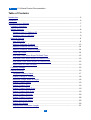
Table of Contents
Introduction............................................................................................................................5
Installation..............................................................................................................................6
Configuring Your Settings......................................................................................................7
License Information...........................................................................................................7
Affiliate Settings.................................................................................................................8
Obtaining Your CJ Website ID.......................................................................................9
Obtaining Your CJ API Key............................................................................................9
General Settings..............................................................................................................11
Use SEO URLs............................................................................................................11
Remove Duplicate Products........................................................................................13
Remove Products Out Of Stock..................................................................................14
Remove Products Without Images..............................................................................14
Clean Up Prices...........................................................................................................14
Hide Sale Price When Equal To Retail Price...............................................................15
Hide Sale Price When Equal To Product Price...........................................................15
Hide Retail Price When Equal To Product Price.........................................................15
Open Links In A New Window.....................................................................................16
Currency Settings............................................................................................................16
Display Settings...............................................................................................................16
Template Directory Name............................................................................................17
Display Listings In Columns........................................................................................18
Maximum Image Width & Height.................................................................................18
Display Product Name.................................................................................................19
Display Product Price..................................................................................................19
Display Product Retail Price........................................................................................19
Display Product Sale Price..........................................................................................19
Display Product Savings.............................................................................................20
Display Product Currency............................................................................................20
Display Advertiser Name.............................................................................................20
Display Buy Button......................................................................................................20
Display/Limit Description Length ................................................................................21
2
3
CJ Wizard Product Documentation
Display Manufacturer Name........................................................................................22
Display Stock Status....................................................................................................22
Advanced Settings...........................................................................................................22
Product Sort Order......................................................................................................22
Limiting By Price..............................................................................................................23
Limit By Low Price.......................................................................................................23
Limit By High Price......................................................................................................23
Limiting By Sale Price......................................................................................................24
Limit By Low Sale Price...............................................................................................24
Limit By High Sale Price..............................................................................................24
Display Products By Advertiser ID...............................................................................25
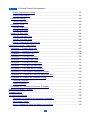
Displaying Products - Posts/Pages......................................................................................26
Parameter 1 - Product Keywords....................................................................................27
Parameter 2 – Number of Products.................................................................................28
Parameter 3 – Advertiser Ids...........................................................................................28
Parameter 4 – Limit By Low Price...................................................................................30
Parameter 5 – Limit By High Price..................................................................................30
Parameter 6 – Limit By Low Sale Price...........................................................................30
Parameter 7 – Limit By High Sale Price..........................................................................30
Parameter 8 – Limit Results By Currency.......................................................................30
Parameter 9 – Limit Product Description Length.............................................................30
Parameter 10 – Display A Product By Advertiser SKU....................................................31
Parameter 11 – Select The Template To Use..................................................................32
Columnar Template.....................................................................................................34
Default Template..........................................................................................................34
Parameter 12 – Number Of Columns To Display............................................................35
Displaying Products – Widgets............................................................................................36
Template Tokens..................................................................................................................37
Troubleshooting/Errors.........................................................................................................39
Advertiser List Showing “No Advertisers Available” ...................................................39
No Products Found......................................................................................................39
Error 1: Website ID Does Not Match Your Account.....................................................39
3
4
CJ Wizard Product Documentation
Error 2: Not Authenticated...........................................................................................40
Product Updates..................................................................................................................41
Getting Customer Support...................................................................................................42
4
5
CJ Wizard Product Documentation
Introduction
I wanted to take this opportunity to thank you
personally for making the decision to purchase
this product. I'm confident you'll be pleased with
our product and enjoy using it on your own
affiliate websites.
My company, Affiliate Wizard Ltd, is a company
which
focuses
of
quality
and
customer
satisfaction. Everything you need to get started
can be found within this product user manual, so please be sure to read it carefully.
Once again, thank you for your custom and I truly hope that you enjoy using this product
on your Wordpress affiliate websites.
To Your Success
Ben Johnson
Affiliate Wizard Ltd
www.AffiliateWizard.com
5
6
CJ Wizard Product Documentation
Installation
Once you have downloaded the plugin from the Wizard Plugins members area, you will
need to install it into Wordpress.
Firstly, you will need to do is login to your Wordpress admin area and navigate to the
'plugins' menu and click on the 'Add New' link. Once you are on the 'Install Plugins' page
you will need to click on the 'Upload' link located at the top of the page.
You can then click on the 'Choose File' button and a pop up window will appear displaying
the files on your computer, simply navigate through the files and locate CJWizard.zip
which you downloaded earlier. Select that file for upload and click the 'Install Now' button,
then click on the 'Activate Plugin' link and your plugin will be activated.
6
7
CJ Wizard Product Documentation
Configuring Your Settings
Next you need to go ahead and configure the main settings for your plugin. To do this
simply click on the 'Settings' menu and then on the 'CJ Wizard' link which appears towards
the bottom.
You will now be presented with the CJ Wizard settings screen which is divided into the
following sections:
1) License Information
2) Affiliate Settings
3) General Settings
4) Currency Settings
5) Display Settings
6) Advanced Settings
License Information
Before you can use the CJ Wizard plugin you will need to enter your license information,
failing to enter this information or entering this information incorrectly will stop your affiliate
links from working. You can check this by clicking one of your own links, if it redirects to
7
8
CJ Wizard Product Documentation
www.WizardPlugins.com instead of to the merchant site then something went wrong with
your license activation.
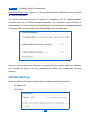
The license information requires two pieces of information, your CJ Wizard members
username and your CJ Wizard members password. The username is the username or
email address you use to login to the WizardPlugins.com members area and the password
is the password you use to login to the WizardPlugins.com members area.
Once you have entered your username and password your license details are validated
and activated. As long as no error messages are shown, your license was activated
correctly.
Affiliate Settings
Under the Affiliate Settings you will be able to configure the following options:
•
CJ Website ID
•
CJ API Key
8
9
CJ Wizard Product Documentation
Obtaining Your CJ Website ID
Each website you promote products on from CJ.com will need to be registered within your
CJ.com members area in order to obtain a website PID. In order to do this you will need to:
1. Login in to your CJ.com members area
2. Click on 'Account' and then 'Web site Settings'
3. Then click on 'Add A New Web Site'
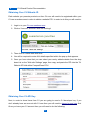
4. You will be required to enter ALL details specified within the pop up that appears
5. Once you have done that you can select your newly added website from the drop
down list on the 'Web site Settings' page, then copy and paste the PID into the 'CJ
Website ID' field within CompariPress PCU.
Obtaining Your CJ API Key
Next, in order to show items from CJ you are going to need a CJ developer key. If you
don't already have an account with CJ.com then you will need to signup for one here first.
Once you have your CJ account then you will need to do the following:
9
10
CJ Wizard Product Documentation
1. Visit the CJ Webservices website
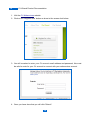
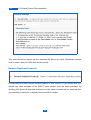
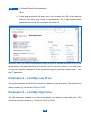
2. Click on the 'Register Now' button as show in the screen shot below:
3. You will be asked to enter your CJ account email address and password, this must
be valid in order for your CJ account to connect with your webservices account.
4. Once you have done that you will click 'Submit'
10
11
CJ Wizard Product Documentation
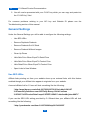
5. You will now be presented with your CJ API key which you can copy and paste into
the “CJ API Key” field.
For common problems relating to your API key and Website ID please see the
Troubleshooting section of this manual.
General Settings
Under the General Settings you will be able to configure the following settings:
•
Use SEO URLs
•
Remove Duplicate Products
•
Remove Products Out Of Stock
•
Remove Products Without Images
•
Clean Up Prices
•
Hide Sale Price When Equal To Retail Price
•
Hide Sale Price When Equal To Product Price
•
Hide Retail Price When Equal To Product Price
•
Open Links In New Window
Use SEO URLs
Affiliate links pointing out from your website show up as external links, with this feature
enabled though your affiliate links appear to originate from your website.
A normal affiliate link for CJ.com will look something like the following:
“http://www.jdoqocy.com/click-3617202-10273928?url=http%3A%2F
%2Fwww.BuyCostumes.com%2FFluffy-Bunny-Child-Costume
%2F68871%2FProductDetail.aspx%3FREF%3DAFC-datafeed&cjsku=68871”
If you use the SEO URL setting provided by CJ Wizard then your affiliate URL will look
something like the following:
“http://yourdomain.com/item-3/10273928/http%253A%252F
11
12
CJ Wizard Product Documentation
%252Fwww.BuyCostumes.com%252FPetite-Pirate-Child-Costume
%252F68873%252FProductDetail.aspx%253FREF%253DAFCdatafeed/68873.html”
The URL prefix is an easy way to customize your URL to any prefix you choose. By default
this option is set to “item-” but it can be changed to anything you want it to be. A few
examples would be:
•
product-
•
products-
•
go-
•
buy-
If you decide to choose your own prefix then you should use a single word followed by a
“-”, as shown above.
If you are using more than one plugin from Wizard Plugins, please avoid giving the same
SEO prefix in your SEO URL settings as this will may cause your URL redirections not to
function correctly.
After selecting the “Use SEO URLs” checkbox and clicking the “Save Options” button you
will be returned to the page and a new box will be displayed containing the htaccess code
you need to copy and paste into the htaccess file on your server.
12
13
CJ Wizard Product Documentation
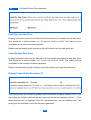
This code should be copied into the htaccess file above any other Wordpress inserted
code to ensure that your SEO links work correctly.
Remove Duplicate Products
CJ merchants will often include multiple products in their feed at CJ, this means that your
results may show multiples of the EXACT same product from the same merchant. By
checking this option all duplicate products from the same merchant will be removed from
your results by looking for multiples of the same SKU number.
13
14
CJ Wizard Product Documentation
Remove Products Out Of Stock
Checking this option will remove products that show as being out of stock. Be aware
though that not all manufacturers actually provide stock information via the CJ API and so
you may still find some out of stock products being returned in results.
Remove Products Without Images
Checking this option will remove products that have no image associated with them. If you
leave this option unchecked then products without images will show a grey “No Image”
placeholder instead.
It's important to note that a product without an associated image is completely different to
a product with a broken image. There is no resource friendly way to check for broken
images on the scale you would need to in order to filter out products with broken images
as well as those which have no image associated with them.
Clean Up Prices
You will often find that CJ provide incomplete product prices, this may include prices which
are missing the final “0” from the end or in some cases the final “00”. Checking this option
will add any missing values back onto the prices so that they appear correctly formatted on
your website.
14
15
CJ Wizard Product Documentation
Hide Sale Price When Equal To Retail Price
On occasion CJ will return sale prices even when it's the same as the retail price.
Checking this option will prevent the sale price from showing when it matches the retail
price exactly.
Hide Sale Price When Equal To Product Price
On occasion CJ will return sale prices even when it's the same as the product price, the
product price is the MAIN price which a particular product is being sold for. Checking this
option will prevent the sale price from showing when it matches the product price exactly.
Hide Retail Price When Equal To Product Price
On occasion CJ will return return prices even when it's the same as the product price, the
product price is the MAIN price which a particular product is being sold for and the retail
price is just the recommended selling price. Checking this option will prevent the retail
price from showing when it matches the product price exactly.
15
16
CJ Wizard Product Documentation
Open Links In A New Window
Checking this option will cause all of your affiliate links to open in a new window, leaving
this option blank will cause your links to open in the same window.
Currency Settings
CJ Wizard currently provides the option to display products in 3 different currencies, UK
Pound, US Dollar and the Euro. If you would like to choose the currency on a per
page/post basis then you can do so by entering “GPB”, “USD” or “EUR” into the 8th
shortcode parameter.
The currency setting simply changes the currency symbol, it in no way affects the product
localization, this is handled purely by CJ.com.
Display Settings
Under the General Settings you will be able to configure several settings which control the
type of information you display in your posts, pages and sidebar widgets. We've put these
admin options into place to make it as easy as possible to display the products how you
want to. Should you wish to manually change anything, the cjWizard product templates are
found in “/cjWizard/templates/”.
16
17
CJ Wizard Product Documentation
The following Display Settings are configurable within the admin area:
•
Template Directory Name
•
Display Listings In Columns
•
Number of Columns
•
Maximum Image Width & Height
•
Display Product Name
•
Display Product Price
•
Display Product Retail Price
•
Display Product Sale Price
•
Display Product Savings
•
Display Product Currency
•
Display Advertiser Name
•
Display Buy Button
•
Button Name
•
Display/Limit Description Length
•
Description “Read More” Text
•
Display Manufacturer Name
•
Display Stock Status
Template Directory Name
All templates which are used by CJ Wizard are located in the following directory:
17
18
CJ Wizard Product Documentation
“wp-content/plugins/cjWizard/templates/”
The template directory name list is generated automatically from the templates which are
currently present in the directory above. On installation this setting will be set to default.
Display Listings In Columns
CJ Wizard allows you to display listings in columns if you wish, simply select the “Display
Listings in Columns” option.
Please note that if you use this setting then the “Template Directory Name” setting will be
overridden.
The number of columns you wish to display can then be set if you've checked the “Display
Listings In Columns” option. You may need to adjust this setting based on your Wordpress
theme.
This setting can be overridden in the 12th shortcode parameter.
Maximum Image Width & Height
This setting allows you to choose the maximum display size of the product images
displayed in your results. By default both the width and the height is set to 125, this
translates into a maximum height and width of 125px.
Should you wish to hide the product image for some reason, you can do so by entering 0
in each of these fields.
Setting a maximum width and height means the image dimensions are maintained in
proportion, preventing the image from becoming distorted.
18
19
CJ Wizard Product Documentation
Display Product Name
Checking this option will display the product name/title.
Display Product Price
Checking this option will display the product price.
Please note that if there is no product price available, it will not display in your results
regardless of this setting.
Display Product Retail Price
Checking this option will display the product retail price.
Please note that if there is no retail price available, it will not display in your results
regardless of this setting.
Display Product Sale Price
Checking this option will display the product sale price.
19
20
CJ Wizard Product Documentation
Please note that if there is no sale price available, it will not display in your results
regardless of this setting.
Display Product Savings
Checking this option will display the product savings
This value is calculated automatically by CJ Wizard, it achieves this by working out the
difference between the product sale price and the original product price. If the product
price and product sale price are the same then the product savings value isn't shown.
Display Product Currency
Checking this option will display the product currency symbol.
Display Advertiser Name
Checking this option will display the advertiser name.
Please note that if the advertiser name has not been provided, it will not display in your
results regardless of this setting.
Display Buy Button
20
21
CJ Wizard Product Documentation
Checking this option will display a Buy Now button below each product. You can change
your button by selecting a new one from the “Button Name” drop down list. Should you
wish to add your own buttons, you can do so by uploading the image to the “wpcontent/plugins/cjWizard/images/” directory of the plugin, the image will then automatically
appear in the drop down list as an option.
Display/Limit Description Length
If you choose to display the product description then this setting will allow you to limit the
number of characters displayed e.g. enter 100 for 100 characters. Leave blank to show the
full description. This setting can be overridden in the 9th shortcode parameter, enter "-"
into that shortcode parameter to hide the description completely.
Please note that if no description displays in the results it's because a description hasn't
been provided.
Description “Read More” Text
If you choose to display the product description using the above setting then this setting
will allow you to specify the “Read More” text which displays after the truncated
description. If you have set the “Display/Limit Description Length” setting to display the full
21
22
CJ Wizard Product Documentation
description this “Read More” text is not shown.
Display Manufacturer Name
Checking this option will display the product manufacturer name.
Please note that if a particular seller hasn't provided a manufacturer name in their API
feed, it will not display in your results regardless of this setting.
Display Stock Status
Checking this option will display the product stock status.
Please note that if there is no stock information available, it will not display in your results
regardless of this setting.
Advanced Settings
You have the following configurable options in the Advanced Settings:
•
Product Sort Order
•
Limit By Retail Price
•
Limit By Sale Price
•
Limit By Advertiser ID
Product Sort Order
If you want to choose the sort order display of the products in your pages or posts then
you can use this option. The default setting is “Random Sort Order”, however, if you would
22
23
CJ Wizard Product Documentation
like to sort your product displays by price then CJ Wizard supports the ability to sort
products by retail price and sale price in ascending and descending order.
Limiting By Price
Limit By Low Price
Entering a numeric value into this field will limit the products you display by low retail price.
This should be a whole number e.g. 10 and not 10.00 or 10.99. This setting can be
overridden in the fourth shortcode parameter.
Limit By High Price
Entering a numeric value into this field will limit the products you display by high retail
price. This should be a whole number e.g. 10 and not 10.00 or 10.99. This setting can be
overridden in the fifth shortcode parameter.
Limiting By Sale Price
23
24
CJ Wizard Product Documentation
Limit By Low Sale Price
Entering a numeric value into this field will limit the products you display by low sale price.
This should be a whole number e.g. 10 and not 10.00 or 10.99. This setting can be
overridden in the sixth shortcode parameter.
Please note that setting a low retail price limit will override any low sale price limit.
Limit By High Sale Price
Entering a numeric value into this field will limit the products you display by high sale price.
This should be a whole number e.g. 10 and not 10.00 or 10.99. This setting can be
overridden in the seventh shortcode parameter
Please note that setting a high retail price limit will override any high sale price limit.
Display Products By Advertiser ID
This setting allows you to specify globally which merchants to display products from. If you
are limiting by multiple merchant Ids then each one should be separated with a "+". If left
blank products will be displayed from ALL advertisers who you are affiliated with. This
setting can be overridden in the 3rd shortcode parameter.
24
25
CJ Wizard Product Documentation
There are several things to note with this setting:
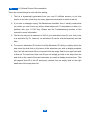
1. The list is dynamically generated from your own CJ affiliate account, so for that
reason it can take a few days for newly approved merchants to show in this list.
2. If you see a message saying “No Advertisers Available” then it usually means that
you either you don't have any active relationships with CJ merchants or there is a
problem with your CJ API key. Please see the Troubleshooting section of this
manual for more information.
3. The list can only pull a maximum of 100 of your advertisers from CJ.com, this is due
to a restriction by CJ. However, an advertiser ID can be inserted manually into this
field.
4. To insert an advertiser ID into the “Limit By Advertiser ID” field you simply select the
drop down list and click on the name of the advertiser you wish to display products
from, this will cause their ID to be inserted into the empty field on the right hand side
of that list. To insert more than one ID you can simply go back to the drop down list
and click on the name of the next advertiser you want to display products from. This
will append their ID to the ID previously inserted into the empty field on the right
hand side of the drop down list.
25
26
CJ Wizard Product Documentation
Displaying Products - Posts/Pages
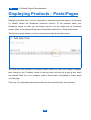
Displaying products from CJ.com merchants is extremely quick and easy to do because
CJ Wizard utilises the Wordpress shortcode function. To list products within your
Wordpress pages or posts you will simply need to use the simple pop up shortcode
creator. Many of the global settings can be overridden within the CJ Wizard shortcode.
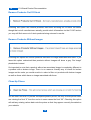
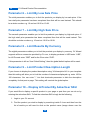
The following image shows you how to access the simple shortcode inserter:
You must first click anywhere in the post content where you want your listings to appear,
then clicking on the CJ button (shown in the red circle) will bring up a pop up box which
has several fields for you to complete, each of these fields is explained in further detail
over the page.
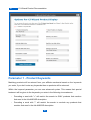
There are 12 configurable parameters inside the shortcode and they are as follows:
26
27
CJ Wizard Product Documentation
Parameter 1 - Product Keywords
Matching products will be retuned from your affiliate merchants based on the keywords
you enter, if you don't enter any keywords then no products will be returned.
Within the keyword parameter you can use advanced syntax. This means that special
treatment will be given to the keywords you enter in the following circumstances:
•
Preceding a word with "+" will restrict the search to ONLY products that mention
that word in the title AND/OR description.
•
Preceding a word with "-" will restrict the search to exclude any products that
mention that word in the title AND/OR description.
27
28
CJ Wizard Product Documentation
Parameter 2 – Number of Products
The second parameter will define the maximum number of products you wish to return and
display on your page or post. If you choose to leave this setting blank then 10 products will
be shown by default.
Parameter 3 – Advertiser Ids
The third parameter enables you to limit the search results by the advertiser ID, multiple
IDs can be used in this parameter as long as they are separated with a “+” and not a “,”. In
CJ Wizard V2.0 we've added a dropdown list which automatically displays your active
merchants from your CJ account. Please note that CJ only provide the ability to return
a max of 100 advertisers, so if you're affiliated with more than 100 then not all can
be displayed in this list.
If you see a message saying “No Advertisers Available” then it usually means that you
either you don't have any active relationships with CJ merchants or there is a problem with
your CJ API key. Please see the troubleshooting section of this manual for more
information.
Should you need to add an advertiser ID manually, you can do so by following the
instructions below:
1. Login to your CJ.com publisher account.
2. Click on the 'Get Links' tab and 'By Relationship' sub tab.
3. Then click on the name of the merchant who you wish to find the advertiser
28
29
CJ Wizard Product Documentation
ID for.
4. A new popup window will open and if you examine the URL in the address
field you will notice that it ends in 'advertiserId=', the 7 digit number which
appears at the end is the merchants advertiser ID.
Be aware that if you leave this parameter empty and you've entered advertiser IDs into the
global setting, the global advertiser IDs will be used to limit your results. If you don't want
to limit your results by advertiser ID on a particular page or post then simply enter “-” into
the 3rd parameter.
Parameter 4 – Limit By Low Price
The fourth parameter will limit the products you display by low retail price. This should be a
whole number e.g. 10 and not 10.00 or 10.99.
Parameter 5 – Limit By High Price
The fifth parameter enables you to limit the products you display by high retail price. This
should be a whole number e.g. 10 and not 10.00 or 10.99.
29
30
CJ Wizard Product Documentation
Parameter 6 – Limit By Low Sale Price
The sixth parameter enables you to limit the products you display by low sale price. If the
low retail price parameter has been completed then that will be used instead. This should
be a whole number e.g. 10 and not 10.00 or 10.99.
Parameter 7 – Limit By High Sale Price
The seventh parameter enables you to limit the products you display by high sale price. If
the high retail price parameter has been completed then that will be used instead. This
should be a whole number e.g. 10 and not 10.00 or 10.99.
Parameter 8 – Limit Results By Currency
The eighth parameter enables you to limit the products you display by currency. CJ Wizard
supports all three currencies provided by CJ.com, to display products in USD enter “USD”,
for UK Pounds enter “GBP” and for the Euro enter “EUR”.
If this parameter is left as “Use Global Setting”, then the global default option will be used.
Parameter 9 – Limit Product Description Length
If you choose to display the product description using %%description%% in your template
then this setting will allow you to limit the number of characters displayed e.g. enter 100 for
100 characters. You can enter "-" into that shortcode parameter to hide the description
completely for that post or page. This setting will override the global option.
Parameter 10 – Display A Product By Advertiser SKU
If you would like to display a specific product in your page or post then you can do so by
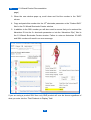
entering the advertiser SKU. To find the advertiser SKU simply do the following:
1. Login to your CJ account
2. Find the product you wish to display by searching inside CJ.com and then from the
list of results you will need to click on the product name (image shown over the
30
31
CJ Wizard Product Documentation
page)
3. When the new window pops up, scroll down and find the number in the “SKU”
column
4. Copy and paste this number into the 10 th shortcode parameter or the “Product SKU”
field in the CJ Wizard Shortcode Creator window.
5. In addition to the SKU number you will also need to ensure that you've entered the
Advertiser ID into the 3rd shortcode parameter or into the “Advertiser ID(s)” field in
the CJ Wizard Shortcode Creator window. Failure to enter an Advertiser ID AND
and SKU number will result in an error message.
If you are using a product SKU then only ONE product will ever be shown regardless of
what you enter into the “Total Products to Display” field.
31
32
CJ Wizard Product Documentation
Parameter 11 – Select The Template To Use
The default “Template” setting is “Use Global Setting” which will use the global option
you've set in the administration area.
If you would like to use a specific template for a particular page or post you can do so by
selecting the name of the template from the drop down list. If you select the “Columns”
template as an option then you should enter the number of columns you want to display
into the “Number of Columns” field. If this field is left blank, the global number of columns
from the global administration area will be used.
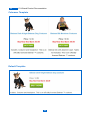
The templates currently available are:
•
default
•
cols
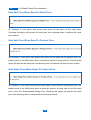
Previews of the different templates can be seen below:
32
33
CJ Wizard Product Documentation
Columnar Template
Default Template
33
34
CJ Wizard Product Documentation
Parameter 12 – Number Of Columns To Display
If you've opted to display your listings in columns then the 12th shortcode parameter allows
you to specify the number of columns to display your products in. So to display products in
2 columns you would enter the number “2” into the 12th shortcode parameter.
34
35
CJ Wizard Product Documentation
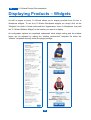
Displaying Products – Widgets
As well as pages or posts, CJ Wizard allows you to display products from CJ.com in
Wordpress widgets. To use the CJ Wizard Wordpress widgets you simply click on the
“Widgets” link which is found underneath the “Appearance” menu in Wordpress, then add
the “CJ Wizard Sidebar Widget” to the location you want it to display.
All configurable options are explained underneath each widget setting and the sidebar
layout can be adjusted by editing the “sidebar_content.html” template file within the
“sidebar” templates directory within the plugin package.
35
36
CJ Wizard Product Documentation
Template Tokens
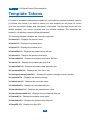
A number of template variables are available for use inside the external templates used by
CJ Wizard, this means if you want to create your own template you will have full control
over how the product display and information is formatted. The package comes with one
default template, one column template and one sidebar template. The templates are
located in “/plugins/wp-content/cjWizard/templates/”.
The following template variables are currently supported:
%%name%% - Displays the product name
%%price%% - Displays the product price
%%price%% - Displays the product price
%%pricetitle%% - Displays the product price title text
%%rprice%% - Displays the product retail price
%%rpricetitle%% - Displays the product retail price title text
%%sprice%% - Displays the product sale price text
%%spricetitle%% - Displays the product sale price title text
%%yousavetitle%% - Displays the “You Save” text
%%savingcurrencysymbol%% - Displays the product savings currency symbol
%%yousave%% - Displays the product savings
%%advertiser%% - Displays the merchant name
%%sellertitle%% - Displays the merchant title text
%%manufacturer%% - Displays the manufacturer name
%%manufacturuertitle%% - Displays the manufacturer title text
%%instock%% - Displays the product stock status
%%stocktitle%% - Displays the product stock title text
%%buyURL%% - Displays the buy URL
36
37
CJ Wizard Product Documentation
%%imgURL%% - Displays the small image URL
%%currency%% - Displays the product price currency
%%currencysymbol%% - Displays the product price currency symbol
%%rcurrencysymbol%% - Displays the product retail price currency symbol
%%scurrencysymbol%% - Displays the product sale price currency symbol
%%buybutton%% - Displays the buy/more info button
%%description%% - Displays the product description (Used with the description limit
setting)
%%target%% - Controls the “_target” of each affiliate link
%%imgheight%% - Controls the maximum image height
%%imgwidth%% - Controls the maximum image width
37
38
CJ Wizard Product Documentation
Troubleshooting/Errors
The following are the most common problems we come across as well as the most likely
solutions. If you can't find an answer to your problem here please take the time to register
for the members forum following the instructions at the back of this user manual.
Advertiser List Showing “No Advertisers Available”
This problem will always be caused by a problem with your CJ API key because the
advertiser list is generated using the CJ API. Please check the following:
1. Your CJ Webservices email & password match your CJ Affiliate account
2. You have added your website to your CJ Affiliate account
3. You have completed all required sections of your Commission Junction application
including tax, address and contact information
No Products Found
If you're seeing this message on your page then it's likely due to one of the following:
1. The merchant you are trying to return products from doesn't have any results for
your parameters
2. Your CJ Wizard shortcode is incorrectly formatted, please check each parameter
you've completed is in the correct location and contains the correct data format
Error 1: Website ID Does Not Match Your Account
This error is returned in the following circumstances:
1. If you haven't added your website to your CJ Affiliate account
2. If you haven't entered a valid website ID into your CJ Wizard settings
Error 2: Not Authenticated
This error is returned where there is a problem with your API key. Please check the
38
39
CJ Wizard Product Documentation
following:
1. Your CJ Webservices email & password match your CJ Affiliate account
2. You have completed all required sections of your Commission Junction application
including tax, address and contact information
3. All of your CJ API Key is filled in, in the CJ Wizard admin area
If the problem still persists after checking the above and this is the first time you have used
this API key then try generating a new key. If that still doesn't solve the problem please
contact CJ support.
39
40
CJ Wizard Product Documentation
Product Updates
With your CJ Wizard membership you are entitled to free updates for the lifetime of the
product. Updates to the CJ Wizard plugin will be provided from time to time, these will
either be feature updates or essential updates for changes to the CJ API and to fix bugs.
All customers will be sent an email when major version updates are available for
download, this email will be sent from [email protected], in order to receive this
email it is recommended that you white list this email address. This email will contain
details of any changes/updates to the current version as well as update instructions.
In addition to an email, an admin message will be displayed at the top of the page within
your CJ Wizard wp-admin screen to let you know that an update is available for download.
Once you've upgraded to the current version this message will disappear.
40
41
CJ Wizard Product Documentation
Getting Customer Support
CJ Wizard is a fully supported product, if you need technical support relating to the use of
the plugin and are unable to find the answer within this manual then you can:
1. Check out our helpful knowledge base for solutions
2. Check out our tutorial videos
3. Visit our support centre located at: www.wizardplugins.com/customer-service
41