1
Chapter 3
Configuring the Adapter
Chapter 3 provides instructions and information for setting the
parameters in the adapter.
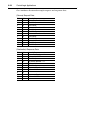
Topic
Configuration Tools
Using the PowerFlex HIM
Setting the Node Address
Setting the I/O Configuration
Selecting Master-Slave
Page
3-1
3-2
3-3
3-3
3-4
Topic
Selecting Reference Adjust
Setting a Fault Action
Resetting the Adapter
Viewing the Adapter Configuration
Page
3-5
3-6
3-7
3-8
For a list of parameters, refer to Appendix B, Adapter Parameters. For
definitions of terms in this chapter, refer to the Glossary.
All example screens shown in this chapter are based on the
20-COMM-C.
Configuration Tools
The ControlNet adapter stores parameters and other information in its
own non-volatile memory. You must, therefore, access the adapter to
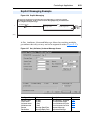
view and edit its parameters. The following tools can be used to access
the adapter parameters:
Tool
PowerFlex HIM
DriveExplorer Software
(version 3.xx or higher)
DriveExecutive Software
(version 1.xx or higher)
Refer to . . .
page 3-2
http://www.ab.com/drives/driveexplorer, or
DriveExplorer Online help (installed with the software)
http://www.ab.com/drives/drivetools, or
DriveExecutive Online Help (installed with the software)