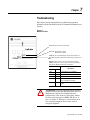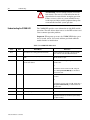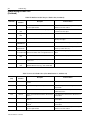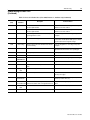
1
DeviceNet™ Communication Module Catalog Number 160-DN2 Firmware 3.xxx User Manual Important User Information Solid state equipment has operational characteristics differing from those of electromechanical equipment. “Safety Guidelines for the Application, Installation and Maintenance of Solid State Controls” (Publication SGI-1.1 available from your local Rockwell Automation Sales Office or online at http://www.ab.com/manuals/gi) describes some important differences between solid state equipment and hard-wired electromechanical devices. Because of this difference, and also because of the wide variety of uses for solid state equipment, all persons responsible for applying this equipment must satisfy themselves that each intended application of this equipment is acceptable. In no event will Rockwell Automation, Inc. be responsible or liable for indirect or consequential damages resulting from the use or application of this equipment. The examples and diagrams in this manual are included solely for illustrative purposes. Because of the many variables and requirements associated with any particular installation, Rockwell Automation, Inc. cannot assume responsibility or liability for actual use based on the examples and diagrams. No patent liability is assumed by Rockwell Automation, Inc. with respect to use of information, circuits, equipment, or software described in this manual. Reproduction of the contents of this manual, in whole or in part, without written permission of Rockwell Automation, Inc. is prohibited. Throughout this manual we use notes to make you aware of safety considerations. ! ATTENTION: Identifies information about practices or circumstances that can lead to personal injury or death, property damage, or economic loss. Attentions help you: • identify a hazard • avoid the hazard • recognize the consequences Important: Identifies information that is especially important for successful application and understanding of the product. Shock Hazard labels may be located on or inside the drive to alert people that dangerous voltage may be present. DeviceNet is a trademark of the Open DeviceNet Vendor Association. SSC is a registered trademark of Rockwell Automation, Inc. Allen-Bradley, ControlLogix, PLC-5, and SLC are trademarks of Rockwell Automation, Inc. RSLinx, RSLogix, and RSNetWorx for DeviceNet are trademarks of Rockwell Software. Summary of Changes The information below summarizes the changes made to this manual since its last release (March, 1999): Location Description of Changes Chapter 3 Added three new sections — Surge-Suppression, Common Mode Noise, and Output Disconnect — after the Low Voltage Directive 73/23/EEC Compliance section. Added EDS file search screen and removed obsolete Table 6 (EDS files for Bulletin 160 using a 160-DN2 version 3.000 or later). Replaced DeviceNet Manager software references and screens with those of RSNetWorx for DeviceNet. Added I/O and explicit messaging information and ladder logic examples for ControlLogix, PLC-5, and SLC controllers. In the “Understanding the FAULT LED” section, added Bulletin 160 Fault Codes 11, 20, 36, and 46 to the table on pages 7-3 and 7-4. In section “Class Code 0xB3 — 160 Parameter Table Object” in the “Instance 1 Attributes” chart on pages B-18 and B-19, corrected the Data Types for these Attribute IDs: Chapter 5 Chapter 6 Chapter 7 Appendix B Attribute ID Parameter Name 9 10 12 15 33 35 39 Drive Status Drive Type Input Status Preset Status Maximum Freq Base Frequency Skip Frequency Data Type WORD (was USINT) USINT (was UINT) WORD (was USINT) WORD (was USINT) UINT (was USINT) UINT (was USINT) UINT (was USINT) In section “Class Code 0x04 — Assembly Objects,” subsection “Instance Data Format: Output Assemblies” on page B-24, added new footnotes for Instance 21 in bit 5 and bit 6 columns. Re-arranged numerical order of all footnotes on this page. In section “Class Code 0x04 — Assembly Objects,” subsection “Instance Data Format: Output Assemblies” on page B-25, added a new footnote for Instance 101 in bit 0, bit 1, and bit 2 columns. Re-arranged numerical order of all footnotes on this page. In section “Class Code 0x04 — Assembly Objects,” subsection “Configuration Assembly Data Formats,” deleted unnecessary Instance 190 table (pages B-29 through B-34). Publication 0160-5.18 - June 2003 S-2 Summary of Changes The March 1999 release of the Bulletin 160-DN2 DeviceNet Communication Module User Manual covers the software enhancements of Firmware Version 3.xxx and contains new and updated information. Bulletin 160-DN2 version 3.xxx Software Enhancements Features and enhancements in the 160-DN2 module that are different than those in the 160-DN1 module include: Compatibility with Bulletin 160 drives (Series A, B, and C) Bulletin 160 (Series A, B, and C) drives can be connected to a DeviceNet network. Ability to Create Electronic Data Sheets Configuration tools, such as DeviceNet Manager, can create an Electronic Data Sheet (EDS file) for the 160 SSC drive and 160-DN2 module. Added Parameter Object This object describes the parameters in the 160 SSC drive and 160-DN2 module. Added Parameter Group Object This object describes the parameter groups associated with the 160 SSC drive and 160-DN2 module. New and Revised Chapters to this Manual The bulletin 160-DN2 DeviceNet Communication Module User Manual, Publication 0160-5.18, is a new manual. It is, however, similar to the 160 DeviceNet Communication Module User Manual, Publication 0160-5.5. The main differences can be found in the following chapters: Using This Manual Quick Start for Experienced Users DeviceNet Parameter Descriptions Using the 160-DN2 with DeviceNet Scanner Troubleshooting DeviceNet Information Summary of Enhancements to User Manual Publication 0160-5.18 - June 2003 Preface Chapter 2 Chapter 5 Chapter 6 Chapter 7 Appendix B Refer to the following references in this manual: Reference Manuals Section Manual Organization DeviceNet Compatibility Replacing a 160-DN1 with a 160-DN2 Required Tools and Equipment DeviceNet Parameter Descriptions Creating EDS Files replaces Installing EDS Files Troubleshooting Updated Parameter Object Parameter Group Object Acknowledge Handler Object P-2 P-3 P-4 P-4 3-1 Chapter 5 6-3 Chapter 7 B-9 B-11 B-17 Table of Contents Using This Manual Product Overview Quick Start for Experienced Users Installation and Wiring Preface Manual Objectives. . . . . . . . . . . . . . . . . . . . . . . . . . . . . . . . . . . . . . . . . . . . . . . . Who Should Use This Manual?. . . . . . . . . . . . . . . . . . . . . . . . . . . . . . . . . . . . . . Product References . . . . . . . . . . . . . . . . . . . . . . . . . . . . . . . . . . . . . . . . . . . . . . Conventions . . . . . . . . . . . . . . . . . . . . . . . . . . . . . . . . . . . . . . . . . . . . . . . . . . . . Firmware Version . . . . . . . . . . . . . . . . . . . . . . . . . . . . . . . . . . . . . . . . . . . . . . . . Related Documentation. . . . . . . . . . . . . . . . . . . . . . . . . . . . . . . . . . . . . . . . . . . . Manual Organization. . . . . . . . . . . . . . . . . . . . . . . . . . . . . . . . . . . . . . . . . . . . . . Safety Precautions . . . . . . . . . . . . . . . . . . . . . . . . . . . . . . . . . . . . . . . . . . . . . . . DeviceNet Compatibility . . . . . . . . . . . . . . . . . . . . . . . . . . . . . . . . . . . . . . . . . . . Replacing a 160-DN1 with a 160-DN2 . . . . . . . . . . . . . . . . . . . . . . . . . . . . . . . . Rockwell Automation Support. . . . . . . . . . . . . . . . . . . . . . . . . . . . . . . . . . . . . . . P-1 P-1 P-1 P-1 P-1 P-2 P-2 P-3 P-4 P-4 P-4 Chapter 1 Module Description . . . . . . . . . . . . . . . . . . . . . . . . . . . . . . . . . . . . . . . . . . . . . . . 1-1 LEDs and DeviceNet Connection . . . . . . . . . . . . . . . . . . . . . . . . . . . . . . . . . . . . 1-1 DIP Switches. . . . . . . . . . . . . . . . . . . . . . . . . . . . . . . . . . . . . . . . . . . . . . . . . . . . 1-2 Chapter 2 Introduction . . . . . . . . . . . . . . . . . . . . . . . . . . . . . . . . . . . . . . . . . . . . . . . . . . . . . 2-1 Required Tools and Equipment. . . . . . . . . . . . . . . . . . . . . . . . . . . . . . . . . . . . . . 2-1 Procedures . . . . . . . . . . . . . . . . . . . . . . . . . . . . . . . . . . . . . . . . . . . . . . . . . . . . . 2-2 Chapter 3 Required Tools and Equipment . . . . . . . . . . . . . . . . . . . . . . . . . . . . . . . . . . . . . 3-1 EMC Directive 89/336/EEC Compliance. . . . . . . . . . . . . . . . . . . . . . . . . . . . . . . 3-2 Low Voltage Directive 73/23/EEC Compliance. . . . . . . . . . . . . . . . . . . . . . . . . . 3-2 Surge Suppression . . . . . . . . . . . . . . . . . . . . . . . . . . . . . . . . . . . . . . . . . . . . . . . 3-2 Common Mode Noise . . . . . . . . . . . . . . . . . . . . . . . . . . . . . . . . . . . . . . . . . . . . 3-4 Drive Output Disconnect . . . . . . . . . . . . . . . . . . . . . . . . . . . . . . . . . . . . . . . . . . 3-4 Removing Program Keypad Module or Ready/Fault Panel . . . . . . . . . . . . . . . . 3-5 Understanding Module Configuration Switches . . . . . . . . . . . . . . . . . . . . . . . . . 3-5 Setting the DeviceNet Node Address . . . . . . . . . . . . . . . . . . . . . . . . . . . . . . . . . 3-6 Setting the Baud Rate. . . . . . . . . . . . . . . . . . . . . . . . . . . . . . . . . . . . . . . . . . . . . 3-7 Cable Lengths and Baud Rates . . . . . . . . . . . . . . . . . . . . . . . . . . . . . . . . . . . 3-7 Installing the Communication Module . . . . . . . . . . . . . . . . . . . . . . . . . . . . . . . . . 3-8 Wiring the DeviceNet Connector. . . . . . . . . . . . . . . . . . . . . . . . . . . . . . . . . . . . . 3-9 Connecting the DeviceNet Drop Line to the Module. . . . . . . . . . . . . . . . . . . . . 3-10 Removing Communication Module From a Drive . . . . . . . . . . . . . . . . . . . . . . 3-10 Publication 0160-5.18 - June 2003 ii Table of Contents Modes of Operation DeviceNet Parameter Descriptions Using 160-DN2 with DeviceNet Scanner Publication 0160-5.18 - June 2003 Chapter 4 Powering Up the Drive . . . . . . . . . . . . . . . . . . . . . . . . . . . . . . . . . . . . . . . . . . . . Modes of Operation. . . . . . . . . . . . . . . . . . . . . . . . . . . . . . . . . . . . . . . . . . . . . . . Power-up Reset Mode. . . . . . . . . . . . . . . . . . . . . . . . . . . . . . . . . . . . . . . . . . . Run Mode . . . . . . . . . . . . . . . . . . . . . . . . . . . . . . . . . . . . . . . . . . . . . . . . . . . . Error Mode . . . . . . . . . . . . . . . . . . . . . . . . . . . . . . . . . . . . . . . . . . . . . . . . . . . 4-1 4-1 4-1 4-2 4-2 Chapter 5 DeviceNet Parameters . . . . . . . . . . . . . . . . . . . . . . . . . . . . . . . . . . . . . . . . . . . . Electronic Data Sheet (EDS) Files . . . . . . . . . . . . . . . . . . . . . . . . . . . . . . . . . . . Parameters and EDS File . . . . . . . . . . . . . . . . . . . . . . . . . . . . . . . . . . . . . . . . . . Bulletin 160 SSC Interface . . . . . . . . . . . . . . . . . . . . . . . . . . . . . . . . . . . . . . . . . Locating EDS Files on the Internet . . . . . . . . . . . . . . . . . . . . . . . . . . . . . . . . . . . Bulletin 160 SSC Interface Parameters . . . . . . . . . . . . . . . . . . . . . . . . . . . . . . . DeviceNet Parameters . . . . . . . . . . . . . . . . . . . . . . . . . . . . . . . . . . . . . . . . . . . . Drive Display Parameters (Read Only) . . . . . . . . . . . . . . . . . . . . . . . . . . . . . . . . Drive Program Parameters . . . . . . . . . . . . . . . . . . . . . . . . . . . . . . . . . . . . . . . . . 5-1 5-1 5-1 5-2 5-2 5-3 5-3 5-6 5-8 Chapter 6 Needed Tools . . . . . . . . . . . . . . . . . . . . . . . . . . . . . . . . . . . . . . . . . . . . . . . . . . . 6-2 Setting Device MAC ID’s. . . . . . . . . . . . . . . . . . . . . . . . . . . . . . . . . . . . . . . . . . . 6-2 Using RSNetWorx for DeviceNet . . . . . . . . . . . . . . . . . . . . . . . . . . . . . . . . . . . . 6-2 Going Online . . . . . . . . . . . . . . . . . . . . . . . . . . . . . . . . . . . . . . . . . . . . . . . . . . 6-2 Creating an EDS File . . . . . . . . . . . . . . . . . . . . . . . . . . . . . . . . . . . . . . . . . . . 6-3 Accessing and Editing Parameters . . . . . . . . . . . . . . . . . . . . . . . . . . . . . . . . . 6-4 Selecting Input and Output Assemblies for I/O Messaging . . . . . . . . . . . . . . . . 6-5 Changing the Output Assembly . . . . . . . . . . . . . . . . . . . . . . . . . . . . . . . . . . . 6-6 Changing the Input Assembly . . . . . . . . . . . . . . . . . . . . . . . . . . . . . . . . . . . . . 6-6 Enabling Network Control . . . . . . . . . . . . . . . . . . . . . . . . . . . . . . . . . . . . . . . . . . 6-7 Configuring Drive Input Mode . . . . . . . . . . . . . . . . . . . . . . . . . . . . . . . . . . . . 6-7 Modifying Drive Reset Functions . . . . . . . . . . . . . . . . . . . . . . . . . . . . . . . . . . 6-8 Configuring the 160 to Accept Speed Commands from the Network . . . . . . . . . 6-9 Configuring the Scanner . . . . . . . . . . . . . . . . . . . . . . . . . . . . . . . . . . . . . . . . . . 6-10 Example Network . . . . . . . . . . . . . . . . . . . . . . . . . . . . . . . . . . . . . . . . . . . . . 6-10 Setting Up the Scan List . . . . . . . . . . . . . . . . . . . . . . . . . . . . . . . . . . . . . . . . 6-11 Mapping the Drive Data in the Scanner . . . . . . . . . . . . . . . . . . . . . . . . . . . . 6-13 Saving the Configuration. . . . . . . . . . . . . . . . . . . . . . . . . . . . . . . . . . . . . . . . 6-16 Using I/O Messaging. . . . . . . . . . . . . . . . . . . . . . . . . . . . . . . . . . . . . . . . . . . . . 6-16 Example Ladder Logic Programs . . . . . . . . . . . . . . . . . . . . . . . . . . . . . . . . . 6-16 ControlLogix Example . . . . . . . . . . . . . . . . . . . . . . . . . . . . . . . . . . . . . . . . . 6-17 PLC-5 Example . . . . . . . . . . . . . . . . . . . . . . . . . . . . . . . . . . . . . . . . . . . . . . 6-19 SLC Example . . . . . . . . . . . . . . . . . . . . . . . . . . . . . . . . . . . . . . . . . . . . . . . . 6-21 Using Explicit Messaging . . . . . . . . . . . . . . . . . . . . . . . . . . . . . . . . . . . . . . . . . 6-23 About Explicit Messaging . . . . . . . . . . . . . . . . . . . . . . . . . . . . . . . . . . . . . . . 6-23 Formatting Explicit Messages . . . . . . . . . . . . . . . . . . . . . . . . . . . . . . . . . . . . 6-23 Executing Explicit Messages. . . . . . . . . . . . . . . . . . . . . . . . . . . . . . . . . . . . . 6-29 Table of Contents Troubleshooting Specifications DeviceNet Information iii Chapter 7 Understanding the COMM LED . . . . . . . . . . . . . . . . . . . . . . . . . . . . . . . . . . . . . 7-2 Understanding the FAULT LED . . . . . . . . . . . . . . . . . . . . . . . . . . . . . . . . . . . . . 7-3 Appendix A Electrical . . . . . . . . . . . . . . . . . . . . . . . . . . . . . . . . . . . . . . . . . . . . . . . . . . . . . Environmental . . . . . . . . . . . . . . . . . . . . . . . . . . . . . . . . . . . . . . . . . . . . . . . . Communications . . . . . . . . . . . . . . . . . . . . . . . . . . . . . . . . . . . . . . . . . . . . . . Mechanical . . . . . . . . . . . . . . . . . . . . . . . . . . . . . . . . . . . . . . . . . . . . . . . . . . . A-1 A-1 A-1 A-1 Appendix B DeviceNet Message Types . . . . . . . . . . . . . . . . . . . . . . . . . . . . . . . . . . . . . . . . . B-1 Object Classes . . . . . . . . . . . . . . . . . . . . . . . . . . . . . . . . . . . . . . . . . . . . . . . . . . B-2 Supported Data Types . . . . . . . . . . . . . . . . . . . . . . . . . . . . . . . . . . . . . . . . . . . . B-2 Class Code 0x01 — Identity Object . . . . . . . . . . . . . . . . . . . . . . . . . . . . . . . . B-3 Class Code 0x03 — DeviceNet Object . . . . . . . . . . . . . . . . . . . . . . . . . . . . . . B-5 Class Code 0x05 — Connection Object . . . . . . . . . . . . . . . . . . . . . . . . . . . . . B-6 Class Code 0x0F — Parameter Object. . . . . . . . . . . . . . . . . . . . . . . . . . . . . . B-9 Class Code 0x10 — Parameter Group Object . . . . . . . . . . . . . . . . . . . . . . . B-11 Class Code 0x28 — Motor Data Object . . . . . . . . . . . . . . . . . . . . . . . . . . . . B-12 Class Code 0x29 — Control Supervisor Object . . . . . . . . . . . . . . . . . . . . . . B-13 State Transition Diagram. . . . . . . . . . . . . . . . . . . . . . . . . . . . . . . . . . . . . . B-14 Run/Stop Event Matrix . . . . . . . . . . . . . . . . . . . . . . . . . . . . . . . . . . . . . . . B-15 Class Code 0x2A — AC Drive Object . . . . . . . . . . . . . . . . . . . . . . . . . . . . . . B-16 Class Code 0x2B — Acknowledge Handler Object . . . . . . . . . . . . . . . . . . . B-17 Class Code 0xB3 — 160 Parameter Table Object . . . . . . . . . . . . . . . . . . . . B-18 Class Code 0xB4 — DN Interface Object . . . . . . . . . . . . . . . . . . . . . . . . . . . B-22 Class Code 0x04 — Assembly Objects . . . . . . . . . . . . . . . . . . . . . . . . . . . . B-23 Instance Data Format: Output Assemblies . . . . . . . . . . . . . . . . . . . . . . . . B-24 Instance Data Format: Input Assemblies . . . . . . . . . . . . . . . . . . . . . . . . . B-26 Configuration Assembly Data Formats . . . . . . . . . . . . . . . . . . . . . . . . . . . B-29 Index Publication 0160-5.18 - June 2003 iv Table of Contents Publication 0160-5.18 - June 2003 Preface Using This Manual Manual Objectives The purpose of this manual is to provide you with the necessary information to apply the Bulletin 160 SSC DeviceNet Communication Module. This manual describes methods to install, configure, and troubleshoot the Bulletin 160 SSC DeviceNet Communication Module. For information on specific features of the Bulletin 160 SSC drive, refer to the Bulletin 160 SSC User Manual. Important: Read this manual in its entirety before installing, operating, servicing, or initializing the Bulletin 160 DeviceNet Communication Module. Who Should Use This Manual? This manual is intended for qualified personnel. To make efficient use of the Communication Module, you must be able to program and operate serial communications devices, as well as have an understanding of the parameter settings and functions of the Bulletin 160 SSC drive. You should understand DeviceNet network operations, including how slave devices operate on the network and communicate with a DeviceNet master. Product References In this manual we refer to the: • Bulletin 160-DN2 DeviceNet Communication Module as Communication Module and Module. • Bulletin 160 SSC Variable Frequency AC Drive as the Drive. Conventions Parameter names are shown in the format PXX - [*] where P denotes parameter, XX represents the parameter number, and * represents the parameter name. For example, P01 - [Output Frequency]. Firmware Version The firmware release is displayed as FRN X.xxx, where: FRN = Firmware Release Number X = Firmware (whole) Number (.) = Decimal point separator xxx = Place holders representing minor updates Places to the right of the decimal do not affect content of this manual. Publication 0160-5.18 - June 2003 P-2 Using This Manual Related Documentation For: Refer to: Publication Bulletin 160 SSC Drive User Manual Series A User Manual Series B User Manual Series C 0160-5.0 0160-5.9 0160-5.15 RSNetWorx for DeviceNet Software RSNetWorx for DeviceNet Getting Results Guide Online help (installed with the software) 9398-DNETGR ControlLogix ControlLogix User Manual 1756-6.5.13 SLC 500 and 1747-SDN DeviceNet Scanner Module Installation Instructions 1747-5.8 DeviceNet Scanner Module Configuration Manual 1747-6.5.2 PLC5 and 1771-SDN DeviceNet Scanner Module Installation Instructions 1771-5.14 DeviceNet Scanner Module Configuration Manual 1771-6.5.118 DeviceNet Cables and Components DeviceNet Product Overview DeviceNet Network Installation DeviceNet Cable System Planning and Installation DN-6.7.2 Manual DN-2.5 Important: Read the DeviceNet Cable System Planning and Installation Manual, Publication DN-6.7.2, in its entirety before planning and installing a DeviceNet system. If the network is not installed according to this document, unexpected operation and intermittent failures can occur. Documentation can be obtained online at http://www.ab.com/manuals. Manual Organization Publication 0160-5.18 - June 2003 This 160-DN2 Module user manual contains the following sections: Chapter Title Contents Preface Using This Manual Manual objectives, audience, vocabulary, manual conventions and organization, safety precautions, and DeviceNet compatibility. 1 Product Overview Module description, LEDs, DIP switches, and DeviceNet compatibility. 2 Quick Start for Experienced Users Communication Module features, configuration, and diagnostics. 3 Installation and Wiring Installation, switch configuration, cabling, and removal. 4 Modes of Operation Power-up and modes of operation. 5 DeviceNet Parameter Descriptions EDS file parameters, Bulletin 160 SSC interface, product codes. 6 Using 160-DN2 with DeviceNet Scanner Mac IDs, RSNetWorx for DeviceNet, configuration, input/output assemblies, network control, scan list, I/O messaging, ladder program examples, explicit messaging. 7 Troubleshooting LED indications and fault descriptions. Appendix A Specifications Environmental, electrical, and communication specifications. Appendix B DeviceNet Information DeviceNet message types and object classes. Using This Manual Safety Precautions P-3 Please read the following safety precautions carefully: ! ! ! ! ! ATTENTION: Risk of injury or death exists. The drive contains high voltage capacitors which take time to discharge after removal of mains supply. Before installing or removing the DeviceNet Communication Module, make sure to isolate the mains supply from line inputs [L1, L2, L3 (R, S, T)]. Wait three minutes for capacitors to discharge to safe voltage levels. Failure to do so may result in injury or death. ATTENTION: Risk of injury or equipment damage exists. Only personnel familiar with DeviceNet devices, Bulletin 160 SSC drives, and associated machinery should plan or implement the installation, start-up, configuration, and subsequent maintenance of the Communication Module. Failure to comply may result in injury and/or equipment damage. ATTENTION: Risk of equipment damage exists. This module contains ESD (Electrostatic Discharge) sensitive parts that can be damaged if you do not follow ESD control procedures. Static control precautions are required when handling this Communication Module. If you are unfamiliar with static control procedures, refer to Guarding Against Electrostatic Damage, Publication 8000-4.5.2. ATTENTION: Risk of injury or equipment damage exists. When a system is configured for the first time, there may be unintended or incorrect machine motion. Disconnect the motor from the machine or process during initial system testing. ATTENTION: Hazard of equipment damage exists. If explicit messages are programmed to frequently change parameter data in the drive, the EEPROM will quickly exceed its life cycle and cause the drive to malfunction. Do not create a program that frequently uses explicit messages to change a parameter in the drive. Publication 0160-5.18 - June 2003 P-4 Using This Manual DeviceNet Compatibility The 160-DN2 Communication Module is intended for use only with Bulletin 160 SSC Series A, Bulletin 160 SSC Series B, and Bulletin 160 SSC Series C (FRN 7.03 and later) devices. Bulletin 160 SSC (Series C) devices must use a 160-DN2 Communication Module to connect to a DeviceNet network. Bulletin 160 SSC (Series A and B) devices can use either a 160-DN2 or 160-DN1 Communication Module to connect to a DeviceNet network. When properly connected, the Communication Module communicates via the DeviceNet Protocol. The Communication Module/Bulletin 160 SSC combination comprise a Group 2 Slave Only device. This device supports DeviceNet slave Polled, Change of State/Cyclic messaging, and DeviceNet slave Explicit messaging. It does not support the Explicit Unconnected Message Manager (UCMM). Replacing a 160-DN1 with a 160-DN2 You can replace a 160-DN1 Communication Module with a 160-DN2 Communication Module on any 160 SSC (Series A and Series B) drive. To do so, you will need to create an EDS file for the new 160DN2 Communication Module and map the module to the network. Chapter 6, Using 160-DN2 with DeviceNet Scanner, provides detailed instructions on how to perform these tasks. Rockwell Automation Support Rockwell Automation, Inc. offers support services worldwide, with over 75 sales/support offices, over 500 authorized distributors, and over 250 authorized systems integrators located through the United States alone. In addition, Rockwell Automation, Inc. representatives are in every major country in the world. Local Product Support — Contact your local Rockwell Automation, Inc. representative for sales and order support, product technical training, warranty support, and support service agreements. Technical Product Assistance — If you need to contact Rockwell Automation, Inc. for technical assistance, please review the information in Chapter 7, Troubleshooting first. If you still have problems, then call your local Rockwell Automation, Inc. representative. U.S. Allen-Bradley Drives Technical Support: E-mail: [email protected] Tel: (1) 262.512.8176 Fax (1) 262.512.2222 Online: www.ab.com/support/abdrives UK Customer Support Center: E-mail: [email protected] Tel: +44 (0) 870 2411802 Fax: +44 (0) 1908 838804 Germany Customer Service Center: E-mail: [email protected] Tel: +49 (0) 2104 960-630 Fax: +49 (0) 2104 960-501 Publication 0160-5.18 - June 2003 Chapter 1 Product Overview This chapter contains the following information: • physical layout of the module • location of configuration switches • DeviceNet overview and components Module Description The Bulletin 160 SSC DeviceNet Communication Module is an optional interface device designed to provide a direct, digital link between DeviceNet devices and the Bulletin 160 SSC drive. The module connects to the Bulletin 160 SSC through the expansion/ keypad port on the front of the drive. LEDs and DeviceNet Connection Figure 1.1 Module Front View Module Installation Latch TM CONFORMANCE TESTED Ready LED - GREEN when drive is powered up ➀ Fault LED - RED when drive is faulted OFF when drive not faulted ➀ COMM - This bi-colored LED (red/green) provides status information on DeviceNet communications ➀ DeviceNet Terminal Block Plug - The Communication Module receives power and communications through this connector. ➀ See Chapter 4, Modes of Operation, and Chapter 7, Troubleshooting, for detailed operation. Publication 0160-5.18 - June 2003 1-2 Product Overview DIP Switches Figure 1.2 Module Rear View The Communication Module has one eight position DIP switch for setting the DeviceNet Node Address and Baud Rate. DIP switches are located on the rear of the module and are only accessible when the module is removed from the Bulletin 160 SSC drive. Expansion/Keypad Port Connector SW.7 - SW.8 = Baud Rate Selection (see page 3-7) Label with DeviceNet Serial Number Publication 0160-5.18 - June 2003 SW.1 - SW.6 = Node Address Selection (see page 3-6) Chapter 2 Quick Start for Experienced Users Introduction This chapter can help you start using the Bulletin 160 DeviceNet Communication module. If you have previously installed or configured a DeviceNet network and are familiar with Rockwell Automation DeviceNet modules and drives, this information can help reduce installation and startup time. If you are uncertain, use the full installation/configuring information beginning in Chapter 3. We base the procedures listed in this chapter on the assumption that you understand DeviceNet concepts and know how to program the Bulletin 160 SSC drive. You should also be able to understand electronic process control and interpret the ladder logic instructions required to generate the electronic signals that control your application. Because it is a start-up guide for experienced users, this chapter does not contain detailed explanations about the procedures listed. It does, however, reference other chapters in this book where you can get more information. If you have any questions or are unfamiliar with the terms used or concepts presented in the procedural steps, always read the referenced chapters and other recommended documentation before trying to apply the information. The information contained in this chapter includes: • What tools and equipment you will need. • When to address, configure, and program the module. • How to install and wire the Communication Module. • System power-up procedures. Required Tools and Equipment Have the following tools and equipment ready: • small blade screwdriver • DeviceNet configuration software or hardware device Publication 0160-5.18 - June 2003 2-2 Quick Start for Experienced Users Procedures Step Refer to . . . 1 Review Attention statements in the Preface. Preface 2 Check the contents of the shipping box. Unpack the shipping box, making sure that it contains: — • Bulletin 160 DeviceNet module (Catalog Number 160-DN2) • 10-pin linear plug with probe holes and jack screws • DeviceNet Communication Module 160-DN2 User Manual If the contents are incomplete, call your local Allen-Bradley representative for assistance. Publication 0160-5.18 - June 2003 3 Ensure that the drive is correctly installed and wired. (The Publication 160-SSC Stop Input, TB3-7 and TB3-8, must be jumpered together User Manual to start the drive.) 4 Ensure that the DeviceNet master and network are installed and functioning by DeviceNet standards. DeviceNet Cable System Planning and Installation Manual (Publication DN-6.7.2) 5 Remove the Program Keypad Module or Ready/Fault Indicating Panel from the drive. Chapter 3, Installation and Wiring 6 Set the DeviceNet Module’s node address and baud rate. Set the DIP Switches at the back of the module. Switches 1 through 6 set the node address; switches 7 and 8 set baud rate. Chapter 3, Installation and Wiring 7 Install the DeviceNet module on the drive. Chapter 3, Installation and Wiring 8 Wire the DeviceNet connector and plug it into the drive. Chapter 3, Installation and Wiring 9 Power up the drive and the network. 10 Select the appropriate Electronic Data Sheet (EDS) file. Select the EDS file with the DeviceNet software or hardware configurator that you are using to configure the Communication Module (see Chapter 5 for EDS file descriptions). 11 Configure the Bulletin 160 SSC drive for DeviceNet so that Chapter 6, the drive can accept speed reference and control logic via Using 160-DN2 with DeviceNet Scanner the network. Use configuration software such as RSNetWorx for DeviceNet or hardware such as DeviceView Hand Held DeviceNet Configurator. 12 Configure the DeviceNet Scanner to recognize the Bulletin Chapter 6, 160 SSC drive. Using 160-DN2 with DeviceNet Scanner Use RSNetWorx for DeviceNet to configure the DeviceNet Scanner’s “Scan List” to recognize the Bulletin 160 SSC drive. Chapter 3, Installation and Wiring, Important: When power-up occurs, the COMM Chapter 4, (communication status) LED flashes green for 1/4 second, red Modes of Operation, for 1/4 second, and then goes blank while the Communication and Module finishes its initialization. If the COMM LED goes red, Chapter 7, Troubleshooting there is a problem. Chapter 6, Using 160-DN2 with DeviceNet Scanner, and DeviceNet Software or Hardware Configurator Manual Chapter 3 Installation and Wiring This chapter contains information necessary to: • Meet requirements for CE compliance (EMC / Low Voltage directives). • Suppress transient EMI from “hard contact” load switching. • Reduce high frequency common mode noise current. • Properly connect/disconnect power to the motor. • Remove a preinstalled Program Keypad Module or Ready/Fault Indicating Panel. • Configure and install the Communication Module. • Wire the DeviceNet communication cables. • Remove an installed Communication Module from the drive. Read this chapter completely before you attempt to install or configure the Communication Module. Before you apply power, review the Safety Precautions on Preface page P-3, making sure that all connections are secure and all selections are correct. ! ! Required Tools and Equipment ATTENTION: When you make changes to the switch settings, use a blunt pointed instrument. Do not use a pencil or pen because damage may occur. ATTENTION: Unpredictable operation may occur if you fail to check connections and DIP switch settings for compatibility with your application. Unpredictable operation may result in personal injury, death, and equipment damage. Before installing and configuring the 160-DN2 Communication Module, make sure that the contents of the shipping box include: • Bulletin 160-DN2 module (Catalog Number 160-DN2) • 10 pin linear Plug (Part Number 1787-PLUG10R) • this manual In addition, you will need to supply: • a small blade screwdriver • DeviceNet configuration software or hardware device • DeviceNet thick cable or thin cable. For details and part numbers, refer to the DeviceNet Product Overview, Publication DN-2.5. Publication 0160-5.18 - June 2003 3-2 Installation and Wiring EMC Directive 89/336/EEC Compliance The 160-DN2 Communication Module complies with Electromagnetic Compatibility (EMC) Directive 89/336/EEC when conforming to these installation requirements: • Applying the essential requirements for a conforming EMC installation for the Bulletin 160 SSC drive. Refer to the Bulletin 160 SSC User Manual. • Connecting the DeviceNet cable shield to the SSC drive’s protective earth terminal, PE, with a low impedance connection. • Installing a clamp-on ferrite cable clamp (see Figure 3.9) on the DeviceNet communication cable within 10 cm (4 in.) of the SSC drive. When multiple SSC drives are contained in one control cabinet, it is sufficient to install one clamp-on ferrite cable clamp where the DeviceNet communication cable enters the control cabinet. Low Voltage Directive 73/23/EEC Compliance The 160-DN2 Communication Module complies with Low Voltage Directive 73/23/EEC when conforming to these installation requirements: • Applying the essential requirements for a conforming Low Voltage Directive installation for the Bulletin 160 SSC drive. Refer to the Bulletin 160 SSC User Manual. • Observing the Safety Precautions on Preface page P-3, and other Attention statements throughout this manual when installing the module. Surge Suppression Transient EMI can be generated whenever inductive loads such as relays, solenoids, electro-mechanical brakes, motor starters, or motors are operated by “hard contacts.” The wiring guidelines contained herein are based on the assumption that you safeguard your system against the effects of transient EMI by using surge suppressors to suppress transient EMI at its source. Inductive loads switched by only solid-state output devices do not require surge suppression. However, inductive loads that are in series or parallel with hard contacts require surge suppression to protect control circuits as well as to suppress transient EMI. Even if regularly cycled inductive loads have no interaction with the control system, these loads need suppression if their conductors are: • Connected to the same separately derived system as that of the control system. • Routed in proximity with conductors of the control system (per routing guidelines). The application (voltage and load of the inductive circuit) dictates the specific suppressor needed at the source of the inductive load. Testing has determined that the best overall RC surge suppressor combination Publication 0160-5.18 - June 2003 Installation and Wiring 3-3 is 220 ohms and 0.50 microfarads. Select the voltage rating for the normal AC voltages. A typical surge suppressor that can be used for most transient EMI problems is Electrocube part number RG1676-16 (rated 480V ac). Surge suppressors are usually most effective when connected at the inductive loads. However, you can also connect surge suppressors at the switching devices, but they may be less effective because the wires connecting the switching devices to the inductive loads act as antennas that radiate EMI. You can evaluate the effectiveness of a particular suppressor by using an oscilloscope to observe the voltage waveform on the line. Figure 3.1 Surge Suppressor Connection for 3-Phase Apparatus 230/460VAC Surge Suppressor 3-Phase Motor For 3-phase apparatus, a suppressor is needed across each phase Figure 3.2 Surge Suppressor Connection for Large Apparatus 115/230/460VAC Surge Suppressor For large apparatus (electro-mechanical brakes, contacts up to size 5) Figure 3.3 Surge Suppressor Connection for Small Apparatus 115VAC Surge Suppressor For small apparatus (relays, solenoids, and motor starters up to size 1) Publication 0160-5.18 - June 2003 3-4 Installation and Wiring Common Mode Noise To greatly reduce high frequency common mode noise current coupled to ground in high capacitance connections, connect a common mode choke at the drive end of the motor cable. The common mode choke reduces the rise time of the high frequency noise by a factor of 10-20, and the amplitude by a factor of 5. For multiple 460 volt drive installations with sensitive equipment (e.g. PLC’s, temperature sensors, sonar detectors, strain gauges, etc.) sharing a common ground separated by more than 30 feet, you must install common mode chokes at the outputs of each drive. In addition to greatly reducing high frequency common mode noise induced by the drive, a common mode choke also effectively reduces high frequency common mode noise that is induced by regularly cycled inductive loads. In installations where inductively-coupled common mode noise causes system problems, connect a common mode choke at the source of the inductively-switched load. For drives on a DeviceNet network, we highly recommend connecting a common mode choke at the drive end of the motor cable. Drive Output Disconnect The drive is intended to be commanded by control signals that will start and stop the motor. Do not use a device that routinely connects or disconnects output power to the motor with the drive outputting power (for the purpose of starting and stopping the motor, or for machine positioning). Connecting or disconnecting power to the motor with the drive outputting power can produce transient EMI which can cause network problems to occur. For emergency stop conditions, make sure that terminal 7 and 8 on TB2 is broken (opened) using an auxiliary contact of a motor output contactor. Also, remember to set the Stop Select parameter to “Coast to Stop.” Publication 0160-5.18 - June 2003 Installation and Wiring Removing Program Keypad Module or Ready/Fault Panel 3-5 Before installing the Communication Module, it may be necessary to remove a previously installed module such as a Program Keypad Module or Ready/Fault Indicating panel. ! ATTENTION: Risk of injury or death exists. The drive contains high voltage capacitors which take time to discharge after removal of mains supply. Before installing or removing the DeviceNet Communication Module, make sure to isolate the mains supply from line inputs [L1, L2, L3 (R, S, T)]. Wait three minutes for capacitors to discharge to safe voltage levels. Failure to do this may result in injury or death. Figure 3.4 Removing Program Keypad Module Program Keypad Module 11 10 7 6 5 4 3 2 + DC 1 T2 U U T1 T1 V V T2 T3 W T3 W DC DC – – + DC 1 2 3 4 5 ES C 6 7 SE L 8 8 9 9 10 50 11 |6 0 ES C SE L Insert a small screw driver into the slot, pry back, and pivot module out. Avoid bending or twisting the contact pins located underneath the center portion of the module. The Communication Module’s DIP switch settings determine: • DeviceNet node address • DeviceNet baud rate The location of the DIP switch and the factory defaults are shown below. Figure 3.5 DIP Switches on Rear of Module DIP Switch Factory Settings ON = 1 OFF = 0 1 2 3 4 5 6 7 8 1 2 3 4 5 6 7 8 Understanding Module Configuration Switches N O N O Important: When setting the Communication Module’s addressing DIP Switches, make sure that each serial device on the network has a unique address. Also, all devices connected to the network must be set at the same baud rate. Publication 0160-5.18 - June 2003 3-6 Installation and Wiring Setting the DeviceNet Node Address DIP switches 6 through 1 set the module’s node address using binary addressing. The factory default setting is DeviceNet address 63. Figure 3.6 Setting the Node Address DeviceNet Address 000000 - 111111 (0 to 63) ON = 1 OFF = 0 1 2 3 4 5 6 7 8 N O To set the DeviceNet node address: 1. Refer to Table 3.A below for the switch settings of a specific address. 2. Using a pointed tool, slide switches 6 through 1 to the appropriate ON/OFF positions. Important: When switches 7 and 8 are ON, the DeviceNet address is set to the value in parameter P103 - [NV MAC ID]. Table 3.A Switch Settings for DeviceNet Node Addressing DeviceNet Address Switch Settings 6 <---- 1 DeviceNet Address Switch Settings 6 <---- 1 DeviceNet Address Switch Settings 6 <---- 1 DeviceNet Address Switch Settings 6 <---- 1 0 000000 16 010000 32 100000 48 110000 1 000001 17 010001 33 100001 49 110001 2 000010 18 010010 34 100010 50 110010 3 000011 19 010011 35 100011 51 110011 4 000100 20 010100 36 100100 52 110100 5 000101 21 010101 37 100101 53 110101 6 000110 22 010110 38 100110 54 110110 7 000111 23 010111 39 100111 55 110111 8 001000 24 011000 40 101000 56 111000 9 001001 25 011001 41 101001 57 111001 10 001010 26 011010 42 101010 58 111010 11 001011 27 011011 43 101011 59 111011 12 001100 28 011100 44 101100 60 111100 13 001101 29 011101 45 101101 61 111101 14 001110 30 011110 46 101110 62 111110 15 001111 31 011111 47 101111 63 111111 Publication 0160-5.18 - June 2003 Installation and Wiring Dip switches 7 and 8 set the baud rate at which the Communication Module communicates on the network. The factory default setting for baud rate is 125 kbps. Figure 3.7 Setting the Baud Rate 1 2 3 4 5 6 7 8 Setting the Baud Rate 3-7 N O Use DIP Switch 8 and 7 for setting the DeviceNet Baud Rate. ON = 1 OFF = 0 To set the DeviceNet Baud Rate: 1. Refer to Table 3.B for the switch setting of a specific Baud Rate. 2. Slide switches 7 and 8 to the appropriate positions using a pointed tool. Important: When switches 7 and 8 are ON, the DeviceNet Baud Rate is set to the value in parameter P104 - [NV Baud Rate]. Table 3.B Switch Settings for DeviceNet Module Baud Rate Baud Rate Switch Setting 8 Switch Setting 7 125 kbps 0 0 250 kbps 0 1 500 kbps 1 0 Set by module parameter P104 1 1 Cable Lengths and Baud Rates The baud rate determines the maximum length of the DeviceNet cable. Refer to Table 3.C to determine cable lengths and baud rates. Table 3.C Baud Rate vs. Cable Length Baud Rate Maximum Cable Length (Trunk Line) 125 kbps 500 meters (1640 feet) 250 kbps 250 meters (820 feet) 500 kbps 100 meters (328 feet) Publication 0160-5.18 - June 2003 3-8 Installation and Wiring Installing the Communication Module After setting the DIP switches, secure the Communication Module to the drive by following these steps: 1. Insert the module, ensuring that the pins on the back of the module line up with the drive’s expansion port. 2. Press down on the module until it is fully seated. The module is fully seated when its sides are resting on the drive’s face. 3. Press down on the latch until it snaps into place. 10 11 Figure 3.8 Installing the Communication Module 2 3 4 5 6 7 8 9 Drive’s Face U T1 V T2 T3 W DC – + DC 1 Expansion Port Publication 0160-5.18 - June 2003 Installation and Wiring Wiring the DeviceNet Connector 3-9 Follow these recommendations for communications wiring: • See DeviceNet Cable System Planning and Installation Manual, Publication DN-6.7.2, for planning and installing DeviceNet networks. • Keep communication wiring away from high noise sources such as motor cables. • Increase noise immunity by: – Using a trunk line in place of a drop line. – Using a ferrite cable clamp around the communication line (see Figure 3.9). – Grounding the cable shield as shown in Figure 3.9. Figure 3.9 Wiring the DeviceNet 10-Pin Linear Plug The Communication Module receives power and communications through the DeviceNet connector. DeviceNet cable wires connect to the DeviceNet plug as shown below: Color Terminal Signal Function Black 1 COMM Common Blue 2 CAN_L Signal Low Bare 3 SHIELD Shield White 4 CAN_H Signal High Red 5 VDC+ Power Supply 5 4 3 Blue Black 1 White Bare 2 Red DeviceNet Trunk Line or Drop Line Trunk line is recommended for greatest noise immunity. Grounding Recommendations Optional Clamp-On Ferrite Cable Clamp Attach bare wire to earth GND as close to the drive as possible. For greatest noise immunity, drive should be single point ground. Install core within 10 cm (4") of Communication Module. Use Ferrishield (part #HI28B2039) or Fair-Rite (part #0443164151 – quantity of 2 required). Important: For each DeviceNet Network with multiple devices, only one device must be grounded. Publication 0160-5.18 - June 2003 3-10 Installation and Wiring Connecting the DeviceNet Drop Line to the Module To connect your module DeviceNet drop line: 1. Turn off the network power supply. ! ATTENTION: Do not wire the Communication Module with the network power supply on. Wiring the module with the network power supply on may short your network or disrupt communication. 2. Make sure that the DeviceNet 10-pin Linear Plug is correctly wired (see Figure 3.9). 3. Locate the DeviceNet connector on the bottom of the module. 4. Insert the plug into the DeviceNet connector. Figure 3.10 Installing the Drop Line COMM FAULT READY CONFORMANCE TESTED TM Removing Communication Module From a Drive If you need to reconfigure the Communication Module DIP switches, you must remove the Communication Module from the drive. 1. Remove the DeviceNet plug from the Communication Module. 2. Press in on the module’s latch and then push away and up. 3. Grasp the module and pull straight up. Avoid bending or twisting the contact pins located underneath the center portion of the module. U T1 V T2 T3 W DC – + DC 1 2 3 4 5 6 7 8 9 10 11 Figure 3.11 Removing the Communication Module Publication 0160-5.18 - June 2003 Chapter 4 Modes of Operation This chapter contains information about: • Powering up the drive with an installed 160-DN2 DeviceNet communication module. • Understanding the module’s modes of operation. Before you apply power, review the Safety Precautions on Preface page P-3. Powering Up the Drive After you have installed the 160-DN2 module, apply power to the drive and to the Network. The COMM LED should flash green or turn solid green. If it does not, refer to Chapter 7, Troubleshooting. Modes of Operation The 160-DN2 module operating modes are: • Power-up reset mode • Run mode • Error mode Power-up Reset Mode During power-up or reset, the COMM LED is off. The 160-DN2 module follows this sequence of operation: 1. When power-up occurs, the COMM LED flashes green for 1/4 second, red for 1/4 second, and then goes blank while the 160DN2 module finishes its initialization. 2. Performs power-up initialization. 3. Reads and stores the DIP switch settings. 4. Performs a duplicate node address check to verify that another node is not assigned the same DeviceNet address as the 160-DN2 module. If the power-up or reset is successful, the 160-DN2 module enters the Run mode and the COMM LED flashes green or turns solid green. Publication 0160-5.18 - June 2003 4-2 Modes of Operation Modes of Operation (Continued) Power-up Reset Mode (Continued) If the power up or reset sequence fails, the COMM LED will turn solid red and the 160-DN2 module will enter the Error mode (see heading below for more information). Table 4.A COMM LED State During Power-up Reset Mode COMM LED State Description Flashes Green 1/4 second, Occurs when power is applied to module. Red 1/4 second, then goes blank Blank Solid Red Solid Green Power-up initialization is taking place. 160-DN2 module is in Error mode. Indicates failed initialization, duplicate node address or incorrect baud rate. 160-DN2 module is in the Run mode. Run Mode After a successful power-up or reset, the 160-DN2 module enters the run mode and operates as a slave device to a master device. In run mode, the module: • Accepts messages from the master on the DeviceNet network. • Monitors DeviceNet incoming power. If an error is detected, the 160-DN2 module will enter the Error mode (see heading below for more information). Error Mode If the 160-DN2 module detects an error, the COMM LED is affected. Errors are critical or noncritical, and are summarized below. Table 4.B COMM LED State During Error Mode COMM LED State Error Type Solid Red Critical (not recoverable) Description Power-up initialization failure. Duplicate node address detected. Incorrect baud rate. Flashing Red Non-Critical (recoverable) I/O connection timed out. Off Non-Critical (recoverable) DeviceNet power lost. See Chapter 7, Troubleshooting for details in the troubleshooting chart on how to recover from an error. Publication 0160-5.18 - June 2003 Chapter 5 DeviceNet Parameter Descriptions This chapter contains: • a description of DeviceNet parameters • the definition of Electronic Data Sheet (EDS) files • Bulletin 160 SSC Interface parameters • brief description of Bulletin 160 parameters Important: This chapter describes the parameter set for a Series C Bulletin 160. If you are using a Series A or Series B Bulletin 160, not all the parameters listed in this manual may apply to that drive. When using a Series A Bulletin 160, please refer to the Bulletin 160 SSC User Manual, Publication 0160-5.0. When using a Series B Bulletin 160, please refer to the Bulletin 160 SSC User Manual, Publication 0160-5.9. DeviceNet Parameters The 160-DN2 communication module contains a set of parameters that define how the module will interact with the Bulletin 160 SSC drive and the DeviceNet network. These parameters may be used to set the module’s address, baud rate, and I/O data format. Parameters may also be read to attain status from the module. Electronic Data Sheet (EDS) Files EDS files are specially formatted ASCII files that provide all of the information necessary for a configuration tool such as RSNetWorx for DeviceNet to access and alter the parameters of a device. The EDS file contains information on the number of parameters in a device and how those parameters are grouped. Additionally, the EDS file contains information about each parameter such as parameter min, max, and default values, parameter data format and scaling, and the parameter name and units. Parameters and EDS File You select an EDS file for the Bulletin 160 drive using a software application such as RSNetWorx for DeviceNet. (See Chapter 6, Using 160-DN2 with DeviceNet Scanner, for instructions to select an appropriate EDS file.) An EDS file defines all the parameters in the Bulletin 160 drive and the 160-DN2 module, and creates a public interface to the drive on the DeviceNet network. Configuration tools such as RSNetWorx for DeviceNet use EDS files to present you with parameters that enable you to configure the 160 SSC drive via DeviceNet by changing values associated with individual parameters. Publication 0160-5.18 - June 2003 5-2 DeviceNet Parameter Descriptions Parameters and EDS File (Continued) Parameter values may be read or written via DeviceNet. Writing a value to a parameter may configure drive operations such as acceleration or deceleration rates. Writing a value to a parameter may also configure DeviceNet operations such as which input or output assemblies are to be used for polled I/O communications with a master. Reading a parameter value gives you status information. Bulletin 160 SSC Interface This parameter set contains all of the parameters described in the Bulletin 160 SSC User Manual, plus a few extra parameters to configure the operation of the 160-DN2 module on the DeviceNet network. Locating EDS Files on the Internet Bulletin 160 SSC drives are available in Analog Signal Follower and Preset Speed models. Each model supports a slightly different set of parameters. (In general, the Preset Speed model contains extra parameters for setting up preset speeds.) Accordingly, each drive model uses an EDS file specific to that model. You can find the EDS file for your drive at http://www.ab.com/ networks/eds. Select the search criteria for the EDS file to be the same as that shown in the screen below. After the EDS file list appears, find your specific drive in the Product Name column. Then, in the Brand column of that row click on the Allen-Bradley Company link to access the EDS file for downloading. Important: Use the correct EDS file for your specific drive model, horsepower, and voltage. If an incorrect EDS file is used, you may not be able to set up the drive with the configuration tool. Publication 0160-5.18 - June 2003 DeviceNet Parameter Descriptions Bulletin 160 SSC Interface Parameters 5-3 The Bulletin 160 SSC Interface parameters are grouped together logically. The following sections provide information about the Bulletin 160 SSC Interface parameter groups: • DeviceNet Parameters • Drive Display Parameters • Drive Program Parameters The following parameter lists summarize the Bulletin 160 SSC Interface. For more detailed information on the Display Group and Program Group parameters, see the Bulletin 160 SSC User Manual. Important: The following information contains object mapping data, which is needed when using Explicit Messaging. Refer to Chapter 6, Page 6-23, for more information. DeviceNet Parameters Parameter Number Use the following parameters to configure and monitor the DeviceNet Network Interface. These parameters are unique to drives equipped with the 160-DN2 DeviceNet Communication Module. Name and Description Object Mapping (Class-InstanceAttribute) Min./Max. Range Factory Default 101 [Switches MAC ID] 0xB4-1-3 This read only parameter displays the state of the Node Address DIP switches. This address may not be the current address of the module if the Baud Rate DIP switches are set to 3. In this case P103 - [NV MAC ID] is used. 0 to 63 63 102 [Switches Baud] This read only parameter displays the state of the Baud Rate DIP switches. A value of 3 means that the actual baud rate used by this module is given in the value of P104 - [NV Baud Rate]. 0 = 125 kbps 1 = 250 kbps 2 = 500 kbps 3 = Use nonvolatile parameters for Address and Baud. 0 to 3 0 103 [NV MAC ID] 0xB4-1-5 This read/write parameter enables you to program the Node Address of the module independent of the DIP switch settings. To use this feature, set the baud rate DIP switches (7 and 8) to ON before power-up. Changing this parameter does not change the actual node address until power is cycled. 0 to 63 63 104 [NV Baud Rate] 0xB4-1-6 This read/write parameter enables you to set the baud rate of the module without having to set the DIP switches. To use this feature, set the baud rate switches (7 and 8) to ON before power up. Changing this parameter does not change the actual data rate until power is cycled. 0 = 125 kbps 1 = 250 kbps 2 = 500 kbps 0 to 2 0 105 [Bus Off Error] This read/write parameter determines how the Communication Module processes a CAN Bus Off condition. 0 = Hold CAN chip in its bus off (reset) state when bus off is detected. 1 = If possible, fully reset the CAN chip and continue communicating when a bus off condition is detected. 0 to 1 0 0xB4-1-4 0x03-1-3 Publication 0160-5.18 - June 2003 5-4 DeviceNet Parameter Descriptions DeviceNet Parameters (Continued) Parameter Number Name and Description Object Mapping (Class-InstanceAttribute) Min./Max. Range Factory Default 106 [Bus Off Count] 0x03-1-4 This read/write parameter counts the number of times the CAN chip went to the bus off state. This counter stops counting when the count reaches 255. Any write to this parameter will reset the counter to 0. 0 to 255 0 107 0x29-1-100 [Output Assembly] This read/write parameter sets the output assembly instance that is to be used for polled messaging with the master. The output assembly defines the data format that the drive receives from the master. The name (output assembly) is somewhat misleading in that this parameter determines the format of data being sent to the drive by the master. It is named output assembly because the DeviceNet specification refers to all assemblies as they relate to the master. The following assembly instances are valid for this parameter: 0 = No Data 1 = Basic Contactor Output 2 = Two Command Contactor Output 3 = Basic Overload Output 4 = Basic Motor Control Output 5 = 2 Command Motor Control 20 = Basic Speed Control 21 = Extended Speed Control 100 = Speed Control in Hz 101 = Preset Control (for Preset Speed units only) 103 = Allen-Bradley Drive Assembly Important: See Appendix B, pages B-24 to B-25 for the formats of the output assembly. 0 to 103 20 108 [Input Assembly] 0x29-1-101 This read/write parameter sets the input assembly instance that is to be used for polled messaging with the master. The input assembly defines the data format that the drive sends to the master in response to a polled message from the master. The name (input assembly) is somewhat misleading in that this parameter determines the format of data being sent to the master. It is named input assembly because the DeviceNet specification refers to all assemblies as they relate to the master. The following assembly instances are valid for this parameter: 0 = No Data 50 = Basic Overload Input 51 = Extended Overload Input 52 = Basic Motor Control Input 53 = Extended Motor Control Input 54 = Extended Motor Control 2 70 = Basic Speed Control Input 71 = Extended Speed Control Input 102 = Custom Parameter Based Assembly 104 = Allen-Bradley Drive Assembly 105 = Allen-Bradley Drive Assembly with Parameters Important: See Appendix B, pages B-26 to B-28 for the formats of the input assembly. 0 to 105 70 109 0xB4-1-7 [Assembly Word 0] This read/write parameter is used when P108 - [Input Assembly] is set to 102 Custom Parameter Based Assembly. It defines the first word in an assembly built from Bulletin 160 parameters. A 0 value defines the end of the assembly. For more information, see Appendix B, page B-27. 0 to 88 9 Publication 0160-5.18 - June 2003 DeviceNet Parameter Descriptions 5-5 DeviceNet Parameters (Continued) Parameter Number Name and Description Object Mapping (Class-InstanceAttribute) Min./Max. Range Factory Default 110 0xB4-1-8 [Assembly Word 1] This read/write parameter is used when P108 - [Input Assembly] is set to 102 Custom Parameter Based Assembly. It defines the second word in an assembly built from Bulletin 160 parameters. A 0 value defines the end of the assembly. For more information, see Appendix B, page B-27. 0 to 88 0 111 [Assembly Word 2] 0xB4-1-9 This read/write parameter is used when P108 - [Input Assembly] is set to 102 Custom Parameter Based Assembly, or 105 Allen-Bradley Drive Assembly with Parameters. It defines the third word in an assembly built from Bulletin 160 parameters. A 0 value defines the end of the assembly. For more information, see Appendix B, page B-27 or B-28. 0 to 88 0 112 [Assembly Word 3] 0xB4-1-10 This read/write parameter is used when P108 - [Input Assembly] is set to 102 Custom Parameter Based Assembly, or 105 Allen-Bradley Drive Assembly with Parameters. It defines the fourth word in an assembly built from Bulletin 160 parameters. A 0 value defines the end of the assembly. For more information, see Appendix B, page B-27 or B-28. 0 to 88 0 113 [DN Fault Mode] This read/write parameter determines the drive’s behavior when a communication fault such as loss of DeviceNet power occurs. The behavior choices are: 0 = Fault the drive and issue a stop command 1 = Ignore the communication fault 0x29-1-16 0 to 1 0 0x28-1-15 200 to 32000 1800 RPM ! ATTENTION: Ignoring communication faults may result in equipment damage, personal injury, or death. Make sure you understand how ignoring a communication fault affects the operation of your system. 114 [Motor Base RPM] This read/write parameter is set to the motor’s rated nameplate speed in RPM. 115 [DNet Idle Mode] 0xB4-1-11 This Parameter controls the action of the drive when the Scanner is in Idle Mode. 0 = Stop if Idle Mode (default) 1 = Hold last state if Idle Mode 0 to 1 0 116 [DNet SW Version] 0xB4-1-12 This read only parameter indicates the software version of the DeviceNet option. The number is shown in the format xx.yy where xx denotes the major revision level and yy denotes the minor revision level. 0.00 to 10.00 3.01 117 [COS Mask] 0xB4-1-13 This parameter is a 16-bit mask used to enable automatic change of state messages. A 0 disables the indicated status from causing an automatic message. A 1 enables the status. The mask is applied to the defined input status assembly. The default value is 0xFFFF. 0 to 0xFFFF 0xFFFF 118 [Local Return Md] 0xB4-1-14 This parameter sets the input mode the drive will use when transitioning from network to local control. This is only used with input mode 2. Available values are 0, 1, 3, 4, and 5. 0 to 9 0 Publication 0160-5.18 - June 2003 5-6 DeviceNet Parameter Descriptions Drive Display Parameters (Read Only) Parameter Number 01 02 03 04 05 06 07 08 09 Parameter Name [Output Frequency] [Output Voltage] [Output Current] [Output Power] [Bus Voltage] [Cmd Frequency] [Present Fault] [Heatsink Temp] [Drive Status] Below is a brief description of the Bulletin 160 SSC Interface Display Group parameters. Refer to the Bulletin 160 SSC User Manual for more detailed information on these parameters. Object Mapping (Class-InstanceAttribute) 0xB3-1-1 0xB3-1-2 0xB3-1-3 0xB3-1-4 0xB3-1-5 0xB3-1-6 0xB3-1-7 0xB3-1-8 0xB3-1-9 Description Units Frequency at TB2 terminals T1, T2, T3. Voltage at TB2 terminals T1, T2, T3. Current at TB2 terminals T1, T2, T3. Power at TB2 terminals T1, T2, T3. DC Bus voltage level. Commanded Frequency. Coded last fault number. Temperature of the drive heatsink. Status of drive in binary coded format. Important: Parameter 9 shown below does not match what is published in the Bulletin 160 SSC User Manual. The DeviceNet binary code for Parameter 9 is: 0.1 Hz 1 Volt 0.01 Amperes 0.01 kW 1 Volt 0.1 Hz Numeric Value 1 degree C Binary Number Bit 6 Bit 5 Bit 4 Bit 3 Bit 2 Bit 1 Bit 0 Running Forward Accel Decel Drive Faulted Reverse Latched A-B Internal Use Only At Frequency Reference 10 11 12 [Drive Type] [Firmware Version] [Input Status] ➀ 0xB3-1-10 0xB3-1-11 0xB3-1-12 Used by Allen-Bradley field service personnel. Version of drive firmware used. Open (0) Closed (1) state of Drive’s discrete inputs. Important: Parameter 12 shown below does not match what is published in the Bulletin 160 SSC User Manual. The DeviceNet binary code for Parameter 12 is: Numeric Value Numeric Value Binary Number Bit 7 Bit 6 Bit 5 Bit 4 Bit 3 Bit 2 Bit 1 Bit 0 Preset 1 Input Preset 2 Input Preset 3 Input Unused Reverse Stop Start Not Used 13 14 ➀ [Power Factor Ang] [Memory Probe] 0xB3-1-13 0xB3-1-14 Angle (electrical degrees) between V and I. Used by Allen-Bradley service personnel. 0.1 degree C Numeric Value For preset speed model, this parameter contains the data from parameter 15 in the SSC drive due to conflicting parameter numbers with DeviceNet specific parameters. Publication 0160-5.18 - June 2003 DeviceNet Parameter Descriptions 5-7 Drive Display Parameters (Read Only) (Continued) Parameter Number 15 Parameter Name [Preset Status] Object Mapping (Class-InstanceAttribute) 0xB3-1-15 Description Units Open (0) and closed (1) state of TB3 inputs SW1, SW2, and SW3. Binary Number Bit 3 Bit 2 Bit 1 Bit 0 SW1 SW2 SW3 Unused 16 17 18 19 [Analog Input] [Fault Buffer 0] [Fault Buffer 1] [Fault Buffer 2] 0xB3-1-16 0xB3-1-17 0xB3-1-18 0xB3-1-19 The analog input as a percent of full scale. Most recent fault. Second most recent fault. Third most recent fault. 0.1% Numeric Value Numeric Value Numeric Value This parameter applies only to the Analog Signal Follower model. This parameter applies only to the Preset Speed model. Publication 0160-5.18 - June 2003 5-8 DeviceNet Parameter Descriptions Drive Program Parameters Parameter Number Parameter Name Below is a brief description of the Bulletin 160 SSC Interface Program Group parameters. Refer to the Bulletin 160 SSC User Manual for more detailed information on these parameters. Object Mapping (Class-InstanceAttribute) Description Units 30 [Accel Time 1] 0xB3-1-30 Time to ramp from 0 Hz to maximum frequency. 0.1 Seconds 31 [Decel Time 1] 0xB3-1-31 Time to ramp from maximum frequency to 0 Hz. 0.1 Seconds 32 [Minimum Frequency] 0xB3-1-32 Lowest continuous output frequency. 1 Hz 33 [Maximum Frequency] 0xB3-1-33 Highest continuous output frequency. 1 Hz 34 [Stop Mode Select] 0xB3-1-34 Determines stop mode used. Numeric Value ! ATTENTION: Changing this parameter value may cause unpredictable network conditions, resulting in equipment damage, personal injury, or death. Make sure that you understand how changing this parameter affects your application. 35 [Base Frequency] 0xB3-1-35 Set to motor’s nameplate frequency. 1 Hz 36 [Base Voltage] 0xB3-1-36 Set to motor’s nameplate voltage. 1 Volt 37 [Maximum Voltage] 0xB3-1-37 Highest voltage the drive will output. 1 Volt 38 [Boost Select] 0xB3-1-38 Sets the volts/Hz relationship. Numeric Value 39 [Skip Frequency] 0xB3-1-39 Frequency at which drive will not run continuously. 1 Hz 40 [Skip Freq Band] 0xB3-1-40 Used with P39 - [Skip Frequency] to create skip band. 1 Hz 41 [Overload Select] 0xB3-1-41 Selects derating factor for motor overload. Numeric Value 42 [Motor Overload] 0xB3-1-42 Set to motor nameplate full load amperes. 0.01 Amperes 43 [Current Limit] 0xB3-1-43 Max output current allowed before limiting. % I rating 44 [DC Hold Time] 0xB3-1-44 DC Injection Braking duration. 0.1 Seconds 45 [DC Hold Voltage] 0xB3-1-45 Voltage level for DC Injection Braking. 1 Volt 46 [Input Mode] 0xB3-1-46 Type of START, STOP, REV, commands. Numeric Value ! ATTENTION: Changing this parameter value may cause unpredictable network conditions, resulting in equipment damage, personal injury, or death. Make sure that you understand how changing this parameter affects your application. 47 [Output Configure] 0xB3-1-47 Configures TB3 output relay functionality. Numeric Value 48 [Output Threshold] 0xB3-1-48 Used in conjunction with P47 - [Output Configure]. Numeric Value 49 [PWM Frequency] 0xB3-1-49 Carrier frequency for PWM output waveform. 0.1 kHz 50 [Restart Tries] 0xB3-1-50 Times drive will attempt to reset a fault. Numeric Value 51 [Restart Time] 0xB3-1-51 Time between restart attempts. 0.1 Seconds 52 [DB Enable] 0xB3-1-52 Enables/disables dynamic braking. Numeric Value 53 [S-Curve] 0xB3-1-53 Enables a fixed shape S-curve. Numeric Value Publication 0160-5.18 - June 2003 DeviceNet Parameter Descriptions 5-9 Drive Program Parameters (Continued) Parameter Number Parameter Name Object Mapping (Class-InstanceAttribute) Description Units 54 [Clear Fault] 0xB3-1-54 Setting to 1 performs a fault reset. Numeric Value 55 [Probe Address] 0xB3-1-55 Used by Allen-Bradley service personnel. Numeric Value 56 [Reset Functions] 0xB3-1-56 Sets all parameters to their factory default. Numeric Value 57 [Program Lock] 0xB3-1-57 Locks all program group parameters. Numeric Value 58 [Internal Freq] 0xB3-1-58 Digital frequency setpoint. 0.1 Hz 59 [Freq Select] 0xB3-1-59 Selects source of Frequency command. Numeric Value 60 [Zero Offset] 0xB3-1-60 Add or subtracts an offset to the analog input. Numeric Value 60 [DN Preset Cmd] 0xB3-1-92 Network preset command. Numeric Value 61 [Preset Freq 0] 0xB3-1-61 Sets command frequency when selected. 0.1 Hz 62 [Preset Freq 1] 0xB3-1-62 Sets command frequency when selected. 0.1 Hz 63 [Preset Freq 2] 0xB3-1-63 Sets command frequency when selected. 0.1 Hz 64 [Preset Freq 3] 0xB3-1-64 Sets command frequency when selected. 0.1 Hz 65 [Preset Freq 4] 0xB3-1-65 Sets command frequency when selected. 0.1 Hz 66 [Preset Freq 5] 0xB3-1-66 Sets command frequency when selected. 0.1 Hz 67 [Preset Freq 6] 0xB3-1-67 Sets command frequency when selected. 0.1 Hz 68 [Preset Freq 7] 0xB3-1-68 Sets command frequency when selected. 0.1 Hz 69 [Accel Time 2] 0xB3-1-69 Sets second acceleration rate. 0.1 Seconds 70 [Decel Time 2] 0xB3-1-70 Sets second deceleration rate. 0.1 Seconds 71 [IR Compensation] 0xB3-1-71 Adds a voltage to the output based on the torque current. 1% 72 [Slip Comp] 0xB3-1-72 Compensates for the inherent slip of the motor. 0.1 Hz 73 [Reverse Disable] 0xB3-1-73 Setting to 1 disables the reverse. Numeric Value 74 [Analog Select] 0xB3-1-74 Selects between unipolar and bipolar analog input. Numeric Value 75 [Analog Minimum] 0xB3-1-75 Sets the percent of the analog input used to represent P32 - [Minimum Frequency]. 0.1% 76 [Analog Maximum] 0xB3-1-76 Sets the percent of the analog input used to represent P33 - [Maximum Frequency]. 0.1% 78 [Compensation] 0xB3-1-78 Some drive/motor combinations have inherent instabilities which are exhibited as non-sinusoidal motor currents. A setting of 1 will enable the compensation to correct this condition. A setting of 0 disables this function. Numeric Value 79 [Curent Trip] 0xB3-1-79 Percent above P43 - [Current Limit] at which the drive trips immediately. 1% This parameter applies only to the Analog Signal Follower model. This parameter applies only to the Preset Speed model. Publication 0160-5.18 - June 2003 5-10 DeviceNet Parameter Descriptions Drive Program Parameters (Continued) Parameter Number 80 Parameter Name [Stall Disable] Object Mapping (Class-InstanceAttribute) 0xB3-1-80 Description Amount of time that the drive must be in a stall condition before it causes a stall fault. ! Units Numeric Value ATTENTION: Risk of equipment damage exists. Continuous operation at high currents caused by a stall can cause motor damage. 81 [Proc Kp Gain] 0xB3-1-81 Proportional gain used by the PI regulator. This parameter is Numeric Value active when P46 - [Input Mode] setting 9 is used. 82 [Proc Ki Gain] 0xB3-1-82 Integral gain used by the PI regulator. This parameter is active when P46 - [Input Mode] setting 9 is used. Numeric Value 83 [Proc Reference] 0xB3-1-83 Set point value to which PI control will regulate. This parameter is active when P46 - [Input Mode] setting 9 is used. Numeric Value 84 [PI Dead Band] 0xB3-1-84 The PI control will ignore errors less than this value. This parameter is active when P46 - [Input Mode] setting 9 is used. Numeric Value This parameter applies only to the Analog Signal Follower model. This parameter applies only to the Preset Speed model. Publication 0160-5.18 - June 2003 Chapter 6 Using 160-DN2 with DeviceNet Scanner This chapter provides an overview of how to use the Bulletin 160DN2 Communication Module with a DeviceNet Scanner. Scanners act as “Masters” on a DeviceNet Network for the I/O communication with a 160-DN2 module. Scanners periodically send I/O messages to a 160-DN2 module at a set frequency, and the module responds to these I/O messages by sending status messages back to the scanner. The scanner also allows a ladder logic program to configure and read parameters from the Bulletin 160 SSC drive through special encoded instructions called Explicit Messages. This chapter contains information on: • How to create the EDS file for the 160-DN2 module. • How to set up the 160-DN2 module on DeviceNet. • How to select Input and Output Assemblies for I/O messaging. • How to set up a scanner (1756-DNB, 1771-SDN or 1747-SDN) to work with the 160-DN2 module. • Sample ladder logic programs for ControlLogix, PLC-5, and SLC controllers to control the Bulletin 160 SSC drive using I/O messaging. • How to set up Explicit Messaging, and sample ladder logic programs for ControlLogix, PLC-5, and SLC controllers to execute Explicit Messaging. Before continuing this chapter, we recommend that you read the RSNetWorx for DeviceNet Getting Results Guide Online help (installed with the software) and the DeviceNet Scanner Module Installation Instructions Manual for the scanner being used. Understanding the concepts in these manuals will be important to using the information in this chapter. This chapter includes examples for using the 160-DN2 module with a 1756-DNB Scanner/ControlLogix system, 1771-SDN Scanner/PLC-5 system, and 1747-SDN Scanner/SLC system. Important: All examples in this chapter use a Bulletin 160 SSC Series C preset speed drive, RSLinx Software (version 2.3x or higher), RSNetWorx for DeviceNet Software (version 3.xxx or higher), RSLogix Programming Software and, for ControlLogix, Ethernet via the controller backplane. Publication 0160-5.18 - June 2003 6-2 Using 160-DN2 with DeviceNet Scanner Needed Tools The following tools are needed to set up the 160-DN2 module on a DeviceNet network and operate with a scanner: • • • RSLinx Software (version 2.3x or higher) RSNetWorx for DeviceNet (version 3.xxx of higher) RSLogix Programming Software Setting Device MAC ID’s Every device on a DeviceNet network must have a unique MAC ID between 0 and 63. Use the network and a configuration tool such as RSNetWorx for DeviceNet to set the MAC ID on the scanner. You can set the MAC ID for the 160-DN2 communication module using this same method or by using its DIP switches. For directions on setting the 160-DN2 module MAC ID, refer to Chapter 3. Using RSNetWorx for DeviceNet Going Online Before starting, make sure to configure the proper driver in RSLinx. If you need further assistance, refer to the online Help in RSLinx. Shortcut to RSNetWorx You can view the devices on a DeviceNet network by going online. A device may appear as an unrecognized device (node 63 in Figure 6.1) if RSNetWorx for DeviceNet does not have an EDS file for it. 1. After setting up a driver in RSLinx, start RSNetWorx for DeviceNet. 2. Select Network > Online. If the Browse for Network dialog box appears, RSLinx has multiple drivers configured. Select your DeviceNet network, and click OK. A prompt appears. 3. Click OK to go online. The devices on the network appear in the Configuration View. You can select Graph, Spreadsheet or Master/Slave views. Figure 6.1 shows an example network in a Graph view. Figure 6.1 Example DeviceNet Network in Graph View Publication 0160-5.18 - June 2003 Using 160-DN2 with DeviceNet Scanner Using RSNetWorx for DeviceNet (Continued) 6-3 Creating an EDS File If the 160-DN2 communication module and Bulletin 160 SSC drive appear as an unrecognized device, create an EDS file for it. 1. Right-click the “Unrecognized Device” icon, and select Register Device in the menu. The EDS Wizard (Figure 6.2) appears. 2. Click Next to display the next step. 3. Select Upload EDS, and then click Next. 4. Type a description (if desired), and then click Next. 5. Under Polled, select Enabled, type 4 in the Input Size and Output Size boxes, and then click Next. RSNetWorx will upload the EDS file from the drive and communication module. 6. Click Next to display the icon options for the node. We recommend that you use the icon for your product. You can change icons by clicking Change Icon. 7. Click Next to view a summary, and then click Next again to accept it. 8. Click Finish to finish the EDS creation. A new icon represents the drive and 160-DN2 module in the Configuration View. Figure 6.2 EDS Wizard Screen Publication 0160-5.18 - June 2003 6-4 Using 160-DN2 with DeviceNet Scanner Using RSNetWorx for DeviceNet (Continued) Accessing and Editing Parameters Parameters in the drive and 160-DN2 module can be edited with RSNetWorx for DeviceNet. 1. After creating an EDS file, right-click on the icon for the Bulletin 160 SSC drive and 160-DN2 module and select Properties. The Bulletin 160 Drive dialog box appears. 2. Click the Parameters tab (Figure 6.3). If an EDS Editor message appears, click Upload to load the parameter values in the drive to the computer. Parameters are displayed in numerical order under Parameter. You can either scroll through the list, or check the Groups box and select a specific group of parameters. The available groups and the numbers of the module parameters will vary based on the type of drive that is connected to the module. 3. In the Current Value column, double-click a value to edit it. 4. Click Apply to save changes to the device. Figure 6.3 Example Bulletin 160 Drive Dialog Box Publication 0160-5.18 - June 2003 Using 160-DN2 with DeviceNet Scanner Selecting Input and Output Assemblies for I/O Messaging 6-5 The DeviceNet Specification defines Assembly Objects as objects that “bind attributes of multiple objects to allow data to or from each object to be sent over a single connection.” The 160-DN2 module uses Assembly Objects to send data to and from a Scanner over an I/O connection. The terms input and output are defined from the scanner’s point of view. Therefore, Output Assemblies are information that is output from the scanner and consumed by the 160-DN2 module. Input Assemblies are the status information produced by the module and consumed as input by the scanner. The 160-DN2 module lets you select between various Input and Output Assemblies, thereby choosing the data format of the messages that are passed back and forth between the module and the scanner on the I/O connection. The Assemblies that are supported are numbered and are part of a DeviceNet-defined “Motor Control Hierarchy.” This lets drives directly replace motor starters or contactors on a network without the need to reprogram the scanner. Refer to Appendix B, pages B-23 to B-28 for information on the data format of all Bulletin 160 Assemblies. DeviceNet parameters P107 - [Output Assembly] and P108 - [Input Assembly] must be programmed with the proper output or input assembly. Refer to Chapter 5, Page 5-4 for available selections. Use the information that is appropriate to your particular system to determine which Input and Output Assembly to use. See Appendix B for descriptions of all Input and Output Assemblies. To illustrate how to select the Assemblies, we will use Output Assembly 103 and Input Assembly 104 as examples. The data formats for these Assemblies are: Table 6.A Output Assembly 103 Data Format Byte Bit 7 Bit 6 Bit 5 Bit 4 Direction Direction Bit 3 0 N/A N/A 1 N/A Reference Reference Reference N/A Select Select Select Bit 2 Clear Faults N/A N/A 2 Scale Speed Reference (Low Byte) 3 Scale Speed Reference (High Byte) Bit 1 Bit 0 Start Stop N/A N/A Table 6.B Input Assembly 104 Data Format Byte Bit 7 Bit 6 0 Fault N/A 1 Freq Freq Source Source Bit 5 Bit 4 Bit 3 Bit 2 Bit 1 Bit 0 Decel Accel Rot Dir Cmd Dir Running Enabled Freq Source Freq Source Local Local Local At Speed 2 Actual Speed Reference 0-32767 3 Actual Speed Reference 0-32767 Publication 0160-5.18 - June 2003 6-6 Using 160-DN2 with DeviceNet Scanner Selecting Input and Output Assemblies for I/O Messaging (Continued) An example screen (Figure 6.4) shows Output Assembly 103 and Input Assembly 104 selected. The following steps were used: Changing the Output Assembly 1. In the Current Value column, double-click on the value for Parameter 107 - [Output Assembly]. 2. Enter Assembly Number “103.” 3. Click Apply to save the changes. Changing the Input Assembly 1. In the Current Value column, double-click on the value for Parameter 108 - [Input Assembly]. 2. Enter Assembly Number “104.” 3. Click Apply to save the changes. Figure 6.4 Example Input and Output Assemblies Screen Publication 0160-5.18 - June 2003 Using 160-DN2 with DeviceNet Scanner Enabling Network Control 6-7 The 160-DN2 module must be configured to accept commands from the network. To do this, configure the drive “Input Mode” parameter (Figure 6.5). Configuring Drive Input Mode 1. In the Current Value column, click on the value for Parameter 46 - [Input Mode] and select “Network Control” from the dropdown list. Important: Remember to jumper or close drive Terminals 7 and 8 on TB2 before the drive can start. 2. Click Apply to save the changes. ! ATTENTION: Changing this parameter value may cause unpredictable network conditions, resulting in equipment damage, personal injury, or death. Ensure that you understand how changing this parameter affects your application. Figure 6.5 Network Control Screen Publication 0160-5.18 - June 2003 6-8 Using 160-DN2 with DeviceNet Scanner Enabling Network Control (Continued) For the new input mode to take effect, modify the drive “Reset Functions” parameter (Figure 6.6). Modifying Drive Reset Functions 1. In the Current Value column, click on the value for P56 - [Reset Functions] and select “Reset Input Mode” from the dropdown list. 2. Click Apply to save the changes. Figure 6.6 Reset Input Mode Screen Publication 0160-5.18 - June 2003 Using 160-DN2 with DeviceNet Scanner Configuring the 160 to Accept Speed Commands from the Network 6-9 The 160-DN2 module must be configured to accept its speed commands from the network. To do this, change the drive “Frequency Select” parameter (Figure 6.7). 1. In the Current Value column, click on the value for P59 [Frequency Select] and select “Internal Freq” from the dropdown list. 2. Click Apply to save the changes. 3. Click OK to close the window. Figure 6.7 Frequency Select Screen Publication 0160-5.18 - June 2003 6-10 Using 160-DN2 with DeviceNet Scanner Configuring the Scanner The scanner must be configured to communicate with the 160-DN2 module and connected Bulletin 160-SSC drive. Example Network After the module is configured, the connected drive and module become a single node on the network. This section provides a step-bystep procedure to configure the scanner in a network, such as the simple network example shown in Figure 6.8. In our example, we will configure the drive for using the example Output Assembly 103 and Input Assembly 104. Figure 6.8 Example DeviceNet Network MAC ID 0 (Node 0) SLC 500 Controller with 1747-SDN Scanner MAC ID 62 (Node 62) Computer with 1770-KFD and RSNetWorx for DeviceNet MAC ID 1 (Node 1) Bulletin 160-SSC and 160-DN2 Publication 0160-5.18 - June 2003 Using 160-DN2 with DeviceNet Scanner Configuring the Scanner (Continued) 6-11 Setting Up the Scan List For the scanner to communicate with a drive, the scanner must be configured and the drive’s node number must be added to its scan list. 1. Go online with RSNetWorx for DeviceNet. The devices on the network are displayed in the configuration view. Figure 6.9 Configuration View (Graph) 2. Right-click the DeviceNet scanner (MAC ID 00 in Figure 6.9) and select Properties. The Scanner Module dialog box appears. Important: If your scanner is an unrecognized device, you must create an EDS file for it and then configure the scanner. Create an EDS file by following the instructions using the EDS Wizard (see Page 6-3 for details). Configure the scanner using the General and Module tabs. If you need more information, click Help or refer to your scanner documentation. 3. Click the Scanlist tab. A message box prompts you to upload. 4. Click Upload. Data is uploaded from the scanner, and then the Scanlist page (Figure 6.10) appears. 5. Click the Automap on Add box (a check mark will appear). 6. In the “Available Devices” list, select the drive, and then click > (Right Arrow) to move it to the “Scanlist.” Publication 0160-5.18 - June 2003 6-12 Using 160-DN2 with DeviceNet Scanner Configuring the Scanner (Continued) Figure 6.10 Scanlist Page in the Scanner Module Dialog Box 7. In the “Scanlist,” select the drive, and then click Edit I/O Parameters. The Edit I/O Parameters dialog box (Figure 6.11) appears. Figure 6.11 Edit I/O Parameters Dialog Box 8. Select the type(s) of data exchange (Strobed, Polled, Change of State or Cyclic). In our example, we selected Polled. Publication 0160-5.18 - June 2003 Using 160-DN2 with DeviceNet Scanner Configuring the Scanner (Continued) 6-13 9. Type the number of bytes that are required for your I/O in the Input Size and Output Size boxes. Refer to Appendix B, pages B-23 to B-28 for all Bulletin 160 Assemblies. In our example, we typed “4” in the Input Size and Output Size boxes because we are using Output Assembly 21 and Input Assembly 71. 10. Set the required rate for the data exchange selected in step 8. (Click Help for more information.) Data Exchange Strobed Polled Change of State Cyclic Rate to Set N/A Poll Rate Heartbeat Rate Send Rate In our example using Polled data exchange, we selected “Every Scan” for the Poll Rate. 11. Click OK. If you changed any settings, a Scanner Applet asks if it is OK to unmap the I/O. Click Yes to continue. The Edit I/O Parameters dialog box closes and then the Scanner Module dialog box (Figure 6.10) reappears. You will map the I/O in the next section in this chapter. Mapping the Drive Data in the Scanner Data from I/O messages must be mapped in the scanner. This mapping determines where a ladder logic program can find data that is passed over the network. You must map both the Input I/O and the Output I/O. Mapping the Input I/O 1. In the Scanner Module dialog box, click the Input tab. (If necessary, right-click the scanner in the configuration view (Figure 6.9) to display this dialog box.) Publication 0160-5.18 - June 2003 6-14 Using 160-DN2 with DeviceNet Scanner Configuring the Scanner (Continued) Figure 6.12 Input Page on the Scanner Module Dialog Box If you selected the Automap on Add box in the Scanlist tab (Figure 6.10), RSNetWorx has already mapped the I/O. If it is not mapped, click Automap to map it. If you need to change the mapping, click Advanced and change the settings. Click Help for assistance. 2. In the Memory box, select a location in scanner memory. Scanner 1747-SDN 1756-DNB 1771-SDN Memory Locations Discrete or M-File Assembly Data Block Xfer 62 – 57 In our example, we are using a 1756-DNB scanner and selected Assembly Data. 3. In the Start DWord box, select the word in memory at which the data should start. In our example, we selected 0. Due to the 32-bit data used by the 1756-DNB scanner in our example, the Logic Status and Speed Feedback information are combined in address 1:I.Data[0], where 1 equals the slot number of the scanner. Therefore, the Logic Status is defined by bits 0-15 (least significant word), and the Speed Feedback is defined by bits 1631 (most significant word). Publication 0160-5.18 - June 2003 Using 160-DN2 with DeviceNet Scanner Configuring the Scanner (Continued) 6-15 Mapping the Output I/O 1. In the Scanner Module dialog box, click the Output tab. To display this dialog box, right-click the scanner in the configuration view (Figure 6.9). Figure 6.13 Output Page on the Scanner Module Dialog Box If you selected the Automap on Add box in the Scanlist tab (Figure 6.10), RSNetWorx has already mapped the I/O. If it is not mapped, click Automap to map it. If you need to change the mapping, click Advanced and change the settings. Click Help for assistance. 2. In the Memory box, select a location in scanner memory. Scanner 1747-SDN 1756-DNB 1771-SDN Memory Locations Discrete or M-File Assembly Data Block Xfer 62 – 57 In our example, we are using a 1756-DNB scanner and selected Assembly Data. Publication 0160-5.18 - June 2003 6-16 Using 160-DN2 with DeviceNet Scanner Configuring the Scanner (Continued) 3. In the Start DWord box, select the word in memory at which the data should start. In our example, we selected 0. Due to the 32-bit data used by the 1756-DNB scanner in our example, the Logic Command and Speed Reference information are combined in address 1:O.Data[0], where 1 equals the slot number of the scanner. Therefore, the Logic Command is defined by bits 0-15 (least significant word), and the Speed Reference is defined by bits 16-31 (most significant word). Saving the Configuration After configuring a scanner, you must download it to the scanner. You should also save it to a file on your computer. 1. In the Scanner Module dialog box (Figure 6.13), click Apply to save the configuration to the scanner. A Scanner Configuration Applet appears and asks if it is OK to download the changes. 2. Click Yes to download the changes. The changes are downloaded and then the Scanner Module dialog box reappears. 3. Click OK to close the Scanner Module dialog box. 4. Select File > Save. If this is the first time that you saved the project, the Save As dialog box appears. Navigate to a folder, type a file name, and click Save to save the scanner configuration to a file. Using I/O Messaging This section discusses how to use I/O messaging after you have configured the 160-DN2 module and scanner. Example Ladder Logic Programs These example ladder logic programs (Figure 6.14, Figure 6.15, and Figure 6.16) work with the Bulletin 160 SSC drive. Functions of the Example Programs The example programs use an operator station wired to an I/O module in Slot 0, Module Group 0, Rack 0. The operator can perform these actions: Publication 0160-5.18 - June 2003 • Obtain status information from the drive. • Use the Logic Command to control the drive (for example, start, stop). • Send a Reference to the drive. Using 160-DN2 with DeviceNet Scanner Using I/O Messaging (Continued) 6-17 ControlLogix Example Table 6.C Tags for the Example Program Tag Name Local:1:I Local:1:O DriveCommandClearFault DriveCommandJog DriveCommandStart DriveCommandStop Type DINT[] DINT[] BOOL BOOL BOOL BOOL Tag Name DriveFeedback DriveInputImage DriveOutputImage DriveReference DriveStatusFaulted DriveStatusRunning Type INT INT[2] INT[2] INT BOOL BOOL Figure 6.14 Example ControlLogix Ladder Logic Program This rung enables the DeviceNet scanner. Local:1:O.CommandRegister.Run 0 This rung copies the 32-bit DeviceNet scanner input image into an array of two 16-bit words. The length in this instruction is two because two 16-bit array elements of the destination are used. 1 These rungs read the Running and Faulted status bits from the input image of the drive and place the data in respective tags. COP Copy File Source Local:1:I.Data[0] Dest DriveInputImage[0] Length 2 DriveInputImage[0].1 DriveStatusRunning DriveInputImage[0].7 DriveStatusFaulted 2 3 This rung reads the drive’s Feedback word and places it in the Feedback tag. 4 These rungs move the inputs of the operator from the operator station to the drive’s output image. COP Copy File Source DriveInputImage[1] Dest DriveFeedback Length 1 DriveCommandStart DriveOutputImage[0].1 DriveCommandStop DriveOutputImage[0].0 DriveCommandJog DriveOutputImage[0].2 5 6 7 Publication 0160-5.18 - June 2003 6-18 Using 160-DN2 with DeviceNet Scanner Using I/O Messaging (Continued) Figure 6.14 Example ControlLogix Ladder Logic Program (Continued) DriveCommandClearFault DriveOutputImage[0].3 8 This rung transfers the reference tag to the drive’s output image. 9 This rung copies the output image into the 32-bit DeviceNet scanner output structure. The length in this instruction is one because only one 32-bit array element of the destination is used. 10 (End) Publication 0160-5.18 - June 2003 COP Copy File Source DriveReference Dest DriveOutputImage[1] Length 1 COP Copy File Source DriveOutputImage[0] Dest Local:1:O.Data[0] Length 1 Using 160-DN2 with DeviceNet Scanner Using I/O Messaging (Continued) 6-19 PLC-5 Example Table 6.D Control File for Block Transfer EN ST DN ER CO EW NR TO RW RLEN BT20:0 BT20:1 0 0 0 0 0 0 0 0 0 0 0 0 0 0 0 0 0 0 62 62 DLEN 0 0 FILE 9 10 ELEM R 0 0 00 00 G 0 0 S 0 0 Figure 6.15 Example PLC-5 Ladder Logic Program The scanner gathers drive status data via the DeviceNet network. The Block Transfer Read in this rung then moves the drive status data from the scanner to the N9 data file in the PLC. BT20:0 BTR Block Transfer Read Module Type Generic Block Transfer Rack 000 Group 0 Module 0 Control Block BT20:0 Data File N9:0 Length 62 Continuous No 0000 EN Bulletin 160 RUNNING Status Bit N9:1 These rungs move the drive status from the Block Transfer Read data file to an operator display. EN DN ER Operator Display Drive Running Status Bit O:000 0001 1 10 Bulletin 160 FAULTED Status Bit N9:1 Operator Display Drive Faulted Status Bit O:000 0002 7 11 Operator Display Drive Feedback Status Word MO MOV Move Source 0003 Dest N9:2 0< N21:1 0< 1771-SDN Scanner Port A Enable N10:0 This rung enables the scanner. 0004 0 Operator Input Drive Start Command Bit I:000 These rungs move the inputs of the operator from the operator station to the Block Transfer Write data file. They will then be sent to the scanner and out to the drive via the DeviceNet network. Bulletin 160 START Command Bit N10:1 0005 10 1 Publication 0160-5.18 - June 2003 6-20 Using 160-DN2 with DeviceNet Scanner Using I/O Messaging (Continued) Figure 6.15 Example PLC-5 Ladder Logic Program (Continued) Operator Input Drive Stop Command Bit I:000 Bulletin 160 STOP Command Bit N10:1 0006 11 0 Operator Input Drive Jog Command Bit I:000 Bulletin 160 JOG Command Bit N10:1 0007 12 Operator Input Drive Clear Faults Command Bit I:000 2 Bulletin 160 CLEAR FAULT Command Bit N10:1 0008 13 0009 The Block Transfer Write in this rung sends the drive command data to the scanner and out to the drive via the DeviceNet network. BT20:1 0010 EN 0011 Publication 0160-5.18 - June 2003 3 Bulletin 160 REFERENCE Command Word MOV Move Source N21:0 0< Dest N10:2 0< BTW Block Transfer Write Module Type Generic Block Transfer Rack 000 Group 0 Module 0 Control Block BT20:1 Data File N10:0 Length 62 Continuous No EN DN ER END Using 160-DN2 with DeviceNet Scanner Using I/O Messaging (Continued) 6-21 SLC Example Figure 6.16 Example SLC Ladder Logic Program The scanner gathers drive status data via the DeviceNet network. The M-File is copied into the N9 data file in the SLC to move the drive status information to a convenient location. CO P Copy File Source Dest Length 0000 Bulletin 160 RUNNING Status Bit N9:0 #M1:1:0 #N9:0 128 Operator Display Drive Running Status Bit O:3.0 These rungs move the drive status from the N9 data file to an operator display. 0001 0 1746-O*8 Operator Display Drive Faulted Status Bit O:3.0 1 Bulletin 160 FAULTED Status Bit N9:0 0002 7 1 1746-O*8 Operator Display Drive Feedback Status Word MOV Move Source 0003 Dest Operator Input Drive Start Command Bit I:2.0 These rungs move the inputs of the operator from the operator station to the N9 data file. They will then be sent to the scanner and out to the drive via the DeviceNet network. N9:1 0< N21:1 0< Bulletin 160 START Command Bit N10:0 0004 0 1746-I*16 Operator Input Drive Stop Command Bit I:2.0 1 Bulletin 160 STOP Command Bit N10:0 0005 1 1746-I*16 Operator Input Drive Jog Command Bit I:2.0 0 Bulletin 160 JOG Command Bit N10:0 0006 2 1746-I*16 2 Publication 0160-5.18 - June 2003 6-22 Using 160-DN2 with DeviceNet Scanner Using I/O Messaging (Continued) Figure 6.16 Example SLC Ladder Logic Program (Continued) 0007 Bulletin 160 CLEAR FAULTS Command Bit N10:0 Operator Input Drive Clear Faults Command Bit I:2.0 3 1746-I*16 0008 3 Bulletin 160 REFERENCE Command Word MOV Move Source Dest This rung enables the scanner. It changes the scanner to RUN mode. N21:0 0< N10:1 0< 1747-SDN Scanner Enable Bit O:1.0 0009 This rung copies the drive command data to the scanner and out to the drive via the DeviceNet network. 0010 0011 Publication 0160-5.18 - June 2003 0 1747-SDN COP Copy File Source Dest Length #N10:0 #M0:1.0 128 END Using 160-DN2 with DeviceNet Scanner Using Explicit Messaging 6-23 This section provides information and examples that explain how to use Explicit Messaging to monitor and configure the 160-DN2 module and connected Bulletin 160-SSC drive. ! ! ATTENTION: Hazard of injury or equipment damage exists. The examples in this publication are intended solely for purposes of example. There are many variables and requirements with any application. Rockwell Automation does not assume responsibility or liability (to include intellectual property liability) for actual use of the examples shown in this publication. ATTENTION: Hazard of equipment damage exists. If Explicit Messages are programmed to write parameter data to Non-Volatile Storage (NVS) frequently, the NVS will quickly exceed its life cycle and cause the drive to malfunction. Do not create a program that frequently uses Explicit Messages to write parameter data to NVS. About Explicit Messaging Explicit Messaging is used to transfer data that does not require continuous updates. With Explicit Messaging, you can configure and monitor a slave device’s parameters on the DeviceNet network. Formatting Explicit Messages Explicit Messages for a ControlLogix Controller ControlLogix scanners accommodate both downloading Explicit Message Requests and uploading Explicit Message Responses. The scanner module can accommodate one request or response for each transaction block. Each transaction block must be formatted as shown in Figure 6.17. For explicit message class codes and attribute information, refer to Appendix B . Publication 0160-5.18 - June 2003 6-24 Using 160-DN2 with DeviceNet Scanner Using Explicit Messaging (Continued) Figure 6.17 ControlLogix Message Format in RSLogix 5000 ➊ ➐ ➋ ➌ ➎ ➍ ➏ ➑ ➒ ➓ See Page 6-25 for a description of the data required for each box (1 – 7). TIP: To display the Message Configuration dialog box in RSLogix 5000, add a message instruction, create a tag for the message (properties: base tag, MESSAGE data type, controller scope), and click the blue box inside the message. Publication 0160-5.18 - June 2003 Using 160-DN2 with DeviceNet Scanner Using Explicit Messaging (Continued) 6-25 The following table identifies the number of Explicit Messages that can be executed at a time. Messages at One Time Scanner 1756-DNB 5 Refer To Figure 6.17 ControlLogix Message Requests and Responses Box ➊ ➋ ➌ ➍ ➎ ➏ ➐ ➑ ➒ ➓ Description Message Type The message type must be CIP Generic. Service Type This box contains the type of function that the message will perform. The default function is Custom. Service Code The service code is the requested DeviceNet service, entered as a hex value. Available services depend on the class and instance that you are using. Refer to Appendix B. Class The object class is a DeviceNet class, entered as a hex value. Refer to Appendix B for available classes. Instance The object instance is determined by the selected DeviceNet class. Refer to Appendix B for available instances. Attribute The object attribute is a class or instance attribute, entered as a hex value. Refer to Appendix B for available classes. Source Element This box contains the name of the tag for any service data to be sent from the scanner to the module and drive. Source Length This box contains the length (in bytes) of the tag used for the Source Element. Destination This box contains the name of the tag that will receive service response data from the module and drive. Path The path includes the following: • Name of the DeviceNet scanner. • Communication port on the front of the 1756-DNB scanner. Always 2. • Node address of the 160-DN2 module. This is set with switches or parameters in the module. Tip: Click Browse to find the path or type in the name of a module that you previously mapped. For proper set up, refer to ControlLogix online Help. Publication 0160-5.18 - June 2003 6-26 Using 160-DN2 with DeviceNet Scanner Using Explicit Messaging (Continued) Explicit Messages for a PLC-5 or SLC Controller Transaction blocks in PLC-5 and SLC scanners accommodate both downloading Explicit Message Requests and uploading Explicit Message Responses. The scanner module can accommodate one request or response for each transaction block. Each transaction block must be formatted as shown in Figure 6.18 or Figure 6.19. Figure 6.18 PLC-5 Explicit Message Format Request Bit Word 0 15 0 TXID Command Port Size Service Address Class Instance Attribute Word 6 - 31 Service Data Word 32 TXID Command Port Size Service Address Class Instance Attribute Word 38 - Service Data 63 Response 15 0 TXID Status Port Size Service Address Service Response Data TXID Status Port Size Service Address Service Response Data Figure 6.19 SLC Explicit Message Format Request Bit Word 0 15 0 TXID Command Port Size Service Address Class Instance Attribute Word 6 - 31 Service Data Response 15 0 TXID Status Port Size Service Address Service Response Data Refer to Page 6-27 and Page 6-28 for a description of the data that is required in each word. The following table identifies the number of transaction blocks within a scanner that are reserved for Explicit Messaging. Scanner 1771-SDN 1747-SDN Publication 0160-5.18 - June 2003 Number of Transaction Blocks 10 10 Words in Each Transaction Block Refer to . . . 32 (two blocks can be moved at once) Figure 6.18 32 Figure 6.19 Using 160-DN2 with DeviceNet Scanner Using Explicit Messaging (Continued) 6-27 PLC-5 / SLC Explicit Message Requests Word 0 1 2 3 4 5 6 – 31 Description Command (Least Significant Byte) The Command is a code that instructs the scanner how to administer the request during each download. 00 = Ignore transaction block (empty) 01 = Execute this transaction block 02 = Get status of transaction TXID 03 = Reset all client/server transactions 04 = Delete this transaction block (available only for SLC) 05 – 255 = Reserved TXID (Most Significant Byte) The Transaction ID is a 1-byte integer between 1 and 255. It is assigned in the ladder logic program when the processor creates and downloads a request to the scanner. The scanner uses it to track the transaction to completion. It returns this value with the response that matches the request downloaded by the processor. Size (Least Significant Byte) The size of the service data is in bytes. Service data includes the words for the class, instance, attribute, and any data. The maximum size is 58 bytes (29 words). Port (Most Significant Byte) The port that is used by the message is always zero (Channel A) on an SLC scanner. It is zero (Channel A) or one (Channel B) for a PLC scanner. Address (Least Significant Byte) The node address of the slave device to which the transaction is sent. For the Explicit Message to be successful, the slave device must be in the scanlist of the scanner, and it must be online. Service (Most Significant Byte) Available services depend on the class and instance that you are using. Refer to Appendix B for available service. Class Refer to Appendix B for available classes. Instance Refer to Appendix B for available instances. Attribute Refer to Appendix B for available attributes. Request Data This is data used for the message. For example, it may be the value written to a parameter. Publication 0160-5.18 - June 2003 6-28 Using 160-DN2 with DeviceNet Scanner Using Explicit Messaging (Continued) PLC-5 / SLC Explicit Message Responses Word 0 1 2 3 – 31 Description Status (Least Significant Byte) One of the following status codes is provided during each upload: 00 = Ignore transaction block (empty) 01 = Transaction completed successfully 02 = Transaction in progress (not ready) 03 = Slave not in scan list 04 = Slave offline 05 = DeviceNet port disabled or offline 06 = Transaction TXID unknown 08 = Invalid command code 09 = Scanner out of buffers 10 = Other client/server transaction in progress 11 = Could not connect to slave device 12 = Response data too large for block 13 = Invalid port 14 = Invalid size specified 15 = Connection busy 16 – 255 = Reserved TXID (Most Significant Byte) The transaction ID is a 1-byte integer in word 31 with a range of 1 to 255. It is assigned in the ladder logic program when the processor creates and downloads a request to the scanner. The scanner uses it to track the transaction to completion. It returns this value with the response that matches the request downloaded by the processor. Size (Least Significant Byte) The size of the service data is in bytes. The service data includes words used for the response data. The maximum size is 58 bytes (29 words). Port (Most Significant Byte) The port that is used by the message is always zero (Channel A) on an SLC scanner. It is zero (Channel A) or one (Channel B) for a PLC scanner. Address (Least Significant Byte) The node address of the slave device to which the transaction is sent. For the Explicit Message to be successful, the slave device must be in the scanlist of the scanner, and it must be online. Service (Most Significant Byte) If the message was successful, 0x80 is added to the service. If it is unsuccessful, 0x94 is returned. Response Data This is data used for the message. For example, it may be the value read from a parameter. Refer to Page 6-27 for a description of the words in a PLC/SLC Explicit Message request. Publication 0160-5.18 - June 2003 Using 160-DN2 with DeviceNet Scanner Using Explicit Messaging (Continued) 6-29 Executing Explicit Messages There are five basic events in the Explicit Messaging process. The details of each step will vary depending on the controller (ControlLogix, PLC-5, or SLC). Refer to the documentation for your controller. Important: There must be a request message and an response message for all Explicit Messages, whether you are reading or writing data. Figure 6.20 Explicit Message Process ➊ Set up and send Explicit Message Request ➎ Complete Explicit Message ➍ Retrieve Explicit Message Response ➋ ➌ Event 1. You format the required data and set up the ladder logic program to send an Explicit Message request to the scanner module (download). 2. The scanner module transmits the Explicit Message Request to the slave device over the DeviceNet network. 3. The slave device transmits the Explicit Message Response back to the scanner. The data is stored in the scanner buffer. 4. The controller retrieves the Explicit Message Response from the scanner’s buffer (upload). 5. The Explicit Message is complete. If you are using a PLC-5 or SLC, delete the transaction ID so that it can be reused. Publication 0160-5.18 - June 2003 6-30 Using 160-DN2 with DeviceNet Scanner Using Explicit Messaging (Continued) ControlLogix Example Data Format for a Read and Write Parameter The data in this example is for a Bulletin 160-SSC drive at MAC ID 1. For a description of the content in each box, refer to the “Formatting Explicit Messages” subsection starting on Page 6-23. Figure 6.21 ParameterReadMessage Screen Publication 0160-5.18 - June 2003 Box Setting Description Message Type Service Type Class Instance Attribute Destination CIP Generic Get Attribute Single B3 (hex) 1 (dec) 3 (hex) Must be CIP Generic Defines Service Code as text message 160 Parameter Table Object Number of Instances Parameter Number ➀ User-created tag for parameter data ➁ Refer to . . . 6-25 6-25 B-18 B-18 B-18 6-25 ➀ For this example screen, Parameter 3 - [Output Current] was selected. ➁ For this example screen, the tag Output_Current was created and assigned. To create a tag, click New Tag, enter tag name, select Data Type, and click OK. To assign this tag, click on the Destination dropdown arrow, select the defined tag, and click outside the dropdown list. Using 160-DN2 with DeviceNet Scanner Using Explicit Messaging (Continued) 6-31 Figure 6.22 ParameterWriteMessage Screen Box Setting Description Message Type Service Type Class Instance Attribute Source Element Source Length CIP Generic Set Attribute Single B3 (hex) 1 (dec) 1E (hex) Must be CIP Generic Defines Service Code as text message 160 Parameter Table Object Number of Instances Parameter Number ➀ User-created tag for parameter data Data Type ➁ 2 (bytes) Refer to . . . 6-25 6-25 B-18 B-18 B-18 6-25 B-2 ➀ For this example screen, Parameter 30 - [Accel Time 1] was selected. ➁ For this example screen, the tag Accel_Time_1 was created and assigned. To create a tag, click New Tag, enter tag name, select Data Type, and click OK. To assign this tag, click on the Source Element dropdown arrow, select the defined tag, and click outside the dropdown list. Publication 0160-5.18 - June 2003 6-32 Using 160-DN2 with DeviceNet Scanner Using Explicit Messaging (Continued) Table 6.E Tags for ControlLogix Example Explicit Messaging Program Tag Names for Read Messages StartParameterRead Output_Current ParameterReadMessage Type BOOL INT MESSAGE Tag Names for Write Messages StartParameterWrite ParameterWriteMessage Accel_Time_1 Type BOOL MESSAGE INT Figure 6.23 ControlLogix Example Explicit Messaging Ladder Logic Program This rung reads the value of parameter 3 - [Output Current]. The value is in the ReadDestination tag. StartParameterRead MSG Type - CIP Generic Message Control 0 ParameterReadMessage ... EN DN ER This rung writes the value of parameter 30 - [Accel Time 1]. The value is taken from the WriteSource tag. 1 StartParameterWrite MSG Type - CIP Generic Message Control (End) Publication 0160-5.18 - June 2003 ParameterWriteMessage ... EN DN ER Using 160-DN2 with DeviceNet Scanner Using Explicit Messaging (Continued) 6-33 PLC-5 Example Data Format for a Read and Write Parameter The data in this example is for a Bulletin 160-SSC drive at MAC ID 1. For a description of the content of the data file, refer to the “Formatting Explicit Messages” subsection starting on Page 6-23. Request Data for Read of Drive Parameter 3 Address Value (hex) N30:0 N30:1 N30:2 0101 0006 0E01 N30:3 N30:4 N30:5 00B3 0001 0003 Description Refer to . . . TXID = 01, Command = 01 (execute) Port = 00, Size = 06 bytes Service = 0E (Get_Attribute_Single) Address = 01 (Drive Node Address) Class = B3 (160 Parameter Table Object) Instance = 1 (Number of Instances) Attribute = 03 (Parameter Number) 6-27 6-27 B-21 6-27 6-27, B-18 6-27, B-18 6-27, B-18 Response Data for Read of Drive Parameter 3 Address Value (hex) N30:70 N30:71 N30:72 0101 0002 8E01 N30:73 0258 Description Refer to . . . TXID = 01, Status = 01 (successful) Port = 00, Size = 02 bytes Service = 8E (successful), Address = 01 (Drive Node Address) Response Data = 600 = 6.00 amperes 6-28 6-28 6-28 Request Data for Write to Drive Parameter 30 Address Value (hex) N30:0 N30:1 N30:2 0101 0008 1001 N30:3 N30:4 N30:5 N30:6 00B3 0001 001E 07D0 Description Refer to . . . TXID = 01, Command = 01 (execute) Port = 00, Size = 08 bytes Service = 10 (Set_Attribute_Single) Address = 01 (Drive Node Address) Class = B3 (160 Parameter Table Object) Instance = 1 (Number of Instances) Attribute = 30 (Parameter Number) Data = 2000 = 20.00 seconds 6-27 6-27 B-21 6-27 6-27, B-18 6-27, B-18 6-27, B-18 Response Data for Write to Drive Parameter 30 Address N30:70 N30:71 N30:72 Value (hex) 0101 0000 9001 Description Refer to . . . TXID = 01, Status = 01 (successful transaction) 6-28 Port = 00, Size = 00 bytes 6-28 Service = 90 (successful) 6-28 Address = 01 (Drive Node Address) Publication 0160-5.18 - June 2003 6-34 Using 160-DN2 with DeviceNet Scanner Using Explicit Messaging (Continued) Figure 6.24 PLC-5 Example Explicit Messaging Ladder Logic Program When I:000/17 is set to true, a one-time Block Transfer Write sends data to the scanner. The Move instruction then initializes the first word of the data file that is used by the Block Transfer Read instruction in the next rung. I:000 0000 17 B3:0 ONS 0 BTW Block Transfer Write Module Type 1771-SDN DeviceNet Scanner Module Rack 000 Group 0 Module 0 Control Block BT20:2 Data File N30:0 Length 64 Continuous No MOV Move Source When BT20:2.DN is true, the Block Transfer Write is complete. The compare instruction compares the first word of data sent from the scanner to the first word of data you send to the scanner. When the messaging function is complete, the two words are equal. If the Block Transfer Read is not enabled, this instruction enables it when BT20:2.DN and the compare are true. The Block Transfer Read reads 64 words of data. BT20:2 0001 DN CMP Comparison Expression N30:70 <> N30:0 Dest Publication 0160-5.18 - June 2003 DN ER 0 0< N30:70 257< BT20:3 EN BTR Block Transfer Read Module Type 1771-SDN DeviceNet Scanner Module Rack 000 Group 0 Module 0 Control Block BT20:3 Data File N30:70 Length 64 Continuous No 0002 EN EN DN ER END Using 160-DN2 with DeviceNet Scanner Using Explicit Messaging (Continued) 6-35 SLC Example Data Format for a Read and Write Parameter The data in this example is for a Bulletin 160-SSC drive at MAC ID 1. For a description of the content of the data file, refer to the “Formatting Explicit Messages” subsection on Page 6-23. Request Data for Read of Drive Parameter 3 Address Value (hex) N20:10 N20:11 N20:12 0101 0006 0E01 N20:13 N20:14 N20:15 00B3 0001 0003 Description Refer to . . . TXID = 01, Command = 01 (execute) Port = 00, Size = 06 bytes Service = 0E (Get_Attribute_Single) Address = 01 (Drive Node Address) Class = B3 (160 Parameter Table Object) Instance = 1 (Number of Instances) Attribute = 03 (Parameter Number) 6-27 6-27 B-21 6-27 6-27, B-18 6-27, B-18 6-27, B-18 Response Data for Read of Drive Parameter 3 Address Value (hex) N20:50 N20:51 N20:52 0101 0002 8E01 N20:53 0258 Description Refer to . . . TXID = 01, Status = 01 (successful) Port = 00, Size = 02 bytes Service = 8E (successful) Address = 01 (Drive Node Address) Response Data = 600 = 6.00 amperes 6-28 6-28 6-28 — Request Data for Write to Drive Parameter 30 Address Value (hex) N20:10 N20:11 N20:12 0101 0008 1001 N20:13 N20:14 N20:15 N20:16 00B3 0001 001E 07D0 Description Refer to . . . TXID = 01, Command = 01 (execute) Port = 00, Size = 08 bytes Service = 10 (Set_Attribute_Single) Address = 01 (Node Address) Class = B3 (160 Parameter Table Object) Instance = 1 (Number of Instances) Attribute = 30 (Parameter Number) Data = 2000 = 20.00 seconds 6-27 6-27 B-21 6-27 6-27, B-18 6-27, B-18 6-27, B-18 — Response Data for Write to Drive Parameter 30 Address N20:50 N20:51 N20:52 Value (hex) 0101 0000 9001 Description Refer to . . . TXID = 01, Status = 01 (successful transaction) 6-28 Port = 00, Size = 00 bytes 6-28 Service = 90 (successful) 6-28 Address = 01 (Drive Node Address) Publication 0160-5.18 - June 2003 6-36 Using 160-DN2 with DeviceNet Scanner Using Explicit Messaging (Continued) Important: To originate a scanner transaction, use a copy operation to M0:[slot number]:224. Then, use a copy operation to read M1:1.224 for the result. If more than one message is enabled, use the TXID to determine which message you are reading. Figure 6.25 SLC Example Explicit Messaging Ladder Logic Program 0000 Initiate Explicit Message B3:0 When B3:0/0 is set to true, this rung will copy the 32 words of Explicit Message from the buffer at N20:10 to M0-File Explicit Message buffer. The scanner will send the message out over DeviceNet. 0 When I:1.0/15 is set to true and the Explicit Message Response has been received in the M1File, this rung performs the following: - Copies the response message into N10:50. - Copies a command of four (4) into the M1File.The four (4) commands the 1747-SDN scanner to discard the response data so that the buffer can be used for the next message response. Explicit Message Response Available I:1.0 Explicit Message COP Copy File Source #N20:10 Dest #M0:1:224 Length 32 Initiate Explicit Message B3 :0 U 0 Explicit Message Response COP Copy File Source #M1:1:224 Dest #N20:50 Length 32 0001 15 1747-SDN Explicit Message EQU Equal Source A Source B N20:10 257 < N20:50 257 < MVM Mask Move Source Mask Dest 0002 Publication 0160-5.18 - June 2003 N20:0 4< 00FFh 255 < M0:1.224 ?< END Chapter 7 Troubleshooting This chapter provides information for troubleshooting potential problems with the 160-DN2 DeviceNet Communication Module and network. Figure 7.1 Module Front View READY LED - Green when drive is powered up. TMTM CONFORMANCE TESTED CONFORMANCE TESTED FAULT LED - Red when drive is faulted Off when drive not faulted. COMM LED - Bi-colored LED (red/green) provides status information on DeviceNet communications. The table below summarizes the operation of the LED. Important: When power-up occurs, the communication status LED (COMM), flashes green for 1/4 second, red for 1/4 second, and then goes blank while the 160-DN2 module finishes its initialization. COMM LED Description Color State None Red ! No DeviceNet power or initializing. Solid Unrecoverable fault. Red Flashing I/O connection has timed out. Green Solid Normal operating state. Device is allocated to a master. Green Flashing Device is on-line but not allocated to a master. ATTENTION: Servicing energized industrial control equipment can be hazardous. Electrical shock, burns, or unintentional actuation of controlled industrial equipment may cause death or serious injury. Follow the safety-related practices of NPFA 70E, Electrical Safety for Employee Workplaces, when working on or near energized equipment. Do not work alone on energized equipment. Publication 0160-5.18 - June 2003 7-2 Troubleshooting ! Understanding the COMM LED ATTENTION: Do not attempt to defeat or override fault circuits. The cause of a fault indication must be determined and corrected before attempting operation. Failure to correct a drive or system malfunction may result in personal injury and/or equipment damage due to uncontrolled machine system operation. The COMM LED provides status information on 160-DN2 module operations. The table below shows how to use the LED to detect and correct common operation problems. Important: When power up occurs, the COMM LED flashes green for 1/4 second, red for 1/4 second, and then goes blank while the module finishes its initialization. Table 7.A COMM LED Indications Color State None What It Means: What To Do: The module is not receiving power from the network. Check DeviceNet power and cable connections and the power connection on the DeviceNet terminal block. Cycle power to the drive and network. If the fault still exists, return the module for repair. Red Solid Diagnostics test failed on power-up/reset. Internal fault exists. Red Solid There is a duplicate DeviceNet node address. Nodes cannot Reset DIP switches 1 through 6 using a valid address and have the same address. reset the module. OR If DIP switches 7 and 8 are both set to ON, change the value of P103 - [Nonvolatile MAC ID] to a valid address and reset the module. Red Solid Invalid data rate. Reset DIP switches 7 and 8 to a valid data rate and reset the module. OR If DIP switches 7 and 8 are both set to ON, change value of P104 - [Nonvolatile Baud Rate] to a valid baud rate and reset the module. Red Flashing Green Solid Green Flashing Publication 0160-5.18 - June 2003 I/O connection timed out. Reset DeviceNet master device. Normal operating state and device is allocated to a master. No action required. Device is on-line but not allocated to a master. Check DeviceNet master for correct 160-DN2 module configuration information (node address, input assembly, and output assembly). Troubleshooting Understanding the FAULT LED 7-3 When the FAULT LED is Red, a drive fault is present. To view the fault code, you must either view P7 - [Present Fault] or read the value of Class 0x29 (Control Supervisor Object) Instance 1 Attribute 13 (Fault Code). If you view P7 - [Present Fault], refer to Table 7.B for an explanation of each fault code. If you read the value of Attribute 13 (Fault Code), refer to Table 7.C. Table 7.B Bulletin 160 SSC Interface Fault Codes Fault Code Fault Indication 0 No Fault 3 Power Loss 4 Under Voltage DC Bus voltage fell below the minimum value while the Monitor incoming AC line for low voltage or line power motor was running. interruption. 5 Over Voltage DC Bus maximum voltage exceeded. Bus overvoltage caused by motor regeneration. Extend the decel time, or install dynamic brake option or external capacitor module. Check for high line voltage. 6 Motor Stalled Motor has stalled. Motor load is excessive. Longer accel time or reduced load required. 7 Motor Overload Internal electronic overload trip. Excessive motor load exists. Reduce motor load. 8 Over Temperature Excessive heat detected. Clear blocked or dirty heat sink fins. Check ambient temperature. Check for blocked or non-operating fan. 11 Operator Fault The keypad has been removed while the drive is powered or there is excessive noise on the network. Clear the fault. Do not remove the keypad under power. Eliminate excessive noise on the network. 12 Over Current Overcurrent detected in hardware trip circuit. Check short circuit at the drive output or excessive load conditions at the motor. 20 Description Corrective Action The drive is currently not faulted. No action required. DC Bus voltage remains below 85% nominal on power up for longer than 5 seconds. Monitor incoming AC line for low voltage or line power interruption. Drive Overload Fault An internal electronic overload trip has occurred. The drive is over heating. 22 Drive Reset 32 EEPROM Fault 33 Max Retries Fault 36 Incompatible Fault Incompatible communication module is installed. Clear blocked or dirty heat sink fins. Check ambient temperature. Check for blocked or non-operating fan. Reduce motor load current. Stop input not present. Check stop input at TB3 terminal 8. EEPROM has invalid data. Reset EEPROM using P56 - [Reset Functions]. Drive did not reset fault within the max retries specified. Repair system fault. Verify compatibility of communication module. 38 Phase U Phase to ground fault detected between drive and motor Check wiring between drive and motor. Check motor for phase U. grounded phase. 39 Phase V Phase to ground fault detected between drive and motor Check wiring between drive and motor. Check motor for phase V. grounded phase. 40 Phase W Phase to ground fault detected between drive and motor Check wiring between drive and motor. Check motor for phase W. grounded phase. 41 UV Short Excessive current has been detected between these two drive output terminals. Check the motor and external wiring to the drive output terminals for a shorted condition. 42 UW Short Excessive current has been detected between these two drive output terminals. Check the motor and external wiring to the drive output terminals for a shorted condition. Publication 0160-5.18 - June 2003 7-4 Troubleshooting Understanding the FAULT LED (Continued) Table 7.B Bulletin 160 SSC Interface Fault Codes (Continued) Fault Code Fault Indication 43 VW Short 46 48 50 51 52 Description Excessive current has been detected between these two drive output terminals. Intermittent Phase An external short occurred while running diagnostics. Fault Reprogramming Fault Occurs when reset defaults is performed. No DeviceNet Power 24 volt network power is not detected. Corrective Action Check the motor and external wiring to the drive output terminals for a shorted condition. Check wiring between the drive and the motor. Check for more than one shorted output. Clear fault. Check DeviceNet connector at module. Also, check the network’s power supply. DeviceNet Module DeviceNet 160-DN2 module EEPROM has invalid data. Reset to factory defaults P56 - [Reset Functions]. EEPROM Fault DeviceNet Lost I/O Connection Polled I/O connection timed out. Check DeviceNet Master for correct operation (i.e., powered up, scanner online, etc.). 53 DeviceNet No communication is occurring. Fault occurs when Check DIP switch settings for proper baud rate and node Unrecoverable Fault duplicate node address exists or wrong baud rate is set. address. 54 DeviceNet Transmit A transmit timeout occurred. Fault 55 56 Forced Fault Control Supervisor Object (Class Code 0x29) attribute 17 was set to 1. Drive Incompatibility The 160-DN2 module is not compatible with the 160 Fault SSC drive firmware version (e.g., Series C FRN 7.02) Power drive off and then cycle power on. Clear fault. Replace the drive. Table 7.C DeviceNet Fault Codes (Class 0x29, Instance 1, Attribute 13) Fault Code (hex) Fault Indication 1100 Max Retries Fault 2213 Description Corrective Action Drive failed to reset fault within the maximum retries specified. Repair system fault. Power Test Fault detected during initial start sequence. Check drive wiring. Check motor wiring. Reset drive to factory defaults. 2220 Over Current Overcurrent detected in hardware trip circuit. Check short circuit at the drive output or excessive load conditions at the motor. 2331 Phase U Phase to ground fault detected between drive and motor Check wiring between drive and motor. Check motor for phase U. grounded phase. 2332 Phase V Phase to ground fault detected between drive and motor Check wiring between drive and motor. Check motor for phase V. grounded phase. 2333 Phase W Phase to ground fault detected between drive and motor Check wiring between drive and motor. Check motor for phase W. grounded phase. 2341 UV Short Excessive current has been detected between these two drive output terminals. Publication 0160-5.18 - June 2003 Check the motor and external wiring to the drive output terminals for a shorted condition. Troubleshooting 7-5 Understanding the FAULT LED (Continued) Table 7.C DeviceNet Fault Codes (Class 0x29, Instance 1, Attribute 13) (Continued) Fault Code (hex) Fault Indication 2342 UW Short Excessive current has been detected between these two drive output terminals. Check the motor and external wiring to the drive output terminals for a shorted condition. 2343 VW Short Excessive current has been detected between these two drive output terminals. Check the motor and external wiring to the drive output terminals for a shorted condition. 3120 Power Loss DC Bus voltage remains below 85% nominal on power up for longer than 5 seconds. Monitor incoming AC line for low voltage or line power interruption. 3210 Over Voltage DC Bus maximum voltage exceeded. Bus overvoltage caused by motor regeneration. Extend the decel time, or install dynamic brake option or external capacitor module. Check for high line voltage. 3220 Under Voltage DC Bus voltage fell below the minimum value while the Monitor incoming AC line for low voltage or line power motor was running. interruption. 4310 Over Temperature 5300 Drive Reset 6310 EEPROM Fault 6311 Motor Stalled 7122 7421 7501 Corrective Action Excessive heat detected. Clear blocked or dirty heat sink fins. Check ambient temperature. Check for blocked or non-operating fan. Stop input not present. Check stop input at TB3 terminal 8. EEPROM has invalid data. Reset EEPROM. DeviceNet Module DevicNet 160-DN2 module EEPROM has invalid data. EEPROM Fault 7121 7500 Description Reset to factory defaults using P56 - [Reset Defaults]. Motor has stalled. Motor load is excessive. Longer accel time or reduced load required. Motor Overload Internal electronic overload trip. Excessive motor load exists. Reduce motor load. Reprogramming Fault Occurs when drive parameters are reset to defaults. Clear fault. No DeviceNet Power 24 volt network power is not detected. DeviceNet Lost I/O Connection Polled I/O connection timed out. Check DeviceNet connector at module. Also, check the network’s power supply. Check DeviceNet Master for correct operation (i.e., powered up, scanner online, etc.). 7502 DeviceNet No communication is occurring. Fault occurs when Check DIP switch settings for proper baud rate and node Unrecoverable Fault duplicate node address exists or wrong baud rate is set. address. 7503 DeviceNet Transmit A transmit timeout occurred. Fault 7504 DN Forced Fault DeviceNet module forced a fault. Power drive off, and then cycle power on. Clear fault. Publication 0160-5.18 - June 2003 7-6 Troubleshooting Notes: Publication 0160-5.18 - June 2003 Appendix A Specifications Electrical Network Supply Voltage 11 to 25V dc Node Current Consumption 40 mA maximum ➀ Power Consumption 1W maximum Environmental Ambient Temperature Operating Storage 0 to 50° C (32 to 122° F) -40 to 85° C (-40 to 185° F) Relative Humidity 0 to 95% non-condensing Vibration 1.0 G operational 2.5 G non-operational Shock 15.0 G operational 30.0 G non-operational Altitude 1,000 m (3,300 ft.) without derating Communications DeviceNet Baud Rates Distance maximum 125, 250 or 500 kbps 500 m (1640 ft.) @ 125 kbps 200 m (820 ft.) @ 250 kbps 100 m (328 ft.) @ 500 kbps Mechanical Dimensions Height Width Depth ➁ 67.5 mm (2.68 in.) 70.0 mm (2.76 in.) 45.4 mm (1.79 in.) ➀ Use this value to size the network current draw from the power supply. ➁ When installed on the 160 SSC drive, the communication module adds approximately 21.4 mm (0.85 in.) to the overall depth. Publication 0160-5.18 - June 2003 A-2 Specifications Notes: Publication 0160-5.18 - June 2003 Appendix B DeviceNet Information The DeviceNet 160-DN2 module enables a Bulletin 160 SSC drive to operate as a slave device on a DeviceNet network. The module supports Explicit Messages and Polled or Change of State/Cyclic I/O Messages of the predefined master/slave connection set. A scanner must be used to properly route messages to a slave device. The 160DN2 module does not support the Explicit Unconnected Message Manager (UCMM). This appendix defines the DeviceNet Message Types, object classes, class services, and attributes that are supported by the 160-DN2 module. DeviceNet Message Types As a group 2 slave device, the module supports these message types: CAN Identifier Field Group 2 Message Type 10xxxxxx111 Duplicate MAC ID Check Messages 10xxxxxx110 Unconnected Explicit Request Messages 10xxxxxx101 Master I/O Poll Command Messages 10xxxxxx100 Master Explicit Request Messages 10xxxxxx011 Slave Explicit Response Messages 01101xxxxxx Slave’s I/O Change of State or Cyclic Message 10xxxxxx010 Master’s Change of State or Cyclic Acknowledge Message 01111xxxxxx Slave Poll Response Messages xxxxxx = 160-DN2 Module Node Address CAN Identifier Field Group 4 Message Types ➀ 11111101100 Communication Faulted Response Message 11111101101 Communication Faulted Request Message ➀ Dip switches 7 and 8 must be set to “ON” position to enable Group 4 messaging (see pages 3-6 and 3-7). Publication 0160-5.18 - June 2003 B-2 DeviceNet Information Object Classes The 160-DN2 module supports these object classes: Class Supported Data Types Object Refer to . . . 0x01 Identity B-3 0x03 DeviceNet B-5 0x04 Assembly B-23 0x05 Connection B-6 0x0F Parameter B-9 0x10 Parameter Group B-11 0x28 Motor Data B-12 0x29 Control Supervisor B-13 0x2A AC Drive B-16 0x2B Acknowledge Handler B-17 0xB3 160 Parameter Table B-18 0xB4 DeviceNet Interface B-22 The 160-DN2 module supports these data types: Data Type Description Source Length BYTE 8-bit unsigned integer 1 byte WORD 16-bit unsigned integer 2 bytes USINT 8-bit unsigned integer 1 byte UINT 16-bit unsigned integer 2 bytes UDINT 32-bit unsigned integer 4 bytes BOOL 8-bit value -- low bit is true or false 2 bytes STRING Array of characters ➀ SHORT_STRING 1-byte length indicator + that many characters ➀ The source length is determined by the number of data types contained in the array, and the type of each data type. Publication 0160-5.18 - June 2003 DeviceNet Information Class Code 0x01 — Identity Object B-3 Class Attributes Attribute ID Access Rule Name Data Type Value 1 Get Revision UINT 1 2 Get Max Instances UINT 2 6 Get Max ID Class UINT 7 7 Get Max ID Instance UINT 7 Number of Instances: 2 Instance 1 Attributes: Drive Instance ➀ Attribute ID Access Rule Name Data Type Value 1 Get Vendor UINT 1 2 Get Product Type UINT 2 3 Get Product Code UINT — 4 Get Revision Major Revision Minor Revision Structure of: USINT USINT xxxxxxxxxx X➀ X➀ 5 Get Status WORD 0 = Not owned 1 = Owned by master 6 Get Serial Number UDINT unique number 7 Get Product Name String Length ASCII String Structure of: USINT STRING 32 “Bulletin 160 Preset 0.37kW 230V” 9 Get Configuration Consistency UINT Checksum For example, firmware revision 5.01 has a major revision of “5” and a minor revision of “1.” Publication 0160-5.18 - June 2003 B-4 DeviceNet Information Class Code 0x01— Identity Object (Continued) Instance 2 Attributes: DeviceNet Instance Attribute ID Access ID 1 Get Vendor UINT 1 2 Get Product Type UINT 105 = Subassembly 3 Get Product Code UINT 1 4 Get Revision Major Minor Structure of USINT USINT 3 1 5 Get Status WORD 0 = Not Owned 1 = Owned by Master 6 Get Serial Number UDINT Unique 32 bit number Get Product Name String Length ASCII String Structure of USINT STRING 16 “Bulletin 160 DN2” 7 Name Data Type Value Common Services Publication 0160-5.18 - June 2003 Implemented for: Service Code Class Instance Service Name 0x0E Yes Yes Get_Attribute_Single 0x05 No Yes Reset DeviceNet Information B-5 Class Code 0x03 — DeviceNet Object Class Attributes: None Supported Number of Instances: 1 Instance 1 Attributes Attribute ID Access Rule Name Data Type Value 1 Get/Set Node Address USINT 0 to 63 2 Get/Set Data Rate USINT 0 to 2 3 Get/Set BOI BOOL 0 = Hold in error state on BOI error 1 = Reset CAN chip on BOI error 4 Get/Set Bus-off Counter USINT 0 to 255 5 Get Allocation Info Allocation Choice Master Node Addr Structure of: BYTE USINT 8 Get MAC ID switch value USINT 0 to 63 9 Get Baud Rate switch val USINT 0 to 3 Allocation_byte ➀ 0 to 63 = Address 255 = Unallocated ➀ Allocation_byte Bit 0Explicit Messaging Bit 1Polled I/O Bit 4Change of state Bit 5Cyclic Common Services Implemented for: Service Code Class Instance Service Name 0x0E Yes Yes Get_Attribute_Single 0x10 No Yes Set_Attribute_Single 0x4B No Yes Allocate_Master/Slave_Connection_Set 0x4C No Yes Release_Master/Slave_Connection_Set Publication 0160-5.18 - June 2003 B-6 DeviceNet Information Class Code 0x05 — Connection Object Class Attributes: None Supported Number of Instances: 3 Instance 1 Attributes: Explicit Message Instance Attribute ID Access Rule Name Data Type Value 1 Get State USINT 0 = Nonexistant 1 = Configuring 3 = Established 4 = Timed out 5 = Deferred delete 2 Get Instance Type USINT 0 = Explicit Message 3 Get Transport Class Trigger USINT 0x83 4 Get Produced Connection ID UINT 10xxxxxx100 where xxxxxx = Node address 5 Get Consumed Connection ID UINT 10xxxxxx100 where xxxxxx = Node address 6 Get Initial Comm. Characteristics USINT 0x22 7 Get Produced Connection Size UINT 7 8 Get Consumed Connection Size UINT 7 9 Get/Set Expected Packet Rate UINT Timer resolution of 10 msec. 12 Get/Set Watchdog Action USINT 1 = Auto delete 3 = Deferred delete 13 Get Produced Connection Path Length UINT 0 14 Get Produced Connection Path 15 Get Consumed Connection Path Length 16 Get Consumed Connection Path Publication 0160-5.18 - June 2003 Null (no data) UINT 0 Null (no data) DeviceNet Information B-7 Class Code 0x05 — Connection Object (Continued) Instance 2 Attributes: Polled I/O Message Connection Attribute ID Access Rule 1 Get 2 3 Name Data Type Value 0 = Nonexistant 1 = Configuring 3 = Established 4 = Timed out State USINT Get Instance Type USINT 1 = I/O Message Get Transport Class Trigger USINT 0x82 4 Get Produced Connection ID UINT 10xxxxxx100 where xxxxxx = Node address 5 Get Consumed Connection ID UINT 10xxxxxx101 where xxxxxx = Node address 6 Get Initial Comm Characteristics USINT 0x21 7 Get Produced Connection Size UINT 0 to 8 8 Get Consumed Connection Size UINT 0 to 4 9 Get/Set Expected Packet Rate UINT Timer resolution of 10 msec. 12 Get/Set Watchdog Action USINT 0 = Transition to timed out 1 = Auto delete 2 = Auto reset 13 Get Produced Connection Path Length UINT 3 14 Get/Set 15 Get 16 Get/Set [63hex][hex string] where [hex string] is the input assembly number in hex Produced Connection Path Consumed Connection Path Length Consumed Connection Path UINT 3 [63hex][hex string] where [hex string] is the output assembly number in hex Publication 0160-5.18 - June 2003 B-8 DeviceNet Information Class Code 0x05 — Connection Object (Continued) Instance 4 Attributes: Change of State/Cyclic Instance Attribute ID Access Rule 1 Get 2 3 Name Data Type Value 0 = Nonexistant 1 = Configuring 3 = Established 4 = Timed out State USINT Get Instance Type USINT 1 = I/O Message Get Transport Class Trigger USINT 0x82 4 Get Produced Connection ID UINT 10xxxxxx100 where xxxxxx = Node address 5 Get Consumed Connection ID UINT 10xxxxxx101 where xxxxxx = Node address 6 Get Initial Comm Characteristics USINT 0x21 7 Get Produced Connection Size UINT 0 to 8 8 Get Consumed Connection Size UINT 0 to 4 9 Get/Set Expected Packet Rate UINT timer resolution of 10 msec. 12 Get/Set Watchdog Action USINT 0 = transition to timed out 1 = auto delete 2 = auto reset 13 Get Produced Connection Path Length UINT 3 14 Get/Set 15 Get 16 Get/Set Consumed Connection Path 17 Get/Set Production Inhibit Time [63hex][hex string] where [hex string] is the input assembly number in hex Produced Connection Path Consumed Connection Path Length UINT 3 [63hex][hex string] where [hex string] is the output assembly number in hex UINT 0 Common Services Publication 0160-5.18 - June 2003 Implemented for: Service Code Class Instance Service Name 0x05 No Yes Reset 0x0E Yes Yes Get_Attribute_Single 0x10 No Yes Set_Attribute_Single DeviceNet Information Class Code 0x0F — Parameter Object B-9 Class Attributes Attribute ID Access Rule Name Data Type Value 1 Get Revision UINT 1 2 Get Max Instance UINT 118 8 Get Parameter Class Descriptor WORD 0x0B 9 Get Configuration Assembly Instance UINT 190 10 Get Native Language USINT 0 = English Number of Instances: 118 Instance 1 through 118 Attributes Attribute ID Access Rule 1 Set Parameter Value data type specified in Descriptor, Data Type and ➀ Data Size 2 Get Link Path Size USINT Link Path ARRAY of DeviceNet path Segment type/port BYTE 6 Segment Address path “20 B3 24 01 30 01” ➀ 3 ➀ Get Name Data Type Value ➀ 4 Get Descriptor WORD ➀ 5 Get Data Type USINT ➀ 6 Get Data Size USINT ➀ 7 Get Parameter Name String SHORT_STRING ➀ 8 Get Units String SHORT_STRING ➀ 9 Get Help String SHORT_STRING ➀ 10 Get Minimum Value data type ➀ 11 Get Maximum Value data type ➀ 12 Get Default Value data type ➀ 13 Get Scaling Multiplier UINT ➀ 14 Get Scaling Divisor UINT ➀ 15 Get Scaling Base UINT ➀ 16 Get Scaling Offset INT ➀ 17 Get Multiplier Link UINT ➀ Value varies based on parameter instance. Publication 0160-5.18 - June 2003 B-10 DeviceNet Information Class Code 0x0F — Parameter Object (Continued) Instance 1 through 118 Attributes (Continued) ➀ Attribute ID Access Rule Name Data Type Value 18 Get Divisor Link UINT ➀ 19 Get Base Link UINT ➀ 20 Get Offset Link UINT ➀ 21 Get Decimal Precision USINT ➀ Value varies based on parameter instance. Common Services Publication 0160-5.18 - June 2003 Implemented for: Service Code Class Instance Service Name 0x0E Yes Yes Get_Attribute_Single 0x10 No Yes Set_Attribute_Single 0x01 Yes Yes Get_Attributes_All 0x4B No Yes Get_Enum_String DeviceNet Information Class Code 0x10 — Parameter Group Object B-11 Class Attributes Attribute ID Access Rule Name Data Type Value 1 Get Revision UINT 1 2 Get Max Instance UINT 3 8 Get Native Language USINT 0 = English Number of Instances: 3 Instance 1 through 3 Attributes ➀ Attribute ID Access Rule Name Data Type Value 1 Get Group Name String SHORT_STRING ➀ 2 Get Number of members in group UINT ➀ 3 Get 1st Parameter Number in Group UINT ➀ 4 Get 2nd Parameter Number in Group UINT ➀ n Get (n-2)th Parameter Number in Group UINT ➀ Value varies based on parameter group instance. Common Services Implemented for: Service Code Class Instance Service Name 0x0E Yes Yes Get_Attribute_Single 0x01 Yes Yes Get_Attributes_All Publication 0160-5.18 - June 2003 B-12 DeviceNet Information Class Code 0x28 — Motor Data Object Class Attributes: None Supported Number of Instances: 1 Instance 1 Attributes Attribute ID Access Rule 6 Get/Set Rated Current UINT 0 to 100.00 0.01 Amps 115% of Rated Stator Current Drive Rating (from motor nameplate) 7 Get/Set Rated Voltage UINT 110 to 460 1 Volt Drive Rating Rated Base Voltage (from motor nameplate) 9 Get/Set RatedFreq UINT 10 to 240 1 Hz 60 Hz Rated Electrical Frequency (from motor nameplate) 15 Get/Set BaseSpeed UINT 200 to 32000 1 RPM 1800 RPM Nominal Speed at Rated Frequency (from motor nameplate) Name Data Type Min/Max Units Default Description Common Services Publication 0160-5.18 - June 2003 Implemented for: Service Code Class Instance Service Name 0x0E No Yes Get_Attribute_Single 0x10 No Yes Set_Attribute_Single DeviceNet Information B-13 Class Code 0x29 — Control Supervisor Object Class Attributes: None Supported Number of Instances: 1 Instance 1 Attributes Attribute ID Access Rule 3 Get/Set RunFwd BOOL 0 to 1 0 See page B-15. 4 Get/Set RunRev BOOL 0 to 1 0 See page B-15. 5 Get/Set NetCtrl BOOL 0 to 1 0 See page B-15. Name Data Type Min/Max Default Description 3 = Ready 4 = Enabled 7 = Faulted (See Figure B.1 on page B-14.) 6 Get State USINT 0 to 7 7 Get RunningFwd BOOL 0 to 1 0 1 = (Enabled and RunFwd) 0 = Other State 8 Get RunningRev BOOL 0 to 1 0 1 = (Enabled and RunRev) 0 = Other State 9 Get Ready BOOL 0 to 1 1 = Ready or Enabled 0 = Other State 10 Get Faulted BOOL 0 to 1 1 = Fault Latched 0 = No faults present 12 Get/Set FaultRst BOOL 0 to 1 0 0 -> 1 = Fault Reset 0 = No Action 13 Get FaultCode UINT 0 to 7504hex 0 In Faulted state, FaultCode indicates the fault that caused the transition to Faulted. If not in Faulted state, FaultCode indicates the fault that caused the last transition to the Faulted state. Fault codes are listed in Chapter 7, Table 7.B. 15 Get CtrlFromNet USINT 0 to 1 0 Status of Run/Stop control source. 0 = Control is Local 1 = Control is from the network 16 Get/Set DNFaultMode USINT 0 to 1 0 Mode that determines the drive’s behavior when a communication fault such as loss of DeviceNet power occurs. 0 = Fault the drive and issue a stop command 1 = Ignore the communication fault 17 Get/Set Force Fault/Trip BOOL 0 to 1 0 0 to 1 transition forces fault. 100 ➀➁ Get/Set OutputAssembly USINT 0 to 103 20 Output Assembly instance that is currently active. 101 ➀➁ Get/Set InputAssembly USINT 0 to 105 70 Input Assembly instance that is currently active. 102 ➀ Get/Set DNPresetCmd USINT 0 to 7 0 DeviceNet Preset command. (Preset Speed Units Only.) ➀ Bulletin 160 specific instance attributes. ➁ Setting Attribute ID 100 to “0” will cause the slave to expect no control information from the master. Likewise, setting Attribute ID 101 to “0” will cause the master to expect no status information from the slave. Publication 0160-5.18 - June 2003 B-14 DeviceNet Information Class Code 0x29 — Control Supervisor Object (Continued) Common Services Implemented for: Service Code Class Instance Service Name 0x0E No Yes Get_Attribute_Single 0x10 No Yes Set_Attribute_Single State Transition Diagram The following State Transition Diagram provides a graphical description of the states and state transitions that are described for attribute 6 on page B-13. Figure B.1 State Transition Diagram Non-Existent Switch Power On Switch Power Off Fault Detected Ready Run Stop Complete Enabled Publication 0160-5.18 - June 2003 Faulted Fault Reset Fault Detected DeviceNet Information Class Code 0x29 — Control Supervisor Object (Continued) B-15 Run/Stop Event Matrix Attribute 5, NetCtrl is used to request that Run/Stop events be controlled from the network. However, before Run/Stop control is accomplished from the network, these things must occur: • Attribute 15, CtrlFromNet is set to 1 by the device in response to a NetCtrl request. • Power is cycled. If attribute 15, CtrlFromNet is set to 1, the events Run and Stop are triggered by a combination of the RunFwd and RunRev attributes as shown in this table: RunFwd RunRev Trigger Event Run Type 0 0 Stop NA 0 -> 1 0 Run RunFwd 0 0 -> 1 Run RunRev 0 -> 1 0 -> 1 No Action NA 1 1 No Action NA 1->0 1 Run RunRev 1 1->0 Run RunFwd Important: Local Stop commands from the TB3 terminal block on the drive override Run/Stop control through the DeviceNet network. Important: When attempting to use attribute 3 or 4 to start the drive, the Explicit Message connection (Class 5, instance 1) attribute 9, Expected Packet Rate must be set to greater than zero. Publication 0160-5.18 - June 2003 B-16 DeviceNet Information Class Code 0x2A — AC Drive Object Class Attributes: None Supported Number of Instances: 1 Instance 1 Attributes Attribute ID Access Rule 3 Get 4 Name AtReference Data Type Min/Max Units Default Description BOOL 0 to 1 0 Set to 1 when SpeedActual is equal to SpeedRef. Get/Set NetRef BOOL 0 to 1 0 1 = Drive uses SpeedRef (attribute 8) as its speed reference. 0 = Drive gets its speed reference from local terminal block 3. 6 Get Drive Mode USINT 1 1 1 = Open Loop Frequency control. 7 Get SpeedActual INT 0 to 32000 1 RPM 0 Actual speed command in RPM. 8 Get/Set SpeedRef INT 0 to 32000 1 RPM 1800 RPM Speed reference in RPM. 9 Get INT 0 to 32000 0.01 Amp 10 Get/Set CurrentLimit INT 0 to 32000 0.01 Amp 180% of rating Motor phase current limit in amperes. 15 Get PowerActual INT 0 to 32000 1 Watt 16 Get InputVoltage INT 0 to 460 1 Volt 17 Get OutputVoltage INT 0 to 460 1 Volt 18 Get/Set AccelTime UINT 100 to 65500 1 mSec 10000 Time to accelerate from 0 to HighSpeed Limit. 19 Get/Set DecelTime UINT 100 to 65500 1 mSec 10000 Time to decelerate from HighSpeed Limit to 0. 20 Get/Set LowSpeed Limit UINT 0 to 32000 1 RPM 0 RPM Minimum Speed Limit in RPM. 21 Get/Set HighSpeed Limit UINT 0 to 32000 1 RPM 1800 RPM Maximum Speed Limit in RPM. 29 Get 0 Status of Network Speed Reference. 1 = Drive uses SpeedRef. 0 = Drive uses local reference. Bulletin 160 SSC Specific Extensions CurrentActual RefFromNet BOOL 0 to 1 Actual motor phase current in amperes. Actual drive output power in Watts. 230V or 460V Input voltage rating. Output voltage to the motor. The AC Drive Object includes in its implementation a variable number of 160 SSC specific instance attributes. By adding the number 100 to any parameter number in the Bulletin 160 parameter table, the resulting number will be a 160 SSC specific instance attribute in the AC Drive Object. For example, in the 160 SSC drive, parameter 5 displays Bus Voltage. Therefore, attribute # 105 of the AC Drive Object returns Bus Voltage. This method of extending the AC Drive Object allows for an ODVA compliant implementation of the Drive Profile, and accommodates all Bulletin 160 SSC models (both analog and preset speed models). Refer to the Bulletin 160 SSC User Manual, Chapter 5. Common Services Publication 0160-5.18 - June 2003 Implemented for: Service Code Class Instance Service Name 0x0E No Yes Get_Attribute_Single 0x10 No Yes Set_Attribute_Single DeviceNet Information B-17 Class Code 0x2B — Acknowledge Handler Object Class Attributes: None Supported Number of Instances: 1 Instance 1 Attributes Attribute ID Access Rule Name Data Type Min/Max Default 1 Get/Set Acknowledge Timer UINT 1 to 65,535 16 ms 2 Get/Set Retry Limit USINT 0 to 255 1 3 Get/Set COS Producing Connection Instance UINT 4 Common Services Implemented for: Service Code Class Instance Service Name 0x0E No Yes Get_Attribute_Single 0x10 No Yes Set_Attribute_Single Publication 0160-5.18 - June 2003 B-18 DeviceNet Information Class Code 0xB3 — 160 Parameter Table Object Class Attributes: None Supported Number of Instances: 1 Instance 1 Attributes Attribute ID Access Rule Parameter Name Data Type Units Description This Bulletin 160 SSC specific object implements all of the parameters in the 160 SSC parameter table as instance attributes of the object. For example, attribute #1 corresponds to P01 - [Output Frequency]. This enables you to configure a drive via DeviceNet using attribute numbers that are published as parameter numbers in the Bulletin 160 SSC User Manual. Important: Attributes 9 and 12 shown below do not match what is published in the Bulletin 160 SSC User Manual. 01 Get [Output Frequency] UINT 0.1 Hz Frequency at TB2 terminals T1, T2, T3. 02 Get [Output Voltage] UINT 1 Volt Voltage at TB2 terminals T1, T2, T3. 03 Get [Output Current] UINT 0.01 Amperes Current at TB2 terminals T1, T2, T3. 04 Get [Output Power] UINT 0.01 kW Power at TB2 terminals T1, T2, T3. 05 Get [Bus Voltage] UINT 1 Volt DC Bus voltage level. 06 Get [Cmd Frequency] UINT 0.1 Hz Commanded frequency. 07 Get [Present Fault] USINT Numeric Value Coded last fault number. 08 Get [Heatsink Temp] USINT 1C Temperature of the drive heatsink. 09 Get [Drive Status] WORD Binary Number Status of drive in binary coded format. 10 Get [Drive Type] USINT Numeric Value Used by Allen-Bradley field service personnel. 11 Get [Control Version] UINT Numeric Value version of drive firmware used. 12 Get [Input Status] WORD Binary Number Open (0) Closed (1) state of drive’s discrete inputs. 13 Get [Power Factor Ang] UINT 0.1 Angle (electrical degrees) between V and I. 14 Get [Memory Probe] UINT Numeric Value Used by Allen-Bradley service personnel. 15 Get [Preset Status] WORD Binary Number Displays state of TB3 inputs. 16 Get [Analog Input] INT 0.1% The analog input as a percent of full scale. 17 Get [Fault Buffer 0] USINT Numeric Value Stores the most recent fault. 18 Get [Fault Buffer 1] USINT Numeric Value Stores the second most recent fault. 19 Get [Fault Buffer 2] USINT Numeric Value Stores the third most recent fault. 30 Get/Set [Accel Time 1] UINT 0.1 Seconds Time to ramp from 0 Hz to maximum frequency. 31 Get/Set [Decel Time 1] UINT 0.1 Seconds Time to ramp from maximum frequency to 0 Hz. 32 Get/Set [Minimum Freq] USINT 1 Hz Lowest continuous output frequency. 33 Get/Set [Maximum Freq] UINT 1 Hz Highest continuous output frequency. 34 Get/Set [Stop Mode Select] USINT Numeric Value Determines stop mode used. ! Publication 0160-5.18 - June 2003 ATTENTION: Changing this parameter value may cause unpredictable network conditions, resulting in equipment damage, personal injury, or death. Make sure that you understand how changing this parameter affects your application. DeviceNet Information B-19 Class Code 0xB3 — 160 Parameter Table Object (Continued) Attribute ID Access Rule Parameter Name Data Type Units Description 35 Get/Set [Base Frequency] UINT 1 Hz Set to motor’s nameplate frequency. 36 Get/Set [Base Voltage] UINT 1 Volt Set to motor’s nameplate voltage. 37 Get/Set [Maximum Voltage] UINT 1 Volt Highest voltage the drive will output. 38 Get/Set [Boost Select] USINT Numeric Value Sets the volts/Hz relationship. 39 Get/Set [Skip Frequency] UINT 1 Hz Frequency at which drive will not run continuously. 40 Get/Set [Skip Freq Band] USINT 1 Hz Used with P39 - [Skip Frequency] to create skip band. 41 Get/Set [Overload Select] USINT Numeric Value Selects derating factor for motor overload. 42 Get/Set [Motor Overload] UINT 0.01 Amperes Set to nameplate full load Amperes. 43 Get/Set [Current Limit] USINT % I rating Max output current allowed before limiting. 44 Get/Set [DC Hold Time] USINT 0.1 Seconds DC Injection Braking duration. 45 Get/Set [DC Hold Voltage] USINT 1 Volt Voltage level for DC Injection Braking. 46 Get/Set [Input Mode] USINT Numeric Value Type of START, STOP and REV commands. ! Numeric Value ATTENTION: Changing this parameter value may cause unpredictable network conditions, resulting in equipment damage, personal injury, or death. Make sure that you understand how changing this parameter affects your application. 47 Get/Set [Output Configure] USINT Configures TB3 output relay functionality. 48 Get/Set [Output Threshold] UINT Numeric Value Used in conjunction with P47 - [Output Configure]. 49 Get/Set [PWM Frequency] USINT 0.1 kHz Carrier Frequency for PWM output waveform. 50 Get/Set [Restart Tries] USINT Numeric Value Times drive will attempt to reset a fault. 51 Get/Set [Restart Time] UINT 0.1 Seconds Time between restart attempts. 52 Get/Set [DB Enable] USINT Numeric Value Enables/Disables dynamic braking. 53 Get/Set [S-Curve] USINT Numeric Value Enables a fixed shape S-curve. 54 Get/Set [Clear Fault] BOOL Numeric Value Setting to 1 performs a fault reset. 55 Get/Set [Probe Address] UINT Numeric Value Used by Allen-Bradley service personnel. 56 Get/Set [Reset Functions] USINT Numeric Value Sets all parameters to their factory default. 57 Get/Set [Program Lock] BOOL Numeric Value Locks all program group parameters. 58 Get/Set [Internal Freq] UINT 0.1 Hz Digital Frequency setpoint. 59 Get/Set [Freq Select] BOOL Numeric Value Selects source of frequency command. Publication 0160-5.18 - June 2003 B-20 DeviceNet Information Class Code 0xB3 — 160 Parameter Table Object (Continued) Attribute ID Access Rule Parameter Name Data Type Units Description 60 Get/Set [Zero Offset] INT Numeric Value Add or subtracts an offset to the analog input. 60 Get/Set [DN Preset Cmd] USINT Numeric Value Network preset command. 61 Get/Set [Preset Freq 0] UINT 0.1 Hz Sets command frequency when selected. 62 Get/Set [Preset Freq1] UINT 0.1 Hz Sets command frequency when selected. 63 Get/Set [Preset Freq 2] UINT 0.1 Hz Sets command frequency when selected. 64 Get/Set [Preset Freq 3] UINT 0.1 Hz Sets command frequency when selected. 65 Get/Set [Preset Freq 4] UINT 0.1 Hz Sets command frequency when selected. 66 Get/Set [Preset Freq 5] UINT 0.1 Hz Sets command frequency when selected. 67 Get/Set [Preset Freq 6] UINT 0.1 Hz Sets command frequency when selected. 68 Get/Set [Preset Freq 7] UINT 0.1 Hz Sets command frequency when selected. 69 Get/Set [Accel Time 2] UINT 0.1 Seconds Sets acceleration rate for presets 4 to 7. 70 Get/Set [Decel Time 2] UINT 0.1 Seconds Sets deceleration rate for presets 4 to 7. 71 Get/Set [IR Compensation] USINT 1% Adds a voltage to the output based on the torque current. 72 Get/Set [Slip Comp] USINT 0.1 Hz Compensates for the inherent slip of the motor. 73 Get/Set [Reverse Disable] BOOL Numeric Value Setting to 1 disables the reverse. 74 Get/Set [Analog Select] BOOL Numeric Value Selects between unipolar and bipolar analog input. 75 Get/Set [Analog Minimum] INT 0.1% Sets the percent of the analog input used to represent P32 - [Minimum Freq]. 76 Get/Set [Analog Maximum] INT 0.1% Sets the percent of the analog input used to represent P33 - [Maximum Freq]. 78 Get/Set [Compensation] BOOL Numeric Value Setting to 1 enables the compensation. 79 Get/Set [Current Trip] USINT 1% Percent above P43 - [Current Limit] at which the drive trips immediately. 80 Get/Set [Stall Disable] USINT Numeric Value Time drive is in stall condition before causing a stall fault. 81 Get/Set [Proc Kp Gain] UINT Numeric Value Proportional gain used by the PI regulator. 82 Get/Set [Proc Ki Gain] UINT Numeric Value Integral gain used by the PI regulator. 83 Get/Set [Proc Reference] UINT Numeric Value Set point value to which PI control will regulate. 84 Get/Set [Proc Invert] USINT Numeric Value The PI control will ignore errors less than this value. This parameter applies only to the Analog Signal Follower model. This parameter applies only to the Preset Speed model. Publication 0160-5.18 - June 2003 DeviceNet Information Class Code 0xB3 — 160 Parameter Table Object (Continued) B-21 Common Services Service Code Implemented for: Class Instance Service Name 0x0E No Yes Get_Attribute_Single 0x10 No Yes Set_Attribute_Single Publication 0160-5.18 - June 2003 B-22 DeviceNet Information Class Code 0xB4 — DN Interface Object Class Attributes: None Supported Number of Instances: 1 Instance 1 Attributes Data Type Attribute ID Access Rule 1 Get Zero USINT 0 0 Returns zero. 2 Get Interface Select USINT 0 0 0 = Bulletin 160 SSC Interface. 3 Get MAC ID Switches USINT 0 to 63 Reflects the state of the MAC ID switches. 4 Get Baud Switches USINT 0 to 3 Reflects the state of the Baud Rate switches. 5 Get/Set Nonvolatile MAC USINT ID 0 to 63 63 Stored value of the MAC ID. This value is used when Baud Rate Switches 7 and 8 are ON. 6 Get/Set Nonvolatile Baud USINT 0 to 2 0 Stored value of Baud Rate. This value is used when Baud Rate Switches 7 and 8 are ON. 7➀ Get/Set Assembly Word 0 Param USINT 0 to 88 9 Bulletin 160 SSC Interface parameter number whose value is used as the first word in Input Assembly 102. 8➀ Get/Set Assembly Word 1 Param USINT 0 to 88 0 Bulletin 160 SSC Interface parameter number whose value is used as the second word in Input Assembly 102. 9➀ Get/Set Assembly Word 2 Param USINT 0 to 88 0 Bulletin 160 SSC Interface parameter number whose value is used as the third word in Input Assembly 102. 10 ➀ Get/Set Assembly Word 3 Param USINT 0 to 88 0 Bulletin 160 SSC Interface parameter number whose value is used as the fourth word in Input Assembly 102. 11 Get/Set DN Idle Mode BOOL 0 to 1 0 0 = Stop, 1 = Hold Last State. 12 Get DN Software Version WORD 0.00 to 10.00 2.00 Indicates the software version of the DeviceNet option. 13 Get/Set DN Change of State Mask WORD 0 to 0xFFFF 0xFFFF A 16 bit mask used to enable automatic change of state messages. 14 Get/Set Local Return Mode BYTE 0 to 5 0 Sets the input mode the drive will use when transitioning from network to local control. 15 Get DeviceNet DIP Switches BYTE 0 to 255 ➀ Name Min/Max Default Description Current DIP switch settings on the 160-DN2 module. If set to a “9,” P9 - [Drive Status] (of the SSC Interface Profile) goes in the low byte of the assembly field, and P12 - [Input Status] (of the SSC Interface Profile) goes in the high byte of the assembly field. Common Services Service Code Publication 0160-5.18 - June 2003 Implemented for: Class Instance Service Name 0x0E No Yes Get_Attribute_Single 0x10 No Yes Set_Attribute_Single DeviceNet Information B-23 Class Code 0x04 — Assembly Objects Class Attributes: None Supported Number of Instances: 19 Instance 1 to 105 Attributes: I/O Instances Attribute ID Access Rule 3 Get Name Data Data Type Min/Max Default Description See instance data format for individual I/O assemblies on pages B-24 through B-28. Instance 191 to 193 Attributes: Configuration Instances Attribute ID Access Rule 3 Get/Set Name Data Data Type Min/Max Default Description See configuration assembly data formats for individual configuration assemblies on pages B-29 and B-30. Common Services Service Code Implemented for: Class Instance Service Name 0x0E No Yes Get_Attribute_Single 0x10 No Yes Set_Attribute_Single Publication 0160-5.18 - June 2003 B-24 DeviceNet Information Class Code 0x04 — Assembly Objects (Continued) Instance Data Format: Output Assemblies Instance 1 Data Format (Basic Contactor Output Assembly) Byte Bit 7 Bit 6 Bit 5 Bit 4 Bit 3 Bit 2 Bit 1 0 Bit 0 Run Instance 2 Data Format (Basic Overload Output Assembly) Byte Bit 7 Bit 6 Bit 5 Bit 4 Bit 3 0 Bit 2 Bit 1 Bit 0 Bit 1 Bit 0 Fault Reset Instance 3 Data Format (Basic Motor Starter Output Assembly) Byte Bit 7 Bit 6 Bit 5 Bit 4 Bit 3 0 Bit 2 Fault Reset Run Instance 4 Data Format (Extended Contactor Output Assembly) Byte Bit 7 Bit 6 Bit 5 Bit 4 Bit 3 Bit 2 0 Bit 1 RunRev Bit 0 RunFwd Instance 5 Data Format (Extended Motor Starter Output Assembly) Byte Bit 7 Bit 6 Bit 5 Bit 4 Bit 3 0 Bit 2 Fault Reset Bit 1 RunRev Bit 0 RunFwd Instance 20 Data Format (Basic Speed Control Output Assembly) Byte Bit 7 Bit 6 Bit 5 0 1 2➀ 3➀ Bit 4 Bit 3 Bit 2 Bit 1 Fault Reset Bit 0 RunFwd Speed Reference RPM (Low Byte) ➁ Speed Reference RPM (High Byte) ➁ Instance 21 Data Format (Reversing Speed Control Output Assembly) Byte Bit 7 Bit 6 NetRef ➂➃ 0 1 2➀ 3➀ Bit 5 Bit 4 Bit 3 Net Control ➂➄ Bit 2 Fault Reset Bit 1 RunRev Bit 0 RunFwd Speed Reference RPM (Low Byte) ➁ Speed Reference RPM (High Byte) ➁ Instance 100 Data Format (Reversing Speed Control Output Assembly (Hz) Byte Bit 7 0 1 2➀ 3➀ ➀ ➁ ➂ ➃ ➄ Bit 6 Bit 5 Bit 4 Bit 3 Bit 2 Fault Reset Bit 1 RunRev Bit 0 RunFwd Internal Frequency (0.1 Hz) (Low Byte) ➅ Internal Frequency (0.1 Hz) (High Byte) ➅ If speed references are outside of their min/max limits, the drive ignores them and previous speed references will be maintained. 0 – 32000 RPM. The RPM value is limited by the value programmed into P33 - [Maximum Frequency]. Must set bit 5 and bit 6 high before issuing bit 0 or bit 1. If bit is set to a 0, the drive looks to TB2 for speed reference control. If bit is set to 1, the drive looks to the network for speed reference control. If bit is set to 0 (low), parameter 118 will pass its value to parameter 46. If bit is set to 1 (high), parameter 118 will be ignored, and parameter 46 will stay “network control.” ➅ 0 = 0 Hz, 2400 = 240.0 Hz. The frequency value is limited by the value programmed into P33 - [Maximum Frequency]. Publication 0160-5.18 - June 2003 DeviceNet Information Class Code 0x04 — Assembly Objects (Continued) B-25 Instance Data Format: Output Assemblies (Continued) Instance 101 Data Format (Preset Control) (Preset Speed Units Only) ➀ This output assembly type is only available for use with Preset Speed Units. Byte Bit 7 Bit 6 Bit 5 Bit 4 0 1 Bit 3 Bit 2 Bit 1 Fault Reset Bit 0 RunRev RunFwd DN Preset Cmd Preset 1 ➁➂ Preset 0 ➁➂ Preset 2 ➁➂ (acts like TB2-4 (acts like TB2-2 (acts like TB2-1 or SW3) or SW2) or SW1) (DN Preset Cmd contains these three bits) Instance 103 Allen-Bradley Drive Output Assembly This output assembly mirrors the 1305/1336 IO format. Byte Bit 7 0 N/A 1 N/A Bit 6 N/A Reference Select ➄ Bit 5 Direction ➃ Reference Select ➄ 2 3 Bit 4 Bit 3 Bit 2 Bit 1 Direction ➃ Clear Faults N/A Reference N/A N/A Select ➄ Scale Speed Reference (Low Byte) ➅ Scale Speed Reference (High Byte) ➅ Bit 0 Start Stop N/A N/A ➀ Net Ref has higher priority than Net Control. Therefore, if Net Ref is set, presets are ignored. ➁ For Preset Speed Units: Net Ref determines if speed reference comes from the network or preset speeds. ➂ Preset Speed ➃ Direction TB3-4 TB3-2 TB3-1 (SW3) (SW2) (SW1) ➄ Reference Select Bit 5 Bit 4 Bit 14 Bit 13 Bit 12 0 0 0 Preset 0 0 0 No Command 0 0 0 0 0 1 Preset 1 0 1 Forward Command 0 0 1 No Command Select TB3 Control 0 1 0 Preset 2 1 0 Reverse Command 0 1 0 Network Control 0 1 1 Preset 3 1 1 Hold Direction Cmd 0 1 1 Preset 3 1 0 0 Preset 4 1 0 0 Preset 4 1 0 1 Preset 5 1 0 1 Preset 5 1 1 0 Preset 6 1 1 0 Preset 6 1 1 1 Preset 7 1 1 1 Preset 7 ➅ 0 = 0 Hz, 32767 = Maximum Frequency (Hz) The following table indicates the I/O Assembly Data Attribute mapping for Output Assemblies. Class Instance Attribute Data Component Name Name Number Number Name Number RunFwd Supervisor 29hex 1 RunFwd 3 RunRev Supervisor 29hex 1 RunRev 4 Fault Reset Supervisor 29hex 1 FaultRst 11 NetCtrl Supervisor 29hex 1 NetCtrl 5 DN Preset Cmd Supervisor 29hex 1 DNPresetCmd 102 NetRef AC Drive 2Ahex 1 NetRef 4 Speed Reference AC Drive 2Ahex 1 SpeedRef 8 Internal Frequency 160 Param B3 1 Internal Freq 58 Publication 0160-5.18 - June 2003 B-26 DeviceNet Information Class Code 0x04 — Assembly Objects (Continued) Instance Data Format: Input Assemblies Instance 50 Data Format (Basic Overload/Contactor Input Assembly) Byte Bit 7 Bit 6 Bit 5 Bit 4 Bit 3 Bit 2 Bit 1 0 Bit 0 Faulted Instance 51 Data Format (Extended Overload/Contactor Input Assembly) Byte Bit 7 Bit 6 0 Bit 5 Bit 4 Bit 3 Bit 2 Bit 1 CtrlFrom Net Bit 0 Faulted Instance 52 Basic Motor Control Byte Bit 7 Bit 6 Bit 5 Bit 4 Bit 3 0 Bit 2 Bit 1 Running1 Bit 0 Faulted/Trip Instance 53 Extended Motor Control 1 (see table for functional assignments) Byte Bit 7 Bit 6 0 Bit 5 CtrlFrom Net Bit 4 Bit 3 Ready Bit 2 Bit 1 Running1 Bit 0 Faulted/Trip Instance 54 Extended Motor Control 2 (see table for functional assignments) Byte Bit 7 Bit 6 0 Bit 5 CtrlFrom Net Bit 4 Ready Bit 3 Bit 2 Running2 Running1 Bit 1 Bit 0 Faulted/Trip Instance 70 Data Format (Basic Speed Control Input Assembly) Byte Bit 7 Bit 6 Bit 5 0 1 2 3 Bit 4 Bit 3 Bit 2 Bit 1 Running1 Bit 0 Faulted Speed Actual RPM (Low Byte) Speed Actual RPM (High Byte) Instance 71 Data Format (Extended Speed Control Input Assembly) Byte 0 Bit 7 At Reference 1 2 3 Publication 0160-5.18 - June 2003 Bit 6 RefFrom Net Bit 5 CtrlFrom Net Bit 4 Ready Bit 3 Running Reverse Speed Actual RPM (Low Byte) Speed Actual RPM (High Byte) Bit 2 Running Forward Bit 1 Bit 0 Faulted DeviceNet Information Class Code 0x04 — Assembly Objects (Continued) B-27 Instance Data Format: Input Assemblies (Continued) Instance 102 Attributes (Custom Parameter Based Input Assembly) 160 SSC Display parameter values are used to form the Output_Data structure for this assembly. Parameters 109, 110, 111, and 112 contain numbers of the parameter values that form this assembly. A value of 0 in any of the parameters 109 through 112 means end of assembly. For example, a value of 0 in parameter 110 means that the assembly will only be two bytes long, with parameter 109 containing the parameter number of the parameter whose value is placed in word 0 of the assembly. Important: Setting Parameters 109, 110, 111, or 112 to a “9” causes the drive status to be mapped to the low byte and input status to be mapped to the high byte. Word Byte 0 1 2 3 4 5 6 7 0 1 2 3 Value of parameter pointed to by Parameter Number 109 (Low Byte) Value of parameter pointed to by Parameter Number 109 (High Byte) Value of parameter pointed to by Parameter Number 110 (Low Byte) Value of parameter pointed to by Parameter Number 110 (High Byte) Value of parameter pointed to by Parameter Number 111 (Low Byte) Value of parameter pointed to by Parameter Number 111 (High Byte) Value of parameter pointed to by Parameter Number 112 (Low Byte) Value of parameter pointed to by Parameter Number 112 (High Byte) Instance 104: Allen-Bradley Input Assembly This input assembly mirrors the Bulletin 1305 I/O Format. Byte Bit 7 Bit 5 Bit 4 Bit 3 Bit 2 Fault N/A Decel Accel Rot Dir ➀ Cmd Dir ➀ Freq Source ➂ Freq Source ➂ Freq Source ➂ Freq Source ➂ Local ➁ Local ➁ Actual Speed Scale 0-32767 ➃ Actual Speed Scale 0-32767 ➃ 0 1 2 3 ➀ Bit 6 Bit 1 Running Local ➁ Bit 0 Enabled At Speed 1 = forward, 0 = reverse ➁ Local Bit 11 ➂ Frequency Source Bit 10 Bit 9 Definition Bit 15 Bit 14 Bit 13 Bit 12 Definition 0 0 0 TB3 Control 0 0 0 0 0 0 1 Network Control 0 0 0 1 Preset 0 Preset 1 0 0 1 0 Preset 2 0 0 1 1 Preset 3 0 1 0 0 Preset 4 0 1 0 1 Preset 5 0 1 1 0 Preset 6 0 1 1 1 Preset 7 1 0 0 0 TB3 1 0 0 1 Network 1 0 1 0 Not defined 1 1 1 1 Not defined ➃ 0 = 0 Hz, 32767 = Maximum Frequency Publication 0160-5.18 - June 2003 B-28 DeviceNet Information Class Code 0x04 — Assembly Objects (Continued) Instance Data Format: Input Assemblies (Continued) Instance 105: Allen-Bradley Drive Input Assembly with Parameters 160 SSC parameter values are used to form the Output_Data structure for this assembly. Parameters 111 and 112 contain numbers of the display parameter values that form this assembly. A value of 0 in either parameter 111 or 112 means end of assembly. For example, a value of 0 in parameter 112 means that the assembly will only be six bytes long, with parameter 111 containing the parameter number of the parameter whose value is placed in word 3 of the assembly. Word 1 3 4 Bit 7 Bit 6 Bit 4 Bit 3 Bit 2 Bit 1 Bit 0 Enabled At Speed 1 = forward, 0 = reverse ➁ Local Bit 11 ➃ Bit 5 Cmd Dir ➀ Running Fault N/A Decel Accel Rot Dir ➀ Freq Source ➂ Freq Source ➂ Freq Source ➂ Freq Source ➂ Local ➁ Local ➁ Local ➁ Actual Speed Scale 0-32767 ➃ Actual Speed Scale 0-32767 ➃ Value of parameter pointed to by Parameter Number 111 (Low Byte) Value of parameter pointed to by Parameter Number 111 (High Byte) Value of parameter pointed to by Parameter Number 112 (Low Byte) Value of parameter pointed to by Parameter Number 112 (High Byte) 0 1 2 3 4 5 6 7 2 ➀ Byte ➂ Frequency Source Bit 10 Bit 9 Bit 15 Definition Bit 14 Bit 13 Bit 12 Definition 0 0 0 TB3 Control 0 0 0 0 0 0 1 Network Control 0 0 0 1 Preset 0 Preset 1 0 0 1 0 Preset 2 0 0 1 1 Preset 3 0 1 0 0 Preset 4 0 1 0 1 Preset 5 0 1 1 0 Preset 6 0 1 1 1 Preset 7 1 0 0 0 TB3 1 0 0 1 Network 1 0 1 0 Not defined 1 1 1 1 Not defined 0 = 0 Hz, 32767 = Maximum Frequency The following table indicates the I/O Assembly Data Attribute mapping for Input Assemblies. Class Name Number Instance Number Supervisor Supervisor Supervisor Supervisor Supervisor AC Drive AC Drive AC Drive 29hex 29hex 29hex 29hex 29hex 2Ahex 2Ahex B3hex 1 1 1 1 1 1 1 1 Data Component Name Faulted Running 1 (Fwd) Running 2 (Rev) Ready CtrlFromNet CtrlFromNet At Reference Speed Actual Publication 0160-5.18 - June 2003 Attribute Name Number Faulted RunningFwd RunningRev Ready CtrlFromNet RefFromNet AtReference SpeedActual 9 7 8 9 15 29 3 7 DeviceNet Information Class Code 0x04 — Assembly Objects (Continued) B-29 Configuration Assembly Data Formats Instance 191 Data Format (Fixed Configuration Assembly – All Preset Speed Models) Config Num. Parameter Number 1 30 Accel Time 1 2 2 31 Decel Time 1 Description Config Num. Parameter Number 17 46 Input Mode 2 18 47 Output Configuration Size Description ! Size 1 1 3 32 Minimum Freq 1 19 48 Output Threshold 2 4 33 Maximum Freq 2 20 49 PWM Frequency 1 5 34 Stop Mode Select 21 50 Restart Tries 1 6 35 Base Frequency 2 22 51 Restart Time 2 7 36 Base Voltage 2 23 61 Preset Freq 0 2 8 37 Maximum Voltage 2 24 62 Preset Freq 1 2 ! 1 9 38 Boost Select 1 25 63 Preset Freq 2 2 10 39 Skip Frequency 2 26 64 Preset Freq 3 2 11 40 Skip Freq Band 1 27 65 Preset Freq 4 2 12 41 Overload Select 1 28 66 Preset Freq 5 2 13 42 Motor Overload 2 29 67 Preset Freq 6 2 14 43 Current Limit 1 30 68 Preset Freq 7 2 15 44 DC Hold Time 1 31 69 Accel Time 2 2 16 45 DC Hold Voltage 1 32 70 Decel Time 2 2 Instance 192 Data Format (Fixed Configuration Assembly – All Signal Follower Models) Config Num. Parameter Number 1 30 ! Size Config Num. Parameter Number Accel Time 1 2 13 42 Description Description Motor Overload Size 2 2 31 Decel Time 1 2 14 43 Current Limit 1 3 32 Minimum Frequency 1 15 44 DC Hold Time 1 4 33 Maximum Frequency 2 16 45 DC Hold Voltage 1 5 34 Stop Mode Select 1 17 46 Input Mode 1 6 35 Base Frequency 2 18 47 Output Configuration 1 7 36 Base Voltage 2 19 48 Output Threshold 2 8 37 Maximum Voltage 2 20 49 PWM frequency 1 ! ! 9 38 Boost Select 1 21 50 Restart Tries 1 10 39 Skip Frequency 2 22 51 Restart Time 2 11 40 Skip Freq Band 1 23 53 S-Curve 1 12 41 Overload Select 1 ATTENTION: Changing this parameter value may cause unpredictable network conditions, resulting in equipment damage, personal injury, or death. Ensure that you understand how changing this parameter affects your application. Publication 0160-5.18 - June 2003 B-30 DeviceNet Information Class Code 0x04 — Assembly Objects (Continued) Configuration Assembly Data Formats (Continued) Instance 193 Data Format (Fixed Configuration Assembly – DeviceNet Module) Publication 0160-5.18 - June 2003 Config Num. Parameter Number Description Size 1 None Reserved 1 2 114 Motor Base RPM 2 3 113 DN Fault Mode 1 4 107 Output Assembly 1 5 108 Input Assembly 1 6 103 NV MAC ID 1 7 104 NV Baud 1 8 109 Assembly Word 0 1 9 110 Assembly Word 1 1 10 111 Assembly Word 2 1 11 112 Assembly Word 3 1 12 115 DN Idle Mode 1 13 117 COS 2 14 118 Local Return Md 1 15 105 Bus Off Error 1 Index B baud rate (data rate) factory default, 3-7 settings, 3-7 C Change of State (COS) data exchange configuring scanner for, 6-12 COMM LED locating, 7-1 troubleshooting with, 7-2 Electronic Data Sheets, see EDS files equipment required, 3-1 error mode, 4-2 Explicit Messages example for ControlLogix, 6-30 example for PLC-5, 6-33 example for SLC, 6-35 using ControlLogix, 6-23 using PLC-5, 6-26 using SLC, 6-26 F common mode noise reduction, 3-4 communication module installing, 3-8 powering up, 4-1 removing from drive, 3-10 wiring, 3-9 configuration switches, 3-5 factory default baud rate (data rate), 3-7 DeviceNet node address, 3-6 FAULT LED locating, 7-1 troubleshooting with, 7-3 configuring drive input mode, 6-7 ControlLogix example I/O messaging program, 6-17 formatting Explicit Messages, 6-23 Cyclic data exchange configuring scanner for, 6-12 G getting started overview for experienced users, 2-1 Quick Start procedures, 2-2 I D data rate, see baud rate DeviceNet wiring, 3-9 DIP switches baud rate (data rate), 3-7 DeviceNet node address, 3-6 locating, 3-5 drive output disconnect guidelines, 3-4 E I/O configuring scanner for, 6-13 mapping the input, 6-13 mapping the output, 6-15 messaging example for ControlLogix, 6-17 messaging example for PLC-5, 6-19 messaging example for SLC, 6-21 input assemblies Instance Data Format for, B-26 to B-28 selecting, 6-5 installing communication module, 3-8 EDS files creating, 6-3 description, 5-1 Publication 0160-5.18 - June 2003 I-2 Index L LEDs, see COMM LED, FAULT LED or READY LED removing Read/Fault panel, 3-5 required equipment, 3-1 run mode, 4-2 M modes of operation error mode, 4-2 power-up reset mode, 4-1 run mode, 4-2 modifying drive reset functions, 6-8 module installation, 3-1 N Non-Volatile Storage (NVS), 6-23 S scanner configuring for Polled, COS or Cyclic, 6-12 mapping the drive data, 6-13 setting up the scan list, 6-11 SLC example I/O messaging program, 6-21 formatting Explicit Messages, 6-26 specifications, A-1 start-up instructions, 2-1 O output assemblies Instance Data Format for, B-24 to B-25 selecting, 6-5 status LEDs, see COMM LED, FAULT LED or READY LED surge suppression, 3-2 switches locating and factory settings, 3-5 P parameters, 5-3 to 5-10 PLC-5 example I/O messaging program, 6-19 formatting Explicit Messages, 6-26 Polled data exchange configuring scanner for, 6-12 power-up reset mode, 4-1 Q quick start for experienced users, 2-1 R READY LED locating and description, 7-1 removing communication module, 3-10 removing keypad, 3-5 Publication 0160-5.18 - June 2003 T tools required, 3-1 troubleshooting, 7-1 W wiring communication module, 3-9 DeviceNet connector, 3-9 Publication 0160-5.18 – June, 2003 Supersedes 0160-5.18 – March, 1999 P/N 193557-P02 Copyright © 2003 Rockwell Automation, Inc. All rights reserved. Printed in USA.