1
 EN .
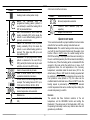
SYMBOL
other icons inside the main menu
DESCRIPTION/FUNCTION
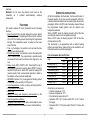
STATUS MODE
Heating mode is active (winter mode)
SYMBOL
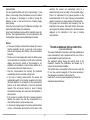
AUTO:
the
thermostat
uses
the
programmed heating pattern (default or
user defined) to switch the heating ON &
OFF at preselected times.
OFF: the thermostat is set to have the
heating constantly OFF (in this mode the
default or user defined heating pattern is
ignored) – summer mode.
PARTY: the thermostat is set to provide
heating constantly ON (in this mode the
default or user defined heating pattern is
ignored). This status stay ON up to end
user switching OFF
ADVANCE: the pre-programmed heating
pattern is advanced to the next ON (or
OFF) period (this function can only be used
when the clock is in the AUTO mode)
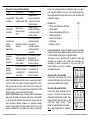
DESCRIPTION/FUNCTION
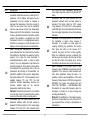
Economy temperature selection
Technical menu selection
expertise)
Escape from main menu
(only
for
QUICK START GUIDE
To be read and used after a proper installation has been made
and after the hours and the working mode has been set.
WORKING MODE: This central heating control device provides
you both the room thermostat function and the weekly clock
function. When in AUTO mode, the central heating will be
ON/OFF according to the programmed times and according to
the set comfort temperature (the ON command is identified by
the flame icon). When the heating will be commanded ON the
set-point in the room will be the comfort one. In case of off
programmed times, the set temperature is the “economy
temperature”, selectable inside the main menu (16°C is the
default value). When in OFF mode the heating requested will
be switched on when the room temperature drops under the
frost protection value (default is 5°C); this value can be
modified inside the technical menu. When in PARTY mode the
heating request is permanently on according the selected
comfort temperature that can be modified any time rotating the
encoder and pressing to confirm.
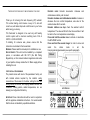
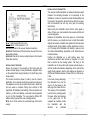
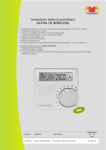
Used to show current day of week
Used to show current time of day or
explanation inside the main menu
24-hour clock in 60 minute segments. Side
example: The heating fascia is OFF up to
15:59 and it is ON from 16:00 to 18:59
Used to show current room temperature or
desired temperature to be selected.
Batteries low
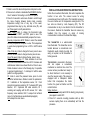
ENCODER
The encoder has three functions: selection of the set
temperature, set the ADVANCE function and setting the
thermostat. If the status mode of the thermostat is OFF, only
the pressing functionality is active; any rotation done does not
generate any modification.
Heat request to the boiler (central heating
ON)
3