1
Icon Index
Custom Method
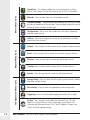
Small Icon Buttons
7
Update System – Press this button to update the current ML600
software to the version that is present on the SD Card.
Disable Method Execution – After downloading a method to the
pump the user has the option to turn the method execution ON or OFF.
When method execution is disabled any methods stored on the pump
will become inactive.
Enable Method Execution – When method execution is enabled the
pump will run the method stored in memory when the trigger is pressed
on the probe and held for 3 seconds. See Chapter 6 for more details.
Chapter 7 Icon Index
7-5