1
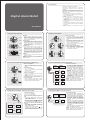
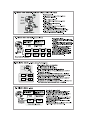
6.0 Chronograph Mode - Functions Overviews
Chronograph Mode
! The Watch includes a stopwatch function
to measure:
! Elapsed time,
! Accumulative elapsed time, and
! Split time.
Chronograph Display
! The display shows the 'Reset' display, if
the Watch or the stopwatch has been
reset. It is then ready for a new
measurement.
! The 1 st. row: Hour digits
! The 2 nd. row: Minute digits and 1/100
second.
! The 3 rd. row: Second digits.
NOTE: The maximum measureing range of
the stopwatch is 23 hours 59 minutes and
59.99 seconds.
1/100
second
hour
minute
second
Chronograph Mode
Reset Display
1. Elapsed
time
hold [L/R]
[S/S]
[S/S]
0
10
2. Accumulative
elapsed time [S/S]
0
3. Split time
0
20
0
[S/S]
20
10
[S/S]
[S/S]
hold [L/R] hold [L/R]
0
10
split
split [L/R]
20
split
[L/R]
[S/S]
0
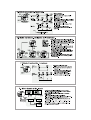
6.1 Chronograph Mode - Using the Chronograph
N O T E : T h i s
diagram illustrates
the key flow on
how to use the
chronograph only,
so
the number
showing on these
displays DOES
NOT conform to
fact.
[S/S]
split
time
Spli t Display
10
seconds
[L/R]
counting
[S/S]
Co unti ng Display
'Rese t' Display
stop
counting
[S/S]
hold [L/R]
10
30
20
time
Stop Co unti ng Display
Elapsed time, Accumulative
Elapsed time and Split time
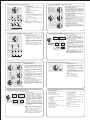
7.0 Countdown Timer Mode - Functions Overviews
Countdown Timer Function
! The Watch includes a countdown
timer function which measures the
elapse of a fix period of time (target
time).
! The timer will downcount from target
time to zero, and beeps will sound at
zero.
! The target time can be set by the user.
Check the coming chapter for more
detail on how to set target time.
minute
hour
second
Countdown Timer Mode
0
20
Case 1
Target
time = 20
How to Measure Elapsed Time and
Accumulative Elapsed Time
! When the chronograph is not counting, press
the [S/S] button once to start counting. When
the chronograph is counting, press the [S/S]
button once to stop counting. The elapsed
time between these two keystrokes is
exhibited on the display.
! Repeat the above mentioned steps to get t h e
accumulative elapsed time of which the
chronograph is counting.
How to Measure Split Time
! When the chronograph is counting, press the
[L/R] button once to take the split time at any
designate moment. This key operation will not
affect the counting.
! The split time will appear on the display for
10 seconds, and it returns to counting display
automatically. Repeat the steps mentioned
above to get another split time.
How to Reset the Chronograph
! To reset the chronograph to get ready for a
new measurement, hold down the [L/R] button
for 2 seconds when the chronograph is not
counting.
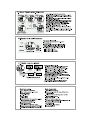
7.1 Countdown Timer Mode - Setting the Target Time
increase
or
Increase
decrease
the
the number
setting
value
Increaseorthe
increase
decrease
number the
at
faster
asetting
highervalue
speed
[S/S] or
[L/R]
hold [S/S] or
hold [L/R]
[M]
hold [M]
Hour
Minute
hold [M]
[M]
[S/S]
20
[M]
Second
Daily Alarm Setting Sequence
20
Case 2
Target
time = 20
10
[S/S]
20
0
10
[S/S]
NOTE: The Watch will also exit the
setting display if NO key-stroke has
been activated for about one minute.
[S/S]
[L/R]
0
10
How to Set the Target Time
! In Countdown Timer Mode, hold down the
[M] button for about 2 seconds will
change the display to setting display.
NOTE: When the timer is counting, the
target time CAN NOT be set.
! The selected digits will be flashing in the
display. Pressing the [M] button will
change among the different settings
(hour, minute, second) following the
adjacent diagram.
! When one of the settings is selected,
pressing the [S/S] or [L/R] button will
increase or decrease the setting value;
holding the [S/S] or [L/R] button will
increase or decrease the setting value
faster.
! When the above is set, hold down the [M]
button will exit the setting.
30
20
time
Countdown Timer Case
7.2 Countdown Timer Mode - Using the Coutndown Timer
counting
[S/S]
Countdown Timer Mode
(Sets as 30 minutes)
Counting Display
stop
[S/S]
counting
[L/R]
Beep
Beep
Beep
Stop Counting Display
[S/S]
counting
29' 58''
Counting Display
How to Use the Timer
! When the target time is set (for example: 30
minutes), pressing the [S/S] button will start
the counting. When the timer is counting,
pressing the [S/S] button once will stop the
counting.
! When the Timer is counting, the remaining
time (to zero) will be exhibited on the display
continuously.
! When it counts to the last 5 seconds, it beeps
once for every second.
! When it counts to 0 seconds, it beeps for 30
seconds. Pressing any button (except the
[EL] button) in this period will terminate the
beeps prematurely.
! The target time will be loaded automatically
after the beeps.
How to Reload the Target Time
! In the Stop Counting Display, pressing the
[L/R] button will reload the target time.
NOTE: The adjacent diagram illustrates the key
flow on how to use the countdown timer only, so
the number showing on these displays DOES
NOT conform to fact.
8.0 Dual Time Mode - Functions Overviews
minute
hour
second
Dual Time Mode
Dual Time
Mode icon
The Dual Time Function
! The Watch includes a dual time function
which measures the current time of
another time zone.
! The second digits of Dual Time Mode will
be the same as the second digits of
Current Time Mode.
! The dual time (hour and minute) can be
set by the user. Check the coming
chapter for more detail on how to set dual
time.
The Dual Time Display
! The 1 st. row: Hour digits,
! The 2 nd. row: Minute digits,
! The 3 rd. row: Second digits.
Counting Display
8.1 Dual Time Mode - Setting the Dual Time
How to Set Dual Time
increase
or
Increase
decrease
the
the number
setting
value
Increaseorthe
increase
decrease
number the
at
faster
asetting
highervalue
speed
[S/S] or
[L/R]
hold [S/S] or
hold [L/R]
[M]
hold [M]
Hour
Minute*
hold [M]
Dual Time Setting Sequence
! In Dual Time Mode, hold down the [M]
button for about 2 seconds will
change the display to setting display.
! The selected digits will be flashing in
the display. Pressing the [M] button
will select among the different
settings following the adjacent
diagram.
! When one of the settings is selected,
pressing the [S/S] or [L/R] button will
increase or decrease the setting
value; holding the [S/S] or [L/R] button
will increase or decrease the setting
value faster.
NOTE: Minute setting value will be
increased or decreased 30 minutes per
step.
! When the above is set, hold down the
[M] button will exit the setting.
NOTE: The Watch will also exit the
setting display if NO key-stroke has
been activated for about one minute.
9.0 Specifications
Current Time Mode
! Hour, minute and second
! Month, day, and day of week
! 12 / 24 hour format (user selectable)
! Auto calendar
Alarm Mode
! Daily alarm
! Alarm beeps for about 30 seconds at
preset alarm time
! Hourly chime
Chronograph Mode
! 1/100 second resolution
! Measuring range 23 hours, 59 minutes,
59.99 seconds
! Split time display
Countdown Timer Mode
! 1 second resolution
! Programmable up to 23 hours, 59
minutes 59 seconds
! Alarm beeps for about 30 seconds when
the timer count to zero
Dual Time Mode
! Hour, minute and second for the second
time zone
! 12 / 24 hour format (according the setting
of Current Time Mode)
Back Light
! Electro-luminescent back light
Other
! Key tone ON/OFF user selectable.