1
Step 6. Connect the ISDN CPE to the UNDP-1200-2 or to the punch panel
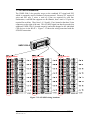
Connect the ISDN CPE to the RJ-45 connectors provided by the UNDP-1200-2
or the S/T-Interface patch panel.
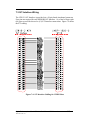
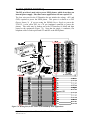
After these six (6) steps, the UT812-2 system installation is complete. All the
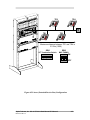
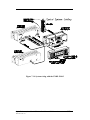
ISDN CPE devices are ready to operate. Figure 5.2 shows a typical UT812-2
installation environment.
Figure 5.2: Typical UT812-2 System installation environment
Alpha Telecom, Inc. U.S.A. UT812-2 Rack Mount NT1 Manual
Revision 0798.1.0.1
5.4