1
CONSOiE
OPERATION
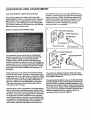
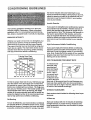
Water Bottle Holder
Reading Rack
Displays
,fi
I-'
igl,t
l'/ll"
t.lg,
•
Im,-Qm_
Start/Pause Button
Speed Buttons
m
i
Accessory Tray
. _ (--
.) CA
.......
•
Follow the steps below to operate the console.
B
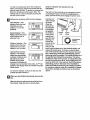
Insert the key into the console.
. :.-
When the key is inserted, the four displays will
turn on.
.. ....
B
Press the staWpause
•
~.;~,
button.
-.,.
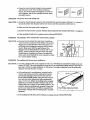
A moment after the button is pressed, the walking
belt will begin to move at I mile per hour. Hold the
handrails and begin walking. Note: The walking
belt can also be started by pressing the speed _,
button once.
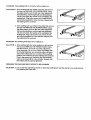
Adjust the speed of the walking belt with the
,°.
..
speed buffons.
. •
o
STEP BY STEP CONSOLE OPERATION
If there is a thin sheet of clear plastic on the console,
remove it. In addition, make sure that the power cord is
properly plugged in (see HOW TO PLUG IN THE
POWER CORD on page 7).
Next, step onto the foot rails of the treadmill. Find the
clip attached to the key (see the drawing above), and
slide the clip onto the waistband of your clothing.
As you walk on the treadmill, adjust the speed of
the walking belt with the
speed buttons. Each time
one of the buttons is
o
I
pressed, the speed will
change by 0.1 mile per hour. The buttons can be
held down to change the speed quickly. The
speed range is 0.5 to 10 miles per hour. Note:
After the buttons are pressed, it may take a
moment for the walking belt to reach the selected
speed setting.