1
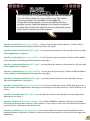
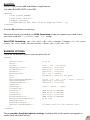
This is an example for the positioning of the interface elements.
For each of these buttons you can decide, in the XML options,
if you want to place it on the left or on the right side.
The position of these buttons is dynamic, meaning that the
positions are not “fixed”, but depends on the buttons you place
on each side. Anyway, the sequence (which of the buttons comes
first) is the one you can see in the example.
figure 1
interface_buttonPrev [yes/true | no/false] : if set to true the “go previous banner ” button will be
added to the interface and displayed (default position: top right)
interface_buttonPrevPosition [left | right] : you can place this button to the top left or the top right
of the application (see figure 1).
interface_buttonNext [yes/true | no/false] : if set to true the “go next banner ” button will be added
to the interface and displayed (default position: top right)
interface_buttonNextPosition [left | right] : you can place this button to the top left or the top right
of the application (see figure 1).
interface_buttonPause [yes/true | no/false] : if set to true the “pause/play ” button will be be added
to the interface and displayed (default position: top right)
interface_buttonPausePosition [left | right] : you can place this button to the top left or the top
right of the application (see figure 1).
interface_timerVisible [yes/true | no/false] : if set to true a little timer clock will be displayed in the
top left corner of the application (showing the remaining time for that banner). Used if autoPlay is set
to true.
interface_timerPosition [left | right] : you can place the timer to the top left or the top right of the
application (see figure 1).
interface_linkCursor [yes/true | no/false] : if you define a link for a banner, clicking on the image
will make the browser go to that url. If this options is set to true a small cursor animation will remaind
you that there’s a link present for that banner.
interface_autoHide [yes/true | no/false] : if set to true when the mouse leave the application the
interface (buttons and timer) will hide in fade, and return automatically as the mouse enter again the
application.
6