1
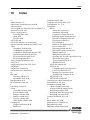
Index
End of run 4-58
Events 4-61
Export 4-66
Flags 4-62
Incubation results 4-60
Laboratory details 4-60
Lot specific parameters 5-42
OD values 4-60
Open 4-65
Outliers 5-40
Print 4-65
Qualitative results 4-61
Quantitative results 4-60
Reader results 4-60
Recalculating 5-40
Recalculation 5-41, 5-42, 5-43
Result interpretation 4-61
Result report structure 4-60
Result report window 4-58
Save 4-65
Spreadsheet results 4-61
Title block 4-60
Validation criteria 4-60
Verify dispense 4-61
Result interpretation 4-61
Result report structure 4-60
Result report window 4-58
Reuse partially used tip racks 4-43
Run
Abort run 4-55
Cancelling 4-57
Clean fluid volume check 4-50
Emergency stop 4-57
Manual pipetting 4-57
Pipetting errors 4-55, 4-57
Pre-run checks 4-50
Processing the run 4-49
Reagent volume check 4-50
Sample volume check 4-51
Steps of a typical test run 4-53
System errors 4-55
System paused dialog 4-55
Test plate removal 5-38
Tip size volume check 4-52
Walk-away 4-54
Wash buffer volume check 4-50
S
Safety 8-1
Safety instructions 1-7
Safety labels 1-13
Samples 4-5
Save 3-14
Save the result report 4-65
Scanner configuration 5-34, 7-25
Schedule 4-17
Optimize 5-32
Selection dialog 3-24
Selection window
File 3-3
Help 3-9
New 3-10
Open 3-11
Windows 3-8
Selftest 5-1
Before each run 5-3
Failures 5-3
Manually start 5-3
Set-up (see System set-up) 7-11
Set-up panel (see Worklist)
Shut down 4-71
Simulation mode 5-54
Software language 5-53
Special types 1-4
Spreadsheet results 4-61
Start worklist 4-28
Start-up 4-3
Storage conditions 4-36
Symbol 3-1
Symbol keys 1-3
System configuration 7-1, 7-11
System description 2-1
System errors 4-55
System liquid container 2-15
System overview (see Overview)
System paused dialog 4-55
System set-up 7-1, 7-11
Colorimeter tab (photometer) 7-16
Incubators tab 7-14
Maintenance tab 7-34
Pipette tab 7-18
Plate transport tab 7-33
Sample rack tab 7-25
System tab 7-12
Washer tab 7-29
System status 4-22
16-4
Elisys Duo - User Manual