1
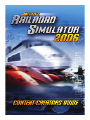
Trainz Railroad Simulator 2006
Content Creator’s Guide
Version 2
August 2006
Copyright© Auran Pty Ltd 2005
This Content Creators Guide is for the Trainz TRS 2006 release. There have been many changes
to TRS2006, new options, and the introduction of the Content Managers Plus program to manage
content, and the integrated Content Creator Plus module, to allow the creation of in-game content.
This document outlines the standards and procedures to create content for Trainz TRS2006,
content that is suitable for uploading to the Download Station.
Further updates may be available from time to time on our website. http://www.auran.com/
TRS2006/index.php
Trainz Railroad Simulator 2005
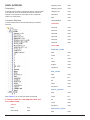
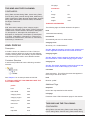
CONTENTS
CHAPTER 1
The Basics
INTRODUCTION
1
OVERVIEW 2
What’s new in TRS2006? 2
The Basics of Content Creation 2
WHAT IS A KUID? 4
KUID2 FORMAT
4
User ID Number 4
Version ID Number
5
CHAPTER 2
Introduction to Kinds, Containers, Tags, and Config.txt files
KINDS
7
Config.txt Files
8
Containers 8
Tags 9
Directory Structure 9
Kinds and Container Relationship9
CONFIG.TXT FILES
10
EFFECTS (optional mesh-table variables)
EFFECT: KIND NAME
12
EFFECT: KIND CORONA
13
EFFECT: KIND TEXTURE-REPLACEMENT
EFFECT: KIND ATTACHMENT
12
13
14
EFFECT: KIND ANIMATION 15
KIND: HTML-ASSET
15
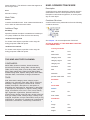
Trainz Railroad Simulator 2006 - The Content Creator’s Guide
Version 2.0 iii KIND: PRODUCT 16
KIND: PRODUCT-CATEGORY
16
OVERVIEW 16
IN-GAME VISUALISATION OF PRODUCTS. 16
AVIATION FUEL PRODUCT 17
COAL PRODUCT
17
GENERAL GOODS PRODUCT
18
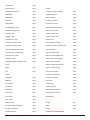
General Goods Mesh Dimensions
CRUDE OIL PRODUCT
19
DIESEL FUEL PRODUCT
19
20 FT CONTAINER PRODUCT
20
20 ft CONTAINER Mesh Dimensions
40 FT CONTAINER PRODUCT
18
20
21
40 ft CONTAINER Mesh Dimensions
21
LUMBER PRODUCT 22
Log Mesh Dimensions
22
PETROL FUEL PRODUCT
22
Lumber Mesh Dimensions
22
WATER PRODUCT 23
WOODCHIPS PRODUCT
23
PASSENGER PRODUCT
24
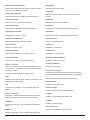
KIND: ENGINE
25
DIESEL ENGINE FILE BREAKDOWN29
STEAM ENGINE FILE BREAKDOWN 31
COMMENTS AND NEW TAGS
KIND: BOGEY
31
33
BREAKDOWN OF CONFIG.TXT
33
KIND: TRAINCAR 34
TRAINCAR CONFIG.TXT BREAKDOWN
TRAINCAR EXAMPLES
36
ENGINESOUND - DIESEL AND ELECTRIC
KIND: ENGINESOUND
37
ENGINESOUND - STEAM
38
KIND: HORNSOUND
35
37
39
KIND: DRIVERCHARACTER
39
KIND: INTERIOR 40
Trainz Railroad Simulator 2006 - The Content Creator’s Guide
Version 2.0 iv INTERIOR CONFIG.TXT BREAKDOWN
STEAM CAB INTERIORS
50
KIND: PANTOGRAPH 62
KIND: ENVIRONMENT
62
KIND: WATER2
63
Calm Water
63
Choppy Water
64
Glassy Water
65
Rough Water
65
47
KIND: MAP 66
KIND: PROFILE
66
KIND: GROUNDTEXTURE
66
GROUNDTEXTURE CLUTTER MESH
66
KIND: SCENERY 67
KIND: INDUSTRY 69
PORTAL
70
MULTI INDUSTRY NEW
72
PASSENGER STATION ASSET
74
PASSENGER VEHICLE ASSET
76
KIND: FIXEDTRACK
77
KIND: TRACK – RAILS
78
KIND: TRACK – ROAD
79
KIND: BRIDGE – SINGLE TRACK
80
KIND: BRIDGE – TUNNEL81
KIND: BRIDGE – DOUBLE TRACK
82
KIND: MOSPEEDBOARD 82
KIND: MOSIGNAL 83
KIND: MOJUNCTION 85
KIND: MESH85
KIND: MOTURNTABLE 86
KIND: MOCROSSING
87
KIND: ACTIVITY
88
KIND: TEXTURE
88
KIND: buildable 89
Trainz Railroad Simulator 2006 - The Content Creator’s Guide
Version 2.0 MISCELLANEOUS CONFIG.TXT TAGS89
CHAPTER 3
Understanding and using
Content Creator Plus
Getting Started
91
Using Content Creator Plus
Inheritance Template
93
95
CHAPTER 4
Using Content Creator Plus to create a New Asset
Creating a New Asset
97
A Workflow Process97
Example Asset
97
Example Asset PB15 Directory Layout 98
Example Asset Main CCP Screen100
CHAPTER 5
Containers and Tags
Common to Each Kind
Introduction 103
Common Items
103
Optional and Mandatory Requirements 103
Common Containers
103
Other Common Containers106
Mesh Table 106
Other Common Tags
107
CHAPTER 6
All Other Container and Tags
CHAPTER 7
Kind Examples
ENVIRONMENT
116
GROUNDTEXTURE
116
DISPLACEMENTS 116
Trainz Railroad Simulator 2006 - The Content Creator’s Guide
Version 2.0 vi SCENERY
117
SCENERY OBJECTS WITH LIGHTS AT NIGHT
SCENERY OBJECTS WITH ANIMATION
117
117
SPECIAL SCENERY OBJECTS – LEVEL CROSSINGS
SPECIAL SCENERY OBJECTS - TURNTABLES
118
118
SCENERY OBJECTS WITH SOUNDS118
SPLINES
119
TRACK
Rails
120
Bridges
120
120
TRACKSIDE121
PANTOGRAPH
Tunnels
121
121
CHAPTER 8
Modeling Guidelines
3DSMax/gmax Interface with Trainz
1. 3DSMax/gmax Initial Setup
123
2. Merging and Exporting
123
3. Animation Requirements
124
4. Attachments
123
125
5. General Modeling Notes
125
6. Config.txt File126
7. Problems with Model Exports
POLYCOUNT
TRAINS
127
128
130
LOCOMOTIVE NUMBERING 131
BUMP MAPPED AND SPECULAR MATERIALS
BUMP MAPPING INFORMATION
Textures and Opacity Effects
131
132
136
1. Placement in 3DSMax/gmax 136
2. Opacity Fade Out
136
3. Alpha Channel Use
136
4. Example136
5. Applying Opacity to Models 136
6. Opacity Settings in 3DSMax/gmax 137
7. Opacity Interference137
Trainz Railroad Simulator 2006 - The Content Creator’s Guide
Version 2.0 vii 8. Special Use of Opacity - Reflection Materials 137
9. Opacity on Roads, Track and Bridges
138
10. Opacity Texture Bleeding 138
11. Textures for Tiling 138
CREATING AN INTERIOR FOR TRS 139
STEAM CAB INTERIORS
143
Steam Cab Fire and Coal Glow Effects
145
Researching Data and Testing of a Steam Locomotive146
Narrow Gauge Geared Locomotives146
Tenders
147
Content Creation Guide Amendments 147
Ditch lights
147
Naming of Assets147
ANIMATION EVENTS148
LEVEL OF DETAIL MESH REDUCTION
LOAD TEXTURE REPLACEMENT
151
TRAINCAR DIRECTORY STRUCTURE
ALIASING TRAINS
BOGEYS
149
154
155
156
3D STUDIO MAX AND GMAX MODEL GUIDELINES 156
PANTOGRAPHS (pants) 159
CHAPTER 9
Uploading to the Download Station
TRAINZ DOWNLOAD STATION 160
TRAINZ DOWNLOAD HELPER 162
Uploading Models and Forum Issues
1. Packaging Assets
163
163
2. Placing Screenshots on the Forum
163
CHAPTER 11
Particle Effects and Scripts
INTRODUCTION
164
MAIN PROPERTIES:165
PFX FROM CONFIG.TXT 165
ADDING SMOKE TAGS
165
SEQUENCE PROPERTIES: 166
Trainz Railroad Simulator 2006 - The Content Creator’s Guide
Version 2.0 viii EXAMPLE 2 - STEAM TRAIN 167
SOUND SCRIPTS 168
TRAINZSCRIPT TUTORIAL
170
CHAPTER 12
Appendix A - Classes and Codes
CATEGORY CLASS
173
REGION CODES 176
Appendix B - Kinds and Containers
ACKNOWLEDGEMENTS 182
Trainz Railroad Simulator 2006 - The Content Creator’s Guide
Version 2.0 ix ADDITIONAL REFERENCE INFORMATION
Please read this document alongside the Trainz Railroad Simulator 2006 User Manual which forms part of the
TRS2006 installation. This installed guide displays the config.txt and script source for all released TRS industry compatible assets. It also contains theory and tutorials.
The default location for the guide: C:\Program Files\Auran\TRS2004\Scripts\docs\index.chm ..............Fix this paragraph references
The following additional information is available for download:
General assets
• Sample TRS in-game files including config files.
http://www.auran.com/trainz/creation/Trainz_custom.zip
• Sample 3D Studio Max and gmax files including textures.
http://www.auran.com/trainz/creation/source_files.zip
Rolling stock
• TRS asset PRR 40’Boxcar in-game files, source files and asset description.
http://www.auran.com/TRS2004/downloads/contentcreation/TRS2004_Box_Car.zip
• TRS asset GATX-Oilco Tank Car in-game files, source files and asset description.
http://www.auran.com/TRS2004/downloads/contentcreation/TRS2004_Tank_Car.zip
• TRS asset Coal Hopper in-game files, source files and asset description.
http://www.auran.com/TRS2004/downloads/contentcreation/TRS2004_Coal_Hopper.zip
• TRS asset Container Flat in-game files, source files and asset description.
http://www.auran.com/TRS2004/downloads/contentcreation/TRS2004_Container_Flat.zip
Interiors
• DD40x cabin interior in-game files, source files.
http://www.auran.com/TRS2004/downloads/contentcreation/TRS2004_dd40_interior.zip
• PB15 Steam interior in-game files, source files.
http://www.auran.com/TRS2004/downloads/contentcreation/TRS2004_PB15_interior.zip
Steam sound
http://www.auran.com/TRS2004/downloads/contentcreation/TRS2004_Steam_Sound.zip
Twinkles Particle Effects Editor
http://www.auran.com/TRS2004/downloads/contentcreation/Twinkles.zip
Other
• New TRS 3dsmax 4 & 5 Plugin for Bump mapping support and Bump mapping description.
http://www.auran.com/TRS2004/downloads/contentcreation/TRS_Max4_Plugin_Bump.zip
• Passenger Asset Tutorial.
http://files.auran.com/TRS2004/downloads/contentcreation/SP2-Passenger_Asset_Tutorial.zip
• Variable Rules Tutorial.
http://files.auran.com/TRS2004/downloads/contentcreation/SP2_VariableRulesTutorial.zip
• API Programmer’s Reference Manual - covers most of the script classes and methods
http://www.auran.com/TRS2004/trssp4dl/dpage.php
Trainz Railroad Simulator 2006 - The Content Creator’s Guide
Version 2.0 Trainz Railroad Simulator 2006
CHAPTER 1
The Basics
INTRODUCTION
Welcome to the Content Creators Guide for Trainz Railroad Simulator 2006.
This document is designed to assist 3rd party content creators design and create functional content for Trainz Railroad
Simulator 2006 (TRS2006).
The purpose of this document is to detail the way in which 3rd party content should be designed and built to be
compatible with TRS2006 and to describe the use of the new modules in TRS2006, the Content Manager Plus and
the Content Creator Plus.
These Content Manager Plus module manages content on your computer, communicates with the Download Station
and uploads or downloads content more easily than in previous versions of Trainz.
The Content Creator Plus module assists in creating model assets that are compatible with the Download Station
requirements, and incorporates error checking that should assist in the creation of successful models. The module
creats the config.txt file for the model asset, the entry of data is by means templates for each model asset Kind, and
dialogue boxes filter and check the data.
This document provides the standards and procedures for a content creator to enter data for the model asset. It also
provides advice on the creation of the model mesh using 3dsmax or gmax, and the creation of correct texture files for
the model.
Scripting is an integral part of model creation, however details on script code and usage are included in a separate
document. Brief references to Scripting are made in this document, as far as they effect the creation requirements.
Please check the Trainz Railroad Simulator website http://www.auran.com/TRS2006/index.php for additional
information and updates. Major updates will be incorporated in future revisions of this document. A companion
document “Content Creation Tips and Tricks” expands on some of the content covered here, and gives guidance to
successfully export a working model into Trainz.
Please refer to the companion document “Content Creation Tips and Tricks 2006” for additional expanded
information and guidance to improve your model creation.
Trainz Railroad Simulator 2006 - The Content Creator’s Guide
Version 2.0 OVERVIEW
Content manager Plus module. It is essential for creating
content in TRS2006.
What’s new in TRS2006?
This document will touch on the use of Content Manager
Plus but will cover in detail how to use Content Creator
Plus to create config.txt files and manage the asset files.
TRS2006 introduces a number of new functions
specifically designed to enhance the performance of
Trainz. The aim in this build is to make the train driving
experience more realistic. Some of the new features in
TRS2006 are.
The Basics of Content Creation
In the Simulator:
Creating new content for Trainz is a generally a five-step
process.
• Cab Control Graphical Interface available when in Cab
Control.
1. Research
• Coupler breakage enhancements made to the physics
engine, that require you to drive a train within the strength
of couplers in the train. Should you exceed the strength
capacity, couplers will break.
• Wheel slip is now included, you will need to allow for
this in starting Trains.
• iTrainz in game chat allows users to talk to other users
while playing.
• Added functionality on the Mini-map screen; query
industry and consist information.
• New PaintShed with more flexible interface that is
included as part of the installation.
• Bogey and bridge sounds supported.
• Re-styled Driver and Session menu screens allow for
easier navigation of installed routes and sessions.
New Routes:
TRS2006 has many new routes provided by Auran staff
and Third Party Creators. These introduce a new driving
experience, with many new train and scenery models,
and a number of driving scenarios for you to try.
For Managing Content:
The new Content Manager Plus module makes the
management of assets very easy. It is integrated with
the Download Station, listing the assets available on the
Download Station, enabling updating of the list when
connected to the Download Station via the Internet, and
making the upload or download an efficient and simple
process.
Content Manager Plus relies on a database of content in
your installation on your computer. This database makes
the loading of data into Trainz on start up very efficient,
and reduces load time.
For Content Creation:
The Content Creator Plus module is integrated with the
The research step involves finding out all the relevant
information that you can about the item you wish to
create. Research usually covers the accumulation of
data about the content in question. The information
needed may cover technical drawings of front, side and
top, performance specifications (for loco engines), and
photo’s for texture reference.
You will generally find that much of this information can
be obtained by searching on the Internet. You should
also be aware of, and comply with, any copyright issues
on information obtained, including pictures, textures and
information.
2. Create a Mesh (.im file)
An .im file is an Indexed Mesh. These files are created by
exporting from ‘3D Studio Max’ (3dsmax) or ‘gmax’ using
an Auran Jet Trainz plugin. 3dsmax requires a plugin to
be separately installed, available for versions 4 and 5
from the Auran website:
http://www.auran.com/TRS2006/index.php
Gmax is a program created by Discreet as a gamespecific version of their very popular ‘3D Studio Max’
program. Gmax is available for free download from the
Discreet site. In order to use gmax with Trainz you will
also need to download the Trainz ‘Content Creation
Pack’ from the Auran website above. After installing
and registering gmax, this pack installs into gmax and
will enable you to export content directly into the .im file
formats that Trainz uses.
Note: Previous versions of Trainz used a ‘Progressive
Mesh’ file ( .pm ). Due to the new mesh reduction in TRS
(‘Level of Detail’ mesh reduction) only .im files are used,
progressive mesh files are obsolete. These files will still
function in TRS2006, but for new models, the .im format
is to be used.
So what is 3dsmax or gmax? These are 3D modeling
programs that enable you to make things such as
locomotives, items of rolling stock or scenery and
trackside accessories. They are quite complex programs,
and you can expect a steep learning curve should you
decide to dive in and learn asset creation. However, on
the plus side, the benefits are well worth it, and if you
take the time to learn it well, you will certainly be able to
Trainz Railroad Simulator 2006 - The Content Creator’s Guide
Version 2.0 create some masterpieces.
The free gmax program lacks a few features of 3dsmax,
notably a rendering option that allows you to see a
rendered picture of the mesh asset in the program,
while being developed, and the ability to export specular
lighting and bump mapped textures. These exports
enhance the visual effects of a locomotive boiler for
instance, but nevertherless, gmax is able to do most
things that a creator wishes, for models in Trainz.
3. Create textures.Creating textures for your assets
Previous versions of Trainz required the config.txt file
to be generated by a text editor such as Notepad, and
saved as UTF-8 code, not ANSI. This encoding option
is available from the save dialogue box. Programs such
as MS Word that can introduce unwanted formatting,
including non standard quotation marks, were not used.
While it is possible to generate a config.txt file in this
manner for TRS2006, the Content Creator Plus module
will do this work for you when you enter the appropriate
data.
is a very important part of the content creation process.
Making good textures is one of the hardest things to do,
but they can be the difference between a good-looking
model and a great looking model.
This document gives details on how to create mesh and
texture files, the config.txt file using the Content Creator
Plus module, and how to incorporate them into the Trainz
program.
Textures are created for Trainz using any 3rd party
program that supports the creation of 2D art, like Adobe
Photoshop or Paint Shop Pro.
5. Incorporate your asset into TRS2006
There are a number of free programs that may be
available, but they may lack the functionality of the
commercial programs.
There are special requirements for texture types and
sizes for models, details are given in this document.
4. Create a ‘Config.txt’ file (config.txt file).
Each and every item of content for Trainz has it’s
own config.txt file. This file is a human-readable text
file included with its corresponding item of content.
Depending on what the item of content is will determine
the necessary contents of the text file, but it will always
contain a unique KUID, (a KUID is an identification serial
code defined a little later in this document), a description
and other information to make the model recognised by,
and function in, Trainz.
Items of content created for Trainz are always assigned
to a group of content called a KIND. A KIND is a type
of content that has particular properties that Trainz
recognizes. For example, one type of KIND is a TRACK.
Trainz understands that items of content that belong to a
group of this KIND define where locomotives and rolling
stock travel, the “steel rails” for trains (of course some
modern trains do not have “steel rails”, the Maglev for
instance. Other KINDs are listed further below in this
document.
The config.txt file also includes a number of statements
for content categories, time eras, Trainz Build, a list
of items that the model may depend on (a KUID list of
dependencies) and other instructions defining how the
asset will behave in Trainz, or the Download Station how
to manage the content.
These instructions are called “tags” and a number of
“tags” may be grouped functionally into “containers”
within the config.txt file. Refer to examples later in this
document.
Previous versions of Trainz relied on a special directory
(Downloads) where downloaded assets were stored.
When Trainz initially started it added these files to a
“cache”. Subsequently, starting Trainz loaded this cache,
which shortened the loading time considerably. Each time
a new asset was installed, the cache was recalculated.
If the Download Station Helper were used, the cach was
automatically recalculated after every asset install.
Previous versions of Trainz also used a separate Custom
model directory, to hold your newly created model files.
This directory was not included in the cache, and each
time Trainz started, files in this directory needed to be
added to the cache of downloaded and installed models.
If you had many models placed in this Custom directory,
trainz could be very slow in loading.
TRS2006 does not use the installed Downloads directory
nor the Custom directory for models. All model assets
are encrypted and incorporated in Trainz as a total asset
database. This makes for very fast load times, but can
restrict easy access to your files.
Briefly, when a new asset is created, Content Creator
Plus (CCP) creates a directory for the new asset under
the “editing” directory in your installed Trainz, and saves
a config file. This newly created directory can then be
located, and files may be placed or exported for the
asset mesh and textures. Even if the model is only partly
constructed, it can be viewed in Trainz, by “committing”
the asset into the database. The directory is then
removed automatically, and Trainz can be launched to
see the model.
On exiting Trainz, CCP can re-open the directory for work
to continue on the model and files. This process will be
fully explained in the following pages.
6. Upload your new content to the Auran
Download Station.
You must create all models for TRS2006 using the
CCP and CMP modules if you wish to upload to the
Auran Download Station. Content Manager Plus has
Trainz Railroad Simulator 2006 - The Content Creator’s Guide
Version 2.0 an integrated function to package your model for the
Download Station and upload it.
Content Manager Plus is a very useful application in that
it automatically performs error checking and simplifies
the preparation of your content for upload. The Content
Manager Plus module embeds information into the
upload package that is required by the Auran Download
Station.
Don’t include files such as .exe, .com or .bat in the model
files. Because these files are a potential source of virus
files they will not be packaged by CMP. Only in-game and
text files are packaged.
For information on how to upload files and the Download
Station requirements refer to Chapter 11.
7. Backup your new content.
Backing up newly created content is important, in case
Trainz needs to be re-installed, or so that the content may
be modified at a later date. Once content is committed
into the database, the asset files are no longer available
for copying or viewing, unless they are re-opened for
editing.
1. Assets on the Download Station may be installed by
re-downloading again. The Content Manager Plus (CMP)
module makes this a seamless task.
2. To disribute model assets to other users, outside of
the Download Station option, make a cdp file from within
CMP.
3. Assets may be archieved from within CMP. An archieve
name and location may be specified, and more than one
asset may be incorporated in the archieve. Trainz keeps
track of any archieve created, making an archieve does
not remove the assets from Trainz, it backs up the assets.
4. Of course the previous methods do not let you actually
see the individual asset files nor allow them to be altered.
To have access to the files, the asset is opened for
editing in Explorer. An asset directory containing the files
is created. This is found under the “editing” directpry
in the Trainz installation. If the asset has been given a
username, the directpry name will be that username. If a
username has not been allocated, a directory name using
alphabetic and numeric characters will be created.
The created directory can then be copied to another
location on the computer for backup or other purpose.
While creating an asset, this procedure may be useful
each time before committing the asset, to ensure that no
files are lost should a computer or program failure occur.
Remember that texture files and exported mesh files are
not easily accessible once the asset is committed.
5. A temporary directory could be created outside of
the Trainz installation and the texture files and mesh
files placed there. This directory can then be imported
into CMP, the drag and drop feature makes this quite
easy (drag the file directory into the main data window
of CMP). Of course a valid config.txt file needs to be
included for CMP to recognise the directory as a valid
asset. Opening the asset in CCP, correcting any errors, or
adding other tags and containers to finish the model, and
then saving the config.txt file will then create a build 2.5
asset.
WHAT IS A KUID?
A KUID is a unique number that is allocated to all content
created for Trainz and can be thought of as much like a
bar code.
KUID2 FORMAT
The KUID format in TRS2006 follows the standard
adopted in TRS2004, and takes the form of three
Identification Numbers (ID) each separated by a colon.
The breakdown of the new KUID system is as follows:
<KUID2:User_ID:Content_ID:Version_ID>
An example of a Kuid number with actual figures:
<KUID2:171456:38001:1>
User ID Number
The number 171456 after the KUID2 is the USER_ID of
the content creator.
When you registered Trainz with the Planet Auran
website, you would have been issued with your USER_
ID. This is the number you should have entered into
Trainz as your USER_ID.
Planet Auran may be found by LMB clicking on the Planet
Auran symbol at the bottom of the Forum page, or visiting
the website:
https://www.auran.com/planetauran/login_f.php
Every member of the Trainz community who is a member
of Planet Auran has a USER_ID. Now, you may be
wondering why you need a USER_ID if you don’t intend
to make any content for Trainz. If you intend to make a
layout at some point in time and you’d like to share that
layout with your friends or other community members,
then you are in fact a content creator.
Content ID Number
The middle number is the CONTENT_ID.
This is a number that the content creator assigns to
each creation to uniquely identify it, in previous Trainz
builds. In TRS2006, the Content Creator Plus module will
automatically assign a CONTENT_ID when you create a
new asset. It will not repeat a number, and keeps track of
all content numbers installed, so you do not have to keep
a separate list or spread sheet of CONTENT_ID numbers
for your model assets.
A CONTENT_ID number is also assigned automatically
Trainz Railroad Simulator 2006 - The Content Creator’s Guide
Version 2.0 when you save a layout (map). In these circumstances,
number allocation will commence at 100,000 and
increase for subsequent maps.
Note that the combination of a creator’s USER_ID and
the CONTENT_ID is unique, and will not conflict with
assets created by others.
Content ID Ranges
Previous versions of Trainz used Content ID Ranges for
KUID creation. The automatic assignment of CONTENT_
ID numbers in TRS2006 has obsoleted the need for,
or the usefullness of, a specific range of numbers for
different kinds of assets.
Version ID Number
The third number is the asset Version_ID number. The
default for all assets is 0 e.g.
<KUID2:xxx:yyyyy:0>
Should this asset require revisions after release to
the Trainz Download Station, the Version ID for each
subsequent revision may be updated as follows:
First revision
<KUID2:xxx:yyyyy:1>
Second revision
<KUID2:xxx:yyyyy:2>
Third revision
<KUID2:xxx:yyyyy:3> Etc.
The Maximum version number is 127.
After the maximum version number is used a new
Content ID needs to be allocated for this asset, and the
previous one needs to be added to the obsolete-table.
You may start a new asset at any version number, and
you may miss numbers in a sequence, for example start
at 1, the next one may be 3, then 4. Trainz will use the
highest version number found for the asset. Obsoleting
a KUID2 asset of the same content ID number does not
require the use of the obsolete table.
duplicates should they be used simultaneously.
2. Similarly, <KUID2:xxx:yyyyy:1> acts as a KUID2 format
obsoletion of <KUID:xxx:yyyyy> .
3. Using the zero, “0” as the first version is acceptable,
however the display on the Download Station, and the
installed file will be in the UTC KUID format, without the
KUID2 format display. It is recommended that you start
the numbering at one, “1” if this is a problem to you.
4. The Download Station displays a History of obsoleted
models. If an obsoleted model has never been placed on
the Download Station, do not include it in your obsolete
table, it will result in a History error notification when you
try to upload the model.
5. While you may use leading zeros in the KUID system,
a version “02” will be the same as “002” or “2”, and the
zeros will be truncated. It is recommended not to use any
leading zeros.
An asset placed in your map will display the latest installed
version. When retrieving an asset from the Download
Station, the newest version will be automatically provided,
and the Download Station will display a History tag for the
model versions. For further examples of the use of the
obsolete-table, refer to Page .
TRAINZ BUILD
Trainz build is the numbering system allocated to each
released version of Trainz. Content may be created for
different versions, making use of the newer functions in a
more recent release. Consequently, some models will not
function in earlier versions of the simulator.
Obsoleting is a process of replacing a previous item with
a more recent one, for updating, improving, or replacing a
faulty model.
It is important for models to list the version of Trainz
for which they are compatible. For older Trainz builds,
this is done by entering a Trainz-Build number in the
model config.txt file. The Content Creator Plus module
will automatically add the correct trainz-build 2.5 to the
config.txt file.
Example 1:
A model <KUID2:171456:38001:3> is to be replaced by a
newer version. The new number <KUID2:171456:38001:4>
is used in the new config.txt file. The previous model will
be replaced (obsoleted).
A model constructed for an older version may function
in a newer version, but this is not guaranteed, as there
have been amendments made to subsequent versions.
Likewise, a model using the latest functions will not work
in an earlier version.
Example 2:
A model <KUID:171456:27001> (UTC version) is to be
replaced, using the new KUID2 format, and with a new
number, <KUID2:171456:27002:1>.
The Download Station identifies which version of Trainz
you have installed and when you use the Download
Helper option, it will not allow the download of a more
recent model that is incompatible with your version.
In this case, the obsolete table container is used to show
the old model KUID to be obsoleted. In this way, the new
KUID is linked to that of the older asset.
The approved Trainz-Build version numbers are;
trainz-build 1.3 for Trainz
trainz-build 1.5 for Ultimate Trainz Collection
trainz-build 2.4 for Trainz Railroad Simulator 2004
trainz-build 2.5 for Trainz Railroad Simulator 2006
Important Notes:
1. <KUID2:xxx:yyyyy:0> is exactly equal to <KUID:xxx:
yyyyy> in the old KUID format. These will be read as
Trainz Railroad Simulator 2006 - The Content Creator’s Guide
Version 2.0 Trainz Railroad Simulator 2006
CHAPTER 2
Introduction to Kinds, Containers,
Tags, and Config.txt files
Trainz Railroad Simulator 2006 - The Content Creator’s Guide
Version 2.0 KINDS
Trainz recognises a number of Kinds of assets. Each
Kind has different attributes, allowing different asset
functions and behaviour to be recognised in the simulator.
In creating a new asset, a suitable Kind must be chosen.
The following is a list of all the Kinds that may be created
in TRS2006, with a brief description.
Activity: An activity is a scripted scenario, that details
the locomotives and rollingstock used in a map, the
driver settings, commands and scripts. A train driver can
undertake a sequence of planned moves – a scenario.
Behavior: A configurable behavior module that forms part
of a session.
FixedTrack: A fixedtrack asset can be likened to a model
trains sectional track system. The models may be straight
or curved and snap into position when moved onto
another track in Surveyor.
GroundTexture: A ground texture is tiled in Surveyor to
color and cover the base grid. It can optionally reference
a low polygon mesh and insert the mesh automatically as
the ground is painted.
HornSound: A traincar horn sound, referenced by the
hornsound tag in a traincar config file. It references the
various sound file to be used.
Html-Asset: An html-asset example is the ingame
tutorial. The config.txt file references one or more .html
pages. The html-asset can be referenced from the scripts
and from some of the Surveyor rules
Bogey: Bogeys are locomotive or rolling stock wheel
mechanisms, sometimes known as ‘Trucks’. This asset
is for attachment to a traincar (locomotive or rollingstock)
and can include animation and a shadow model.
Industry: A scenery asset with product processing
functionality. Industry assets interact with compatible
rolling stock assets through their script file and asset
triggers. An Industry asset supports product queues and
attached track
Bridge: Road or rail bridges and similar assets, as
variable length splines. The bridge kind may include
initiator and terminator segments, and shadows. The
height and gradient of the bridge spline may be varied in
Surveyor.
Interior: A traincar interior asset. It allows the interior
mesh model to be defined, and has attached levers and
controls to operate a locomotive in cab mode. It also
creates an interior for rolling stock.
Buildable: A variant of Kind Scenery, with similar
attributes, but allowing attached track to be used as part
of the model. It does not support processes, as used in a
Kind Industry
Chunky-Track: Track and rails for Trains (the common
flexi-track), by defining the cross section shape and
properties of the track. It uses a texture file but does not
require a 3dsmax or gmax mesh model.
Double-Track: Track splines that may place two or more
tracks as one model, by specifying the track spacings to
be used.
DriverCharacter: The locomotive driver character. This
specifies the picture icon that appears in Driver for the
engine driver.
DriverCommand: A command for the train driver to
accomplish a specific task.
Engine: An engine specification for locomotives and
rollingstock, which defines the detailed performance
requirements; including throttle requirements, engine and
braking performance
EngineSound: An engine sound specification, detailing
the locomotive engine sound files, referenced by the
enginesound tag in a traincar kind.
Environment: Additional sky textures, specifying the
normal, night and stormy sky images to be used in Trainz
Library: Coded modules that interact with other coded
modules.
Mesh: A mesh that is never referenced through Surveyor
panels, but referenced from another asset. It could be
referenced through the preview-mesh-kuid tag or as a
kind attachment effect, like the red arrows used on fixedtrack assets.
Mesh-Reducing-Track: Mesh-Reducing-Track is used
to create poly efficient splines. The asset consists of a
short high detailed mesh and a longer less detailed mesh,
based on the same object. The short mesh is displayed
when the camera is close to the asset whilst the long
mesh is shown when less detail is required.
MOCrossing: Combined rail and road crossings, that
reacts to trains or script control. This allows animation,
special lighting effects and attachment points for rail track
and roads.
MOJunction: Junction control levers, which are attached
to track junctions, include sound, and may be offset a
specified distance from the track. They can be used to
replace the default junction lever.
MOSignal: A train signal with lights (coronas). It specifies
the aspects the signal is capable of displaying, the light
points activated when each state is displayed, and the
corona details. The signal may be offset a specified
distance from the track.
MOSpeedBoard: A Speed limit sign for Trains. It displays
Trainz Railroad Simulator 2006 - The Content Creator’s Guide
Version 2.0 the maximum limit (sign texture made by the creator) and
the sign may be offset a specified distance from the track.
The limit to control train speed is specified in the asset in
metres per second.
Paintshed-Skin: A reskin texture for a locomotive or
rolling stock asset.
Paintshed-Template: A template for particular
locomotives and rolling stock that may be used in the
integrated Paintshed utility. The template may be painted
in different colour schemes
Pantograph: The animated mechanisms on the roof
of electric locomotives that conduct electricity from
the catenary (wires) above. It is referenced by the
pantograph tag in a traincar config file.
Product: An individual product (commodity) that Trainz
compatible rolling stock and industry assets are able to
process. It specifies the type, unit of measurement and
the picture icon that displays the product in the simulator.
Produce and materials are product examples.
Product-Category: A category class of products
(commodities) that Trainz compatible rolling-stock and
industry assets are able to process. It specifies the
type, unit of measurement and the picture icon that
displays the category on Surveyor or Driver. Bulk,
liquid, passengers and containers are product category
examples.
Profile: A Profile is known as a Session in Trainz. This
kind creates a session defining a single route with
different consists, starting points, and industry outputs.
Different sets of trains may be used in each different
session.
Region: A region is chosen in Surveyor to create a new
map or route. This Kind creates a new region in addition
to the in-built regions, such as Australia or USA for
example. The region can define geographical location,
road traffic and weather conditions.
Scenery: A basic scenery asset, that supports night
lighting, smoke (particle) effects, sound and animation. It
is height adjustable and forms the majority of map objects
used
Scenery-Trackside: A special scenery asset, attached to
rail track, with the offset distance from the track specified
in the asset. Examples could include a signal box, or
dummy track sign or track object.
Steam-Engine: The special engine specification
for steam locomotives, which defines the detailed
performance requirements, including throttle settings,
engine and braking performance, and boiler capacity and
steam attributes.
Texture: A simple texture as an asset that can be
referenced by from another asset for example, a custom
corona, by reference to its kuid.
Texture-Group: Defines a group of textures as an
asset that can be referenced from another asset or via
scripting.
Track: Variable length spline based track, roads, and
other scenery items. Tracks may include initiator and
terminator segments, and are height adjustable. Other
examples include fences, power lines and hedges.
TrackSound: A sound asset that is referenced by track
or bogeys to play a different sound from the default
track/train sound (for example, when a train travels over a
bridge or through a tunnel).
Traincar: A locomotive or rolling stock item. A traincar
specifies the dependant assets (bogey, engine sound,
engine specification, pantograph and interior), to make a
complete traincar asset.
Tunnel: Road and rail tunnel variable length splines.
These allow the spline to be placed below ground and
usually require an integrated initiator and termination
mesh as a tunnel entrance.
TurnTable: A turntable asset for moving or rotating
traincars, specifying the static and moving part of the
turntable. Animated rotation (turntable) and lateral
translation (transfer table) assets are supported.
Water2: Animated water texture assets.
There is one additional Kind that is used by Trainz, but
may not be created from within Content Creator Plus
(CCP), this is the Map Kind.
A map kind needs a number of files to be created when
saving from Surveyor. This is not possible from within
CCP. However, a Map Kind created in Surveyor may be
edited in CCP, for instance, to add specific car Kuids
to the Map file. These cars will then be mixed with the
default in-built cars on roads in the map.
Config.txt Files
Each model asset that is created requires a config.txt file.
This file is a simple text file that is used to describe the
item of content to Trainz.
In previous Trainz Builds, the config.txt file was created
in a text editor. TRS2006 now uses the Content Creator
Plus module to create the required file, using a series of
input boxes in a graphical user interface. This simplifies
the creation of the file and allows the file to be checked
for errors.
Because each different ‘KIND’ has a different config.
txt requirement, please refer to the appropriate KIND
descriptions and information on the following pages.
Containers
Trainz Railroad Simulator 2006 - The Content Creator’s Guide
Version 2.0 A data container is a portion of the config.txt file that
covers a particular function for the model, for example the
model mesh files to be used, or the effects to be applied.
for a particular model to be created, and alos show the
hierachy and relationship of Kinds and containers.
The model asset has a top level container for data that is
required for, or is common to, most model assets. Nested
in this container may be other subcontainers, each
describing a particular function of the asset.
Config File:
Descriptions and usage
Original usage and Open in Explorer option
Autocreation in CCP
Sample config
Tags
Directory Structure: Discussion on the directory structure
for assets and the use of and need for subdirectories as
required.
Within a container the commands that Trainz recognizes
are called Tags. Each tag indicates data values to be
used or a function to be implemented.
Dialogue boxes and drop down menus are provided for
the data entry and in-built error checking will indicate
faulty data or entries. An error message display will assist
in creating a correctly configured model.
Containers: Spreadsheet of Kinds and
Containers showing hierarchy – Appendix. Note there
are approx 44 containers and 346 different tags in
Trainz, a spreadsheet database of all tags, similar to the
container listing below, is not possible in the document.
However, each tag will be discussed within its appropriate
container.
Directory Structure
A new asset requires that the config.txt file, mesh files,
texture files and other files be placed in a directory. This
directory is created whenever a new asset is comenced.
The arrangement of files within the main directory or a
subdirectory is, in most cases, the choice of the creator. It
may be convienient to group some files in a subdirectory,
for example, the night directory mesh and texture files.
This can make it easy to distinguish the files associated
with a particular part or function of an asset. The mesh
table layout adopted since TRS2004, makes it easy to
point the config.txt file data to the required subdirectories.
For some Kinds, certain files may be required to be
placed in particular directories, and the creator has no
choice in the layout of the directories. The creator will
make the required sudirectories, and place the files.
In these instances, requirements will be shown in the
examples in the following Chapters and pages.
In other instances it may be more convienient to use
only one main directory for all meshes and texture files
for the asset. This can result in a smaller cdp file than
if subdirectories were used. For example, sometimes a
night mesh model may use the same texture files as the
day mesh model. If these same textures are placed in
the main directory and also in a night subdirectory, the
files are actually loaded twice in the cdp package (the
same file in different locations, or a different texture file
using the same file name in a sepatate subdirectory, are
converted to binary form in the packaging process, and
are given a unique binary identifier).
Kinds and Container Relationship
Each Kind has unique attributes, but also shares some
attributes with other Kinds. The tables below show the
types of containers that are available in each Kind. These
will indicate which asset Kind may be the most suitable
Trainz Railroad Simulator 2006 - The Content Creator’s Guide
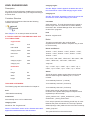
Version 2.0 CONFIG.TXT FILES
Each item of content that you create is required to have
a config.txt file. This file is a simple text file that is used to
describe the item of content to Trainz. TRS assets have
become far more flexible through the use of the new
mesh-table fields.
Because each different ‘KIND’ has a different config.
txt requirement, please refer to the appropriate KIND
descriptions on the following pages.
Example Config.txt File, General breakdown:
General
While there is great flexibility in the order of placement of
information in the config.txt file. It is important to ensure:
the correct number and orientation of brackets;
correct spaces within the statements are used; and
the correct lower case or capitalisation is used for names.
While the tabbing of information across the page is not
mandatory, it assists in the readability and debugging of
the file. The Content Dispatcher will format your config.txt
file in this manner. Do not remove any apparent blank line
at the top of such a file if you edit it, as it contains hidden
information used by Trainz.
kuid
Unique ID of this asset. The KUID contains basic creator
information. Refer to page 3 for information on KUID
format.
The New KUID2 format in TRS gives greater version
control and flexibility over asset updates. It eliminates the
need to give a new Content ID every time you the creator
releases a new version of the same asset.
Refer KUID2 information Page 3.
mesh-table
This is the new and preferred method of asset mesh
placement for most mesh asset types. It gives huge
control over mesh placement and animations.
There are some asset types that cannot use a meshtable. These include all Bridges, Tunnels, Rails,
Pantographs and other Spline Objects (eg. Fences or
Catenaries).
Important Note:
Any asset that uses a mesh-table will not be compatible
with pre-TRS versions of Trainz (i.e. Ultimate Trainz
Collection or UTC).
TRS will of course still read UTC assets.
Just remember that as with most major software
releases, backwards compatibility is usually achievable,
while forwards compatibility is often impossible.
default
Default is the ‘main’ mesh of the asset.
Blue text: Required tags Green text: Optional tags.
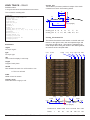
kuid <KUID2:1234:5678:1>
Note: This example
mesh-table
refers to a .lm file
{
(LOD file). The mesh
default
tag could also refer
{
to the mesh itself i.e..
mesh industry.lm
industry.im. If this
anim anim.kin
animation-loop-speed 1.0 were the case the
asset would not have
auto-create 1
LOD mesh reduction.
effects
{
0
{
kind name
fontsize 0.15
fontcolor 30,30,30
att a.name0
name name
}
1
{
kind corona
att a.coronawhite
frequency 1
directional 0
texture-kuid <KUID:-3:10111>
}
}
}
default-night
{
mesh nightwindows/nightwindows.im
night-mesh-base default
}
attachedanimation
{
mesh meshname/meshname.im
anim animname/animname.kin
auto-create 1
att a.pointname
att-parent default
animation-loop-speed 1.0
}
}
kuid-table
{
0 <KUID2:1234:6000:1>
1 <KUID2:1234:6001:3>
}
obsolete-table
{
0 <KUID:1234:5677>
}
preview-mesh-kuid <KUID:##:####>
username My Locomotive
description "You can have multiple lines
but no double quote characters in here.
Trainz automatically wraps this text. This
information is displayed with the model
on the Download Station. Please make the
description useful and informative."
region Australia
trainz-build 2.4
kind assetkind
category-class AD
category-region-0 AUS
category-region-1 UK
category-era-0 1960s
category-era-1 1970s
author Spock2204
organisation Trainz Thingz
contact-website http://www.auran.com/helpdesk
Trainz Railroad Simulator 2006 - The Content Creator’s Guide
Version 2.0 10 mesh
The ‘main’ mesh name. This may include a sub-path.
ie: mesh nightwindows/nightwindows.im, where the file
nightwindows.im has been placed in the subdirectory
nightwindows.
Use .im files exported from 3dsmax or gmax (as opposed
to .pm.) or reference an .lm file if you wish your asset
to have ‘Level of Detail’ mesh reduction. A pantograph
model still requires a .pm file.
Level of detail is a process of using different model
meshes, depending on how far the viewer is from the
model. A finer mesh is used for close up viewing in
Trainz. For further information please refer to Page 105.
anim
The animation file (.kin) exported from 3dsmax or gmax.
This may include a sub-path.
animation-loop-speed 1.0
This tag must be here if the asset is to animate when
placed. If this tag is not here when placed the animation
will not play by default, but may play if controlled by
script. A different value (e.g. 0.5, 2.0) may be used in the
tag to play the animation at a different speed from that
created in 3dsmax or gmax.
auto-create 1
The model is generated automatically when placed, or
when you load a map which includes the model. In some
instances you don’t want the mesh visible (as this may be
controlled through script). If auto-create is 0 the mesh will
not be visible when placed.
default-night
‘Main’ night window mesh on scenery and industry and
traincar assets. Modeled to the same 3d space as the
default mesh and is inserted at the default mesh origin.
Note that this example on the previous page has placed
the mesh in a subdirectory.
night-mesh-base default
This night mesh is linked to the default mesh and is
visible only at night. It is invisible if the ‘default’ mesh
is invisible, (if the auto-create 0 line were used so the
default mesh can be controlled by script).
att
The mesh (and animation if present) is inserted at a mesh
attachment point rather than the origin (without this line
the mesh is placed relative to the origin of the parent
model).
att-parent name
The tag tells Trainz in which mesh the attachment point is
located. The insertion attachment point is located within
the mesh ‘name’ , as listed in the config.txt.
kuid-table
A list of KUIDs required for this asset to function correctly.
A kuid-table must be included where the config.
txt references additional KUIDs, such as a bogey, or
a pantograph, including Auran built-in KUIDs. The
Download Station performs a search, and those found
are added to the download pack.
obsolete-table
The obsolete-table describes the asset’s revision history.
This field was used extensively for pre-TRS assets, as
each version required a unique Content ID. However
in order to make the content creators life a little easier,
Trainz now uses the KUID2 format which adds another
number as a version number. For KUID2 information see
Page 3.
TRS and the Trainz Download Station automatically
detects the most recent version of an asset whether it be
through the KUID2 Version ID or through the obsoletetable.
If there are no obsoletes, you can display the lines thus,
obsolete-table
{
}
or leave them out. While the blank entry may prompt
you to add obsoletes when they are required, they are
unnecessary lines in the config.txt file.
preview-mesh-kuid
Only add this to reference a different mesh for the
Surveyor preview window. This is useful when an asset
has a large bounding box. i.e. the Airport with it’s jet
animation. By using a different mesh it will fit better in
the preview window. It can also reduce the polycount on
screen.
username
The human-readable English name of this asset.
description
The human-readable multi-line English description of
this asset. It displays on the Download Station with your
model, so please make it useful and informative so others
may understand your model, for instance, entering what
the model is called and under which Region and category
it may be found in Surveyor, is very useful in finding an
installed model.
region
The country region to which this asset belongs. This
should be one of the Auran-supplied region names
trainz-build
The Trainz build is the version number for which
this asset was created. Refer to Page 3 for further
information.
kind
The asset kind. Must be one of the Auran-supplied asset
kinds. i.e. kind industry
category-class
The class code for this asset. Refer to Page 5.
category-region-0
A list of REGION codes or REGION GROUP codes,
Trainz Railroad Simulator 2006 - The Content Creator’s Guide
Version 2.0 11 starting at category-region-0 and progressing categoryregion-1, etc. with one code per tag. Do not miss out
numbers in the sequence 0, 1, 2 etc.
category-era-0
A list of ERA codes, starting at category-era-0 and
progressing category-era-1, etc. with one code per tag.
Do not miss out numbers in the sequence 0, 1, 2 etc.
other entries
You may enter data for additional information at the
bottom of the config.txt file, such as:
author, contact-email and contact-website are useful
information, particularly if a user has a question on your
models or would like to offer help or suggestions.
organisation name will show in Trainz in Railyard as the
organisation for the model, for instance if you use Joe’s
Trainz or Cripple Creek Logging Company.
Note: Effects
You do not have to use the 0,1,2... block naming
convention.
For the name effects described in the example, 0 could
easily be mainsign or something more relevant to your
model.
Setting unique names may be useful for script purposes,
so you can easily recognise a script reference for
instance.
Breakdown of KIND NAME:
kind name
The effect kind
fontsize
The size of the sign text
Note: Previous versions of Trainz config.txt also had an
entry for creators licence details. This is not necessary
in TRS2004, as your licence details are entered in the
Content Dispatcher program, and these details will be
transferred to your model config.txt file by the packaging
process. Having a separate entry in the config.txt file will
result in the licence details being entered twice in the
config.txt file, in the installed asset.
fontcolor
The colour of the sign text in r.g.b.
EFFECTS (optional mesh-table variables)
Points are placed in top view in 3dsmax/gmax. When
aligning the point in 3dsmax of gmax, click on the
Hierarchy - Affect Pivot Only option to examine the axis
direction, turn off the Affect Pivot Only selection, and
rotate the point itself to the correct orientation. Click
on the Affect Pivot Only option again to check the new
alignment. Make sure you rotate the point, not the axis.
EFFECT: KIND NAME
Some assets may have editable signs. When you set an
asset’s name in surveyor through the Edit Properties icon
(‘?’ icon) the signage can be set-up to automatically
update. The variables can be set for each sign.
att
The sign text insertion point (part of the mesh). The
attachment point must be orientated correctly in 3dsmax
or gmax.
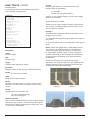
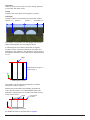
The diagram shows the correct orientation of the axis.
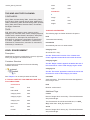
Typical Kind Name mesh table set-up
mesh-table
{
default
{
mesh industry.lm
auto-create 1
effects
{
0
{
kind name
fontsize 0.15
fontcolor 30,30,30
att a.name0
name name
}
1
{
kind name
fontsize 0.3
fontcolor 30,30,30
att a.name1
name name
}
}
}
}
name
The default text when placed
When name name is specified, it uses the asset’s
changeable name. Changed through the Edit Properties
icon (the ‘?’ icon) in Surveyor.
If name Graceland (for example) was used, the sign
would never be able to be changed even though the user
may have changed the asset’s name in Surveyor.
When you use the name tag, this name will appear in the
minimap. In some instances the names will be hard to
distinguish in a crowded map. For this reason, it may be
advisable to limit the use of the name tag to objects that
have a use for the attribute.
Trainz Railroad Simulator 2006 - The Content Creator’s Guide
Version 2.0 12 EFFECT: KIND CORONA
A corona is a ‘glow’ light effect. It is a simple texture
that is inserted at an attachment point within the mesh.
Coronas can be added to any asset that uses a meshtable.
Examples of coronas used in-game can be seen on the
Airport and Airport basic assets. The Jumbo Jet, the
Cessna and the Airport tower all use flashing coronas.
Breakdown of KIND CORONA:
Adding this tag over-rides this behavior, to make the
corona always face the screen – useful for scenery
objects.
object-size 0.15 (optional)
Size of the corona on the object when viewed up close
Defaults to 0.15 (i.e. 0.15m)
TRS released corona textures:
• Yellow/orange corona
Default (if no texture-kuid)
• Green corona
<KUID:-3:10110>
• Red corona
<KUID:-3:10112>
• White corona
<KUID:-3:10111>
kind corona (required)
The effect kind
att (required)
The corona insertion point in the main mesh.
Typical Kind Corona mesh-table set-up
mesh-table
{
default
{
mesh asset.lm
auto-create 1
effects
{
0
{
kind corona
att a.corona0
texture-kuid <KUID:-3:10110>
frequency 2
directional 0
object-size 0.20
}
1
{
kind corona
att a.corona1
}
}
}
}
EFFECT: KIND TEXTURE-REPLACEMENT
This effect was created for rolling stock items to swap the
visible texture of bulk loads (such as coal or woodchips).
If a coal car is set up to take any bulk load (which
includes woodchips) the ‘coal’ texture on the load
mesh will update to a ‘woodchips’ texture when it loads
woodchips.
For detailed information on the setup of rolling stock load
, see Page 107.
texture-kuid (optional)
Add this tag only when you want to specify your own
texture for the corona. It specifies the KUID of a kind
texture asset. See KIND TEXTURE.
If the texture-kuid tag is not present the corona will use
the default yellow/orange texture in TRS.
frequency 2 (optional)
This variable specifies the frequency in Hz (or ‘flashes’
per second). e.g. 1 for once per second, 0.5 for once
every 2 seconds, 2 for twice per second.
directional 0 (optional)
The default for coronas is to be aligned to the attachment
point to face the NEGATIVE Z direction. This is especially
useful for Traincars.
Trainz Railroad Simulator 2006 - The Content Creator’s Guide
Version 2.0 13 EFFECT: KIND ATTACHMENT
In TRS we now have the ability to attach a mesh into
another mesh by referencing it’s KUID through a meshtable. Prime examples are the TRS fixed-track assets.
Rather than having an arrow in each fixed-track asset
directory, we saved a lot of memory space by making the
config.txt file reference a KUID of that mesh. Therefore,
it only needed to be cached once. The mesh to be used
should only be of kind scenery or kind mesh.
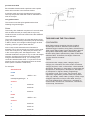
Kind Attachment example (fixed-track)
username FT 10 Deg 700m Rad
kind fixedtrack
kuid <KUID2:####:#######:1>
region Fixed track
type Fixed track
preview-mesh-kuid <KUID:-3:10099>
mesh-table
{
default
{
mesh 10-700.im
auto-create 1
effects
{
arrow0
{
kind attachment
att a.track0a
default-mesh <KUID:-3:10092>
surveyor-only 1
}
arrow1
{
kind attachment
att a.track0e
default-mesh <KUID:-3:10092>
surveyor-only 1
}
}
}
}
attached-track
{
track0
{
track <KUID:-1:15>
vertices
{
0 a.track0a
1 a.track0c
2 a.track0e
}
}
}
WARNING: Never cross-reference a kind attachment
KUID with the assets own KUID. Unless of course you
want to show your friends what an instant fatal error looks
like!
Fixed Track configuration used in the example
Arrow mesh config.txt (for reference)
kuid <KUID:-3:10092>
kind mesh
mesh-table
{
default
{
mesh arrow.im
auto-create 1
}
}
Breakdown of KIND ATTACHMENT:
Note that the example covers the information relating to
the attachment. Additional entries for category region,
era, trainz-build, etc. are necessary to make a complete
config.txt file.
type
Specify a type for the model that will be used in the
Surveyor menu drop down menu for Track or Object type.
kind attachment (required)
The effect kind
att (required)
The insertion point of the attached mesh. In the example
left, it is the origin of the ‘default’ mesh.
default-mesh <KUID2:####:#######:1> (required)
The KUID of the attached mesh.
surveyor-only 1 (optional)
Adding this means the attached mesh will only be visible
in Surveyor and not Driver.
For tracks, this is especially handy so you know when
it starts and ends, but it won’t be there when driving
around.
attached-track
Information on the track to be attached to the model by
Trainz. This includes a name for the track (track0), the
track KUID to be used, and attachment points placed
in the 3dsmax/gmax model to define the curve for the
attached track to follow.
The points use the a.name naming convention, any
names may be used, but using the “track” name
(a.track0a) for rails, and the “road” name (a.road0a)
is convienient. A specified road spline connection will
generate road traffic.
See Page 82 for more details on using the attachment
points and the special orientation of the axis at the ends
of the track.
Trainz Railroad Simulator 2006 - The Content Creator’s Guide
Version 2.0 14 EFFECT: KIND ANIMATION
KIND: HTML-ASSET
This effect is used when a mesh has a variety of
animations. Usually the animations will be controlled by a
script related to the asset.
A html-asset can be referenced from the scripts and
An example of the kind animation effect is the PB15
interior coalman. The script for this ties in the animations
with the coal requirements of the steam locomotive.
coalman
{
mesh coalman/coalman.im
auto-create 1
att-parent default
att a.coalman
effects
{
shovel
{
kind animation
anim coalman/coalman_shovel.kin
}
wave
{
kind animation
anim coalman/Coalman_wave.kin
}
Etc...
Breakdown of KIND ANIMATION:
kind animation (required)
The effect kind
anim (required)
Reference to the animation file (.kin)
from some of the Surveyor rules (i.e. you select the htmlasset by name, then type in the name of the *.html file in
the small edit box).
A typical example of KIND: html-asset in use is the ingame tutorial.
The general setup is very simple, you bundle your
config.txt along with one or more .html pages.
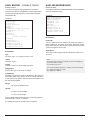
Config.txt
kind html-asset
username "my html page"
kuid <KUID2:####:#####:0>
tut_1a.html
<HTML>
<BODY>
<IMG SRC=’images/tut_1a.jpg’>
<BODY>
</HTML>
looped 1 (optional)
Use only if the animation is looping (repeating).
Default 0 (i.e. not looped).
speed 1 (optional)
Speed factor of the animation.
Default 1
2 = Double speed
0.5 = Half speed
The PB15 interior script can be viewed on:
Page 59,
The PB15 config.txt can be viewed on:
Page 55
Trainz Railroad Simulator 2006 - The Content Creator’s Guide
Version 2.0 15 KIND: PRODUCT
KIND: PRODUCT-CATEGORY
Texture swapping is possible for some rolling stock bulk
loading assets. Details of how the texture swapping is set
up is available on Page 107.
OVERVIEW
Products are the commodities that TRS compatible rolling
stock and industry assets process. TRS released products fall under one of four product-categories... Liquid
Load, Bulk load, Container or Passenger.
This document description is not only to give you the list
of products and product categories, but to also give you a
better understanding of how the products are used.
As product-categories are fundamentally different to
products, so too are they dealt with differently. A rolling
stock item may be able to pick up anything that falls
under a product-category or be limited to one or a few
products only.
For example, passenger cars can only take passengers,
where-as a gondola may be set up to take any bulk load
available.
IN-GAME VISUALISATION OF PRODUCTS.
In TRS, products can be displayed in a few ways:
1) An animated load representation.
This technique is used for bulk-category loads such as
coal or woodchip products both in industry and rolling
stock assets and for liquid loads through indicators
adjacent to storage tanks. The animation is non-looping.
Say we have an industry bulk load animation with the
frames running from 0 to 30. Empty will be at frame 0 and
full will be at frame 30.
TRS RELEASED
PRODUCT-CATEGORY LIST
(kind product-category)
2) Mesh attachment representation.
This technique is used for container-category loads such.
20ft and 40ft Containers, General Goods, Lumber and
Logs all use this technique. If a piece of rolling stock has
the potential to carry several product types (such as a
flat car), it is possible to set up the loads to be mutually
exclusive through it’s config. That is, if it has capacity of
one load, it cannot load any other product types.
3) ‘View details’ Driver information window display.
This (of course) can be used for all rolling stock items, but
specifically, it is the means to see the load of rolling stock
that cannot otherwise visually display it’s load. i.e.. Tank
Cars and enclosed Box Cars.
Box cars can be setup to take General Goods but are
constructed without load attachments.
Note: Tank cars and tenders may use a separate
animated ‘loader’ mesh to visualise the loading of liquids.
This is set up through the industry asset’s script and the
rolling stock item’s config. For script reference please
refer to index.chm found in \Trainz\scripts\docs directory.
Refer: KIND TRAINCAR for links to in-game examples,
descriptions and source files of the various types of
product compatible rolling stock.
Container Category Config.txt
Bulk Load Category Config.txt
kind product-category
kuid <KUID:-3:10040>
username "Bulk Load"
• Container
<KUID:-3:10042>
kind product-category
kuid <KUID:-3:10042>
username Container”
• Bulk Load
<KUID:-3:10040>
Passenger Category Config.txt
Liquid Load Category Config.txt
kind product-category
kuid <KUID:-3:10091>
username "Passenger"
kind product-category
kuid <KUID:-3:10044>
username "Liquid Load"
• Liquid Load <KUID:-3:10044>
• Passenger <KUID:-3:10091>
TRS RELEASED PRODUCT LIST (kind product)
Product Category Container:
• 20ft Container <KUID:-3:10014>
• 40ft Container
<KUID:-3:10041>
• General Goods
<KUID:-3:10013>
• Log
<KUID:-3:10001>
• Lumber
<KUID:-3:10003>
Product Category Liquid Load:
• Aviation Fuel<KUID:-3:10045>
• Crude Oil
<KUID:-3:10010>
• Diesel Fuel
<KUID:-3:10011>
• Petrol Fuel
<KUID:-3:10012>
• Water
<KUID:-3:10004>
Product Category Bulk Load:
• Coal
<KUID:44179:60013>
• Woodchips
<KUID:-3:10002>
Product Category Passenger:
• Passenger
<KUID:-3:10060>
Trainz Railroad Simulator 2006 - The Content Creator’s Guide
Version 2.0 16 PRODUCT CONFIG.TXT FILES
Legend:
kind product = New kind in TRS
product-category = KUID of applicable category for this product
instance-type resource = Used when there is no mesh (or only one mesh) is referenced in the mesh table (i.e. Liquids, Bulk loads etc.).
instance-type instance = Used when more than one mesh is in the mesh table i.e: Passengers, General Goods. 200 max.‘size’ per
Asset.
icon-texture = the in-game representation of the product when specifying the load type for a compatible rolling stock item (in
Driver).
mass = The physical mass of the product (or is that ‘virtual’ mass?)
• For Containers and Passengers this is calculated in kilograms/unit
• For Liquid and Bulk loads this is calculated in kilograms/litre
product-texture = The texture to be used with load ‘texture-replacement’. i.e. When a hopper loads woodchips instead of it’s
default load of coal. Refer to Load_Texture_Replacement.pdf for details.
allows-mixing 1 = Products with this tag may be combined in a single queue along with other products of the same category.
Eg. Lumber and 20ft Container on a flatcar. By default, allows-mixing is set to 0. Therefore by default, a queue will only allow one
product-category at a time.
- To look at allows-mixing from another angle, liquid products should never have allows-mixing enabled. Otherwise you have the
potential to mix petrol with oil all within the same tanker, and I don’t think cars like 2-stroke fuel too much!
We have placed Products and Product-Category files in the ‘scenarios’ directory. (This location is not mandatory though).
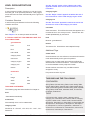
AVIATION FUEL PRODUCT
Aviation Fuel Product Config.txt
Aviation Fuel directory structure
kind product
kuid <KUID:-3:10045>
username "Aviation Fuel"
product-category <KUID:-3:10044>
instance-type resource
icon-texture "icon_texture.texture"
mass 0.800
mesh-table
{
}
icon_texture.texture.txt
Primary=AvGas.tga
Alpha=AvGas.tga
Tile=none
AvGas.tga
64x64 32 bit
COAL PRODUCT
Coal Product Config.txt
Coal directory structure
kind product
kuid <KUID:44179:60013>
username "Coal"
instance-type resource
product-category <KUID:-3:10040>
icon-texture "icon_texture.texture"
mass 0.860
product-texture "coal.texture"
mesh-table
{
}
icon_texture.texture.txt
Primary=Coal_icon.tga
Alpha=Coal_icon.tga
Tile=none
Trainz Railroad Simulator 2006 - The Content Creator’s Guide
Coal_icon.tga
64x64 32 bit
Version 2.0 17 GENERAL GOODS PRODUCT
General Goods Product Config.txt
kind product
kuid <KUID:-3:10013>
username "General Goods"
product-category <KUID:-3:10042>
instance-type instance
icon-texture “icon_texture.texture”
icon_texture.texture.txt
Primary=GeneralGoods.tga
Alpha=GeneralGoods.tga
Tile=none
GeneralGoods.tga
64x64 32 bit
mass 1400
mesh-table
{
default
{
mesh general_goods.im
}
crate2
{
mesh crate2.im
}
crate3
{
mesh crate3.im
}
crate4
{
mesh crate4.im
}
crate5
{
mesh crate5.im
}
crate6
{
mesh crate6.im
}
crate7
{
}
}
General Goods directory structure
icon_texture.texture.txt
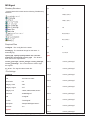
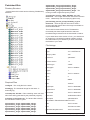
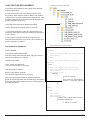
allows-mixing 1
Note: The circular icon is made using an opacity map as
the Alpha channel in the .tga file. This is a white circle
and black background to cut out the circular shape. Both
Primary and Alpha lines in the texture.txt file refer to the
same .tga file.
General Goods Mesh Dimensions
Length
Width
Height
Trainz Railroad Simulator 2006 - The Content Creator’s Guide
1.6 metres
1.6 metres
2.8 metres
Version 2.0 18 CRUDE OIL PRODUCT
Crude Oil Product Config.txt
Crude Oil directory structure
kind product
kuid <KUID:-3:10010>
username “Crude Oil”
product-category <KUID:-3:10044>
instance-type resource
icon-texture “icon_texture.texture”
mass 0.9
mesh-table
{
}
icon_texture.texture.txt
Primary=CrudeOil.tga
Alpha=CrudeOil.tga
Tile=none
CrudeOil.tga
64x64 32 bit
DIESEL FUEL PRODUCT
Diesel Fuel Product Config.txt
Diesel Fuel directory structure
kind product
kuid <KUID:-3:10011>
username "Diesel Fuel"
product-category <KUID:-3:10044>
instance-type resource
icon-texture "icon_texture.texture"
mass 0.830
mesh-table
{
}
icon_texture.texture.txt
Primary=Diesel.tga
Alpha=Diesel.tga
Tile=none
Diesel.tga
64x64 32 bit
Trainz Railroad Simulator 2006 - The Content Creator’s Guide
Version 2.0 19 20 FT CONTAINER PRODUCT
20ft Container Product Config.txt
kind product
kuid <KUID:-3:10014>
username "20ft Container"
product-category <KUID:-3:10042>
instance-type instance
icon-texture "icon_texture.texture"
mass 11000
mesh-table
{
default
{
mesh 20ft_container.im
}
20ft_Pil
{
mesh 20ft_Pil.im
}
20ft_Capital
{
mesh 20ft_Capital.im
}
20ft_matsui
{
mesh 20ft_matsui.im
}
20ft_Gen1
{
mesh 20ft_Gen1.im
}
}
icon_texture.texture.txt
Primary=Containers20ft.tga
Alpha=Containers20ft.tga
Tile=none
Containers20ft.tga
64x64 32 bit
20ft Container directory structure
allows-mixing 1
20 ft CONTAINER Mesh Dimensions
Length
Width
Height
Trainz Railroad Simulator 2006 - The Content Creator’s Guide
6.10 metres
2.44 metres
3.05 metres
Version 2.0 20 40 FT CONTAINER PRODUCT
40ft Container Product Config.txt
kind product
kuid <KUID:-3:10041>
username "40ft Container"
product-category <KUID:-3:10042>
instance-type instance
icon-texture "icon_texture.texture"
icon_texture.texture.txt
Primary=Containers40ft.tga
Alpha=Containers40ft.tga
Tile=none
Containers40ft.tga
64x64 32 bit
mass 22000
mesh-table
{
default
{
mesh 40ft_container.im
}
pils
{
mesh 40ft_pils.im
}
matsui
{
mesh 40ft_matsui.im
}
capital
{
}
blue
{
mesh 40ft_blue.im
}
}
40ft Container directory structure
icon_texture.texture.txt
allows-mixing 1
40 ft CONTAINER Mesh Dimensions
Length
Width
Height
Trainz Railroad Simulator 2006 - The Content Creator’s Guide
12.20 metres
2.44 metres
3.05 metres
Version 2.0 21 LUMBER PRODUCT
Lumber Product Config.txt
Lumber directory structure
kind product
kuid <KUID:-3:10003>
username "Lumber"
product-category <KUID:-3:10042>
instance-type resource
icon-texture "icon_texture.texture"
mass 8000
mesh-table
{
default
{
mesh lumberstack.im
}
}
icon_texture.texture.txt
Primary=Lumber.tga
Alpha=Lumber.tga
Tile=none
allows-mixing 1
Lumber.tga
64x64 32 bit
Log Mesh Dimensions
Lumber Mesh Dimensions
Length
Diameter
Length
Width
Height
6.0 metres
1.2 metres
PETROL FUEL PRODUCT
6.10 metres
2.13 metres
1.62 metres
Petrol directory structure
Petrol Fuel Product Config.txt
kind product
kuid <KUID:-3:10012>
username “Petrol Fuel”
product-category <KUID:-3:10044>
instance-type resource
icon-texture “icon_texture.texture”
mass 0.7
mesh-table
{
}
icon_texture.texture.txt
Primary=Petrol.tga
Alpha=Petrol.tga
Tile=none
Trainz Railroad Simulator 2006 - The Content Creator’s Guide
Petrol.tga
64x64 32 bit
Version 2.0 22 WATER PRODUCT
Water Product Config.txt
Water directory structure
kind product
kuid <KUID:-3:10004>
username "Water"
product-category <KUID:-3:10044>
instance-type resource
icon-texture "icon_texture.texture"
mass 1.0
mesh-table
{
}
icon_texture.texture.txt
Primary=Water.tga
Alpha=Water.tga
Tile=none
Water.tga
64x64 32 bit
WOODCHIPS PRODUCT
Woodchips Product Config.txt
Woodchips directory structure
kind product
kuid <KUID:-3:10002>
username "Woodchips"
instance-type resource
product-category <KUID:-3:10040>
icon-texture "icon_texture.texture"
mass 0.400
product-texture "woodchips.texture"
mesh-table
{
}
icon_texture.texture.txt
Primary=WoodChips_icon.tga
Alpha=WoodChips_icon.tga
Tile=none
Trainz Railroad Simulator 2006 - The Content Creator’s Guide
WoodChips_icon.tga
64x64 32 bit
Version 2.0 23 PASSENGER PRODUCT
Passenger Product is unique as it is controlled
very differently from other products. All passenger
animations, meshes and texture files are located
within the passenger directory. There was simply too
many to list in this doc.
icon_texture.texture.txt
Primary=passengers.tga
Alpha=passengers.tga
Tile=none
passengers.tga
64x64 32 bit
Passenger Product Config.txt - Extract
kind product
kuid <KUID:-3:10060>
name "Passenger"
product-category <KUID:-3:10091>
instance-type instance
icon-texture "icon_texture.texture"
mass 65
mesh-table
{
male-suit
{
mesh MaleSuit.im
effects
{
walk
{
kind animation
anim MaleSuit_walk.kin
looped 1
}
pissedoff
{
kind animation
anim MaleSuit_pissedoff.kin
}
lookatwatch
{
kind animation
anim MaleSuit_lookatwatch.kin
}
lookdownline
{
kind animation
anim MaleSuit_lookdownline.kin
}
shuffle
{
kind animation
anim MaleSuit_shuffle.kin
}
sitdown
{
kind animation
anim MaleSuit_sitdown.kin
}
sitdownloop1
{
kind animation
anim MaleSuit_sitdownloop1.kin
}
sitdownloop2
{
kind animation
anim MaleSuit_sitdownloop2.kin
}
standup
{
kind animation
anim MaleSuit_standup.kin
}
standloop1
{
kind animation
anim MaleSuit_standloop1.kin
looped 1
}
standloop2
{
kind animation
anim MaleSuit_standloop2.kin
looped 1
}
}
}
FemaleLongDress
{
mesh FemaleLongDress.im
effects
{
walk
kind animation
anim FemaleLongDress_walk.kin
looped 1
lookatwatch
{
Etc. Etc....
}
}
}
Etc. Etc....
FemaleLongDressFat
FemalemumBaby
Female_Pants
FemaleShortDress
FemaleSuit
KidFemale
KidMale
MaleFat
MaleShirt
MaleShorts
}
}
}
Trainz Railroad Simulator 2006 - The Content Creator’s Guide
Version 2.0 24 KIND: ENGINE
An engine file specifies a traincar’s performance and physics parameters. TRS now supports steam physics and thus,
steam engine files have additional fields for this. The following examples are of the SD40-2 Diesel locomotive and the
PB-15 Steam locomotive.
WARNING: ALTERING ENGINE FIGURES MAY
ENGINE FILE (SD40-2 Diesel locomotive)
RESULT IN UNDESIRED EFFECTS IN PERFORMNACE
Default location: C:\Program Files\Auran\TRS2004\Engines AND BEHAVIOR OF YOUR TRAINS. (MAKE BACK-UP
COPIES OF YOUR ENGINE CONFIG FILES!!)
kuid <KUID:-1:42004221>
kind engine
rem SD402
flowsize
{
trainbrakepipe 170000
epreservoirpipe 0.1
no3pipe 0.1
no4pipe 0.1
auxreservoirvent 0.1
auxreservoir_no3 0.1
auxreservoir_trainbrakepipe 0.1
autobrakecylindervent 0.1
auxreservoir_autobrakecylinder 0.1
equaliser_mainreservoir 0.06
equaliservent 0.06
equaliserventhandleoff 0.1
equaliserventemergency 0.1
no3pipevent 1.5
no3pipe_mainreservoir 0.1
compressor 10
trainbrakepipe_reservoir 1
trainbrakepipevent 0.06
no3pipe_autobrakecylinder 0.1
epreservoirpipe_autobrakecylinder 0.1
mainreservoir_ep 0.1
vacuumbrakepipe 0.1
vacuumbrakepipereleasevent 0.1
vacuumbrakepipevent 0.1
vacuumbrakereservoir_vacuumbrakepipe 0.1
vacuumbrakecylinder_vacuumbrakepipe 0.1
highspeedexhauster_vacuumbrakepipe 0.1
}
volume
{
scale 1
trainbrakepipe 0.2
epreservoirpipe 0.2
no3pipe 0.2
no4pipe 0.2
auxreservoir 0.0384678
autobrakecylinder 0.00969387
vacuumbrakepipe 0
vacuumbrakereservoir 0
vacuumbrakecylinder 0
mainreservoir 0.9
equaliser 0.5
independantbrakecylinder 0.0103239
}
pressure
{
scale 1
compressor 0.00946941
mainreservoir 0.00946941
highspeedexhauster 0
brakepipe 0.00736041
brakeinitial 0.00693861
brakefull 0.0044992
indbrakefull 0.005075
trainbrakepipe_start 0.00553261
epreservoirpipe_start 0
no3pipe_start 0
no4pipe_start 0
auxreservoir_start 0.00553261
autobrakecylinder_start 0.00560291
vacuumbrakepipe_start 0
vacuumbrakereservoir_start 0
vacuumbrakecylinder_start 0
mainreservoir_start 0.00946941
equaliser_start 0.00553261
independantbrakecylinder_start 0.00560291
}
mass
{
scale 1
fuel 6.2156e+006
}
motor
{
resistance 1.7
adhesion 7
maxvoltage 600
maxspeed 40
brakeratio 55000
max-accel 3500
max-decel 9000
axle-count 6
surface-area 80
moving-friction-coefficient .03
air-drag-coefficient .00017
}
throttle-power
{
0 {
0
}
1 {
}
2 {
0
}
0
0
2.2
4.4
6.6
8.8
13.3
22.2
2.2
4.4
6.6
8.8
13.3
22.2
107
224
62
34
31
25
18
11
125
68
62
50
36
22
Continues next page...
Trainz Railroad Simulator 2006 - The Content Creator’s Guide
Version 2.0 25 3 {
}
4 {
0
}
6 {
}
7 {
0
0
}
8 {
}
0
}
5 {
0
}
dynamic-brake
0
2.2
4.4
6.6
8.8
13.3
2.2
4.4
6.6
8.8
13.3
22.2
2.2
4.4
6.6
8.8
13.3
22.2
35.5
2.2
4.4
6.6
8.8
13.3
22.2
35.5
2.2
4.4
6.6
8.8
13.3
22.2
35.5
44.4
2.2
4.4
6.6
8.8
13.3
22.2
35.5
44.4
373
448
618
747
872
996
187
125
93
75
53
249
166
125
100
71
45
309
206
154
123
88
56
36
374
249
187
149
107
68
44
436
291
218
174
124
79
51
42
498
332
249
199
142
90
58
48
{
0 {
}
0
0
1 {
}
1.333
2
5
10
12
0
30
25
15
0
2 {
}
1.333
3
10
14
15
0
50
35
20
0
1.333
3
10
17
22
0
3 {
}
4 {
}
5 {
}
6 {
}
7 {
}
8 {
}
}
Trainz Railroad Simulator 2006 - The Content Creator’s Guide
40
20
0
60
1.333 0
4
80
10
60
20
20
25
0
1.333
5
10
25
29
0
1.333
5
10
29
32
0
1.333
5
10
32
36
0
1.33
5
10
36
40
0
70
25
0
80
70
0
100
60
0
100
50
0
190
250
250
250
Version 2.0 26 ENGINE FILE (PB15 locomotive)
Default location - C:\Program Files\Auran\TRS2004\Engines
kuid <KUID:44179:51002>
kind steam-engine
rem PB15
epbrakes 1
flowsize
{
trainbrakepipe 170000
epreservoirpipe 0.1
no3pipe 0.1
no4pipe 0.1
auxreservoirvent 0.1
auxreservoir_no3 0.1
auxreservoir_trainbrakepipe 0.1
autobrakecylindervent 0.1
auxreservoir_autobrakecylinder 0.1
equaliser_mainreservoir 0.06
equaliservent 0.06
equaliserventhandleoff 0.1
equaliserventemergency 0.1
no3pipevent 1.5
no3pipe_mainreservoir 0.1
compressor 5
trainbrakepipe_reservoir 1
trainbrakepipevent 0.06
no3pipe_autobrakecylinder 0.1
epreservoirpipe_autobrakecylinder 0.1
mainreservoir_ep 0.1
vacuumbrakepipe 0.1
vacuumbrakepipereleasevent 0.1
vacuumbrakepipevent 0.1
vacuumbrakereservoir_vacuumbrakepipe 0.1
vacuumbrakecylinder_vacuumbrakepipe 0.1
highspeedexhauster_vacuumbrakepipe 0.1
}
volume
{
scale 1
trainbrakepipe 0.2
epreservoirpipe 0.2
no3pipe 0.2
no4pipe 0.2
auxreservoir 0.0384678
autobrakecylinder 0.00969387
vacuumbrakepipe 0
vacuumbrakereservoir 0
vacuumbrakecylinder 0
mainreservoir 1.0
equaliser 0.5
independantbrakecylinder 0.0103239
}
pressure
{
scale 1
compressor 0.00946941
mainreservoir 0.00946941
highspeedexhauster 0
brakepipe 0.00595441
brakeinitial 0.00560291
brakefull 0.00398601
indbrakefull 0.00398601
trainbrakepipe_start 0.00440781
epreservoirpipe_start 0
no3pipe_start 0
no4pipe_start 0
auxreservoir_start 0.00504051
autobrakecylinder_start 0.00489991
vacuumbrakepipe_start 0
vacuumbrakereservoir_start 0
vacuumbrakecylinder_start 0
mainreservoir_start 0.00876641
equaliser_start 0.00440781
independantbrakecylinder_start 0.00489991
}
mass
{
scale 1
fuel 6.2156e+006
}
motor
{
resistance 1.3
adhesion 2.5
maxvoltage 600
maxspeed 21
brakeratio 55000
max-accel 1500
max-decel 5000
throttle-notches 32
axle-count 4
surface-area 150
moving-friction-coefficient 0.01
air-drag-coefficient 0.0001
}
throttle-power
{
0 {
0
0
}
1 {
}
2 {
}
0
5
10
12
35
28
18
0
0
5
10
15
30
85
70
60
30
0
3 {
}
4 {
}
0
5
10
15
30
140
93
70
62
0
2
5
10
15
30
187
109
93
87
0
Continues next page...
Trainz Railroad Simulator 2006 - The Content Creator’s Guide
Version 2.0 27 5 {
}
6 {
0
5
10
15
30
0
5
10
15
30
}
7 {
0
5
10
15
30
}
281
218
109
87
0
343
265
172
125
0
359
343
187
156
0
8 {
0
436
3.5
429
4.25 425
5
408
10
234
15
172
21
0
}
}
dynamic-brake
0 {
}
1 {
}
2 {
}
3 {
}
4 {
}
{
0 0
1.333 0
2 30
5 25
6 15
7 0
1.333 0
2 50
5 35
7 20
8 0
1.333 0
2 60
5 40
7 20
8 0
1.333 0
3 80
7 60
10 20
12 0
5
}
6
}
7
}
8
}
}
{
{
{
{
1.333 0
5 90
9 70
12 25
15 0
1.333 0
5 150
9 80
13 70
17 0
1.333 0
5 200
10 100
16 60
19 0
1.33 0
5 200
10 150
18 50
21 0
steam
{
;
;
;
;
firebox-volume
1000.0
firebox-to-boiler-heat-flow 0.055
firebox-efficiency
0.995
boiler-volume
water-injector-rate
3000.0
4.0
westinghouse-volume
main-reservoir-volume
100
50.0
cylinder-volume
piston-volume-min
piston-volume-max
piston-area
piston-angular-offsets
piston-to-atmosphere-flow
50.0
1.48
68.7
0.177
0.1
0.0021
safety-valve-low-pressure 956.0
safety-valve-low-flow
0.011
safety-valve-high-pressure1010.0
safety-valve-high-flow
0.2
}
max-fire-coal-mass
max-fire-temperature
shovel-coal-mass
burn-rate
fuel-energy
50.0
1873.0
2.0
0.0001
100.0
boiler-to-piston-flow
0.0017
Trainz Railroad Simulator 2006 - The Content Creator’s Guide
pressure in kPa
flow sizes (nominal figure)
volume in L
mass in kg
Version 2.0 28 DIESEL ENGINE FILE BREAKDOWN
kind – asset type
rem – comment used to display engine name
flowsize
rate of flow through pipes, generally leave these settings:
trainbrakepipe 170000
epreservoirpipe 0.1
no3pipe 0.1
no4pipe 0.1
auxreservoirvent 0.1
auxreservoir_no3 0.1
auxreservoir_trainbrakepipe 0.1
autobrakecylindervent 0.1
auxreservoir_autobrakecylinder 0.1
equaliser_mainreservoir 0.06
equaliservent 0.06
equaliserventhandleoff 0.1
equaliserventemergency 0.1
no3pipevent 1.5
no3pipe_mainreservoir 0.1
compressor 10
trainbrakepipe_reservoir 1
trainbrakepipevent 0.06
no3pipe_autobrakecylinder 0.1
epreservoirpipe_autobrakecylinder 0.1
mainreservoir_ep 0.1
vacuumbrakepipe 0.1
vacuumbrakepipereleasevent 0.1
vacuumbrakepipevent 0.1
vacuumbrakereservoir_vacuumbrakepipe 0.1
vacuumbrakecylinder_vacuumbrakepipe 0.1
highspeedexhauster_vacuumbrakepipe 0.1
volume – size of pipes and appliances
scale 1
multiplies volume by given value, generally leave this setting.
trainbrakepipe……………………….. 0.2
brake pipe volume
epreservoirpipe ………………………0.2
For electro pneumatic braking - not currently in use, generally leave this setting
vacuumbrakereservoir……………… 0
vacuumbrakecylinder……………….. 0
For vacuum braking - not currently in use, generally leave this setting
mainreservoir …………………………0.9
Main reservoir volume.
equaliser ………………………………0.5
Equalising reservoir volume
independantbrakecylinder……………0.0103239
Loco brake cylinder volume
pressure
Brake system pressures.
scale 1
Multiplies pressure by given value, generally leave this setting.
Compressor…………………………...0.00946941 (120psi expressed in grams/m³)
Compressor maximum pressure.
mainreservoir………………………….0.00946941
Main reservoir maximum pressure
highspeedexhauster …………………0
For vacuum braking - not currently in use, generally leave this setting
brakepipe ………………………….….0.00736041 (80psi expressed in grams/m³)
Brake pipe pressure when fully charged
brakeinitial………………………….…0.00693861 (72psi expressed in grams/m³)
Brake pipe pressure after initial service reduction (for self lapping brakes)
brakefull ………………………….…...0.0044992
(57psi expressed in grams/m³)
Brake pipe pressure after full service reduction (for self lapping brakes)
no3pipe………………………………. 0.2
Independent brake pipe
indbrakefull …………………………...0.005075
Brake cylinder pressure for independant brake service.
no4pipe ……………………………….0.2
Bail pipe - not currently in use, generally leave this setting
trainbrakepipe_start …………………0.00553261
Brake pipe pressure on loading the game.
Auxreservoir…………………………..0.0384678
Auxiliary reservoir volume.
epreservoirpipe_start ………………..0
For electro pneumatic braking - not currently in use, generally leave this setting
Autobrakecylinder…………………… 0.00969387
Brake cylinder volume.
vacuumbrakepipe …………….……...0
no3pipe_start …………………………0
no4pipe_start ………………………...0
Generally leave these settings.
Trainz Railroad Simulator 2006 - The Content Creator’s Guide
Version 2.0 29 auxreservoir_start…………………….0.00553261
Auxiliary reservoir pressure on loading the game.
autobrakecylinder_start ……………..0.00560291
Train brake cylinder pressure on loading the game.
vacuumbrakepipe_start ……………..0
vacuumbrakereservoir_start ………..0
vacuumbrakecylinder_start ………....0
For vacuum braking - not currently in use, generally leave this setting
mainreservoir_start …………………..0.00946941 (100psi expressed in grams/m³)
Main Reservoir pressure on loading the game.
equaliser_start ……………………….0.00553261
Equalising Reservoir pressure on loading the game.
independantbrakecylinder_start ……0.00560291
Locomotive brake cylinder pressure on loading the game.
mass
scale 1
Multiplies fuel mass by given value, not currently in use, generally leave this setting.
fuel …………………………………….6.2156e+006
Fuel level, not currently in use, generally leave this setting.
motor
resistance………………………….…..1.7
Power figure for DCC, higher resistance value=less power
adhesion ……………………………....2.5
Adhesion parameter, higher value=greater adhesion
maxvoltage …………………………...600
Generally leave this setting
maxspeed ………………………….….40
Maximum speed for DCC, expressed in metres per second.
Brakeratio…………………………….. 55000
Brake force for pressure reduction
max-accel……………………………..3500
max-decel……………………………..9000
Parameters for DCC acceleration & deceleration.
axle-count……………………………..4
Resistance – axle count
surface-area …………………………80
Resistance – surface area
moving-friction-coefficient…………...0 .03
Resistance – moving friction
air-drag-coefficient…………………...0.00017
Resistance – air drag
throttle-power
Acceleration variables in cabin mode
1 { 0
30
5
25
10
15
12
0
}
= notch number (1)
= At speed 5, acceleration = 25
dynamic-brake
Deceleration variables while dynamic braking in cabin mode
1 { 1.3330
2
30 5
25
10
15
12
0
}
= notch number (1)
= At speed 5, deceleration = 25
Equalisation of Pressures There is a point at which
no further brake pipe pressure reduction will result in
increased braking effort, this is known as full application
or equalisation of pressures.
Imagine you made a 26 psi reduction when operating a
loco with a 90psi brake pipe. 90psi in the train pipe minus
26psi reduction equals 64 psi in the pipe. Due to the 2.5:
1 ratio of auxiliary reservoir volume to brake cylinder
volume, the 26 psi reduction puts 64 psi into the brake
cylinder.
As the pressure in the reservoir and the pressure in the
cylinder is now equal, no more air will flow into the brake
cylinder; and making a further reduction in brake pipe
pressure will have no effect on braking.
Equalisation occurs at different pressures, depending on
the train pipe feed pressure.
100 psi pipe (e.g. the UK locos - 7 bar) equalisation at 71
psi.
90 psi pipe (e.g. the US locos) equalisation at 64 psi.
72 psi pipe (e.g. French & Queensland locos)
equalisation at 49 psi.
The easiest way to set your custom content to the desired
brake pipe feed pressure is to copy the entire pressure
section from the config of a loco that uses the pressure
you desire.
Trainz Railroad Simulator 2006 - The Content Creator’s Guide
Version 2.0 30 Note: Converting PSI to Grams /m cubed…
e.g. 90psi... (90+14.7).0000703
104.7 x .0000703=.00736041
STEAM ENGINE FILE BREAKDOWN
Generally identical to a diesel engine file with the addition
of the following:
Units:
Pressure in kPa
Volume in Litres
Mass in kg
Flow sizes (nominal figure)
Temperature degrees Kelvin
steam
firebox-volume……………… 1000.0
Physical volume of firebox in Litres.
firebox-to-boiler-heat-flow...…0.055
Rate of heat flow from firebox to boiler and viceversa.
firebox-efficiency………..……0.995
Atmosphere leakage. 1.0 = No leakage.
boiler-volume……………..…..3000.0
Physical volume of boiler in Litres.
water-injector-rate………...….4.0
Water injection rate into boiler in Litres/second.
westinghouse-volume....….…100
Westinghouse volume in Litres.
safety-valve-low-flow……...…0.011
Lower pressure valve release. Nominal hole size.
safety-valve-high-pressure....1010.0
When boiler pressure hits this value in kPa the
safety-valve-high-flow release is initiated. (below)
safety-valve-high-flow…….…0.2
Higher pressure valve release. Nominal hole size.
max-fire-coal-mass…....….…50.0
The maximum mass of coal the firebox can take in
kilograms.
max-fire-temperature…......…1873.0
Maximum heat obtainable.
(Kelvin scale temperature)
shovel-coal-mass……........…2.0
Amount of coal in one shovel load in kilograms.
burn-rate……………….......…0.0001
Coal consumption rate.
fuel-energy………………...…100.0
Relative energy in kilojoules per kilogram of coal.
boiler-to-piston-flow…….....…0.0017
Relative energy.
COMMENTS AND NEW TAGS
The above information is specific to the small PB 15
locomotive. A Big Boy locomotive for example, is at the
other size extreme for locomotives. The following is
an expanded discussion for other size locomotives, of
additional tags and options, with some examples.
piston-volume-min……..….…1.48
The volume of the space in the cylinder ahead of the
piston at the end of a full stroke.
firebox-volume
westinghouse-volume
main-reservoir-volume
piston-volume-max….........…68.7
The volume of the space in the cylinder ahead of the
piston at the start of a full stroke.
The above tags are currently not implemented.
piston-area………….....…..…0.177
The cross section of one piston in m2. It is assumed
there is one piston only on each side of the
locomotive.
piston-angular-offsets……...…0.1
See the additional notes in Comments and New
Tags
piston-to-atmosphere-flow…..0.0021
Atmospheric leakage from piston. Nominal hole size.
safety-valve-low-pressure…..956.0
When boiler pressure hits this value in kPa the
safety-valve-low-flow release is initiated. (below)
boiler-volume……………..…..00000.0
maximum-volume…………….00000.0
minimum-volume……………..00000.0
These above three tags are used together. Because of
the way fireboxes are handled in Trainz, basing these
figures on the actual litre volume of the boiler results in
the water being used too quickly.
All three values for real world boiler size should be
multiplied by 10 to give a more realistic consumption
rate.
maximum-volume - this volume should be 90% of the
boiler-volume, this simulates the steam space left over
the top of the water.
minimum-volume - this value should be 90% of the
maximum-volume, this represents the working low water
level in the boiler.
Trainz Railroad Simulator 2006 - The Content Creator’s Guide
Version 2.0 31 Alternatively there are three (3) sets of figures that cover
all boilers, this is a relatively coarse setting and as such a
broad range of vessels can be “blanket” covered:
Small locos with grate areas under 10 Sq metres
boiler-volume
minimum-volume
maximum-volume
47500.0
37750.0
40500.0
Large locos with a grate area over 25 Sq metres
boiler-volume
minimum-volume
maximum-volume
95000.0
73000.0
81000.0
initial-boiler-temperature.........380
This line has been added to allow the locomotives to be
at an almost ready to go state when the session starts.
Then, in conjunction with the firebox-to-boiler-heat-flowidle and burn-rate-idle values, it allows a locomotive to
stay in this state with the water and fire left for as long as
is required, i.e. on stand by. This is nominally 80 - 90% of
working pressure.
Full pressure is not required initially, as it only takes a
short time to get the fire brightened up, and the boiler
to pressure from this point. Most locomotives will go to
blowing off pressure with a press of the N key to turn
the blower on and a single tap on the space bar for a
shovel of coal, remembering that in the real world it is
considered very bad practice to have the locomotive
blowing the safeties, a waste of resources and energy,
and shows a lack of control by the crew.
The following table may be useful as a comparison
of initial-boiler-temperature and related pressures.
Temperature values (e.g.369) are in degrees Kelvin, see
the important Notes to the right of the table:
369 380 381 389 389.6 401 404 409 410 411 412 413 424 426 455 = 869kpa / 140psi
= 1008kpa / 146psi
= 1021kpa / 148psi
= 1122kpa / 163psi
= 1129kpa / 165psi
= 1275kpa / 185psi
= 1297kpa / 188psi
= 1374kpa / 199psi
= 1387kpa / 201psi
= 1401kpa / 203psi
= 1410kpa / 204psi
= 1414kpa / 206psi
= 1564kpa / 227psi
= 1589kpa / 230psi
= 1956kpa / 284psi
Determines the number of power impulses a locomotive
has for each wheel revolution, thus simulating the
prototype.
For a 2 cylinder locomotive use:
piston-angular-offsets
0.0174,1.5254,3.0333,4.5413
37500.0
28500.0
32500.0
Medium locos with a grate area 10 to 25 Sq metres
boiler-volume
minimum-volume
maximum-volume
piston-angular-offsets
= 460.3K
= 466.5K
= 467.0K
= 471.5K
= 471.8K
= 478.2K
= 479.8K
= 482.6K
= 483.2K
= 483.7K
= 484.3K
= 484.8K
= 490.9K
= 492.4K
= 508.2K
For a 3 cylinder locomotive use:
piston-angular-offsets
0.0174,1.065,2.107,3.061,
4.206,5.253
For a 4 cylinder locomotive use:
piston-angular-offsets
0.0174,0.8028,1.5254,2.3736,
3.0333,3.9444,4.5413,5.5152
These are expressed in radians (3.1416 radians = 360
degrees) and the values were determined so as to
achieve the smoothest operation possible, they have
been deliberately kept away from the sound impulse
point. It is recommended not to alter these tested
settings.
firebox-to-boiler-heat-flow-idle 0.003
burn-rate-idle
0.003
These two tags in conjunction with the initial-boilertemperature tag are the “brakes” for the boiler when the
locomotive is in standby mode, i.e. unattended, and they
don’t need any alteration, unless you desire the boiler to
run out of water or fire when parked unattended.
See the separate Content Creation Tips and Tricks
document for a discussion on how a locomotive using
these tags and values may be tuned to give realistic
performance.
Notes on the Initial Boiler Temperature Table:
Trainz does not actually use correct Kelvin temperatures
for the input to the initial-boiler-temperature tag value, a
correction factor is applied to these values in Trainz.
The bolded values in the left column are to be entered in
the tag.
The Kelvin values in the right hand column of the table
are more representative of the actual Kelvin temperatures
associated with the pressures shown.
If you know the initial boiler pressure, for example
1275kpa, enter 401 as the value in the tag.
If you know the initial boiler temperature, for example
467K, enter 381 as the value in the tag.
Trainz Railroad Simulator 2006 - The Content Creator’s Guide
Version 2.0 32 KIND: BOGEY
Default location:
C:\Program Files\Auran\TRS2004\World\Custom\bogeys
A ‘bogey’ is a term used for a locomotive or rolling stock
wheel mechanism. In some countries these are known as
‘Trucks’.
Referenced by the bogey tag in a traincar config.txt
Config.txt:
kuid <KUID2:###:#####:#>
kind bogey
animdist 2.1
mesh-table
{
default
{
mesh Car_bogey.lm
auto-create 1
}
shadow
{
mesh Car_bogey_shadow/Car_bogeyshadow.im
}
}
obsolete-table
{
}
username mybogey
description " "
trainz-build 2.0
category-class AC
category-region-0 AT
category-era-0 1980s
direct-drive 1
BREAKDOWN OF CONFIG.TXT
animdist
Leave this tag out if the bogey is not animated.
The distance traveled in meters by the bogey in 1 second
(30 frames) of animation. This figure would normally
be the circumference of the wheel (multiply the wheel
diameter by Pi which is 3.1416). If for instance there are
large driving wheels and smaller wheels used on the
pilot, of a steam locomotive, you will need to work out the
correct value for each bogey using the angular rotation
for 30 frames.
For an example calculation see Page 113.
Note: Bogey animations (exported from gmax or 3dsmax)
are called “anim.kin”.
In previous versions of Trainz, the following lines were
used in the config.txt file anim anim.kin
animation-loop-speed 1.0
These are no longer required. Trainz automatically
recognises the anim.kin file for the bogey. These lines if
used in the config.txt will generate an error log message
about incorrectly specified animation being ignored.
Refer to Chapter 4 - Bogeys for modeling guidelines,
Page 112.
direct-drive
Steam Locomotive animated driving bogeys only.
Important:
When direct-drive is present, the bogey animation is
linked to the steam piston and physics system. If this
tag is not included the piston and steam sounds will
not work!
Note: The example on the left shows a bogey with LOD
mesh reduction. UTC setup (without a mesh-table) will
of course still work but we do recommend setting up the
config with a mesh-table.
Refer Enginesound - Steam Page 40.
Reversing bogey animation:
If a front bogey is attached to a train car, and the same
bogey is to be used at the rear, but rotated 180 degrees,
this is accomplished by entering bogey-r in the config.txt
file for the train car, for that bogey.
If the bogey has animation, the animation will have
reversed orientation (this will cause bogey animation to
play in reverse). The attachment point for the bogey also
has to be rotated 180 degrees in 3dmax/gmax to correct
the rotation direction.
Refer to Page 37 for description of other config.txt file
entries.
Trainz Railroad Simulator 2006 - The Content Creator’s Guide
Version 2.0 33 KIND: TRAINCAR
Default location:
C:\Program Files\Auran\TRS2004\World\Custom\trains
A ‘traincar’ is a Locomotive or Rolling stock asset. One of
the main features of TRS is that traincars, (namely rolling
stock), can now have the ability to transport commodities
(products) and to interact with compatible industry assets.
As there are a range of products and product
categories, each rolling stock type is set up differently to
accommodate the load type both visual representation
and through it’s config. For this reason we have made
available individual downloads for the various rolling
stock types on Page 38.
Refer:
KIND: PRODUCT & KIND: PRODUCT-CATEGORY
The following example is a config.txt file from a
locomotive. Note the mesh-table and animation setup.
kuid <KUID2:####:#####.#>
category-class AC
category-region-0 AU
category-era-0 1970s
category-era-1 1980s
category-era-2 1990s
category-era-3 2000s
kuid-table
{
}
obsolete-table
{
}
mesh-table
{
default
{
mesh loco_body/loco_body.lm
auto-create 1
}
shadow
{
mesh loco_shadow/loco_shadow.im
}
fan1
{
mesh loco_body/fan/fan.im
anim loco_body/fan/fan.kin
auto-create 1
att a.fan0
att-parent default
animation-loop-speed 1.0
}
fan2
{
mesh loco_body/fan/fan.im
anim loco_body/fan/fan.kin
auto-create 1
att a.fan2
att-parent default
animation-loop-speed 1.0
}
}
default-night-forward
{
mesh loco_body/night/night.im
auto-create 0
att a.bog0
att-parent default
}
bogey <KUID:####:#####>
bogey-1 <KUID:####:#####>
bogey-2-r <KUID:####:#####>
pantograph <KUID:###:#####>
interior <KUID:####:#####>
engine 1
name Electric Loco
mass 37000
company Queensland Rail
origin AU
kind traincar
fonts 2
cabinsway 0
enginespec <KUID:####:#####>
enginesound <KUID:####:#####>
hornsound <KUID:####:#####>
smoke_shade 0.3
smoke_random 2
smoke_slowlife 1
smoke_fastlife 6
smoke_height 7
smoke_fastspeed 4
smoke0
{
attachment a.exhaust0
mode speed
enabled 1
maxspeedkph 120
file "lospeed.tfx"
}
smoke1
{
attachment a.exhaust1
mode speed
enabled 1
maxspeedkph 120
file "hispeed.tfx"
}
description " "
Trainz Railroad Simulator 2006 - The Content Creator’s Guide
Version 2.0 34 TRAINCAR CONFIG.TXT BREAKDOWN
Some config.txt tags are not explained below. Others are
covered in the general config.txt explanation, see
Page 12.
default-night-forward
The name for a submesh attached to a locomotive, to
show a beam of light for example, in the direction of
movement of the locomotive. Trainz recognises the name
and turns on the correct mesh depending on the running
direction.
Note in the example the use of auto-create 0 to make
the mesh invisible when placed. The mesh will be visible
when the light switch is activated.
bogey
The bogey KUID number (default for a.bog0 and a.bog1)
bogey-1
The bogey KUID number for a.bog1 (Used only if
different to a.bog0)
bogey-r and bogey-1-r
Used instead of ‘bogey’ and bogey-1. The bogey
will have reversed orientation. Note: This will
cause bogey animation to play in reverse unless
the attachment point for the bogey is also rotated
180 degrees in 3dmax/gmax.
pantograph
The pantograph KUID number inserted at a.pant0,
a.pant1, etc. Use this tag only when needed.
interior
Kuid number of the required interior. Inserted at
a.cabfront or a.cabback. Use this tag only when needed
e.g.locomotives.
engine
States type of traincar.
0 = Rolling stock
1 = Locomotive
mass
Mass in kilograms
company
The Locomotive or car owner
origin
The Country Abbreviation
kind
Traincar
fonts
Indicates how many types of numbering fonts used, e.g.
0 = no fonts used
2 = two fonts
Digit textures (digit_1a.tga to digit_6a.tga and digit_1b.tga
to digit_6b.tga) replaced automatically with alphanumber
textures (alphanumber_0a to alphanumber_9a and
alphanumber_0b to alphanumber_9b) as numbers are
changed via the Surveyor Trains tab - ‘Edit Properties’
icon (the ‘?’ icon).
Enginespec
References the engine KUID number. This specifies the
driver physics boundaries for the traincar.
Refer KIND: ENGINE Page 27.
Default location
C:\Program Files\Auran\TRS2004\Engines\
enginesound
References the KUID number for the traincar’s sound.
Refer Chapter 3, KIND: ENGINESOUND Page 39.
Default location
C:\Program Files\Auran\TRS2004\World\Custom\
enginesound\
hornsound
References the KUID number for the traincar horn sound.
Refer Chapter 3, KIND: HORNSOUND Page 41.
Default location
C:\Program Files\Auran\TRS2004\World\Custom\
hornsound\.
cabinsway “strength”
strength is a floating point number. This controls the
magnitude of the random roll in internal view. The roll is
also affected by the speed of the train. Negative numbers
are not used.
0 = no sway
larger numbers (2, 6 etc) = larger sway.
smoke0
Sets boundaries for smoke, steam, vapor and similar
effects. Refer: Smoke Effects Chapter 5 on Page 122
description " "
Description of the model for ‘Railyard’ information and
display on the Download station with the model.
light_color
RGB headlight colour. eg. 255,255,255
This is the color of the train headlight corona, not the
lighting itself.
Please download the examples and source files from the
links on the next page.
1 = one font
Digit textures (digit_1.tga to digit_6.tga) replaced
automatically with alphanumber textures (alphanumber_0
to alphanumber_9) as numbers are changed via the
Surveyor Trains tab - ‘Edit Properties’ icon (the ‘?’ icon).
Trainz Railroad Simulator 2006 - The Content Creator’s Guide
Version 2.0 35 TRAINCAR EXAMPLES
Please download the following rolling stock descriptions
and examples for your reference.
COAL HOPPER
A Coal Hopper is a typical example of a rolling stock item
that uses an animated load representation. This asset
also has animated opening doors and particle effects,
each controlled by a script.
Download a zipped pack containing a PDF description,
in-game files and source 3dsmax 4 and gmax files of the
TRS asset ‘Coal hopper’
http://www.auran.com/TRS2004/downloads/contentcreation/
TRS2004_Coal_Hopper.zip
TANK CAR
A Tank Car is a typical example of a rolling stock item that
can take a liquid load.
Download a zipped pack containing a PDF description,
in-game files and source 3dsmax 4 and gmax files of the
TRS asset ‘GATX Oilco Tank Car’
http://www.auran.com/TRS2004/downloads/contentcreation/
TRS2004_Tank_Car.zip
CONTAINER FLATCAR
The Container Flat is a typical example of a rolling stock
item that can take a variety of loads by attachment.
Download a zipped pack containing a PDF description,
in-game files and source 3dsmax 4 and gmax files of the
TRS asset ‘Container Flat’ Car
http://www.auran.com/TRS2004/downloads/contentcreation/
TRS2004_Container_Flat.zip
BOX CAR
The Box Car is a typical example of a rolling stock item
that can take the General Goods Product without having
attachments.
Download a zipped pack containing a PDF description,
in-game files and source 3dsmax 4 and gmax files of the
TRS asset ‘PRR 40ft Box Car’
http://www.auran.com/TRS2004/downloads/contentcreation/
TRS2004_Box_Car.zip
PASSENGER STATION AND VEHICLE TUTORIAL
The Passenger Asset Tutorial gives information on passenger
stations and vehicles compatible with the new passenger supported features.
Download the Tutorial from:
http://files.auran.com/TRS2004/downloads/contentcreation/
SP2-Passenger_Asset_Tutorial.zip
Trainz Railroad Simulator 2006 - The Content Creator’s Guide
Version 2.0 36 KIND: ENGINESOUND
Default location:
C:\Program Files\Auran\TRS2004\World\custom\enginesound\
These are the locomotive engine sounds, referenced by the enginesound tag in a traincar config.txt
With the inclusion of steam in TRS, we have added additional features for engine sound support.
For diesel and electric loco’s the sound is generally as-per the UTC release (described on this page).
Steam sound requirements are described on the following page.
ENGINESOUND - DIESEL AND ELECTRIC
Diesel enginesound Directory Structure
Note:
Diesel enginesound files (.wav) must be located in the
same subfolder as the config.txt. You must ensure all
custom engine sound files are named the same as those
described in the example on the left.
Config,txt (Diesel enginesound)
kuid <KUID:###:#####>
kind enginesound
obsolete-table
{
}
category-era-0
category-region-0
category-class
Note:
For general information on soundfiles and soundscripts
for other uses see Page 126.
Trainz Railroad Simulator 2006 - The Content Creator’s Guide
Version 2.0 37 ENGINESOUND - STEAM
Custom steam sounds can be created for TRS. The following is a general break down of the required sounds needed
and a brief description of how the sounds are used by TRS. These sound files described can be downloaded in zip
format from this location: http://www.auran.com/TRS2004/downloads/contentcreation/TRS2004_Steam_Sound.zip
Steam sounds can be located in the default enginesound directory.
These file are the steam engine idling sounds played after the steam engine is stationary for 1, 2 and 3 minutes
• loco_stationary_fast.wav (after 1min)
• loco_stationary_med.wav (after 2mins)
• loco_stationary_slow.wav (after 3mins)
Piston stoke sounds, played every 180 degrees revolution of the piston wheel played in sequence and repeated up to
about 40 kph.
• piston_stroke1.wav
• piston_stroke2.wav
• piston_stroke3.wav
• piston_stroke4.wav
From 40 kph upwards, the following sound loop is cross-faded as the piston sounds die off. The loop is pitched shifted
(through code) relative to the locomotive’s velocity.
• steam_loop.wav.
The general hiss from the smoke stack:
• smoke_stack_hiss.wav
Steam enginesound Directory Structure
Config.txt
kuid <KUID:###:#####>
kind enginesound
obsolete-table
{
}
category-era-0
category-region-0
category-class
IMPORTANT Note 1:
You must ensure all custom sound files for steam trains
are named the same as those described above.
IMPORTANT Note 2:
The Steam loco driving bogey is connected to the piston
and physics system by adding the following tag to the
bogey’s config.txt: direct-drive 1
(See PB_15_bogey2 Config.txt right)
This tag MUST be included for piston and steam sounds
to work.
Trainz Railroad Simulator 2006 - The Content Creator’s Guide
PB_15_bogey2 Config.txt
kind bogey
kuid <KUID:44179:50003>
animdist 3.816
category-class AS
category-region-0 AU
category-era-0 1920s
category-era-1 1930s
category-era-2 1940s
category-era-3 1950s
category-era-4 1960s
category-era-5 1970s
category-era-6 1980s
direct-drive 1
Version 2.0 38 KIND: HORNSOUND
KIND: DRIVERCHARACTER
C:\Program Files\Auran\TRS2004\World\custom\hornsound\
C:\Program Files\Auran\TRS2004\World\custom\TEXTURES\
Default location:
Default location:
This is the traincar horn sound.
This is the TRS locomotive driver character.
Referenced by the hornsound tag in a traincar config.txt
DriverCharacter Config.txt Hornsound Config.txt
kind hornsound
kuid <KUID:###:#####>
category-era-0
category-region-0
category-class
two-part 1
dave64.tga
kind DriverCharacter
face-texture dave64.texture
KUID <KUID:16:10129>
mesh <KUID:-3:10130>
DriverCharacter Directory Structure
Hornsound Directory Structure
face-texture
This is the driver icon used in TRS.
two-part 1
Indicateg that the Railyard and Driver hornsounds are
different. The Driver hornsound is looping. If this tag is
not present, the hornsound defauts to UTC equivalent
non-looping format.
mesh
This refers to the kuid of the mesh inserted in the
locomotive mesh at a.driver0, (when in the Driver
Module).
DriverCharacter Mesh Directory Structure
Sound files:
• horn.wav
‘Railyard’ hornsound (non-looping)
• horn_loop.wav
The looping hornsound used in ‘Driver’.
• horn_start.wav
The starting sound played before the looping hornsound
above.
• idle 1.wav
Generally used for the bell sound (bell keystroke = b)
Download DriverCharacter example
An in-game example of this character is available for
download through the following link:
http://www.auran.com/TRS2004/downloads/contentcreation/
DriverCharacter.zip
We suggest you re-skin the mesh files provided in this
zip in order to keep consistency.
DriverCharacter Mesh Config.txt
kind mesh
KUID <KUID:-3:10130>
mesh-table
{
standing
{
mesh dave/dave.im
}
sitting
{
mesh dave_lowres/dave_lowres.im
}
}
Trainz Railroad Simulator 2006 - The Content Creator’s Guide
Version 2.0 39 KIND: INTERIOR
DD40 Cab interior
Default location:
C:\Program Files\Auran\TRS2004\World\custom\interiors\
This is the traincar interior.
Referenced by the interior tag in a traincar config.txt
In TRS, an interior config.txt file now has the ability to
be setup using a mesh-table. This gives greater control
over animations and gives the ground work for script
implementation.
In the following example, the generic UP DD40 interior
has scripted, animated wipers and a fan, both controlled
by a switches. Also, when these switches are in the ‘on’
position, a mesh is rendered to represent the switch light
coming on.
Actually, the DD40 interior is a great example of what
can be done using standard levers alone. The sliding
windows, the retractable sun visors and the swivel chair
are all ‘levers’. Sure they contain no real function...
It adds a bit of fun if anything!
Download DD40 Interior source and in-games files here:
http://www.auran.com/TRS2004/downloads/contentcreation/
TRS2004_dd40_interior.zip
Remember: Interiors created using a mesh-table cannot
be used in pre-TRS versions of Trainz.
DD40 Interior Config.txt
kind interior
script "DD40Cabin"
class "DD40Cabin"
kuid <KUID:-3:10085>
cameralist
{
camera0 -0.564, 0.984, 0.987, 13.528, -0.137
camera1 0.707, -0.333, 1.023, -6.189, -0.049
camera2 1.317, 0.949, 1.023, -13.501, -0.122
camera3 -1.058, 0.522, 0.887, 0.1, -0.089
camera4 -1.382, 0.78, 0.987, 6.592, -0.194
camera5 -1.361, 0.923, 1.137, 6.902, -0.503
camera6 -0.618, 0.715, 1.023, -0.983, -0.234
}
cameradefault 3
mesh-table
{
default
{
mesh gen_dd40_int.im
auto-create 1
}
Fan_Switch
{
kind lever
auto-create 1
mesh switch_red.im
att a.switch0
limits 0, 1
angles 0, -2
notches 0, 1
notchheight 0, 0
mousespeed -1
radius 0.05
att-parent default
}
switchlight0
{
kind light
mesh switchlight.pm
att a.switch0
auto-create 0
att-parent default
}
Wiper_Switch
{
kind lever
auto-create 1
mesh switch_red.im
att a.switch1
limits 0, 1
angles 0, -2
notches 0, 1
notchheight 0, 0
mousespeed -1
radius 0.05
att-parent default
}
switchlight1
{
kind light
mesh switchlight.pm
att a.switch1
auto-create 0
att-parent default
}
Switch_3
{
kind lever
auto-create 1
mesh switch.pm
att a.switch2
limits 0, 1
angles 0, -2
notches 0, 1
notchheight 0, 0
Trainz Railroad Simulator 2006 - The Content Creator’s Guide
Continues next page...
Version 2.0 40 mousespeed -1
radius 0.05
att-parent default
}
switchlight2
{
kind light
mesh switchlight.pm
att a.switch2
auto-create 0
att-parent default
}
Switch_4
{
kind lever
auto-create 1
mesh switch.pm
att a.switch3
limits 0, 1
angles 0, -2
notches 0, 1
notchheight 0, 0
mousespeed -1
radius 0.05
att-parent default
}
switchlight3
{
kind light
mesh switchlight.pm
att a.switch3
auto-create 0
att-parent default
}
Switch_5
{
kind lever
auto-create 1
mesh switch.pm
att a.switch4
limits 0, 1
angles 0, -2
notches 0, 1
notchheight 0, 0
mousespeed -1
radius 0.05
att-parent default
}
switchlight4
{
kind light
mesh switchlight.pm
att a.switch4
auto-create 0
att-parent default
}
Switch_6
{
kind lever
auto-create 1
mesh switch.pm
att a.switch5
limits 0, 1
angles 0, -2
notches 0, 1
notchheight 0, 0
mousespeed -1
radius 0.05
att-parent default
}
switchlight5
{
kind light
mesh switchlight.pm
att a.switch5
auto-create 0
att-parent default
}
Switch_7
{
kind lever
auto-create 1
mesh switch.pm
att a.switch6
limits 0, 1
angles 0, -2
notches 0, 1
notchheight 0, 0
mousespeed -1
radius 0.05
att-parent default
}
switchlight6
{
kind light
mesh switchlight.pm
att a.switch6
auto-create 0
att-parent default
}
Switch_8
{
kind lever
auto-create 1
mesh switch.pm
att a.switch7
limits 0, 1
angles 0, -2
notches 0, 1
notchheight 0, 0
mousespeed -1
radius 0.05
att-parent default
}
switchlight7
{
kind light
mesh switchlight.pm
att a.switch7
auto-create 0
att-parent default
}
reverser_lever
{
kind lever
auto-create 1
mesh reverser_lever.pm
att a.reverser_lever
limits 0, 2
angles 0.55, -0.55
notches 0, 0.5, 1
notchheight 1, 1, 1
att-parent default
}
independantbrake_lever
{
kind lever
Trainz Railroad Simulator 2006 - The Content Creator’s Guide
Continues next page...
Version 2.0 41 auto-create 1
mesh ind_brake_lever.pm
att a.ind_brake_lever
limits 0, 32
angles 0, -2.1
notches 0, 0.1, 0.2, 0.3, 0.4, 0.5, 0.6,
0.7, 0.8, 0.9, 1
notchheight 1, 2, 2, 2, 2, 2, 2, 2, 2, 2, 1
radius 0.15
att-parent default
}
trainbrake_lever
{
kind lever
auto-create 1
mesh train_brake_lever.pm
att a.train_brake_lever
limits 0, 4
angles 0, -2.4
notches 0, 0.25, 0.27, 0.29, 0.31, 0.33,
0.35, 0.37, 0.39, 0.41, 0.43, 0.45, 0.47, 0.49,
0.5, 0.75, 1
notchheight 1, 1, 2, 2, 2, 2, 2, 2, 2, 2,
2, 2, 2, 2, 1, 1, 1
radius 0.15
att-parent default
}
throttle_lever
{
kind lever
auto-create 1
mesh throttle_lever.pm
att a.thottle_lever
limits 0, 8
angles 1.2, 0
notches 0, 0.125, 0.25, 0.375, 0.5, 0.625,
0.75, 0.875, 1
notchheight 1, 2, 2, 2, 2, 2, 2, 2, 1
radius 0.35
att-parent default
}
dynamicbrake_lever
{
kind lever
auto-create 1
mesh dynamic_lever.pm
att a.dynamic_brake
limits 0, 2
angles 0, -1.2
notches 0, 0.5, 1
notchheight 1, 1, 1
radius 0.35
att-parent default
}
light_switch
{
kind lever
auto-create 1
att a.light_switch
mesh dial.pm
limits 0, 1
angles 0, 4.5
notches 0, 0.5, 1
notchheight 0, 0, 0
att-parent default
}
ampmeter_needle
{
kind needle
auto-create 1
mesh ampmeter_needle.pm
att a.ammeter
limits 0, 1500
angles 0, 1.9
att-parent default
}
bploco_equaliser
{
kind needle
auto-create 1
mesh whitepress_needle.pm
att a.equaliser_pressure
limits 0, 1000
att-parent default
}
bplocomain_needle
{
kind needle
auto-create 1
mesh redpress_needle.pm
att a.main_res_pressure
limits 0, 1000
att-parent default
}
bptrainbrakecylinder_needle
{
kind needle
auto-create 1
mesh redpress_needle.pm
att a.brake_cyl_pressure
limits 0, 1000
att-parent default
}
bptrainbrakepipe_needle
{
kind needle
auto-create 1
mesh whitepress_needle.pm
att a.brake_pipe_pressure
limits 0, 1000
att-parent default
}
speedo_needle
{
kind needle
auto-create 1
mesh whitepress_needle.pm
att a.speedo
limits 0, 48
att-parent default
}
horn
{
kind lever
auto-create 1
mesh horn.pm
att a.horn
limits 0, 1
angles 0, -0.6
notches 0, 1
notchheight 3, 3
radius 0.16
mousespeed -2
att-parent default
}
wheelslip_light
{
kind light
auto-create 0
mesh wheelslip.pm
Continues next page...
Trainz Railroad Simulator 2006 - The Content Creator’s Guide
Version 2.0 42 }
swivel_chair
{
kind lever
auto-create 1
mesh chair.im
att a.chair1
limits 0, 8
angles 6.8, -6.8
radius 0.5
mousespeed 0.2
att-parent default
}
dial0
{
kind lever
auto-create 1
att a.dial0
mesh dial.pm
limits 0, 1
angles 0, 3.8
notches 0, 1
notchheight 0, 0
att-parent default
}
dial1
{
kind lever
auto-create 1
att a.dial1
mesh dial.pm
limits 0, 1
angles 0, 3.8
notches 0, 1
notchheight 0, 0
att-parent default
}
fan
{
mesh fan.im
anim fan.kin
auto-create 1
att a.fan
att-parent default
}
visor0
{
mesh visor.im
auto-create 1
att a.visor0
att-parent default
kind lever
mousespeed -1
limits 0, 1
angles 0, 1.7
notches 0, 0.125, 0.25, 0.375, 0.5, 0.625,
0.75, 0.875, 1
notchheight 0, 0, 0, 0, 0, 0, 0, 0, 0
}
visor1
{
mesh visor.im
auto-create 1
att a.visor1
att-parent default
kind lever
mousespeed -1
limits 0, 1
angles 0, 1.7
notches 0, 0.125, 0.25, 0.375, 0.5,
0.75, 0.875, 1
notchheight 0, 0, 0, 0, 0, 0, 0, 0,
}
sl_wind_R_Fr
{
mesh sliding_wind_R_Fr.im
auto-create 1
att a.sliding_wind_R_Fr
att-parent default
limits 0, 1.0
angles 0, 0.011
notches 0, 0.125, 0.25, 0.375, 0.5,
0.75, 0.875, 1
notchheight 0, 0, 0, 0, 0, 0, 0, 0,
kind lever
}
sl_wind_R_Bk
{
mesh sliding_wind_R_Bk.im
auto-create 1
att a.sliding_wind_R_Bk
att-parent default
limits 0, 1.0
angles 0, -0.011
notches 0, 0.125, 0.25, 0.375, 0.5,
0.75, 0.875, 1
notchheight 0, 0, 0, 0, 0, 0, 0, 0,
mousespeed -1
kind lever
}
sl_wind_L_Fr
{
mesh sliding_wind_L_Fr.im
auto-create 1
att a.sliding_wind_L_Fr
att-parent default
limits 0, 1.0
angles 0, -0.011
notches 0, 0.125, 0.25, 0.375, 0.5,
0.75, 0.875, 1
notchheight 0, 0, 0, 0, 0, 0, 0, 0,
kind lever
}
sl_wind_L_Bk.im
{
mesh sliding_wind_L_Bk.im
auto-create 1
att a.sliding_wind_L_Bk
att-parent default
limits 0, 1.0
angles 0, 0.011
notches 0, 0.125, 0.25, 0.375, 0.5,
0.75, 0.875, 1
notchheight 0, 0, 0, 0, 0, 0, 0, 0,
mousespeed -1
kind lever
}
wipers
{
mesh wipers.im
anim wipers.kin
auto-create 1
att a.wipers
att-parent default
}
}
0.625,
0
0.625,
0
0.625,
0
0.625,
0
0.625,
0
End of DD40 interior config.txt
Trainz Railroad Simulator 2006 - The Content Creator’s Guide
Version 2.0 43 DD40Cabin.gs
This is the DD40 interior script file.
This sets up the fan and wiper animations to be switch
controlled and controls the visibility of switchlights.
cast<DD40CabinData>cd;
float value = 0.0;
include "defaultlocomotivecabin.gs"
class DD40CabinData isclass CabinData
{
public bool animatingFan;
public bool animatingWiper;
public bool switchOn3;
public bool switchOn4;
public bool switchOn5;
public bool switchOn6;
public bool switchOn7;
public bool switchOn8;
};
class DD40Cabin isclass
DefaultLocomotiveCabin
{
// Switches
CabinControl cabin_fan_switch;
CabinControl window_wipers;
CabinControl switch3;
CabinControl switch4;
CabinControl switch5;
CabinControl switch6;
CabinControl switch7;
CabinControl switch8;
// Lights
CabinControl
CabinControl
CabinControl
CabinControl
CabinControl
CabinControl
CabinControl
CabinControl
cabin_fan_light;
window_wipers_light;
light3;
light4;
light5;
light6;
light7;
light8;
thread void SlowFanDown(void);
thread void SpeedFanUp(void);
void UpdateFan(void);
void UpdateWipers(void);
thread void RunAnimation(void);
float fanSpeed;
bool isFanSpeedingUp;
bool isFanSlowingDown;
//! Attach this cabin to a game object
(i.e. a locomotive).
//
// Param: obj Game object to attach this
cabin to (usually a Locomotive).
//
void Attach(GameObject obj)
{
inherited(obj);
// get cabin data
CabinData cd = loco.GetCabinData();
if(cd)
{
// reset the controls from saved values
DD40CabinData ddcd =
Trainz Railroad Simulator 2006 - The Content Creator’s Guide
// ANIMATING FAN
if (ddcd.animatingFan)
{
fanSpeed = 1.0;
SetMeshAnimationSpeed("fan", 1.0);
StartMeshAnimationLoop("fan");
value = 1.0;
}
else
value = 0.0;
cabin_fan_switch.SetValue(value);
cabin_fan_light.SetValue(value);
// ANIMATING WIPER
if (ddcd.animatingWiper)
{
value = 1.0;
SetMeshAnimationSpeed("wipers", 1.0);
StartMeshAnimationLoop("wipers");
}
else
value = 0.0;
window_wipers.SetValue(value);
window_wipers_light.SetValue(value);
// SWITCH 3
if (ddcd.switchOn3)
value = 1.0;
else
value = 0.0;
switch3.SetValue(value);
light3.SetValue(value);
// SWITCH 4
if (ddcd.switchOn4)
value = 1.0;
else
value = 0.0;
switch4.SetValue(value);
light4.SetValue(value);
// SWITCH 5
if (ddcd.switchOn5)
value = 1.0;
else
value = 0.0;
switch5.SetValue(value);
light5.SetValue(value);
// SWITCH 6
if (ddcd.switchOn6)
value = 1.0;
else
value = 0.0;
switch6.SetValue(value);
light6.SetValue(value);
// SWITCH 7
if (ddcd.switchOn7)
value = 1.0;
else
value = 0.0;
switch7.SetValue(value);
light7.SetValue(value);
Continues next page...
Version 2.0 44 // SWITCH 8
if (ddcd.switchOn8)
value = 1.0;
else
value = 0.0;
switch8.SetValue(value);
light8.SetValue(value);
}
else
{
DD40CabinData ddd = new
DD40CabinData();
loco.SetCabinData(ddd);
}
}
void UserPressKey(string s)
{
if(s == "cabin-fans")
{
DD40CabinData cd = cast<DD40CabinData>l
oco.GetCabinData();
cd.animatingFan = !cd.animatingFan;
float value;
if (cd.animatingFan)
value = 1.0;
else
value = 0.0;
cabin_fan_switch.SetValue(value);
cabin_fan_light.SetValue(value);
UpdateFan();
}
if(s == "wipers")
{
DD40CabinData cd = cast<DD40CabinData>l
oco.GetCabinData();
cd.animatingWiper = !cd.animatingWiper;
float value;
if (cd.animatingWiper)
value = 1.0;
else
value = 0.0;
window_wipers.SetValue(value);
window_wipers_light.SetValue(value);
}
}
UpdateWipers();
public void Init(void)
{
inherited();
cabin_fan_switch = GetNamedControl("fan_
switch");
window_wipers = GetNamedControl("wiper_
switch");
switch3 = GetNamedControl("switch_3");
switch4 = GetNamedControl("switch_4");
switch5 = GetNamedControl("switch_5");
switch6 = GetNamedControl("switch_6");
switch7 = GetNamedControl("switch_7");
switch8 = GetNamedControl("switch_8");
cabin_fan_light = GetNamedControl("switch
light0");
window_wipers_light = GetNamedControl("sw
itchlight1");
light3 = GetNamedControl("switchlight2");
light4 = GetNamedControl("switchlight3");
light5 = GetNamedControl("switchlight4");
light6 = GetNamedControl("switchlight5");
light7 = GetNamedControl("switchlight6");
light8 = GetNamedControl("switchlight7");
RunAnimation();
}
void UserSetControl(CabinControl p_control,
float p_value)
{
DD40CabinData cd = cast<DD40CabinData>loc
o.GetCabinData();
if (p_control == cabin_fan_switch)
{
bool wantFanAnimation = p_value > 0.5;
if (wantFanAnimation !=
cd.animatingFan)
{
cd.animatingFan = wantFanAnimation;
UpdateFan();
}
}
0.5;
if (wantFanAnimation)
cabin_fan_light.SetValue(1.0);
else
cabin_fan_light.SetValue(0.0);
else if (p_control == window_wipers)
{
bool wantWiperAnimation = p_value >
if (wantWiperAnimation !=
cd.animatingWiper)
{
cd.animatingWiper =
wantWiperAnimation;
UpdateWipers();
}
if (wantWiperAnimation)
window_wipers_light.SetValue(1.0);
else
window_wipers_light.SetValue(0.0);
}
else if (p_control == switch3)
{
bool isOn = p_value > 0.5;
float value = 0.0;
if (isOn)
value = 1.0;
Trainz Railroad Simulator 2006 - The Content Creator’s Guide
light3.SetValue(value);
cd.switchOn3 = value;
Continues next page...
Version 2.0 45 }
isFanSlowingDown = true;
isFanSpeedingUp = false;
else if (p_control == switch4)
{
bool isOn = p_value > 0.5;
float value = 0.0;
if (isOn)
value = 1.0;
}
light4.SetValue(value);
cd.switchOn4 = value;
else if (p_control == switch5)
{
bool isOn = p_value > 0.5;
float value = 0.0;
if (isOn)
value = 1.0;
}
// Slow it down...
while (fanSpeed > 0.1)
{
fanSpeed = fanSpeed - 0.1;
SetMeshAnimationSpeed("fan", fanSpeed);
light5.SetValue(value);
cd.switchOn5 = value;
}
}
if (isFanSpeedingUp)
return;
isFanSpeedingUp = true;
isFanSlowingDown = false;
// Speed it up...
while (fanSpeed < 1.0)
{
fanSpeed = fanSpeed + 0.1;
SetMeshAnimationSpeed("fan", fanSpeed);
StartMeshAnimationLoop("fan");
light6.SetValue(value);
cd.switchOn6 = value;
else if (p_control == switch7)
{
bool isOn = p_value > 0.5;
float value = 0.0;
if (isOn)
value = 1.0;
}
}
}
light7.SetValue(value);
cd.switchOn7 = value;
else if (p_control == switch8)
{
bool isOn = p_value > 0.5;
float value = 0.0;
if (isOn)
value = 1.0;
}
}
thread void SlowFanDown(void)
{
DD40CabinData cd = cast<DD40CabinData>loc
o.GetCabinData();
if (isFanSlowingDown)
return;
Sleep(0.5);
if (!isFanSpeedingUp)
return;
fanSpeed = 1.0;
SetMeshAnimationSpeed("fan", fanSpeed);
//isFanSpeedingUp = false;
void UpdateFan(void)
{
DD40CabinData cd = cast<DD40CabinData>loc
o.GetCabinData();
light8.SetValue(value);
cd.switchOn8 = value;
else
inherited(p_control, p_value);
fanSpeed = 0.0;
StopMeshAnimation(vfan");
thread void SpeedFanUp(void)
{
DD40CabinData cd = cast<DD40CabinData>loc
o.GetCabinData();
else if (p_control == switch6)
{
bool isOn = p_value > 0.5;
float value = 0.0;
if (isOn)
value = 1.0;
}
Sleep(0.5);
if (!isFanSlowingDown)
return;
}
if (cd.animatingFan)
SpeedFanUp();
else
SlowFanDown();
void UpdateWipers(void)
{
DD40CabinData cd = cast<DD40CabinData>loc
o.GetCabinData();
// Don’t need to worry about else, as it
will be handled when the loop is done.
if (cd.animatingWiper)
{
SetMeshAnimationSpeed("wipers", 1.0);
StartMeshAnimationLoop("wipers");
Continues next page...
}
Trainz Railroad Simulator 2006 - The Content Creator’s Guide
Version 2.0 46 }
thread void RunAnimation(void)
{
DD40CabinData cd = cast<DD40CabinData>loc
o.GetCabinData();
wait()
{
on "Animation-Event", "wiperstop":
if (!cd.animatingWiper)
StopMeshAnimation("wipers");
continue;
}
}
};
INTERIOR CONFIG.TXT BREAKDOWN
script
class
This refers to the name of the script file and the class of
asset it is (the class must match that stated within the
script file).
cameralist
Multiple in-cab camera positions relative to a.cabfront.
0,0,0,0,0 =left/right, front/back, up/down, yaw, pitch
To determine these variables add -freeintcam to the
trainzoptions.txt. Pan around the interior using arrow keys
and mouse. Co-ordinates are displayed at bottom-left
of screen. Make sure you include the negative sign for
coordinates where appropriate.
cameradefault
The in-cab camera view Trainz defaults to when entering
the cab.
bplocomain_needle
Main reservoir pressure needle
bploco_equalizer
Equalising reservoir pressure needle
bptrainbrakepipe_needle
Brake pipe pressure needle
bptrainbrakecylinder_needle
Brake cylinder pressure needle
speedo_needle
Speedometer needle
ampmeter_needle
Power meter needle
flow_needle
Flow gauge needle
windows
Textured mesh with low opacity (semi-transparent) to
give impression of reflection. This mesh has the same 3D
origin point as the main .pm model, therefore does not
require an attachment point
wheelslip_light
A warning light mesh that is only visible when the
locomotive loses traction. This mesh has the same 3D
origin point as the main .pm model, therefore does not
require an attachment point
switch0, switch1 etc
Switches
light_switch
Headlight switch
INTERIOR ATTACHMENT VARIABLES
Kinds: lever
Levers, switches, dials etc
INTERIOR ATTACHMENT TYPES
pantograph_lever
Pantograph lever/switch. For raising and lowering
pantographs on electric locos.
animated-lever
Animated Levers etc e.g. in steam cabs
horn
Locomotive’s horn.
collision-proxy
Mouse collisions for animated levers
independantbrake_lever
Independent (Loco) brake lever
needle
Gauge needles (i.e. Speedo, brake pres.)
reverser_lever
Reverser lever (Forward/Neutral/Reverse)
pullrope
Pull rope horn as in the F7
throttle_lever
Throttle / power handle
light
Wheelslip light
trainbrake_lever
Train brake lever - self lapping
mesh
Mesh file to be inserted.
trainbrakelap_lever
Train brake lever with lap position.
att
Attachment point where mesh is inserted. If no
attachment point is specified the mesh will be inserted at
a.cabfront (the same insertion point as main mesh)
dynamicbrake_lever
For selecting dynamic brake
Trainz Railroad Simulator 2006 - The Content Creator’s Guide
Version 2.0 47 limits
Mathematical boundaries Trainz uses determine the
objects function. These values vary as different objects
use different mathematical units. Generally use the
default values used in the config files provided.
angles
Rotational boundaries in radians relative to its attachment
point. Refer to the radian/degree circle diagram below to
help you out.
notches
The position of notches within the angle boundaries.
These are represented as decimal points between and
including 0 and 1.
notchheight
The size of the notches specified.
radius
The notch position relative to the attachment point.
mousespeed
This controls the use of the mouse on screen. Use this
to control the mouse speed and push/pull direction for
levers and dials.
• mousespeed -1 Inverts mouse direction.
• mousespeed 2
Doubles mouse speed in default direction.
• mousespeed -0.5 Inverts mouse direction and halves the speed.
test-collisions 0
Mouse cannot be used for this mesh. Collision mesh
used instead. i.e. animated-levers
opacity
Usually used for the window mesh to give transparency
(and the impression of reflection).
RADIAN / DEGREE CIRCLE (for angle reference)
Trainz Railroad Simulator 2006 - The Content Creator’s Guide
Version 2.0 48 Trainz Railroad Simulator 2006 - The Content Creator’s Guide
Version 2.0 49 STEAM CAB INTERIORS
Overview
TRS steam cab interiors have been set-up in generally
the same way as diesel and electric cabs with a few
additional steam specific features.
Many of the levers and fireplates have several moving
objects and required mouse controlled animations. This
differed from the usual lever types with only one object,
set to rotate around an attachment point.
Not only did the levers need reviewing, but the cab
firebox itself had to produce fire and glow variations and
the coal shoveller needed to be controlled and linked to
the coal requirements also.
Download PB15 Interior source and in-games files here:
http://www.auran.com/TRS2004/downloads/contentcreation/
TRS2004_PB15_interior.zip
See PB15 interior Config.txt on the following page.
fan
{
}
mesh fan/fan.im
anim fan/fan.kin
auto-create 1
att a.fan
att-parent default
Trainz Railroad Simulator 2006 - The Content Creator’s Guide
Version 2.0 50 PB15 Steam Interior Config.txt
kuid <KUID:-3:10191>
kind interior
script "pb15cabin"
class "PB15Cabin"
camera -0.769, 0.566, 0.617
cameralist
{
camera0 0.817, 0.026, 0.654, 0.026, -0.146
camera1 -0.808, 0.474, 0.694, 0.214, -0.773
camera2 -1.429, 0.461, 0.617, 0.162, -0.075
camera3 -0.769, 0.566, 0.617,0.157, -0.125
camera4 0.703, 0.831, 0.694, -0.715, -0.561
camera5 1.344, 0.305, 0.617, -0.015, -0.049
}
cameradefault 3
obsolete-table
{
0 <KUID:44179:55003>
}
soundscript
{
coal_on
{
trigger coal_on
attachment a.coalman
ambient 1
nostartdelay 1
repeat-delay 0,0.001
distance 5,200
sound
{
sound/coal_shovel2.wav
}
}
shovel_againstmetal
{
trigger shovel_againstmetal
attachment a.coalman
ambient 1
nostartdelay 1
repeat-delay 0,0.001
distance 5,200
sound
{
sound/shovel_hit.wav
}
}
step_metal
{
trigger step_metal
attachment a.coalman
ambient 1
nostartdelay 1
repeat-delay 0,0.001
distance 5,200
sound
{
sound/metal_footstep_left.wav
}
}
coal_off
{
trigger coal_off
attachment a.coalman
}
}
ambient 1
nostartdelay 1
repeat-delay 0,0.001
distance 5,200
sound
{
sound/coal_into_firebox1.wav
}
mesh-table
{
default
{
mesh PB_interior_main.im
auto-create 1
}
trainbrake_lever
{
mesh brake_lever/brake_lever.im
auto-create 1
att a.brake
limits 0, 4
angles -0.75, 0.35
notches 0, 0.5,1.0
notchheight 1, 1, 1
radius 0.16
att-parent default
kind lever
}
left_window
{
mesh window_sides.im
auto-create 1
limits 0, 1.0
angles 0, -1
notches 0, 1.0
notchheight 1,1
att a.window_l
att-parent default
kind lever
}
right_window
{
mesh window_sides.im
auto-create 1
att a.window_r
att-parent default
limits 0, 1.0
angles 0, -1
notches 0, 1.0
notchheight 1,1
kind lever
}
left_sliding_window
{
mesh window_sliding.im
auto-create 1
att a.windowsliding_l
att-parent default
limits 0, 1.0
angles 0, -0.009
notches 0, 1.0
notchheight 1,1
kind lever
Continues next page...
Trainz Railroad Simulator 2006 - The Content Creator’s Guide
Version 2.0 51 }
right_sliding_window
{
mesh window_sliding.im
auto-create 1
att a.windowsliding_r
att-parent default
limits 0, 1
angles 0, -0.009
notches 0, 1.0
notchheight 1,1
kind lever
}
cylinder_drain
{
limits 0,4
angles 0,-0.3
mesh cylinder_clean/cylinder_clean.im
auto-create 1
limits 0, 1.0
notches 0, 1.0
notchheight 1, 1
att a.cylinderclean
att-parent default
kind lever
}
regulator
{
mesh regulator/regulator.im
anim regulator/regulator.kin
auto-create 1
att a.regulator
limits 0, 1.0
x-notches 0, 0.25, 0.5, 0.75, 1.0
x-notchheight 1, 1, 1, 1, 1
att-parent default
kind animated-lever
test-collisions 0
mousespeed -1.0
}
regulator-collision-box
{
mesh regulator/selection_box/selection_
box.im
att-parent regulator
att a.selection_box
auto-create 1
kind collision-proxy
opacity 0
collision-parent regulator
}
seat0
{
mesh seat/seat.im
anim seat/seat.kin
auto-create 1
limits 0, 1.0
notches 0, 1.0
notchheight 1, 1
att a.seat0
att-parent default
kind animated-lever
test-collisions 0
}
seat0-collision-box
{
mesh seat/selection_box/selection_box.im
att-parent seat0
att a.selection_box
auto-create 1
kind collision-proxy
opacity 0
collision-parent seat0
}
seat1
{
mesh seat/seat.im
anim seat/seat.kin
auto-create 1
limits 0, 1.0
notches 0, 1.0
notchheight 1, 1
att a.seat1
att-parent default
kind animated-lever
test-collisions 0
}
seat1-collision-box
{
mesh seat/selection_box/selection_box.im
att-parent seat1
att a.selection_box
auto-create 1
kind collision-proxy
opacity 0
collision-parent seat1
}
water_injector_0
{
mesh injector/injector.im
anim injector/injector.kin
auto-create 1
limits 0, 1.0
notches 0, 1.0
notchheight 1, 1
att a.injector0
att-parent default
kind animated-lever
test-collisions 0
mousespeed -1.0
}
water_injector_0-collision-box
{
mesh injector/selection_box/selection_
box.im
att-parent water_injector_0
att a.selection_box
auto-create 1
kind collision-proxy
opacity 0
collision-parent water_injector_0
}
water_injector_1
{
mesh injector/injector.im
anim injector/injector.kin
auto-create 1
limits 0, 1.0
notches 0, 1.0
Continues next page...
Trainz Railroad Simulator 2006 - The Content Creator’s Guide
Version 2.0 52 }
notchheight 1, 1
att a.injector1
att-parent default
kind animated-lever
test-collisions 0
mousespeed -1.0
water_injector_1-collision-box
{
mesh injector/selection_box/selection_
box.im
att-parent water_injector_1
att a.selection_box
auto-create 1
kind collision-proxy
opacity 0
collision-parent water_injector_1
}
fire_plates
{
mesh fireplates/fireplates.im
anim fireplates/fireplates.kin
auto-create 1
kind animated-lever
test-collisions 0
notches 0, 1.0
notchheight 1,1
limits 0, 1.0
}
fire_plates-collision-box
{
mesh fireplates/selection_box/selection_
box.im
att-parent fire_plates
att a.selection_box
auto-create 1
kind collision-proxy
opacity 0
collision-parent fire_plates
}
water_valve0
{
mesh water_valve/water_valve.im
auto-create 1
att a.water_valve0
att-parent default
kind lever
}
water_valve1
{
mesh water_valve/water_valve.im
auto-create 1
att a.water_valve1
att-parent default
kind lever
}
water_valve2
{
mesh water_valve/water_valve.im
auto-create 1
att a.water_valve2
att-parent default
kind lever
}
water_valve3
{
mesh water_valve/water_valve.im
auto-create 1
att a.water_valve3
att-parent default
kind lever
}
water_valve4
{
mesh water_valve/water_valve.im
auto-create 1
att a.water_valve4
att-parent default
kind lever
}
water_valve5
{
mesh water_valve/water_valve.im
auto-create 1
att a.water_valve5
att-parent default
kind lever
}
blowdown
{
kind lever
mesh blowdown/blowdown.im
auto-create 1
limits 0, 1.0
notches 0, 1.0
notchheight 1, 1
angles 0, 0.01
att a.blowdown
att-parent default
mousespeed -1.0
}
sanding_lever
{
kind lever
mesh sanding_lever/sanding_lever.im
auto-create 1
limits 0, 1.0
notches 0, 1.0
notchheight 1, 1
angles 0, 0.2
att a.sanding_lever
att-parent default
mousespeed -1.0
}
whistle_lever
{
kind lever
mesh whistle_lever/whistle_lever.im
auto-create 1
limits 0, 1.0
notches 0, 1.0
notchheight 1, 1
angles 0, 0.3
att a.whistle
att-parent default
}
bplocomain_needle
{
Trainz Railroad Simulator 2006 - The Content Creator’s Guide
Continues next page...
Version 2.0 53 }
kind needle
mesh main_res_needle/main_res_needle.im
auto-create 1
att a.reservoir_press_red
att-parent default
limits 0, 3600
light 0
test-collisions 0
bptrainbrakepipe_needle
{
kind needle
mesh trainline_needle_black/trainline_
needle_black.im
auto-create 1
att a.brake_press_black
att-parent default
limits 0, 3600
}
boiler_needle
{
kind needle
mesh boiler_needle/boiler_needle.im
att a.boiler_pressure
limits 0, 1570
auto-create 1
}
reverser
{
mesh reverser/reverser.pm
anim reverser/reverser.kin
auto-create 1
kind animated-lever
test-collisions 0
limits -1.0, 1.0
}
reverser-collision-box
{
mesh reverser/selection_box/selection_
box.im
att-parent reverser
att a.selection_box
auto-create 1
kind collision-proxy
opacity 0
collision-parent reverser
}
waterglass_right
{
mesh waterglass_right.im
anim waterglass_right.kin
auto-create 1
limits 0, 100
kind animated-dial
}
waterglass_left
{
mesh waterglass_left.im
anim waterglass_left.kin
auto-create 1
limits 0, 100
kind animated-dial
}
firebox
{
mesh firebox.im
auto-create 1
kind firebox
}
}
fire
{
mesh fire.im
auto-create 1
light 0
test-collisions 0
}
coal
{
mesh coal.im
auto-create 1
light 0
test-collisions 0
}
fireglow
{
mesh fireglow.im
auto-create 1
light 0
test-collisions 0
}
coalman
{
mesh coalman/coalman.im
auto-create 1
att-parent default
att a.coalman
effects
{
shovel
{
kind animation
anim coalman/Coalman_shovel.kin
}
wave
{
kind animation
anim coalman/Coalman_wave.kin
}
idle1
{
kind animation
anim coalman/Coalman_loop1.kin
}
idle2
{
kind animation
anim coalman/Coalman_loop2.kin
}
loop2shovel
{
kind animation
anim coalman/Coalman_loop2shovel.kin
}
shovel2loop
{
kind animation
anim coalman/Coalman_shovel2loop.kin
}
wipebrow
{
kind animation
anim coalman/Coalman_wipebrow.kin
}
}
}
Trainz Railroad Simulator 2006 - The Content Creator’s Guide
Version 2.0 54 PB15Cabin.gs
This is the PB15 steam interior script file.
This script is responsible for mapping all the steam-specific controls to the physics system, and for handling PB-15
specific functions such as the coal shovelling dude.
include "train.gs"
include "locomotive.gs"
include "cabin.gs"
class PB15CabinData isclass CabinData
{
public float fire_plates_val;
public float left_window_val;
public float right_window_val;
public float left_sliding_window_val;
public float right_sliding_window_val;
public float seat0_val;
public float seat1_val;
public float sanding_lever_val;
public float whistle_lever_val;
public float regulator_lever_val;
public float blowdown_lever_val;
public bool fireboxDoorOpen;
};
class PB15Cabin isclass Cabin
{
Locomotive loco;
CabinControl speedometer;
CabinControl main_reservoir_needle;
CabinControl brake_cylinder0_needle;
CabinControl brake_cylinder1_needle;
CabinControl no3_pipe_needle;
CabinControl brake_pipe_needle;
CabinControl equaliser_needle;
CabinControl flow_needle;
CabinControl ampmeter_needle0;
CabinControl ampmeter_needle1;
//CabinControl throttle_lever;
CabinControl reverser_lever;
CabinControl train_brake_lever;
CabinControl train_lapbrake_lever;
CabinControl loco_brake_lever;
CabinControl dynamic_brake_lever;
CabinControl wheelslip_light;
CabinControl horn_rope;
CabinControl pantograph_lever;
CabinControl light_switch;
CabinControl
CabinControl
CabinControl
CabinControl
CabinControl
CabinControl
CabinControl
CabinControl
CabinControl
CabinControl
CabinControl
CabinControl
CabinControl
CabinControl
waterGlassLeft_dial, waterGlassRight_dial;
firebox;
boiler_needle;
regulator_lever;
fire_plates;
left_window;
right_window;
left_sliding_window;
right_sliding_window;
seat0;
seat1;
sanding_lever;
whistle_lever;
blowdown_lever;
CabinControl waterInjector0, waterInjector1;
PB15CabinData cabinData;
Trainz Railroad Simulator 2006 - The Content Creator’s Guide
Version 2.0 55 bool shovellingCoal;
bool waving;
thread void RunAnimation(void);
public void Init(void)
{
speedometer =
GetNamedControl("speedo_needle");
main_reservoir_needle =
GetNamedControl("bplocomain_needlev);
brake_cylinder0_needle = GetNamedControl(vbptrainbrakecylinder_needle");
brake_cylinder1_needle = GetNamedControl("no3pipe_needle");
no3_pipe_needle =
GetNamedControl("bptrainbrakecylinder2_needle");
brake_pipe_needle =
GetNamedControl("bptrainbrakepipe_needle");
equaliser_needle =
GetNamedControl(vbploco_equaliser");
flow_needle =
GetNamedControl("flow_needle");
ampmeter_needle0 =
GetNamedControl("ampmeter_needle");
ampmeter_needle1 =
GetNamedControl(vampmeter2_needle");
//throttle_lever =
GetNamedControl(vthrottle_lever");
train_brake_lever =
GetNamedControl("trainbrake_lever");
train_lapbrake_lever =
GetNamedControl("trainbrakelap_lever");
loco_brake_lever =
GetNamedControl(vindependantbrake_lever");
dynamic_brake_lever =
GetNamedControl("dynamicbrake_lever");
wheelslip_light =
GetNamedControl("wheelslip_light");
horn_rope =
GetNamedControl("horn");
light_switch =
GetNamedControl("light_switch");
waterGlassLeft_dial = GetNamedControl("waterglass_left");
waterGlassRight_dial = GetNamedControl("waterglass_right");
firebox = GetNamedControl("firebox");
boiler_needle = GetNamedControl("boiler_needle");
regulator_lever = GetNamedControl("regulator");
reverser_lever = GetNamedControl("reverser");
waterInjector0 = GetNamedControl(vwater_injector_0");
waterInjector1 = GetNamedControl("water_injector_1");
fire_plates = GetNamedControl("fire_plates");
left_window = GetNamedControl("left_window");
right_window = GetNamedControl("right_window");
left_sliding_window = GetNamedControl("left_sliding_window");
right_sliding_window = GetNamedControl("right_sliding_window");
seat0 = GetNamedControl("seat0");
seat1 = GetNamedControl("seat1");
sanding_lever = GetNamedControl("sanding_lever");
whistle_lever = GetNamedControl("whistle_lever");
blowdown_lever = GetNamedControl("blowdown_lever");
}
RunAnimation();
//! Attach this cabin to a game object (i.e. a locomotive).
//
// Param: obj Game object to attach this cabin to (usually a Locomotive).
//
public void Attach(GameObject obj)
{
loco = cast<Locomotive>(obj);
// get cabin data
CabinData cd = loco.GetCabinData();
if(cd)
{
// reset the controls from saved values
PB15CabinData pbcd = cast<PB15CabinData>cd;
if(fire_plates)
fire_plates.SetValue(pbcd.fire_plates_val);
if(left_window)
left_window.SetValue(pbcd.left_window_val);
if(right_window)
Trainz Railroad Simulator 2006 - The Content Creator’s Guide
Version 2.0 56 right_window.SetValue(pbcd.right_window_val);
if(left_sliding_window)
left_sliding_window.SetValue(pbcd.left_sliding_window_val);
if(right_sliding_window)
right_sliding_window.SetValue(pbcd.right_sliding_window_val);
if(seat0)
seat0.SetValue(pbcd.seat0_val);
if(seat1)
seat1.SetValue(pbcd.seat1_val);
if(sanding_lever)
sanding_lever.SetValue(pbcd.sanding_lever_val);
if(whistle_lever)
whistle_lever.SetValue(pbcd.whistle_lever_val);
if(regulator_lever)
regulator_lever.SetValue(pbcd.regulator_lever_val);
if(blowdown_lever)
blowdown_lever.SetValue(pbcd.blowdown_lever_val);
}
}
else
{
PB15CabinData pbd = new PB15CabinData();
loco.SetCabinData(pbd);
}
// the default locomotive config uses kPa to describe pressure dial ranges
// this function converts from g/m^3 into kPa-above-atmospheric
public float GetPressureParam(string param)
{
float pressureMultiplier = 1.0 / (0.145 * 0.0000703);
float pressureBase = 14.7 * 0.0000703;
}
return pressureMultiplier * (loco.GetEngineParam(param) - pressureBase);
public void Update(void)
{
float value;
Train train = loco.GetMyTrain();
//
// Update Needles
//
if (speedometer)
speedometer.SetValue(train.GetVelocity());
if (main_reservoir_needle)
main_reservoir_needle.SetValue(GetPressureParam("main-reservoir-pressure"));
value = GetPressureParam("brake-cylinder-pressurev);
if (brake_cylinder0_needle)
brake_cylinder0_needle.SetValue(value);
if (brake_cylinder1_needle)
brake_cylinder1_needle.SetValue(value);
if (no3_pipe_needle)
no3_pipe_needle.SetValue(GetPressureParam("no3-pipe-pressure"));
if (brake_pipe_needle)
brake_pipe_needle.SetValue(GetPressureParam("brake-pipe-pressure"));
if (equaliser_needle)
equaliser_needle.SetValue(GetPressureParam("equaliser-pressure"));
if (flow_needle)
flow_needle.SetValue(GetPressureParam("flow"));
value = loco.GetEngineParam("current-drawn");
if (ampmeter_needle0)
Trainz Railroad Simulator 2006 - The Content Creator’s Guide
Version 2.0 57 ampmeter_needle0.SetValue(value);
if (ampmeter_needle1)
ampmeter_needle1.SetValue(value);
//
// Update Levers
//
// This is done in case the game logic has changed any of the settings from what
// the user selected.
//
//if (throttle_lever)
// throttle_lever.SetValue(loco.GetEngineSetting("throttle"));// * 8.0);
if (reverser_lever)
reverser_lever.SetValue(loco.GetEngineSetting("reverser"));
if (train_brake_lever)
train_brake_lever.SetValue(loco.GetEngineSetting("train-auto-brake"));
if (train_lapbrake_lever)
train_lapbrake_lever.SetValue(loco.GetEngineSetting("train-lap-brake"));
if (loco_brake_lever)
loco_brake_lever.SetValue(loco.GetEngineSetting("loco-auto-brake"));
if (dynamic_brake_lever)
dynamic_brake_lever.SetValue(loco.GetEngineSetting("dynamic-brake"));
if (wheelslip_light)
wheelslip_light.SetValue(loco.GetEngineParam("wheelslip"));
if (horn_rope)
horn_rope.SetValue(loco.GetEngineParam("horn"));
if (pantograph_lever)
pantograph_lever.SetValue(loco.GetEngineSetting("pantograph"));
if (light_switch)
light_switch.SetValue(loco.GetEngineSetting("headlight"));
if (waterGlassLeft_dial)
waterGlassLeft_dial.SetValue(loco.GetEngineParam("steam-boiler-liquid-percent"));
if (waterGlassRight_dial)
waterGlassRight_dial.SetValue(loco.GetEngineParam("steam-boiler-liquid-percent"));
// update cabin data
PB15CabinData cd = cast<PB15CabinData>loco.GetCabinData();
if(left_window)
cd.left_window_val = left_window.GetValue();
if(right_window)
cd.right_window_val = right_window.GetValue();
if(left_sliding_window)
cd.left_sliding_window_val = left_sliding_window.GetValue();
if(right_sliding_window)
cd.right_sliding_window_val = right_sliding_window.GetValue();
if(seat0)
cd.seat0_val = seat0.GetValue();
if(seat1)
cd.seat1_val = seat1.GetValue();
if(sanding_lever)
cd.sanding_lever_val = sanding_lever.GetValue();
if(whistle_lever)
cd.whistle_lever_val = whistle_lever.GetValue();
if(regulator_lever)
cd.regulator_lever_val = regulator_lever.GetValue();
if(fire_plates)
cd.fire_plates_val = fire_plates.GetValue();
if(blowdown_lever)
Trainz Railroad Simulator 2006 - The Content Creator’s Guide
Version 2.0 58 cd.blowdown_lever_val = blowdown_lever.GetValue();
cd.fireboxDoorOpen = fire_plates.GetValue() > 0.9;
if (firebox)
{
firebox.SetNamedValue("amount-burning-coal", 0.5);
if(fire_plates)
{
firebox.SetNamedValue("door-open", fire_plates.GetValue());
}
}
firebox.SetNamedValue("fire-life", loco.GetEngineParam("fire-temperature") / 1600.0);
firebox.SetNamedValue("steam-piston-cycle", loco.GetEngineParam("steam-piston-cycle"));
if (boiler_needle)
{
boiler_needle.SetValue(GetPressureParam("steam-boiler-pressure"));
}
if (waterInjector0)
waterInjector0.SetValue(loco.GetEngineSetting("injector"));
}
if (waterInjector1)
waterInjector1.SetValue(loco.GetEngineSetting("injector"));
void UserSetControl(CabinControl p_control, float p_value)
{
Interface.Log("control: " + p_control.GetName() + " value: " + p_value);
if (p_control == reverser_lever)
loco.SetEngineSetting("reverser", p_value);
// else if (p_control == throttle_lever)
// loco.SetEngineSetting("throttle", p_value);
else if (p_control == train_brake_lever)
loco.SetEngineSetting("train-auto-brake", p_value);
else if (p_control == train_lapbrake_lever)
loco.SetEngineSetting("train-lap-brake", p_value);
else if (p_control == loco_brake_lever)
loco.SetEngineSetting("loco-auto-brake", p_value);
else if (p_control == dynamic_brake_lever)
loco.SetEngineSetting("dynamic-brake", p_value);
else if (p_control == horn_rope)
; // todo
else if (p_control == pantograph_lever)
loco.SetEngineSetting("pantograph", p_value);
else if (p_control == light_switch)
loco.SetEngineSetting("headlight", p_value);
else if (p_control == regulator_lever)
loco.SetEngineSetting("regulator", p_value);
}
else if (p_control == waterInjector0 or p_control == waterInjector1)
loco.SetEngineSetting("injectorv, p_value);
void UserPressKey(string s)
{
if(s == "shovel-coal")
Trainz Railroad Simulator 2006 - The Content Creator’s Guide
Version 2.0 59 {
PB15CabinData cd = cast<PB15CabinData>loco.GetCabinData();
// if(cd.fireboxDoorOpen)
{
if(FireAddCoal())
{
if(!shovellingCoal)
{
if(!waving)
{
if(fire_plates)
fire_plates.SetValue(1.0f);
}
}
}
}
}
shovellingCoal = true;
SetFXAnimationState("idle1", false);
SetFXAnimationState("idle2", false);
SetFXAnimationState("loop2shovel", false);
SetFXAnimationState(vloop2shovel", true);
}
else if(s == "wave")
{
if(!shovellingCoal)
{
if(!waving)
{
waving = true;
SetFXAnimationState("wave", false);
SetFXAnimationState("wave", true);
}
}
}
thread void RunAnimation(void)
{
SetFXAnimationState("idle1", true);
wait()
{
on "Animation-Event", "Coalman_loop1_end":
SetFXAnimationState("idle1", false);
SetFXAnimationState("idle2", true);
continue;
on "Animation-Event", "Coalman_loop2_end":
SetFXAnimationState("idle2", false);
SetFXAnimationState("idle1", true);
continue;
on "Animation-Event", "Coalman_loop2shovel_end":
SetFXAnimationState("loop2shovel", false);
SetFXAnimationState("shovel", true);
continue;
on "Animation-Event", "Coalman_shovel_end":
SetFXAnimationState("shovel", false);
SetFXAnimationState("wipebrow", true);
continue;
on "Animation-Event", "Coalman_wipebrow_end":
SetFXAnimationState("wipebrow", false);
SetFXAnimationState("shovel2loop", true);
continue;
on "Animation-Event", "Coalman_shovel2loop_end":
SetFXAnimationState("shovel2loop", false);
Trainz Railroad Simulator 2006 - The Content Creator’s Guide
Version 2.0 60 SetFXAnimationState("idle1", true);
shovellingCoal = false;
continue;
on "Animation-Event", "Coalman_wave_end":
SetFXAnimationState("wave", false);
SetFXAnimationState("idle1", true);
waving = false;
continue;
}
}
};
Trainz Railroad Simulator 2006 - The Content Creator’s Guide
Version 2.0 61 KIND: PANTOGRAPH
Default location:
C:\Program Files\Auran\TRS2004\World\Custom\pants
These are the animated mechanisms on the roof of
electric locomotives that conduct to an electric catenary
(wires) above.
Referenced by the pantograph tag in a traincar config.txt
Config.txt:
kuid <KUID2:###:#####:1>
kind pantograph
obsolete-table
{
}
username
description " "
trainz-build 1.5
category-class AL
category-region-0 US
category-era-0 1960s
KIND: ENVIRONMENT
Default location:
C:\Program Files\Auran\TRS2004\World\Custom\Environment\
Config.txt:
kuid <KUID2:###:#####:1>
kind environment
region Britain
normal mediumclouds
storm mediumClouds_Storm
night mediumClouds_Night
obsolete-table {
}
username
description " "
trainz-build 1.5
category-class ES
category-region-0 UK
category-era-0
Breakdown for Environment Config.txt:
region
Surveyor region.
normal
Name of image file for normal sky.
File should be 256 x 256 pixel 24bit tga.
storm
Name of image file for stormy sky.
File should be 256 x 256 pixel 24bit tga.
night
Name of image file for night sky.
File should be 256 x 256 pixel 24bit tga.
Trainz Railroad Simulator 2006 - The Content Creator’s Guide
Version 2.0 62 KIND: WATER2
Bump-mapping requires special settings and naming
conventions in 3dsmax. Refer to Page 99 and the
following download for information:
Default location:
C:\Program Files\Auran\TRS2004\World\Custom\Environment\
Note: New animated water in TRS (kind water2)
supercedes previous UTC water (kind water).
http://www.auran.com/TRS2004/downloads/contentcreation/
TRS_Max4_Plugin_Bump.zip
Therefore kind water is no longer supported by TRS.
Where a UTC map refers to an old kind water asset
it will automatically be updated to one of the new
animated water assets.
Essentially the new water system comprises of
an animated, bump-mapped, transparent surface.
The animation variables are controlled through the
water.anim.txt. The tile size and material properties are
controlled though the water.config.txt file (following page).
The following example is of Calm Water.
Choppy, Glassy and Rough water are described on the
following pages.
Calm Water
config.txt Calm Water
water2a.tga
Typical Water2 Directory Structure
kuid <KUID2:###:#####:1>
kind water2
username "Glassy water"
obsolete-table {
}
description " "
trainz-build 2.4
category-class EW
category-region-0 UK
category-era-0
256 x 256 pixel 32bit tga.
water.anim.txt Calm Water Note: // indicates start of creator notes only (comments on script)
version 1.00
// Water DetailAnim configuration file
// Is used from DefaultWater.config.txt
DetailAnim
{
animSampleRate = 10;
// Sample rate (samples per sec)
animPeriod = 5;
// Looping period in sec.
animSpeed = 2.0;
// Speed of waves
animSize = 128,128;
// Bump map dimentions
animWorldSize = 450.0;
// "Size" of one tile
animMaxHeight = 0.4;
// Max height of the wave
animScaleNormXY = 4.0;
// scale X,Y coordinates of the normal map for better interpolation
}
FFT
{
animFFTWindVec = -15.0,5.0;
animPhillipsA = 1.0e-3;
animFFTSeed = 0;
}
// Direction and speed of the wind affecting length of the waves
// Phillips spectrum constant affecting heights of the waves
Trainz Railroad Simulator 2006 - The Content Creator’s Guide
Version 2.0 63 water.config.txt Calm Water Note: // indicates start of creator notes only
version 1.00
// WaterManager config data
WaterManager("WaterManagerGeneric")
{
WaterMaterial
{
materialColor = (0.20, 0.45, 0.45, 0.8);
materialRI = 0.3;
opacityTex = WaterOpacity.texture;
opacityAmount = 0.5;
}
}
// Compiled DetailAnim or text ConfigData file ‘water.anim.txt’
// This is now loaded manually by Trainz so Trainz can cache the anim file in a separate folder.
// DetailAnimFile = water.anim;
// WaterGeometry config data
WaterGeometry
{
UVScrollVelocity = 0.0, 0.05;
TileUVScale
= 1.0, 1.0;
GridSpacing
TileGridSize
WaveFreq
MaxAmp
// Mesh animation
//
TileGridSize
//
WaveFreq
//
MaxAmp
}
=
=
=
=
10.0;
2, 2;
0.0;
0.0;
= 3, 3;
= 0.15;
= 0.25;
// "Size" of one cell of the grid (is used if MaxAmp > 0)
// Number of vertices in one tile (use more if MaxAmp > 0)
//0.15;
//0.25;
// Number of vertices in one tile (use more if MaxAmp > 0)
Choppy Water
Notation (comments on the script) removed for clarity.
config.txt Calm Water
kuid <KUID2:###:#####:1>
kind water2
username "Choppy water"
obsolete-table {
}
description " "
trainz-build 2.0
category-class EW
category-region-0 UK
category-era-0
water.anim.txt Choppy Water
water.config.txt Choppy Water
version 1.00
version 1.00
DetailAnim
{
animSampleRate = 10;
animPeriod = 5;
animSpeed = 5.0;
animSize = 128,128;
animWorldSize = 450.0;
animMaxHeight = 1.0;
animScaleNormXY = 4.0;
WaterManager("WaterManagerGeneric")
{
WaterMaterial
{
materialColor = (0.20, 0.45, 0.45, 0.8);
materialRI = 0.3;
opacityTex = WaterOpacity.texture;
opacityAmount = 0.5;
}
}
}
FFT
{
animFFTWindVec = -15.0,5.0;
animPhillipsA = 1.0e-3;
animFFTSeed = 0;
}
Trainz Railroad Simulator 2006 - The Content Creator’s Guide
WaterGeometry
{
UVScrollVelocity = 0.0, 0.05;
TileUVScale = 1.0, 1.0;
GridSpacing = 10.0;
TileGridSize = 2, 2;
WaveFreq = 0.0;
MaxAmp = 0.0;
}
Version 2.0 64 Glassy Water
Notation (comments on the script)removed for clarity
config.txt Glassy Water
kuid <KUID2:###:#####:1>
kind water2
username "Glassy water"
obsolete-table {
}
description " "
trainz-build 2.4
category-class EW
category-region-0 UK
category-era-0
water.anim.txt Glassy Water
water.config.txt Glassy Water
version 1.00
version 1.00
DetailAnim
{
animSampleRate = 1;
animPeriod = 1;
animSpeed = 1.0;
animSize = 128,128;
animWorldSize = 450.0;
animMaxHeight = 0.0;
animScaleNormXY = 4.0;
WaterManager("WaterManagerGeneric")
{
WaterMaterial
{
materialColor = (0.20, 0.45, 0.45, 0.8);
materialRI = 0.3;
opacityTex = WaterOpacity.texture;
opacityAmount = 0.5;
}
}
}
FFT
{
animFFTWindVec = 0.0,0.0;
animPhillipsA = 1.0e-3;
animFFTSeed = 0;
}
WaterGeometry
{
UVScrollVelocity = 0.0, 0.05;
TileUVScale = 1.0, 1.0;
GridSpacing = 10.0;
TileGridSize = 2, 2;
WaveFreq = 0.0;
MaxAmp = 0.0;
}
Rough Water
Notation (comments on the script) removed for clarity
config.txt Rough Water
kuid <KUID2:###:#####:1>
kind water2
username "Rough water"
obsolete-table {
}
description " "
trainz-build 2.4
category-class EW
category-region-0 UK
category-era-0
water.anim.txt Rough Water
water.config.txt Rough Water
version 1.00
version 1.00
DetailAnim
{
animSampleRate = 10;
animPeriod = 5;
animSpeed = 5.0;
animSize = 128,128;
animWorldSize = 450.0;
animMaxHeight = 2.0;
animScaleNormXY = 4.0;
WaterManager("WaterManagerGeneric")
{
WaterMaterial
{
materialColor = (0.20, 0.45, 0.45, 0.8);
materialRI = 0.3;
opacityTex = WaterOpacity.texture;
opacityAmount = 0.5;
}
}
}
FFT
{
animFFTWindVec = -12.0,4.0;
animPhillipsA = 1.0e-3;
animFFTSeed = 0;
}
Trainz Railroad Simulator 2006 - The Content Creator’s Guide
WaterGeometry
{
UVScrollVelocity = 0.0, 0.05;
TileUVScale = 1.0, 1.0;
GridSpacing = 10.0;
TileGridSize = 2, 2;
WaveFreq = 0.0;
MaxAmp = 0.0;
}
Version 2.0 65 KIND: MAP
KIND: GROUNDTEXTURE
C:\Program Files\Auran\TRS2004\World\Custom\maps\
C:\Program Files\Auran\TRS2004\World\Custom\Ground\
Default location:
The config.txt for maps are automatically generated by
TRS Surveyor.
You can add a soundscript to the config if desired such as
the example below. Refer Soundscripts Page 126.
.
Config.txt :
kind map
kuid <KUID2:###:#####:1>
username Britain
workingscale 0
workingunits 0
water <KUID:-1:8009>
region Britain
trainz-build 2.4
soundscript
{
morning
{
ambient 1
value-range 1, 0.1
volume 0.3
sound
{
ctry_day_1.wav
}
}
night
{
ambient 1
value-range 0, 0.9
volume 0.3
sound
{
night_loop.wav
}
}
}
....
Default location:
These are the text.
Config.txt :
kuid <KUID2:###:#####:1>
kind groundtexture
region Britain
obsolete-table
{
}
clutter-mesh <KUID2:###:#####:1>
username
description " "
trainz-build 2.4
category-class GL
category-region-0 UK
category-era-0
Breakdown of Groundtexture Config.txt:
region
Surveyor region.
clutter-mesh
Not a requirement. Optional only. See below.
GROUNDTEXTURE CLUTTER MESH
Ground textures can now reference a mesh and insert
the mesh automatically as the ground is painted. Painting
over a clutter-mesh ground texture effectively deletes the
clutter meshes and texture.
The mesh it refers to is can be standard scenery object or
kind mesh.
Clutter-meshes must have only one 3dsmax material
assigned to it only. Polycounts must be very low.
Note: The draw distance is very short for clutter-mesh
assets. We suggest only scrubs or grasses be used like
the example below.
KIND: PROFILE
Default location:
C:\Program Files\Auran\TRS2004\World\Custom\profiles\
Ground Clutter Mesh
A Profile is otherwise known as a Session in TRS.
You can now create multiple Sessions in Surveyor for
a single route with different consists, starting points,
industry outputs etc. You may have different sets of trains
in each different session.
The config.txt and profile.dat files for Profiles are
automatically generated by TRS Surveyor and generally
shouldn’t be edited.
Trainz Railroad Simulator 2006 - The Content Creator’s Guide
Version 2.0 66 KIND: SCENERY
Default location:
C:\Program Files\Auran\TRS2004\World\Custom\scenery\
The example right shows how flexible the mesh table can
be. Note this asset has 2 animations. One as part of he
default mesh, and another external mesh inserted into an
attachment point within the default mesh (the radar).
Note: We no longer need the UTC tag autoanimation
1 as all animations are now referenced through the
mesh-table.
The night mesh (default-night) has also changed from
UTC. It too is now referenced through the mesh-table.
Breakdown of Scenery Config.txt:
Please refer to earlier config.txt examples for other
entries not described here.
region
Surveyor region.
type
Surveyor type.
light
Sets lighting to be used for object to be ambient or
directional. 0 sets ambient lighting and object is lit by
general light value (uniform colouring), 1 sets directional
light which is affected by the position of the sun (shows
shadows on the object surfaces).
nightmode
Only add this tag if you reference a default-night mesh in
the mesh-table.
Values: home, lamp or constant.
Home switches on night effect at dusk and off sometime
during the night. Lamp switches the night effect on from
dusk to dawn. Constant lights are on day and night.
corona and name effects (optional)
Refer Effects - Page 13
SCENERY MOVEMENT VARIABLES
snapgrid n
Where n is a value in meters. This lets you specify the
size of the grid the object snaps to.
Typical Scenery Config.txt :
kuid <KUID2:###:#####:1>
kind scenery
region Britain
type Buildings
light 1
nightmode home
username
kuid-table{
}
obsolete-table {
}
mesh-table
{
default
{
mesh scenery_asset.im
anim anim.kin
auto-create 1
animation-loop-speed 1
effects
{
0
{
kind name
fontsize 0.15
fontcolor 30,30,30
att a.name0
name name
}
1
{
kind corona
att a.coronawhite
frequency 1
directional 0
texture-kuid <KUID:-3:10111>
}
}
}
default-night
{
mesh night.im
night-mesh-base default
}
radar
{
mesh radar/radar.im
anim radar/radar.kin
att a.radar
att-parent default
animation-loop-speed 1.0
}
}
description " "
trainz-build 2.4
category-class FS
category-region-0 UK
category-era-0
We recommend factors/fractions of 720 as this is the size
of a base board and the positioning may do funny things
across section borders. e.g. 1, 2, 5, 10, 20, 30, 40, 45,
60, 80, 90, 120, 180, 240, 360, 720.
The default snapgrid is 10. See snapmode (below) on
how to enable grid snapping.
rotstep n
Where n is a value in degrees. This lets you specify the
Trainz Railroad Simulator 2006 - The Content Creator’s Guide
Version 2.0 67 step size of rotation angles for this object. Other example
values are 1, 10, 20, 90, 180 etc.
The default rotstep is 1.0
snapmode n
Where n is either 0 (default) , 1 or 2. Use snapmode to
enable snapping of a scenery object to the snap grid.
Note: Animation Events
Sounds events and generic events can be linked to an
animation key-frame to give great control over sound
and script timing for industry and scenery assets.
Refer to Page 104.
0 will disable grid snapping (default)
1 will enable grid snapping
2 will enable an offset grid snapping.
Offset grid snapping will cause objects to be snapped to
the grid but will also offset the object’s position by ½ the
grid size – essentially positioning the object in between
the normal grid lines.
See snapgrid (above) on how to set the snap grid size
from the default of 10 meters.
Note: In TRS, you can now hold down the control key
while moving object’s to snap them to the default grid of
10 meters.
rotate n
Where n is 0 or 1 (default). This lets you disable rotation
on a scenery object.
0 to disable
1 to enable (default).
rotate-yz-range min, max
eg: rotate-yz-range –90, 90
Where min and max are values in degrees. This tag lets
you set the roll / yz rotation range (normal object rotation
is an xy rotation). If you want your scenery object to
support rolling then use this tag to set the minimum and
maximum roll range. By default, objects have a min/max
roll range of 0 to 0.
rollstep n
Where n is a value in degrees. Used in conjunction with
rotate-yz-range, rollstep lets you specify the step size of
roll angles for this object. Other example values are 1, 5,
20 etc. The default rollstep is 1.0.
height-range min, max
eg: height-range –10, 100
Where min and max are values in meters.
Custom scenery objects are height adjustable, and this
tag allows you to specify the minimum and maximum
height ranges for changing the height with the new
“Adjust Height” tool in Surveyor’s ‘Object Tools’ panel.
Adding a height range is particularly useful for ships/
buoys (placed on water) and for Station accessories.
Trainz Railroad Simulator 2006 - The Content Creator’s Guide
Version 2.0 68 KIND: INDUSTRY
Default location:
C:\Program Files\Auran\TRS2004\World\Custom\scenery\
An industry is best described as a scenery asset with
product processing functionality. Industry assets interact
with compatible rolling stock assets through their script
file. See note at bottom of page.
Tags that apply in a scenery asset may also apply in an
industry asset. See Kind Scenery Page 72.
Full config or script files are not included in this section
because all TRS released industry config.txt files and
script files (.gs) are available for download reference:
A trigger is setup in an industries config.txt.
Queues (required)
The queues field states which product or products the
industry can use. It contains the size of each product, the
initial count when placed, and can refer to it’s visual load
state whether through a load animation or attachment.
Any load animations are set-up within the mesh-table.
Processes (required)
The input and output settings of the industry.
You can specify the amount of input and output for each
queue referenced product as well as the duration (or rate)
in seconds for that process to take place.
http://www.auran.com/TRS2004/trssp4dl/dpage.php
All queues and processes are linked through the industry
asset’s script file.
Overview
Industry functionality
All TRS industries have attached-tracks, attachedtriggers, queues and processes to input or output
products (or commodities).
Attached-track (required)
Attached tracks are setup in an industries config.txt. Autogenerated spline track is generated through attachment
points located within the default mesh.
Attached-tracks update automatically to the spline track
connected to it. You may over-ride this auto-update
feature by adding useadjoiningtracktype 0
Note. Correct track end attachment orientation is
essential. The Y axis must point ‘out’ at the correct angle.
the Z axis must point ‘up’. Refer to Page 82.
attached-track
{
track0
{
track <KUID:-3:15>
useadjoiningtracktype 0
vertices
{
0 a.track0a
1 a.track0b
}
}
}
Attached-trigger (required)
A Trigger is a point along an attached track with a
specified radius. When a compatible rolling stock
item enters this radius it triggers a set of commands,
controlled through its script.
Perhaps the simplest examples of industry functionality
are the TRS released Coalmine and the Powerstation
assets.
When the coal hopper enters the trigger radius of the
coalmine loading bay, it’s script interacts with the hoppers
own script. Particle effects (pfx) from the coalmine
visually display the coal entering the hopper and the
hopper animated load rises to show it’s full state. The
coalmine’s own animated load pile reduces as does it’s
commodity level.
Similarly, when the full hopper enters the Powerstation
trigger radius, the hopper’s animated load lowers, the
side doors open and the pfx effects on the hopper itself
initiate. The animated load pile in the Powerstation
increases and it’s commodity level increases.
The hopper pfx, and the animated doors are both
controlled by the hopper.gs script file.
Refer: IN-GAME VISUALISATION OF PRODUCTS
Page 18.
Note: Animation Events
Sounds events and generic events can be linked to an
animation key-frame to give great control over sound
and script timing for industry and scenery assets.
Refer to Page 104.
Note: The increasing use of scripts in TRS adds huge flexibility and control to assets and their functionality.
Adding scripts on a per asset basis is a logical progression in the development of Trainz. However, we do understand
that most 3D modelers do not know a great deal about scripts let alone how to write them. With the release of TRS,
we are really dawning on a new era in Trainz custom content creation.
Because of this, we recognise there will need to be far more collaboration and group efforts for custom industry asset
creation. There are several very good script writers in the Trainz content Creation community. Just ask around the
forums.
Trainz Railroad Simulator 2006 - The Content Creator’s Guide
Version 2.0 69 Note: Preview Window Icons
Auran released Industry assets (and industry compatible
assets) have an additional tag in their config: icon0
<KUID:-3:10164>
The kuid is of a kind texture and the icon texture is a
32x32 pixel - 32 bit tga file and you may have up to 4
(icon0, icon1, icon2, icon3)
PORTAL
A portal is an industry object used to create and emit
trains. It relies on a script to function. An example
config.txt file is shown for a basic portal asset.
HTML lines have been omitted under the string-table. The
working asset has extensive entries here to make it fully
functional. Refer to the example Portal asset available on
the Auran Content Creation Art Source CDs.
Breakdown of Portal Config.txt:
Some config.txt tags are not explained below. Others are
covered in the general config.txt explanation, see
Page 12.
region
Surveyor region.
type
Surveyor type.
light
Sets lighting to be used for object to be ambient or
directional. 0 sets ambient lighting and object is lit by
general light value (uniform coloring), 1 sets directional
light which is affected by the position of the sun (shows
shadows on the object surfaces).
script
Name of Script to be used with this asset.
class
Script class.
icon-texture
The in-game representation of the asset when specifying
a drive to command in Driver.
category-class
The class code for this asset. Refer to Page 5
kuid-table
KUIDs required for this asset to function correctly, sample
only shown (the rolling stock listed in the consists entry).
default
Default is the ‘main’ mesh of the asset.
mesh
The model name.
auto-create 1
The model is generated automatically when placed, or
when you load a map which includes the model. In some
instances you don’t want the mesh visible (as this may be
controlled through script). If auto-create is 0 the mesh will
not be visible when placed.
Portal Config.txt:
kuid <KUID2:###:#####:1>
kind industry
region Australia
type Industrial
light 1
kuid-table {
}
obsolete-table {
}
description " "
trainz-build 2.4
username Portal
script PortalTunnel
class PortalTunnel
icon-texture icon_portal.tga
category-region-0 AU
category-era-0 2000s
category-class BIN
kuid-table
{
loco <kuid:-1:100861>
wagon <kuid:-1:100048>
guardsvan <kuid:-1:100770>
}
mesh-table
{
default
{
mesh portal.im
auto-create 1
effects
{
portalentry
{
kind attachment
att a.track0g
default-mesh <KUID:-3:10239>
surveyor-only 1
}
portalend
{
kind attachment
att a.track0a
default-mesh <KUID:-3:10238>
surveyor-only 1
}
}
}
}
string-table
{
}
consists
{
aus-freight
{
0
{
vehicle <kuid:-1:100725>
running-number 4840
}
1
{
vehicle <kuid:-1:100828>
}
2
{
vehicle <kuid:-1:100828>
}
Trainz Railroad Simulator 2006 - The Content Creator’s Guide
Version 2.0 70 effects
kind attachment
Attaching a mesh to the default mesh using the kind
attachment effect. Each effect is given a name such as
“portalentry”.
3
{
}
4
{
default-mesh
Kuid of the mesh to be attached.
att
The mesh is inserted at a mesh attachment point rather
than the origin (without this line the mesh is placed
relative to the origin of the parent model).
surveyor-only 1
The attached mesh will only be visible in Surveyor.
string-table
A listing of HTML options to be called by the script file to
display when the properties option of the asset is used
in Surveyor. H lines have been omitted in this example.
Refer to the example Portal model available on the Auran
Content Creation Art Source CDs.
consists
List of the kuid numbers of the cars to make up a consist
for production by the portal.
running-number
The default number for the vehicle. It is changeable in
Surveyor.
facing
Determines the vehicle facing direction.
0 represents reversed.
1 represents forward (default).
show-in-consist-menu
Indicates if the created train should be user-controllable.
0 reserves the train as a script-controlled train.
1 causes the train to be user-controllable.
coupling-mask
Indicates if the created train can be coupled to.
0 = the train can not be coupled to.
1 = the train can be coupled to.
decoupling-mask
Indicates if the created train is permitted to be decoupled. 0 = the train can not be decoupled.
1 = the train can be decoupled.
attached-track
Track to be attached to the model, including a name for
the track (out_track0), the track KUID to be used, and
attachment points, placed in the 3dsmax/gmax model.
attached-trigger
A point on the attached track with a specified radius.
When a compatible rolling stock item enters this radius it
triggers a set of commands, controlled through script.
vehicle <kuid:-1:100048>
vehicle <kuid:-1:100048>
}
vehicle <kuid:-1:100770>
}
show-in-consist-menu 0
coupling-mask 0
decoupling-mask 0
}
british-hst
{
0
{
vehicle <kuid:-1:100039>
running-number 7
}
1
{
vehicle <kuid:-1:100058>
}
2
{
vehicle <kuid:-1:100059>
facing 0
}
3
{
vehicle <kuid:-1:100062>
facing 0
}
show-in-consist-menu 0
coupling-mask 0
decoupling-mask 0
}
attached-track
{
out_track0
{
track <KUID:-1:15>
vertices
{
0 a.track0a
1 a.track0b
2 a.track0c
3 a.track0d
4 a.track0e
5 a.track0f
6 a.track0g
}
}
}
attached-trigger
{
trig_end
{
att a.track0d
radius 10.0
}
trig_entry
{
att a.track0f
radius 10.0
}
}
icon0 <kuid:-3:10164
icon0
Window preview icon - see information box Page 75.
Trainz Railroad Simulator 2006 - The Content Creator’s Guide
Version 2.0 71 MULTI INDUSTRY NEW
This is an industry object used to set up your own
industry, with loading and unloading of products on
attached track.
The example model consists of track with attachment
points and triggers, allowing you to place your own
buildings to suit. It relies on a script to function. An
example config.txt file is shown for the asset.
Breakdown of Multi Industry New Config.txt:
Some config.txt tags are not explained below. Others are
covered in the general config.txt explanation, see
Page 12.
script
Name of Script to be used with this asset.
class
Script class.
icon-texture
The in-game representation of the asset when specifying
a “Drive To” command in Driver.
preview-mesh-kuid
As spline tracks will not render in the Preview window a
preview-mesh is needed, as a kind mesh (this example
model consists of spline track only).
kuid-table
A list of KUIDs required for this asset to function correctly,
in this case the products to be supported.
default
Default is the ‘main’ mesh of the asset.
mesh
The ‘main’ mesh name.
auto-create 1
The model is generated automatically when placed, or
when you load a map which includes the model. In some
instances you don’t want the mesh visible (as this may be
controlled through script). If auto-create is 0 the mesh will
not be visible when placed.
effects
The effects to be attached to the model.
arrow0
The name of the effect, in this case a red arrow to be
attached to the model to shows the ends of the track.
att
The mesh is inserted at a mesh attachment point rather
than the origin (without this line the mesh is placed
relative to the origin of the parent model).
default-mesh
The mesh for the arrow model to be attached.
surveyor-only 1
The attached mesh will only be visible in Surveyor.
Multi Industry New Config.txt
kuid <KUID2:###:#####:1>
kind industry
region Australia
type Industrial
light 1
kuid-table {
}
description " "
trainz-build 2.4
username
Multiple_Industry_New
obsolete-table {
0 <kuid:-19:10152>
}
nightmode
lamp
script
MultipleIndustryNew
class
MultipleIndustryNew
icon-texture icon_multiple.tga
preview-mesh-kuid <kuid:-3:10154>
kuid-table {
coal
<kuid:44179:60013>
diesel
<kuid:-3:10011>
cont20ft
<kuid:-3:10014>
cont40ft
<kuid:-3:10041>
gengoods
<kuid:-3:10013>
logs
<kuid:-3:10001>
lumber
<kuid:-3:10003>
woodchips
<kuid:-3:10002>
oil
<kuid:-3:10010>
petrol
<kuid:-3:10012>
water
<kuid:-3:10004>
avgas
<kuid:-3:10045>
}
mesh-table {
default {
mesh Multiple_Industry.im
auto-create 1
effects {
arrow0 {
att a.track0a
default-mesh <kuid:-3:10092>
surveyor-only1
kind attachment
}
arrow1 {
att
a.track0f
default-mesh <kuid:-3:10092>
surveyor-only1
kind attachment
}
}
}
}
attached-track {
out_track0 {
track <kuid:-1:15>
vertices {
0
a.track0a
1
a.track0b
2
a.track0c
3
a.track0d
4
a.track0e
5
a.track0f
}
}
}
attached-trigger {
trig0 {
att
a.track0b
radius10
}
trig1 {
att
a.track0c
radius10
Trainz Railroad Simulator 2006 - The Content Creator’s Guide
Version 2.0 72 kind
Kind attachment.
attached-track
Details of the track to be attached to the model, defined
by the attachment points in the 3dsmax/gmax model
using the a.name convention. Note the axis orientation
of the end attachment points. Refer to the Fixed Track
example Page 82.
out_track0
Name of the track.
track
The track type (kuid) to be used for the attachment, in this
case the red invisible track kuid.
vertices
List of attachment vertices from the 3dsmax/gmax model,
for track attachment.
attached-trigger
A point inserted in 3dsmax/gmax, on the attached track,
with a specified radius in the config.txt file. When a
compatible rolling stock item enters this radius it triggers
a set of commands, controlled through script.
trig0
Name of the trigger.
radius
The radius of operation in metres.
queues
The queues field defines the queue name, the product,
the size and the initial count when placed.
size
The initial size of the queue (in product units)
allowed-products
The allowed products, not specified, therefore allows
multiproducts listed in the kuid-table.
processes
The input and output settings of the passenger asset.
You can specify the amount of input and output for each
queue referenced product as well as the duration (or rate)
in seconds for that process to take place.
start-enabled 1
Option is set such that this process will be running by
default when the session is launched
}
trig2 {
att
a.track0d
radius10
}
trig3 {
att
a.track0e
radius10
}
}
queues {
queue1 {
size 100
allowed-products
}
}
queue2 {
size 100
allowed-products
}
}
queue3 {
size 100
allowed-products
}
}
queue4 {
size 100
allowed-products
}
}
queue5 {
size 100
allowed-products
}
}
queue6 {
size 100
allowed-products
}
}
}
processes {
multi_consumer_producer
start-enabled 1
duration
30
inputs {
}
outputs {
}
}
}
icon0
{
{
{
{
{
{
{
<kuid:-3:10164>
duration
Duration time of the process in seconds.
inputs
Input quantity (in product units) for the process.
outputs
Output quantity (in product units) for the process.
icon0
Window preview icon - see information box Page 74.
Trainz Railroad Simulator 2006 - The Content Creator’s Guide
Version 2.0 73 PASSENGER STATION ASSET
A passenger station industry asset has more attributes
than normal industry assets. It allows loading and
unloading of passengers, and a "spawn" and "delete"
process for passengers. It relies on a script to function.
An example config.txt file is shown for the a basic two
platform passenger station asset. Some similar multiple
attachment point entries in the original asset have been
omitted for brevity.
For more information refer to the Passenger Station and
Vehicle Assets Tutorial available for download:
http://files.auran.com/TRS2004/downloads/contentcreation/
SP2-Passenger_Asset_Tutorial.zip
Breakdown of Passenger Station Config.txt:
Some config.txt tags are not explained below. Others are
covered in the general config.txt explanation, see
Page 12.
icon-texture
The icon for the asset, used for the “Drive To” command,
the file is a 64x64 tga texture with no alpha channel.
passenger-height
This value sets the height of the passenger asset in
metres, to suit the platform model height.
queues
The queues field defines the passenger product, the size
and the initial count when placed. Passenger attachment
points placed in 3dsmax/gmax are referenced, but only a
limited number have been included in this example.
passenger_on_X
Queue name for the passenger on platform, and must be
of this form, where “X” is the platform number, starting at
0. Passenger off queues must be named similarly.
size
The size of the queues must match the number of
attachment points. Note the special name for the
attachment points, for seated passengers the name ends
in “sitNN” where NN is any two characters, usually digits.
processes
The input and output settings of the passenger asset.
You can specify the amount of input and output for each
queue referenced product as well as the duration (or
rate) in seconds for that process to take place. This asset
spawns or deletes passengers from the model.
passenger_spawn_X
The queue name for the passenger spawn process. The
name must be of this form, where “X” is the platform
number, starting at 0. Passenger off queues must be
named similarly.
string_table
Defines the name for each platform track.
icon0
Window preview icon - see information box Page 75.
Passenger Station config.txt
kuid <KUID2:###:#####:1>
username Small_Station Example
kind industry
light 1
region TRS2004
type Trackside
icon-texture icon_small_station.tga
script SmallStation
class SmallStation
passenger-height 1.204
kuid-table {
passenger
<kuid:-3:10060>
}
mesh-table {
default {
mesh small_station.im
auto-create 1
effects {
0 {
kind name
fontsize 0.08
fontcolor 220,220,220
att
a.name0
name name
}
1 {
kind name
fontsize
0.08
fontcolor
220,220,220
att
a.name1
name
name
}
2 {
kind name
fontsize
0.08
fontcolor
220,220,220
att
a.name2
name
name
}
}
}
}
attached-track {
track_one {
track <kuid:-1:15>
vertices {
0 a.track0a
1 a.track0b
2 a.track0c
3 a.track0d
}
}
track_two {
track <kuid:-1:15>
vertices {
0 a.track1a
1 a.track1b
2 a.track1c
3 a.track1d
}
}
}
attached-trigger {
trigger_track_one_a {
att a.track0a
radius 2
track track_one
}
trigger_track_one_b {
att a.trigmain
radius 19
track track_one
}
trigger_track_one_c {
Trainz Railroad Simulator 2006 - The Content Creator’s Guide
Version 2.0 74 att a.track0d
radius 2
track track_one
}
trigger_track_two_a {
att a.track1a
radius 2
track track_two
}
trigger_track_two_b {
att a.trigmain
radius 19
track track_two
}
trigger_track_two_c {
att a.track1d
radius 2
track track_two
}
}
queues {
passengers_on_0 {
passenger-queue 1
size 48
initial-count 0
product-kuid <kuid:-3:10060>
attachment-points {
0 a.passon30
1 a.passsit02
2 a.passsit03
3 a.passsit04
4 a.passon32
5 etc
}
}
passengers_on_1 {
passenger-queue 1
size 40
initial-count 0
product-kuid <kuid:-3:10060>
attachment-points {
0 a.passon61
1 a.passsit67
2 a.passon43
3 etc }
}
passengers_off_0 {
passenger-queue 1
size 26
initial-count 0
product-kuid <kuid:-3:10060>
attachment-points {
0 a.passoff01
1 a.passoff15
2 a.passoff03
3 etc }
}
passengers_off_1 {
passenger-queue 1
size 26
initial-count 0
product-kuid <kuid:-3:10060>
attachment-points {
0 a.passoff27
1 a.passoff44
2 a.passoff29
3 etc }
}
}
processes {
passenger_spawn_0 {
start-enabled 1
duration 20
outputs {
0 {
amount 1
queue passengers_on_0
}
}
}
passenger_spawn_1 {
start-enabled 1
duration 20
outputs {
0 {
amount 1
queue passengers_on_1
}
}
}
passenger_delete_0 {
start-enabled 1
duration 3
inputs {
0 {
amount 1
queue passengers_off_0
}
}
}
passenger_delete_1 {
start-enabled 1
duration 3
inputs {
0 {
amount 1
queue passengers_off_1
}
}
}
}
soundscript {
dayloop {
repeat-delay 0
distance 8,130
sound {
station_amb_2.wav
}
}
}
string-table {
smallstation_plat1 Platform 1
smallstation_plat2 Platform 2
}
username-fr Gare_petite
string-table-fr
{
smallstation_plat1 Plateforme 1
smallstation_plat2 Plateforme 2
}
username-it Small_Station
string-table-it {
smallstation_plat1 Platform 1
smallstation_plat2 Platform 2
}
username-de Kleiner_Bahnhof
string-table-de {
smallstation_plat1 Bahnsteig 1
smallstation_plat2 Bahnsteig 2
}
username-es Estación_Pequeña
string-table-es {
smallstation_plat1 Platform 1
smallstation_plat2 Platform 2
}
icon0 <kuid:-3:10164>
Trainz Railroad Simulator 2006 - The Content Creator’s Guide
Version 2.0 75 PASSENGER VEHICLE ASSET
A passenger vehicle asset allows loading and unloading
of passengers. No additional script is required for this
asset to function. As this is configured to operate with
the Passenger Station Asset, an example config.txt file is
shown here.
For more information refer to the Passenger Station and
Vehicle Assets Tutorial available for download:
http://files.auran.com/TRS2004/downloads/contentcreation/
SP2-Passenger_Asset_Tutorial.zip
Breakdown of Passenger Vehicle Config.txt:
Some config.txt tags are not explained below. Others are
covered in the general config.txt explanation, see
Page 12.
soundscript
Optional sound script for door operation, triggered as an
event from the animation file.
mesh
The model name. The model uses an LOD mesh
(modelname.lm).
shadow
The model ‘shadow’ name, the mesh has been included
in a subdirectory.
left-passenger-door, right-passenger-door
The ‘animated door‘ names, these must be named like
this to work with passenger stations. The mesh has been
included in a subdirectory.
.kin
The animation file for the door model, the mesh has been
included in a subdirectory.
att-parent ‘name’
The door mesh attachment point is located within the
mesh ‘name’ .
queues
The queues field defines the passenger product, the size
and the initial count when placed. Passenger attachment
points placed in 3dsmax/gmax are referenced, but only a
limited number have been included in this example.
passengers
The name you choose for the queue.
size
The size of the queues must match the number of
attachment points, note the special names, for seated
passengers, “a.sitNN”, for standing passengers,
“a.standNN”, where NN is any two characters, usually
digits. Each point must have a unique name.
initial-count
The initial number at starting.
passenger-queue
Enables the queue to carry passengers, when set to 1.
product-kuid
The passenger product kuid required for this vehicle.
Passenger Vehicle Config.txt
kuid <KUID2:###:#####:1>
name BR MK1 RMB Example
company British Railways
kind traincar
region TRS2004
kuid-table {
}
engine0
mass 28000
bogey <kuid:-3:10061>
enginespec <kuid:-1:42004201>
soundscript {
door_open {
trigger door_open
nostartdelay 1
repeat-delay 1
distance
5,170
sound {
start.wav
}
}
door_close {
trigger door_close
nostartdelay 1
repeat-delay 1
distance
5,170
sound {
start.wav
}
}
}
mesh-table {
default {
mesh mk1_rmb_body/mk1_rmb_body.lm
auto-create
1
}
shadow {
meshmk1_rmb_shadow/mk1_rmb_shadow.pm
}
left-passenger-door {
meshmk1_rmb_body/left_door/left_door.im
animmk1_rmb_body/left_door/left_door.kin
auto-create 1
att
a.doors
att-parent default
}
right-passenger-door {
mesh mk1_rmb_body/right_door/right_door.im
anim mk1_rmb_body/right_door/right_door.kin
auto-create 1
att
a.doors
att-parent default
}
}
queues {
passengers {
size 44
initial-count0
passenger-queue 1
product-kuid <kuid:-3:10060>
attachment-points {
0
a.sit5a
1
a.sit1b
2
a.stand3c
3
etc
}
}
}
icon0 <kuid:-3:10164>
description "BR MK1 RMB Example Asset"
name-fr
"MK1 RMB de BR"
name-de
"BR MK1 RMB"
"BR - MK1 RMB"
name-es
name-it
"BR MK1 RMB"
Trainz Railroad Simulator 2006 - The Content Creator’s Guide
Version 2.0 76 KIND: FIXEDTRACK
Default location:
C:\Program Files\Auran\TRS2004\World\Custom\Fixedtrack\
A fixedtrack in TRS could be likened to a model train
sectional track system. They snap into position when
moved onto another track in Surveyor.
Technically, all a fixedtrack comprises is a mesh asset
with an attached track (or tracks) and surveyor only
rendered arrows so the user knows where the fixedtrack
starts and ends.
The model simply comprises of a few attachment points
(using the a.name naming convention) set-up accurately
in 3dsmax or gmax, and a single invisible polygon to
allow exporting, and for in-game asset selection.
Note that correct track end attachment orientation is
essential. The Y axis must point ‘out’ at the correct angle.
The Z axis must point ‘up’. Mid points only need to be in
the correct spline path. See diagram below.
TRS released fixedtracks comprise of only curved and
straight sections. Junctions are not possible in TRS,
as the lever switching functionality for trains is not
implemented. Crossings may be made, just create two
attached-track fields.
When a spline track is attached to a fixedtrack the
fixedtrack will update to the attached track type. (unless
useadjoiningtracktype 0 is used as shown left)
The arrows are inserted at each end as a kind attachment
- referenced by the arrow’s KUID: <KUID:-3:10092>
Each fixedtrack asset needs a preview-mesh, as spline
tracks will not render in the Preview window. A previewmesh can simply be setup as a kind mesh. This way
the preview-mesh will never be selectable or seen in
Surveyor.
Crossing Attachments
Y
X
Curve Attachments
Y
a.track0c
X
a.track1a
a.track0a
a.track0b
Y
X
a.track1b
X
Y
a.track0b
X
Y
X
a.track0a
Y
X
Y
username FT 10 Deg 700m Rad
kind fixedtrack
kuid <KUID2:#####:#######:1>
region Fixed track
type Fixed track
preview-mesh-kuid <KUID:-3:10099>
mesh-table
{
default
{
mesh 10-700.im
auto-create 1
effects
{
arrow0
{
kind attachment
att a.track0a
default-mesh <KUID:-3:10092>
surveyor-only 1
}
arrow1
{
kind attachment
att a.track0e
default-mesh <KUID:-3:10092>
surveyor-only 1
}
}
}
}
attached-track
{
track0
{
track <KUID:-1:15>
vertices
{
0 a.track0a
1 a.track0b
2 a.track0c
}
}
}
Default fixedtrack preview mesh KUIDs:
STRAIGHT
<KUID:-3:10154>
CURVE <KUID:-3:10099>
Crossing Fixed Track
attached-track
{
track0
{
track <KUID:-1:15>
useadjoiningtracktype 0
vertices
{
0 a.track0a
1 a.track0b
}
}
track1
{
track <KUID:-1:15>
useadjoiningtracktype 0
vertices
{
0 a.track1a
1 a.track1b
}
}
}
Trainz Railroad Simulator 2006 - The Content Creator’s Guide
Version 2.0 77 Default location:
C:\Program Files\Auran\TRS2004\World\Custom\track\
chunky_info
These values (in metres) define the shape of the mesh
created for the track. See drawing below:
E
This is used for creating rails.
G
Breakdown:
region
Surveyor region.
type
Surveyor type.
A
F
D
Config.txt :
kuid <KUID2:####:#####:1>
kind track
region Britain
type Rails
rgb 255,200,0
length 4
istrack 1
width 4
chunky_mesh mstand_tex
chunky_info 0, 2, 1.2, 0.2, 0.85, 0.3, 0.7
username
description " "
trainz-build 1.5
category-class TR
category-region-0 UK
category-era-0
D+0.05m
KIND: TRACK – RAILS
0,0,0 (Origin)
C
B
chunky_info A, B,
C, D,
E,
F,
G
chunky_info 0, 2, 1.2, 0.2, 0.85, 0.3, 0.7
chunky_info texture file
The texture file with the track texture on the left and a rail
texture on the right is 128 x 128 uncompressed tga, and
may have an alpha layer. The texture is mapped to the
mesh shape above using the values in the drawing below,
as fractions of the 128 pixel width.
0.01
0.225
0.525
0.74
0.91
0.83
0.75 0.83 0.91 0.99
rgb
Color used for display in mini map.
length
Length of track piece.
istrack
Sets whether the track is a rail for trains or not.
1 = This is a rail track
width
Width of track in meters.
chunky_mesh
Name of texture to apply to rail.
0.83
0.01
0.225
0.91
0.525
0.75
0.99
0.74
0.75
0.99
0,0,0 (Origin)
Fraction 0.01 0.225 0.525 0.74 0.75 0.83 0.91 0.99
Pixels
Trainz Railroad Simulator 2006 - The Content Creator’s Guide
1
29
67
95
96
106 117 127
Version 2.0 78 KIND: TRACK – ROAD
Default location:
carrate
Defines traffic density on road (minimum seconds
between each car generated).
This is used for creating roads.
C:\Program Files\Auran\TRS2004\World\Custom\Track\
config.txt:
kuid <KUID2:####:####:1>
kind track
type Roads
region Australia
length 5
grounded 0.4
istrack 0
width 7.9
bendy 1
isroad 1
uncached_alphas 1
carrate 55
obsolete-table
{
}
username
description " "
trainz-build 1.5
category-class SR
category-region-0 AU
category-era-0
Breakdown:
region
Surveyor region.
type
Surveyor type.
length
Length of track segment in meters.
grounded
Height in meters for the road to be offset from terrain.
0 = No traffic.
Number must be greater than 3.
Refer to Tips and Tricks Chapter on how to add created
vehicles to road traffic.
Additional Notes for splines:
Splines may be used to create a number of objects that
are not track, a building, bridges, walls, fences a row of
poles or trees for example.
upright 0
This effects how vertical the objects in the spline are, for
example a row of poles:
0 = the poles will be placed at right angles to the slope of
the ground.
1 = the poles will be truly vertical regardless of the ground
slope.
Notes: bendy and upright have a visible effect for Kind
Track splines, see diagram below. For Kind Bridge or
Tunnel, the splines show as in bendy 1, bendy 0 has
no visual effect. However, bendy 1 should always be
entered in the config.txt file for bridge and tunnel Kinds,
as the tag improves handling of the spline and Trainz
performance .
A Kind track placed on the ground is now height
adjustable, and is the best option for most spline models.
Splines of Kind track have a much less frame rate and
performance impact than Kind bridge.
istrack
0 = This is not rail tracks .
width
Width of track mesh in meters.
bendy
Switches how track is bent on corners, set as 1 allows
the mesh to be deformed as the spline is bent around
corners.
Bendy 1
Upright 1
Bendy 0
isroad
Specifies track is a road with cars,
1 for cars to appear on road
0 for no cars to appear.
uncached_alphas
This is used in certain situations to improve alpha sorting.
This should only be set to 1 for tracks that use an alpha
texture and are always placed flat near the ground. This
is only used on road splines.
Trainz Railroad Simulator 2006 - The Content Creator’s Guide
Upright 0
Version 2.0 79 KIND: BRIDGE – SINGLE TRACK
istrack
C:\Program Files\Auran\TRS2004\World\Custom\track\
Default location:
or
C:\Program Files\Auran\TRS2004\World\Custom\splines\
This kind is used for creating road and rail bridges.
Config.txt
kuid <KUID2:####:#####:1>
kind bridge
type Bridges
region Britain
length 20
bendy 1
bridgetrack <KUID:-1:100395>
trackoffsets 0.01
height -8
casts_shadows 1
istrack 1
initiator dark_stone_arch_2t_start
terminator dark_stone_arch_2t_end
endlength 40
kuid-table {
0 <KUID:-1:100395>
}
username
description " "
trainz-build 2.4
category-class TB
category-region-0 UK
category-era-0
Breakdown:
type
Surveyor type – e.g. bridge, tunnel or rail.
0 = This is a road bridge
1 = This is a rail bridge
Initiator
Name of model to use at start of bridge, placed in sub
folder with same name.
terminator
Name of model to use at end of bridge, placed in sub
folder with same name.
endlength
Length in meters of the initiator and terminator models.
initiator “L1”
spline “L”
spline “L”
terminator “L1”
In 3dsmax/gmax, the initiator, terminator and spline
models must be constructed starting on the origin and
extending in the negative Y axis direction. The top view in
the diagram shows the correct placement and dimensions
L1 or L.
origin
region
Surveyor region.
initiator/terminator length “L1”,
or spline length “L”
length
Length in meters of each bridge piece.
bridgetrack
Kuid for the type of rail or road used on bridge.
trackoffsets
Distance in meters the rail/s are attached to the center of
the bridge spline. Any number of tracks can be attached
to the spline, only splines with the same track offsets can
be connected together. For a single track bridge a small
offset of 0.01 metres for example, is necessary.
height
Height from the track level to the base of the bridge
supports, should be negative for bridges.
Y
X
3dsmax/gmax Top view
The initiator may be rotated 180 degrees to create a
terminator model, if required.
Attachment points will be automatically generated in
Trainz at ground level. The model heights need to be
adjusted in 3dsmax/gmax so a road or track will connect
at the correct levels.
ground level
origin
in Trainz
casts_shadows
Defines whether or not the shadows are cast.
0 = shadows off
1 = shadows on
If shadows are on there needs to be a bridge_shadow.im
model in a sub folder, for the bridge spline model, and the
initiator and terminator segments (if they are used).
Z
X
3dsmax/gmax Front view
For additional notes on splines refer to Page 84.
Trainz Railroad Simulator 2006 - The Content Creator’s Guide
Version 2.0 80 KIND: BRIDGE – TUNNEL
istrack
C:\Program Files\Auran\TRS2004\World\Custom\track\
0 = This is a road bridge (tunnel)
1 = This is a rail bridge (tunnel)
Default location:
or
C:\Program Files\Auran\TRS2004\World\Custom\splines\
This kind is used for creating road and rail tunnels.
Config.txt :
kuid <KUID2:####:#####:1>
kind bridge
type Tunnels
region Australia
length 20
bendy 1
bridgetrack <KUID:###:#####>
trackoffsets -2.5, 2.5
height 8
istrack 1
initiator oz_tunnel_start
terminator oz_tunnel_end
endlength 20
kuid-table
{
0 <KUID:###:#####>
}
Initiator
Name of model to use at start of bridge, placed in
subfolder with same name.
terminator
Name of model to use at end of bridge, placed in
subfolder with same name.
endlength
Length in meters of the initiator and terminator models.
Refer to Page 85 for information on constructing initiator
and terminator models.
For additional notes on splines refer to Page 84.
username
description " "
trainz-build 2.4
category-class TB
category-region-0 AU
category-era-0 2000s
Breakdown:
type
Surveyor type – e.g. bridge, tunnel or rail.
region
Surveyor region.
length
Length in meters of each bridge (tunnel) segment.
bridgetrack
Kuid for the type of rail or road used on the bridge.
trackoffsets
Distance in meters the rail/s are attached to the center of
the bridge spline. Any number of tracks can be attached
to the spline, only splines with the same trackoffsets can
be connected together.
For a single track tunnel, use:
trackoffsets 0.01
height
The height value for tunnels should be positive and
greater than the height of the ceiling of the tunnel, but
less than the height of the tunnel entrance structure.
Trainz Railroad Simulator 2006 - The Content Creator’s Guide
Version 2.0 81 KIND: BRIDGE – DOUBLE TRACK
Default location:
C:\Program Files\Auran\TRS2004\World\Custom\track\
This kind can also be configured to create splines that
can be used for placing two or more tracks using the
trackoffsets tag.
Config.txt :
kuid <KUID2:####:#####:1>
kind bridge
type Rails
region Australia
length 20
bendy 1
bridgetrack <KUID:-1:100396>
trackoffsets -2.5,2.5
height 0
istrack 1
kuid-table {
0 <KUID:-1:100396>
}
username
description " "
trainz-build 2.4
category-class TB
category-region-0 AU
category-era-0 2000s
Breakdown:
type
Surveyor type – e.g. bridge, tunnel or rail.
region
Surveyor region.
length
Length in meters of each bridge segment.
bridgetrack
Kuid for the type of rail used on bridge.
KIND: MOSPEEDBOARD
Default location:
C:\Program Files\Auran\TRS2004\World\Custom\trackside\
This is a speed limit sign.
Config.txt:
kuid <KUID2:####:#####:1>
kind mospeedboard
region Australia
trackside -2.5
speedlimit 5.56
username
description " "
trainz-build 2.4
category-class WS
category-region-0 AU
category-era-0 2000s
Breakdown:
trackside
This is a value that is the distance in meters the object is
placed relative to the center of the track. Negative values
will put the object on the left side of the track, and positive
values will appear on the right.
Speedlimit
This value is the maximum speed allowed in meters per
seconds.
Note:
To convert miles per hour to meters per second multiply by a
conversion factor of 0.447.
e.g. 10mph is 4.47 m/s.
To convert kilometers per hour to meters per second multiply
by a conversion factor of 0.278.
e.g. 10kph is 2.78m/s.
trackoffsets
Distance in meters the rail/s are attached to the center of
the bridge spline. Any number of tracks can be attached
to the spline, only splines with the same track offsets can
be connected together.
height
0 is used for double tracks.
istrack
0 = This is a road bridge
1 = This is a rail bridge
Refer to Page 85 for information on constructing initiator
and terminator models, if required.
For additional notes on splines refer to Page 84.
Trainz Railroad Simulator 2006 - The Content Creator’s Guide
Version 2.0 82 KIND: MOSIGNAL
Default location:
C:\Program Files\Auran\TRS2004\World\Custom\trackside\
The standard light signals in TRS.
Config.txt
kuid <KUID2:####:#####:1>
kind mosignal
mesh-table
{
default
{
mesh signalname.im
auto-create 1
effects
{
0
{
kind name
fontsize 0.15
fontcolor 30,30,30
att a.name0
name name
}
}
}
}
light 1
trackside -2.7
function TrackSignal
region Britain
obsolete-table
{
}
username
description " "
trainz-build 2.4
category-class WA
category-region-0 UK
category-era-0
Breakdown:
region
Surveyor region.
light
Sets lighting to be used for object to be ambient or
directional. 0 sets ambient lighting and object is light by
general light value (uniform colouring), 1 sets directional
light which is affected by the position of the sun (shows
shadows on the object surfaces).
trackside
This is a value that is the distance in meters the object is
placed relative to the center of the track. Negative values
will put the object on the left side of the track, and positive
values will appear on the right.
function
Must be set to TrackSignal
SIGNALS
The next section of the config explains which aspects
the signal is capable of displaying, and also which light
points are activated when each state is displayed. The
supported aspects are configured by reference number
as follows…
0
1
2
3
4
5
6
7
8
STOP
STOP THEN PROCEED
CAUTION AND LEFT DIVERGE
CAUTION AND RIGHT DIVERGE
CAUTION
PROCEED AND LEFT DIVERGE
PROCEED AND RIGHT DIVERGE
ADVANCED CAUTION
PROCEED
The following two aspects are only used for scenarios….
9
10 SLOW
MEDIUM SPEED
The aspect section of the config.txt is arranged as
follows…..
signals
{
0
{
light 7
}
2
{
light 6,0,1,2,3,4
}
4
{
light 6
}
}
(don’t forget the ‘space’ between the number and bracket)
Looking at the example above, under the heading
‘signals’ we see the states the signal is capable of
displaying in the left column. From this extract we can
see that this signal is capable of displaying aspects 0, 2
& 4.
When aspect 0 (stop) is displayed, light point 7 is
activated.
When aspect 2 (caution left) is displayed, light points
6,0,1,2,3,4 are activated
When aspect 4 (caution) is displayed, light point 6 is
activated.
Note: All editable signage must use the effect - name
set-up when a mesh-table is used. Refer Effects on
Page 13.
Trainz Railroad Simulator 2006 - The Content Creator’s Guide
Version 2.0 83 LIGHTS
Each light point needs to have a corona associated with
it. Coronas are stored in each signal object’s directory
alongside it’s textures. Examples have been packaged
within the zip file this document was located.
lights
{
0
{
corona
}
1
{
corona
}
2
{
corona
}
3
{
corona
}
4
{
corona
}
5
{
corona
}
6
{
corona
}
7
{
corona
}
8
{
corona
}
9
{
corona
}
}
Looking at the extract left…
When light point 7 is activated, it displays corona red.
When aspect 2 (caution left) is displayed, light points
6,0,1,2,3,4 are activated
When light point 6 is activated, it displays corona_yellow.
corona_white.tga
corona_white.tga
corona_white.tga
corona_white.tga
corona_white.tga
When light points 0 – 4 are activated, each displays
corona_white.
Signal placement is very important for correct operation
of the system. There are some rules to consider while
signaling your map which if not observed may cause
problems with getting the correct aspects to display.
There are also various departures from prototypical
operation which should be considered when designing
new signaling, and also when installing it into a map.
Please refer to the Signaling document for further details.
Default location:
C:\Program Files\Auran\TRS2004\Docs\manuals_cd\
manuals\Signaling_Guide.pdf
corona_green.tga
corona_yellow.tga
corona_red.tga
corona_white.tga
corona_white.tga
(don’t forget the ‘space’ between the number and bracket)
Looking at the example above, under the heading ‘lights’
we see the light points that are attached to the 3D model.
This model has 10 of them, they are named a.light0 to
a.light9.
From the signals section we know that when aspect 0
(stop) is displayed, light point 7 is activated.
Trainz Railroad Simulator 2006 - The Content Creator’s Guide
Version 2.0 84 KIND: MOJUNCTION
Default location:
C:\Program Files\Auran\TRS2004\World\Custom\trackside\
This is used for creating junction control levers.
Config.txt :
kuid <KUID2:####:#####:1>
kind mojunction
mesh-table
{
mode0
{
mesh lever1/lever1.im
auto-create 1
}
mode1
{
mesh lever2/lever2.im
auto-create 1
}
}
region Australia
trackside 2
light 1
soundscript
{
toggle
{
trigger toggle
distance 5, 100
nostartdelay 1
repeat-delay 1
sound
{
points.wav
}
}
}
obsolete-table
{
}
username
description " "
trainz-build 2.4
category-class WX
category-region-0 AU
category-era-0
Breakdown:
region
Surveyor region.
trackside
This is a value that is the distance in meters the object is
placed relative to the center of the track. Negative values
will put the object on the left side of the track, and positive
values will place the object on the right.
mode0
The model name of the initial junction, the model file is
located in subfolder (lever1). Example refers to a file
lever1\lever1.im
mode1
The model name of the initial junction, the model file is
located in subfolder (lever2). Example refers to a file
lever2\lever2.im
Note that this model does not have an animation file. The
model changes between the two positions defined by the
lever1.im and the lever2.im file models.
soundscript
Soundscripts for mojunction objects can be activated with
toggle trigger message as in the example.
When a model has animation it is possible to trigger
effects by an event associated with the animation at
defined key frames of the animation. This event is
activated by a trigger name such as “toggle” in the .evt
file and called up from the config.txt file.
Refer to the Animation Event descriptions on Page 104.
However, for this model without an animation, the
trigger name “toggle” is recognised by Trainz when the
mojunction is activated, and the sound will play.
If you delete the Auran default junction lever for a switch
junction in Trainz and replace it with your model, the
wave file defined in the config.txt file will be associated
with the trigger and play instead of the default in-built
sound.
KIND: MESH
Default location:
C:\Program Files\Auran\TRS2004\World\Custom\meshes\
These are meshes that are never referenced through
Surveyor panels but are referenced by KUID from
another asset.
It could be referenced through the preview-mesh-kuid tag
(like the airport does) or as a kind attachment effect like
that of fixed-tracks.
light
Sets lighting to be used for object to be ambient or
directional. 0 sets ambient lighting and object is light by
general light value (uniform colouring), 1 sets directional
light which is affected by the position of the sun (shows
shadows on the object surfaces).
Trainz Railroad Simulator 2006 - The Content Creator’s Guide
Typical mesh config.txt
kuid <KUID:-3:10092>
kind mesh
mesh-table
{
default
{
mesh arrow.im
auto-create 1
}
}
Version 2.0 85 KIND: MOTURNTABLE
Default location:
C:\Program Files\Auran\TRS2004\World\Custom\scenery\
This is a turntable object.
Config.txt :
kuid <KUID2:####:#####:1>
kind turntable
region Australia
type Trackside
mesh-table
{
default
{
mesh turntablebase/turntablebase.im
auto-create 1
}
turntable
{
mesh platform/platform.im
auto-create 1
}
}
light 1
mode0 oz_turntable2
mode1 oz_turntable2_spinner
angle 0,165,180,345
track <KUID:-1:100966>
snapmode 2
dighole 3,3
kuid-table
{
0 <KUID:###:#####>
}
obsolete-table
{
}
username
description " "
trainz-build 2.4
category-class TR
category-region-0 AU
category-era-0
Breakdown:
type
Surveyor type.
region
Surveyor region.
default (Previously mode0 for pre-TRS releases)
The name of the main turntable object, now referenced
from the mesh-table.
turntable (Previously mode1 for pre-TRS releases)
Name of the rotating turntable part, now referenced from
the mesh-table.
light
Sets lighting to be used for object to be ambient or
directional. 0 sets ambient lighting and object is lit by
general light value (uniform colouring), 1 sets directional
light which is affected by the position of the sun (shows
shadows on the object surfaces).
angle
Specifies the angles at which the turntable stops.
NOT USED IF THE TURNTABLE IS SET UP AS AN
ANIMATION SEE BELOW.
track
Kuid for track to be attached to turntable
snapmode
Specifies the alignment of the turntable to the surveyor
grid. 1 = origin snaps to grid (use for removing even
dighole values), 2 = origin snaps to the center of a grid
square (use for odd dighole values).
dighole
Specifies the number of grid segments (length, width) to
be removed from the surveyor grid to accommodate the
turntable pit.
ANIMATED TURNTABLES
Turntables can now be set up as an animation.
Keyframes can be specified as the stopping points much
like ‘angles’ above. Use attached-tracks at keyframe
points.
keyframes
Specifies where on the animation the turntable is to stop.
frame-rate
Generally make this 30
Example:
The example below shows the entries using an animation
file for a transfer table model. For a sample model, see:
http://www.auran.com/TRS2004/downloads/contentcreation/
TransporterTestAsset.zip
kuid <KUID:44179:60004>
region Australia
light 1
kind turntable
type Trackside
username transporter
track <KUID:-1:100966>
snapmode 1
dighole 4,8
keyframes 0,100,201,300,400,601
looping 0
frame-rate 30
nightmode home
interior <KUID:44179:55002>
mesh-table
{
default
{
mesh trans_base/trans_base.im
auto-create 1
}
turntable
{
mesh trans_platform/trans_platform.im
anim trans_platform/anim.kin
}
}
Etc.
Trainz Railroad Simulator 2006 - The Content Creator’s Guide
Version 2.0 86 KIND: MOCROSSING
Default location:
C:\Program Files\Auran\TRS2004\World\Custom\scenery\
This is an example level crossing consisting of script
animated boom gates, and flashing lights, however, only
the config.txt entries are discussed here. Some duplicate
entries in the config.txt file for the corona effects are not
shown to conserve space.
Note that an animated mocrossing can be created
without the use of scripts, the animation being triggered
automatically by a train. Animation events may also be
linked to an animation key-frame to give control over
effect and script timing.
The track and road types are specified in the attachedtrack and the meshes are within the mesh-table. An
invisible road KUID may be useful for this type of model.
Breakdown:
class
Script class.
script
Script file name.
kuid-table
Lists the dependencies
(track, road, corona)
mesh
Name of the default
mesh model.
anim
Animation file attached to the default mesh.
att
Attachment point for the sub mesh.
att-parent
Defines the mesh to which the sub mesh is attached.
auto-create 1
The mesh is visible when the model is placed.
effects
The attached effects (coronas).
directional 0
The default alignment is overridden so the corona always
faces the screen.
texture-kuid
KUID for the corona.
attached-track
Track type that will be joined between the attachment
points, The names “a.track” and “a.road” are not
mandatory, any name using the “a.name” convention may
be used. The attachment points are defined in the model
mesh. Refer to Page 82 for attachment orientation.
useadjoiningtracktype 0
prevents the track used being updated to match the
attached track.
config.txt
kuid <KUID2:######:######:1>
light 1
type trackside
kind mocrossing
trainz-build 2.4
category-region-0 AU
category-era-0
1980s
region
Australia
class
modular_xing
script
xing.gs
KUID-table {
corona_red <KUID:-3:10112>
road
<KUID:###:####>
}
mesh-table {
default
{
mesh road.im
animboomgates.kin
auto-create 1
effects {
pole1-light1 {
kind corona
att a.pole1-lamp0
texture-kuid <KUID:-3:10112>
}
pole1-light2 {
kind corona
att a.pole1-lamp1
texture-kuid <KUID:-3:10112>
}
boom1-light1 {
kind corona
att a.boom1-light0
directional 0
texture-kuid <KUID:-3:10112>
}
boom1-light2 {
kind corona
att a.boom1-light1
directional 0
texture-kuid <KUID:-3:10112>
}
}
}
attached-track {
track {
track <KUID:-1:15>
vertices {
0
a.track0a
1
a.track0b
}
}
road {
track
<KUID:###:####>
useadjoiningtracktype
0
vertices {
0
a.road0a
1
a.road0b
}
}
}
string-table {
}
username
QR Level Crossing
category-class
TR
description "QR level crossing with animated
boomgates and flashing lights."
string-table
A list that can be accessed in script/scriptlet code.
Trainz Railroad Simulator 2006 - The Content Creator’s Guide
Version 2.0 87 KIND: ACTIVITY
Breakdown:
C:\Program Files\Auran\TRS2004\World\Custom\scenarios\
username
Name of scenario displayed in TRS.
Default location:
An activity is a scripted scenario.
Config.txt :
kind activity
kuid <KUID:-14:160>
username Highland Valley (DCC)
scriptlibrary SP3S1DCC
scriptclass SP3S1DCC
driver-settings
{
autopilotmode 0
startingtime 0.4
timerate 1
deraillevel 0
showhelp 0
controlmethod 0
weather 3
changeability 1
}
kuid-table
{
highland_valley <KUID:-12:132>
f7_sfred <KUID:-1:1>
atsf_chair <KUID:-1:100160>
atsf_pullman_pine <KUID:-1:100163>
atsf_baggage <KUID:-1:100159>
cflow_fert <KUID:-1:100012>
prr_fm_tuscan <KUID:-1:100017>
40ft_boxcar <KUID:-1:100085>
pdhc_babyruth <KUID:-1:100066>
4bhopper_il <KUID:-1:100929>
50ft_boxcar <KUID:-1:100086>
gatx_pennsalt <KUID:-1:100092>
60ft_boxcar <KUID:-1:100087>
sd40_2_santafe <KUID:-1:100871>
4bhopper_il_coal_full <KUID:-1:101224>
foundry_car <KUID:-1:101220>
}
description "Take contol of the morning
passenger service to Highland Valley stopping
at all stations and return to Greenwood. Bad
weather is forecast so drive with care.
Service : Highland Valley Passenger
Train No. : 7528
Consist : F7A + 5 cars
Weight in Tow : 300t
Total Length : 490’"
scriptlibrary
The name of the .gsl (compiled script) library on disk,
without the “.gsl” extension.
scriptclass
The name of the scenario class within the script file.
driver-settings{}
Specify the settings of this scenario, similar to Driver’s
‘settings’ screen. Allows you to set the weather, control
method (0 – dcc, 1 – cabin controlled) etc.
autopilotmode
0=of
1=on
startingtime
0..1 (0.5=midday)
timerate 1=real-time
deraillevel
0=none
1=arcade
2=realistic
showhelp
0=off
1=on
controlmethod
0=dcc
1=cabin
weather
0=clear
1=cloudy
2=drizzle
3=rain
4=stormy
5=light snow
6=medium snow
7=heavy snow
changeability
0=none
1=periodic
2=extreme
kuid-table{}
A list of named assets used in the scenario. Scripts refer
to assets (eg trains) by the names in this table.
KIND: TEXTURE
Default location:
C:\Program Files\Auran\TRS2004\World\Custom\textures\
You can now reference a simple texture as an asset.
These can be referenced by kuid for use as a custom
corona for example.
Typical mesh config.txt
kind texture
kuid <KUID:-3:10112>
Trainz Railroad Simulator 2006 - The Content Creator’s Guide
Version 2.0 88 KIND: buildable
Default location:
C:\Program Files\Auran\TRS2004\World\Custom\scenery\
A Kind buildable is a variant of Kind Scenery, and may be
used in place of a normal scenery item, with the following
attributes:
It inherits the Kind scenery attributes:
It allows attached track to be used as part of the model, refer to
Page 82 for information of the attachments and orientation;
It does not support processes, use Kind Industry for this
purpose.
MISCELLANEOUS CONFIG.TXT TAGS
There are a number of miscellaneous tags used in
config.txt files that may not have been covered fully in
previous Kind examples. A brief summary is provided for
some of these here:
Used for an animated object. A bounding box is a fairly
generic term used to describe the size of an object for
clipping purposes. If the bounding box goes off the
screen, the game will stop rendering the object. The idea
is that the bounding box completely wraps the object,
but this is not always the case. Animation, for example,
may cause the object to pass outside its precalculated
bounding box. Distance is not relevant; it’s simply a
question of whether the bounding box is on the screen or
not.
The tag relates the sub mesh bounding box to the main
mesh bounding box, and makes the animated sub mesh
continuously visible. The tag is placed within the sub
mesh config.txt entries
buffer-speed
Sets the upper speed limit for an object to act as a buffer.
The value buffer-speed 5 sets a 5 metres per second
speed as the limit for stopping a traincar. Used in a Kind
mosignal object.
tender 1
Indicates the traincar is a locomotive tender. Used in
the tender config.txt file to enable the tender to remain
coupled with the locomotive in a runaround movement.
invisible 1
A tag only used for track, the track will only show in
Surveyor.
For other meshes use surveyor-only 1 to make it
invisible in Driver, refer to Page 82 for an example.
trigger 1
Used for a trackside object to send script messages.
default-night-forward, default-night-reverse
This is the name for a sub mesh attached to a locomotive,
to show a beam of light for example, in the direction of
movement of the locomotive. Trainz recognises the name
and turns on the correct mesh depending on the running
direction.
Note in the example the use of auto-create 0 to make
the mesh invisible when placed. The mesh will be visible
when the light switch is activated.
default-night
Similar to the previous tag, but not dependent on running
direction.
use-parent-bounds
{
default
{
mesh loco_body/loco_body.lm
auto-create 1
}
default-night-forward
{
mesh loco_body/night/night.im
auto-create 0
att a.bog0
att-parent default
}
}
Trainz Railroad Simulator 2006 - The Content Creator’s Guide
Version 2.0 89 Trainz Railroad Simulator 2006
CHAPTER 3
Understanding and using
Content Creator Plus
The purpose of this chapter is to introduce users to Content Creator Plus, a powerful program used to
generate and validate “config.txt” files. Content Creator Plus is intended for experienced content creators
and a degree of prior knowledge regarding kinds and containers is assumed.
Getting Started
Main Screen
The main screen is divided into a number of areas:
The tree may be freely expanded or collapsed (by clicking
with the Left mouse button on the plus or minus symbols).
When you click on one of the nodes, it will load the tags that
are included for that container in the tag space, so you can add
new entries or edit existing values. Left clicking on the node
icon will select that node, whilst Left clicking the node name
will select the node and allow you to rename it.
When you click with the Right mouse button on one of the
nodes, a contextual menu will pop up with four different
sections:
1. Tree View 2. Tag space 3. 3D Viewport 4. Error Message
Box.
1. Tree View
When an existing config file is loaded, the program will “parse”
the text file and gather 2 different sorts of information: the
tags and the containers. The tags are values being assigned
to a property, and a container is a section of the config.txt that
groups a number of tags or other containers.
With many possible tags and containers, the best way to
manage the containers is to load them into a tree view hierarchy
(like the tree view of Explorer for example). The diagram
below is a section of the tree view for a Kind traincar model:
Sub-Containers: The first section is the available subcontainer section. This section shows which sub-containers
you may add to the opened container. Select a sub-container
by clicking on it with the Left mouse button. Depending on
the type of container added, a number of compulsory entry
dialog boxes may appear when you now click with the Left
mouse button on the new container name.
Tags: The second section is the tag section. This shows you
the list of non-compulsory tags (a non-compulsory tag is an
optional tag for additional functionality). When you click
on one of the choices with the Left mouse button, it will be
added to the tag space that represents the container. You may
also delete any non-compulsory tags.
Rename: The rename option allows you to change the name
of a container.
Remove: The remove option allows you to delete an
unwanted container from the config file. This is particularly
useful if you are editing a config.txt from an existing asset to
create a new asset. Click on a container name with the Right
mouse button to open the options for the container, and select
an item using the Left mouse button.
The top “node” or Kind is called traincar, and is the main
container for the complete config file. Traincar is the name
of the Kind that we are currently creating (for example, if we
were making a bogey, it would be written “bogey”). Under that
container are other sub containers in the config file.
Trainz Railroad Simulator 2006 - The Content Creator’s Guide
Version 2.0 91 2. Tag Space
4. Error Message Box
This section of the program displays the content of a container.
It dynamically changes as you either select different containers
or add\delete tags.
When you load or save a config.txt file, the program will
validate your data input to make sure that everything is correct.
The error box is used to output error\warning messages to the
user to assist error checking if the model is not working in
Trainz.
Select tags may have a variety of buttons placed adjacently:
Clicking on an error message with the Left mouse button will
jump to the relevant tag in the program that is causing the error.
You can also Right click on the message, which will bring up a
contextual menu that will let you copy the error message to the
clipboard.
Tag Name: The name of every mandatory and\or selected
single tag will be displayed on the left hand side of the space.
Tag Value: The value stored in the selected tag.
Load: This button will let you select a file or asset (depending
on the tag type).
View in Content Manager Plus: Will open Content Manager
Plus and find the selected asset.
Delete: Removes the selected tag from the working config.txt.
3. 3D Viewport
When a mesh is referenced for the model, you need to specify a
mesh file. Clicking on the “...” button will allow you to browse
for the filename. The program will load the referenced mesh
file, and display it in the 3D viewport. This viewport only
appears in Content Manager Plus when a valid mesh is loaded.
Buttons below the viewport allow the camera to be moved,
rotated or zoomed. Alternatively, you can control the model
with your mouse by interating directly with the 3D Viewport.
Use the Mousewheel to zoom in and out
Hold the Left mouse button down to move
Hold the Right mouse button down to rotate
Trainz Railroad Simulator 2006 - The Content Creator’s Guide
Version 2.0 92 Using Content Creator Plus
Creating a new Asset
In the “Content Manager Plus Program”, clicking on the
button (New) will open Content Creator Plus and display
the “New Asset” window, from which you can select a
base Kind to use as a template
Vector
A vector is a series of values. A vector may have any
number of values depending on the type of data it stores,
for example a Vector3 will display three separate text
boxes; one for each value.
Float list entry
A float list for a tag will take a series of floating point
number values.
The list above includes a series of four floats, each of
which can be removed if required. Additional values may
be added to the list by clicking on the add button.
.
KUIDs
This form shows all the asset Kinds supported by Trainz.
Click on the kind that you want to create and the program
will generate the basic config.txt structure for that kind,
using the mandatory tags. You may also add additional
optional tags and containers to your config.txt file for a
more complex asset.
The KUID entry is made up of three different parts: The
user ID, the content ID and the version ID.
KUIDs are handled internally, and are unable to be edited
directly.
The Working Directory
When you are creating or editing an asset with Content
Creator Plus, all of your content exists in a temporary
“working directory” which is located in your “.\editing”
folder within your Trainz install. Assets in this folder are
considered “open for editing”.
All assets required by your model MUST be placed in
your working directory.
Boolean Entry
A Boolean entry is a simple true of false value. It is
represented by a tick box.
Clicking with the Left Mouse button in the box will toggle
You can easily open this folder by selecting “Edit|Edit in
Explorer” from the main menu bar.
Formats for entering Tag Data
Tags require different forms of entry depending on the
type of data required. Some tags require a simple text
string, while others will require more complex data like a
Vector, a float list or a Boolean value.
String, floating point numbers or integers
These three data types are simple text or numeric values.
A string is a basic text field, a Floating point number (or
float) is a number that includes a decimal point, while and
integer is a numeric value with no decimal point (whole
number). The value placed in the text box will be directly
associated with the tag.
Trainz Railroad Simulator 2006 - The Content Creator’s Guide
Version 2.0 93 the tick mark on or off. A tick represents “True”.
If these tags are populated, the “New” button is replaced
with an “Edit” button, which will open the asset in your
default editor.
Data choices
Where a large list of choices is offered, it is convenient to
display the available selections in a combo box.
Open the box and select a value by clicking on that value
with the Left mouse button. A tick-mark is shown in the
box. You may select multiple choices by ticking additional
boxes in the list.
Asset Browser
Some fields require a link to other assets to be created.
For simplicity, a list of relevant assets is presented from
which the user can select their desired asset.
Browse through the list of installed assets, or type in a
partial name in the top search box to locate the asset
required. Once you have found the asset you wish to
use, Left click on the “Select” button. This wil internally
store the asset KUID. A null KUID may also alternatively
be selected where required.
File Browser
Clicking on the “...” button adjacent to the appropriate tag
with the Left mouse button will open the file browser. The
file browser is used to locate the files you wish to use in
your asset.
Once the file is located, click on the “Ok” button and
the field will be filled with the path for the file you have
selected.
Remember that your files must be placed in the working
directory.
The file type selections in the browser will reflect the
types that are required to fill the dialog box. For example,
a mesh dialog box offers a choice between “ *.im, *.lm,
and *.lm.txt” types, whereas a script will allow files with
“*.gs or *.gse” extensions to be selected.
New Assets
Some tags (typically images, scripts or HTML assets) will
have a “New” button next to them when they are empty.
String Asset Browser
Clicking on the “New” button will allow you to create a
new asset of the appropriate kind, and will automatically
create the necessary files and load them into your editor
of choice (specified in your windows settings, for example
Photoshop may be your default image editor).
The string asset (KUID) browser works similarly to the
KUID browser, with the additional ability to change the
actual name of the tag.
Trainz Railroad Simulator 2006 - The Content Creator’s Guide
Version 2.0 94 Inheritance Template
The model asset Kinds have a certain relationshop to each other. The following chart shows how these are related, the way the
classes are inherited in the game.
Trainz Railroad Simulator 2006 - The Content Creator’s Guide
Version 2.0 95 Trainz Railroad Simulator 2006
CHAPTER 4
Using Content Creator Plus to create
a New Asset
The purpose of this chapter is to explain the Workflow process using Content Creator Plus to efficiently
create a new asset for Trainz. An example asset will be used to illustrate the process.
Trainz Railroad Simulator 2006 - The Content Creator’s Guide
Version 2.0 96 Creating a New Asset
The aim of the Content Creator Plus (CCP) module is to
create the asset config.txt file. Additionally, it creates a
temporary directory where the model files are placed, to
be incorporated in the Trainz asset database when the
asset is committed.
Please refer to the previous Chapter 3 for an explanation
on how to navigate the CCP interface and menus.
A Workflow Process
A logical process should be used to create an asset. This
is a brief summary of one such process:
1. Using a pixel editing program, for example Photoshop
or Paint Shop Pro, create textures for the new model
asset, and save to a temporary directory.
2. Create the mesh model in 3dsmax or gmax, texture
and map the model and save the files to the directory.
3. Open CCP and choose the New asset option to select
an appropriate Kind for the model, in the example used in
this chapter, it would be a Kind ...........
4. Enter as much data as possible, description, username
for example, following the guidelines in the previous
Chapter 3 for slecting containers and tags, and entering
values.
5. Find the newly created directory for the asset, it will
be called “New Asset” or in some instances may have
a coded name until the config file is first saved and
committed with a relevant Username tag. The “New
Asset” will also appear in the Content Manager Plus main
screen.
6. Make any appropriate subdirectories in this model
directory, and export the mesh files and textures from
3dsmax or gmax, into the directory. After exporting the
mesh file, remember to use the Resource Collector from
within 3dsmax or gmax to gather and place all the texture
files in the directory.
7. Continue to add containers and tags in CCP for the
model. Now you have a .im mesh file in the directory,
additional information and choices will be available for
data entry, for instance, selecting the mesh file will be
make it visible in the graphics window; when choosing
attachment points within the mesh for tag data, you will
be offered the actual mesh attachment point name for
choosing.
8. Save the config.txt file (CCP knows where to place it,
in the created directory). If any error messages appear,
click with the Left Mouse Button (LMB click) on each
error message to be taken to the tag within the model.
Examine the data and fix the errors.
9. Some entries and changes to the asset may not
appear until the asset is committed. RMB click on the
“New Asset” name in the main screen of CMP and select
Edit/Commit. The temporary directory is closed and
any new error messages that are generated may be
examined.
10. Launching Trainz from within CMP will alllow the
new asset to be examined after placeing in Surveyor.
Of course if there are dependencies that have not been
specified at this early stage, or not enough containers or
tags added in CCP, the asset may not show up in Trainz.
11. Alternately, when working on the asset, the asset
does not have to be committed manually to view it in
Trainz. When launching Trainz you will be asked to
confirm that any assets open for editing should be
committed before proceeding. Any uncommitted asset will
not show in Trainz.
12. If you have selected the settings within CMP to “reopen asset ater exiting Trainz”, the temporary directory
will be re-opend automatically for you to continue working
with the asset files.
13. It is important to backup assets, particularly as the
exported files and textures are incorporated in the Trainz
data base on commitiing the asset, and are not available
for examination or copying once the temporary directory
has been closed. Refer to Page .. for options to back up
the asset files.
Each creator will determine a suitable workflow process
with experience. CCP should make it easier for new
creators to create workable config files.
Of course you can examine the saved config.txt file in the
asset temporary directory, or even edit and re-save the
file. This however is not the recommended process, as
the config.txt file has then not be checked for errors in the
CCP module, and could have newly introduced errors.
It is prefereable that CCP be used to build a working
config.txt file, and this process will validate the asset as
suitable for upload to the Download Station.
Example Asset
The example asset chosen is the PB15 locomotive,
which is included in Trainz. The various screenshots will
illustrate how the graphical user interface would appear
for this asset, and show the various forms of data value
input. It will not discuss all the containers or tags in detail,
but rather give a feel for the process of creating a new
asset.
There are many containers and tags to make a fully
functional locomotive asset, and duplicate containers and
tags have not been shown in this example. P{lease refer
to Chapter 5 and Chapter 6 for details on containers and
tags for all asset kinds.
Trainz Railroad Simulator 2006 - The Content Creator’s Guide
Version 2.0 97 Example Asset PB15 Directory Layout
Main Directory: The directory structure for this example
consists of a main directory “qr pb15”. This is also the
name of the asset taken from the Username tag.
The .tfx files in this directory are Twinkles smoke effect
files, created in the Twinkles Editor and placed in the
directory by the creator.
The config,txt file created by CCP will aslo be placed in
this top directory.
Coalman Directory: The asset has an animated coalman
in the cab. For convienience, a subdirectory “coalman”
has been created for the relevant files. This sub-directory
includes the exported coalman.im mesh file, a number of
animation files, coalman_loop1.kin file for example, and
all the textures for the coalman model.
Main diffuse texture files (main color texture placed
and mapped on the mesh in 3dsmax or gamax) in this
directory are .tga type files.
The .bmp file format is used for opacity files associated
with the texture files. These files allow certain parts of
the main texture file to be transparent or translucent,
depending on the amount and location of grey or black
areas in the file. Opacity can also be included as an
Alpha layer of the main .tga file, this is more efficient as
Trainz only has to load one file instead of two separate
files.
Please refer to Page ... for the correct file format and fuile
sizes to be used for the model asset.
Main Body Directory: The main body mesh of the model
is placed in the pb_15_body subdirectory. Files similar to
the ones described in the coalman directory, but specific
to the main locomotive body, are also included in this
directory.
When the mesh file is exported from 3dsmax or gmax,
a texture.txt file is automatically generated for each
combination of textures, for example the catcher-catcher.
texture.txt file. This text file oncludes details of the .tga
diffuse texture and the .bmp opacity file that have been
used in combination to texture the catcher part of the
locomotive. The opcaity file will make parts of the metal
catcher on the front of the locomotive transparent,
showing the distinctie sttel bars in the typical steel
catcher.
When making a complicated model, there may be other
textures gathered in the Resource Collector process into
this directory. These textures may have been for another
mesh part to be exported later, and are not necessary
for this part of the model. All textures without a matching
texture.txt file should be removed form the directory.
Likewise, if texture file names are changed during the
model development, unused texture.txt files may be left
in the directory. If these files do not have the associated
Trainz Railroad Simulator 2006 - The Content Creator’s Guide
Version 2.0 98 texture files present, they can cause Trainz to crash.
Good practice at the end of the model development, is
to remove all the files except the directory structure, the
mesh.im files and config file, and re-export all meshes
and the correct texture files. By leaving the mesh.im files,
these can be overwritten during the export, without errors
being introduced by re-typing the mesh names (they must
match the mesh names iused in the config.txt file).
LOD files: There are some special mesh and text files
in the main body sub-directory, to use LOD (Level of
Detail) attributes to enhance frame rate in Trainz. The
aim in Trainz is to keep models as simple as possible
(reasonably sized textures, lowest polycount) to achieve
a high frame rate (minimum display time between
frames).
Briefly, Level of Detail (or ‘LOD’) is a technique used
for asset mesh reduction. Trainz uses a different mesh
dependant on the viewing distance, a lower quality meshs
as viewing distance increases.
This concept is different from the previous “progressive
mesh” (.pm) reduction. That is, instead of gradually
reducing the polycount of a single mesh you can now
have several versions of the same asset, each at different
polycounts and texture levels.
Assets with LOD reduction must comprise of ‘indexed
meshes’ or .im files only (exported from gmax or
3dsmax). No .pm files are used in LOD. TRS2004 looks
for these .im files through an .lm.txt (LOD mesh file)
which is referenced from the asset’s config.txt file.
The pb_15_body.lm.txt file in this example is the text file
that lists the details of the various meshes to be used,
depending on viewing distance. The four referenced files
are called
pb_15_body_lowest.im,
pb_15_body_low.im,
pb_15_body_med.im and
pb_15_body.im.
The last file is the highest quality for clos viewing
distance.
Please refer to Page .. for details on Level of Detail
Night Directory: This is an example of the night mesh
being placed in a night subdirectory.
Reverser Directory: The reverser.im mesh file is for
the reverser used in the cab of the locomotive. As it is
animated, an animation file, reverser.kin has also been
created and exported from 3dsmax or gmax.
Shadow Directory: This is used to cast a shadow of
the locomotive on the ground when the Shadow option
is turned on in the Trainz configuration setup menu.
This is a very simple low polygon mesh (to assist Trainz
performance), to match the outline of the locomotive
shape, and textured plain black.
Trainz Railroad Simulator 2006 - The Content Creator’s Guide
Version 2.0 99 Example Asset Main CCP Screen
This is the main CCP screen for the model, showing the
dcontainer structure to the left and tags that have been
entered in the top container, the Kind Traincar container.
Trainz Railroad Simulator 2006 - The Content Creator’s Guide
Version 2.0 100 Example Asset Dropdown Selection Box for the Coalman Mesh
The selection box uses a dropdown menu, to display the attachment points found in the mesh model, for selection.
Example Asset Smoke Container
The menu allows appropriate values to be entered for the smoke effects. Note that some values can be removed or
other input boxes added for additional values for the tag .
Trainz Railroad Simulator 2006 - The Content Creator’s Guide
Version 2.0 101 Example Asset Smoke Attachment Dropdown Box
The selection box uses a dropdown menu, to display the attachment points found in the mesh model, for selection.
Example Asset Kuid Table Container
A browse box is provided to select the appropriate kuid for the table.
Example Asset Bogey Container
A browse box is provided to select the appropriate bogey for the model.
Trainz Railroad Simulator 2006 - The Content Creator’s Guide
Version 2.0 102 Example Obsolete Table and Mesh Table Browser
A kuid browse box presents the assets as proper names for selection, not kuids, and the mesh browser lists the
available meshes in the model directory.
Trainz Railroad Simulator 2006 - The Content Creator’s Guide
Version 2.0 103 Trainz Railroad Simulator 2006 - The Content Creator’s Guide
Version 2.0 104 Trainz Railroad Simulator 2006
CHAPTER 5
Common Containers and Tags
The purpose of this chapter is to detail those containers and tags which are common across all kinds,
and to detail their usage.
Trainz Railroad Simulator 2006 - The Content Creator’s Guide
Version 2.0 105 Chapter 5 Contents
Across all kinds, a number of tags and containers are required as basic prerequisites (eg. kuid tags), while others
apply to all kinds though they aren’t mandatory (eg. author information tags).
This section details those tags and containers which are present in all kinds, as well as some of the more regularly
used containers\tags.
The following tags and containers are defined in this chapter. Note that additional notes on their usage are shown in
Chapter 6 where relevant.
Common Containers
•
critical-animation
•
kind
•
Kuid Table
•
use-parent-bounds
•
texture
•
Obsolete Table
•
att
•
Attachment Effect
•
ru
String Table cn, cz, de, es, fr, it, pl, •
att-parent
•
kind
•
Thumbnails
•
opacity
•
att
•
Extensions
•
light
•
default-mesh
•
test-collisions
•
surveyor-only
•
mesh
Animation Effect
•
night-mesh-base
•
kind
•
radius
•
anim
•
collision-parent
•
looped
•
speed
Common Tags
•
kuid
•
trainz-build
•
category-class
•
category-region
•
category-era
•
username cn, cz, de, es, fr, it, pl, ru
•
kind
•
ru
description cn, cz, de, es, fr, it, pl,
•
Effects
Name Effect
Tracksound Container
•
name
•
track-sound
•
font
•
priority
•
fontsize
•
track
author
•
fontcolor
•
track-parent
•
organisation
Corona Effect
•
bogey
•
contact-email
•
kind
Soundscript Container
•
contact-website
•
att
•
repeat-delay
•
category-keywords
•
directional
•
distance
•
license
•
frequency
•
ambient
Other Regularly Used Containers
•
max-distance
•
attachment
Mesh Table
•
object-size
•
nostartdelay
•
anim
•
texture-kuid
•
trigger
•
auto-create
•
wave-shift
•
value-range
•
animation-loop-speed
Texture Replacement Effect
•
volume
Trainz Railroad Simulator 2006 - The Content Creator’s Guide
Version 2.0 106 •
period
Queue Container
•
scale
•
size
•
shift
•
animated-mesh
•
start
•
custom-attachments
•
texture
•
initial-count
Other Regularly Used Tags
•
passenger-queue
•
alias
•
product-kuid
•
autoname
•
allowed products
•
class
•
conflicts-with-queues
•
dighole
•
attachment-points
•
floating
•
allowed-categories
•
height
Smoke Container
•
height-range
•
attachment
•
icon0, icon1, icon2, icon3
•
mode
•
icont-texture
•
color
•
light
•
rate
•
preview-mesh-kuid
•
velocity
•
preview-scale
•
lifetime
•
nightmode
•
minsize
•
rgb
•
maxsize
•
rollstep
•
accel
•
rotate
•
conesize
•
rotate-yz-range
•
direction
•
rotstep
•
enabled
•
script
•
endcolor
•
snapgrid
•
faces
•
snapmode
•
file
•
surveyor-name-label
•
inherit-velocity
•
surveyor-only
•
interpolate
•
texture
•
loop
•
loopdelay
•
maxrate
•
maxspeedkph
•
minrate
•
sound
Trainz Railroad Simulator 2006 - The Content Creator’s Guide
Version 2.0 107 Common Containers
of the asset’s config.txt file as follows:
The following containers are present in all kinds.
Kuid Table
A list of KUIDs required for this asset to function correctly.
A kuid-table must be included where the config
references additional KUIDs, such as a bogey, or a
pantograph. The Download Station performs a search,
and those found are added to the download pack.
Obsolete Table
The obsolete-table describes the assets revision history.
This container was used extensively for pre-TRS2004
assets as each version required a unique Content ID.
In order to simplify this process the KUID2 format
was introduced, which now supersedes the obsoletetable method. TRS2006 and the Download Station
automatically detect and use the most recent version
of an asset whether it be through the KUID2 system or
through the obsolete-table.
The obsolete-table container has been included to
maintain backwards compatibility with older assets and it
is recommended that the KUID2 system be used instead.
Privileges
As of TRS2006, limited content protection applies only
to built-in (JArchived) assets. The following tags are
available:
The follow permit tags grant or deny the user specific
access rights. By default, all permissions are granted on
an asset. Set one of these tags to false (0) to remove the
permission.
On their own, these string tables are useless. It’s only
when you get into scripting that the string tables become
useful.
To compliment the english String Table, a variety of
additional String Tables allow for equivalent strings to be
supported across many languages.
Thumbnails
Any asset may specify a thumbnail or preview image.
The exact usage of this image may vary depending on
the asset kind and the build of Trainz, but the following
usages are historically common:
32x32 - standard icon representation for display in lists,
etc.
128x64 - ‘kind traincar’ list icon.
512x512 - ‘kind traincar’ preview image.
240x180 - Download Station thumbnail image.
To allow for the generic specification of thumbnail images,
the following format is adopted for TRS2006.
Any number of thumbnail entries may be present. It is
recommended that no more than 3 images are used. The
specified width and height must match the actual width
and height of the image file in pixels.
Supported image formats include:
permit-commit - Allows the end-user to commit changes
to this asset.
•
32-bit uncompressed targa (.tga) - this supports an alpha channel
permit-edit - Allows the end-user to open this asset for
editing.
•
24-bit windows bitmap (.bmp)
•
Jpeg (.jpg)
permit-listing - Allows the end-user to view this object in
the surveyor pickers (if it is of an appropriate kind.) Does
not affect the visibility of the asset within the CMP asset
list.
String Table cn, cz, de, es, fr, it, pl, ru
Every asset can have a string table. A string table is a list
of text strings that are defined in the string-table section
When displaying an image, the closest-sized image (in
terms of pixel dimensions) will generally be used.
Extensions
Third parties may sometimes wish to include additional
config tags in an asset’s config file for the purposes of
providing asset-keyed data to custom scripts.
Trainz Railroad Simulator 2006 - The Content Creator’s Guide
Version 2.0 108 It is important that the following mechanism is used to
prevent potential conflict with future Auran tags or other
content creators.
All third-party tags must be embedded under an
extensions container which is placed at the top level the
config file.
Tags within the extensions container should have a
meaningful name and should be end with a hypen and
the UserID of the content creator who is responsible for
the extension. The responsible content creator should
determine any rules and restrictions which apply to his
or her tag and should make an effort to provide this
information to other creators (outside the scope of the
asset itself).
While creators are permitted to make use of each
other’s extensions, it is not permissable to create a new
extension (or change the meaning of an extension) in the
namespace belonging to another creator.
Each tag in the extensions container may be either a
single value, or a subcontainer. If a subcontainer is used,
the contents of the subcontainer should be specified in
the extension’s documentation.
No restrictions are placed by Auran on the values within
a specific extension, beyond the normal config file format
guidelines.
trainz-build
The Trainz build number for which the asset was created.
TRS2006 assets will have a trainz-build number of 2.5.
TRS2006
TRS2004-SP4
TRS2004-SP3
TRS2004-SP2
TRS2004-SP1
TRS2004
UTC
Trainz SP3
Trainz 1.2
Trainz 1.1.1
Trainz 1.1
Trainz CE
2.5
2.4
2.3
2.2
2.1
2.0
1.5
1.3
1.2
1.11
1.1
1.0
NOTE: When editing an asset in Content Creator Plus,
the trainz-build will automatically be upgraded to 2.5 in
order to support newly added tags and functions.
Example Value: “2.5”
category-class
The class code for this asset. A full list of class codes is
provided in an appendix at the end of this document.
category-class has been in use since Trainz SP3.
Example Value: “LM - Monorail Vehicles”
category-region
The region code for this asset. A full list of region codes
is provided in an appendix at the end of this document.
Common Tags
Similar in function to the category-region-XX tags which
have been in use since Trainz SP3, however categoryregion has been reformatted to allow multiple regions on
a single line.
kuid
A semicolon is used to separate individual values.
Whitespace is not permitted.
The following tags are present in all kinds.
The “unique identifier” number for the asset. When
creating new assets with Content Creator Plus, the asset
kuid will be automatically generated.
See Chapter 1 for more information on kuids.
Example value: “56113:1107:0”
Example Value: “AD;AE;AU”
category-era
The era code for this asset. A full list of era codes is
provided in an appendix at the end of this document.
Similar in function to the category-era-XX tags which
have been in use since Trainz SP3, however categoryera has been reformatted to allow multiple eras on a
single line.
A semicolon is used to separate individual values.
Whitespace is not permitted.
Trainz Railroad Simulator 2006 - The Content Creator’s Guide
Version 2.0 109 Example Value: “1800s”
username cn, cz, de, es, fr, it, pl, ru
contact-email
Email address specified by the asset author. This is an
optional tag.
The human-readable name of the asset. The username
tag is mandatory. To compliment the english username,
a variety of additional optional tags allow for equivalent
usernames to be supported across many languages.
These are as follows:
Example Value: “[email protected]”
username-cn - Chinese
username-cz - Czech
username-de - German
username-es - Spanish
username-fr - French
username-it - Italian
username-pl - Polish
username-ru - Russian
Example Value: “www.auran.com”
contact-website
Website URL specified by the asset author. This is an
optional tag.
category-keywords
To improve the searchability of assets, generic search
keywords may be included in the config file.
Example Value: “testActivity”
Each keyword should be a lowercase word with no
punctuation. Keywords should be English and as neutral
as possible.
kind
Keywords are separated by a semicolon. Whitespace is
not permitted within the category-keywords tag.
The asset kind. Must be one of the Auran-supplied asset
kinds. I.e. kind industry
See Chapter 2 for a complete list of kinds.
Example Value: “MOSignal”
description cn, cz, de, es, fr, it, pl, ru
The human readable description of the asset. This is an
optional tag. To compliment the english description, a
variety of additional tags allow for equivalent descriptions
to be supported across many languages. These are as
follows:
description-cn - Chinese
description-cz - Czech
description-de - German
description-es - Spanish
description-fr - French
description-it - Italian
description-pl - Polish
description-ru - Russian
Example Value: “This is a test activity written for the 2006
CCG.”
author
The human-readable author name text. This is an
optional tag.
Example Value: “Scott Cameron”
Example Value: “scott;auran;example;ccg;test”
license
The asset’s license agreement as written by the author.
This is an optional tag.
Example Value “This is an example license”
Other Regularly Used Containers
Some containers are not present in every single kind, but
appear across a number of different common kinds. The
most common of these are detailed in this section.
Mesh Table
This is the preferred method of asset mesh placement for
most mesh asset types. It gives huge control over mesh
placement and animations.
There are some asset types that cannot use a Mesh
Table. These include all Bridges, Tunnels, Rails,
Pantographs and other Spline Objects (eg. Fences or
Caternaries).
Important Note: Any asset that uses a mesh-table will
not be compatible with pre-TRS 2004 versions of Trainz
(I.e. Ultimate Trainz Collection or UTC). TRS will of
course still read UTC assets. Just remember that as with
most major software releases, backwards compatibility is
usually achievable, while forwards compatibility is often
impossible.
organisation
Mesh Tables contain the following tags and
subcontainers:
Example Value: “Auran”
anim: The animation file (.kin) exported from 3d Studio
Max or Gmax. This may include a sub-path. More
information on .kin files is available in Chapter 8 of this
The organisation name as specified by the asset author.
This is an optional tag.
Trainz Railroad Simulator 2006 - The Content Creator’s Guide
Version 2.0 110 document.
update. The variables can be set for each sign.
auto-create: Generated automatically when placed. In
some instances you don’t want the mesh visible (as this
may be controlled through script). If auto-create is 0 the
mesh will not be visible when placed.
kind: The effect kind.
att: The Sign Text insertion point (part of the mesh). See
below for correct orientation:
animation-loop-speed: This tag must be here if the
asset is to animate when placed. If this tag is not present
when placed the animation will not play by default, but
may play if controlled by script.
critical-animation: When enabled, this forces the
animation to continue playing when off screen. Impacts
performance when enabled.
use-parent-bounds: Specifies that the mesh should use
the bounds of the parent object for visibility culling. Use
with caution.
att: The mesh (and animation if present) is inserted at a
mesh attachment point rather than the origin.
att-parent: The insertion attachment point is located
within the mesh from the ‘name’ block in the config.txt.
opacity: Controls the opacity of the mesh. Zero
(invisible, not recommended) or one (solid).
light: Sets lighting to be used for object to be ambient
or directional. 0 sets ambient lighting and object is light
by general light value, 1 sets directional light which is
affected by the position of the sun.
test-collisions: This is an interior-specific mesh-table
tag. When disabled, it prevents the mesh from obstructing
the mouse (eg. if a mesh overlays a lever and should not
be tested). Enabled by default.
mesh: The ‘main’ mesh name. This may include a subpath. Ie: mesh “nightwindows/nightwindows.im”.
night-mesh-base: This night mesh is linked to the
default mesh and is visible only when the ‘default’ mesh
is visible.
radius: radius for notches display.
collision-parent: For collision-proxy meshes in an
interior mesh-table, this specifies the parent object to be
proxied.
Effects (optional mesh variables)
The effects containers are a subset of the Mesh Table
Container. At the time of writing there are 4 distinct types
of effects which are:
Name Effect, Corona Effect, Attachment Effect, and
Animation Effect.
name: The default text when placed. If not used it will
default to the config ‘block’ name and will not be editable.
When name name is specified, it uses the asset’s
changeable name.
font: The name of the font. Generally shouldn’t be used
as there is no guarantee that the font exists on an endusers system.
fontsize: The size of the sign text.
fontcolor: The colour of the sign text in r.g.b.
Corona Effect
A corona is a ‘glow’ light effect. It is a simple texture
that is inserted at an attachment point within the mesh.
Corona’s can be added to any asset that uses a meshtable.
Examples of coronas used in-game can be seen on the
“Airport” and “Airport Basic” assets. The Jumbo Jet, the
Cessna and the Airport tower all use flashing corona’s.
kind: The effect kind.
att: The corona insertion point and centre (part of the
mesh).
directional: The default for coronas is to be aligned to
the attachment point to face the NEGATIVE Z direction.
This is especially useful for Traincars.
frequency: This variable specifies the frequency in Hz
(or ‘flashes’per second). Eg. 1 for once per second, 0.5
for once every 2 seconds, 2 for twice in a second.
max-distance: Maximum distance to which the effect is
visible.
object-size: Size of the corona on the object when
viewed up close. Defaults to 0.15 (ie . 0.15m).
Name Effect
Some assets may have editable signs. When you set
an asset’s name in surveyor through the Edit Properties
icon (‘?’ icon) the signage can be set-up to automatically
Trainz Railroad Simulator 2006 - The Content Creator’s Guide
Version 2.0 111 texture-kuid: Add this tag only when you want to specify
your own texture for the corona. It specifies the KUID of
a kind texture asset. If the texture-kuid tag is not present
the corona will use the default yellow/orange texture in
TRS.
speed: Speed factor of the animation. Default 1. 2 =
Double speed.
wave-shift: Affects the flashing intensity pattern on the
corona.
Kinds that use the Mesh Table Container: bogey,
buildable, drivercharacter, fixedtrack, industry, interior,
mesh, mocrossing, mojunction, mosignal, mospeedboard,
pantograph, product, scenery-trackside, scenery, traincar,
turntable.
Texture Replacement Effect
Tracksound Container
This effect was created for rollingstock items to swap the
visible texture of bulk loads (such as coal or woodchips).
If a coal car is set up to take any bulk load (which
includes woodchips) the ‘coal’ texture on the load
mesh will update to a ‘woodchips’ texture when it loads
woodchips.
kind: The effect kind.
The tracksound container stores information regarding
custom tracksounds that can be attached to certain
assets.
The tracksound container contains the following tags:
track-sound: The kuid of the tracksound object to be
used.
texture: The replacement texture.
priority: The priority of the sound versus other sounds to
be played. Lower values indicate a higher priority.
Attachment Effect
track: The track type to which this sound will apply
In TRS we now have the ability to attach a mesh into
another mesh by referencing it’s kuid through a mesh
table.
track-parent: The parent (eg. bridge/industry/tunnel) of
the track to which this sound will apply.
Prime examples are the TRS fixed-track assets. Rather
than having an arrow in each fixed-track asset directory,
we saved a lot of memory space by making it reference a
KUID of that mesh. Therefore it only needed to be cached
once. Use attached meshes should be only of kind
scenery or kind mesh.
bogey: The bogey to which this sound will apply.
Kinds that use the Tracksound Container: bogey,
bridge, chunky-track, double-track, mesh-reducing-track,
track, tunnel.
Soundscript Container
WARNING: Never cross-reference a kind attachment
kuid with the assets own kuid. Unless of course you
want to show your friends what an instant fatal error
looks like!
Soundscripts give ambient or directional sounds to
objects. They cannot be used on track, bridge or spline
objects. Wav files should be located within the same
directory as the config.txt file.
kind: The effect kind.
The Soundscript Container contains the following tags
and sub-containers:
att: The insertion point of the attached mesh. In the
example left, it is the insertion point of the ‘default’ mesh.
default-mesh: The KUID of the attached mesh.
surveyor-only: Adding this means the attached mesh
will only be visible in Surveyor and not Driver.
Animation Effect
This effect is used when a mesh has a variety of
animations. Usually the animations will be controlled by a
script related to the asset.
An example of the kind animation effect is the PB15
interior Coalman. The script for this ties in the animations
with the coal requirements of the steam locomotive.
kind: The effect kind.
anim: Reference to the animation file (.kin).
repeat-delay: 1 or 2 numbers (min, max, in seconds)
time to delay between the end of the sound playing, and
playing it again randomised between (min .. max) default
min = 0, default max = min distance.
distance: Two numbers (in meters). The first number is
the distance at which the sound is played at 100%. The
second number is the he cut-off distance. Doesn’t affect
the volume of the sound default: 50m, 150m.
ambient: Ambient sounds have no 3d “position” and
may be stereo. non-ambient (positional) sounds are
positioned on the object and must be mono.
attachment: Attachment point on the object to attach the
sound to.
nostartdelay: If not set, the sound will have a short delay
before playing. This stops flanging (a really nasty sound
caused when several copies of the same sound are
looped: Use only if the animation is looping. Default 0
(I.e. not looped).
Trainz Railroad Simulator 2006 - The Content Creator’s Guide
Version 2.0 112 played at once).
trigger: Currently used only for levers. the sound doesn’t
play until the trigger message happens.
value-range: Two numbers, currently used only for day/
night sound effects. Midnight is 0.5, midday = 0.0 or 1.0.
Where the numbers are not the same, this sets the start
and end times for the sound to play. Default 0,0 (off).
volume: Gain of the sound. Default 1.0 = 100%.
Sound: Filename of the sound to be played.
Kinds that use the Soundscript Container: buildable,
fixedtrack, industry, interior, mocrossing, mojunction,
mosignal, mospeedboard, scenery-trackside, scenery,
traincar, turntable.
Queue Container
The queues container states which product or products
the industry can use. It contains the size of each
product, the initial count when placed, and can refer to
it’s visual load state whether through a load animation or
attachment.
Any load animations are set-up within the mesh-table.
The queue container contains the following tags:
size: Size of queue.
animated-mesh: Animated mesh which changes as the
queue becomes full.
attachment: The attachment point (stored in the mesh
file) to place the smoke effect.
mode: Describes the mode or type of this smoke effect.
This affects how start and period are interpreted. (time
| speed | anim | timeofday). See Chapter 11 for a more
detailed description of the mode tag.
color: The A,R,G,B colour value of the effect.
rate: The rate of emission in particles per second for
modes time, speed, and timeofday, or the number of
particles to emit over the animation period for anim mode.
Default is 4.
velocity: The initial speed of emitted smoke particles.
Default is 1.
lifetime: Time in seconds that smoke particles exist for.
efault is 3.
minsize: Start size of smoke particles. Default is 0.
maxsize: End size of smoke particles. Default is 3.
accel: Acceleration. A vector pointing in the direction
of the sum of all forces affecting this smoke effect.
Essentially, <z> describes gravity, and <x>, <y> describe
the force of wind. Default is 0,0,0.
conesize<--------TEXT TO GO HERE--------->
direction: The vector at which the smoke travels.
enabled: Specifies whether the effect is enabled.
custom-attachments: Not used.
endcolor: The final colour the smoke effect shifts to.
initial-count: The initial number of items in the queue.
faces: The direction the smoke effect faces. (camera,
motion, down)
passenger-queue: Not used.
product-kuid: The product type used to fill ‘initial-count’
allowed products: The allowed products in this queue.
conflicts-with-queues: This queue and the conflicting
queue(s) cannot be used simultaneously.
attachment-points: List of attachment points for this
queue on which products are visualised. (Use this, OR
animated-mesh)
file: The twinkle file to be used (optional).
inherit-velocity: blah<--------TEXT TO GO HERE--------->
interpolate: blah<--------TEXT TO GO HERE--------->
loop: Time in seconds to loop the smoke sequence.
Only valid if mode is set to time.
loopdelay: Delay (in seconds) before the effect is played
again.
allowed-categories: The allowed product categories in
this queue.
maxrate: The maximum rate at which particles are
emitted.
Kinds that use the Queue Container: buildable,
fixedtrack, industry, mocrossing, mojunction, mosignal,
mospeedboard, scenery-trackside, scenery, traincar,
turntable.
maxspeedkph: blah<--------TEXT TO GO HERE--------->
Smoke Container
More information on smoke and particle effects can be
found in Chapter 11.
minrate: The minimum rate at which particles are
emitted.
period: The usage of period depends on the value of the
mode tag.
If the mode is set to time, period is the duration of time
this effect will remain active.
The Smoke Container contains the following tags:
Trainz Railroad Simulator 2006 - The Content Creator’s Guide
Version 2.0 113 If mode is set to anim, period is a value from 0.0 to 1.0
that describes the duration over which the effect is active.
start + period must not exceed 1.0.
When enabled, automatically assigns a unique name to
this object as it is placed.
In all modes, period can be set to -1 (default) to imply the
phase is active until the next phase begins.
Kinds that use this tag: buildable, fixedtrack, industry,
mocrossing, mojunction, mosignal, mospeedboard,
scenery-trackside, scenery, traincar, turntable.
scale: blah<--------TEXT TO GO HERE--------->
class
shift: blah<--------TEXT TO GO HERE--------->
This refers to the name of the script file and the class of
asset it is (the class must match that stated within the
script file).
start: The usage of stard depends on the value of the
mode tag.
If the mode is set to time, start is a set of time values in
seconds after the creation of this effect’s parent object
when this phase of the effect will start.
If the mode is set to speed, start is a speed in meters
per second (m/s) and period is not used. (Note: 1 m/s =
3.6 km/hr.) All other sequence attributes (rate, velocity,
lifetime, minsize, maxsize) are interpolated so there are
smooth transitions between phases.
If the mode is set to anim, start is a value from 0.0 to 1.0
which describes the start time into the object’s animation
cycle.
If the mode is set to timeofday, start is a value from 0.0 to
1.0 which describes the time of day when this effect will
start.
Kinds that use this tag: activity, behavior, bogey, bridge,
buildable, chunky, track, double-track, drivercharacter,
drivercommand, engine, enginesound, environment,
fixedtrack, groundtexture, hornsound, html-asset,
industry, interior, library, mesh-reducing-track, mesh,
mocrossing, mojunction, mospeedboard, paintshedskin, paintshed-template, pantograph, product-category,
product, profile, region, scenery-trackside, scenery,
steam-engine, texture-group, texture, track, tracksound,
traincar, tunnel, turntable, water2.
dighole
Specifies the number of grid segments (length, width) to
be removed from the surveyor grid to accommodate the
turntable pit.
Values range as follow:
Kinds that use this tag: buildable, fixedtrack, industry,
mocrossing, mojunction, mosignal, mospeedboard,
scenery-trackside, scenery, traincar, turntable.
0 - midnight, 0.25 - 6am, 0.5 - midday, 0.75 6pm, 1.0 midnight.
floating
texture: Kuid of the texture to be used for the effect.
Obsolete.
Kinds that use the Smoke Container: buildable,
fixedtrack, industry, mocrossing, mojunction, mosignal,
mospeedboard, scenery-trackside, scenery, traincar,
turntable.
Kinds that use this tag: buildable, fixedtrack,
industry, mocrossing, mojunction, mosignal,
mospeedboard, scenery-trackside, scenery, traincar,
turntable.
Other Regularly Used Tags
height
Some tags are not present in every single kind, but
appear across a number of different common kinds. The
most common of these are detailed in this section.
Height from the track level to the base. Should be
negative.
alias
Kuid of the asset to be referenced as a basis for the
new asset. For example TRS Traincars can reference
archived locomotive mesh assets for use with custom
textures. This process is done by aliasing the KUID of the
archived traincars.
Kinds that use this tag: bogey, bridge, buildable,
chunky-track, double-track, drivercharacter, fixedtrack,
industry, interior, mesh-reducing-track, mesh, mocrossing,
mojunction, mosignal, mospeedboard, pantograph,
product, scenery-trackside, scenery, track, traincar,
tunnel, turntable.
autoname
Kinds that use this tag: bridge, buildable, double-track,
fixedtrack, industry, mocrossing, mojunction, mosignal,
mospeedboard, scenery-trackside, scenery, traincar,
tunnel, turntable.
height-range
min, max. eg: height-range –10, 100. Where min and
max are values in meters. This allows you to specify the
minimum and maximum height ranges for when adjusting
the height of this object with the new “Adjust Height” tool
in Surveyor’s ‘Object Tools’ panel.
All scenery objects have a default min/max height
range of 0 and 0. Ie they do not (by default) allow you to
adjust the height. Adding a height range is particularly
useful for ships/buoys (placed on water) and for Station
accessories.
Trainz Railroad Simulator 2006 - The Content Creator’s Guide
Version 2.0 114 Kinds that use this tag: buildable, fixedtrack, industry,
mocrossing, mojunction, mosignal, mospeedboard,
scenery-trackside, scenery, traincar, turntable.
icon0, icon1, icon2, icon3
Small icon displayed over the vehicle preview in
Surveyor.
Kinds that use this tag: bogey, buildable,
drivercharacter, fixedtrack, industry, interior, mesh,
mocrossing, mojunction, mosignal, mospeedboard,
pantograph, product, scenery-trackside, scenery, traincar,
turntable.
icon-texture
Now Obsolete. Thumbnails container should be used
instead.
Kinds that use this tag: buildable, fixedtrack, industry,
mocrossing, mojunction, mosignal, mospeedboard,
product, scenery-trackside, scenery, traincar, turntable.
light
Sets lighting to be used for object to be ambient or
directional. 0 sets ambient lighting and object is light
by general light value, 1 sets directional light which is
affected by the position of the sun.
Kinds that use this tag: bridge, buildable, chunky-track,
double-track, fixedtrack, industry, mesh-reducing-track,
mocrossing, mojunction, mosignal, mospeedboard,
scenery-trackside, scenery, track, traincar, tunnel,
turntable.
preview-mesh-kuid
Only add this to reference a different mesh for the
Surveyor preview window. This is useful when an asset
has a large bounding box. Ie the “Airport” with it’s jet
animation.
Kinds that use this tag: bogey, buildable,
drivercharacter, fixedtrack, industry, interior, mesh,
mocrossing, mojunction, mosignal, mospeedboard,
pantograph, product, scenery-trackside, scenery, traincar,
turntable.
Preview-scale
Scale of the preview mesh.
Kinds that use this tag: bogey, buildable,
drivercharacter, fixedtrack, industry, interior, mesh,
mocrossing, mojunction, mosignal, mospeedboard,
pantograph, product, scenery-trackside, scenery, traincar,
turntable.
nightmode
Home switches on night effect at dusk and off sometime
during the night.
Lamp switches the night effect on from dusk to dawn.
Constant lights are on day and night.
Kinds that use this tag: buildable, fixedtrack, industry,
mocrossing, mojunction, mosignal, mospeedboard,
scenery-trackside, scenery, traincar, turntable.
rgb
Color used for display in mini map.
Kinds that use this tag: bridge, buildable, chunky-track,
double-track, fixedtrack, industry, mesh-reducing-track,
mocrossing, mojunction, mosignal, mospeedboard,
scenery-trackside, scenery, track, traincar, tunnel,
turntable.
rollstep
Used in conjunction with rotate-yz-range, rollstep lets
you specify the step size of roll angles (in degrees) for
this object. Other example values are 1, 5, 20 etc. The
default rollstep is 1.0.
Kinds that use this tag: buildable, fixedtrack, industry,
mocrossing, mojunction, mosignal, mospeedboard,
scenery-trackside, scenery, traincar, turntable.
rotate
This lets you disable rotation on a scenery object. 0 to
disable 1 to enable (default).
Kinds that use this tag: buildable, fixedtrack, industry,
mocrossing, mojunction, mosignal, mospeedboard,
scenery-trackside, scenery, traincar, turntable.
rotate-yz-range
Where min and max are values in degrees. This tag lets
you set the roll / yz rotation range (normal object rotation
is an xy rotation).
If you want your scenery object to support rolling then use
this tag to set the minimum and maximum roll range. By
default, objects have a min/max roll range of 0 to 0.
Kinds that use this tag: buildable, fixedtrack, industry,
mocrossing, mojunction, mosignal, mospeedboard,
scenery-trackside, scenery, traincar, turntable.
rotstep
This lets you specify the step size of rotation angles (in
degrees) for this object. Other example values are 1, 10,
20, 90, 180 etc. The default rotstep is 1.0
Only add this tag if you reference a default-night mesh in
the mesh-table.
Kinds that use this tag: buildable, fixedtrack, industry,
mocrossing, mojunction, mosignal, mospeedboard,
scenery-trackside, scenery, traincar, turntable.
Values: home, lamp or constant.
script
Trainz Railroad Simulator 2006 - The Content Creator’s Guide
Version 2.0 115 The script file (gs or gse file).
Kinds that use this tag: activity, behavior, bogey, bridge,
buildable, chunky,track, double-track, drivercharacter,
drivercommand, engine, enginesound, environment,
fixedtrack, groundtexture, hornsound, html-asset,
industry, interior, library, mesh-reducing-track, mesh,
mocrossing, mojunction, mospeedboard, paintshedskin, paintshed-template, pantograph, product-category,
product, profile, region, scenery-trackside, scenery,
steam-engine, texture-group, texture, track, tracksound,
traincar, tunnel, turntable, water2.
trackside, scenery, texture-group, texture, traincar,
turntable.
snapgrid
This lets you specify the size of the grid (in meters) the
object snaps to.
We recommend factors/fractions of 720 as this is the size
of a base board and the positioning may do odd things
across section borders.
eg 1, 2, 5, 10, 20, 30, 40, 45, 60, 80, 90, 120, 180, 240,
360, 720.
Kinds that use this tag: buildable, fixedtrack, industry,
mocrossing, mojunction, mosignal, mospeedboard,
scenery-trackside, scenery, traincar, turntable.
snapmode
Specifies the alignment of the turntable to the surveyor
grid.
1 = origin snaps to grid (use for removing even dighole
values), 2 = origin snaps to the center of a grid square
(use for odd dighole values).
Kinds that use this tag: buildable, fixedtrack, industry,
mocrossing, mojunction, mosignal, mospeedboard,
scenery-trackside, scenery, traincar, turntable.
surveyor-name-label
Specifies whether this item has floating name label text.
Kinds that use this tag: buildable, fixedtrack, industry,
mocrossing, mojunction, mosignal, mospeedboard,
scenery-trackside, scenery, traincar, turntable.
surveyor-only
Adding this means the attached mesh will only be visible
in Surveyor and not Driver.
Kinds that use this tag: buildable, fixedtrack, industry,
mocrossing, mojunction, mosignal, mospeedboard,
scenery-trackside, scenery, traincar, turntable.
texture
An image texture file.
Kinds that use this tag: buildable, drivercharacter,
fixedtrack, groundtexture, industry, mocrossing,
mojunction, mosignal, mospeedboard, product, scenery-
Trainz Railroad Simulator 2006 - The Content Creator’s Guide
Version 2.0 116 Trainz Railroad Simulator 2006
CHAPTER 6
All Other Containers and Tags
Chapter 6 described the Containers and Tags that are common to all model assets. The purpose of
this chapter is to define and describe the remaining Containers and Tags used in TRS2006, and to give
examples of how they are used and entered in Content Creator Plus. Please refer to Chapter 7 for example
assets using the Container and Tags, and for the directory structure of model asset.
Trainz Railroad Simulator 2006 - The Content Creator’s Guide
Version 2.0 117 INTRODUCTION
In each section, an example config.txt layout is shown illustrating which values would be present in a basic asset of
that KIND. These values are color coded to help represent their purpose:
RED - A default container. These containers only appear once in a config and cannot be renamed.
BLUE - A user defined container. These containers may appear multiple times as needed, and can often be
renamed.
ITALIC - Italic text represents a data value. Three distinctions are made:
kuid - The value is a kuid number, which may be used to reference another asset
data - The usable data value for the tag is stored within the file
file - The value is a filename (and the file is located within the asset)
The following KINDS are outlined in this Chapter:
•
Activity
•
HTML-Asset
•
Product-Category
•
Behavior
•
Industry
•
Profile
•
Bogey
•
Interior
•
Region
•
Bridge
•
Library
•
Scenery
•
Buildable
•
Mesh
•
Scenery-Trackside
•
Chunky-Track
•
Mesh-Reducing-Track
•
Steam-Engine
•
DriverCharacter
•
MOCrossing
•
Texture
•
DriverCommand
•
MOJunction
•
Texture-Group
•
Double-Track
•
MOSignal
•
Track
•
Engine
•
MOSpeedboard
•
TrackSound
•
EngineSound
•
Paintshed-Skin
•
TrainCar
•
Environment
•
Paintshed-Template
•
Tunnel
•
Fixed Track
•
Pantograph
•
Turntable
•
GroundTexture
•
Product
•
Water2
•
Hornsound
Trainz Railroad Simulator 2006 - The Content Creator’s Guide
Version 2.0 118 KIND: ACTIVITY
0
Description
image
file
An activity is a scripted scenario that details the
locomotives and rolling-stock used in a map, the driver
settings, commands and scripts.
width
data
height
data
A train driver can undertake a sequence of planned
moves – a scenario.
TAGS AND CONTAINERS
Container Structure
A well formed activity kind has the following container
structure:
The following tags are further defined in Chapter 5:
kuid
Generated automatically.
trainz-build
Automatically set to 2.5 for 2006 assets.
category-class
Should be “YS - Scenario”.
See Chapter 7 for an example asset of this kind.
A TYPICAL ASSET OF THIS KIND MAY HAVE THE
FOLLOWING TAGS:
See the “Maps & Scenarios” section of the “Classes and
Codes” appendix located at the end of this document.
category-region
See the “Region Codes” appendix located at the end of
this document for a list of valid category-region values.
activity
kuid
kuid
trainz-build
data
category-class
data
See the “Era Codes” appendix located at the end of this
document for a list of valid category-era values.
category-region
data
username
category-era
data
username
data
kind
data
Asset username. Though this asset doesn’t appear in
the Surveyor menu, the username is used to identify
the asset in the “Content Manager Plus” and “Content
Creator Plus” programs.
class
data
script
file
driver-settings
autopilotmode
data
startingtime
data
timerate
data
deraillevel
data
showhelp
data
controlmethod
data
weather
data
changeability
data
thumbnails
category-era
kind
Must be “activity”.
Class
The name of the scenario class within the script file.
Script
The script file (gs or gse file).
Additional Containers
As well as containing all of the common tags and
containers detailed in Chapter 5 , the activity kind
also contains additional containers and tags that are
specialised to the requirements of the kind.
driver-settings
Specify the settings of this scenario, similar to Driver’s
settings’ screen.
Trainz Railroad Simulator 2006 - The Content Creator’s Guide
Version 2.0 119 The driver settings container contains the following child
tags:
autopilotmode
AI driver setting. (off, on)
startingtime
Time of day. Range is from 0 to 1 (0.5 - midday).
TAGS:
kuid, trainz-build, category-class, category-region,
category-era, username, kind, author, category-keyword,
class, contact-email, contact-website, description,
description-cn, description-cz, description-de, descriptiones, description-fr, description-it, description-pl,
description-ru, license, organisation, script, username-cn,
username-cz, username-de, username-es, username-fr,
username-it, username-pl, username-ru
timerate
Time progression. (1 - real-time, 2 - double speed etc.)
deraillevel
KIND: BEHAVIOR
Derail setting. (none, arcade, realistic)
Description
showhelp
Show Driver Help. (off, on)
controlmethod
Driver control setting. (dcc, cabin)
A configurable behavior module that forms part of a
session.
Container Structure
A well formed behavior kind has the following container
structure:
weather
Weather setting. (clear, cloudy, drizzle, rain, stormy, light
snow, medium snow, heavy snow)
changeability
Propensity for weather to change. (none, periodic,
extreme)
See Chapter 7 for an example asset of this kind.
A TYPICAL ASSET OF THIS KIND MAY HAVE THE
FOLLOWING TAGS:
behavior
kuid
kuid
trainz-build
data
category-class
data
category-region
data
category-era
data
username
data
kind
data
class
data
script
file
thumbnails
THIS KIND HAS THE FOLLOWING:
0
CONTAINERS:
image
file
String Table, Chinese String Table, Czech String Table,
French String Table, German String Table, Italian String
Table, Polish String Table, Russian String Table, Spanish
String Table, KUID Table, Obsolete Table, Thumbnails,
Privileges, Extensions, Driver Settings Container.
width
data
height
data
Additional Tags
username
Name of scenario displayed in TRS.
scriptlibrary
Obsolete. Now replaced with the “script” tag.
scriptclass
Obsolete. Replaced with the “class” tag.
Notes
Scripted scenarios are made available for backwards
compatibility reasons.
Trainz Railroad Simulator 2006 - The Content Creator’s Guide
Version 2.0 120 TAGS AND CONTAINERS
KIND: BOGEY
The following tags are further defined in Chapter 5:
Description
kuid
Bogeys are locomotive or rolling stock wheel
mechanisms, sometimes known as ‘Trucks’. This asset is
for attachment to a “traincar” (locomotive or rolling-stock)
and can include animation and a shadow model.
Generated automatically.
trainz-build
Automatically set to 2.5 for 2006 assets.
Container Structure
category-class
A well formed bogey kind has the following container
structure:
Should be “YR - Rule”.
See the “Maps & Scenarios” section of the “Classes and
Codes” appendix located at the end of this document.
category-region
See the “Region Codes” appendix located at the end of
this document for a list of valid category-region values.
category-era
See Chapter 7 for an example asset of this kind.
A TYPICAL ASSET OF THIS KIND MAY HAVE THE
FOLLOWING TAGS:
bogey
kuid
kuid
trainz-build
data
category-class
data
username
data
kind
kind
data
Must be “behavior”.
category-region
data
Class
category-era
data
The name of the scenario class within the script file.
mesh-table
Script
default
The script file (gs or gse file).
mesh
file
THIS KIND HAS THE FOLLOWING:
auto-create
data
CONTAINERS:
thumbnails
String Table, Chinese String Table, Czech String Table,
French String Table, German String Table, Italian String
Table, Polish String Table, Russian String Table, Spanish
String Table, KUID Table, Obsolete Table, Thumbnails,
Privileges, Extensions.
0
image
file
width
data
TAGS:
height
data
See the “Era Codes” appendix located at the end of this
document for a list of valid category-era values.
username
Asset username. Though this asset doesn’t appear in
the Surveyor menu, the username is used to identify
the asset in the “Content Manager Plus” and “Content
Creator Plus” programs.
kuid, trainz-build, category-class, category-region,
category-era, username, kind, author, category-keyword,
class, contact-email, contact-website, description,
description-cn, description-cz, description-de, descriptiones, description-fr, description-it, description-pl,
description-ru, license, organisation, script, username-cn,
username-cz, username-de, username-es, username-fr,
username-it, username-pl, username-ru.
TAGS AND CONTAINERS
The following tags are further defined in Chapter 5:
kuid
Generated automatically.
Trainz Railroad Simulator 2006 - The Content Creator’s Guide
Version 2.0 121 trainz-build
Automatically set to 2.5 for 2006 assets.
category-class
Should be “ZB - Bogie/Truck”.
See the “Track” section of the “Classes and Codes”
appendix located at the end of this document.
category-era, username, kind, direct-drive, alias,
animdist, author, category-keyword, class, contactemail, contact-website, description, description-cn,
description-cz, description-de, description-es, descriptionfr, description-it, description-pl, description-ru, icon0,
icon1, icon2, icon3, license, organisation, preview-meshkuid, preview-scale, script, username-cn, username-cz,
username-de, username-es, username-fr, username-it,
username-pl, username-ru.
category-region
KIND: BRIDGE
See the “Region Codes” appendix located at the end of
this document for a list of valid category-region values.
Description
category-era
See the “Era Codes” appendix located at the end of this
document for a list of valid category-era values.
Road or rail bridges and similar assets, as variable
length splines. The bridge kind may include initiator and
terminator segments, and shadows. The height and
gradient of the bridge spline may be varied in Surveyor.
kind
Container Structure
Must be “bogey”.
A well formed bridge kind has the following container
structure:
Mesh Table
Default
Contains the default mesh. Auto-create should be set to
true in order to make the mesh visible.
Additional Tags
See Chapter 7 for an example asset of this kind.
animdist
A TYPICAL ASSET OF THIS KIND MAY HAVE THE
FOLLOWING TAGS:
Leave this tag out if the bogey is not animated.
bridge
The distance traveled in meters by the bogeys in 1
second (30 frames) of animation.
bendy
data
carrate
data
casts_shadows
data
direct-drive
endlength
data
When direct-drive is present, the bogey animation is
linked to the steam piston and physics system.
grounded
data
isroad
data
istrack
data
length
data
repeats
data
rgb
data
shadows
data
upright
data
visible-on-minimap
data
width
data
kuid
kuid
Bogey animations (exported from Gmax or 3ds Max) are
called “anim.kin”.
If this tag is not included the piston and steam sounds will
not work!
THIS KIND HAS THE FOLLOWING:
CONTAINERS:
Mesh Table, String Table, Chinese String Table, Czech
String Table, French String Table, German String Table,
Italian String Table, Polish String Table, Russian String
Table, Spanish String Table, KUID Table, Obsolete Table,
Thumbnails, Privileges, Extensions, Track Sound.
TAGS:
kuid, trainz-build, category-class, category-region,
Trainz Railroad Simulator 2006 - The Content Creator’s Guide
Version 2.0 122 trainz-build
data
username
category-class
data
category-region
data
Asset username. This will be the name that appears in
the surveyor menu.
category-era
data
username
data
kind
data
bridgetrack
kuid
height
data
trackoffsets
data
initiator
data
divider
data
terminator
data
kuid-table
0
thumbnails
0
image
file
width
data
The kuid of the track\road used in the asset should be
present here, as should those of any other referenced
assets.
height
data
Additional Tags
height
Height from the track level to the base. Must be a
negative value in order to raise the bridge above the
ground.
kind
Must be “bridge”.
rgb
This value should be left as default.
bridgetrack
Kuid of the track type to be used.
istrack\isroad
kuid
Two boolean tags detailing the behavior of the bridge.
If the isroad is set to true, then cars are placed on the
bridge. Both values should not be set to true.
Kuid Table
bendy
The following tags are further defined in Chapter 5:
Switches how track is bent on corners, set as 1 allows
the mesh to be deformed as the spline is bend around
corners.
kuid
carrate
Generated automatically.
trainz-build
Defines traffic density on road (minimum seconds
between each car generated). 0 = No traffic. Number
must be greater than 3.
Automatically set to 2.5 for 2006 assets.
casts_shadows
category-class
Toggles whether the shadow model is displayed.
Should be “TB - Bridge”.
endlength
See the “Track” section of the “Classes and Codes”
appendix located at the end of this document.
Length in meters of the initiator and terminator models.
TAGS AND CONTAINERS
category-region
See the “Region Codes” appendix located at the end of
this document for a list of valid category-region values.
grounded
Height in meters for the road to be offset from terrain.
length
category-era
Length of track segment in meters
See the “Era Codes” appendix located at the end of this
document for a list of valid category-era values.
repeats
The number of times the mesh is placed between spline
Trainz Railroad Simulator 2006 - The Content Creator’s Guide
Version 2.0 123 points
KIND: BUILDABLE
shadows
Description
BLAH
upright
A variant of Kind Scenery, with similar attributes, but
allowing attached track to be used as part of the model.
Does not support processes, as used in a Kind Industry..
Specifies whether the bridge “legs” point vertically, or
perpendicular to the spline.
Container Structure
visible-on-minimap
A well formed buildable kind has the following container
structure:
Specifies whether the object\track is displayed on the
minimap.
width
Width of track mesh in meters.
initiator
Name of model to use at start of bridge, placed in
subfolder with same name.
divider
Name of the model to use as the middle bridge section.
Placed in subfolder with same name.
terminator
See Chapter 7 for an example asset of this kind.
A TYPICAL ASSET OF THIS KIND MAY HAVE THE
FOLLOWING TAGS:
buildable
kuid
kuid
trainz-build
data
category-class
data
category-region
data
THIS KIND HAS THE FOLLOWING:
category-era
data
CONTAINERS:
username
data
Track Sound, String Table, Chinese String Table, Czech
String Table, French String Table, German String Table,
Italian String Table, Polish String Table, Russian String
Table, Spanish String Table, KUID Table, Obsolete Table,
Thumbnails, Privileges, Extensions.
kind
data
mesh-table
default
TAGS:
mesh
file
auto-create
data
attached-track
track_0
track
vertices
0
data
1
data
kuid-table
Name of model to use at end of bridge, placed in
subfolder with same name.
trackoffsets
Distance in meters the rail/s are attached to the center of
the spline. Any number of tracks can be attached to the
spline, only splines with the same track offsets can be
connected together.
bendy, carrate, casts_shadows, endlength, grounded,
isroad, istrack, length, repeats, rgb, shadows, upright,
visible-on-minimap, width, kuid, trainz-build, categoryclass, category-region, category-era, username,
kind, bridgetrack, height, trackoffsets, alias, author,
category-keyword, contact-email, contact-website,
description, description-cn, description-cz, description-de,
description-es, description-fr, description-it, descriptionpl, description-ru, divider, dont-flip-terminator, hidden,
initiator, invisible, license, light, organisation, terminator,
uncached_alphas, username-cn, username-cz,
username-de, username-es, username-fr, username-it,
username-pl, username-ru.
Trainz Railroad Simulator 2006 - The Content Creator’s Guide
kuid
Version 2.0 124 0
thumbnails
0
image
file
width
data
height
data
kuid
TAGS AND CONTAINERS
The following tags are further defined in Chapter 5:
kuid
Generated automatically.
attachment points located within the default mesh.
Attached-tracks update automatically to the spline track
connected to it. You may over-ride this auto-update
feature by adding useadjoiningtracktype 0
Note. Correct track end attachment orientation is
essential. The Y axis must point ‘out’ at the correct angle.
The Z axis must point ‘up’.
The Attached Track Container has the following tags and
containers:
track
Kuid of the track to be used.
useadjoiningtracktype
trainz-build
Indicates whether the track type should change to match
that of the first track joined to the object.
Automatically set to 2.5 for 2006 assets.
Vertex
category-class
Attachment points at which to place track.
Should be “BB - Buildable (Kind Buildable)”
Attached Trigger Container
See the “Buildings & Structures” section of the “Classes
and Codes” appendix located at the end of this
document.
A Trigger is a point along an attached track with a
specified radius. When a compatible rollingstock
item enters this radius it triggers a set of commands,
controlled through its script. A trigger is setup setup in an
industries config.txt.
category-region
See the “Region Codes” appendix located at the end of
this document for a list of valid category-region values.
category-era
See the “Era Codes” appendix located at the end of this
document for a list of valid category-era values.
username
Asset username. This will be the name that appears in
the surveyor menu.
kind
Must be “buildable”.
Mesh Table
Default
Contains the default mesh. Auto-create should be set to
true in order to make the mesh visible.
Additional Containers
As well as containing all of the common tags and
containers detailed in Chapter 5 , the buildable kind
also contains additional containers and tags that are
specialised to the requirements of the kind.
Attached Track Container
The Attached Trigger Container has the following tags:
att
The attachment point (stored in the mesh file) to place the
trigger.
radius
Radius (in meters) of the trigger.
track
The track name which the train must be on to trigger.
Consists Container
The consists tag stores information on consists that can
be generated by the industry.
The Consists Container has the following Tags:
show-in-consist-menu
Boolean flag that dictates whether this train appears in
the consist menu (0 - false, 1 - true). The consist menu
was along the bottom of the screen in the original Trainz
and UTC but is no longer present. It effectively stopped
a user from getting access to an AI train. Redundant for
most uses except for legacy/scenario usage.
coupling-mask
Auto-generated spline track. Generated through
Trainz Railroad Simulator 2006 - The Content Creator’s Guide
Version 2.0 125 Coupling mask that applies to the consist. 0 will block
off all coupling activity while “1” will mean you can couple
with a vehicle.
KIND: CHUNKY-TRACK
decoupling-mask
Track and rails for Trains (the common flexi-track)
defining the cross section shape and properties of the
track. Chunky-track uses a texture file but does not
require a 3dsmax or gmax mesh model.
Coupling mask that applies to the consist. 0 will mean
you can’t decouple vehicles in the train while 1 means
you can decouple vehicles.
Consist Element(Consist subcontainer)
vehicle
Description
Container Structure
A well formed chunky-track kind has the following
container structure:
The kuid of the vehicle to be used.
facing
Indicates the direction of the vehicle.
running-number
See Chapter 7 for an example asset of this kind.
Running number of the vehicle.
A TYPICAL ASSET OF THIS KIND MAY HAVE THE
FOLLOWING TAGS:
Kuid Table
The kuid of the track\road used in the asset should be
present here, as should those of any other referenced
assets.
chunky-track
bendy
data
carrate
data
Additional Tags
casts_shadows
data
passenger-height
endlength
data
Used when making a station. Indicates the height of the
platform on which the passengers stand.
grounded
data
isroad
data
THIS KIND HAS THE FOLLOWING:
istrack
data
CONTAINERS:
length
data
repeats
data
rgb
data
shadows
data
upright
data
visible-on-minimap
data
width
data
kuid
kuid
trainz-build
data
category-class
data
category-region
data
category-era
data
username
data
kind
data
Queues Container, Smoke Container, SoundScript
Container, Mesh Table, Attached Track Container,
Attached Trigger Container, String Table, Chinese String,
Table, Czech String Table, French String Table, German
String Table, Italian String Table, Polish String Table,
Russian String Table, Spanish String Table, KUID Table,
Obsolete Table, Thumbnails, Privileges, Extensions,
Consists Container.
TAGS:
kuid, trainz-build, category-class, category-region,
category-era, username, kind, alias, author, autoname,
category-keyword, class, contact-email, contact-website,
description, description-cn, description-cz, description-de,
description-es, description-fr, description-it, descriptionpl, description-ru, dighole, floating, height-range,
icon-texture, icon0, icon1, icon2, icon3, license, light,
nightmode, organisation, passenger-height, previewmesh-kuid, preview-scale, rgb, rollstep, rotate, rotateyz-range, rotstep, script, snapgrid, snapmode, surveyorname-label, surveyor-only, username-cn, username-cz,
username-de, username-es, username-fr, username-it,
username-pl, username-ru.
Trainz Railroad Simulator 2006 - The Content Creator’s Guide
Version 2.0 126 chunky_mesh
data
chunky_info
data
thumbnails
0
image
file
width
data
height
data
Name of texture to apply to rail. The texture must be
within a directory of the same name (ie. “textureName\
textureName.texture.txt”). The chunky_mesh value will
simply be the name of this directory (ie. “textureName”).w
chunky_info
These values (in metres) define the shape of the mesh
created for the track. See drawing below:
TAGS AND CONTAINERS
The following tags are further defined in Chapter 5:
kuid
Generated automatically.
trainz-build
Automatically set to 2.5 for 2006 assets.
chunky_info 0, 2, 1.2, 0.2, 0.85, 0.3, 0.7
category-class
chunky_info A, B, C, D, E, F, G
Should be set to “TR - Rails”.
bendy
See the “Classes and Codes” appendix located at the
end of this document for more information.
Switches how track is bent on corners, set as 1 allows
the mesh to be deformed as the spline is bend around
corners.
category-region
See the “Region Codes” appendix located at the end of
this document for a list of valid category-region values.
category-era
See the “Era Codes” appendix located at the end of this
document for a list of valid category-era values.
username
Asset username. This will be the name that appears in
the surveyor menu.
carrate
Defines traffic density on road (minimum seconds
between each car generated). 0 = No traffic. Number
must be greater than 3.
casts_shadows
Toggles whether the shadow model is displayed.
endlength
Length in meters of the initiator and terminator models.
kind
isroad
Must be “track”.
Specifies track is a road with cars, set to 1 for cars to
appear on road.
rgb
This value should be left as default.
Additional Tags
Kind bridge is derived from kind track and shares most
of the same tags which are detailed in the KIND TRACK
section of this chapter.
grounded
istrack
0 = This is not rail tracks.
length
Length of track segment in meters
repeats
Height in meters for the road to be offset from terrain.
The number of times the mesh is placed between spline
points
chunky_mesh
shadows
Trainz Railroad Simulator 2006 - The Content Creator’s Guide
Version 2.0 127 BLAH
drivercharacter
upright
kind
data
Specifies whether the bridge “legs” point vertically, or
perpendicular to the spline.
face-texture
file
kuid
kuid
mesh
kuid
username
data
width
trainz-build
data
Width of track mesh in meters.
category-class
data
category-region
data
category-era
data
kuid-table
0
thumbnails
0
image
file
width
data
height
data
1
image
file
width
data
height
data
visible-on-minimap
Specifies whether the object\track is displayed on the
minimap.
THIS KIND HAS THE FOLLOWING:
CONTAINERS:
Track Sound, String Table, Chinese String Table, Czech
String Table, French String Table, German String Table,
Italian String Table, Polish String Table, Russian String
Table, Spanish String Table, KUID Table, Obsolete Table,
Thumbnails, Privileges, Extensions.
TAGS:
bendy, carrate, casts_shadows, endlength, grounded,
isroad, istrack, length, repeats, rgb, shadows, upright,
visible-on-minimap, width, kuid, trainz-build, categoryclass, category-region, category-era, username, kind,
chunky_mesh, chunky_info, alias, author, categorykeyword, contact-email, contact-website, description,
description-cn, description-cz, description-de,
description-es, description-fr, description-it, descriptionpl, description-ru, divider, dont-flip-terminator, hidden,
initiator, invisible, license, light, organisation, terminator,
uncached_alphas, username-cn, username-cz,
username-de, username-es, username-fr, username-it,
username-pl, username-ru.
kuid
TAGS AND CONTAINERS
The following tags are further defined in Chapter 5:
kuid
KIND: DRIVERCHARACTER
Generated automatically.
Description
trainz-build
The locomotive driver character. This specifies the
picture icon that appears in Driver as the engine driver.
Automatically set to 2.5 for 2006 assets.
Container Structure
A well formed drivercharacter kind has the following
container structure:
category-class
Should be “OHD - Locomotive Driver”.
See the “Classes and Codes” appendix located at the
end of this document for more information.
category-region
See Chapter 7 for an example asset of this kind.
See the “Region Codes” appendix located at the end of
this document for a list of valid category-region values.
A TYPICAL ASSET OF THIS KIND MAY HAVE THE
FOLLOWING TAGS:
category-era
See the “Era Codes” appendix located at the end of this
Trainz Railroad Simulator 2006 - The Content Creator’s Guide
Version 2.0 128 document for a list of valid category-era values.
KIND: DRIVERCOMMAND
username
Description
Asset username. This will be the text name of the driver.
A command for the train driver to accomplish a specific
task.
kind
Must be “drivercharacter”.
Thumbnails
As well as the 240x180 image used as the assets
preview thumbnail, a 32x32 thumbnail should be included
as well. This is a half-size representation of the “facetexture” image, and is used where the small driver image
is displayed. Not including this second thumbnail will
cause Trainz to use the larger one.
face-texture
This is the driver icon used in TRS. Must be 64x64
pixels.
Container Structure
A well formed drivercommand kind has the following
container structure:
See Chapter 7 for an example asset of this kind.
A TYPICAL ASSET OF THIS KIND MAY HAVE THE
FOLLOWING TAGS:
drivercommand
kuid
kuid
trainz-build
data
category-class
data
Kuid Table
category-region
data
The kuid of the driver mesh should be present in the kuid
table.
category-era
data
username
data
THIS KIND HAS THE FOLLOWING:
kind
data
CONTAINERS:
supports-null-driver-character
data
class
data
script
data
thumbnails
0
image
file
width
data
height
data
mesh
This refers to the kuid of the mesh asset inserted in to
the locomotive mesh at a.driver0 (when in the Driver
Module).
Mesh Table, String Table, Chinese String Table, Czech
String Table, French String Table, German String Table,
Italian String Table, Polish String Table, Russian String
Table, Spanish String Table, KUID Table, Obsolete Table,
Thumbnails, Privileges, Extensions.
TAGS:
kuid, trainz-build, category-class, category-region,
category-era, username, kind, face-texture, mesh, alias,
author, category-keyword, class, contact-email, contactwebsite, description, description-cn, description-cz,
description-de, description-es, description-fr, descriptionit, description-pl, description-ru, icon0, icon1, icon2,
icon3, license, organisation, preview-mesh-kuid, previewscale, username-cn, username-cz, username-de,
username-es, username-fr, username-it, username-pl,
username-ru.
TAGS AND CONTAINERS
The following tags are further defined in Chapter 5:
kuid
Generated automatically.
trainz-build
Automatically set to 2.5 for 2006 assets.
Trainz Railroad Simulator 2006 - The Content Creator’s Guide
Version 2.0 129 category-class
KIND: DOUBLE-TRACK
Should be “YD - Driver Command”.
Description
See the “Maps & Scenarios” section of the “Classes and
Codes” appendix located at the end of this document.
Track splines that may place two or more tracks as one
model, by specifying the track spacings to be used.
category-region
Container Structure
See the “Region Codes” appendix located at the end of
this document for a list of valid category-region values.
A well formed double-track kind has the following
container structure:
category-era
See the “Era Codes” appendix located at the end of this
document for a list of valid category-era values.
username
Asset username. This will be the name that appears in
the driver menu.
See Chapter 7 for an example asset of this kind.
kind
A TYPICAL ASSET OF THIS KIND MAY HAVE THE
FOLLOWING TAGS:
Must be “drivercommand”.
double-track
Class
bendy
data
The name of the scenario class within the script file.
carrate
data
Script
casts_shadows
data
The script file (gs or gse file).
endlength
data
grounded
data
isroad
data
istrack
data
length
data
repeats
data
rgb
data
shadows
data
upright
data
visible-on-minimap
data
width
data
kuid
kuid
trainz-build
data
category-class
data
category-region
data
category-era
data
username
data
kind
data
bridgetrack
kuid
Additional Tags
supports-null-driver-character
Command can be executed without a driver present in
the selected loco.
THIS KIND HAS THE FOLLOWING:
CONTAINERS:
String Table, Chinese String Table, Czech String Table,
French String Table, German String Table, Italian String
Table, Polish String Table, Russian String Table, Spanish
String Table, KUID Table, Obsolete Table, Thumbnails,
Privileges, Extensions.
TAGS:
kuid, trainz-build, category-class, category-region,
category-era, username, kind, supports-null-drivercharacter, author, category-keyword, class, contactemail, contact-website, description, description-cn,
description-cz, description-de, description-es, descriptionfr, description-it, description-pl, description-ru, license,
organisation, script, username-cn, username-cz,
username-de, username-es, username-fr, username-it,
username-pl, username-ru.
Trainz Railroad Simulator 2006 - The Content Creator’s Guide
Version 2.0 130 height
data
bendy
trackoffsets
data
kuid-table
Switches how track is bent on corners, set as 1 allows
the mesh to be deformed as the spline is bend around
corners.
0
kuid
carrate
thumbnails
0
image
file
casts_shadows
width
data
Toggles whether the shadow model is displayed.
height
data
endlength
Defines traffic density on road (minimum seconds
between each car generated). 0 = No traffic. Number
must be greater than 3.
Length in meters of the initiator and terminator models.
TAGS AND CONTAINERS
grounded
The following tags are further defined in Chapter 5:
Height in meters for the road to be offset from terrain.
kuid
isroad
Generated automatically.
Specifies track is a road with cars, set to 1 for cars to
appear on road.
trainz-build
Automatically set to 2.5 for 2006 assets.
category-class
Should be “TR - Rails”.
See the “Track” section of the “Classes and Codes”
appendix located at the end of this document.
category-region
See the “Region Codes” appendix located at the end of
this document for a list of valid category-region values.
istrack
0 = This is not rail tracks.
length
Length of track segment in meters
repeats
The number of times the mesh is placed between spline
points
shadows
category-era
BLAH
See the “Era Codes” appendix located at the end of this
document for a list of valid category-era values.
upright
username
Specifies whether the bridge “legs” point vertically, or
perpendicular to the spline.
Asset username. This will be the name that appears in
the surveyor menu.
visible-on-minimap
kind
Specifies whether the object\track is displayed on the
minimap.
Must be “bridge”.
width
rgb
Width of track mesh in meters.
This value should be left as default.
bridgetrack
trackoffsets
Kuid for the type of rail or road used on bridge.
Distance in meters the rail/s are attached to the center of
the spline.
height
Additional Tags
Height from the track level to the base. Should be
negative.
Trainz Railroad Simulator 2006 - The Content Creator’s Guide
Version 2.0 131 Kuid Table
The kuid of the track\road used in the asset should be
present here, as should those of any other referenced
assets.
THIS KIND HAS THE FOLLOWING:
CONTAINERS:
String Table, Chinese String Table, Czech String Table,
French String Table, German String Table, Italian String
Table, Polish String Table, Russian String Table, Spanish
String Table, KUID Table, Obsolete Table, Thumbnails,
Privileges, Extensions.
TAGS:
kuid, trainz-build, category-class, category-region,
category-era, username, kind, author, category-keyword,
class, contact-email, contact-website, description,
description-cn, description-cz, description-de, descriptiones, description-fr, description-it, description-pl,
description-ru, license, organisation, script, username-cn,
username-cz, username-de, username-es, username-fr,
username-it, username-pl, username-ru.
KIND: ENGINE
Description
An engine specification for locomotives and rolling-stock
which defines the detailed performance requirements;
including throttle requirements and engine and braking
performance.
See Chapter 7 for an example asset of this kind.
A TYPICAL ASSET OF THIS KIND MAY HAVE THE
FOLLOWING TAGS:
engine
Container Structure
kuid
kuid
A well formed engine kind has the following container
structure:
trainz-build
data
category-class
data
category-region
data
category-era
data
username
data
kind
data
flowsize
trainbrakepipe
data
epreservoirpipe
data
no3pipe
data
no4pipe
data
auxreservoirvent
data
auxreservoir_no3
data
Trainz Railroad Simulator 2006 - The Content Creator’s Guide
Version 2.0 132 auxreservoir_trainbrakepipe
data
autobrakecylindervent
data
auxreservoir_autobrakecylinder
data
equaliser_mainreservoir
data
equaliservent
data
equaliserventhandleoff
data
equaliserventemergency
data
no3pipevent
data
no3pipe_mainreservoir
data
compressor
data
trainbrakepipe_reservoir
data
trainbrakepipevent
data
no3pipe_autobrakecylinder
data
epreservoirpipe_autobrakecylinder
data
mainreservoir_ep
data
vacuumbrakepipe
data
vacuumbrakepipereleasevent
data
vacuumbrakepipevent
data
vacuumbrakereservoir_vacuumbrakepipe data
vacuumbrakecylinder_vacuumbrakepipedata
highspeedexhauster_vacuumbrakepipe data
volume
scale
data
trainbrakepipe
data
epreservoirpipe
data
no3pipe
data
no4pipe
data
auxreservoir
data
autobrakecylinder
data
data
vacuumbrakepipe
vacuumbrakereservoir
data
vacuumbrakecylinder
data
mainreservoir
data
equaliser
data
data
independantbrakecylinder
pressure
scale
data
compressor
data
mainreservoir
data
highspeedexhauster
data
brakepipe
data
brakeinitial
data
brakefull
data
indbrakefull
data
trainbrakepipe_start
data
epreservoirpipe_start
data
no3pipe_start
data
no4pipe_start
data
auxreservoir_start
data
autobrakecylinder_start
data
vacuumbrakepipe_start
data
vacuumbrakereservoir_start
data
vacuumbrakecylinder_start
data
mainreservoir_start
data
equaliser_start
data
independantbrakecylinder_start
data
mass
scale
data
fuel
data
motor
resistance
data
adhesion
maxvoltage
data
maxspeed
data
brakeratio
data
max-accel
data
max-decel
data
throttle-notches
data
Trainz Railroad Simulator 2006 - The Content Creator’s Guide
data
Version 2.0 133 axle-count
data
surface-area
data
the Surveyor menu, the username is used to identify
the asset in the “Content Manager Plus” and “Content
Creator Plus” programs.
moving-friction-coefficient
data
kind
air-drag-coefficient
data
Must be “engine”.
throttle-power
Additional Containers
*See Chapter 7 Examples for various Throttle-Power
values.
dynamic-brake
*See Chapter 7 Examples for various Dynamic Brake
values.
As well as containing all of the common tags and
containers detailed in Chapter 5 , the engine kind
also contains additional containers and tags that are
specialised to the requirements of the kind.
Throttle-Power Container
Contains acceleration variables as used in cabin mode.
thumbnails
0
image
file
width
data
height
data
1
TAGS AND CONTAINERS
0
30
5
25 = At speed 5, acceleration = 25
10
15
12
0
See Chapter 7 for example Throttle-Power values.
The following tags are further defined in Chapter 5:
Dynamic Brake Container
kuid
Contains deceleration variables for dynamic braking in
cabin mode.
Generated automatically.
trainz-build
Automatically set to 2.5 for 2006 assets.
category-class
Should be one of the following:
“AA - Electric Multi-current”, “AC - AC Electric”, “AD DC Electric”, “AE - Experimental or Special”, “AG - Gas
Turbine”, “AH - Diesel Hydraulic”, “AL - Diesel & Diesel
Electric”, “AM - Mammal”, “AS - Steam Loco & Tender”,
“AT - Steam Tank”.
See the “Motive Power” section of the “Classes and
Codes” appendix located at the end of this document.
category-region
See the “Region Codes” appendix located at the end of
this document for a list of valid category-region values.
category-era
See the “Era Codes” appendix located at the end of this
document for a list of valid category-era values.
username
Asset username. Though this asset doesn’t appear in
1
1.333 0
2
30
5
25 = At speed 5, deceleration = 25
10
15
12
0
See Chapter 7 for example Dynaic Brake values.
Pressure Container
Stores brake system pressures.
The Pressure Container has the following tags:
scale
Multiplies pressure by given value, generally leave this
setting.
compressor
(120psi expressed in grams/m³) Compressor maximum
pressure.
mainreservoir
Trainz Railroad Simulator 2006 - The Content Creator’s Guide
Version 2.0 134 Main reservoir maximum pressure
highspeedexhauster
For vacuum braking - not currently in use, generally leave
this setting.
(100psi expressed in grams/m³) Main Reservoir pressure
on loading the game.
equaliser_start
Equalising Reservoir pressure on loading the game.
brakepipe
independantbrakecylinder_start
(80psi expressed in grams/m³) Brake pipe pressure when
fully charged
Locomotive brake cylinder pressure on loading the game.
brakeinitial
Mass Container
(72psi expressed in grams/m³) Brake pipe pressure after
initial service reduction (for self lapping brakes)
The mass container stores information related to fuel
consumption. These tags aren’t in use and shouldn’t
generally be used.
brakefull
The mass container has the following tags:
(57psi expressed in grams/m³) Brake pipe pressure after
full service reduction (for self lapping brakes)
scale
indbrakefull
Multiplies fuel mass by given value, not currently in use,
generally leave this setting.
Brake cylinder pressure for independant brake service
fuel
trainbrakepipe_start
Fuel level, not currently in use, generally leave this
setting.
Brake pipe pressure on loading the game.
epreservoirpipe_start
Motor Container
For electro pneumatic braking - not currently in use,
generally leave this setting.
The Motor Container stores an assortment of values
related to motor function, particularly that of DCC.
no3pipe_start
resistance
Generally leave these settings.
Power figure for DCC, higher resistance value=less
power
no4pipe_start
Generally leave these settings.
auxreservoir_start
Auxiliary reservoir pressure on loading the game
autobrakecylinder_start
Train brake cylinder pressure on loading the game
vacuumbrakepipe_start
For vacuum braking - not currently in use, generally leave
this setting.
vacuumbrakereservoir_start
For vacuum braking - not currently in use, generally leave
this setting.
adhesion
Adhesion parameter, higher value=greater adhesion
maxvoltage
Generally leave this setting
maxspeed
Maximum speed for DCC, expressed in metres per
second.
brakeratio
Brake force for pressure reduction.
max-accel
Parameters for DCC acceleration & deceleration.
vacuumbrakecylinder_start
max-decel
For vacuum braking - not currently in use, generally leave
this setting.
Parameters for DCC acceleration & deceleration.
mainreservoir_start
throttle-notches
Number of throttle notches.
Trainz Railroad Simulator 2006 - The Content Creator’s Guide
Version 2.0 135 axle-count
equaliserventhandleoff
Resistance - Axle Count.
Flowsize of the equaliser to the atmosphere when in the
“handle off” position.
surface-area
Resistance - Surface Area.
moving-friction-coefficient
Resistance - Moving friction.
air-drag-coefficient
Resistance - Air drag.
Flowsize Container
Flowsize settings specify the rate of flow through the
pipes. Generally these setting should be left unaltered.
equaliserventemergency
Flowsize of the emergency equaliser vent.
no3pipevent
Flowsize of the independent brake pipe.
no3pipe_mainreservoir
Flowsize of the independent brake main reservoir.
compressor
Flowsize of the compressor.
The Flowsize Container has the following tags:
trainbrakepipe_reservoir
trainbrakepipe
Flowsize of the brake pipe reservoir.
Flowsize of the brake pipe.
trainbrakepipevent
epreservoirpipe
Flowsize of the brake pipe vent.
Flowsize of the electric pneumatic braking
no3pipe_autobrakecylinder
no3pipe
Flowsize of the independent automatic brake pipe
cylinder.
Flowsize of the independent brake pipe.
no4pipe
epreservoirpipe-autobrakecylinder
Flowsize of the bail pipe.
Flowsize of the electro pneumatic automatic brake
cylinder reservoir.
auxreservoirvent
mainreservoir_ep
Flowsize of the auxiliary reservoir vent.
Flowsize of the electro pneumatic main reservoir.
auxreservoir_no3
vacuumbrakepipe
Flowsize of the auxiliary independent brake pipe.
Flowsize of the vacuum brake pipe.
auxreservoir_trainbrakepipe
vacuumbrakepipereleasevent
Flowsize of the auxiliary reservoir brake pipe.
Flowsize of the vacuum brake pipe release vent.
autobrakecylindervent
vacuumbrakepipevent
Flowsize of the automatic brake cylinder vent.
Flowsize of the vacuum brake pipe vent.
auxreservoir_autobrakecylinder
vacuumbrakereservoir_vacuumbrakepipe
Flowsize of the auxiliary reservoir automatic brake
cylinder.
Flowsize of the vacuum brake pipe reservoir.
equaliser_mainreservoir
Flowsize of the equaliser main reservoir.
equaliservent
Flowsize of the equaliser vent.
vacuumbrakecylinder_vacuumbrakepipe
Flowsize of the vacuum brake pipe cylinder.
highspeedexhauster_vacuumbrakepipe
Flowsize of the high speed exhauser vacuum brake pipe.
Volume Container
Trainz Railroad Simulator 2006 - The Content Creator’s Guide
Version 2.0 136 The volume container stores information regarding the
size of pipes and appliances. Generally these settings
should remain unaltered.
There is a point at which no further brake pipe pressure
reduction will result in increased braking effort, this is
known as full application or equalisation of pressures.
The Volume Container has the following tags:
Imagine you made a 26 psi reduction when operating a
loco with a 90psi brake pipe. 90psi in the train pipe minus
26psi reduction equals 64 psi in the pipe. Due to the 2.5:
scale
multiplies volume by given value, generally leave this
setting.
trainbrakepipe
1 ratio of auxiliary reservoir volume to brake cylinder
volume, the 26 psi reduction puts 64 psi into the brake
cylinder.
epreservoirpipe
As the pressure in the reservoir and the pressure in the
cylinder is now equal, no more air will flow into the brake
cylinder; and making a further reduction in brake pipe
pressure will have no effect on braking.
For electro pneumatic braking - not currently in use,
generally leave this setting.
Equalisation occurs at different pressures, depending on
the train pipe feed pressure.
no3pipe
100 psi pipe (e.g. the UK locos - 7 bar) equalisation at 71
psi.
brake pipe volume
Independent brake pipe
no4pipe
Bail pipe - not currently in use, generally leave this
setting.
90 psi pipe (e.g. the US locos) equalisation at 64 psi. 72
psi pipe (e.g. French & Queensland locos) equalisation at
49 psi.
Auxiliary reservoir volume.
The easiest way to set your custom content to the desired
brake pipe feed pressure is to copy the entire pressure
section from the config of a loco that uses the pressure
you desire.
autobrakecylinder
*Note: Converting PSI to Grams /m cubed…
Brake cylinder volume.
e.g. 90psi... (90+14.7).0000703
vacuumbrakepipe
104.7 x .0000703=.00736041
auxreservoir
For vacuum braking - not currently in use, generally leave
this setting.
vacuumbrakereservoir
For vacuum braking - not currently in use, generally leave
this setting.
vacuumbrakecylinder
For vacuum braking - not currently in use, generally leave
this setting.
mainreservoir
THIS KIND HAS THE FOLLOWING:
CONTAINERS:
String Table, Chinese String Table, Czech String Table,
French String Table, German String Table, Italian String
Table, Polish String Table, Russian String Table, Spanish
String Table, KUID Table, Obsolete Table, Thumbnails,
Privileges, Extensions, Throttle Power Container,
Dynamic Brake Container, Pressure Container, Mass
Container, Motor Container, Flowsize Container, Volume
Container.
Main reservoir volume.
TAGS:
equaliser
kuid, trainz-build, category-class, category-region,
category-era, username, kind, author, category-keyword,
class, contact-email, contact-website, description,
description-cn, description-cz, description-de,
description-es, description-fr, description-it, descriptionpl, description-ru, license, organisation, username-cn,
username-cz, username-de, username-es, username-fr,
username-it, username-pl, username-ru.
Equalising reservoir volume
independantbrakecylinder
Loco brake cylinder volume
Notes
Equalisation of Pressures
Trainz Railroad Simulator 2006 - The Content Creator’s Guide
Version 2.0 137 KIND: ENGINESOUND
category-region
Description
See the “Region Codes” appendix located at the end of
this document for a list of valid category-region values.
An engine sound specification, detailing the locomotive
engine sound files referenced by the enginesound tag in
a traincar kind.
Container Structure
A well formed enginesound kind has the following
container structure:
See Chapter 7 for an example asset of this kind.
A TYPICAL ASSET OF THIS KIND MAY HAVE THE
FOLLOWING TAGS:
category-era
See the “Era Codes” appendix located at the end of this
document for a list of valid category-era values.
username
Asset username. Though this asset doesn’t appear in
the Surveyor menu, the username is used to identify
the asset in the “Content Manager Plus” and “Content
Creator Plus” programs.
kind
Must be “enginesound”.
Notes
enginesound
kuid
kuid
trainz-build
data
category-class
data
username
data
kind
data
category-region
data
“idle 1.wav”, “idle 2.wav”, “idle 3.wav”, “idle 4.wav”, “idle
5.wav”, “idle 6.wav”, “idle 7.wav”, “idle 8.wav”
category-era
data
“stop.wav”
thumbnails
0
image
file
width
data
height
data
Though not mentioned in the config.txt istelf,
enginesounds must be named in a specific way in order
to work correctly.
Diesel and Electric
“down 2 - 1.wav”, “down 3 - 2.wav”, “down 4 - 3.wav”,
“down 5 - 4.wav”, “down 6 - 5.wav”, “down 7 - 6.wav”,
“down 8 - 7.wav”
“up 1 - 2.wav”, “up 2 - 3.wav”, “up 3 - 4.wav”, “up 4 5.wav”, “up 5 - 6.wav”, “up 6 - 7.wav”, “up 7 - 8.wav”
Steam
These file are the steam engine idling sounds played
after the steam engine is stationary for 1, 2 and 3
minutes.
“loco-stationary.fast.wav” (1 minute)
TAGS AND CONTAINERS
“loco-stationary.med.wav” (2 minutes)
The following tags are further defined in Chapter 5:
“loco-stationary.slow.wav” (3 minutes)
kuid
Piston stoke sounds, played every 180 degrees
revolution of the piston wheel played in sequence and
repeated up to about 40 kph.
Generated automatically.
trainz-build
Automatically set to 2.5 for 2006 assets.
category-class
Should be “ZS - Enginesound”.
See the “Train Parts” section of the “Classes and Codes”
appendix located at the end of this document.
“piston_stroke1.wav”, “piston_stroke2.wav”, “piston_
stroke3.wav”, “piston_stroke4.wav”
From 40 kph upwards, the following sound loop is crossfaded as the piston sounds die off. The loop is pitched
shifted (through code) relative to the locomotive’s velocity.
“steam_loop.wav”
The general hiss from the smoke stack:
Trainz Railroad Simulator 2006 - The Content Creator’s Guide
Version 2.0 138 “smoke_stack_hiss.wav”
THIS KIND HAS THE FOLLOWING:
CONTAINERS:
String Table, Chinese String Table, Czech String Table,
French String Table, German String Table, Italian String
Table, Polish String Table, Russian String Table, Spanish
String Table, KUID Table, Obsolete Table, Thumbnails,
Privileges, Extensions.
TAGS:
kuid, trainz-build, category-class, category-region,
category-era, username, kind, author, category-keyword,
contact-email, contact-website, description, descriptioncn, description-cz, description-de, description-es,
description-fr, description-it, description-pl, descriptionru, license, organisation, username-cn, username-cz,
username-de, username-es, username-fr, username-it,
username-pl, username-ru.
KIND: ENVIRONMENT
Description
Additional sky textures, specifying the normal, night and
stormy sky images to be used in Trainz.
storm
data
night
data
thumbnails
0
image
file
width
data
height
data
TAGS AND CONTAINERS
The following tags are further defined in Chapter 5:
kuid
Generated automatically.
trainz-build
Automatically set to 2.5 for 2006 assets.
category-class
Should be “ES - Sky”.
See the “Environment” section of the “Classes and
Codes” appendix located at the end of this document.
category-region
Container Structure
A well formed environment kind has the following
container structure:
See the “Region Codes” appendix located at the end of
this document for a list of valid category-region values.
category-era
See the “Era Codes” appendix located at the end of this
document for a list of valid category-era values.
See Chapter 7 for an example asset of this kind.
username
A TYPICAL ASSET OF THIS KIND MAY HAVE THE
FOLLOWING TAGS:
Asset username. This will be the name that appears in
the surveyor menu.
environment
kind
kuid
kuid
Must be “environment”.
trainz-build
data
Additional Tags
category-class
data
normal
category-region
data
category-era
data
Name of image file for normal sky. File should be 256 x
256 pixel 24bit tga.
username
data
The file extension should be excluded here, ie “QLD_
Sky” rather than “QLD_Sky.texture.txt”.
kind
data
storm
normal
data
Name of image file for stormy sky. File should be 256 x
256 pixel 24bit tga.
Trainz Railroad Simulator 2006 - The Content Creator’s Guide
Version 2.0 139 The file extension should be excluded here, ie “QLD_
Sky-Storm” rather than “QLD_Sky.texture.txt”.
night
Name of image file for night sky. File should be 256 x
256 pixel 24bit tga.
The file extension should be excluded here, ie “QLD_
Sky-Night” rather than “QLD_Sky.texture.txt”.
THIS KIND HAS THE FOLLOWING:
CONTAINERS:
String Table, Chinese String Table, Czech String Table,
French String Table, German String Table, Italian String
Table, Polish String Table, Russian String Table, Spanish
String Table, KUID Table, Obsolete Table, Thumbnails,
Privileges, Extensions.
See Chapter 7 for an example asset of this kind.
A TYPICAL ASSET OF THIS KIND MAY HAVE THE
FOLLOWING TAGS:
fixedtrack
username
data
TAGS:
kind
data
kuid, trainz-build, category-class, category-region,
category-era, username, kind, normal, storm, night,
author, category-keyword, contact-email, contact-website,
description, description-cn, description-cz, description-de,
description-es, description-fr, description-it, descriptionpl, description-ru, license, organisation, username-cn,
username-cz, username-de, username-es, username-fr,
username-it, username-pl, username-ru.
kuid
kuid
preview-mesh-kuid
kuid
trainz-build
data
category-class
data
category-region
data
category-era
data
KIND: FIXEDTRACK
mesh-table
Description
default
A fixedtrack asset can be likened to a model trains
sectional track system. The models may be straight or
curved and snap into position when moved onto another
track in Surveyor.
mesh
file
auto-create
data
effects
arrow0
att
data
default-mesh
kuid
surveyor-only
data
kind
data
arrow1
att
data
default-mesh
kuid
surveyor-only
data
kind
data
attached-track
Container Structure
A well formed fixedtrack kind has the following container
structure:
Trainz Railroad Simulator 2006 - The Content Creator’s Guide
Version 2.0 140 Mesh Table
track0
track
vertices
0
data
arrow0, arrow1
1
data
2
data
thumbnails
These attachment effects place an arrow mesh at each
end of the Default Mesh according to the attachment
points stored in the mesh file (and referenced in the
vertices container). These arrows are used as guides
and only shown in surveyor.
0
image
file
width
data
height
data
kuid
Default
Contains the default mesh.
Additional Containers
As well as containing all of the common tags and
containers detailed in Chapter 5 , the fixedtrack kind
also contains additional containers and tags that are
specialised to the requirements of the kind.
Attached Track Container
TAGS AND CONTAINERS
The following tags are further defined in Chapter 5:
kuid
Generated automatically.
trainz-build
Automatically set to 2.5 for 2006 assets.
category-class
Should be “TF - Fixed Track”.
See the “Classes and Codes” appendix located at the
end of this document for more information.
category-region
See the “Region Codes” appendix located at the end of
this document for a list of valid category-region values.
Auto-generated spline track. Generated through
attachment points located within the default mesh.
Attached-tracks update automatically to the spline track
connected to it. You may over-ride this auto-update
feature by adding useadjoiningtracktype 0
Note. Correct track end attachment orientation is
essential. The Y axis must point ‘out’ at the correct angle.
The Z axis must point ‘up’.
The Attached Track Container has the following tags and
containers:
track
Kuid of the track to be used.
useadjoiningtracktype
Indicates whether the track type should change to match
that of the first track joined to the object.
Vertex
category-era
Attachment points at which to place track.
See the “Era Codes” appendix located at the end of this
document for a list of valid category-era values.
Junction-Vertices Container
username
The Junction-Vertices Container contains the tags
needed to handle the lever portions of a fixed track.
Asset username. This will be the name that appears in
the surveyor menu.
The Junction-Vertices Container has the following tags:
kind
junction-lever-mesh
Must be “fixedtrack”.
The mesh (selected from the mesh table) to be used as a
junction lever.
preview-mesh-kuid
junction-vertex
the mesh to be used in the surveyor preview area. This
is useful when an asset has a large bounding box. Ie the
“Airport” with it’s jet animation.
The attachment point (located in mesh file) at which to
place the lever.
Additional Tags
Trainz Railroad Simulator 2006 - The Content Creator’s Guide
Version 2.0 141 preview-mesh-kuid
Each fixedtrack asset needs a preview-mesh a spline
tracks will not render in the Preview window.
A preview-mesh can simply be setup as a kind mesh.
This way the preview-mesh will never be selectable or
seen in Surveyor.
use-gradient-track
This means to use the spline gradient rather than
following the ground height.
Notes
Technically, all a fixedtrack comprises of is a mesh asset
with an attached track (or tracks) and surveyor only
rendered arrows so the user knows where the fixedtrack
starts and ends.
The model comprises simply of a few attachment points
(using the a.name naming convention) set-up accurately
in Max or Gmax, and a single invisible polygon to allow
exporting, and for in-game asset selection.
Note. Correct track end attachment orientation is
essential. The Y axis must point ‘out’ at the correct angle.
The Z axis must point ‘up’. Mid points just need to be
in the correct spline path. See diagram below. TRS
released fixedtracks comprise of only curved and straight
sections. Crossings and junctions are easily created
using the attached-track set-up. For crossings, just
create two attached-track fields. For junctions do the
same but use one of the attachments twice as shown
below (where a.track0a is used twice).
For example:
attached-track
track0
track useadjoiningtracktype 0
vertices
0
a.track0a
1
a.track0b
2
a.track0c
track1
track
vertices
0
a.track0a
1
a.track1a
2
a.track1b
<KUID:-1:15>
THIS KIND HAS THE FOLLOWING:
CONTAINERS:
Mesh Table, Queues Container, Smoke Container,
SoundScript Container, Attached Track Container,
Attached Trigger Container, String Table, Chinese String
Table, Czech String Table, French String Table, German
String Table, Italian String Table, Polish String Table,
Russian String Table, Spanish String Table, KUID Table,
Obsolete Table, Thumbnails, Privileges, Extensions,
Junction-Vertices Container.
TAGS:
kuid, trainz-build, category-class, category-region,
category-era, username, kind, alias, author, autoname,
category-keyword, class, contact-email, contact-website,
description, description-cn, description-cz, description-de,
description-es, description-fr, description-it, descriptionpl, description-ru, dighole, floating, height-range,
icon-texture, icon0, icon1, icon2, icon3, license, light,
nightmode, organisation, preview-mesh-kuid, previewscale, rgb, rollstep, rotate, rotate-yz-range, rotstep, script,
snapgrid, snapmode, surveyor-name-label, surveyoronly, user-gradient-track, username-cn, username-cz,
username-de, username-es, username-fr, username-it,
username-pl, username-ru.
<KUID:-1:15>
Trainz Railroad Simulator 2006 - The Content Creator’s Guide
Version 2.0 142 KIND: GROUNDTEXTURE
Description
See the “Ground” section of the “Classes and Codes”
appendix located at the end of this document for more
information.
A ground texture is tiled in Surveyor to color and cover
the base grid. It can optionally reference a low polygon
mesh and insert the mesh automatically as the ground is
painted.
category-region
Container Structure
category-era
A well formed groundtexture kind has the following
container structure:
See the “Era Codes” appendix located at the end of this
document for a list of valid category-era values.
See the “Region Codes” appendix located at the end of
this document for a list of valid category-region values.
username
See Chapter 7 for an example asset of this kind.
A TYPICAL ASSET OF THIS KIND MAY HAVE THE
FOLLOWING TAGS:
groundtexture
kuid
kuid
kind
data
trainz-build
data
category-class
data
username
data
category-region
data
category-era
data
texture
file
thumbnails
0
image
file
width
data
height
data
Asset username. This will be the name that appears as a
mouseover hint in the surveyor menu. Textures are also
sorted alphabetically by username.
kind
Must be “groundtexture”.
texture
The texture file. Should be a 128x128pixel bitmap.
Additional Tags
clutter-mesh
Ground textures can now reference a mesh and insert the
mesh automatically as the ground is painted.
Painting over a clutter-mesh ground texture effectively
deletes clutter meshes and texture. The mesh it refers to
is can be standard scenery object kind mesh.
Clutter-meshes must have only one Max material
assigned to it only.
Polycounts must be very low.
TAGS AND CONTAINERS
The following tags are further defined in Chapter 5:
kuid
Generated automatically.
trainz-build
Automatically set to 2.5 for 2006 assets.
category-class
Should be “G - Ground”, “GA - Arid, “GL - Lush”, “GS Seasonal”.
THIS KIND HAS THE FOLLOWING:
CONTAINERS:
String Table, Chinese String Table, Czech String Table,
French String Table, German String Table, Italian String
Table, Polish String Table, Russian String Table, Spanish
String Table, KUID Table, Obsolete Table, Thumbnails,
Privileges, Extensions.
TAGS:
kuid, trainz-build, category-class, category-region,
category-era, username, kind, texture, author, categorykeyword, clutter-mesh, contact-email, contact-website,
description, description-cn, description-cz, description-de,
description-es, description-fr, description-it, descriptionpl, description-ru, license, organisation, username-cn,
username-cz, username-de, username-es, username-fr,
username-it, username-pl, username-ru.
Trainz Railroad Simulator 2006 - The Content Creator’s Guide
Version 2.0 143 KIND: HORNSOUND
See the “Train Parts” section of the “Classes and Codes”
appendix located at the end of this document.
Description
A traincar horn sound, referenced by the hornsound tag in
a traincar config file. It references the various sound files
to be used.
category-region
See the “Region Codes” appendix located at the end of
this document for a list of valid category-region values.
Container Structure
category-era
A well formed hornsound kind has the following container
structure:
See the “Era Codes” appendix located at the end of this
document for a list of valid category-era values.
username
See Chapter 7 for an example asset of this kind.
A TYPICAL ASSET OF THIS KIND MAY HAVE THE
FOLLOWING TAGS:
Asset username. Though this asset doesn’t appear in
the Surveyor menu, the username is used to identify
the asset in the “Content Manager Plus” and “Content
Creator Plus” programs.
kind
Must be “hornsound”.
hornsound
kind
data
kuid
kuid
trainz-build
data
category-class
data
Indicated that the Railyard and Driver hornsounds are
different. The Driver hornsound is looping. If this tag is
not present, the hornsound defauts to UTC equivalent
non-looping format.
category-region
data
See Chapter 7 for an example of a two-part hornsound.
category-era
data
three-part
username
data
Specifies that the hornsound has a beginning, middle and
ending sound.
three-part
data
thumbnails
0
image
file
width
data
height
data
TAGS AND CONTAINERS
The following tags are further defined in Chapter 5:
kuid
Generated automatically.
trainz-build
Automatically set to 2.5 for 2006 assets.
Additional Tags
two-part
See Chapter 7 for an example of a three-part hornsound.
THIS KIND HAS THE FOLLOWING:
CONTAINERS:
String Table, Chinese String Table, Czech String Table,
French String Table, German String Table, Italian String
Table, Polish String Table, Russian String Table, Spanish
String Table, KUID Table, Obsolete Table, Thumbnails,
Privileges, Extensions.
TAGS:
kuid, trainz-build, category-class, category-region,
category-era, username, kind, author, category-keyword,
contact-email, contact-website, description, descriptioncn, description-cz, description-de, description-es,
description-fr, description-it, description-pl, description-ru,
license, organisation, three-part, two-part, username-cn,
username-cz, username-de, username-es, username-fr,
username-it, username-pl, username-ru.
category-class
Should be “ZH - Hornsound”.
Trainz Railroad Simulator 2006 - The Content Creator’s Guide
Version 2.0 144 KIND: HTML-ASSET
category-region
Description
See the “Region Codes” appendix located at the end of
this document for a list of valid category-region values.
An html-asset example is the ingame tutorial. The config.
txt file references one or more .html pages. The htmlasset can be referenced from the scripts and from some
of the Surveyor rules.
Container Structure
A well formed html-asset kind has the following container
structure:
category-era
See the “Era Codes” appendix located at the end of this
document for a list of valid category-era values.
username
Asset username. Though this asset doesn’t appear in
the Surveyor menu, the username is used to identify
the asset in the “Content Manager Plus” and “Content
Creator Plus” programs.
kind
See Chapter 7 for an example asset of this kind.
Must be “html-asset”.
A TYPICAL ASSET OF THIS KIND MAY HAVE THE
FOLLOWING TAGS:
THIS KIND HAS THE FOLLOWING:
html-asset
kuid
kuid
CONTAINERS:
trainz-build
data
category-class
data
category-region
data
String Table, Chinese String Table, Czech String Table,
French String Table, German String Table, Italian String
Table, Polish String Table, Russian String Table, Spanish
String Table, KUID Table, Obsolete Table, Thumbnails,
Privileges, Extensions.
category-era
data
TAGS:
username
data
kind
data
thumbnails
0
image
file
kuid, trainz-build, category-class, category-region,
category-era, username, kind, author, category-keyword,
contact-email, contact-website, description, descriptioncn, description-cz, description-de, description-es,
description-fr, description-it, description-pl, descriptionru, license, organisation, username-cn, username-cz,
username-de, username-es, username-fr, username-it,
username-pl, username-ru.
width
data
height
data
TAGS AND CONTAINERS
The following tags are further defined in Chapter 5:
kuid
Generated automatically.
trainz-build
Automatically set to 2.5 for 2006 assets.
category-class
Should by “YH - HTML-Asset”
See the “Maps & Scenarios” section of the “Classes and
Codes” appendix located at the end of this document.
Trainz Railroad Simulator 2006 - The Content Creator’s Guide
Version 2.0 145 KIND: INDUSTRY
class
data
Description
preview-mesh-kuid
kuid
A scenery asset with product processing functionality.
Industry assets interact with compatible rolling stock
assets through their script file and asset triggers. An
Industry asset supports product queues and attached
track.
icon0
kuid
kuid-table
coal
mesh-table
default
mesh
file
auto-create
data
attached-track
out_track0
track
vertices
0
attached-trigger
trig0
att
data
radius
data
queues
20ft_cont_q
size
data
initial-count
data
product-kuid
kuid
allowed-products
0
processes
multi_consumer_producer
Container Structure
A well formed industry kind has the following container
structure:
See Chapter 7 for an example asset of this kind.
A TYPICAL ASSET OF THIS KIND MAY HAVE THE
FOLLOWING TAGS:
kuid
kuid
data
kuid
industry
kuid
kuid
start-enabled
data
trainz-build
data
duration
data
category-class
data
inputs
category-region
data
0
category-era
data
amount
data
username
data
queue
data
kind
data
outputs
script
file
0
Trainz Railroad Simulator 2006 - The Content Creator’s Guide
Version 2.0 146 amount
data
kind
queue
data
Must be “industry”.
string-table
class
multi_pickupdropoff data
The name of the scenario class within the script file.
thumbnails
script
0
The script file (gs or gse file).
image
file
icon0
width
data
Kuid of the preview icon. Should be a 32x32 TGA.
height
data
preview-mesh-kuid
1
image
file
the mesh to be used in the surveyor preview area. This
is useful when an asset has a large bounding box. Ie the
“Airport” with it’s jet animation.
width
data
height
data
TAGS AND CONTAINERS
Mesh Table
Default
Contains the default mesh. Auto-create should be set to
true in order to make the mesh visible.
The following tags are further defined in Chapter 5:
String Table
kuid
The string table stores a list of text sttings to be used by
the industry script.
Generated automatically.
trainz-build
Automatically set to 2.5 for 2006 assets.
category-class
Should be one of the following:
“BIN - Industry asset with product processing
functionality”, “BPF - Passenger Station with passenger
processing functionality”, “BPN Passenger Station (nonfunctional)”, “BB Buildable (Kind Buildable)”
See the “Buildings & Structures” section of the “Classes
and Codes” appendix located at the end of this
document.
category-region
See the “Region Codes” appendix located at the end of
this document for a list of valid category-region values.
Kuid Table
The kuid of the track\road used in the asset should be
present here, as should those of any other referenced
assets.
Additional Containers
As well as containing all of the common tags and
containers detailed in Chapter 5 , the industry kind
also contains additional containers and tags that are
specialised to the requirements of the kind.
Attached Track Container
Auto-generated spline track. Generated through
attachment points located within the default mesh.
Attached-tracks update automatically to the spline track
connected to it. You may over-ride this auto-update
feature by adding useadjoiningtracktype 0
category-era
Note. Correct track end attachment orientation is
essential. The Y axis must point ‘out’ at the correct angle.
The Z axis must point ‘up’.
See the “Era Codes” appendix located at the end of this
document for a list of valid category-era values.
The Attached Track Container has the following tags and
containers:
username
track
Asset username. This will be the name that appears in
the surveyor menu.
Kuid of the track to be used.
useadjoiningtracktype
Trainz Railroad Simulator 2006 - The Content Creator’s Guide
Version 2.0 147 Indicates whether the track type should change to match
that of the first track joined to the object.
Vertex
Attachment points at which to place track.
Attached Trigger Container
A Trigger is a point along an attached track with a
specified radius. When a compatible rollingstock
item enters this radius it triggers a set of commands,
controlled through its script. A trigger is setup setup in an
industries config.txt.
running-number
Running number of the vehicle.
Processes Container
Processes (required) The input and output settings of the
industry. You can specify the amount of input and output
for each queue referenced product as well as the duration
(or rate) in seconds for that process to take place.
All queues and processes are linked through the industry
asset’s script file.
The Attached Trigger Container has the following tags:
The Processes Container has the following tags and
containers:
att
start-enabled
The attachment point (stored in the mesh file) to place the
trigger.
Specifies whether the process starts enabled.
radius
Radius (in meters) of the trigger.
track
The track name which the train must be on to trigger.
Consists Container
The consists tag stores information on consists that can
be generated by the industry.
duration
Length of time (in seconds) that the process runs for.
Inputs Container (Processes subcontainer)
amount
Amount required as input.
queue
Queue from which to take input.
The Consists Container has the following Tags:
Outputs Container(Processes subcontainer)
show-in-consist-menu
amount
Boolean flag that dictates whether this train appears in
the consist menu (0 - false, 1 - true). The consist menu
was along the bottom of the screen in the original Trainz
and UTC but is no longer present. It effectively stopped
a user from getting access to an AI train. Redundant for
most uses except for legacy/scenario usage.
Amount to output.
coupling-mask
size: Size of queue.
Coupling mask that applies to the consist. 0 will block
off all coupling activity while “1” will mean you can couple
with a vehicle.
decoupling-mask
Coupling mask that applies to the consist. 0 will mean
you can’t decouple vehicles in the train while 1 means
you can decouple vehicles.
Consist Element(Consist subcontainer)
vehicle
The kuid of the vehicle to be used.
queue
Queue in which to place output.
Queue Container
animated-mesh: Animated mesh which changes as the
queue becomes full.
custom-attachments: Not used.
initial-count: The initial number of items in the queue.
product-kuid: The product type used to fill ‘initial-count’
allowed products: The allowed products in this queue.
conflicts-with-queues: This queue and the conflicting
queue(s) cannot be used simultaneously.
facing
attachment-points: List of attachment points for this
queue on which products are visualised. (Use this, OR
animated-mesh)
Indicates the direction of the vehicle.
allowed-categories: The allowed product categories in
Trainz Railroad Simulator 2006 - The Content Creator’s Guide
Version 2.0 148 this queue.
Notes
Perhaps the most simple examples of industry
functionality are the TRS released Coalmine and the
Powerstation assets.
When the coal hopper enters the trigger radius of the
coalmine loading bay, it’s script interacts with the hoppers
own script. Particle effects (pfx) from the coalmine
visually display the coal entering the hopper and the
hopper animated load rises to show it’s full state. The
coalmine’s own animated load pile reduces as does it’s
commodity level.
category-era, username, kind, alias, author, autoname,
category-keyword, class, contact-email, contact-website,
description, description-cn, description-cz, description-de,
description-es, description-fr, description-it, descriptionpl, description-ru, dighole, floating, height-range,
icon-texture, icon0, icon1, icon2, icon3, license, light,
nightmode, organisation, passenger-height, previewmesh-kuid, preview-scale, rgb, rollstep, rotate, rotateyz-range, rotstep, script, snapgrid, snapmode, surveyorname-label, surveyor-only, username-cn, username-cz,
username-de, username-es, username-fr, username-it,
username-pl, username-ru.
Similarly, when the full hopper enters the Powerstation
trigger radius, the hopper’s animated load lowers, the
side doors open and the pfx on the hopper itself initiate.
The animated load on the Powerstation increases and it’s
commodity level increases.
The hopper pfx, and the animated doors are both
controlled by the hopper.gs script file.
Sounds events and generic events can be linked to
ananimation key-frame to give great control over sound
and script timing for industry and scenery assets.
* Note: The increasing use of scripts in TRS adds huge
flexibility and control to assets and their functionality.
Adding scripts on a per asset basis is a logical
progression in the development of Trainz. However, we
do
understand that most 3D modelers do not know a great
deal about scripts let alone how to write them. With the
release of TRS, we are really dawning on a new era in
Trainz custom content creation.
Because of this, we recognise there will need to be far
more collaboration and group efforts for custom industry
asset creation. There are several very good script writers
in the Trainz content Creation community. Just ask
around the forums.
THIS KIND HAS THE FOLLOWING:
CONTAINERS:
Queues Container, Smoke Container, SoundScript
Container, Mesh Table, Attached Track Container,
Attached Trigger Container, String Table, Chinese String
Table, Czech String Table, French String Table, German
String Table, Italian String Table, Polish String Table,
Russian String Table, Spanish String Table, KUID Table,
Obsolete Table, Thumbnails, Privileges, Extensions,
Processes Container, Consists Container.
TAGS:
kuid, trainz-build, category-class, category-region,
Trainz Railroad Simulator 2006 - The Content Creator’s Guide
Version 2.0 149 KIND: INTERIOR
category-class
data
Description
category-region
data
A traincar interior asset. It allows the interior mesh model
to be defined, and has attached levers and controls to
operate a locomotive in cab model. It also creates an
interior for rolling stock.
category-era
data
username
data
kind
data
Container Structure
cameradefault
data
A well formed interior kind has the following container
structure:
cameralist
camera0
data
camera1
data
camera2
data
camera3
data
camera4
data
camera5
data
mesh-table
ampmeter_needle
kind
data
mesh
file
att
data
limits
data
angles
data
att-parent
data
flow_needle
kind
data
mesh
file
att
data
limits
data
att-parent
data
bploco_equaliser
kind
data
See Chapter 7 for an example asset of this kind.
mesh
file
A TYPICAL ASSET OF THIS KIND MAY HAVE THE
FOLLOWING TAGS:
att
data
limits
data
att-parent
data
bplocomain_needle
kind
interior
kuid
kuid
trainz-build
data
Trainz Railroad Simulator 2006 - The Content Creator’s Guide
data
Version 2.0 150 mesh
file
limits
data
att
data
angles
data
limits
data
notches
data
att-parent
data
notchheight
data
bptrainbrakecylinder_needle
mousespeed
data
kind
data
att-parent
data
mesh
file
reverser_lever
att
data
kind
data
limits
data
mesh
file
att-parent
data
att
data
bptrainbrakepipe_needle
limits
data
kind
data
angles
data
mesh
file
notches
data
att
data
notchheight
data
limits
data
att-parent
data
att-parent
data
throttle_lever
speedo_needle
kind
data
kind
data
mesh
file
mesh
file
att
data
att
data
limits
data
limits
data
angles
data
att-parent
data
notches
data
dynamicbrake_lever
notchheight
data
kind
data
mousespeed
data
mesh
file
att-parent
data
att
data
trainbrakelap_lever
limits
data
kind
data
angles
data
mesh
file
notches
data
att
data
notchheight
data
limits
data
att-parent
data
angles
data
independantbrake_lever
notches
data
kind
data
notchheight
data
mesh
file
mousespeed
data
att
data
att-parent
data
Trainz Railroad Simulator 2006 - The Content Creator’s Guide
Version 2.0 151 horn
interior_main
kind
data
mesh
mesh
file
speedo
att
data
mesh
limits
data
westinghouse
angles
data
mesh
notches
data
notchheight
file
file
file
windows
data
mesh
file
mousespeed
data
opacity
data
att-parent
data
wheelslip_light
light_switch
kind
data
kind
data
mesh
file
mesh
file
att
data
att
data
att-parent
data
limits
data
default
angles
data
mesh
file
notches
data
auto-create
data
notchheight
data
thumbnails
mousespeed
data
0
radius
data
image
file
att-parent
data
width
data
ampmeter
height
data
mesh
bploco
mesh
bptrain
mesh
brakepressure
mesh
chair
mesh
controlstand
mesh
horizblinds
mesh
file
TAGS AND CONTAINERS
The following tags are further defined in Chapter 5:
file
kuid
Generated automatically.
file
trainz-build
Automatically set to 2.5 for 2006 assets.
file
category-class
Should be “ZI - Interior”.
file
file
file
See the “Train Parts” section of the “Classes and Codes”
appendix located at the end of this document.
category-region
See the “Region Codes” appendix located at the end of
this document for a list of valid category-region values.
category-era
Trainz Railroad Simulator 2006 - The Content Creator’s Guide
Version 2.0 152 See the “Era Codes” appendix located at the end of this
document for a list of valid category-era values.
kind
Must be “interior”.
Mesh Table
kind
The type of interior object the particular mesh is. Affects
the behavior of the mesh in game.
notches
The position of notches within the angle boundaries.
These are represented as decimal points between and
including 0 and 1.
notchheight
The size of the notches specified.
radius
The notch position relative to the attachment point.
mousespeed
Kinds
lever
Levers, switches, dials etc
This controls the use of the mouse on screen. Use this
to control the mouse speed and push/pull direction for
levers and dials.
animated-lever
• mousespeed -1 Inverts mouse direction.
Animated Levers etc Eg. in steam cabs
collision-proxy
• mousespeed 2 Doubles mouse speed in default
direction.
Mouse collisions for animated levers
• mousespeed -0.5 Inverts mouse direction and halves
the speed.
needle
test-collisions
Gauge needles (I.e. Speedo, brake pres.)
pullrope
Mouse cannot be used for this mesh. Collision mesh
used instead. Ie animated-levers.
Pull rope horn as in the F7
light
Wheelslip light
limits
opacity
Usually used for the window mesh to give transparency
(and the impression of reflection).
Additional Containers
Mathematical boundaries Trainz uses determine the
objects function. These values vary as different objects
use different mathematical units.
As well as containing all of the common tags and
containers detailed in Chapter 5 , the interior kind
also contains additional containers and tags that are
specialised to the requirements of the kind.
angles
CameraList Container
Rotational boundaries in radians relative to its attachment
point. Refer to the radian/degree circle diagram below:
Contains a list of camera coordinates for the interior
cameras relative to a.cabfront.
camera
A camera contains 5 numeric coordinates that determine
the placement and orientation of the camera. These are:
0,0,0,0,0 =left/right, front/back, up/down, yaw, pitch
To determine these variables add -freeintcam to the
trainzoptions.txt. Pan around the interior using arrow keys
and mouse.
Co-ordinates are displayed at bottom-left of screen.
Additional Tags
cameradefault
o.yu
otuh
pel
Trainz Railroad Simulator 2006 - The Content Creator’s Guide
Version 2.0 153 The in-cab camera view Trainz defaults to when entering
the cab.
Notes
Extra notes on modelling interiors can be found in
Chapter 8.
Interior Attachment types
These values should be used as the name of your mesh
table entries when constructiing an interior (ie a throttle
should be called “throttle_lever”).
pantograph_lever
Pantograph lever/switch. For raising and lowering
pantographs on electric locos.
horn
Locomotive’s horn.
independantbrake_lever
Independent (Loco) brake lever
reverser_lever
Power meter needle
flow_needle
Flow gauge needle
windows
Textured mesh with low opacity (semi-transparent) to
give impression of reflection. This mesh has the same
3D origin point as the main .im mesh, therefore does not
require an attachment point.
wheelslip_light
A warning light mesh that is only visible when the
locomotive loses traction. This mesh has the same 3D
origin point as the main .pm model, therefore does not
require an attachment point
switch0, switch1 etc
Switches
light_switch
Headlight switch
Reverser lever (Forward/Neutral/Reverse)
throttle_lever
THIS KIND HAS THE FOLLOWING:
Throttle / power handle
CONTAINERS:
trainbrake_lever
String Table, Chinese String Table, Czech String Table,
French String Table, German String Table, Italian String
Table, Polish String Table, Russian String Table, Spanish
String Table, KUID Table, Obsolete Table, Thumbnails,
Privileges, Extensions, CameraList, SoundScript
Container, Mesh Table.
Train brake lever - self lapping
trainbrakelap_lever
Train brake lever with lap position.
dynamicbrake_lever
For selecting dynamic brake
bplocomain_needle
Main reservoir pressure needle
bploco_equalizer
Equalising reservoir pressure needle
bptrainbrakepipe_needle
TAGS:
kuid, trainz-build, category-class, category-region,
category-era, username, kind, cameradefault, alias,
author, category-keyword, class, contact-email, contactwebsite, description, description-cn, description-cz,
description-de, description-es, description-fr, descriptionit, description-pl, description-ru, icon0, icon1, icon2,
icon3, license, organisation, preview-mesh-kuid, previewscale, script, username-cn, username-cz, username-de,
username-es, username-fr, username-it, username-pl,
username-ru.
Brake pipe pressure needle
bptrainbrakecylinder_needle
Brake cylinder pressure needle
speedo_needle
Speedometer needle
ampmeter_needle
Trainz Railroad Simulator 2006 - The Content Creator’s Guide
Version 2.0 154 KIND: LIBRARY
category-region
Description
See the “Region Codes” appendix located at the end of
this document for a list of valid category-region values.
Coded modules that interact with other coded modules.
Container Structure
A well formed library kind has the following container
structure:
category-era
See the “Era Codes” appendix located at the end of this
document for a list of valid category-era values.
username
Asset username. This will be the name that appears in
the surveyor menu.
See Chapter 7 for an example asset of this kind.
kind
A TYPICAL ASSET OF THIS KIND MAY HAVE THE
FOLLOWING TAGS:
Must be “lubrary”.
Script
library
kuid
kuid
trainz-build
data
category-class
data
category-region
data
category-era
data
THIS KIND HAS THE FOLLOWING:
username
data
CONTAINERS:
kind
data
class
data
script
file
thumbnails
0
image
file
width
data
height
data
The script file (gs or gse file).
Class
The name of the scenario class within the script file.
String Table, Chinese String Table, Czech String Table,
French String Table, German String Table, Italian String
Table, Polish String Table, Russian String Table, Spanish
String Table, KUID Table, Obsolete Table, Thumbnails,
Privileges, Extensions.
TAGS:
TAGS AND CONTAINERS
kuid, trainz-build, category-class, category-region,
category-era, username, kind, author, category-keyword,
class, contact-email, contact-website, description,
description-cn, description-cz, description-de, descriptiones, description-fr, description-it, description-pl,
description-ru, license, organisation, script, username-cn,
username-cz, username-de, username-es, username-fr,
username-it, username-pl, username-ru.
The following tags are further defined in Chapter 5:
kuid
Generated automatically.
trainz-build
Automatically set to 2.5 for 2006 assets.
category-class
Should be “YR - Rule”.
See the “Maps & Scenarios” section of the “Classes and
Codes” appendix located at the end of this document.
Trainz Railroad Simulator 2006 - The Content Creator’s Guide
Version 2.0 155 KIND: MESH
Generated automatically.
Description
trainz-build
A mesh that is never referenced through Surveyor
panels but is referenced from another asset. It could be
referenced through the preview-mesh-kuid tag or as a
kind attachment effect, like the red arrows used on fixed
track assets.
Automatically set to 2.5 for 2006 assets.
category-class
Should be “HM - Mesh”.
Container Structure
See the “Mesh” section of the “Classes and Codes”
appendix located at the end of this document.
A well formed mesh kind has the following container
structure:
category-region
See the “Region Codes” appendix located at the end of
this document for a list of valid category-region values.
category-era
See Chapter 7 for an example asset of this kind.
A TYPICAL ASSET OF THIS KIND MAY HAVE THE
FOLLOWING TAGS:
mesh
kuid
kuid
trainz-build
data
category-class
data
category-region
data
category-era
data
username
data
kind
data
mesh-table
default
mesh
file
auto-create
data
thumbnails
0
image
file
width
data
height
data
See the “Era Codes” appendix located at the end of this
document for a list of valid category-era values.
username
Asset username. Though this asset doesn’t appear in
the Surveyor menu, the username is used to identify
the asset in the “Content Manager Plus” and “Content
Creator Plus” programs.
kind
Must be “mesh”.
Mesh Table
Default
Contains the default mesh. Auto-create should be set to
true in order to make the mesh visible.
THIS KIND HAS THE FOLLOWING:
TAGS AND CONTAINERS
The following tags are further defined in Chapter 5:
CONTAINERS:
Mesh Table, String Table, Chinese String Table, Czech
String Table, French String Table, German String Table,
Italian String Table, Polish String Table, Russian String
Table, Spanish String Table, KUID Table, Obsolete Table,
Thumbnails, Privileges, Extensions.
TAGS:
kuid, trainz-build, category-class, category-region,
category-era, username, kind, alias, author, categorykeyword, class, contact-email, contact-website,
description, description-cn, description-cz, description-de
, description-es, description-fr, description-it, descriptionpl, description-ru, icon0, icon1, icon2, icon3, license,
organisation, preview-mesh-kuid, preview-scale, script,
username-cn, username-cz, username-de, username-es,
username-fr, username-it, username-pl, username-ru.
kuid
Trainz Railroad Simulator 2006 - The Content Creator’s Guide
Version 2.0 156 KIND: MESH-REDUCING-TRACK
unit_mesh
data
Description
bendy
data
Mesh-Reducing-Track is used to create poly efficient
splines. The asset consists of a short high detailed mesh
and a longer less detailed mesh based on the same
object. The short mesh is displayed when the camera is
close to the asset whilst the long mesh is shown when
less detail is required.
thumbnails
0
image
file
width
data
Container Structure
height
data
A well formed mesh-reducing-track kind has the following
container structure:
TAGS AND CONTAINERS
The following tags are further defined in Chapter 5:
kuid
See Chapter 7 for an example asset of this kind.
Generated automatically.
A TYPICAL ASSET OF THIS KIND MAY HAVE THE
FOLLOWING TAGS:
trainz-build
Automatically set to 2.5 for 2006 assets.
mesh-reducing-track
carrate
data
casts_shadows
data
endlength
data
See the “Classes and Codes” appendix located at the
end of this document for more information.
grounded
data
category-region
isroad
data
istrack
data
See the “Region Codes” appendix located at the end of
this document for a list of valid category-region values.
length
data
repeats
data
See the “Era Codes” appendix located at the end of this
document for a list of valid category-era values.
rgb
data
username
shadows
data
upright
data
Asset username. This will be the name that appears in
the surveyor menu.
visible-on-minimap
data
width
data
kuid
kuid
trainz-build
data
category-class
data
category-region
data
Height in meters for the road to be offset from terrain. Eg
0.4..
category-era
data
length
username
data
Length of track segment in meters. Eg. 4.
kind
data
repeats
category-class
Should be set to “TR - Rails”.
category-era
kind
Must be “Track”.
rgb
This value should be left as default.
grounded
Trainz Railroad Simulator 2006 - The Content Creator’s Guide
Version 2.0 157 The number of times the mesh is placed between spline
points. Eg 4.
width
Width of track mesh in meters. Eg 0.5.
Additional Tags
Kind mesh-reducing-track is derived from kind track and
shares most of the same tags which are detailed in the
KIND TRACK section of this chapter.
unit_mesh
The filename of the long mesh, which must be placed in a
subdirectory of the same name as the mesh.
Only the file name is entered, not the directory name nor
the file extension. For example, the full pathname and
extension is “rockwall/rockwall.im”. Enter only “rockwall”
in the text input box.
bendy
Switches how track is bent on corners, set as 1 allows
the mesh to be deformed as the spline is bend around
corners.
THIS KIND HAS THE FOLLOWING:
CONTAINERS:
Track Sound, String Table, Chinese String Table, Czech
String Table, French String Table, German String Table,
Italian String Table, Polish String Table, Russian String
Table, Spanish String Table, KUID Table, Obsolete Table,
Thumbnails, Privileges, Extensions.
TAGS:
bendy, carrate, casts_shadows, endlength, grounded,
isroad, istrack, length, repeats, rgb, shadows, upright,
visible-on-minimap, width, kuid, trainz-build, categoryclass, category-region, category-era, username, kind,
unit_mesh, alias, author, category-keyword, contactemail, contact-website, description, description-cn,
description-cz, description-de, description-es, descriptionfr, description-it, description-pl, description-ru, divider,
dont-flip-terminator, hidden, initiator, invisible, license,
light, organisation, terminator, uncached_alphas,
username-cn, username-cz, username-de, username-es,
username-fr, username-it, username-pl, username-ru.
carrate
Defines traffic density on road (minimum seconds
between each car generated). 0 = No traffic. Number
must be greater than 3.
casts_shadows
Toggles whether the shadow model is displayed.
endlength
Length in meters of the initiator and terminator models.
isroad
Specifies track is a road with cars, set to 1 for cars to
appear on road.
istrack
0 = This is not rail tracks.
shadows
BLAH
upright
Specifies whether the bridge “legs” point vertically, or
perpendicular to the spline.
visible-on-minimap
Specifies whether the object\track is displayed on the
minimap.
Trainz Railroad Simulator 2006 - The Content Creator’s Guide
Version 2.0 158 KIND: MOCROSSING
mesh
file
Description
anim
file
Combined rail and road crossings that react to trains
or script control. This allows animation, special lighting
effects and attachment points for rail track and roads.
auto-create
data
attached-track
Container Structure
road1
A well formed mocrossing kind has the following
container structure:
track
useadjoiningtracktype data
vertices
0
data
1
data
track1
track
useadjoiningtracktype data
vertices
0
data
1
data
thumbnails
0
image
file
width
data
height
data
See Chapter 7 for an example asset of this kind.
A TYPICAL ASSET OF THIS KIND MAY HAVE THE
FOLLOWING TAGS:
mocrossing
kuid
kuid
trainz-build
data
category-class
data
category-region
data
category-era
data
username
data
kind
data
soundscript
dayloop
repeat-delay
data
distance
data
sound
0
mesh-table
default
kuid
kuid
TAGS AND CONTAINERS
The following tags are further defined in Chapter 5:
kuid
Generated automatically.
trainz-build
Automatically set to 2.5 for 2006 assets.
category-class
Should be “WX - Accessories”
See the “Wayside” section of the “Classes and Codes”
appendix located at the end of this document.
file
category-region
See the “Region Codes” appendix located at the end of
this document for a list of valid category-region values.
category-era
Trainz Railroad Simulator 2006 - The Content Creator’s Guide
Version 2.0 159 See the “Era Codes” appendix located at the end of this
document for a list of valid category-era values.
username
Asset username. This will be the name that appears in
the surveyor menu.
kind
description-es, description-fr, description-it, descriptionpl, description-ru, dighole, floating, height-range,
icon-texture, icon0, icon1, icon2, icon3, license, light,
nightmode, organisation, passenger-height, previewmesh-kuid, preview-scale, rgb, rollstep, rotate, rotateyz-range, rotstep, script, snapgrid, snapmode, surveyorname-label, surveyor-only, username-cn, username-cz,
username-de, username-es, username-fr, username-it,
username-pl, username-ru.
Must be “mocrossing”.
Additional Containers
Soundscript Container
Controls the looping sound made by the object.
Attached Track Container
Auto-generated spline track. Generated through
attachment points located within the default mesh.
Attached-tracks update automatically to the spline track
connected to it. You may over-ride this auto-update
feature by adding useadjoiningtracktype 0
KIND: MOJUNCTION
Description
Junction control levers, which are attached to track
junctions, include sound, and may be offset a specified
distance from the track. They can be used to replace the
default junction lever.
Container Structure
A well formed mojunction kind has the following container
structure:
Note. Correct track end attachment orientation is
essential. The Y axis must point ‘out’ at the correct angle.
The Z axis must point ‘up’.
The Attached Track Container has the following tags and
containers:
track
Kuid of the track to be used.
useadjoiningtracktype
Indicates whether the track type should change to match
that of the first track joined to the object.
See Chapter 7 for an example asset of this kind.
A TYPICAL ASSET OF THIS KIND MAY HAVE THE
FOLLOWING TAGS:
mojunction
kuid
kuid
trainz-build
data
category-class
data
THIS KIND HAS THE FOLLOWING:
category-region
data
CONTAINERS:
category-era
data
Queues Container, Smoke Container, SoundScript
Container, Mesh Table, Attached Track Container,
Attached Trigger Container, String Table, Chinese String
Table, Czech String Table, French String Table, German
String Table, Italian String Table, Polish String Table,
Russian String Table, Spanish String Table, KUID Table,
Obsolete Table, Thumbnails, Privileges, Extensions.
username
data
kind
data
trackside
data
mesh-table
TAGS:
lever1
kuid, trainz-build, category-class, category-region,
category-era, username, kind, alias, author, autoname,
category-keyword, class, contact-email, contact-website,
description, description-cn, description-cz, description-de,
mesh
file
auto-create
data
lever2
Vertex
Attachment points at which to place track.
Trainz Railroad Simulator 2006 - The Content Creator’s Guide
Version 2.0 160 mesh
file
This is a value that is the distance in meters the object is
placed relative to the center of the track. Negative values
will put the object on the left side of the track, and positive
values will appear on the right.
soundscript
toggle
trigger
data
Mesh Table
distance
data
Default
nostartdelay
data
Contains the default mesh. Auto-create should be set to
true in order to make the mesh visible.
repeat-delay
data
sound
0
thumbnails
0
image
file
width
data
height
data
data
Addition Containers
Soundscript Container
Controls the looping sound made by the object.
Notes
TAGS AND CONTAINERS
The following tags are further defined in Chapter 5:
repeat-delay now has two values rather than one. When
upgrading old assets, make sure there is a repeat delay
for both values or the sound will loop endlessly when
triggered.
THIS KIND HAS THE FOLLOWING:
CONTAINERS:
trainz-build
Queues Container, Smoke Container, SoundScript
Container, Mesh Table, String Table, Chinese String
Table, Czech String Table, French String Table, German
String Table, Italian String Table, Polish String Table,
Russian String Table, Spanish String Table, KUID Table,
Obsolete Table, Thumbnails, Privileges, Extensions.
Automatically set to 2.5 for 2006 assets.
TAGS:
category-class
kuid, trainz-build, category-class, category-region,
category-era, username, kind, alias, author, autoname,
buffer-speed, category-keyword, class, contact-email,
contact-website, description, description-cn, descriptioncz, description-de, description-es, description-fr,
description-it, description-pl, description-ru, dighole,
floating, height-range, icon-texture, icon0, icon1,
icon2, icon3, license, light, nightmode, organisation,
passenger-height, preview-mesh-kuid, preview-scale,
rgb, rollstep, rotate, rotate-yz-range, rotstep, script,
snapgrid, snapmode, speedlimit, surveyor-name-label,
surveyor-only, trackmark, trackside, trigger, username-cn,
username-cz, username-de, username-es, username-fr,
username-it, username-pl, username-ru.
kuid
Generated automatically.
Should be “WX - Accessories”
See the “Wayside” section of the “Classes and Codes”
appendix located at the end of this document.
category-region
See the “Region Codes” appendix located at the end of
this document for a list of valid category-region values.
category-era
See the “Era Codes” appendix located at the end of this
document for a list of valid category-era values.
username
Asset username. This will be the name that appears in
the surveyor menu.
kind
Must be “mojunction”.
trackside
Trainz Railroad Simulator 2006 - The Content Creator’s Guide
Version 2.0 161 KIND: MOSIGNAL
function
data
Description
trackside
data
A train signal with lights (coronas). It specifies the aspects
the signal is capable of displaying, the light points
activated when each state is displayed, and the corona
details. The signal may be offset a specified distance
from the track.
signals
0
light
lights
0
corona
mesh-table
default
mesh
file
auto-create
data
thumbnails
0
image
file
width
data
height
data
Container Structure
A well formed mosignal kind has the following container
structure:
data
data
TAGS AND CONTAINERS
The following tags are further defined in Chapter 5:
kuid
Generated automatically.
trainz-build
Automatically set to 2.5 for 2006 assets.
See Chapter 7 for an example asset of this kind.
category-class
A TYPICAL ASSET OF THIS KIND MAY HAVE THE
FOLLOWING TAGS:
Should be “WX - Accessories”
See the “Wayside” section of the “Classes and Codes”
appendix located at the end of this document.
mosignal
kuid
kuid
category-region
trainz-build
data
See the “Region Codes” appendix located at the end of
this document for a list of valid category-region values.
category-class
data
category-region
data
category-era
data
See the “Era Codes” appendix located at the end of this
document for a list of valid category-era values.
username
data
username
kind
data
Asset username. This will be the name that appears in
the surveyor menu.
category-era
Trainz Railroad Simulator 2006 - The Content Creator’s Guide
Version 2.0 162 trackside
This is a value that is the distance in meters the object is
placed relative to the center of the track. Negative values
will put the object on the left side of the track, and positive
values will appear on the right.
kind
Sets lighting to be used for object to be ambient or
directional. 0 sets ambient lighting and object is light
by general light value, 1 sets directional light which is
affected by the position of the sun.
Lights Container
Must be “mosignal”.
Each light point needs to have a corona associated with
it. Coronas are stored in each signal object’s directory
alongside it’s textures.
Mesh Table
Corona
Default
A corona is a ‘glow’ light effect.
Contains the default mesh. Auto-create should be set to
true in order to make the mesh visible.
Additional Tags
Additional Containers
As well as containing all of the common tags and
containers detailed in Chapter 5 , the mosignal kind
also contains additional containers and tags that are
specialised to the requirements of the kind.
function
Must be set to TrackSignal.
Notes
(SEE PAGE 79-80 OF CCG FOR EXAMPLE TO BE
INCUDED. SEE SIGNALS.BMP IN NEWLINKS1)
Signal Container
When adding a signal, the user is presented with a choice
of 12 separate signal containers:
Signal 1, Signal 2, Signal 3, Signal 4, Signal 5, Signal 6,
Signal 7, Signal 8, Signal 9, Signal 10, Signal 11, Signal
12
The numbering of these is meaningful in that each
numeric is assigned to a particular signalling state. The
states are as follows:
0 STOP
THIS KIND HAS THE FOLLOWING:
CONTAINERS:
Mesh Table, Queues Container, Smoke Container,
SoundScript Container, String Table, Chinese String
Table, Czech String Table, French String Table, German
String Table, Italian String Table, Polish String Table,
Russian String Table, Spanish String Table, KUID Table,
Obsolete Table, Thumbnails, Privileges, Extensions,
Signals, Lights.
1 STOP THEN PROCEED
TAGS:
2 CAUTION AND LEFT DIVERGE
kuid, trainz-build, category-class, category-region,
category-era, username, kind, function, alias, author,
autoname, buffer-speed, category-keyword, class,
contact-email, contact-website, description, descriptioncn, description-cz, description-de, description-es,
description-fr, description-it, description-pl,
3 CAUTION AND RIGHT DIVERGE
4 CAUTION
5 PROCEED AND LEFT DIVERGE
6 PROCEED AND RIGHT DIVERGE
7 ADVANCED CAUTION
8 PROCEED
The following two aspects are only used for scenarios….
9 SLOW
description-ru, dighole, floating, height-range, icontexture, icon0, icon1, icon2, icon3, license, light,
nightmode, organisation, passenger-height, previewmesh-kuid, preview-scale, rgb, rollstep, rotate, rotate-yzrange, rotstep, script, snapgrid, snapmode, speedlimit,
surveyor-name-label, surveyor-only, trackmark, trackside,
trigger, username-cn, username-cz, username-de,
username-es, username-fr, username-it, username-pl,
username-ru.
10 MEDIUM SPEED
11 (NO MENTION IN CCG)
12 (NO MENTION IN CCG)
light
Trainz Railroad Simulator 2006 - The Content Creator’s Guide
Version 2.0 163 KIND: MOSPEEDBOARD
The following tags are further defined in Chapter 5:
Description
kuid
A speed limit sign for Trains. It displays the maximum
limit (sign texture made by the creator) and the sign may
be offset a specified distance from the track. The limit to
control train speed is specified in the asset in metres per
second.
Generated automatically.
trainz-build
Automatically set to 2.5 for 2006 assets.
category-class
Container Structure
A well formed mospeedboard kind has the following
container structure:
Should be “WS - Trackside signage”
See the “Wayside” section of the “Classes and Codes”
appendix located at the end of this document.
category-region
See the “Region Codes” appendix located at the end of
this document for a list of valid category-region values.
See Chapter 7 for an example asset of this kind.
category-era
A TYPICAL ASSET OF THIS KIND MAY HAVE THE
FOLLOWING TAGS:
See the “Era Codes” appendix located at the end of this
document for a list of valid category-era values.
mospeedboard
username
kuid
kuid
trainz-build
data
category-class
data
username
data
This value is the maximum speed allowed in meters per
seconds.
kind
data
trackside
category-region
data
category-era
data
trackside
data
This is a value that is the distance in meters the object is
placed relative to the center of the track. Negative values
will put the object on the left side of the track, and positive
values will appear on the right.
speedlimit
data
mesh-table
Must be “mospeedboard”.
default
Mesh Table
mesh
file
auto-create
data
thumbnails
0
image
file
width
data
height
data
TAGS AND CONTAINERS
Asset username. This will be the name that appears in
the surveyor menu.
speedlimit
kind
Default
Contains the default mesh. Auto-create should be set to
true in order to make the mesh visible.
THIS KIND HAS THE FOLLOWING:
CONTAINERS:
Mesh Table, Queues Container, Smoke Container,
SoundScript Container, String Table, Chinese String
Table, Czech String Table, French String Table, German
String Table, Italian String Table, Polish String Table,
Russian String Table, Spanish String Table, KUID Table,
Obsolete Table, Thumbnails, Privileges, Extensions.
Trainz Railroad Simulator 2006 - The Content Creator’s Guide
Version 2.0 164 TAGS:
enginespec
kuid
kuid, trainz-build, category-class, category-region,
category-era, username, kind, alias, author, autoname,
buffer-speed, category-keyword, class, contact-email,
contact-website, description, description-cn, descriptioncz, description-de, description-es, description-fr,
description-it, description-pl, description-ru, dighole,
floating, height-range, icon-texture, icon0, icon1, icon2,
icon3, license, light, nightmode, organisation, passengerheight, preview-mesh-kuid, preview-scale, rgb, rollstep,
rotate, rotate-yz-range, rotstep, script, search-limit,
snapgrid, snapmode, speedlimit, surveyor-name-label,
surveyor-only, trackmark, trackside, trigger, username-cn,
username-cz, username-de, username-es, username-fr,
username-it, username-pl, username-ru.
enginesound
kuid
hornsound
kuid
username
data
description
data
alias
kuid
kuid
kuid
paintshed-template-used
kuid
paintshed-skin-used
kuid
category-region
data
category-era
data
trainz-build
data
mesh-table
default
mesh
file
auto-create
data
shadow
mesh
file
auto-create
data
bogeys
0
bogey
kuid
reversed
data
thumbnails
0
KIND: PAINTSHED-SKIN
Description
A reskin texture for a locomotive or rolling stock asset.
Container Structure
A well formed paintshed-skin kind has the following
container structure:
See Chapter 7 for an example asset of this kind.
A TYPICAL ASSET OF THIS KIND MAY HAVE THE
FOLLOWING TAGS:
paintshed-reskin
origin
data
image
file
category-class
data
width
data
product-id
data
height
data
product-version
data
kuid-table
product-type
data
0
kuid
engine
data
1
kuid
interior
kuid
2
kuid
fonts
data
3
kuid
mass
data
4
kuid
kind
data
5
kuid
Trainz Railroad Simulator 2006 - The Content Creator’s Guide
Version 2.0 165 6
kuid
engine
7
kuid
Specifies whether the traincar is a locomotive or
rollingstock item. A loco or B-unit will have the engine tag
set to true.
TAGS AND CONTAINERS
mass
The following tags are further defined in Chapter 5:
Mass in Kilograms, ie “7000”.
kuid
interior
Generated automatically.
trainz-build
Kuid number of the interior. Inserted at a.cabfront. This
tag should only be used when required (an interior is
needed when the traincar is a locomotive).
Automatically set to 2.5 for 2006 assets.
enginesound
category-class
References the kuid number for the traincar’s sound
asset.
See the “Motive Power” section of the “Classes and
Codes” appendix located at the end of this document.
category-region
See the “Region Codes” appendix located at the end of
this document for a list of valid category-region values.
category-era
See the “Era Codes” appendix located at the end of this
document for a list of valid category-era values.
enginespec
References the engine kuid number. This specifies the
driver physics boundaries for the traincar.
hornsound
References the kuid number for the traincar horn sound
asset.
paintshed-skin-used
username
Kuid of the paintshed skin used. (if applicable)
Asset username. This will be the name that appears in
the surveyor menu.
paintshed-template-used
description
Description of model which is used for the ‘Railyard’
information.
Kuid of the paintshed template used. (if applicable)
fonts
Indicates how many types of numbering fonts used.
kind
E.g.
Must be “traincar”.
0 = no fonts used
alias
1 = one font
the kuid of the paintshed template the paintshed reskin is
based on.
origin
Digit textures (digit_1.tga to digit_6.tga) replaced
automatically with alphanumber textures (alphanumber_0
to alphanumber_9) as numbers are changed via the
Surveyor Trains tab - ‘Edit Properties’ icon (the ‘?’ icon).
The Country Abbreviation.
2 = two fonts
product-id
For paintshed support.
Digit textures (digit_1a.tga to digit_6a.tga and digit_1b.tga
to digit_6b.tga) replaced automatically with alphanumber
textures (alphanumber_0a to alphanumber_9a and
alphanumber_0b to alphanumber_9b) as numbers are
changed via the Surveyor Trains tab - ‘Edit Properties’
icon (the ‘?’ icon).
product-version
Mesh Table
For paintshed support.
default
For paintshed support.
product-type
Trainz Railroad Simulator 2006 - The Content Creator’s Guide
Version 2.0 166 The main traincar mesh.
KIND: PAINTSHED-TEMPLATE
auto-create
Description
Specifies that this mesh is automatically created (visible
without needing to resort to a script).
A template for particular locomotives and rolling-stock
that may be used in the integrated Paintshed utility. The
template may be painted with different color schemes.
shadow
The mesh model to be used as a shadow.
Bogey Container
Container Structure
A well formed paintshed-template kind has the following
container structure:
The bogey container stores the bogeys used for the loco\
rollingstock item.
The functionality of a bogey can be determined by
naming it as follows:
See Chapter 7 for an example asset of this kind.
bogey: The bogey kuid number (default for a.bog0 and
a.bog1)
A TYPICAL ASSET OF THIS KIND MAY HAVE THE
FOLLOWING TAGS:
bogey-1: The bogey kuid number for a.bog1 (Used only if
different to a.bog0)
paintshed-template
kind
data
paintshed-skin
kuid
kuid
kuid
username
data
category-class
data
category-era
data
trainz-build
data
category-region
data
thumbnails
0
image
file
width
data
height
data
bogey-r and bogey-1-r: Used instead of ‘bogey’ and
bogey-1. The bogey will have reversed orientation. Note:
This will cause bogey animation to play in reverse.
A Bogey container has the following tags:
reversed
Affects the direction of the bogey.
bogey
The KUID of the bogey asset.
THIS KIND HAS THE FOLLOWING:
CONTAINERS:
String Table, Chinese String Table, Czech String Table,
French String Table, German String Table, Italian String
Table, Polish String Table, Russian String Table, Spanish
String Table, KUID Table, Obsolete Table, Thumbnails,
Privileges, Extensions.
TAGS:
kuid, trainz-build, category-class, category-region,
category-era, username, kind, author, category-keyword,
contact-email, contact-website, description, descriptioncn, description-cz, description-de, description-es,
description-fr, description-it, description-pl, descriptionru, license, organisation, username-cn, username-cz,
username-de, username-es, username-fr, username-it,
username-pl, username-ru.
TAGS AND CONTAINERS
The following tags are further defined in Chapter 5:
kuid
Generated automatically.
trainz-build
Automatically set to 2.5 for 2006 assets.
category-class
Should be “ZX - PaintShed-Template”.
Trainz Railroad Simulator 2006 - The Content Creator’s Guide
Version 2.0 167 See the “Train Parts” section of the “Classes and Codes”
appendix located at the end of this document.
category-region
See the “Region Codes” appendix located at the end of
this document for a list of valid category-region values.
category-era
See the “Era Codes” appendix located at the end of this
document for a list of valid category-era values.
username
KIND: PANTOGRAPH
Description
The animated mechanisms on the roof of electric
locomotives that conduct electricity from the catenary’s
(wires) above. It is referenced by the pantograph tag in a
traincar config file.
Container Structure
A well formed pantograph kind has the following container
structure:
Asset username. Though this asset doesn’t appear in
the Surveyor menu, the username is used to identify
the asset in the “Content Manager Plus” and “Content
Creator Plus” programs.
kind
Must be “paintshed-template”.
See Chapter 7 for an example asset of this kind.
Additional Tags
A TYPICAL ASSET OF THIS KIND MAY HAVE THE
FOLLOWING TAGS:
paintshed-skin
Kuid of the paintshed skin to be used for this template.
THIS KIND HAS THE FOLLOWING:
CONTAINERS:
String Table, Chinese String Table, Czech String Table,
French String Table, German String Table, Italian String
Table, Polish String Table, Russian String Table, Spanish
String Table, KUID Table, Obsolete Table, Thumbnails,
Privileges, Extensions.
TAGS:
kuid, trainz-build, category-class, category-region,
category-era, username, kind, paintshed-skin, author,
category-keyword, contact-email, contact-website,
description, description-cn, description-cz, description-de,
description-es, description-fr, description-it, descriptionpl, description-ru, license, organisation, username-cn,
username-cz, username-de, username-es, username-fr,
username-it, username-pl, username-ru.
pantograph
kuid
kuid
trainz-build
data
category-class
data
category-region
data
category-era
data
username
data
kind
data
mesh-table
default
mesh
file
auto-create
data
anim
file
thumbnails
0
image
file
width
data
height
data
TAGS AND CONTAINERS
The following tags are further defined in Chapter 5:
kuid
Trainz Railroad Simulator 2006 - The Content Creator’s Guide
Version 2.0 168 Generated automatically.
KIND: PRODUCT
trainz-build
Description
Automatically set to 2.5 for 2006 assets.
Should be “ZP - Pantographs”.
An individual product (commodity) that Trainz compatible
rolling stock and industry assets are able to process. It
specifies the type, unit of measurement and the picture
icon that displays the product in the simulator. Produce
and materials are product examples.
See the “Train Parts” section of the “Classes and Codes”
appendix located at the end of this document.
Container Structure
category-region
A well formed product kind has the following container
structure:
category-class
See the “Region Codes” appendix located at the end of
this document for a list of valid category-region values.
category-era
See the “Era Codes” appendix located at the end of this
document for a list of valid category-era values.
username
Asset username. Though this asset doesn’t appear in
the Surveyor menu, the username is used to identify
the asset in the “Content Manager Plus” and “Content
Creator Plus” programs.
kind
Must be “pantograph”.
Mesh Table
anim
The “anim.kin” animation file for the pantograph
animation.
THIS KIND HAS THE FOLLOWING:
CONTAINERS:
String Table, Chinese String Table, Czech String Table,
French String Table, German String Table, Italian String
Table, Polish String Table, Russian String Table, Spanish
String Table, KUID Table, Obsolete Table, Thumbnails,
Privileges, Extensions, Mesh Table.
TAGS:
kuid, trainz-build, category-class, category-region,
category-era, username, kind, alias, author, categorykeyword, contact-email, contact-website, description,
description-cn, description-cz, description-de,
description-es, description-fr, description-it, descriptionpl, description-ru, icon0, icon1, icon2, icon3, license,
organisation, preview-mesh-kuid, preview-scale,
username-cn, username-cz, username-de, username-es,
username-fr, username-it, username-pl, username-ru.
See Chapter 7 for an example asset of this kind.
A TYPICAL ASSET OF THIS KIND MAY HAVE THE
FOLLOWING TAGS:
product
kuid
kuid
trainz-build
data
category-class
data
category-region
data
category-era
data
username
data
kind
data
allows-mixing
data
instance-type
data
mass
data
product-category
kuid
icon-texture
file
product-texture
file
mesh-table
default
mesh
file
auto-create
data
thumbnails
0
image
Trainz Railroad Simulator 2006 - The Content Creator’s Guide
file
Version 2.0 169 width
data
height
data
the in-game representation of the product when
specifying the load type for a compatible rollingstock item
(driver) Should be a 64x64 TGA.
product-texture
TAGS AND CONTAINERS
The following tags are further defined in Chapter 5:
kuid
Generated automatically.
trainz-build
Automatically set to 2.5 for 2006 assets.
category-class
“I - Product”, “IC - Container Category”, “IP - Passenger
Category”, “IB - Bulkload Category”, “IL - Liquid Category”
See the “Motive Power” section of the “Classes and
Codes” appendix located at the end of this document.
category-region
See the “Region Codes” appendix located at the end of
this document for a list of valid category-region values.
category-era
See the “Era Codes” appendix located at the end of this
document for a list of valid category-era values.
username
Asset username. This will be the name that appears in
the surveyor menu.
kind
Must be “product”.
Mesh Table
Default
Contains the default mesh. Auto-create should be set to
true in order to make the mesh visible.
Additional Tags
allows-mixing
Products with this tag may be combined in a single queue
along with other products of the same category.
mass
The physical mass of the product
For Containers and Passengers this is calculated in
kilograms/unit, while for Liquid and Bulk loads this is
calculated in kilograms/litre.
The texture to be used with load ‘texture-replacement’.
Ie When a hopper loads woodchips instead of it’s default
load of coal.
See the texture replacement section in Chapter 8 for
more information.
product-category
kuid of applicable category for this product
instance-type
No definition could be found for this.
resource = Used when there is no mesh, or one only
mesh is referenced in the mesh table (Ie Liquids, Bulk
loads etc).
instance = Used when more than one mesh is in the
mesh table Ie: Passengers, General Goods. 200
max.‘size’ per Asset.
unique = SO UNIQUE NOBODY KNOWS ANYTHING
ABOUT IT :P
Notes
IN-GAME VISUALISATION OF PRODUCTS.
In TRS, products can be displayed a few ways:
1) An animated load representation.
This technique is used for bulk-category loads such
as coal or woodchip products both in industry and
rollingstock assets and for liquid loads through indicators
adjacent to storage tanks. The animation is non-looping.
Say we have an industry bulk load animation with the
frames running from 0 to 30. Empty will be at frame 0 and
full will be at frame 30. Texture swapping is possible for
some rollingstock bulk loading assets.
Details of how to texture swapping is set up is available
in the following downloadable file: http://www.auran.com/
TRS2004/downloads/contentcreation/TRS2004_Load_
Texture_Replacement.zip
2) Mesh attachment representation.
This technique is used for container-category loads such.
20ft and 40ft Containers, General Goods, Lumber and
Logs all use this technique. If a piece of rollingstock has
the potential to carry several product types (such as a
flat car), it is possible to set up the loads to be mutually
exclusive through it’s config. That is if it has capacity of
one load, it cannot load any other product types.
3) ‘View details’ Driver information window display.
icon-texture
Trainz Railroad Simulator 2006 - The Content Creator’s Guide
Version 2.0 170 This (of course) can be used for all rollingstock items, but
specifically, it is the means to see the load of rollingstock
that cannot otherwise visually display it’s load. Ie. Tank
Cars and enclosed Box Cars.
Box cars can be setup to take General Goods but without
load attachments.
Note: Tank cars and tenders may use a separate
animated ‘loader’ mesh to visualise the loading of liquids.
This is set up through the industry asset’s script and the
rollingstock item’s config. For script reference please
refer to index.chm found in \Trainz\scripts\docs directory.
THIS KIND HAS THE FOLLOWING:
CONTAINERS:
Mesh Table, String Table, Chinese String Table, Czech
String Table, French String Table, German String Table,
Italian String Table, Polish String Table, Russian String
Table, Spanish String Table, KUID Table, Obsolete Table,
Thumbnails, Privileges, Extensions.
TAGS:
kuid, trainz-build, category-class, category-region,
category-era, username, kind, allows-mixing, instancetype, mass, product-category, alias, author, categorykeyword, contact-email, contact-website, description,
description-cn, description-cz, description-de,
description-es, description-fr, description-it, descriptionpl, description-ru, icon-texture, icon0, icon1, icon2, icon3,
license, organisation, preview-mesh-kuid, preview-scale,
product-texture, username-cn, username-cz, usernamede, username-es, username-fr, username-it, usernamepl, username-ru.
KIND: PRODUCT-CATEGORY
Description
A category class of products (commodities) that Trainz
compatible rolling-stock and industry assets are able to
process. It specifies the type, unit of measurement and
the picture icon that displays the category on Surveyor
or Driver. Bulk, liquid, passengers and containers are
product category examples.
Container Structure
A well formed product-category kind has the following
container structure:
product-category
kuid
kuid
trainz-build
data
category-class
data
category-region
data
category-era
data
username
data
kind
data
thumbnails
0
image
file
width
data
height
data
TAGS AND CONTAINERS
The following tags are further defined in Chapter 5:
kuid
Generated automatically.
trainz-build
Automatically set to 2.5 for 2006 assets.
category-class
Should be one of the following:
“I - Product”, “IC - Container Category”, “IP - Passenger
Category”, “IB - Bulkload Category”, “IL - Liquid Category”
See the “Product” section of the “Classes and Codes”
appendix located at the end of this document.
category-region
See the “Region Codes” appendix located at the end of
this document for a list of valid category-region values.
category-era
See the “Era Codes” appendix located at the end of this
document for a list of valid category-era values.
username
See Chapter 7 for an example asset of this kind.
A TYPICAL ASSET OF THIS KIND MAY HAVE THE
FOLLOWING TAGS:
Asset username. This will be the name that appears in
the surveyor menu.
kind
Must be “Product-Category”.
Trainz Railroad Simulator 2006 - The Content Creator’s Guide
Version 2.0 171 info-page
THIS KIND HAS THE FOLLOWING:
thumbnails
CONTAINERS:
0
String Table, Chinese String Table, Czech String Table,
French String Table, German String Table, Italian String
Table, Polish String Table, Russian String Table, Spanish
String Table, KUID Table, Obsolete Table, Thumbnails,
Privileges, Extensions.
image
file
width
data
height
data
TAGS:
TAGS AND CONTAINERS
kuid, trainz-build, category-class, category-region,
category-era, username, kind, author, category-keyword,
contact-email, contact-website, description, descriptioncn, description-cz, description-de, description-es,
description-fr, description-it, description-pl, descriptionru, license, organisation, username-cn, username-cz,
username-de, username-es, username-fr, username-it,
username-pl, username-ru.
The following tags are further defined in Chapter 5:
file
kuid
Generated automatically.
trainz-build
Automatically set to 2.5 for 2006 assets.
category-class
KIND: PROFILE
Should by “YP - Profile/Session”.
Description
A Profile is known as a Session in Trainz. This kind
creates a session defining a single route with different
consists, starting points, and industry outputs. Different
sets of trains may be used in each different session.
Container Structure
A well formed profile kind has the following container
structure:
See the “Maps & Scenarios” section of the “Classes and
Codes” appendix located at the end of this document.
category-region
See the “Region Codes” appendix located at the end of
this document for a list of valid category-region values.
category-era
See the “Era Codes” appendix located at the end of this
document for a list of valid category-era values.
username
Asset username. This will be the name that appears in
the surveyor and driver menus.
See Chapter 7 for an example asset of this kind.
kind
A TYPICAL ASSET OF THIS KIND MAY HAVE THE
FOLLOWING TAGS:
Must be “profile”.
profile
Additional Tags
kuid
kuid
trainz-build
data
category-class
data
category-region
data
category-era
data
username
data
THIS KIND HAS THE FOLLOWING:
kind
data
CONTAINERS:
map-kuid
kuid
String Table, Chinese String Table, Czech String Table,
French String Table, German String Table, Italian String
map-kuid
Kuid of the map attached to this session.
info-page
Filename of the HTML information page for the session.
Trainz Railroad Simulator 2006 - The Content Creator’s Guide
Version 2.0 172 Table, Polish String Table, Russian String Table, Spanish
String Table, KUID Table, Obsolete Table, Thumbnails,
Privileges, Extensions.
altitude
data
car0
kuid
TAGS:
thumbnails
kuid, trainz-build, category-class, category-region,
category-era, username, kind, map-kuid, author,
category-keyword, contact-email, contact-website,
description, description-cn, description-cz, description-de,
description-es, description-fr, description-it, descriptionpl, description-ru, info-page, license, organisation,
username-cn, username-cz, username-de, username-es,
username-fr, username-it, username-pl, username-ru.
0
image
file
width
data
height
data
TAGS AND CONTAINERS
The following tags are further defined in Chapter 5:
KIND: REGION
kuid
Description
A region is chosen in Surveyor to create a new map or
route. This Kind creates a new region in addition to the
in-built regions such as Australia or USA for example. The
region can define geographical location, road traffic and
weather conditions.
Container Structure
A well formed region kind has the following container
structure:
Generated automatically.
trainz-build
Automatically set to 2.5 for 2006 assets.
category-class
See the “Motive Power” section of the “Classes and
Codes” appendix located at the end of this document.
category-region
See the “Region Codes” appendix located at the end of
this document for a list of valid category-region values.
See Chapter 7 for an example asset of this kind.
A TYPICAL ASSET OF THIS KIND MAY HAVE THE
FOLLOWING TAGS:
category-era
See the “Era Codes” appendix located at the end of this
document for a list of valid category-era values.
username
region
kuid
kuid
Asset username. This will be the name that appears in
the surveyor menu.
trainz-build
data
kind
category-class
data
Must be “Traincar”.
category-region
data
category-era
data
username
data
RGB colour value of the water for the region.
kind
data
defaultjunction
watercolor
data
Default type of junction in this region.
defaultjunction
data
ontheright
ontheright
data
Cars drive on the right side of the road.
longitude
data
longitude
latitude
data
Additional Tags
watercolor
Trainz Railroad Simulator 2006 - The Content Creator’s Guide
Version 2.0 173 longitude of this region
See Chapter 7 for an example asset of this kind.
latitude
A TYPICAL ASSET OF THIS KIND MAY HAVE THE
FOLLOWING TAGS:
latitude of this region
scenery
kuid
kuid
trainz-build
data
category-class
data
category-region
data
category-era
data
username
data
THIS KIND HAS THE FOLLOWING:
kind
data
CONTAINERS:
mesh-table
String Table, Chinese String Table, Czech String Table,
French String Table, German String Table, Italian String
Table, Polish String Table, Russian String Table, Spanish
String Table, KUID Table, Obsolete Table, Thumbnails,
Privileges, Extensions.
default
mesh
file
auto-create
data
TAGS:
thumbnails
kuid, trainz-build, category-class, category-region,
category-era, username, kind, watercolor, defaultjunction,
ontheright, longitude, latitude, altitude, author, car0, car1,
car10, car11, car12, car13, car14, car15, car2, car3, car4,
car5, car6, car7, car8, car9, category-keyword, contactemail, contact-website, description, description-cn,
description-cz, description-de, description-es, descriptionfr, description-it, description-pl, description-ru, license,
organisation, username-cn, username-cz, username-de,
username-es, username-fr, username-it, username-pl,
username-ru.
0
image
file
width
data
height
data
altitude
altitude of this region
car0, car1, car2, car3, car4, car5, car6, car7, car8,
car9,car10, car11, car12, car13, car14, car15
Each of these tags storas the kuid of a car to be used on
the roads.
KIND: SCENERY
Description
A basic scenery asset that supports night lighting, smoke
(particle) effects, sound and animation. It is height
adjustable and forms the majority of map objects used.
Container Structure
A well formed scenery kind has the following container
structure:
TAGS AND CONTAINERS
The following tags are further defined in Chapter 5:
kuid
Generated automatically.
trainz-build
Automatically set to 2.5 for 2006 assets.
category-class
See the “Classes and Codes” appendix located at the
end of this document.
category-region
See the “Region Codes” appendix located at the end of
this document for a list of valid category-region values.
category-era
See the “Era Codes” appendix located at the end of this
document for a list of valid category-era values.
username
Trainz Railroad Simulator 2006 - The Content Creator’s Guide
Version 2.0 174 Asset username. This will be the name that appears in
the surveyor menu.
kind
Must be “scenery”.
Mesh Table
KIND: SCENERY-TRACKSIDE
Description
A special scenery asset attached to rail track with the
offset distance from the track specified in the asset.
Examples could include a signal box, or dummy track
sign or track object.
Default
Container Structure
Contains the default mesh. Auto-create should be set to
true in order to make the mesh visible.
A well formed scenery-trackside kind has the following
container structure:
Additional Tags
backdrop
Specifies whether the object is treated as a backdrop or
not. (stays visible even when far from the camera)
random-color-high-hsb
For clutter-mesh objects, specifies a color range for
tinting purposes. HSB color space.
random-color-low-hsb
See Chapter 7 for an example asset of this kind.
A TYPICAL ASSET OF THIS KIND MAY HAVE THE
FOLLOWING TAGS:
scenery-trackside
kuid
kuid
trainz-build
data
category-class
data
THIS KIND HAS THE FOLLOWING:
category-region
data
CONTAINERS:
category-era
data
username
data
kind
data
trackside
data
preview-mesh-kuid
kuid
kuid-table
0
mesh-table
default
mesh
file
auto-create
data
thumbnails
0
image
file
width
data
height
data
For clutter-mesh objects, specifies a color range for
tinting purposes. HSB color space.
Mesh Table, Queues Container, Smoke Container,
Soundscript Container, String Table, Chinese String
Table, Czech String Table, French String Table, German
String Table, Italian String Table, Polish String Table,
Russian String Table, Spanish String Table, KUID Table,
Obsolete Table, Thumbnails, Privileges, Extensions.
TAGS:
kuid, trainz-build, category-class, category-region,
category-era, username, kind, alias, author, autoname,
backdrop, category-keyword, contact-email, contactwebsite, description, description-cn, description-cz,
description-de, description-es, description-fr, descriptionit, description-pl, description-ru, dighole, floating, heightrange, icon-texture, icon0, icon1, icon2, icon3, license,
light, nightmode, organisation, preview-mesh-kuid,
preview-scale, random-color-high-hsb, random-color-lowhsb, rgb, rollstep, rotate, rotate-yz-range, rotstep, script,
snapgrid, snapmode, surveyor-name-label, surveyor-only,
username-cn, username-cz, username-de, username-es,
username-fr, username-it, username-pl, username-ru.
Trainz Railroad Simulator 2006 - The Content Creator’s Guide
kuid
Version 2.0 175 TAGS AND CONTAINERS
trackside
The following tags are further defined in Chapter 5:
This is a value that is the distance in meters the object is
placed relative to the center of the track. Negative values
will put the object on the left side of the track, and positive
values will appear on the right.
kuid
Generated automatically.
trainz-build
Automatically set to 2.5 for 2006 assets.
category-class
See the “Classes and Codes” appendix located at the
end of this document to select an appropriate class.
category-region
See the “Region Codes” appendix located at the end of
this document for a list of valid category-region values.
trigger
Specifies that the object is a trigger.
search-limit
Not required. For internal use only.
Kuid Table
The kuid of the track\road used in the asset should be
present here, as should those of any other referenced
assets.
category-era
See the “Era Codes” appendix located at the end of this
document for a list of valid category-era values.
username
Asset username. This will be the name that appears in
the surveyor menu.
kind
Must be “scenery”.
Mesh Table
Default
Contains the default mesh. Auto-create should be set to
true in order to make the mesh visible.
Additional Tags
collate-meshes
Enables clutter-mesh support (eg. fast trees)
buffer-speed
Used for buffers; specifies the maximum speed up to
which the buffer will stop a train.
THIS KIND HAS THE FOLLOWING:
CONTAINERS:
Mesh Table, Queues Container, Smoke Container,
Soundscript Container, String Table, Chinese String
Table, Czech String Table, French String Table, German
String Table, Italian String Table, Polish String Table,
Russian String Table, Spanish String Table, KUID Table,
Obsolete Table, Thumbnails, Privileges, Extensions.
TAGS:
kuid, trainz-build, category-class, category-region,
category-era, username, kind, trackside, alias, author,
autoname, backdrop, buffer-speed, category-keyword,
class, collate-meshes, contact-email, contact-website,
description, description-cn, description-cz, description-de,
description-es, description-fr, description-it, descriptionpl, description-ru, dighole, floating, height-range,
icon-texture, icon0, icon1, icon2, icon3, license, light,
nightmode, organisation, preview-mesh-kuid, previewscale, random-color-high-hsb, random-color-low-hsb, rgb,
rollstep, rotate, rotate-yz-range, rotstep, script, searchlimit, snapgrid, snapmode, speedlimit, surveyor-namelabel, surveyor-only, trackmark, trigger, username-cn,
username-cz, username-de, username-es, username-fr,
username-it, username-pl, username-ru.
speedlimit
This value is the maximum speed allowed in meters per
seconds.
preview-mesh-kuid
the mesh to be used in the surveyor preview area. This
is useful when an asset has a large bounding box. Ie the
“Airport” with it’s jet animation.
trackmark
Specifies that the object is a trackmark.
Trainz Railroad Simulator 2006 - The Content Creator’s Guide
Version 2.0 176 KIND: STEAM-ENGINE
auxreservoir_autobrakecylinder
data
Description
equaliser_mainreservoir
data
The special engine specification for steam locomotives
which defines the detailed performance requirements
such as throttle requirements, engine and braking
performance, boiler capacity and steam attributes.
equaliservent
data
equaliserventhandleoff
data
equaliserventemergency
data
no3pipevent
data
Container Structure
no3pipe_mainreservoir
data
A well formed steam-engine kind has the following
container structure:
compressor
data
trainbrakepipe_reservoir
data
trainbrakepipevent
data
no3pipe_autobrakecylinder
data
epreservoirpipe_autobrakecylinder
data
mainreservoir_ep
data
vacuumbrakepipe
data
vacuumbrakepipereleasevent
data
See Chapter 7 for an example asset of this kind.
vacuumbrakepipevent
data
A TYPICAL ASSET OF THIS KIND MAY HAVE THE
FOLLOWING TAGS:
vacuumbrakereservoir_vacuumbrakepipe
data
vacuumbrakecylinder_vacuumbrakepipe
data
highspeedexhauster_vacuumbrakepipe
data
steam-engine
kuid
kuid
trainz-build
data
category-class
data
category-region
data
category-era
data
username
data
kind
data
flowsize
trainbrakepipe
data
epreservoirpipe
data
no3pipe
data
no4pipe
data
auxreservoirvent
data
auxreservoir_no3
data
auxreservoir_trainbrakepipe
data
autobrakecylindervent
data
volume
scale
data
trainbrakepipe
data
epreservoirpipe
data
no3pipe
data
no4pipe
data
auxreservoir
data
autobrakecylinder
data
vacuumbrakepipe
data
vacuumbrakereservoir
data
vacuumbrakecylinder
data
mainreservoir
data
equaliser
data
independantbrakecylinder
data
pressure
scale
Trainz Railroad Simulator 2006 - The Content Creator’s Guide
data
Version 2.0 177 compressor
data
mainreservoir
data
steam
highspeedexhauster
data
firebox-to-boiler-heat-flow
data
brakepipe
data
firebox-efficiency
data
brakeinitial
data
boiler-volume
data
brakefull
data
minimum-volume
data
indbrakefull
data
maximum-volume
data
trainbrakepipe_start
data
initial-boiler-temperature
data
epreservoirpipe_start
data
water-injector-rate
data
no3pipe_start
data
piston-volume-min
data
no4pipe_start
data
piston-volume-max
data
auxreservoir_start
data
piston-area
data
autobrakecylinder_start
data
piston-angular-offsets
data
vacuumbrakepipe_start
data
firebox-to-boiler-heat-flow-idle
data
vacuumbrakereservoir_start
data
burn-rate-idle
data
vacuumbrakecylinder_start
data
boiler-to-piston-flow
data
mainreservoir_start
data
piston-to-atmosphere-flow
data
equaliser_start
data
safety-valve-low-pressure
data
independantbrakecylinder_start
data
safety-valve-low-flow
data
safety-valve-high-pressure
data
mass
scale
data
safety-valve-high-flow
data
fuel
data
max-fire-coal-mass
data
max-fire-temperature
data
motor
resistance
data
shovel-coal-mass
data
adhesion
data
burn-rate
data
maxvoltage
data
fuel-energy
data
maxspeed
data
firebox-volume
data
brakeratio
data
main-reservoir-volume
data
max-accel
data
westinghouse-volume
data
max-decel
data
thumbnails
axle-count
data
0
surface-area
data
image
file
moving-friction-coefficient
data
width
data
air-drag-coefficient
data
height
data
throttle-notches
data
TAGS AND CONTAINERS
Trainz Railroad Simulator 2006 - The Content Creator’s Guide
Version 2.0 178 The following tags are further defined in Chapter 5:
Coal consumption rate when idle.
kuid
firebox-efficiency
Generated automatically.
Atmosphere leakage. 1.0 = No leakage.
trainz-build
firebox-to-boiler-heat-flow
Automatically set to 2.5 for 2006 assets.
Rate of heat flow from firebox to boiler and viseversa.
category-class
firebox-to-boiler-heat-flow-idle
Should be one of the following:
Rate of heat flow from firebox to boiler when idle.
, “AS - Steam Loco & Tender”, “AT - Steam Tank”.
firebox-volume
See the “Motive Power” section of the “Classes and
Codes” appendix located at the end of this document.
Physical volume of firebox in Litres.
category-region
See the “Region Codes” appendix located at the end of
this document for a list of valid category-region values.
fuel-energy
Relative energy in kilojoules per kilogram of coal
main-reservoir-volume
category-era
Main reservoir volume in litres.
See the “Era Codes” appendix located at the end of this
document for a list of valid category-era values.
max-fire-coal-mass
username
The maximum mass of coal the firebox can take in
kilograms.
Asset username. Though this asset doesn’t appear in
the Surveyor menu, the username is used to identify
the asset in the “Content Manager Plus” and “Content
Creator Plus” programs.
max-fire-temperature
kind
piston-angular-offsets
Must be “steam-engine”.
Additional Containers
As well as containing all of the common tags and
containers detailed in Chapter 5 , the steam-engine kind
also contains additional containers and tags that are
specialised to the requirements of the kind.
Steam Container
The Steam Container stores specialised variables related
to steam engines.
Maximum heat obtainable in degrees K. (Kelvin scale
temperature)
Leave this setting
piston-volume-min
The volume of the space in the cylinder ahead of the
piston at the end of a full stroke.
piston-volume-max
The volume of the space in the cylinder ahead of the
piston at the end of a full stroke.
piston-area
The Steam Containers has the following tags:
The cross section of one piston in m2. It is assumed there
is one piston only on each side of the locomotive.
boiler-to-piston-flow
piston-to-atmosphere-flow
Relative energy
Atmospheric leakage from piston. Nominal hole size.
boiler-volume
safety-valve-low-pressure
Physical volume of boiler in Litres.
When boiler pressure hits this value in kPa the safetyvalve-low-flow release is initiated.
burn-rate
Coal consumption rate.
burn-rate-idle
safety-valve-low-flow
Lower pressure valve release. Nominal hole size.
Trainz Railroad Simulator 2006 - The Content Creator’s Guide
Version 2.0 179 safety-valve-high-pressure
maxvoltage
When boiler pressure hits this value in kPa the safetyvalve-low-flow release is initiated.
Generally leave this setting
safety-valve-high-flow
maxspeed
Higher pressure valve release. Nominal hole size.
Maximum speed for DCC, expressed in metres per
second.
shovel-coal-mass
brakeratio
Amount of coal in one shovel load in kg
Brake force for pressure reduction.
water-injector-rate
max-accel
Water injection rate into boiler in Litres/second
Parameters for DCC acceleration & deceleration.
westinghouse-volume
max-decel
Westinghouse volume in Litres.
Parameters for DCC acceleration & deceleration.
initial-boiler-temperature
throttle-notches
Boiler temperature on loading the game.
Number of throttle notches.
max-coal-mass
axle-count
Maximum volume of coal.
Resistance - Axle Count.
maximum-volume
surface-area
The maximum volume of the piston(in litres)
Resistance - Surface Area.
minimum-volume
moving-friction-coefficient
The minimum volume of the piston(in litres)
Resistance - Moving friction.
Mass Container
air-drag-coefficient
The mass container stores information related to fuel
consumption. These tags aren’t in use and shouldn’t
generally be used.
Resistance - Air drag.
The mass container has the following tags:
Flowsize settings specify the rate of flow through the
pipes. Generally these setting should be left unaltered.
scale
Multiplies fuel mass by given value, not currently in use,
generally leave this setting.
Flowsize Container
The Flowsize Container has the following tags:
trainbrakepipe
fuel
Flowsize of the brake pipe.
Fuel level, not currently in use, generally leave this
setting.
epreservoirpipe
Motor Container
no3pipe
The Motor Container stores an assortment of values
related to motor function, particularly that of DCC.
Flowsize of the independent brake pipe.
resistance
Power figure for DCC, higher resistance value=less
power
adhesion
Flowsize of the electric pneumatic braking
no4pipe
Flowsize of the bail pipe.
auxreservoirvent
Flowsize of the auxiliary reservoir vent.
Adhesion parameter, higher value=greater adhesion
Trainz Railroad Simulator 2006 - The Content Creator’s Guide
Version 2.0 180 auxreservoir_no3
Flowsize of the vacuum brake pipe.
Flowsize of the auxiliary independent brake pipe.
vacuumbrakepipereleasevent
auxreservoir_trainbrakepipe
Flowsize of the vacuum brake pipe release vent.
Flowsize of the auxiliary reservoir brake pipe.
vacuumbrakepipevent
autobrakecylindervent
Flowsize of the vacuum brake pipe vent.
Flowsize of the automatic brake cylinder vent.
vacuumbrakereservoir_vacuumbrakepipe
auxreservoir_autobrakecylinder
Flowsize of the vacuum brake pipe reservoir.
Flowsize of the auxiliary reservoir automatic brake
cylinder.
vacuumbrakecylinder_vacuumbrakepipe
equaliser_mainreservoir
Flowsize of the equaliser main reservoir.
equaliservent
Flowsize of the equaliser vent.
equaliserventhandleoff
Flowsize of the equaliser to the atmosphere when in the
“handle off” position.
Flowsize of the vacuum brake pipe cylinder.
highspeedexhauster_vacuumbrakepipe
Flowsize of the high speed exhauser vacuum brake pipe.
Volume Container
The volume container stores information regarding the
size of pipes and appliances. Generally these settings
should remain unaltered.
The Volume Container has the following tags:
equaliserventemergency
scale
Flowsize of the emergency equaliser vent.
multiplies volume by given value, generally leave this
setting.
no3pipevent
Flowsize of the independent brake pipe.
no3pipe_mainreservoir
Flowsize of the independent brake main reservoir.
compressor
Flowsize of the compressor.
trainbrakepipe_reservoir
Flowsize of the brake pipe reservoir.
trainbrakepipevent
trainbrakepipe
brake pipe volume
epreservoirpipe
For electro pneumatic braking - not currently in use,
generally leave this setting.
no3pipe
Independent brake pipe
no4pipe
Flowsize of the brake pipe vent.
Bail pipe - not currently in use, generally leave this
setting.
no3pipe_autobrakecylinder
auxreservoir
Flowsize of the independent automatic brake pipe
cylinder.
Auxiliary reservoir volume.
epreservoirpipe-autobrakecylinder
autobrakecylinder
Brake cylinder volume.
Flowsize of the electro pneumatic automatic brake
cylinder reservoir.
vacuumbrakepipe
mainreservoir_ep
For vacuum braking - not currently in use, generally leave
this setting.
Flowsize of the electro pneumatic main reservoir.
vacuumbrakereservoir
vacuumbrakepipe
Trainz Railroad Simulator 2006 - The Content Creator’s Guide
Version 2.0 181 For vacuum braking - not currently in use, generally leave
this setting.
vacuumbrakecylinder
KIND: TEXTURE
Description
For vacuum braking - not currently in use, generally leave
this setting.
A simple texture asset that can be referenced from
another asset (for example a custom corona) by
referencing its kuid.
mainreservoir
Container Structure
Main reservoir volume.
A well formed texture kind has the following container
structure:
equaliser
Equalising reservoir volume
independantbrakecylinder
Loco brake cylinder volume
See Chapter 7 for an example asset of this kind.
Steam-Power Coordinate
A TYPICAL ASSET OF THIS KIND MAY HAVE THE
FOLLOWING TAGS:
This container is a graph, similar to the throttle and
dynamic-brake graphs. Velocity incoming, Power
multiplier outgoing.
texture
kuid
kuid
Coordinate Element
trainz-build
data
Find out how these work somehow.
category-class
data
category-region
data
category-era
data
username
data
kind
data
texture
file
thumbnails
0
image
file
TAGS:
width
data
kuid, trainz-build, category-class, category-region,
category-era, username, kind, author, category-keyword,
class, contact-email, contact-website, description,
description-cn, description-cz, description-de,
description-es, description-fr, description-it, descriptionpl, description-ru, license, organisation, username-cn,
username-cz, username-de, username-es, username-fr,
username-it, username-pl, username-ru.
height
data
THIS KIND HAS THE FOLLOWING:
CONTAINERS:
String Table, Chinese String Table, Czech String Table,
French String Table, German String Table, Italian String
Table, Polish String Table, Russian String Table, Spanish
String Table, KUID Table, Obsolete Table, Thumbnails,
Privileges, Extensions, Throttle Power Container,
Dynamic Brake Container, Pressure Container, Mass
Container, Motor Container, Flowsize Container, Volume
Container, Steam container, Steam-Power.
TAGS AND CONTAINERS
The following tags are further defined in Chapter 5:
kuid
Generated automatically.
trainz-build
Automatically set to 2.5 for 2006 assets.
category-class
Should be one of the following values: “J - Texture” , “JC
- Corona”, “JI - Icon”, “JP - Particle Effect Texture”, “JO
Trainz Railroad Simulator 2006 - The Content Creator’s Guide
Version 2.0 182 - Other Texture”.
KIND: TEXTURE-GROUP
See the “Texture” section of the “Classes and Codes”
appendix located at the end of this document.
Description
category-region
See the “Region Codes” appendix located at the end of
this document for a list of valid category-region values.
category-era
Defines a group of textures as an asset that can be
referenced from another asset or via scripting.
Container Structure
A well formed texture-group kind has the following
container structure:
See the “Era Codes” appendix located at the end of this
document for a list of valid category-era values.
username
Asset username. Though this asset doesn’t appear in
the Surveyor menu, the username is used to identify
the asset in the “Content Manager Plus” and “Content
Creator Plus” programs.
See Chapter 7 for an example asset of this kind.
A TYPICAL ASSET OF THIS KIND MAY HAVE THE
FOLLOWING TAGS:
kind
texture-group
Must be “texture”.
kuid
kuid
texture
trainz-build
data
The texture file to be used.
category-class
data
category-region
data
category-era
data
username
data
kind
data
textures
0
file
1
file
2
file
thumbnails
0
image
file
width
data
height
data
THIS KIND HAS THE FOLLOWING:
CONTAINERS:
String Table, Chinese String Table, Czech String Table,
French String Table, German String Table, Italian String
Table, Polish String Table, Russian String Table, Spanish
String Table, KUID Table, Obsolete Table, Thumbnails,
Privileges, Extensions.
TAGS:
kuid, trainz-build, category-class, category-region,
category-era, username, kind, texture, author, categorykeyword, contact-email, contact-website, description,
description-cn, description-cz, description-de,
description-es, description-fr, description-it, descriptionpl, description-ru, license, organisation, username-cn,
username-cz, username-de, username-es, username-fr,
username-it, username-pl, username-ru.
TAGS AND CONTAINERS
The following tags are further defined in Chapter 5:
kuid
Generated automatically.
trainz-build
Automatically set to 2.5 for 2006 assets.
Trainz Railroad Simulator 2006 - The Content Creator’s Guide
Version 2.0 183 category-class
Should be one of the following values: “J - Texture” , “JC
- Corona”, “JI - Icon”, “JP - Particle Effect Texture”, “JO
- Other Texture”.
See the “Motive Power” section of the “Classes and
Codes” appendix located at the end of this document.
category-region
See the “Region Codes” appendix located at the end of
this document for a list of valid category-region values.
category-era
See the “Era Codes” appendix located at the end of this
document for a list of valid category-era values.
username
Asset username. Though this asset doesn’t appear in
the Surveyor menu, the username is used to identify
the asset in the “Content Manager Plus” and “Content
Creator Plus” programs.
keyword, contact-email, contact-website, description,
description-cn, description-cz, description-de,
description-es, description-fr, description-it, descriptionpl, description-ru, license, organisation, username-cn,
username-cz, username-de, username-es, username-fr,
username-it, username-pl, username-ru.
KIND: TRACK
Description
Variable length spline based track, roads, and other
scenery items. Tracks may include initiator and
terminator segments, and are height adjustable. Other
uses for this kind include fences, power lines and hedges.
Container Structure
A well formed track kind has the following container
structure:
kind
Must be “texture-group”.
Additional Containers
As well as containing all of the common tags and
containers detailed in Chapter 5 , the texture-group kind
also contains additional containers and tags that are
specialised to the requirements of the kind.
See Chapter 7 for an example asset of this kind.
A TYPICAL ASSET OF THIS KIND MAY HAVE THE
FOLLOWING TAGS:
track
bendy
data
carrate
data
casts_shadows
data
Texture
endlength
data
Texture path.
grounded
data
isroad
data
istrack
data
length
data
repeats
data
THIS KIND HAS THE FOLLOWING:
rgb
data
CONTAINERS:
shadows
data
String Table, Chinese String Table, Czech String Table,
French String Table, German String Table, Italian String
Table, Polish String Table, Russian String Table, Spanish
String Table, KUID Table, Obsolete Table, Thumbnails,
Privileges, Extensions, Textures Container.
upright
data
visible-on-minimap
data
width
data
TAGS:
kuid
kuid
kuid, trainz-build, category-class, category-region,
category-era, username, kind, texture, author, category-
trainz-build
data
Textures Container
The textures container stores a list of additional textures
to be used in the texture group.
Notes
The ONLY use for this asset is for reference by the script
function “SetFXTextureReplacement”.
Trainz Railroad Simulator 2006 - The Content Creator’s Guide
Version 2.0 184 category-class
data
rgb
category-region
data
This value should be left as default.
category-era
data
Additional Containers
username
data
kind
data
bridgetrack
kuid
As well as containing all of the common tags and
containers detailed in Chapter 5 , the track kind also
contains additional containers and tags that are
specialised to the requirements of the kind.
height
data
trackoffsets
data
kuid-table
0
thumbnails
carrate
0
image
file
Defines traffic density on road (minimum seconds
between each car generated). 0 = No traffic. Number
must be greater than 3.
width
data
casts_shadows
height
data
Toggles whether the shadow model is displayed.
kuid
Additional Tags
bendy
Switches how track is bent on corners, set as 1 allows
the mesh to be deformed as the spline is bend around
corners.
endlength
TAGS AND CONTAINERS
Length in meters of the initiator and terminator models.
The following tags are further defined in Chapter 5:
grounded
kuid
Height in meters for the road to be offset from terrain.
Generated automatically.
isroad
trainz-build
Specifies track is a road with cars, set to 1 for cars to
appear on road.
Automatically set to 2.5 for 2006 assets.
category-class
Should be “TR - Rails”.
See the “Track” section of the “Classes and Codes”
appendix located at the end of this document.
istrack
0 = This is not rail tracks.
length
Length of track segment in meters
category-region
repeats
See the “Region Codes” appendix located at the end of
this document for a list of valid category-region values.
The number of times the mesh is placed between spline
points
category-era
shadows
See the “Era Codes” appendix located at the end of this
document for a list of valid category-era values.
BLAH
username
Asset username. This will be the name that appears in
the surveyor menu.
kind
Must be “track”.
upright
Specifies whether the bridge “legs” point vertically, or
perpendicular to the spline.
visible-on-minimap
Specifies whether the object\track is displayed on the
minimap.
Trainz Railroad Simulator 2006 - The Content Creator’s Guide
Version 2.0 185 width
Width of track mesh in meters.
bridgetrack
Kuid for the type of rail or road used on bridge.
height
Height from the track level to the base. Should be
negative.
trackoffsets
Distance in meters the rail/s are attached to the center of
the spline. Any number of tracks can be attached to the
spline, only splines with the same track offsets can be
connected together.
Table, Spanish String Table, KUID Table, Obsolete Table,
Thumbnails, Privileges, Extensions.
TAGS:
bendy, carrate, casts_shadows, endlength, grounded,
isroad, istrack, length, repeats, rgb, shadows, upright,
visible-on-minimap, width, kuid, trainz-build, categoryclass, category-region, category-era, username, kind,
alias, author, category-keyword, contact-email, contactwebsite, description, description-cn, description-cz,
description-de, description-es, description-fr, descriptionit, description-pl, description-ru, divider, dont-flipterminator, hidden, initiator, invisible, license, light,
organisation, terminator, uncached_alphas, username-cn,
username-cz, username-de, username-es, username-fr,
username-it, username-pl, username-ru.
divider
KIND: TRACKSOUND
Name of the model to use as the middle bridge section.
Placed in subfolder with same name.
Description
dont-flip-terminator
Terminator model isn’t mirrored on one side.
A sound asset that is referenced by track or bogeys to
play a different sound from the default track/train sound
(for example when a train travels over a bridge or through
a tunnel).
hidden
Container Structure
Prevents the spline from being rendered.
A well formed tracksound kind has the following container
structure:
initiator
Name of model to use at start of bridge, placed in
subfolder with same name.
invisible
Specifies whether the object is invisible.
terminator
See Chapter 7 for an example asset of this kind.
Name of model to use at end of bridge, placed in
subfolder with same name.
A TYPICAL ASSET OF THIS KIND MAY HAVE THE
FOLLOWING TAGS:
uncached_alphas
tracksound
This is used in certain situations to improve alpha sorting.
This should only be set to 1 for tracks that use an alpha
texture and are always placed flat near the ground.
kuid
kuid
trainz-build
data
category-class
data
category-region
data
category-era
data
username
data
THIS KIND HAS THE FOLLOWING:
kind
data
CONTAINERS:
min-distance
data
Track Sound, String Table, Chinese String Table, Czech
String Table, French String Table, German String Table,
Italian String Table, Polish String Table, Russian String
max-distance
data
levels
Kuid Table
The kuid of the track\road used in the asset should be
present here, as should those of any other referenced
assets.
Trainz Railroad Simulator 2006 - The Content Creator’s Guide
Version 2.0 186 0
data
0
0.1
1
data
1
10
thumbnails
0
image
file
width
data
height
data
Multiple sound files may be used, idle 1.wav, idle 2.wav
for instance.
TAGS AND CONTAINERS
The following tags are further defined in Chapter 5:
Additional Tags
min-distance
Minimum distance at which the sound is played. Eg 0.
max-distance
Maximum distance at which the sound is played. Eg
10000.
kuid
Generated automatically.
trainz-build
THIS KIND HAS THE FOLLOWING:
Automatically set to 2.5 for 2006 assets.
CONTAINERS:
category-class
String Table, Chinese String Table, Czech String Table,
French String Table, German String Table, Italian String
Table, Polish String Table, Russian String Table, Spanish
String Table, KUID Table, Obsolete Table, Thumbnails,
Privileges, Extensions, Levels Container.
Value should be “XSE - Unclassified”.
See the “Classes and Codes” appendix located at the
end of this document for more information.
category-region
See the “Region Codes” appendix located at the end of
this document for a list of valid category-region values.
category-era
See the “Era Codes” appendix located at the end of this
document for a list of valid category-era values.
username
TAGS:
kuid, trainz-build, category-class, category-region,
category-era, username, kind, min-distance, maxdistance, author, category-keyword, contact-email,
contact-website, description, description-cn, descriptioncz, description-de, description-es, description-fr,
description-it, description-pl, description-ru, license,
organisation, username-cn, username-cz, username-de,
username-es, username-fr, username-it, username-pl,
username-ru.
Asset username. Though this asset doesn’t appear in
the Surveyor menu, the username is used to identify
the asset in the “Content Manager Plus” and “Content
Creator Plus” programs.
kind
Must be “tracksound”.
Additional Containers
As well as containing all of the common tags and
containers detailed in Chapter 5 , the tracksound kind
also contains additional containers and tags that are
specialised to the requirements of the kind.
Levels Container
Relative sound levels. The sound is silent until 0.1 m/s,
ramping up in volume until 10.0 m/s, constant maximum
after that. Note, a value below 0.1 will not play a sound.
An example Levels setting would be:
Trainz Railroad Simulator 2006 - The Content Creator’s Guide
Version 2.0 187 KIND: TRAINCAR
auto-create
Description
shadow
A locomotive or rolling stock item. A traincar specifies
the dependant assets (bogey, engine sound, engine
specification, pantograph and interior), to make a
complete asset.
mesh
bogeys
bogey
Container Structure
reversed
data
A well formed traincar kind has the following container
structure:
bogey
kuid
thumbnails
0
image file
width data
height
data
A TYPICAL TRAINCAR KIND MAY HAVE THE
FOLLOWING TAGS:
data
data
TAGS AND CONTAINERS
The following tags are further defined in Chapter 5:
kuid
traincar
kuid
kuid
Generated automatically.
trainz-build
data
trainz-build
category-class
data
Automatically set to 2.5 for 2006 assets.
category-region
data
category-class
category-era
data
username
data
See the “Motive Power” section of the “Classes and
Codes” appendix located at the end of this document.
kind
data
engine
kuid
See the “Region Codes” appendix located at the end of
this document for a list of valid category-region values.
mass
data
category-era
description
data
enginesound
kuid
See the “Era Codes” appendix located at the end of this
document for a list of valid category-era values.
hornsound
kuid
enginespec
kuid
Asset username. This will be the name that appears in
the surveyor menu.
pantograph
kuid
kind
company
data
Must be “Traincar”.
interior
kuid
engine
mesh-table
default
mesh
category-region
username
Specifies whether the traincar is a locomotive or
rollingstock item. A loco or B-unit will have the engine tag
set to true.
file
Trainz Railroad Simulator 2006 - The Content Creator’s Guide
Version 2.0 188 mass
Mass in Kilograms, ie “7000”.
bogey-r and bogey-1-r: Used instead of ‘bogey’ and
bogey-1. The bogey will have reversed orientation. Note:
This will cause bogey animation to play in reverse.
description
A Bogey container has the following tags:
Description of model which is used for the ‘Railyard’
information.
reversed
enginesound
References the kuid number for the traincar’s sound
asset.
Affects the direction of the bogey.
bogey
The KUID of the bogey asset.
hornsound
References the kuid number for the traincar horn sound
asset.
enginespec
References the engine kuid number. This specifies the
driver physics boundaries for the traincar.
See Chapter 7 for an example asset of this kind.
Additional Tags
cabinsway
Cabin sway multiplier. Eg -2.
pantograph
backlength
The pantograph kuid number inserted at a.pant0, a.pant1,
etc. Use this tag only when needed.
Obsolete.
company
The Locomotive or car owner, eg “QR”.
interior
Kuid number of the interior. Inserted at a.cabfront. This
tag should only be used when required (an interior is
needed when the traincar is a locomotive).
Mesh Table
default
The main traincar mesh.
auto-create
Specifies that this mesh is automatically created (visible
without needing to resort to a script).
shadow
The mesh model to be used as a shadow.
Bogey Container
The bogey container stores the bogeys used for the loco\
rollingstock item.
The functionality of a bogey can be determined by
naming it as follows:
bogey: The bogey kuid number (default for a.bog0 and
a.bog1)
bogey-1: The bogey kuid number for a.bog1 (Used only if
different to a.bog0)
backpivot
Obsolete.
disable-extra-track-sounds
Disables the “click-clack” tracksounds. (0, 1)
ditch_color
RGB ditch light colour. Eg. 255,255,255.
fonts
Indicates how many types of numbering fonts used.
E.g.
0 = no fonts used
1 = one font
Digit textures (digit_1.tga to digit_6.tga) replaced
automatically with alphanumber textures (alphanumber_0
to alphanumber_9) as numbers are changed via the
Surveyor Trains tab - ‘Edit Properties’ icon (the ‘?’ icon).
2 = two fonts
Digit textures (digit_1a.tga to digit_6a.tga and digit_1b.tga
to digit_6b.tga) replaced automatically with alphanumber
textures (alphanumber_0a to alphanumber_9a and
alphanumber_0b to alphanumber_9b) as numbers are
changed via the Surveyor Trains tab - ‘Edit Properties’
icon (the ‘?’ icon).
fonts-path
Replaces asset-filename usage for ‘fonts’.
Trainz Railroad Simulator 2006 - The Content Creator’s Guide
Version 2.0 189 frontlength
Obsolete.
THIS KIND HAS THE FOLLOWING:
frontpivot
CONTAINERS:
Obsolete.
Queues Container, Smoke Container, SoundScript
Container, Mesh Table, String Table, Chinese String
Table, Czech String Table, French String Table, German
String Table, Italian String Table, Polish String Table,
Russian String Table, Spanish String Table, KUID Table,
Obsolete Table, Thumbnails, Privileges, Extensions,
Bogeys.
light_color
RGB headlight colour. Eg. 255,255,255.
max-coupler-gap
maximum gap expected between couplers of this type
(meters).
origin
The Country Abbreviation.
paintshed-skin-used
Kuid of the paintshed skin used. (if applicable)
paintshed-template-used
Kuid of the paintshed template used. (if applicable)
product-id
For paintshed support.
product-type
For paintshed support.
product-version
For paintshed support.
TAGS:
kuid, trainz-build, category-class, category-region,
category-era, username, kind, engine, mass, alias,
author, autoname, backlength, backpivot, bufferspeed, cabinsway, category-keyword, class, company,
contact-email, contact-website, description, descriptioncn, description-cz, description-de, description-es,
description-fr, description-it, description-pl, descriptionru, dighole, disable-extra-track-sounds, ditch_color,
enginesound, enginespec, floating, fonts, fonts-path,
frontlength, frontpivot, height-range, hornsound, icontexture, icon0, icon1, icon2, icon3, interior, license, light,
light_color, max-coupler-gap, nightmode, organisation,
origin, paintshed-skin-used, paintshed-template-used,
pantograph, preview-mesh-kuid, preview-scale, productid, product-type, product-version, rgb, rollstep, rotate,
rotate-yz-range, rotstep, script, search-limit, smoke_
fastlife, smoke_fastspeed, smoke_height, smoke_
random, smoke_shade, smoke_slowlife, snapgrid,
snapmode, speedlimit, surveyor-name-label, surveyoronly, tender, trackmark, trackside, trigger, username-cn,
username-cz, username-de, username-es, username-fr,
username-it, username-pl, username-ru.
smoke_fastlife
Longevity of smoke particles at normal speed.
smoke_height
How hard particles are pushed out of the stack.
smoke_random
Level of particle excitation.
smoke_shade
Smoke opacity. (0 - 1)
smoke_slowlife
Longevity of smoke particles at low speed.
tender
Specifies that the traincar is a tender.
Notes
See Chapter 7 for some examples using the traincar kind.
Trainz Railroad Simulator 2006 - The Content Creator’s Guide
Version 2.0 190 KIND: TUNNEL
kind
data
Description
bridgetrack
kuid
Road and rail tunnel variable length splines. These allow
the spline to be placed below ground and usually require
an integrated initiator and termination mesh as a tunnel
entrance.
height
data
trackoffsets
data
initiator
data
Container Structure
divider
data
A well formed tunnel kind has the following container
structure:
terminator
data
kuid-table
0
thumbnails
0
image
file
width
data
height
data
See Chapter 7 for an example asset of this kind.
A TYPICAL ASSET OF THIS KIND MAY HAVE THE
FOLLOWING TAGS:
kuid
tunnel
bendy
data
TAGS AND CONTAINERS
carrate
data
The following tags are further defined in Chapter 5:
casts_shadows
data
kuid
endlength
data
Generated automatically.
grounded
data
trainz-build
isroad
data
Automatically set to 2.5 for 2006 assets.
istrack
data
category-class
length
data
Should be “TT - Tunnel”.
repeats
data
rgb
data
See the “Track” section of the “Classes and Codes”
appendix located at the end of this document.
shadows
data
upright
data
visible-on-minimap
data
width
data
kuid
kuid
See the “Era Codes” appendix located at the end of this
document for a list of valid category-era values.
trainz-build
data
username
category-class
data
Asset username. This will be the name that appears in
the surveyor menu.
category-region
data
category-era
data
username
data
category-region
See the “Region Codes” appendix located at the end of
this document for a list of valid category-region values.
category-era
kind
Must be “bridge”.
rgb
Trainz Railroad Simulator 2006 - The Content Creator’s Guide
Version 2.0 191 This value should be left as default.
height
Height from the track level to the base. Must be a
positive value in order to place the tunnel under the
ground.
Specifies whether the bridge “legs” point vertically, or
perpendicular to the spline.
visible-on-minimap
Specifies whether the object\track is displayed on the
minimap.
bridgetrack
width
Kuid of the track type to be used.
Width of track mesh in meters.
Kuid Table
bridgetrack
The kuid of the track\road used in the asset should be
present here, as should those of any other referenced
assets.
Kuid for the type of rail or road used on bridge.
Additional Tags
bendy
Switches how track is bent on corners, set as 1 allows
the mesh to be deformed as the spline is bend around
corners.
carrate
Defines traffic density on road (minimum seconds
between each car generated). 0 = No traffic. Number
must be greater than 3.
casts_shadows
Toggles whether the shadow model is displayed.
endlength
Length in meters of the initiator and terminator models.
grounded
Height in meters for the road to be offset from terrain.
isroad
Specifies track is a road with cars, set to 1 for cars to
appear on road.
istrack
0 = This is not rail tracks.
length
height
Height from the track level to the base. Should be
negative.
trackoffsets
Distance in meters the rail/s are attached to the center of
the spline. Any number of tracks can be attached to the
spline, only splines with the same track offsets can be
connected together.
divider
Name of the model to use as the middle bridge section.
Placed in subfolder with same name.
dont-flip-terminator
Terminator model isn’t mirrored on one side.
hidden
Prevents the spline from being rendered.
initiator
Name of model to use at start of bridge, placed in
subfolder with same name.
invisible
Specifies whether the object is invisible.
terminator
Name of model to use at end of bridge, placed in
subfolder with same name.
Length of track segment in meters
repeats
THIS KIND HAS THE FOLLOWING:
The number of times the mesh is placed between spline
points
CONTAINERS:
shadows
BLAH
upright
Track Sound, String Table, Chinese String Table, Czech
String Table, French String Table, German String Table,
Italian String Table, Polish String Table, Russian String
Table, Spanish String Table, KUID Table, Obsolete Table,
Thumbnails, Privileges, Extensions.
TAGS:
Trainz Railroad Simulator 2006 - The Content Creator’s Guide
Version 2.0 192 auto-create
turntable
mesh
file
auto-create
data
attached-track
track_turntable
track
kuid
useadjoiningtracktype
data
vertices
KIND: TURNTABLE
0
data
Description
1
data
A turntable asset for moving or rotating traincars,
specifying the static and moving part of the turntable.
Animated rotation (turntable) and lateral translation
(transfer table) assets are supported.
track0_base
track
kuid
useadjoiningtracktype
data
vertices
0
data
See Chapter 7 for an example asset of this kind.
1
data
A TYPICAL ASSET OF THIS KIND MAY HAVE THE
FOLLOWING TAGS:
track1_base
track
data
useadjoiningtracktype
data
vertices
0
data
1
data
track2_base
track
kuid
useadjoiningtracktype
data
vertices
0
data
1
data
track3_base
track
kuid
useadjoiningtracktype
data
vertices
0
data
1
data
bendy, carrate, casts_shadows, endlength, grounded,
isroad, istrack, length, repeats, rgb, shadows, upright,
visible-on-minimap, width, kuid, trainz-build, categoryclass, category-region, category-era, username,
kind, bridgetrack, height, trackoffsets, alias, author,
category-keyword, contact-email, contact-website,
description, description-cn, description-cz, description-de,
description-es, description-fr, description-it, descriptionpl, description-ru, divider, dont-flip-terminator, hidden,
initiator, invisible, license, light, organisation, terminator,
uncached_alphas, username-cn, username-cz,
username-de, username-es, username-fr, username-it,
username-pl, username-ru.
Container Structure
A well formed turntable kind has the following container
structure:
turntable
kuid
kuid
trainz-build
data
category-class
data
category-region
data
category-era
data
username
data
kind
data
snapmode
data
dighole
data
light
data
angle
data
looping
data
mesh-table
default
mesh
file
Trainz Railroad Simulator 2006 - The Content Creator’s Guide
data
Version 2.0 193 track4_base
track
kuid
useadjoiningtracktype
data
vertices
0
data
1
data
track10_base
track
kuid
frame-rate
useadjoiningtracktype
data
Generally make this 30 (frames per second)
vertices
0
data
Specifies where on the animation the turntable is to stop.
1
data
looping
kuid-table
0
thumbnails
0
image
file
width
data
height
data
Asset username. This will be the name that appears in
the surveyor menu.
kind
Must be “turntable”.
Additional Tags
angle
Specifies the angles at which the turntable stops. Not
used if the turntable is set up as animation.
keyframes
kuid
specifies that the turntable can go all the way around,
rather than stopping at a certain point.
snapmode
TAGS AND CONTAINERS
The following tags are further defined in Chapter 5:
kuid
Generated automatically.
trainz-build
Automatically set to 2.5 for 2006 assets.
category-class
Should be set to “BR - Railway (scenery non-functional)”.
See the “Classes and Codes” appendix located at the
end of this document for more information.
category-region
See the “Region Codes” appendix located at the end of
this document for a list of valid category-region values.
Specifies the alignment of the turntable to the surveyor
grid. 1 = origin snaps to grid (use for removing even
dighole values), 2 = origin snaps to the center of a grid
square (use for odd dighole values).
dighole
Specifies the number of grid segments (length, width) to
be removed from the surveyor grid to accommodate the
turntable pit.
light
Sets lighting to be used for object to be ambient or
directional. 0 sets ambient lighting and object is lit by
general light value (uniform colouring), 1 sets directional
light which is affected by the position of the sun (shows
shadows on the object surfaces).
Notes
ANIMATED TURNTABLES
Turntables can be set up as an animation.
Keyframes can be specified as the stopping points
much like ‘angles’ above. Use attached-tracks at
keyframe points. See Test Asset example:http://www.
auran.com/TRS2004/downloads/contentcreation/
TransporterTestAsset.zip
category-era
See the “Era Codes” appendix located at the end of this
document for a list of valid category-era values.
username
Trainz Railroad Simulator 2006 - The Content Creator’s Guide
Version 2.0 194 thumbnails
THIS KIND HAS THE FOLLOWING:
0
CONTAINERS:
image
file
Mesh Table, Queues Container, Smoke Container,
Soundscript Container, Attached Track Container,
Attached Trigger Container, String Table, Chinese String
Table, Czech String Table, French String Table, German
String Table, Italian String Table, Polish String Table,
Russian String Table, Spanish String Table, KUID Table,
Obsolete Table, Thumbnails, Privileges, Extensions.
width
data
height
data
TAGS:
kuid
kuid, trainz-build, category-class, category-region,
category-era, username, kind, snapmode, alias, angle,
author, autoname, category-keyword, class, contactemail, contact-website, description, description-cn,
description-cz, description-de, description-es, descriptionfr, description-it, description-pl, description-ru, dighole,
floating, frame-rate, height-range, icon-texture, icon0,
icon1, icon2, icon3, keyframes, license, light, looping,
nightmode, organisation, preview-mesh-kuid, previewscale, rgb, rollstep, rotate, rotate-yz-range, rotstep, script,
snapgrid, surveyor-name-label, surveyor-only, usernamecn, username-cz, username-de, username-es, usernamefr, username-it, username-pl, username-ru.
TAGS AND CONTAINERS
The following tags are further defined in Chapter 5:
Generated automatically.
trainz-build
Automatically set to 2.5 for 2006 assets.
category-class
Should be set to “EW - Water”.
See the “Classes and Codes” appendix located at the
end of this document for more information.
category-region
KIND: WATER2
See the “Region Codes” appendix located at the end of
this document for a list of valid category-region values.
Description
category-era
Animated water texture assets.
See the “Era Codes” appendix located at the end of this
document for a list of valid category-era values.
Container Structure
A well formed water2 kind has the following container
structure:
username
Asset username. This will be the name that appears in
the surveyor menu.
kind
Must be “water2”.
See Chapter 7 for an example asset of this kind.
THIS KIND HAS THE FOLLOWING:
A TYPICAL ASSET OF THIS KIND MAY HAVE THE
FOLLOWING TAGS:
CONTAINERS:
water2
kuid
kuid
trainz-build
data
category-class
data
category-region
data
category-era
data
username
data
kind
data
String Table, Chinese String Table, Czech String Table,
French String Table, German String Table, Italian String
Table, Polish String Table, Russian String Table, Spanish
String Table, KUID Table, Obsolete Table, Thumbnails,
Privileges, Extensions.
TAGS:
kuid, trainz-build, category-class, category-region,
category-era, username, kind, author, category-keyword,
contact-email, contact-website, description, descriptioncn, description-cz, description-de, description-es,
description-fr, description-it, description-pl, descriptionru, license, organisation, username-cn, username-cz,
username-de, username-es, username-fr, username-it,
username-pl, username-ru.
Trainz Railroad Simulator 2006 - The Content Creator’s Guide
Version 2.0 195 Trainz Railroad Simulator 2006
CHAPTER 7
Kind Examples
The purpose of this chapter is to Define all the Kinds that are included in TRS2006, and to describe the
Container and Tags that are applicable to each Kind. Please refer to Chapter 6 for a complete description of
the Containers and Tags used.
Trainz Railroad Simulator 2006 - The Content Creator’s Guide
Version 2.0 196 •
Activity
•
HornSound (3 Part)
•
Product-Category
•
Behavior
•
Html-Asset
•
Profile
•
Bogey
•
Industry (Multiple Industry)
•
Scenery
•
Bogey (Animated Bogey)
•
Industry(Coal Mine)
•
Scenery-Trackside
•
Bogey (Steam Bogey)
•
Interior (Diesel)
•
Steam-Engine
•
Bridge
•
Interior (Electric)
•
Texture
•
Buildable
•
Interior (Steam)
•
Texture-Group
•
Buildable (Passenger Station)
•
Library
•
Track
•
Chunky-Track
•
Map
•
TrackSound
•
Double-Track
•
Mesh
•
TrainCar (Coal Hopper)
•
DriverCharacter
•
Mesh-Reducing-Track
•
TrainCar (Diesel Engine)
•
DriverCommand
•
MOCrossing
•
TrainCar (Electric Engine)
•
Engine (Diesel)
•
MOJunction
•
TrainCar (Rollingstock)
•
Engine (Electric)
•
MOSignal
•
TrainCar (Passenger Car)
•
EngineSound
•
MOSpeedBoard
•
TrainCar (Steam Engine)
•
Engine (Diesel\Electric)
•
Pantograph
•
Tunnel
•
Engine (Steam)
•
Paintshed-Template
•
TurnTable (Animated)
•
Environment
•
Paintshed-Skin
•
TurnTable (Not animated)
•
Fixed Track (Simple)
•
Product (Coal Product)
•
Water2
•
Fixed Track (Junction)
•
Product (General Goods Product)
•
GroundTexture (Normal)
•
Product (Diesel Fuel Product)
•
Groundtexture (Clutter Mesh)
•
Product (40Ft Container Product)
•
HornSound (1 Part)
•
Product (Lumber Product)
•
HornSound (2 Part)
•
Product (Passenger Product)
Trainz Railroad Simulator 2006 - The Content Creator’s Guide
Version 2.0 197 Activity
Directory Structure
A typical asset of this kind has the following File\Directory
Structure:
Required Files
config.txt - The config file for the asset.
thumb.jpg - The thumbnail image for this asset. A
240x180 jpeg.
File Listings
Download this asset
This asset is available for download from the TRS2006
website at: http://www.auran.com/TRS2006/downloads/
theURLhere.zip.
Trainz Railroad Simulator 2006 - The Content Creator’s Guide
Version 2.0 198 Behavior
Directory Structure
A typical asset of this kind has the following File\Directory
Structure:
Required Files
config.txt - The config file for the asset.
thumb.jpg - The thumbnail image for this asset. A
240x180 jpeg.
File Listings
Download this asset
This asset is available for download from the TRS2006
website at: http://www.auran.com/TRS2006/downloads/
theURLhere.zip.
Trainz Railroad Simulator 2006 - The Content Creator’s Guide
Version 2.0 199 Bogey
config.txt
Directory Structure
kuid
<kuid:56113:1228>
A typical asset of this kind has the following File\Directory
Structure:
trainz-build
2.5
category-class
“ZB”
username
“testBogey”
kind
“bogey”
direct-drive
0
category-region
“00”
category-era
“2000s;2010s”
description
“Test Bogey. This bogey is
based on the Class 37 Green bogey and is oriented to be
used on that particular vehicle.”
mesh-table
default
Required Files
mesh
“37_bogey.im”
config.txt - The config file for the asset.
auto-create
1
thumb.jpg - The thumbnail image for this asset. A
240x180 jpeg.
thumbnails
37_bogey.lm.txt - Level of Detail (or ‘LOD’) file. See
the section on LOD meshes ain Chapter 8 for more
information.
image
“thumb.jpg”
width
240
height
180
37_bogey_vlow.im - Lowest quality LOD mesh.
37_bogey_low.im - Low quality LOD mesh.
37_bogey_med.im - Medium quality LOD mesh
37_bogey.im - The bogey mesh file.
37bogie2.tga, 37bogie4.tga, 37bogie.tga, envmap1.tga
- Various texture files.
0
37_bogey.lm.txt
version 1.0
offset = 0.01;
37bogie2.texture.txt, 37bogie4.texture.txt, 37bogie.
texture.txt, envmap1.texture.txt - Various texture.txt
files. See the section on Texture.txt files at the beginning
of this chapter for more information.
calcPoint = center;
File Listings
mesh(“0.1”) {
multiplier = 1.0;
animationCutOff = 0.00;
name=”37_bogey_vlow.im”;
}
mesh(“0.2”)
{
name=”37_bogey_low.im”;
}
mesh(“0.3”)
Trainz Railroad Simulator 2006 - The Content Creator’s Guide
Version 2.0 200 37_bogey.lm.txt cont.
{
name=”37_bogey_med.im”;
}
mesh(“1.0”)
{
name=”37_bogey.im”;
}
Download this asset
This asset is available for download from the TRS2006
website at: http://www.auran.com/TRS2006/downloads/
theURLhere.zip.
Trainz Railroad Simulator 2006 - The Content Creator’s Guide
Version 2.0 201 Bogey (Animated Bogey)
Directory Structure
A typical asset of this kind has the following File\Directory
Structure:
Required Files
config.txt - The config file for the asset.
thumb.jpg - The thumbnail image for this asset. A
240x180 jpeg.
File Listings
Download this asset
This asset is available for download from the TRS2006
website at: http://www.auran.com/TRS2006/downloads/
theURLhere.zip.
Trainz Railroad Simulator 2006 - The Content Creator’s Guide
Version 2.0 202 Bogey (Steam Bogey)
Directory Structure
A typical asset of this kind has the following File\Directory
Structure:
Required Files
config.txt - The config file for the asset.
thumb.jpg - The thumbnail image for this asset. A
240x180 jpeg.
File Listings
Download this asset
This asset is available for download from the TRS2006
website at: http://www.auran.com/TRS2006/downloads/
theURLhere.zip.
Trainz Railroad Simulator 2006 - The Content Creator’s Guide
Version 2.0 203 Bridge
shadows
0
Directory Structure
upright
0
A typical asset of this kind has the following File\Directory
Structure:
visible-on-minimap
1
width
7.9
kuid
<kuid:56113:1005>
trainz-build
2.5
category-class
“AA”
category-region
“AF”
category-era
“1830s”
username
“testBridge”
kind
“bridge”
bridgetrack
<kuid:-3:10049>
Required Files
height
-15
config.txt - The config file for the asset.
trackoffsets
2.5,0
thumb.jpg - The thumbnail image for this asset. A
240x180 jpeg.
description
“Test Bridge asset.”
default.im - The middle section of the tunnel asset. This
mesh is also used as the preview image. Must be named
“default.im” and placed in the base directory.
rustypanel.texture.txt, rustypanel.tga, steelbraces.
bmp, steelbraces.texture.txt, steelbraces.tga,
steelbraves-steelbraces.texture.txt, black.texture.txt,
black.tga - Texture files used by the indexed meshes of
this bridge asset.
thumbnails
0
image
“thumb.jpg”
width
240
height
180
us_bridge_steel_shadow.im - The indexed mesh file of
the bridge shadow.
Download this asset
File Listings
This asset is available for download from the TRS2006
website at: http://www.auran.com/TRS2006/downloads/
theURLhere.zip.
config.txt
bendy
0
carrate
0
casts_shadows
1
endlength
0
grounded
0
isroad
0
istrack
1
length
20
repeats
1
rgb
200,100,0
Trainz Railroad Simulator 2006 - The Content Creator’s Guide
Version 2.0 204 Buildable
mesh
“carriageshed.lm”
Directory Structure
auto-create
1
A typical asset of this kind has the following File\Directory
Structure:
attached-track
track_0
track
<kuid:61119:38114>
vertices
0
“a.track0a”
1
“a.track0b”
track_1
track
Required Files
config.txt - The config file for the asset.
thumb.jpg - The thumbnail image for this asset. A
240x180 jpeg.
vertices
0
“a.track0a”
1
“a.track0b”
carriageshed2.texture.txt, carriageshed.texture.txt Various texture.txt files. See the section on LOD meshes
ain Chapter 8 for more information.
kuid-table
carriageshe2.tga, carriageshed.tga -Various texture
files.
thumbnails
carriageshed.im -The buildable mesh file.
carriageshed.lm.txt -Level of Detail (or ‘LOD’) file. See
the section on LOD meshes at the beginning of this
chapter for more information.
<kuid:61119:38114>
0
<kuid:61119:38114>
0
width
240
height
180
image
“thumb.jpg”
carriageshedlow.im - The low quality LOD mesh.
Referenced in the carriageshed.lm.txt file.
File Listings
config.txt
kuid
<kuid:56113:1007>
trainz-build
2.5
category-class
“BB”
Download this asset
category-region
“AU”
category-era
“2010s”
This asset is available for download from the TRS2006
website at: http://www.auran.com/TRS2006/downloads/
theURLhere.zip.
username
“testBuildable”
kind
“buildable”
light
1
description
“This is a test Buildable asset.”
mesh-table
default
Trainz Railroad Simulator 2006 - The Content Creator’s Guide
Version 2.0 205 Buildable (Passenger Station)
Directory Structure
A typical asset of this kind has the following File\Directory
Structure:
Required Files
config.txt - The config file for the asset.
thumb.jpg - The thumbnail image for this asset. A
240x180 jpeg.
File Listings
Download this asset
This asset is available for download from the TRS2006
website at: http://www.auran.com/TRS2006/downloads/
theURLhere.zip.
Trainz Railroad Simulator 2006 - The Content Creator’s Guide
Version 2.0 206 Chunky-Track
upright
0
Directory Structure
visible-on-minimap
1
A typical asset of this kind has the following File\Directory
Structure:
width
4
kuid
<kuid:56113:1004>
trainz-build
2.5
category-class
“TF”
category-region
“AU”
category-era
“2000s”
username
“testChunky-Track”
kind
“track”
chunky_mesh
“mstand_tex_test”
Required Files
chunky_info
0,2,1.2,0.2,0.85,0.3,0.7
config.txt - The config file for the asset.
description
“Test Chunky Track.”
thumb.jpg - The thumbnail image for this asset. A
240x180 jpeg.
thumbnails
default.im - The indexed mesh file used for the Chunky
Track asset.
railsection_nogravel_sleepers.tga, rail_oz.texture.
txt, rail_oz.tga - The texture files of the preview window
asset.
0
image
“thumb.jpg”
width
240
height
180
railsection_nogravel_sleepers_alpha.bmp,
railsection_nogravel_sleepers-railsection_alpha.
texture.txt - The alpha texture files of the preview
window asset.
mstand_tex_text.texture.txt, mstand_tex.tga - The
texture files of the in-game Chunky Track asset.
Download this asset
File Listings
This asset is available for download from the TRS2006
website at: http://www.auran.com/TRS2006/downloads/
theURLhere.zip.
config.txt
bendy
1
carrate
0
casts_shadows
0
endlength
0
grounded
0.4
isroad
0
istrack
1
length
4
repeats
1
rgb
255,200,0
shadows
0
Trainz Railroad Simulator 2006 - The Content Creator’s Guide
Version 2.0 207 Double-Track
grounded
0.4
Directory Structure
isroad
0
A typical asset of this kind has the following File\Directory
Structure:
istrack
1
length
4
repeats
1
rgb
0,0,0
shadows
0
upright
0
visible-on-minimap
1
Required Files
width
7.9
config.txt - The config file for the asset.
kuid
<kuid:56113:1001>
thumb.jpg - The thumbnail image for this asset. A
240x180 jpeg.
trainz-build
2.5
category-class
“TR”
username
“testDoubleTrack”
kind
“bridge”
This indexed mesh is not referenced in the config.txt of
the asset. In order to be used, the indexed mesh MUST
be named “default.im”.
bridgetrack
<kuid:-1:100396>
height
0
rail_oz.texture.txt, rail_oz.tga, railsection_oz_
sleepers.tga, railsection_oz_sleepers_alpha.bmp,
railsection_oz_sleepers-railsection_oz_sleepers_
alpha.texture.txt - The texture files used for the “default.
im” indexed mesh.
trackoffsets
-2.5,2.5
category-region
“00”
category-era
“1840s”
description
“Test double track asset.”
default.im - Though the double track references a “single
track” asset to be used as the track in-game, an actual
double track model must be present to be used as the
preview mesh in the surveyor panel.
File Listings
thumbnails
0
image
“thumb.jpg”
width
240
height
180
Download this asset
config.txt
bendy
1
carrate
55
casts_shadows
0
endlength
40
This asset is available for download from the TRS2006
website at: http://www.auran.com/TRS2006/downloads/
theURLhere.zip.
Trainz Railroad Simulator 2006 - The Content Creator’s Guide
Version 2.0 208 DriverCharacter
1
Directory Structure
image
“cafe32.bmp”
A typical asset of this kind has the following File\Directory
Structure:
width
32
height
32
cafe64.texture.txt
Primary=Cafe64.tga
Required Files
config.txt - The config file for the asset.
thumb.jpg - The thumbnail image for this asset. A
240x180 jpeg.
cafe64.texture.txt - The texture file which references
cafe64.tga.
cafe64.tga - 64x64 Targa Image file.
Alpha=Cafe64.tga
Tile=none
Download this asset
This asset is available for download from the TRS2006
website at: http://www.auran.com/TRS2006/downloads/
theURLhere.zip.
cafe32.bmp - The 32x32 thumbnail image used for the
small driver portraits (in the “Driver Settings” menu, or the
train properties in driver).
File Listings
config.txt
kuid
<kuid:56113:1236>
trainz-build
2.5
category-class
“OHD”
category-region
“AU”
category-era
“1930s;1940s;1950s;1960s;1970
s;1980s;1990s;2000s;2010s”
username
“testHenk”
kind
“drivercharacter”
face-texture
“Cafe64.texture”
mesh
<kuid:-3:10128>
description
“This is Henk.”
thumbnails
0
image
“thumb.jpg”
width
240
height
180
Trainz Railroad Simulator 2006 - The Content Creator’s Guide
Version 2.0 209 Driver-Command
character to take a train either to a destination industry or
a specific track in a destination industry.”
Directory Structure
A typical asset of this kind has the following File\Directory
Structure:
driver_command_drive_to
“Drive To “
kuid-table
command-sounds
<kuid:-3:10219>
thumbnails
0
image
“thumb.jpg”
Required Files
width
240
config.txt - The config file for the asset.
height
180
thumb.jpg - The thumbnail image for this asset. A
240x180 jpeg.
1
driveto.texture.txt - The texture.txt file. See the section
on Texture.txt files at the beginning of this chapter for
more information.
image
“driveto.tga”
width
64
height
64
driveto.tga - The texture file for the drivercommand icon.
drivetocommand.gs - The trainz script file referenced in
the config.txt.
drivetoschedulecommand.gs - A trainz script file which
is a dependency of “drivercommand.gs”.
DriverCommand.gs
//
File Listings
// DriverToCommand.gs
//
config.txt
// Copyright (C) 2003 Auran Developments Pty Ltd
kuid
<kuid:56113:1268>
trainz-build
2.5
category-class
“YD”
category-region
“00”
category-era
30s;1840s”
“1800s;1810s;1820s;18
username
“testDriverCommand”
include “KUID.gs”
kind
“drivercommand”
include “Industry.gs”
supports-null-driver-character
1
include “DriveToScheduleCommand.gs”
script
“DriveToCommand.gs”
//
class
“DriveToCommand”
// Driver command that allows a driver character to take a train
either to a destination industry
description
“Test command. This
does the same thing as ‘Drive To’.”
//
include “DriverCommand.gs”
include “World.gs”
include “Browser.gs”
// or a specific track in a destination industry.
//
string-table
description
// All Rights Reserved.
“Allows a driver
class DriveToCommand isclass DriverCommand
Trainz Railroad Simulator 2006 - The Content Creator’s Guide
Version 2.0 210 {
Industry industry = cast<Industry>(industryList[i]);
//
string localisedName = industry.GetLocalisedName();
// Initialize parent object and add handlers to process
messages for this driver command object.
string[] locationNames = new string[0];
string[] locationTracks = new string[0];
//
public void Init(Asset asset)
{
industry.AppendDriverDestinations(locationNames,
locationTracks);
inherited(asset);
if (localisedName.size())
AddHandler(me, “DriveToIndustry”, null, “DriveTo”);
if (locationNames.size())
AddHandler(me, “DriveToIndustryTrack”, null,
“DriveToTrack”);
{
Menu submenu = Constructors.NewMenu();
}
int j;
//
// Adds industry destination menu items for all industries to
the given menu along with submenus of
// destination tracks for all industries added.
//
public void AddCommandMenuItem(DriverCharacter driver,
Menu menu)
{
Train train;
if (driver)
{
for (j = 0; j < locationNames.size(); j++)
if (locationNames[j] and locationNames[j].size() and
locationTracks[j] and locationTracks[j].size())
submenu.AddItem(locationNames[j]
, me, “DriveToIndustryTrack”, industry.GetId() + “ “ +
locationTracks[j]);
else if (train)
train.Exception(“Error in ‘track names’ of industry ‘”
+ localisedName + “’”);
train = driver.GetTrain();
if (!train)
industriesMenu.AddSubmenu(localisedName + “ >”,
submenu);
return;
}
}
else
StringTable strTable = GetAsset().GetStringTable();
Menu industriesMenu = Constructors.NewMenu();
industriesMenu.AddItem(localisedName, me,
“DriveToIndustry”, industry.GetName());
GameObject[] industryList = World.GetIndustryList();
}
int i, industryCount = industryList.size();
industriesMenu.SubdivideItems();
if (!industryCount)
// we dont bother with a ‘Drive To’ command if there are
no industries
return;
for (i = 0; i < industryCount; i++)
{
menu.AddSubmenu(strTable.GetString(“driver_command_
drive_to”) + “ >”, industriesMenu);
}
//
// Called by either DriveTo() or DriveToTrack() to play one of
4 random driver acknowledgments.
//
Trainz Railroad Simulator 2006 - The Content Creator’s Guide
Version 2.0 211 void PlayConfirmation(void)
{
PlayConfirmation();
}
KUID kuid = GetAsset().LookupKUIDTable(“commandsounds”);
Library libCommandSounds = World.GetLibrary(kuid);
if (libCommandSounds)
{
//
// Handler method to drive a train to a specific track in an
industry.
//
libCommandSounds.LibraryCall(“PlayConfirmation”, null,
null);
}
void DriveToTrack(Message msg)
{
DriverCommands commands =
GetDriverCommands(msg);
}
DriverScheduleCommand CreateScheduleCommand(DriverC
haracter driver, Soup soup)
DriverCharacter driver = cast<DriverCharacter>(msg.src);
string msgData = msg.minor;
{
int industryId = Str.UnpackInt(msgData);
DriveToScheduleCommand cmd = new DriveToScheduleC
ommand();
string trackName = Str.UnpackString(msgData);
cmd.Init(driver, me);
cmd.SetParent(me);
cmd.SetProperties(soup);
GameObject industry = Router.GetGameObject(industryId);
return cast<DriverScheduleCommand>cmd;
if (!industry)
return;
}
// schedule our command
//
Soup soup = Constructors.NewSoup();
// Handler method to drive a train to an industry (no specific
destination track though).
soup.SetNamedTag(“industryName”, industry.GetName());
//
soup.SetNamedTag(“trackName”, trackName);
void DriveTo(Message msg)
{
DriverCommands commands =
GetDriverCommands(msg);
DriverCharacter driver = cast<DriverCharacter>(msg.src);
string industryName = msg.minor;
// schedule our command
DriveToScheduleCommand cmd = cast<DriveToScheduleCo
mmand>CreateScheduleCommand(driver, soup);
commands.AddDriverScheduleCommand(cmd);
if (driver)
PlayConfirmation();
}
};
Soup soup = Constructors.NewSoup();
soup.SetNamedTag(“industryName”, industryName);
DriveToScheduleCommand cmd = cast<DriveToScheduleCo
mmand>CreateScheduleCommand(driver, soup);
commands.AddDriverScheduleCommand(cmd);
if (driver)
Trainz Railroad Simulator 2006 - The Content Creator’s Guide
Version 2.0 212 DriveToScheduleCommand.gs
Train train = driver.GetTrain();
//
if (!train)
// DriveToScheduleCommand.gs
// cant drive if we dont have a train
//
return false;
// Copyright (C) 2003 Auran Developments Pty Ltd
// All Rights Reserved.
Industry industry = cast<Industry>(Router.GetGameObject(i
ndustryName));
if (!industry)
//
// cant drive to an industry which doesn’t exist
include “DriverCommand.gs”
return false;
include “World.gs”
return driver.NavigateToIndustry(industry, trackName);
include “Browser.gs”
}
include “KUID.gs”
// we should really implement EndExecute() to allow the
game to determine the success of this command
include “Industry.gs”
include “DriveToCommand.gs”
include “Schedule.gs”
//
// Provides an icon for this command so it can be seen on the
driver’s schedule. Uses the industry
//
// Driver schedule command used by DriveToCommand to get
a driver character to take a train to
// icon to indicate the destination.
//
// a specific track on an industry.
public object GetIcon(void)
//
{
class DriveToScheduleCommand isclass
DriverScheduleCommand
Industry industry = cast<Industry>(Router.GetGameObject(i
ndustryName));
{
return cast<object>industry;
public string industryName; // Name of the industry to drive
to.
public string trackName;
industry to drive to.
// Name of the track in the
}
public string GetTooltip(void)
{
DriveToCommand parent;
StringTable strTable = GetAsset().GetStringTable();
public void SetParent(DriveToCommand newParent)
string userTrackName = trackName;
{
parent = newParent;
}
//
// Starts executing this schedule command on the given driver
character.
//
public bool BeginExecute(DriverCharacter driver)
{
Industry industry = cast<Industry>(Router.GetGameObject(i
ndustryName));
if (industry)
{
string[] destNames = new string[0];
string[] destTracks = new string[0];
industry.AppendDriverDestinations(destNames,
destTracks);
int i;
Trainz Railroad Simulator 2006 - The Content Creator’s Guide
Version 2.0 213 for (i = 0; i < destNames.size(); i++)
Download this asset
{
This asset is available for download from the TRS2006
website at: http://www.auran.com/TRS2006/downloads/
theURLhere.zip.
if (destTracks[i] == trackName)
{
userTrackName = destNames[i];
break;
}
}
}
return strTable.GetString(“driver_command_drive_to”) +
industryName + “ (“ + userTrackName + “)”;
}
public Soup GetProperties(void)
{
Soup soup = Constructors.NewSoup();
// Save support
// Save the properties to the soup, then return the soup
soup.SetNamedTag(“industryName”, industryName);
soup.SetNamedTag(“trackName”, trackName);
return soup;
}
public void SetProperties(Soup soup)
{
// Load support
// Setup the properties from the passed in soup
industryName = soup.GetNamedTag(“industryName”);
trackName = soup.GetNamedTag(“trackName”);
}
};
Trainz Railroad Simulator 2006 - The Content Creator’s Guide
Version 2.0 214 Engine (Diesel)
config.txt cont.
Directory Structure
no3pipe_mainreservoir
0.1
A typical asset of this kind has the following File\Directory
Structure:
compressor
5
trainbrakepipe_reservoir
1
trainbrakepipevent
0.06
no3pipe_autobrakecylinder
0.1
config.txt - The config file for the asset.
epreservoirpipe_autobrakecylinder
0.1
thumb.jpg - The thumbnail image for this asset. A
240x180 jpeg.
mainreservoir_ep
0.1
vacuumbrakepipe
0.1
File Listings
vacuumbrakepipereleasevent
0.1
vacuumbrakepipevent
0.1
vacuumbrakereservoir_vacuumbrakepipe
0.1
vacuumbrakecylinder_vacuumbrakepipe
0.1
highspeedexhauster_vacuumbrakepipe
0.1
Required Files
config.txt
kuid
<kuid:56113:1230>
trainz-build
2.5
category-class
“ZE”
category-region
“ES”
category-era
“2000s;2010s”
username
(Diesel)”
“testEngine
kind
“engine”
description
“Test EngineSpec.”
flowsize
volume
scale
1
trainbrakepipe
0.2
epreservoirpipe
0.2
no3pipe
0.2
no4pipe
0.2
trainbrakepipe
170000
auxreservoir
0.0384678
epreservoirpipe
0.1
autobrakecylinder
0.00969387
no3pipe
0.1
vacuumbrakepipe
0
no4pipe
0.1
vacuumbrakereservoir
0
auxreservoirvent
0.1
vacuumbrakecylinder
0
auxreservoir_no3
0.1
mainreservoir
2
auxreservoir_trainbrakepipe
0.1
equaliser
0.5
autobrakecylindervent
0.1
independantbrakecylinder
auxreservoir_autobrakecylinder
0.1
pressure
equaliser_mainreservoir
0.06
scale
equaliservent
0.06
compressor
0.011248
equaliserventhandleoff
0.1
mainreservoir
0.0081548
equaliserventemergency
0.1
highspeedexhauster
no3pipevent
1.5
brakepipe
0.00736041
brakeinitial
0.00665741
Trainz Railroad Simulator 2006 - The Content Creator’s Guide
0.0103239
1
0
Version 2.0 215 config.txt cont.
config.txt cont.
brakefull
0.00553261
0
“30”
indbrakefull
0.00553261
5
“25”
trainbrakepipe_start
0.00553261
10
“15”
“0”
epreservoirpipe_start
0
12
no3pipe_start
0
2
no4pipe_start
0
0
“55”
auxreservoir_start
0.00553261
5
“48”
autobrakecylinder_start
0.00560291
10
“40”
vacuumbrakepipe_start
0
15
“30”
vacuumbrakereservoir_start
0
30
“0”
vacuumbrakecylinder_start
0
3
mainreservoir_start
0.00946941
0
“90”
equaliser_start
0.00553261
5
“60”
independantbrakecylinder_start
0.00560291
10
“45”
15
“40”
30
“0”
mass
scale
fuel
1
6.2156e+006
motor
4
2
“120”
resistance
1
5
“70”
adhesion
5
10
“60”
maxvoltage
600
15
“55”
maxspeed
33.33
30
“0”
brakeratio
55000
5
max-accel
3000
0
“180”
max-decel
8500
5
“140”
throttle-notches
32
10
“70”
axle-count
4
15
“55”
surface-area
150
30
“0”
moving-friction-coefficient
0.03
6
air-drag-coefficient
0.0025
0
“220”
throttle-power
5
“170”
0
10
“110”
15
“80”
30
“0”
0
1
“0”
Trainz Railroad Simulator 2006 - The Content Creator’s Guide
Version 2.0 216 7
22
“0”
0
“230”
4
5
“220”
1.333
“0”
10
“200”
4
“80”
15
“100”
10
“60”
30
“0”
20
“20”
25
“0”
8
0
“250”
5
3.5
“200”
1.333
“0”
5
“160”
5
“90”
10
“130”
10
“70”
15
“100”
25
“25”
30
“90”
29
“0”
32
“60”
6
34
“0”
1.333
“0”
dynamic-brake
5
“150”
0
10
“80”
29
“70”
32
“0”
0
“0”
1
1.333
“0”
7
2
“30”
1.333
“0”
5
“25”
5
“150”
10
“15”
10
“100”
12
“0”
32
“60”
36
“0”
2
1.333
“0”
8
3
“50”
1.33
“0”
10
“35”
5
“150”
14
“20”
10
“100”
15
“0”
36
“50”
40
“0”
3
1.333
“0”
thumbnails
3
“60”
0
10
“40”
image
17
“20”
width
Trainz Railroad Simulator 2006 - The Content Creator’s Guide
“thumb.jpg”
240
Version 2.0 217 height
180
Download this asset
This asset is available for download from the TRS2006
website at: http://www.auran.com/TRS2006/downloads/
theURLhere.zip.
Trainz Railroad Simulator 2006 - The Content Creator’s Guide
Version 2.0 218 Engine (Electric)
auxreservoir_trainbrakepipe
0.1
Directory Structure
autobrakecylindervent
0.1
A typical asset of this kind has the following File\Directory
Structure:
auxreservoir_autobrakecylinder
0.1
equaliser_mainreservoir
0.06
equaliservent
0.06
equaliserventhandleoff
0.1
config.txt - The config file for the asset.
equaliserventemergency
0.1
thumb.jpg - The thumbnail image for this asset. A
240x180 jpeg.
no3pipevent
1.5
no3pipe_mainreservoir
0.1
File Listings
compressor
10
trainbrakepipe_reservoir
1
trainbrakepipevent
0.06
no3pipe_autobrakecylinder
0.1
epreservoirpipe_autobrakecylinder
0.1
mainreservoir_ep
0.1
vacuumbrakepipe
0.1
vacuumbrakepipereleasevent
0.1
vacuumbrakepipevent
0.1
vacuumbrakereservoir_vacuumbrakepipe
0.1
vacuumbrakecylinder_vacuumbrakepipe
0.1
highspeedexhauster_vacuumbrakepipe
0.1
Required Files
config.txt.
kuid
<kuid:56113:1234>
trainz-build
2.5
category-class
“ZE”
category-region
“CZ”
category-era
0s”
username
“1980s;1990s;2000s;201
“testEngine (Electric)”
kind
description
asset. Based on the TGV.”
“engine”
“Test electric engine
flowsize
trainbrakepipe
170000
epreservoirpipe
0.1
no3pipe
0.1
no4pipe
0.1
auxreservoirvent
0.1
auxreservoir_no3
0.1
volume
scale
1
trainbrakepipe
0.2
epreservoirpipe
0.2
no3pipe
0.2
no4pipe
0.2
auxreservoir
0.0384678
autobrakecylinder
0.00969387
vacuumbrakepipe
0
vacuumbrakereservoir
0
vacuumbrakecylinder
0
mainreservoir
0.9
equaliser
0.5
independantbrakecylinder
Trainz Railroad Simulator 2006 - The Content Creator’s Guide
0.0103239
Version 2.0 219 pressure
scale
1
moving-friction-coefficient
0.03
air-drag-coefficient
0.00017
compressor
0.011248
throttle-power
mainreservoir
0.0081548
0
highspeedexhauster
0
0
“0”
brakepipe
0.00609501
1
brakeinitial
0.00560291
0
“20”
brakefull
0.00447811
1.5
“16”
indbrakefull
0.00447811
3
“10”
trainbrakepipe_start
0.00447811
10
“1”
epreservoirpipe_start
0
2
no3pipe_start
0
0
“40”
no4pipe_start
0
1.5
“28”
auxreservoir_start
0.00447811
3
“20”
autobrakecylinder_start
0.00507566
5
“10”
“1”
vacuumbrakepipe_start
0
10
vacuumbrakereservoir_start
0
3
vacuumbrakecylinder_start
0
0
“52”
mainreservoir_start
0.00876641
1.5
“36”
equaliser_start
0.00447811
3
“30”
independantbrakecylinder_start
0.00507566
10
“20”
18
“10”
25
“1”
mass
scale
fuel
1
“6.2156e+006”
motor
4
0
“92”
resistance
1
1.5
“76”
adhesion
3
3
“58”
maxvoltage
600
5
“50”
maxspeed
90
15
“40”
brakeratio
50000
30
“24”
max-accel
12500
40
“1”
max-decel
175000
5
throttle-notches
32
0
“132”
axle-count
4
1.5
“116”
surface-area
80
3
“98”
Trainz Railroad Simulator 2006 - The Content Creator’s Guide
Version 2.0 220 15
“92”
10
“30”
40
“60”
30
“0”
50
“30”
2
60
“1”
0
“150”
5
“120”
6
0
“172”
10
“110”
1.5
“156”
25
“90”
3
“136”
35
“50”
50
“106”
3
60
“52”
0
“200”
70
“36”
5
“180”
80
“1”
10
“150”
25
“110”
“60”
7
0
“160”
50
1.5
“150”
4
30
“140”
0
“270”
50
“130”
3.5
“230”
70
“70”
5
“190”
80
“50”
10
“150”
90
“1”
40
“110”
70
“60”
8
0
“160”
5
1.5
“140”
0
“350”
5
“134”
3.5
“320”
8
“120”
5
“270”
50
“114”
10
“190”
60
“110”
40
“150”
70
“100”
70
“80”
90
“0”
6
dynamic-brake
0
“400”
0
10
“360”
15
“300”
30
“220”
0
“0”
1
0
“100”
60
“100”
5
“75”
90
“80”
Trainz Railroad Simulator 2006 - The Content Creator’s Guide
Version 2.0 221 7
0
“500”
10
“470”
15
“420”
30
“360”
60
“250”
90
“130”
105
“80”
8
0
“600”
10
“550”
15
“460”
30
“350”
60
“220”
90
“100”
105
“90”
135
“20”
thumbnails
0
image
“thumb.jpg”
width
240
height
180
Download this asset
This asset is available for download from the TRS2006
website at: http://www.auran.com/TRS2006/downloads/
theURLhere.zip.
Trainz Railroad Simulator 2006 - The Content Creator’s Guide
Version 2.0 222 Enginesound (Diesel\Electric)
File Listings
Directory Structure
config.txt
A typical asset of this kind has the following File\Directory
Structure:
kuid
<kuid:56113:1242>
trainz-build
2.5
category-class
“ZS”
category-region
“UK”
category-era
s”
“1960s;1970s;1980s;1990s;2000
username
Electric)”
“testEngineSound (Diesel or
kind
“enginesound”
description
the BR 37 Sounds.”
“Test Enginesound. Based on
thumbnails
0
Required Files
config.txt - The config file for the asset.
thumb.jpg - The thumbnail image for this asset. A
240x180 jpeg.
image
“thumb.jpg”
width
240
height
180
Download this asset
This asset is available for download from the TRS2006
website at: http://www.auran.com/TRS2006/downloads/
theURLhere.zip.
down 2 - 1.wav, down 3 - 2.wav, down 4 - 3.wav, down
5 - 4.wav, down 6 - 5.wav, down 7 - 6.wav, down 8 7.wav - The various sound files used for “slowing down”
sounds relative to each of the 8 notches.
idle 1.wav, idle 2.wav, idle 3.wav, idle 4.wav, idle
5.wav, idle 6.wav, idle 7.wav, idle 8.wav - The various
sound files used for “idle” sounds relative to each of the 8
notches.
up 1 - 2.wav, up 2 - 3.wav, up 3 - 4.wav, up 4 - 5.wav,
up 5 - 6.wav, up 6 - 7.wav, up 7 - 8.wav - The various
sound files used for “speeding up” sounds relative to
each of the 8 notches.
Trainz Railroad Simulator 2006 - The Content Creator’s Guide
Version 2.0 223 Enginesound (Steam)
File Listings
Directory Structure
config.txt
A typical asset of this kind has the following File\Directory
Structure:
kuid
<kuid:56113:1243>
trainz-build
2.5
category-class
“ZS”
category-region
“US”
category-era
s”
“1960s;1970s;1980s;1990s;2000
username
“testEngineSound (Steam)”
kind
“enginesound”
description
Based on the PB15.”
“Test Steam Engine Sounds.
Required Files
config.txt - The config file for the asset.
thumb.jpg - The thumbnail image for this asset. A
240x180 jpeg.
loco_stationary_fast.wav, loco_stationary_med.wav,
loco_stationary_slow.wav - These file are the steam
engine idling sounds played after the steam engine is
stationary for 1, 2 and 3 minutes.
piston_stroke1.wav, piston_stroke2.wav, piston_
stroke3.wav, piston_stroke4.wav - Piston stoke sounds,
played every 180 degrees revolution of the piston wheel
played in sequence and repeated up to about 40 kph.
smoke_stack_hiss.wav - The general hiss from the
smoke stack.
steam_loop.wav - From 40 kph upwards, the following
sound loop is cross-faded as the piston sounds die off.
The loop is pitched shifted (through code) relative to the
locomotive’s velocity.
thumbnails
0
image
“thumb.jpg”
width
240
height
180
Download this asset
This asset is available for download from the TRS2006
website at: http://www.auran.com/TRS2006/downloads/
theURLhere.zip.
Trainz Railroad Simulator 2006 - The Content Creator’s Guide
Version 2.0 224 Environment
Download this asset
Directory Structure
This asset is available for download from the TRS2006
website at: http://www.auran.com/TRS2006/downloads/
theURLhere.zip.
A typical asset of this kind has the following File\Directory
Structure:
Required Files
config.txt - The config file for the asset.
thumb.jpg - The thumbnail image for this asset. A
240x180 jpeg.
night.texture.txt, night.tga - The image files used for the
environment when it’s night time.
norm.texture.txt, norm.tga - The image files used for
the environment when it’s day time.
storm.texture.txt, storm.tga - The image files used for
the environment when the conditions are stormy.
File Listings
config.txt
kuid
<kuid:56113:1227>
trainz-build
2.5
category-class
“ES”
category-region
“00”
category-era
“2010s”
username
“testEnvironment”
kind
“environment”
normal
“norm”
storm
“storm”
night
“night”
thumbnails
0
image
“thumb.jpg”
width
240
height
180
Trainz Railroad Simulator 2006 - The Content Creator’s Guide
Version 2.0 225 Fixed Track (Simple)
auto-create
Directory Structure
effects
A typical asset of this kind has the following File\Directory
Structure:
arrow0
1
kind
“attachment”
att
“a.track0a”
default-mesh
<kuid:-3:10092>
surveyor-only
1
arrow1
Required Files
config.txt - The config file for the asset.
thumb.jpg - The thumbnail image for this asset. A
240x180 jpeg.
checkrail.texture.txt, checkrail.tga, rail_oz.texture.txt,
rail_oz.tga, rail_oz_bump.texture.txt, rail_oz_bump.
tga, railsection_ger_sleepersa.tga, railsection_ger_
sleepersa_railsection_ger_sleepersa.texture.txt - The
texture files used in the indexed mesh of this asset.
turnoutdiamond.im - The indexed mesh for this Fixed
Track asset.
kind
“attachment”
att
“a.track0b”
default-mesh
<kuid:-3:10092>
surveyor-only
1
arrow2
kind
“attachment”
att
“a.track1a”
default-mesh
<kuid:-3:10092>
surveyor-only
1
arrow3
kind
“attachment”
File Listings
att
“a.track1b”
config.txt
default-mesh
<kuid:-3:10092>
1
kuid
<kuid:56113:1017>
surveyor-only
trainz-build
2.5
attached-track
category-class
“TF”
track0
category-region
“00”
track
category-era
“1980s;1990s;2000s;2010s”
useadjoiningtracktype 0
username
“testFixedTrack(Diamond)”
vertices
kind
“fixedtrack”
0
“a.track0a”
description
“Test Fixed Track asset.”
1
“a.track0b”
height-range
-50,50
track1
preview-mesh-kuid
<kuid:171456:60520>
track
use-gradient-track
1
useadjoiningtracktype 0
<kuid:67598:38001>
<kuid:67598:38001>
mesh-table
vertices
default
0
“a.track1a”
1
“a.track1b”
mesh
“turnoutdiamond.im”
Trainz Railroad Simulator 2006 - The Content Creator’s Guide
Version 2.0 226 kuid-table
0
<kuid:-3:10092>
1
<kuid:67598:38001>
2
<kuid:171456:60520>
thumbnails
0
image
“thumb.jpg”
width
240
height
180
Download this asset
This asset is available for download from the TRS2006
website at: http://www.auran.com/TRS2006/downloads/
theURLhere.zip.
Trainz Railroad Simulator 2006 - The Content Creator’s Guide
Version 2.0 227 Fixed Track (Junction)
config.txt
Directory Structure
kuid
<kuid:56113:1018>
A typical asset of this kind has the following File\Directory
Structure:
trainz-build
2.5
category-class
“TF”
category-region
“00”
category-era
s;2010s”
“1950s;1970s;1980s;1990s;2000
username
“testFixedTrack (Junction)”
kind
“fixedtrack”
description
(Junction).”
“Test fixed track asset
height-range
-50,50
preview-mesh-kuid
<kuid:171456:60560>
use-gradient-track
1
mesh-table
default
Required Files
config.txt - The config file for the asset.
thumb.jpg - The thumbnail image for this asset. A
240x180 jpeg.
rail_oz.texture.txt, rail-oz.tga, railsection_ger_
sleepersa.tga, railsection_ger_sleepersa-railsection_
ger_sleepersa.texture.txt, arrows.tga, arrows-arrows.
texture.txt, switch_lever.texture.txt, switch_lever.tga
- The texture files used in the indexed meshes of this
asset.
turnout8l, blades.im, lever.im - The indexed meshes
used to build this asset.
anim.kin - The animation files used for both the moving
track blades, and the animating lever.
File Listings
mesh
“turnout8l.im”
auto-create
1
effects
arrow0
kind
“attachment”
att
“a.track0a”
default-mesh
<kuid:-3:10092>
surveyor-only
1
arrow1
kind
“attachment”
att
“a.track0e”
default-mesh
<kuid:-3:10092>
surveyor-only
1
arrow2
kind
“attachment”
att
“a.track1b”
default-mesh
<kuid:-3:10092>
surveyor-only
1
blades
mesh
Trainz Railroad Simulator 2006 - The Content Creator’s Guide
“Blades/blades.im”
Version 2.0 228 anim
“Blades/anim.kin”
kuid-table
auto-create
1
0
<kuid:-3:10092>
1
<kuid:67598:38001>
<kuid:171456:60563>
lever1
mesh
“Lever/lever.im”
2
anim
“Lever/anim.kin”
thumbnails
auto-create
1
0
att-parent
“default”
image
“thumb.jpg”
att
“a.lever1”
width
240
heigh
180
attached-track
track0
track
<kuid:67598:38001>
useadjoiningtracktype 0
vertices
0
“a.track0a”
1
“a.track0b”
2
“a.track0c”
3
“a.track0d”
4
“a.track0e”
Download this asset
This asset is available for download from the TRS2006
website at: http://www.auran.com/TRS2006/downloads/
theURLhere.zip.
track1
track
<kuid:67598:38001>
useadjoiningtracktype 0
vertices
0
“a.track0b”
1
“a.track1a”
2
“a.track1b”
junction-vertices
0
junction-lever-mesh
“lever0”
junction-vertex
“a.track0b”
1
junction-lever-mesh
“lever1”
junction-vertex
“a.track0b”
2
junction-lever-mesh
“blades”
junction-vertex
“a.track0b”
Trainz Railroad Simulator 2006 - The Content Creator’s Guide
Version 2.0 229 Groundtexture (Normal)
Download this asset
Directory Structure
This asset is available for download from the TRS2006
website at: http://www.auran.com/TRS2006/downloads/
theURLhere.zip.
A typical asset of this kind has the following File\Directory
Structure:
Required Files
config.txt - The config file for the asset.
thumb.jpg - The thumbnail image for this asset. A
240x180 jpeg.
ugly.bmp - The 128x128 bitmap image used as a ground
texture.
File Listings
config.txt
kuid
<kuid:56113:1246>
trainz-build
2.5
category-class
“GL”
category-region
“AU”
category-era
“1980s;1990s;2000s;2010s”
username
“testGroundTexture”
kind
“groundtexture”
texture
“ugly.bmp”
description
example.”
“A very ugly ground texture
thumbnails
0
image
“thumb.jpg”
width
240
height
180
Trainz Railroad Simulator 2006 - The Content Creator’s Guide
Version 2.0 230 Groundtexture (Clutter Mesh)
Download this asset
Directory Structure
This asset is available for download from the TRS2006
website at: http://www.auran.com/TRS2006/downloads/
theURLhere.zip.
A typical asset of this kind has the following File\Directory
Structure:
Required Files
config.txt - The config file for the asset.
thumb.jpg - The thumbnail image for this asset. A
240x180 jpeg.
ugly.bmp - The 128x128 bitmap image used as a ground
texture.
File Listings
config.txt
kuid
<kuid:56113:1247>
trainz-build
2.5
category-class
“GL”
category-region
“AF”
category-era
“1980s;1990s;2000s”
username
Mesh)”
“testGroundTexture (Clutter-
kind
“groundtexture”
texture
“ugly.bmp”
clutter-mesh
<kuid:-3:10128>
description
“A very ugly Ground Texture with
a whole bunch of Alaistair’s running around as the clutter
mesh.”
thumbnails
0
image
“thumb.jpg”
width
240
height
180
Trainz Railroad Simulator 2006 - The Content Creator’s Guide
Version 2.0 231 Hornsound (1 Part)
Download this asset
Directory Structure
This asset is available for download from the TRS2006
website at: http://www.auran.com/TRS2006/downloads/
theURLhere.zip.
A typical asset of this kind has the following File\Directory
Structure:
Required Files
config.txt - The config file for the asset.
thumb.jpg - The thumbnail image for this asset. A
240x180 jpeg.
horn.wav - Railyard hornsound (non looping).
idle1.wav - Generally used for the bell sound (bell
keystroke = b).
File Listings
config.txt
kuid
<kuid:56113:1269>
trainz-build
2.5
category-class
“ZH”
category-region
“AN”
category-era
“1990s;2000s;2010s”
username
“testHornsound (1 Part)”
kind
“hornsound”
thumbnails
0
image
“thumb.jpg”
width
240
height
180
Trainz Railroad Simulator 2006 - The Content Creator’s Guide
Version 2.0 232 Hornsound (2 Part)
Download this asset
Directory Structure
This asset is available for download from the TRS2006
website at: http://www.auran.com/TRS2006/downloads/
theURLhere.zip.
A typical asset of this kind has the following File\Directory
Structure:
Required Files
config.txt - The config file for the asset.
thumb.jpg - The thumbnail image for this asset. A
240x180 jpeg.
horn.wav - ‘Railyard’ hornsound (non-looping).
horn_loop.wav - The looping hornsound used in ‘Driver’.
horn_start.wav - The starting sound played before the
looping hornsound above.
idle 1.wav - Generally used for the bell sound (bell
keystroke = b).
File Listings
config.txt
kuid
<kuid:56113:1273>
trainz-build
2.5
category-class
“ZH”
category-region
“AN”
category-era
“1840s;1860s;1870s;1880s”
username
“testHornsound (2 Part)”
kind
“hornsound”
two-part
1
thumbnails
0
image
“thumb.jpg”
width
240
height
180
Trainz Railroad Simulator 2006 - The Content Creator’s Guide
Version 2.0 233 Hornsound (3 Part)
Download this asset
Directory Structure
This asset is available for download from the TRS2006
website at: http://www.auran.com/TRS2006/downloads/
theURLhere.zip.
A typical asset of this kind has the following File\Directory
Structure:
Required Files
config.txt - The config file for the asset.
thumb.jpg - The thumbnail image for this asset. A
240x180 jpeg.
idle 1.wav - The looping sound played while the horn is
held down.
start.wav - The sound played when the horn is first
sounded.
stop.wav - The sound played when the horn is released.
File Listings
config.txt
kind
“hornsound”
kuid
<kuid:56113:1013>
trainz-build
2.5
category-class
“ZH”
category-region
“00”
category-era
“1800s”
username
“testHornsound (3 Part)”
three-part
1
description
“A 3 part horn sound.”
thumbnails
0
image
“thumb.JPG”
width
240
height
180
Trainz Railroad Simulator 2006 - The Content Creator’s Guide
Version 2.0 234 HTML-Asset
index.html
Directory Structure
<html>
A typical asset of this kind has the following File\Directory
Structure:
<body>
<img src = “traffic.jpg”>
</body>
</html>
Download this asset
Required Files
config.txt - The config file for the asset.
thumb.jpg - The thumbnail image for this asset. A
240x180 jpeg.
This asset is available for download from the TRS2006
website at: http://www.auran.com/TRS2006/downloads/
theURLhere.zip.
index.html - The HTML page to be used in-game.
traffic.jpg - An image file used in the index.html HTML
page.
File Listings
config.txt
kuid
<kuid:56113:1003>
trainz-build
2.5
category-class
“YH”
category-region
“AG”
category-era
“1850s”
username
“testHTMLAsset”
kind
“html-asset”
description
“Test HTML Asset.”
thumbnails
0
image
“thumb.jpg”
width
240
height
180
Trainz Railroad Simulator 2006 - The Content Creator’s Guide
Version 2.0 235 Industry (Multiple Industry)
Directory Structure
A typical asset of this kind has the following File\Directory
Structure:
description
“Test Industry asset. Based on
the Mulitple Industry New.”
kuid-table
coal
<kuid:44179:60013>
diesel
<kuid:-3:10011>
cont20ft
<kuid:-3:10014>
cont40ft
<kuid:-3:10041>
gengoods
<kuid:-3:10013>
logs
<kuid:-3:10001>
lumber
<kuid:-3:10003>
Required Files
woodchips
<kuid:-3:10002>
config.txt - The config file for the asset.
oil
<kuid:-3:10010>
thumb.jpg - The thumbnail image for this asset. A
240x180 jpeg.
petrol
<kuid:-3:10012>
water
<kuid:-3:10004>
avgas
<kuid:-3:10045>
concrete.texture.txt, concrete.tga, recess.texture.txt,
recess.tga - The texture files used for the industry asset.
icon_multiple.tga - The image files used as an icon for
the industry.
multiple_industry.im - The indexed mesh used for the
Industry asset.
mesh-table
default
mesh
“Multiple_Industry.im”
multiple_industry.gs - The script file used to outline the
behavior of the industry.
auto-create
1
File Listings
arrow0
config.txt
kuid
<kuid:56113:1001>
trainz-build
2.5
category-class
“BIN”
category-region
“00”
category-era
“1810s”
username
“testIndustry”
kind
“industry”
light
1
nightmode
“lamp”
script
“multipleindustry.gs”
class
“MultipleIndustry”
preview-mesh-kuid
<kuid:-3:10154>
icon0
<kuid:-3:10164>
effects
att
“a.track0a”
default-mesh
<kuid:-3:10092>
surveyor-only
1
kind
“attachment”
arrow1
att
“a.track0f”
default-mesh
<kuid:-3:10092>
surveyor-only
1
kind
“attachment”
attached-track
out_track0
track
<kuid:-1:15>
vertices
0
Trainz Railroad Simulator 2006 - The Content Creator’s Guide
“a.track0a”
Version 2.0 236 1
“a.track0b”
allowed-products
2
“a.track0c”
0
3
“a.track0d”
logs_q
4
“a.track0e”
size
90
5
“a.track0f”
initial-count
45
attached-trigger
product-kuid
<kuid:-3:10001>
trig0
allowed-products
att
“a.track0b”
0
radius
10
lumber_q
trig1
<kuid:-3:10013>
<kuid:-3:10001>
size
51
att
“a.track0c”
initial-count
25
radius
10
product-kuid
<kuid:-3:10003>
trig2
allowed-products
att
“a.track0d”
0
radius
10
coal_q
trig3
<kuid:-3:10003>
size
1086000
att
“a.track0e”
initial-count
543000
radius
10
product-kuid
<kuid:44179:60013>
queues
allowed-products
20ft_cont_q
0
<kuid:44179:60013>
size
100
woodchips_q
initial-count
50
size
726000
product-kuid
<kuid:-3:10014>
initial-count
302500
product-kuid
<kuid:-3:10002>
allowed-products
0
<kuid:-3:10014>
40ft_cont_q
allowed-products
0
<kuid:-3:10002>
size
100
crude_oil_q
initial-count
50
size
1940000
product-kuid
<kuid:-3:10041>
initial-count
776000
product-kuid
<kuid:-3:10010>
allowed-products
0
<kuid:-3:10041>
gen_goods_q
allowed-products
0
<kuid:-3:10010>
size
100
diesel_q
initial-count
50
size
1164000
product-kuid
<kuid:-3:10013>
initial-count
582000
Trainz Railroad Simulator 2006 - The Content Creator’s Guide
Version 2.0 237 product-kuid
<kuid:-3:10011>
allowed-products
0
queue
“gen_goods_q”
3
<kuid:-3:10011>
petrol_q
amount
1
queue
“logs_q”
size
388000
4
initial-count
194000
amount
1
product-kuid
<kuid:-3:10012>
queue
“lumber_q”
allowed-products
0
5
<kuid:-3:10012>
water_q
amount
100000
queue
“coal_q”
size
15000
6
initial-count
10000
amount
100000
animated-mesh
“default”
queue
“woodchips_q”
product-kuid
<kuid:-3:10004>
7
allowed-products
0
<kuid:-3:10004>
av_in_q
amount
100000
queue
“crude_oil_q”
8
size
582000
amount
100000
initial-count
271600
queue
“diesel_q”
product-kuid
<kuid:-3:10045>
9
allowed-products
0
<kuid:-3:10045>
amount
100000
queue
“petrol_q”
processes
10
multi_consumer_producer
amount
100
start-enabled
1
queue
“water_q”
duration
30
11
inputs
amount
100000
0
queue
“av_in_q”
amount
1
outputs
queue
“20ft_cont_q”
0
1
amount
1
“20ft_cont_q”
amount
1
queue
queue
“40ft_cont_q”
1
2
amount
1
amount
1
queue
“40ft_cont_q”
Trainz Railroad Simulator 2006 - The Content Creator’s Guide
Version 2.0 238 2
width
64
64
amount
1
height
queue
“gen_goods_q”
1
3
image
“thumb.jpg”
amount
1
width
240
queue
“logs_q”
height
180
4
amount
1
queue
“lumber_q”
5
amount
100000
queue
“coal_q”
6
amount
100000
queue
“woodchips_q”
7
amount
100000
queue
“crude_oil_q”
8
amount
100000
queue
“diesel_q”
9
multipleindustry.gs
include “BaseIndustry.gs”
//
// MultipleIndustry industry
//
class MultipleIndustry isclass BaseIndustry
{
ProductQueue crudeOilQueue, dieselQueue, petrolQueue,
coalQueue, cont20ftQueue, cont40ftQueue, gengoodsQueue,
logsQueue, lumberQueue, woodchipsQueue, waterQueue,
avgasQueue;
Asset crudeOilAsset, dieselAsset, petrolAsset, coalAsset,
cont20ftAsset, cont40ftAsset, gengoodsAsset, logsAsset,
lumberAsset, woodchipsAsset, waterAsset, avgasAsset;
bool animating = false;
bool processing = false;
bool scriptletEnabled = true;
amount
100000
queue
“petrol_q”
// Track if they only supply some of the logs that were
requested in the waybill.
int avWBRemain = 0;
10
amount
100
int cont20WBRemain = 0;
queue
“water_q”
int cont40WBRemain = 0;
int goodsWBRemain = 0;
11
amount
100000
int logWBRemain = 0;
queue
“av_in_q”
int lumberWBRemain = 0;
int coalWBRemain = 0;
string-table
multi_pickupdropoff
“Multiple Pickup/Drop off”
int woodchipWBRemain = 0;
thumbnails
int oilWBRemain = 0;
0
int dieselWBRemain = 0;
image
“icon_multiple.tga”
int petrolWBRemain = 0;
Trainz Railroad Simulator 2006 - The Content Creator’s Guide
Version 2.0 239 int waterWBRemain = 0;
bool goodsWBModified = false;
//
bool logWBModified = false;
//
bool lumberWBModified = false;
//
bool coalWBModified = false;
bool TriggerSupportsStoppedLoad(Vehicle vehicle, string
triggerName)
{
bool vehicleToTrain = vehicle.GetFacingRelativeToTrain();
int direction = vehicle.GetRelationToTrack(me, “out_
track0”);
if (!vehicleToTrain)
direction = -direction;
// Are we up to the furthest trigger away from the side we
entered for diesel?
if (direction == Vehicle.DIRECTION_BACKWARD and
triggerName == “trig3”)
return true;
if (direction == Vehicle.DIRECTION_FORWARD and
triggerName == “trig0”)
return true;
// If the train has already stopped, then fall thru and allow
this load as well
if (triggerName == “trig0” or triggerName == “trig1” or
triggerName == “trig2” or triggerName == “trig3”)
{
bool woodchipWBModified = false;
bool oilWBModified = false;
bool dieselWBModified = false;
bool petrolWBModified = false;
bool waterWBModified = false;
int spaceAvailable;
LoadingReport report;
int direction;
if (itc.IsTrainCommand(vehicle.GetMyTrain(), Industry.
LOAD_COMMAND))
{
// Attempt to load everything! ;)
//
// Load the crudeoil
//
if (GetProcessOutput(“multi_consumer_producer”,
crudeOilQueue, crudeOilAsset) > 0)
{
spaceAvailable = crudeOilQueue.GetQueueCount();
if (vehicle.GetMyTrain().IsStopped())
return true;
report = CreateLoadingReport(crudeOilQueue,
spaceAvailable);
direction = vehicle.GetRelationToTrack(me, “out_
track0”);
}
return false;
}
if (direction == Vehicle.DIRECTION_FORWARD)
report.sideFlags = LoadingReport.LEFT_SIDE;
void PerformStoppedLoad(Vehicle vehicle, string
triggerName)
{
else if (direction == Vehicle.DIRECTION_
BACKWARD)
report.sideFlags = LoadingReport.RIGHT_SIDE;
if (triggerName == “trig0” or triggerName == “trig1” or
triggerName == “trig2” or triggerName == “trig3”)
vehicle.LoadProduct(report);
// Already done something to the queue? if so, set flag so
that we don’t unload it again. (just for this multi ind)
{
bool avWBModified = false;
bool cont20WBModified = false;
if (report.amount > 0)
oilWBModified = true;
bool cont40WBModified = false;
Trainz Railroad Simulator 2006 - The Content Creator’s Guide
Version 2.0 240 vehicle.LoadProduct(report);
}
//
// Load the diesel
// Already done something to the queue? if so, set flag so
that we don’t unload it again. (just for this multi ind)
if (report.amount > 0)
//
if (GetProcessOutput(“multi_consumer_producer”,
dieselQueue, dieselAsset) > 0)
petrolWBModified = true;
}
//
{
spaceAvailable = dieselQueue.GetQueueCount();
report = CreateLoadingReport(dieselQueue,
spaceAvailable);
direction = vehicle.GetRelationToTrack(me, “out_
track0”);
if (direction == Vehicle.DIRECTION_FORWARD)
report.sideFlags = LoadingReport.LEFT_SIDE;
else if (direction == Vehicle.DIRECTION_
BACKWARD)
report.sideFlags = LoadingReport.RIGHT_SIDE;
// Load the coal
//
if (GetProcessOutput(“multi_consumer_producer”,
coalQueue, coalAsset) > 0)
{
spaceAvailable = coalQueue.GetQueueCount();
report = CreateLoadingReport(coalQueue,
spaceAvailable);
direction = vehicle.GetRelationToTrack(me, “out_
track0”);
if (direction == Vehicle.DIRECTION_FORWARD)
vehicle.LoadProduct(report);
// Already done something to the queue? if so, set flag so
that we don’t unload it again. (just for this multi ind)
if (report.amount > 0)
report.sideFlags = LoadingReport.LEFT_SIDE;
else if (direction == Vehicle.DIRECTION_
BACKWARD)
report.sideFlags = LoadingReport.RIGHT_SIDE;
dieselWBModified = true;
vehicle.LoadProduct(report);
}
//
// Load the petrol
// Already done something to the queue? if so, set flag so
that we don’t unload it again. (just for this multi ind)
if (report.amount > 0)
//
if (GetProcessOutput(“multi_consumer_producer”,
petrolQueue, petrolAsset) > 0)
coalWBModified = true;
}
//
{
spaceAvailable = petrolQueue.GetQueueCount();
report = CreateLoadingReport(petrolQueue,
spaceAvailable);
direction = vehicle.GetRelationToTrack(me, “out_
track0”);
if (direction == Vehicle.DIRECTION_FORWARD)
report.sideFlags = LoadingReport.LEFT_SIDE;
else if (direction == Vehicle.DIRECTION_
BACKWARD)
report.sideFlags = LoadingReport.RIGHT_SIDE;
// Load the cont20
//
if (GetProcessOutput(“multi_consumer_producer”,
cont20ftQueue, cont20ftAsset) > 0)
{
spaceAvailable = cont20ftQueue.GetQueueCount();
report = CreateLoadingReport(cont20ftQueue,
spaceAvailable);
direction = vehicle.GetRelationToTrack(me, “out_
track0”);
Trainz Railroad Simulator 2006 - The Content Creator’s Guide
Version 2.0 241 if (direction == Vehicle.DIRECTION_FORWARD)
{
spaceAvailable = gengoodsQueue.GetQueueCount();
report.sideFlags = LoadingReport.LEFT_SIDE;
else if (direction == Vehicle.DIRECTION_
BACKWARD)
report.sideFlags = LoadingReport.RIGHT_SIDE;
vehicle.LoadProduct(report);
report = CreateLoadingReport(gengoodsQueue,
spaceAvailable);
direction = vehicle.GetRelationToTrack(me, “out_
track0”);
if (direction == Vehicle.DIRECTION_FORWARD)
// Already done something to the queue? if so, set flag so
that we don’t unload it again. (just for this multi ind)
if (report.amount > 0)
cont20WBModified = true;
report.sideFlags = LoadingReport.LEFT_SIDE;
else if (direction == Vehicle.DIRECTION_
BACKWARD)
report.sideFlags = LoadingReport.RIGHT_SIDE;
}
vehicle.LoadProduct(report);
//
// Load the cont40
// Already done something to the queue? if so, set flag so
that we don’t unload it again. (just for this multi ind)
//
if (report.amount > 0)
if (GetProcessOutput(“multi_consumer_producer”,
cont40ftQueue, cont40ftAsset) > 0)
{
spaceAvailable = cont40ftQueue.GetQueueCount();
report = CreateLoadingReport(cont40ftQueue,
spaceAvailable);
direction = vehicle.GetRelationToTrack(me, “out_
track0”);
if (direction == Vehicle.DIRECTION_FORWARD)
goodsWBModified = true;
}
//
// Load the logs
//
if (GetProcessOutput(“multi_consumer_producer”,
logsQueue, logsAsset) > 0)
{
spaceAvailable = logsQueue.GetQueueCount();
report.sideFlags = LoadingReport.LEFT_SIDE;
else if (direction == Vehicle.DIRECTION_
BACKWARD)
report.sideFlags = LoadingReport.RIGHT_SIDE;
vehicle.LoadProduct(report);
report = CreateLoadingReport(logsQueue,
spaceAvailable);
direction = vehicle.GetRelationToTrack(me, “out_
track0”);
if (direction == Vehicle.DIRECTION_FORWARD)
// Already done something to the queue? if so, set flag so
that we don’t unload it again. (just for this multi ind)
if (report.amount > 0)
cont40WBModified = true;
report.sideFlags = LoadingReport.LEFT_SIDE;
else if (direction == Vehicle.DIRECTION_
BACKWARD)
report.sideFlags = LoadingReport.RIGHT_SIDE;
}
//
// Load the gengoods
vehicle.LoadProduct(report);
// Already done something to the queue? if so, set flag so
that we don’t unload it again. (just for this multi ind)
//
if (GetProcessOutput(“multi_consumer_producer”,
gengoodsQueue, gengoodsAsset) > 0)
if (report.amount > 0)
logWBModified = true;
}
Trainz Railroad Simulator 2006 - The Content Creator’s Guide
Version 2.0 242 //
// Load the lumber
// Already done something to the queue? if so, set flag so
that we don’t unload it again. (just for this multi ind)
if (report.amount > 0)
//
if (GetProcessOutput(“multi_consumer_producer”,
lumberQueue, lumberAsset) > 0)
woodchipWBModified = true;
}
//
{
spaceAvailable = lumberQueue.GetQueueCount();
report = CreateLoadingReport(lumberQueue,
spaceAvailable);
direction = vehicle.GetRelationToTrack(me, “out_
track0”);
if (direction == Vehicle.DIRECTION_FORWARD)
report.sideFlags = LoadingReport.LEFT_SIDE;
else if (direction == Vehicle.DIRECTION_
BACKWARD)
report.sideFlags = LoadingReport.RIGHT_SIDE;
// Load the water
//
if (GetProcessOutput(“multi_consumer_producer”,
waterQueue, waterAsset) > 0)
{
spaceAvailable = waterQueue.GetQueueCount();
report = CreateLoadingReport(waterQueue,
spaceAvailable);
direction = vehicle.GetRelationToTrack(me, “out_
track0”);
if (direction == Vehicle.DIRECTION_FORWARD)
vehicle.LoadProduct(report);
// Already done something to the queue? if so, set flag so
that we don’t unload it again. (just for this multi ind)
if (report.amount > 0)
report.sideFlags = LoadingReport.LEFT_SIDE;
else if (direction == Vehicle.DIRECTION_
BACKWARD)
report.sideFlags = LoadingReport.RIGHT_SIDE;
lumberWBModified = true;
vehicle.LoadProduct(report);
}
//
// Load the woodchips
// Already done something to the queue? if so, set flag so
that we don’t unload it again. (just for this multi ind)
if (report.amount > 0)
//
if (GetProcessOutput(“multi_consumer_producer”,
woodchipsQueue, woodchipsAsset) > 0)
waterWBModified = true;
}
//
{
spaceAvailable = woodchipsQueue.GetQueueCount();
report = CreateLoadingReport(woodchipsQueue,
spaceAvailable);
direction = vehicle.GetRelationToTrack(me, “out_
track0”);
if (direction == Vehicle.DIRECTION_FORWARD)
report.sideFlags = LoadingReport.LEFT_SIDE;
else if (direction == Vehicle.DIRECTION_
BACKWARD)
report.sideFlags = LoadingReport.RIGHT_SIDE;
vehicle.LoadProduct(report);
// Load the avgas
//
if (GetProcessOutput(“multi_consumer_producer”,
avgasQueue, avgasAsset) > 0)
{
spaceAvailable = avgasQueue.GetQueueCount();
report = CreateLoadingReport(avgasQueue,
spaceAvailable);
direction = vehicle.GetRelationToTrack(me, “out_
track0”);
if (direction == Vehicle.DIRECTION_FORWARD)
Trainz Railroad Simulator 2006 - The Content Creator’s Guide
Version 2.0 243 oilWBRemain = oilWBRemain - report.amount;
report.sideFlags = LoadingReport.LEFT_SIDE;
else if (direction == Vehicle.DIRECTION_
BACKWARD)
report.sideFlags = LoadingReport.RIGHT_SIDE;
vehicle.LoadProduct(report);
// Already done something to the queue? if so, set flag so
that we don’t unload it again. (just for this multi ind)
if (report.amount > 0)
avWBModified = true;
}
}
}
//
// Unload the diesel
//
if (GetProcessInput(“multi_consumer_producer”,
dieselQueue, dieselAsset) > 0)
{
if (!dieselWBModified)
}
{
if (itc.IsTrainCommand(vehicle.GetMyTrain(), Industry.
UNLOAD_COMMAND))
{
// Attemp to unload everything! ;)
//
spaceAvailable = dieselQueue.GetQueueSpace();
report = CreateUnloadingReport(dieselQueue,
spaceAvailable);
direction = vehicle.GetRelationToTrack(me, “out_
track0”);
if (direction == Vehicle.DIRECTION_FORWARD)
// Unload the crudeoil
report.sideFlags = LoadingReport.LEFT_SIDE;
//
if (GetProcessInput(“multi_consumer_producer”,
crudeOilQueue, crudeOilAsset) > 0)
else if (direction == Vehicle.DIRECTION_
BACKWARD)
report.sideFlags = LoadingReport.RIGHT_SIDE;
{
vehicle.UnloadProduct(report);
if (!oilWBModified)
{
spaceAvailable = crudeOilQueue.GetQueueSpace();
// Ensure we are tracking this if we are waiting for a
way bill to complete in its entirety
if (dieselWBRemain > 0)
report = CreateUnloadingReport(crudeOilQueue,
spaceAvailable);
dieselWBRemain = dieselWBRemain - report.amount;
}
direction = vehicle.GetRelationToTrack(me, “out_
track0”);
if (direction == Vehicle.DIRECTION_FORWARD)
report.sideFlags = LoadingReport.LEFT_SIDE;
else if (direction == Vehicle.DIRECTION_
BACKWARD)
report.sideFlags = LoadingReport.RIGHT_SIDE;
vehicle.UnloadProduct(report);
// Ensure we are tracking this if we are waiting for a
way bill to complete in its entirety
if (oilWBRemain > 0)
}
//
// Unload the petrol
//
if (GetProcessInput(“multi_consumer_producer”,
petrolQueue, petrolAsset) > 0)
{
if (!petrolWBModified)
{
spaceAvailable = petrolQueue.GetQueueSpace();
Trainz Railroad Simulator 2006 - The Content Creator’s Guide
Version 2.0 244 report = CreateUnloadingReport(petrolQueue,
spaceAvailable);
direction = vehicle.GetRelationToTrack(me, “out_
track0”);
if (direction == Vehicle.DIRECTION_FORWARD)
report.sideFlags = LoadingReport.LEFT_SIDE;
else if (direction == Vehicle.DIRECTION_
BACKWARD)
report.sideFlags = LoadingReport.RIGHT_SIDE;
}
}
//
// Unload the cont20
//
if (GetProcessInput(“multi_consumer_producer”,
cont20ftQueue, cont20ftAsset) > 0)
{
if (!cont20WBModified)
vehicle.UnloadProduct(report);
{
// Ensure we are tracking this if we are waiting for a
way bill to complete in its entirety
if (petrolWBRemain > 0)
petrolWBRemain = petrolWBRemain - report.amount;
spaceAvailable = cont20ftQueue.GetQueueSpace();
report = CreateUnloadingReport(cont20ftQueue,
spaceAvailable);
direction = vehicle.GetRelationToTrack(me, “out_
track0”);
}
}
if (direction == Vehicle.DIRECTION_FORWARD)
//
// Unload the coal
//
report.sideFlags = LoadingReport.LEFT_SIDE;
else if (direction == Vehicle.DIRECTION_
BACKWARD)
report.sideFlags = LoadingReport.RIGHT_SIDE;
if (GetProcessInput(“multi_consumer_producer”,
coalQueue, coalAsset) > 0)
{
if (!coalWBModified)
vehicle.UnloadProduct(report);
// Ensure we are tracking this if we are waiting for a
way bill to complete in its entirety
if (cont20WBRemain > 0)
{
spaceAvailable = coalQueue.GetQueueSpace();
report = CreateUnloadingReport(coalQueue,
spaceAvailable);
direction = vehicle.GetRelationToTrack(me, “out_
track0”);
if (direction == Vehicle.DIRECTION_FORWARD)
report.sideFlags = LoadingReport.LEFT_SIDE;
else if (direction == Vehicle.DIRECTION_
BACKWARD)
report.sideFlags = LoadingReport.RIGHT_SIDE;
vehicle.UnloadProduct(report);
// Ensure we are tracking this if we are waiting for a
way bill to complete in its entirety
if (coalWBRemain > 0)
coalWBRemain = coalWBRemain - report.amount;
amount;
cont20WBRemain = cont20WBRemain - report.
}
}
//
// Unload the cont40
//
if (GetProcessInput(“multi_consumer_producer”,
cont40ftQueue, cont40ftAsset) > 0)
{
if (!cont40WBModified)
{
spaceAvailable = cont40ftQueue.GetQueueSpace();
report = CreateUnloadingReport(cont40ftQueue,
Trainz Railroad Simulator 2006 - The Content Creator’s Guide
Version 2.0 245 spaceAvailable);
direction = vehicle.GetRelationToTrack(me, “out_
track0”);
amount;
}
if (direction == Vehicle.DIRECTION_FORWARD)
}
report.sideFlags = LoadingReport.LEFT_SIDE;
//
else if (direction == Vehicle.DIRECTION_
BACKWARD)
report.sideFlags = LoadingReport.RIGHT_SIDE;
vehicle.UnloadProduct(report);
// Unload the logs
//
if (GetProcessInput(“multi_consumer_producer”,
logsQueue, logsAsset) > 0)
{
if (!logWBModified)
// Ensure we are tracking this if we are waiting for a
way bill to complete in its entirety
{
if (cont40WBRemain > 0)
amount;
cont40WBRemain = cont40WBRemain - report.
}
goodsWBRemain = goodsWBRemain - report.
spaceAvailable = logsQueue.GetQueueSpace();
report = CreateUnloadingReport(logsQueue,
spaceAvailable);
direction = vehicle.GetRelationToTrack(me, “out_
track0”);
}
if (direction == Vehicle.DIRECTION_FORWARD)
//
report.sideFlags = LoadingReport.LEFT_SIDE;
// Unload the gengoods
//
if (GetProcessInput(“multi_consumer_producer”,
gengoodsQueue, gengoodsAsset) > 0)
else if (direction == Vehicle.DIRECTION_
BACKWARD)
report.sideFlags = LoadingReport.RIGHT_SIDE;
vehicle.UnloadProduct(report);
{
if (!goodsWBModified)
{
// Ensure we are tracking this if we are waiting for a
way bill to complete in its entirety
if (logWBRemain > 0)
spaceAvailable = gengoodsQueue.GetQueueSpace();
logWBRemain = logWBRemain - report.amount;
report = CreateUnloadingReport(gengoodsQueue,
spaceAvailable);
direction = vehicle.GetRelationToTrack(me, “out_
track0”);
if (direction == Vehicle.DIRECTION_FORWARD)
report.sideFlags = LoadingReport.LEFT_SIDE;
else if (direction == Vehicle.DIRECTION_
BACKWARD)
report.sideFlags = LoadingReport.RIGHT_SIDE;
vehicle.UnloadProduct(report);
// Ensure we are tracking this if we are waiting for a
way bill to complete in its entirety
if (goodsWBRemain > 0)
}
}
//
// Unload the lumber
//
if (GetProcessInput(“multi_consumer_producer”,
lumberQueue, lumberAsset) > 0)
{
if (!lumberWBModified)
{
spaceAvailable = lumberQueue.GetQueueSpace();
Trainz Railroad Simulator 2006 - The Content Creator’s Guide
Version 2.0 246 if (woodchipWBRemain > 0)
report = CreateUnloadingReport(lumberQueue,
spaceAvailable);
amount;
direction = vehicle.GetRelationToTrack(me, “out_
track0”);
if (direction == Vehicle.DIRECTION_FORWARD)
report.sideFlags = LoadingReport.LEFT_SIDE;
else if (direction == Vehicle.DIRECTION_
BACKWARD)
report.sideFlags = LoadingReport.RIGHT_SIDE;
vehicle.UnloadProduct(report);
// Ensure we are tracking this if we are waiting for a
way bill to complete in its entirety
}
}
//
// Unload the water
//
if (GetProcessInput(“multi_consumer_producer”,
waterQueue, waterAsset) > 0)
{
if (!waterWBModified)
{
if (lumberWBRemain > 0)
amount;
woodchipWBRemain = woodchipWBRemain - report.
spaceAvailable = waterQueue.GetQueueSpace();
lumberWBRemain = lumberWBRemain - report.
report = CreateUnloadingReport(waterQueue,
spaceAvailable);
}
direction = vehicle.GetRelationToTrack(me, “out_
track0”);
}
//
if (direction == Vehicle.DIRECTION_FORWARD)
// Unload the woodchips
//
if (GetProcessInput(“multi_consumer_producer”,
woodchipsQueue, woodchipsAsset) > 0)
report.sideFlags = LoadingReport.LEFT_SIDE;
else if (direction == Vehicle.DIRECTION_
BACKWARD)
report.sideFlags = LoadingReport.RIGHT_SIDE;
{
if (!woodchipWBModified)
{
vehicle.UnloadProduct(report);
// Ensure we are tracking this if we are waiting for a
way bill to complete in its entirety
if (waterWBRemain > 0)
spaceAvailable = woodchipsQueue.GetQueueSpace();
waterWBRemain = waterWBRemain - report.amount;
report = CreateUnloadingReport(woodchipsQueue,
spaceAvailable);
direction = vehicle.GetRelationToTrack(me, “out_
track0”);
if (direction == Vehicle.DIRECTION_FORWARD)
report.sideFlags = LoadingReport.LEFT_SIDE;
else if (direction == Vehicle.DIRECTION_
BACKWARD)
report.sideFlags = LoadingReport.RIGHT_SIDE;
vehicle.UnloadProduct(report);
// Ensure we are tracking this if we are waiting for a
way bill to complete in its entirety
}
}
//
// Unload the avgas
//
if (GetProcessInput(“multi_consumer_producer”,
avgasQueue, avgasAsset) > 0)
{
if (!avWBModified)
{
Trainz Railroad Simulator 2006 - The Content Creator’s Guide
Version 2.0 247 SetProcessEnabled(“multi_consumer_producer”, true);
spaceAvailable = avgasQueue.GetQueueSpace();
}
report = CreateUnloadingReport(avgasQueue,
spaceAvailable);
continue;
direction = vehicle.GetRelationToTrack(me, “out_
track0”);
}
// ?
if (direction == Vehicle.DIRECTION_FORWARD)
on “Scriptlet-Enabled”, “0”:
report.sideFlags = LoadingReport.LEFT_SIDE;
{
else if (direction == Vehicle.DIRECTION_
BACKWARD)
if (scriptletEnabled)
report.sideFlags = LoadingReport.RIGHT_SIDE;
{
vehicle.UnloadProduct(report);
scriptletEnabled = false;
// Ensure we are tracking this if we are waiting for a
way bill to complete in its entirety
SetProcessEnabled(“multi_consumer_producer”, false);
}
if (avWBRemain > 0)
continue;
avWBRemain = avWBRemain - report.amount;
}
}
}
}
}
}
// called by the game once when a process is ready to start
(see Industry.gs)
}
}
void NotifyProcessStarted(string processName)
//
{
//
//Interface.Print(“A process in the oil refinery has started.”);
//
if (PerformProcessInput(processName))
thread void MultipleMain(void)
{
Message msg;
{
// we are making the assumption that there is only one
process, “multi_consumer_producer”
PerformProcessStarted(processName);
Vehicle vehicle;
string triggerName;
}
wait()
else
PerformProcessCancelled(processName);
{
// ?
on “Scriptlet-Enabled”, “1”:
{
if (!scriptletEnabled)
{
scriptletEnabled = true;
}
//
// Called by the game once when a process is ready to stop
(see Industry.gs)
//
void NotifyProcessFinished(string processName)
{
Trainz Railroad Simulator 2006 - The Content Creator’s Guide
Version 2.0 248 //Interface.Print(“A process in the oil refinery has finished.”);
cont20ftAsset = GetAsset().FindAsset(“cont20ft”);
processing = false;
cont40ftAsset = GetAsset().FindAsset(“cont40ft”);
if (!animating)
gengoodsAsset = GetAsset().FindAsset(“gengoods”);
{
logsAsset = GetAsset().FindAsset(“logs”);
PerformProcessOutput(processName);
lumberAsset = GetAsset().FindAsset(“lumber”);
PerformProcessFinished(processName);
woodchipsAsset = GetAsset().FindAsset(“woodchips”);
PostMessage(me,
“GenericIndustry”, “ProcessComplete”, 0.0f);
}
}
//
//
//
public void Init(void)
{
inherited();
usePipeAnimation = false;
useGenericViewDetails = true;
// initialize queues
crudeOilQueue = GetQueue(“crude_oil_q”);
dieselQueue = GetQueue(“diesel_q”);
petrolQueue = GetQueue(“petrol_q”);
coalQueue = GetQueue(“coal_q”);
cont20ftQueue = GetQueue(“20ft_cont_q”);
cont40ftQueue = GetQueue(“40ft_cont_q”);
gengoodsQueue = GetQueue(“gen_goods_q”);
logsQueue = GetQueue(“logs_q”);
lumberQueue = GetQueue(“lumber_q”);
woodchipsQueue = GetQueue(“woodchips_q”);
waterQueue = GetQueue(“water_q”);
avgasQueue = GetQueue(“av_in_q”);
crudeOilAsset = GetAsset().FindAsset(“oil”);
dieselAsset = GetAsset().FindAsset(“diesel”);
petrolAsset = GetAsset().FindAsset(“petrol”);
coalAsset = GetAsset().FindAsset(“coal”);
waterAsset = GetAsset().FindAsset(“water”);
avgasAsset = GetAsset().FindAsset(“avgas”);
AddAssetToIndustryProductInfo(“oil”, “crude_oil_q”,
“multi_consumer_producer”, true, false);
AddAssetToIndustryProductInfo(“petrol”, “petrol_q”,
“multi_consumer_producer”, true, false);
AddAssetToIndustryProductInfo(“diesel”, “diesel_q”,
“multi_consumer_producer”, true, false);
AddAssetToIndustryProductInfo(“coal”, “coal_q”, “multi_
consumer_producer”, true, false);
AddAssetToIndustryProductInfo(“cont20ft”, “20ft_cont_q”,
“multi_consumer_producer”, true, false);
AddAssetToIndustryProductInfo(“cont40ft”, “40ft_cont_q”,
“multi_consumer_producer”, true, false);
AddAssetToIndustryProductInfo(“gengoods”, “gen_goods_
q”, “multi_consumer_producer”, true, false);
AddAssetToIndustryProductInfo(“logs”, “logs_q”, “multi_
consumer_producer”, true, false);
AddAssetToIndustryProductInfo(“lumber”, “lumber_q”,
“multi_consumer_producer”, true, false);
AddAssetToIndustryProductInfo(“woodchips”, “woodchips_
q”, “multi_consumer_producer”, true, false);
AddAssetToIndustryProductInfo(“water”, “water_q”,
“multi_consumer_producer”, true, false);
AddAssetToIndustryProductInfo(“avgas”, “av_in_q”,
“multi_consumer_producer”, true, false);
AddAssetToIndustryProductInfo(“oil”, “crude_oil_q”,
“multi_consumer_producer”, false);
AddAssetToIndustryProductInfo(“petrol”, “petrol_q”,
“multi_consumer_producer”, false);
AddAssetToIndustryProductInfo(“diesel”, “diesel_q”,
“multi_consumer_producer”, false);
AddAssetToIndustryProductInfo(“coal”, “coal_q”, “multi_
consumer_producer”, false);
AddAssetToIndustryProductInfo(“cont20ft”, “20ft_cont_q”,
“multi_consumer_producer”, false);
Trainz Railroad Simulator 2006 - The Content Creator’s Guide
Version 2.0 249 AddAssetToIndustryProductInfo(“cont40ft”, “40ft_cont_q”,
“multi_consumer_producer”, false);
cont20WBRemain = 30;
req.dst = me;
AddAssetToIndustryProductInfo(“gengoods”, “gen_goods_
q”, “multi_consumer_producer”, false);
req.dstQueue = cont20ftQueue;
ret[ret.size()] = req;
AddAssetToIndustryProductInfo(“logs”, “logs_q”, “multi_
consumer_producer”, false);
AddAssetToIndustryProductInfo(“lumber”, “lumber_q”,
“multi_consumer_producer”, false);
AddAssetToIndustryProductInfo(“woodchips”, “woodchips_
q”, “multi_consumer_producer”, false);
AddAssetToIndustryProductInfo(“water”, “water_q”,
“multi_consumer_producer”, false);
AddAssetToIndustryProductInfo(“avgas”, “av_in_q”,
“multi_consumer_producer”, false);
}
}
rate = GetProcessInput(“multi_consumer_producer”,
GetQueue(“40ft_cont_q”), GetAsset().FindAsset(“cont40ft”));
if (rate > 0)
{
if (cont40ftQueue.GetQueueCount() < 30 or
cont40WBRemain > 0)
// stop animation on refinery mesh - fueling doors are shut
and not animated
{
ResourceRequirement req = new ResourceRequirement();
StopMeshAnimation(“fuelling_doors”);
SetMeshAnimationFrame(“fuelling_doors”, 0);
MultipleMain();
}
public Requirement[] GetRequirements(void)
req.resource = cont40ftQueue.GetProductFilter().
GetProducts()[0];
// This is how many we have asked for. Wait till it is
fullfilled,
// if we are not already waiting for a waybill to be
completed.
{
req.amount = 30;
Requirement[] ret = new Requirement[0];
int rate = 0;
if (cont40ftQueue.GetQueueCount() < 30 and
cont40WBRemain == 0)
cont40WBRemain = 30;
rate = GetProcessInput(“multi_consumer_producer”,
GetQueue(“20ft_cont_q”), GetAsset().FindAsset(“cont20ft”));
req.dst = me;
if (rate > 0)
req.dstQueue = cont40ftQueue;
{
ret[ret.size()] = req;
if (cont20ftQueue.GetQueueCount() < 30 or
cont20WBRemain > 0)
}
}
{
ResourceRequirement req = new ResourceRequirement();
req.resource = cont20ftQueue.GetProductFilter().
GetProducts()[0];
// This is how many we have asked for. Wait till it is
fullfilled,
// if we are not already waiting for a waybill to be
completed.
req.amount = 30;
if (cont20ftQueue.GetQueueCount() < 30 and
cont20WBRemain == 0)
rate = GetProcessInput(“multi_consumer_
producer”, GetQueue(“gen_goods_q”), GetAsset().
FindAsset(“gengoods”));
if (rate > 0)
{
if (gengoodsQueue.GetQueueCount() < 15 or
goodsWBRemain > 0)
{
ResourceRequirement req = new ResourceRequirement();
req.resource = gengoodsQueue.GetProductFilter().
Trainz Railroad Simulator 2006 - The Content Creator’s Guide
Version 2.0 250 GetProducts()[0];
// This is how many we have asked for. Wait till it is
fullfilled,
// if we are not already waiting for a waybill to be
completed.
req.amount = 40;
GetQueue(“lumber_q”), GetAsset().FindAsset(“lumber”));
if (rate > 0)
{
if (lumberQueue.GetQueueCount() < 40 or
lumberWBRemain > 0)
{
if (gengoodsQueue.GetQueueCount() < 15 and
goodsWBRemain == 0)
goodsWBRemain = 40;
req.dst = me;
req.dstQueue = gengoodsQueue;
ret[ret.size()] = req;
}
ResourceRequirement req = new ResourceRequirement();
req.resource = lumberQueue.GetProductFilter().
GetProducts()[0];
// This is how many we have asked for. Wait till it is
fullfilled,
// if we are not already waiting for a waybill to be
completed.
req.amount = 30;
}
rate = GetProcessInput(“multi_consumer_producer”,
GetQueue(“logs_q”), GetAsset().FindAsset(“logs”));
if (lumberQueue.GetQueueCount() < 40 and
lumberWBRemain == 0)
lumberWBRemain = 30;
if (rate > 0)
req.dst = me;
{
req.dstQueue = lumberQueue;
if (logsQueue.GetQueueCount() < 25 or logWBRemain >
0)
ret[ret.size()] = req;
{
}
ResourceRequirement req = new ResourceRequirement();
req.resource = logsQueue.GetProductFilter().
GetProducts()[0];
// This is how many we have asked for. Wait till it is
fullfilled,
// if we are not already waiting for a waybill to be
completed.
req.amount = 50;
if (logsQueue.GetQueueCount() < 25 and logWBRemain
== 0)
logWBRemain = 50;
req.dst = me;
req.dstQueue = logsQueue;
ret[ret.size()] = req;
}
}
rate = GetProcessInput(“multi_consumer_producer”,
}
rate = GetProcessInput(“multi_consumer_producer”,
GetQueue(“coal_q”), GetAsset().FindAsset(“coal”));
if (rate > 0)
{
if (coalQueue.GetQueueCount() < 271500 or
coalWBRemain > 0) // 7 mins till empty
{
ResourceRequirement req = new ResourceRequirement();
req.resource = coalQueue.GetProductFilter().
GetProducts()[0];
// This is how many we have asked for. Wait till it is
fullfilled,
// if we are not already waiting for a waybill to be
completed.
req.amount = 814500;
if (coalQueue.GetQueueCount() < 271500 and
coalWBRemain == 0)
Trainz Railroad Simulator 2006 - The Content Creator’s Guide
Version 2.0 251 coalWBRemain = 814500;
// 15 hoppers
req.dst = me;
req.resource = crudeOilQueue.GetProductFilter().
GetProducts()[0];
// This is how many we have asked for. Wait till it is
fullfilled,
req.dstQueue = coalQueue;
ret[ret.size()] = req;
// if we are not already waiting for a waybill to be
completed.
}
req.amount = 543000;
}
if (crudeOilQueue.GetQueueCount() < 27500 and
oilWBRemain == 0)
rate = GetProcessInput(“multi_consumer_
producer”, GetQueue(“woodchips_q”), GetAsset().
FindAsset(“woodchips”));
oilWBRemain = 543000;
// 10 tank cars
req.dst = me;
if (rate > 0)
req.dstQueue = crudeOilQueue;
{
ret[ret.size()] = req;
if (woodchipsQueue.GetQueueCount() < 181500 or
woodchipWBRemain > 0) // 3 gondolas
{
ResourceRequirement req = new ResourceRequirement();
req.resource = woodchipsQueue.GetProductFilter().
GetProducts()[0];
// This is how many we have asked for. Wait till it is
fullfilled,
// if we are not already waiting for a waybill to be
completed.
}
}
rate = GetProcessInput(“multi_consumer_producer”,
GetQueue(“diesel_q”), GetAsset().FindAsset(“diesel”));
if (rate > 0)
{
if (dieselQueue.GetQueueCount() < 232800 or
dieselWBRemain > 0) // 6 tankers
{
req.amount = 544500;
ResourceRequirement req = new ResourceRequirement();
if (woodchipsQueue.GetQueueCount() < 181500 and
woodchipWBRemain == 0)
woodchipWBRemain = 544500;
// 9 gondolas
req.dst = me;
req.dstQueue = woodchipsQueue;
req.resource = dieselQueue.GetProductFilter().
GetProducts()[0];
// This is how many we have asked for. Wait till it is
fullfilled,
// if we are not already waiting for a waybill to be
completed.
ret[ret.size()] = req;
}
req.amount = 776000;
if (dieselQueue.GetQueueCount() < 232800 and
dieselWBRemain == 0)
}
dieselWBRemain = 776000;
rate = GetProcessInput(“multi_consumer_producer”,
GetQueue(“crude_oil_q”), GetAsset().FindAsset(“oil”));
req.dst = me;
if (rate > 0)
req.dstQueue = dieselQueue;
{
ret[ret.size()] = req;
if (crudeOilQueue.GetQueueCount() < 27500 or
oilWBRemain > 0) // approx 14 min to empty
{
ResourceRequirement req = new ResourceRequirement();
// 20 tankers
}
}
rate = GetProcessInput(“multi_consumer_producer”,
GetQueue(“petrol_q”), GetAsset().FindAsset(“petrol”));
Trainz Railroad Simulator 2006 - The Content Creator’s Guide
Version 2.0 252 if (rate > 0)
waterWBRemain = 116400;
VAUGHAN EDIT
{
// 3 tankers
//
req.dst = me;
if (petrolQueue.GetQueueCount() < 77600 or
petrolWBRemain > 0) // 2 tankers approx 10 min
req.dstQueue = waterQueue;
{
ret[ret.size()] = req;
ResourceRequirement req = new ResourceRequirement();
req.resource = petrolQueue.GetProductFilter().
GetProducts()[0];
// This is how many we have asked for. Wait till it is
fullfilled,
}
}*/
rate = GetProcessInput(“multi_consumer_producer”,
GetQueue(“av_in_q”), GetAsset().FindAsset(“avgas”));
if (rate > 0)
// if we are not already waiting for a waybill to be
completed.
req.amount = 116400;
if (petrolQueue.GetQueueCount() < 77600 and
petrolWBRemain == 0)
petrolWBRemain = 116400;
{
if (avgasQueue.GetQueueCount() < 145000 or
avWBRemain > 0) // approx 25% of full
{
ResourceRequirement req = new ResourceRequirement();
// 3 tankers
req.dst = me;
req.dstQueue = petrolQueue;
ret[ret.size()] = req;
req.resource = avgasQueue.GetProductFilter().
GetProducts()[0];
// This is how many we have asked for. Wait till it is
fullfilled,
}
}
/* NOT BEING USED AS WE HAVE NO WAY OF
TRANSPORTING WATER YET
rate = GetProcessInput(“multi_consumer_producer”,
GetQueue(“water_q”), GetAsset().FindAsset(“water”));
// if we are not already waiting for a waybill to be
completed.
req.amount = 465600;
// 12 tank cars
if (avgasQueue.GetQueueCount() < 145000 and
avWBRemain == 0)
if (rate > 0)
avWBRemain = 465600;
{
req.dst = me;
if (waterQueue.GetQueueCount() < 77600 or
waterWBRemain > 0) // 2 tankers approx 10 min //
VAUGHAN EDIT
req.dstQueue = avgasQueue;
ret[ret.size()] = req;
{
}
ResourceRequirement req = new ResourceRequirement();
}
req.resource = waterQueue.GetProductFilter().
GetProducts()[0];
// This is how many we have asked for. Wait till it is
fullfilled,
// if we are not already waiting for a waybill to be
completed.
req.amount = 116400;
// VAUGHAN EDIT
if (waterQueue.GetQueueCount() < 77600 and
petrolWBRemain == 0) // VAUGHAN EDIT
return ret;
}
public void AppendDriverDestinations(string[] destNames,
string[] destTracks)
{
Trainz Railroad Simulator 2006 - The Content Creator’s Guide
Version 2.0 253 StringTable stringTable = GetAsset().GetStringTable();
destNames[destNames.size()] = stringTable.
GetString(“multi_PickupDropoff”);
destTracks[destTracks.size()] = “out_track0”;
}
};
Download this asset
This asset is available for download from the TRS2006
website at: http://www.auran.com/TRS2006/downloads/
theURLhere.zip.
Trainz Railroad Simulator 2006 - The Content Creator’s Guide
Version 2.0 254 Industry (Coal Mine)
Directory Structure
A typical asset of this kind has the following File\Directory
Structure:
Required Files
config.txt - The config file for the asset.
thumb.jpg - The thumbnail image for this asset. A
240x180 jpeg.
File Listings
Download this asset
This asset is available for download from the TRS2006
website at: http://www.auran.com/TRS2006/downloads/
theURLhere.zip.
Trainz Railroad Simulator 2006 - The Content Creator’s Guide
Version 2.0 255 Interior (Diesel)
Directory Structure
A typical asset of this kind has the following File\Directory
Structure:
Trainz Railroad Simulator 2006 - The Content Creator’s Guide
Version 2.0 256 Trainz Railroad Simulator 2006 - The Content Creator’s Guide
Version 2.0 257 Required Files
config.txt - The config file for the asset.
thumb.jpg - The thumbnail image for this asset. A
240x180 jpeg.
ampmeter_dial_alpha.bmp, ampmeter_table_alpha.
bmp, BPgauge_backplate_alpha.bmp, BPgauge_
wires_alpha.bmp, BPloco_alpha.bmp, Env_metal.
bmp, horiz_blind_alpha.bmp, vert_blind_alpha.
bmp, ampmeter_dial.tga, ampmeter_table.tga,
black.tga, BPgauge_backplate.tga, BPgauge_dial.
tga, BPgauge_surround.tga, BPgauge_wires.tga,
BPloco_dial.tga, BPtrain_dial.tga, brass_metal.tga,
chair_back.tga, chair_base.tga, chair_lhside.tga,
chair_lhstand.tga, chair_rhside.tga, chair_rhstand.
tga, chair_seattop.tga, chair_vlowside.tga, chair_
vtopside.tga, control_maincyl.tga, control_maintop.
tga, control_top.tga, control_topcyl.tga, floor.
tga, front_heater.tga, front_lower.tga, front_lower_
boxfront.tga, front_lower_littlebox2_front.tga, front_
lower_littlebox2_side.tga, front_lower_littleboxfront.
tga, front_lower_littleboxside.tga, front_midcyl.
tga, front_wire.tga, grey_metal.tga, horiz_blind.
tga, lh_consolefront.tga, lh_consoleside_hi.tga,
lh_raisededge_h.tga, lh_raisededge_v.tga, lh_
raisedfloor.tga, lh_side.tga, lh_sidefront.tga, lh_
sideupper.tga, needle_darkred.tga, needle_red.tga,
needle_white.tga, rear_panel.tga, rh_consolebevel.
tga, rh_consolefront.tga, rh_consoleside.tga,
rh_raisededge_h.tga, rh_raisededge_v.tga,
rh_raisedfloor.tga, rh_side.tga, rh_sidefront.tga,
rh_sideupper.tga, roof_hi.tga, rope.tga, speedo_face.
tga, speedo_lhside.tga, speedo_rhside.tga, speedo_
stand.tga, speedo_top.tga, switch_panel.tga, vert_
blind.tga, warninglight_off.tga, westing_basetop.
tga, westing_blackcyl.tga, westing_blackcyltop.tga,
westing_blacksmallcyl.tga, westing_blacksurround_
lhside.tga, westing_blacksurround_rhside.tga,
westing_blacktop.tga, westing_bolt.tga, westing_
extrusion.tga, westing_frontwrap.tga, westing_
greencyl.tga, westing_greenmidtop.tga, westing_
greentop.tga, westing_maintop.tga, westing_midcyl_
hi.tga, westing_midtop2.tga, westing_midtop.tga,
westing_midtoptop.tga, westing_tallgreencyl.tga,
westing_topcyl_hi.tga, westing_topsmallcyl.tga,
wheelslip.tga, windows_lhfront.tga, windows_lhside.
tga, windows_lhsidedoor.tga, windows_rhfront.
tga, windows_rhside.tga, windows_rhsidedoor.
tga, windscreen_darktile.tga, windscreen_mid.tga,
windscreen_outeredge.tga, windscreen_surroundtile.
tga, windscreen_tile.tga, ampmeter_dial-ampmeter_
dial_alpha.texture.txt, ampmeter_table-ampmeter_
table_alpha.texture.txt, black.texture.txt, BPgauge_
backplate-BPgauge_backplate_alpha.texture.
txt, BPgauge_dial.texture.txt, BPgauge_surround.
texture.txt, BPgauge_wires-BPgauge_wires_alpha.
texture.txt, Ploco_dial-BPloco_alpha.texture.txt,
BPtrain_dial-BPloco_alpha.texture.txt, brass_metal.
texture.txt, chair_back.texture.txt, chair_base.texture.
txt, chair_lhside.texture.txt, chair_lhstand.texture.
txt, chair_rhside.texture.txt, chair_rhstand.texture.
txt, chair_seattop.texture.txt, chair_vlowside.texture.
txt, chair_vtopside.texture.txt, control_maincyl.
texture.txt, control_maintop.texture.txt, control_top.
texture.txt, control_topcyl.texture.txt, floor.texture.txt,
front_heater.texture.txt, front_lower.texture.txt, front_
lower_boxfront.texture.txt, front_lower_littlebox2_
front.texture.txt, front_lower_littlebox2_side.texture.
txt, front_lower_littleboxfront.texture.txt, front_lower_
littleboxside.texture.txt, front_midcyl.texture.txt,
front_wire.texture.txt, grey_metal.texture.txt, horiz_
Trainz Railroad Simulator 2006 - The Content Creator’s Guide
Version 2.0 258 blind-horiz_blind_alpha.texture.txt, horiz_blind-horiz_
blind_alpha.texture.txt, lh_consoleside_hi.texture.txt,
lh_raisededge_h.texture.txt, lh_raisededge_v.texture.
txt, lh_raisedfloor.texture.txt, lh_side.texture.txt,
lh_sidefront.texture.txt, lh_sideupper.texture.txt,
needle_darkred.texture.txt, needle_red.texture.txt,
needle_white.texture.txt, rear_panel.texture.txt, rh_
consolebevel.texture.txt, rh_consolefront.texture.txt,
rh_consoleside.texture.txt, rh_raisededge_h.texture.
txt, rh_raisededge_v.texture.txt, rh_raisedfloor.
texture.txt, rh_side.texture.txt, rh_sidefront.texture.
txt, rh_sideupper.texture.txt, roof_hi.texture.txt, rope.
texture.txt, speedo_face.texture.txt, speedo_lhside.
texture.txt, speedo_rhside.texture.txt, speedo_stand.
texture.txt, speedo_top.texture.txt, switch_panel.
texture.txt, vert_blind-vert_blind_alpha.texture.
txt, warninglight_off.texture.txt, westing_basetop.
texture.txt, westing_blackcyl.texture.txt, westing_
blackcyltop.texture.txt, westing_blacksmallcyl.
texture.txt, westing_blacksurround_lhside.texture.
txt, westing_blacksurround_rhside.texture.
txt, westing_blacktop.texture.txt, westing_bolt.
texture.txt, westing_extrusion.texture.txt, westing_
frontwrap.texture.txt, westing_greencyl.texture.txt,
westing_greenmidtop.texture.txt, westing_greentop.
texture.txt, westing_maintop.texture.txt, westing_
midcyl_hi.texture.txt, westing_midtop2.texture.txt,
westing_midtop.texture.txt, westing_midtoptop.
texture.txt, westing_tallgreencyl.texture.txt, westing_
topcyl_hi.texture.txt, westing_topsmallcyl.texture.
txt, wheelslip.texture.txt, windows_lhfront.texture.
txt, windows_lhside.texture.txt, windows_lhsidedoor.
texture.txt, windows_rhfront.texture.txt, windows_
rhside.texture.txt, windows_rhsidedoor.texture.txt,
windscreen_darktile.texture.txt, windscreen_mid.
texture.txt, windscreen_outeredge.texture.txt,
windscreen_surroundtile.texture.txt, windscreen_tile.
texture.txt - The texture files used by the progressive
meshes of this interior.
f7interior_ampmeter.pm, f7interior_ampmeter_
needle.pm, f7interior_bpflow_needle.pm, f7interior_
bploco.pm, f7interior_bplocoequaliser_needle.pm,
f7interior_bplocomain_needle.pm, f7interior_bptrain.
pm, f7interior_bptrainbrakecylinder_needle.
pm, f7interior_bptrainbrakepipe_needle.pm,
f7interior_brakepressure.pm, f7interior_chair.pm,
f7interior_controlstand.pm, f7interior_controlstand.
pm, f7interior_horizblinds.pm, f7interior_horn.pm,
f7interior_locobrake_lever.pm, f7interior_main.pm,
f7interior_reverser_lever.pm, f7interior_speedo.pm,
f7interior_speedo_needle.pm, f7interior_switch.pm,
f7interior_throttle_lever.pm, f7interior_trainbrake_
lever.pm, f7interior_westinghouse.pm, f7interior_
windows.pm, wheelslip.pm - The progressive mesh
components used to create the interior asset. More
information on modelling interior assets can be found in
Chapter 8 of this document.
attpoints.txt - A text file stating which attachment points
relate to which assets. For reference purposes only. This
file may be deleted.
File Listings
config.txt
kuid
<kuid:56113:1014>
trainz-build
2.5
category-class
“ZI”
category-region
“00”
category-era
“1960s;1970s;1980s”
username
“testInterior”
kind
“interior”
cameradefault
2
description
(based on the F7A interior).”
“Test interor asset
mesh-table
ampmeter_needle
kind
“needle”
mesh
needle.pm”
“f7interior_ampmeter_
att
“a.ampmeter_needle”
limits
0,1500
angles
0,2.12058
att-parent
“default”
flow_needle
kind
“needle”
mesh
needle.pm”
“f7interior_bpflow_
att
“a.bpflow_needle”
limits
0,100
att-parent
“default”
bploco_equaliser
kind
“needle”
mesh
bplocoequaliser_needle.pm”
“f7interior_
att
needle”
“a.bplocoequaliser_
limits
0,1000
att-parent
“default”
bplocomain_needle
Trainz Railroad Simulator 2006 - The Content Creator’s Guide
Version 2.0 259 kind
“needle”
att-parent
mesh
needle.pm”
“f7interior_bplocomain_
independantbrake_lever
att
“a.bplocomain_needle”
limits
att-parent
“default”
kind
“lever”
0,1000
mesh
lever.pm”
“f7interior_locobrake_
“default”
att
“a.locobrake_lever”
limits
0,32
angles
0.94,0
mesh
“f7interior_
bptrainbrakecylinder_needle.pm”
notches
0.7,0.8,0.9,1
0,0.1,0.2,0.3,0.4,0.5,0.6,
att
needle”
“a.bptrainbrakecylinder_
notchheight
1,2,2,2,2,2,2,2,2,2,1
limits
0,1000
mousespeed
-1
att-parent
“default”
att-parent
“default”
bptrainbrakecylinder_needle
kind
“needle”
bptrainbrakepipe_needle
reverser_lever
kind
“lever”
mesh
lever.pm”
“f7interior_reverser_
att
“a.reverser_lever”
limits
0,2
0,1000
angles
0,-0.471239
“default”
notches
0,0.5,1
notchheight
1,1,1
“default”
kind
“needle”
mesh
bptrainbrakepipe_needle.pm”
“f7interior_
att
needle”
“a.bptrainbrakepipe_
limits
att-parent
speedo_needle
kind
“needle”
att-parent
mesh
needle.pm”
“f7interior_speedo_
throttle_lever
att
“a.speedo_needle”
limits
att-parent
kind
“lever”
mesh
pm”
“f7interior_throttle_lever.
0,58
“default”
att
“a.throttle_lever”
limits
0,8
dynamicbrake_lever
kind
“lever”
angles
-0.471,0
mesh
dynamicbrake_lever.pm”
“f7interior_
notches
.625,0.75,0.875,1
0,0.125,0.25,0.375,0.5,0
att
“a.dynamicbrake_lever”
notchheight
1,1,1,1,1,1,1,1,1
limits
0,2
mousespeed
-1
angles
0,0.94
att-parent
“default”
notches
0,0.5,1
trainbrakelap_lever
notchheight
1,1,1
kind
Trainz Railroad Simulator 2006 - The Content Creator’s Guide
“lever”
Version 2.0 260 mesh
lever.pm”
“f7interior_trainbrake_
att
“a.trainbrake_lever”
limits
0,4
angles
0.94,0
notches
0,0.25,0.5,0.75,1
notchheight
1,1,1,1,1
mousespeed
-1
att-parent
“default”
horn
kind
“pullrope”
mesh
“f7interior_horn.pm”
att
“a.horn”
limits
0,1
angles
0.1,0
notches
0,1
notchheight
0,0
mousespeed
-1
att-parent
“default”
1
kind
“lever”
mesh
“f7interior_switch.pm”
att
“a.switch0”
limits
0,1
angles
0,2
mousespeed
-1
radius
0.2
att-parent
“default”
2
kind
“lever”
mesh
“f7interior_switch.pm”
att
“a.switch1”
limits
0,1
angles
0,2
mousespeed
-1
radius
0.2
att-parent
“default”
3
kind
“lever”
mesh
“f7interior_switch.pm”
att
“a.switch2”
limits
0,1
angles
0,2
mousespeed
-1
radius
0.2
att-parent
“default”
4
kind
“lever”
mesh
“f7interior_switch.pm”
att
“a.switch3”
limits
0,1
angles
0,2
mousespeed
-1
radius
0.2
att-parent
“default”
5
kind
“lever”
mesh
“f7interior_switch.pm”
att
“a.switch4”
limits
0,1
angles
0,2
mousespeed
-1
radius
0.2
att-parent
“default”
6
kind
“lever”
mesh
“f7interior_switch.pm”
att
“a.switch5”
limits
0,1
angles
0,2
Trainz Railroad Simulator 2006 - The Content Creator’s Guide
Version 2.0 261 mousespeed
-1
horizblinds
radius
0.2
att-parent
“default”
mesh
pm”
light_switch
“f7interior_horizblinds.
interior_main
mesh
“f7interior_main.pm”
kind
“lever”
mesh
“f7interior_switch.pm”
att
“a.switch6”
limits
0,1
angles
0,2
mesh
westinghouse.pm”
notches
0,1
windows
notchheight
0,0
mesh
“f7interior_windows.pm”
mousespeed
-1
opacity
0
radius
0.2
wheelslip_light
att-parent
“default”
kind
“light”
mesh
“wheelslip.pm”
8
speedo
mesh
“f7interior_speedo.pm”
westinghouse
“f7interior_
kind
“lever”
att
“none”
mesh
“f7interior_switch.pm”
att-parent
“default”
att
“a.switch7”
default
limits
0,1
mesh
“f7interior_main.pm”
angles
0,2
auto-create
1
mousespeed
-1
cameralist
radius
0.2
0.737,
att-parent
“default”
camera0
0.079,0.547,1.397,-0.321
ampmetermesh
pm”
“f7interior_ampmeter.
camera1
0.146,0.527,-0.173,0.032
1.014,
bplocomesh
“f7interior_bploco.pm”
camera2
0.476,0.547,0.057,-0.085
-0.797,
camera3
0.907,0.72,0.191,-0.452
-0.977,
camera4
0.079,0.547,-1.397,-0.321
-0.737,
camera5
0.476,0.547,0.057,-0.085
-0.797,
bptrain
mesh
“f7interior_bptrain.pm”
brakepressure
mesh
brakepressure.pm”
“f7interior_
chair
mesh
thumbnails
“f7interior_chair.pm”
controlstand
mesh
pm”
“f7interior_controlstand.
0
image
“thumb.jpg”
width
240
Trainz Railroad Simulator 2006 - The Content Creator’s Guide
Version 2.0 262 height
180
Download this asset
This asset is available for download from the TRS2006
website at: http://www.auran.com/TRS2006/downloads/
theURLhere.zip.
Trainz Railroad Simulator 2006 - The Content Creator’s Guide
Version 2.0 263 Interior (Electric)
Directory Structure
A typical asset of this kind has the following File\Directory
Structure:
Trainz Railroad Simulator 2006 - The Content Creator’s Guide
Version 2.0 264 Required Files
config.txt - The config file for the asset.
thumb.jpg - The thumbnail image for this asset. A
240x180 jpeg.
cabin.txt - A text file mapping sounds to their respective
interior elements.
air_horn_3.wav, lever_2.wav, lever_4.wav, lever_
5.wav, notch_1.wav, reverser.wav, switch_6.wav,
throttle.wav - The sound files associated with the interior
elements.
exting_handle_op.bmp, phonecord_op.bmp,
wheelslip_op.bmp, ammeter0_1.tga, ammeter2_3.tga, ball.tga, black.tga, bonnet.tga, chair_base.
tga, dash fr left.tga, dash fr mid.tga, dash fr right.tga,
dash fr side.tga, dash front.tga, dash right edge.tga,
dash sideface2.tga, dash sideface.tga, dashtop_main.
tga, dial_green_large.tga, dial_green_small.tga,
dial_ring.tga, dial_ring_small.tga, dial_white.tga,
exting_body.tga, exting_handle.tga, front switches.
tga, large_pressure.tga, lever base2.tga, lever base.
tga, lever handle1.tga, leverstaff.tga, meters.tga,
needle_red.tga, needle_white.tga, peddle.tga, peddle_
base front.tga, peddle_base sides.tga, pent_base.
tga, pent_lever side.tga, pent_lever top.tga, phone
base.tga, phone.tga, phonecord.tga, red_ring.tga,
ring.tga, seat.tga, silver_metal.tga, small_pressure1.
tga, small_pressure2.tga, speakerpanel.tga, speedo1.
tga, speedo2.tga, switch red.tga, switch white.tga,
switchpanel_right.tga, tgv_int1.tga, tgv_int2.tga,
tgv_int3.tga, tract front.tga, tract left.tga, tract right.
tga, tract_base.tga, tract_top.tga, voltmeter0_15.tga,
voltmeter0_30.tga, wheelslip.tga, window.tga, yellow.
tga, ammeter0_1.texture.txt, ammeter-2_3.texture.
txt, ball.texture.txt, black.texture.txt, chair_base.
texture.txt, dash fr left.texture.txt, dash fr mid.texture.
txt, dash fr right.texture.txt, dash fr side.texture.txt,
dash front.texture.txt, dash right edge.texture.txt,
dash sideface2.texture.txt, dash sideface.texture.
txt, dashtop_main.texture.txt, dial_green_large.
texture.txt, dial_green_small.texture.txt, dial_ring.
texture.txt, dial_ring_small.texture.txt, dial_white.
texture.txt, exting_body.texture.txt, exting_handleexting_handle_op.texture.txt, front switches.texture.
txt, large_pressure.texture.txt, lever base2.texture.
txt, lever base.texture.txt, lever handle1.texture.txt,
leverstaff.texture.txt, meters.texture.txt, needle_red.
Trainz Railroad Simulator 2006 - The Content Creator’s Guide
Version 2.0 265 texture.txt, needle_white.texture.txt, peddle.texture.
txt, peddle_base front.texture.txt, peddle_base
sides.texture.txt, pent_base.texture.txt, pent_lever
side.texture.txt, pent_lever top.texture.txt, phone
base.texture.txt, phone.texture.txt, phonecordphonecord_op.texture.txt, red_ring.texture.txt, ring.
texture.txt, seat.texture.txt, silver_metal.texture.txt,
small_pressure1.texture.txt, small_pressure2.texture.
txt, speakerpanel.texture.txt, speedo1.texture.txt,
speedo2.texture.txt, switch red.texture.txt, switch
white.texture.txt, switchpanel_right.texture.txt, tgv_
int1.texture.txt, tgv_int2.texture.txt, tgv_int3.texture.
txt, tract front.texture.txt, tract left.texture.txt, tract
right.texture.txt, tract_base.texture.txt, tract_top.
texture.txt, voltmeter0_15.texture.txt, voltmeter0_
30.texture.txt, wheelslip-wheelslip_op.texture.txt,
window.texture.txt, yellow.texture.txt - The texture files
used by the progressive meshes of this interior.
1.566,-0.096
bar_meter_needle.pm, brake.pm, gen_tgv_cab.pm,
lever_handle.pm, light_switch.pm, pantograph_lever.
pm, pressure_needle_lge.pm, pressure_needle_
lge_red.pm, pressure_needle_sml.pm, reverser.pm,
speedo_needle1.pm, speedo_needle2.pm, switch.
pm, traction.pm, wheelslip.pm, windows.pm - The
progressive mesh components used to create the interior
asset. More information on modelling interior assets can
be found in Chapter 8 of this document.
File Listings
config.txt
kuid
<kuid:56113:1016>
trainz-build
2.5
category-class
“ZI”
category-region
“00”
category-era
“1990s;2000s;2010s”
username
“testElectricInterior”
kind
“interior”
cameradefault
2
description
the TGV interior.”
“Test electric interior. Based on
cameralist
camera5
0.6,0.35,0.17,0,0
mesh-table
pantograph_lever
kind
“lever”
mesh
“pantograph_lever.pm”
att
“a.pantograph_lever”
limits
0,1
angles
0,1
notches
0,1
notchheight
3,3
radius
0.16
att-parent
“default”
horn
kind
“lever”
mesh
“lever_handle.pm”
att
“a.horn”
limits
0,1
angles
0,-0.45
notches
0,1
notchheight
3,3
radius
0.16
mousespeed
-1
att-parent
“default”
independantbrake_lever
kind
“lever”
mesh
“lever_handle.pm”
att
“a.ind_brake_lever”
limits
0,32
angles
0,-0.45
camera0
0.096
0.773,0.671,0.2,1.566,-
camera1
0.352
0.583,0.35,0.247,0,-
notches
0.9,1
0,0.1,0.2,0.3,0.4,0.5,0.6,0.7,0.8,
camera2
0.479,0,0.148,0,0
notchheight
1,2,2,2,2,2,2,2,2,2,1
camera3
0.185
-0.69,-0.017,0.17,0.242,-
radius
0.15
camera4
-0.773,0.671,0.2,-
mousespeed
-1
Trainz Railroad Simulator 2006 - The Content Creator’s Guide
Version 2.0 266 config.txt
limits
0,1
kuid
<kuid:56113:1016>
angles
0,-0.45
trainz-build
2.5
notches
0,1
category-class
“ZI”
notchheight
3,3
category-region
“00”
radius
0.16
category-era
“1990s;2000s;2010s”
mousespeed
-1
username
“testElectricInterior”
att-parent
“default”
kind
“interior”
independantbrake_lever
cameradefault
2
kind
“lever”
description
the TGV interior.”
“Test electric interior. Based on
mesh
“lever_handle.pm”
att
“a.ind_brake_lever”
limits
0,32
angles
0,-0.45
cameralist
camera0
0.096
0.773,0.671,0.2,1.566,-
camera1
0.352
0.583,0.35,0.247,0,-
notches
0.9,1
0,0.1,0.2,0.3,0.4,0.5,0.6,0.7,0.8,
camera2
0.479,0,0.148,0,0
notchheight
1,2,2,2,2,2,2,2,2,2,1
camera3
0.185
-0.69,-0.017,0.17,0.242,-
radius
0.15
mousespeed
-1
camera4
0.096
-0.773,0.671,0.2,-1.566,-
att-parent
“default”
camera5
0.6,0.35,0.17,0,0
reverser_lever
mesh-table
kind
“lever”
pantograph_lever
mesh
“reverser.pm”
kind
“lever”
att
“a.reverser”
mesh
“pantograph_lever.pm”
limits
0,2
att
“a.pantograph_lever”
angles
0,-0.471239
limits
0,1
notches
0,0.5,1
angles
0,1
notchheight
1,1,1
notches
0,1
att-parent
“default”
notchheight
3,3
throttle_lever
radius
0.16
kind
“lever”
att-parent
“default”
mesh
“traction.pm”
att
“a.traction”
horn
kind
“lever”
limits
0,32
mesh
“lever_handle.pm”
angles
-0.75,0.75
att
“a.horn”
notches
0,0.0303,0.0606
,0.0909,0.1212,0.1515,0.1818,0.2121,0.2424,0.2727,0.3
Trainz Railroad Simulator 2006 - The Content Creator’s Guide
Version 2.0 267 03,0.3333,0.3636,0.3939,0.4242,0.4545,0.4848,0.5151,0
.5454,0.5757,0.606,0.6363,0.6666,0.6969,0.7272,0.7575
,0.7878,0.8181,0.8484,0.8787,0.909,0.9393,1
att-parent
notchheight
1,2,2,2,2,2,2,2,2,2,2,2,2,2,2,2,2,
2,2,2,2,2,2,2,2,2,2,2,2,2,2,2,1
kind
“needle”
mesh
“bar_meter_needle.pm”
att
“a.voltmeter_battery”
limits
0,125
value
72
angles
0,0.6
att-parent
“default”
radius
0.35
att-parent
“default”
voltmeter_line
kind
“needle”
mesh
“bar_meter_needle.pm”
att
“a.voltmeter_line”
limits
0,125
value
75
angles
0,0.6
att-parent
“default”
ampmeter_needle
“default”
voltmeter_battery
trainbrake_lever
kind
“lever”
mesh
“brake.pm”
att
“a.train_brake_lever”
limits
0,4
angles
-0.75,0.35
kind
“needle”
mesh
“bar_meter_needle.pm”
notches
0,0.25,0.27,0.29,0.31,0.33,0.35,
0.37,0.39,0.41,0.43,0.45,0.47,0.49,0.5,0.75,1
att
“a.ampmeter_motor1”
notchheight
1,1,2,2,2,2,2,2,2,2,2,2,2,2,1,1,1
limits
0,1500
radius
0.15
angles
0,0.6
mousespeed
-1
att-parent
“default”
att-parent
“default”
bplocomain_needle
ampmeter2_needle
kind
“needle”
kind
“needle”
mesh
“bar_meter_needle.pm”
mesh
“pressure_needle_lge.pm”
att
“a.ampmeter_motor2”
att
“a.res_pressure_needle”
limits
0,1500
limits
0,1000
angles
0,0.6
att-parent
“default”
att-parent
“default”
bploco_equaliser
ampmeter_brake
kind
“needle”
kind
“needle”
mesh
“pressure_needle_lge_red.pm”
mesh
“bar_meter_needle.pm”
att
“a.res_pressure_needle”
att
“a.ampmeter_brake”
limits
0,1000
limits
0,1000
att-parent
“default”
value
200
bptrainbrakepipe_needle
angles
0,0.6
kind
Trainz Railroad Simulator 2006 - The Content Creator’s Guide
“needle”
Version 2.0 268 mesh
“pressure_needle_sml.pm”
att-parent
att
“a.brake_cyl_pressure”
switch1
limits
0,1000
kind
“lever”
att-parent
“default”
mesh
“switch.pm”
att
“a.switch1”
no3pipe_needle
“default”
kind
“needle”
limits
0,1
mesh
“pressure_needle_sml.pm”
angles
0,1
att
“a.ind_brake_pressure”
notches
0,1
limits
0,1000
notchheight
0,0
att-parent
“default”
att-parent
“default”
speedo_needle2
switch2
kind
“needle”
kind
“lever”
mesh
“speedo_needle1.pm”
mesh
“switch.pm”
att
“a.speedo_needle1”
att
“a.switch2”
limits
0,50
limits
0,1
att-parent
“default”
angles
0,1
notches
0,1
speedo_needle
kind
“needle”
notchheight
0,0
mesh
“speedo_needle2.pm”
att-parent
“default”
att
“a.speedo_needle2”
switch3
limits
0,186
kind
“lever”
att-parent
“default”
mesh
“switch.pm”
att
“a.switch3”
wheelslip_light
kind
“light”
limits
0,1
mesh
“wheelslip.pm”
angles
0,1
att
“none”
notches
0,1
att-parent
“default”
notchheight
0,0
att-parent
“default”
switch0
kind
“lever”
switch4
mesh
“switch.pm”
kind
“lever”
att
“a.switch0”
mesh
“switch.pm”
limits
0,1
att
“a.switch4”
angles
0,1
limits
0,1
notches
0,1
angles
0,1
notchheight
0,0
notches
0,1
Trainz Railroad Simulator 2006 - The Content Creator’s Guide
Version 2.0 269 notchheight
0,0
notches
0,1
att-parent
“default”
notchheight
0,0
att-parent
“default”
switch5
kind
“lever”
switch9
mesh
“switch.pm”
kind
“lever”
att
“a.switch5”
mesh
“switch.pm”
limits
0,1
att
“a.switch9”
angles
0,1
limits
0,1
notches
0,1
angles
0,1
notchheight
0,0
notches
0,1
att-parent
“default”
notchheight
0,0
att-parent
“default”
switch6
kind
“lever”
switch10
mesh
“switch.pm”
kind
“lever”
att
“a.switch6”
mesh
“switch.pm”
limits
0,1
att
“a.switch10”
angles
0,1
limits
0,1
notches
0,1
angles
0,1
notchheight
0,0
notches
0,1
att-parent
“default”
notchheight
0,0
att-parent
“default”
switch7
kind
“lever”
switch11
mesh
“switch.pm”
kind
“lever”
att
“a.switch7”
mesh
“switch.pm”
limits
0,1
att
“a.switch11”
angles
0,1
limits
0,1
notches
0,1
angles
0,1
notchheight
0,0
notches
0,1
att-parent
“default”
notchheight
0,0
att-parent
“default”
switch8
kind
“lever”
switch12
mesh
“switch.pm”
kind
“lever”
att
“a.switch8”
mesh
“switch.pm”
limits
0,1
att
“a.switch12”
angles
0,1
limits
0,1
Trainz Railroad Simulator 2006 - The Content Creator’s Guide
Version 2.0 270 angles
0,1
limits
0,1
notches
0,1
angles
0,1
notchheight
0,0
notches
0,1
att-parent
“default”
notchheight
0,0
att-parent
“default”
switch13
kind
“lever”
switch17
mesh
“switch.pm”
kind
“lever”
att
“a.switch13”
mesh
“switch.pm”
limits
0,1
att
“a.switch17”
angles
0,1
limits
0,1
notches
0,1
angles
0,1
notchheight
0,0
notches
0,1
att-parent
“default”
notchheight
0,0
att-parent
“default”
switch14
kind
“lever”
switch18
mesh
“switch.pm”
kind
“lever”
att
“a.switch14”
mesh
“switch.pm”
limits
0,1
att
“a.switch18”
angles
0,1
limits
0,1
notches
0,1
angles
0,1
notchheight
0,0
notches
0,1
att-parent
“default”
notchheight
0,0
att-parent
“default”
switch15
kind
“lever”
switch19
mesh
“switch.pm”
kind
“lever”
att
“a.switch15”
mesh
“switch.pm”
limits
0,1
att
“a.switch19”
angles
0,1
limits
0,1
notches
0,1
angles
0,1
notchheight
0,0
notches
0,1
att-parent
“default”
notchheight
0,0
att-parent
“default”
switch16
kind
“lever”
switch20
mesh
“switch.pm”
kind
“lever”
att
“a.switch16”
mesh
“switch.pm”
Trainz Railroad Simulator 2006 - The Content Creator’s Guide
Version 2.0 271 att
“a.switch20”
limits
0,1
angles
0,1
notches
0,1
notchheight
0,0
att-parent
“default”
light_switch
kind
“lever”
att
“a.switch21”
mesh
“light_switch.pm”
limits
0,1
angles
0,1
notches
0,1
notchheight
0,0
att-parent
“default”
cabin.txt
* switch switch_6.wav
dynamicbrake_lever change-notch notch_1.wav
independantbrake_lever change-notch notch_1.wav
reverser_lever change-notch lever_2.wav
throttle_lever change-notch lever_5.wav
trainbrakelap_lever change-notch notch_1.wav
pantograph_lever change-notch lever_4.wav
trainbrake_lever change-notch notch_1.wav
Download this asset
This asset is available for download from the TRS2006
website at: http://www.auran.com/TRS2006/downloads/
theURLhere.zip.
windows
mesh
“windows.pm”
opacity
0
default
mesh
“gen_tgv_cab.pm”
auto-create
1
thumbnails
0
image
“thumb.jpg”
width
240
height
180
Trainz Railroad Simulator 2006 - The Content Creator’s Guide
Version 2.0 272 Interior (Steam)
Directory Structure
A typical asset of this kind has the following File\Directory
Structure:
Trainz Railroad Simulator 2006 - The Content Creator’s Guide
Version 2.0 273 txt, copper.texture.txt, darkmetal.texture.txt, fire.
texture.txt, firebox.texture.txt, firebox_glow-firebox_
glow_op.texture.txt, flaman.texture.txt, glass-glass.
texture.txt, glassw-glassw.texture.txt, red.texture.
txt, roof.texture.txt, waterhose.texture.txt, blackhead.
texture.txt, blackhead.tga, bumpy_blackhead.texture.
txt, bumpy_blackhead.tga, darkmetal.texture.txt,
darkmetal.tga, water.texture.txt, water.tga, needles.
tga, needles.texture.txt - The texture files used by the
progressive meshes of this interior.
fireplates.kin, waterglass_left.kin, waterglass_right.
kin - The animation files used to operate certain elements
of the interior, ie the fireplate doors opening and closing.
bigsteam_interior.gs - Script file detailing some
functionality of the interior asset, in this case that no
animated fireman is present in the interior.
bigtap.im, coal.im, cylindercocks.im, drifter.im, fire.
im, firebox.im, fireglow.im, injector.im, mallard_
interior.im, regulator.im, smalltap.im, trainbrake_
lever.im, watervalvea.im, watervalveb.im, window.
im, selection_box.im, waterglass_left.im, waterglass_
right.im, boiler_needle.im, brake_needle.im, flaman_
needle.im, speedo_needle.im, fireplates.im - The
indexed mesh components used to create the interior
asset. More information on modelling interior assets can
be found in Chapter 8 of this document.
Cabin.txt - A text file mapping sounds to their respective
interior elements.
air_brake2.wav, air_brake.wav, boiler_blow_down.
wav, boiler_blow_down_end.wav, brakehandle.
wav, brakes.wav, coal_into_firebox1.wav, coal_into_
firebox2.wav, coal_into_firebox3.wav, coal_shovel1.
wav, coal_shovel2.wav, coal_shovel_into_combined.
wav, cylinder_cocks1.wav, cylinder_cocks2.wav,
cylinder_cocks_full.wav, fire_roar.wav, firebox_close.
wav, firebox_open.wav, metal_footstep_left.wav,
metal_footstep_right.wav, regulator1.wav, regulator2.
wav, reversing_lever_notch.wav, reversing_
lever_throw.wav, rutnut.wav, sanding_lever1.wav,
sanding_lever2.wav, seat_unfold.wav, shovel_hit.wav,
tender_handbrake.wav, throttle.wav, whistle_end.wav,
whistle_mid_loop.wav, whistle_start.wav, window_
open.wav - The sound files associated with the interior
elements.
Required Files
File Listings
config.txt - The config file for the asset.
thumb.jpg - The thumbnail image for this asset. A
240x180 jpeg.
firebox_glow_op.bmp, glass.bmp, glassw.bmp, black.
tga, blackhead.tga, brass.tga, bumpy_blackhead.tga,
coalfire.tga, copper.tga, darkmetal.tga, firebox.tga,
firebox_glow.tga, flaman.tga, flame_test2.tga, glass.
tga, glassw.tga, red.tga, roof.tga, waterhose.tga,
black.texture.txt, blackhead.texture.txt, brass.texture.
txt, bumpy_blackhead.texture.txt, coal.texture.
Trainz Railroad Simulator 2006 - The Content Creator’s Guide
Version 2.0 274 config.txt
kind
“lever”
kuid
<kuid:56113:1015>
mesh
“trainbrake_lever.im”
kind
“interior”
att
“a.trainbrake_lever”
username
“testSteamInterior”
att-parent
“default”
trainz-build
2.5
auto-create
1
cameradefault
0
limits
0,4
category-class
“ZI”
angles
0,0.94
category-region
“00”
notches
0,0.25,0.5,0.75,1
category-era
s”
“1940s;1950s;1960s;1970s;1980
notchheight
1,1,1,1,1
script
“bigsteam_interior.gs”
mousespeed
1
class
“Bigsteam_Interior”
cameralist
camera0
1,0.9,0.55,0,0
camera1
0.5,0.9,0.55,0,0
camera2
0,0.9,0.55,0,0
camera3
-0.5,0.9,0.55,0,0
camera4
-1,0.9,0.55,0,0
camera5
1.1,0.8,0,0,0
mesh-table
default
mesh
“mallard_interior.im”
auto-create
1
regulator
kind
“lever”
mesh
“regulator.im”
att
“a.regulator”
att-parent
“default”
auto-create
1
limits
0,1
angles
0.24,-0.24
radius
0.35
mousespeed
-1
mousemode
“exact”
trainbrakelap_lever
firebox
kind
“firebox”
mesh
“firebox.im”
auto-create
1
att
“a.origin”
att-parent
“default”
test-collisions
0
fire
mesh
“fire.im”
auto-create
1
light
0
test-collisions
0
coal
mesh
“coal.im”
auto-create
1
light
0
test-collisions
0
fireglow
mesh
“fireglow.im”
auto-create
1
light
0
test-collisions
0
water_injector_0
mesh
“injector.im”
auto-create
1
Trainz Railroad Simulator 2006 - The Content Creator’s Guide
Version 2.0 275 att
“a.injector0”
kind
att-parent
“default”
waterglass_left
kind
“lever”
“waterglasses/waterglass_left.
mousespeed
1
mesh
im”
anim
kin”
“waterglasses/waterglass_left.
water_injector_1
“animated-dial”
mesh
“injector.im”
auto-create
1
auto-create
1
limits
0,100
att
“a.injector1”
kind
“animated-dial”
att-parent
“default”
reverser
kind
“lever”
mesh
“reverser/reverser.im”
mousespeed
1
anim
“reverser/reverser.kin”
auto-create
1
fire_plates
mesh
“fireplates/fireplates.im”
kind
“animated-lever”
anim
“fireplates/fireplates.kin”
test-collisions
0
auto-create
1
limits
-1,1
kind
“animated-lever”
mousespeed
-2
test-collisions
0
reverser-collision-box
notches
0,1
“reverser/selection_box/
notchheight
1,1
mesh
selection_box.im”
limits
0,1
att-parent
“reverser”
att
“a.selection_box”
auto-create
1
kind
“collision-proxy”
0
fire_plates-collision-box
mesh
selection_box.im”
“fireplates/selection_box/
att-parent
“fire_plates”
opacity
att
“a.selection_box”
collision-parent “reverser”
auto-create
1
boiler_needle
kind
“collision-proxy”
kind
“needle”
opacity
0
mesh
“needles/boiler_needle.im”
collision-parent “fire_plates”
att
“a.boiler_pressure1”
waterglass_right
limits
0,1902
att-parent
“default”
auto-create
1
mesh
im”
“waterglasses/waterglass_right.
anim
kin”
“waterglasses/waterglass_right.
auto-create
1
kind
“needle”
limits
0,100
mesh
“needles/boiler_needle.im”
boiler_needle1
Trainz Railroad Simulator 2006 - The Content Creator’s Guide
Version 2.0 276 att
“a.boiler_pressure2”
water_valve__
limits
0,1902
mesh
“watervalveA.im”
att-parent
“default”
auto-create
1
auto-create
1
att
“a.watervalve_1”
att-parent
“default”
speedo_needle
kind
“needle”
kind
“lever”
mesh
“needles/speedo_needle.im”
mousemode
“exact”
att
“a.speedo”
limits
0,1
att-parent
“default”
angles
0,-0.5
auto-create
1
water_valve___
limits
0,49
mesh
“watervalveB.im”
bptrainbrakepipe_needle
auto-create
1
kind
“needle”
att
“a.watervalve_2”
mesh
“needles/brake_needle.im”
att-parent
“default”
att
“a.trainbrake_needle”
kind
“lever”
att-parent
“default”
mousemode
“exact”
auto-create
1
limits
0,1
limits
0,1970
angles
0,0.5
mousespeed
-1
bplocomain_needle
kind
“needle”
water_valve____
mesh
“needles/brake_needle.im”
mesh
“watervalveB.im”
att
“a.mainres_needle”
auto-create
1
att-parent
“default”
att
“a.watervalve_3”
auto-create
1
att-parent
“default”
angles
0,-3.14
kind
“lever”
limits
0,890
mousemode
“exact”
limits
0,1
angles
0,0.5
mousespeed
-1
water_valve_
mesh
“watervalveA.im”
auto-create
1
att
“a.watervalve_0”
water_valve_____
att-parent
“default”
mesh
“watervalveB.im”
kind
“lever”
auto-create
1
mousemode
“exact”
att
“a.watervalve_4”
limits
0,1
att-parent
“default”
angles
0,-0.5
kind
“lever”
Trainz Railroad Simulator 2006 - The Content Creator’s Guide
Version 2.0 277 mousemode
“exact”
mesh
“window.im”
limits
0,1
auto-create
1
angles
0,-0.5
att
“a.windowB”
mousespeed
-1
att-parent
“default”
limits
0,1
water_valve______
mesh
“watervalveB.im”
angles
0,0.012
auto-create
1
notches
0,1
att
“a.watervalve_5”
notchheight
1,1
att-parent
“default”
kind
“lever”
kind
“lever”
cylinder_cocks
mousemode
“exact”
mesh
“cylindercocks.im”
limits
0,1
auto-create
1
angles
0,-0.5
att
“a.cylindercocks”
mousespeed
-1
att-parent
“default”
kind
“lever”
_
mesh
“drifter.im”
mousemode
“exact”
auto-create
1
limits
0,1
att
“a.drifter”
angles
0,-0.5
att-parent
“default”
__
kind
“lever”
mesh
“watervalveA.im”
mousemode
“exact”
auto-create
1
limits
0,1
att
“a.steamvalve”
angles
0,-0.5
att-parent
“default”
mousespeed
-1
kind
“lever”
mousemode
“exact”
driver_window
mesh
“window.im”
limits
0,1
auto-create
1
angles
0,-0.5
att
“a.windowA”
speedo_needle1
att-parent
“default”
kind
“needle”
limits
0,1
mesh
“needles/flaman_needle.im”
angles
0,-0.012
att
“a.flaman”
notches
0,1
att-parent
“default”
notchheight
1,1
auto-create
1
kind
“lever”
limits
0,85
fireman_window
___
Trainz Railroad Simulator 2006 - The Content Creator’s Guide
Version 2.0 278 mesh
“smalltap.im”
0
auto-create
1
image
“thumb.jpg”
att
“a.steamvalve0”
width
240
att-parent
“default”
height
180
kind
“lever”
mousespeed
1
bigsteam_interior.gs
____
include “DefaultSteamCabin.gs”
mesh
“bigtap.im”
class Bigsteam_Interior isclass DefaultSteamCabin
auto-create
1
{
att
“a.steamvalve1”
public void Init(void)
att-parent
“default”
{
kind
“lever”
inherited();
mousespeed
1
hasAnimatedFireman = false;
blower
mesh
“bigtap.im”
auto-create
1
att
“a.steamvalve2”
att-parent
“default”
kind
“lever”
mousespeed
______
mesh
“smalltap.im”
auto-create
1
att
“a.steamvalve3”
att-parent
“default”
kind
“lever”
mousespeed
1
cabin.txt
* switch switch_6.wav
dynamicbrake_lever change-notch notch_1.wav
1
independantbrake_lever change-notch airbrake2.wav
reverser lever-low reversing_lever_notch.wav
reverser lever-high reversing_lever_throw.wav
fire_plates lever-low firebox_open.wav
fire_plates lever-high firebox_close.wav
fire_plates looping fire_roar.wav
regulator lever-high regulator2.wav
sanding_lever lever-low sanding_lever1.wav
mesh
“bigtap.im”
auto-create
1
att
“a.steamvalve4”
att-parent
“default”
kind
“lever”
thumbnails
};
regulator lever-low THROTTLE.wav
_______
mousespeed
}
1
sanding_lever lever-high sanding_lever2.wav
blowdown looping boiler_blow_down.wav
cylinder_cocks change-notch cylinder_cocks_full.wav
seat0 change-notch seat_unfold.wav
seat1 change-notch seat_unfold.wav
whistle_lever looping whistle_mid_loop.wav
trainbrakelap_lever change-notch air_brake2.wav
Trainz Railroad Simulator 2006 - The Content Creator’s Guide
Version 2.0 279 pantograph_lever change-notch lever_4.wav
trainbrake_lever change-notch air_brake.wav
driver_window change-notch seat_unfold.wav
fireman_window change-notch seat_unfold.wav
Download this asset
This asset is available for download from the TRS2006
website at: http://www.auran.com/TRS2006/downloads/
theURLhere.zip.
Trainz Railroad Simulator 2006 - The Content Creator’s Guide
Version 2.0 280 Library
Directory Structure
A typical asset of this kind has the following File\Directory
Structure:
Required Files
config.txt - The config file for the asset.
thumb.jpg - The thumbnail image for this asset. A
240x180 jpeg.
File Listings
Download this asset
This asset is available for download from the TRS2006
website at: http://www.auran.com/TRS2006/downloads/
theURLhere.zip.
Trainz Railroad Simulator 2006 - The Content Creator’s Guide
Version 2.0 281 Map
latitude
27,28,-1
Directory Structure
longitude
153,2,1
A typical asset of this kind has the following File\Directory
Structure:
altitude
0
string-table
atsf_f7a_1
“ATSF F7A 1”
kuid-table
Required Files
0
<kuid:-1:6270>
config.txt - The config file for the asset.
1
<kuid:-1:101452>
thumb.jpg - The thumbnail image for this asset. A
240x180 jpeg.
2
<kuid:-1:110014>
mapfile.bmk - The bookmark file, storing all the
bookmarks you’ve saved in surveyor.
mapfile.gnd - The “ground file” storing information about
the topology of your map.
mapfile.obs - The “objects” file storing information about
the objects placed in your map.
mapfile.trk - The track layout file. This file can be
opened in a 3rd party viewer such as Trainzmap.
File Listings
3
<kuid:-3:10049>
4
<kuid:44179:60021>
thumbnails
0
image
“thumb.jpg”
width
240
height
180
config.txt
region
<kuid:-1:7801>
Download this asset
kuid
<kuid:56113:1244>
kind
“map”
This asset is available for download from the TRS2006
website at: http://www.auran.com/TRS2006/downloads/
theURLhere.zip.
username
“testMap”
workingscale
0
workingunits
0
water
<kuid:-1:6342>
trainz-build
2.5
category-class
“YM”
carrate
0
category-region
“00”
category-era
“2000s”
description
“A test map. Generated in
Trainz and edited in CCP.”
world-origin
Trainz Railroad Simulator 2006 - The Content Creator’s Guide
Version 2.0 282 Mesh
sitting
Directory Structure
mesh
im”
A typical asset of this kind has the following File\Directory
Structure:
“alastair_lowres/Alastair_lowres.
thumbnails
0
image
“thumb.jpg”
width
240
height
180
Download this asset
This asset is available for download from the TRS2006
website at: http://www.auran.com/TRS2006/downloads/
theURLhere.zip.
Required Files
config.txt - The config file for the asset.
thumb.jpg - The thumbnail image for this asset. A
240x180 jpeg.
alastair.im - The default mesh.
alastair.texture.txt, alastair.tga - The default mesh
texture files.
alastair_lowres.im - A second mesh.
alastair_lores.texture.txt, alastair_lores.tga - The
texture files for the second mesh.
File Listings
config.txt
kuid
<kuid:56113:1003>
trainz-build
2.5
category-class
“HM”
category-region
“00”
category-era
“1980s;1990s;2000s”
username
“testMesh”
kind
“mesh”
description
driver mesh.”
“Sample Mesh Asset. This is a
mesh-table
standing
mesh
“alastair/Alastair.im”
auto-create
1
Trainz Railroad Simulator 2006 - The Content Creator’s Guide
Version 2.0 283 Mesh-Reducing-Track
endlength
0
Directory Structure
grounded
0.4
A typical asset of this kind has the following File\Directory
Structure:
isroad
1
istrack
0
length
4
repeats
4
rgb
0,0,0
shadows
0
upright
0
visible-on-minimap
1
Required Files
width
7.9
config.txt - The config file for the asset.
kuid
<kuid:56113:1008>
thumb.jpg - The thumbnail image for this asset. A
240x180 jpeg.
trainz-build
2.5
category-class
“TR”
username
“testMeshReducingTrack”
kind
“track”
unit_mesh
“rockwall”
category-region
“00”
category-era
“1980s;2000s;2010s”
brick.texture.txt, brick.tga,meshwall.jpg, wall.texture.
txt, wall.tga - The texture files used by the indexed
meshes for this asset.
default.im - The “short” mesh, which is the more detailed
mesh which is used when the camera is close to the
spline. This mesh is also used as the preview mesh in
surveyor. Must be named “default.im”.
rockwall.im - The filename of the “long mesh”, which
must be placed in a subdirectory of the same name as
the mesh.
Only the file name is entered, not the directory name nor
the file extension. For example, the full pathname and
extension is “rockwall/rockwall.im”. Enter only “rockwall”
in the text input box.
description
“Test Mesh Reducing Track
asset. This asset appears in the ‘splines’ menu in
surveyor. The asset has two distinct meshes, one for
far and one for close. This illustrates the way in which
Mesh-Reducing-Track works in-game.”
thumbnails
0
File Listings
image
“thumb.jpg”
width
240
height
180
config.txt
bendy
0
carrate
0
casts_shadows
0
Download this asset
This asset is available for download from the TRS2006
website at: http://www.auran.com/TRS2006/downloads/
theURLhere.zip.
Trainz Railroad Simulator 2006 - The Content Creator’s Guide
Version 2.0 284 MOCrossing
Directory Structure
A typical asset of this kind has the following File\Directory
Structure:
File Listings
config.txt
kuid
<kuid:56113:1261>
trainz-build
2.5
category-class
“WX”
category-region
“AU”
category-era
s”
“1970s;1980s;1990s;2000s;2010
username
“testMOCrossing”
kind
“mocrossing”
description
Asset.”
“An example MOCrossing
soundscript
Required Files
dayloop
config.txt - The config file for the asset.
repeat-delay
0,0
thumb.jpg - The thumbnail image for this asset. A
240x180 jpeg.
distance
10,100
sound
crossing_bell_1.wav - The environment sound of the
crossing.
0
anim.kin - The animation file for the crossing.
mesh-table
level_crossing_oz.im - The default mesh of the
crossing.
default
level_crossing_oz.texture.txt, level_crossing_oz.tga
- Texture files for the default mesh of the crossing.
level_crossing_oz_lights.texture.txt, level_crossing_
oz_lights.tga - The texture files for the signal lights.
level_crossing_oz_signs.bmp, level_crossing_oz_
signs.tga, level_crossing_oz_signs-level_crossing_
oz_signs.texture.txt - The texture files for the crossing
signs.
“crossing_bell_1.wav”
mesh
crossing_oz.im”
“level_crossing_oz/level_
anim
“level_crossing_oz/anim.kin”
auto-create
1
attached-track
road1
track
<kuid:-1:100409>
useadjoiningtracktype 0
vertices
0
“a.road0a”
1
“a.road0b”
track1
track
<kuid:-1:100396>
useadjoiningtracktype 0
vertices
0
Trainz Railroad Simulator 2006 - The Content Creator’s Guide
“a.track0a”
Version 2.0 285 1
“a.track0b”
track2
track
<kuid:-1:100396>
useadjoiningtracktype 0
vertices
0
“a.track1a”
1
“a.track1b”
thumbnails
0
image
“thumb.jpg”
width
240
height
180
Download this asset
This asset is available for download from the TRS2006
website at: http://www.auran.com/TRS2006/downloads/
theURLhere.zip.
Trainz Railroad Simulator 2006 - The Content Creator’s Guide
Version 2.0 286 MOJunction
trackside
Directory Structure
description
“Test MOJunction. Based on the
“UK Point Motor” by Alan Thomson (snowsignal).”
A typical asset of this kind has the following File\Directory
Structure:
0
mesh-table
lever1
mesh
“lever1/lever1.im”
auto-create
1
lever2
mesh
“lever2/lever2.im”
soundscript
toggle
trigger
“toggle”
distance
5,100
nostartdelay
1
repeat-delay
1,1
sound
Required Files
0
config.txt - The config file for the asset.
thumbnails
thumb.jpg - The thumbnail image for this asset. A
240x180 jpeg.
0
points.wav - The sound played when the junction is
toggled.
grey.bmp, grey.texture.txt, orange.bmp, orange.
texture.txt, rust.bmp, rust.texture.txt - The texture files
for the Juntion asset.
lever1.im, lever2.im - The indexed mesh files used for
the junction levers.
File Listings
“points.wav”
image
“thumb.jpg”
width
240
height
180
Download this asset
This asset is available for download from the TRS2006
website at: http://www.auran.com/TRS2006/downloads/
theURLhere.zip.
config.txt
kuid
<kuid:56113:1254>
trainz-build
2.5
category-class
“WX”
category-region
“AG”
category-era
“1830s”
username
“testMOJunction”
kind
“mojunction”
light
1
Trainz Railroad Simulator 2006 - The Content Creator’s Guide
Version 2.0 287 MOSignal
0
Directory Structure
light
A typical asset of this kind has the following File\Directory
Structure:
2
light
11
10,8,6,4,2,0
3
light
10,8,7,5,3,1
4
light
10
5
light
9,8,6,4,2,0
6
light
8
Required Files
config.txt - The config file for the asset.
thumb.jpg - The thumbnail image for this asset. A
240x180 jpeg.
light
9
9
light
opacity.tga, opacity-opacity.texture.txt, concrete.
texture.txt, concrete.tga, signal_q.tga - The texture
files used for the signal asset.
lights
corona_green.tga, corona_red.tga, corona_white.tga,
corona_yellow.tga - The corona textures used to light
the signals.
corona
qr_01.im - The signal indexed mesh file.
corona
File Listings
2
config.txt
corona
11,12,13
0
“corona_white.tga”
1
kuid
<kuid:56113:1266>
3
trainz-build
2.5
corona
category-class
“WA”
4
category-region
“AU”
corona
category-era
“1980s;1990s;2000s;2010s”
5
username
“testMOSignal”
corona
kind
“mosignal”
6
function
“TrackSignal”
corona
description
“Sample MOSignal asset.”
7
trackside
-2.5
corona
signals
9,8,7,5,3,1
“corona_white.tga”
“corona_white.tga”
“corona_white.tga”
“corona_white.tga”
“corona_white.tga”
“corona_white.tga”
“corona_white.tga”
8
corona
Trainz Railroad Simulator 2006 - The Content Creator’s Guide
“corona_white.tga”
Version 2.0 288 9
corona
“corona_green.tga”
10
corona
“corona_yellow.tga”
11
corona
“corona_red.tga”
12
corona
“corona_white.tga”
13
corona
“corona_white.tga”
mesh-table
default
mesh
“QR_01.im”
auto-create
1
thumbnails
0
image
“thumb.jpg”
width
240
height
180
Download this asset
This asset is available for download from the TRS2006
website at: http://www.auran.com/TRS2006/downloads/
theURLhere.zip.
Trainz Railroad Simulator 2006 - The Content Creator’s Guide
Version 2.0 289 MOSpeedboard
Download this asset
Directory Structure
This asset is available for download from the TRS2006
website at: http://www.auran.com/TRS2006/downloads/
theURLhere.zip.
A typical asset of this kind has the following File\Directory
Structure:
Required Files
config.txt - The config file for the asset.
thumb.jpg - The thumbnail image for this asset. A
240x180 jpeg.
largesign.im - The indexed mesh file used for the
speedboard model.
largespeed.tga, largespeed.texture.txt - The texture
files for the speedboard asset.
File Listings
config.txt
kuid
<kuid:56113:1264>
trainz-build
2.5
category-class
“WS”
username
“testMOSpeedBoard”
kind
“mospeedboard”
category-region
“AU”
category-era
“2000s”
trackside
2.4
speedlimit
33.36
description
“Sample Speedboard Asset.”
mesh-table
default
mesh
“LargeSign.im”
auto-create
1
thumbnails
0
image
“thumb.jpg”
width
240
height
180
Trainz Railroad Simulator 2006 - The Content Creator’s Guide
Version 2.0 290 Pantograph
Directory Structure
A typical asset of this kind has the following File\Directory
Structure:
Required Files
config.txt - The config file for the asset.
thumb.jpg - The thumbnail image for this asset. A
240x180 jpeg.
anim.kin - The animation file for the pantograph asset.
env_metal.bmp, env_metal.texture.txt, pant.texture.
txt, pant.tga - The texture files for the pantograph asset.
Download this asset
This asset is available for download from the TRS2006
website at: http://www.auran.com/TRS2006/downloads/
theURLhere.zip.
panto.pm - The progressive mesh used for the
pantograph.
File Listings
config.txt
kuid
<kuid:56113:1003>
trainz-build
2.5
category-class
“ZP”
category-region
“00”
category-era
“1990s;2000s;2010s”
username
“testPantograph”
kind
“pantograph”
description
“Test pantograph asset.”
thumbnails
0
width
240
height
180
image
“thumb.jpg”
Trainz Railroad Simulator 2006 - The Content Creator’s Guide
Version 2.0 291 Paintshed-Template
username
“testPaintshed-Template”
Directory Structure
kind
“paintshed-template”
A typical asset of this kind has the following File\Directory
Structure:
paintshed-skin
<kuid:-13:132000>
description
Asset.”
“Test Paintshed-Template
thumbnails
0
image
“thumb.jpg”
width
240
height
180
Required Files
Download this asset
config.txt - The config file for the asset.
This asset is available for download from the TRS2006
website at: http://www.auran.com/TRS2006/downloads/
theURLhere.zip.
thumb.jpg - The thumbnail image for this asset. A
240x180 jpeg.
consist_mask.bmp - The template image used as a
basis for the consist menu icon.
front_mask.bmp - The template image used as a basis
for the texture on the front of the train model.
left_mask.bmp - The template image used as a basis for
the texture on the left side of the train model.
main_mask.bmp - The template image used as a basis
for the main texture of the traincar.
preview_mask.bmp -The template image used as
a basis for the 512x512 preview image generated by
paintshed.
rear_mask.bmp - The template image used as a basis
for the texture on the rear of the train model.
right_mask.bmp - The template image used as a basis
for the texture on the right side of the train model.
top_mask.bmp -The template image used as a basis for
the texture on the top of the train model.
File Listings
config.txt
kuid
<kuid:56113:1001>
trainz-build
2.5
category-class
“ZX”
category-region
“00”
category-era
s”
“1970s;1980s;1990s;2000s;2010
Trainz Railroad Simulator 2006 - The Content Creator’s Guide
Version 2.0 292 Paintshed-Skin
Directory Structure
A typical asset of this kind has the following File\Directory
Structure:
alphanumber_6a.tga, alphanumber_6b.tga,
alphanumber_7a.tga, alphanumber_7b.tga,
alphanumber_8a.tga, alphanumber_8b.tga,
alphanumber_9a.tga, alphanumber_9b.tga - The
running number images and opacity masks.
consist.bmp, consist_a.bmp, bb15000_art_icon.
texture.txt - The image used as the train icon in the train
menu. 128x64 bmp and accompanying alpha map.
preview.bmp, preview_a.bmp, bb15000_art_512.
texture.txt - These image files are used to show a
512x512 preview texture when the image is available on
the download station.
This is valid for 2004 assets, but in TRS2006 this
functionality has been replaced with the 240x180
thumbnail image referenced in the thumbnails container.
If your asset has a trainz-version of 2.5+, you should use
an image from a thumbnail container instead, at which
time these files may be deleted if you wish to decrease
the filesize of your asset.
File Listings
config.txt
Required Files
config.txt - The config file for the asset.
thumb.jpg - The thumbnail image for this asset. A
240x180 jpeg.
colormap.dat, skin.dat - Files containing extra color and
skin information (generated by the paintshed program).
origin
“AU - AUSTRALIA”
category-class
“AA”
product-id
“paintshed”
product-version
1.4
product-type
“reskin”
pantograph
<kuid:-1:100860>
engine
1
interior
<kuid:-1:100554>
fonts
2
mass
90000
kind
“traincar”
enginespec
<kuid:-1:42004205>
enginesound
<kuid:-1:42003002>
hornsound
<kuid:-1:42003101>
username
“testPaintshed-Skin”
main.bmp, main.texture.txt - The texture files used for
the actual train model in game.
description
“paintshed skin.
Generated in Paintshed and edited in CCP.”
alphanumber_0a.tga, alphanumber_0b.tga,
alphanumber_1a.tga, alphanumber_1b.tga,
alphanumber_2a.tga, alphanumber_2b.tga,
alphanumber_3a.tga, alphanumber_3b.tga,
alphanumber_4a.tga, alphanumber_4b.tga,
alphanumber_5a.tga, alphanumber_5b.tga,
alias
<kuid:-10:182>
kuid
<kuid:56113:1005>
paintshed-template-used
<kuid:-13:157001>
Trainz Railroad Simulator 2006 - The Content Creator’s Guide
Version 2.0 293 paintshed-skin-used
<kuid:-13:157000>
Download this asset
category-region
“AU”
category-era
“2000s”
This asset is available for download from the TRS2006
website at: http://www.auran.com/TRS2006/downloads/
theURLhere.zip.
trainz-build
2.5
mesh-table
default
mesh
bb15000_body.pm”
“bb15000_body/
auto-create
1
shadow
mesh
bb15000_shadow.pm”
“bb15000_shadow/
auto-create
0
bogeys
0
bogey
<kuid:-1:100005>
reversed
0
thumbnails
0
image
“thumb.jpg”
width
240
height
180
bb15000_art_icon.texture.txt
Primary=consist.bmp
Tile=st
Hint=Dynamic
Alpha=consist_a.bmp
bb15000_art_512.texture.txt
Primary=preview.bmp
Tile=st
Hint=Dynamic
Alpha=preview_a.bmp
Trainz Railroad Simulator 2006 - The Content Creator’s Guide
Version 2.0 294 Product (Coal Product)
1
Directory Structure
image
“Coal_icon.tga”
A typical asset of this kind has the following File\Directory
Structure:
width
64
height
64
Download this asset
This asset is available for download from the TRS2006
website at: http://www.auran.com/TRS2006/downloads/
theURLhere.zip.
Required Files
config.txt - The config file for the asset.
thumb.jpg - The thumbnail image for this asset. A
240x180 jpeg.
coal.tga, coal.texture.txt - The texture file used when an
item of rollingstock is carrying a load of coal. This texture
is applied to the surface of the “load” in the rollingstock
item, for example the load in the back of a coal hopper
car.
coal_icon.tga, icon_texture.texture.txt - The product
icon images (64x64 TGA).
File Listings
config.txt
kuid
<kuid:56113:1004>
trainz-build
2.5
category-class
“IB”
category-region
“00;AE”
category-era
“1850s”
username
“testCoal”
kind
“product”
allows-mixing
1
instance-type
“resource”
mass
0.86
product-category
<kuid:-3:10040>
product-texture
“coal.texture”
thumbnails
0
width
240
height
180
image
“thumb.jpg”
Trainz Railroad Simulator 2006 - The Content Creator’s Guide
Version 2.0 295 Product (General Goods Product)
File Listings
Directory Structure
config.txt
A typical asset of this kind has the following File\Directory
Structure:
kuid
<kuid:56113:1005>
trainz-build
2.5
category-class
“IC”
category-region
“00”
category-era
“2000s”
username
“testGeneral Goods”
kind
“product”
allows-mixing
1
instance-type
“instance”
mass
1400
product-category
<kuid:-3:10042>
description
“Test General Goods Asset.”
mesh-table
default
Required Files
config.txt - The config file for the asset.
thumb.jpg - The thumbnail image for this asset. A
240x180 jpeg.
general_goods.im, crate2.im, crate3.im, crate4.im,
crate5.im, crate6.im, crate7.im - The assorted indexed
mesh files used to represent this product when placed on
an item of rollingstock.
Using more of these files creates a greater variety of
meshes to be displayed when items of rollingstock are
carrying this product.
crate.tga, crate.texture.txt, crate_2.tga, crate_
2.texture.txt, crate_3.tga, crate.texture_3.txt, crate_
4.tga, crate_4.texture.txt, crate_5.tga, crate_5.texture.
txt, crate_6.tga, crate_6.texture.txt, crate_7.tga, crate_
7.texture.txt - The texture files used by the indexed
meshes of this product.
generalgoods.tga, icon_texture.texture.txt - The
product icon images (64x64 TGA).
mesh
“general_goods.im”
auto-create
1
crate2
mesh
“crate2.im”
auto-create
1
crate3
mesh
“crate3.im”
auto-create
1
crate4
mesh
“crate4.im”
auto-create
1
crate5
mesh
“crate5.im”
auto-create
1
crate6
mesh
“crate6.im”
auto-create
1
crate7
Trainz Railroad Simulator 2006 - The Content Creator’s Guide
Version 2.0 296 mesh
“crate7.im”
auto-create
1
thumbnails
0
image
“thumb.jpg”
width
240
height
180
1
image
“icon_texture.texture”
width
64
height
64
Download this asset
This asset is available for download from the TRS2006
website at: http://www.auran.com/TRS2006/downloads/
theURLhere.zip.
Trainz Railroad Simulator 2006 - The Content Creator’s Guide
Version 2.0 297 Product (Diesel Fuel Product)
Directory Structure
A typical asset of this kind has the following File\Directory
Structure:
height
64
Download this asset
This asset is available for download from the TRS2006
website at: http://www.auran.com/TRS2006/downloads/
theURLhere.zip.
Required Files
config.txt - The config file for the asset.
thumb.jpg - The thumbnail image for this asset. A
240x180 jpeg.
icon_texture.texture.txt, diesel.tga - The product icon
images (64x64 TGA).
File Listings
config.txt
kuid
<kuid:56113:1006>
trainz-build
2.5
category-class
“AA”
category-region
“00”
category-era
s;2000s;2010s”
“1950s;1960s;1970s;1980s;1990
username
“testDiesel Fuel”
kind
“product”
allows-mixing
1
instance-type
“resource”
mass
0.89
product-category
<kuid:-3:10044>
description
“Teset Diesel Fuel product.”
thumbnails
0
image
“thumb.jpg”
width
240
height
180
1
image
“icon_texture.texture”
width
64
Trainz Railroad Simulator 2006 - The Content Creator’s Guide
Version 2.0 298 Product (40ft Container Product)
kind
“product”
Directory Structure
allows-mixing
1
A typical asset of this kind has the following File\Directory
Structure:
instance-type
“instance”
mass
22000
product-category
<kuid:-3:10042>
category-region
“00”
category-era
“1980s”
description
“Test 40ft Container asset.”
mesh-table
default
mesh
“40ft_container.im”
auto-create
1
pils
mesh
“40ft_pils.im”
auto-create
1
matsui
Required Files
config.txt - The config file for the asset.
thumb.jpg - The thumbnail image for this asset. A
240x180 jpeg.
40ft_blue.im, 40ft_capital.im, 40ft_container.im, 40ft_
mitsui.im, 40ft_pils.im - The assorted indexed mesh
files used to represent this product when placed on an
item of rollingstock.
Using more of these files creates a greater variety of
meshes to be displayed when items of rollingstock are
carrying this product.
40ft_blue.texture.txt, 40ft_blue.tga, 40ft_capital.
texture.txt, 40ft_capital.tga, 40ft_container.texture.txt,
40ft_container.tga, 40ft_db.texture.txt, 40ft_db.tga,
40ft_mitsui.texture.txt, 40ft_mitsui.tga, 40ft_pil.
texture.txt, 40ft_pil.tga - The texture files used by the
indexed meshes of this product.
Containers40ft.tga, icon_texture.texture.txt - The
product icon images (64x64 TGA).
mesh
“40ft_matsui.im”
auto-create
1
capital
mesh
“40ft_capital.im”
auto-create
1
blue
mesh
“40ft_blue.im”
auto-create
1
thumbnails
0
image
“thumb.jpg”
width
240
height
180
1
File Listings
config.txt
image
“icon_texture.texture”
width
64
height
64
kuid
<kuid:56113:1007>
trainz-build
2.5
category-class
“IC”
Downlo
username
“test40ft Container”
This ass
website
theURLh
Trainz Railroad Simulator 2006 - The Content Creator’s Guide
Version 2.0 299 Product (Lumber Product)
thumbnails
Directory Structure
0
A typical asset of this kind has the following File\Directory
Structure:
image
“thumb.jpg”
width
240
height
180
1
Required Files
image
“icon_texture.texture”
width
64
height
64
config.txt - The config file for the asset.
thumb.jpg - The thumbnail image for this asset. A
240x180 jpeg.
icon_texture.texture.txt, lumber.tga - The product icon
images (64x64 TGA).
lumberstack.im - The indexed mesh file used to
represent this product when placed on an item of
rollingstock.
Download this asset
This asset is available for download from the TRS2006
website at: http://www.auran.com/TRS2006/downloads/
theURLhere.zip.
plank.texture.txt, plank.tga - The texture files used by
the indexed mesh of this product.
File Listings
config.txt
kuid
<kuid:56113:1019>
trainz-build
2.5
category-class
“IB”
category-region
“00”
category-era
“1980s”
username
“testLumberProduct”
kind
“product”
allows-mixing
1
instance-type
“resource”
mass
8000
product-category
<kuid:-3:10042>
description
“Test Lumber Asset.”
mesh-table
default
mesh
“lumberstack.im”
auto-create
1
Trainz Railroad Simulator 2006 - The Content Creator’s Guide
Version 2.0 300 Product (Passenger Product)
Directory Structure
A typical asset of this kind has the following File\Directory
Structure:
2.bmp, f_torso_2.texture.txt, f_torso_3.bmp, f_torso_
3.texture.txt, f_torso_4.bmp, f_torso_4.texture.txt,
f_torso_9.texture.txt, f_torso_9.bmp, f_dress_7.bmp,
f_dress7.texture.txt - The texture files used by the
indexed meshes used in this product.
female01.sit.im, female01-stand.im, female02.sit.im,
female02-stand.im, female03.sit.im, female03-stand.
im, female04.sit.im, female04-stand.im, female05.sit.
im, female05-stand.im - The assorted indexed mesh
files used to represent passengers inside a populated
railcar.
icon_texture.texture.txt, passengers.tga -The product
icon images (64x64 TGA).
File Listings
config.txt
kuid
<kuid:56113:1013>
trainz-build
2.5
category-class
“IP”
username
“testPassenger”
kind
“product”
allows-mixing
1
instance-type
“instance”
mass
65
product-category
<kuid:-3:10091>
category-region
“00”
category-era
“1990s;2000s;2010s”
description
“Test Passenger Product.”
mesh-table
female01-stand
mesh
“Female01-Stand.IM”
female01-sit
mesh
Required Files
female02-stand
config.txt - The config file for the asset.
mesh
thumb.jpg - The thumbnail image for this asset. A
240x180 jpeg.
female02-sit
f_dress.bmp, f_dress.texture.txt, f_dress_4.bmp,
f_dress_4.texture.txt, f_dress_5.bmp, f_dress_
5.texture.txt, f_head_2.bmp, f_head_2.texture.txt,
f_head_5.bmp, f_head_5.texture.txt, f_head_7.bmp,
f_head_7.texture.txt, f_shoe_1.bmp, f_shoe_1.texture.
txt, f_torso_11.bmp, f_torso_11.texture.txt, f_torso_
mesh
“Female01-Sit.IM”
“Female02-Stand.IM”
“Female02-Sit.IM”
female03-stand
mesh
“Female03-Stand.IM”
female03-sit
Trainz Railroad Simulator 2006 - The Content Creator’s Guide
Version 2.0 301 mesh
“Female03-Sit.IM”
female04-stand
mesh
“Female04-Stand.IM”
female04-sit
mesh
“Female04-Sit.IM”
female05-stand
mesh
“Female05-Stand.IM”
female05-sit
mesh
“Female05-Sit.IM”
thumbnails
0
image
“thumb.jpg”
width
240
height
180
1
image
“icon_texture.texture”
width
64
height
64
kuid-table
0
<kuid:-3:10091>
Download this asset
This asset is available for download from the TRS2006
website at: http://www.auran.com/TRS2006/downloads/
theURLhere.zip.
Trainz Railroad Simulator 2006 - The Content Creator’s Guide
Version 2.0 302 Product-Category
Directory Structure
A typical asset of this kind has the following File\Directory
Structure:
Required Files
config.txt - The config file for the asset.
thumb.jpg - The thumbnail image for this asset. A
240x180 jpeg.
File Listings
config.txt
kuid
<kuid:56113:1250>
trainz-build
2.5
category-class
“IB”
category-region
“00”
category-era
“1970s;1980s;2000s;2010s”
username
“testProduct-Category”
kind
“product-category”
description
“Product Category. Useful when
making traincar assets and designating which products
are allowed,”
thumbnails
0
image
“thumb.jpg”
width
240
height
180
Download this asset
This asset is available for download from the TRS2006
website at: http://www.auran.com/TRS2006/downloads/
theURLhere.zip.
Trainz Railroad Simulator 2006 - The Content Creator’s Guide
Version 2.0 303 Profile
10
<kuid:-3:10081>
Directory Structure
11
<kuid:-3:10082>
A typical asset of this kind has the following File\Directory
Structure:
12
<kuid:-3:10083>
13
<kuid:-3:10090>
14
<kuid:-3:10078>
15
<kuid:-1:1>
Required Files
16
<kuid:56113:1244>
config.txt - The config file for the asset.
thumbnails
thumb.jpg - The thumbnail image for this asset. A
240x180 jpeg.
0
profile.dat - The data file containing information on
the session. This file is generated by Trainz and is not
human readable.
File Listings
image
“thumb.jpg”
width
240
height
180
Download this asset
config.txt
kind
“profile”
kuid
<kuid:56113:1245>
username
“testProfile”
map-kuid
<kuid:56113:1244>
category-class
“YS”
trainz-build
2.5
category-region
“AU”
category-era
“2000s”
This asset is available for download from the TRS2006
website at: http://www.auran.com/TRS2006/downloads/
theURLhere.zip.
description
“A Quick Test Profile. It’s best
to make these via Trainz and then edit them in CCP as
desired.”
kuid-table
0
<kuid:-16:10212>
1
<kuid:-16:2025>
2
<kuid:-101:10110>
3
<kuid:-3:10057>
4
<kuid:-3:10058>
5
<kuid:-3:10149>
6
<kuid:-3:10209>
7
<kuid:-3:10186>
8
<kuid:-3:10076>
9
<kuid:-3:10077>
Trainz Railroad Simulator 2006 - The Content Creator’s Guide
Version 2.0 304 Scenery
mesh
“reihenhaus1.im”
Directory Structure
auto-create
1
A typical asset of this kind has the following File\Directory
Structure:
thumbnails
0
image
“thumb.jpg”
width
240
Download this asset
This asset is available for download from the TRS2006
website at: http://www.auran.com/TRS2006/downloads/
theURLhere.zip.
Required Files
config.txt - The config file for the asset.
thumb.jpg - The thumbnail image for this asset. A
240x180 jpeg.
boden1.texture.txt, boden1.tga,
dachziewgeldunkelrot.texture.txt,
dachziewgeldunkelrot.tga, fenster.texture.txt, fenster.
tga, holzbretterhel.texture.txt, holzbretterhel.tga,
metal.texture.txt, metal.tga, mursten.texture.txt,
mursten.tga - The texture files used for this scenery
object.
reinhenhaus1.im - The indexed mesh file used for this
scenery object.
File Listings
config.txt
kuid
<kuid:56113:1008>
trainz-build
2.5
category-class
“BH”
category-region
“00”
category-era
s;2010s”
“1960s;1970s;1980s;1990s;2000
username
“testScenery”
kind
“scenery”
description
“Test Scenery object.”
mesh-table
default
Trainz Railroad Simulator 2006 - The Content Creator’s Guide
Version 2.0 305 Scenery-Trackside
width
240
Directory Structure
height
180
A typical asset of this kind has the following File\Directory
Structure:
Required Files
config.txt - The config file for the asset.
thumb.jpg - The thumbnail image for this asset. A
240x180 jpeg.
catchpoint.im - The indexed mesh of this scenerytrackside asset.
Download this asset
limit of shunt.texture.txt, limit of shunt.tga - The
texture files used by the indexed mesh of this asset.
This asset is available for download from the TRS2006
website at: http://www.auran.com/TRS2006/downloads/
theURLhere.zip.
File Listings
config.txt
kuid
<kuid:56113:1009>
trainz-build
2.5
category-class
“WS”
category-region
“00”
category-era
“1860s”
username
“testTrackside”
kind
“scenery”
trackside
-2.8
description
“Test Trackside object.”
mesh-table
default
mesh
“CatchPoint.im”
auto-create
1
thumbnails
0
image
“thumb.jpg”
Trainz Railroad Simulator 2006 - The Content Creator’s Guide
Version 2.0 306 Steam-Engine
no3pipevent
1.5
Directory Structure
no3pipe_mainreservoir
0.1
A typical asset of this kind has the following File\Directory
Structure:
compressor
5
trainbrakepipe_reservoir
1
trainbrakepipevent
0.06
no3pipe_autobrakecylinder
0.1
epreservoirpipe_autobrakecylinder
0.1
mainreservoir_ep
0.1
vacuumbrakepipe
0.1
File Listings
vacuumbrakepipereleasevent
0.1
config.txt
vacuumbrakepipevent
0.1
vacuumbrakereservoir_vacuumbrakepipe
0.1
Required Files
config.txt - The config file for the asset.
thumb.jpg - The thumbnail image for this asset. A
240x180 jpeg.
kuid
<kuid:56113:1235>
trainz-build
2.5
vacuumbrakecylinder_vacuumbrakepipe
0.1
category-class
“ZE”
highspeedexhauster_vacuumbrakepipe
0.1
category-region
“US”
volume
category-era
“1940s”
scale
1
trainbrakepipe
0.2
epreservoirpipe
0.2
no3pipe
0.2
no4pipe
0.2
username
“testSteamEngine”
kind
“steam-engine”
description
“Test Steam
Engine asset. Based on the UP Big Boy engine file.”
flowsize
trainbrakepipe
170000
epreservoirpipe
0.1
no3pipe
0.1
no4pipe
0.1
auxreservoirvent
0.1
auxreservoir_no3
0.1
auxreservoir_trainbrakepipe
0.1
autobrakecylindervent
0.1
auxreservoir_autobrakecylinder
0.1
equaliser_mainreservoir
0.06
equaliservent
0.06
equaliserventhandleoff
0.1
equaliserventemergency
0.1
auxreservoir
0.0384678
autobrakecylinder
0.00969387
vacuumbrakepipe
0
vacuumbrakereservoir
0
vacuumbrakecylinder
0
mainreservoir
1
equaliser
0.5
independantbrakecylinder
0.0103239
pressure
scale
1
compressor
0.00946941
mainreservoir
0.00946941
highspeedexhauster
0
brakepipe
0.00595441
brakeinitial
0.00560291
Trainz Railroad Simulator 2006 - The Content Creator’s Guide
Version 2.0 307 brakefull
0.00398601
maximum-volume
indbrakefull
0.00398601
trainbrakepipe_start
0.00440781
initial-boiler-temperature
455
epreservoirpipe_start
0
no3pipe_start
0
no4pipe_start
0
auxreservoir_start
0.00504051
autobrakecylinder_start
0.00489991
81000
water-injector-rate
20
piston-volume-min
8.715
piston-volume-max
232.4
piston-area
0.285
piston-angular-offsets
0.0174,0.8028,1
.5254,2.3736,3.0333,3.9444,4.5413,5.5152
vacuumbrakepipe_start
0
firebox-to-boiler-heat-flow-idle
0.003
vacuumbrakereservoir_start
0
burn-rate-idle
0.003
vacuumbrakecylinder_start
0
boiler-to-piston-flow
0.0039
mainreservoir_start
0.00876641
piston-to-atmosphere-flow
0.0031
equaliser_start
0.00440781
safety-valve-low-pressure
2164.97
independantbrakecylinder_start
0.00489991
safety-valve-low-flow
0.00375
safety-valve-high-pressure
2179
mass
scale
fuel
1
“6.2156e+006”
motor
safety-valve-high-flow
0.003875
max-fire-coal-mass
585
max-fire-temperature
1585
resistance
1.75
shovel-coal-mass
55
adhesion
4.7
burn-rate
0.0825
maxvoltage
600
fuel-energy
27.5
maxspeed
30
firebox-volume
0
brakeratio
66000
main-reservoir-volume
0
max-accel
5200
westinghouse-volume
0
max-decel
85000
thumbnails
axle-count
16
0
surface-area
100
image
moving-friction-coefficient
0.035
width
240
air-drag-coefficient
0.002
height
180
throttle-notches
8
steam
firebox-to-boiler-heat-flow
0.07125
firebox-efficiency
0.9
boiler-volume
95000
minimum-volume
73000
“thumb.jpg”
Download this asset
This asset is available for download from the TRS2006
website at: http://www.auran.com/TRS2006/downloads/
theURLhere.zip.
Trainz Railroad Simulator 2006 - The Content Creator’s Guide
Version 2.0 308 Texture
Directory Structure
A typical asset of this kind has the following File\Directory
Structure:
Required Files
config.txt - The config file for the asset.
thumb.jpg - The thumbnail image for this asset. A
240x180 jpeg.
eg.bmp - The image file used as the texture in this asset.
File Listings
config.txt
kuid
<kuid:56113:1267>
trainz-build
2.5
category-class
“JO”
category-region
“AU”
category-era
“2000s;2010s”
username
“testTexture”
kind
“texture”
texture
“eg.bmp”
thumbnails
0
image
“thumb.jpg”
width
240
height
180
Download this asset
This asset is available for download from the TRS2006
website at: http://www.auran.com/TRS2006/downloads/
theURLhere.zip.
Trainz Railroad Simulator 2006 - The Content Creator’s Guide
Version 2.0 309 Texture-Group
Directory Structure
A typical asset of this kind has the following File\Directory
Structure:
Required Files
config.txt - The config file for the asset.
thumb.jpg - The thumbnail image for this asset. A
240x180 jpeg.
1.bmp, 2.bmp, 3.bmp - The texture files stored within
this asset (which will be referenced via script from
another asset).
File Listings
config.txt
kuid
<kuid:56113:1002>
trainz-build
2.5
category-class
“JO”
category-region
“00”
category-era
“1810s”
username
“testTextureGroup”
kind
“texture-group”
description
“Test texture group.”
textures
0
“1.bmp”
1
“2.bmp”
2
“3.bmp”
thumbnails
0
image
“thumb.jpg”
width
240
height
180
Download this asset
This asset is available for download from the TRS2006
website at: http://www.auran.com/TRS2006/downloads/
theURLhere.zip.
Trainz Railroad Simulator 2006 - The Content Creator’s Guide
Version 2.0 310 Track
category-class
“TR”
Directory Structure
category-region
“00”
A typical asset of this kind has the following File\Directory
Structure:
category-era
“2000s”
username
“testTrack”
kind
“track”
description
“Sample Track.”
thumbnails
0
image
“thumb.jpg”
Required Files
width
240
config.txt - The config file for the asset.
height
180
thumb.jpg - The thumbnail image for this asset. A
240x180 jpeg.
default.im - The indexed mesh used for the track asset.
Should be named “default.im”.
rail.texture.txt, rail.tga, track.texture.txt, track.tga,
track-track.texture.txt - The texture files used by this
track asset.
Download this asset
This asset is available for download from the TRS2006
website at: http://www.auran.com/TRS2006/downloads/
theURLhere.zip.
File Listings
config.txt
bendy
1
carrate
0
casts_shadows
0
endlength
40
grounded
0.4
isroad
0
istrack
1
length
2
repeats
1
rgb
255,200,0
shadows
0
upright
0
visible-on-minimap
1
width
4
kuid
<kuid:56113:1006>
trainz-build
2.5
Trainz Railroad Simulator 2006 - The Content Creator’s Guide
Version 2.0 311 Tracksound
Directory Structure
A typical asset of this kind has the following File\Directory
Structure:
Required Files
config.txt - The config file for the asset.
thumb.jpg - The thumbnail image for this asset. A
240x180 jpeg.
idle 1.wav - The track sound file.
File Listings
config.txt
kuid
<kuid:56113:1001>
trainz-build
2.5
category-class
“XSN”
category-region
“00”
category-era
“1930s;1940s;1950s;1960s;1970
s;1980s;1990s;2000s;2010s”
username
“testTracksound”
kind
“tracksound”
min-distance
10
max-distance
10000
description
“Sample Tracksound asset.”
levels
0
0.1
1
10
thumbnails
0
image
“thumb.jpg”
width
240
height
180
Download this asset
This asset is available for download from the TRS2006
website at: http://www.auran.com/TRS2006/downloads/
theURLhere.zip.
Trainz Railroad Simulator 2006 - The Content Creator’s Guide
Version 2.0 312 Traincar (Coal Hopper)
Directory Structure
A typical asset of this kind has the following File\Directory
Structure:
This is valid for 2004 assets, but in TRS2006 this
functionality has been replaced with the 240x180
thumbnail image referenced in the thumbnails container.
If your asset has a trainz-version of 2.5+, you should use
an image from a thumbnail container instead, at which
time these files may be deleted if you wish to decrease
the filesize of your asset.
coal_hopper_art_icon.texture.txt, coal_hopper_
art_icon.tga - The icon texture files. 128x64 pixels in
dimension.
coal_hopper_body.lm.txt - Level of Detail (or ‘LOD’) file.
See the section on LOD meshes ain Chapter 8 for more
information.
erz3d.texture.txt, erz3d.tga, black.texture.txt, black.
tga, load_map.texture.txt, load_map.tga - The texture
files used by the indexed and progressive meshes.
load.pm, coal_hopper_shadow.pm - The progressive
meshes used by the traincar asset.
unload_left.kin, unload_right.kin, load.kin - The
animation files used by th traincar asset for loading and
unloading operations.
unload_left.im, unload_right.im, coal_hopper_body.
im, coal_hopper_body_low.im - The indexed mesh files
used by the traincar asset.
File Listings
config.txt
Required Files
config.txt - The config file for the asset.
thumb.jpg - The thumbnail image for this asset. A
240x180 jpeg.
coal_dump1.wav, coal_load1.wav, coupling_1.wav Sound files referenced within the hopper.gs script file.
hopper.gs - Script file detailing some functionality of the
traincar asset.
coal_hopper_art_512.texture.txt, coal_hopper_art_
512.tga - These image files are used to show a 512x512
preview texture when the image is available on the
download station.
kuid
<kuid:56113:1001>
trainz-build
2.5
category-class
“XG”
username
“testTraincar (Hopper)”
kind
“traincar”
engine
0
mass
15000
category-region
“00”
category-era
“1990s;2000s;2010s”
enginespec
<kuid:-1:42004201>
script
“hopper.gs”
class
“Hopper”
icon0
<kuid:-3:10164>
description
“Test Coal Hopper Asset.”
soundscript
door_close
Trainz Railroad Simulator 2006 - The Content Creator’s Guide
Version 2.0 313 trigger
“door_close”
load0
nostartdelay
1
size
54300
repeat-delay
1,0
initial-count
0
distance
5,170
animated-mesh
“load”
product-kuid
<kuid:44179:60013>
sound
0
“coupling_1.wav”
allowed-categories
mesh-table
0
default
smoke0
mesh
hopper_body.lm”
“coal_hopper_body/coal_
auto-create
1
shadow
mesh
hopper_shadow.pm”
“coal_hopper_shadow/coal_
load
<kuid:-3:10040>
attachment
“a.unload_left_pfx0”
mode
“time”
color
0,0,0,250
rate
8
velocity
2
lifetime
2
minsize
1
maxsize
4
enabled
0
mesh
pm”
“coal_hopper_body/load/load.
anim
kin”
“coal_hopper_body/load/load.
auto-create
1
smoke1
use-parent-bounds
1
attachment
“a.unload_left_pfx1”
effects
mode
“time”
product-texture
color
0,0,0,250
kind
“texture-replacement”
rate
8
texture
“load_map.texture”
velocity
2
lifetime
2
minsize
1
maxsize
4
enabled
0
left-door
mesh
unload_left.im”
“coal_hopper_body/unload_left/
anim
unload_left.kin”
“coal_hopper_body/unload_left/
auto-create
1
right-door
mesh
unload_right.im”
“coal_hopper_body/unload_right/
anim
unload_right.kin”
“coal_hopper_body/unload_right/
auto-create
1
queues
smoke2
attachment
“a.unload_right_pfx0”
mode
“time”
color
0,0,0,250
rate
8
velocity
2
lifetime
2
minsize
1
Trainz Railroad Simulator 2006 - The Content Creator’s Guide
Version 2.0 314 maxsize
enabled
4
hopper.gs
//
0
// Hopper.gs
smoke3
attachment
“a.unload_right_pfx1”
//
mode
“time”
// Copyright (C) 2003 Auran Developments Pty Ltd
color
0,0,0,250
// All Rights Reserved.
rate
8
//
velocity
2
//
lifetime
2
include “vehicle.gs”
minsize
1
//
maxsize
4
// Hopper scriplet class. No threads - only call overridden
callbacks from Vehicle that
enabled
0
// are called by an Industry.
bogeys
//
0
bogey
<kuid:-1:100063>
reversed
0
thumbnails
class Hopper isclass Vehicle
{
// Play sound hopper is starting to be loaded.
float BeginLoad(LoadingReport report)
0
image
“thumb.jpg”
width
240
height
180
{
Asset meAsset = GetAsset();
World.PlaySound(meAsset, “coal_load1.wav”, 1000.0f,
20.0f, 1000.0f, me, “”);
1
return 0.0;
image
art_icon.texture”
“coal_hopper_art/coal_hopper_
width
128
height
64
}
// Activate particles and play a sound as the hopper is
beginning to unload.
float BeginUnload(LoadingReport report)
{
SetMeshAnimationState(“left-door”, true);
SendMessage(me, “pfx”, “+0+1”);
SetMeshAnimationState(“right-door”, true);
SendMessage(me, “pfx”, “+2+3”);
Asset meAsset = GetAsset();
World.PlaySound(meAsset, “coal_dump1.wav”, 1000.0f,
20.0f, 1000.0f, me, “”);
return 1.0;
Trainz Railroad Simulator 2006 - The Content Creator’s Guide
Version 2.0 315 }
// Deactivate particles and play a sound as the hopper is
ending the unload operation.
float EndUnload(LoadingReport report)
{
Sleep(1.0);
SetMeshAnimationState(“left-door”, false);
SendMessage(me, “pfx”, “-0-1”);
SetMeshAnimationState(“right-door”, false);
SendMessage(me, “pfx”, “-2-3”);
return 1.0;
}
};
coal_hopper_body.lm.txt
version 1.0
offset = 0.01;
calcPoint = center;
multiplier = 1.0;
animationCutOff = 0.00;
mesh(“0.25”)
{
name=”coal_hopper_body_low.im”;
}
mesh(“1.0”)
{
name=”coal_hopper_body.im”;
}
Download this asset
This asset is available for download from the TRS2006
website at: http://www.auran.com/TRS2006/downloads/
theURLhere.zip.
Trainz Railroad Simulator 2006 - The Content Creator’s Guide
Version 2.0 316 Traincar (Diesel Engine)
Directory Structure
A typical asset of this kind has the following File\Directory
Structure:
Required Files
config.txt - The config file for the asset.
thumb.jpg - The thumbnail image for this asset. A
240x180 jpeg.
File Listings
Download this asset
This asset is available for download from the TRS2006
website at: http://www.auran.com/TRS2006/downloads/
theURLhere.zip.
Trainz Railroad Simulator 2006 - The Content Creator’s Guide
Version 2.0 317 Traincar (Electric Engine)
trainz-build
2.5
Directory Structure
category-class
“AE”
A typical asset of this kind has the following File\Directory
Structure:
username
“testTrainCar (Electric)”
kind
“traincar”
engine
1
mass
53000
company
International”
“Transrapid
origin
“Germany”
disable-extra-track-sounds
1
enginespec
<kuid:37522:2>
enginesound
<kuid:-1:42003002>
hornsound
<kuid:60723:54000>
category-region
“DE”
category-era
“2000s”
fonts
0
Required Files
max-coupler-gap
0
config.txt - The config file for the asset.
use-coupler-sounds
0
thumb.jpg - The thumbnail image for this asset. A
240x180 jpeg.
description
asset. Based on the Maglev.”
“Test electric traincar
File Listings
mesh-table
default
mesh
TR08_Maglev_body.im”
“TR08_Maglev_body/
auto-create
1
shadow
mesh
Maglev_shadow.im”
“TR08_Maglev_shadow/
left-passenger-door
config.txt
kuid
<kuid:56113:1003>
mesh
TR08Cab_LeftDoors.im”
“TR08_Maglev_body/
anim
TR08Cab_LeftDoors.kin”
“TR08_Maglev_body/
auto-create
1
att
“a.doors”
att-parent
“default”
right-passenger-door
Trainz Railroad Simulator 2006 - The Content Creator’s Guide
Version 2.0 318 mesh
TR08Cab_RightDoors.im”
“TR08_Maglev_body/
anim
TR08Cab_RightDoors.kin”
“TR08_Maglev_body/
auto-create
1
att
“a.doors”
Downl
att-parent
“default”
This as
website
theURL
queues
passengers
passenger-queue
“1”
product-kuid
<kuid:-3:10060>
size
92
initial-count
5
bogeys
bogey-element0
reversed
0
bogey
<kuid2:171456:149:1>
thumbnails
0
image
“tr08_icon/tr08_icon.tga”
width
128
height
64
1
image
“thumb.jpg”
width
240
height
180
kuid-table
0
<kuid:-1:100141>
1
<kuid:37522:2>
2
<kuid:-1:42003002>
3
<kuid:60723:54000>
4
<kuid:-10:216>
5
<kuid:-3:10060>
6
<kuid2:171456:149:1>
Trainz Railroad Simulator 2006 - The Content Creator’s Guide
Version 2.0 319 Trainz Railroad Simulator 2006 - The Content Creator’s Guide
Version 2.0 320 Traincar (Rollingstock)
Directory Structure
A typical asset of this kind has the following File\Directory
Structure:
Required Files
config.txt - The config file for the asset.
thumb.jpg - The thumbnail image for this asset. A
240x180 jpeg.
File Listings
Download this asset
This asset is available for download from the TRS2006
website at: http://www.auran.com/TRS2006/downloads/
theURLhere.zip.
Trainz Railroad Simulator 2006 - The Content Creator’s Guide
Version 2.0 321 Traincar (Passenger Car)
Directory Structure
A typical asset of this kind has the following File\Directory
Structure:
Required Files
config.txt - The config file for the asset.
thumb.jpg - The thumbnail image for this asset. A
240x180 jpeg.
File Listings
Download this asset
This asset is available for download from the TRS2006
website at: http://www.auran.com/TRS2006/downloads/
theURLhere.zip.
Trainz Railroad Simulator 2006 - The Content Creator’s Guide
Version 2.0 322 Traincar (Steam Locomotive)
Directory Structure
A typical asset of this kind has the following File\Directory
Structure:
Required Files
config.txt - The config file for the asset.
thumb.jpg - The thumbnail image for this asset. A
240x180 jpeg.
bigboy-cyl-steam.tfx, bigboy-smoke.tfx, bigboysmoke-idle.tfx, bigboy-steam-relief.tfx - The Twinkle
files used for the smoke effects. More information on
twinkles can be found in Chapter 11.
UP_Bigboy_art_512.texture.txt, UP_Bigboy_art_512.
tga - These image files are used to show a 512x512
preview texture when the image is available on the
download station.
This is valid for 2004 assets, but in TRS2006 this
functionality has been replaced with the 240x180
thumbnail image referenced in the thumbnails container.
If your asset has a trainz-version of 2.5+, you should use
an image from a thumbnail container instead, at which
time these files may be deleted if you wish to decrease
the filesize of your asset.
UP_Bigboy_art_icon.texture.txt, UP_Bigboy_art_icon.
tga - The icon texture files. 128x64 pixels in dimension.
bb_alpha.bmp, bb_alpha.texture.txt, bb_alpha.tga,
bb_alpha-bb_alpha.texture.txt, BB_Bolts.texture.txt,
BB_Bolts.tga, BB_Bolts_bump.texture.txt, BB_Bolts_
bump.tga, BB_Bolts_LOW.texture.txt, BB_Bolts_
LOW.tga, BB_Bolts_med.texture.txt, BB_Bolts_med.
tga, bb_main01.texture.txt, bb_main01.tga, bb_main.
texture.txt, bb_main.tga, bb_main_bump.texture.txt,
bb_main_bump.tga, bb_main_LOW.texture.txt, bb_
main_LOW.tga, bb_main_MED.texture.txt, bb_main_
MED.tga, Env_glass.bmp, Env_glass.texture.txt, Env_
metal.bmp, Env_metal.texture.txt, generic.texture.txt,
generic.tga, generic_LOW.texture.txt, generic_LOW.
tga, generic_med.texture.txt, generic_med.tga,
window+interior.texture.txt, window+interior.tga,
black.texture.txt, black.tga - The texture files used by
the indexed meshes.
UP_Bigboy_body.lm.txt - Level of Detail (or ‘LOD’) file.
See the section on LOD meshes ain Chapter 8 for more
information.
UP_Bigboy_body.im, UP_Bigboy_body_low.im, UP_
Bigboy_body_med.im, UP_Bigboy_shadow.im - The
indexed mesh files used by the traincar asset.
File Listings
Trainz Railroad Simulator 2006 - The Content Creator’s Guide
Version 2.0 323 config.txt
rate
1
kuid
<kuid:56113:1002>
velocity
0.8
trainz-build
2.5
lifetime
0.4
category-class
“AS”
minsize
0.5
username
“testTraincar (Steam)”
maxsize
1.5
kind
“traincar”
smoke1
engine
1
attachment
“a.steam_cyl_drainR”
mass
544310
mode
“anim”
category-region
“US”
color
255,255,255,225
category-era
s;1980s”
“1930s;1940s;1950s;1960s;1970
start
0.1
enginespec
<kuid:523:51469>
period
0
enginesound
<kuid:-3:10105>
rate
1
hornsound
<kuid:523:54745>
velocity
0.8
smoke_fastlife
6
lifetime
0.4
smoke_fastspeed
2
minsize
0.5
smoke_height
0
maxsize
1.5
smoke_random
2
smoke_shade
0.3
smoke_slowlife
1
smoke2
attachment
“a.steam_L0”
mode
“anim”
color
255,255,255,225
start
0.61
mesh-table
period
0
default
rate
1
velocity
0.8
lifetime
0.4
minsize
0.5
maxsize
1.5
description
“Test steam traincar asset.
Based on the UP BigBoy.”
mesh
body.lm”
“UP_Bigboy_body/UP_Bigboy_
auto-create
1
shadow
mesh
Bigboy_shadow.im”
“UP_Bigboy_shadow/UP_
smoke0
smoke3
attachment
“a.steam_R0”
attachment
“a.steam_cyl_drainL”
mode
“anim”
mode
“anim”
color
255,255,255,225
color
255,255,255,225
start
0.11
start
0.6
period
0
period
0
rate
1
velocity
0.8
Trainz Railroad Simulator 2006 - The Content Creator’s Guide
Version 2.0 324 lifetime
0.4
color
50,50,50,255
minsize
0.5
accel
0,0,-1.5
maxsize
1.5
start
0,5,10,20
rate
5,12,15,20
smoke4
attachment
“a.safety01”
velocity
2.5,3.5,4.5,5.5
mode
“time”
lifetime
2,3,4,4
color
255,255,255,150
minsize
0.4
rate
45
maxsize
2,3,4,5
velocity
0.5
bogeys
lifetime
0.4
0
minsize
0.05
bogey
<kuid:523:10071>
maxsize
0.5
reversed
0
smoke5
1
attachment
“a.safety02”
bogey
<kuid:523:10072>
mode
“time”
reversed
0
color
255,255,255,150
thumbnails
rate
45
0
velocity
0.5
image
“thumb.jpg”
lifetime
0.4
width
240
minsize
0.05
height
180
maxsize
0.5
smoke6
attachment
“a.smoke0”
mode
“speed”
color
50,50,50,255
accel
0,0,-1.5
start
0,5,10,20
rate
5,12,15,20
velocity
2.5,3.5,4.5,5.5
lifetime
2,3,4,4
minsize
0.4
maxsize
2,3,4,5
smoke7
attachment
“a.smoke1”
mode
“speed”
Trainz Railroad Simulator 2006 - The Content Creator’s Guide
Version 2.0 325 UP_Bigboy_body.lm.txt
version 1.0
offset = 0.01;
calcPoint = center;
multiplier = 1.0;
animationCutOff = 0.00;
renderCutOff = 0.00;
attachmentCutOff = 0.06;
mesh(“0.25”)
{
name=”UP_Bigboy_body_low.im”;
}
mesh(“0.52”)
{
name=”UP_Bigboy_body_med.im”;
}
mesh(“1.0”)
{
name=”UP_Bigboy_body.im”;
}
Download this asset
This asset is available for download from the TRS2006
website at: http://www.auran.com/TRS2006/downloads/
theURLhere.zip.
Trainz Railroad Simulator 2006 - The Content Creator’s Guide
Version 2.0 326 Trainz Railroad Simulator 2006 - The Content Creator’s Guide
Version 2.0 327 Tunnel
istrack
1
Directory Structure
length
20
A typical asset of this kind has the following File\Directory
Structure:
repeats
0
rgb
180,180,180
shadows
0
upright
0
visible-on-minimap
1
width
7.9
kuid
<kuid:56113:1006>
trainz-build
2.5
category-class
“TT”
category-region
“AG”
category-era
“1830s”
username
“testTunnel”
kind
“bridge”
bridgetrack
<kuid:-1:100608>
height
12
trackoffsets
-2,2
initiator
“stone_tunnel_start”
terminator
“stone_tunnel_end”
default.im - The middle section of the tunnel asset. This
mesh is also used as the preview image. Must be named
“default.im” and placed in the base directory.
description
“Test Tunnel asset.”
stone_tunnel_end.im, stone_tunnel_start.im - The
indexed meshes used at each end of the tunnel.
0
Required Files
config.txt - The config file for the asset.
thumb.jpg - The thumbnail image for this asset. A
240x180 jpeg.
tunnel_more.texture.txt, tunnel.re.tga, tunnel_mouth.
texture.txt, tunnel_mouth.tga, darkstone.tga, tunnel_
more.texture.txt, tunnel_more.tga - The texture files
used by the indexed meshes for this asset.
thumbnails
image
“thumb.jpg”
width
240
height
180
Download this asset
File Listings
config.txt
bendy
0
carrate
55
casts_shadows
0
endlength
20
grounded
0
isroad
0
This asset is available for download from the TRS2006
website at: http://www.auran.com/TRS2006/downloads/
theURLhere.zip.
Trainz Railroad Simulator 2006 - The Content Creator’s Guide
Version 2.0 328 Turntable (Animated)
Directory Structure
A typical asset of this kind has the following File\Directory
Structure:
Required Files
config.txt - The config file for the asset.
thumb.jpg - The thumbnail image for this asset. A
240x180 jpeg.
File Listings
Download this asset
This asset is available for download from the TRS2006
website at: http://www.auran.com/TRS2006/downloads/
theURLhere.zip.
Trainz Railroad Simulator 2006 - The Content Creator’s Guide
Version 2.0 329 Turntable (Not animated)
Directory Structure
A typical asset of this kind has the following File\Directory
Structure:
Required Files
config.txt - The config file for the asset.
thumb.jpg - The thumbnail image for this asset. A
240x180 jpeg.
File Listings
Trainz Railroad Simulator 2006 - The Content Creator’s Guide
Version 2.0 330 config.txt
track1_base
kuid
<kuid:56113:1011>
track
kind
“turntable”
useadjoiningtracktype 0
username
“testTurntable”
vertices
trainz-build
2.5
0
“a.otrack1a”
category-class
“BR”
1
“a.otrack1b”
category-region
“00”
track2_base
category-era
“1850s;1860s;1870s;1880s”
track
snapmode
1
useadjoiningtracktype 0
dighole
4,4
vertices
light
1
0
“a.otrack2a”
angle
0,210,220,230,240
0,10,20,30,40,50,60,180,190,20
1
“a.otrack2b”
looping
0
description
“Test turntable asset.”
mesh-table
mesh
“base/base.im”
auto-create
1
turntable
mesh
“turntable/turntable.im”
auto-create
1
attached-track
track_turntable
<kuid:11:32001>
useadjoiningtracktype 0
vertices
0
“a.itrack0a”
1
“a.itrack0b”
track0_base
track
<kuid:9:50001>
useadjoiningtracktype 0
vertices
0
<kuid:9:50001>
track3_base_
track
<kuid:9:50001>
useadjoiningtracktype 0
vertices
default
track
<kuid:9:50001>
“a.otrack0a”
1
“a.otrack0b”
0
“a.otrack3a”
1
“a.otrack3b”
track4_base
track
<kuid:9:50001>
useadjoiningtracktype 0
vertices
0
“a.otrack4a”
1
“a.otrack4b”
track10_base
track
<kuid:9:50001>
useadjoiningtracktype 0
vertices
0
“a.otrack10a”
1
“a.otrack10b”
kuid-table
0
<kuid:9:50001>
1
<kuid:11:32001>
thumbnails
0
Trainz Railroad Simulator 2006 - The Content Creator’s Guide
Version 2.0 331 image
“thumb.jpg”
width
240
height
180
Download this asset
This asset is available for download from the TRS2006
website at: http://www.auran.com/TRS2006/downloads/
theURLhere.zip.
Trainz Railroad Simulator 2006 - The Content Creator’s Guide
Version 2.0 332 Water2
water.anim.txt
Directory Structure
version 1.00
A typical asset of this kind has the following File\Directory
Structure:
// Water DetailAnim configuration file
// Is used from DefaultWater.config.txt
DetailAnim
{
AnimName = WaterAnimationPN;
animation.
AnimSampleRate = 10;
sec)
Required Files
config.txt - The config file for the asset.
thumb.jpg - The thumbnail image for this asset. A
240x180 jpeg.
water.anim.txt - Contains the animation variables for the
water asset.
water.bmp, wateropacity.texture.txt - The texture files
applied to the water.
water.config.txt - Contains the tile size and material
properties for the water asset.
File Listings
AnimPeriod = 5;
// Perlin noise
// Sample rate (samples per
// Looping period in sec.
AnimSpeed = 5.0;
// Speed of waves
AnimSize = 128,128;
// Bump map dimentions
//AnimSize = 32,32;
// Bump map dimentions
AnimWorldSize = 450.0;
// “Size” of one tile
AnimMaxHeight = 1.0;
// Max height of the wave
AnimScaleNormXY = 4.0;
// scale X,Y coordinates
of the normal map for better interpolation
Perlin
config.txt
{
kuid
<kuid:56113:1226>
AnimPerlinFreq = 15.0;
trainz-build
2.5
AnimPerlinSpeed = 10.0;
category-class
“EW”
AnimPerlinOctaves = 3.0;
category-region
“00”
}
category-era
“2010s”
FFT
username
“TestWater”
{
kind
“water2”
description
for the 2006 CCG.”
“This is a test water2 kind written
thumbnails
AnimFFTWindVec = -15.0,5.0;
// Direction and speed
of the wind affecting length of the waves
AnimPhillipsA = 1.0e-3;
affecting heights of the waves
AnimFFTSeed
0
image
“thumb.jpg”
width
240
height
180
// Phillips spectrum constant
= 0;
// Reduce height of waves in direction perpendicular to wind
(CosMin <= cos(dir) <= CosMax)
//acrossCosMax
// Default -1.1 (disabled) (1.0 same
direction, 0.0 - perpendicular, -1.0 opposite)
//acrossCosMim
//acrossRatio
Trainz Railroad Simulator 2006 - The Content Creator’s Guide
// Default 1.1
// Default 1.0
Version 2.0 333 // Reduce height of waves in direction opposite to wind
//oppositeCos
// Default -1.1 (disabled) (1.0 same
direction, -1.0 opposite direction)
//oppositeRatio
TileGridSize
= 2, 2;
tile (use more if MaxAmp > 0)
// Default 1.0
WaveFreq
= 0.0;//0.15;
MaxAmp
= 0.0;//0.25;
// Number of vertices in one
}
}
// Mesh animation
// TileGridSize
= 3, 3;
// Number of vertices in
one tile (use more if MaxAmp > 0)
water.config.txt
version 1.00
// WaveFreq
= 0.15;
// MaxAmp
= 0.25;
}
// WaterManager config data
WaterManager(“WaterManagerGeneric”)
{
Download this asset
WaterMaterial
{
materialColor = (0.20, 0.45, 0.45, 0.8);
This asset is available for download from the TRS2006
website at: http://www.auran.com/TRS2006/downloads/
theURLhere.zip.
materialRI = 0.3;
opacityTex = WaterOpacity.texture;
opacityAmount = 0.5;
}
// Compiled DetailAnim or text ConfigData file ‘water.anim.
txt’
// This is now loaded manually by Trainz so Trainz can cache
the anim file in a separate folder.
// DetailAnimFile = water.anim;
}
// WaterGeometry config data
WaterGeometry
{
UVScrollVelocity = 0.0, 0.05;
TileUVScale
= 1.0, 1.0;
GridSpacing
= 10.0;
grid (is used if MaxAmp > 0)
// “Size” of one cell of the
Trainz Railroad Simulator 2006 - The Content Creator’s Guide
Version 2.0 334 Trainz Railroad Simulator 2006 - The Content Creator’s Guide
Version 2.0 335 Trainz Railroad Simulator 2006 - The Content Creator’s Guide
Version 2.0 336 Trainz Railroad Simulator 2006 - The Content Creator’s Guide
Version 2.0 337 Trainz Railroad Simulator 2006 - The Content Creator’s Guide
Version 2.0 338 GROUNDTEXTURE
Default location:
C:\Program Files\Auran\TRS2004\World\Custom\Ground\
Typical directory structure for a custom ground texture
should be:
(128x128 pixel 24bit .bmp)
DISPLACEMENTS
Default location:
C:\Program Files\Auran\TRS2004\World\Custom\
displacements\
Displacement maps are used to adjust the height and
shape of an area of terrain.
Typical directory structure for a custom ground texture
should be:
(256x256 pixel Greyscale 8bit .bmp)
Note: Displacement maps do not require a config.txt file.
ENVIRONMENT
The Environment folder accommodates the use of
different types of sky and water in TRS.
WATER2
New animated water in TRS (kind water2) supercedes
previous UTC water (kind water). Refer to
descriptions on Page 68.
SKY
Default location:
C:\Program Files\Auran\TRS2004\World\Custom\Environment\
Sky is generated from three source images.
Typical directory structure for a custom sky should be:
kind environment
kuid <KUID:###:#####>
normal mediumclouds
storm mediumClouds_Storm
night mediumClouds_Night
region Britain
Primary=mediumClouds_Storm.tga
Tile=st
Trainz Railroad Simulator 2006 - The Content Creator’s Guide
Version 2.0 339 SCENERY
Default location:
C:\Program Files\Auran\TRS2004\World\Custom\scenery\
Scenery objects can vary greatly in size and appearance. It is recommended to keep the models as simple as is
reasonable regarding texture and polygon usage.
Note: Animation Events
Sounds events and generic events can be linked to an animation key-frame to give great control over sound and script
timing for industry and scenery assets. Refer to Page 104 for information.
Typical directory structure for a custom scenery object should be:
Scenery\
Custom_Object\
Config.txt
Custom_Object.im
x.tga
y.bmp
*.texture.txt
(Mesh exported from 3dsmax or gmax)
SCENERY OBJECTS WITH LIGHTS AT NIGHT
Objects just as buildings or signs can be made to appear to be have lights on at night. A model that contains only the
lit areas of the object can be exported into a subdirectory.
Typical directory structure for adding night light effect to custom scenery should be:
Scenery\
Custom_Object\
Custom_Object_Nightwindows
Custom_Object_Nightwindows.im (Mesh exported from 3dsmax or gmax)
x.tga
y.bmp
*.texture.txt
SCENERY OBJECTS WITH ANIMATION
Typical directory structure for adding animation to custom scenery should be:
Scenery\
Custom_Object_animation\
Custom_Object_animation.im (Mesh exported from 3dsmax or gmax)
anim.kin (animation exported from 3dsmax or gmax)
x.tga
y.bmp
*.texture.txt
Trainz Railroad Simulator 2006 - The Content Creator’s Guide
Version 2.0 340 SPECIAL SCENERY OBJECTS - TURNTABLES
Typical directory structure for Turntables should be:
Scenery\
Custom_Turntable\
Config.txt
Custom_Turntable_Pit\
Custom_Turntable_Pit.im
x.tga
y.bmp
*.texture.txt
Custom_Turntable_Spinner\
Custom_Turntable_Spinner.im
x.tga
y.bmp
*.texture.txt
SPECIAL SCENERY OBJECTS – LEVEL CROSSINGS
Typical directory structure for creating a level crossing object should be:
Scenery\
Custom_Level_Crossing\
Config.txt
Custom_Level_Crossing\
Custom_ Level_Crossing.im
anim.kin
x.tga
y.bmp
*.texture.txt
SCENERY OBJECTS WITH SOUNDS
Typical directory structure for adding sounds to custom scenery should be:
Scenery\
Custom_Object\
Config.txt
Custom_Object.im
x.tga
y.bmp
sound_file.wav
*.texture.txt
Trainz Railroad Simulator 2006 - The Content Creator’s Guide
Version 2.0 341 SPLINES
Default location:
C:\Program Files\Auran\TRS2004\World\Custom\Splines\
Splines are a useful way of making things like fences and roads in Trainz.
Typical directory structure for custom splines should be:
Splines\
Custom_spline\
Config.txt
Custom_spline.im
x.tga
y.bmp
*.texture.txt
Custom_spline_object (Optional secondary object)
Custom_ spline_object.im
x.tga
y.bmp
*.texture.txt
Trainz Railroad Simulator 2006 - The Content Creator’s Guide
Version 2.0 342 TRACK
Default location:
C:\Program Files\Auran\TRS2004\World\Custom\Track\
Track folder is used for rails, bridges and tunnels.
Rails
Typical directory structure for custom track rails should be:
Tracks\
Custom_track\
Config.txt
Custom_track.im (Used for game object viewer)
x.tga
y.bmp
*.texture.txt
Custom_track_tex (For in game track derived from chunky mesh)
Custom_track_tex.texture.txt
Custom_track_tex.tga (32-bit .tga file)
Bridges
Typical directory structure for custom bridges should be:
Tracks\
Custom_bridge\
Config.txt
Custom_bridge.im
x.tga
y.bmp
*.texture.txt
Custom_bridge_start (Optional initiator file)
Custom_bridge_start.im
x.tga
y.bmp
*.texture.txt
Custom_bridge_start_shadow (Optional shadow file)
Custom_bridge_end (Optional terminator file)
Custom_bridge_end.im
x.tga
y.bmp
*.texture.txt
Custom_bridge_shadow (Optional shadow file)
Custom_bridge_shadow (Optional shadow file)
Custom_bridge_shadow.im
black.tga
black.texture.txt
Trainz Railroad Simulator 2006 - The Content Creator’s Guide
Version 2.0 343 Tunnels
Typical directory structure for custom tunnel should be:
Tracks\
Custom_tunnel\
Config.txt
Custom_ tunnel.im
x.tga
y.bmp
*.texture.txt
Custom_ tunnel_start
Custom_bridge_start.im
x.tga
y.bmp
*.texture.txt
Custom_ tunnel_end
Custom_bridge_end.im
x.tga
y.bmp
*.texture.txt
TRACKSIDE
Trackside is used for special scenery objects that can be placed on or near the track, such as signals and speed limit
signs.
Typical directory structure for a custom scenery object should be:
Trackside\
Custom_Trackside_Object\
Config.txt
Custom_Trackside_Object.im
x.tga
y.bmp
*.texture.txt
PANTOGRAPH
Typical Pantograph Directory Structure
Animation exported from 3dsmax/
gmax
Mesh incl. bones exported from
3dsmam/gmax
Trainz Railroad Simulator 2006 - The Content Creator’s Guide
Version 2.0 344 Trainz Railroad Simulator 2006
CHAPTER 8
Modeling Guidelines
The purpose of this chapter is to assist the production and installation of custom TRS assets. We assume
that third party developers have a sound knowledge of 3dsmax or gmax and therefore only give references
to model requirements, rather than a modeling tutorial.
Trainz Railroad Simulator 2006 - The Content Creator’s Guide
Version 2.0 345 3DSMax/gmax Interface with Trainz
The interface between creating the models and exporting
to Trainz can be an area of frustration, when the
model does not show in Trainz, or animation operates
incorrectly. This section discusses how to set up
3DSMax/gmax, place things correctly and the export
requirements. It is not a tutorial on how to make models,
manipulate shapes or to map textures.
1. 3DSMax/gmax Initial Setup
You should first set up 3DSMax or Gmax with default
settings, both programs have similar settings. The
units are easiest to work with when set to metric, some
experience problems with animation in imperial units.
Set the menus as follows:
1. From the Customise .. Preference Settings .. General,
set the System Units Scale
2. From the Customise .. Units Setup, set the Units
3. From the Grid and Snap Settings ..Home Grid, set the
grid to a very fine value, say 0.01 metres. This allows you
to have a fine grid when you zoom in, and allows you to
snap objects to the grid points (this option may be turned
on or off in 3DSMax/gmax). The grid will not clutter the
screen as it only shows a grid density suitable for viewing
as you zoom in or out.
4. From the Customise .. Preferences .. Files, some
boxes may already be ticked, but the following settings
are useful.
Increment on save, after first saving the file with a name
of your choice, subsequently using the save button will
automatically create a new saved file, incrementing the
file number. For a file called bridge, this gives brideg001,
bridge002 etc as you Save the file, you do not need to
use Save As. Save often, when you have finished the
model, you can remove older files later on, but if you
have a problem with the model you can go back a few
saved steps and start again.
It is very important to check the Auto Backup. If 3DSMax
or gmax crashes (and it does when you are trying to undo
too many steps when mapping, or typing a material name
in some of the dialogue boxes in gmax) you can find
three files called Autobak001, 002, 003 in the Autobak
directory.
3dsmax cycles through these numbers and overwrites
them. Find the directory, look at the time stamp for the
most recent file, open it in 3DSMax or gmax and you will
only have lost up to 5 minutes of work (whatever time you
have set). You may have to “Show All Files” to see the
file, when trying to open it from the Autobak directory.
5. From the Customise .. Configure Paths .. General
you can choose the paths for your files. It is useful to set
the Export path to the full directory of the Custom Trainz
directory. It is simple to then navigate to the particular
model directory from there, without navigating from the C:
directory every time you export a file.
An easy way to have consistent 3DSMax/gmax settings
is to load a previous model and then select the “new file”
option to begin a new model, retaining the settings from
the previous loaded file.
One issue with 3DSMax/gmax is “saved file corruption”.
Your saved files naturally get larger as you work, but a
reasonable files size may be 100k to 400k, depending
on the model. Sometimes the next file save becomes
corrupted and the file size will jump to 2 or 3mb.
While it does not seem to have any effect on the file
contents, you will notice this effect by the greatly
increased save and load time of the file. This has been
recognised by Discreet, but presently they have no
solution to the problem. If possible you should go back to
a previous uncorrupted saved file and try again.
Do not merge any object from the corrupted file into a
new file, it can corrupt the new file as well, and inflate
the size. If you were also using the Increment on Save
option, you can then end up with many large files, using
up valuable disk space.
2. Merging and Exporting
If you have a completed model, or part, that you wish to
use in the currently open model, use the File... Merge
function to select and load the part/s. You will have a list
to choose from for the parts you wish to merge. The parts
will be loaded in the same relative location to the origin,
as when they were originally saved. Be aware if they
were hidden in 3DSMax/gmax in the original, they will be
hidden when merged.
Exporting the model to Trainz requires the use of the
Asset Creation Studio for gmax or the export plugin for
3DSMax. Use the Asset Creation Studio to load gmax,
do not use the gmax icon or menu to load it, or the Trainz
export option will not be enabled.
Make sure all surfaces have been mapped with your
materials or error messages may indicate that certain
parts of the model cannot be exported.
You should save the model before any export, a good
practice to make sure you have a saved file in case of
computer problems. You must save the file before the first
export, or 3DSMax/gmax will not know the correct path
for file location and materials when you try to export, and
an error message may result.
When exporting, have no part of the model selected, so
you can be sure of what is exported. If you want to export
only a part of the model, select those parts and use the
Export Selected option. Alternatively, hide all parts that
are not to be included.
Trainz Railroad Simulator 2006 - The Content Creator’s Guide
Version 2.0 346 See the section on Animation Requirements for additional
issues with exporting animated models.
Under Tools, use the Resource Collector option to
automatically find all the textures for the model and
export them to the model directory.
The exporter creates an additional file, for example
model.gmw. Files with the gmw extension are not used by
Trainz and should be deleted.
3. All parts must be placed correctly at the start of the
animation, key frame 1. The axis of all parts must then
be aligned to the World axis before commencing the
linking of parts.
5. Dummies are linked to the b.r.main, and the objects
are linked to their respective dummies. When this is
done, do not move or adjust the parts, unless you are
recording the movements as part of the animation (the
red animation box is turned on).
When you have finished developing a model, before you
package it using the Content Dispatcher, a good practice
is to clean out the Custom directories and export the
model and all the texture files a final time. This clears out
any unused texture files and texture.txt files that were
generated during development and are not used in the
final model. Leaving unreferenced files in a model can
give errors. In clearing the directory make sure you do
not delete the config.txt file or any readme file you have
created.
6. Do not use groups in animation, they will not export.
You can however choose a number of separate parts and
link them to a common dummy in one step.
If you develop a large number of models you may find
that keeping the 3DSMax/gmax file in a suitably named
directory along with the texture files for that model, makes
it easy to find the exact files used for the model later.
Commonly a sub directory under 3DSMax/gmax, such
as “Scenes” might be used for the purpose. Use simple
names for directories and files, to minimise typing errors
in the config.txt file.
9. All relevant dummies must be exported with the
animated objects. If you have two separate animations for
the same model (animations in separate subdirectories
for example) the common b.r.main must be exported for
each animated model part. Failure to include this may
give a message “nothing to export”. Again, once you
enter any dummy in the model and export it, even
before you have started any animation, all parts
must be linked to a dummy, and the dummies linked
together, or parts will not show in Trainz.
3ds is a widely used graphical file standard, and 3DSMax
can export this type of file, which can then be imported
and used in gmax. You may find that some things like
attachment points may not be exported. It also truncates
the material file names to 8 characters. When imported
into gmax you need to rename the materials to include
the original longer file name characters for the materials
to be loaded correctly.
Gmax does not export 3ds format, so it is difficult to
transfer a gmax file into 3DSMax.
3. Animation Requirements
Adding animation to models requires very specific steps
and standards in 3DSMax/gmax. The following are a few
key points in having animation export and work correctly:
1. Animation is set up using helper (dummy) points using
the b.r. naming notation. It is usual to have a main point
(b.r.main or b.r.base or similar) as the main reference
point, often placed at the origin. All animation and objects
must be linked to this dummy, directly or through other
dummies connected to b.r.main.
2. Place the b.r. dummies in top view, and move them
to their correct locations, for the individual movement of
parts of the model. They are usually placed at the rotation
point of the part. Placing a dummy in top view sets the
orientation of the dummy axis correctly at the start.
Normally, do not rotate the dummy, this misaligns the
axis. If the dummy is rotated, the axis must be re-aligned
to the World axis.
7. Every part of the model must be linked to a dummy,
static parts must be linked to the b.r.main.
8. Apply animation to the dummies only, not the objects.
Do not move the dummies unless you are recording the
animation (see 5 above).
10. An event file made be used to start and stop
animation with the help of triggers and script files. The
event file is a simple text file saved with an .evt extension.
When exporting the animated model, you will be queried
for an event file. You may point the exporter to the
appropriate file, and the commands from the file will be
incorporated in the animation export. See the event file
section in the Content Creation Guide for details.
11. Some difficulty may be experienced with animation in
imperial units, or mixed units if care is not taken. Metric
units are recommended.
12. The Trainz exporter will only export translation and
rotation in animations, not scalar. An object can be moved
and rotated but you cannot change the size of the object.
13. Bones may be used for smooth animation in Trainz.
They represent parts of the model, aligned to the world
axis, and linked. A bone linkage constrains the motion,
for example, moving a hand moves the wrist, elbow and
shoulder to suit.
Bones must be linked to the b.r. dummies, the objects
themselves are also linked to the dummies, and only the
dummies are animated, not the bones or objects. The
animation of the dummies is constrained by the structure
of bones.
Trainz Railroad Simulator 2006 - The Content Creator’s Guide
Version 2.0 347 4. Attachments
Attachments are the means of specifying how sub
meshes or other effects are placed or attached in a
model. An attachment point is located in the model and
reference is made from the config.txt file, to define its use
and function.
Attachment points use the a.name convention, to
be recognised in Trainz. For an attachment point to
move with an animated dummy, there is a special
naming convention for the point in 3DSMax/gmax, e.g.
a.r.dummy/a.name. Refer to the Content Creation Guide
for further explanation of this option.
Attachment points should be created in top view, and the
orientation of the axis will be consistent. Sometimes the
attachment point may not be facing the correct direction,
and has to be rotated (realigned). The Content Creation
Guide will give advice on any special orientation required
for different attachment points, for track, names, bogeys,
coupler points and effects.
Be aware that the point itself must be rotated correctly,
not the axis of the point. The Hirerachy...Affect Pivot Only
option may be turned on to determine the orientation of
the point, it must then be turned off before rotating the
point (click on the Affect Pivot Only box to toggle on/off).
Turn on the axis information again to verify the rotation of
the point has been done correctly.
a.bog, a.limfront and a.limback are some of the important
attachments for rollingstock models. As these have
specific placements, it may be helpful to save a file of
these points as a template, so you can merge it with your
new model. With a few adjustments, you can quickly
incorporate the template into the model and be sure the
point names and orientation are correct.
an object, and reduce segments to the minimum suitable
for the purpose.
Shortcut keys:
There are a number of shortcut keys that are useful,
refer to the Help display for 3DSMax/gmax for a guide.
A particularly useful one is the function key F2. When in
Edit Mesh mode and using the Polygon option to choose
surfaces of an object by clicking on them, the F2 key will
toggle the color of those surfaces to show you exactly
which ones you have chosen.
The Ctrl key is used to choose a number of surfaces or
polygons together, for a complicated object.
Two sided textures:
For surfaces like planes that can be seen from two sides,
ticking the 2 sided box will make the one texture show on
both sides. Be aware that this can increase the effective
polygons that have to be displayed in Trainz, however
Trainz will only have to “paint” those surface that are
towards the viewer, so the problem is somewhat reduced.
If you wish to have two different textures on the opposite
sides of a plane, you will need to make two separate
planes separated by a small distance and each textured
with the appropriate texture. Make sure the Normals face
the correct direction (see below), or the plane will be
transparent. In this case, do not tick the 2 sided texture
box for either texture.
The example below shows a billboard which is to have a
different picture on each side. A thin box is the basis for
the model.
5. General Modeling Notes
A few general notes on other aspects of 3DSMax/gmax
when creating models may be helpful:
Hidden Surfaces and Polycount:
Any surface that will not be seen in Trainz should
be deleted to reduce the polycount and the effect on
performance. When you initially create a number of
shapes, the default settings usually has more segments
than you need.
For example, a cylinder by default has 5 height segments
and 18 sides. These should be reduced to suit the
purpose, many cylinders need only one height segment
unless they are to be bent, and small handrails need
no more than 4 or 5 segments, and sometimes 3 can
be used (or hidden surface also deleted), especially if a
smooth modifier is applied to blend the texture around the
corners.
Planes default to 4 by 4 segments, this is not usually
required. If the 3DSMax/gmax window is set to Smooth +
Highlights, the segments may not be noticed. Change to
Wireframe mode to see how many segments are used in
normals show in blue
(see below)
remove the box sides,
or texture the sides separately
Normals:
Normals are the direction of the primary surface of an
object and effect the color displayed in Trainz. Normals
may be turned on in 3DSMax/gmax and show a blue
line from any selected surfaces (polygons). The normals
should be aligned for surfaces facing the same direction.
If planes are cloned (then rotated) or mirrored, the
normals can be facing in the opposite directions. These
planes show a mixture of light and dark texturing in
Trainz Railroad Simulator 2006 - The Content Creator’s Guide
Version 2.0 348 Trainz and the misaligned normals should be “flipped” in
3DSMax/gmax to align correctly with other planes.
Boolean Operators:
The boolean function is often used to cut holes in a
model (a window for instance). For a sequence of cutting
operations, the model should be converted between
operations, to an editable mesh, it can cause problems if
this is not done. The cutting action can also cause very
long thin polygons in the surface, these can be difficult to
texture map. Removing the polygons and replacing them
with ones of a more regular shape can make the mapping
easier and reduce the actual number of polygons to make
the surface.
6. Config.txt File
The requirements of the config.txt file have been covered
in the Content Creation Guide for a number of models.
The commands recognised by Trainz are known as Tags.
A few important points should be mentioned here:
1. The config.txt file must not include any formatted code
or symbols. A simple text editor such as Notepad is to be
used, the file must be saved as UTF-8 code, not ANSI.
This encoding option is available from the save dialogue
box. Do not use a program such as MS Word that can
introduce unwanted formatting including non standard
quotation marks.
Reset XForms:
Cloning and mirroring can result in an object appearing
“inside out” or appearing hollow in Trainz. This is a
result of the pivot point alignment being changed while
processing. It cannot be fixed by flipping normals.
2. The order of the lines for most general tags may
be varied. Of course, certain tags must be grouped
within their appropriate sections (mesh tables, effects,
processes and queues). It is useful to have the KUID
of the model as the first line, and group the mandatory
entries together (categories, Trainzbuild, region).
Use the Reset Transform utility to align object pivot points
and bounding boxes with the World coordinate system. To
reset an object’s transform, select the object, and on the
Utilities panel, click Reset XForm. In the Reset Transform
rollout, click Reset Selected.
3. Brackets and quotation marks must be matching pairs
(the same number of left and right facing brackets for
instance), or tags and information will not be interpreted
correctly.
You can collapse the object modifiers to absorb the
corrected rotation and scale values into the object mesh.
4. You do not need to include blank entries for the
kuid-table or the obsolete listing. Use these only where
necessary, Trainz does not need to process additional
blank entries.
Hiding and Grouping:
The hide function allows you to display only the parts of
a model you want to work on. It is useful for complicated
objects made up of individual objects, so you can see
what you are working on and when exporting certain
parts only of a model.
Grouping is also useful, allowing easier selection of
a number of objects to transform or hide. If a group is
opened, the hide function is disabled until the group is
closed. Grouped objects cannot be linked to dummies in
animation, the grouped objects will not show in Trainz.
Perspective and User Views:
These allow you to rotate around an object and see the
object from different angles. Perspective view centers on
the centre of the view box for zooming, so you have to
move the object often to zoom into different parts. It also
has a clipping box, which makes the object vanish as you
zoom closer.
User view allows you to zoom in and out to any point on
the object easily, does not clip the view, but it also does
not rotate the object about the centre point of view. Each
viewing option has advantages and disadvantages for
modelling. The mouse wheel is very useful in zooming.
Model Centre of Rotation:
A model should be centred on the origin, as this will
be the centre of rotation in Trainz. If an object is set off
centre, (the origin is away from the object in 3DSMax/
gmax, it will appear very small in the Trainz Surveyor
menu selection window.
5. At the start of a line, any text or symbol that is not a
recognised tag in Trainz will be ignored. If you mistype
a tag name, Trainz will jump over this line. Make sure
names are entered correctly, with no unnecessary
spaces, correct hyphens or underscores and full path
names as necessary.
The jumping of unrecognised lines is useful for adding
comments. On a new line type rem, (for remark) followed
by a space and comment text, for example:
rem This section defines the passenger processes.
6. The description entry uses a single pair of quotation
marks, do not include additional marks within the
description or the entry will be truncated. The Description
is displayed on the Download Station so make it
informative, perhaps including what the model is called
and under what directory it is to be found in Trainz. This
will assist a user in finding the model in the Surveyor
menu.
7. The Content Dispatcher modifies the config.txt file
when the model is packaged:
• It places an apparent blank line at the top. This line
contains hidden code used by the Download Station
process, and should not be removed or the config.txt file
will not function;
• It tabs the entries across the page and inserts quotes
around descriptive words. While the tabbing makes the
Trainz Railroad Simulator 2006 - The Content Creator’s Guide
Version 2.0 349 file hard to read sometimes, it can improve the readability
for the bracket symbols, making it easier to match pairs;
• it adds the licence entry from the Content Dispatcher, so
do not manually enter any licence details in the config.txt
file or you will have duplicate entries;
• it performs some basic error checking and may indicate
if you have not included necessary mandatory tags.
7. Problems with Model Exports
Some suggestions for common problems in having a
model export to Trainz:
1. The object shows in Trainz but has white surfaces, no
texture:
• the texture file is not a recommended size;
• it has been saved as a compressed file;
• the reference name is spelt incorrectly; or
• the texture files have not been exported to the Trainz
Custom directory (use the Resource Collector).
texture. Window transparency must be applied to window
planes separate from the main building wall and a
separate texture must be used for the window and for the
wall. Do not add an opacity layer to the wall texture.
5. The animation does not work in Trainz:
• the anim.kin file has not been exported;
• parts of the model were hidden when exported;
• all the dummies were not included in the export;
• the config.txt file is incorrect, particularly with reference
to names of files, missing lines in the file, incorrect
matching brackets or quotes;
• the animation-loop-speed 1 tag has not been entered in
the config.txt file; or
• the default modelling units are not consistent.
6. The animation is working but the animated parts are
scattered over the landscape in Trainz:
• the axis of the parts were not aligned to the World
coordinates before linking and animating; or
• the objects have been moved after linking, but the
movement was not recorded as part of the animation, and
the axis reference has changed; or
• parts are linked to the incorrect dummy.
Unlinking the parts and dummies, and re-aligning the axis
does not always fix the problem. Often the dummies have
to be deleted and replaced, with all the aligning, linking
and animation redone.
2. Some faces of the model are invisible in Trainz:
The faces or surfaces have a single sided texture and the
normals are facing away from the viewer.
3. Some surfaces of planar objects show darker colours
(in shadow) when lit by the sun in Trainz:
The sun side of the object shows dark, and the unlit
opposite side of the object shows a lighter colour if the
normals are facing away from the viewer for a 2 sided
textured object.
This can happen when a plane object is copied to the
opposite side of a model, plates on a steel bridge for
instance, and the normals have not been flipped to face
outwards towards the viewer, on that side of the object.
After selecting the face, and clicking the Show Normals
box, use the Normals: Flip option to change the normal
direction to align with other normals of the model.
7. The lettering on a sign using the a.name attachment
point option is not visible or is facing the wrong way:
The axis of the attachment point is not facing the correct
direction. You must rotate the attachment point, not the
axis, in 3dsmax/gmax. Refer to the Content Creation
Guide for the corrrect method and orientation.
Orientation can also be a problem with corona visibility.
8. Deleting a model in Trainz sometimes leaves the track
attachment points behind, or attachment point changes
do not show.
When developing a mocrossing type object, you may
have changed the location of attachment points in
3DSMax/gmax. If the model has already been placed in
Trainz, these changes do not show unless the original
model is deleted and replaced.
When a model is deleted, sometimes the attachment
point circles remain. Change to the Track menu in
Surveyor to delete the obsolete attachment points.
4. Building walls which include transparent windows are
see-through:
A transparent texture with an alpha channel or opacity
map has been applied to the windows as part of the wall
Trainz Railroad Simulator 2006 - The Content Creator’s Guide
Version 2.0 350 POLYCOUNT
Based on this thought, then consider the following:
3D STUDIO MAX AND GMAX
MODEL GUIDELINES:
This page contains an outline of the mesh asset
polycount guide for the various types of assets. Of course
being a ‘real-time’ 3D engine we strongly suggest you
keep the polygon count to a minimum.
In other words - in what environment is the asset being
used? Do you have a single house in the middle of a
desert or is the house surrounded by trees, power lines,
other houses and buildings, a train track and a 100,000
polygon full train consist zipping by every 10 minutes?
User system variations
User system Performance
If you need a ladder, use alpha maps, if you need a steel
structure, use alpha maps, if you want to model a signal
pole only use a 5 sided cylinder, if a locomotive has lots
of pipes and handrails, make the pipes 3 or 4 sided (and
use the same smoothing group to get the pipe effect).
The following table will give you a guide for creating
your models. Slight variations to these are possible but
it is not advisable for example to use 17,000 polygons
for a locomotive body.accept a 17,000 polygon
locomotive body
MESH POLYCOUNT GUIDE
Kind
max polycount
notes
Locomotive Interiors
8,000 each
Diesel or steam loco’s. Including all levers, dials
and animations, & bonnets (hoods for our American
friends).
Locomotive Body (diesel)
9,000 each
This should be sufficient for all diesel loco’s - excluding
bogeys, pantographs etc. For example, the ‘QR 2100’
body currently in Trainz has less than 5000 polys.
Less is always better!
Locomotive Body (steam)
12,000 each
This should be sufficient for very detailed steam locos
- excluding bogeys, etc. (see images at bottom of
page).
Locomotive Bogey (diesel)
2000 per truck
Locomotive Bogey (steam)
5,000 per
wheel set
Pantographs
1,000 each
On average pantographs will have about 400-700
polys.
Passenger Rolling stock
2200 each
This should be sufficient for a passenger car with
window cut-outs, a low poly interior with seats (visible
from the exterior), and animated doors.
Hopper Rolling stock
1400 each
This should be sufficient for most Hopper cars,
inclusive of load and animated doors.
Flat, box and tank Rolling
stock
1100 each
This should be sufficient for most cars, inclusive of
load and animated doors where applicable.
Rolling stock Bogeys
400 each
Rolling stock bogeys must be kept to a minimum. Make
the bogey sides basic, even alpha mapped only.
Level Crossing
350 each
Based on a simple road/track crossing with animated
boom-gates and signals.
Single Caternary
200 each
Based on per pole structure.
Semiphore Signal post
300 each
Ladders should be 2-sided alpha mapped.
Coloured light Signal post
300 each
Ladders should be 2-sided alpha mapped.
3D Passengers
140 each
Typical House
150 each
Typical Large Building
300 each
driving
Including all rods and animated parts. Less is always
better! Should be sufficient enough for most steam
bogeys.
The ‘Australian houses’ currently in Trainz average
about 150 polygons.
Trainz Railroad Simulator 2006 - The Content Creator’s Guide
Version 2.0 351 Kind
max polycount
notes
Other Scenery Objects
Varies
Just don’t go overboard! Put the detail in the textures.
Remember not to go overboard with the texture sizes
either! 512x512 pixels is too big for a house.
The UTC German Lumber Yard for example, including
it’s forklift and scary looking driver, came to only 1714
polys. The logs are 5 sided cylinders, the dominant
chimney stack is an 8 sided cylinder.
SHADOW: Loco
700-900 each
SHADOW: Passenger cars
less than 300
SHADOW: Tank cars etc
less than 500
SHADOW: Bogeys
less than 100
Just enough to model loco form (usually including
buffers)
Simple box and wheel faces are usually enough
The images above are an example of the kind of detail
you can get within the polygon boundaries above.
Body: 10,578 polygons (hi-res L.O.D. version)
Front bogey: 696 polygons
Rear bogey: 4018 polygons
TOTAL: 15,292 polygons (body & bogeys)
With respect to L.O.D., this locomotive’s polygons can be
reduced very easily:
The pipework, valve and gauge details within the cab
equate to 4775 polygons.
The pipework and handrails on each side of the boiler
equate to 948 polygons.
The coupling and pipe at the front equate to 459
polygons.
This could mean a body reduction of 5882 polygons
without any loss of form.
There are more examples of cab interior polygon counts
on Page 51.
Trainz Railroad Simulator 2006 - The Content Creator’s Guide
Version 2.0 352 TRAINS
3D STUDIO MAX AND GMAX
MODEL GUIDELINES:
Download Source files from the Trainz Website
POLYGON LIMITS:
Train body polygon recommendations (excluding bogies)
Diesel loco = 3500-9000 polygons.
Steam loco = Up to 12000 polygons.
As a general rule of thumb, less is always better!
The front end of the train body should be on the LHS
when displayed in the RIGHT viewport.
Train body shadow polygon recommendations = Less
than 1000 polygons modeled to the same basic shape
and 3D space as the body. No attachments are required
within the shadow file.
ATTACHMENT POINTS:
(3dsmax & gmax: ‘Create’ tab, ‘Helpers’, ‘Point’)
To maintain correct alignment, attachment points should
be created in the TOP viewport.
These are ‘points’ in 3D space giving information on
various aspects of the train as follows:
a.limfront
• Marks the front of the train, used for coupling
• Should be roughly the same distance from origin as a.limback
• Bogeys can be further forward than a.limfront if desired
• Determines the forward headlight position
• Height above origin (or Z) = 0.89m (2’ 10.8”)
a.limback
• Marks the rear of the train, used for coupling
• See a.limfront
• Height above origin (or Z) = 0.89m (2’ 10.8”)
a.bog0
• Front bogey attachment
• Used for positioning the train on the track
• Positioned at absolute centre of front bogey
a.bog1
• Rear bogey attachment
• Used for positioning the train on the track
• Positioned at absolute centre of rear bogey
a.bog* (2, 3, etc)
• Any other bogey attachments
a.exhaust* (0, 1, etc..)
• Smoke generator attachments (where needed)
a.cabback
• Attachment point for the rear cabin of a loco. Use this
for dual cab locomotives.
• Located at the centre of cabin
• Front/back cab toggled using the ‘Alt C’ key when using
the internal camera mode.
a.pant* (0, 1, etc..)
• Attachment point for pantographs (where needed, i.e.
Electric locos)
a.driver* (0, 1, etc..)
• Attachment point for driver mesh (0 is used for the first
driver, 1 for the second driver in dual cab for instance).
Currently, only a.driver 0 is supported.
a.outsideview* (0, 1, etc..)
• These are located external of the loco body mesh.
• The camera is positioned to face the negative Y
direction of the attachment.
• Toggled using [ and ] using the internal camera mode
after default interior camera view(s).
In addition to these, you may add any other attachments
so long as they use the a.name naming convention.
These can be used as steam or smoke points, or as an
attachment position for another mesh or animated mesh.
All additional smoke and mesh attachment points are
referenced through the Loco’s config file, smoke through
the smoke fields, the mesh attachments through the
mesh table field.
TRS has the ability to allow it’s rolling stock to pick-up
and deliver commodities (or products) to the various
industry assets. In the coal hopper for example, the load
mesh is a simple animated mesh, that is tied in through
the config to the product queue values.
Simple carriage cars require only a.limfront, a.limback,
a.bog0, and a.bog1.
Another idea for animated attachments is a diesel
locomotive roof fan. This would be set-up using the same
animated mesh inserted at each point. This can be done
easily through the mesh-table.
Refer to TRAINCAR EXAMPLES Page 38 for links to
downloadable in-game files, documentation and source
files of the various types of TRS compatible traincar
assets.
Refer to Passenger Asset Tutorial for information on
passenger vehicles compatible with the new passenger
supported features:
http://files.auran.com/TRS2004/downloads/contentcreation/
SP2-Passenger_Asset_Tutorial.zip
a.light* (0, 1, etc..)
• Light “corona” attachments
a.cabfront
• Attachment point for the front cabin of a loco
• Located at the centre of cabin
Trainz Railroad Simulator 2006 - The Content Creator’s Guide
Version 2.0 353 TRAIN TEXTURES
The materials are of Multi/Sub-Object type (one M/SO
only per model) and we have used UVW Map and
Unwrap UVW for texture allocation. Textures must be of
following pixel dimensions: 8, 16, 32, 64, 128, 256, 512
and 1024 pixels. Maximum ratio = 1:8 e.g. 64x512
Diffuse Maps: In many cases a single 512x1024 24bit .tga file is sufficient to texture a locomotive. We
recommend not making them any larger than this.
Occasionally an extra texture (say 128x256) can be
added.
Reflection maps are supported (16 bit colour .bmp). We
generally set train body reflection amounts (in 3dsmax) to
10 and windows to 25.
Opacity Maps (8 bit greyscale .bmp) are also supported
to the EXACT same pixel dimensions as the diffuse map.
Where possible, opacity maps should be included as
an alpha channel of the main diffuse texture .tga file.
A separate opacity map degrades the performance of
Trainz as the extra file has to be processed separately.
Reflection and Opacity maps must not be used together
with-in the same texture. Reflection and Opacity maps
must not be used on digits.
Window opacity is derived from the material opacity
setting. See figure right.
LOCOMOTIVE NUMBERING
TRS supports dynamic locomotive numbering for custom
content (using alpha-numbers). Otherwise known as
‘running numbers’.
Digits are modeled as 6 individual rectangular polygons
offset from the face of the Loco body (about 5mm). Digit
polygons must be texture mapped using the correct
texture naming and alpha-number naming conventions as
follows:
If one font type used:
Digit textures (digit_1.tga to digit_6.tga) are replaced
automatically with alphanumber textures (alphanumber_0
to alphanumber_9).
If two or more font type used:
Digit textures (digit_1a.tga to digit_6a.tga and digit_1b.tga
to digit_6b.tga etc) are replaced automatically with
alphanumber textures (alphanumber_0a to alphanumber_
9a and alphanumber_0b to alphanumber_9b).
Locomotive numbering in TRS is edited in Surveyor:
Trains panel (Train mode) - Edit Properties (the ‘?’ icon).
Refer to Source files for configuration of Loco numbering
digit’s.
3dsmax/gmax window material
BUMP MAPPED AND
SPECULAR MATERIALS
TRS supports bump mapping and specular materials.
A nice example of a bump mapped loco with specular
values in use is the TRS asset: The SNCF TGV loco.
Bump mapping *
3dsmax 4 + users only (at time of writing).
A gmax exporter update may soon be available pending
negotiations with the creator of gmax - Discreet.
For those new to this term, Bump mapping is used to
add 3-dimensional detail to an image (using an applied
RGB ‘Normal’ map), without increasing the number of
polygons.
Bump mapped materials for TRS requires a new 3dsmax
exporter.
Specular Materials *
3dsmax and gmax Users
Adding Specular values to a material is best described
as adding ‘shininess’ to the material. Altering specular
values can give realistic material properties to metallic
and glassy surfaces.
You can specify specular values from 3dsmax or gmax,
but it is quite important for bump mapped materials to
have specular values in order to highlight the bump
mapping effect.
* Note:
Please download the following zip file for information
and set-up of bump mapped and specular materials and
the 3dsmax4 exporter: http://www.auran.com/TRS2004/
downloads/contentcreation/TRS_Max4_Plugin_Bump.zip
Trainz Railroad Simulator 2006 - The Content Creator’s Guide
Version 2.0 354 BUMP MAPPING INFORMATION
NOTE: Bump mapped materials for TRS requires an new
exporter. At time of writing, only a 3dsmax 4/4.2 exporter
update is available. A gmax exporter update may soon
be available pending negotiations with the creator of
gmax - Discreet.
The new 3dsmax 4 & 4.2 exporter is available from the
same zip that this document was extracted from:
http://www.auran.com/TRS2004/downloads/contentcreation/
TRS_Max4_Plugin_Bump.zip
If the user’s graphics card does not support per-pixel
bump mapping, then the bump mapping effect won’t be
seen
Bump Mapping in TRS2004:
For all intents and purposes, bump mapping should only
be used on locomotives and only in the hi-res locomotive
version if ‘level of detail’ mesh reduction is being used.
(Refer to Level of Detail, Page 105).
Bump mapping can be used to 3-dimensional detail to
rivets, bolts, rust and joints for example. The following
example taken from the Auran’s Steam locomotive the
QR Class PB 15 (figure 1).
Bump Mapping Background Theory:
For those new to this term, Bump mapping is used to
add 3-dimensional detail to an image (using an applied
RGB ‘Normal’ map), without increasing the number of
polygons.
QR Class PB 15
A ‘normal’ is a vector that points into the direction that
a surface is facing (orthogonal to its surface). ‘Normal’
bump mapping applies ‘false’ normals to each pixel
of a polygon, so that the reflection is not computed in
accordance to the ‘real’ polygon surface, but according to
the surface vectors of the normal map.
This results in the bump mapping effect, giving the
surface a 3D-appearance that is not ‘really’ geometrically
there.
Figure 1
DIFFUSE TEXTURE 1024x512 24 bit .tga
Figure 2
Trainz Railroad Simulator 2006 - The Content Creator’s Guide
Version 2.0 355 GREYSCALE HEIGHT MAP 1024x512
Figure 3
RGB NORMAL MAP 1024x512
Figure 4
‘Normal’ Map Generation:
This ‘normal’ map was created from the greyscale height
map above using a Photoshop Normal Map Generation
Filter available for download from the Nvidia web site.
The plug-in also includes a 3D preview with per-pixel
lighting to view the generated normal map. PaintShop
Pro 7 users should also be able to use it.
PHOTOSHOP NORMAL MAP GENERATION FILTER
The plug-in generates the normal map by calculating
the greyscale contrast. White is high, grey is flat, black
is low.
The above normal map was generated using the
settings displayed right (figure 5).
Note: Bump map textures will need to be in a pixel ratio
of ‘power of 2’ for the filter to function. i.e. 512x512,
256x512, 512x1024 etc. Of course these are the same
dimensions as TRS2004 so you shouldn’t have a
problem!
Refer to ‘Important Notes: Normal Maps’, on
Page 102
Figure 5
Trainz Railroad Simulator 2006 - The Content Creator’s Guide
Version 2.0 356 Important Notes: ‘Normal Maps’
• Once the bump map has been converted to a RGB
Normal Map, do not apply any changes to it like scale,
blur sharpen etc. If you wish to alter the normal, apply
the changes to the greyscale height map then regenerate.
• The normal map does not have to be the same
dimensions as the diffuse map. Normal maps can be
smaller to save texture space, larger for finer grain
bumps but the later is not advisable at 1024x512. As
above, do not apply changes to an already generated
normal map.
• At no time should you save RGB normal maps in a
‘lossy’ file format (i.e. jpg or other compression file
format). This is due to the fact that compression denormalises normals. Use only uncompressed 24 bit
tga’s.
Note:
These settings will also apply when specifying specular
levels of non-bump mapped materials. Just remember
to make the Diffuse and Ambient colour values pure
white (unless you really know what you are doing!).
Emissive values (self-illumination) is also exportable
using the above configuration.
Specific material naming conventions need not apply
to non-bump mapped materials.
gmax: You can specify Specular, Ambient Diffuse and
Emissive settings via Trainz Asset Creation Studio
exporter.
Edit the .cfg file as above...
C:\gmax\gamepacks\Trainz\Plugins\JetExporter.cfg
(you just cannot at this stage export bump mapping).
• Keep all mapping clean. i.e. Don’t stretch your mapping
co-ordinates. You can get some seriously undesirable
effects!
Bump Mapped Materials
3D Studio Max 4/4.2
The setup has altered from previous exporters. This is
to allow specular control of bump mapped surfaces (see
notes on Page 99 for Specular Control).
After downloading and installing the new exporter, ensure
the following configuration:
C:\3dsmax4\plugins\JetExporter\JetExporter.cfg
enableWarnings = 1
}
[C:\3dsmax4\Plugins\JetExporter\IndexedMeshExport.dll]
{
buildNeighborArray = 0
If these values are set to 1, they will override the
forceTxtOverwrite = 0
Ambient, Diffuse, Specular and Emissive settings
defaultMaterialColor = 0
noted on page 100.
disableautobillboard = 1
}
[C:\3dsmax4\Plugins\JetExporter\ProgressiveMeshExport.dll]
{
buildNeighborArray = 0
forceTxtOverwrite = 0
defaultMaterialColor = 0
disableautobillboard = 1
}
[C:\3dsmax4\Plugins\JetExporter\AnimationExport.dll]
{
Check the drive paths are correct
Trainz Railroad Simulator 2006 - The Content Creator’s Guide
Version 2.0 357 Material Naming Conventions.
For straight bump mapped materials with or without alpha (no reflection allowed) = name.m.tbumptex
For bump materials with reflection (or gloss) (no alpha allowed) = name.m.tbumpgloss
Specular Values:
The specular setting is controlled by the
whiteness slider (left). The whiter it is, the higher
the value.
• Ensure Specular Level is 100
• For bump mapped materials, the Glossiness
value gives a visual representation in MAX only
(as TRS forces this value to 32)
• For non-bump mapped materials the glossiness
value WILL be exported, you should still use the
whiteness slider to determine the specular level.
The Glossiness value adjusts now wide or narrow
the Specular is.
Trainz Railroad Simulator 2006 - The Content Creator’s Guide
Version 2.0 358 Textures and Opacity Effects
Trainz makes use of a texture.tga map associated with
an opacity texture map to create transparent, translucent
and see through effects. This is applied to objects for
transparent/translucent windows, ladders, lattice work for
cranes, handrails, and catenary, to name a few.
A 24 bit uncompressed .tga texture (diffuse texture) may
be created for the object and a 8 bit .bmp map (opacity
texture) of the same size is used with the .tga texture
to create areas of transparency. The opacity map is
predominately black and white, or shades of grey (see
below).
4. Example
The images show a window .tga texture and a
corresponding .bmp opacity map.
The window frame will show in the model, because the
corresponding area on the opacity map is white. The
green glass area will be translucent (show a green tinge)
in this example because the “black” areas are actually
a grey, rgb, 64,64,64. Once again, it is good practice
to combine this opacity file as the Alpha channel of the
original .tga texture file.
Any area on the opacity map that is white, will make
corresponding areas on the diffuse map opaque.
Any area on the opacity map that is black, will make
corresponding areas on the diffuse map transparent.
Any area on the opacity map that is shades of grey,
will make corresponding areas on the diffuse map
translucent, depending on the shade of grey.
There are certain requirements in using such maps:
1. Placement in 3DSMax/gmax
In 3DSMax/gmax, when using an opacity map with a
diffuse map, the .tga texture is placed in the diffuse colour
slot of the Material Navigator, and the opacity map is
placed in the opacity slot. Often it is necessary to tick
the texture 2 sided box, so the object is visible from all
directions, particularly with ladders and windows.
2. Opacity Fade Out
Most opacity maps are primarily black and white. In TRS,
requirements have changed for the opacity map. If the
map consists only of black and white, a third colour must
be added. It is convienient to add at least one pixel of
another colour, say rgb 32,32,32 to an area of black.
This is necessary to prevent the object from fading out
and flickering a short distance away. It is particularly
important with ladders, railings and catenary, models with
fine detail.
3. Alpha Channel Use
While it is convenient to make a separate opacity map
to create the transparent effects, it is better to make the
opacity map an Alpha channel of the original .tga diffuse
texture. This may be made in Photoshop, Paint Shop
Pro or TgaTools2. The primarily black and white Alpha
channel is saved (embedded) within the diffuse .tga
texture file.
Using the alpha channel procedure is more efficient for
Trainz to process, it is quicker to load, than two separate
maps. This is the recommended process for loading the
opacity effects. Of course there are instances where the
separate opacity map is useful (see reflective materials
below).
5. Applying Opacity to Models
When modelling a building with windows in 3DSMax/
gmax, as an example, the windows should be
constructed as separate planes and the window texture
with the opacity applied to those planes.
This has two effects:
• only requiring a small opacity map to match the window
texture, instead of a very large opacity texture of the
whole building with a few opacity areas “cut out”;
• more importantly, it is essential to prevent the complete
wall being “see through” from different angles in Trainz.
An opacity map that is part of a larger wall map can
create this “vanishing wall effect”, and flickering.
Trainz Railroad Simulator 2006 - The Content Creator’s Guide
Version 2.0 359 6. Opacity Settings in 3DSMax/gmax
In the 3DSMax/gmax material editor there is an opacity
settings box, where you can change the opacity of
a material. This option however will make the whole
surface, to which the material is applied, transparent to
the degree chosen in the percentage selection, 100%
being opaque. It will not allow the fine control of the
opacity texturing that the Alpha channel provides.
See the Content Creation Guide for information on
texture files.
7. Opacity Interference
If there are two opacity planes (transparency) close
together and behind each other, there may be some
display issues in Trainz. Current graphic cards are not
always capable of determining the depth order of opacity
texture in a scene in Trainz. This means that an object
behind another object, both using transparency, may
actually be shown in front of the foreground object.
An example would be a footbridge using transparency to
show the timber lattice construction, being behind a train
with transparent windows, the footbridge supports may
actually appear in front of the train, instead of behind.
This effect can occur on different parts of the same
model, but also with separate objects. Be aware of this
issue, which is not under the control of the creator.
8. Special Use of Opacity - Reflection
Materials
The methods outlined above may be extended to give
other lighting effects, using the additional Reflective
materials slot in the 3DSMax/gmax Material Navigator.
A nightwindows directory is often useful to provide a
night mode for the model, with lights and lit windows.
This requires a separate night model mesh, and can be
called up as a sub mesh in the config.txt file. Some Kinds
such as splines do not support the Nightwindows option.
To make a night effect on a spline, certain parts may be
specially textured to give a lighted appearance at night.
Three texture files are used, a texture for the day visible
object or planes, an opacity file to determine the shape
of the lit portion at night, and a reflective texture to give
the night colour and attributes. These are applied as one
material to the object.
Example:
A road barrier is made as a spline and requires white
reflectors at regular distances along the spline, to light
up at night. A light.tga file will define the day texture for a
circular reflector, a light.bmp will make the opacity file to
be used, and the reflective material can be a single colour
.tga or .bmp texture, to be the night colour. All texture files
must be the same size, in this case 64 x 64. The image
below shows the texture files:
To the left is the reflector.tga, the next is the opacity.bmp,
and the third image is the light colour to show at night,
this could be a whiter shade, but is left yellow so it shows
better in this example image. It is placed in the Reflective
material slot in 3DSMax/gmax.
The last image is a circular gradient opacity.bmp texture
that could also be used, to give softer edges to the
circular night shape.
The yellow colour texture may cover the whole area, but
a single pixel of colour may be used instead. This gives
directional lighting - a pixel placed to the left of centre
will light up the whole circular area, but the colour will
only be seen from the right side of the object - you can
experiment.
There are two important differences between the use of
the opacity texture for reflection and when used for the
normal transparency effects:
• if the reflector object were made in 3DSMax/gmax
using a square 2 poly plane, the opacity file will not
“cut out” the circular shape of the reflector, as a circular
opacity map might normally do. The black border will
show in the day time. If you want the circular shape to
be apparent in the day time, the object itself must be that
shape; and
• the opacity map acts differently, the reverse of
transparency. The white area allows the yellow light to
shine through, in a circular shape, the black area blocks
the yellow light.
Trainz Railroad Simulator 2006 - The Content Creator’s Guide
Version 2.0 360 This technique can be applied to normal scenery objects,
and does not require a nightwindow option, or can be
used in addition to a nightwindow directory. It could
be used to make a concrete area light up at night with
pools of light, if the texture is tiled. Choose your colours
carefully as the effect can show in the day time.
Phantom line
The following image is the 3dsmax maps rollout showing
the texture files as entered in the three slots (the gmax
display is similar).
When exported, the texture.txt file for the plane has the
Tile=st option. By changing this to Tile=s the line may
become invisible. The s and the t options are related
to the x and y axis, (tiling in the x or y direction) so
experiment to find the correct option to delete.
9. Opacity on Roads, Track and Bridges
The plane may have transparency on the top and sides,
so use the Tile=none option to turn off the tiling for both
directions.
To blend a road or track model into the ground, track
built-in to Trainz has used an opacity map as part of the
ballast or road diffuse texture. The edges of the road or
track are made transparent, blending into the opaque
track or road texture.
Texture.txt file example for a separate .bmp opacity map:
Often a spline rail bridge is constructed with initiators and
terninators. These may have a solid deck as part of the
model. When using track with opacity mapping applied
(Alpha channel) on a bridge, the transparency can “cut
through” the textures of the bridge deck, and make it
transparent when viewed from the track level.
Texture.txt file example for an alpha channel within the
.tga file:
Specify a track type that does not use transparency,
such as the no ballast options available in Trainz, to fix
the problem. Alternatively, model the track as part of the
bridge deck, and use an invisible track as the spline for
the model.
If you re-export the model after changing these values,
they will revert to the original Tile=st settings. You will
need to amend the lines again.
You could also use the Auran no ballast track across a
truss bridge for instance, then model the track check rails
as part of the bridge model.
10. Opacity Texture Bleeding
Opacity maps or Alpha channels may be used to make
large areas of a plane transparent, for example making a
scenery backdrop to place at the edge of the baseboard.
A scenery picture is used for the texture, and the sky area
above the tree line is made transparent using an opacity
map as the Alpha channel. This allows the Trainz sky to
show through the backdrop plane.
When viewed from some directions, often the top edge of
the backdrop plane in the sky area shows a phantom line,
being the texture colour bleeding from the bottom of the
plane to the top.
Primary=river1.tga
Alpha=river1.bmp
Tile=none
Primary=river1.tga
Alpha=river1.tga
Tile=none
11. Textures for Tiling
Tiled textures are used to cover a large surface with a
small high quality picture file. The tile is mapped multiple
times across a surface. The tile needs to be seamless
(the patterns match and repeat at the edges) so no
distinct line is visible at the joins.
For a brick pattern, the brick shape and colour should
match at the sides to make full bricks, and a mortar joint
is placed only at the bottom or top of the tile, otherwise a
double thickness mortar line will appear at every tile join.
Mortar at top only
Half bricks match
at sides
Trainz Railroad Simulator 2006 - The Content Creator’s Guide
Version 2.0 361 CREATING AN INTERIOR FOR TRS
Overview
The creation of interiors is probably the most timeconsuming mesh asset you can make for Trainz. This
is no doubt the reason why there are very few custom
interiors around.
In fact it is quite common to spend 2 weeks of full 8
hour days on a single interior. Excluding research time,
tweaking and testing. Auran uses 3dsmax and Photoshop
for modeling and texture creation. One major advantage
of 3dsmax over it’s simpler counterpart gmax is the ability
to render images. As you will read further on, rendering
images has been a integral part of the realtime texture
creation of Auran’s released interiors.
As every interior is fundamentally different, each has had
it’s own issues and requirements. Ie. Steam loco’s have
fire, and animated levers, Electric loco’s need pantograph
levers (while Diesel and Steam don’t), and Diesel
loco’s may have a Dynamic brake and other specific
requirements.
Modeling and Texture Passes
We’d like to give an outline of how we went about
creating the mesh, the textures and the implementation of
these combined to give you a better understanding of the
interior asset’s structure.
• • • • • • • • Phase 1 - Research
Phase 2 - Modeling
Phase 3 - Hi-res Textures and Placement
Phase 4 - Lighting Placement
Phase 5 - Rendering for Realtime
Phase 6 - Realtime Textures and Placement
Phase 7 - Realtime Model Spit-up and Attachments
Phase 8 - Exporting and Config setup.
Phase 1 - Research
Much of the information we have found has come straight
from the internet. I suppose Auran has had the luxury of
making ‘generic’ interiors where possible by re-using the
control mechanism in other interior shells.
The main focus for the generic cabs has been to make
the window and side door layout correct. The general
interior layout such as beams, electrical boxes, sound
proofing hessian and grills has really been up to the artist
to make look convincing. This is certainly the case if there
isn’t a lot of information available.
You can often come across a photo of the front and one
side of an interior, but rarely will you find a photo of the
back!
One thing to bear in mind though is that you don’t have to
create a perfect prototypical representation. As an artist
you have a bit or ‘artistic-licence’ and flexibility to place
and arrange things that simply add to the feel of the cab.
Take the animated fan in the DD40 cab for example.
Phase 2 - Modeling
We start the model under the premise that it will be
used for in-game purposes. We model it fairly low poly.
Sometimes we may add some specific detail i.e. pipes
if necessary, that will be removed after the rendering
phase.
Note: Many game developers use very high polycount
models for rendering realtime textures, and then assign
these to low polycount models for realtime purposes.
The interior shell, the levers, accessories, windows and
piping should all be modeled at this stage.
The interior polycount limits are a little more flexible
in TRS due to the increased minimum spec machine
requirements. However don’t go silly!
As an indication, here are the polycounts for a selection
of Auran’s realtime interior components:
QR PB15 Steam Cab Interior
• Cab shell, exterior, pipes, dial cylinders, valve bases and firebox = 7941 polygons
• Blowdown lever = 86 polygons
• Boiler needle = 14 polygons
• Brake lever = 86 polygons
• Cylinder clean lever = 40 polygons
• Animated fire panel = 513 polygons
• Animated water injector lever = 122 polygons
• Animated regulator lever = 244 polygons
• Animated reverser lever = 132 polygons
• Animated seat = 132 polygons
• Sander lever = 28 polygons
• Whistle lever = 68 polygons
SBB Krokodil Electric Cab Interior (available for download)
• Cab shell, dash board, seats, gauges, bonnet and fire
extinguisher = 3362 polygons
• Brake wheel = 220 polygons
• Horn lever = 46 polygons
• Reverser lever = 124 polygons
• Throttle wheel = 154 polygons
SNCF TGV Electric Cab Interior
• Cab shell, dash board, seats and windows
= 1886 polygons
• Brake lever = 54 polygons
• Pantograph lever = 94 polygons
• Throttle ring = 96 polygons
• Reverser lever = 38 polygons
UP DD40 Diesel Cab Interior
• Cab shell, exterior, dash panel, windows, brake lever
bases, handrails, driver seat and fire extinguisher
= 2629 polygons
• Animated fan (including blades) = 354 polygons
• Swivel seat = 180 polygons
• Sun visor = 94 polygons
• Animated wipers = 96 polygons
• Train brake lever = 60 polygons
• Loco brake lever = 50 polygons
Trainz Railroad Simulator 2006 - The Content Creator’s Guide
Version 2.0 362 Phase 3 - Hi-res Textures and Placement
This is the first of three texture passes undertaken to
crate realtime textures.
We map hi-res textures to every surface of the model
using the mapping commands from the ‘Modify’ panel of
3dsmax - ‘UVW map’ and ‘Unwrap UVW’.
Below are examples of hi-res textures assigned to the
first pass of the DD40 interior front. Generally match the
ratio of physical model dimensions to the texture. This
way we eliminate details being stretched when mapping.
It is fairly important to limit the highlight and shadow
variations to the hires diffuse textures as this will be
created by 3dsmax during the render phase. Adding dirt
and subtle surface texture is usually necessary (keep
detail and texture consistent over all hires textures).
In many cases we will also create and assign greyscale
bump maps to add additional surface variation and relief.
You can alter the material properties by altering the
‘specular’ and ‘glossiness’ settings before the next texture
pass of rendering.
Hi-res diffuse map (800h x 887w) for the DD40 cab
Hi-res bump map (800h x 887w) for the DD40 cab
Trainz Railroad Simulator 2006 - The Content Creator’s Guide
Version 2.0 363 Phase 4 - Lighting Placement
Once the first texture pass is finished it is now time to
strategically add lighting to the scene. 3D Studio Max
ships with a variety of light types.
The ones we generally use are the following:
Target Spotlight
The main light source for the scene.
Acts as the ‘sun’.
Omni Light
Ambient lighting and additional highlights.
- given a negative ‘multiplier’ value
removes light to accentuate shadows.
I.e. Under benches.
Target Spotlight
Multiplyer: 1.6
Contrast: 0.0
Soften Dif. Edge: 100.0
Far attenuation: Start: 9.0m
End: 14.0m
Decay: none
Object shadows: On
- Shadow map
You’ll have to experiment with lighting
and add variation to make it look right.
Omni light
Multiplyer: 0.6
Contrast: 100
Soften Dif. Edge: 100.0
Far attenuation: Start: 5.0m
End: 10.0m
Decay: none
Object shadows: On
- Shadow map
Omni light
Multiplyer: 0.7
Contrast: 50
Soften Dif. Edge: 100.0
Far attenuation: Start: 2.0m
End: 3.0m
Decay: none
Object shadows: On
- Shadow map
Omni light
Multiplyer: 0.7
Contrast: 70
Soften Dif. Edge: 100.0
Far attenuation: Start: 2.0m
End: 3.0m
Decay: none
Object shadows: On
- Shadow map
Omni light
Multiplyer: 0.4
Contrast: 10
Soften Dif. Edge: 100.0
Far attenuation: Start: 2.0m
End: 3.0m
Decay: none
Object shadows: On
- Shadow map
Phase 5 - Rendering for Realtime
The next step is to the second texture pass. This
involves rendering all details and surfaces (front,
back, sides, floor, ceiling, door recesses etc.).
There is a very handy 3dsmax material plugin
called “Cast Shadows Only” from Blur Studios This
material makes the object invisible, but lets it cast
shadows. Very handy when trying to control what
does and doesn’t render in a scene.
We create another cab shell with the window cutouts to completely surround the textured cab shell.
This casts the window shadows over the model.
Download the ‘Cast Shadows Only’ plugin
http://www.3dmaxer.dk/plugsdown4.asp?id=45
This plugin requires a utility called ‘blurlib’ available
for download:
http://www.3dmaxer.dk/plugsdown4.asp?id=43
Realtime render of the
DD40 interior front.
Trainz Railroad Simulator 2006 - The Content Creator’s Guide
Version 2.0 364 Phase 6 - Realtime Textures and Placement
This Phase takes all the rendered out textures
(from Phase 5) and manipulate them into a
format that TRS can read.
Realtime texture example of the DD40 interior.
The following example is one of the realtime
textures from the DD40 interior. Note the front
render described before is now part of the
realtime texture. As are the two sides and the
rear render.
The front door however has been rotated 90
degrees and the floor render is in its place. This
is in order to economically utilise the texture
space.
Once the render manipulation is complete, you
will probably have to re-assign much of the new
textures back onto the model. In many cases
this should just consist of re-doing the Unwrap
UVW command.
Phase 7 - Realtime Model Spit-up and
Attachments
After all your realtime textures have been
mapped, it is now time to split up the model into
logical divisions and add attachment points.
Doing this in the logical order described below will save a
lot of time and frustration.
Remember to save a non-split version for backup!
Any object in the scene that has to move (ie. levers and
dials), or animate, will need to be ‘detached’ from the
main model. To do this, select the polygons or elements
you want detached and through the 3dsmax modify
panel, press the detach button and name the new object.
To make life a heck of a lot easier later on, it pays to
move the pivot point of each new object to it’s logical
position. Ie. For needles and levers the pivot point should
be the centre of rotation (with the rotation around the Z
axis). Align lever shaft in the Positive Y direction.
To do this, access the 3dsmax Hierarchy panel, and
press Affect Pivot Only. From here you can centre and
align the pivot to the object and move it to the preferred
location.
Once the pivot points have been set for all your new
objects, now is the time to start adding attachment
points. Add these through the 3dsmax create panel (see
image below). Remember to use the a.name naming
convention. Attachment points are simply points in 3D
space where another mesh can inserted (through config.
txt reference).
Attachment point creation
Since you have
already worked out
the pivot points of all your
objects, all you have to do is
align the attachment points
to your object pivot points.
Press the icon (above) and
select the object to align to....
Align position: X, Y & Z
Current and Target: Pivot Point
Note: gmax users...
It is of course possible to skip Phase 3 to 6 and create the realtime textures
yourselves with a 2d editing program such as Photoshop of Paintshop Pro before
assigning them to the model.
Study the cab interiors that Auran has included in TRS as correct lighting variations
truly add to the 3D feel of the interior.
Studying how light falls on and reflects off differerent materials and adding this
knowledge to your textures could be the difference between a nice cab and an
awesome one.
3dsmax does remove a lot of the guesswork and has the ability to create flowing,
seemingly natural lit scenes. It might take a little extra time but the results are worth it!
Rendering options are not available in gmax.
Trainz Railroad Simulator 2006 - The Content Creator’s Guide
Version 2.0 365 These attachments are exported as part of the default
mesh (or the main mesh). Objects for attachment must
not be included in the export as they are each exported
from their own 3dsmax files and attached to the default
mesh separately (through config.txt reference).
There may be occasions where you don’t want a mesh
visible by default. Take the switchlights for example.
These have auto-create 0 in the config as their visibility
is controlled by script when the switch is in the on
position.
Save a backup of the 3dsmax file!!
2) Animations:
Note the animated fan and the wipers do not have the
animation-loop-speed tag added. This is because the
animations are controlled through the script. They are
visible by default, but the animation does not play by
default.
Select each object from the scene and save each one
as its own 3dsmax file, (command panel, file - save
selected). You may delete the object from the main mesh
scene after you save it.
The next step is to open each 3dsmax
file you have just created (of the movable
objects), and move the object to 0,0,0
and make the rotational values 0,0,0 (press and right
click these 3dsmax icons). This makes the object (and it’s
pivot) aligned correctly to the origin of the scene.
Now is the time to export the object to a Trainz mesh file
(.im).
Note: When a lever is inserted into the default mesh
it is attached at the lever’s origin, regardless of the
geometry the lever has. Setting the pivot point of the
object earlier, and aligning the object to the origin in it’s
own scene, reduces the possibility of alignment errors.
Should we have added animation-loop-speed 1 the
looping animation would have played by default (with or
without a script)
3) Levers:
The visors, swivel chair and sliding windows are all setup
as levers.
In these three cases the notchheights are 0 so they don’t
display.
In the case of the visor and sliding windows, they each
have a number of invisible notches. This is to give the
user the option to have them ‘slightly’ open or ‘partially’
closed.
The rotation is always through the attachment point’s
Z axis and the in-game notch display defaults from
the positive Y location (clockwise) around the Z axis.
Altering the angle settings in the config can adjust the
notch position.
The sliding windows have a very large radius (30m), and
very small angles.
Refer to the config.txt example earlier
Overview
TRS steam cab interiors have been set-up in generally
the same way as diesel and electric cabs with a few
additional steam specific features.
Phase 8 - Exporting and Config setup.
Exporting the objects is very simple. You will need the
Trainz Exporter Plugin for 3dsmax,
http://www.auran.com/TRS2004/downloads/contentcreation/
TRS_Max4_Plugin_Bump.zip
or the gmax Asset Creation Studio,
http://www.auran.com/trainz/contentcreation.htm
Select the objects within the scene that you want
exported, from the command panel, press File, Export
Selected, select Trainz Format and remember to type in
the file extension in the File name dialogue box.
All mesh files should be within the same directory as the
config (or in a directory within the same path). The config.
txt may contain a sub-path to find the mesh, e.g.
STEAM CAB INTERIORS
Many of the levers and fireplates have several moving
objects and required mouse controlled animations. This
differed from the usual lever types with only one object,
set to rotate around an attachment point.
Not only did the levers need reviewing, but the cab
firebox itself had to produce fire and glow variations and
the coal shoveller needed to be controlled and linked to
the coal requirements also.
Download PB15 Interior source and in-games files here:
http://www.auran.com/TRS2004/downloads/contentcreation/
TRS2004_PB15_interior.zip
When exporting the default mesh, you must include
all attachment points. TRS may crash if the config.txt
references an attachment that is not there.Config.txt file
set-up
There are a few key things to remember.
1) Mesh-table:
An interior uses the same properties as any TRS meshtable, you need to add auto-create 1 or the mesh will
not show in the scene.
Trainz Railroad Simulator 2006 - The Content Creator’s Guide
Version 2.0 366 Animated Levers
b.r.firebase at origin (0,0,0)
and insertion point
Animated levers are generally set up like all other
animations in TRS/Trainz. Bones (or dummies) need to
comply with the b.r.name naming convention.
b.r.handlearm
As the new animated levers are mouse controlled, the
need arose to be able to ‘grab’ the lever handle only
and not the rest of the animated parts. Because of this,
animated levers require a collision mesh (kind: collisionproxy)
Take the animated fire plates for example:
fire_plates
{
mesh fireplates/fireplates.im
anim fireplates/fireplates.kin
auto-create 1
kind animated-lever
test-collisions 0
notches 0, 1.0
notchheight 1,1
limits 0, 1.0
}
fire_plates-collision-box
{
mesh fireplates/selection_box/selection_box.im
att-parent fire_plates
att a.selection_box
auto-create 1
kind collision-proxy
opacity 0
collision-parent fire_plates
}
a.r.handlearm/a.selection_box
(linked to b.r.handlearm)
The fire_plates are kind animated-lever. The mouse
cannot select this mesh as it has the test-collisions 0
tag.
Note the fire_plates-collision-box has auto-create 1
but has an opacity 0. Also, the parent mesh it defaults
to is the fire_plates. That is, you have to mouse over the
fire_plates-collision-box in order to move the fire_plates.
The a.selection_box attachment is named
a.r.handlearm/a.selection_box in 3dsmax as it is ‘linked’
to the animated bone called b.r.handlearm.
Note: Moving attachment points for other models.
Attachments use the a.name convention and allow the
attachment of a submesh to a specific point in a mesh.
If the attachment point in the main mesh is to move
with an animation of that mesh, the special naming
convention above must be used for the point to follow
the animation, and allow the submesh to then follow the
point.
For example, a submesh is to be attached to a
main mesh using the attachment name a.lever. This
attachment point in the main mesh must be linked to a
helper point called b.r.pivot, that is animated.
The attachment point in the 3dsmax/gmax model
must be named a.r.pivot/a.lever. In the config.txt
file the attachment point will be entered as a.lever.
The submesh will now follow any animation in the
main mesh. It can be useful for moving coronas, and
animated nightwindow meshs.
Trainz Railroad Simulator 2006 - The Content Creator’s Guide
Version 2.0 367 Steam Cab Fire and Coal Glow Effects
These effects are generated automatically by TRS when
it finds firebox, fire, coal, and fireglow in the config.txt.
firebox
{
mesh firebox.im
auto-create 1
kind firebox
light 0
test-collisions
}
fire
{
mesh fire.im
auto-create 1
light 0
test-collisions
}
coal
{
mesh coal.im
auto-create 1
light 0
test-collisions
}
fireglow
{
mesh fireglow.im
auto-create 1
light 0
test-collisions
}
Firebox
This is simply a textured box. TRS controls lighting
effects when the temperature rises
Fire
This is simply a few polygons with simple planar UVW
mapping with a texture called flametest2.tga. The UVW
mapping is altered automatically by TRS to play each
frame of the fire animation.
0
coal
This is simple mesh with simple planar UVW mapping
with a texture called ‘coalfire.tga’. The UVW mapping is
altered automatically by TRS as the temperature rises.
0
fireglow
This is single polygon that acts as a visible glow around
the firebox opening. Visibility is controlled by TRS.
firebox mesh
fireglow mesh
fire mesh
fireglow mesh
0
0
Note the tag: light 0. This is because the
mesh’s lighting is dealt with differently
through code to resemble the gradual
glowing of the coal and fire heating up.
coal mesh
flametest2.tga
coalfire.tga
Trainz Railroad Simulator 2006 - The Content Creator’s Guide
Version 2.0 368 Researching Data and Testing of a
Steam Locomotive
5. set the safety valve values (see comment below);
6. suggest firebox-to-boiler-heat-flow, and burn-rate, of
0.06 as a good starting point;
7. boiler-to-piston-flow and piston-to-atmosphere-flow usually 0.0035;
8. the water-injector-rate at 15 to start, shovel-coal-mass
at 35, and fuel-energy value at 20;
9. the boiler-volume approximately 10x real volume (see
the table in the Content Creation Guide for three sets of
figures that cover “proportionally” appropriate loco sizes).
Testing Suggestions:
1. starting with the loco and train on a long level section
adjust the speed and power with the boiler to piston and
piston to atmosphere flows;
Steam locomotives are quite complicated and many of
the performance values entered as tags in the
config.txt file interact with, and influence, each other. This
can make it difficult to firstly choose starting values for
the various input data, then to vary those values during
testing within Trainz to produce a smoothly operating and
realistically performing locomotive.
Using the Steam Locomotive information in the Content
Creation Guide and entering data for the various settings,
the following may assist in developing a workable and
realistic steam locomotive.
Research and Record:
1. the locomotive data and convert the data to metric
values (the config.txt is ALL in metric);
2. the dimensions for the cylinders, bore & stroke;
3. boiler working pressure;
4. the specific locomotive hauling rating on what percentage grade (for cut off and speed);
5. the normal service speed with that load on the level,
and its practical maximum speed; and
6. the water and coal consumption per hour (sometimes
the hardest to find).
Input in the Config.txt file:
1. piston-area in sq metres;
2. piston-volume-max in litres;
3. piston-volume-min of the cylinder at 3% of the
maximum volume;
4. set the initial-boiler-temperature at 80 - 85% of working boiler temperature;
2. carefully adjust the “firebox-to-boiler-heat-flow”, the
“max-fire-temperature” along with the “fuel-energy”
settings (the boiler steam production can be made to be
prototypical and produce enough steam providing the
locomotive is hauling a train within its capacity and is
driven with the correct use of the valve gear);
3. during this process, the injector is tuned in to feed
enough water at just below maximum demand;
4. the shovel rate is used to adjust the amount of coal
used and to supply heat;
5. the fuel value is another adjustable in the fire
parameters;
This should give a config.txt file that reasonably
reproduces the real performance in Trainz, hauling
standard Auran cars (most users don’t vary or adjust
the rollingstock config.txt files, yet it is not difficult to find
tonnage and speed numbers for the locomotives).
A comment on the safety valve settings: Try not to waste
water through the safeties, keeping the settings close
together (by setting the safety valves to 15Kpa (2lbs)
difference) allows for a rapid release to bring the pressure
back quickly, thus emulating the action of “Pop” type
valves. This is both deliberate and prototypically accurate,
to prevent over pressure and ultimately the big bang.
More practically in Trainz, it prevents water wastage.
Narrow Gauge Geared Locomotives
These engines have relatively small cylinders and they
use a miniscule amount of water. To get the water usage
up to an appropriate prototypical rate, you will need to
multiply the cylinder volume by the gear ratio then you will
get it to use the apropriate amount of water.
The cylinder volume makes no difference to the
performance, just the water usage, so for a geared
locomotive such as a Shay, Climax, or Heisler, by
multiplying the cylinder volume by the gear ratio then the
Trainz Railroad Simulator 2006 - The Content Creator’s Guide
Version 2.0 369 amount of water used will be realistic. It is the piston area
/ boiler pressure that gives the output force / power that
drives the locomotive and train.
For example, a typical Shay locomotive may have a gear
ratio quoted as 3.3:1 (3.3 to 1). Multiply the boiler volume
by 3.3 to give a realistic water usage.
Tenders
Locomotives with tenders normally operate as a unit.
However, if you use the runaround comand in Driver the
locomotive leaves the tender behind.
For steam tender config.txt files, add the following line:
tender 1
This ensures the tender stays with the locomotive.
Tenders Dump Coal
To prevent steam tenders or the coal bunker of a steamer
being robbed at the Power station or any Multi industry
track that is coal unload enabled, you should use the “No
Dump” Script by Wulf_9.
You may find the scripts in the following forum post.
Please read the post carefully.
Content Creation Guide Amendments
This section lists comments on, and additional changes
to, the Guide that have been made since version 1.04
was released. They may be incorporated in future
updates of the Guide.
Ditch lights
While ditch light had been mentioned in the guide these
have not been fully implemented (tested) and reference
has been removed.
In TRS, ditch lights may be simulated using the corona
attachment method mentioned in the Guide. This
however does not provide any surrounding illumination to
the track.
Naming of Assets
Various asset kinds are automatically named. This
enables the name to be changed by clicking on the “?”
key in the Surveyor menu then on the placed asset.
For other assets that do not display this automatic
function, you can also specify that you want to enable
auomatic naming by adding the following line to your
config.txt file:
autoname 1
http://forums.auran.com/TRS2004/forum/showthread.
php?s=67dd789e0493d937324e5dda2c17090a&threadid
=62630
Include the script with the asset and add these lines to a
tender config.txt file and it stops the tender dumping coal
incorrectly.
script “steamtender”
class “Steam_Tender”
A second script is available for tank engines, and the
following lines should be included in the config.txt file for
the engine:
script “steamtank”
class “Steam_Tank”
Trainz Railroad Simulator 2006 - The Content Creator’s Guide
Version 2.0 370 ANIMATION EVENTS
Sounds events and generic events can be linked to an
animation key-frame to give great control over sound and
script timing for industry and scenery assets.
Note: For script reference please refer to
index.chm found in \Trainz\scripts\docs
directory.
When an animation file (.kin file) is exported from 3dsmax
or gmax, the exporter will make a query for an event file.
Tick the box and you will be asked to browse to the event
file. See Figure 1. The event information is added to the
contents of the new animation file.
The Event File: (.evt)
Format: FrameNum EventType EventName.
The event file consists of a list of events and is set up
as a simple text file. Each event consists of the frame
number, followed by the event type
(Sound_Event or Generic_Event), then the event name.
Sound events are generally referenced as a trigger within
the asset’s config.txt file (or through script). All events
start on a new line (should there be more than one)
Sound and Generic Events:
A Sound_Event tells TRS when to play a sound,
relative to an animation keyframe.
A Generic_Event is an animation keyframe reference for
script timing and control.
Example 1: Lumbermill:
The animation in the max file is set up over 1000 frames.*
We want a single sound to play on frame 760 as a log
runs through the mill on the conveyor. When exporting
the kin animation we are queried for an event file.
lumbermill.evt
760 Sound_Event logcut
999 Generic_Event animstop
An exerpt from the TRS Lumbermill
config.txt file (note the trigger) :
soundscript
{
log_cut
{
trigger logcut
attachment a.sawsound
nostartdelay 1
repeat-delay 1
distance 10,400
sound
{
log_cutting.wav
}
}
}
Figure 1. Export Animation window.
Example 2: Looping sounds:
Not only can we control when a single sound plays but
we can also control the start and the stop of a looping
sound by adding another Sound_Event with a / before the
relevant name. In the example below the sound starts on
frame 370 and ends on 589.
typicallooping.evt
370 Sound_Event reverse
589 Sound_Event /reverse
soundscript
{
backup
{
attachment a.sound
trigger reverse
repeat-delay 0
distance 5,100
sound
{
warning.wav
}
}
}
Important Note:
The Max file in Example 1 has 1000 frames:
One thing to note is that although the Max file states the
frames are from
0 - 1000 frames, we must remember that frame 999 is
the last one.
On a looping time scale, frame 1000 is the same time as
frame 1.
Therefore, the Generic-Event at the end of the
animation is thus:
999 Generic_Event animstop
Trainz Railroad Simulator 2006 - The Content Creator’s Guide
Version 2.0 371 LEVEL OF DETAIL MESH REDUCTION
General Description
Level of Detail (or ‘LOD’) is a technique used for asset
mesh reduction. Trainz uses a different mesh dependant
on the viewing distance.
This concept is different from the previous “progressive
mesh” (.pm) reduction as used by UTC. That is, instead
of gradually reducing the polycount of a single mesh you
can now have several versions of the same asset, each
at different polycounts and texture levels. (See ‘Directory
Structure’, next page)
Assets with LOD reduction must comprise of ‘indexed
meshes’ or .im files only (exported from gmax or
3dsmax). No .pm files are used in LOD.
TRS2004 looks for these .im files through an .lm.txt (LOD
mesh file) which is referenced via the asset’s config.txt
file.
Note: Only Figure 4 the hi-res version is bump-mapped.
Bump mapping will be ignored if the graphics card does
not support it.
Use only non-formated text to create the .lm.txt file i.e.
Use a simple text editor such as notepad
Refer to the .lm file in the next column for information.
LOD Mesh File (PB_15_body.lm.txt) Auran’s steam loco:
version 1.0
offset = 0.01;
calcPoint = center;
multiplier = 1.0;
animationCutOff = 0.00;
renderCutOff = 0.00;
attachmentCutOff = 0.06;
mesh("0.07")
{
name="PB_15_body_lowest.im";
}
mesh("0.30")
{
name="PB_15_body_low.im";
}
mesh("0.52")
{
name="PB_15_body_med.im";
}
mesh("1.0")
{
name="PB_15_body.im";
}
Breakdown of LOD Mesh File
Version 1.0
offset = 0.01;
The offset that prevents “popping” between two levels of
detail- repeatedly.
calcPoint = center;
The position where the level of detail is calculated from
(center,near,far)
PB_15_body_lowest.im (600 polys, 64x64 tex) bogies attachments flagged ‘:Cull’,
bogies represented in mesh (see next page)
Figure 1
PB_15_body_med.im (5066 polys 512x256 tex)
Figure 3
PB_15_body_low.im (1947 polys 256x256 tex)
Figure 2
PB_15_body.im
(10578 polys, 1024x512 tex & bump-mapped)
Figure 4
Trainz Railroad Simulator 2006 - The Content Creator’s Guide
Version 2.0 372 multiplier = 1.0;
A level of detail multiplier (leave as 1.0)
animationCutOff = 0.00;
The level of detail where animation stops
(to screen width) 1.00 = full width,
0.5 = half screen width, 0.00 = never stop animation.
renderCutOff = 0.00;
The level (to screen width) where rendering stops (no
longer visible).
attachmentCutOff = 0.06;
The level where :Cull flagged attachments are dropped.
(to screen width) * See note below
Note: Below. Meshes referenced within an LOD file must
be in ascending screen width order.
mesh(“0.07”)
{
name=”PB_15_body_lowest.im”;
}
When the mesh is displayed at
0.07 of the screen, the mesh ‘PB_
15_body_lowest.im’ is displayed.
Note the figure is just bigger then
the attachment-CutOff figure
above. This ensures the modeled
bogeys in this LOD mesh are
rendered before the actual bogeys
are culled.
mesh(“0.30”)
{
name=”PB_15_body_low.im”;
}
Mesh ‘PB_15_body_low.im’
is displayed when the mesh is
displayed at 0.3 of the screen.
mesh(“0.52”)
{
name=”PB_15_body_med.im”;
}
mesh(“1.0”)
{
name=”PB_15_body.im”;
}
Config.txt file extract
kuid <KUID:-3:10024>
kuid-table {
}
obsolete-table {
}
mesh-table
{
default
{
mesh PB_15_body/PB_15_body.lm
auto-create 1
}
shadow
{
mesh PB_15_shadow/PB_15_
shadow.im
}
reverser
{
mesh PB_15_body/reverser/
reverser.im
anim PB_15_body/reverser/
reverser.kin
auto-create 1
att a.bog2
att-parent default
}
}
Directory Structure (LOD Loco)
The main thing to remember is that all LOD files, .im
meshes and textures must be located within the same
directory. In the case of a locomotive or rolling stock item,
it should be in the *_body directory. Note the LOD Mesh
file is referenced from the config.txt file.
Note
attachmentCutOff = 0.1;
Attachment cutoff specifies the level where
attachments with the flag “:Cull” are dropped.
(ie To stop drawing the bogeys of the trains at a
specific level of detail, append :Cull to the bogie
attachment point. (ie “a.bog0:Cull” ))
Where the above applies (bogeys culled) the body
mesh will need a low poly representation of the
bogeys.
Trainz Railroad Simulator 2006 - The Content Creator’s Guide
Version 2.0 373 LOAD TEXTURE REPLACEMENT
Coal Hopper Directory Structure
This feature was created for rolling stock items that use
animated bulk loads.
If a rolling stock item (say a Gondola) is setup to carry
any product within product-category ‘Bulk Load’, AND it’s
config.txt file is set up to enable texture replacement, then
a texture replacement on the load mesh will take place to
visually represent the product.
Lets break down the texture-replacement setup:
Texture swapping functionality relies on 2 things:
1) The rolling stock item config.txt to include with ‘product-texture’ load effects setup (see Rollngstock examples
1 and 2 below).
2) The product config.txt itself needs product-texture
information and reference to the texture to be loaded (see
product examples on page 3).
Extract from Coal Hopper Config.txt
ROLLINGSTOCK EXAMPLE 1:
COAL HOPPER
Load allows texture replacement:
Note the texture to be replaced (load_map) (see load, effects, product-texture in config.txt)
Default product load:
COAL <KUID:44179:60013>
(see product-kuid field in config.txt)
Can take product-category:
BULK LOAD <KUID:-3:10040>
(see allowed-categories field in config.txt)
When the Coal hopper enters an industry asset that
produces a bulk-load other than it’s default (ie. woodchips
at a lumbermill), and it loads this product, texture-replacement will take place.
mesh-table
{
default
{
mesh coal_hopper_body/coal_hopper_body.lm
auto-create 1
}
shadow
{
mesh coal_hopper_shadow/coal_hopper_
shadow.pm
}
load
{
mesh coal_hopper_body/load/load.pm
anim coal_hopper_body/load/load.kin
auto-create 1
use-parent-bounds 1
effects
{
product-texture
{
kind texture-replacement
texture "load_map.texture"
}
}
}
}
queues
{
load0
{
size 54300
initial-count 0
animated-mesh load
product-kuid <KUID:44179:60013>
allowed-categories
{
0 <KUID:-3:10040>
}
}
}
Trainz Railroad Simulator 2006 - The Content Creator’s Guide
Version 2.0 374 ROLLINGSTOCK EXAMPLE 2:
Woodchip Gondola Directory Structure
WOODCHIP GONDOLA
Load allows texture replacement. Note the texture to be
replaced (load_map)
(see load, effects, product-texture in config.txt)
Default product load:
WOODCHIPS <KUID:-3:10002>
(see product-kuid field in config.txt)
Can take product-category:
BULK LOAD <KUID:-3:10040>
(see allowed-categories field in config.txt)
When the Woodchip Gondola enters an industry asset
that produces a bulk-load other than it’s default (ie. coal at
a coalmine), and it is loads this product, texture-replacement will take place.
Extract from Woodchip Gondola Config.txt
mesh-table
{
default
{
mesh woodchip_gondola_body/woodchip_
gondola_body.lm
auto-create 1
}
shadow
{
mesh woodchip_gondola_shadow/woodchip_
gondola_shadow.im
}
load
{
mesh woodchip_gondola_body/load/load.im
anim woodchip_gondola_body/load/load.kin
auto-create 1
use-parent-bounds 1
effects
{
product-texture
{
kind texturereplacement
texture "load_map.
texture"
}
}
}
}
queues
{
load0
{
size 60500
initial-count 0
animated-mesh load
product-kuid <KUID:-3:10002>
allowed-categories
{
0 <KUID:-3:10040>
}
}
}
Trainz Railroad Simulator 2006 - The Content Creator’s Guide
Version 2.0 375 As a rolling stock item with texture-replacement enabled
has reference to the texture to be replaced, the product
has reference to the texture that will be used in its place.
PRODUCT EXAMPLE 1:
COAL PRODUCT
In the case of the coal product, the texture to be used
is ‘coal.tga’, i.e. if the woodchip gondola enters the coal
mine to load coal, the load-map texture will be replaced
with coal.tga.
Coal Product Directory Structure
Coal Product Config.txt
kind product
kuid <KUID:44179:60013>
username "Coal"
instance-type resource
product-category <KUID:-3:10040>
icon-texture "icon_texture.texture"
mass 0.860
product-texture "coal.texture"
mesh-table
{
}
coal.texture.txt
Primary=coal.tga
Tile=st
PRODUCT EXAMPLE 2:
WOODCHIP PRODUCT
In the case of the woodchip product, the texture to
be used is ‘woodchips.tga’
I.e. If the coal hopper enters the lumber mill to load
woodchips, the load-map texture will be replaced
with woodchips.tga.
Woodchip Product Config.txt
kind product
kuid <KUID:-3:10002>
username "Woodchips"
instance-type resource
product-category <KUID:-3:10040>
icon-texture "icon_texture.texture"
mass 0.400
product-texture "woodchips.texture"
Woodchip Product Directory Structure
mesh-table
{
}
woodchips.texture.txt
Primary=woodchips.tga
Tile=st
Trainz Railroad Simulator 2006 - The Content Creator’s Guide
Version 2.0 376 TRAINCAR DIRECTORY STRUCTURE
Typical Directory Structure
Default location:
C:\Program Files\Auran\TRS2004\World\Custom\trains
The following example is of a typical Coal hopper.
This asset has an animated load (typical for bulk load
rolling stock) and animated unload doors (specific to this
asset). These doors are controlled by the hopper.gs script
file.
Expanded Directory Structure
Primary=coal_hopper_art_512.tga
Alpha=coal_hopper_art_512.tga
Tile=st
Hint=Dynamic
(512x512 pixel 32-bit .tga file)
(128x64 pixel 32-bit .tga file)
‘Load’ animation file. Referenced through the config
‘Load’ mesh file. Referenced through the config
Exporter generated txt file
Load texture. Refer to Page 107.
The grey area indicates optional files. The load files
are essential for visualisation of the TRS bulk load
product such as coal or woodchips.
The hi-res mesh in level of detail mesh reduction
LOD file (.lm). Ref. through default-mesh in config.
The low-res mesh in level of detail mesh reduction
24-bit .tga file
Default textures for shadows
Shadow mesh.
Wave sound files. Timing controlled through script.
Config.txt and Hopper.gs (script) files. Refer:
C:\Program Files\Auran\TRS2004\Scripts\docs\index.chm
Trainz Railroad Simulator 2006 - The Content Creator’s Guide
Version 2.0 377 ALIASING TRAINS
TRS Traincars can reference archived locomotive mesh
assets for use with custom textures. This process is done
by aliasing the KUID of the archived traincars.
A typical structure of an aliased loco could be as follows:
World
custom\
trains\
train\
train_alpha_numbers\
train_art\
Config.txt
x.tga
x.texture.txt
y.tga
y.texture.txt
The textures must have exactly the same names and
have exactly the same quantity and pixel dimensions that
the aliased mesh uses.
The shadow file of the aliased loco will also be read (if
present).
kuid <KUID2:####:#####:1>
alias <KUID:-10:183>
name train
company Auran
origin AU
bogey <KUID:###:#####>
engine 1
interior <KUID:###:#####>
fonts 1
mass 97600
kind traincar
running-numbers
{
rn-0 #0003
rn-1 #0004
rn-2 #0005
rn-3 #0006
}
smoke_shade 0.18
smoke_random 2.5
smoke_slowlife 6
smoke_fastlife 0.8
smoke_height 1.7
smoke_fastspeed 3.2
enginespec <KUID:-1:42004209>
enginesound <KUID:-12:2100>
hornsound <KUID:-1:42003103>
description " "
kuid-table
{
0 <KUID:###:#####>
1 <KUID:###:#####>
2 <KUID:###:#####>
}
obsolete-table
{
}
username My locomotive
trainz-build 1.5
category-class AC
category-region-0 AT
category-era-0 1980s
Trainz Railroad Simulator 2006 - The Content Creator’s Guide
The KUID of
the aliased
mesh
Version 2.0 378 BOGEYS
b.r. helper points must be made in top view in 3dsmax/
gmax.
3D STUDIO MAX AND GMAX
MODEL GUIDELINES
Download Source files from the Trainz Website
POLYGON LIMITS:
Steam Loco bogey polygon recommendations
< 5000 polygons per driving wheels (including all rods
and animated parts)
Diesel Loco bogey polygon recommendations
< 2000 polygons per truck.
EXPORTING MODELS:
As per ‘Modeling Trains’ section. Remember naming
conventions and to type in the file extension under file
name (e.g.TRAIN_NAME_bogey.im).
Refer to Page 37 for information on reversing bogeys
and animation, with reference to attachment points.
IMPORTANT NOTE: Steam Driving Bogeys
The Steam loco driving bogey is connected to the piston
and physics system by adding the following tag to the
bogey’s config.txt: direct-drive 1
Bogey shadow polygon recommendations
< 100 polygons per truck.
(See PB_15_bogey2 Config.txt below)
Carriage bogey polygon recommendations
< 300 polygons per truck.
This tag MUST be included for piston and steam sounds
to work.
Carriage bogey shadow polygon recommendations
< 100 polygons per truck.
As a general rule of thumb, less is always better!
The absolute centre of bogeys should be located at
World origin point (0,0,0). This is where they are inserted
into the a.bog0 etc attachment points in the loco body
mesh.
BOGEY TEXTURES
The materials are of Multi/Sub-Object type (one M/SO
only per model) and we have used UVW Map and
Unwrap UVW for texture allocation.
PB_15_bogey2 Config.txt
kind bogey
kuid <KUID:44179:50003>
animdist 3.816
category-class AS
category-region-0 AU
category-era-0 1920s
category-era-1 1930s
category-era-2 1940s
category-era-3 1950s
category-era-4 1960s
category-era-5 1970s
category-era-6 1980s
direct-drive 1
Diffuse Maps: Generally a single 128x128 16-bit TGA file
is sufficient to texture a bogey. Additional maps (e.g. for
springs) are also used.
Opacity Maps (8 bit greyscale
.bmp) are supported to the same
pixel dimensions as the diffuse
map. Used regularly for carriage
bogey sides. Reflection maps
are supported but generally not
used on bogey models.
Animated Bogey Example 1
b.r.base 0,0,0
b.r.wheel_1
b.r.wheel_0
Bump mapping and specular
values are possible to give
greater detail and variation.
(3dsmax 4 + users only). See
TRAINCAR Bump mapping
notes Page 100.
wheel_1
Hierarchal Sub-tree:
b.r.base
b.r.wheel0
wheel_0
b.r.wheel1
wheel_1
bogey
wheel_0
bogey
In this example, the bogey will be inserted into the Train model attachment point (e.g.
a.bog0) at b.r.base (or 0,0,0). b.r.wheel0, and b.r.wheel1 (bones) were animated to turn
360o over 32 frames.
Bones must have the b.r.* naming convention for Trainz to recognise them.
Trainz Railroad Simulator 2006 - The Content Creator’s Guide
Version 2.0 379 Animated Bogey Example 2a - Objects
wheel_1
wheel_2
base
link1
drive1
wheel_3
middleshaft
smallwheel
crank
link0
drive0
Animated Bogey Example 2b - Bones
b.r.wheel_1
b.r.drive1
b.r.drive0
b.r.wheel_2
b.r.crank
b.r.wheel_3
b.r.output
b.r.base 0,0,0
Hierarchal Sub-tree
b.r.base
b.r.crank
b.r.link1
crank
b.r.link0
b.r.output
b.r.smallwheel
b.r.drive0
b.r.link0
link0
Animated Bogey Example 2c - Side view after a few frames
drive0
b.r.drive1
b.r.link1
link1
drive1
middleshaft
b.r.smallwheel
smallwheel
b.r.wheel_1
wheel_1
This example is much more complex than the previous example. Animation frames = 120
b.r.wheel_2
Wheel_1, 2 & 3 circumference = 4.2m
smallwheel circumference = 2.8m
wheel_2
• Animated to turn 720o over 120 frames:
• Animated to turn 1080o over 120 frames:
b.r.wheel_3
Distance traveled: 4.2m x 2 revs = 8.4m
Distance traveled: 2.8m x 3 revs = 8.4m
wheel_3
• Animdist: (worked out from distance travelled in 30 frames: 8.4 / 4 = 2.1) therefor animdist 2.1 base
Trainz Railroad Simulator 2006 - The Content Creator’s Guide
Version 2.0 380 Typical TRS bogey config.txt (.im files with mesh-table)
kuid <KUID:###:#####>
kind bogey
animdist 2.1
mesh-table
{
default
{
mesh dd40ax_bogey.im
auto-create 1
}
shadow
{
}
}
mesh dd40ax_bogey_shadow/dd40ax_bogey_shadow.im
obsolete-table
{
}
username mybogey
description " "
trainz-build 2.0
category-class AC
category-region-0 AT
category-era-0 1980s
Typical UTC bogey config.txt (.pm files)
kind bogey
kuid <KUID:44179:50003>
animdist 3.816
category-class AS
category-region-0 AU
category-era-0 1920s
category-era-1 1930s
category-era-2 1940s
category-era-3 1950s
category-era-4 1960s
category-era-5 1970s
category-era-6 1980s
direct-drive 1
Trainz Railroad Simulator 2006 - The Content Creator’s Guide
Version 2.0 381 PANTOGRAPHS (pants)
Generally Pantograph animations should take place
over 16 frames only. Bones must have the b.r.* naming
convention for Trainz to recognise them.
Download Source files from the Trainz Website
Refer to the Source files from the Trainz Website for a
working example.
Default location:
C:\Program Files\Auran\TRS2004\World\Custom\pants
Pantographs are the animated mechanisms on the roof of
electric locomotives that conduct to an electric catenary
(wires) above.
Model configuration:
Typical model configuration: (based on the bb15000
pantograph)
Note: Mesh tables do not apply to Pantogaphs and
files are of type .pm. Animation should commence in
the lowered position (frame 0) and be in the highest
position at frame 16. All b.r. helper points (dummies) are
constructed in top view in 3dsmax/gmax.
pant_top
b.r.top
b.r.mid
pant_mid
b.r.strut
pant_basestrut
pant_base
b.r.base (0,0,0)
b.r.midbase
b.r.strutbase
In this example, the Pantograph will be inserted into the Train model
attachment point (a.pant0) at b.r.base (or 0,0,0).
Typical Hierarchal Sub-tree
Typical Pantograph Directory Structure
b.r.base
b.r.midbase
b.r.mid
b.r.top
pant_top
pant_mid
b.r.strutbase
b.r.strut
pant_basestrut
pant_base
Trainz Railroad Simulator 2006 - The Content Creator’s Guide
Animation exported from 3dsmax/
gmax
Mesh incl. bones exported from
3dsmam/gmax
Version 2.0 382 TURNTABLE (TRANSFER TABLE)
Download example Source files from the Trainz Website.
http://www.auran.com/TRS2004/downloads/
contentcreation/TransporterTestAsset.zip
A transfer table is a particular kind of turntable, instead of
using the in-built options of specifying angles for the track
stopping positions, it uses an animation file exported from
3dsmax or gmax, with stopping points located by the key
frames of the animation.
Generally the platform will move in a linear motion, but
any type of motion is possible with this asset, specified by
the animation file. Refer to the example Kinds in Chapter
6 for full examples of turntable Kinds.
Model configuration:
A typical model configuration consists of a base model
(the static pit in the ground) and a transfer table or
platform model. Additional night models and other
attached meshes may be used. A sample directory
configuration is shown in the column to the right.
Track for the static approach tracks and the track on the
moving platform are specified using the track container.
In order to have the track on the platform (or any other
attachment on the platform) move with the platform, a
special notation in 3dsmax or gmax is required for the
attachment points, as discussed on page 137.
Typical Hierarchal Sub-tree in 3dsmax or gmax:
b.r.base
b.r.platform
platform
a.r.platform/a.cabfront
a.r.platform/a.itrack0a
a.r.platform/a.itrack0b
a.r.platform/a.warnlight0
b.r.night
night
base
a.otrack0a
a.otrack0b
a.otrack1a
a.otrack1b
etc
Refer to the diagram below.
In the example above, the moving platform has attached
track, and interior requiring an a.cabfront attachment, and
a flashing corona warning light.
The base of the transfer table, the pit, has attached track
at regular intervals. A night mesh is also used for the
base.
The b.r.base is the main helper point located on the
origin. The moving platform is linked to the b.r.platform
helper that is also linked to the b.r.base.
Trainz Railroad Simulator 2006 - The Content Creator’s Guide
Version 2.0 383 Note in the diagram, for the platform in the start
position as shown, the attachment point on the
platform, a
.r.platform/a.itrack0a is in the same position as
the joining track on the base, a.otrack0a.
Any object using attachment points and linked to the
moving b.r.platform uses the special notation in 3dsmax
or gmax shown above, the cabfront, track attachment
points and flashing coronas on the platform use the
a.r.platform/ notation as part of the attachment point
name, however only the attachment point name itself is
used in the config/txt file.
For example, the track attachment point at one end of the
moving platform is: a
.r.platform/a.itrack0a
The name entered in the config.txt file is: a.itrack0a
If the platform had a night mesh attached, it also would
need to be attached in this manner.
Naming conventions
The naming of the track attachment points is not
important in TRS2006. For circular turntables in
TRS2004, the names used above were reserved names,
recignoised and interpreted by Trainz, to place the
attached track correctly, for example, a track on the
rotating turntable was a.itrack0a and a.itrack0b, the “i”
denoting an inner track on the platform.
The attached track on the base was labeled as
a.otrack0a and a.otrack0b, the “o” denoting an outer
track, and the “a” and ‘b” denoting the extremities of the
track attachment.
In TRS2006, mesh tables are now used to list all
the attached track, and this default notation is not
now required. It has been used in this example for
consistency.
Platform mesh called platform.im? for circular tables?
Animation Key Frames
An animation file exported from 3dsmax or gmax will
specify the key frames that coincide with the attached
track along the transfer table, for example, the key frame
entries in the config.txt file might be:
keyframes 0,160,320,480,640
looping 0
frame-rate 30
The key frame 0 would co-incide with the a.otrack0a
position on the diagram above, and key frame 160 would
co-incide with the a.otrack1a position.
However, inaccurate stopping locations may occur in
large models with many tracks. The mis-alignment may
increase as you move to tracks 6 or 7 for instance until
a locomotive derails. This can be corrected by entering
additional key frames in 3dsmax or max, either side of
the correct stopping point, for example at 158 amd 162,
either side of the frame 160 point. these frames are not
Trainz Railroad Simulator 2006 - The Content Creator’s Guide
Version 2.0 384 kisted in the key frame list in the config.txt file table. One
drawback is that the platform moving from track0 to track
6 for example, will hesitate at the intermediate tracks.
Because the use of animation key frames is so versatile
for a transfer table, for example a vertical mine shaft
might be made, with the elevator car as the platform,
the platform can vanish as it moves away from the base
model.
This is caused by the platform moving outside the main
bounding box of the base model. An additional tag should
be used in the config.txt file, in the platform container, to
correct this issue:
platform
mesh cage/cage.im
anim cage/anim.kin
use-parent-bounds 1
FIXEDTRACK
A fixedtrack in TRS could be likened to a model train
sectional track system. They snap into position when
moved onto another track in Surveyor.
Technically, all a fixedtrack comprises is a mesh asset
with an attached track (or tracks) and surveyor only
rendered arrows so the user knows where the fixedtrack
starts and ends.
The model simply comprises of a few attachment points
(using the a.name naming convention) set-up accurately
in 3dsmax or gmax, and a single invisible polygon to
allow exporting, and for in-game asset selection.
Note that correct track end attachment orientation is
essential. The Y axis must point ‘out’ at the correct angle.
The Z axis must point ‘up’. Mid points only need to be in
the correct spline path. See diagram below.
Crossing Attachments
Y
X
Curve Attachments
Y
a.track0c
X
a.track1a
a.track0a
a.track0b
Y
Y
X
X
a.track1b
X
Y
a.track0b
X
Y
X
a.track0a
Y
TRS2004 released fixedtracks comprise of only curved
and straight sections. Crossings may be made, just
create two attached-track fields.
FIXEDTRACK - Junctions
Junctions (turnouts) are now possible in TRS2006, with
the use of additional tags. A number of samples are
available in TRS2006. because the Kind fixed track is not
based on the Kind Track asset, there is some functionality
for the common flexi track that is not available for the
fixed track asset.
The default red and green direction arrows of the flexi
track junctions are not available with the fixed track
object. The fixed track object may be raised or lowered
and placed on a slope. Operation of the turnout using
the mouse will only operate one trigger or animation.
Multiple operations such as double slip junctions should
be possible by scripting.
The example asset in TRS2006 has been constructed
with a main default mesh consisting of the fixed rails and
ballast, the moveable blades are a separate animated
mesh connected to an attachment point in the main
mesh, and a separate lever mesh also connect to an
appropriate attachment point either to the left or right of
the default mesh.
In the example, the red and green arrows have been
simulated using an arrow texture with some transparency,
with rotating animation, and attached to the lever
attachment points. By amending the config.txt file, the
arrows and the levers may be deleted or replaced by
other suitable meshes.
When a spline track is attached to a fixedtrack the
fixedtrack will update to the attached track type. (unless
useadjoiningtracktype 0 is used as shown left)
The arrows are inserted at each end as a kind attachment
- referenced by the arrow’s KUID: <KUID:-3:10092>
Each fixedtrack asset needs a preview-mesh, as spline
tracks will not render in the Preview window. A previewmesh can simply be setup as a kind mesh. This way
the preview-mesh will never be selectable or seen in
Surveyor.
Trainz Railroad Simulator 2006 - The Content Creator’s Guide
Version 2.0 385 Y
a.track0a
X
X
a.track0b
Y
a.track1a
X
X
Y
X
a.track1b
X
Y
a.track0b is the common
track attachment point. The
curved track may require
more attachment points then
the straight track, to define
the curve shape.
a.track0c
Note the Y axis at the end
attachments must point
outwards and be aligned
Y
with the track entrance or
a.track0e
exit direction.
Y
a.track0d
X
Y
To define the attached track in attached-track container,
attachments a.track0a and a.track0b are common to both
track tag lists.
The vertices are listed as:
for the curved track0
0 a.track0a
1 a.track0b
2. a.track0c
3 a.track0d
4 a.track0e
and for the straight track1
0 a.track0b
1 a.track1a
2 a.track1b
The diagram in the column to the right shows the
positioning of:
the various track attachments (referenced in the
attached-track container);
the helper point b.r.blade for the animated blades; and
the switch lever attachment, a.lever0, called the junctionvertex tag in CCP, and the lever mesh, referenced by the
junction-lever-mesh tag in CCP.
For convenience, the b.r.blade is placed on the origin,
and is also the helper for the default mesh (the fixed parts
of the turnout).
For examples of the attributes and tags required for Fixed
Track assets, refer to Kind Fxed Track Containers, Tags
and Examples in Chapter 6 and Chapter 7.
CHUNKY MESH TRACK
Chunky mesh track is an asset that uses a default inbuild
mesh. The creator does not have to construct a mesh in
3dsmax or gmax.
The cross sectional track and ballast shape of the mesh
is pre-defined by the diagram on the next page.
A 128 by 128 pixel tga file is used for the texture. This
generally includes the ballast, ties and a larger rail
section texture on the right of the graphic. Because
the shape is defined by geometric proportions, the
approximate equivalent dimensions measured in pixels is
shown in the chunky_info texture file data shown below.
This is approximate due to rounding of values to whole
pixels. For additional information on using the Kind, reefer
to Page ....
Trainz Railroad Simulator 2006 - The Content Creator’s Guide
Version 2.0 386 chunky_info
These values (in metres) define the shape of the mesh
created for the track. See drawing below:
D+0.05m
E
upright 0
This effects how vertical the objects in the spline are, for
example a row of poles:
A
0,0,0 (Origin)
C
0 = the poles will be placed at right angles to the slope of
the ground.
B
1 = the poles will be truly vertical regardless of the ground
slope.
chunky_info A, B,
C, D,
E,
F,
G
chunky_info 0, 2, 1.2, 0.2, 0.85, 0.3, 0.7
chunky_info texture file
The texture file with the track texture on the left and a rail
texture on the right is 128 x 128 uncompressed tga, and
may have an alpha layer. The texture is mapped to the
mesh shape above using the values in the drawing below,
as fractions of the 128 pixel width.
0.01
0.225
0.525
0.83
0.01
0.91
0.225
0.74
0.75 0.83 0.91 0.99
0.91
0.83
0.525
0.75
0.99
0.74
0.75
0.99
0,0,0 (Origin)
Fraction 0.01 0.225 0.525 0.74 0.75 0.83 0.91 0.99
Pixels
1
29
67
95
Splines have a number of tags that have special effects in
Trainz, and alos need to be constructed in a certain way
in 3dsmax or gmax.
For example, the effect of the following tags are explained
in the diagrams:
F
D
G
Splines
96
106 117 127
bendy
Switches how track is bent on corners, set as 1 allows
the mesh to be deformed as the spline is bent around
corners.
Notes: bendy and upright have a visible effect for Kind
Track splines, see diagram below. For Kind Bridge or
Tunnel, the splines show as in bendy 1, bendy 0 has
no visual effect. However, bendy 1 should always be
entered in the config.txt file for bridge and tunnel Kinds,
as the tag improves handling of the spline and Trainz
performance .
Bendy 1
Upright 1
Bendy 0
Upright 0
length and endlength
A spline may be made by specifying a length value in the
config.txt file. To add a different model at the start or end
of the spline, Initiators and Terminators are used.
Initiator
Name of model to use at start of bridge, placed in sub
folder with same name.
Trainz Railroad Simulator 2006 - The Content Creator’s Guide
Version 2.0 387 terminator
Name of model to use at the end of the bridge, placed in
a sub folder with same name.
length
Length of the main spline track segment in meters.
endlength
Length in meters of the initiator and terminator models.
initiator “L1”
spline “L”
spline “L”
terminator “L1”
The initiator or terminator is a fixed length and the main
spline model repeats as in the diagram above.
In 3dsmax/gmax, the initiator, terminator and spline
models must be constructed starting on the origin and
extending in the negative Y axis direction. The top view in
the diagram shows the correct placement and dimensions
L1 or L.
origin
initiator/terminator length “L1”,
or spline length “L”
Y
X
3dsmax/gmax Top view
The initiator may be rotated 180 degrees to create a
terminator model, if required.
Attachment points will be automatically generated in
Trainz at ground level. The model heights need to be
adjusted in 3dsmax/gmax so a road or track will connect
at the correct levels.
ground level
origin
in Trainz
Z
X
3dsmax/gmax Front view
For additional notes on splines refer to Page 84.
Trainz Railroad Simulator 2006 - The Content Creator’s Guide
Version 2.0 388 Trainz Railroad Simulator 2006
CHAPTER 9
Uploading to the Download Station
The purpose of this chapter is to familiarise users with the new Uploading and Content Distribution
procedures made available by Content Creator Plus.
Trainz Railroad Simulator 2006 - The Content Creator’s Guide
Version 2.0 389 The Trainz Download Station
areas:
With the introduction of Content Manager Plus (CMP),
many aspects of the upload process have been changed
somewhat.
Unlike previous versions of Trainz, uploading and
downloading are now fully encapsulated within the
Content Manager Plus (CMP) program. Assets no longer
need to be manually packaged in order to be uploaded,
making the process much simpler.
To upload your content, you must have a valid Planet
Auran profile. You are also only able to upload your own
custom content.
Steps to Upload
Verify Content is Error Free
Before uploading content it must be verified and found
error-free; a process which is rigorously enforced by the
CMP program. This verification occurs automatically
during the upload process in order to ensure a high
standard of quality among download station assets.
Faulty assets are marked with a
in CMP. If an asset
is faulty, it must be fixed with the Content Creator Plus
(CCP) program and verified as error free before it is able
to be uploaded.
Select Content to be Uploaded
Next, you must select the assets to be uploaded. You
needn’t select the dependencies of an asset you wish
to upload as these will be selected automatically by the
program.
If some of your dependant content has been created by
other authors, or if it is already present on the Downlaod
Station it will automatically be removed from your upload
list.
When a user downloads your content, any depend assets
which are present on the Download Station will also be
queued for download.
Begin Uploading
Once you’ve selected the appropriate assets to be
uploaded, clicking the “upload” button will bring up the
Planet Auran License Agreement which details the legal
issues regarding uploaded content.
Accepting this agreement will upload your content to
the Download Station and open the Planet Auran “Your
Content” page.
This page is part of your personal Planet Auran profule
and allows you to manage your online content at any
time.
Upload Content: You needn’t utilize this section as
CMP now handles the entire upload process. It is
recommended that you only use CMP to upload TRS2006
assets.
Unprocessed: The “unprocessed” section shows the
files you have uploaded which have not yet passed
through the automated checking process.
After uploading an asset via CMP you will find it in this
section. Any files you upload using CMP will be packed
into an “upload.cdp” file automatically. If you upload
many files in one instance, they will be compiled into a
single file before they are processed online.
Files are usually processed daily and will remain in this
section until they are either verified as valid or rejected.
If you have uploaded a file and decide that you no longer
wish for it to be processed, you can mark the offending
upload as “do not process”. The file will remain in this
area should you change your mind, and will be purged at
the end of the day.
Preview Area: The preview area acts as a temporary
‘holding bay’ for previewing and testing your content
before it is submitted for approval. The main features of
the Preview Area are as follows:
a. You can review and approve your own content before
the final approval process.
b. You can send a link to your content to others for testing
purposes. Only you have initial access as the content
is not publicly available until you submit the content for
approval.
c. You can re-check all the Download Station pack
information before final approval, i.e. Pack contents,
category, obsoletes, descriptions etc.
d. You may have multiple revision uploads for assets of
the same KUID.
You can access this section separately by visiting the
Auran website and following the “Planet Auran” link.
e. You may delete the content before it is made publicly
available.
The “Your Content” section is divided into the following
Important note:
Trainz Railroad Simulator 2006 - The Content Creator’s Guide
Version 2.0 390 Preview Area content can only be held for 4 weeks since
last revision. All testing/revisions must be done within this
time.
If you have (say) 4 assets for upload - A locomotive, an
engine file, a bogey and a pantograph, and you only
update ONE of these assets, the other 3 are still on the
original 4 week period.
Waiting Area: The waiting area section houses that
content which has successfully passed through the
automated checks made by the Download Station system
and is awaiting visual confirmation from internal Auran
staff. This is done for a number of reasons, including:
- Valid thumbnail tags and accompanying image are
included
- File size is below the maximum. The maximum file size
will be stated on the Download Station upload page as
this may be subject to revision.
Packaging Files (CDP’s)
You may wish to distribute your content through means
other than the Trainz Download Station. To facilitate this,
CMP allows you to export CDP “package” files (which
experienced users may already be familiar with).
- Verifying that the name and description are valid and
appropriate
Like the upload process, when packaging CDPs you can
only package your own custom content for distribution.
- Verifying that the correct category is selected
- To create a package with CMP:
- Verifying that the thumbnail image is visually acceptable
- Select the items of content you wish to add.
You will receive an email to indicate if your content has
been approved or declined. If approved, the content will
be available on the Download Station approximately 8
hours after the email is sent.
- Right Click and select “Save to CDP” (or press CTRL
SHIFT D)
Your Content: The “Your Content” section shows your
content which is currently available for download on the
Trainz Download Station.
The CDP format is intended for content distribution
purposes and doesn’t automatically include any
dependencies associated to the assets you are packing.
Download Station Checks
If you wish to store backups of your work then it is
recommended that you use the “Archive” CMP feature
instead (which is mentioned in the CMP help file).
Save the resulting CDP file to a location of your choice.
If your content fails any of the following checks, the
content will be removed and you notified:
- File/s were extracted successfully.
- Compares the number of files to the number processed
- Ensures that the User ID of the content belongs to the
user uploading the content
- If content was uploaded via a Group member, it checks
that the User ID belongs to that Group.
- That the KUID is valid
- Name for minimum length of 3 characters and no swear
words.
- Description is present and free of swear words. If
updating content, it checks that the content being
updated is the latest version and not a previous version.
- The Region / Country codes are valid.
- The Eras are valid.
- Description for maximum length of 2048 characters, if
over 2048, description is truncated.
- Name for maximum length of 64 characters, if over 64
the name is truncated
Trainz Railroad Simulator 2006 - The Content Creator’s Guide
Version 2.0 391 Trainz Railroad Simulator 2006
CHAPTER 11
Particle Effects and Scripts
INTRODUCTION
TRS gives you the ability to add customizable smoke,
steam, vapor and similar effects to your custom trains
and scenery objects. For simplicity, this document will
refer to this set of effects as simply smoke effects.
There are two ways of setting up particle effects (pfx) for
TRS mesh assets.
1) As per UTC. Setup all the settings and variables
through the config.txt. Not recommended as future
versions may use twinkles exclusively.
or the recommended/preferred method...
2) Use a new pfx tool called Twinkles PFX to set pfx
parameters and reference it via the config.txt.
It is assumed the reader is already familiar with creating
and exporting models from either 3dsmax or gmax.
Method
Smoke effects are added to custom trains and scenery
objects in two steps:
1. Add attachment points to the original model.
2. Add smoke tags to the object’s config.txt file.
3dsmax insert point
gmax insert point
The attachment point should also be rotated so that its Y
axis is pointing in the direction that smoke particles will be
emitted. (Ensure Axis Tripod is checked to see the point’s
orientation - use the Hierarchy - Affect Pivot Only option
in 3dsmax or gmax.) When finished, save and export the
model as per normal.
Make sure you rotate the point itself and not the axis
when aligning the point. Unselect the Hierarchy - Affect
Pivot Only option before rotating.
Adding Attachment Points
Attachment points are added to the original model using
3dsmax or gmax wherever a smoke effect is desired. See
figures 1 and 2 below to locate the Insert Point tool. After
a point is inserted, it must be given a name with a prefix
of ‘a.’ to identify it as an attachment point, e.g. a.smoke,
a.steam, a.safety, a.mist, etc.
Trainz Railroad Simulator 2006 - The Content Creator’s Guide
Version 2.0 392 PFX FROM CONFIG.TXT
(NOT USING TWINKLES - NOT RECOMMENDED)
ADDING SMOKE TAGS
Smoke blocks are added to an object’s config.txt file to
describe each smoke effect that will be created on the
object. Smoke blocks are named smoke# (where # is
a number) and are sequentially numbered starting at 0.
See Example 2.
Smoke blocks have two sections: main and sequence
properties. Main properties describe the attributes that
do not change based on the mode’s key. Sequence
properties describe a set of one or more phases/periods
in the smoke emission sequence.
A smoke block has the following format:
smoke#
{
mode
time | speed | anim | timeofday
attachment <name of attachment point>
color
<red>, <green>, <blue>, <opacity>
accel
<x>, <y>, <z>
loop
<n>
start
<n> [, <n>] …
period<n> [, <n>] …
rate
<n> [, <n>] …
velocity
<n> [, <n>] …
lifetime
<n> [, <n>] …
minsize
<n> [, <n>] …
maxsize
<n> [, <n>] …
}
Notation:
#
Is a number, starting with 0
[ ]
Means optional,
…
Indicates a variable number of parameters,
|
Means or.
Breakdown:
<name of attachment point>
Is the name of an attachment point in the model. e.g.
a.smoke, a.steam, a.chimney etc
<n>
Is a decimal number.
MAIN PROPERTIES:
mode
Describes the mode or type of this smoke effect. This
affects how start and period are interpreted. Default is
time. In all modes, period can be set to -1 (default) to
imply the phase is active until the next phase begins.
If set to time, start is a set of time values in seconds after
the creation of this effect’s parent object when this phase
of the effect will start. Period is the duration of time this
effect will remain active. Scenery objects currently only
support time mode.
If set to speed, start is a speed in meters per second (m/
s) and period is not used. (Note: 1 m/s = 3.6 km/hr.) All
other sequence attributes (rate, velocity, lifetime, minsize,
maxsize) are interpolated so there are smooth transitions
between phases. See smoke3 in Example 2.
If set to anim, start is a value from 0.0 to 1.0 which
describes the start time into the object’s animation
cycle. period is a value from 0.0 to 1.0 that describes
the duration over which the effect is active. start + period
must not exceed 1.0.
If set to timeofday, start is a value from 0.0 to 1.0 which
describes the time of day when this effect will start.
Values range as follow:
0 - midnight, 0.25 - 6am, 0.5 - midday, 0.75 6pm, 1.0 midnight.
color
The color of the smoke effect. e.g. ‘150,150,150,255’
for dark smoke; ‘255,255, 255,150’ for steam;
‘150,150,255,255’ for water. Default is ‘255,255,255,255’.
accel
Acceleration. A vector pointing in the direction of the sum
of all forces affecting this smoke effect. Essentially, <z>
describes gravity, and <x>, <y> describe the force of
wind. Default is 0,0,0.
loop
Time in seconds to loop the smoke sequence. Only valid
if mode is set to time. Not functional in TRS.
<red>, <green>, <blue>
Are numbers from 0 to 255 describing the intensity of that
color component.
<opacity>
Is a number from 0 to 255 describing the effect’s initial
opacity / transparency.
<x>, <y>, <z>
Are vector components pointing in the direction of the
sum of all forces affecting this smoke effect. Essentially,
<z> describes gravity, and <x>, <y> describe the force of
wind.
Trainz Railroad Simulator 2006 - The Content Creator’s Guide
Version 2.0 393 SEQUENCE PROPERTIES:
EXAMPLE 1 - SMOKE FROM A FACTORY’S CHIMNEY
The following properties can be set to a single value or
a set of values for multiple phases of the smoke effect.
Please note that phases must not overlap as only one
phase can be active at any one time. If a property has
a set of values, it must be the same length as start. If a
single value is given then it will be used for all phases of
the effect. See Example 1 using multiple phases.
Using a model of a factory with a chimney, an attachment
point called ‘a.smoke’ is placed at the top of the chimney
with it’s Y axis pointing up. The factory is then exported
as an indexed mesh (.im file type) to the Trainz\world\
custom\scenery\factory folder and the model’s art assets
are copied to the same location. The following config.txt
file will cause smoke to come out of the factory’s chimney
between 6am and midday and 3pm and 6pm. Please
note the given KUID is invalid and should not be used in
your own custom context.
start, period
See mode.
rate
The rate of emission in particles per second for modes
time, speed, and timeofday, or the number of particles to
emit over the animation period for anim mode. Default is
4.
velocity
The initial speed of emitted smoke particles. Default is 1.
lifetime
Time in seconds that smoke particles exist for. Default is
3.
minsize
Start size of smoke particles. Default is 0.
maxsize
End size of smoke particles. Default is 3.
In general, it is better to use a low emission rate with
large particles (ie min/max size) than using a high
emission rate with small particles to reduce the impact on
frame rate. Smoke effects can be quite stunning but are
best used in moderation.
Config.txt
kuid <KUID2:####:#####:1>
region Britain
kind scenery
type Industrial
light 1
smoke0
{
attachment a.smoke
mode timeofday
color 150,150,150,250
accel 1,0.3,0
start 0.25, 0.5
period 0.25, 0.125
rate 8
velocity 3
lifetime 5
minsize 0.5
maxsize 2
}
Try experimenting with the different values to get a feel of
how they affect the smoke effects. Many different types
of effects other than smoke are possible with only a little
imagination, e.g. waterfalls, mist, toxic green clouds, fire
by using a few effects at the same position to simulate
the smoke and flames etc.
Trainz Railroad Simulator 2006 - The Content Creator’s Guide
Version 2.0 394 EXAMPLE 2 - STEAM TRAIN
An animated steam train model that requires four smoke
points may be set up as follow:
• Dark smoke from the main chimney stack that is
dependant on the trains velocity (a.smoke, Y pointing up),
• A constant steam trail from a small safety pipe on top
(a.steam.safety, Y pointing up),
• 2 steam trails on each side of the train that alternately
expel steam keyed to the animation of the trains wheels
(a.steam.l, a.steam.r, Y pointing outwards).
The model is exported as an indexed mesh (.im file type)
to ‘Trainz\world\custom\ trains\steam_train\steam_train_
body’ folder and the model’s art assets are copied to the
same location. Please see the custom content creation
guide for more information on creating your own custom
trains. The following config.txt file in the parent folder
will generate the desired smoke effects. Note the given
KUID is also invalid and should not be used in your own
context.
For example purposes, the settings of an F7 train have
been used.
TWINKLES PFX
(RECOMMENDED)
Twinkles pfx is a particle effects editor.
Twinkles was designed to simplify the creation and
configuration of 3D effects for use in 3D games. Twinkles
is game independent and requires a TRS effects plugin to
convert it’s particle emitters into TRS format.
Once installed, adding an effect in Twinkles allows you to
add and configure the TRS particle emitter effect.
Full documentation is supplied with Twinkles PFX as is
the TrainzPFX plugin.
Examples of smoke block configuration for TRS assets
are available from the Twinkles PFX User Guide.doc
which forms part of the Twinkles install.
Download Twinkles from the following site:
http://www.auran.com/TRS2004/downloads/contentcreation/
Twinkles.zip
Config.txt
kuid <KUID2:####:#####:1>
kuid <KUID2:####:#####:1>
kind traincar
bogey 0
engine 1
name Steam Train
mass 100000
enginespec <KUID:###:#####>
enginesound <KUID:###:#####>
hornsound <KUID:###:#####>
interior <KUID:###:#####>
smoke0
{
attachment a.steam.l
mode anim
color 255,255,255,150
start 0
period 0.4
rate 2
velocity 1
lifetime 2
minsize 0.05
maxsize 1
}
smoke1
{
attachment a.steam.r
mode anim
color 255,255,255,150
start 0.5
period 0.4
rate 2
velocity 1
lifetime 2
minsize 0.05
maxsize 1
}
smoke2
{
attachment a.steam.safety
mode time
color 255,255,255,150
rate 2
velocity 1
lifetime 2
minsize 0.05
maxsize 1
}
smoke3
{
attachment a.smoke0
mode speed
color 100,100,100,200
start 0,10,20,30
rate 3,5,7,9
velocity 3,4,5,5
lifetime 4,3,2.5,2
minsize 0.3
maxsize 2
}
Trainz Railroad Simulator 2006 - The Content Creator’s Guide
Version 2.0 395 SOUND SCRIPTS
Soundscripts give ambient or directional sounds to
objects. They cannot be used on track, bridge or spline
objects. Wav files should be located within the same
directory as the config.txt file. Examples as follows:
MOJUNCTION
Config.txt
kuid <KUID:###:#####>
kind mojunction
region Australia
trackside 2
light 1
mesh-table
{
mode0
{
mesh lever1/lever1.im
auto-create 1
}
mode1
{
mesh lever2/lever2.im
}
}
soundscript
{
toggle
{
trigger toggle
distance 5, 100
nostartdelay 1
repeat-delay 1
sound
{
points.wav
}
}
}
etc.
PEOPLE CROWD
Config.txt :
kind scenery
region Australia
kuid <KUID:###:#####>
type People
soundscript
{
daysingle
{
repeat-delay 0
distance 3,150
sound
{
crowd_1.wav
}
}
}
etc.
MAP
Config.txt
kind map
kuid <KUID:###:#####>
soundscript
{
morning
{
ambient 1
value-range 1, 0.1
volume 0.3
sound
{
ctry_day_1.wav
}
}
night
{
ambient 1
value-range 0, 0.9
volume 0.3
sound
{
night_loop.wav
}
}
}
username Britain
workingscale 0
workingunits 0
water <KUID:-1:8009>
region Britain
etc.
THUNDERBOX
Config.txt
kuid <KUID:###:#####>
region Australia
light 1
kind scenery
type Residential
soundscript
{
dayloop
{
repeat-delay 15,50
distance 5, 50
sound
{
strain_1.wav
}
}
}
etc.
Trainz Railroad Simulator 2006 - The Content Creator’s Guide
Version 2.0 396 Breakdown of Soundscripts:
repeat-delay
1 or 2 numbers (min, max, in sec) time to delay between
the end of the sound playing, and playing it again
randomised between
(min .. max)
default min = 0 default max = min
attachment
Attachment point on the object to which the sound is
attached.
nostartdelay
0 or 1, default 0
If not set, the sound will have a short delay before
playing, this stops flanging (flanging is a really nasty
sound caused when several copies of the same sound
are played at once).
dayloop, daysingle, morning, night
These have no current function in Trainz and have only
been put in for user reference.
Each is a single word only. Do not use a space.
Default: The sound will attach to the origin of parent
object (not used for ambient sound)
distance
2 numbers (meters)
1st number = the distance at which the sound is played at
100%
2nd number = The cut-off distance. Doesn’t affect the
volume of the sound default: 50m, 150m
sound
List of .wav files to play (randomly picked)
volume
Gain of the sound
Default 1.0 = 100%
ambient
0 or 1, default 0 is off
Ambient sounds have no 3D “position” and may be
stereo. Non-ambient (positional) sounds are positioned
on the object and must be mono - see attachment above
value-range
2 numbers, currently used only for day/night sound
effects.
Midnight is 0.5, midday = 0.0 or 1.0
Where the numbers are not the same, this sets the start
and end times for the sound to play.
Default 0,0 (off)
trigger
A trigger may be used in an event file (.evt) associated
with an animation. It plays at selected key frames of the
animation as defined in the event file. Sound files may be
triggered in this manner, and from scripting.
Used in the mojunction example (switch lever) the
“toggle” action is automatically triggered when the lever
is operated and the sound plays. The sound doesn’t play
until the trigger message happens, as a result of the lever
operating.
Trainz Railroad Simulator 2006 - The Content Creator’s Guide
Version 2.0 397 TRAINZSCRIPT TUTORIAL
Introduction
Welcome to the first TrainzScript tutorial.
TrainzScript is the scripting language developed for Auran
Trainz. This document will teach you how to create
a very simple scenario - it does not aim to teach you
how to program, or teach you programming concepts.
TrainzScript may be used from Version 1 Service Pack 3
onward to create scenario content.
If you do not understand programming concepts, you
may need to read further tutorials before trying to create
Scenarios for TRS. We will be releasing a user-friendly
interface for compiling powerful scripts in a later version.
Please take the time to follow the steps of this document
from start to finish. The tutorial is presented in an
informal (non text book) manner. More help can be found
by visiting the Scenarios forum at http://www.auran.com/
trainz/forum/default.htm
Where do I find TrainzScript?
TrainzScript is a scripting language used to drive
the scenarios. Each scenario will have one or more
TrainzScript files (.gs) located in its directory in the
World\Custom\Scenarios folder. The supporting
TrainzScript files are found in the \Scripts folder. The
script files in this folder give you all of the supported
functions required to control Trainz. Over time, you will
learn most of the functions provided in these files. The
TrainzScript compiler (gsc.exe) is located in the \Bin
folder.
Go to the bin folder in your dos prompt, and run the
compiler with the –d flag as follows.
gsc –d > reference.txt
This will copy the TrainzScript documentation to the file
reference.txt. Consult this document as a reference
manual for the TrainzScript language.
Creating A Scenario
Lets create our very first scenario. This will teach you
how to use the TrainzScript compiler and guide you
through the process required to make a simple scenario
that just loads a map.
1.
Launch Trainz, and create a new map in Surveyor.
Lay a small track loop, and place a track mark
named “START” somewhere on your track. Make
sure you name the track mark using UPPERCASE,
as all named object in TrainzScript are casesensitive. Place a lever somewhere on the track
so we have something for the camera to focus on.
Save your map and call it “Tutorial1”.
2.
Before exiting out of Surveyor, select the “Export
Scenario TSO” from the Trainz Main Menu, and type
in “Tutorial1”.
3.Quit out of Trainz go to your Trainz\World folder.
Locate the config.txt file in the folder World\Custom\
Maps\Tutorial1.
4.
Open the config.txt file of your Tutorial1map. It
should look something like the following.
kuid <KUID:-2:2023211879>
kind map
username Tutorial1
workingscale 0
workingunits 0
water <KUID:-1:110015>
region Australia
Note the KUID for your new layout. In this case, it is
-2:2023211879.
5.
Now go to the World\Custom\Scenarios\Tutorial1\
folder and open the config.txt file of your Tutorial1
Scenario. It should look something like the
following:
kind activity
username Tutorial1
scriptlibrary Tutorial1
scriptclass MyTutorial1
kuid <KUID:-2:2023211880>
kuid-table
{
tutorial1 <KUID:-2:2023211879>
}
description "Tutorial1"
A few notes on this. The KUID-table is a name-KUID
translation table used by the scenario. All objects
loaded by the scenario must be entered in this table.
The scenario will reference the KUID by name, which
is case-sensitive. For example, when the script loads
the map, it will reference it by the name “Tutorial1”,
which will be looked up in the KUID-table, and found as
KUID -2:2023211879. Trains and rolling stock etc are
referenced in the same manner. You will also notice that
the scenario has its own unique KUID. The description
text is displayed in the scenario selection screen.
6.
Next, we will begin editing the TrainzScript file. Open
the Tutorial1.gs file with your desired programming
editor. This file is created from the template.gst in
the scripts\ folder when you export the Track Side
Object (TSO). The syntax of the following script is
explained in the compiler documentation, but if you
have a read through it, it is pretty self-explanatory.
The file looks like this.
Trainz Railroad Simulator 2006 - The Content Creator’s Guide
Version 2.0 398 {
if(!scenarioDone)
{
World.EndScenario(10);
scenarioDone = true;
}
include "trainz.gs"
//
// class MyTutorial1
// brief This is the scenario class. Modify
this class with
// your own gameplay.
//
game class MyTutorial1 isclass Scenario
{
Train myConsist;
bool scenarioDone = false;
//
// Load will be called by Trainz to load the
scenario map, and when the user presses Ctrl-L
// param data is the save game data if
loading a saved game.
//
bool Load(string data)
{
if(data and data.size())
{
Interface.Load(data);
}
// load the map
if(!World.LoadMap(World.
FindKUID("Tutorial1")))
{
Interface.Log("Error loading scenario
map");
return false;
}
}
return true;
//
// Save will be called by Trainz when the
user presses Ctrl-S.
// return the save game string, such that
load will be able to restor the save game
// from the last save check point.
//
string Save()
{
return Interface.Save();
}
//
// TrainDerailed will be called by Trainz
when a train derails
//
void TrainDerailed(int trainId)
{
if(!scenarioDone)
{
World.EndScenario(10);
scenarioDone = true;
}
}
//
// TrainCollided will be called by Trainz
when a train collides
//
void TrainCollided(int trainId)
}
//
// TrainSpeedingFine() is called by Trainz
every second your trains speed exceeds the
floating limit
//
void TrainSpeedingFine()
{
//Interface.AdjustScore(-10);
}
//
// TrainBadCouple() is called by Trainz when
vehicles couple greater than 8KPH.
//
void TrainBadCouple(int vehicleId)
{
//Interface.AdjustScore(-200);
}
//
//
// main thread
// brief main is executed automatically after
Load() is called. edit
// main to contain your scenarios gameplay.
//
//
thread void main(void)
{
// Start the monitor thread to monitor
speeding, derailing etc.
Monitor();
//
// create consist specs
//
//
// create consists
//
//
// gameplay
//
scenarioDone = true;
}
};
7.
The final step is to compile the scenario. Copy the
makescript.bat file from Scripts\Docs folder into
your World\Custom\Scenarios\Tutorial1 folder. Run
this batch file and make sure no errors are reported
(consult the forum for assistance). Notice that this
batch file uses the TrainzScript compiler (gsc) to
create the Tutorial1.gsl file.
Trainz Railroad Simulator 2006 - The Content Creator’s Guide
Version 2.0 399 8.
You are now ready to launch your very first scenario.
The scenario should load your Tutorial1 map. You
will notice that the camera is focused on the junction
we placed on the map. Had we not placed that
junction, the map would not be visible, as Trainz has
nowhere to focus the camera.
You have now successfully created your very first
scenario. Study the Highland Valley scenarios and
the script .gs files for further TrainzScript information.
Scripting questions may also be asked on the forums.
Good luck, and we hope you will enjoy your scripting
efforts
Trainz Railroad Simulator 2006 - The Content Creator’s Guide
Version 2.0 400 Trainz Railroad Simulator 2004
CHAPTER 12
Appendix A - Classes and Codes
CATEGORY CLASS
The Category Class is listed in the config.txt file of each
item of content.
They represent a standardized system for referring to the
various types of Locos, Rolling stock, Scenery, Spline
and Industry assets. Future version of Trainz will also
make use of the codes so adding them to any locos and
rolling stock you create is advisable.
Categories listed in red are new to TRS
The Category Classes are:
Class “A” Motive Power
Class “B”
Buildings and Structures
Class “C” Cabeese
Class “D” Defence
Class “E” Environment
Class “F” Foliage
Class “G” Ground
Class “H”
Mesh
Class “I”
Product
Class “J”
Texture
Class “L” Light Rail & Monorail
Class “M” Maintenance Of Way
Class “O” Organism
Class “P” Passenger & Mail Cars
Class “R” Railcars & Multiple Unit Sets
Class “S” Splines
Class “T” Track
Class “V” Vehicles
Class “W” Wayside
Class “X” Freight Cars
Class “Y” Maps and Scenarios
Class “Z” Train Parts
Each Category Class may have many subcategories
as listed below. Please choose the most appropriate
Category Class for your item.
Selecting a correct Category Class is important since
Trainz will allow users to use the Category Class as a sort
and selection criteria inside My Collection and in Drivers
Consist selection screen
A
AA
AC AD AE AG AH AL AM AS AT MOTIVE POWER
Electric Multi-current
AC Electric
DC Electric
Experimental or Special
Gas Turbine
Diesel Hydraulic
Diesel & Diesel Electric
Mammal
Steam Loco & Tender
Steam Tank
B
BC BI BH BR BS BT BU BIN
BPF
BPN
BB
BUILDINGS & STRUCTURES
Commercial (scenery non-functional)
Industrial (scenery non-functional)
Home & Residential (scenery non-functional)
Railway (scenery non-functional)
Special (e.g. military) (scenery non-functional)
Traffic & Streetscape (scenery non-functional)
Utility (incl. Civil buildings) (scenery non-functional)
Industry asset with product processing functionality
Passenger Station with passenger processing functionality
Passenger Station (non-functional)
Buildable (Kind Buildable)
Trainz Railroad Simulator 2006 - The Content Creator’s Guide
Version 2.0 401 C
CB CC CABEESE
Brake van
Caboose
D
DA DE DP DX DEFENCE
Military motive power
Military experimental & special vehicles
Military equipment - lab & personnel vehicles
Military equipment - freight
E
ES EW ENVIRONMENT
Sky
Water
F
FC FF FO FS FT FOLIAGE
Cactii
Flowers
Orchards & Crops
Shrub
Trees
G
GA GL GS GROUND
Arid
Lush
Seasonal
H
HM Mesh
Mesh
I
IC
IP
IB
IL
PRODUCT
Container Category
Passenger Category
Bulkload Category
Liquid Category
J texture
JC
Corona
JI
Icon
JP
Particle Effects Texture
JO
Other Texture
L
LS LT LM LIGHT RAIL & MONORAIL
Articulated train sets
Trolleys, trams & streetcars
Monorail vehicles
M
MA MB MC MD ME MF MI MT MP MS MX MW MAINTENANCE of WAY
Camp vehicles
Ballast cars
Cranes/lifting
Diagnostic vehicles (e.g. dynamometer)
Instructional vehicles
Fire vehicles
Inspection vehicles
Track vehicles (e.g. tamper)
Snow ploughs
Section cars (e.g. fairmont)
Freight equipment (for MoW traffic)
Weed spray
O
OA ORGANISM
Animal Kingdom
OH OHD
Human
Locomotive Driver
P
PA PB PC PD PH PL PM PO PP PR PS PU PV PX PASSENGER & MAIL CARS
Suburban/short haul (no W.C.)
Baggage cars
Coach/chair cars
Dome cars
Bar/cafeteria cars
Lounge cars
Mail cars
Observation cars
Power cars
Buffet/dining/restaurant cars
Sleeping cars
Special cars (e.g. Gaming Cars)
Private cars
Composite passenger cars
R
RA RC RD RH RP RS RAILCARS & MULTIPLE UNIT SETS
AC electric
DC electric
Diesel & diesel electric
Diesel hydraulic
Petrol
Steam
S
SF SR SP SS SV SPLINES
Fences
Roads
Platforms
Structure
Vegetation
T
TB TR TT TF
TRACK
Bridge
Rails
Tunnel
Fixed Track
V
VA VL VS VEHICLES
Air
Land
Sea
W
WA WS WX
WAYSIDE
Signalling
Trackside signage
Accessories
X
FREIGHT CARS
XA XAA XAB Auto transporter
Open sides
Auto box car
XB XBD XBG XBI Box car/covered van
Dangerous goods
General service
Insulated
XF XFA Flat
Articulated
Trainz Railroad Simulator 2006 - The Content Creator’s Guide
Version 2.0 402 XFC XFD XFH XFM Intermodal
Depressed center
Heavy duty
General service
XG XGB XGC XGE XGR XGS XGT Gondola/open wagon
Bottom dumping
Combination bottom/end/side dumping
End dumping
Rotary dumping
Side dumping
Covered
XH XHB XHC XHE XHR XHS XHT Hopper
Bottom dumping
Combination bottom/end/side dumping
End dumping
Rotary dumping
Side dumping
Covered
XI XIB XIT Foundry
Bottle/torpedo cars
Tipper/slag cars
XL XLA XLC XLH Livestock
Single deck
Multiple deck and convertible
Horse box
XR Refrigerated
XRI Ice chilled
XRM Mechanically chilled
XS Special
XSN Novelty
XSU Unclassified
XT XTA XTS XTM Tanker
Domeless
Single dome
Multiple dome
XV Ventilated car/louvred van
XVG General service
XVP Produce service
Y
YM YS YP
YR
YD
YH
MAPS & SCENARIOS
Map
Scenario
Profile/Session
Rule
Driver Command
HTML-Asset
Z
ZB ZE ZH ZI ZP
ZS ZX TRAIN PARTS
Bogie/Truck
Enginespec
Hornsound
Interior
Pantographs
Enginesound
PaintShed-Template
Trainz Railroad Simulator 2006 - The Content Creator’s Guide
Version 2.0 403 REGION CODES
Region codes are a single or multiple line code that is
included in the config.txt file. The codes are used in
Trainz as a sort and selection criteria. For content that
exists in multiple areas, select approriate codes in CCP.
For example, a locomotive that was available in the
United States and Canada would be specified as follows:
category-region-0 US
category-region-1 CA
The region codes that are recognized by Trainz are as
follows:
AD Andorra
AE United Arab Emirates
AF Afghanistan
AG Antigua and Barbuda
AI Anguilla
AL Albania
AM Armenia
AN Netherland Antilles
AO Angola
AQ Antarctica
AR Argentina
AS American Samoa
AT Austria
AU Australia
AW Aruba
AZ Azerbaidjan
BA Bosnia-Herzegovina
BB Barbados
BD Bangladesh
BE Belgium
BF Burkina Faso
BG Bulgaria
BH Bahrain
BI Burundi
BJ Benin
BM Bermuda
BN Brunei Darussalam
BO Bolivia
BR Brazil
BS Bahamas
BT Buthan
BV Bouvet Island
BW Botswana
BY Belarus
BZ Belize
CA Canada
CC ocos (Keeling) Isl.
CF Central African Rep.
CG Congo
CH Switzerland
CI Ivory Coast
CK Cook Islands
CL Chile
CM Cameroon
CN China
CO Colombia
CR Costa Rica
CS Czechoslovakia
CU Cuba
CV Christmas Island
CY Cyprus
CZ Czech Republic
DE Germany
DJ Djibouti
DK Denmark
DM Dominica
DO Dominican Republic
DZ Algeria
EC Ecuador
EE Estonia
EG Egypt
EH Western Sahara
ES Spain
ET Ethiopia
FI Finland
FJ Fiji
FK Falkland Isl.(Malvinas)
FM Micronesia
FO Faroe Islands
FR France
GA Gabon
GB Great Britain
GD Grenada
GE Georgia
GH Ghana
GI Gibraltar
GL Greenland
GP Guadeloupe (Fr.)
GQ Equatorial Guinea
GF Guyana (Fr.)
GM Gambia
GN Guinea
GR Greece
GT Guatemala
GU Guam (US)
GW Guinea Bissau
GY Guyana
HK Hong Kong
HM Heard & McDonald Isl.
HN Honduras
HR Croatia
HT Haiti
HU Hungary
ID Indonesia
IE Ireland
IL Israel
IN India
IO British Indian O. Terr.
IQ Iraq
IR Iran
IS Iceland
IT Italy
JM Jamaica
JO Jordan
JP Japan
KE Kenya
KG Kirgistan Ex-USSR
KH Cambodia
KI Kiribati
Trainz Railroad Simulator 2006 - The Content Creator’s Guide
Version 2.0 404 KM Comoros
KN St.Kitts Nevis Anguilla
KP Korea (North)
KR Korea (South)
KW Kuwait
KY Cayman Islands
KZ Kazachstan
LA Laos
LB Lebanon
LC Saint Lucia
LI Liechtenstein
LK Sri Lanka
LR Liberia
LS Lesotho
LT Lithuania
LU Luxembourg
LV Latvia
LY Libya
MA Morocco
MC Monaco
MD Moldavia Ex-USSR
MG Madagascar
MH Marshall Islands
ML Mali
MM Myanmar
MN Mongolia
MO Martinique (Fr.)
MR Mauritania
MS Montserrat
MT Malta
MU Mauritius
MV Maldives
MW Malawi
MX Mexico
MY Malaysia
MZ Mozambique
NA Namibia
NC New Caledonia (Fr.)
NE Niger
NF Norfolk Island
NG Nigeria
NI Nicaragua
NL Netherlands
NO Norway
NP Nepal
NR Nauru
NT Neutral Zone
NU Niue
NZ New Zealand
OM Oman
PA Panama
PE Peru
PF Polynesia (Fr.)
PG Papua New Guinea
PH Philippines
PK Pakistan
PL Poland
PM St. Pierre & Miquelon
PN Pitcairn
PT Portugal
PR Puerto Rico (US)
PW Palau
PY Paraguay
QA Qatar
RE Reunion (Fr.)
RO Romania
RU Russian Federation Ex-USSR
RW Rwanda
SA Saudi Arabia
SB Solomon Islands
SC Seychelles
SD Sudan
SE Sweden
SG Singapore
SH St. Helena
SI Slovenia
SJ Svalbard & Jan Mayen Is
SK Slovak Republic
SL Sierra Leone
SM San Marino
SN Senegal
SO Somalia
SR Suriname
ST St. Tome and Principe
SU Soviet Union
SV El Salvador
SY Syria
SZ Swaziland
TC Turks & Caicos Islands
TD Chad
TF French Southern Terr.
TG Togo
TH Thailand
TJ Tadjikistan Ex-USSR
TK Tokelau
TL East Timor
TM Turkmenistan Ex-USSR
TN Tunisia
TO Tonga
TR Turkey
TT Trinidad & Tobago
TV Tuvalu
TW Taiwan
TZ Tanzania
UA Ukraine
UG Uganda
UK United Kingdom
UM US Minor outlying Isl.
US United States
UY Uruguay
UZ Uzbekistan Ex-USSR
VA Vatican City State
VC St.Vincent & Grenadines
VE Venezuela
VG Virgin Islands (British)
VI Virgin Islands (US)
VN Vietnam
VU Vanuatu
WF Wallis & Futuna Islands
WS Samoa
YE Yemen
YU Yugoslavia
ZA South Africa
ZM Zambia
ZR Zaire
ZW Zimbabwe
Trainz Railroad Simulator 2006 - The Content Creator’s Guide
Version 2.0 405 ERA CODES
Era codes are used in Trainz as a sort and selection
criteria. For content that exists in multiple eras list each
era in CCP.
For example, a locomotive that was available in the
1960s and 1970s would be specified as follows:
category-era-0 1960s
category-era-1 1970s
The era codes that are recognized by TRS are as follows:
1800s
1810s
1820s
1830s
1840s
1850s
1860s
1870s
1880s
1890s
1900s
1910s
1920s
1930s
1940s
1950s
1960s
1970s
1980s
1990s
2000s
2010s
Trainz Railroad Simulator 2006 - The Content Creator’s Guide
Version 2.0 406 Appendix B - Kinds and Containers
This is a tabulation showing the Kinds and their dependant Containers, as a quick reference. Please refer
to Chapter 6 for a complete description of the Containers and dependant Tags used in TRS2006. There are
too many tags to do a similar tabulation for Containers and tags.
Trainz Railroad Simulator 2006 - The Content Creator’s Guide
Version 2.0 407 allowed categories
ü
allowed products list
ü
animation effect
ü
ü
attached track
ü
ü
attachment points
ü
ü
ü
ü
ü
ü
ü
ü
ü
ü
ü
ü
ü
ü
ü
ü
ü
ü
Mesh-Reducing-Track
Mesh
Map
Library
Interior
Industry
Html-asset
Hornsound
Groundtexture
ü
ü
ü
attachment effect
ü
ü
ü
attached trigger
Fixed Track
Environment
Enginesound
Engine
Drivercommand
Drivercharacter
Double-Track
Chunky-Track
Buildable
Bridge
Bogey
Behavior
Containers
Activity
Kinds
bogeys
cameralist
ü
conflicts with queues
consists
ü
corona effect
driver-settings
ü
ü
ü
ü
ü
ü
ü
ü
ü
effects
ü
ü
ü
ü
ü
ü
ü
ü
ü
ü
ü
ü
flowsize
ü
ü
ü
ü
ü
ü
ü
ü
ü
ü
ü
ü
ü
ü
ü
ü
ü
ü
ü
ü
ü
ü
ü
ü
ü
ü
ü
ü
ü
ü
ü
junction-vertices
kuid table
ü
ü
dynamic brake
extensions
ü
ü
ü
ü
ü
ü
ü
ü
ü
ü
ü
ü
ü
levels
lights
mass
ü
mesh table
ü
ü
ü
ü
ü
ü
motor
ü
name effect
notches
obsolete-table
ü
ü
ü
ü
ü
ü
ü
ü
ü
ü
pressure
privileges
ü
ü
ü
ü
ü
ü
ü
ü
ü
ü
ü
ü
ü
ü
ü
ü
ü
ü
ü
ü
ü
ü
ü
ü
ü
ü
ü
ü
ü
ü
ü
ü
ü
ü
ü
ü
ü
ü
processes
ü
queues
ü
ü
ü
smoke
ü
ü
ü
sound
ü
ü
ü
ü
ü
soundscript
ü
ü
ü
ü
ü
ü
ü
ü
ü
ü
ü
signals
steam
steam power
string table cn, cz, de,
fr, if, pl, ru
ü
ü
texture-replacement
effect
ü
ü
ü
ü
ü
ü
ü
ü
ü
ü
ü
ü
ü
ü
ü
ü
ü
ü
ü
ü
textures
throttle power
thumbnails
tracksound
vertices
volume
ü
ü
ü
ü
ü
ü
ü
ü
ü
ü
ü
ü
ü
ü
ü
ü
ü
ü
ü
ü
ü
ü
ü
ü
ü
ü
ü
ü
ü
ü
world origin
Trainz Railroad Simulator 2006 - The Content Creator’s Guide
ü
Version 2.0 408 ü
ü
ü
ü
attached trigger
ü
ü
attachment effect
ü
ü
ü
ü
attachment points
ü
ü
ü
ü
ü
Water2
ü
Turntable
ü
ü
Tunnel
ü
ü
Traincar
ü
attached track
Tracksound
ü
animation effect
Track
ü
ü
Texture-Group
ü
ü
Texture
Scenery-Trackside
ü
ü
Steam-Engine
Scenery
ü
ü
Region
ü
ü
Profile
ü
ü
Product-Category
ü
ü
Product
MOSpeedBoard
ü
allowed products list
Pantograph
MOSignal
allowed categories
Containers
Paintshed-Skin
MOJunction
Paintshed-Template
MOCrossing
Kinds
ü
ü
ü
ü
ü
ü
ü
ü
ü
ü
ü
bogeys
ü
cameralist
conflicts with queues
ü
ü
ü
ü
ü
ü
ü
ü
effects
ü
ü
ü
ü
extensions
ü
ü
ü
ü
ü
ü
ü
ü
ü
ü
ü
ü
ü
ü
ü
ü
ü
ü
ü
ü
consists
corona effect
driver-settings
dynamic brake
ü
ü
ü
ü
ü
ü
ü
ü
flowsize
ü
ü
ü
ü
ü
ü
ü
ü
ü
ü
ü
ü
ü
ü
ü
ü
ü
ü
junction-vertices
kuid table
ü
ü
ü
ü
ü
ü
ü
ü
ü
ü
ü
ü
ü
ü
ü
ü
levels
lights
ü
mass
mesh table
ü
ü
ü
ü
ü
ü
motor
name effect
ü
ü
ü
ü
ü
ü
ü
ü
ü
ü
ü
ü
ü
ü
ü
ü
ü
ü
ü
ü
ü
ü
ü
pressure
privileges
ü
ü
notches
obsolete-table
ü
ü
ü
ü
ü
ü
ü
ü
ü
ü
ü
ü
ü
ü
ü
ü
ü
ü
ü
ü
ü
ü
ü
ü
ü
ü
ü
ü
ü
ü
ü
ü
ü
ü
ü
ü
ü
ü
ü
ü
ü
processes
queues
signals
ü
smoke
ü
ü
ü
ü
ü
ü
ü
ü
sound
ü
ü
ü
ü
ü
ü
ü
ü
soundscript
ü
ü
ü
ü
ü
ü
ü
ü
steam
ü
steam power
ü
string table cn, cz, de,
fr, if, pl, ru
ü
ü
ü
ü
texture-replacement
effect
ü
ü
ü
ü
ü
ü
ü
ü
ü
ü
ü
ü
ü
ü
ü
ü
ü
ü
ü
ü
ü
ü
ü
ü
ü
throttle power
ü
ü
ü
ü
ü
ü
ü
ü
ü
ü
ü
ü
tracksound
vertices
ü
ü
textures
thumbnails
ü
ü
ü
ü
ü
ü
ü
ü
ü
ü
ü
ü
ü
ü
ü
ü
volume
world origin
Trainz Railroad Simulator 2006 - The Content Creator’s Guide
Version 2.0 409 ACKNOWLEDGEMENTS
We would like to acknowledge the assistance of a
number of members of the community, who have made
formal submissions, with comments and suggestions, on
the revision of the CCG. They are…
Andi Smith
Bill Smith
Chris Cordes
Chris Hucklebridge
Chris Margetts
Geoff Steele
Giga Melt “GM”
Jeff Barr
JL Bernard
Martin van Kuilenburg
Mike Banfield
Rhian Geleick
Rick Horwell
Toby Roberts
…and Eric Whitmore.
This list to be redone following feedback from the darft
relese and comments submitted.
Their input has been invaluable and has assisted us to
address many of the community questions about content
creation.
A general thank you is also extended to the wider Trainz
community for their forum posts on content creation
issues and suggestions.
Finally, I’d like to thank Ian Manion and Scott Cameron
for taking on the revision to suit the new TRS2006
release.
The Brew Crew.
(August 2005)
Trainz Railroad Simulator 2006 - The Content Creator’s Guide
Version 2.0 410