1
Chapter 4
4. Serial Interface Operation
4.1 General Description
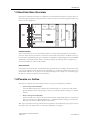
The serial interface is a common asynchronous serial interface, which can easily be interfaced directly to
a micro controller or UART (For connection examples etc., see “Interfacing to 5V Logic” on page 26).
The serial interface is handled differently depending on which type of module that is used (active or passive), see below.
•
Active Modules
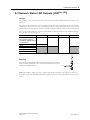
On active modules, the serial interface is activated using the (OM[0...2]) inputs, which are also
used to select the operating baud rate (see “OM[0...2] (Operating Mode)” on page 12).
Other communication settings are fixed to the following values:
Data bits: 8
Parity: None
Stop bits: 1
•
Passive Modules
On passive modules, the serial interface is always active (regardless of the state of the OM[0...2]
inputs), and the communication settings are determined by other factors (network specific).
4.2 Serial Interface Signals
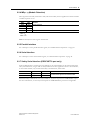
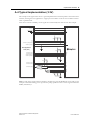
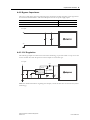
The serial interface option uses only two signals:
Signal
Tx
Description
TTL-compliant asynchronous serial transmit output.
This signal must be pulled to VDD on the host application side.
Rx
Asynchronous serial receivea.
This signal must be pulled to VDD on the host application side.
Notes
Leave this signal unconnected
when unused.
Tie this signal to VDD when
unused.
a. This input is not 5V tolerant
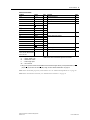
Note: It is important to connect the parallel interface signals correctly for proper functioning of the serial interface. See “Parallel Interface Signals” on page 17 for details.
4.3 Baud Rate Accuracy
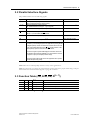
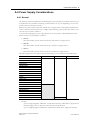
As with most asynchronous communication devices, the actual baud rate used on the Anybus CompactCom may differ slightly from the ideal baud rate.
The baud rate error of the Anybus module is less than ±1.5%. For proper operation, it is recommended
that the baud rate accuracy in the host application lies within ±1.5% from the ideal value.
Anybus CompactCom 30 Hardware Design Guide
Doc.Rev. 2.24
Doc.Id. HMSI-168-31