1
Staking Out Points and Lines
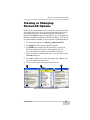
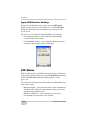
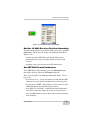
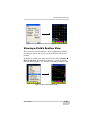
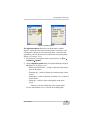
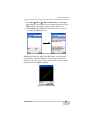
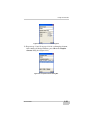
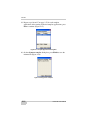
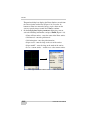
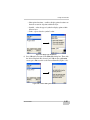
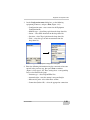
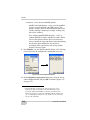
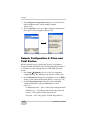
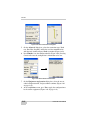
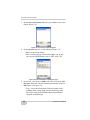
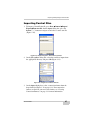
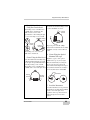
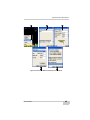
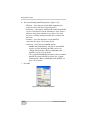
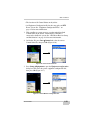
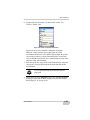
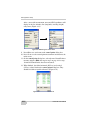
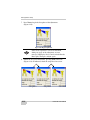
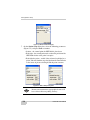
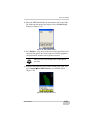
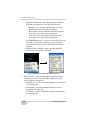
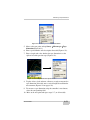
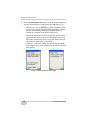
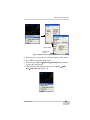
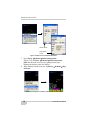
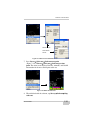
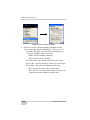
2. On the stake-out options dialog box, select the desired options for
stakeout measurements and audio, then press Ok (Figure 7-2).
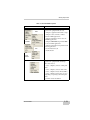
• Measure tab – sets the ENTER key on the controller’s casing
as the trigger to begin measuring points/alignments, enables/
disables auto zooming, and displays stakeout distance/
azimuth or east/north details on the main screen.
Pocket-3D will zoom so that the target point and the current
position of the rover can always be seen on the main screen.
If the rover comes closer to the target point, Pocket-3D will
automatically zoom in for a closer look.
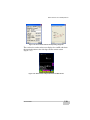
• Audio tab – an internal, Pocket-3D voice recites the cut/fill
value rounded to the nearest tenth of a foot, and at an entered
time interval.
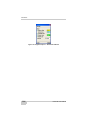
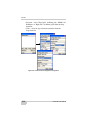
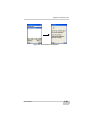
Figure 7-2. Measure and Audio Option Tabs
7-2
Pocket-3D User’s Manual