1
SAINT LOUIS DREAMA
Page 10 of 12
KITS AND LOOPS
The second category is called Kits and Loops. These have a very similar interface to the instruments
so only the unique controls will be detailed here.
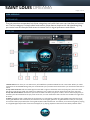
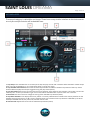
1. Loop tempo: This indicates the current tempo the loop will play back at and is linked to either Kontakt’s master tempo
when running as standalone, or your host tempo when running as a plugin.
2. Loop element mute buttons: Click these blue LED style buttons to enable or disable components of the loop. These
buttons affect the playback of loops triggered using the play button (see 3).
3. Loop play button: Press once to start continuous loop playback, press again to stop playback. This button can be automated by a CC. To set up automation right-click on the button and select learn CC, then move a CC controller.
4. Pitch knob: Use this control to change the tuning of the selected loop element (see 5).
5. Key switch indicator: This displays which key switch is currently selected and is linked to the red key switches on the
Kontakt keyboard, and keys C1 to B1. The key switches allow you to select which loop element is affected by the Drum
Kit Amp Env ADSR controls, the pitch knob, and the volume knob.
6. Volume knob: Adjusts the volume of the selected loop element (see 5).


![ManyGuitar user manual [november 2005]](http://vs1.manualzilla.com/store/data/005861536_1-a0b937985b357a67600aa3c9a5e7e46a-150x150.png)