1
SAINT LOUIS DREAMA
Page 7 of 12
USER INTERFACE
INSTRUMENTS
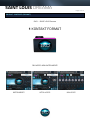
The instruments are separated into three categories, each with their own user interface and control
set. The first category is simply called instruments, these have a simple multi-tab interface giving
you control over the samples and access to several built in signal processors and effects.
MAIN TAB
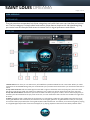
1.Preset menu: From here you can select many of the different presets available for each instrument. When you make
changes to the local ADSR settings they are remembered by the preset and are saved when you save the Kontakt instrument.
2. Poly voice count box: Left click and drag the mouse left or right to choose the amount of polyphony the instrument
has when in polyphonic mode. For instance by selecting 2 only a maximum of two notes will sound at any one time.
3. Poly and mono buttons: Use these to put the instrument into either polyphonic mode, in which case the polyphony is
limited by the value selected in the poly voice count box, or mono mode where the instrument is limited to a single note
at a time.
4. Glide: The glide control is used when the instrument is in monophonic mode, this control determines the amount of
time a glide between two notes takes, increase the knob for a higher glide time. To glide between notes you must play
one note and then play another (the one to glide to) within 300 milliseconds. This allows you to achieve a glide by playing
in a fingered legato style where notes are overlapped, or by playing separate notes with a short delay between them.






![ManyGuitar user manual [november 2005]](http://vs1.manualzilla.com/store/data/005861536_1-a0b937985b357a67600aa3c9a5e7e46a-150x150.png)