1
6. Hardware setup
6. 1. Receipt
• Check that the card reference printed on the label is the same as that on the delivery note corresponding to the purchase order.
• Remove the option card from its packaging and check that it has not been damaged in transit.
6. 2. Check list
LonWorks card is shipped together with the following accessories. On opening the packing case, check if it contains :
- the mounting instruction sheet,
- the led label,
- the Neuron ID label.
Note: no paper user manual is delivered with the card. The user manuals are available on the Web site www.schneider-electric.com.
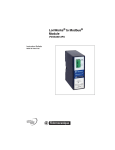
6. 3. Hardware description
LEDs
Service pin push-button
Open style 3-pin
connector
6. 4. Installing the card in the drive
Refer to the installation manual.
1765273 10/2010
8