1
MaxFPS:
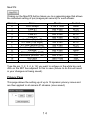
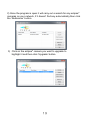
Clicking on the MaxFPS button takes you to a separate page that allows
the individual setting of ips (images per second) for each stream:
Stream:
0
1
2
3
4
5
6
7
8
9
10
11
12
13
Name
Full Fisheye
View #1
View #2
View #3
View #4
4 x View (Top Left)
4 x View (Top Right)
4 x View (Bottom Left)
4 x View (Bottom Right)
Fisheye
Panorama (Top 1800)
Panorama (Bottom 1800)
HD Pano
HD PTZ
Pixels
2144 x 1944
640 x 480
640 x 480
640 x 480
640 x 480
320 x 240
320 x 240
320 x 240
320 x 240
640 x 480
640 x 240
640 x 240
1280 x 240
1280 x 720
Control
None
ePTZ
ePTZ
ePTZ
ePTZ
ePTZ
ePTZ
ePTZ
ePTZ
None
Pan
Pan
Pan
ePTZ
Type the ips (1, 2, 3, 4, 6, 12) you want to achieve in the white box and
click on the SET box adjacent to this to save (failure to do this will result
in your changes not being saved).
Privacy Page
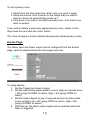
This page allows the setting up of up to 10 dynamic privacy zones and
are then applied to all camera IP streams (once saved):