1
FLYBOX
®
Use in AUTOMATIC mode
4.3 USE IN AUTOMATIC MODE
In AUTOMATIC mode you can move the flaps choosing one
of the four stored position; the maximum travel of the motor
is defined by the two limit switches UP and DOWN.
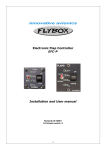
The LEDs show the status of the flaps:
LED on: indicate the current position of the flaps
LED flashing: indicate the position that the flaps are reaching
-EXAMPLE OF USEThe flaps are in the first position (LED1 on, all other LEDs
off):
to move the flaps in the third position press two times the U/D
switch in the DOWN position; the flaps start moving and the
third LED is flashing, indicating the position that the flaps are
reaching.
When the flaps reaches the second position the first LED turn
off while the second turn on; when they reaches the third
position the second LED turn off and the third turn on. The
flaps have reached the selected position and the EFC-P
return to steady state, waiting for another command.
Pressing the U/D switch in the UP position for more than 1
second move automatically the flaps to the first position
(regardless of the current position).
EFC-P - User’s manual
Rev. 3.1
23