1
Step 2
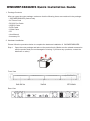
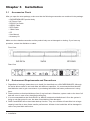
Mount the product to the rack. Make sure that the fan is not blocked and there is appropriate
space around for heat dissipation. (Do not place the product nearby water area or any
environment that may cause damage to the product)
Step 3 Take out the tray and install your hard disk in it. Make sure to fasten the hard disk securing
screws to prevent damages caused by unnecessary movement.
Step 4 Once the installation is completed, insert the tray back and fix it firmly in the proper place.
Step 5 Select the RAID 0 or NRAID mode.
Raid 0
NRaid
RaidMode Switch
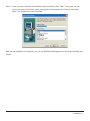
Step 6 Connect the cables to the corresponding jacks. Then connect the power cord.
Step 7 Hardware installation is completed. You can power on the system to start the related setup
and application.