1
TE L E P H O N E U S E R G U I D E
SoundPoint IP Phone for Sphericall
Table 1
SoundPoint IP Phone Features
Features
Functions
Basic Features
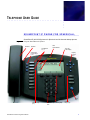
Call Buttons
Each Call button represents a line. The IP phone is
equipped with 3 lines. The Call buttons manage multiple
calls.
Dial pad
These 12 keys provide the 10 digits, the 26 alphabetic
characters as well as the # and * keys. In alphanumeric
entry mode, press the same key repeatedly to cycle
through the number and letters associated with that key.
Feature keys
Your organization’s Sphericall system Administrator
determines the use for each of these keys. The three top,
left keys may be associated with indicators on the display
to select call appearances. The feature keys include:
• Conference (IP phone 3-party conferencing)
• Forward
• Transfer
• Call Lists (this feature is not presently supported)
• Speed Dial (this feature is not presently supported)
• Redial
• Menu
• Voice Mail
• Do Not Disturb
Note: Future software releases of Sphericall will include
more features for the SoundPoint IP phone. Feature keys
that are inoperable will display Not Available.
Note: Star code commands may be applied from the
SoundPoint IP phone. Refer to the Sphericall Desktop
User Manual for a complete list of star code commands.
Hold feature key
Places active calls on hold.
Note: The Hold button places calls on hold. It does not
take calls off of hold.
Soft Features
2
SoundPoint IP Phone Integration Manual