1
P5
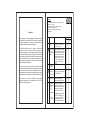
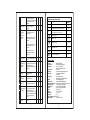
(High Temp) indicating that the
temperature has gone above the
value in this parameter and at
this point the buzzer will come on.
3
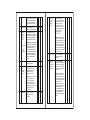
P3
P3 parameter
Function: To set minimum
-40.00C XX
allowable Low temperature limit.
To change
the P3
parameter,
press the
SET key
Use UP/DOWN keys to set
desired value. Once set at a will
particular value, this not allow
the set point to go below this
value and above P2 setting.
XX = Set point
L
(Message on Display)
4
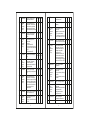
P4
-40.00C
Function : To set the comp.
differential (hysterisis).
To change
the P4
parameter,
press the
SET key.
Use UP/DOWN keys to set
desired value. Differential
between cutout and cutin
temperature can be set
between 0.10C to 20.00C
6
0.10C 20.00C 2.00C
Example: If the set point is set
at 10.00C and differential is
set at 2.00C, then when the
system reaches 10.00C, the
comp. relay will cutout. Since
the differential is 2.00C, the comp.
Relay will cutin at 12.00C.
(10.00C + 2.00C)
5
P5 parameter
Function : To set probe 1
offset (cold room temp.)
calibration.
3
Use UP/DOWN keys to set
desired value. In time it may be
possible that the display may
be offset by a degree or so.
To compensate for this error,
you may need to add or minus
the degrees required to achieve
the correct temperature.
Setting value is from 10.00C to + 10.00C
Example: The temperature on
the display is 28.00C, whereas
the actual temperature is 30.00C.
You will need to set the P5 mode
to 2.00C, which means that once
out of the programming mode,
that once out of the programming
mode, the temperature will show
30.00C (28.00C + 2.00C).
Example: Setting this parameter
at -30.0 0C will not allow the set
point to go below -30.0 0C. Also,
if the temperature reaches
-30.0 0C, the display will show
Lt(Low Temp) indicating that the
temperature has gone below
the value in this parameter and
at this point the buzzer will
come on.
P4 parameter
To change
the P5
parameter,
press the
SET key
-10.00C 10.00C 0.00C
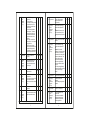
P6
P6 parameter
Function: To set time delay
between compressor relay
restart time.
To change
the P6
parameter,
press the
SET key.
Use UP/DOWN keys to set
desired value. This parameter is
used to protect the compressor
from restarting in a short period
of time and can be set between
0 to 20 minutes.
Example: If this parameter is
set at 3 minutes, the relay will
cut off at the set temperature, but
will cut off at the set temperature,
but will not restart for a minimum
of 3 minutes, even if the
differential is achieved earlier.
This parameter is good to protect
the life of the compressor or
even in applications where the
probe is placed at places where
there are sudden & short in
temperature like above a cold
room door.
4
0 Min 20 Min 3 Min