1
Model:
Maximum Power
Point Tracker Monitor
MCM
Page 2 of 4
Operating Instructions
Please Read Before Use
1. Parameter and Setting List
System Setup
Main Menu
Vb
Battery Voltage in Volts
Ib
Battery Current in Ampers, + For Charging
and - for Discharging Current
Load Control
Enable or Disable Load Switch, LVD and DDS options
– see Note 1.
Load Switch
Turns On or Off The Load ( connect disconnects blue
wire from – battery).
LVD
Adjustable Low Voltage Disconnect (10V to 50 range)
to disconnect load.
DDS
Dawn to Dusk Switch, connects load for preset period
of time when no light over 20 seconds
FBR
Flat Battery Recovery, sets output to 36V for
4 minutes to restore flat 24V or 48V batteries.
Over Temp Enable
Over Temperature Alarm Enabling and Setting.
Load Current In Ampers, Measures Current
On Blue Wire
Temp
Internal MPPT Temperature in C
AHb
Battery Charge / Discharge in Ampere-Hours
Load Consumption In Ampere-Hours
Hours
BUV Alarm
Ampere - Hours Timer In Hours
Time Elapsed
Note 1: When Load Control is disabled the built in
Amp Hour Alarm
MPPT low voltage disconnect is active.
RESET All ?
Battery Under Voltage Alarm Enabling and Setting.
Time Elapsed in the Ampere Hour Counter.
Battery Discharge Ampere Hour Alarm Enabling and
Setting.
Sets all Parameters to Default Values
– see default tables.
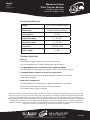
2. Alarm and Parameter Ranges and Defaults
ALARM
RANGE
DEFAULT VALUE
Over Temp Alarm
30C-75C
70C
BUV Alarm
10V-50V
11V
Ampere Hour Alarm
-50AH - 1000AH
-200AH
PARAMETER
RANGE
DEFAULT VALUE
LVD
10V-50V
10V
DDS
1 HOUR - 16 HOURS
6 HOURS
Load Control
ON-OFF
OFF
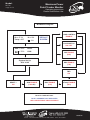
3. MCM Operation
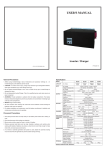
Use left side UP and right side DOWN buttons to navigate between or within screens, and increment or decrement selected adjustable parameters. Use center ENTER button used to select adjustable parameter or to toggle
options (on/off, enable/ disable, reset). Any button activity to result in backlight on, after 20 seconds of no button
activity the backlight turns off and display goes to default screen, unless in parameter set or select mode.
Parameter selection mode is indicated by a blinking cursor. Holding the ENTER button for 2 seconds while within
System Setup Menu will bring the Main Menu. When an alarm is tripped the buzzer is activated and backlight
starts flashing until ENTER button is held for 2 seconds. Once Load Control is enabled the load control modes
( Load Switch, LVD and DDS ) become available but only one can be selected at one time.
MCM-R5
Unit 2, 110 Station Road, Seven Hills ,NSW, 2147, Australia