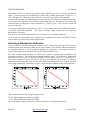
1
USER MANUAL MODEL 654 MICROPROCESSOR ORP ANALYZER um-654-202 CONTENTS IC Controls CONTENTS um-654-202 CONTENTS............................................................2 654 MENUS............................................................3 INTRODUCTION..................................................6 Features...............................................................6 Specifications......................................................7 INSTALLATION...................................................9 Analyzer Mounting.............................................9 Wiring.................................................................9 Sensor Mounting...............................................10 Sensor Wiring....................................................10 Instrument Shop Test Startup............................11 STARTUP.............................................................13 Analyzer Startup Test........................................13 Start-up Settings................................................13 Changing Settings.............................................13 EASY MENU........................................................14 Remembers Where You Were...........................14 Home Base: Press Sample.................................14 Display Features................................................14 Arrow Keys.......................................................15 AUTO and MANUAL Keys.............................15 Standby Mode...................................................15 Temperature °C or °F........................................16 Real-Time Clock...............................................16 Input Damping..................................................16 EDIT MODE.........................................................17 Editing by Selecting a Setting...........................17 Editing a Numeric Value...................................17 Summary of Key Functions in Edit Mode.........18 ORP CALIBRATION..........................................19 Calibration Procedure........................................19 Selecting a Standard for Calibration.................20 Temperature Compensation for Quinhydrone Standards...........................................................21 Selecting Manual Temperature Compensation..21 Manual Adjustment of Offset............................21 Output Hold During Calibration.......................22 Electrode Maintenance......................................22 Replacing Electrodes.........................................22 ERROR MESSAGES...........................................23 Acknowledging an Error Message....................23 Error and Caution Messages for ORP...............24 Messages for Temperature Input.......................25 OUTPUT SIGNALS.............................................26 Reversing the 4 mA to 20 mA Output...............26 Simulated 4 mA to 20 mA Output.....................26 Units for Outputs...............................................26 Output Specifications........................................26 Output Characterization....................................27 Characterization Example: Tri-linear output....27 ALARM FUNCTIONS........................................30 Use of Relay Contacts.......................................30 Alarm Indication...............................................30 Alarm Override.................................................31 Delayed Relay Activation..................................31 Units for Alarms................................................31 Wiring and NO/NC Contacts............................31 High or Low Alarm...........................................32 Deviation Alarm................................................32 Fault Alarm.......................................................32 Using Alarms for On/Off Control.....................33 CONFIGURATION OF PROGRAM.................34 TROUBLESHOOTING.......................................36 Isolating the Problem.........................................36 Equipment Problem Troubleshooting................37 ORP Sensor Troubleshooting............................38 ELECTRONIC HARDWARE ALIGNMENT..39 Calibration of ORP Input..................................39 Calibration of Temperature Input......................41 Calibration of 4 mA to 20 mA Outputs.............41 DISPLAY PROMPTS..........................................43 GLOSSARY..........................................................45 Appendix A — Security.......................................46 Appendix B — Output Characterization...........49 Appendix C — Default Settings..........................50 Appendix D — Serial Output..............................51 Appendix E — Parts List.....................................53 DRAWINGS..........................................................54 D5980176: Display Component Location........54 D5900081: Wiring & Component Location.....55 D5900080: Wiring 600 Interface.....................56 D4850015: 600 Installation..............................57 D4830022: Mounting Dimensions...................58 D4950053: Pipe/wall Mounting.......................59 D4950054: Panel Mounting.............................60 INDUSTRIAL PRODUCTS WARRANTY.......61 INDEX...................................................................62 Copyright 2007 IC Controls Ltd. All rights reserved. Page 2 www.iccontrols.com um-654-202 IC Controls 654 MENUS 654 MENUS CHANGES Areas shaded in dark orange indicate program settings which can be changed by the user. Menu areas shaded in light blue indicate viewonly. Illustration 1: Menu overview um-654-202 Page 3 654 MENUS IC Controls Illustration 2: Configuration menu Illustration 3: Alarm menu Page 4 www.iccontrols.com um-654-202 IC Controls 654 MENUS Illustration 4: Internal data log menu Illustration 5: Serial menu um-654-202 Page 5 INTRODUCTION IC Controls INTRODUCTION The model 654 is IC Controls’ industrial quality remote operational ORP analyzer, designed to give maximum flexibility, reliability, and ease-of-use. The model 654 is shipped from the factory with the ORP input calibrated for measuring -1,000 mV to +1,000 mV and the output for 4 mA to 20 mA. Calibration should not be required. It has two isolated 4 mA to 20 mA outputs, two 10 A SPDT relays, plus a serial communication port. The analyzer recognizes specific ORP standards to auto-calibrate, holds output during calibration, notifies user of diagnosed sensor or analyzer faults, plus stores in memory the last 12 calibration records, 1 000 minute measurement trend, alarms, power outages, and diagnostic messages, all date and time stamped. The 654 is one of a series of 115/230 VAC process analyzers supplied in a corrosion resistant IP65 (NEMA 4X) water- and dust-tight case. These analyzers are also available for pH, conductivity, dissolved oxygen and chlorine, plus as two-wire versions with an optional explosion-proof rating. In the case of ORP, the analyzer measures the sensor signal corresponding to the actual ORP. The analyzer conditions and digitizes the signal for maximum accuracy, and then sends it out as a digital output and/or on 4 mA to 20 mA outputs. Features The 654 ORP analyzer features: 1. Intuitive user friendly program; easy-to-use. 2. Auto-calibration; recognizes specific ORP standards. 3. Self and sensor diagnostics. 4. Output hold during calibration. 5. Stores 12 calibration records. 6. Stores alarms, caution and error messages. 7. Stores running 1 000 minute ORP trend. 8. Two programmable 4 mA to 20 mA outputs. 9. Two programmable alarms. 10.Serial digital output and for remote operation. 11.Optional PID control. 12.Three level security to protect settings. 13.Durable housing; IP65, NEMA 4X. Page 6 www.iccontrols.com um-654-202 IC Controls INTRODUCTION Specifications Physical Data PROPERTY CHARACTERISTIC Display Four and one half LCD digits, 1.5 cm (0.6 in) displays for ORP, temperature, error codes, prompts and diagnostic information. (back-lit display optional) Display Ranges ORP: -2,020 mV to +2,020 mV Temperature: -5.0 °C to 105 °C (23.0 °F to 221 °F) Keypad 8 pushbutton entry keys LED's 2 alarms (A and B), 1 auto, 1 error Case Dimensions 12.0 cm (H) 20.0 cm (W) 7.5 cm (D) (4.7 in (H) 7.9 in (W) 3.0 in (D)) Weight 1.1 kg (2.5 lb) Shipping Weight 2.3 kg (5.0 lb) Shipping Dimensions 30 cm 23 cm 23 cm (12 in 9 in 9 in) Environmental Data PROPERTY CHARACTERISTIC Temperature Operational: 5.0 °C to 45 °C (41.0 °F to 113 °F) Storage: -10.0 °C to 55 °C (14.0 °F to 131 °F) Relative Humidity: 95 % maximum; non-condensing Environment Ratings Housing: IP65 (Nema 4X) Pollution Degree: 2 Installation Category: II Electrical Ratings 115/230 VAC, 0.25 A, 50/60 Hz Electrical Requirements 115/230 VAC ± 10 %, 50 W es-654-1.3 um-654-202 Page 7 INTRODUCTION IC Controls Specifications Operational Data PROPERTY CHARACTERISTIC Accuracy ORP: Temperature: ±0.5 % of ORP range ±0.1 °C Precision ORP: Temperature: ± 1 digit (1.0 mV) ± 1 digit (0.1 °C) Response Time 90% within 5 s (default), function of flow and temperature. Damping adjustment: 3 s to 99 s Temperature Compensation Auto: -5.0 °C to 105 °C (23.0 °F to 221 °F) Manual: -5.0 °C to 105 °C (23.0 °F to 221 °F) Preamplifier Require model 600 interface OR integral preamp, option -6 (within 100 ft maximum). Require TC option -33 in ORP sensor to read temperature (select -33P if using option -6). Security 3 access-level security; partial and/or all settings may be protected via 3 and/or 4 digit security code. Alarms Two independent, assignable, programmable, configurable, failsafe NO/NC alarm relays; SPDT, Form C, rated 10 A 115 V/5 A 230 V. Controls PID (optional); standard, pump pulser or time proportional. Outputs Two continuous, assignable, programmable 4 mA to 20 mA, or 0 mA to 20 mA outputs; isolated, max. load 600 ; Convertible from 1 VDC to 5 VDC or 0 VDC to 5 VDC. Communication Via RS485 bidirectional serial data port; require IC NetTM 2000 software. es-654-1.3 Page 8 www.iccontrols.com um-654-202 IC Controls INSTALLATION INSTALLATION Analyzer Mounting The ORP sensor is typically supplied with at least a 1.5 m (5 foot) lead as standard. The 654 analyzer should be kept within the sensor lead length and mounted on a wall, ideally at eye level. Position the analyzer to allow the sensor, still connected to the analyzer, to be removed and the electrode tip placed in a beaker on the floor for cleaning or calibration. Assume the safest place for the beaker is on the floor the service person stands on. Horizontal separation between rows of analyzers should allow for electrode leads which need periodic replacement, and the electrical conduit. IC Controls recommends a minimum separation of 10 cm (4 in) between rows/columns. As standard, the 654 comes with four internal 0.43 cm (0.17 in) holes for surface mounting screws spaced 18.8 cm (7.41 in) wide and 8.8 cm (3.47 in) high. Case dimensions are 20 cm x 12 cm x 7.5 cm (w, h, d) or 7.87 in x 4.72 in x 2.75 in (w, h, d) as shown on drawing D4830022. Pipe mounting kit, option -8 for 5 cm (2 in) pipe, P/N A2500255, is shown on drawing D4950053. It may also be used to surface mount the analyzer by removing the 2 inch U bolts and using the holes in the mounting plate for wall studs (using customer-supplied studs). The mounting plate dimensions are 20.3 cm x 21.6 cm (8 in x 8.5 in) with elongated U bolt holes. Panel mounting kit, option -9, P/N A2500201, is shown on drawing D4950054. It requires a customer supplied panel cut-out, 20.6 cm (8.1 in) wide x 12.2 cm (4.8 in) high, with two 0.4 cm (0.15 in) screw holes centered 22.6 cm (8.9 in) apart and 6.1 cm (2.4 in) below top of cutout. The panel bezel dimensions are 24.1 cm x 15.9 cm (9.5 in x 6.25 in). Wiring Power for the 654 analyzer is 115/230 VAC ± 10%, single phase 50/60 Hz, and 0.25 A. Caution: Line voltage selector switch must be set prior to applying power for either 115 VAC or 230 VAC. Power connections are made at TB400 inside the instrument enclosure; refer to illustration 6 and drawing D5900081. The microprocessor requires a suitable ground to ensure stable operation. A power line with the third wire connected to earth ground should be adequate, however, a local earth rod may prove more fitting. If this ground connection is not made, published specifications may not be achieved. Supply wiring terminals are designed for 14 AWG conductors. Supply should be protected by an external 15 A branch circuit. CSA certified ½ inch liquid tight fittings should be used to maintain the IP65 rating. Illustration 6: Power wiring Caution: Bonding between conduit connections is not automatic and must be provided as part of the installation. Caution: Signal wiring connected in this box must be rated at least 300 V. The basic wiring scheme for all IC Controls sensors is shown in drawing D5900081. For alarm, RS485, or output wiring refer to the alarm, serial communications, or output section. um-654-202 Page 9 INSTALLATION IC Controls There are three 2.0 cm (0.875 in) holes for 0.5 inch conduit in the bottom of the enclosure. IC Controls recommends that AC be brought in through the right-hand entrance for power and alarms; 4 mA to 20 mA and digital low voltage wiring be brought in through the center entrance, and sensor leads be passed through the left-hand entrance. Conduit should be flexible, watertight, and sealed using a gasket to maintain environmental integrity within the enclosure. Connect the two relay/alarm contacts; Alarm A: contact TB300 Alarm B: contact TB301 Connect the two isolated 4 mA to 20 mA outputs; Output 1: contact TB303 Output 2: contact TB304 Sensor Mounting It is recommended that the sensor be located as near as possible to the ORP analyzer to minimize any effects of ambient electrical noise interference. Flow sensors can be in any orientation but should be mounted tip down at an angle anywhere from 15 degrees above horizontal to vertical. 15 degrees above horizontal is best because air bubbles will rise to the top and debris will sink, both bypassing the sensor. Submersion sensors should not be mounted where a lot of air bubbles rise in the tank, they will cause spikes in the ORP readout. If an air bubble is allowed to lodge in the sensing tip, electrical continuity between the sensitive glass and the silver/silver chloride element may be disrupted. Sensor Wiring The analyzer requires a model 600 interface or a -6 integral high-impedance input (some ORP sensors have option -22, a 600 interface on the sensor). Illustration 7 shows an analyzer with a -6 integral preamp installed and illustration 8 shows a model 600 interface. Illustration 7: -6 integral high-impedance input Page 10 Illustration 8: Model 600 interface www.iccontrols.com um-654-202 IC Controls INSTALLATION Installation of Model 600 Interface The model 654 requires a remote preamp, model 600 interface. Refer to drawing D5060286 for interface wiring. This drawing provides all the markings and colour codes needed for proper connections to the preamplifier, ORP sensor, and temperature compensator. At the analyzer, connect the inputs: TB200 ORP TB201 temperature Connecting a -6 Input The -6 option for the 654 analyzer is an integral highimpedance input. No preamp needs to be wired. This option requires either an electrode without a TC (temperature compensator), or with a -33P TC option (pin jack connectors). Connect the electrode BNC to the analyzer as shown in illustration 9. If the electrode has a TC, insert the pin jacks into the pin jack receptacles, matching the red wire with the red pin jack hole and the white wire with the white pin jack hole. Illustration 9: -6 electrode connection All low-level sensor signals should be run through a dedicated conduit. Take care to route all signal wiring away from AC power lines in order to minimize unwanted electrical interference. When installing sensor cable in conduit, use caution to avoid scraping or cutting the cable insulation - the resulting short of the cable’s internal drive shield will cause ORP errors. Avoid twisting the sensor lead to minimize potential for broken wires. Ensure the sensor connections are clean and tight. Instrument Shop Test Startup 1. Apply 115/230 VAC power to the analyzer. 2. Hook up the sensor and remove orange protective cap. Keep for future use. 3. Rinse the sensor in deionized water and place in 263 mV ORP standard. 4. The 654 should come up reading close to 263 mV. 5. Perform a calibration for an ORP reading of 263 mV. Allow 30 minutes warm-up time for electronics to stabilize. 6. To check for general performance, place the sensor in 66 mV standard. approximately 66 mV. The display should read 7. Before placing the analyzer into operation, verify settings to ensure that they coincide with the intended setup. Refer to Appendix C: Default Settings section. 8. For the 4 mA to 20 mA output, set high limit and low limit. 9. Set preference for temperature units as °C or °F in [CONF] [unit]. 10.Install password security, if desired. 11.The unit is now ready for field installation. um-654-202 Page 11 INSTALLATION IC Controls NOTICE OF COMPLIANCE US This meter may generate radio frequency energy and if not installed and used properly, that is, in strict accordance with the manufacturer’s instructions, may cause interference to radio and television reception. It has been type-tested and found to comply with the limits for a Class A computing device in accordance with specifications in Part 15 of FCC Rules, which are designed to provide reasonable protection against such interference in an industrial installation. However, there is no guarantee that interference will not occur in a particular installation. If the meter does cause interference to radio or television reception, which can be determined by turning the unit off and on, the user is encouraged to try to correct the interference by one or more of the following measures: * Reorient the receiving antenna * Relocate the meter with respect to the receiver * Move the meter away from the receiver * Plug the meter into a different outlet so that the meter and receiver are on different branch circuits If necessary, the user should consult the dealer or an experienced radio/television technician for additional suggestions. The user may find the following booklet prepared by the Federal Communications Commission helpful: How to Identify and Resolve Radio-TV Interference Problems. This booklet is available from the U.S. Government Printing Office, Washington, D.C., 20402. Stock No. 004-000-00345-4. CANADA This digital apparatus does not exceed the Class A limits for radio noise emissions from digital apparatus set out in the Radio Interference Regulations of the Canadian Department of Communications. Le present appareil numérique n’ émet pas de bruits radioélectriques depassant les limites applicables aux appareils numériques (de la class A) prescrites dans le Règlement sur le brouillage radioélectrique édicté par le ministère des Communications du Canada. Page 12 www.iccontrols.com um-654-202 IC Controls STARTUP STARTUP If the analyzer is new and has not been installed, then follow the procedures described in Installation, Electronic Hardware Alignment and Configuration of Program before mounting. Mounting and wiring procedures for new installations vary with equipment options — refer to drawing section for instructions. If the analyzer has been previously installed, all that is required is to attach the sensor to the analyzer and then turn on the power. The analyzer will go through its automatic startup procedure any time power to the analyzer is lost for more than a few seconds. The startup procedure will initialize the analyzer program, perform error checks and then proceeds to display the ORP reading and function normally. All program settings, calibration settings, and default values will have been retained by the analyzer as the memory has battery backup. Analyzer Startup Test 1. Install the analyzer according to the instructions in the Installation section. Verify power supply has been wired for proper voltage and instrument is suitably grounded. 2. Turn on flow at sample inlet or insert sensor in sample. 3. Power up the analyzer. 4. The startup procedure will begin by alternately flashing [tESt] and [----] while performing the memory tests. 5. The analyzer will display in sequence the analyzer model number, in this case [654], and the program version number, eg. [2.02]. 6. The display test lights each of the implemented display segments in turn. At the same time, each of the LEDs will be lighted in turn. 7. If the analyzer passes all the tests then the hardware is functioning properly and the analyzer will proceed to display the ORP reading. 8. If the analyzer displays [+Err], this indicates that the input is off-scale. The error LED will be lighted as long as an input is off-scale. An off-scale error can indicate that the sensor is not in solution, is off-scale, or is not connected properly. If the error LED remains lighted, go to the error display section by selecting [Err] from the main menu to see what errors have been detected by the analyzer. 9. After completing the above steps, the analyzer is now in normal operational mode. Analyzer settings and parameters can be viewed and/or changed at any time using the keypad. Start-up Settings The 654 analyzer default assumes a properly functioning sensor with no offset. Refer to Appendix C for a list of all analyzer default settings. IC Controls recommends a full chemical calibration after initial startup. Changing Settings Analyzer settings and parameters can be viewed and/or changed at any time. Refer to the menus starting with illustration 1 on page 3. The areas shaded in dark orange indicate program settings which can be changed by the user. Menu areas shaded in light blue indicate view-only menus. um-654-202 Page 13 EASY MENU IC Controls EASY MENU The layout of the program is shown in the menus starting on page 3. Remembers Where You Were The analyzer remembers where SAMPLE is. The sample display is home base for the program. The program also remembers which menu selections were used last and loops around the columns. The menu can be accessed using the arrow keys to find any parameter then press SAMPLE to return to the displayed reading. Then using the Right arrow key return to exactly where you were. Home Base: Press Sample From anywhere in the menu, the SAMPLE key can be used to return to displaying ORP. The program will safely abort whatever it was doing at the time and return to displaying the ORP reading. The ORP display is the default sample display for the analyzer. The analyzer’s inputs, ORP and temperature, are arranged underneath each other at the left-hand side of the menu. Use the Up or Down arrow key to display each of the readings in turn. Illustration 10: Home base Display Features 1. The analyzer has a built-in timer which returns the program to displaying ORP if no key is pressed for 15 minutes. This time-out has the same effect as pressing the SAMPLE key. If security has been enabled, then the time-out will change the access level back to 0 or 1 automatically which gives the user read-only access. The user will have to enter an appropriate password to go to a higher access level. 2. When the sample value is displayed, pressing the Left arrow key will show which of ORP or temperature is displayed. Pressing Right arrow key displays the sample reading again. 3. Each input can be turned off and thereby effectively disappear from the menu if it is turned off in the configuration menu. To change the configuration, refer to the Configuration of Program section. 4. The main sample, ie. the input that is displayed first when the SAMPLE key is pressed, can be changed. By default the main input is [ORP]. Change the default in [CONF] [in] [dFLt]. Refer to the Configuration of Program section for further details. Illustration 11: Main menu Page 14 www.iccontrols.com um-654-202 IC Controls EASY MENU Arrow Keys The four arrow keys on the keypad are used to move around in the menu. Example: Press SAMPLE to make sure that display is at home base. Press the Right arrow key. One of the prompts in the column starting with [out] will be displayed. Use the Up or Down arrow keys to display the prompt above or below. If the prompt at the top or the bottom is displayed, the program will loop around. Press the Up or Down key until [AL] is displayed. Press the Left key to return to the sample display. Press the Right key again and [AL] will be displayed. AUTO and MANUAL Keys The AUTO and MANUAL keys are used to implement the alarm override feature on analyzers that do not use the PID option. Refer to the Alarm Override heading in the Alarm Functions section for a description of these key functions. Illustration 12: Analyzer keypad Standby Mode In standby, the alarms will not function and the 4 mA to 20 mA outputs will go to 4.00 mA. When SAMPLE is pressed, the inputs will show [StbY]. The analyzer will not resume normal operations until the analyzer is taken out of standby. While in standby, the entire menu and all of the settings are accessible to the operator as before. None of the settings will take effect until the analyzer is returned to normal operation. The standby feature is protected by security level 2. Illustration 13: Standby menu um-654-202 Page 15 EASY MENU IC Controls Temperature °C or °F By default, the analyzer will use metric units. This means that temperature will be displayed using degrees Celsius and that the prompt for the temperature input will be [°C]. The analyzer can also use imperial units. For imperial units, temperature will be displayed using degrees Fahrenheit and the prompt for the first temperature input will be [°F] instead of [°C]. In this instruction manual the temperature input is always identified as [°C] throughout the menus. To select imperial units for the analyzer, select [unit] from the configuration menu, then go into edit mode and change the [°C] setting to [°F]. Real-Time Clock The analyzer clock is used for internal date/time stamping of system events and the internal data log. Both the system events and the internal data log are accessed using the IC Net Intelligent Access Program, which is available as option -35. Analyzers purchased with option -34 have a real-time clock which will maintain the correct time and date even when the analyzer power is turned off. Input Damping The ORP and temperature measurements can be damped to provide the user with a means to alleviate rapidly-varying or noisy signals. The available damping range is 3 s to 99 s; with 0, there would be no damping and each reading the analyzer made would be used to directly update the display and 4 mA to 20 mA output. The factory default of 5 s adds the next four seconds worth of readings to the first and divides by five; this provides a fast response. Selecting 99 s adds the readings for 99 s and divides by 99, providing smooth damping out of turbulent readings. Any selection between 3 s and 99 s can be made. Select [CONF] [in] from the menu. Use the up or down arrow key to select the input to be adjusted, then select the [dA] frame. Press ENTER to edit the input damping to the selected seconds. Press ENTER to leave edit mode. Page 16 www.iccontrols.com um-654-202 IC Controls EDIT MODE EDIT MODE Edit mode is used to change a numeric value or to select between different options. Values and settings which can be edited are identified by the darker shading in the menu. Any frame which has a white background cannot be modified. Editing by Selecting a Setting Editing a value is like picking an option from a list; only one item on the list can be seen at a time. To change the setting, press ENTER to go into edit mode. The display will start blinking. Use the Up or Down arrow key to switch between the possible options and then press ENTER again to accept the new setting and leave edit mode. Example: Turn alarm A off. From the menu, select [Al] [Al.A] [ON.OF]. The analyzer will now display either [ON] or [OFF], which are the two choices. To change the setting, press ENTER to go into edit mode. The display will start blinking. Use the Up or Down arrow key to switch between the possible options. When [ON] is displayed, press ENTER again to accept the new setting and leave edit mode. Editing a Numeric Value Numeric values such as an alarm set-point are adjusted by going into edit mode and then adjusting each digit until the new value is displayed. Use the and keys to move between digits and use the and NH\VWRDGMXVWHDFKGLJLW When ENTER is pressed to go into edit mode, two things will happen. First, the last digit will start blinking to show that this digit can be changed. Second, any blank spaces will change to zeros and a plus or minus sign will appear. Now each digit can be accessed. Change between positive and negative QXPEHUVE\VZLWFKLQJEHWZHHQSOXVDQGPLQXVVLJQXVLQJWKH RU NH\ZKHQWKHSOXVPLQXVVHJPHQWLV blinking. Press ENTER again to leave edit mode. Before the new value is changed, the analyzer will check the new value to make sure that it is within range. If the new value is lower than the lowest value allowed for that frame then the analyzer will use the lowest allowable value instead of the new value entered. Likewise, if the new value entered is higher than allowable then the highest allowable value is used instead. The analyzer will display whatever value it has stored in memory. Example: Change the low output setting from 0 mV to 200 mV. From the menu, select [out] [LO]. The current set-point (e.g. [000.0]) will be displayed. Press ENTER to select edit mode. The display will change to [+ 000.0] and the last digit will start blinking. Press three times to move left three digits. The last digit from the end will now be blinking. Press the key to change the ‘0’ to ‘2’. Press ENTER again and the display will change from [+000.0] to [+200.0] indicating that the new value has been stored in memory. The 4 mA to 20 mA low set-point has now been changed from 0.0 mV to 200.0 mV. 3UHVVWKH NH\WRGLVSOD\>/2@>RXW@HWF um-654-202 Page 17 EDIT MODE IC Controls Summary of Key Functions in Edit Mode Enters edit mode. The entire display or a single digit will blink to indicate that the analyzer is in edit mode. Press the ENTER key again to leave edit mode and accept the new value. Adjusts blinking digit upward or selects the previous item from the list. If a 9 is displayed then the digit will loop around to show 0. Adjusts blinking digit downward or selects the next item from the list. If a 0 is displayed then the digit will loop around to show 9. Numeric values only: move to the right one digit. If blinking is already at last digit, the display will loop to the +/- sign on the left. Numeric values: move left one digit. If blinking is at the +/- sign then blinking goes to last character. Settings: restore the initial value if it was changed. Otherwise leaves edit mode without doing anything. Illustration 14: Edit keys Page 18 www.iccontrols.com um-654-202 IC Controls ORP CALIBRATION ORP CALIBRATION Redox electrodes (the sensing electrode) theoretically do not undergo changes of zero-point nor of characteristic slope as do glass electrodes used to measure pH. Nevertheless, incorrect redox potentials can be measured, usually caused by contamination or poisoning of the electrode surface or by a change in the reference electrode. Calibration is easily accomplished by selecting the proper standard, placing the electrode in the standard solution, and letting the analyzer do the rest. The analyzer tests for electrode stability and performs diagnostic tests during calibration. Automatic stability testing takes most of the guesswork out of deciding when a reading is acceptable or not. The internal diagnostic tests will activate warning and/or error messages if faulty operation is suspected or detected. Illustration 15: ORP menu Calibration Procedure Performing a calibration or standardization causes the analyzer to calculate a new offset. To start the calibration, select [orP] [CAL] from the menu. The user now needs to select a standard with which to calibrate the analyzer. Select either a custom value or one of the quinhydrone standards supplied by IC CONTROLS. Refer to the heading Selecting a Standard for further information on selecting a standard. For this example, a 200 mV ORP standard will be used. Select [CUSt] from the menu. If the display does not show [200] then edit the value to read 200. Place the electrode in the standard solution, then press SELECT to start the calibration process. The display will show a flashing ORP reading to indicate that the analyzer is reading ORP and is testing for stability. The calibration procedure is fully automatic from here on. As soon as the electrode has stabilized, the display will stop flashing, the electrode offset will be calculated, and the new offset will be entered in memory. It is, however, possible to override the analyzer. The ENTER key may be pressed before the electrode has stabilized, forcing the analyzer to calibrate using the current ORP reading. Also, the calibration may be redone or started over at any time. Press CANCEL to display the selected buffer (e.g. [CUSt]), then SELECT to restart the calibration. um-654-202 Page 19 ORP CALIBRATION IC Controls If the analyzer detects or suspects any problems during calibration, an error or a caution message will appear. Caution messages for the ORP input are those with a number greater than or equal to 7, i.e. CA1.7 through CA1.9. Refer to the Error Messages section for a description of each message. If an error has occurred, the standardization was not successful; the analyzer has kept the values from the last successful calibration. Press ENTER to acknowledge the error. The analyzer will return to the calibration menu and display the selected standard, e.g. [CUSt] or [66]. Take corrective action and retry the calibration. If a potential problem has been detected, eg. there is a large change in the offset, then the analyzer has successfully completed calibration. The caution message simply informs the user that poor performance is suspected. Press any key to resume normal operation after a warning or error message has appeared. To check the new offset that has been calculated, press SAMPLE, then select [orP] [OFFS] from the menu to display the offset in mV for the ORP electrode. Selecting a Standard for Calibration For any calibration standard selected, the analyzer can be calibrated by selecting [CUSt] from the calibration menu, then entering the ORP in mV of the standard. The oxidation reduction potential of most standard solutions is at least somewhat dependent on temperature. If the highest accuracy is required, the temperature-compensated value of the standard should be used. The most common ORP standards are buffered pH solutions saturated with quinhydrone and ferrous/ferric solutions. Two quinhydrone standards available from IC CONTROLS are quinhydrone standards buffered at 4.0 pH or 7.4 pH with an ORP of 263 mV and 66 mV (at 25 °C) respectively. If one of these standards is used, select [263] or [66] from the calibration menu directly. If automatic temperature compensation has been selected, the temperature-compensated values of these standards will be used automatically. Illustrations 16 and 17 show how these standards change with temperature. Illustration 16: 263 mV ORP standard Illustration 17: 66 mV ORP standard ORP standards automatically recognized by the 654 are: 263 mV ORP standard, part number A1100083 66 mV ORP standard, part number A1100084 These part numbers supply 6 calibrations. Refer to Appendix E for ordering information. Page 20 www.iccontrols.com um-654-202 IC Controls ORP CALIBRATION Temperature Compensation for Quinhydrone Standards The ORP measurement does not require temperature compensation during normal operation. Nevertheless, it can be important to know the process temperature since redox potentials can have a high temperature coefficient. The process temperature can be displayed by the analyzer if the ORP sensor has an installed TC. The ORP measurement itself however, is not temperature compensated. During normal measurement the temperature reading has no effect on the ORP reading displayed by the analyzer. Temperature correction of the ORP reading is used only when a calibration is performed with one of the quinhydrone ORP standards. If a TC is in the sensor, the microprocessor looks up the temperaturecorrected mV from an internal table. The temperature probe can read temperatures from -5 °C to 105 °C. The process temperature can be displayed directly by displaying the temperature input in the sample menu at the left hand side of the menu (refer to page 3). Note that the sample menu always shows the temperature of the process, regardless of whether manual or automatic temperature compensation has been set for calibrations. To determine the current setting of the temperature compensator, select [orP] [CAL] [tc] from the menu. If [Auto] is displayed, automatic temperature compensation is used for calibrations; if [SEt] is displayed a manual set-point is used for calibrations using the 66 mV or 263 mV quinhydrone standards. The TC setting is located within the [CAL] menu because temperature compensation is not used except during calibrations. Selecting Manual Temperature Compensation Press SAMPLE to display the ORP reading, then select [ORP] [CAL] [tc] from the menu. At this point either [Auto] (automatic temperature compensation), or [SEt] (manual temperature compensation) will be displayed, depending on the current setting. To change the setting from [Auto] to [SEt], press ENTER to edit the current setting. The display will start blinking, indicating that a selection needs to be made. Use the Up or Down arrow key to display [SEt] (set temperature). Press ENTER to select manual temperature compensation. Refer to the section entitled Edit Mode for further information on changing settings and numeric values. With [SEt] as the current display, press SELECT to display and/or adjust the temperature setting to be used with manual temperature compensation. If the current value needs to be changed, press ENTER to edit the current setting. The display will start blinking. Use the Up or Down arrow keys to display the desired temperature for manual temperature compensation. Press ENTER to accept the currently displayed value. Note that even with manual temperature compensation selected for ORP, the sample frame for temperature at the left-hand side of the menu will continue to read the temperature from the temperature sensor. The temperature value displayed is that of the sensor and not the manual temperature compensation value for ORP. Manual Adjustment of Offset It is possible to bypass the regular calibration procedures and edit the offset directly. The offset is protected by level 1 security, which is the same security as the calibration procedure. When the offset or slope are adjusted directly there is no way for the analyzer to verify the accuracy of the adjustments made. IC Controls advises that the operator use the regular calibration procedures whenever possible. um-654-202 Page 21 ORP CALIBRATION IC Controls Output Hold During Calibration The analyzer features an automatic output hold. During calibration, ie. as soon as SELECT is pressed when [CAL] is displayed, both 4 mA to 20 mA output signals are frozen at their current levels and the alarms are temporarily disabled. The output hold feature avoids false alarms and erratic signal output caused by a routine calibration. If the output signal for ORP is not acceptable at the value found, it can be changed for the duration of the calibration. Select [Hold] from the calibration menu to display the ORP value used by the analyzer to determine the output signal. Use the normal editing procedure to change the ORP value used for output hold. The output hold remains in effect for the duration of the calibration, that is, the output hold is disabled when the [CAL] prompt is displayed, the SAMPLE key is pressed, or after no key has been pressed for 15 minutes. Electrode Maintenance The electrodes need to be calibrated periodically to maintain an accurate ORP measurement. An internal timer keeps track of the time since the electrodes were last standardized or calibrated. After 30 days a warning message, CA1.8, will appear, warning the user that the electrodes need to be calibrated. This 30-day timer is reset automatically when the analyzer is calibrated. Depending on the process, the analyzer will need to be calibrated more frequently, eg. weekly or daily. Frequent calibration is especially important if an accurate ORP measurement is required. Over time electrode performance will degrade. The sensing electrode can become contaminated and dirty and the reference electrode becomes depleted. Depending on the harshness of the process, the electrodes will need to be replaced after a few months or after several years of use. An internal timer has been provided which causes a caution message, CA1.9, to appear after 12 months of continuous operation. The caution messages are removed by following the Replacing Electrodes procedure below. Replacing Electrodes When the electrodes have been replaced or serviced, perform the following procedure to reset the 30day and 12-month timers and to return the calibration settings to their default values. The offset will be set to 0.0 mV. Select [orP] [ELEC] [rEPL] from the menu. Press SELECT. The display will flash [do]. Press CANCEL to abort the operation or ENTER to reset the timers and to reset the calibration settings; the display will change to [donE]. Page 22 www.iccontrols.com um-654-202 IC Controls ERROR MESSAGES ERROR MESSAGES Detected errors and/or cautions can be displayed by the analyzer. From the main menu select [Err]. If there are no error or caution messages, [NONE] will be displayed, otherwise scroll through the error list using the Up and Down arrow keys. Errors and cautions cannot be removed from this list directly; each error or caution will be removed automatically when appropriate, eg. errors associated with improper calibration will be cleared after a successful calibration. Input/Source Input Number for Error and Caution Messages ORP 1 Temperature 2 Alarm A 7 Alarm B 8 Table 1: Input values for error/caution messages Error messages are numbered. Errors 1 through 5 are identified as [En.e] where n is the input number and e is the error number. Messages 7 through 9 are less serious and are identified as cautions instead, eg. [CAn.e]. Off-scale errors for ORP are not numbered and are identified as [+Err] and [-Err], depending on whether the input is at the top or the bottom of the scale. The off-scale error is displayed instead of the sample reading and does not show up in the error menu with the numbered error messages, if any. Error message indicators can be annoying when one has already been made aware of them. A method has been provided to turn off the error LED and the fault alarm for a particular error message. Refer to the heading Acknowledging an Error Message below for the exact procedure. The error LED will remain on as long as there is an unacknowledged error or caution message or as long as any input is off-scale. Each source of error must be removed or acknowledged before the error LED will go off. Acknowledging an Error Message Select [Err] from the main menu. Use the Up or Down arrow key until the error message to be acknowledged is displayed. Errors are displayed with either a positive (+) sign or a negative sign (-) in front. The + sign is used to indicate an active or unacknowledged error, the sign indicates an inactive or acknowledged error. Acknowledging the error will change the sign from + to -. Caution Messages for Alarms Error Description CA7.6 Alarm A, HIGH alarm CA7.7 Alarm A, LOW alarm Press ENTER to go into edit mode. The + or - sign will be flashing. Use the Up or Down arrow key to change the sign, then press ENTER again. CA7.8 Alarm A, DEVIATION alarm An acknowledged error message is cleared for one occurrence of the error only. If the error reappears, the sign changes from - to + and the error message must be acknowledged again. CA8.6 Alarm B, HIGH alarm CA7.9 Alarm A, FAULT alarm CA8.7 Alarm B, LOW alarm CA8.8 Alarm B, DEVIATION alarm CA8.9 Alarm B, FAULT alarm Table 2: Messages for Alarms um-654-202 Page 23 ERROR MESSAGES IC Controls Error and Caution Messages for ORP Error E1.0 E1.1 E1.2 Description Causes ORP measurement is off-scale. ORP measurement is too low Display shows [-Err] or [+Err]. or too high and is outside of analyzer measuring range. Solutions Verify the process and check connections. Service or replace electrode if necessary. Input ’window’ for ORP input needs to be shifted. Default input range is -1000 mV to 1000 mV. Shift the ORP input ’window’ up or down by making electronic alignment and program adjustments. Refer to the Program Configuration section. Electrode has not stabilized after 5 minutes of calibration. Sensing element is dirty. Polish sensing element. Wrong reference electrode. Refer to the electrode instruction manual or to the setup procedures in this manual. Electrode has stabilized, but offset > 1000 mV. The previous offset has been retained. Large offset in electrode pair. Check electrode connections. Perform electrode maintenance. Refer to the electrode manual. Use a different ORP standard. Wrong standard specified for calibration. Specify the correct ORP value for the standard and redo the calibration. Electrode not connected. Check electrode connections and redo the calibration. Supply voltages at 5% and 95% of scale for better results. E1.3 Electronic calibration error: offset. Calibration points are too close to calculate accurate gain. Previous settings retained. E1.4 Electronic calibration error: gain. Calculated gain is outside of Supply voltages at 5% and 70% to 130% range. Previous 95% of scale for better results. gain retained. E1.5 TC is not connected. Temperature compensator is off-scale when calibrating using temperature-compensated Standard is outside of TC quinhydrone standards. operating range of -5 °C to 105 °C. Page 24 www.iccontrols.com Connect TC connections or use manual TC. Redo calibration within TC operating range. um-654-202 IC Controls Error ERROR MESSAGES Description Causes Solutions CA1.7 Standardize caution. The Large offset in reference offset is more than 50 mV electrode or electrode higher or lower than the offset depleted. for the previous calibration. Incorrect standard used for calibration or standard not specified correctly. Check electrode, service or replace as necessary. CA1.8 30 days have passed since last No calibration performed in calibration. the last 30 days. Perform a calibration. CA1.9 12 months have passed since electrodes were replaced. Verify electrode operation. Follow Replacing Electrodes procedure, if replacement required. More than 12 months have passed since the electrodes were replaced. Use fresh standard and redo the calibration ensuring that the correct custom mV value is specified. Repeating the calibration should clear the caution message. Messages for Temperature Input Error E2.1 E2.2 um-654-202 Description Temperature reading is offscale. Temperature is less than -5 °C. Causes Solutions Temperature is low. Verify process and sensor location. Electronic temperature calibration necessary. Follow procedure in Hardware Alignment section. Temperature reading is offTemperature compensator is scale. Temperature is greater not attached. than 105 °C. Attach temperature compensator. Connect resistor to TC terminals to simulate a constant temperature. Refer to Hardware Alignment section. Temperature is high. Verify process and sensor location. Electronic temperature calibration necessary. Follow procedure in Hardware Alignment section. Page 25 OUTPUT SIGNALS IC Controls OUTPUT SIGNALS Two assignable 4 mA to 20 mA output channels are provided. The user may configure the analyzer to determine which input signal will be transmitted by each 4 mA to 20 mA output channel. Each output channel can be independently configured to transmit an ORP or a temperature signal. The output channels function independent of each other. Each output channel has a separate on/off switch and adjustable low and high span (or scale) adjustments. This makes it possible, for example, to transmit two ORP signals, each using separate high and low adjustments. To adjust the output span or output window for ORP or temperature signals, set [LO] to correspond to the low end of the scale or 4 mA output, and set [HI] to correspond to the high end of the scale or 20 mA output. The analyzer will automatically scale the output according to the new settings. Reversing the 4 mA to 20 mA Output The low scale setting will normally be lower than the high scale setting. It is possible to reverse the output or "flip the window" by reversing the settings of the low and high scale. Example: Define an output window from 500 mV to 0 mV with 500 mV corresponding to 4 mA output and 0 mV corresponding to 20 mA output. Set [LO] to 500 and set [HI] to 0. Simulated 4 mA to 20 mA Output Select [cur] from the menu to display the output current in mA that is presently being transmitted by this output signal. The display will be updated as the output signal changes based on the input signal and the program settings. From here, one can watch the output respond to the change in the input signal. This is useful for verifying program settings and for testing the hardware calibration. To simulate a different 4 mA to 20 mA output signal press ENTER to access edit mode. Edit the displayed mA value to display the desired output needed for testing the output signal. Press ENTER to select the displayed value. The output signal will be adjusted to put out the desired current. This process can be repeated as often as necessary. The output signal is held at the displayed level until the program leaves this part of the menu. Units for Outputs The output menu will be using different units for its settings, depending on the input selected. Select [unit] from the output menu to display the units in use for this output. Output Specifications ORP Temperature (°C) Temperature (°F) maximum span 2040 mV (default -1000 mV to +1000 mV) -5 to 105 23 to 220 span adjustment 1 mV 0.1 0.1 output resolution 1 mV 0.2 0.4 Table 3: Output specifications Page 26 www.iccontrols.com um-654-202 IC Controls OUTPUT SIGNALS Output Characterization The analyzer has a user-programmable output characterization capability. Output characterization could be used to provide more accurate control over an output device such as a non-linear ball-valve, or recorder output could be customized to meet your specific application needs. The 21 point output table allows the user to specify the behavior of the output in increments of 5% of the uncharacterized output signal. The table links uncharacterized output values to specific output values, allowing a wide variety of linear and non-linear behaviors to be described with high resolution. By default the output module does not characterize its output. Whenever the [CHAr] setting in the output menu is set to [OFF], the characterization table [tbl] is bypassed so that the 4 mA to 20 mA output is linear. With linear output selected, an input value equal to the LO setting will produce an output of 4 mA and an input value equal to the HI setting produces an output of 20 mA. If the [CHAr] setting in the output menu is set to [on], the output is characterized according to the curve defined in the characterization table. For output values which do not fall exactly on a 5% boundary, the table output is extrapolated so that the characterization is continuous. Each of the two outputs has its own independent characterization capability. This makes it possible to define a different behavior for each output. Illustration 18: Characterization of ball-valve Characterization Example: Tri-linear output The basic functionality of the output characterization can best be described by way of an example. Goal: to record the ORP input between -1000 mV and 1000 mV, but give 80% of the scale to the area between -200 mV and 200 mV. The purpose of this arrangement is to give maximum recorder resolution to the main area of interest, which is -200 mV to 200 mV, yet still maintain a record of the times that the ORP would go out of this region. If output characterization were not available, one could still set [LO] and [HI] to -1000 mV and 1000 mV respectively, but the area of interest from -200 mV to 200 mV would occupy only 20% at the center of the scale. To correct this "problem", the center of the scale will be "expanded" and the outside areas will be "shrunk". To achieve the desired output characterization, the 21-point characterization table and the high and low settings need to be defined as follows: 1. Set the boundaries for ORP output which are: [LO] = -1000 mV [HI] = 1000 mV The characterization table will now automatically characterize the output so that: 0% = -1000 mV 100% = 1000 mV 2. It is probably easiest to draw or sketch the characterization curve before entering any table values. A blank worksheet has been provided in Appendix B. This worksheet can be copied and can serve as documentation for analyzer setup. um-654-202 Page 27 OUTPUT SIGNALS IC Controls 3. The characterization curve for this example is shown in illustration 19. For reference, the ORP values corresponding to the uncharacterized output are shown at the top of the diagram. There are four points on the graph that are of most interest. a) “Normal” 0% output corresponds to the [LO] setting of -1000 mV and 4.00 mA output. b) “Normal” 100% output corresponds to the [HI] setting of 1000 mV and 20.00 mA output. c) At -200 mV, one requires 10% output; -200 mV corresponds to 40% of the horizontal scale. d) At 200 mV 90% output is required; 200 mV corresponds to 60% of the horizontal scale. 4. Once the points of interest are identified, plot them on the graph and connect them with straight lines. 5. The shaded column marked "% characterized output" can now be filled in by reading the coordinates off the graph. For example, to find the required table value for "45", find 45 on the horizontal scale, follow the line up until it hits the curve. The table value is the value on the vertical axis, in this case 30. Refer to arrows in illustration 19. 6. Once the shaded column in the table has been completed, enter the table values in the program. Select [tbL] from the output menu, then enter each output value. All 21 points must be entered; it is not possible to skip values. The completed table for the example is shown in Table 4. 7. To activate output characterization, set [CHAr] in the output menu to [on]. Illustration 19: Tri-linear output characterization Page 28 www.iccontrols.com um-654-202 IC Controls OUTPUT SIGNALS % uncharacterized output 4 mA to 20 mA output % characterized output corresponding ORP (mV) corresponding 4 mA to 20 mA output 0 4.00 0.0 (LO) (a) -1000 4.00 5 4.80 1.3 -900 4.20 10 5.60 2.5 -800 4.40 15 6.40 3.8 -700 4.60 20 7.20 5.0 -600 4.80 25 8.00 6.3 -500 5.00 30 8.80 7.5 -400 5.20 35 9.60 8.8 -300 5.40 40 10.40 10.0 (c) -200 5.60 45 11.20 30.0 -100 8.80 50 12.00 50.0 0 12.00 55 12.80 70.0 100 15.20 60 13.60 90.0 (d) 200 18.40 65 14.40 91.3 300 18.60 70 15.20 92.5 400 18.80 75 16.00 93.8 500 19.00 80 16.80 95.0 600 19.20 85 17.60 96.3 700 19.40 90 18.40 97.5 800 19.60 95 19.20 98.8 900 19.80 100 20.00 100.0 (HI) (b) 1000 20.00 Table 4: Analyzer table values for tri-linear output characterization example um-654-202 Page 29 ALARM FUNCTIONS IC Controls ALARM FUNCTIONS Two alarms, alarm A and alarm B, are a standard feature. Each alarm has an alarm contact associated with it which can be used for remote alarm indication or for control functions. The two alarms function independently of each other. Either alarm can monitor the ORP or the temperature input. Each alarm features an adjustable set-point, user-selectable alarm type, adjustable differential (also called hysteresis), and an on/off switch. The alarm types which are available are high, low, deviation, and fault. Use of Relay Contacts By default, the relay contacts will be used to indicate alarm conditions. If there is an alarm condition for either alarm then the alarm will be indicated using both the alarm LED and the alarm contact. This usage of the alarm contacts is selected by setting [CONF] [AL] [AL.A] [FUNC] to [AL]. While another use is selected for the relay contacts then the alarm cannot simultaneously use the contact; however, the alarm function continues using the LED, display messages and serial communication. Analyzers with PID option can also use the relay contacts for pump pulser or time proportional control. In this case, the alarms will continue to function. An alarm is indicated using the alarm LED but not the alarm contact. Illustration 20: Alarm menu Alarm Indication The A and B LEDs on the front panel show the current state of each alarm and alarm contact. In addition, an alarm condition for an input will cause the sample display for that input to alternate with the alarm function, either [LO], [HI], [dEv], or [FLt]. This way the operator can quickly determine which alarm caused the alarm condition (alarm A or alarm B LED lighted), and the type of alarm. Each alarm will simultaneously generate a caution number in the error menu. Refer to Error Messages section for the meaning of each alarm caution. The alarm cautions will not cause the error LED to come on because the error LED only comes on if there are any errors. To view alarm caution(s) using the error menu, select [Err] from the main menu, then use the Up or Down arrow key to scroll through the list of errors and cautions, if any. Illustration 21: Alarm status indication, alarm LEDs Page 30 www.iccontrols.com um-654-202 IC Controls ALARM FUNCTIONS Alarm Override For normal alarm operation the alarms are said to operate in auto-mode. If the operator wishes to intervene and switch off the alarm contacts temporarily while attending to a problem, the alarms can be switched to manual override using the MANUAL key. In AUTO mode: the green AUTO LED is on and the analyzer alarms will activate and deactivate the relay contact as programmed. Press the MANUAL key to temporarily deactivate the alarm contacts. In MANUAL mode: the green AUTO LED will blink. The relay contacts are deactivated, but the alarm LEDs continue to indicate alarm condition(s). Press the AUTO key to return to AUTO mode immediately and reactivate the relays. If no key is pressed for 15 minutes, the 15-minute timeout will return the alarms to AUTO mode. Delayed Relay Activation Illustration 22: Alarm override status, AUTO LED Alarm relay activation, by default, is immediate upon alarm condition. Alarm relay activation may be delayed. Activation delay gives the operator a chance to correct alarm situations before the relay contacts activate, or can eliminate alarms based on temporary or spurious changes in the process. The delay time is programmable by the operator. To change or view the delay time, select [dLAY] from the alarm menu. The default value of 0 seconds is for immediate contact activation. The delay time can be set from 0 s to 9999 s. Units for Alarms The alarm module will be using different units for its settings, depending on the input selected. Select [unit] from the alarm menu to display the units in use for this alarm. The temperature input will use different units depending on whether metric or imperial units are selected for the analyzer. The choice between metric or imperial units is made in the configuration menu. Refer to the Configuration of Program section in this manual for details. The ORP input only uses mV units. Wiring and NO/NC Contacts The alarm contacts for alarms A and B may be wired as normally open or normally closed. By default, the analyzer assumes the alarm contacts are wired normally open. A normally open alarm contact will be inactive if there is no alarm condition and will be active when there is an alarm condition. If the program configuration and the wiring for each alarm do not match then the incorrectly configured alarm contact will generate an alarm when there is no alarm condition and vice versa. Refer to illustration 2 for the configuration menu. Select [CONF] [AL] from the menu. um-654-202 Page 31 ALARM FUNCTIONS IC Controls High or Low Alarm A high alarm is set when the value of the ORP or temperature rises above the set-point and is cleared when the ORP or temperature drops to below the set-point minus the differential (refer to illustration 24). A low alarm is set when the value of the ORP or temperature drops below the set-point and is cleared when the ORP or temperature rises to above the set-point plus the differential (refer to illustration 23). The differential has the effect of setting the sensitivity of the alarm. The differential provides a digital equivalent of a hysteresis. A two-stage alarm can be implemented by choosing the same alarm function, ie. high or low alarm, for both alarms, but selecting different set-points. Illustration 23: Low alarm Illustration 24: High alarm Example: The ORP of a critical process may not drop to below 200 mV. Use alarm A as a low alarm set at 200 mV and use alarm B as an advance warning device by configuring it as a low alarm set at 250 mV. When alarm B is activated there is still time left to take corrective action. Deviation Alarm A deviation alarm is practical when the process is expected to stay within a certain range. An alarm will be set if the input deviates too far from a set-point. Please note that the [dEv] frame only shows up in the menu after the alarm function has been changed to deviation alarm, since it would have no effect for a high, low, or fault alarm. Example: If the ORP is expected to stay between 100 mV and 300 mV, then we would set [in] to [orP], [Func] to [dEv], [SEt] to 200, and [dEv] to 100. Effectively, a high alarm at 300 mV and a low alarm at 100 mV has been set. The differential setting will continue to function as for high and low alarms. Fault Alarm A fault alarm for an input will be set when anything goes wrong with that input. Something is wrong with an input if the input is off-scale or an unacknowledged error message exists for that input. Caution messages do not cause a fault alarm. To use an alarm as a fault alarm, select [FUNC] from the alarm menu, then select [Flt]. To enable the alarm, make sure the on/off switch is set to [on]. Also, set the input in the alarm menu to the desired input, either ORP or temperature. The set-point and differential for the alarm have no effect when the alarm is used as a fault alarm. Page 32 www.iccontrols.com um-654-202 IC Controls ALARM FUNCTIONS Using Alarms for On/Off Control The alarms can also be used for process control; the alarm contacts will then function as on/off signals for switches controlling a valve, pump, motor, etc. The set-point determines the control point of the system and the setting of the differential controls the amount of corrective action before a controlled shut-off occurs. Examples of high and low control using the alarms are shown in the illustrations below. Illustration 25: High control um-654-202 Illustration 26: Low control Page 33 CONFIGURATION OF PROGRAM IC Controls CONFIGURATION OF PROGRAM The 654 analyzer has been designed with ease-of-use in mind. In most cases the analyzer has been configured to ordered specifications at the factory and no configuration of the analyzer is necessary. However, several hardware options are available and if they are changed the program configuration settings need to be set accordingly for the program to function properly. Other program adjustments which are normally made infrequently or when installing the analyzer are located in the configuration menu. Normally Open or Normally Closed Alarm Contacts The alarm contacts for alarms A and B may be wired as normally open or normally closed. By default the 654 program assumes the alarm contacts are wired normally open. A normally open alarm contact will be inactive if there is no alarm condition and will be active when there is an alarm condition. If the program configuration and the wiring for each alarm do not match then the incorrectly configured alarm contact will generate an alarm when there is no alarm condition and vice versa. Initializing All Program Settings Occasionally it may be desirable to reinitialize all of the program’s settings to bring them back to defaults. Executing the initialization procedure will cause the analyzer to reset all the program variables, settings, preferences, and input calibrations to factory defaults and then proceed with the normal startup display. The initialization procedure is not to be used unless you are absolutely sure that you want to restore the analyzer to factory default configuration. Illustration 27: Configuration menu After the analyzer program has been initialized, you will need to re-enter the output signal settings, alarm settings, as well as the program configuration if it was different from the factory default settings. For your convenience the analyzer will remember your most recent menu selections. From the menu, select [CONF] [init] [ALL] [do]. The [do] will be flashing; you must press ENTER to proceed with initialization. When ENTER is pressed, the analyzer will go though its start-up sequence. Input On/Off Switch Each of the inputs has been provided with an on/off switch. The most common use of this feature is to ‘turn off’ the temperature input if no temperature compensator or temperature sensor has been installed. Turning off an input will make the sample display at the left side of the menu disappear, as if the input did not exist. Page 34 www.iccontrols.com um-654-202 IC Controls CONFIGURATION OF PROGRAM Temperature Calibration The temperature compensator in the ORP sensors will sometimes show some variance in their offset. To make the sensor read correctly without adjusting the electronic calibration of the analyzer, use the following procedure. The current temperature, as measured by the temperature sensor, needs to be known. If the sensor is in the process, the known temperature of the process can be used. Select [CONF] [in] [°C] [CAL] from the menu. A frame showing the current temperature will be displayed. Press ENTER, then change the displayed temperature to what the temperature should be. Press ENTER again to leave edit mode. Press SELECT to go to the calibration frame. The current temperature will flash. When the input is stable press ENTER to set the new temperature. The displayed temperature will be adjusted to the specified temperature and the temperature calibration is completed. Metric or Imperial Units By default the analyzer will use metric units. This means that temperature will be displayed using degrees Celsius and that the prompt for the temperature input will be [°C]. The analyzer can also be made to use imperial units as the preferred unit. Using imperial units temperature will be displayed using degrees Fahrenheit in the sample menu and the prompt for the temperature input will be [°F] instead of [°C] throughout the program. For practical reasons the temperature input is identified as [°C] throughout this instruction manual and in the menus. To select imperial units for the analyzer, select [unit] from the configuration menu, then go into edit mode and change the [°C] prompt to [°F]. Real-Time Clock Analyzers purchased with a -34 option are equipped with a real-time clock which will maintain the correct time and date even with the analyzer power turned off. To check if your analyzer has a realtime clock chip, select [CONF] [rtc] [CHIP] from the menu. If the display shows [YES], then there is a real-time clock. If the display shows [no], then you can still set the real-time clock maintained by the analyzer, but the time and date will need to be adjusted each time the analyzer loses power. Effectively, the analyzer date/time clock stops and continues where it left off when it is powered down if it does not have the -34 option. To set the real-time clock, select [CONF] [rtc] from the menu. Set the year, month, date (day of the month), hour, minute, and second. The [hund] frame displays hundreds of a second but cannot be edited. Input Damping The ORP and temperature measurements can be damped to provide the user with a means to alleviate rapidly-varying or noisy signals. The available damping range is 3 s to 99 s; with 0, there would be no damping and each reading the analyzer made would be used to directly update the display and 4 mA to 20 mA output. The factory default of 5 s adds the next four seconds worth of readings to the first and divides by five; this provides a fast response. Selecting 99 s adds the readings for 99 s and divides by 99, providing smooth damping out of turbulent readings. Any selection between 3 s and 99 s can be made. Select [CONF] [in] from the menu. Use the up or down arrow key to select the input to be adjusted, then select the [dA] frame. Press ENTER to edit the input damping to the selected seconds. Press ENTER to leave edit mode. um-654-202 Page 35 TROUBLESHOOTING IC Controls TROUBLESHOOTING When trying to determine what the problem is with an ORP loop, there are a few simple steps to follow. First the problem is isolated to determine whether the problem is with the sensor or the equipment. The equipment consists of the analyzer, wiring, and preamp. Isolating the Problem 1. Write down the symptoms. (a) ORP reading (b) Temperature reading (c) ORP offset Illustration 28: BNC fitting 2. Separate the sensor from the analyzer. Disconnect the sensor from the analyzer at the BNC fitting. This way the sensor and the equipment can be tested separately. 3. See if the analyzer reads correctly by inputting 0 mV. (a) Take a paper clip and bend it into a ’U’ shape, or use a BNC shorting strap if one is available. (b) Insert the paper clip in the analyzer input BNC connector, shorting between the center pin and the outside ring. This will give a 0 mV input. If using a BNC shorting strap, simply attach it to the input BNC connector. (c) Note the ORP reading. If the ORP is close to 0 mV then the analyzer is OK. If the reading is far from 0 mV then do a calibration and note the ORP reading and the offset. Illustration 29: Paper clip short 4. Problem Isolated ORP offset less than ±20 mV action The equipment is good. The problem is in the sensor. Continue with Sensor Troubleshooting. greater than ±20 mV The equipment is likely at fault. Continue with Equipment Troubleshooting to determine if the problem is with the wiring, analyzer, or preamp. Page 36 www.iccontrols.com um-654-202 IC Controls TROUBLESHOOTING Equipment Problem Troubleshooting 1. Check the wiring: If the offset determined in the third step of the isolation procedure is greater than 20 mV, check the wiring between the preamp and its terminal block and see if there are any loose or faulty connections. Frayed, corroded, or broken wires here are the most common cause of equipment problems. 2. Check the analyzer: If the wiring looks good, and after recalibration the large offset is still there: (a) Use the paper clip ’U’ at the analyzer terminal block, and short directly between the reference (REF) and the signal (SIG) to bypass the preamp and wiring. (b) A new single-point calibration can be done to see if there is any problem in the analyzer alone, independent of the preamp and field wiring. 3. Problem identified ORP offset less than ±20 mV action The analyzer is good. The problem is in the wiring or the preamp. Further check the wiring. A bad preamp would need to be replaced. greater than ±20 mV The problem is in the analyzer electronics. Send the analyzer to a service shop for electronic alignment or repair. um-654-202 Page 37 TROUBLESHOOTING IC Controls ORP Sensor Troubleshooting In order to troubleshoot an ORP sensor, it is very important to have no doubt that the analyzer used to get readings is functioning correctly. IC Controls manufactures a portable pH/ORP analyzer and calibrator for troubleshooting purposes; the model 659. The calibrator can be used to prove the ORP analyzer before use, or it can be used to prove the analyzer in an ORP loop after a problem has appeared. CAUTION: Before testing your ORP sensors, be sure your test analyzer is known to be good. 1. Inspect the sensor. If the sensor is dirty or scaled: (a) Clean with a soft cloth. (b) Acid clean to remove scale. P/N A1100094. IC Controls recommends using gentle scale remover, 2. Test sensor response without adjusting analyzer calibration. Test the sensor response, both mV reading and response time in two different standards. Record both the mV reading and the response time. Use the following standards: (a) 66 mV quinhydrone standard. (b) 263 mV quinhydrone standard. If the sensor response is slow, clean the sensor again with a soft cloth, or acid clean overnight with electrode wash solution, P/N A1100091. If the readings in the two standards do not differ by about 263 mV – 66 mV = 200 mV, then there is a problem with the sensor. Lack of response can be due to coating of the electrode pair, the ORP and/or the reference electrode. Lack of response can also be caused by a failed or poorlyfunctioning reference electrode due to drying-out or depletion. 3. If the sensor passes the tests: The sensor is good. Place the sensor back in the loop and then calibrate following the calibration instructions in this manual. 4. If the sensor fails the tests: (a) Replace the ORP sensor. (b) Consider returning the sensor to IC Controls for failure analysis if you think that electrode life was short. IC Controls offers a free cause-of-failure and application analysis that may help you get longer sensor life. Page 38 www.iccontrols.com um-654-202 IC Controls ELECTRONIC HARDWARE ALIGNMENT ELECTRONIC HARDWARE ALIGNMENT The electronics goes through factory alignment to set up default condition. It should not normally be necessary to make any field adjustments. To make things easy for the instrument maintenance mechanic, however, IC CONTROLS designed electronic zero and span adjustments. This allows the user the final say on setting and/or the ability to re-range the instrument to his particular requirements. Devices referred to in the following descriptions are shown on component location drawings D5900081. Proper field wiring for hookup is shown on drawing D5900080. These instructions assume 115 VAC or 230 VAC power is hooked up, that the voltage select switch is set to 115 V or 230 V operation, the analyzer electronics are operable, and field wiring is in place. Calibration of ORP Input Both the ORP and the temperature inputs can be calibrated both by making electronic adjustments and/or by having the program compensate for differences in span or offset. Both procedures are described here. Before calibrating the ORP input, the quality of the electronic calibration can easily be determined by supplying the ORP input with a known voltage, and comparing this voltage with the displayed mV value. Input Range Adjustment for ORP The voltage range the analyzer is capable of measuring is fixed at about 2040 mV. This is adequate for measuring between -1020 mV and +1020 mV with about a 1 mV resolution. Although the span is fixed, the center of the input range or ’input window’ which is normally at 0.0 mV can be shifted up or down up to 1000 mV if so desired. Both the electronics and the program setting for the center of the input window need to be adjusted for the analyzer to read correctly. Example: Change the input window to have the analyzer read from 0 mV to 2040 mV. 1. Select [CONF] [in] [orP] [Ctr] from the menu. Go into edit mode and change the setting to 1020, which represents the new center of the measurement span of the analyzer. Press SAMPLE to display the ORP readout. 2. Connect a voltage supply at the high impedance BNC connector, normally found on the preamp. Refer to drawing D5900080. Supply a signal of 1020 mV to match the new center of the measurement span of the analyzer. 3. Adjust the voltage using blue trimpot VR200 until the analyzer display matches the supplied voltage signal, ie. until the analyzer displays 1020 mV. Adjusting Electronic Calibration The analyzer can be adjusted if the electronic zero is not correct. To align the electronics properly to factory defaults with measurement span of 1020 mV: 1. Select [CONF] [in] [orP] [Ctr] from the menu. The ‘center’ value should be 0.0. If not, change the setting to 0, which represents the new center of the measurement span of the analyzer. Press SAMPLE to display the ORP readout. 2. Zero the input at the high impedance BNC connector, normally found on the preamp. Refer to drawing D5000080. The measured voltage at TP200 (pin 8 of U200) should be at 2.50 VDC. um-654-202 Page 39 ELECTRONIC HARDWARE ALIGNMENT IC Controls 3. Adjust the voltage using blue trimpot VR200 until the analyzer display reads 0 mV. NOTE: There is no electronic span adjustment. The ‘input window’ for ORP is fixed. Software Calibration The electronic calibration of the ORP input, both the span/slope and the offset, can be fine-tuned using program settings. Although the offset can be adjusted electronically, it may be easier to adjust the hardware alignment without having to open the case. By doing the [SLP.1] calibration, you can adjust the slope/span of the ORP input. By doing both the [SLP.1] and the [SLP.2] calibration, you adjust the slope/span and also fine-tune the offset by adjusting the value for the center of the input window. The factory default is a slope of 100% which gives an input span or window of 2 x 10²⁰ mV or 2040 mV. To calibrate the ORP input by adjusting the slope: 1. Connect a voltage supply at the high impedance BNC connector, normally found on the preamp. Refer to drawing D5900080. 2. Select [CONF] [in] [orP] [CAL] [SLP.1] from the menu. The displayed value is the required voltage for the first test point. You achieve best results by calibrating close to the bottom or top 5% of the scale, eg. at -900 mV or 900 mV for a 2040 mV span with center point of 0 mV. The default value for [SLP.1] is 900 mV. This value can be changed as needed. 3. Supply the specified voltage signal, eg. 900 mV, to the ORP input. 4. Press SELECT to display the flashing [do]. When the input signal is stable, press ENTER to do the calibration. The analyzer will calculate the slope. 5. The slope can be displayed by selecting [CONF] [in] [orP] [CAL] [SLOP] from the menu. This value can be manually adjusted by going into edit mode. The slope can be more accurately calculated and the offset can be adjusted by supplying a second reference voltage. In addition to the procedure above: 1. Select [CONF] [in] [orP] [CAL] [SLP.2] from the menu. The displayed value is the required voltage for the second test point. Choose a test point close to the other end of the scale, eg. at -900 mV if the first test point was at 900 mV. The default value for [SLP.2] is -900 mV. This value can be changed as needed. 2. Supply the specified voltage signal, eg. -900 mV, to the ORP input. 3. Press SELECT to display the flashing [do]. When the input signal is stable, press ENTER to do the calibration. The analyzer will calculate the slope using both test points and also adjusts the centerof-scale value. 4. The calculated center-of-scale value can be displayed by selecting [CONF] [in] [orP] [ctr] from the menu. This value can be manually adjusted by going into edit mode. 5. The calculated slope can be displayed by selecting [CONF] [in] [orP] [CAL] [SLOP] from the menu. This value can be manually adjusted by going into edit mode. Page 40 www.iccontrols.com um-654-202 IC Controls ELECTRONIC HARDWARE ALIGNMENT Calibration of Temperature Input The temperature input can be adjusted both by making electronic adjustments and/or by having the program compensate for differences in offset. Both procedures are described here. Before calibrating the temperature input, the quality of the calibration can easily be determined by supplying the temperature input with a known temperature, and comparing this temperature with the temperature display. The temperature input of the 654 microprocessor analyzer requires option -33 or -33P in the sensor. The 654 analyzer is configured at the factory for use with -33 TC option by selecting J204 to J207 for micro TC operation (J204,J205 closed). Refer to drawing D5900081 for jumper settings. Adjusting Electronic Calibration 1. To make the electronic calibration read correctly, first remove any offset in the software. Select [CONF] [in] [°C] [OFFS] from the menu and set the offset to 0.0. 2. Disconnect any field wiring from TB201 terminals 5 and 6, identified as "T+" and "T-". If no TC is present, remove the 25 k resistor before starting the electronic calibration procedure. 3. Input for temperature circuit zero by supplying 0.273 V (representing 0 C) at TB201, "T-" terminal, with common at TB200 "REF" terminal. Adjust the trimpot VR202 for a reading of 0.227 VDC at TP201. 4. Input for temperature circuit span by supplying 0.373 V (representing 100 C) at TB201, "T-" terminal, with common at TB200 "REF" terminal. Adjust the trimpot VR203 for a reading of 4.733 VDC at TP201. 5. Close the case and press SAMPLE, followed by the Down arrow key to display the temperature reading. 6. Re-apply 0.273 V and adjust VR202 until the display reads 0.0 C 0.1 C. 7. Re-apply 0.373 V and adjust VR203 until the display reads 100.0 C 0.1 C. 8. Re-install the TC field wiring or the 25 k resistor if there is no TC in the sensor. The 25 k resistor simulates a TC value close to 25 C. Software Calibration The current temperature, as measured by the temperature sensor, needs to be known. If the sensor is in the process, the known temperature of the process can be used. Select [CONF] [in] [°C] [CAL] from the menu. A frame showing the current temperature will be displayed. Press ENTER, then change the displayed temperature to what the temperature should be. Press ENTER again to leave edit mode. Press SELECT to go to the calibration frame. The current temperature will flash. When the input is stable, press ENTER to set the new temperature. The displayed temperature will be adjusted to the specified temperature and the temperature calibration is completed. The calculated offset in degrees Celsius or Fahrenheit can be viewed by selecting [CONF] [in] [°C] [OFFS] from the menu. By default and whenever the hardware alignment is ‘correct’, the offset will be 0.0. The offset can also be manually adjusted by editing the offset. Calibration of 4 mA to 20 mA Outputs Use one of the following two approaches to get the analyzer to output the desired current level, and then make electronic adjustments to calibrate the output. Approach 1: Simulated 4 mA to 20 mA Output (Self Calibration) um-654-202 Page 41 ELECTRONIC HARDWARE ALIGNMENT IC Controls Select [cur] from the output 1 menu to display the present output current in mA. The display will be updated as the output current changes based on the input signal and the program settings. To simulate a different 4 mA to 20 mA output signal, press ENTER to enter edit mode. Use the arrow keys to display the desired output needed for testing the output signal. Press ENTER to select the displayed value. The output signal will be adjusted to put out the desired current. This process can be repeated as often as necessary. The output signal is held at the displayed level until the program leaves this menu selection. Make calibration adjustments while the analyzer shows the output at 20.00 mA. Repeat the procedure for output 2. Approach 2: Use Voltage Source to Adjust Input A faster calibration approach requires a voltage source for the ORP input. To calibrate output 1, set [in] = [ORP]. Input a low enough signal to cause the analyzer to indicate - Err; the analyzer will output 4.00 mA. Reverse the polarity or input a high enough signal to cause the analyzer to indicate + Err; the analyzer will output 20.00 mA. Outputs are isolated from main circuit, therefore measurements are made with common at the output 2 terminal, TB304. Tip: Both outputs can be simultaneously calibrated if you set [in] = [ORP] for both inputs. Adjusting Electronic Calibration Measure output 1 ‘zero’ at TP301 (pin 8 of U304), while output 1 is outputting 4.00 mA. The test point should be between -0.870 V and 0.890 V. Adjust #2 voltage with VR300. Change analyzer output to 20.00 mA, switch meter to mA and measure + Terminal (+ terminal of O/P 1) and adjust VR301 so that the current reads 20.00 mA. Return analyzer output to 4.00 mA and trim actual output to 4.00 mA using VR300. Check again at 20.00 mA and repeat adjustments until satisfied. Measure output 2 'zero' at TP300 (pin 7 of U304), while output 2 is outputting 4.00 mA. The test point should read between -0.870 V and 0.890 V. Adjust #2 ‘zero’ voltage with VR302. Change output at output 2 to 20.00 mA, switch meter to mA at TB304, + terminal of output 2, and adjust VR303 (spanpot) until the current reads 20.00 mA. NOTE: Zero and span are very wide range adjustments which show small interactions. Recheck zero and span to confirm good calibration. To return all configurations and analyzer settings to default run [init] in the configuration menu. Testing Relay Outputs No calibration is necessary beyond checking for actual operation. To check actual operation, check for contact closure; continuity at each relay. To activate relay go into configuration section and select [CONF] [NO.NC] [Al.A] from the menu. Press ENTER, press , press ENTER to change [OPEN] to [CLSd]. A closed contact should open or an open contact should close. Repeat the same check for Alarm B. To return all configurations and analyzer settings to default run [init] in the configuration menu. Page 42 www.iccontrols.com um-654-202 IC Controls DISPLAY PROMPTS DISPLAY PROMPTS [4-20] [66] [263] [ACC.n] [AL] [AL.A] [AL.b] [AUto] [ASCI] [BAud] [°C] [CAL] [CHAr] [CHIP] [CLr] [CLSd] [cnt] [CONF] [Cont] [Ctr.] [cur] [cuSt] [dA] [dAtE] [dEv] [dFLt] [dLAY] [do] [donE] [ELEC] [Err] [Er.91] [Er.92] [Er.93] [Er.94] [Er.95] [°F] [FLt] [FrEq] [FULL] [Grab] [HI] [Hold] [hour] [hund] [iLOG] [in] um-654-202 4 mA to 20 mA analogue output signals 66 mV quinhydrone standard 263 mV quinhydrone standard Access level for security. Displayed after password entered by user Alarms AlarmA Alarm B Automatic ASCII serial output log Baud rate for serial communications Temperature in degrees Celsius; use metric units Calibrate analyzer Output characterization on/off Chip: Is this analyzer equipped with a real-time clock chip? Clear the internal data log Normally closed alarm contact Count of number of readings in internal data log Configuration of program menu Continue internal data log when buffer full Center-of-scale setting for ORP input Signal output in mA, or current Custom ORP standard value for calibration Damping setting for inputs Date: Real-time clock setting for day of the month (1-31) Deviation alarm Default input to display when SAMPLE pressed Alarm activation delay Do: press ENTER to execute the reset/clear action Done: Reset/clear action has been taken Electrode Error or warning number RAM chip not detected or not functioning RAM chip only partially functioning RAM chip noise or address/data line open RAM checksum failed. Some settings may be lost EPROM checksum failed Temperature in degrees Fahrenheit; use imperial units Fault alarm Frequency of internal data log updates in seconds Full: What to do when internal data log is full; continue or stop Grab sample calibration High alarm; high limit (20 mA) for 4 mA to 20 mA output window Output hold during calibration Hour: Real-time clock setting Hundredth of a second: Real-time clock display Internal data log Input OR Minute: Real-time clock setting Page 43 DISPLAY PROMPTS IC Controls PROMPTS CON’T [init] [LO] [NodE] [NO.NC] [OFF] [OFFS] [ON] [ON.OF] [onth] [OPEN] [orP] [out] [out 1] [out 2] [PAS.1] [PAS.2] [PASS] [rEPL] [rtc] [SEC] [SEr] [SEt] [StAr] [StOP] [tbL] [tc] [unit] [YEAr] Page 44 Initialize all program settings to factory defaults Low alarm; low limit (4 mA) for 4 mA to 20 mA output window Node number for IC Net communications Normally open/Normally closed Off Offset On On/off switch Month: Real-time clock setting Normally open alarm contact ORP input Output menu First 4 mA to 20 mA analog output channel Second 4 mA to 20 mA analog output channel Set password 1, operator access Set password 2, complete access Enter password to change access level Replace electrode Real-time clock Seconds: Real-time clock setting Serial communications menu Set-point Start internal data log Stop internal data log Characterization table Temperature compensation Display/setting of units Year: Real-time clock setting www.iccontrols.com um-654-202 IC Controls GLOSSARY GLOSSARY Electrode Both a sensing and a reference electrode are needed for the analyzer to measure the process. Commonly these are combined into one and referred to as a combination electrode. The temperature sensor may be built into the electrode as well. EPROM Erasable/Programmable Read Only Memory. The EPROM chip holds the program which determines the functioning of 654 analyzer. Replacing the EPROM chip with a chip containing a new or an updated program changes the way the analyzer functions. The EPROM chip is programmed by the manufacturer. Hysteresis The reading at which an alarm is turned on is not the same reading at which the alarm is turned off again. This phenomenon is referred to as the hysteresis. LED Light Emitting Diode. LEDs are used as on/off indicators on the front panel of the 654. Menu The series of prompts which determine the layout of the program used by the analyzer. Microprocessor An integrated circuit (chip) which executes the program on the EPROM chip and controls all the input/output functions. NC, Normally Closed Normally Closed Each of the alarm contacts can be wired and configured as normally open or normally closed. A circuit which is wired normally closed will be closed, ie. the external device wired to it is turned on, when the analyzer is not powered. NO, Normally Open. Normally Open A circuit which is wired normally open will be open, ie. the external device wired to it is turned off, when the analyzer is not powered. On/off Control Control response in which the contact is either fully on or fully off. ORP, Oxidation Reduction Potential The potential developed by a metallic electrode when placed in a solution containing a species in two different oxidation states. Oxidation The loss of electrons by a molecule or ion. RAM Random Access Memory. Memory in a RAM chip can be both written to and read from. The contents of RAM will disappear as soon as the RAM chip loses power. The RAM chip has a battery backup device which preserves the contents of the RAM chip for a considerable time even if the analyzer is turned off. All settings are stored in RAM. TC, Temperature Compensator. Temperature Compensation Correction for the influence of temperature on the sensing electrode. The analyzer reads out concentration as if the process were at 25 °C, regardless of actual solution temperature. Redox Reaction A chemical reaction involving transfer of electrons from one element to another. One element is being oxidized, another is being reduced. Reduction The gain of electrons by a molecule or ion. um-654-202 Page 45 Appendix A — Security IC Controls Appendix A — Security The analyzer has a built-in password protection system. This security system is disabled by default and does not need to be enabled if no password protection is necessary. If you choose not to enable the password protection system then the user will have unrestricted access to all analyzer settings available through the menu as described in this manual. Having security disabled gives the user the same access to the program as being at access-level 2 at all times. With security enabled anyone can view settings anywhere in the program. When you do not have proper access rights, the program will display [PASS] for 2 seconds, indicating that a proper password must be entered before being allowed to proceed. Access-level This appendix contains instructions for setting passwords in the configuration section of the menu. Daily usage of the analyzer by the operator does not require knowledge of setting passwords in the configuration section since all passwords are entered by selecting [PASS] directly from the main menu. Description 0 View only access to all settings 1 Access to all settings except for configuration menu. Usage: operator access, no changes can be made to configuration and passwords cannot be changed. 2 Access to all settings. This gives the same program access as when password security is not enabled. Passwords can be changed. Usage: installation, management. Table 5: Security access levels ENTERING A PASSWORD With security enabled, select [PASS] from the main menu. The analyzer will display [0000]. Use the arrow keys to display your level 1 or level 2 password, then press ENTER. The program will display [good], followed by your access level before returning to the main menu. If an incorrect password was entered, the program displays [bAd] instead. Refer to illustration 30 to determine how the program validates a password. You will now have level 1 or level 2 access for as long as you are working with the analyzer. The access level will automatically be restored to level 0 after no key has been pressed for 15 minutes. This 15-minute timeout will also return to display the main sample. It is good practice to return the analyzer to level 0 access (or level 1 access if password 1 is set to “000”) when you have finished using the analyzer. This is accomplished by selecting [PASS] from the main menu, then pressing ENTER with [0000] displayed. ENABLING PASSWORD SECURITY When security is disabled, both password 1 and password 2 are set to “0000.” Security is enabled by setting password 2 to a non-zero value. Level 2 Select [CONF] [PAS.2] from the menu. The analyzer will display [0000]. Use the arrow keys to change the display to the desired password for level 2. You can press SAMPLE at any time to safely cancel password entry. Press ENTER to enter the password into memory and to enable password security. The analyzer program automatically returns to the configuration menu. With only password 2 set to a non-zero value, level 2 access is required to make changes in the configuration menu but all other settings are unprotected. Effectively the user will always have at least level 1 access. Page 46 www.iccontrols.com um-654-202 IC Controls Appendix A — Security Level 1 At this point, password 1 is still “000.” You may optionally enable operator access control or level 1 security by changing the level 1 password from “000" to a non-zero value. Change the password by selecting [CONF] [PAS.1] from the menu, then entering an appropriate 3-digit password. RECORDING YOUR PASSWORDS You may want to write down the passwords you set and store them in a secure place. Once a password has been set, there is no way to redisplay it. Since passwords are set in the configuration menu, level 2 access is required to change either password. If you have forgotten the level 2 password, there is no simple way to regain access to the analyzer. Contact the factory if you find yourself locked out of the analyzer. DISABLING PASSWORD SECURITY Password security can be disabled by setting the level 2 password to “0000.” In order to change the password you must first have level 2 access to the program. Select [CONF] [PAS.2] from the menu, then press ENTER when the program displays [0000]. Both passwords 1 and 2 are set to “0000" and security is now disabled. The main menu will be changed to exclude the [PASS] frame , and the configuration menu will no longer have the [PAS.1] frame. Illustration 30: Password validation um-654-202 Page 47 Appendix A — Security IC Controls PASSWORD EXAMPLE - A QUICK TOUR With security disabled, select [CONF] [PAS.2] from the menu. Set the level 2 password to “0002". Select [CONF] [PAS.1] from the menu. Set the level 1 password to ”001." Security is now enabled. Select [PASS] from the main menu. Press ENTER with [0000] displayed. The analyzer will display [ACC.0] to indicate we are now at access level 0. Try changing the output 1 low setting. Select [out] [out1] [LO] from the menu. The current value will display. Press ENTER to go into edit mode. The analyzer will display [PASS] for 2 seconds because we need to enter a password first. Level 1 security is needed to change this setting. Select [PASS] from the main menu again. Change the displayed value to [0001], which is the level 1 password. Press ENTER. The analyzer will display [good], followed by [ACC.1], indicating that the password is valid and that we now have level 1 access. Try changing the output 1 low setting again. You will find that this time we can go into edit mode unhindered. Select [PASS] from the main menu again. Enter the level 2 password, which is “0002.” We are going to set the level 2 password to “0000” again to disable password security. Password 2 is found in the configuration menu and therefore requires level 2 access before it can be accessed. Select [CONF] [PAS.2] from the menu. Press ENTER with [0000] displayed. Both passwords are set to “0000” again and password security is disabled. Page 48 www.iccontrols.com um-654-202 IC Controls Appendix B — Output Characterization Appendix B — Output Characterization % Uncharacterized Output 0 Input units (eg. mV, °C) 4-20 mA output LO 4.00 5 4.80 10 5.60 15 6.40 20 7.20 25 8.00 30 8.80 35 9.60 40 10.40 45 11.20 50 12.00 55 12.80 60 13.60 65 14.40 70 15.20 75 16.00 80 16.80 85 17.60 90 18.40 95 19.20 100 um-654-202 % Characterized Output HI 20.00 Page 49 Appendix C — Default Settings IC Controls Appendix C — Default Settings The following program settings are the default settings for the analyzer. New analyzers will have these settings unless the setup has already been customized for your application. Outputs Output 1 Input to be transmitted Output 2 ORP Temperature Low setting - 1000 mV 0.0 °C High setting 1000 mV 100.0 °C ON/OFF switch ON ON Characterization switch OFF OFF Alarms Alarm A Alarm B Input for alarm ORP ORP Alarm function High Low ON/OFF switch ON ON Set-point Differential 400 mV - 400 mV 2 mV 2 mV Global units Metric units, temperature in degrees Celsius. Alarm contacts Configured normally open. Security Not enabled. Temperature compensation method for ORP calibration with quinhydrone standards Automatic TC using temperature input. Input on/off configuration Both the ORP and the temperature inputs are on and will show up in the sample menu. Page 50 www.iccontrols.com um-654-202 IC Controls Appendix D — Serial Output Appendix D — Serial Output RS485 can be used to send ASCII format serial ORP and temperature (default frequency is 60 seconds), or as a two-way communication port for remote operation if an interface format program is available. No special software is needed on the computer to receive ASCII data. The ASCII data port function can be turned on/off and controlled from the internal data log menu; both ASCII and serial must be on. Data transmitted by the analyzer is in simple ASCII format. No special software is needed on the computer to receive the ASCII data, only an ASCII terminal program such as Hyperterminal on MS Windows systems. The 654 continuous output consists of two data fields containing input values separated by commas. Each line of data is terminated by a linefeed/newline. Comma-separated fields make it easy to import the data into other programs for analysis, for example, into a spreadsheet. Wiring and Enabling 1) It is good practice to first turn off the analyzer and the computer before connecting a serial cable. 2) Wire the RS485 cable into the terminal block TB1 located on the display board. Refer to illustration 31. Connect pin1 RD(A) to pin 3 TD(A) and connect this to terminal A on TB1 in the analyzer. Connect pin2 TD(B) to pin 9 RD(B) and connect this to terminal B in the analyzer. Connect earth or shield at one end only! 3) Turn on the analyzer and the computer. 4) Configure the analyzer for the desired baud rate. Select [SEr] [baud] from the menu. Baud rates from 1200 to 38400 baud can be selected, the default is 9600 baud. For RS485 systems with automatic send data control the lowest baud rate that can be used is 9600. 5) To enable serial transmission by the analyzer, set the serial ON/OFF switch to ON; select [SEr] [ON.OF] and edit to display [ on ]. 6) Turn on ASCII output; select [iLOG] [ASCII] and edit to display [ on ]. Illustration 31: RS485 wiring um-654-202 Page 51 Appendix D — Serial Output IC Controls Portable Laptop Hookup RS232 to RS485 Converter The P/N A7900015 is a port-powered, half-duplex RS232 to RS485 converter. The unit supports two-wire RS485 communications. The converter handles the enabling and disabling of the transmitter. This works regardless of the operating system or program you are running. The RS232 side has a DB9 female connector. The RS485 side has a sixposition RJ11 connector. Illustration 32 : Port-powered RS232 to RS485 converter Material List: + P/N A7900015, RS232 to RS485 converter + P/N A2500192, 10 foot cable with RJ11 connector at one end, data wires at other end Installation: 1) It is good practice to first turn off the analyzer before connecting a serial cable. 2) Bring the RS485 cable into the analyzer through the center hole. Wire the RS485 cable into the terminal block TB1 located on the display board. Connect the black to terminal B, red to terminal A, and the clear to EARTH. 3) Connect the converter to a free COM port on your laptop computer. 4) Insert the cable’s RJ11 connector into the converter. Illustration 33: Wiring RS485 cable Making a Custom Cable: A cable has been provided with the adapter. If this cable is not long enough, use the following information to create your own cable. Connect shield at one end only. Converter Signal RJ11 Pin Number Data A (-) 2 Data B (+) 5 Signal Ground 4 Page 52 www.iccontrols.com um-654-202 IC Controls Appendix E — Parts List Appendix E — Parts List Part Number Description Reference Drawing Number 654 ORP Analyzer A9051008 Assembly; 654 ORP/power PCB D5900081 A9051009 Assembly; M55 micro/display board D5980176 A9141007 Assembly; M55 case, complete D4830022 A9201014 16-wire interconnector cable, two-end A9160024 0.25 A microfuse A3200070 Hardware set, 55-series front panel; 4 each of standoff, lock washer, 4-40 nuts A2500201 Panel mounting kit; 55-series D4950054 A2500255 Pipe/wall mounting kit; 55-series D4950053 Interconnect Cable to 600 Interface A9200006 ORP cable, 5 conductor with shield; per foot A2500033 ORP preamp A9120098 Terminal strip 6 CKT A2101513 Explosion-proof J-box (only) D5900080 600 ORP Interface, Pipe Top, Explosion Proof Type D5900080 600-71 ORP Interface, Wall Mount Type A2500033 ORP preamp D5900080 A2100049 Preamp holding bracket A9120050 Terminal block 6 CKT A2101514 Weather-proof, wall mount J-box (only) Consumable Supplies A1100083 263 mV ORP standard (does 6 calibrations) A1100084 66 mV ORP standard (does 6 calibrations) A1100187 476 mV ORP standard (does 6 calibrations) A1600061 ORP calibration kit, 1 year supply. A1100192 Deionized rinse water, 500 mL (A11000192-6P for 6-pack) A1100090 Electrode storage solution, 500 mL (A1100090-6P for 6-pack) A1100091 Electrode wash solution, 500 mL (A1100091-6P for 6-pack) A1100094 Gentle scale remover, 500 mL (A1100094-6P for 6-pack) um-654-202 Page 53 DRAWINGS IC Controls DRAWINGS D5980176: Display Component Location Page 54 www.iccontrols.com um-654-202 IC Controls DRAWINGS D5900081: Wiring & Component Location um-654-202 Page 55 DRAWINGS IC Controls D5900080: Wiring 600 Interface Page 56 www.iccontrols.com um-654-202 IC Controls DRAWINGS D4850015: 600 Installation um-654-202 Page 57 DRAWINGS IC Controls D4830022: Mounting Dimensions Page 58 www.iccontrols.com um-654-202 IC Controls DRAWINGS D4950053: Pipe/wall Mounting um-654-202 Page 59 DRAWINGS IC Controls D4950054: Panel Mounting Page 60 www.iccontrols.com um-654-202 IC Controls INDUSTRIAL PRODUCTS WARRANTY INDUSTRIAL PRODUCTS WARRANTY Industrial instruments are warranted to be free from defects in material and workmanship for a period of twelve (12) months from the date of installation or eighteen (18) months from the date of shipment from IC CONTROLS whichever is earlier, when used under normal operating conditions and in accordance with the operating limitations and maintenance procedures in the instruction manual, and when not having been subjected to accident, alteration, misuse, or abuse. This warranty is also conditioned upon calibration and consumable items (electrodes and all solutions) being stored at temperatures between 5 °C and 45 °C (40 °F and 110 °F) in a non-corrosive atmosORPere. IC CONTROLS consumables or approved reagents must be used or performance warranty is void. Accessories not manufactured by IC CONTROLS are subject to the manufacturer’s warranty terms and conditions. Limitations and exclusions: Industrial electrodes, and replacement parts, are warranted to be free from defects in material and workmanship for a period of three (3) months from the date of installation or eighteen (18) months from the date of shipment when used under normal operating conditions and in accordance with the operating limitations and maintenance procedures given in the instruction manual and when not having been subjected to accident, alteration, misuse, abuse, freezing, scale coating, or poisoning ions. Chemical solutions, standards or buffers carry an “out-of-box” warranty. Should they be unusable when first “out-of-box”, contact IC CONTROLS immediately for replacement. To be considered for warranty, the product shall have an RA (Return Authorization) number issued by IC CONTROLS service department for identification and shall be shipped prepaid to IC CONTROLS at the above address. In the event of failure within the warranty period, IC CONTROLS, or its authorized dealer will, at IC CONTROLS option, repair or replace the product non-conforming to the above warranty, or will refund the purchase price of the unit. The warranty described above is exclusive and in lieu of all other warranties whether statutory, express or implied including, but not limited to, any implied warranty of merchantability or fitness for a particular purpose and all warranties arising from the course of dealing or usage of trade. The buyer’s sole and exclusive remedy is for repair, or replacement of the non-conforming product or part thereof, or refund of the purchase price, but in no event shall IC CONTROLS (its contractors and suppliers of any tier) be liable to the buyer or any person for any special, indirect, incidental or consequential damages whether the claims are based in contract, in tort (including negligence) or otherwise with respect to or arising out of the product furnished hereunder. Representations and warranties made by any person, including its authorized dealers, distributors, representatives, and employees of IC CONTROLS, which are inconsistent or in addition to the terms of this warranty shall not be binding upon IC CONTROLS unless in writing and signed by one of its officers. um-654-202 Page 61 INDEX IC Controls INDEX Acknowledging error messages 23 Alarms 30 caution messages 23 default settings 50 deviation 30, 32 differential 30, 33 fault 30, 32 function 30 high 32 indication of 30 low 32 manual override 31 on/off switch 30 relay outputs 42 sensitivity of 32 set-point 30 two-stage 32 AUTO key 15, 31 Battery backup 13 Calibration 19p. error checking 20 error messages 19 offset 19 output hold 22 overriding analyzer 19 standards 20 temperature compensation 21 temperature input 41 Calibrator 38 Celsius 16 Characterization example 27 output signal 27 Configuration normally closed 34 normally open 34 ORP input 39 program 34 temperature calibration 41 Current output 26p. Current output characterization 27 output hold 22 reversing 26 settings 26 simulating 26 specifications 26 Page 62 standby mode 15 units 26 Default settings 50 Deviation alarm 32 Diagnostics memory test 13 startup procedure 13 Edit mode change settings 17 numeric values 17 Edit Mode change settings 17 example 17 key functions 18 numeric values 17 Electrode maintenance 22 replacing 22 troubleshooting 37 Electronic alignment 39 ORP Input 39 Error messages 23 - sign 23 + sign 23 acknowledging 20, 23 alarms 23 CA1.7 25 CA1.8 25 CA1.9 25 calibration 19 clearing 23 E1.0 24 E1.1 24 E1.2 24 E1.3 24 E1.4 24 E1.5 24 E2.1 25 E2.2 25 Fahrenheit 16 Fault alarm 32 Hardware alignment 39 electronic calibration 39 span adjustment 39 zero adjustment 39 Home base 14 www.iccontrols.com um-654-202 IC Controls Hysteresis 45 Input damping 16, 35 Installation 9p., 13 jumper 41 Keypad arrow keys 15 AUTO key 15 CANCEL key 18 DOWN key 17 ENTER key 17 MANUAL key 15 SELECT key 18 UP key 17 LED 13, 45 MANUAL key 15, 31 Memory test 13 Menu 3p., 14, 45 Offset manual adjustment 21 ORP 19 ORP -of-scale 40 current output 26 electronic offset 40 electronic slope 40 input range 39 offset 19 Output hold 22 Password 46pp. pH calibrating 19 Portable calibrator 38 Process control 33 Prompts 43 Quinhydrone standards 19pp. Real-time clock 16 Redox electrodes 19 Relay outputs 42 SAMPLE key 14 Security um-654-202 INDEX access-level 46 disabling 47 enabling 46 password 46pp. password 1 46 password 2 46 time-out 14 Span, electronic 39 Specifications 7p. Standards 19p. Standby mode 15 Start-up display 13 error checking 13 initial startup 13 program initialization 34 Temperature 16 calibration 35 current output 26 default settings 50 electronic alignment 41 software calibration 41 units 16, 35 Temperature compensation definition 45 Timer 12 month timer 22 12-month timer 22 15 minute time-out 14 30-day timer 22 security time-out 14 Troubleshooting analyzer 36 isolating the problem 36 preamp 37 sensor 38 wiring 37 Version 13 Wiring 9 Zero, electronic 39 21 Page 63