1
4.Setting-Up 4.7.Relay Pulse Output
Crompton Instruments
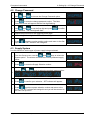
Output 1
3.
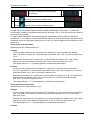
Use the
and
keys to select the Output 1 screen.
4.
to enter the Output 1 setting routine. The screen will
Press
show the current setting for Output 1 flashing.
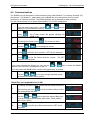
5.
and
keys to select the required option for Output
Use the
1: none or import/export and units.
6.
Press
to confirm your selection. The SET indicator will appear.
Press
to exit Output 1 setting routine. The SET indicator will
7.
extinguish and the
and
different Relay parameter.
keys can now be used to select a
Output 2
This is the next item on the Relays menu and the method of setting is
exactly the same as for Output 1
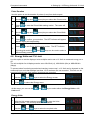
Rate
Use this to set the energy represented by each pulse from either output.
8.
Use the
and
keys to select the Rate screen.
9.
to enter the Rate setting routine. The Rate value will
Press
flash. The Rate is the energy that each output pulse represents.
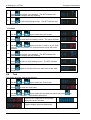
10.
and
Use the
pulse output(s).
keys to select the Rate required for the
11.
Press
to confirm your selection. The SET indicator will appear
and the display will stop flashing.
Press
to exit Rate setting routine. The SET indicator will
12.
extinguish and the
and
different Relay parameter.
14
keys can be used to select a
Integra Ci1 User Manual Issue 2 April 2010