1
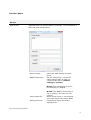
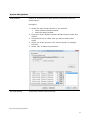
System Management Scan Subnet Search all IP addresses of PDU that are connected under the same subnet. Procedure: 1. Select the way to scan the PDU in the network. Scan network interface subnet Scan the specify subnet 2. Press the “Scan” Button to search all PDU devices under this subnet. 3. Checked the box of “ADD” that you want to add to PDU Utility. 4. Select one of the groups in the “Device Group” to category the PDU. 5. Select “OK” to finish the procedure. General Setting This setting contains two functions. ServerLink PDU Utility Manual 12