1
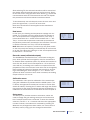
rTA · FT · sinθ2 = rPA · (mweigt · g) · sinθ1
FT = rPA · (mweigt · g) · sinθ1
rTA · sinθ2
As the length of the “pan arm” is 2 cm, the length of the “transducer arm” is 4 cm,
the weight is 2 g, both angles are 900 and the acceleration of gravity is 9.81 ms-2, the
force acting on the force transducer is:
FT = 2 cm · (2 g · 9.81 ms-2) · sin90
4 cm · sin90
FT = 9.81 gram · m · s-2
As 1 N is equal 1 kg · m · s-2, FW is equal to:
FT = 9.81 mN
4.1.2 Weight calibration procedure
The section contains a complete step-by-step description of how to weight calibrate
the force transducer.
1. Place the units on the interface, plug in the cables, and fill the chambers with
double distilled water.
2. Place the calibration bridge, balance and weight on the first myograph unit allowing it to be pre-warmed together with the myograph unit (it is important that the
calibration kit is warm). Turn on the heating in the Heat menu of the Myo-Interface. The system will typically reach the target set temperature (by default, 370C)
after ~20 minutes.
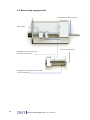
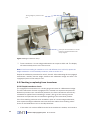
3. Place the calibration bridge, balance and weight on myograph unit 1 as illustrated in fig. 4.1. Make sure that the tip of the transducer arm on the balance is
positioned protruding behind the clamp support. Carefully move the calibration
bridge until the tip of the transducer arm is hanging free, which means it does
not touch the side of the chamber or the support (inset enlargement in fig. 4.1).
Note: The weight should not be placed on the balance yet.
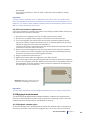
4. Go to the Calibration menu on the Myo-Interface. Ensure Calibrate 1 is active
(the > symbol is displayed to the left; use the F1 button to scroll through the list).
When the relative force reading in the display is stable, press F2 to proceed with
calibration of force transducer 1
5. Carefully place the 2 g weight on the pan (as pointed out in fig. 4.1). The force
applied on the force transducer should mimic the stretch created by the contraction of the mounted preparation. Wait until the relative force reading is stable.
Press F2 to finish the calibration.
User manual 800MS
Chapter 4
21