1
32.2.1. Main window
Caution:
The installation file of EDYTOR WPW is accessible on RADWAG website
www.radwag.com. In Products /Measuring indicators / PUE C41H.
32.2.2. Setting parameters of RS232
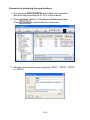
On order to establish the connection with EDYTOR WPW through
RS232 interface follow the remarks below:
• Run EDYTOR WPW,
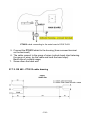
• Connect the scale to a computer using cable PT0020 (see ch. 25),
• Set the port for communication with a computer – parameter
<P3.1.1 COMP. PORT> set to RS232 (1) (see ch. 15.1.1),
• Set transmission parameters: submenu <P2.2 RS232 (1)>
(see ch. 14.1.3),
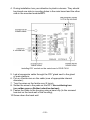
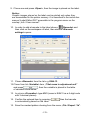
• Click on the button „Settings” to show the window below:
- 172 -