1
UNITYINOVA
Microimaging Module
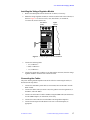
Installing the Preamplifier Attenuator
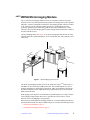
This procedure describes how to install the preamplifier attenuator, which attenuates
the output of the observe preamplifier before the signal reaches the single mixer.
1.
Position the preamplifier attenuator (00-969935-00) on the floor near the magnet leg.
2.
Disconnect cable 00-958298-08 from the observe preamplifier output J5312 and
connect it to the preamplifier attenuator output.
3.
Use cable 00-958298-03 to attach the preamplifier attenuator input to the observe
preamplifier output J5312.
Installing Gradient Coils and the Microimaging Probe
Refer to the NMR Probes Installation Manual for the following procedures:
• Installing gradient coils
• Inserting a sample into the microimaging probe
• Installing and connecting the microimaging probe
Configuring VNMR for Microimaging
The microimaging software option can be installed at any time from the VNMR CD-ROM.
Refer to the VNMR and Solaris Software Installation Manual for more information.
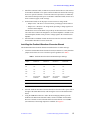
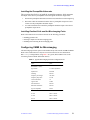
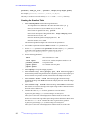
Run config to add gradients, using Table 3 as a guide. (WFG+SDAC refers to the
waveform generator and the Smart DAC board.)
Table 3. Typical Microimaging Software Configuration File
Label
Value
RF Channel 1 (Obs):
Type of RF:
U+ Direct Synthesis
Synthesizer:
PTS 500
Latching:
Present
Frequency Overrange:
100, 000
Frequency Step Size:
0.1 Hz
Coarse Attenuator:
79
Upper Limit:
63 dB
Fine Attenuator:
Present
Waveform Generator:
Present
Type of Amplifier:
Linear
Axial Gradients
X Axis
WFG + SDAC
Y Axis
WFG + SDAC
Z Axis
WFG + SDAC
01-999070-00 A0499
UNITYINOVA
Microimaging Hardware Installation
21