1
Paging Message Format
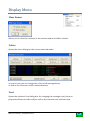
PDW consists of two window panes, the upper pane which is the main message pane
and the lower pane which is used for displaying filtered messages. Both panes have the
same message format as follows :
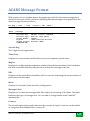
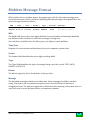
Address | Time | Date | Mode | Type | Bitrate | Message
1234567 14:13:33 17-08-09 POCSAG-1
ALPHA
1200
Please call ASAP
7654321 15:14:13 17-08-09 POCSAG-2 NUMERIC
512
0845-123456
1234567 14:13:33 17-08-09 FLEX-A
ALPHA
1600
Please call ASAP
7654321 15:14:13 17-08-09 FLEX-B
StNUM
3200
0845-123456
1234567 14:13:33 17-08-09 ERMES-2
ALPHA
6250
Please call ASAP
Address
The address field can be either seven or nine digits long and uniquely identifies the
pager for which the message is being sent. You can filter out addresses into the filter
pane, see Options menu Filters.
Time/Date
Displays the current time and date based on your computers system time.
On some FLEX networks you can use the so-called network FlexTIME,
see Options Flex.
Mode
This field shows the mode (POCSAG, FLEX or ERMES) and either the function number
(1-4) or the phase letter (A-D).
Bitrate
The bitrate (speed) of the current paging signal.
Message
The message type can be one of the following :
POCSAG : Alphanumeric / Numeric / Tone-Only
FLEX
: Alphanumeric / Numeric / Tone-Only / Binary / Secure
ERMES : Alphanumeric / Numeric / Tone-Only / Transparent
The message types (as well as faulty characters and filtered keywords) are indicated by
their own colors and can be configured in the Display Colors dialog box.
PDW v3.1 Manual – September 2010
7