1
OPERATION GUIDELINES
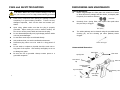
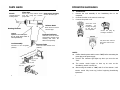
II. Melt the solder
1.
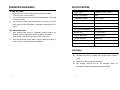
Power Input :
available in 110V / 220V
* Do not touch nozzle to board.
Power Consumption:
70W
Try to check the inside of the hole and the backside of the PCB
Temperature Range:
150°C - 380°C
Heating Element:
Heating Element
easily then it means that solder is completely melted but do not
Output Voltage:
24V
force it.
Tip to Ground Resistance:
Below 2 Ω
Tip to Ground Potential:
Below 2mV
After checking that solder is completely melted, position the
Suction Flow:
15 l /min (max)
desolder gun then absorb the solder by pulling the trigger.
Vacuum Generator:
Double Cylinder
Vacuum Pressure:
600mm Hg
Station Dimensions:
188(w) x 127(h) x 244(d) mm
Weight:
5.3Kg
Apply the nozzle to the soldered part and melt the solder.
2.
if solder is melted.
3.
Try moving the solder using the desolder gun nozzle, if it moves
III. Absorb the solder
1.
* Be careful not to leave any solder remain in the hole.
2.
SPECIFICATIONS
After fully absorbing all the solder, cool the soldering junction in
order to prevent it from becoming resoldered.
FEATURES
Compact unit with air cylinder type strong suction vacuum
●
pump.
●
Suited for multi-layered PCB reworking.
●
The heating element and tip are designed closely to
guarantee enough temperature during desoldering.
8
5