1
interX User Manual
2.2
RS232 Terminal
Revision 0.1.4
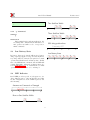
>p
To=0A
Tc=05
Ts=03
>
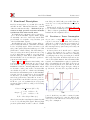
interX configuration can be done via RS232 terminal
program (like HyperTerminal or Term95). Terminal
session can be started only after interX powered up.
To enter terminal session following steps required.
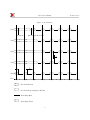
In this example
T o = 0A = 10sec,
T c = 5sec,
T s = 3min
1. Open Terminal program
2. Configure RS232 port (see Section RS232 Port
Settings )
3. Connect RS232 cable from interX to PC
2.2.3 ’o’ Command
SYNOPSIS
o < T ime >
4. Turn on or restart interX
5. If everything is connected and configured right DESCRIPTION
Set T o. T ime must be hex number 00 to FF
you will see in terminal window countdown from
that
denotes 0 to 255 second value.
9 to 0 (9876543210). Press ENTER before
counter gets to zero Countdown will stop, in- EXAMPLE
Set T o to 0f=15 second
terX will enter terminal session and will show
prompt character ’>’
>o 0 f
>
987654
>
2.2.1
2.2.4 ’c’ Command
SYNOPSIS
c < T ime >
RS232 Port Settings
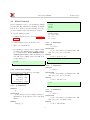
interX requires following RS232 port settings:
Bits per second 9600
Data bits 8
Parity ODD
Stop bits 1
Flow control None
2.2.2
DESCRIPTION
Set T c. T ime must be hex number 00 to FF
that denotes 0 to 255 second value.
EXAMPLE
Set T c to 0A=10 second
>c0A
>
’p’ Command
SYNOPSIS
p
2.2.5 ’s’ Command
SYNOPSIS
s < T ime >
DESCRIPTION
Print current To,Tc,Ts settings as hexadeci- DESCRIPTION
mal numbers. To,Tc values are in seconds, Ts in
Set T s. T ime must be hex number 00 to FF
minutes.
that denotes 0 to 255 minutes value.
EXAMPLE
EXAMPLE
Set T o to 14h=20 min.
Just type ’p’
8