1
Bobbin Winder Controls
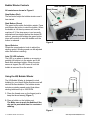
All controls are shown in Figure 6.
Auto Fill LED
Start (Green)
Speed Selector
Stop Button (Red)
The red button stops the bobbin winder once it
has started.
Start Button (Green)
The green button starts the bobbin winder. Press
and release the button to wind the bobbin. When
the bobbin is full the stop sensor will turn the
machine off. If the stop sensor is not correctly
adjusted and has tripped before the desired fill
amount, pressing and holding the green button
down will continue to wind the bobbin until the
button is released.
Stop (Red)
Stop Sensor
Figure 6
Speed Selector
Rotate the speed selector knob to adjust the
winding speed. Winding speed can be adjusted
while the bobbin is winding.
Auto Fill LED Indicator
The LED is on when no bobbin or an empty or
partially-full bobbin is in the winder and it will
flash while winding a bobbin. When the stop
sensor is tripped, the LED turns off until the
bobbin is removed from the winder.
Using the HQ Bobbin Winder
The HQ Bobbin Winder is designed to wind
bobbins for your Handi Quilter machine and will
wind all M-class bobbins. The bobbin winder
includes a winding speed control that allows
winding bobbins at up to 3500 RPM.
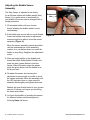
1. Place the thread cone on the thread post to
keep the thread steady (Figure 7).
2. Place a bobbin on the bobbin post.
Tip: Make sure to push the bobbin all the
way on the post each time for consistent
winding.
Figure 7
7 HQ Bobbin Winder User Manual
Visit http://www.HandiQuilter.com