1
Commissioning a project
6.4 Transfer
Requirements
● The *.hmi project is opened in WinCC flexible.
● The HMI device is connected to a configuration PC.
● The data channel is configured on the HMI device
● The automatic transfer is activated in the data channel for the transfer
● The project is started on the HMI device.
Procedure
Proceed as follows:
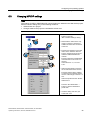
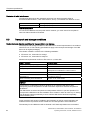
1. On the configuration PC, select the "Transfer settings" command from the "Project >
Transfer" menu in WinCC flexible.
The "Select devices for transfer" dialog opens.
2. Select the HMI device in the left area of the dialog.
3. Select the type of interconnection for the HMI device and the configuration PC.
Set the connection parameters.
4. Set the transfer parameters in the right area of the dialog.
5. Start the transfer in WinCC flexible by selecting "Transfer".
The configuration PC checks the connection to the HMI device. The HMI device shuts
down the current project and automatically changes to "Transfer" mode. The project is
transferred to the HMI device. An error message is displayed on the configuration PC if
the connection is not available or disrupted.
Result
The project is available on the HMI device following successful transfer. The transferred
project is started automatically.
6.4.4
Testing a project
Introduction
You have the following options to test a project:
● Test the project on the configuration PC
You can test a project at a configuration PC, using a simulator. For detailed information,
refer to the "WinCC flexible" user manual and to the WinCC flexible online help.
● Offline testing of the project on the HMI device
Offline testing means that communication between the HMI device and PLC is down
while the test is being carried out.
● Online testing of the project on the HMI device
Online testing means that the HMI device and PLC communicate with each other during
testing.
KTP400 Basic, KTP600 Basic, KTP1000 Basic, TP1500 Basic
Operating Instructions, 01/2009, A5E02421799-01
69