1
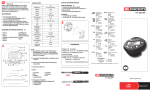
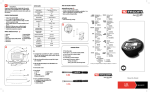
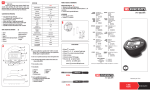
OPERATION
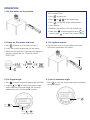
1. Put the meter on the wrench
Get started fast
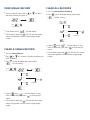
Press
to power on.
Press
or
Press
to start the angle measurement.
■
■
■
to set target angle.
Start rotation.
■
Rotation stop and the LCD will be flashing.
■
Now press
to record angle or press
to
to count from current angle.
clear or press
■
2. Power on the meter and reset
Press
4. Pre-tighten wrench
to power on the meter or reset it.
■
Finally the current target angle will be shown.
■
Hold on your wrench to pre-tighten the screw.
(eliminate the backlash of wrench)
■
Make sure the direction. If you want to change to
direction, please refer to ”CHANGE ANGLE
DIRECTION”.
■
Pre-tighten
Press
Positive
direction
Current
target angle
3. Set target angle
5. Start to measure angle
to select the pre-set target angle (M1~M9).
Press
■
Or press
to modify the current target
or
angle. Note that the target angle will be saved
automatically with the current M number.
■
■ Press
to start the angle meter and immediately
pull your wrench.
Press
Press
to
select angle
Press
or
to
modify target angle