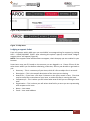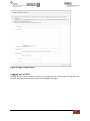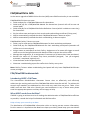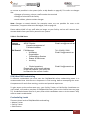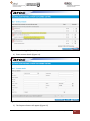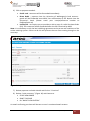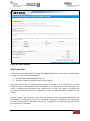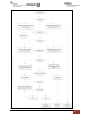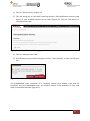
1
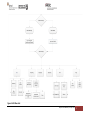
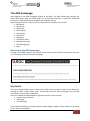
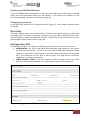
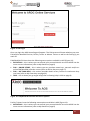
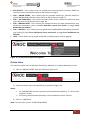
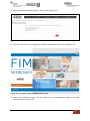
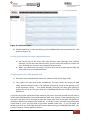
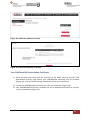
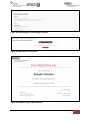
AROC Online Services (AOS) User Manual Version 5.0 (September 2014) FIM/WeeFIM (Clinician) Contents Introduction .................................................................................................................................................. 3 Flow chart of AOS functionality .......................................................................................................................... 3 Computing requirements.................................................................................................................................... 3 Session time-out ................................................................................................................................................. 4 Getting started with AOS.................................................................................................................................... 4 Getting a FIM ID............................................................................................................................................. 4 Getting an AOS login...................................................................................................................................... 4 Logging into AOS............................................................................................................................................ 6 Contacting AROC ................................................................................................................................................ 6 If you have an AOS username........................................................................................................................ 6 If you have a FIM ID ....................................................................................................................................... 6 If you do not have an AOS username of FIM ID ............................................................................................ 7 The AOS homepage ....................................................................................................................................... 8 Returning to the AOS home page .................................................................................................................. 8 My Details .......................................................................................................................................................... 8 Checking my FIM/WeeFIM status ................................................................................................................. 9 Changing my password .................................................................................................................................. 9 My Facility .......................................................................................................................................................... 9 Getting help in AOS ............................................................................................................................................ 9 Lodging a support ticket .............................................................................................................................. 10 Logging out of AOS ........................................................................................................................................... 11 FIM/WeeFIM in AOS .................................................................................................................................... 12 FIM/WeeFIM fundamentals ............................................................................................................................. 12 Introducing AROC’s FIM Team..................................................................................................................... 12 What AROC needs from facilities?............................................................................................................... 12 Help us keep your records up to date..................................................................................................... 12 FIM/ WeeFIM Credentialing ........................................................................................................................ 13 Credentialing Levels..................................................................................................................................... 13 Master Trainers....................................................................................................................................... 14 Facility Trainers ....................................................................................................................................... 14 FIM/WeeFIM Clinician ............................................................................................................................ 14 Re-credentialing Reminders ........................................................................................................................ 15 Accessing the Online FIM/WeeFIM system ...................................................................................................... 15 Getting a FIM ID........................................................................................................................................... 15 Logging into AOS as a FIM/WeeFIM clinician or FIM/WeeFIM Facility Trainer ........................................... 15 Online Store ...................................................................................................................................................... 17 My Exam Keys................................................................................................................................................... 20 Flow for lifespan of a FIM/WeeFIM exam key............................................................................................. 21 The FIM and WeeFIM Online Refresher Course .......................................................................................... 23 Navigating in the FIM Refresher Course ................................................................................................. 25 Sitting the FIM/WeeFIM Exam .................................................................................................................... 26 Pausing and resuming the online FIM/WeeFIM exam............................................................................ 28 Completing the online FIM/WeeFIM exam ............................................................................................ 28 Your FIM/WeeFIM Credentialing Certificate ............................................................................................... 29 Draft AOS User Manual (V4.5 June 2014) 1 FIM/WeeFIM Workshops ................................................................................................................................. 31 Types of FIM/WeeFIM Training Workshops ................................................................................................ 31 FIM/WeeFIM training workshop hosted by a facility ............................................................................. 31 FIM/WeeFIM training workshop hosted by AROC.................................................................................. 31 FIM Facility Trainers Workshop Hosted by AROC ................................................................................... 32 Organising or attending a workshop ........................................................................................................... 32 Cost of workshops ....................................................................................................................................... 32 Checklists ..................................................................................................................................................... 33 Check List for Facility Trainers Running Workshops at their own facility ............................................... 33 Check List for Facility Trainers Requesting a Master Trainer Workshop at their Facility ....................... 33 Evaluation .................................................................................................................................................... 33 Finance ........................................................................................................................................................ 33 Draft AOS User Manual (V4.5 June 2014) 2 Introduction AROC Online Services (AOS) is a secure, web-based service that enables staff of AROC member facilities to manage their facility’s AROC data, their personal details and FIM/WeeFIM credentialing status. AOS is intended for: • Staff involved in the data entry or data upload of AROC data • Staff responsible for downloading and reviewing AROC benchmarking reports • Staff wanting to extract and analyse their facility’s data • Staff needing to become credentialed/re-credentialed in FIM/WeeFIM • Staff planning on sitting the online FIM/WeeFIM refresher course • Staff intending on purchasing/managing FIM/WeeFIM keys and resources. Facilities can opt to have one or many of their staff registered to use AOS and are responsible for ensuring that no unauthorised staff gains access to AOS. This user manual provides AROC members with detailed instructions on how to use the functions available within AOS. Flow chart of AOS functionality The flow chart presented in Figure 1 provides a quick reference to all the functions available from the AOS menu and demonstrates the pathways of entry into the system: A) AOS Login B) FIM ID Each function listed in the flow chart is explained in detail within this document. This manual is available online at from both the AROC Homepage (AROC Online Services … AOS and FIM User Manuals) and from all AOS Menus (Help … User Manual) and can be downloaded as a complete document or by chapter. Computing requirements To access AOS users will need: • An AOS username and password or FIM ID (page 4) • Internet connectivity • A standard internet browser with pop-ups, browser scripting and cookies enabled • Adobe Acrobat reader to view or open PDF files. The recommended browsers are: • Internet Explorer 8.0+ • Mozilla Firefox • Google Chrome • Safari The recommended screen resolution is 1024 x 768. Draft AOS User Manual (V4.5 June 2014) 3 Session time-out To maintain security AOS sessions, including data entry and FIM/WeeFIM online exam, will automatically time out if inactive for periods of 30 minutes or more. If in the middle of a data entry tab or an exam, the user will lose any unsaved data or exam progress. An error message will appear indicating the session has timed out and the user will be returned to the AOS login screen. Getting started with AOS To access AOS users require either an AOS username and password (AOS login) or a FIM ID. FIM and WeeFIM clinicians wishing to purchase an exam key and/or sit an exam (with or without the refresher course) can access this limited functionality of the online FIM system within AOS by logging in with their FIM ID. For full online FIM system functionality or access to other AOS functions (such as data entry and data upload) users of AOS require an AOS login. Getting a FIM ID A FIM ID is a unique and unchanging identifier assigned to each individual FIM/WeeFIM clinician known to AROC. The FIM ID is provided on your FIM/WeeFIM credentialing certificate. If you cannot locate your FIM ID, please ask your facility trainer, who will have the latest credentialing status report, listing all FIM/WeeFIM clinicians and their FIM IDs. If the facility trainer cannot locate it either, please email [email protected] and include your name, facility, email address and the date you last completed the FIM/WeeFIM exam. If you are new to FIM/WeeFIM and are booked to participate in a workshop, you will receive your FIM ID and instructions about how to access the FIM/WeeFIM online system via email shortly after the workshop, for more detail, see page 15. Getting an AOS login If you require an AOS username and password please email AROC at [email protected], and provide the following details: • your name • facility role • facility name* • email address* • your telephone number at this facility* *If you work at more than one facility please clearly state each facility along with your role and telephone number at each. A unique AROC username and password will be provided to you by email. Your username and password will be case-sensitive so it is best to copy and paste from the email sent to you by AROC to your internet browser. When you first log in to AOS you will be prompted to change your password. Draft AOS User Manual (V4.5 June 2014) 4 Figure 1: AOS flow chart Draft AOS User Manual (V4.5 May 2014) 5 Logging into AOS 1) Log into AOS from the AROC homepage http://ahsri.uow.edu.au/aroc (Figure 2). 2) Once the Login screen has opened (Figure 3), choose from “AOS LOGIN” or “FIM LOGIN”. a.To log into AOS using the AOS login enter “Username” and “Password” in the corresponding fields and click “Log In to AOS”. b. To log into AOS using the FIM login enter your “FIM ID” in the corresponding field and click “Log In to FIM”. Figure 2: Location of AOS Log in on AROC Website Contacting AROC If you have an AOS username For any general AROC questions or queries related to functions within AOS please contact AROC using the AOS Menu: HELP Lodge Support Ticket (page 10). If your query relates to an inability to login, please email [email protected]. For information related to FIM, workshop organisation, clinical queries or invoicing queries please email [email protected]. If you have a FIM ID For information related to FIM, workshop organisation, clinical queries or invoicing queries please email [email protected]. AOS User Manual (V5.0 September 2014) 6 Figure 3: AOS Login screen If you do not have an AOS username of FIM ID For any general AROC questions or access requests to AOS please email [email protected]. For information related to FIM, workshop organisation, clinical queries or invoicing queries please email [email protected]. AOS User Manual (V5.0 September 2014) 7 The AOS homepage After logging in the AOS homepage (Figure 4) will open. The AOS home page provides the latest news about AOS and AROC and a list of available functions. If access to additional functions is required please email AROC at [email protected]. Depending on the user’s level of access, the functions available may include: • My Details • My Facility • Data Entry • Data Upload • Data Extract • Data Audit • Reporting • FIM Online Store • FIM My Exam Keys • FIM Manage Keys • Help Returning to the AOS home page Clicking on the AROC logo on the top left corner of the screen will exit the function the user is in and return them to the AOS homepage. Figure 4: AOS homepage My Details This menu option allows users to view their profile. Users are able to edit certain details by clicking on “Edit” under “Quick Links” on the left hand side. We encourage users to keep their details as up to date as possible. Users are unable to update details in greyed out fields. These include: • Contact Person Details • AOS Login • Credentialing If you need to change any of these details, please lodge a support ticket, which can be found in the “Help” menu option. AOS User Manual (V5.0 September 2014) 8 Checking my FIM/WeeFIM status If you are FIM/WeeFIM credentialed you can view your FIM ID and exam results, including when your FIM certification expires via “My Details”. If you believe these details are not correct please lodge a support ticket (refer to page 10). Changing my password In the AOS login section click “Change Password” (Figure 5). The Change Password screen will appear. My Facility This menu option shows users which facility or facilities their AROC account is associated with (Figure 6). This option is read-only and users will not be able to edit the facilities they are listed against or details recorded for a facility. If the facility or list of facilities is incorrect please lodge a support ticket (refer to page 10). Getting help in AOS The HELP menu (Figure 7) is always available during an AOS session and has two options: • USER MANUAL: this links to the AROC documentation page relevant to the system currently being accessed – a PDF of the User Manual and Quick Reference Guide relevant to this system are located here. The online data dictionary is also accessible here. This should be the first port of call for help. This page will be continually updated so it is worth bookmarking. • LODGE SUPPORT TICKET: If you are unable to find an answer to what you need within the online documentation you should lodge a support ticket (page 10). Figure 5: Changing password in “My Details” screen AOS User Manual (V5.0 September 2014) 9 Figure 6: My Facilities Screen Figure 7: Help menu Lodging a support ticket From all systems within AOS users can send AROC a message asking for support by clicking HELP … LODGE SUPPORT TICKET. After selecting this option a pop up screen titled “Lodge a support ticket” will appear (Figure 8). NOTE: if the support ticket window does not appear, check that pop ups are enabled in your browser Some items may pre-fill, based on the account you are logged in as. Please fill out all the other items where you can before submitting, otherwise, we may not be able to get back to you. • Summary – This is a summary of your issue, think of it like a subject line in an email. • Description – This is the overall description of the issue you are having. • Attach file – If you have a file that is relevant to the issue, attach it here. Files that may be useful are screenshots of your issue, or a data file that is causing the issue. • Component/s – This is where you will select what area of AOS you are having an issue with. • Organisation – This is where you will select what facility or area you are representing with respect to this issue • Name – Your name • Email – Your email address AOS User Manual (V5.0 September 2014) 10 Figure 8: Lodge a support ticket Logging out of AOS Clicking on the “Logout” button in red at the top right corner of the screen will log users out of their AOS session and re-direct them to the AROC homepage. AOS User Manual (V5.0 September 2014) 11 FIM/WeeFIM in AOS In the recent upgrade of AROC Online Services (AOS) extra FIM functionality is now available. FIM/WeeFIM Clinicians can now: • Order and pay for a FIM/WeeFIM exam for themselves • Order and pay for a FIM/WeeFIM Manual for themselves (manual will still be sent via normal post) • Order and pay for a FIM/WeeFIM Online Refresher Course (which includes an exam key) for themselves • Sit the online exam and receive their results and credentialing certificate (if they pass) • Will be automatically notified that their FIM/WeeFIM exam is about to expire • Will be automatically notified that their credentialing is about to expire FIM/WeeFIM Facility Trainers can now: • Order, pay for and receive FIM/WeeFIM exams for their workshop participants • Order and pay for FIM/WeeFIM Manuals for their workshop participants (manuals will still be sent via normal post) • Assign exams to participants at their facility. Assignment of an exam will trigger an email to be sent to the assigned person with details of how to access the online exam • Manage the assignment, or re-assignment if necessary of all exams they have purchased • Review the status of all exams they have purchased (assigned, not yet assigned, activated , completed, expired, etc) • View the exam results of participants • Generate a credentialing report for staff at their facility at any time Note: Facility Trainers whose credentialing has lapsed will only have FIM/WeeFIM Clinician access privileges FIM/WeeFIM fundamentals Introducing AROC’s FIM Team The Australasian Rehabilitation Outcomes Centre aims to effectively and efficiently administer the training and use of the FIM/WeeFIM within Australia and NZ. To achieve this several staff members are dedicated to assist with any need that may arise. Table 1 lists AROC staff and their FIM roles. Should you need assistance in any of these areas please email the appropriate person and they will be happy to help. What AROC needs from facilities? If AROC is going to achieve its aim of making the administration of FIM/WeeFIM as efficient as possible, it needs the help of individuals and facilities alike. Help us keep your records up to date The distribution of FIM/WeeFIM information relies on having correct contact information, for this reason it is imperative that details are kept up to date, please keep your own details AOS User Manual (V5.0 September 2014) 12 as current as possible in the system (refer to My Details on page 8). This refers to changes like: • Changes of name e.g. where a staff member has married • Change of role within the facility • email address, phone number changes Note: Changes to certain details, for example name, are not possible for users to do themselves, a support ticket must be lodged, refer to page 10. Please advise AROC of any staff who are longer at your facility and we will remove their contact details from your facility stored in our system. Table 1: The FIM Team Member Contact Details Designated FIM Role Frances Simmonds AROC Director Overall management of FIM administration Email: [email protected] Niki Panteli FIM Manager • Workshop Organisation • Credentialing Queries • Exams & Resources • Invoicing Tel: 02 4221 5282 Email: [email protected] • Clinical questions Please refer to this email address in the first instance, you query will be filtered to the correct contact. Email: [email protected] FIM/ WeeFIM Credentialing To become credentialed you must pass the FIM/WeeFIM online credentialing exam. It is recommended that clinicians are competent in FIM scoring before attempting the exam. Competence will result from training, revision and practical experience. To gain access to the online exam you, your Facility Trainer or FIM Facility Coordinator on your behalf, will need to purchase a FIM/WeeFIM Exam (refer to the Online Store on page 17). Credentialed status lasts for 2 years, after which candidates must re-sit the exam if they wish to remain credentialed. Credentialing Levels There are three levels of FIM/WeeFIM credentialing: • Master Trainer • Facility Trainer • FIM Clinician AOS User Manual (V5.0 September 2014) 13 The attainment of each level has different requirements. Master Trainers Individuals are invited by AROC to become Master Trainers. Master Trainers are contracted to AROC and train outside their facility for payment, but within their facility they act as Facility Trainers and training is done as part of their normal paid time. Master Trainers train in all facilities (public and private) and conduct FIM or WeeFIM Clinician Workshops and some also conduct Facility Trainer workshops for prospective FIM/WeeFIM Facility Trainers. Master Trainers have extensive experience with the FIM/WeeFIM and with training others how to administer it. The initial and ongoing criteria for Master Trainers are listed in Table 2. Table 2: Initial and Ongoing Criteria for Master Trainers Invited to become a Master Trainer by AROC Contracted to AROC Have 5 yrs experience using the FIM tool and maintain current credentialing during that period Have 3 yrs experience as a Facility Trainer with evidence of training Meet a set of standard competencies Be reviewed by a current Master Trainer Have taken measures to maintain clinical currency Satisfy a peer evaluation every 4 years Facility Trainers Facility Trainers train staff within their facility, as part of their job description, in their normal paid time (i.e. not as an independent contractor). The initial and ongoing criteria for Facility Trainers are listed in Table 3. Table 3: Initial and Ongoing Criteria for Facility Trainers Initial Be trained in FIM or WeeFIM scoring by a Master trainer Have current credentialing status Pass the most recent credentialing exam to at least 85+% Have 3+ years experience using the FIM/WeeFIM tool as a credentialed FIM clinician and be prepared to actively participate in training staff Must be supported by employer Have a training qualification or relevant experience Have attended a FIM Facility Trainer workshop Ongoing Conduct at least 1 workshop/year Undertake a refresher course run by a FIM Master Trainer at least every 4 years Pass the exam at 85% + every 2 years FIM/WeeFIM Clinician Clinicians use the FIM/WeeFIM tool within their facility in their paid time. The initial and ongoing criteria for clinicians are listed in Table 4. AOS User Manual (V5.0 September 2014) 14 Table 4: Initial and Ongoing Criteria for FIM/WeeFIM Clinicians Initial Passed the credentialing exam with 80%+ Ongoing Pass the exam at 80+ every 2 years Undertake a refresher course at least every 4 years Re-credentialing Reminders Credentialing lasts two years. AROC will send you a reminder one month before your credentialing is about to expire, notifying you that your credentialing is about to expire and reminding you to re-sit the exam to maintain your credentialed status. Accessing the Online FIM/WeeFIM system Getting a FIM ID A FIM ID is a unique and unchanging identifier assigned to each individual FIM/WeeFIM clinician known to AROC. The FIM ID is provided on your FIM/WeeFIM credentialing certificate. If you cannot locate your FIM ID, please ask your facility trainer, who will have the latest credentialing status report, listing all FIM/WeeFIM clinicians and their FIM IDs. If the facility trainer cannot locate it either, please email [email protected] and include your name, facility, email address and the date you last completed the FIM/WeeFIM exam. If you are new to FIM/WeeFIM and are booked to participate in a workshop, you will receive your FIM ID and instructions about how to access the FIM/WeeFIM online system via email shortly after the workshop. Logging into AOS as a FIM/WeeFIM clinician or FIM/WeeFIM Facility Trainer 1) Log into AOS from the AROC homepage http://ahsri.uow.edu.au/aroc (refer to Figure 2 on page 6). 2) Once the Login screen has opened (Figure 9), choose from “AOS LOGIN” or “FIM LOGIN”. a. If you are a FIM/WeeFIM trainer or coordinator: log into AOS using the AOS login – enter your “Username” and “Password” in the corresponding fields and click “Log In to AOS”. b. If you are a FIM/WeeFIM clinician: log into AOS using the FIM login – enter your “FIM ID” in the corresponding field and click “Log In to FIM”. If you are a facility trainer you are required to login to AOS using your username and password (refer to page 4 for how to obtain an AOS login) to view and manage keys, generate reports and assign keys. As a facility trainer you can also log in using your FIM ID, however logging in this way will provide you with only limited access to FIM functions. AOS User Manual (V5.0 September 2014) 15 Figure 9: FIM Login Once you login the AOS Home Page will appear. The FIM system will know whether you are a FIM and/or WeeFIM Clinician, Facility Trainer or Master Trainer as well as the facility(s) you work for. FIM/WeeFIM Clinicians have the following menu options available in AOS (Figure 10): • MY DETAILS – this is where you can amend your personal details to ensure AROC has the most current information (refer to My Details on page 8) • FIM … ONLINE STORE – this is where you can purchase exam keys, manuals and/or an online FIM/WeeFIM refresher course (refer to Online Store on page 17) • FIM … MY EXAM KEYS – this section provides details of any current or used exam keys you have (refer to My Exam Keys on page 20) • HELP – this is where you go to get help (refer to Getting help in AOS on page 9) Figure 10: FIM/WeeFIM clinician AOS menu options Facility Trainers have the following menu options available in AOS (Figure 11): • MY DETAILS – this is where you can amend your personal details to ensure AROC has the most current information (refer to My Details on page 8) AOS User Manual (V5.0 September 2014) 16 • • • • • • MY FACILITY – this is where you can amend your personal details to ensure AROC has the most current information (refer to My Facility on page 9) FIM … ONLINE STORE – this is where you can purchase exam keys, manuals and/or an online FIM/WeeFIM refresher course (refer to Online Store on page 17) FIM … MY EXAM KEYS – this section provides details of any current or used exam keys you have (refer to My Exam Keys on page 20) FIM … MANAGE KEYS – this is where you manage the keys you have purchased for your workshop participants (refer to Error! Reference source not found. on page Error! Bookmark not defined.) FIM … REPORTS – this is where you can generate a FIM/WeeFIM credentialing report for your facility(s) (refer Error! Reference source not found. on page Error! Bookmark not defined.) HELP – this is where you go to get help (refer to Getting help in AOS on page 9) Figure 11: Facility trainer AOS menu options Online Store This service enables users to purchase Exam Keys, Manuals or an Online Refresher Course. 1) Click on “ONLINE STORE” from the FIM menu (Figure 12) Figure 12: Online Store 2) Check the boxes next to the product(s) to purchase (Figure 13) Notes: • • For FIM/WeeFIM clinicians quantity will automatically default to “1” each time a product is ticked Purchasing multiple exams/manuals is only available to Facility Trainers 3) Click on “CONTINUE” Note: To clear ticks, click on “START NEW ORDER” AOS User Manual (V5.0 September 2014) 17 Figure 13: Purchasing FIM/WeeFIM products 4) Enter contact details (Figure 14). Figure 14: Contact details 5) The Payment Screen will appear (Figure 15) AOS User Manual (V5.0 September 2014) 18 6) Click on payment method: • • Credit card - resources will be forwarded immediately Direct Debit – payment into the University of Wollongong’s bank account goods will be forwarded once AROC has confirmation of the deposit into the University’s bank. (Please email your receipt/reference number to [email protected]) • Invoice/PO - we require you to provide us with a copy of a valid Purchase Order (PO). The resources will be dispatched after the PO is received by AROC Note: It is mandatory to tick the box indicating agreement to the terms and conditions of the online ordering system. Failure to do this will prevent the user from moving through to the next step. Figure 15: Payment 7) Review payment and order details and click on “Continue” 8) Review “order summary” (Figure 16) and choose to: • START NEW ORDER • PRINT THIS PAGE • Go “BACK TO FIM SYSTEM” An email confirming purchase will be sent to user’s nominated email account. AOS User Manual (V5.0 September 2014) 19 Figure 16: Order summary My Exam Keys A key must be purchased before sitting the FIM/WeeFIM online exam (refer to Online Store on page 17). Keys can be purchased by: • An individual FIM/WeeFIM clinician, or • A Facility Trainer on behalf of staff at their facility. Exam keys have a life of 6 months from the date of purchase. If an exam key is not used within 6 months it will become invalid and appear as an Expired Key in the FIM system. An email is automatically generated one month prior to exam key expiry to remind the purchaser and person the key is assigned to (if they are different) that it expires in one month. Facility Trainers who purchase exam keys on behalf of their workshop participants are responsible for assigning each key to an individual. Assignment is automatic if a single exam key was purchased by an individual. Once a key is assigned to an individual they will be able to ‘see’ this key in My Keys. AOS User Manual (V5.0 September 2014) 20 Exam keys require activation before the exam can be accessed. The individual to whom the key has been assigned is responsible for activation of the key. Once activated, the key must be used within 1 month or it will become invalid and appear as an Expired Key in the FIM system. Flow for lifespan of a FIM/WeeFIM exam key Figure 17 provides a visual guide to the lifespan of a FIM/WeeFIM exam key. AOS User Manual (V5.0 September 2014) 21 Figure 17: Lifespan of a FIM/WeeFIM exam key AOS User Manual (V5.0 September 2014) 22 The FIM and WeeFIM Online Refresher Course If you have been previously credentialed in FIM/WeeFIM and need to undertake a Refresher Workshop (required every 4 years for both FIM/WeeFIM clinicians and Facility Trainers), instead of attending a whole day face to face workshop you can now access the FIM/WeeFIM Online refresher course. To access and complete the course follow these steps: 1) Purchase an online FIM or WeeFIM Refresher Course key from the Online Store (page 17) – examples here refer to the completion of the FIM Refresher Course 2) Click on “Activate” (Figure 18) Figure 18: My Keys - Activate 3) Click on “Go to activity” (Figure 19) Figure 19: My Keys - Go to activity 4) Click on FIM Refresher Course (Figure 20) Figure 20: Starting the FIM Refresher Course AOS User Manual (V5.0 September 2014) 23 5) When the Welcome Page appears, click on Enter (Figure 21) Figure 21: Entering the FIM Refresher Course 6) This takes you to the front page of the FIM or WeeFIM Refresher Course (Figure 22) Figure 22: Front Page of the FIM Refresher Course 7) Select Start Module to begin, this will take you to the introduction page of the FIM refresher course (Figure 23) AOS User Manual (V5.0 September 2014) 24 Figure 23: Introduction Page of the FIM Refresher Course Navigating in the FIM Refresher Course 1) When navigating in the FIM/WeeFIM Refresher course, many pages have blue menu items in the left column. On the bottom right of the page is the ‘back’ and ‘forward’ arrows. For each page, you must click through the blue menu items to see the content for that page, before clicking the ‘forward’ arrow to move to the next page. 2) When you have completed the introduction section you will reach the summary page. At this point the system will give you two options: • ‘Continue to FIM Item 1: Eating’: this allows you to jump straight into the course content for Eating. Using this option, you can follow the course in a sequential fashion, completing each item one at a time and stepping on to the next item. • ‘Select an item from the main menu’: this will take you to the course menu, which presents a list of the 18 FIM items and allows you to work through them in any order. You will still need to work through each of the 18 items to complete the refresher course, however this method has the benefit of allowing you to do the course in your own way. AOS User Manual (V5.0 September 2014) 25 Each item consists of a few pages of information, followed by a few questions. Please note that these questions are NOT THE FIM EXAM. There is no penalty for answering incorrectly here, the purpose is educational. 3) To answer the question, select the best option and click ‘Submit’ (as per the instruction on the screen). If you answer correctly, you will see a ‘tick’ and an explanation. If you answer incorrectly, you will see a ‘cross’ and an explanation of the correct answer. After you have reviewed the answer, click the ‘forward’ icon in the bottom right to move on. 4) Once you have completed your course, you will be directed back to AROC Learning System’s FIM Qualification Activity screen. From here you can choose to go directly to complete your FIM/WeeFIM Exam or you can exit the system and come back to do your FIM Exam later (remembering that as your Exam Key is activated you only have 1 month before the key becomes invalid and expires). Sitting the FIM/WeeFIM Exam To become credentialed, or to recredential, a clinician must successfully complete an online examination. The FIM/WeeFIM exam is an “open book” exam, which means that clinicians can refer to their FIM/WeeFIM Manuals whilst taking the exam. The exam is designed to test the knowledge of each individual, thus COLLABORATION is not allowed. Clinicians who collaborate will be identified automatically by the online FIM system, and be required to re-sit the exam under more stringent exam conditions and at their own expense. The conditions under which the exam must be done are quite flexible and can be altered to suit the individual facility. The exam can be supervised in a group environment, where everyone does the exam at a computer in a teaching room, or clinicians can complete the exam online in their own time at work or at home. To access and complete an exam, follow these steps: 1) Click on “MY EXAM KEYS” from the FIM Menu (Figure 24) Note: If you have not already done so, click on “Activate” (Figure 18) Figure 24: My exam keys AOS User Manual (V5.0 September 2014) 26 2) Click on “Go to activity” (Figure 19) 3) This will bring you to the AROC Learning System’s FIM Qualification Activity page where all your available courses can be seen (Figure 25). Click on “FIM Exam” to commence the exam. Figure 25: FIM Qualification Activity page 4) Click on “Attempt exam now” 5) A confirmation pop up box will appear. Click on “Start attempt” to start exam (Figure 26) Figure 26: Confirmation pop up The FIM/WeeFIM exam comprises of 2 randomly chosen case studies, each with 18 questions, one per FIM/WeeFIM item. You need to answer all 18 questions in each case study to complete the exam (Figure 27). AOS User Manual (V5.0 September 2014) 27 Figure 27: FIM Exam screen 6) Answer questions in exam by clicking on the FIM/WeeFIM score you choose for each question (Figure 73). Pausing and resuming the online FIM/WeeFIM exam a) You can do part of the exam, then save and exit. After selecting “Save and Exit Attempt” on the left hand side of screen, you can leave AOS and your results will save, allowing you to return and complete the exam later. b) When you come back the system will know that you were part way through the exam and invite you to Resume Exam. Completing the online FIM/WeeFIM exam 1) Once you have completed the exam click ‘Submit all and finish’ (Figure 28). 2) The system will mark your exam immediately. The next screen will show you how many answers you got correct. The example in Figure 29 shows a user getting only 3 of 36 questions correct … so a failed attempt, and then two days later getting a perfect 36 out of 36. The pass mark for a FIM/WeeFIM clinician is 80% (or 29 of 36 questions). If you fail you will be locked out of the exam for 24 hours. Clinicians should use this time to review their FIM/WeeFIM manual and seek help from their Facility Trainer before they re-sit the exam. Everyone has 3 attempts to pass the exam; each time the system will present 2 randomly chosen case studies to be answered. If you fail 3 times, the exam key will become invalid and to re-sit you will need to purchase another exam key. If you fail twice we recommend that you seek help and clarification about scoring the FIM/WeeFIM from your Facility Trainer or contact AROC for advice. AOS User Manual (V5.0 September 2014) 28 Figure 28: FIM Exam submission screen Figure 29: FIM Exam Summary of Results Your FIM/WeeFIM Credentialing Certificate 1) Once you pass your exam you are returned to the AROC Learning System’s FIM Qualification Activity page where your FIM/WeeFIM certificate can be accessed (Figure 30). Click on FIM Certificate Complete to access your certificate. 2) To see your FIM/WeeFIM Certificate click “Get you certificate” (Figure 31). 3) Your FIM/WeeFIM Certificate is available for you to download and email to yourself, or print immediately (Figure 32). AOS User Manual (V5.0 September 2014) 29 Figure 30: Generating the credentialing certificate Figure 31: Notification of Certificate Figure 32: Example copy of FIM Certificate AOS User Manual (V5.0 September 2014) 30 FIM/WeeFIM Workshops Types of FIM/WeeFIM Training Workshops AROC offers several types of workshops: • FIM/WeeFIM training workshop hosted by a facility (for staff from the facility hosting the workshop) • FIM/WeeFIM training workshop hosted by AROC (Master Trainer) • FIM Facility Trainers Workshop Hosted by AROC (Master Trainer) FIM/WeeFIM training workshop hosted by a facility This type of workshop is held at a facility for staff from that facility. It is for clinicians who have not used the FIM/WeeFIM assessment measure before, or who have limited knowledge of the assessment. Clinicians can attend this workshop and then sit the FIM/WeeFIM online exam to become credentialed FIM/WeeFIM users. It can be run by either a Facility Trainer or AROC Master Trainer. FIM/WeeFIM workshops usually commence at 9:00 am and conclude at 16.00 pm. Recommended class size: • If workshop is being conducted by a single Facility Trainer, we recommend that classes should not exceed 12 participants. • If workshop is being conducted by 2 Facility Trainers together, we recommend that classes should not exceed 20 participants. • If workshop is being conducted by a Master FIM Trainer, we recommend that classes should not exceed 20 participants. If you require a Master Trainer to conduct a workshop at your facility, please contact AROC and not the Master Trainers themselves. AROC will organise the Master Trainer workshop. Please complete a workshop request form http://ahsri.uow.edu.au/content/groups/public/@web/@chsd/@aroc/documents/doc/uow 094426.pdf and email ([email protected]) or fax ( 02 4221 4679) it to the FIM manager. Once we have received your request, we will proceed with the organisation of the workshop i.e. organising dates and resources. From this point forward it is up to the facility to provide the equipment needed for training i.e. overhead projector, screen, laptop with USB port and catering. AROC will email the facility with a list of equipment required. FIM/WeeFIM training workshop hosted by AROC Commonly referred to as an Open FIM/WeeFIM workshop, this is the same in content as a workshop hosted by a facility (see above). The difference is that it is conducted at a venue other than a facility, is organised by AROC and conducted by an AROC Master Trainer. People from many different facilities can attend this workshop. FIM/WeeFIM workshops usually commence at 9:00 am and conclude at 16.00 pm and cater for a maximum of 20 participants. AOS User Manual (V5.0 September 2014) 31 FIM Facility Trainers Workshop Hosted by AROC This type of workshop is for clinicians who meet the criteria to become a Facility Trainer and can only be conducted by an AROC Master FIM Trainer. The aim of this workshop is to train and equip clinicians with the skills needed to train other staff at their facility in the use of the FIM assessment. Before sending clinicians, employers/ supervisors should be aware of the criteria and ensure that the clinician is proficient in the FIM, is willing to present items at the workshop and is prepared to conduct FIM training at their facility on their return. Facility Trainer workshops usually commence at 9:00 am and conclude at 16.00 pm, and cater for a maximum of 10 participants. Organising or attending a workshop To organise or attend a workshop, simply download the workshop request form from the AROC website http://ahsri.uow.edu.au/aroc/index.html and email ([email protected]) or fax ( 02 4221 4679) it to the FIM manager. Alternatively you can contact the FIM Manager on [email protected] who will be happy to help you. All open workshops will be advertised on our website and in our quarterly newsletter, Data Matters. Once your place in the open workshop has been confirmed, transport and accommodation (if required) is your own responsibility. Cost of workshops The structure is designed so that it is more economical for hospitals to have workshops run at their facility rather than sending them to an AROC OPEN Workshop. This is true for a facility if they have 8 or more people to train. The great thing about the trainer coming to your facility is that you can have up to 20 people trained for that flat rate, provided the venue can hold the numbers comfortably. For further pricing details please see Table 5. Table 5 FIM/WeeFIM Workshop Expenses for AROC Members NB: The above fees do not include GST. This must be added to the total cost. Non members of AROC should contact AROC for the relevant charges. AOS User Manual (V5.0 September 2014) 32 Checklists Check List for Facility Trainers Running Workshops at their own facility 1. Determine date of workshop 2. Book venue 3. Advertise workshop within facility and register interested people 4. Complete a registered FIM ID form and forward to AROC at least 2 weeks prior to your workshop – AROC will assign FIM ID’s to those participants that don’t already have one 5. Log in to THE NEW FIM SYSTEM and order any FIM/WeeFIM manuals you need (allow 2 weeks for delivery) 6. Log in to THE NEW FIM SYSTEM and purchase exams for workshop participants. Upon receipt log in to THE NEW FIM SYSTEM and assign each participant an exam. 7. Print the attendance sheet and evaluation forms for use at the workshop; these can be found on your CD of presentation slides along with other useful documents. 8. The day after the workshop send the completed attendance sheet and evaluation forms to AROC by fax, or scan and email [email protected] Check List for Facility Trainers Requesting a Master Trainer Workshop at their Facility 1. Complete a workshop request form providing dates that may be suitable for training at your facility. Where possible we will try to accommodate your requested dates: http://ahsri.uow.edu.au/content/groups/public/@web/@chsd/@aroc/documents/doc/ uow094426.pdf 2. The date of workshop will be confirmed by email and you will be provided with a list of equipment and other requirements for training 3. Complete a FIM ID form for registered participants and forward to AROC at least 2 weeks prior to your workshop – AROC will create FIM ID’s to those participants that don’t already have one 4. Log in to THE NEW FIM SYSTEM and order any FIM/WeeFIM manuals you need (allow 2 weeks for delivery) 5. Log in to THE NEW FIM SYSTEM and purchase exams for workshop participants. Upon receipt log in to THE NEW FIM SYSTEM and assign each participant an exam Evaluation AROC aims to continually improve the process of FIM/Wee/FIM Training and management. To aid this, evaluation forms are to be completed for all workshops conducted by a Master Trainer or Facility Trainer. It is very important that these are completed and sent to the FIM Manager at AROC. After AROC has received the forms they are entered into a database to be analysed so a report can be produced. Through this process it is hoped that any problem areas that are identified will be rectified. For this reason we ask that all people doing the FIM/WeeFIM training complete the evaluation forms. Finance Please contact the FIM Manager if you have any queries regarding financial matters. AROC sits within the Australian Health Services Research Institute (AHSRI) which in itself sits within the University of Wollongong. AHSRI therefore utilizes the University’s financial infrastructure. AOS User Manual (V5.0 September 2014) 33 Workshop billing will occur at the time of registering for an AROC hosted workshop. For a facility hosting an on site workshop billing will occur once all expenses are finalised. Should your facility require an invoice, you will first need to provide AROC with a copy of a valid purchase order number generated by the finance department of your organisation. If you require any more information, please contact the AROC team at [email protected] AOS User Manual (V5.0 September 2014) 34