1
Table of Contents
1. Introduction................................................................................................................................. 4
1.1 Product Introduction ......................................................................................................... 5
1.2 Package Content................................................................................................................ 6
1.3 Product Features ............................................................................................................... 7
1.4 Application ........................................................................................................................ 7
1.4.1 Wireless ISP (WISP) Mode...................................................................................... 7
1.4.2 Bridge Mode........................................................................................................... 8
1.5 Product Outline Introduction ............................................................................................ 9
1.5.1 Front view .............................................................................................................. 9
1.5.2 Back view ............................................................................................................... 9
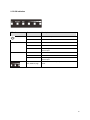
1.5.3 LED Indication ...................................................................................................... 10
1.5.4 I/O Interface ..........................................................................................................11
1.5.5 Mounting Options ................................................................................................ 12
2. Hardware Installation ................................................................................................................ 13
2.1 Connection overview ...................................................................................................... 13
2.2 Installation Steps ............................................................................................................. 13
2.3 IP Surveillance ................................................................................................................. 15
3. Software Configuration............................................................................................................. 16
3.1 System Requirements...................................................................................................... 16
3.2 Easy Installation .............................................................................................................. 16
3.3 Get started with LP-2596K ............................................................................................. 17
4. Software Features...................................................................................................................... 18
4.1 Operation Mode .............................................................................................................. 18
4.1.1 Access Point ......................................................................................................... 18
4.1.2 Client .................................................................................................................... 26
4.1.3 WDS Access Point ............................................................................................... 34
4.1.4 WDS Client .......................................................................................................... 42
4.1.5 AP Router ............................................................................................................. 50
4.1.6 Wireless ISP ......................................................................................................... 64
4.2 System Configuration ..................................................................................................... 78
4.2.1 Device IP Settings ................................................................................................ 78
4.2.2 Time Settings ....................................................................................................... 79
4.2.3 Password Settings ................................................................................................ 80
4.2.4 System Management ............................................................................................ 81
4.2.5 Ping Watchdog ..................................................................................................... 82
4.2.6 Firmware Upgrade ............................................................................................... 83
4.2.7 Save and Restore .................................................................................................. 83
4.2.8 Factory Default .................................................................................................... 84
4.2.9 Reboot .................................................................................................................. 84
4.3 Tools ................................................................................................................................ 85
4.3.1 Network Ping ....................................................................................................... 85
4.3.2 Network Traceroute ............................................................................................. 86
4.4 Device Status .................................................................................................................. 87
2