1
Table of Contents
Copyright ......................................................................................................................................2
Getting started .............................................................................................................................5
Getting to know your monitor ................................................................................................7
Front view.................................................................................................................................................... 7
Back view ..................................................................................................................................................... 7
Input and output ports.............................................................................................................................. 8
Connection ................................................................................................................................................ 10
How to assemble your monitor hardware ........................................................................ 13
How to detach the stand and the base ............................................................................................... 19
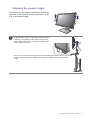
Adjusting the monitor height ................................................................................................................ 21
Rotating the monitor .............................................................................................................................. 22
Viewing angle adjustment ....................................................................................................................... 23
Using the monitor wall mounting kit ................................................................................................... 24
Getting the most from your BenQ monitor ...................................................................... 25
How to install the monitor on a new computer .............................................................................. 26
How to upgrade the monitor on an existing computer ................................................................. 27
How to install on Windows 8 (8.1) system ....................................................................................... 28
How to install on Windows 7 system ................................................................................................ 29
How to adjust your monitor ................................................................................................. 30
The control panel..................................................................................................................................... 30
Basic menu operation ............................................................................................................................. 31
Picture optimization (for models with D-Sub inputs) ..................................................................... 33
Customizing the hot keys....................................................................................................................... 33
Adjusting display mode ........................................................................................................................... 33
Choosing an appropriate picture mode.............................................................................................. 34
Connecting the monitor to your MacBook series product ........................................................... 34
Navigating the main menu ...................................................................................................... 35
Display menu ............................................................................................................................................. 36
Picture menu ............................................................................................................................................. 38
Picture Advanced menu ......................................................................................................................... 40
Audio menu ............................................................................................................................................... 43
System menu ............................................................................................................................................. 44
Ergonomics menu .................................................................................................................................... 48
Eco menu ................................................................................................................................................... 50
Troubleshooting ....................................................................................................................... 52
Frequently asked questions (FAQ) ...................................................................................................... 52
Need more help?...................................................................................................................................... 54
4