1
Item
Function
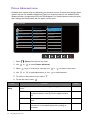
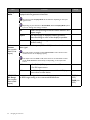
Custom Key Sets the function to be accessed by custom key 1.
1
Custom Key Sets the function to be accessed by custom key 2.
2
Custom Key Sets the function to be accessed by custom key 3.
3
Range
• Picture Mode
• CAD / CAM
• Animation
• Low Blue Light
• Display Mode
• Brightness
• Contrast
• Auto
Adjustment
(for models with
D-Sub inputs)
• Volume
• Mute
• Input
• Eye Protect
• Eye Protect
Meter
• ECO Sensor
• ECO Sensor
Meter
• Smart
Reminder
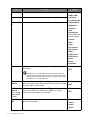
DDC/CI
Allows the monitor settings to be set through the software • ON
on the PC.
• OFF
DDC/CI, short for Display Data Channel/Command Interface,
which was developed by Video Electronics Standards Association
(VESA). DDC/CI capability allows monitor controls to be sent via
the software for remote diagnostics.
DP Auto
Switch
When this function is activated, DP port will be in the
• ON
input auto select loop. Otherwise, DP can only be selected • OFF
by input select or by hot key.
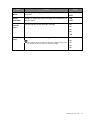
HDMI Auto
Switch
When this function is activated, HDMI port will be in the
input auto select loop. Otherwise, HDMI can only be
selected by input select or by hot key.
• ON
• OFF
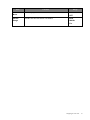
Sets the time to power off the monitor automatically in
power saving mode.
• OFF
• 10min.
• 20min.
• 30min.
(for models
with HDMI
inputs)
Auto Power
Off
46
Navigating the main menu