1
5.3.6.
Download OTC Simulation Portfolio............................................................................................. 33
5.3.7.
Reset the OTC Simulation Portfolio ............................................................................................. 33
5.4.
FUTURES PORTFOLIO SCREEN................................................................................................................. 34
5.4.1.
Overall Summary ......................................................................................................................... 34
5.4.2.
Valid ETD Instrument Codes........................................................................................................ 34
5.4.3.
Retrieve Cleared Portfolio and Allocations................................................................................... 34
5.4.4.
Export Cleared Portfolio ............................................................................................................... 36
5.4.5.
Upload Custom Portfolio .............................................................................................................. 36
5.4.5.1. Download Futures Template .......................................................................................................................... 37
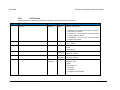
5.4.5.2. CSV File Format ............................................................................................................................................ 38
5.4.6.
Allocate for Cross-Margining ........................................................................................................ 41
5.4.7.
Include in Simulation .................................................................................................................... 41
5.4.8.
Download Futures Simulation portfolio ........................................................................................ 42
5.4.9.
Reset Futures Simulation portfolio ............................................................................................... 42
5.5.
SIMULATION RESULTS SCREEN ................................................................................................................ 43
5.5.1.
Submitting for Simulation ............................................................................................................. 43
5.5.2.
Progress Update .......................................................................................................................... 43
5.5.3.
View Simulation results ................................................................................................................ 43
6.
COMMON ERROR MESSAGES ................................................................................................................... 46
7.
BUSINESS CONTINUITY SOLUTION........................................................................................................... 48
8.
APPENDICES ................................................................................................................................................ 49
8.1.
APPENDIX 1 – REGISTRATION FORM......................................................................................................... 49
8.2.
APPENDIX 2 – DIGITAL CERTIFICATE PROCEDURE ..................................................................................... 49
8.3.
APPENDIX 3 – TROUBLESHOOTING ........................................................................................................... 49
8.3.1.
Browser-related Error Messages ................................................................................................. 49
8.3.1.1. This website only supports Internet Explorer 7, 8 and 9 Issue ...................................................................... 49
8.3.1.2. HTTP 403 Forbidden Issue ............................................................................................................................ 49
8.3.1.3. JavaScript Issue............................................................................................................................................. 50
8.3.2.
Margin Simulator Access Issues .................................................................................................. 51
8.3.2.1. Cannot view margin Simulator link on the application Selection Page. ......................................................... 51
8.3.2.2. On Clicking the Margin Simulator link, access denied error is displayed ...................................................... 51