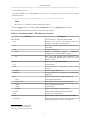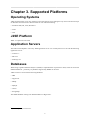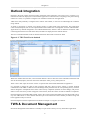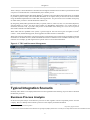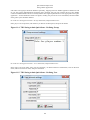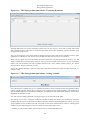
1
Together Workflow Server V.6.0-1 - 20130807-0400-TAB-2.4-1 User Manual Together Teamsolutions Co., Ltd. in Thailand. Together Workflow Server: User Manual by Together Teamsolutions Co., Ltd. in Thailand. Copyright © 2011 Together Teamsolutions Co., Ltd. in Thailand. Permission is granted to copy, distribute and/ or modify this document under the terms of the GNU Free Documentation License, Version 1.3 or any later version published by the Free Software Foundation; with the Invariant Sections being "Introduction", "Installation Guide", "Supported Platforms", "Integration", "WfMC", "Architecture", "Swing Admin Application", "Web Client Application", "JSP Client Application", "Console Client Application", "Quick Start Example with Swing Admin Application", "Quick Start Example with Web Client Application", "Together for Outlook", "Plain Web Service Wrapper", "EJB Service Wrapper", "CORBA Service Wrapper", "WfXML Service Wrapper", "How to Model Processes with ARIS", "Tool Agents", "LDAP", "Plug-In Components", "XPDL Extended Attributes Usage", "The Developer's Guide", "How to", "Questions and Answers", "Patches to Subcomponents", "Build Guide", "Release Notes", and with the Front-Cover Texts. A copy of the license is included in the section entitled "GNU Free Documentation License". Together Teamsolutions Co., Ltd. DISCLAIMS ALL WARRANTIES, EXPRESS OR IMPLIED, INCLUDING BUT NOT LIMITED TO ANY WARRANTY THAT THE USE OF THE INFORMATION HEREIN WILL NOT INFRINGE ANY RIGHTS OR ANY IMPLIED WARRANTIES OF MERCHANTABILITY OR FITNESS FOR A PARTICULAR PURPOSE. While every precaution has been taken in the preparation of this book, the publisher assumes no responsibility for errors or omissions, or for damages resulting from the use of the information contained in this book. The Together logos, Enhydra, the Enhydra logo and the Enhydra Shark logo are registered trademarks of GrECo International Holding AG in Austria / Europe. Java and all Java-based trademarks or logos are trademarks or registered trademarks of Oracle Corporation, in the United States States and other countries. Together Teamsolutions Co., Ltd. is independent of Oracle Corporation. In this document parts of the original XPDL 2.1 specification - WfMC XPDL 2.1 Specification1 and OMG's Workflow Management Facility Specification2 are used. The Workflow Management Coalition/Object Management Group and its members are the owners of the copyright of this specification. 1 2 http://www.wfmc.org/Download-document/WFMC-TC-1025-Oct-10-08-A-Final-XPDL-2.1-Specification.html http://www.omg.org/spec/WfMF/1.2/PDF Table of Contents 1. Introduction .............................................................................................................................. 1 What is Together Workflow Server? ........................................................................................ 1 Some (Technical) Facts about TWS ......................................................................................... 1 2. Installation Guide ...................................................................................................................... 3 Getting the Binaries .............................................................................................................. 3 Prerequisites ......................................................................................................................... 3 Installation ........................................................................................................................... 3 Silent Installation .................................................................................................................. 5 3. Supported Platforms .................................................................................................................. 6 Operating Systems ................................................................................................................ 6 J2SE Platform ...................................................................................................................... 6 Application Servers ............................................................................................................... 6 Databases ............................................................................................................................ 6 4. Integration ................................................................................................................................ 7 Outlook Integration ............................................................................................................... 8 TWS & Document Management .............................................................................................. 8 Typical Integration Scenario ................................................................................................... 9 Business Process Analysis .............................................................................................. 9 Existing System Analysis ............................................................................................. 10 XPDL Modeling ......................................................................................................... 10 Writing Specific Plug-Ins ............................................................................................. 10 Implementation ........................................................................................................... 10 Support ...................................................................................................................... 11 Sample of Business Process Automation ................................................................................. 11 Integration Showcases .......................................................................................................... 13 IntelliCare .................................................................................................................. 13 openTrends ................................................................................................................ 13 Gruppo Sistematica ...................................................................................................... 13 INA .......................................................................................................................... 14 IconMedialab .............................................................................................................. 17 TerraNua ................................................................................................................... 18 Others ....................................................................................................................... 23 5. WfMC ................................................................................................................................... 25 XPDL Overview ................................................................................................................. 26 XPDL Elements Overview .................................................................................................... 26 6. Architecture ............................................................................................................................ 30 WfMC Interfaces ................................................................................................................ 30 Interface 1: XPDL Workflow Metamodel ........................................................................ 30 Interface 2 and 3: Worklist Client .................................................................................. 30 Interface 3: Tool Agent ................................................................................................ 30 Interface 4: Wf-XML ................................................................................................... 30 Interface 5: Audit Data ................................................................................................. 30 TWS Project ....................................................................................................................... 31 Workflow Engine ........................................................................................................ 31 Service Wrappers ........................................................................................................ 31 Administration Tools ................................................................................................... 31 Worklist Handlers ....................................................................................................... 31 XPDL Workflow Editor ............................................................................................... 32 SQL Scripts and ETL Tool ........................................................................................... 32 Workflow Engine Architecture .............................................................................................. 32 Public/Client API ........................................................................................................ 33 Plug Ins ..................................................................................................................... 50 Kernel ....................................................................................................................... 52 How it Works ............................................................................................................. 52 Data Model ........................................................................................................................ 54 iii Together Workflow Server How to Switch Database Vendor for TWS Persistence ....................................................... 54 7. Swing Admin Application ......................................................................................................... 57 What is TWS Swing Admin Application? ................................................................................ 57 Starting TWS Swing Admin Application ................................................................................. 57 Using TWS Swing Admin application .................................................................................... 57 Repository Management ............................................................................................... 57 Package Management ................................................................................................... 58 Process Instantiation Management .................................................................................. 61 Process Monitor .......................................................................................................... 62 User Management ....................................................................................................... 66 Application Mapping ................................................................................................... 68 Cache Management ..................................................................................................... 69 Work List .................................................................................................................. 70 Process List ................................................................................................................ 72 8. Web Client Application ............................................................................................................ 74 What is TWS Web Client Application? ................................................................................... 74 Deploying TWS Web Client Application ................................................................................. 74 Deploying TWS Web Client Application on Tomcat 7.x ..................................................... 74 Deploying TWS Web Client Application on JBoss 4.x ....................................................... 75 Starting TWS Web Client Application .................................................................................... 75 Using TWS Web Client application ........................................................................................ 76 Repository Management ............................................................................................... 76 Package Management ................................................................................................... 77 Process Instantiation .................................................................................................... 79 Process Monitor .......................................................................................................... 80 Groups Management .................................................................................................... 85 Users Management ...................................................................................................... 86 Participant Mapping ..................................................................................................... 87 Application Mapping ................................................................................................... 87 Cache Management ..................................................................................................... 88 Work List .................................................................................................................. 89 Process List ................................................................................................................ 91 Web Client Application as a Framework for Developing Web-Flow Applications ............................ 92 Example of Web-Flow Application Implemented through XPDL .......................................... 93 Web Client and WfXML .................................................................................................... 100 9. JSP Client Application ............................................................................................................ 103 What is TWS JSP Client Application? .................................................................................. 103 Deploying TWS JSP Client Application ................................................................................ 103 Starting TWS JSP Client Application .................................................................................... 103 Using TWS JSP Client Application ...................................................................................... 104 10. Console Client Application .................................................................................................... 110 What is TWS Console Client Application? ............................................................................. 110 Starting TWS Console Client Application in Console Mode ...................................................... 110 Using TWS Console Client Application in Console Mode ......................................................... 111 Using TWS Console Client Application in Command-line Mode ................................................ 118 11. Quick Start Example with Swing Admin Application .................................................................. 121 12. Quick Start Example with Web Client Application ..................................................................... 128 13. Together for Outlook ............................................................................................................ 143 Connecting to Outlook ....................................................................................................... 143 Handling Tasks in Outlook .................................................................................................. 146 Task Categories ................................................................................................................. 150 Creating New Task in Outlook ............................................................................................ 152 Changing Database vendor for TFO ...................................................................................... 152 Using Together Workflow Editor from TFO package ............................................................... 152 14. Plain Web Service Wrapper ................................................................................................... 154 Deploying TWS Plain Web Services ..................................................................................... 154 Using TWS Plain Web Services ........................................................................................... 154 15. EJB Service Wrapper ............................................................................................................ 157 iv Together Workflow Server 16. 17. 18. 19. 20. 21. 22. Deploying TWS EJB Services on JBoss 4.x ........................................................................... Using TWS EJB Web Services ............................................................................................ Exposing Web Services with TWS EJB Service Wrapper .......................................................... CORBA Service Wrapper ...................................................................................................... Deploying TWS CORBA Services ........................................................................................ Using TWS CORBA Services .............................................................................................. WfXML Service Wrapper ...................................................................................................... Deploying TWS WfXML Services ....................................................................................... WfXML Showcase with TWS Web Client ............................................................................. Setting up Tomcat 7.x ................................................................................................ Setting up TWS WfXML Configuration ........................................................................ Deploying XPDLs for WfXML Showcase ...................................................................... Executing Retailer-Manufacturer Process ....................................................................... How to Model Processes with ARIS ........................................................................................ Tool Agents ........................................................................................................................ About tool agents (from WfMC document) ............................................................................ TWS Implementation of Tool Agent Interface ........................................................................ How does TWS Use Tool Agents ......................................................................................... TWS Tool Agents ............................................................................................................. JavaClass Tool Agent ................................................................................................. RuntimeApplication Tool Agent ................................................................................... JavaScript Tool Agent ................................................................................................ Bsh Tool Agent ......................................................................................................... XSLT Tool Agent ..................................................................................................... SOAP Tool Agent ..................................................................................................... Mail Tool Agent - sends and receives mail messages. ....................................................... Scheduler Tool Agent ................................................................................................. Quartz Tool Agent ..................................................................................................... UserGroup Tool Agent ............................................................................................... LDAP Tool Agent ..................................................................................................... Check Document Formats Tool Agent ........................................................................... Default Tool Agent .................................................................................................... Tool Agent Loader .................................................................................................... How to Use Swing Admin Application to Perform Tool Agent Mappings ..................................... Example of Tool Agents Used in the Example XPDLs ............................................................. LDAP ................................................................................................................................ Introduction ...................................................................................................................... LDAP structure, type 0 ....................................................................................................... LDAP structure, type 1 ....................................................................................................... LDAP structure, type 2 - Active Directory ............................................................................. Plug-In Components ............................................................................................................. Event Audit plug-ins .......................................................................................................... SMTP Event Audit Manager ....................................................................................... Reporting Event Audit Manager ................................................................................... XPILLog Event Audit Manager ................................................................................... Assignment Manager plug-ins .............................................................................................. History Related Assignment Manager plug-in ................................................................. Error Handler plug-ins ........................................................................................................ SMTPNewProcFileSysLog Error Handler plug-in ............................................................ Deadline Handler plug-ins ................................................................................................... SMTP Deadline Handler plug-in .................................................................................. XPDL Extended Attributes Usage ........................................................................................... Server-side (kernel) extended attributes ................................................................................. ALLOW_UNDEFINED_VARIABLES ............................................................................. UNSATISFIED_SPLIT_CONDITION_HANDLING_MODE ............................................... HANDLE_ALL_ASSIGNMENTS ................................................................................... CREATE_ASSIGNMENTS ........................................................................................... CREATE_DEFAULT_ASSIGNMENT ............................................................................. v 157 157 160 161 161 161 166 166 167 167 168 169 170 173 180 180 180 180 181 181 182 182 182 183 183 184 191 192 192 194 195 195 195 196 196 199 199 199 201 205 206 206 206 210 210 211 211 211 211 214 214 216 216 216 216 217 217 217 Together Workflow Server ACCEPT_SINGLE_ASSIGNMENT ................................................................................ REASSIGN_WITH_UNACCEPTANCE_TO_SINGLE_USER .............................................. DELETE_OTHER_ASSIGNMENTS ............................................................................... ASSIGNMENT_MANAGER_PLUGIN ............................................................................ USE_PROCESS_CONTEXT_ONLY ............................................................................... DELETE_FINISHED .................................................................................................. TRANSIENT ............................................................................................................. DYNAMICSCRIPT ..................................................................................................... XPDL_STRING_VARIABLE. ........................................................................................ OVERRIDE_PROCESS_CONTEXT ............................................................................... Client side extended attributes ............................................................................................. VariableToProcess_VIEW ........................................................................................... VariableToProcess_UPDATE ....................................................................................... VariableToProcess_FETCH ......................................................................................... CHECK_FOR_FIRST_ACTIVITY ............................................................................... CHECK_FOR_CONTINUATION ................................................................................ CHECK_FOR_COMPLETION .................................................................................... REDIRECT_AFTER_PROCESS_END .......................................................................... DYNAMIC_VARIABLE_HANDLING ......................................................................... CHOOSE_NEXT_PERFORMER ................................................................................. XFORMS_FILE ........................................................................................................ ENABLE_COMMENTS ............................................................................................. ENABLE_REASSIGNMENT ...................................................................................... 23. The Developer's Guide .......................................................................................................... Starting TWS .................................................................................................................... Using SharkInterfaceWrapper Utility Class .................................................................... Configuring TWS .............................................................................................................. Setting "enginename" parameter ................................................................................... Setting kernel behavior in the case of unsatisfied split conditions ........................................ Setting kernel to evaluate OTHERWISE conditions last .................................................... Setting kernel for assignment creation ........................................................................... Setting kernel for default assignment creation ................................................................. Setting kernel for resource handling during assignment creation ......................................... Setting kernel behavior to re-evaluate assignments at engine startup .................................... Setting kernel for assignment handling .......................................................................... Setting kernel's configuration string variables ................................................................. Setting kernel behavior to fill the caches on startup ......................................................... Setting kernel behavior for reevaluating deadline limits .................................................... Setting kernel and event audit mgr for persisting old event audit data .................................. Setting kernel for the priority handling .......................................................................... Setting properties for browsing LDAP server .................................................................. Setting kernel's CallbackUtilities implementation class ..................................................... Setting kernel's ObjectFactory implementation class ......................................................... Setting kernel's ToolActivityHandler implementation class ................................................ Setting kernel's TxSynchronizationFactory class .............................................................. Database configuration ............................................................................................... Setting persistence components variable data model ......................................................... Setting Assignment manager implementation class ........................................................... Setting user group implementation ................................................................................ Setting participant map persistence implementation .......................................................... Setting Caching implementation ................................................................................... Setting instance persistence implementation .................................................................... Configuring DODS instance persistence implementation to delete processes when they finish ................................................................................................................................ Setting logging API implementation .............................................................................. Setting repository persistence implementation ................................................................. Setting scripting manager implementation ...................................................................... Setting security (authorization) API implementation ......................................................... vi 218 218 219 219 219 220 220 220 221 222 222 222 222 222 223 223 223 224 224 224 224 224 225 226 226 227 228 229 229 230 230 230 230 231 231 231 231 232 232 232 232 235 236 236 236 236 237 238 238 239 239 239 240 240 242 243 243 Together Workflow Server 24. 25. 26. 27. 28. Setting tool agents ..................................................................................................... Setting application map persistence implementation ......................................................... Setting WfXML interoperability implementation ............................................................. Setting DODS Id generator cache size(s) ....................................................................... How To .............................................................................................................................. Database .......................................................................................................................... How to configure TWS to work with another database? .................................................... How to clear TWS database? ....................................................................................... Client interface .................................................................................................................. How to use TWS library ............................................................................................. XPDL process definitions ................................................................................................... How to write deadline expressions for activities? ............................................................. How to write extended attributes to be able to update/view activity variables in TWS's admin application ................................................................................................................ How to write XPDL to use custom Java classes as variables in TWS ................................... How to define in XPDL that initial value of some variable should be 'null' ............................ How to specify scripting language ................................................................................ How to use XPDL to directly map Application definition to particular Tool Agent (no need for Application mapping in runtime) .................................................................................. Questions and Answers ......................................................................................................... General ............................................................................................................................ Process definitions, repositories ............................................................................................ Tool agents, scripting ......................................................................................................... Process instances, execution ................................................................................................ Database,... ....................................................................................................................... Patches to Subcomponents ..................................................................................................... Chiba ............................................................................................................................... XSLTForms ...................................................................................................................... CSVJDBC ........................................................................................................................ Build Guide ........................................................................................................................ Getting the Source Code ..................................................................................................... Prerequisites ..................................................................................................................... Preparing the Build Environment .......................................................................................... Compiling and Building ...................................................................................................... Packaging Distributions ...................................................................................................... Rebranding ....................................................................................................................... Release Notes ...................................................................................................................... Release 6.0-1 .................................................................................................................... Release 5.2-1 .................................................................................................................... Release 5.1-1 .................................................................................................................... Release 5.0-1 .................................................................................................................... Release 4.6-1 .................................................................................................................... Release 4.5-1 .................................................................................................................... Release 4.4-1 .................................................................................................................... Release 4.3-1 .................................................................................................................... Release 4.2-1 .................................................................................................................... Release 4.1-2 .................................................................................................................... Release 4.1-1 .................................................................................................................... Release 4.0-1 .................................................................................................................... Release 3.3-2 .................................................................................................................... Release 3.3-1 .................................................................................................................... Release 3.2-2 .................................................................................................................... Release 3.2-1 .................................................................................................................... Release 3.1-3 .................................................................................................................... Release 3.1-2 .................................................................................................................... Release 3.1-1 .................................................................................................................... Release 3.0-1 .................................................................................................................... Release 2.5-1 .................................................................................................................... vii 243 244 244 245 246 246 246 246 247 247 251 251 252 252 253 253 254 255 255 257 258 260 266 268 268 268 268 269 269 269 269 270 271 272 276 276 278 279 282 285 287 288 290 292 294 295 297 298 299 303 303 304 304 305 306 306 Together Workflow Server Release 2.4-1 .................................................................................................................... Release 2.3-1 .................................................................................................................... Release 2.2-1 .................................................................................................................... Release 2.1-1 .................................................................................................................... Release 2.0-2 .................................................................................................................... Release 2.0-1 .................................................................................................................... Release 2.0-beta8 ............................................................................................................... Release 2.0-beta7 ............................................................................................................... Release 2.0-beta5 ............................................................................................................... Release 2.0-beta4 ............................................................................................................... Release 2.0-beta3 ............................................................................................................... Release 2.0-beta2 ............................................................................................................... Release 2.0-beta1 ............................................................................................................... A. GNU Free Documentation License ........................................................................................... viii 306 308 308 310 313 313 315 316 319 319 319 320 321 323 List of Figures 4.1. TWS Integration ..................................................................................................................... 7 4.2. TWS Task List in Outlook ....................................................................................................... 8 4.3. TWS and Document Management ............................................................................................. 9 4.4. Bausch&Lomb's Helpdesk Process Definition ............................................................................. 12 4.5. Bausch&Lomb's Web Client Customization ............................................................................... 12 4.6. INA's Process Definition ........................................................................................................ 15 4.7. INA's TWS Client Application (1) ........................................................................................... 16 4.8. INA's TWS Client Application (2) ........................................................................................... 17 4.9. IconMedialab's TWS Client Application - Worklist ..................................................................... 18 4.10. IconMedialab's TWS Client Application - Audit Information ....................................................... 18 4.11. TerraNua's Process Definition (1) ........................................................................................... 19 4.12. TerraNua's TWS Client Application - Dynamic Worklist ............................................................ 19 4.13. TerraNua's System Architecture ............................................................................................. 20 4.14. TerraNua's Process Definition (2) ........................................................................................... 20 4.15. TerraNua's TWS Client Application - Login Page ..................................................................... 21 4.16. TerraNua's TWS Client Application - Batch Activity Page .......................................................... 21 4.17. TerraNua's TWS Client Application - Create Mapping Page ........................................................ 22 4.18. TerraNua's TWS Client Application - Load Confirmation Page .................................................... 22 4.19. TerraNua's TWS Client Application - Activity Dashboard ........................................................... 23 5.1. Generic Workflow Product Structure ........................................................................................ 25 5.2. Workflow Reference Model & TWS/TWE ................................................................................ 26 5.3. Package Definition Meta Model ............................................................................................... 27 5.4. Workflow Process Definition Meta Model ................................................................................. 28 6.1. TWS Architecture ................................................................................................................. 33 6.2. Workflow Management Facility Model ..................................................................................... 34 6.3. How Does TWS Handles Client Request ................................................................................... 53 7.1. TWS Swing Admin - Login Dialog .......................................................................................... 57 7.2. TWS Swing Admin - Repository Management ........................................................................... 58 7.3. TWS Swing Admin - Package Management (List of XPDL Packages) ............................................ 59 7.4. TWS Swing Admin - Package Management (Loading XPDL Package) ............................................ 60 7.5. TWS Swing Admin - Process Instantiation Management .............................................................. 61 7.6. TWS Swing Admin - Process Monitor (Graphical Monitoring) ...................................................... 62 7.7. TWS Swing Admin - Process Monitor (Audit Information) ........................................................... 63 7.8. TWS Swing Admin - Process Monitor (Process Variables) ........................................................... 64 7.9. TWS Swing Admin - Process Monitor (Activity Management) ...................................................... 65 7.10. TWS Swing Admin - User Management (Groups) ..................................................................... 66 7.11. TWS Swing Admin - User Management (Users) ....................................................................... 67 7.12. TWS Swing Admin - User Management (List of Participant->User/Group Mappings) ....................... 67 7.13. TWS Swing Admin - User Management (Mapping Dialog) ......................................................... 68 7.14. TWS Swing Admin - Application Mapping (List of Application->Tool Agent Mappings) .................. 68 7.15. TWS Swing Admin - Application Mapping (Mapping Dialog) ..................................................... 69 7.16. TWS Swing Admin - Cache Management ................................................................................ 70 7.17. TWS Swing Admin - Work List (List of Workitems) ................................................................. 70 7.18. TWS Swing Admin - Work List (Updating Process Variables) ..................................................... 71 7.19. TWS Swing Admin - Work List (Reassigning Workitem) ........................................................... 72 7.20. TWS Swing Admin - Process List .......................................................................................... 73 8.1. TWS Web Client - Login Page (Basic Authentication) ................................................................. 76 8.2. TWS Web Client - Repository Management .............................................................................. 77 8.3. TWS Web Client - Package Management .................................................................................. 78 8.4. TWS Web Client - Process Instantiation .................................................................................... 79 8.5. TWS Web Client - Process Monitor (List of Process Instances) ..................................................... 80 8.6. TWS Web Client - Process Monitor (Process Details) .................................................................. 81 8.7. TWS Web Client - Process Monitor (Activity Management) ......................................................... 82 8.8. TWS Web Client - Process Monitor (Process Variables) ............................................................... 83 8.9. TWS Web Client - Process Monitor (Process Comments) ............................................................. 84 ix Together Workflow Server 8.10. TWS Web Client - Process Monitor (Process Execution Graph) ................................................... 85 8.11. TWS Web Client - Groups' Management ................................................................................. 86 8.12. TWS Web Client - Users' Management ................................................................................... 86 8.13. TWS Web Client - Participant Mapping .................................................................................. 87 8.14. TWS Web Client - Application Mapping ................................................................................. 88 8.15. TWS Web Client - Cache Management ................................................................................... 89 8.16. TWS Web Client - Work List (List of Workitems) .................................................................... 90 8.17. TWS Web Client - Work List (Activity Details) ........................................................................ 90 8.18. TWS Web Client - Together Document Manager Integration ....................................................... 91 8.19. TWS Web Client - Process List ............................................................................................. 92 8.20. TWS Web Client - Product Manager ...................................................................................... 93 8.21. TWS Web Client - Product Start Page .................................................................................... 94 8.22. TWS Web Client - "Travel Wizard" Process Definition .............................................................. 95 8.23. TWS Web Client - "Travel Wizard" Step 1 (Choosing Travel Tour) .............................................. 96 8.24. TWS Web Client - "Travel Wizard" Step 2 (Choosing Destination) ............................................... 97 8.25. TWS Web Client - "Travel Wizard" Step 3 (Personal Data) ......................................................... 98 8.26. TWS Web Client - "Travel Wizard" Step 4 (Travel Information) .................................................. 99 8.27. TWS Web Client - "Travel Wizard" Step 5 (Travel Contract) ..................................................... 100 8.28. TWS Web Client - WfXML (TWE Connection) ...................................................................... 101 8.29. TWS Web Client - WfXML (Uploading XPDL with TWE) ....................................................... 102 9.1. TWS JSP Client - Connecting ............................................................................................... 104 9.2. TWS JSP Client - Loading XPDL Package .............................................................................. 105 9.3. TWS JSP Client - Instantiating Process ................................................................................... 106 9.4. TWS JSP Client - Editing Variables and Completing Task .......................................................... 107 9.5. TWS JSP Client - Accepting Tasks ........................................................................................ 108 9.6. TWS JSP Client - Finishing Process ....................................................................................... 109 10.1. TWS Console Client - Starting in Console Mode ..................................................................... 111 10.2. TWS Console Client - Uploading XPDL Package .................................................................... 112 10.3. TWS Console Client - Instantiating Process ............................................................................ 113 10.4. TWS Console Client - Getting Work List ............................................................................... 114 10.5. TWS Console Client - Choosing Workitem Action .................................................................. 115 10.6. TWS Console Client - Setting Variable Value (1) .................................................................... 116 10.7. TWS Console Client - Setting Variable Value (2) .................................................................... 117 10.8. TWS Console Client - Process List ....................................................................................... 118 10.9. TWS Console Client - Command-line Mode (Uploading XPDL Package) ..................................... 120 11.1. TWS Swing Admin Quick Start - "Game" Process Definition ..................................................... 121 11.2. TWS Swing Admin Quick Start - Login Dialog ....................................................................... 122 11.3. TWS Swing Admin Quick Start - Uploading XPDL Package ..................................................... 123 11.4. TWS Swing Admin Quick Start - Defining Group ................................................................... 124 11.5. TWS Swing Admin Quick Start - Defining User ..................................................................... 124 11.6. TWS Swing Admin Quick Start - Executing Workitem ............................................................. 126 11.7. TWS Swing Admin Quick Start - Setting Variable ................................................................... 126 12.1. TWS Web Client Quick Start - "Leave Request" Process Definition ............................................ 130 12.2. TWS Web Client Quick Start - Login Page (Basic Authentication) .............................................. 131 12.3. TWS Web Client Quick Start - Uploading XPDL Package ........................................................ 132 12.4. TWS Web Client Quick Start - Defining Groups ..................................................................... 133 12.5. TWS Web Client Quick Start - List of Group's ....................................................................... 133 12.6. TWS Web Client Quick Start - Defining Users ....................................................................... 134 12.7. TWS Web Client Quick Start - List of Users .......................................................................... 134 12.8. TWS Web Client Quick Start - Participant Mappings ............................................................... 135 12.9. TWS Web Client Quick Start - Instantiating "Leave Request" Process ......................................... 136 12.10. TWS Web Client Quick Start - Filling Leave Request Information ............................................ 136 12.11. TWS Web Client Quick Start - Attaching Document with the Leave Request ............................... 137 12.12. TWS Web Client Quick Start - Reviewing Leave Request by Supervisor .................................... 138 12.13. TWS Web Client Quick Start - Leave Request Graphical Monitoring ......................................... 139 12.14. TWS Web Client Quick Start - Reviewing Leave Request by Personnel ...................................... 140 12.15. TWS Web Client Quick Start - Leave Request Notification ...................................................... 141 12.16. TWS Web Client Quick Start - Leave Request E-mail Notification ............................................ 142 x Together Workflow Server 13.1. Together for Outlook - Work List in Web Client (1) ................................................................ 144 13.2. Together for Outlook - Creating Contact in Outlook ................................................................. 145 13.3. Together for Outlook - Task List in Outlook (1) ...................................................................... 145 13.4. Together for Outlook - Handling Task in Outlook (Attaching Document) ..................................... 146 13.5. Together for Outlook - Task List in Outlook (2) ...................................................................... 147 13.6. Together for Outlook - Work List in Web Client (2) ................................................................ 147 13.7. Together for Outlook - Activity Details in Web Client (Attached Document) ................................. 148 13.8. Together for Outlook - Handling Task in Outlook (Open in Browser Action) ................................. 149 13.9. Together for Outlook - Activity Details in Web Client (on Open in Browser Action from Outlook) ..... 150 13.10. Together for Outlook - Work List in Web Client (Task Categories) ........................................... 151 13.11. Together for Outlook - Task List in Outlook (Category Related) ............................................... 151 14.1. TWS Plain Web Service - Tomcat Log Information ................................................................. 155 14.2. TWS Plain Web Service - Swing Admin and Console Client Connection ...................................... 156 15.1. TWS EJB Service - JBoss Log Information ............................................................................ 158 15.2. TWS EJB Service - Swing Admin and Console Client Connection .............................................. 159 16.1. TWS CORBA Service - Console Log Information ................................................................... 161 16.2. TWS CORBA Service - Instantiating Process with CORBA Client .............................................. 163 16.3. TWS CORBA Service - Instantiating and Executing Processes with CORBA Client ....................... 165 17.1. TWS WfXML Service - Log Information ............................................................................... 166 17.2. TWS WfXML Showcase - Starting Two Tomcat Instances ........................................................ 168 17.3. TWS WfXML Showcase - "Retailer/Manufacturer" XPDL Process Definitions .............................. 169 17.4. TWS WfXML Showcase - Entering Order by "Retailer" ........................................................... 170 17.5. TWS WfXML Showcase - Monitoring "Retailer" Process .......................................................... 170 17.6. TWS WfXML Showcase - Handling Order by "Manufacturer" ................................................... 171 17.7. TWS WfXML Showcase - Report from Manufacturer .............................................................. 172 18.1. ARIS Process Modeling - Selecting Main Group ..................................................................... 173 18.2. ARIS Process Modeling - Selecting ePC ................................................................................ 174 18.3. ARIS Process Modeling - Modeling Area .............................................................................. 174 18.4. ARIS Process Modeling - Editing Identifier Attribute ............................................................... 176 18.5. ARIS Process Modeling - Process Model ............................................................................... 177 18.6. ARIS Process Modeling - Export Process Model ..................................................................... 178 18.7. TWS Web Client - Convert ARIS to XPDL ............................................................................ 179 xi List of Tables 2.1. Installation Guide - TWS directory structure ................................................................................ 4 13.1. Together for Outlook - TFO directory structure ....................................................................... 143 27.1. Build Guide - Rebranding (Explanation for %TWS_SRC_HOME%/Shark/branding) ...................... 273 27.2. Build Guide - Rebranding (Explanation for %TWS_SRC_HOME%/SharkWebClient/branding) ........ 274 xii List of Examples 24.1. How To - Not very useful work-list handler ........................................................................... 24.2. How To - Loading package into TWS library ......................................................................... 24.3. How To - Creating and starting process ................................................................................. 24.4. How To - Setting a variable ................................................................................................ 24.5. How To - Getting process managers based on some criteria ....................................................... 24.6. How To - Getting processes based on some criteria .................................................................. xiii 247 247 248 249 250 250 Chapter 1. Introduction What is Together Workflow Server? Together Workflow Server (TWS) is a powerful Java workflow management system which enables simple and efficient implementation of business processes and their management. One can automate any real business process by modeling it using Together Workflow Editor1, XPDL modeling tool, and deploy such process into TWS. This way the company can improve efficiency of their business processes and gain more control over these processes: • To minimize the time for the process execution, • To exactly know what is happening with the particular process instance at any given time (via process monitoring), • To have various reports about the efficiency of the process execution in order to improve the model, etc. When business processes are executed, TWS insures that the following important things for the effective process execution are fulfilled: • That all necessary process steps will be completed • That the right people are involved in the execution of the process steps • That there is always enough accurate information available to execute steps • That the right decision will be made at a time it needs to be made Together Workflow Server is fully compliant with WfMC's2 Open Workflow Standards and it also offers a variety of extensions and enhancements which makes TWS so powerful and production ready. It is equally suited for embedded and standalone deployments. It can be embedded inside already existing application or the application can use TWS deployed standalone as a workflow server. TWS is a scalable system designed to handle thousands of users and millions of transactions. TWS supports automated, manual and mixed workflow processes, and has extensible work item allocation algorithms. Activities are automated through an extensible system of Tool Agents, which enable the invocation of external logic defined in Java classes, EJBs, native executables, scripts in arbitrary scripting languages, Web Services, and so on. Human interactions are managed through work items, which are purely manual. Through the work list API, the TWS clients are able to manage the work items. In addition to the execution of business processes, TWS offers additional features like tracking of all business processes within the system. At any time, one can discover who did what and when inside a particular business process instance. Some (Technical) Facts about TWS • TWS is using WfMC's XML Process Definition Language3 (XPDL) as its native workflow definition format. • TWS is a POJO library which provides APIs based on WfMC and OMG's Workflow Management Facility Specification4 as well as a lot of additional TWS specific APIs for easier and more powerful workflow handling Since TWS is a library, it does not open its own threads, but everything works from client application thread, which makes it a kind of workflow state machine - a thin layer on top of the database. 1 http://www.together.at/prod/workflow/twe http://www.wfmc.org 3 http://www.wfmc.org/Download-document/WFMC-TC-1025-Oct-10-08-A-Final-XPDL-2.1-Specification.html 4 http://www.omg.org/spec/WfMF/1.2/PDF 2 1 Introduction This enables TWS to be used in many different environments. Basically it can be used either directly through its POJO interface by integrating engine within WEB, Swing or pure console application, or it can be used as CORBA, EJB, RMI or WEB Service by making CORBA/EJB/RMI/WEB Service wrappers on top of the POJO interface. TWS project currently provides partial CORBA wrappers, full EJB wrappers and WEB Service wrappers based on stateless EJB interface and AXIS based WEB Service wrappers deployable on Tomcat. There are also several client applications (including administrative application) in TWS project which are able to access TWS through POJO interface, as well as through EJB and WEB Service wrapper interfaces. • TWS is highly configurable, and all of its "internal" plug-in interfaces, as well as complete kernel could be replaced by another implementation. • TWS library can be used from many VMs simultaneously (in cluster scenario). • TWS can be configured to use organizational structure defined on LDAP server(Active Directory) through the use of specific implementation of UserGroup plug-in component • TWS has full JTA support • TWS uses Together Relation Objects5, OR/M tool, which enables it to use almost any DB system for storing information, and it can be easily configured to switch target DB vendor and/or URL (it has predefined scripts, and means to automatically create appropriate tables in those DBs using Together Data Transformer6 - ETL tool. • TWS has implemented Tool Agent concept defined by WfMC to execute tools of automatic, server-side activities of XPDL definition. Several useful Tool Agents are coming with TWS, and anybody can create its own tool agents based on Tool Agent API, which provides enormous capabilities for integration with other systems. • TWS can use custom Java classes (and even interfaces or abstract classes) as process variables. 5 6 http://www.together.at/prod/database/tro http://www.together.at/prod/database/tdt 2 Chapter 2. Installation Guide Getting the Binaries The latest binary packages of Together Workflow Server can be downloaded from SourceForge1 Prerequisites The prerequisite to be able to run TWS on Windows or Linux system is Java JRE 1.7 installed on the machine. For Linux systems, prerequisite is also to have xterm installed. In order to deploy Together for Outlook application, TWS Web Client Application or TWS JSP Client Application, the prerequisite is Tomcat 7.x. In order to deploy to deploy TWS EJB Service Wrapper, the prerequisite is JBoss 4.x (TWS Web Client Application can be also deployed on JBoss 4.x). In order to use the feature of TWS's Web Client application to automatically convert EML files into MSG files when uploading them into the TWS through its embedded TDM (Together Document Manager2) application, redemption needs to be installed on the client machines. Also Microsoft Office 2007 Service Pack 3, Microsoft Office 2010 or Microsoft Office 2013 should be installed to fully use TDM's capabilities. User Account Control should be turned off to enable all TDM/TAX functionalities when working with TWS Web Client application (embedded TDM part). Read TDM documentation, Configuration section to see what else should be configured to successfully use embedded TDM from TWS Web Client application. Installation If TWS is installed from exe or rpm distribution, the usual installation procedure should be followed. When doing rpm installation on Linux, make sure that Sun JDK/JRE is the default Java on your system, or execute: export JAVA_HOME=%PATH_TO_SUN_JDK_1.7% before doing rpm installation. For tar.gz or zip distribution, after unpacking it to a convenient location on the disk (that we will further refer to as TWS_HOME), the following steps should be done: • open configure.properties file from TWS_HOME with your favorite text editor • find and edit the value for jdk_dir to point to your Java installation, e.g.: jdk_dir=c:/Program Files/Java/jdk1.7 • find the following section: # HypersonicSQL hsql_JdbcDriver=org.hsqldb.jdbcDriver hsql_Connection_Url=jdbc:hsqldb:C:/tmp/Shark/output/tws/db/hsql/hsql hsql_user=sa hsql_passwd= • replace the value of hsql_Connection_Url property with the location to the example hsql database that will be created, to correspond to the location of your TWS installation. E.g. in the example above, you should replace the part: 1 2 http://sourceforge.net/projects/sharkwf/files http://www.together.at/prod/docmgmt/tdm 3 Installation Guide C:/tmp/Shark/output/tws with TWS_HOME. If your TWS_HOME is e.g. D:/tws-4.5-1 you will have hsql_Connection_Url property defined as follows: hsql_Connection_Url=jdbc:hsqldb:D:/tws-4.5-1/db/hsql/hsql Note Be sure to use "/" characters when specifying this location. • execute configure script from TWS_HOME (configure.sh for unix or configure.bat for windows) After installing TWS, the following directory structure will be created: Table 2.1. Installation Guide - TWS directory structure Directory Description TWS_HOME The root directory, referred as TWS_HOME ..... dist Directory that contains sub-directories with files necessary to do TWS (re)configuration ..... bin Executable scripts for applications/services built on top of the TWS ..... conf Configuration directory .......... dods Together Relational Objects3 (TRO/DODS) configuration for various database vendors .......... sql SQL scripts and Together Data Transformer4 files for creating TWS database table structure for various database vendors ..... db Directory for sample HSQL database ..... doc Documentation ..... EJB Contains EAR file for deployment in JBoss 4.x EJB container ..... examples Contains sample XPDL files ..... JSPClient Contains WAR file with sample JSP worklisthandler application ..... lib Runtime libraries and third party dependencies .......... client Client application libraries .......... clientcontrib Third party libraries used in client applications .......... contrib Third party libraries for engine .......... engine Engine libraries .......... wrapper CORBA and WfXML wrapper libraries ..... licenses TWS license and third party library's licenses ..... logs Directory for execution logs ..... twe XPDL Editor (Together Workflow Editor5/JaWE) ..... WebClient Contains WAR files (and zip files) with TWS WEB Client application for Tomcat 7.x and JBoss 4.x 3 http://www.together.at/prod/database/tro http://www.together.at/prod/database/tdt 5 http://www.together.at/prod/workflow/twe 4 4 Installation Guide Directory ..... WS-Plain Description Contains WAR file for TWS Plain Web Service deployment under Tomcat 7.x Silent Installation TWS has possibility to silently install via tws-x.y-z.x86.exe file. To do that, rename the tws-x.yz.silent.properties.txt file comming with TWS distribution into tws-x.y-z.silent.properties, put it into the same folder with the tws-x.y-z.x86.exe, and normally start the installation. During the installation, there will be no dialogs asking you to chose Java, place to install, etc. This information is taken from tws-x.y-z.silent.properties file. Here is the content of that file, with the properties you should modify to customize your installation: # Where to install Together Workflow Server (default value is C:\tws-x.y-z) inst.dir=C:\tws-4.5-1 # Path to local java installation (obligated - has no default value) jdk.dir=C:\Program Files\Java\jdk1.7.0_03 # Startup menu name. (default value - Together Workflow Server x.y-z) startup.menu.name=Together Workflow Server 4.5-1 # Create start menu entry (on/off) create.start.menu.entry=on # Create quick launch icon (on/off) create.quick.launch.icon=off # Create desktop icon (on/off) create.desktop.icon=on # Create pin to taskbar (on/off) create.pin.to.taskbar=on 5 Chapter 3. Supported Platforms Operating Systems TWS can theoretically run on any operating system that supports Java, although it only comes with launch scripts for Windows and Unix/Linux. TWS is known to work with the following: • Windows 2000, XP, Vista, Windows7 • Linux • AIX J2SE Platform JDK1.7 is required to use TWS. Application Servers The TWS can be adapted to run on any J2EE application server. It is currently known to work with the following application servers: • Tomcat 7.x • JBoss 4.x • WebLogic 8.x Databases When using Together Relational Objects1 (DODS) as implementation of persistence APIs, TWS can work with different databases - practically, any database supported by DODS can be used. TWS is known to work with the following databases: • DB2 • Hypersonic • MSQL • MySQL • Oracle • PostgreSQL The default database coming with TWS distribution is Hypersonic. 1 http://www.together.at/prod/database/tro 6 Chapter 4. Integration Together Workflow Server is suitable for any kind of system integrations. There are many ways to integrate it into your system: • To embed TWS as a library. This is the preferred way of integration into Java Web applications. It is most natural and most efficient way. • To have TWS deployed as Web Service. This is a way to integrate it as independent server into your application which is not Java based, or even some specific Swing based Java application. The drawback of using it this way is transaction handling. Hence, you can't execute method calls to your application and to TWS in one logical transaction (using JTS). • To have TWS deployed as EJB This is another way to integrate TWS into your Java application when you need a central server independent of the application itself. • Outlook integration TWS modular architecture makes possible to adjust engine to any system. TWS is designed to run standalone or be seamlessly embedded within any Java application. The nature of its embedding is completely customizable to the requirements of the application. TWS's pluggable architecture allows extensibility and customization on every level (the whole engine or per each process definition or even an instance of process/activity). The good thing with TWS is that when writing application communicating with TWS you don't care what will be the way of integration. You always use the same (POJO) API no matter how you integrate TWS. This allows you to easily change the way of integration and to use the same application as a front-end. The engine automatically handles state, variable, and task management as well as audit logging across all process instances. TWS provides visibility into the state of processes in which users and applications are interacting. It easily handles an execution of long-running processes in a flexible and scalable manner. TWS, together with Together Workflow Editor1, XPDL graphical editor, unifies the definition, execution, and administration of workflow processes and provides a platform for managing interactions with users and systems. Figure 4.1. TWS Integration 1 http://www.together.at/prod/workflow/twe 7 Integration Outlook Integration Outlook is the most popular and most widely used mail client application. The goal of every company is to minimize the effort for employees to learn another application to use and to have everything at one place. Having outlook as a client, it is possible to integrate even workflow task list into the application. TWS comes with possibility to integrate user's task list with outlook, so user can see and manage his workitems using outlook. To make a connection to outlook, user should connect to TWS's Web Client application. This application comes with (Sharepoint) web services implementation that enables user to manage the work list within Outlook. Application is by default configured to use NTLM authentication, and has a link for Outlook connection. After connecting Outlook retrieves tasks from TWS, and tasks are displayed in the outlook task list. The list is a standard Outlook's task list but the information about tasks comes from TWS. Figure 4.2. TWS Task List in Outlook When user double-clicks the task, a form with task details is shown. This form shows information about the task such as the name(subject), the time when it has started, the status, priority, description etc. There is also a link "Open in browser actions" to open the task form within administrative application. It is possible to change the value of task properties and after "Save & Close" button is pressed, Outlook communicates with TWS via Web Services and changes these parameters for the corresponding activity. If status field is changed to "Completed" this will also cause activity completion (because of status change), and process follows to the next activity which will appear in the task list, while the current one will be marked as completed. Outlook integration with TWS adds another value to the overall system and enables users that don't need to be in any case "TWS aware" to use workflow and take a part in the execution of the workflow procedures using well know application they are used to. Outlook integration will be explained in more details in Chapter 13, Together for Outlook. TWS & Document Management Document management and workflow is nowadays a topic which is always in every back-office application. 8 Integration There is always a need to determine a document flow through the workflow and to be able to pass documents from one person to another based on a rules defined by the workflow process. By integrating TDM (Together Document Manager2) application into TWS Web Client application we managed to provide a system to easily write and handle documents. In its simplest form you have an out-of-box solution using the default implementation of TWS Web Client application. You just need to write an XPDL and specify for which tasks you want to see/edit documents and that's it! By integrating TDM, TWS gained functionality to upload, check-in, check-out, edit, view, download, duplicate, send documents by using a nice GUI which enables you Drag&Drop functionality, nice context menus of documents, and more-over, it provides a full preview of documents when clicking on it. You can even preview files inside containers like ZIP and MSG. When office files are uploaded to the system, it goes through an ActiveX control (part of Together ActiveX3 controls - TAX) called OfficeUpgrade, which upgrades old office formats to Office2007. When right-clicking on document, context menu appears, with numerous actions that can be performed on selected document. For each file extension, beside standard actions there are different actions available related only to this extension. For example, zip and msg files have specific action to extract files/attachments. Figure 4.3. TWS and Document Management Typical Integration Scenario Normally when TWS is to be deployed and used in some organization the following steps are done to automate the business processes. Business Process Analysis In this first step the analysis of the business processes is done together with the responsible persons from the company. Here we identify which business processes of the company should be automated. 2 http://www.together.at/prod/docmgmt/tdm 3 https://docs.google.com/leaf? id=0B9ZAe6ftekYJMGU0NDlkMmUtOWIwMi00ODczLTg0ODgtOGJjZDBjNjc4ZDZm&sort=name&layout=list&pid=0B9ZAe6ftekYJNTc0OWM2NzctNzM3 9 Integration The business process flow is formalized, the roles participating in the processes are identified, and the concrete tasks related to the roles are described and formalized. Existing System Analysis The existing infrastructure of the company is analyzed and the parts that will be used during integration of the workflow are identified. This includes identification of the storage for the information about users and roles from the company. Identifying which database vendor(s) is available to use for the workflow system. The network infrastructure and the hardware are analyzed. XPDL Modeling Based on business process analysis, XPDL models of the processes are being created: XPDL Participants are used according to the roles in the real system. Process flow is modeled according to the business rules, and decision points are modeled as well. For that purpose variables in the XPDL definition are defined and used to model conditions for going from one task to another depending on their value at a decision points in a process flow. E.g. task Review document should result in an affirmative or negative answer which then determines the process flow to go to the Release document task (if affirmative) or to Update document task (if negative). Writing Specific Plug-Ins Based on a business process analysis, system analysis and requirements during modeling of business processes in XPDL, special TWS plug-in components are provided. Typically, these are the following ones: • User/Group manager component for accessing information about users and roles from an existing system. This is in most cases either Active Directory or Database repository of users and roles. • Assignment manager component that applies different algorithms for task allocation specific to the company needs. These algorithms can be the simple ones that only map the role from XPDL to the role in the existing system up to the complex ones that allocate tasks to users based on their current workload. • Event audit manager component that logs event audit history in a specific way, or is even capable to send an email to a person whenever new task arrives in his work list. • Set of specific Tool agent components like the ones for retrieving/storing information into application database. Implementation If standard Shark Web Client application is used as the default worklist handler application, it is being customized by configuring it according to the customer needs: • Custom xsl transformations and css are provided to get the desired L&F for the application. • Application is configured to behave as desired (e.g. to run limit and deadline checker at a specific time(s) of day, to permit/forbid access to a certain functionality to a different roles, etc. • Custom Web forms (XForms technology) are defined for specific tasks. If custom worklist handler application is developed, the customer determines which functionality needs to be provided within the application. E.g. user can just accept/reject/complete task and see appropriate variables he has to change, or he also have ability to monitor the processes, to terminate them, reassign tasks, etc., and what is desired application's L&F. 10 Integration Support Finally, after implementing the whole system, the support to the customer is provided, from the remote support (telephone, mail) to the on-site support. Sample of Business Process Automation Help Desk process is a typical business process that can be automated. Here is a specification for the Help Desk process developed for Bausch&Lomb company. The entire process deals with two major parts: the user on the one side and the IT department on the other side. The goal of the process design is to set up the structure and the information flow between the users and IT in order to realize an automated helpdesk workflow which enables the user to enter their requirements and to feed back any stage of the flow back to the user. It will have the requirements of all users available and can work through his tasks. By definition there are three levels; Level I, Level II and Level III. One of these levels will be assigned to each user requirement. Usually users cannot distinguish between the several levels when a problem occurs. The user will rather describe his problem in his own words, by entering this semantic data into the system (user interface to the workflow system). This interface is being represented by a web-screen (or application), launched by the internet explorer (or any other internet browser). He will enter the description, due date and priority. If the system cannot be used (workstation is broken), he has to call IT support anyway. The IT representative will create a helpdesk object by himself behalf of the user who called in. Definition of support levels: • Level I = local support (hotline), local administration • Level II = security- and account administration (any kind of administration or set up activities which are subject to internal or legal requirements and where a formal approval process is required). -> attached form! • Level III = support activities done by third party resources (e.g. Microsoft help etc.) Exclusively the IT group will assign the support level. Level I activities: once assigned to the task, the user will receive feedback (email) with the due date. Level II activities: once assigned, the user should receive feedback and a form to fill and to sign for his specific requirements. The user is responsible to collect the signatures from his supervisor or the GM. The collection of the signatures and the return of the form (CAR computer access request) will be done manually. If the form is returned to IT, the process will continue as defined. Level III activities: this level indicates the involvement of external resources. External help will be cost relevant, therefore the externals will send an invoice to B&L Technolas after the task has been completed. The first part of the feedback process indicates a return of form for cost approval. The user has to care about to collect the signature from his supervisor or GM according the cost approval. Once this has been done, the user shall return the form to IT. IT will feed back the user (system) that the process has been transformed into the next stage. IT will resolve the problem with the external helpers. Once the task is completed, the user will receive feedback from the system. All Levels: the user will see the status of all associated task in the list as far as he has signed on (into the workflow). Each change of a status of a specific task will be feed-backed to the relevant user. All closed task are being kept in the database and can be reviewed, selected and reported at any time. Based on this description and talking to the customer, the XPDL design is made, customized tool agents provided as well as customized user group and assignment manager components for TWS. Here is a XPDL design of such process. 11 Integration Figure 4.4. Bausch&Lomb's Helpdesk Process Definition When implemented those processes Web Client application which manages worklist is also customized and properly configured. Based on the TWS's XML kernel interface and using customized XSLT the layout of the worklist for end users was adapted to the project specific needs and the corporate design. Figure 4.5. Bausch&Lomb's Web Client Customization 12 Integration Integration Showcases Many companies integrated TWS engine into their system. The typical integration is through its POJO interface, but there are also cases where TWS is integrated through CORBA, Web Service or EJB interface. Here there are some show-cases of TWS integration: 4 IntelliCare In late 2005, IntelliCare started searching for a workflow product, which would support the automated delivery of patients to nurses and medical service representatives for our disease management programs. Upon careful consideration, we decided upon using an open source product, which completely conforms to WfMC specifications using XPDL, Shark. Using Shark, we now deliver a web-based application, which we call careFLOW. careFLOW provides agents and nurses a portal into Shark, delivering them patients and assignments to perform, as well as integrating with other technologies (soft phone/Asterisk, time tracking, Drools Rules, and other in-house developed tools). To support the careFLOW infrastructure and ideals, we are not using the Shark Workflow server. Instead we use Shark as a library in a Tomcat / Web Application environment, utilizing other open source solutions like Linux, MySQL,Tomcat, Shale and JSF. To inform Shark of our special assignment criteria, we have written our own assignment manager, which extends the HistoryRelatedAssignmentMangager class, a contribution from the Shark community. We also dynamically reference URLS for our assignments using data in MySQL. This allows us to reuse our XPDL for many different projects. Also, each activity is driven by a related table which delivers the appropriate activity to the agent based on project and role / skill. We are thus far very pleased with our implementation of Shark. 5 openTrends We are using Shark as the workflow core technology in a complete BPM solution. This BPM technology consists of 2 J2EE applications: - Model application. Which let business users to define their workflows using an enhanced version of JaWE. After defining it, the user can simulate logically the workflow through a combination of a JaWE-based graphical environment and a Shark-based execution environment. - Execution application. Through a user friendly application, the user can see its tasks and accept them to complete them via a Shark instance. Also he can query process context and history information. On the other hand, admin users can manage some parameters of the application and manage the processes to go forward or to go back following the defined workflow. We use Shark 1.1-2 with DODS implementation and we have deployed our application in different databases: MySQL, Microsoft SQL Server, IBM DB2, Hypersonic, Oracle. 6 Gruppo Sistematica We have embedded Shark in our web-based workflow management system (named AmicoWorkflow). As workflow editor we use TWE CE 2.0beta2. 4 http://www.intellicare.com http://www.opentrends.net 6 http://www.grupposistematica.it 5 13 Integration This product is currently used by some Italian Local Public Administrations and by some SMBs. Its latest version is in production from almost one year now, but we're continuously enhancing the product. The largest installation is in a LPA with 600 registered users. They have activate more than 6000 instances in 11 months of a quite complex workflow: • more than 20 activities • use of complex agents (e.g: for generating Word and PDF documents, database interactions, LDAP queries) • each instance requires at least 15 transitions to reach the final activity • at least 500 instances concurrently running in the system In 2008 other 3 Italian Local Public Administration (with more than 400 users) will use AmicoWorkflow for their business process automation. The main features of AmicoWorkflow are: • automatic generation of the (web) user interface based on custom extended attributes we have defined in the XPDL (we support all HTML controls, from text input to text area, from check-box to radio-button, from file to lists). Based on this custom extended attributes we show to the end user only the workflow relevant data (WRD) which he/she has right to view/modify and we can decide which WRD are mandatory for a particular transition; • support for workflow start-up parameters; • support for automatic generation of electronic documents based on Microsoft Word/Open Office Template (e.g. writing WRD into Word/OO templates) and transformation into PDF files • support for digital signatures of electronic files • enhanced agents (send email with attachments, generic query on a datasource, etc.) • JCR (JSR-170) compliant repository (currently Apache Jackrabbit, we are working on Alfresco and Exo too) as storage for electronic documents generated in the workflow (with version control enabled) • support for multiple organization chart (many to many relationship between workflows and organization chart) • support for local or remote LDAP-based organization chart • support for multiple authentication schemas (actually LDAP-bind, MS Active Directory, IBM Lotus Domino) • powerful and flexible search module (the user can create the query based both on WRD and Activities) • SOA-enabled (it provides a web-service interface for starting, stopping and updating a workflow instance) AmicoWorflow is J2EE application deployed on JBoss AS, MySQL, OpenOffice, Apache Jackrabbit and obviously Shark. Our product currently uses Shark v 1.1 and in our roadmap we would like to upgrade to Shark 2.0. 7 INA Last year, INA decided to open a new website : "Les archives pour tous" (Archives for everybody), on the ina.fr website. The goal is to give anybody the opportunity to watch and buy videos from the archives, directly on the 7 http://www.ina.fr 14 Integration website. People that appear on the videos (the "assignees") are supposed to get a part of the money, and since the number of videos sold would suddenly be increased, and considering the complexity of the computing rules, we had to think about implementing a workflow that could manage the big volume of the sales from the website. We tried Shark workflow system and we added it in the application that manages the legal aspects of the videos - the application that knows the assignees list of each video - in order to compute the amount of money that the INA has to give them back, as soon as possible. The original application was written in Java, then it was quite easy to implement the Workflow. We began with a beta version and we integrated your workflow libraries in a custom library used in our application. We don't use any server for Shark (webservice or CORBA), everything is on the client. We implemented our ToolAgent to manage exceptions and to store messages in our database, and most of the activities are ToolAgent ones. We stored a process state in a specific table, and all the ToolAgents update this information. We store the Shark process id too. It's useful for us because we don't use users, assignments and worklist. Then we just have to look on this table to know where is what. It's very useful too, when we modify the process graph, we can destroy the Shark tables and rebuild them from scratch. We just have to get the list - from our table - of the active processes to create them back (we just need to take care about the Sql code in the tool agents, not to create again anything). Our custom library handles the Sql rollback when anything goes wrong. The custom library is on our CORBA server too, this server gets the sales every week and creates the Shark processes. Till today, about 100.000 process instances were created, 86.000 are still in the workflow (the others are closed and automatically removed from the workflow, we don't use the persistence). Figure 4.6. INA's Process Definition 15 Integration Figure 4.7. INA's TWS Client Application (1) 16 Integration Figure 4.8. INA's TWS Client Application (2) 8 IconMedialab "PLYCA is a complete e-procurement product suite, for administration and enterprises that includes functions like e-publishing, e-tender, e-awarding, e-contracting, e-invoice and e-archive. All the products have their associated services. The final result is a complete electronic interoperable procurement file having all the documents, signs, activities and tasks, related to procurement, accordingly a format file." Tasks list: 8 http://www.iconmedialab.es 17 Integration Figure 4.9. IconMedialab's TWS Client Application - Worklist Audit information: Figure 4.10. IconMedialab's TWS Client Application - Audit Information 9 TerraNua • TerraNua are an Irish based Fidelity Investments company • Sharp-Load product aimed at data load and capture with ability to integrate with client record keeper systems • Contact [email protected] or visit www.terranua.com • Integrated Validation engine • Support for on-line correction of 'bad' data 9 http://www.terranua.com 18 Integration • Using Enhydra Shark as the workflow engine supports definition of workflow process per implementation (without changing the core product) using XPDL standard Figure 4.11. TerraNua's Process Definition (1) • Dynamic worklist based on current state of workflow processes Figure 4.12. TerraNua's TWS Client Application - Dynamic Worklist • 3 levels of participant within the overall process • WebApp participant represent users and controls workflow tasks available to users • Batch Agent participant facilitates concurrent processing • Record Agent participant facilitates high volumes 19 Integration Figure 4.13. TerraNua's System Architecture • High volume support achieved through the Shark workflow engine by configuration parameters that control number of participants at particular levels and the creation of asynchronous processes to be completed by these participants. Figure 4.14. TerraNua's Process Definition (2) 20 Integration Figure 4.15. TerraNua's TWS Client Application - Login Page Figure 4.16. TerraNua's TWS Client Application - Batch Activity Page 21 Integration Figure 4.17. TerraNua's TWS Client Application - Create Mapping Page Figure 4.18. TerraNua's TWS Client Application - Load Confirmation Page 22 Integration Figure 4.19. TerraNua's TWS Client Application - Activity Dashboard Others Some other references of TWS usage are given in the following subsections. Austrian Ministry of Inner Affairs The Austrian ministry of inner affairs uses TWS in production as a workflow engine in Central Resident Registry (CRR) application since April 2005. This application that supports the residents' registration process in an optimal way, to make residence data accessible to the citizens, the economy and administration to the extent admissible under the law and to provide a basis data pool for E-Government. The CRR has become the hub for E-Government projects (e.g. the Citizen Card function, the Register of Persons and the Supplementary Register). This is the most heavy load usage of our workflow engine, and here are some facts: • CRR has aprox. 100.000 users (public authority, police, business partner) • CRR stores 8.3 millions of main residence datas, 1.4 million sub residence datas and approx. 65 millions of historical datas • CRR has aprox. 200 millions of transactions (workflow processes handled by TWS) per year • CRR has a average response time of 0,9 seconds In this application, TWS handles around half a million workflow processes per day, where the most of them are so called "non-persistent" automatic processes (data about the process execution is not stored into TWS's data model, but they are completely executed in the memory based on XPDL definition). 23 Integration Read more about CRR here10. Akbank Intense and mission critical production usage of Shark as embedded server side workflow engine. Approval mechanism of AKBANK's retail banking project rely on Shark, taking the load of approval mechanism from the host. Shark working in a 8 clone environment without any failover problems and zero coupling of Shark observed with server side application. 5,000 processes processed per day and 20,000 processes planned. About 6000 thousand users of the application The system is in production for more than a year. Read more about this here11. 10 11 http://www.epractice.eu/en/cases/crraustria http://objectwebcon06.objectweb.org/xwiki/bin/UseCase/No7 24 Chapter 5. WfMC The Workflow Management Coalition (WfMC) is a non-profit, international organization of workflow vendors, users, analysts and university/research groups. The Coalition's mission is to promote and develop the use of workflow through the establishment of standards for software terminology, interoperability and connectivity between workflow products. Consisting of over 300 members worldwide, the Coalition is the primary standards body for this software market. WfMC defined The Workflow Reference Model that describes a common model for the construction of workflow systems and identifies how it may be related to various alternative implementation approaches. The Workflow Reference model has been developed from the generic workflow application structure by identifying the interfaces within this structure which enable products to interoperate at a variety of levels. All workflow systems contain a number of generic components which interact in a defined set of ways; different products will typically exhibit different levels of capability within each of these generic components. Figure 5.1. Generic Workflow Product Structure TWS XPDL workflow management system, together with TWE XPDL workflow editor is covering all the interfaces of the reference model. The whole WMS is conceptually based as shown on the picture above. 25 WfMC Figure 5.2. Workflow Reference Model & TWS/TWE The picture above shows the workflow reference model and TWS/TWE components are fitting into this model. XPDL Overview One of the greatest WfMC standards is XPDL – XML Process Definition Language. XPDL defines an XML schema for specifying the declarative part of workflow / business process. It is a rich language for describing business processes in a way that can be easily interpreted by the workflow engines. One of the main goals of XPDL was to get the common, powerful language which would describe semantics of a workflow business processes which would be exchangeable between different workflow products such as modeling tools and workflow engines supporting this specification. Theoretically this is possible, but in practice the goal can't be achieved 100% although the great level of interoperability is reached. However, nowadays it is much easier to adjust XPDL written for deployment in one workflow system to another one. Just minor changes should be done because each system must comply with the main concepts of XPDL specification. XPDL Elements Overview Picture below shows the meta-model of XPDL's schema main element, Package: 26 WfMC Figure 5.3. Package Definition Meta Model • Package is a container for grouping together a number of individual process definitions and associated entity data, which is applicable to all the contained process definitions. XPDL supports external package concept (Applications, Participants, Processes from another Package/XPDL can be re-used within the main XPDL). • Workflow Process Definition - defines the elements that make a workflow. • Participant (representation of the users of the system). • Application (representation of applications to be executed at runtime). Tool for an activity is Application defined inside the particular WorkflowProcess, Package, or Package's external packages. • DataField (workflow relevant data, variable). Typically used to maintain decision data (used in conditions) or reference data values (parameters), which are passed between activities or sub-processes Data types (can chose from a number of standard data types or your own declared types) 27 WfMC • TypeDeclaration (used to declare new data type). WfMC assumes a number of standard data types (string, reference, integer, float, date/time, etc.). Sometimes set of data types that XPDL provides won't be enough, or you want to represent some data type with a special name to easily use it when defining Formal/Actual parameters. This XPDL feature allows you to declare new data type. • Pools (and their Lanes), Artifacts, Associations are supported by XPDL model used by TWS, but according to specification, not taken into account during the execution of the processes. These elements are used to better graphically document the process. • Message flows are not supported by XPDL model used by TWS. Picture below shows the meta-model of XPDL's schema element WorkflowProcess which is XPDL representation of business process: Figure 5.4. Workflow Process Definition Meta Model • Activity (represents the unit of work) – there are several activity types: • Manual – executed by the human. During execution of processes such activities are handled by TWS based on assignment allocation algorithm, and put into the worklist of appropriate user. • Task (Automatic) – executed by workflow engine. Typically it executes an application code defined by WfMC's Tool Agent standard. TWS currently supports only one type of Task activities - Task-Application. • Sub-Flow – executes another process synchronously or asynchronously (executed by workflow engine). 28 WfMC • Block – executes ActivitySet (executed by workflow engine). • Route - dummy activity (executed by workflow engine) used only for routing in the process graph. • Event - only Start and End events of type None are supported by TWS. They are marking the process starts/ ends. • Transition - Link between two activities. • ActivitySet (group of activities and transitions inside process). An activity set is a self-contained set of activities and transitions. Transitions in the set should refer only to activities in the same set and there should be no transitions into or out of the set. Activity sets can be executed by block activities Used either to simplify graph or to model a part of the process which is repeating several times. • Extended attributes. XPDL contain most of the entities, which are likely to be required in the process definition modeling. However, sometimes, there is a need for some additional information (user or vendor specific). Extended Attributes are the primary method to support such extensions. These are attributes those defined by the user or vendor, where necessary, to express any additional entity characteristics. Extended attributes can be defined for Package, TypeDeclaration, WorkflowProcess, Application, Participant, DataField, Activity, Transition, Tool and ExternalPackage. 29 Chapter 6. Architecture TWS is a flexible, modular, standards-compliant Open Source Java workflow engine library. It faithfully implements WfMC's1 Open Workflow Standards, to which it offers a variety of extensions and enhancements. TWS is equally suited to embedded or standalone deployment. It supports several operating systems and almost all databases. TWS is highly configurable and extensible, and practically every aspect can be customized. The runtime engine relies upon pluggable services to provide authentication, authorization, persistence, task assignment, event audit handling and outbound integration capabilities. TWS supports deep integration with workflow enabled applications. TWS supports automated, manual and mixed workflow processes, and has extensible work item allocation algorithms. Activities are automated through an extensible system of Tool Agents, which enable the invocation of external logic defined in Java classes, EJBs, native executables, scripts in arbitrary scripting languages, Web Services, and so on. Human interactions are managed through work items, which are purely manual. Through a worklist API shark clients are able to manage work items. WfMC Interfaces As Mentioned, TWS implements all the WfMC interfaces. Interface 1: XPDL Workflow Metamodel XPDL (XML Process Definition Language) is an XML dialect used to define portable workflow processes which conform to the WfMC workflow metamodel. TWS supports all the core XPDL features and also provides various extensions. Interface 2 and 3: Worklist Client WAPI (Workflow API) is an API to a WfMS (Workflow Management System). It also defines the meta-model for runtime process, activity and work item instances and the lifecycles associated with each. The WAPI standard is defined in terms of the C language, and TWS implements this functionality both through WAPI 2/3 specification2, and through its object model representation defined by OMG's Workflow Management Facility Specification3. Interface 3: Tool Agent The Tool Agent API is the API which acts on behalf of a WFMS to invoke external applications. TWS uses this API to invoke external applications through appropriate tool agent Java class. Interface 4: Wf-XML Interface 4 is an extensibility interface that enables communication between a WfMS and external programs. The interface enables processes and their instances to be created, managed and queried using an asynchronous requestresponse protocol. Wf-XML is the XML binding; there are also bindings to other formats such as MIME. TWS implements Interface 4, and enables other applications to access TWS through this interface. Interface 5: Audit Data Interface 5 defines the format of the audit data which a conformant WfMS must generate during workflow enactment. The Interface 5 API defines the audit record formats as C language structures – TWS implements a functionality of this interface both through WfMC and an OMG specification. 1 http://www.wfmc.org http://www.wfmc.org/Download-document/WFMC-TC-1009-Ver-2-Workflow-Management-API-23-Specification.html 3 http://www.omg.org/spec/WfMF/1.2/PDF 2 30 Architecture TWS Project TWS Project contains of several parts. Workflow Engine The Workflow Engine is the core of the workflow management system. It is responsible for creating and enacting runtime instances of business processes. To achieve this it creates process, activity and work item instances and drives these through their standard life cycles (defined by WfMC Interface 2/OMG interface) in order to realize the activity flows defined in XPDL workflow models. The workflow engine relies upon various services which are in TWS's case implemented as a separate components based on TWS internal API. Typical TWS integration scenario is to embed the core workflow engine part into your own (WEB) application, and use it through the TWS's public POJO API. Service Wrappers TWS provides service wrappers around the core POJO API of workflow engine. The following wrappers are available: • EJB Wrapper - enables usage of the engine through EJB interface, which is a wrapper around all the core engine's public POJO APIs • Web Service Wrapper - enables usage of the engine through web service interface, which is a wrapper around all "stateless" public POJO APIs • WfXML Wrapper - enables usage of the core engine through WfMC's Interface 4 • CORBA Wrapper - enables usage of the core engine through CORBA API, which is a wrapper around the core engine's "stateful" public POJO APIs defined by OMG's Workflow Management Facility Specification4 TWS distribution comes with the service wrapper implementations. E.g. EJB wrapper for JBoss application server is given as the EAR file, Web Service Wrapper as WAR file to deploy under Tomcat 7.x application server, CORBA Wrapper as the set of batch scripts and JAR files to install the service, and WfXML wrapper comes both as the set of batch scripts and JAR files and as the part of TWS's Web Client application implementation. Administration Tools The Administration Tools are used to manage workflow process definitions and the associated runtime process, activity and work item instances. TWS provides a graphical swing administration application, and similar WEB based application. Both applications are capable to use TWS through POJO, EJB and Web Service interfaces. There is also a console client application (SharkConsoleClient) that enables partial administration of TWS through the simple console interface. TWS's Swing Admin and Web Client application will be explained in details in the following chapters. Worklist Handlers The Worklist Handler is an application that enables a human workflow participant to manage the work items which have been assigned to them. TWS provides graphical Worklist Handlers: graphical swing worklist handler, and similar WEB based application (in fact, these are the part of Administrative tool applications). Both applications are capable to use TWS through POJO, EJB and Web Service interfaces. Beside those two, there is also graphical JSP Worklist Handler application delivered with the project, it uses TWS only through POJO interface. 4 http://www.omg.org/spec/WfMF/1.2/PDF 31 Architecture There is also a console application called "SharkConsoleClient", that enables partial administration and worklist handling through the simple console interface. XPDL Workflow Editor TWS project distribution also delivers the fully configured package of Together Workflow Editor5, the advanced graphical XPDL editor for creating XPDL process definitions to be executed by TWS engine. This editor has functionality to work in so called "Shark mode", which extends its capabilities and makes it suitable to define workflow processes for TWS. There are many executable XPDL samples coming with TWS distribution package. SQL Scripts and ETL Tool TWS persists the various information about the process model and process execution into the database. TWS project distribution delivers SQL scripts, an ETL tool Together Data Transformer6 and scripts for that tool, together with the batch scripts using this tool to create TWS data model for all the main database vendors like DB2, HSQL, MSQL, MySQL, Oracle, PostgreSQL. Using the batch scripts, it is easy to create TWS data model and thus prepare the environment for the engine execution. Workflow Engine Architecture The core engine architecture can be divided into three different parts: • Public/Client API - POJO API used by Client applications that integrate engine. • Plug-Ins - various plug-in components for persisting engine's state, handling user/groups, assignments, etc. • Kernel - implements the Public APIs, handles API requests, provides XPDL interpreter and controls the Plug-Ins 5 6 http://www.together.at/prod/workflow/twe http://www.together.at/prod/database/tdt 32 Architecture Figure 6.1. TWS Architecture Public/Client API This set of APIs can be divided into several parts: Extended WfMC API Covers WfMC's Interface 2 and 5, plus it provide more functionality necessary to implement full WMS. Provides methods to initiate process instance, and then control its execution, methods to handle activities and assignments (workitems), and to get different information about processes, activities, there variables etc. Extended OMG API Covers OMG's Workflow Facility Specification. It covers the similar functionality as WfMC's API, but it is a "stateful" object oriented API. The following picture shows the object model: 33 Architecture Figure 6.2. Workflow Management Facility Model Read more about this API in OMG's Workflow Management Facility Specification7 XPDL Administration API It is used to handle XPDL definitions. The following functionality is provided through this API: • check if the XPDL with given Id is already loaded into the engine • check if the XPDL with given Id is referenced by other XPDLs • retrieve the Ids of all XPDLs loaded into engine • retrieve the versions of any XPDL loaded into engine • retrieve the current version of any XPDL • upload new XPDL from shark's external repository into the engine • update an XPDL already uploaded into engine • remove an XPDL from Shark engine Note In order to unload the XPDL, there must be no process instances based on process definitions from this XPDL, nor references to this XPDL from other XPDLs (External Package concept). • obtain the byte array representation of any XPDL loaded into engine 7 http://www.omg.org/spec/WfMF/1.2/PDF 34 Architecture • synchronize XPDL cache To interpret XPDLs quickly, object representation of XPDL model (for all loaded XPDLs) in held in the memory. When used in a cluster, XPDL uploaded by one engine, won't be visible in another one until synchronization of the cache (with XPDL internal repository state), or until you try to obtain the information about the process instance based on a definition from newly uploaded XPDL. XPDL Browsing API Provides means to get any information from XPDL definition. All the details about all XPDL elements can be retrieved using this API. XPIL API The special API specific to TWS. It enables the communication with the engine through so called XPIL (XML Process Instance Language) protocol. This protocol is specific to TWS engine. Client application can retrieve or send an information from/to engine in the form of XML. This can be used by client applications to transform such response using XSLT transformations into any kind of graphical representation (we use it in TWS's Web Client Application). Below is XPIL schema that defines the kind of XML data used by this protocol: <xsd:schema xmlns:xsd="http://www.w3.org/2001/XMLSchema" targetNamespace="http://www.together.at/2006/XPIL1.0" xmlns:xpdl="http://www.wfmc.org/2002/XPDL1.0" xmlns:xpil="http://www.together.at/2006/XPIL1.0" elementFormDefault="qualified" attributeFormDefault="unqualified"> <xsd:import namespace="http://www.wfmc.org/2002/XPDL1.0" schemaLocation="xpdl.xsd"/> <xsd:element name="WorkflowFacilityInstance"> <xsd:complexType> <xsd:sequence> <xsd:element ref="xpil:Header"/> <xsd:element ref="xpil:Users" minOccurs="0"/> <xsd:element ref="xpil:PackageInstances" minOccurs="0"/> </xsd:sequence> <xsd:attribute name="Id" type="xsd:string" use="required"/> <xsd:attribute name="Name" type="xsd:string"/> </xsd:complexType> </xsd:element> <xsd:element name="ExtendedWorkflowFacilityInstance"> <xsd:complexType> <xsd:sequence> <xsd:element ref="xpil:Header"/> <xsd:choice minOccurs="0" maxOccurs="unbounded"> <xsd:element ref="xpil:User"/> <xsd:element ref="xpil:Users"/> <xsd:element ref="xpil:PackageInstance"/> <xsd:element ref="xpil:PackageInstances"/> <xsd:element ref="xpil:WorkflowProcessFactoryInstance"/> <xsd:element ref="xpil:WorkflowProcessFactoryInstances"/> <xsd:element ref="xpil:MainWorkflowProcessInstance"/> <xsd:element ref="xpil:SubWorkflowProcessInstance"/> <xsd:element ref="xpil:WorkflowProcessInstances"/> <xsd:element ref="xpil:ManualActivityInstance"/> <xsd:element ref="xpil:ToolActivityInstance"/> <xsd:element ref="xpil:BlockActivityInstance"/> 35 Architecture <xsd:element ref="xpil:RouteActivityInstance"/> <xsd:element ref="xpil:SubFlowActivityInstance"/> <xsd:element ref="xpil:ActivityInstances"/> <xsd:element ref="xpil:AssignmentInstance"/> <xsd:element ref="xpil:AssignmentInstances"/> <xsd:element ref="xpil:StringDataInstance"/> <xsd:element ref="xpil:StringArrayDataInstance"/> <xsd:element ref="xpil:BooleanDataInstance"/> <xsd:element ref="xpil:BooleanArrayDataInstance"/> <xsd:element ref="xpil:DateDataInstance"/> <xsd:element ref="xpil:DateArrayDataInstance"/> <xsd:element ref="xpil:DateTimeDataInstance"/> <xsd:element ref="xpil:DateTimeArrayDataInstance"/> <xsd:element ref="xpil:TimeDataInstance"/> <xsd:element ref="xpil:TimeArrayDataInstance"/> <xsd:element ref="xpil:LongDataInstance"/> <xsd:element ref="xpil:LongArrayDataInstance"/> <xsd:element ref="xpil:DoubleDataInstance"/> <xsd:element ref="xpil:DoubleArrayDataInstance"/> <xsd:element ref="xpil:ByteArrayDataInstance"/> <xsd:element ref="xpil:AnyDataInstance"/> <xsd:element ref="xpil:ComplexDataInstance"/> <xsd:element ref="xpil:SchemaDataInstance"/> <xsd:element ref="xpil:DataInstances"/> <xsd:element ref="xpil:DeadlineInstance"/> <xsd:element ref="xpil:DeadlineInstances"/> <xsd:element ref="xpil:InstanceExtendedAttribute"/> <xsd:element ref="xpil:InstanceExtendedAttributes"/> <xsd:element ref="xpil:DataSignature"/> <xsd:element ref="xpil:ContextSignature"/> <xsd:element ref="xpil:LanguageMapping"/> <xsd:element ref="xpil:LanguageMappings"/> <xsd:element ref="xpil:NextInfoElement"/> <xsd:element ref="xpil:NextInfo"/> <xsd:element ref="xpil:PreviousActivityInstance"/> <xsd:element ref="xpil:EventAudits"/> <xsd:element ref="xpil:StateEventAudit"/> <xsd:element ref="xpil:DataEventAudit"/> <xsd:element ref="xpil:AssignmentEventAudit"/> <xsd:element ref="xpil:CreateProcessEventAudit"/> </xsd:choice> </xsd:sequence> <xsd:attribute name="Id" type="xsd:string" use="required"/> <xsd:attribute name="Name" type="xsd:string"/> </xsd:complexType> </xsd:element> <xsd:element name="Header"> <xsd:complexType> <xsd:sequence> <xsd:element ref="xpil:XPILVersion"/> <xsd:element ref="xpil:XPILVendor"/> <xsd:element ref="xpil:CreationTime"/> <xsd:element ref="xpil:XPILRequester"/> <xsd:element ref="xpil:InstanceDescription" minOccurs="0"/> </xsd:sequence> </xsd:complexType> </xsd:element> <xsd:element name="User"> 36 Architecture <xsd:complexType> <xsd:sequence> <xsd:element ref="xpil:InstanceExtendedAttributes" minOccurs="0"/> </xsd:sequence> <xsd:attribute name="Id" type="xsd:string" use="required"/> <xsd:attribute name="Name" type="xsd:string"/> </xsd:complexType> </xsd:element> <xsd:element name="Users"> <xsd:complexType> <xsd:sequence> <xsd:element ref="xpil:User" minOccurs="0" maxOccurs="unbounded"/> <xsd:element ref="xpil:InstanceExtendedAttributes" minOccurs="0"/> </xsd:sequence> </xsd:complexType> </xsd:element> <xsd:element name="PackageInstance"> <xsd:complexType> <xsd:sequence> <xsd:element ref="xpil:WorkflowProcessFactoryInstances" minOccurs="0"/> <xsd:element ref="xpil:InstanceExtendedAttributes" minOccurs="0"/> <xsd:element ref="xpdl:Package" minOccurs="0"/> </xsd:sequence> <xsd:attribute name="Id" type="xsd:string" use="required"/> <xsd:attribute name="Version" type="xsd:string" use="required"/> </xsd:complexType> </xsd:element> <xsd:element name="PackageInstances"> <xsd:complexType> <xsd:sequence> <xsd:element ref="xpil:PackageInstance" minOccurs="0" maxOccurs="unbounded"/> <xsd:element ref="xpil:InstanceExtendedAttributes" minOccurs="0"/> </xsd:sequence> </xsd:complexType> </xsd:element> <xsd:element name="WorkflowProcessFactoryInstance"> <xsd:complexType> <xsd:sequence> <xsd:element ref="xpil:ContextSignature" minOccurs="0"/> <xsd:element ref="xpil:WorkflowProcessInstances" minOccurs="0"/> <xsd:element ref="xpil:InstanceExtendedAttributes" minOccurs="0"/> <xsd:element ref="xpdl:WorkflowProcess" minOccurs="0"/> </xsd:sequence> <xsd:attribute name="Id" type="xsd:string" use="required"/> <xsd:attribute name="DefinitionId" type="xsd:string"/> <xsd:attribute name="State"> <xsd:simpleType> <xsd:restriction base="xsd:NMTOKEN"> <xsd:enumeration value="enabled"/> <xsd:enumeration value="disabled"/> </xsd:restriction> </xsd:simpleType> </xsd:attribute> </xsd:complexType> </xsd:element> <xsd:element name="WorkflowProcessFactoryInstances"> <xsd:complexType> 37 Architecture <xsd:sequence> <xsd:element ref="xpil:WorkflowProcessFactoryInstance" minOccurs="0" maxOccurs="unbounded"/> <xsd:element ref="xpil:InstanceExtendedAttributes" minOccurs="0"/> </xsd:sequence> </xsd:complexType> </xsd:element> <xsd:complexType name="ExecutionInstance" abstract="true" mixed="false"> <xsd:sequence> <xsd:element ref="xpil:InstanceDescription" minOccurs="0"/> <xsd:element ref="xpil:InstanceLimit" minOccurs="0"/> <xsd:element ref="xpil:InstancePriority" minOccurs="0"/> <xsd:element ref="xpil:DataInstances" minOccurs="0"/> <xsd:element ref="xpil:EventAudits" minOccurs="0"/> <xsd:element ref="xpil:InstanceExtendedAttributes" minOccurs="0"/> </xsd:sequence> <xsd:attribute name="Id" type="xsd:string" use="required"/> <xsd:attribute name="DefinitionId" type="xsd:string"/> <xsd:attribute name="Name" type="xsd:string"/> <xsd:attribute name="State"> <xsd:simpleType> <xsd:restriction base="xsd:NMTOKEN"> <xsd:enumeration value="open.not_running.not_started"/> <xsd:enumeration value="open.not_running.suspended"/> <xsd:enumeration value="open.running"/> <xsd:enumeration value="closed.completed"/> <xsd:enumeration value="closed.terminated"/> <xsd:enumeration value="closed.aborted"/> </xsd:restriction> </xsd:simpleType> </xsd:attribute> <xsd:attribute name="Created" type="xsd:dateTime"/> <xsd:attribute name="Started" type="xsd:dateTime"/> <xsd:attribute name="Finished" type="xsd:dateTime"/> </xsd:complexType> <xsd:complexType name="WorkflowProcessInstance" abstract="true" mixed="false"> <xsd:complexContent mixed="false"> <xsd:extension base="xpil:ExecutionInstance"> <xsd:sequence> <xsd:element ref="xpil:ActivityInstances" minOccurs="0"/> <xsd:element ref="xpdl:WorkflowProcess" minOccurs="0"/> </xsd:sequence> <xsd:attribute name="RequesterUsername" type="xsd:string"/> </xsd:extension> </xsd:complexContent> </xsd:complexType> <xsd:element name="MainWorkflowProcessInstance"> <xsd:complexType> <xsd:complexContent> <xsd:extension base="xpil:WorkflowProcessInstance"/> </xsd:complexContent> </xsd:complexType> </xsd:element> <xsd:element name="SubWorkflowProcessInstance"> <xsd:complexType> <xsd:complexContent> <xsd:extension base="xpil:WorkflowProcessInstance"> <xsd:sequence> 38 Architecture <xsd:element ref="xpil:SubFlowActivityInstance" minOccurs="0"/> </xsd:sequence> </xsd:extension> </xsd:complexContent> </xsd:complexType> </xsd:element> <xsd:element name="WorkflowProcessInstances"> <xsd:complexType> <xsd:sequence> <xsd:choice minOccurs="0" maxOccurs="unbounded"> <xsd:element ref="xpil:MainWorkflowProcessInstance"/> <xsd:element ref="xpil:SubWorkflowProcessInstance"/> </xsd:choice> <xsd:element ref="xpil:InstanceExtendedAttributes" minOccurs="0"/> </xsd:sequence> </xsd:complexType> </xsd:element> <xsd:complexType name="ActivityInstance" abstract="true" mixed="false"> <xsd:complexContent mixed="false"> <xsd:extension base="xpil:ExecutionInstance"> <xsd:sequence> <xsd:element ref="xpil:DeadlineInstances" minOccurs="0"/> <xsd:element ref="xpdl:Activity" minOccurs="0"/> </xsd:sequence> </xsd:extension> </xsd:complexContent> </xsd:complexType> <xsd:element name="ManualActivityInstance"> <xsd:complexType> <xsd:complexContent> <xsd:extension base="xpil:ActivityInstance"> <xsd:sequence> <xsd:element ref="xpil:AssignmentInstances" minOccurs="0"/> <xsd:element ref="xpil:PreviousActivityInstance" minOccurs="0"/> <xsd:element ref="xpil:NextInfo" minOccurs="0"/> </xsd:sequence> </xsd:extension> </xsd:complexContent> </xsd:complexType> </xsd:element> <xsd:element name="ToolActivityInstance"> <xsd:complexType> <xsd:complexContent> <xsd:extension base="xpil:ActivityInstance"/> </xsd:complexContent> </xsd:complexType> </xsd:element> <xsd:element name="BlockActivityInstance"> <xsd:complexType> <xsd:complexContent> <xsd:extension base="xpil:ActivityInstance"> <xsd:sequence> <xsd:element ref="xpil:ActivityInstances" minOccurs="0"/> </xsd:sequence> </xsd:extension> </xsd:complexContent> </xsd:complexType> </xsd:element> 39 Architecture <xsd:element name="RouteActivityInstance"> <xsd:complexType> <xsd:complexContent> <xsd:extension base="xpil:ActivityInstance"/> </xsd:complexContent> </xsd:complexType> </xsd:element> <xsd:element name="SubFlowActivityInstance"> <xsd:complexType> <xsd:complexContent> <xsd:extension base="xpil:ActivityInstance"> <xsd:sequence> <xsd:element ref="xpil:SubWorkflowProcessInstance" minOccurs="0"/> </xsd:sequence> </xsd:extension> </xsd:complexContent> </xsd:complexType> </xsd:element> <xsd:element name="ActivityInstances"> <xsd:complexType> <xsd:sequence> <xsd:choice minOccurs="0" maxOccurs="unbounded"> <xsd:element ref="xpil:ManualActivityInstance"/> <xsd:element ref="xpil:ToolActivityInstance"/> <xsd:element ref="xpil:BlockActivityInstance"/> <xsd:element ref="xpil:RouteActivityInstance"/> <xsd:element ref="xpil:SubFlowActivityInstance"/> </xsd:choice> <xsd:element ref="xpil:InstanceExtendedAttributes" minOccurs="0"/> </xsd:sequence> </xsd:complexType> </xsd:element> <xsd:element name="AssignmentInstance"> <xsd:complexType> <xsd:sequence> <xsd:element ref="xpil:InstanceExtendedAttributes" minOccurs="0"/> </xsd:sequence> <xsd:attribute name="Username" type="xsd:string" use="required"/> <xsd:attribute name="IsAccepted" type="xsd:boolean" use="required"/> </xsd:complexType> </xsd:element> <xsd:element name="AssignmentInstances"> <xsd:complexType> <xsd:sequence> <xsd:element ref="xpil:AssignmentInstance" minOccurs="0" maxOccurs="unbounded"/> <xsd:element ref="xpil:InstanceExtendedAttributes" minOccurs="0"/> </xsd:sequence> </xsd:complexType> </xsd:element> <xsd:complexType name="DataInstance" abstract="true" mixed="false"> <xsd:sequence> <xsd:choice minOccurs="0"> <xsd:element ref="xpdl:DataField"/> <xsd:element ref="xpdl:FormalParameter"/> </xsd:choice> <xsd:element ref="xpil:LanguageMappings" minOccurs="0"/> <xsd:element ref="xpil:InstanceExtendedAttributes" minOccurs="0"/> 40 Architecture </xsd:sequence> <xsd:attribute name="Id" type="xsd:string" use="required"/> </xsd:complexType> <xsd:element name="StringDataInstance"> <xsd:complexType> <xsd:complexContent> <xsd:extension base="xpil:DataInstance"> <xsd:attribute name="Value" type="xsd:string" use="optional"/> </xsd:extension> </xsd:complexContent> </xsd:complexType> </xsd:element> <xsd:element name="StringArrayDataInstance"> <xsd:complexType> <xsd:complexContent> <xsd:extension base="xpil:DataInstance"> <xsd:sequence> <xsd:choice minOccurs="0" maxOccurs="unbounded"> <xsd:element ref="xpil:StringValue"/> </xsd:choice> </xsd:sequence> </xsd:extension> </xsd:complexContent> </xsd:complexType> </xsd:element> <xsd:element name="StringValue"> <xsd:complexType> <xsd:attribute name="Value" type="xsd:string" use="optional"/> </xsd:complexType> </xsd:element> <xsd:element name="BooleanDataInstance"> <xsd:complexType> <xsd:complexContent> <xsd:extension base="xpil:DataInstance"> <xsd:attribute name="Value" type="xsd:boolean" use="optional"/> </xsd:extension> </xsd:complexContent> </xsd:complexType> </xsd:element> <xsd:element name="BooleanArrayDataInstance"> <xsd:complexType> <xsd:complexContent> <xsd:extension base="xpil:DataInstance"> <xsd:sequence> <xsd:choice minOccurs="0" maxOccurs="unbounded"> <xsd:element ref="xpil:BooleanValue"/> </xsd:choice> </xsd:sequence> </xsd:extension> </xsd:complexContent> </xsd:complexType> </xsd:element> <xsd:element name="BooleanValue"> <xsd:complexType> <xsd:attribute name="Value" type="xsd:boolean" use="optional"/> </xsd:complexType> </xsd:element> <xsd:element name="DateDataInstance"> 41 Architecture <xsd:complexType> <xsd:complexContent> <xsd:extension base="xpil:DataInstance"> <xsd:attribute name="Value" type="xsd:date" use="optional"/> </xsd:extension> </xsd:complexContent> </xsd:complexType> </xsd:element> <xsd:element name="DateArrayDataInstance"> <xsd:complexType> <xsd:complexContent> <xsd:extension base="xpil:DataInstance"> <xsd:sequence> <xsd:choice minOccurs="0" maxOccurs="unbounded"> <xsd:element ref="xpil:DateValue"/> </xsd:choice> </xsd:sequence> </xsd:extension> </xsd:complexContent> </xsd:complexType> </xsd:element> <xsd:element name="DateValue"> <xsd:complexType> <xsd:attribute name="Value" type="xsd:date" use="optional"/> </xsd:complexType> </xsd:element> <xsd:element name="DateTimeDataInstance"> <xsd:complexType> <xsd:complexContent> <xsd:extension base="xpil:DataInstance"> <xsd:attribute name="Value" type="xsd:dateTime" use="optional"/> </xsd:extension> </xsd:complexContent> </xsd:complexType> </xsd:element> <xsd:element name="DateTimeArrayDataInstance"> <xsd:complexType> <xsd:complexContent> <xsd:extension base="xpil:DataInstance"> <xsd:sequence> <xsd:choice minOccurs="0" maxOccurs="unbounded"> <xsd:element ref="xpil:DateTimeValue"/> </xsd:choice> </xsd:sequence> </xsd:extension> </xsd:complexContent> </xsd:complexType> </xsd:element> <xsd:element name="DateTimeValue"> <xsd:complexType> <xsd:attribute name="Value" type="xsd:dateTime" use="optional"/> </xsd:complexType> </xsd:element> <xsd:element name="TimeDataInstance"> <xsd:complexType> <xsd:complexContent> <xsd:extension base="xpil:DataInstance"> <xsd:attribute name="Value" type="xsd:time" use="optional"/> 42 Architecture </xsd:extension> </xsd:complexContent> </xsd:complexType> </xsd:element> <xsd:element name="TimeArrayDataInstance"> <xsd:complexType> <xsd:complexContent> <xsd:extension base="xpil:DataInstance"> <xsd:sequence> <xsd:choice minOccurs="0" maxOccurs="unbounded"> <xsd:element ref="xpil:TimeValue"/> </xsd:choice> </xsd:sequence> </xsd:extension> </xsd:complexContent> </xsd:complexType> </xsd:element> <xsd:element name="TimeValue"> <xsd:complexType> <xsd:attribute name="Value" type="xsd:time" use="optional"/> </xsd:complexType> </xsd:element> <xsd:element name="LongDataInstance"> <xsd:complexType> <xsd:complexContent> <xsd:extension base="xpil:DataInstance"> <xsd:attribute name="Value" type="xsd:long" use="optional"/> </xsd:extension> </xsd:complexContent> </xsd:complexType> </xsd:element> <xsd:element name="LongArrayDataInstance"> <xsd:complexType> <xsd:complexContent> <xsd:extension base="xpil:DataInstance"> <xsd:sequence> <xsd:choice minOccurs="0" maxOccurs="unbounded"> <xsd:element ref="xpil:LongValue"/> </xsd:choice> </xsd:sequence> </xsd:extension> </xsd:complexContent> </xsd:complexType> </xsd:element> <xsd:element name="LongValue"> <xsd:complexType> <xsd:attribute name="Value" type="xsd:long" use="optional"/> </xsd:complexType> </xsd:element> <xsd:element name="DoubleDataInstance"> <xsd:complexType> <xsd:complexContent> <xsd:extension base="xpil:DataInstance"> <xsd:attribute name="Value" type="xsd:double" use="optional"/> </xsd:extension> </xsd:complexContent> </xsd:complexType> </xsd:element> 43 Architecture <xsd:element name="DoubleArrayDataInstance"> <xsd:complexType> <xsd:complexContent> <xsd:extension base="xpil:DataInstance"> <xsd:sequence> <xsd:choice minOccurs="0" maxOccurs="unbounded"> <xsd:element ref="xpil:DoubleValue"/> </xsd:choice> </xsd:sequence> </xsd:extension> </xsd:complexContent> </xsd:complexType> </xsd:element> <xsd:element name="DoubleValue"> <xsd:complexType> <xsd:attribute name="Value" type="xsd:double" use="optional"/> </xsd:complexType> </xsd:element> <xsd:element name="ByteArrayDataInstance"> <xsd:complexType> <xsd:complexContent> <xsd:extension base="xpil:DataInstance"> <xsd:attribute name="Value" type="xsd:string" use="optional"/> </xsd:extension> </xsd:complexContent> </xsd:complexType> </xsd:element> <xsd:element name="AnyDataInstance"> <xsd:complexType> <xsd:complexContent> <xsd:extension base="xpil:DataInstance"> <xsd:sequence> <xsd:element name="Value" type="xsd:anyType"/> </xsd:sequence> </xsd:extension> </xsd:complexContent> </xsd:complexType> </xsd:element> <xsd:element name="SchemaDataInstance"> <xsd:complexType> <xsd:complexContent> <xsd:extension base="xpil:DataInstance"> <xsd:sequence> <xsd:element name="Value" type="xsd:anyType"></xsd:element> </xsd:sequence> </xsd:extension> </xsd:complexContent> </xsd:complexType> </xsd:element> <xsd:element name="ComplexDataInstance"> <xsd:complexType> <xsd:complexContent> <xsd:extension base="xpil:DataInstance"> <xsd:sequence> <xsd:choice minOccurs="0" maxOccurs="unbounded"> <xsd:element ref="xpil:StringDataInstance"/> <xsd:element ref="xpil:StringArrayDataInstance"/> <xsd:element ref="xpil:BooleanDataInstance"/> 44 Architecture <xsd:element ref="xpil:BooleanArrayDataInstance"/> <xsd:element ref="xpil:DateDataInstance"/> <xsd:element ref="xpil:DateArrayDataInstance"/> <xsd:element ref="xpil:DateTimeDataInstance"/> <xsd:element ref="xpil:DateTimeArrayDataInstance"/> <xsd:element ref="xpil:TimeDataInstance"/> <xsd:element ref="xpil:TimeArrayDataInstance"/> <xsd:element ref="xpil:LongDataInstance"/> <xsd:element ref="xpil:LongArrayDataInstance"/> <xsd:element ref="xpil:DoubleDataInstance"/> <xsd:element ref="xpil:DoubleArrayDataInstance"/> <xsd:element ref="xpil:AnyDataInstance"/> <xsd:element ref="xpil:ComplexDataInstance"/> <xsd:element ref="xpil:SchemaDataInstance"/> </xsd:choice> </xsd:sequence> </xsd:extension> </xsd:complexContent> </xsd:complexType> </xsd:element> <xsd:element name="DataInstances"> <xsd:complexType> <xsd:sequence> <xsd:choice minOccurs="0" maxOccurs="unbounded"> <xsd:element ref="xpil:StringDataInstance"/> <xsd:element ref="xpil:StringArrayDataInstance"/> <xsd:element ref="xpil:BooleanDataInstance"/> <xsd:element ref="xpil:BooleanArrayDataInstance"/> <xsd:element ref="xpil:DateDataInstance"/> <xsd:element ref="xpil:DateArrayDataInstance"/> <xsd:element ref="xpil:DateTimeDataInstance"/> <xsd:element ref="xpil:DateTimeArrayDataInstance"/> <xsd:element ref="xpil:TimeDataInstance"/> <xsd:element ref="xpil:TimeArrayDataInstance"/> <xsd:element ref="xpil:LongDataInstance"/> <xsd:element ref="xpil:LongArrayDataInstance"/> <xsd:element ref="xpil:DoubleDataInstance"/> <xsd:element ref="xpil:DoubleArrayDataInstance"/> <xsd:element ref="xpil:ByteArrayDataInstance"/> <xsd:element ref="xpil:AnyDataInstance"/> <xsd:element ref="xpil:ComplexDataInstance"/> <xsd:element ref="xpil:SchemaDataInstance"/> </xsd:choice> <xsd:element ref="xpil:InstanceExtendedAttributes" minOccurs="0"/> </xsd:sequence> </xsd:complexType> </xsd:element> <xsd:element name="DeadlineInstance"> <xsd:complexType> <xsd:sequence> <xsd:element ref="xpil:InstanceExtendedAttributes" minOccurs="0"/> <xsd:element ref="xpdl:Deadline" minOccurs="0"/> </xsd:sequence> <xsd:attribute name="IsExecuted" type="xsd:boolean" use="required"/> <xsd:attribute name="IsSynchronous" type="xsd:boolean" use="required"/> <xsd:attribute name="ExceptionName" type="xsd:string" use="required"/> <xsd:attribute name="TimeLimit" type="xsd:dateTime" use="required"/> </xsd:complexType> 45 Architecture </xsd:element> <xsd:element name="DeadlineInstances"> <xsd:complexType> <xsd:sequence> <xsd:element ref="xpil:DeadlineInstance" minOccurs="0" maxOccurs="unbounded"/> <xsd:element ref="xpil:InstanceExtendedAttributes" minOccurs="0"/> </xsd:sequence> </xsd:complexType> </xsd:element> <xsd:element name="InstanceExtendedAttribute"> <xsd:complexType mixed="true"> <xsd:choice minOccurs="0" maxOccurs="unbounded"> <xsd:any processContents="lax" minOccurs="0" maxOccurs="unbounded"/> </xsd:choice> <xsd:attribute name="Name" type="xsd:string" use="required"/> <xsd:attribute name="Value" type="xsd:string"/> </xsd:complexType> </xsd:element> <xsd:element name="InstanceExtendedAttributes"> <xsd:complexType> <xsd:sequence> <xsd:element ref="xpil:InstanceExtendedAttribute" minOccurs="0" maxOccurs="unbounded"/> </xsd:sequence> </xsd:complexType> </xsd:element> <xsd:element name="DataSignature"> <xsd:complexType> <xsd:sequence> <xsd:choice minOccurs="0"> <xsd:element ref="xpdl:DataField"/> <xsd:element ref="xpdl:FormalParameter"/> </xsd:choice> <xsd:element ref="xpil:LanguageMappings"/> <xsd:element ref="xpil:InstanceExtendedAttributes" minOccurs="0"/> </xsd:sequence> <xsd:attribute name="Id" type="xsd:string" use="required"/> </xsd:complexType> </xsd:element> <xsd:element name="ContextSignature"> <xsd:complexType> <xsd:sequence> <xsd:element ref="xpil:DataSignature" minOccurs="0" maxOccurs="unbounded"/> <xsd:element ref="xpil:InstanceExtendedAttributes" minOccurs="0"/> </xsd:sequence> </xsd:complexType> </xsd:element> <xsd:element name="LanguageMapping"> <xsd:complexType> <xsd:attribute name="Language" type="xsd:string" use="required"/> <xsd:attribute name="Type" type="xsd:string" use="required"/> </xsd:complexType> </xsd:element> <xsd:element name="LanguageMappings"> <xsd:complexType> <xsd:sequence> 46 Architecture <xsd:element ref="xpil:LanguageMapping" minOccurs="0" maxOccurs="unbounded"/> <xsd:element ref="xpil:InstanceExtendedAttributes" minOccurs="0"/> </xsd:sequence> </xsd:complexType> </xsd:element> <xsd:element name="NextInfoElement"> <xsd:complexType> <xsd:sequence> <xsd:element ref="xpdl:Activity"/> <xsd:element ref="xpdl:Transition"/> <xsd:element ref="xpil:InstanceExtendedAttributes" minOccurs="0"/> </xsd:sequence> </xsd:complexType> </xsd:element> <xsd:element name="NextInfo"> <xsd:complexType> <xsd:sequence> <xsd:element ref="xpil:NextInfoElement" minOccurs="0" maxOccurs="unbounded"/> <xsd:element ref="xpil:InstanceExtendedAttributes" minOccurs="0"/> </xsd:sequence> </xsd:complexType> </xsd:element> <xsd:element name="PreviousActivityInstance"> <xsd:complexType> <xsd:sequence> <xsd:choice> <xsd:element ref="xpil:ManualActivityInstance"/> <xsd:element ref="xpil:ToolActivityInstance"/> <xsd:element ref="xpil:BlockActivityInstance"/> <xsd:element ref="xpil:RouteActivityInstance"/> <xsd:element ref="xpil:SubFlowActivityInstance"/> </xsd:choice> <xsd:element ref="xpil:InstanceExtendedAttributes" minOccurs="0"/> </xsd:sequence> </xsd:complexType> </xsd:element> <xsd:complexType name="EventAudit" abstract="true" mixed="false"> <xsd:sequence> <xsd:element ref="xpil:InstanceExtendedAttributes" minOccurs="0"/> </xsd:sequence> <xsd:attribute name="Created" type="xsd:dateTime" use="required"/> <xsd:attribute name="Type" type="xsd:string" use="required"/> <xsd:attribute name="WorkflowProcessFactoryId" type="xsd:string" use="required"/> <xsd:attribute name="WorkflowProcessFactoryVersion" type="xsd:string" use="required"/> <xsd:attribute name="WorkflowProcessInstanceId" type="xsd:string" use="required"/> <xsd:attribute name="WorkflowProcessInstanceName" type="xsd:string"/> <xsd:attribute name="ActivityInstanceId" type="xsd:string"/> <xsd:attribute name="ActivityInstanceName" type="xsd:string"/> <xsd:attribute name="PackageId" type="xsd:string" use="required"/> <xsd:attribute name="ProcessDefinitionId" type="xsd:string" use="required"/> <xsd:attribute name="ActivityDefinitionId" type="xsd:string"/> 47 Architecture </xsd:complexType> <xsd:element name="EventAudits"> <xsd:complexType> <xsd:sequence> <xsd:choice minOccurs="0" maxOccurs="unbounded"> <xsd:element ref="xpil:StateEventAudit"/> <xsd:element ref="xpil:DataEventAudit"/> <xsd:element ref="xpil:AssignmentEventAudit"/> <xsd:element ref="xpil:CreateProcessEventAudit"/> </xsd:choice> <xsd:element ref="xpil:InstanceExtendedAttributes" minOccurs="0"/> </xsd:sequence> </xsd:complexType> </xsd:element> <xsd:element name="StateEventAudit"> <xsd:complexType> <xsd:complexContent> <xsd:extension base="xpil:EventAudit"> <xsd:attribute name="OldState" type="xsd:string" use="required"/> <xsd:attribute name="NewState" type="xsd:string" use="required"/> </xsd:extension> </xsd:complexContent> </xsd:complexType> </xsd:element> <xsd:element name="DataEventAudit"> <xsd:complexType> <xsd:complexContent> <xsd:extension base="xpil:EventAudit"> <xsd:sequence> <xsd:element ref="xpil:OldEventData" minOccurs="0"/> <xsd:element ref="xpil:NewEventData"/> </xsd:sequence> </xsd:extension> </xsd:complexContent> </xsd:complexType> </xsd:element> <xsd:element name="AssignmentEventAudit"> <xsd:complexType> <xsd:complexContent> <xsd:extension base="xpil:EventAudit"> <xsd:attribute name="NewResourceKey" type="xsd:string" use="required"/> <xsd:attribute name="NewResourceName" type="xsd:string"/> <xsd:attribute name="OldResourceKey" type="xsd:string"/> <xsd:attribute name="OldResourceName" type="xsd:string"/> <xsd:attribute name="IsAccepted" type="xsd:boolean" use="required"/> </xsd:extension> </xsd:complexContent> </xsd:complexType> </xsd:element> <xsd:element name="CreateProcessEventAudit"> <xsd:complexType> <xsd:complexContent> <xsd:extension base="xpil:EventAudit"> <xsd:attribute name="PWorkflowProcessFactoryId" type="xsd:string" use="required"/> 48 Architecture <xsd:attribute name="PWorkflowProcessFactoryVersion" type="xsd:string" use="required"/> <xsd:attribute name="PWorkflowProcessInstanceId" type="xsd:string" use="required"/> <xsd:attribute name="PWorkflowProcessInstanceName" type="xsd:string"/> <xsd:attribute name="PActivityInstanceId" type="xsd:string"/> <xsd:attribute name="PPackageId" type="xsd:string" use="required"/> <xsd:attribute name="PProcessDefinitionId" type="xsd:string" use="required"/> <xsd:attribute name="PActivityDefinitionId" type="xsd:string"/> </xsd:extension> </xsd:complexContent> </xsd:complexType> </xsd:element> <xsd:element name="OldEventData"> <xsd:complexType> <xsd:sequence> <xsd:choice minOccurs="1" maxOccurs="unbounded"> <xsd:element ref="xpil:StringDataInstance"/> <xsd:element ref="xpil:StringArrayDataInstance"/> <xsd:element ref="xpil:BooleanDataInstance"/> <xsd:element ref="xpil:BooleanArrayDataInstance"/> <xsd:element ref="xpil:DateDataInstance"/> <xsd:element ref="xpil:DateArrayDataInstance"/> <xsd:element ref="xpil:DateTimeDataInstance"/> <xsd:element ref="xpil:DateTimeArrayDataInstance"/> <xsd:element ref="xpil:TimeDataInstance"/> <xsd:element ref="xpil:TimeArrayDataInstance"/> <xsd:element ref="xpil:LongDataInstance"/> <xsd:element ref="xpil:LongArrayDataInstance"/> <xsd:element ref="xpil:DoubleDataInstance"/> <xsd:element ref="xpil:DoubleArrayDataInstance"/> <xsd:element ref="xpil:ByteArrayDataInstance"/> <xsd:element ref="xpil:AnyDataInstance"/> <xsd:element ref="xpil:ComplexDataInstance"/> <xsd:element ref="xpil:SchemaDataInstance"/> </xsd:choice> <xsd:element ref="xpil:InstanceExtendedAttributes" minOccurs="0"/> </xsd:sequence> </xsd:complexType> </xsd:element> <xsd:element name="NewEventData"> <xsd:complexType> <xsd:sequence> <xsd:choice minOccurs="1" maxOccurs="unbounded"> <xsd:element ref="xpil:StringDataInstance"/> <xsd:element ref="xpil:StringArrayDataInstance"/> <xsd:element ref="xpil:BooleanDataInstance"/> <xsd:element ref="xpil:BooleanArrayDataInstance"/> <xsd:element ref="xpil:DateDataInstance"/> <xsd:element ref="xpil:DateArrayDataInstance"/> <xsd:element ref="xpil:DateTimeDataInstance"/> <xsd:element ref="xpil:DateTimeArrayDataInstance"/> <xsd:element ref="xpil:TimeDataInstance"/> <xsd:element ref="xpil:TimeArrayDataInstance"/> 49 Architecture <xsd:element ref="xpil:LongDataInstance"/> <xsd:element ref="xpil:LongArrayDataInstance"/> <xsd:element ref="xpil:DoubleDataInstance"/> <xsd:element ref="xpil:DoubleArrayDataInstance"/> <xsd:element ref="xpil:ByteArrayDataInstance"/> <xsd:element ref="xpil:AnyDataInstance"/> <xsd:element ref="xpil:ComplexDataInstance"/> <xsd:element ref="xpil:SchemaDataInstance"/> </xsd:choice> <xsd:element ref="xpil:InstanceExtendedAttributes" minOccurs="0"/> </xsd:sequence> </xsd:complexType> </xsd:element> <xsd:element <xsd:element <xsd:element <xsd:element <xsd:element <xsd:element <xsd:element </xsd:schema> name="InstanceDescription" type="xsd:string"/> name="InstanceLimit" type="xsd:dateTime"/> name="InstancePriority" type="xsd:int"/> name="XPILVersion" type="xsd:string"/> name="XPILVendor" type="xsd:string"/> name="CreationTime" type="xsd:dateTime"/> name="XPILRequester" type="xsd:string"/> Filtering/Querying API Our intention is to enable advanced querying/filtering through the set of API methods. There are methods to construct a various queries against engine, such as to get all the process instances created by a certain user in a certain period which are still running. Such API allows the code to be easier to write, more importantly easier to read and maintain. Additional benefit is that engine can internally optimize such queries to be performed on DB server, instead of reading everything into memory, than comparing each instance there. Therefore new feature appeared - ordering capability. Plug Ins Each internal API implementation is responsible to provide a certain service to the engine. Kernel is handling a client request by parsing XPDL and doing its own logic by calling internal API implementations to have some work done. TWS has many internal APIs (services), and each is responsible to provide only one functionality, and is generally independent of other APIs. Repository Persistence API Responsible to store/retrieve XPDL information. There are currently two implementations of this API coming with TWS project: Database and File system related. Instance Persistence API Responsible for storing/retrieving information about the current state of the process instances. There are currently two implementations of this API coming with TWS project. Both implementations are database related. Event Audit API Responsible to log/retrieve the audit information. 50 Architecture There are currently five implementations of this API coming with TWS project (Database related with two different data models, SMTP related which sends an emails when some event happens, and Notifying, which notifies registered observers). This API is a special one in the sense that engine can be configured to use more than one implementation at a time. Tool Agent API Responsible for providing access to appropriate Java class in order to execute defined Tool agent code. There are many general purpose tool agents coming with TWS project, explained in the following chapters. Assignment API Responsible for allocating Ids of WfResources that will become assignees for a certain activity. There are currently four implementations of this API coming with TWS project, the Standard one, History related, Workload related, and Straight XPDL participant mapping implementation. User/Group API Responsible to retrieve information about organizational structure. There are currently two implementations of this API coming with TWS project. The first one is Database related implementation, where organizational structure is stored in data model, and the second one is LDAP based, where organizational structure is stored in LDAP server. Scripting API Responsible to provide appropriate parsing of XPDL expressions (transition conditions, actual parameters, …). The standard implementation of this API provides JavaScript, Java and Python script interpreters. Participant Mapping API Responsible to store/retrieve information about XPDL Participant -> user/group mapping. There is only one database related implementation of this API coming with TWS project. Application Mapping API Responsible to store/retrieve information about XPDL Application -> Tool agent mapping. There is only one database related implementation of this API coming with TWS project. Interoperability API Responsible for the implementation of WfXML protocol. There is only one implementation of this API coming with TWS project. Logging API Responsible to log information about shark execution. There are two implementations of this API coming with TWS project. 51 Architecture Global Persistence API Responsible for storing some global (non instance related) information. There is only one database related implementation of this API coming with TWS project. Caching API Responsible to cache and retrieve cached "kernel" objects (WfProcessInternal and WfResourceInternal). There are two implementations of this API coming with TWS project. One is simple and another LRU cache implementation. Security API Responsible to check the security – if user is allowed to call some API method. There is only one "dummy" implementation of this API coming with TWS project. Kernel Kernel is glue that bounds public/client API implementations and internal component implementations based on provided configuration. TWS kernel part is also an implementation of special core kernel API, which is the main internal component API. Kernel handles the client requests by parsing XPDL definition, communicating with internal components and implementing its own logic to achieve the goal. The kernel API is also based on OMG spec for workflow engine facility. We haven't directly implemented core client (OMG) API in order to protect engine from giving its internal state/variable information to the client. In its default implementation, shark kernel does not logically interpret any XPDL extended attribute. By having kernel API, it is quite simple to write special extensions for some of the kernel API interfaces, which would handle specific extended attributes, and will work in a specific way. Kernel API has an ObjectFactory interface, which is responsible for creating other kernel API implementations. Which implementation of the Object factory interface will be used, is also configurable. This way, by implementing your own Object Factory, and other kernel APIs, you are able to completely customize engine behavior based on specific extended attributes. How it Works Using TWS's client API, worklist handler application obtains worklist for the logged user. Here we show the scenario when user completes task from the worklist. Picture below shows how engine handles a client request coming from a client: 52 Architecture Figure 6.3. How Does TWS Handles Client Request In this sample, user picks task "Submit request" from the worklist and completes the task. An API call to engine is made and kernel starts to process the request. Kernel interprets XPDL and interacts with Plug-ins in order to: • Check with Caching plug-in if corresponding task instance is in the cache and obtain it from the cache if so • If task is not in the cache, it gets it from DB using Instance persistence plug-in, and stores it into the cache • It interprets XPDL in order to find out what needs to be done • It performs corresponding action of completing task and: • persists new information about the task using Instance persistence plug-in, • logs audit information using Event auditing plug-in, • logs execution information into log file using Logging plug-in, • Based on XPDL interpretation instantiates and executes next (automatic) activity • uses Scripting plug-in to evaluate the parameters to pass to the automatic activity, 53 Architecture • again stores information about activity execution using Instance persistence, Event auditing and Logging plug-ins, • Evaluates transition condition using scripting plug-in, • Instantiates next (manual) activity Review request and assigns it to the appropriate users based on the algorithm implemented by Task allocation plug-in which also uses User/Group plug-in to connect to Active Directory or Database holding information about the users in the system The final output of this action is completion of task "Submit request", automatic execution of the activity "Check request", instantiation and assignment of manual activity "Review request". As shown on the picture, there are numerous plug-in components for TWS where each one has its own API, and is responsible for performing a specific action. To fully integrate TWS into some system, typically some of the standard components are replaced with a custom ones. The most typical is to have custom Assignment and User/ Group plug-ins. It is very easy to write a custom component and using it within TWS means just changing configuration. Data Model TWS has a lot of "internal" plug-in APIs. The various implementations of those APIs are using the persistence to the database, such as InstancePersistence, EventAudit, RepositoryPersistence implementation. The default implementations of those APIs are using Together Relational Objects8 (TRO/DODS), relation objects mapping tool for the implementation of database persistence, which allows TWS to work with practically any database vendor. How to Switch Database Vendor for TWS Persistence The scripts for creating tables for various databases (by using Together Data Transformer9 (Octopus) library) are distributed with TWS. If you want to use different database vendor than the default one configured (HypersonicSQL database), you should do the following: • first you'll need to stop any TWS instance that may be running. • Edit the configure.properties file from the root of binary output and set values for: db_loader_job name of the directory containing Octopus loader job, options are: db2, hsql, informix, msql, mysql, oracle, postgresql, sybase db_user username for database authentication db_passwd password for database authentication db_ext_dirs directory containing jar file(s) with JDBC driver, if you need more than one directory specified here - use ${path.separator} to concatenate them ${db_loader_job}_JdbcDriver classname of the JDBC driver you want to use These entries are already filled with default values. ${db_loader_job}_Connection_Url full database URL These entries are already filled with default values, too. • run the configure.[bat|sh] 8 9 http://www.together.at/prod/database/tro http://www.together.at/prod/database/tdt 54 Architecture Note When loading newly created database, Together Data Transformer10 will complain about not being able to drop indices and tables, but these warnings should be ignored. At this time, sharkdb.properties file(that is placed in lib/client folder), Shark.conf and quartz.properties (in conf folder) are adjusted to use selected database when running Swing Admin and other sample applications. To make TWS Web Client application (sharkWebClient) running with the selected database, the context.xml, web.xml and quartz.properties files had to be adjusted manually, and appropriate JDBC driver should be added to the Tomcat's lib folder or to the application's WEB-INF\lib folder. Here is an example of the sections of these files configured to work with MSQL database called shark, which data model is already created using Together Data Transformer11 (Octopus) library and the scripts coming with TWS distribution: // context.xml <Resource name="sharkdb" type="javax.sql.DataSource" factory="org.enhydra.jndi.DataSourceFactory" max="96" min="16" username="sa" password="m1cr0s0ft$" driverClassName="com.microsoft.sqlserver.jdbc.SQLServerDriver" url="jdbc:sqlserver://localhost:1433;DatabaseName=shark;SelectMethod=cursor" /> // web.xml <!-Properties Required for HSQL NOTE: When working with other DBs, you should comment following properties --> <!-<env-entry> <description></description> <env-entry-name>DatabaseManager/DB/sharkdb/ObjectId/NextWithPrefix</env-entry-name> <env-entry-value>true</env-entry-value> <env-entry-type>java.lang.String</env-entry-type> </env-entry> <env-entry> <description></description> <env-entry-name>DatabaseManager/DB/sharkdb/ObjectId/NextColumnName</env-entry-name> <env-entry-value>nextoid</env-entry-value> <env-entry-type>java.lang.String</env-entry-type> </env-entry> <env-entry> <description></description> <env-entry-name>DatabaseManager/DB/sharkdb/Connection/ShutDownString</env-entry-name <env-entry-value>CHECKPOINT</env-entry-value> <env-entry-type>java.lang.String</env-entry-type> </env-entry> --> <!-10 11 http://www.together.at/prod/database/tdt http://www.together.at/prod/database/tdt 55 Architecture Properties Required for PostgreSQL NOTE: When working with other DBs, you should comment following properties --> <!-<env-entry> <description></description> <env-entry-name>DatabaseManager/ObjectIdColumnName</env-entry-name> <env-entry-value>ObjectId</env-entry-value> <env-entry-type>java.lang.String</env-entry-type> </env-entry> <env-entry> <description></description> <env-entry-name>DatabaseManager/VersionColumnName</env-entry-name> <env-entry-value>ObjectVersion</env-entry-value> <env-entry-type>java.lang.String</env-entry-type> </env-entry> --> <!-- In the case of Microsoft SQL DB put MSQL, otherwise this does not need to change <env-entry> <description></description> <env-entry-name>Application/DBVendor</env-entry-name> <env-entry-value>MSQL</env-entry-value> <env-entry-type>java.lang.String</env-entry-type> </env-entry> // quartz.properties ######################################################################################## # Data Source Properties ######################################################################################## org.quartz.dataSource.myDS.URL=jdbc:sqlserver://localhost:1433;DatabaseName=shark;Select org.quartz.dataSource.myDS.driver=com.microsoft.sqlserver.jdbc.SQLServerDriver org.quartz.dataSource.myDS.password=m1cr0s0ft$ org.quartz.dataSource.myDS.user=sa org.quartz.dataSource.myDS.maxConnections=96 Note that web.xml has 3 sections that should be configured depending on your DB vendor choice: 1. Section used only in the case of HSQL database vendor (have to be commented/removed for others) 2. Section used only in the case of PostgreSQL database vendor (have to be commented/removed for others) 3. Section that needs to be changed only in the case of MSQL database vendor (otherwise the value of this entry is not relevant) 56 Chapter 7. Swing Admin Application What is TWS Swing Admin Application? TWS Swing Admin application is Java swing application meant to be used to be used both by administrators to manage TWS engine, and ordinary users to execute worklists. It can be configured to use TWS directly (embedded) as POJO library, TWS deployed as EJB service or TWS exposed as WEB Services (default configuration is to use TWS embedded through POJO interface). It is used to administer TWS: to load/unload/update XPDL definitions into TWS, to instantiate and monitor TWS's processes, to perform mappings among participant definitions and real users, and among application definitions and Tool agents, etc. It contains a built-in worklist handler application for execute workitems, or for reassigning workitems from one user to another. Starting TWS Swing Admin Application To start the TWS admin application, you simply have to execute runSwingAdmin script from TWS's bin directory. When application is started, the login screen is shown. To actually connect to the TWS, first you have to enter your username. If you are using default configuration (provided in SharkClient.conf), you have to enter "admin" for username, and "enhydra" for password. After entering credentials, press OK button and you'll be logged into the application as admin user. Figure 7.1. TWS Swing Admin - Login Dialog By default, admin application uses TWS through POJO which means that TWS runs in the same VM as the admin application. By editing configuration parameters in SharkClient.conf file you can make admin application use TWS through EJB or Web Service wrappers in which case you first have to deploy TWS in EJB container using EAR file (from EJB directory of TWS's output structure) that can be generated for JBoss container or as a Web Service using WAR file (from WS-Plain directory of TWS's output structure). Using TWS Swing Admin application The admin application is divided into several logical parts. Each part will be described in following sections. Repository Management The repository management displays all available files in chosen XPDL repository. This is the place where you can manage XPDL repository. You can upload a new XPDL file to this repository, or delete one from the repository. By pressing a 'location' button you can change the location of your XPDL repository. 57 Swing Admin Application Figure 7.2. TWS Swing Admin - Repository Management To upload new package, press 'upload' button. The dialog for choosing XPDL files from your local file system is shown. When you choose the package file you want to upload, the dialog for entering the file path relative to the repository is shown. Here you can enter the directory structure and the file name that your XPDL will have in the repository. You can enter something like: test/conformance/test1.xpdl. After the file is uploaded into XPDL repository, it can be loaded into engine, and its processes can be started, which will be described in following sections. You can also delete the files from the repository by selecting the file you want to delete, and pressing Delete button. Package Management The package management displays all packages (XPDLs) that are loaded into engine. The basic information about each XPDL is displayed: its Id, the version, name and the number of process definitions. It enables loading and unloading packages to/from engine, as well as updating already loaded packages and synchronizing engine's package cache. 58 Swing Admin Application Figure 7.3. TWS Swing Admin - Package Management (List of XPDL Packages) • Loading packages: To load package(s) into engine, press the Load button, and select the one of the offered packages. The packages that can be loaded are all the packages from XPDL repository, except the ones that have already loaded, and the ones that have the same Id as already loaded packages. When package is selected from the list, its file name and Id are displayed in the text box. After Load button is pressed, package will be loaded into engine (if it is valid and if there are no problems while package loading), and then the processes instances can be started based on the process definitions within that package. 59 Swing Admin Application Figure 7.4. TWS Swing Admin - Package Management (Loading XPDL Package) Note If the package references some external packages, and TWS is used through POJO, they will also be loaded into engine (of course, they also have to be valid). Otherwise (if using TWS through EJBs), referenced packages has to be uploaded first. 60 Swing Admin Application Note if the file to be loaded into engine is not valid according to TWS, the error messages describing problems will be shown, and the package won't be uploaded. • Unloading packages: To unload package from engine, you have to select the wanted package, and press the 'unload' button. If there are no instantiated processes from that package's process definitions that are still held into DB, and this package is not referenced by any other package, it will be unloaded from the engine. After that, the processes based on the process definition from this package can't be instantiated anymore. There is also a possibility to unload all versions of selected package, but than the above requirements must be fulfilled for each package version. • Updating packages: To update the package, select it, and press Update button. The list of the packages from repository, with the same Ids as the one to update, is shown. Select a package from the list, and press Update button. The processes that were running based on old package's process definitions remain to run based on them, but new ones will run based on definitions contained in new package version. If the XPDL used to update the package is not valid according to TWS, the error messages describing problems will be shown, and the package won't be updated Process Instantiation Management The main purpose of this section is to instantiate new process instances from the available process definitions. On the left pane there is a package-processdefinition tree of the loaded packages. When package/process definition is selected from the tree, and right-mouse button is pressed, pop-up menu appears. By selecting Properties menu item, the property dialog of the package/process definition is displayed. The right pane displays some general processdefinition properties, along with the number of currently running and finished processes based on this process definition. Figure 7.5. TWS Swing Admin - Process Instantiation Management There are several buttons at the bottom: • New instance of the process can be created and started it by pressing button Instantiate • Graphical presentation of the process definition is displayed when pressing the View button 61 Swing Admin Application • The description taken from process definition is displayed when pressing Description button • Enable/Disable buttons are used to enable or disable specific process definition. Note Disabling definition means forbidding instantiation of the processes based on this definition. Process Monitor Process monitor section provides graphical monitoring of processes, and administrative actions to manage them. It is divided into four major parts. The "package-processdefinition-processinstances" tree shows all or just active process instances (depending on the admin setting). When the process instance is selected, other section's data correspond to this process instance. The main properties of the instance are shown below the tree: Id, name, current state, time of creation, time of completion, requester (initiator) and limit time. The graphical diagram of the process instance with activities that are currently running being marked is shown on the right side. Figure 7.6. TWS Swing Admin - Process Monitor (Graphical Monitoring) There are many buttons on the bottom of the section that provide a different operations on the selected process instance. In some cases these actions are applied depending on the selection, on a single process instance, or on all the process instances of the selected process definition/package/all packages: • Start - can be used in the case the process is in open.not_running.not_started state • Suspend - suspends the process, which means all of its active activities and synchronous sub-processes instantiated by some active subflow activities will be suspended • Resume - resumes the process, which means all of its activities and synchronous sub-processes instantiated by an active subflow activities will be resumed Note Synchronous process started by some subflow activity of the suspended process can't be resumed - it will be automatically resumed when the 'parent' process/activity is resumed 62 Swing Admin Application • Terminate - terminates the process, which means that all of its activities and synchronous sub-processes instantiated by an active subflow activities will be terminated (this is also a group action, depending on a selection) • Abort - aborts the process, which means that all of its activities and synchronous sub-processes instantiated by an active subflow activities will be aborted (this is also a group action, depending on a selection). The dialog is displayed • Show history - displays a dialog with the chronological view of what have happened since the process started: when the process started, when process changed its state, when some process variables are changed, when some process activity changed state, when a process activity variables changed, when are activity assigned to resource, ... Figure 7.7. TWS Swing Admin - Process Monitor (Audit Information) • Description - shows the description of the process • Variables - opens a dialog where the process variables can be managed. That way administrator can manage the process flow if necessary (if a transition condition depends on the variable value) 63 Swing Admin Application Figure 7.8. TWS Swing Admin - Process Monitor (Process Variables) • Activity management - opens a dialog for managing activities of the process. The dialog displays the list of process activity's definitions, and when one is selected, displays its current state. From this dialog, the actions similar to the ones available for the process can be performed on single activity: • Start - starts activity (accepts it) • Suspend - suspends activity • Resume - resumes activity • Complete - completes activity • Terminate - terminates activity (when activity is terminated, process proceeds to the next activities if transition conditions are satisfied) • Abort - aborts activity (process becomes 'stucked') • Start manually - manually starts an activity (beyond the process definition) WARNING: this action is potentially very risky, and should be used only when exactly knowing the consequences. • Set activity limit - sets the limit time for the activity 64 Swing Admin Application • Show history - shows the activity execution history • Variables - shows the activity variables Figure 7.9. TWS Swing Admin - Process Monitor (Activity Management) • Running toolagent activity management - opens a dialog for managing running toolagent activities. The dialog displays the list of running toolagent activity instances, and when one is selected, displays relevant information about this activity. From this dialog, the following actions can be performed on the selected activity: • Complete - completes activity • Terminate - terminates activity (when activity is terminated, process proceeds to the next activities if transition conditions are satisfied) • Abort - aborts activity (process becomes 'stucked') • Show history - shows the activity execution history • Variables - shows the activity variables • Delete - deletes selected finished process and displays the result (this is also a group action, depending on a selection) • Reevaluate assignments - re-evaluates assignments for selected process and displays the result (this is also a group action, depending on a selection) • Check deadlines - performs a check for activity deadlines for selected process and displays the result (this is also a group action, depending on a selection) • Check limits - performs a check for limits for selected process and its activities and displays a result (this is also a group action, depending on a selection) • Set limit - opens a dialog to set the limit for the selected process • Process migration - opens a dialog offering possible definitions that the process instance can be migrated to (e.g. process instance can be migrated to the newer version of the definition). 65 Swing Admin Application User Management User group section is responsible for managing users and groups of the system, as well as for making the mappings between XPDL Participants and users/groups. It is divided into three parts: • Groups - For managing the groups by defining the new ones, deleting the existing ones, changing their properties or managing their users. Note If TWS is configured to use LDAP implementation of UserGroup manager, the groups can't be created, modified or deleted. It just shows the existing ones. Figure 7.10. TWS Swing Admin - User Management (Groups) • Users - For managing the users by defining the new ones, deleting the existing ones, changing their properties or managing their groups. Note If TWS is configured to use LDAP implementation of UserGroup manager, you users can't be created, modified or deleted. It just shows the existing ones. 66 Swing Admin Application Figure 7.11. TWS Swing Admin - User Management (Users) • Mapping - for mapping XPDL participants to the real TWS users and/or groups. When the mapping is defined, and the process comes to the point when an activity needs to be performed by participant that is mapped to one or more real users/groups, the workitem will be placed into the worklist of each mapped user. When participant is mapped to a group, typically (depending on the implementation of TWS's internal component for workitem allocation algorithm) all the users from this group will get a workitem in their worklists. Figure 7.12. TWS Swing Admin - User Management (List of Participant->User/Group Mappings) When Add button is pressed, a dialog displaying participants from XPDL on the left side, and users and groups from the system on the right side is displayed. By selecting participant and user/group, and pressing Apply button, new mapping is added to the system. 67 Swing Admin Application Figure 7.13. TWS Swing Admin - User Management (Mapping Dialog) Application Mapping XPDL application definitions can be mapped to the real applications handled by a TWS's tool agent. Several general purpose tool agents come with the TWS distribution, and new (custom) ones can be easily written. Application mapping is the place where the new mappings can be added or the existing ones removed. Figure 7.14. TWS Swing Admin - Application Mapping (List of Application->Tool Agent Mappings) When Add button is pressed, the dialog will arise showing XPDL application definitions at the left side of dialog, and the tool agents on the right side of the dialog. After selecting application definition and tool agent, some 68 Swing Admin Application mapping parameters should be entered for tool agent (typically only Application name). When the application definition is mapped the tool agent, at a time of execution of activity using this application definition, TWS will call proper tool agent, execute it, and will retrieve the results of execution. Here is the brief description of mapping parameters: • username and password - not required for tool agents distributed with TWS. Some other tool agents can use it when calling applications that require login procedure • Application name - the name of application that should be started by tool agent (e.g. for JavaClass Tool Agent that would be the full name of the class, for RuntimeApplication Tool Agent it would be the name of executable file that should be in the path of the machine where tool agent resides, for JavaScript Tool Agent this can be either the name of the java script file, or the java script itself, depending on Application mode attribute), for SOAP Tool Agent it is the location of WEB service and for Mail Tool Agent it is a class of MailMessageHandler called to actually send/receive mails. • Application mode - various tool agents use this attribute for different purposes. E.g. RuntimeApplication Tool Agent uses mode 0 to indicate that it should not finish execution until the system application is finished (otherwise it will start system application and return finished status -> activity does not wait for system application to finish, but process proceeds to the next activity), and JavaScript Tool Agent uses mode 0 to indicate that it should search for java script file (otherwise, the application name will be considered the java script) Figure 7.15. TWS Swing Admin - Application Mapping (Mapping Dialog) Read more about tool agent mappings in Chapter 19, Tool Agents. Cache Management TWS has its own internal caching mechanism which helps to improve performance of the overall system. Cache Management section is responsible for managing the size of the TWS caches. The size of Process and Resource caches can be changed or the caches can be cleared. 69 Swing Admin Application Figure 7.16. TWS Swing Admin - Cache Management Work List The worklist part of application is a generic worklist handler which allows logged user to see his worklist and execute the workitems. If logged as admin user, there is a combo-box where all the users that have workitems are listed. By selecting one, the worklist with all the workitems for that user are displayed. Before completing the workitem, it has to be accepted by selecting the check-box for that item. When a workitem is put into the list of two or more different users, it will stay there till any of them accept it. When someone accepts the workitem, it is removed from other user's worklists, and if he rejects it afterwards, the workitem will be put back into the proper user's worklist. Figure 7.17. TWS Swing Admin - Work List (List of Workitems) The workitem is executed by pressing 'complete' button or by double-clicking it in the table. If the workitem has variables that are meant to be updated or seen by the user, when trying to complete it, the dialog will pop-up 70 Swing Admin Application asking for the variable update. The variables can also be updated by pressing "Update variable(s)" after selecting the workitem. Figure 7.18. TWS Swing Admin - Work List (Updating Process Variables) TO BE ABLE TO UPDATE OR VIEW VARIABLES WHEN EXECUTING A WORKITEM, THE ACTIVITY DEFINITION IN XPDL HAS TO HAVE SOME SPECIAL EXTENDED ATTRIBUTEs DEFINED, AND HERE ARE THE EXAMPLES: • to allow performer to update the 'x' process variable when executing activity, when creating the process definition, the following extended attribute for that activity should be defined: <ExtendedAttribute Name="VariableToProcess_UPDATE",Value="x"/> • to allow performer only to see the 'y' and 'z' process variables when executing activity, when creating the process definition, the following extended attributes for that activity should be defined: <ExtendedAttribute Name="VariableToProcess_VIEW",Value="y"/> <ExtendedAttribute Name="VariableToProcess_VIEW",Value="z"/> • to allow performer to update 'x', 'y' and 'z' process variables, and to see 'a', 'b' and 'c' variables, the following extended attributes for that activity should be defined: <ExtendedAttribute <ExtendedAttribute <ExtendedAttribute <ExtendedAttribute <ExtendedAttribute <ExtendedAttribute Name="VariableToProcess_UPDATE",Value="x"/> Name="VariableToProcess_UPDATE",Value="y"/> Name="VariableToProcess_UPDATE",Value="z"/> Name="VariableToProcess_VIEW",Value="a"/> Name="VariableToProcess_VIEW",Value="b"/> Name="VariableToProcess_VIEW",Value="c"/> IT CAN BE SIMPLY DONE BY USING Together Workflow Editor1, a GRAPHICAL WORKFLOW EDITOR There is also a possibility to reassign the selected workitem from one user to another. When "Reassign" button is pressed, the dialog will appear offering the list of the users to whom you can delegate workitem. 1 http://www.together.at/prod/workflow/twe 71 Swing Admin Application Figure 7.19. TWS Swing Admin - Work List (Reassigning Workitem) Process List This part of application displays the process instances created by different users. By selecting "*" in the combobox, the processes of all the users will be shown. 72 Swing Admin Application Figure 7.20. TWS Swing Admin - Process List 73 Chapter 8. Web Client Application What is TWS Web Client Application? TWS Web Client application is Java web application meant to be used both by administrators to manage TWS engine, and ordinary users to execute worklists. The same as the Swing application, It can be configured to use TWS directly (embedded) as POJO library, TWS deployed as EJB service or TWS exposed as WEB Services (default configuration is to use TWS embedded through POJO interface). The same as Swing Admin application, It is also used to administer TWS: to load/unload/update XPDL definitions into TWS, to instantiate and monitor TWS's processes, to perform mappings among participant definitions and real users, and among application definitions and Tool agents, etc. It contains a built-in worklist handler application for execute workitems, or for reassigning workitems from one user to another. The main difference between Swing Admin and TWS Web Client is that this is a WEB application which completely runs on the server, and the only prerequisite for the users to log into the application is Internet Explorer browser. TWS Web Client application is written based on the Swing admin application, but has much more features than Swing admin application. It embeds Together Document Manager1 application to handle documents through the processes, and Together Task Manager2 application to manage users' worklists. In TWS Web Client package, there is also standalone Together Document Viewer3 application which enables the quick preview of the documents. TWS Web Client can also be used to drive the wizard processes for a single user (e.g. online processes to apply for something, to make a reservations to a travel tours, booking of tickets, etc.), or even to combine wizard like processes with the back-office processes. Deploying TWS Web Client Application The prerequisite to deploy Web Client application is Tomcat 7.x or JBoss 4.x, and Java 1.7 installed on the system. When TWS binary distribution is installed (look at Chapter 2, Installation Guide), the output structure contains folder WebClient with two sub-folders. It is assumed that clean Tomcat 7.x/JBoss 4.x is installed on the system. Deploying TWS Web Client Application on Tomcat 7.x The following are steps to deploy TWS Web Client application in Tomcat 7.x: • delete %TOMCAT_HOME%/webapps/ROOT folder • put sharkWebClient.war, tdv.war and ROOT.war from %TWS_HOME%/WebClient/tomcat folder into %TOMCAT_HOME%/webapps • Edit catalina.bat(*.sh) file from %TOMCAT_HOME%/bin folder to increase JVM memory and permgen space needed for TWS Web Client application by adding '-Xms128m -Xmx512m -XX:MaxPermSize=256m' at the end of JAVA_OPTS property. Search for the lines containing: set JAVA_OPTS=%JAVA_OPTS% %LOGGING_CONFIG% 1 http://www.together.at/prod/docmgmt/tdm http://www.together.at/prod/groupware/ttm 3 http://www.together.at/prod/docmgmt/tdv 2 74 Web Client Application and change them to: set JAVA_OPTS=%JAVA_OPTS% XX:MaxPermSize=256m %LOGGING_CONFIG% -Xms128m -Xmx512m - Now the Tomcat is ready to start. Make sure there are no other applications using ports required by Tomcat (e.g. 8080), and start Tomcat in a usual way, and if everything is setup by default, TWS Web Client application will be available at: http://[servername]:[port]/sharkWebClient. Deploying TWS Web Client Application on JBoss 4.x The following are steps to deploy TWS Web Client application in JBoss 4.x: • unpack jboss.zip file from %TWS_HOME%/WebClient/jboss folder into the %JBOSS_HOME% • put sharkWebClient.war, tdv.war, ROOT.war and sharkdb-ds.xml from %TWS_HOME%/WebClient/jboss folder into %JBOSS_HOME%/server/default/deploy • Edit run.bat(*.sh) file from %JBOSS_HOME%/bin folder to increase permgen space needed for TWS Web Client application by adding '-XX:MaxPermSize=256m' at the end of JAVA_OPTS property. Search for the line containing: set JAVA_OPTS=%JAVA_OPTS% -Xms128m -Xmx512m and change it to: set JAVA_OPTS=%JAVA_OPTS% -Xms128m -Xmx512m -XX:MaxPermSize=256m Now the JBoss is ready to start. Make sure there are no other applications using ports required by JBoss (e.g. 8080), and start JBoss in a usual way, and if everything is setup by default, TWS Web Client application will be available at: http://[servername]:[port]/sharkWebClient. Starting TWS Web Client Application Note Further on, we will assume application is deployed on Tomcat 7.x and it runs on the localhost on port 8080. To start the TWS Web Client application (after deployed on Tomcat), simply open the browser and type the address http://localhost:8080/sharkWebClient. In the login screen (for basic authentication that is used by default), enter "admin" for username, and "enhydra" for password. After entering credentials, press OK button and you'll be logged into the application as admin user with administrative privileges. 75 Web Client Application Figure 8.1. TWS Web Client - Login Page (Basic Authentication) By default, application uses TWS through POJO which means that TWS runs in the same VM as the Web application. Using TWS Web Client application The application is divided into several logical parts. Each part will be described in following sections. Repository Management The repository management displays all available files in XPDL repository. This is the place where you can manage XPDL repository. You can upload a new XPDL file to this repository, or delete one from the repository. 76 Web Client Application Figure 8.2. TWS Web Client - Repository Management To upload new XPDL, press 'Browse' button. The dialog for choosing XPDL files from your local file system is shown. When you choose the package file you want to upload, in the filed bellow enter the name of the file as you want it to appear in the repository (if you leave it blank, the original name will be used), and then click on the icon on the right to actually upload it into repository. After the file is uploaded into XPDL repository, it can be loaded into engine, and its processes can be started, which will be described in following sections. You can also delete the files from the repository by selecting arrow icon in the row of the file you want to delete, and pressing Delete item from the popup that will appear. Package Management The package management displays all packages (XPDLs) that are loaded into engine. The basic information about each XPDL is displayed: Id, version and name. It enables loading and unloading packages to/from engine, as well as updating already loaded packages and synchronizing engine's package cache. 77 Web Client Application Figure 8.3. TWS Web Client - Package Management • Loading packages: To load package(s) into engine, select it from the drop-down list, and press Load package icon on the right. The packages that can be loaded are all the packages from XPDL repository, except the ones that have already loaded, and the ones that have the same Id as already loaded packages. If the selected package is valid and if there are no problems while package loading, it will be loaded into the engine and then the processes instances can be started based on the process definitions within that package. Note If the package references some external packages, and TWS is used through POJO, they will also be loaded into engine (of course, they also have to be valid). Otherwise (if using TWS through EJBs), referenced packages has to be uploaded first. Note If the file to be loaded into engine is not valid according to TWS, the stacktrace will be shown, and the package won't be uploaded. • Unloading packages: To unload package from engine, select the arrow icon for that package. The drop-down list with a possible actions will be shown - press the Unload'. If there are no instantiated processes from that package's process definitions that are still held into DB, and this package is not referenced by any other package, it will be unloaded from the engine. After that, the processes based on the process definition from this package can't be instantiated anymore. • Updating packages: To update the package, select Update from the drop-down list. The list of the packages from repository, with the same Ids as the one to update, is shown. Select a package from the list, and select Update. The processes that were running based on old package's process definitions remain to run based on them, but new ones will run based on definitions contained in new package version. If the XPDL used to update the package is not valid according to TWS, the stack trace will be shown, and the package won't be updated. When clicking on table header column, the view gets sorted by this column. 78 Web Client Application Process Instantiation The main purpose of this section is to instantiate new process instances from the available process definitions. This section shows a table with all available process definitions. If there are more process definition, the paging buttons will be displayed. When process definition is selected by right clicking the arrow button, pop-up menu appears with all the available actions that can be applied to this definition. Figure 8.4. TWS Web Client - Process Instantiation There are several menu items: • New instance of the process can be created and started it by pressing the item Create • Enable/Disable actions are displayed depending on the current state of the definition, and are used to enable or disable specific process definition. Note Disabling definition means forbidding instantiation of the processes based on this definition. • Terminate All Processes action terminates all the running process instances for that definition • Delete All Processes action deletes all the finished process instances for that definition • Re-evaluate Assignments action re-evaluates assignments for all the processes of the selected definition • Check Deadlines action checks the deadlines for all the processes of the selected definition • Check Limits action checks the limits for all the processes of the selected definition • Graphical presentation of the process definition is displayed when selecting Process definition graph item Beside the actions listed above, in the up-right corner there are group actions for enabling/disabling all the process definitions. When clicking on table header column, the view gets sorted by this column. 79 Web Client Application Process Monitor Process monitor section provides graphical monitoring of processes, and administrative actions to manage them. It shows all process instances (if there are many of them, paging buttons appear). When the process instance is selected, drop-down menu appears with all the possible actions for this instance depending on its state. Beside those actions, in the upper-right corner there are group actions that can be applied to all the process instances at once. Figure 8.5. TWS Web Client - Process Monitor (List of Process Instances) There are many actions available from the drop-down list that provide a different operations on the selected process instance: • Start - can be used in the case the process is in open.not_running.not_started state • Details - shows the basic information about the process instance. If the documents are attached to the process, that are shown in the "document management table" frame at the bottom of the page. 80 Web Client Application Figure 8.6. TWS Web Client - Process Monitor (Process Details) • Suspend - suspends the process, which means all of its active activities and synchronous sub-processes instantiated by some active subflow activities will be suspended • Resume - resumes the process, which means all of its activities and synchronous sub-processes instantiated by an active subflow activities will be resumed Note Synchronous process started by some subflow activity of the suspended process can't be resumed - it will be automatically resumed when the 'parent' process/activity is resumed. • Terminate - terminates the process, which means that all of its activities and synchronous sub-processes instantiated by an active subflow activities will be terminated • Delete - deletes selected finished process and displays the result • Reevaluate assignments - re-evaluates assignments for selected process and displays the result (this is also a group action, depending on a selection) • Check deadlines - performs a check for activity deadlines for selected process and displays the result (this is also a group action, depending on a selection) • Check limits - performs a check for limits for selected process and its activities and displays a result (this is also a group action, depending on a selection) • Process migration - opens page offering possible definitions that the process instance can be migrated to (e.g. process instance can be migrated to the newer version of the definition). • Activity management - opens page showing all the executed and active activities for the process. The actions similar to the ones available for the process can be performed on single activity depending on its state: 81 Web Client Application Figure 8.7. TWS Web Client - Process Monitor (Activity Management) • Details - shows the basic information about the activity instance. • Start - starts activity (accepts it) • Stop - stops activity (rejects it when accepted) • Suspend - suspends activity • Resume - resumes activity • Complete - completes activity • Terminate - terminates activity (when activity is terminated, process proceeds to the next activities if transition conditions are satisfied) • Abort - aborts activity (process becomes 'stucked') • History - shows the chronological view of what have happened since the activity instance was created • Comments - shows the page to add new comments for this activity instance • Variables - shows the page where the process name, description, priority and variables can be managed. That way administrator can manage the process flow if necessary (if a transition condition depends on the variable value) 82 Web Client Application Figure 8.8. TWS Web Client - Process Monitor (Process Variables) • History - shows the chronological view of what have happened since the process started: when the process started, when process changed its state, when some process variables are changed, when some process activity changed state, when a process activity variables changed, when are activity assigned to resource, ... • Comments - shows the page to add new comments for this process instance 83 Web Client Application Figure 8.9. TWS Web Client - Process Monitor (Process Comments) • Process execution graph - displays the process definition graph with activities colored depending on their state. • Red color - finished activities • Green color - active, non-accepted activities • Yellow color - active, accepted activities • White - activities which are still not executed 84 Web Client Application Figure 8.10. TWS Web Client - Process Monitor (Process Execution Graph) As mentioned in the beginning, the upper-left corner contains some of the actions just described, but applied to all the process instances. There are also two actions which do not exist as single process instance action: • Fast delete All Processes action deletes all the finished process instances using method for their fast deletion • Manage running tool agent activities - displays page where all the running tool agent activities are shown and allows their management (this activities are normally the ones handled by Error handler implementation and kept running) Groups Management Groups management section is responsible for managing groups of the system by defining the new ones, deleting the existing ones, changing their properties or managing their users. Note If TWS is configured to use LDAP implementation of UserGroup manager, the groups can't be created, modified or deleted. It just shows the existing ones. 85 Web Client Application Figure 8.11. TWS Web Client - Groups' Management Users Management Users management section is responsible for managing the users by defining the new ones, deleting the existing ones, changing their properties or managing their groups. Note If TWS is configured to use LDAP implementation of UserGroup manager, you users can't be created, modified or deleted. It just shows the existing ones. Figure 8.12. TWS Web Client - Users' Management 86 Web Client Application Participant Mapping Participant mapping section is responsible for mapping XPDL participants to the real TWS users and/or groups. When the mapping is defined, and the process comes to the point when an activity needs to be performed by participant that is mapped to one or more real users/groups, the workitem will be placed into the worklist of each mapped user. When participant is mapped to a group, typically (depending on the implementation of TWS's internal component for workitem allocation algorithm) all the users from this group will get a workitem in their worklists. Figure 8.13. TWS Web Client - Participant Mapping When Add new Participant Mapping button (in the upper-right corner) is pressed, the screen displaying participants from XPDL, and users and groups from the system is shown. By selecting participant and user/group, and pressing Save "button", new mapping is added to the system. Application Mapping XPDL application definitions can be mapped to the real applications handled by a TWS's tool agent. Several general purpose tool agents come with the TWS distribution, and new (custom) ones can be easily written. Application mapping is the place where the new mappings can be added or the existing ones removed. 87 Web Client Application Figure 8.14. TWS Web Client - Application Mapping When Add new Application Mapping "button" (from the upper-right corner) is pressed, the page with XPDL application definitions and the tool agents appears. After selecting application definition and tool agent, some mapping parameters should be entered for tool agent (typically only Application name). When the application definition is mapped the tool agent, at a time of execution of activity using this application definition, TWS will call proper tool agent, execute it, and will retrieve the results of execution. Here is the brief description of mapping parameters: • username and password - not required for tool agents distributed with TWS. Some other tool agents can use it when calling applications that require login procedure • Application name - the name of application that should be started by tool agent (e.g. for JavaClass Tool Agent that would be the full name of the class, for RuntimeApplication Tool Agent it would be the name of executable file that should be in the path of the machine where tool agent resides, for JavaScript Tool Agent this can be either the name of the java script file, or the java script itself, depending on Application mode attribute), for SOAP Tool Agent it is the location of WEB service and for Mail Tool Agent it is a class of MailMessageHandler called to actually send/receive mails. • Application mode - various tool agents use this attribute for different purposes. E.g. RuntimeApplication Tool Agent uses mode 0 to indicate that it should not finish execution until the system application is finished (otherwise it will start system application and return finished status -> activity does not wait for system application to finish, but process proceeds to the next activity), and JavaScript Tool Agent uses mode 0 to indicate that it should search for java script file (otherwise, the application name will be considered the java script) Read more about tool agent mappings in Chapter 19, Tool Agents. Cache Management TWS has its own internal caching mechanism which helps to improve performance of the overall system. Cache Management section is responsible for managing the size of the TWS caches. The size of Process and Resource caches can be changed or the caches can be cleared. 88 Web Client Application Figure 8.15. TWS Web Client - Cache Management Work List The worklist part of application is a generic worklist handler which allows logged user to see his worklist and execute the workitems. If logged as admin user, there is a combo-box where all the users that have workitems are listed. By selecting one, the worklist with all the workitems for that user are displayed. The worklist part of the application is actually embedded Together Task Manager4 application with TWS implementation of part of its APIs. GUI offers a lot of possibilities like multilevel sorting and grouping which is available from the pop-up menu that appears when right clicking on the table header. On the other hand, the pop-up menu of the selected Task offers a lot of different actions to be taken. 4 http://www.together.at/prod/groupware/ttm 89 Web Client Application Figure 8.16. TWS Web Client - Work List (List of Workitems) When double-clicking the workitem/task row, screen displaying the (X)Form appears where process variables related to this task can be handled. It also embeds Together Document Manager5 application to handle documents through the processes, and makes a link to Together Document Viewer6 application which enables the quick preview of the documents. Figure 8.17. TWS Web Client - Work List (Activity Details) 5 6 http://www.together.at/prod/docmgmt/tdm http://www.together.at/prod/docmgmt/tdv 90 Web Client Application Together Document Manager: Together Document Manager7 (TDM) is simple but robust document management system (DMS). More precisely, TDM is a web application that enables simple and efficient tracking, storing and sharing of electronic documents. TDM offers all benefits of classic document management but has many more additional features. Some of those features are: implemented WebDAV standard, documents filtering (conversion to other format, compressing and resizing images, removing unnecessary attachments from mails…), PDF creation, numerous document actions (like download, extract attachments from mails or inner files from archive, print, copy…), integration with e-mail client, multi-language support and many more. Although TDM is complex and powerful system it is very easy to use it. In many ways TDM is similar to Windows Explorer so adaptation time is short. Technical Aspects of TDM/TWS Web Client Integration: From the technical point of view, the integration in TWS Web Client application is done by having an iFrame in the Task details page of TWS Web Client which source is a TDM servlet. As an input parameters for his servlet, TWS Web Client sends the information about the process for which we show the documents and XSL transformation to be used to generate HTML for the iFrame. This XSLT works on the XML output generated by the usage of TDM plug-in component that describes resulting documents using (extended) WebDav specification schema. The plug-in is responsible to define a way how the documents (meta-information and content) are stored into and retrieved from the system. Default plugin implementation we provided for TWS Web Client stores/reads both, document meta-data and the content itself into workflow variables. This plug-in implementation could be customized to use references to other DM stores / DM systems, and in that case TDM would just provide the GUI. Next picture shows the way we integrated TDM into TWS Web Client's application task details. Figure 8.18. TWS Web Client - Together Document Manager Integration Process List This part of application displays the process instances created by different users. By selecting "*" in the combo-box, the processes of all the users will be shown. The actions from the pop-up menu for the selected process instance allows you to see the process details, enter the comments for the process or see the process execution graph. 7 http://www.together.at/prod/docmgmt/tdm 91 Web Client Application Figure 8.19. TWS Web Client - Process List Web Client Application as a Framework for Developing Web-Flow Applications TWS Web Client application can be used as a framework for developing so called XPDL based Web-Flow applications. From TWS engine's point of view, Web-Flow application is just another process to execute. This process has just few specifics: • The process definitions should be written in a way that at a time there is only one active task for the user in a single process instance (no parallel execution branches) • There should be always one user assigned to a task from a particular process instance (the user who started the process/application). In fact, there are no assignments but framework always returns currently active task from the process. TWS Web Client can be configured (either by system configuration or by special extended attributes from XPDL) to always display the web form for the currently active activity within the process. When the process is initiated (e.g. by the link from some HTML page) the form corresponding to the first manual activity is presented to the user. After user completes an activity, process proceeds to the next manual activity, and TWS Web Client automatically displays the web form for this activity, and so on until the process finishes the last activity. Beside those basic concepts, TWS Web Client has a feature to actually provide the whole package (that we call WDP). These packages are actually self-contained workflow-driven web applications containing XPDLs, Tool Agents, XForms, XSL transformations, Excel calculations, SQL scripts for creating database tables. And it comes with administrative application to deploy such packages. When deployed, another data entry wizard web flow application is available for the usage. The only thing one should do is to provide appropriate link to the application (another XPDL process deployed within engine) and when this link is accessed, the process instance is being created and started, which executes (if any) all the automatic activities until the process flow comes to the first manual activity for this user, and appropriate XForm is being displayed to the user (which is defined by XPDL process definition). 92 Web Client Application User fills the form, and presses appropriate button to submit it, which tells the engine to complete the activity and to proceed with the process (automatic activities being executed again until the execution reaches another manual one) which results in another XForm being displayed to the user and so on. Example of Web-Flow Application Implemented through XPDL Now we will show how to deploy and use the sample Web-Flow application meant to be used as a form wizard to book the travel tours. There is a "Go To Product Manager" link in an upper-right corner of "Repository Management" section of Web Client application which opens a new window with Product Manager page. This is the utility used to deploy and manage WDP packages. It is assumed that TWS Web Client application is deployed and running under Tomcat 7.x. To deploy a tourist WDP, from the "Product" drop-down list select "**** upload a product ***. The new section "Deploy New File" will appear at the bottom of the page. Press the "Browse" button, and search for the tourist.WDP package in %TOMCAT_HOME%/webapps/sharkWebClient/examples folder, and after selecting it press "Upload" button. Figure 8.20. TWS Web Client - Product Manager 93 Web Client Application The tourist.WDP package will be deployed. To instantiate the process (to start the Web-Flow application), select "Go To Start Process Page" link which will bring new demo page which is an entry to all the available Web-Flow applications (In the real-life sample this would be some site's homepage with a different links for different WebFlow applications and would be accessible to anyone through the internet). Figure 8.21. TWS Web Client - Product Start Page By clicking on link "tourist: dest_wizard", our tourist travel booking application gets started (process instance gets created and the first activity form is displayed). Bellow is an XPDL process definition that drives our travel wizard Web-Flow application. 94 Web Client Application Figure 8.22. TWS Web Client - "Travel Wizard" Process Definition Every activity in the first swim-line is bound to the corresponding XForm to be displayed for the user. The whole package (WDP package) comes with XPDL, tool agent classes that are executed through automatic activities (in this case performing some calculations, document creation and database access), XForms for GUI, Excel calculation classes, template document and scripts to create appropriate tables in database when the package is deployed. The first activity is bound with the XForm to fill the data about the travel tour. One should enter the information about the lodging type (where there are several choices), transportation type (also several choices), start and end date for the travel. 95 Web Client Application Figure 8.23. TWS Web Client - "Travel Wizard" Step 1 (Choosing Travel Tour) After all the information is entered, form is submitted by clicking "Continue" button which tells the engine to put this data into the process and continue to the next activity. As you can see from the process definition, an automatic activity gets executed, performing some calculations, updating some process variables, and then second manual activity gets created and the next form to choose one of the available destinations is being displayed to the user. 96 Web Client Application Figure 8.24. TWS Web Client - "Travel Wizard" Step 2 (Choosing Destination) User can either choose one of the offered destinations, or he can go back to change the information he already entered. Note Every Web-Flow process has a capability to navigate back to the previous form. When user makes his choice and presses "Choose" button, again information is being send to the engine, and engine according to the XPDL definition executes process and moves to the next activity, and framework assures that the XForm for this activity gets displayed to the user. In this case this is a form to enter a personal data for the user. 97 Web Client Application Figure 8.25. TWS Web Client - "Travel Wizard" Step 3 (Personal Data) When user fills the data, he can again either to go back to change some information, or he can submit the form. When the form is submitted, data are passed to the engine and according to XPDL, appropriate automatic tool agent activity that prepares the contract gets executed, after which the next contract summary form gets displayed, and user has several options: to see the contract, to see the details about the travel company or to see all the contracts he already made through this application. Note We purposely didn't provide a "Back" button at this place since the contract can't be modified anymore. 98 Web Client Application Figure 8.26. TWS Web Client - "Travel Wizard" Step 4 (Travel Information) If user chooses to see the contract, already created contract gets displayed to the user, and this is the end of the process execution. 99 Web Client Application Figure 8.27. TWS Web Client - "Travel Wizard" Step 5 (Travel Contract) This is an example of very simple demo application implemented through XPDL and TWS Web Client framework, but it shows the basic concepts that can be applied for more complex systems. The point is that this is very powerful concept for developing Web Flow Data Entry Wizard applications driven by workflow engine, and use all the benefits of quick application development and the standard things a workflow system can provide (like monitoring, reporting, data analysis, database storage for some application data, etc.) Web Client and WfXML Beside through its HTML GUI, TWS Web Client application can be accessed through the Web Services based on WfMC's Interface 5 - WfXML. Note It also offers an access to the outlook through the "Sharepoint" Web Services implementation which will be explained in Chapter 13, Together for Outlook. 100 Web Client Application Together Workflow Editor8 which comes with TWS distribution is able to use TWS through WfXML to: • list all available process definitions from the engine • upload new XPDL definitions into the engine • update existing process definition To make a connection from Together Workflow Editor9 to the WfXML Web Services delivered with TWS Web Client application, start TWE by executing run script in twe/bin folder from TWS distribution folder. Go to TWE's WfXML plug-in section, enter http://localhost:8080/sharkWebClient/wfxmlRegistryBinding in the "Registry service URL" drop down list, and press the button next to the drop down list. The authentication dialog will appear where "admin" should be entered for the username, and "enhydra" for the password. Figure 8.28. TWS Web Client - WfXML (TWE Connection) If TWS Web Client application was not used so far, the process definition list table retrieved from the engine via WfXML will be empty. Use TWE's File->Open command to Open some TWS valid XPDL file in the editor (e.g. leave_request.xpdl from TWE's examples/Valid/RealLife folder). After opened, select the second icon from the left in WfXML toolbar to Upload this XPDL into the TWS engine. After XPDL is successfully uploaded, TWE will display a message and process definition list will be refreshed with the process definitions from uploaded XPDL (in this case only 8 9 http://www.together.at/prod/workflow/twe http://www.together.at/prod/workflow/twe 101 Web Client Application one definition). Open more XPDL files in TWE and repeat the "Upload" procedure. As you upload an XPDL the process definition list gets refreshed. Figure 8.29. TWS Web Client - WfXML (Uploading XPDL with TWE) After XPDLs are uploaded, you can open your browser, and access TWS Web Client application as described before to see that XPDLs are really uploaded into the engine, and that you can create process instances based on the listed definitions from those XPDLs. To Download an XPDL from the engine to TWE, press the first icon from the left after selecting a definition contained in this XPDL from the list. To update XPDL into the engine, select the definition from the list belonging to the XPDL with the same Id, and press the third icon from the left. Read the section called “WfXML Showcase with TWS Web Client” to see the showcase for WfXML scenario with two TWS Web Client applications. 102 Chapter 9. JSP Client Application What is TWS JSP Client Application? TWS JSP Client application is a Web application with very simple graphical interface written as a single JSP page. It does not require user authentication, and provides functionalities to "load" pre-defined XPDL definitions into TWS, to instantiate processes based on "loaded" definitions, and to handle workitems including the handling of variables. It uses TWS as an embedded library through its POJO interface. Deploying TWS JSP Client Application The prerequisite to deploy Web Client application is Tomcat 7.x and Java 1.7 installed on the system. It is assumed that clean Tomcat 7.x is installed on the system. When TWS binary distribution is installed (look at the Chapter 2, Installation Guide), the output structure contains folder JSPClient. The only thing to be done to deploy JSP Client application is to take sharkworklisthandler.war file from JSPClient folder, and to put it into %TOMCAT_HOME%/webapps folder. Now the tomcat is ready to start. Make sure there are no other applications using ports required by Tomcat (e.g. 8080), and start Tomcat in a usual way, and if everything is setup by default, TWS JSP Client application will be available on: http://[servername]:[port]/sharkworklisthandler. NOTE: further on, we will assume application runs on the localhost on port 8080. Starting TWS JSP Client Application To start the TWS JSP Client application (after deployed on Tomcat), simply open the browser and type the address http://localhost:8080/sharkworklisthandler1, and the following screen will appear. 1 http://localhost:8080/sharkWebClient 103 JSP Client Application Figure 9.1. TWS JSP Client - Connecting As already mentioned, application uses TWS through POJO which means that TWS runs in the same VM as the JSP Web application. Using TWS JSP Client Application As shown on the previous picture, in the list on the left there are available XPDL definitions that can be "loaded" into TWS. In this sample, we will "load" test-JavaScript.xpdl. To do so, scroll through the list and select XPDL. When selected, the "load" action is automatically performed, the page will be refreshed, and in the list on the right the available process definitions for instantiating processes will appear. 104 JSP Client Application Figure 9.2. TWS JSP Client - Loading XPDL Package When selecting any of the definitions, the process gets instantiated, the page gets refreshed, and the workitems appear in the task list section of the application (in this case, every task will be assigned to "admin" user since JSP client implicitly "connects" to engine as "admin" user). Here, we will select "test_js#1#Game" process definition (NOTE: in the Chapter 11, Quick Start Example with Swing Admin Application you can find a detail description of the "Game" process). 105 JSP Client Application Figure 9.3. TWS JSP Client - Instantiating Process Two tasks appear in admin's task list. When any of them is accepted, the page refreshes, and button "complete" appears. Before completion, the variables can be edited. In this case, we will edit variables for the player1_no and player2_no for corresponding tasks. 106 JSP Client Application Figure 9.4. TWS JSP Client - Editing Variables and Completing Task At a time the "textbox" where we enter variable value loses focus, the action of changing variable value is performed and page is refreshed. After we edit variable, we will complete tasks, and after both of them are completed, the next two tasks will appear. 107 JSP Client Application Figure 9.5. TWS JSP Client - Accepting Tasks After accepting them, new variables will be displayed, and after completing both, the process instance gets finished. 108 JSP Client Application Figure 9.6. TWS JSP Client - Finishing Process 109 Chapter 10. Console Client Application Beside graphical applications such as TWS Swing Admin, TWS Web Client and TWS JSP Client, there is a console application coming with TWS package. What is TWS Console Client Application? TWS JSP Client application is a two-mode application: console and command-line, with very simple interface when used in console mode, written as a single Java class. It does not require user authentication, and provides functionalities to "load" pre-defined XPDL definitions into TWS, to instantiate processes based on "loaded" definitions, to handle process instances (terminate running ones or delete the finished ones), and to handle workitems including the handling of variables. It can be configured to use TWS directly (embedded) as POJO library, TWS deployed as EJB service or TWS exposed as WEB Services (default configuration is to use TWS embedded through POJO interface). Starting TWS Console Client Application in Console Mode To start the TWS Console application in console mode, you simply have to execute runConsoleClient script from %TWS_HOME%/bin directory. When application is started, the console displays the TWS logs, and at the end it offers a simple menu. 110 Console Client Application Figure 10.1. TWS Console Client - Starting in Console Mode As already mentioned, by default configuration, application uses TWS through POJO which means that TWS runs in the same VM as the Console client application. Using TWS Console Client Application in Console Mode After starting the application in console mode, the main menu appears, and there are four main actions that can be taken: • By pressing letter "u", new menu with available XPDLs for "loading" into the engine will appear • By pressing letter "c", new menu with available XPDL process definitions (from the "loaded" XPDLs) that can be used to instantiate the processes will appear • By pressing letter "p", the list of all the process instances will appear • By pressing letter "w", the worklist for the user "admin" will appear (in this case, every task will be assigned to "admin" user since console client implicitly "connects" to engine as "admin" user) • If anything else is pressed on a keyboard, application will terminate In order to do anything useful, first the XPDL needs to be "loaded" into engine. After pressing "u", the following screen appears: 111 Console Client Application Figure 10.2. TWS Console Client - Uploading XPDL Package The menu with available XPDL definitions appears. We will type number 15 and then press "Enter". After that, test-JavaScript.xpdl is "loaded" into the engine, and the main menu gets displayed in the console. Now, we will type letter "c" to get the menu of available process definitions that we can use to instantiate processes. 112 Console Client Application Figure 10.3. TWS Console Client - Instantiating Process By typing number 6, the "Game" process gets instantiated (NOTE: in the Chapter 11, Quick Start Example with Swing Admin Application you can find a detail description of the "Game" process), and the main menu gets displayed again. Now we type letter "w" to get the worklist: 113 Console Client Application Figure 10.4. TWS Console Client - Getting Work List As you can see, there are 2 workitems available. The first "Enter_No1" and the second "Enter_No2" (to enter the number for player 1 and 2 in the Game process). When selecting one of them by typing e.g. number 2, we get the new menu to choose if we want to complete the workitem or to set variables: 114 Console Client Application Figure 10.5. TWS Console Client - Choosing Workitem Action When we type "v" and press "Enter", we get to the menu to choose which variable we want to set (NOTE: different than in Swing Admin, Web Client or JSP Client applications, here all the variables will be listed since Console client does not take into account the Extended Attributes of XPDL Activity definition to control the GUI). 115 Console Client Application Figure 10.6. TWS Console Client - Setting Variable Value (1) We will type number 6 to choose variable player1_no: 116 Console Client Application Figure 10.7. TWS Console Client - Setting Variable Value (2) After typing a number (33 in this sample) the selected variable gets updated to this value, and the menu with variables gets displayed again. When we type e.g. "q", we go back to the "worklist" menu, and there we can again select desired workitem, and then from the menu (that offers choices to complete workitem or to set variables) we choose to complete the workitem. This finishes the workitem and returns as back to the "worklist" menu. We will do the same for the next workitem, and then for the next two that will appear in the worklist. After that, by typing e.g. "q", we go back to the main menu. From there, now we select "p" to get to the "process" menu where the information about all the process instances is displayed (in our case there will be only one process instance we just finished). When we type number 1, we get a new menu with possible actions for the process instances - to terminate or delete it. 117 Console Client Application Figure 10.8. TWS Console Client - Process List By typing two times e.g. "q" the application will terminate. You can play around with the application to get the better feeling how it works. This was a short overview of TWS Console client working in "Console" mode.Now lets explain how it can be used in the "Command-line" mode. Using TWS Console Client Application in Command-line Mode To use TWS Console application in command-line mode, we can also use runConsoleClient script from %TWS_HOME%/bin directory. In this case, we need to provide a certain parameters to the script. When used without runConsoleClient script, this is the full description of how the application is used: java SharkConsoleClient <confFile> [<username> [-<command> [command_param]]] To start the application in the console mode, do NOT provide the command argument(s). Example: java SharkConsoleClient conf/SharkClient.properties admin To start the application in the command-line mode, command argument(s) HAS to be provided. 118 Console Client Application The possible commands are: xl - list of available XPDL files for upload xu - uploads given XPDL file into the engine fl - list available process definition factories for the creation of process instances fc - creates a process instance using given process factory pl - list all process instances pt - terminates given process instance pd - deletes given process instance wl - lists all the workitems for the user Examples: java java java java java java java java SharkConsoleClient SharkConsoleClient SharkConsoleClient SharkConsoleClient SharkConsoleClient SharkConsoleClient SharkConsoleClient SharkConsoleClient conf/SharkClient.properties conf/SharkClient.properties conf/SharkClient.properties conf/SharkClient.properties conf/SharkClient.properties conf/SharkClient.properties conf/SharkClient.properties conf/SharkClient.properties admin admin admin admin admin admin admin admin -xl -xu -fl -fc -pl -pt -pd -wl test-JavaScript.xpdl test_js#1#Game 1_test_js_Game 1_test_js_Game The runConsoleClient script already provides the first argument (path to configuration file), and for the usage in the console mode, no other parameter is required (the username parameter is by default set to "admin"). When we use the application in the command-line mode through runConsoleClient script, we need to provide the username argument and the command arguments. E.g. to list all available XPDL files for upload, we will execute: runConsoleClient admin -xl This will result in the following output: 119 Console Client Application Figure 10.9. TWS Console Client - Command-line Mode (Uploading XPDL Package) So, in the command-line mode, the given command is executed and application finishes its execution without any further user interaction. 120 Chapter 11. Quick Start Example with Swing Admin Application To get the feeling of what TWS does, here we show a sample XPDL process being executed via TWS's administrative application which comes with TWS project itself. As explained in previous section, this is a Swing based application written in such a way that it can use TWS embedded directly within an application, but it can be also used to access TWS deployed as a service (EJB or Web Service). In our sample, we will have embedded scenario of TWS's usage. It is assumed that TWS is installed as described in Installation guide section. Let's describe XPDL process first: Figure 11.1. TWS Swing Admin Quick Start - "Game" Process Definition This process represents the game played by two players. When process starts, each player has to enter integer number (1-100). When both players have entered their numbers, the Generate Random No activity generates random number. This activity is performed automatically by TWS calling appropriate Tool Agent application. After the number is generated, TWS evaluates expression for transition going from activity Generate Random No to activity Update Player1 Score - this expression checks if the number entered by the Player 1 is closer to the generated random number than the number entered by the Player 2. If it is, process flow goes to activity Update Player1 Score, and if it isn't, and if Player2 number is closer, it goes to activity Update Player2 Score. These are also activities performed by TWS using tool agent application, and they update appropriate score (add one to an existing score). Now, the game counter is incremented by activity Update Counter, also performed by TWS using tool agent application. Then, TWS creates two more manual activities used to display the result to the players. When they see the result, and complete their activities, TWS evaluates the expression for transition going from activity r3 to activity r2 - 121 Quick Start Example with Swing Admin Application this expression checks if the value of the counter variable is smaller than the number of game_cycles variable. If it is, the new game cycle is started and otherwise process finishes. In order to execute this process via TWS Swing Admin application, go to the bin folder of TWS's distribution and start runSwingAdmin script. The connection dialog will appear where admin should be entered for the Username and enhydra for the Password. Figure 11.2. TWS Swing Admin Quick Start - Login Dialog First, we have to upload XPDL with our process definition into the TWS. This XPDL (test-JavaScript.xpdl) already exists in application's repository, and it is available for the upload. Go to the Package management section, and press Load button which will bring another dialog. Select test-JavaScript.xpdl, and press Load button (or double-click test-JavaScript.xpdl list item). 122 Quick Start Example with Swing Admin Application Figure 11.3. TWS Swing Admin Quick Start - Uploading XPDL Package Wait while TWS loads the XPDL package into memory, and press Close button. The XPDL with 10 different process definitions is now uploaded into TWS and processes can be instantiated based on those definitions. To see the process definition graph, go to Process instantiation management section and select the Opened Packages-test->Process definition-The Game, Version-1 from the package tree on the left part of the screen. Press View button to view the process definition graph. When the process definition is selected, the right part of screen shows some other information like how many active/finished processes there are for the selected definition. Before instantiating the process, some administrative steps had to be performed so process can run as described. First, new user that will participate in the game has to be created, and then the mappings between XPDL participants 123 Quick Start Example with Swing Admin Application and TWS's users/groups should be defined. Optionally, mappings between XPDL application definitions and its real Tool Agent implementations should be done (example will still work without this step since XPDL contains extended attributes which are used by Default Tool Agent implementation to start appropriate Tool Agent application - see documentation about Tool agents). Finally, the process has to be instantiated, and the number of the game cycles should be defined. Go to the User management section - Groups sub-section, and press button New. Enter player1 for Group name, and whatever you like for the description, and press OK button. Figure 11.4. TWS Swing Admin Quick Start - Defining Group Go to the User management section - Users sub-section, and press button New. Select playe1 for Group name, enter john for Username, j for Password and its confirmation, John for the First name, and Doe for the Last name, and press OK button. Figure 11.5. TWS Swing Admin Quick Start - Defining User 124 Quick Start Example with Swing Admin Application Now new group and new account belonging to this group are created. This information together with the mapping that we have to define will be used by TWS's when assigning tasks to users. This account will be used to represent the Player 1 of The Game process. Go to the "User management" section - "Mapping" sub-section, and press "Add" button. In the left pane select "Player 1", in the right pane select "player1", and press "Apply" button and then "Close" button. Now we mapped XPDL definition of the "Player 1" to all the accounts that belong to the group player1 (in our case this is john's account that we just created). All activities that are performed by "Player 1" participant in XPDL, are going to be placed in the "john's" worklist when they come to execution. NOTE: If mapping would not exist, activity would be placed into the worklist of the user who created the process (which would be "admin" user in our case). In the "The Game" process, admin will perform "Player 2" activities. Go to the "Application mapping" section, and press "Add" button. • In the left panel Select "random_no_generator" , and in the right panel select "org.enhydra.shark.toolagent.JavaClassToolAgent". Populate "Application name" field in the right pane with RandomNoProc. Finally, press the "Apply" button. • In the left panel Select "addition" , and in the right panel select "org.enhydra.shark.toolagent.JavaScriptToolAgent". Populate "Application name" field in the right pane with "AdditionProc.js" (do not enter quotes), and for "Application Mode" enter 0 (zero). Finally, press the "Apply" button. XPDL application definition is now mapped to real application performed by Tool Agent application. Press "Close" button to close the mapping dialog. Now that everything is prepared for the process execution, return to the "Process instantiation management", select "The Game" process definition and press "Instantiate" button. You will be asked if you want to update some process variables. Answer yes, and enter e.g. "3" for "game_cycles" (you will play 3 cycles of the guessing game). At this point, process instance is created, and according to its XPDL definition and the mappings we've done, workitems for the users will be created. Go to 'Worklist management' section, press CTRL+R to refresh the content of combo-box, and select 'admin' from the box. The workitem for the activity "Enter 2. No" will appear. Accept it, and double-click on its row, or press "Complete" button. You will be asked if you want to update variables. Press "Yes", and the variable "player2_no" will be shown. Enter an integer value from 0 to 100. The number you enter will be compared to the number entered by the player1 by an automatic (Tool agent) activity to determine which one is closer to randomly generated number (generated by another automatic activity). After you press OK button, activity will be completed, and TWS waits while Player2 enters his number and completes its activity . Since you are logged in as "admin', a user that belongs to the group with administrative privileges (in this case this is predefined admin group), you are able to see the worklists of all the users. Now select 'john' from the box and workitem for the activity "Enter 1. No" will appear. 125 Quick Start Example with Swing Admin Application Figure 11.6. TWS Swing Admin Quick Start - Executing Workitem Although admin user can see the workitems of other users, he can't accept it. To be able to accept and execute John's workitem, select Connection->Connect from the menu. Enter John's credentials (john for username, and j for password) and press OK. Now you are logged in as user John which has limited privileges. Notice that the only available sections of the application are "Work List" and "Process List" and that user John can only see his own worklist. When you go to Work List section and select john from combo-box, workitem for the activity "Enter 1. No" will appear, and this time you will be able to accept it. After you accept it, double-click on its row, or press "Complete" button. You will be asked if you want to update variables. Press "Yes", and the variable "player1_no" will be shown. Enter an integer value from 0 to 100. Too see the variable description, press the button at the right in the variable row. Enter the value for player1_no, and press "OK". Figure 11.7. TWS Swing Admin Quick Start - Setting Variable Press OK button to complete activity. As explained, automatic activity executed by TWS will generate random number, and the numbers entered by two players will be compared to this random number. The comparison is done by XPDL definition of the transition conditions, and appropriate path from XPDL definition will be taken depending on comparison result. Two new activities will be generated, one for each player, to see the result of the game. New activity "View score" will appear in admin's and john's worklist (if it doesn't, press CTRL-R to refresh the worklist). Execute those activities both from admin's and john's worklist, and client application will ask you if you want to update process variables. Press OK, and you'll see the list of variables and its values in a dialog (those variables can't be updated, but they are here to show the result of the game cycle): • random_no - the random number generated by the activity "Generate Random No" 126 Quick Start Example with Swing Admin Application • player1_no - the number that "Player 1" (which is john) entered (the one that is compared to the number of the player2, to see which is closer to random generated number). • player2_no - the number that "Player 2" (which is admin) entered (the one that is compared to the number of the player1, to see which is closer to random generated number). • player1_score - the score of the "Player 1" (which is john). Every time the player1 guess is closer to the random number, this score is incremented. • player2_score - the score of the "Player 2" (which is admin). Every time the player2 guess is closer to the random number, this score is incremented. When both players finish their "View score" activity, counter increments, and TWS performs the check if the end of the game is reached (all cycles finished). If you've entered "3" for the number of game cycles, the game will proceed, and you have to repeat previous actions in the worklists. While executing the activities, switch to the "Process monitor" section to graphically monitor process flow. Go to this section and select Package 'test", refresh view by selecting appropriate menu item, or pressing CTRL-R and then select the instantiated process to see which activities from process flow are currently active (in this example you will be able to see only "Enter 1. No", "Enter 2. No" and "View score" activities active, because those are the only manual activities which are waiting for user input, and not automatically executed by TWS. You might also want try to execute some processes from XPDL called workflow_patterns.xpdl. To do so, upload this XPDL into TWS, read description of the process, and while executing it, read the description of each activity in the worklist. 127 Chapter 12. Quick Start Example with Web Client Application Similar to the sample with TWS Swing Admin application, here we will show the sample usage of TWS inside more typical scenario, in the client/server environment. To start with TWS Web Client, first the WEB application has to be deployed as it is described in Chapter 8, Web Client Application. After deploying the application, some configuration needs to be changed in order to configure environment for our scenario, and application then needs to be restarted. Go to %TOMCAT_HOME%/webapps/sharkWebClient/WEB-INF folder, and open web.xml file, find the sections: <auth-constraint> <role-name>admin</role-name> </auth-constraint> <security-role> <role-name>admin</role-name> </security-role> and replace them with sections like: <auth-constraint> <role-name>admin</role-name> <role-name>personnel</role-name> <role-name>employee</role-name> <role-name>supervisor</role-name> </auth-constraint> <security-role> <role-name>admin</role-name> <role-name>personnel</role-name> <role-name>employee</role-name> <role-name>supervisor</role-name> </security-role> This will allow the users from the groups listed above (that we will create in our sample) to log-into application. To configure system to be able to send an email notifications, go to %TOMCAT_HOME%/webapps/ sharkWebClient/conf folder, and open Shark.conf file, find the section: # the parameters for sending mails DefaultMailMessageHandler.SMTPMailServer=smtp.together.at DefaultMailMessageHandler.SMTPPortNo=25 [email protected] # credentials [email protected] DefaultMailMessageHandler.Password=twspassword # authentication DefaultMailMessageHandler.useAuthentication=true 128 Quick Start Example with Web Client Application # starttls DefaultMailMessageHandler.starttls=true # SSL DefaultMailMessageHandler.useSSL=false # debug DefaultMailMessageHandler.debug=true and modify it according to your SMTP server parameters, e.g. if you have a gmail account [email protected], it would be like: # the parameters for sending mails DefaultMailMessageHandler.SMTPMailServer=smtp.gmail.com DefaultMailMessageHandler.SMTPPortNo=25 [email protected] # credentials [email protected] DefaultMailMessageHandler.Password=mygmailpassword # authentication DefaultMailMessageHandler.useAuthentication=true # starttls DefaultMailMessageHandler.starttls=true # SSL DefaultMailMessageHandler.useSSL=false # debug DefaultMailMessageHandler.debug=true or if you want to use SSL connection: # the parameters for sending mails DefaultMailMessageHandler.SMTPMailServer=smtp.gmail.com DefaultMailMessageHandler.SMTPPortNo=465 [email protected] # credentials [email protected] DefaultMailMessageHandler.Password=mygmailpassword # authentication DefaultMailMessageHandler.useAuthentication=true # starttls DefaultMailMessageHandler.starttls=true # SSL DefaultMailMessageHandler.useSSL=true # debug DefaultMailMessageHandler.debug=true Now, the XPDL process itself: 129 Quick Start Example with Web Client Application Figure 12.1. TWS Web Client Quick Start - "Leave Request" Process Definition This process represents handling of the leave request submitted by employee. The process has to be initiated by the employee who will submit the leave request. When process starts, an automated activity initializes the information about the employee: personal Id and number of leave days for this employee (randomly generated for the purpose of sample - in the real life scenario this information would be read from the application database), first and last name and his email address. At this point, employee gets the task to submit the leave request. If employee does not finish the task within 5-10 minutes, the deadline will be raised and the process will terminate. If he enters required data (information about leave request reason, from and to date), and finishes the task on time, another automatic activity checks if there are enough leave days (as required by employees request) for that employee. If not, or if employee entered incorrect values for from/to date, the email is send to the employee (by the next automatic activity), and task that notifies employee about the automatic denial of his request appears in the employees' task list. If there are enough leave days, process goes to the Review leave request activity performed by supervisor role. Supervisor opens his task list, reads the employees' request, and approves it or denies it. In the case of denial, employee is notified both via email and by getting notification task in his worklist describing the reason for denial. If supervisor approves the request, it goes to the personnel department for the final approval. The personnel department gets the task to review the leave request for the employee, and in the cases of denial or approval, the employee is notified about the result both via email and by getting the notification task in the task list. 130 Quick Start Example with Web Client Application After changing configuration as described before, (re)deploy TWS Web Client application. Here, we assume application is used on the same machine where deployed (client and the server are the same machines) and application is accessible via port 8080. When opening http://localhost:8080/sharkWebClient inside IE browser, the (basic) authentication screen will appear where admin should be entered for the Username and enhydra for the Password. Figure 12.2. TWS Web Client Quick Start - Login Page (Basic Authentication) First, we have to upload XPDL with our process definition into the TWS. This XPDL (leave_request.xpdl) already exists in application's repository, and it is available for the upload. Go to the Package management section, select leave_request.xpdl from the drop-down list and press Load package button next to it. 131 Quick Start Example with Web Client Application Figure 12.3. TWS Web Client Quick Start - Uploading XPDL Package The XPDL with a single process definition is now uploaded into TWS and leave request process can be instantiated. To see the process definition graph, go to Process instantiation section and select Process definition graph from the pop-up that appears when pressing the arrow for that definition row. Before instantiating the process, some administrative steps had to be performed so process can run as described. First, groups and users that will participate in the game have to be created, and then the mappings between XPDL participants and TWS's users/groups should be defined. Go to the Groups Management section, and press button Create new group icon in the upper-right corner. Define groups: employee, supervisor and personnel. 132 Quick Start Example with Web Client Application Figure 12.4. TWS Web Client Quick Start - Defining Groups After finishing, you should get the following in the Groups Management table: Figure 12.5. TWS Web Client Quick Start - List of Group's Go to the Users Management section to create users and assign them to the groups. Press Create new user icon from the upper-right corner, and define several users: • John Doe: employee for the group name, john for Username, j for Password and its confirmation, John for the First name, Doe for the Last name and [email protected] for an email address. • Hank Moody: supervisor for the group name, hank for Username, h for Password and its confirmation, Hank for the First name, Moody for the Last name and [email protected] for an email address. 133 Quick Start Example with Web Client Application • Robert Smith: personnel for the group name, robert for Username, r for Password and its confirmation, Robert for the First name, Smith for the Last name and [email protected] for an email address. Figure 12.6. TWS Web Client Quick Start - Defining Users After finishing, you should get the following in the Users Management table: Figure 12.7. TWS Web Client Quick Start - List of Users Now new groups and new accounts belonging to those groups are created. This information together with the mapping that we have to define will be used by TWS's when assigning tasks to users, and by TTT (Together Tomcat Tools) authentication filter mechanism to allow users to be logged into application. 134 Quick Start Example with Web Client Application We will use account for John Doe to submit the leave request, account for Hank Moody to approve/deny request as a supervisor, and account for Robert Smith to finally approve/deny request as the person from personnel department. Go to the Participant Mapping section and press Add new Participant Mapping icon from the upper-left corner. In both drop-down lists select supervisor, press Save button, then repeat the similar for the personnel. After finishing, you should get the following in the Participant Mapping section: Figure 12.8. TWS Web Client Quick Start - Participant Mappings We mapped XPDL definition of the "supervisor" and "personnel" to all the accounts that belong to the groups "supervisor" and "personnel" we created in TWS's user/group structure (in our case these are Hank's and Robert's accounts respectively). All activities that are performed by "supervisor" participant in XPDL, are going to be placed in the "hank's" worklist and all performed by "personnell" department will end up in Robert's worklist when they come to execution. Note for the user "john" that belongs to "employee" group there is no mapping. TWS's assignment allocation algorithm will insure that the "Submit leave request" and "Leave request notification" tasks end up in the worklist of the user who instantiated the process (which will be "john" in our case). New users ("john", "hank" and "robert") will be able only to access the part of the TWS Web Client application: Work List and Process List, since they do not belong to the admin group which has the privileges to access other parts of the application used to administer TWS. Now that everything is prepared for the process execution, start new IE browser session, open the location http:// localhost:8080/sharkWebClient and log into the application as user "john" (password j). The Work List section will be shown, select "Leave request" process definition as shown on the picture below, and press "Create new Process Instance" icon (the one on the right next to the drop-down box). 135 Quick Start Example with Web Client Application Figure 12.9. TWS Web Client Quick Start - Instantiating "Leave Request" Process At this point, process instance is created, and according to its XPDL definition task for the user "john" will be created and will appear in the worklist. Double-click "Submit leave request" tasks' row from the worklist, and the following screen will appear: Figure 12.10. TWS Web Client Quick Start - Filling Leave Request Information 136 Quick Start Example with Web Client Application This is a generic XForm generated by TWS Web Client Application based on XPDL definition of the process. TWS Web Client Application can also have custom XForms for each activity definition from XPDL, but in this sample we are using only the generic forms. As you can see, the fields with the general user information (email address, first and the last name, as well as his personal Id) are automatically filled by an automated activity. What needs to be done is to change an email address so the email notification goes to your address instead the one given in the sample, to fill the reason for leave, and to choose the leave from and leave to date. For the purpose of sample, the number of leave days an employee has left is automatically generated number from 5 to 15. If you want to be sure your leave request will not be automatically denied by the system, enter the leave to/from dates to have maximum 5 days difference. At the bottom of the screen, there is a part for the document management (implemented by embedding Together Document Manager1 application ). You can attach a document with your leave request by either dragging it from your file-system to the first (arrow) icon on the left, by copying it from your file-system and then pasting it by pressing the second icon from the left (or pressing CTRL-V), or by pressing the third icon from the left which will open a browse dialog. Create e.g. a Microsoft Office Word document for your leave request and name it "Leave Request - John Doe", then attach it with the process as described above. Check the "Show Preview" in the document management section, and something like following will be displayed: Figure 12.11. TWS Web Client Quick Start - Attaching Document with the Leave Request As you can see, the document management table now contains a leave request document which preview is shown on the right side using Together Document Viewer2 application. When right-clicking on the document in the table, the pop-up dialog appears with a different actions that can be taken for this document. Complete the task by pressing "Complete" button from the upper-right corner. When task is completed, the process flows to the next automatic activity according to XPDL definition. This activity will check if john has enough leave days left for his leave request, and if it is so, the next task goes to supervisors' (hank's) work list. 1 2 http://www.together.at/prod/docmgmt/tdm http://www.together.at/prod/docmgmt/tdv 137 Quick Start Example with Web Client Application Start new IE browser session, open the location http://localhost:8080/sharkWebClient and log into the application as user "hank" (password h). The Work List for Hank contains a task to Review john's leave request. Double-click it, and the form describing the task will be shown. The general data about the user who submitted the request and about the request itself is shown in read-only mode, together with an editable fields for approving/denying request and the document management section showing the John's leave request document. Select "Show preview" in the document management section to see John's document, and then check the box to approve his request. Note There could be many supervisors that can review the request, depending on the user/group structure, but in our sample it is the single one (hank). The next automatic activity will fill the information about supervisor that approved/denied request, and this information will be visible both by personnel department person and the employee. Figure 12.12. TWS Web Client Quick Start - Reviewing Leave Request by Supervisor Press the complete button to finish the task. Now process executes the following automated activities and flows to the next (manual) activity for the final review of the request by someone from personnel department, which is in our case assigned only to Robert. User John can monitor his Leave request process during its execution. To do so, go to the John's IE browser session, and then to Process List section. Find your "Leave request" process instance, right click it and select "Process execution graph" from the drop down list. The information about process instance will be collected by TWS Web Client, and process execution graph will be generated and displayed in a new window: 138 Quick Start Example with Web Client Application Figure 12.13. TWS Web Client Quick Start - Leave Request Graphical Monitoring Red colored activities are the finished ones, white colored are the ones still not executed, and the green colored is the one that the process is currently executing - in our case, this is the Review of the leave request by personnel department. Start new IE browser session, open the location http://localhost:8080/sharkWebClient and log into the application as user "robert" (password r). The Robert's Work List has a task to make a final review of john's leave request. Double-click the task, look at the form, approve or deny request, and complete the task (if denying enter the reason for the denial). 139 Quick Start Example with Web Client Application Figure 12.14. TWS Web Client Quick Start - Reviewing Leave Request by Personnel The notification email will be send to John (if you've changed an email address when submitting the request as user john, it will go to your address), and notification task informing john about approval/denial will appear in his worklist. Go to the john's IE browser session, and refresh the worklist by pressing the "Refresh" icon in the upper-right corner (the 2nd icon from the right). Open the "Leave request notification" task and see the form that will display all the information about your request, information if it is approved or denied by supervisor and personnel, when did they approve/deny it, who did it and the reason why is it denied in the case of denial. 140 Quick Start Example with Web Client Application Figure 12.15. TWS Web Client Quick Start - Leave Request Notification In this sample, John can see that his supervisor Hank Moody approved his leave request on 12th of October 2010, and that Robert Smith from personnel department denied it on the same day with a reason that there is too much work to be done. Press complete button to complete the activity. At this point the process finishes its execution. If you configured TWS properly to be able to send emails, and if you've entered your email address instead of John's, read the email you received from the system. 141 Quick Start Example with Web Client Application Figure 12.16. TWS Web Client Quick Start - Leave Request E-mail Notification In the case of approval, the email will have subject and content "Your leave request is approved!", and in the case of denial it will be "Your leave request is declined!". This example has shown a typical workflow scenario of a simple real life process modeled in XPDL by Together Workflow Editor3, and executed by TWS Web Client application which also has document management features to attach documents to a process instances. To get even more flexible, prettier and more powerful system, it could be easily integrated with the real application database containing information about the leave days for the employee (through the concept of tool agents and automated activities in XPDL), custom XForms could be implemented for each activity, system could be configured differently and XSLT transformations could be adjusted to your needs. The next section will describe another very powerful thing - the possible integration of TWS Web Client application with outlook. 3 http://www.together.at/prod/workflow/twe 142 Chapter 13. Together for Outlook Outlook is the most popular and most widely used mail client application. The goal of every company is to minimize the effort for employees to learn another application to use and to have everything at one place. Having outlook client, it is possible to integrate even workflow task list into the application. TWS comes with possibility to integrate user's task list with outlook, so user can see and manage his workitems using outlook. This is done through TWS Web Client Application which Work List part embeds Together Task Manager1 and Together Document Manager2 applications that enable full integration with Outlook including possibilities to attach documents with a task. Together for Outlook (TFO) is a special packaging of Together Web Client application, where this application is configured to use NTLM authentication. The TFO package structure is the following: Table 13.1. Together for Outlook - TFO directory structure Directory Description TFO_HOME The root directory, referred as TFO_HOME .... DBUtil Utilities to configure TFO to use specific database vendor .... doc TWS Documentation .... licenses TWS license and third party library's licenses .... twe XPDL Editor (Together Workflow Editor3/JaWE) .... WebClient Contains WAR files with TWS WEB Client application for Tomcat 7.x configured to use NTLM authentication Having outlook as the client, it is possible to synchronize your tasks with TFO, take them home and work offline to analyze them, read the documents attached, complete them, create new ones, etc. and when you get back to work on-line, all the changes will be synchronized with TFO. Connecting to Outlook To make a connection to outlook, TWS Web Client application from TFO package should be deployed as described in Chapter 8, Web Client Application. The difference is that the files from TFO package (%TFO_HOME%/ WebClient folder) should be used instead of the ones mentioned there. TFO application comes with (SharePoint) web services that enables user to manage the worklist within outlook. Application is by default configured to use NTLM authentication. Here, we will assume application is used on the same machine where deployed (client and the server are the same machines) and application is accessible via port 8080. When opening http://localhost:8080/sharkWebClient inside IE browser, you will be automatically authenticated through NTLM, and TWS Web Clients' worklist will be displayed. In the real life (client/server) scenario, there would be an Active Directory server responsible for the authentication, but when deploying TFO locally, the access to the application is limited to the users defined on your Windows machine. Before connecting to outlook, we will upload an XPDL into TFO, and then instantiate several processes to get tasks in the users' worklist. When this is done, worklist will look something like this: 1 http://www.together.at/prod/groupware/ttm http://www.together.at/prod/docmgmt/tdm 3 http://www.together.at/prod/workflow/twe 2 143 Together for Outlook Figure 13.1. Together for Outlook - Work List in Web Client (1) To be able to handle tasks from outlook, there is one thing that needs to be done in outlook before connecting it with your worklist. The contact with the mail address that begins with the name of the logged user plus @together.at as domain should be defined in outlook's address book. In the real life scenario, TFO would be configured to use Active Directory server for getting user information, and outlook would be connected to Exchange server where all the user information is stored. Open outlook application, and define new contact in the address book with the email address [email protected] (e.g. [email protected]): 144 Together for Outlook Figure 13.2. Together for Outlook - Creating Contact in Outlook By pressing outlook icon above the task list, the connection to outlook is being established. Outlook application starts and the dialog appears asking if you want to connect SharePoint task list to outlook, describing the details of the connection. When answered positively, outlook starts to synchronize with TFO, and your tasks appear in outlook just like that: Figure 13.3. Together for Outlook - Task List in Outlook (1) 145 Together for Outlook Handling Tasks in Outlook Let's open "receive order" task in outlook by double-clicking it. To attach a document with a task, we will select "Insert->Attach File" from menu/toolbar, and then browse to some document on our file system, and press "Insert" button in browse dialog when find one. The document will appear in our form. Then we will set the task's status to "Completed" and apply the changes by pressing "Save & Close" button from Task menu/toolbar. Figure 13.4. Together for Outlook - Handling Task in Outlook (Attaching Document) Outlook will send a Web Service request to TFO to attach a document to a task and to complete it. TFO will take these actions, and two new tasks: "produce part1" and "produce part2" will be created as defined by XPDL definition of the process. Outlook will synchronize with TFO, and these tasks will appear in outlook's worklist, while "receive order" task will be marked as completed. 146 Together for Outlook Figure 13.5. Together for Outlook - Task List in Outlook (2) When we switch to TFO (TWS Web Client application), and refresh the worklist there, we see that two new tasks are there (the completed task is not shown by default). Figure 13.6. Together for Outlook - Work List in Web Client (2) By double-clicking "produce part1" or "produce part2" task, we see that the document we attached in outlook appears in the document management section of task detail form, and we are able to edit the document or to take some other action like download/copy/rename/send/print/duplicate. 147 Together for Outlook Figure 13.7. Together for Outlook - Activity Details in Web Client (Attached Document) When working from outlook, we can't change access process variables, but TFO also provides possibility to quickly access the task detail form in TFO when editing the same form in outlook. To show this, we will open outlook's task detail form for task "Enter math parameters": 148 Together for Outlook Figure 13.8. Together for Outlook - Handling Task in Outlook (Open in Browser Action) When we press "Open in Browser" button from the toolbar, the (IE) browser opens the URL address of TFO's task detail form for this particular task: 149 Together for Outlook Figure 13.9. Together for Outlook - Activity Details in Web Client (on Open in Browser Action from Outlook) Here we can edit process variables as we normally do in TFO (TWS Web Client application). All the changes we do in Outlook will be reflected to TFO and vice-versa. Task Categories When we create XPDL, and we specify variable with Id "category" and provide a value for this variable, each task from this process definition will be categorized, and TFO (TWS Web Client application) enables the filtering of the worklist by available categories. It also enables to connect the outlook to this specific view of user's worklist. In the sample above, we have connected outlook to the whole worklist, and thus all the tasks from all the categories were synchronized. However, when we choose a different "category" view in TFO, our worklist is showing only the tasks for that category, and when 'Connect to outlook" action is taken, outlook will synchronize only with the tasks for this category. To show that, we will go to the "Switch category" drop-down box (2nd icon from the right of the worklist toolbar), select cat2 and press "Switch category" button that appears. Our task list will now change, and will show only the tasks for this category. 150 Together for Outlook Figure 13.10. Together for Outlook - Work List in Web Client (Task Categories) When connecting to outlook (by pressing outlook icon from the task list toolbar) outlook will ask you to allow the connection, and then will synchronize with TFO, but only for the tasks from this category. Figure 13.11. Together for Outlook - Task List in Outlook (Category Related) 151 Together for Outlook Creating New Task in Outlook In outlook, it is possible to create a new task. When this action is taken, and depending in which TFO connected list the task is created (which category), new process instance will be instantiated in TFO. The first (manual) task from this instance will get the properties as defined in the outlook (e.g. Subject is mapped to the task name, Due date is mapped to tasks' limit, Priority is mapped to tasks' priority, and Status is determining the state of the task). Which process definition will be used to create new instance of the process is defined by TFO configuration. So, creation of new task in outlook, results in the creation of new process instance in TFO. Changing Database vendor for TFO In DBUtil folder of TFO distribution package there are utilities to help you to switch TFO to work with another DB vendor (to create database structure for TFO, and to provide necessary configuration files). To be able to switch to a different database for TFO (TWS Web Client application - sharkWebClient.war) deployed as POJO under Tomcat7.x, you should do the following steps: • edit configure.properties file and adjust settings: • specify location where Java is installed on your machine (jdk_dir property) • specify database vendor (db_loader_job property with possible values: db2, hsql, informix, msql, mysql, oracle, postgresql, sybase) • specify folder where JDBC driver for selected vendor is placed (db_ext_dirs property) • specify parameters to make a connection to a database for the selected vendor msql_JdbcDriver,msql_Connection_Url,msql_user,msql_passwd properties for MSQL vendor) (e.g. • create database specified by connection parameters (in the case of HSQL you don't need to do it) • execute recreateDB script, which will create necessary tables, indexes, etc. for a database you specified, and will create context.xml and web.xml files appropriate for this database • copy web.xml file from the newly created %TFO_HOME%/DBUtil/sharkWebClient/WEB-INF folder into %TOMCAT_HOME%/webapps/sharkWebClient/WEB-INF folder • copy context.xml file from the newly created %TFO_HOME%/DBUtil/sharkWebClient/META-INF folder into %TOMCAT_HOME%/webapps/sharkWebClient/META-INF folder • delete sharkWebClient.war file from %TOMCAT_HOME%/webapps (if you previously already deployed application) • delete sharkWebClient.xml file from %TOMCAT_HOME%/conf/Catalina/localhost • If you switch to PostgreSQL database, edit Shark.conf from %TOMCAT_HOME%/webapps/ sharkWebClient/conf folder and add the following property (otherwise comment it out): DatabaseManager.ObjectIdColumnName=ObjectId • copy appropriate JDBC driver jar file into %TOMCAT_HOME%/lib folder • restart Tomcat Using Together Workflow Editor from TFO package In twe folder of TFO distribution package, there is a Together Workflow Editor4 (TWE) binary distribution. 4 http://www.together.at/prod/workflow/twe 152 Together for Outlook To be able to use TWE, do the following steps: • execute configure script from %TFO_HOME%/twe folder by passing appropriate parameter to specify Java home, e.g.: configure -jdkhome c:/jdk1.7 which will create run script in bin folder to run TWE • execute newly created run script from %TFO_HOME%/twe/bin folder Read also TWE documentation from %TFO_HOME%/twe/doc folder to learn the concepts of XPDL and its modeling and about capabilities of TWE. 153 Chapter 14. Plain Web Service Wrapper TWS distribution package contains the WAR file for Tomcat 7.x to expose TWS (stateless) interface through the Web Services. This provides an interface for NON-JAVA applications to take an advantage of TWS, and thus enables its usage in different kinds of systems. In this chapter we will explain how to deploy TWS Plain Web Service Wrapper under Tomcat 7.x and how to access it by Swing Admin, Web Client and Console Client applications. Deploying TWS Plain Web Services The prerequisite to deploy TWS Plain Web Service Wrapper application is Tomcat 7.x and Java 1.7 installed on the system. When TWS binary distribution is installed (look at the Chapter 2, Installation Guide), the output structure contains folder WS-Plain. The only thing to be done to deploy TWS Plain Web Service Wrapper application is to take sharkWebServices.war file from this folder, and to put it into %TOMCAT_HOME%/webapps folder. Now the tomcat is ready to start. Start Tomcat in a usual way, and if everything is setup by default, TWS should be accessible via the Web Service Wrappers. Note Further on, we will assume application runs on the localhost on port 8080. Using TWS Plain Web Services To be able to use TWS Plain Web Services by Swing Admin and Console Client applications, there is only a single thing that needs to be configured in %TWS_HOME%/conf/SharkClient.conf file, and that is changing configuration to specify that client applications are used to access web services: # Default client type is POJO ClientType=WS Now we are ready to start our applications. Start Swing Admin application in a usual way, by executing runSwingAdmin script from %TWS_HOME%/ bin folder (as explained in Chapter 7, Swing Admin Application). Log into the application using default credentials (admin for username, enhydra for password). You won't notice the difference that you are using this application different than when in POJO mode, but now the TWS is not running in the same VM as the application itself, but accessed through the Web Services. To see that, do some usual steps like uploading an XPDL from Package management section, instantiate some process instances from Process instantiation management section, then use the Work List and Process monitor sections to execute workitems and monitor the process flow. Now look at the Tomcat console, and you'll see the normal TWS execution logs in-there: 154 Plain Web Service Wrapper Figure 14.1. TWS Plain Web Service - Tomcat Log Information Now without shutting down Swing Admin application, at a same time start Console client application by simply executing runConsoleClient script from %TWS_HOME%/bin folder. You will notice in the console that now there are no TWS logs, and that there is a log saying that the type of client is WS (which means Web Service mode). Also, in the console of Swing Admin application there is no TWS logs, and in the title bar after application name there is (WS), which means that Swing Admin application is working in Web Service mode. The following picture shows both Swing Admin and Console client application using TWS's Plain Web Service Wrapper application remotely. 155 Plain Web Service Wrapper Figure 14.2. TWS Plain Web Service - Swing Admin and Console Client Connection To setup TWS Web Client application to use TWS through Plain Web Services, you should deploy it in ANOTHER Tomcat 7.x instance. Follow the instructions for deployment from Chapter 8, Web Client Application. After deploying the application, as for the Swing Admin and Console Client, the %TOMCAT_HOME%/webapps/ sharkWebClient/conf/SharkClient.conf file should be edited to setup client type property to WS: # Default client type is POJO ClientType=WS To allow two Tomcat instances running on the same physical machine, you will also need to change %TOMCAT_HOME%/conf/server.xml file to change the port numbers for a different services (e.g. search for '*port=' inside the file and "increment" port number). If you change ports, to access the TWS Web Client application, use this new port number (e.g. http:// localhost:8081/sharkWebClient). Now, log into the application with "admin"/"enhydra" credentials to see that you are able to access TWS Plain Web Services. You should see the exact state of the process instances, workitems, etc. as in the Swing Admin and Console Client applications. Anything you do in any of those applications is done on the TWS Web Service deployment, and all the client applications will see the changes when done in any of them. By having TWS Plain Web Service Wrapper, TWS exposes all its stateless interface (wrapper over the POJO interface) through the Web Services, and thus it is possible to use it not only from JAVA based applications, but from any other application types (e.g. C++, .NET, ...). 156 Chapter 15. EJB Service Wrapper An EJB container can hold four major categories of beans: • Session Beans • Stateless Session Beans • Stateful Session Beans • Entity Beans • Message Driven Beans (MDBs or Message Beans) EJBs used in TWS are session beans (stateless and stateful). Stateless Session Beans are distributed objects that do not have state associated with them thus allowing concurrent access to the bean. The contents of instance variables are not guaranteed to be preserved across method calls. The lack of overhead to maintain a conversation with the calling program makes them less resource-intensive than stateful beans. Session beans are used to implement business objects that hold client-specific business logic. The state of an object consists of the values of its instance variables. In a stateful session bean, the instance variables represent the state of a unique client-bean session. Because the client interacts with its bean, this state is often called the conversational state. Note The TWS beans build process is done and tested for JBOSS 4.x EJB container. Deploying TWS EJB Services on JBoss 4.x The following are steps to deploy TWS EJB Service Wrapper application on JBoss 4.x: • unpack jboss.zip file from %TWS_HOME%/EJB folder into the %JBOSS_HOME% • put sharkejb-jboss.ear, tdv.war, ROOT.war and sharkdb-ds.xml from %TWS_HOME%/EJB folder into %JBOSS_HOME%/server/default/deploy • Edit run.bat(*.sh) file from %JBOSS_HOME%/bin folder to increase permgen space needed for TWS Web Client application (included in the TWS EJB Service Wrapper EAR file) by adding '-XX:MaxPermSize=256m' at the end of JAVA_OPTS property. Search for the line containing: set JAVA_OPTS=%JAVA_OPTS% -Xms128m -Xmx512m and change it to: set JAVA_OPTS=%JAVA_OPTS% -Xms128m -Xmx512m -XX:MaxPermSize=256m Now the JBoss is ready to start. Make sure there are no other applications using ports required by JBoss (e.g. 8080), and start JBoss in a usual way, and if everything is setup by default, TWS EJB Service Wrapper will be ready to use. Using TWS EJB Web Services To be able to use TWS Plain Web Services by Swing Admin and Console Client applications, there is only a single thing that needs to be configured in %TWS_HOME%/conf/SharkClient.conf file, and that is changing configuration to specify that client applications are used to access EJB services: 157 EJB Service Wrapper # Default client type is POJO ClientType=EJB Now we are ready to start our applications. Start Swing Admin application in a usual way, by executing runSwingAdmin script from %TWS_HOME%/ bin folder (as explained in Chapter 7, Swing Admin Application). Log into the application using default credentials ("admin" for username, "enhydra" for password). You won't notice the difference that you are using this application different than when in POJO mode, but now the TWS is not running in the same VM as the application itself, but accessed through the EJB Services. To see that, do some usual steps like uploading an XPDL from Package management section, instantiate some process instances from Process instantiation management section, then use the Work List and Process monitor sections to execute workitems and monitor the process flow. Now look at the JBoss console, and you'll see the normal TWS execution logs in-there: Figure 15.1. TWS EJB Service - JBoss Log Information Now without shutting down Swing Admin application, at a same time start Console client application by simply executing runConsoleClient script from %TWS_HOME%/bin folder. You will notice in the console that now there are no TWS logs, and that there is a log saying that the type of client is EJB (which means Web Service mode). Also, in the console of Swing Admin application there is no TWS logs, and in the title bar after application name there is (EJB), which means that Swing Admin application is working in EJB mode. 158 EJB Service Wrapper The following picture shows both Swing Admin and Console client application using TWS's EJB Service Wrapper application remotely. Figure 15.2. TWS EJB Service - Swing Admin and Console Client Connection TWS Web Client application is coming as a part of TWS EJB Services' EAR file, and after EAR's deployment on JBoss, it is automatically available at http://localhost:8080/sharkWebClient (assuming default JBoss configuration and deployment and usage on the local machine). In this case, TWS Web Client application is using TWS through EJB interface as well. Now, log into the application with "admin"/"enhydra" credentials to see that you are able to access TWS EJB Services. You should see the exact state of the process instances, workitems, etc. as in the Swing Admin and Console Client applications. Anything you do in any of those applications is done on the TWS EJB Service deployment, and all the client applications will see the changes when done in any of them. Beside EJB Services, this deployment also exposes WfXML services. Read the section called “Web Client and WfXML” to see how to access WfXML services with Together Workflow Editor1, and the section called “WfXML Showcase with TWS Web Client” to see the showcase for WfXML scenario with two TWS Web Client applications 1 http://www.together.at/prod/workflow/twe 159 EJB Service Wrapper Exposing Web Services with TWS EJB Service Wrapper It is also possible to produce an EAR file which, beside EJB Services and WfXML Services, also exposes all the stateless TWS's POJO API through the Web Services. To do that, open configure.properties file from %TWS_HOME% folder, find the property ejb_container and replace it with the following: # EJB container for which the ear file will be built, pick one of: # jboss, jboss-ws # NOTE: if you pick jboss-ws, it will build ear for JBoss with possibility # to expose beans as WebServices ejb_container=jboss-ws This tells TWS configuration process to generate EAR file with TWS POJO interface also exposed through the Web Services. Now, start configuration process by simply executing configure script from %TWS_HOME%. After few minutes, new EAR file "sharkejb-jboss-ws.ear" will be generated in EJB folder. Follow the deployment procedure explained before but this time in step number two put sharkejb-jboss.ear, tdv.war, ROOT.war and sharkdb-ds.xml from %TWS_HOME%/EJB folder into %JBOSS_HOME%/server/ all/deploy. After doing this, start JBoss by executing run script from %JBOSS_HOME%/bin folder but with the following parameters: run -c all Note This kind of deployment currently works only with JBoss 4.0-2 Now, to confirm that everything works as before (through EJB interface), follow the instructions to use Swing Admin, Console and Web Client applications as described in previous section. To see that everything works also through Web Service interface, change the configuration in %TWS_HOME%/conf/SharkClient.properties file to tell the Swing Admin and Console clients to work in Web Service mode: # Default client type is POJO ClientType=WS and then re-start those two applications. 160 Chapter 16. CORBA Service Wrapper TWS distribution package contains JAR files and batch scripts to allow the deployment of CORBA Service Wrapper, based on OMG's Workflow Management Facility Specification1, on top of TWS's "stateful" Public/ Client API. This provides an interface for NON-JAVA applications to take an advantage of TWS, and thus enables its usage in different kind of systems. Deploying TWS CORBA Services Deploying TWS CORBA Service Wrapper is very simple. To deploy the CORBA service as a (Windows/Linux) service, make sure there are no other applications using port 10123 required by Java nameserver application. Then, on windows system simply execute sharkCorbaServiceInstall and then sharkCorbaServiceStart scripts from %TWS_HOME%/bin folder, and for the linux systems only execute ./sharkCorbaService.sh start. For non (Windows/Linux) service deployment, use runCORBAService or runCORBAPOAService scripts from the same folder. Now the CORBA Services are ready to be used by CORBA client applications. Below is the console output when CORBA services are started by the usage of runCORBAService script. Figure 16.1. TWS CORBA Service - Console Log Information Using TWS CORBA Services Unfortunately, OMG specification does not cover all the necessary things for preparing workflow engine environment for the execution (such as deployment of XPDLs), and we didn't cover all the TWS's POJO interface through the CORBA wrappers, but just the part of OMG specification. 1 http://www.omg.org/spec/WfMF/1.2/PDF 161 CORBA Service Wrapper To prepare the TWS environment to be used by our simple CORBA application, stop the CORBA services either by executing sharkCorbaServiceStop script from %TWS_HOME%/bin folder if deployed as Windows service by sharkCorbaServiceStart script, or ./sharkCorbaService.sh stop if deployed as Linux service with ./sharkCorbaService.sh start), or terminate the CORBA console if deployed through runCORBAService/ runCORBAPOAService scripts. Note It is necessary to stop the CORBA service because by default we are using in-memory HSQL database, which does not allow access from many applications at a same time. If other database vendor is used, it is not required to stop the service. Now use TWS Swing Admin or TWS Console client applications as described in earlier chapters to upload an XPDL file into the engine. Insure that applications are used in POJO mode by checking if the "ClientType" property from %TWS_HOME %/conf/SharkClient.properties file is set to POJO (or commented). # Default client type is POJO ClientType=POJO The easiest way to deploy new XPDL is to use TWS Console client in "command" mode, and to use runConsoleClient script as follows: runConsoleClient admin -xu test-JavaScript.xpdl After deployment finishes, the TWS environment is ready, the CORBA services can be started again, and we can use it by our CORBA sample application. This application is a very simple one and used only to create and start new process instances. If test-JavaScript.xpdl is deployed, execute runCORBAProcessStart script from %TWS_HOME%/bin as follows: runCORBAProcessStart test_js Game player1_no=33 player2_no=11 This will create and start new process instance for the Game process definition from test-JavaScript.xpdl ("test_js" parameter is an Id of XPDL Package test-JavaScript.xpdl and "Game" is process definition Id of the Game process from XPDL), and will set the value of its "player1_no" variable to 33, and "player2_no" variable to 11. The following are the outputs of both, CORBA client and CORBA server consoles: 162 CORBA Service Wrapper Figure 16.2. TWS CORBA Service - Instantiating Process with CORBA Client The CORBA client application shows the logs of the steps performed, and CORBA server console show the standard TWS logs. TWS distribution package offers another automatic test sample to be used with CORBA service. This test creates and starts N instances of processes (optionally providing a variables for the process), and then executes workitems using M client threads. To be able to use this test with CORBA, open runTests script from %TWS_HOME%/bin folder, and modify some parameters: • comment TEST_CLASS parameter, and un-comment the one under comments: rem set TEST_CLASS=org.enhydra.shark.test.ManualTest set TEST_CLASS=org.enhydra.shark.test.CORBAManualTest • comment the first "JAVA execution line", and un-comment the third one: rem "C:\jdk1.7\bin\java" -Xmx128M -Djava.ext.dirs="C:\jdk1.7\jre\lib\ext";lib;lib\engine;lib\client; 163 CORBA Service Wrapper lib\contrib; %TEST_CLASS% conf/SharkClient.conf %* rem "C:\jdk1.7\bin\java" -Xmx128M -Djava.ext.dirs="C:\jdk1.7\jre\lib\ext";lib;lib\engine;lib\client; lib\contrib; %TEST_CLASS% conf/SharkClient.conf repository/external/test-JavaScript.xpdl test_js basic 1 1 %* "C:\jdk1.7\bin\java" -Xmx128M -Djava.ext.dirs=lib;lib\client %TEST_CLASS% conf/corbaclient.conf %* Now execute runTests script as follows: runTests test_js Game 1 1 player1_no=11 player2_no=33 The process gets instantiated and finished by CORBA client executing the workitems, the console outputs are shown below: 164 CORBA Service Wrapper Figure 16.3. TWS CORBA Service - Instantiating and Executing Processes with CORBA Client 165 Chapter 17. WfXML Service Wrapper TWS distribution package contains JAR files and batch scripts to allow the deployment of WfXML as a standalone Service Wrapper, based on WfMC Interface 4 specification. WfXML services allow workflow engines to interact with each other (in a way based on WfMC Interface 5 standard) during an execution of XPDL processes. In previous chapters, we explained that WfXML Web Services are automatically deployed with TWS Web Client application. In this chapter we will explain how to deploy WfXML service wrapper as a standalone service. Deploying TWS WfXML Services As with a CORBA Service wrapper, deploying of TWS WfXML Service Wrapper is very simple. To deploy the WfXML service wrapper, Make sure there are no other applications using ports required by axis server (e.g. 8080), and simply execute sharkWfXMLServiceInstall and then sharkWfXMLServiceStart scripts from %TWS_HOME%/bin folder on Windows system, or ./sharkWfXMLService.sh start on Linux systems. To check if the WfXML service is successfully started, open wrapper.log file from %TWS_HOME%/logs folder, it should contain the logs similar to the one below: Figure 17.1. TWS WfXML Service - Log Information 166 WfXML Service Wrapper To use Together Workflow Editor1 which comes with TWS distribution to access the WfXML services, follow the instructions described in the section called “Web Client and WfXML”, but when WfXML services are deployed like described in previous section, instead of entering http://localhost:8080/sharkWebClient/ wfxmlRegistryBinding in the "Registry service URL" drop down list, enter http://localhost:8080/axis/services/ wfxmlRegistryBinding. Also, in this kind of deployment, authentication dialog won't appear (services are available to everyone). WfXML Showcase with TWS Web Client As explained in Chapter 8, Web Client Application, TWS Web Client application also comes with WfXML services deployment. In this section, we will present the showcase of two TWS Web Client applications executing two different workflow processes interacting with each other. For this sample, both TWS Web Client applications will be deployed on the same physical machine on two different Tomcat 7.x instances. Setting up Tomcat 7.x To be able to simulate the scenario on your own, it is necessary to setup one of the Tomcat 7.x instances to listen for the HTTP requests on the port 8081. To enable two Tomcat 7.x instances to run on the same physical machine, and to setup one of them to use port 8081, the second tomcat instances' %TOMCAT_HOME2%/conf/server.xml file has to be modified: • Find the section: <Server port="8005" shutdown="SHUTDOWN"> and change it to: <Server port="8006" shutdown="SHUTDOWN"> • Find the section: <Connector port="8080" protocol="HTTP/1.1" connectionTimeout="20000" redirectPort="8443" /> and change it to: <Connector port="8081" protocol="HTTP/1.1" connectionTimeout="20000" redirectPort="8444" /> • Find the section: <Connector port="8009" protocol="AJP/1.3" redirectPort="8443" /> and change it to: <Connector port="8010" protocol="AJP/1.3" redirectPort="8444" /> Now, both Tomcat 7.x instances are ready for the deployment. Deploy TWS Web Client application in both of them by reading instructions from Chapter 8, Web Client Application, and starting both Tomcat instances. 1 http://www.together.at/prod/workflow/twe 167 WfXML Service Wrapper Note To start Tomcats, you typically open the console window in corresponding %TOMCAT_HOME%/bin folders, and type: Figure 17.2. TWS WfXML Showcase - Starting Two Tomcat Instances Now TWS Web Client applications are deployed in both Tomcat 7.x instances. Setting up TWS WfXML Configuration Stop second Tomcat 7.x instance that uses port 8081 in order to change TWS WfXML configuration to be able to simulate this showcase. Open Shark.conf from %TOMCAT_HOME2%/webapps/sharkWebClient/conf folder of the second Tomcat instance which uses port 8081, and find WfXML section: WfEngineInteroperabilityManagerClassName=org.enhydra.shark.interoperability.WfXMLInteroperabilityImpl Interoperability.Host=localhost Interoperability.Port=8080 Interoperability.ObserverPath=/sharkWebClient/asapObserverBinding Interoperability.IgnoreTerminateAndAbortRemoteExceptions=true Interoperability.Auth.1=http://localhost:8081/sharkWebClient/wfxmlFactoryBinding,admin,enhydra Interoperability.Auth.2=http://localhost:8081/sharkWebClient/wfxmlInstanceBinding,admin,enhydra Interoperability.Auth.3=http://localhost:8081/sharkWebClient/asapObserverBinding,admin,enhydra and change it to: WfEngineInteroperabilityManagerClassName=org.enhydra.shark.interoperability.WfXMLInteroperabilityImpl Interoperability.Host=localhost Interoperability.Port=8081 168 WfXML Service Wrapper Interoperability.ObserverPath=/sharkWebClient/asapObserverBinding Interoperability.IgnoreTerminateAndAbortRemoteExceptions=true Interoperability.Auth.1=http://localhost:8080/sharkWebClient/wfxmlFactoryBinding,admin,enhydra Interoperability.Auth.2=http://localhost:8080/sharkWebClient/wfxmlInstanceBinding,admin,enhydra Interoperability.Auth.3=http://localhost:8080/sharkWebClient/asapObserverBinding,admin,enhydra Now restart the second Tomcat instance, and we are ready to deploy XPDLs for the showcase. Deploying XPDLs for WfXML Showcase Start IE browser session and enter URL http://localhost:8080/sharkWebClient. Go to the "Package Management" section and upload "shark_retailer.xpdl", then start another IE browser session and this time upload "shark_manufacturer.xpdl" (read Chapter 8, Web Client Application to see how to log-in and use TWS Web Client). Let us explain the simple workflow processes deployed in the first and the second TWS Web Client instances. Retailer-Manufacturer Process and WfXML The workflow process that will run on first TWS Web Client instance on port 8080 is a "retailer" process, where in the first step, user enters the order form. After submitting the form, the sub-flow is executed using WfXML protocol to instantiate the "manufacturer" process on the second TWS Web Client instance (which runs on port 8081), by passing the necessary data from "retailer" process. The "manufacturer" process is very simple, consisting of a single step where user enters some sample data, and when the form is submitted process finishes. When the "manufacturer" process finishes, using WfXML protocol, the data from this process are passed back to the "retailer" process, and the notification is sent to the "retailer" process that it can proceed with the execution. Figure 17.3. TWS WfXML Showcase - "Retailer/Manufacturer" XPDL Process Definitions 169 WfXML Service Wrapper Executing Retailer-Manufacturer Process From the "Work List" section of the "Retailer" Tomcat instance (port 8080), instantiate "Retailer" process. The "Enter order" workitem will appear in the worklist. Double-click it to get the form for entering data: Figure 17.4. TWS WfXML Showcase - Entering Order by "Retailer" After data is entered, press "Complete" button. At this point, new process instance on remote machine ("Manufacturer" Tomcat instance) will be instantiated, and data you entered will be passed to this process instance. The "Retailer" process will wait until it gets the response from the "Manufacturer". If you go to "Process List" section, you can get the process execution graph of the "Retailer" process by selecting appropriate item from the drop-down list: Figure 17.5. TWS WfXML Showcase - Monitoring "Retailer" Process The "Enter order" activity is colored in red, which means it is finished, "Contact manufacturer" sub-flow activity is marked yellow which means it is in-progress, and "Report from manufacturer" activity is colored white, which means it is still not executed. 170 WfXML Service Wrapper Now go to "Work List" section of the "Manufacturer" Tomcat instance (port 8081), and you will see new "Handle order" workitem there. Double-click workitem to get the form for entering data. This form contains information sent from the "Retailer" process, with two fields to be filled-in by the "manufacturer": Figure 17.6. TWS WfXML Showcase - Handling Order by "Manufacturer" After you enter data, press the "Complete" button. The "manufacturer" process finishes, and sends data back to the "retailer" process notifying it that it can proceed with the execution. In the "Work List" of "Retailer" Tomcat instance, new workitem "Report from manufacturer" will appear. When you double-click it, the form with the order request from the "Retailer" and with the order response from the "Manufacture" will be shown: 171 WfXML Service Wrapper Figure 17.7. TWS WfXML Showcase - Report from Manufacturer 172 Chapter 18. How to Model Processes with ARIS TWS Web Client application has a feature to convert process definitions created with ARIS tool into XPDL. We used ARIS version 6.2. to model such process definitions and here is a short tutorial about ARIS process modeling and the conversion of such processes into XPDL. When you install and configure ARIS, start ARIS Toolset program. From menu-bar Select File->New and then select model in the following dialog. Another dialog will appear to select the place where your ARIS model will be stored. You can select e.g. LOCAL->Demo62->Main group. Figure 18.1. ARIS Process Modeling - Selecting Main Group When you press "Next" button, another dialog will appear, and you need to select Processes checkbox, and for the model type, select eEPC. 173 How to Model Processes with ARIS Figure 18.2. ARIS Process Modeling - Selecting ePC After pressing Next button, dialog will appear where you need to assign the name to your new ARIS model. Fill in some name, and press Finish button. The window will show the modeling area for your new model. Figure 18.3. ARIS Process Modeling - Modeling Area When modeling ARIS processes you should use only toolbox items marked with a red circle on the picture above. 174 How to Model Processes with ARIS Item placed top-right in a toolbox is called Function in ARIS, and it will be mapped to the Activity/Task in XPDL, so you use it to define the tasks in the process. Item is called AND Rule in ARIS and is mapped to a dummy (Route) activity in XPDL with AND Split or/ and Join depending on how you connect it to the tasks. Item is called XOR Rule in ARIS and is mapped to a dummy (Route) activity in XPDL with XOR Split or/ and Join depending on how you connect it to the tasks. Items and are called in ARIS Organization unit and Group respectively, and are mapped to Organizational unit type Participant in XPDL. Item is called Position in ARIS and is mapped to Role type Participant in XPDL. Items , and are called Internal person, External person and Person type respectively and are mapped to Human type Participant in XPDL. Finally, item is used to make a connection amongst Functions, XOR Rules and AND Rules, in which case it is mapped to the Transition in XPDL. It can also be used to connect items that represent Participant in XPDL (Organizational unit, Group, Position, Internal person, External person and Person type in ARIS) with Activities (Functions in ARIS), and in this case such connections are representing Performer of the activity in XPDL. When defining objects in ARIS that will map to the Participants in XPDL, and if you want to directly connect it with a real Users/Groups/Roles defined by your organizational structure (without participant mapping), you have to make there Identifier attribute equal to the value determining username/groupname in your organizational structure (e.g. for Active directory, this unique entity attribute is usually called sAMAccountName). Also, if you want to define some meaningful Id for other objects (Activities, Transitions) you should also change the same attribute in ARIS for the corresponding objects. To do this, you have to double-click an object once you insert it into the graph, and edit its Identifier attribute. 175 How to Model Processes with ARIS Figure 18.4. ARIS Process Modeling - Editing Identifier Attribute Make sure your identifiers contain only alphanumeric characters or ‘_’, ‘-‘, ‘.’ characters. The following is a sample of ARIS model containing all of the described elements: 176 How to Model Processes with ARIS Figure 18.5. ARIS Process Modeling - Process Model You can notice that the ARIS processes we model do not have any transition conditions since this is something ARIS normally don’t know about. To meaningfully execute such processes with XOR splits, client application should provide interface for the user to decide what is the following step to take. It is IMPORTANT to mention that whenever you want to make AND/XOR split/join, you need to use special ARIS’s AND/XOR Rule objects for modeling. After you create your process model in ARIS, you can export it in XML. To do so, you should find the process definition in ARIS’s tree view, right-click it, and select Export/Import->XML Export… 177 How to Model Processes with ARIS Figure 18.6. ARIS Process Modeling - Export Process Model After you click on XML Export, you’ll be asked to enter the language to use (we were always using English) and then to select the location and the name of XML file to be generated. To be able to import and handle this XML with TWS Web Client application, you’ll have to change its extension to aml, e.g you will call your file testaris.aml. To upload ARIS file into TWS Web Client XPDL repository, after you log-in into application, go to Repository Management section, press Browse button, locate your *.aml file on the disc and then press Upload button. Your ARIS *.aml file will be uploaded to the XPDL repository, and will be listed. TWS Web Client comes with one ARIS sample: "testaris.aml" which is listed in the Repository Management section. To convert this file into XPDL, press the combo-button next to the "testaris.aml" and then click "Convert to XPDL" menu item. 178 How to Model Processes with ARIS Figure 18.7. TWS Web Client - Convert ARIS to XPDL Now ARIS file is converted into XPDL with a name "testaris.xpdl" which is placed in the TWS Web Client repository (will be listed in Repository Management section after this action) and is available for upload. After it is uploaded into the engine you are able to instantiate your process instances based on definition produced by ARIS. Note ARIS->XPDL transformation is XPDL 1.0 based and thus the converted XPDL file is in the XPDL 1.0 format. Anyway, during the upload process, it will be automatically migrated to XPDL 2 format. 179 Chapter 19. Tool Agents About tool agents (from WfMC document) The "Invoking Applications Interface" defines an interface mechanism between Workflow Management Systems and any other application, but it, however, differentiates itself from the other Coalition interface definitions. Invoking an application is not a workflow specific functionality, but a Workflow System would not make much sense without this functionality. Therefore, this interface addresses workflow system vendors as well as any third party software vendor. Based on different communication technologies the so-called "Tool Agents" can handle the application control and information exchange. These Tool Agents represent at least one specific invocation technology. E.g. while one Tool Agent supports DDE commands, others can communicate based on protocols like OLE or CORBA or any other concept. The technology to interact between a Tool Agent and a corresponding application depends on the underlying architecture and on application - specific interfaces, which have to be managed under control of the Tool Agent itself. The suggested interface defines the way a Tool Agent can be used by a workflow application, e.g. a worklist handler or the workflow engine. Finally, the purpose of Tool Agents can be compared with the purpose of standardized software components. The set of application interface functions provides services to Tool-Agents, to invoke and control applications associated with specific work items. The Invoked Application Interface defines an API set, which is highly recommended to be used by Workflow System components (engine and client applications) to control specialized application drivers called Tool Agents. These Tool Agents finally start up and stop applications, pass workflow and application relevant information to and from the application and control the application's run level status. Therefore, the Invoked Application Interface WAPIs are only directed against a Tool Agent. Nevertheless, additional workflow information could be requested by an application via the Tool Agent using standard WAPI functions. As the Invoked Application Interface should handle bi-directional requests (requests to and from applications), it depends on the interfaces and architecture of applications how to interact with an Tool Agent. This interface will allow the request and update of application data and more run-time relevant functionalities. The Workflow System itself has to know about the installed Tool Agents. The basic architecture of Tool Agents could be compared with a driver - interface, e.g. ODBC, etc.. Within this interface definition, no further communication mechanism between the Tool Agents and the Workflow System is necessary. TWS Implementation of Tool Agent Interface TWS defines Tool Agent interface to be its internal interface - clients know nothing about it. We defined our own Java interface for tool agents, and this interface is based on WfMC specification. It is defined in SharkAPI module, in the package org.enhydra.shark.internal.toolagent. There is a pretty good documentation of API for tool agents, and it can be found in documentation's tool agent api section1 How does TWS Use Tool Agents TWS knows only about tool agent interface. It doesn't know anything about any particular tool agent implementation. When automatic* activity of "Tool" type is performed, TWS searches for the appropriate tool agent: • if mapping information for the application definition which is referenced from this activity's tool exists (Admin has previously mapped the application definitions to tool agents), TWS finds this mapping, and gets the 1 ../api/SharkAPI/org/enhydra/shark/api/internal/toolagent/package-summary.html 180 Tool Agents information which tool agent to call, and what are the mapping parameters to be passed to tool agent. TWS then tries to connect tool agent, and gets a handle to it. Then it calls invokeApplication() method of tool agent, and passes the relevant parameters (some of them contained in the mapping information, more precisely the application name and application mode parameter). After that, it calls its method requestAppStatus(), to check the tool agent's status and to retrieve the results, and set appropriate activity variables. • If mapping information does not exist, TWS calls "Default tool agent", whose class name is specified in TWS's configuration (i.e in file Shark.conf if TWS is configured through the file), and does the same as previously mentioned. When calling tool agent's invokeApplication() method, for the first AppParameter in the AppParameter array, TWS is always passing a string representing ExtendedAttributes section of corresponding XPDL application, chopped out from the XPDL definition, e.g.: <ExtendedAttributes> <ExtendedAttribute Name="ToolAgentClass" Value="org.enhydra.shark.toolagent.JavaScriptToolAgent"/> <ExtendedAttribute Name="Script" Value="c=a-b;"/> </ExtendedAttributes> As previously mentioned, if TWS can't found mapping information, it executes Default tool agent. The default tool agent is responsible to execute proper tool agent if it finds in ExtendedAttributes information which tool agent to execute. Default tool agent gets this information from XPDL application extended attribute whose name has to be ToolAgentClass and value has to be the full class name of wanted tool agent. Other extended attributes are supposed to be read by tool agent specified to be executed, and are "Tool agent specific". Note that TWS automatically starts "Tool" activities under following conditions: 1. If "Tool" activity's Start mode is AUTOMATIC (if Start mode is not defined, the automatic mode is assumed) 2. If "Tool" activity has a performer different then "SYSTEM" type participant, and its Start mode is MANUAL In the second case, the activity will first be assigned to participant, and after he completes activity, the tools specified will be executed automatically by the TWS, through tool agent calls. TWS Tool Agents There are several useful general purpose tool agents coming with TWS. They can serve as an example how to develop your own, probably more complex tool agents. The source code for our tool agents can be found in %TWS_HOME%/Shark/modules/SharkToolAgent. NOTE that tool agents will read extended attributes only if they are called through "Default tool agent" (not by TWS directly) and this is the case when information on which tool agent to start for XPDL application definition is not contained in mappings. JavaClass Tool Agent This tool agent executes Java classes, by calling its static method called "execute". When calling this tool agent's invokeApplication() method, the application name parameter should be the full name of the class that should be executed by this tool agent. So far, we defined a few classes that execute simple arithmetic operation, generation of random number, and one that performs waiting. There are also two classes contributed to by Paloma Trigueros Cabezon, and they can be used to use this tool agent to send mails. This tool agent is able to "understand" the extended attribute with the following name: • AppName - value of this attribute should represent the class name to be executed The tool agent will pass all the parameters it gets (instance variables described by the formal parameters defined in the XPDL application definition) to the Java class it is executing. 181 Tool Agents RuntimeApplication Tool Agent Executes system executables like notepad on Windows or Vi editor on Unix system. The application MUST be in the system path of machine where TWS is running. If you use application mode 0 (zero), the tool agent will wait until the executable application is completed, and if you choose application status other then 0 the tool agent will finish its work as soon as the executable application is started (this usually happens immediately), and TWS will proceed to the next activity, even if the executable application is still running (this is asynchronous execution of applications). This tool agent is able to "understand" extended attributes with following names: • AppName - value of this attribute should represent the executable application name to be executed by tool agent • AppMode - value of this attribute should represent the mode of execution, if set to 0 (zero), tool agent will wait until the executable application is finished. The tool agent accepts parameters (AppParameter class instances), but does not modify any. The parameters for which the corresponding application definition formal parameters are "IN" type and whose data type is string are added as suffixes to the application name, and resulting application (command) that is executed could be something like "notepad c:\readme.txt" ('c:\readme.txt' is the parameter provided). JavaScript Tool Agent Executes java script. If you set application mode to 0 (zero), tool agent will search for a java script file given as applicationName parameter (this file has to be in the class path), and if it finds it, it will try to execute it. Otherwise, it will consider applicationName parameter to be the script itself, and will try to execute it. So far, to show an example, we defined few java script files that execute simple arithmetic operations, generation of random number, and one that performs waiting. This tool agent is able to "understand" the extended attributes with the following names: • AppName - if present, the value of this attribute should represent the name of script file to execute (this file has to be in class path) • Script - the value of this parameter represents the script to be executed. e.g. this extended attribute in XPDL can be defined as follows: <ExtendedAttribute Name="Script" Value="c=a-b;"/> (a, b and c in above text are Formal parameter Ids from XPDL Application definition) The tool agent will provide all the parameters it gets (instance variables described by the formal parameters defined in the XPDL application definition) to the Java script interpreter so it can evaluate script. Bsh Tool Agent This tool agent Executes script written in Java language syntax. If you set application mode to 0 (zero), tool agent will search for a script file given as applicationName parameter (this file has to be in the class path), and if it finds it, it will try to execute it. Otherwise, it will consider applicationName parameter to be the script itself, and will try to execute it. This tool agent is able to "understand" the extended attributes with the following names: • AppName - if present, value of this attribute should represent the name of script file to execute (this file has to be in class path) • Script - the value of this attribute represents the script to be executed. e.g. this extended attribute in XPDL can be defined as follows: 182 Tool Agents <ExtendedAttribute Name="Script" Value="c=new java.lang.Long(a.longValue()-b.longValue());"/> (a, b and c in above text are Formal parameter Ids from XPDL Application definition) The tool agent will provide all the parameters it gets (instance variables described by the formal parameters defined in the XPDL application definition) to the Java expression interpreter so it can evaluate script. XSLT Tool Agent Applies xsl transformation to the provided String, byte[] or XML variable, and produces String, byte[] or XML variable as a result. XSLT Tool Agent is able to understand only variables (formal parameters) with a certain Ids and these variables have the special meaning and the order of the variables (the order of formal parameters defined in XPDL) is not important. The following is description of all possible variables/formal parameters this tool agent can interpret: • source - value of this attribute represents the source of transformation and it can be defined as String, byte[] or Schema formal parameter in XPDLs application definition. If source parameter does not exist, the source for the transformation is an XPIL of the process variables. • result - value of this attribute represents the result of transformation and it can be defined as String, byte[] or Schema formal parameter in XPDLs application definition. • transformer_name - value of this attribute represents the name of XSL transformation which must be present in the classpath. It must be defined as String formal parameter in XPDLs application definition. • transformer_path - value of this attribute represents the location of XSL transformation on the file system (it is used only if there are no transformer_name formal parameter). It must be defined as String formal parameter in XPDLs application definition. • transformer_node - This parameter must be defined as Schema formal parameter in XPDLs application definition. It is an XML representing the XSL transformation(it is used only if there are no transformer_name and transformer_path formal parameters defined). • transformer_script - This parameter must be defined as String formal parameter in XPDLs application definition. It is a string representing the XSL transformation(it is used only if there is no transformer_name, transformer_path and transformer_node formal parameters defined). • xpil_omit_dm_variables - As mentioned above, in the case source for the transformation is not specified, XPIL of the current process variables will be used. By setting this (boolean) attribute to 'true', document management variables will be omitted. The tool agent also understands a special extended attribute of XPDLs application definition with name "Script". The value of this attribute represents the XSL transformation to be executed and will be used only if there is none of the following formal parameters defined for the application definition: transformer_name, transformer_path, transformer_node, transformer_script. If there are other then above mentioned formal parameters defined in XPDLs application definition, they will be passed as a parameters to the XSL transformation. SOAP Tool Agent Executes WEB service operation. When you map XPDL application to this tool agent, you should set application name to the location of the WSDL file that defines WEB service to be called. This tool agent is able to "understand" the extended attribute with the following name: 183 Tool Agents • AppName - value of this attribute should represent the location of WSDL file where WEB service is defined. This tool agent requires that the first parameter defined in XPDL Application's formal parameters represent the name of WEB service operation to be called. The tool agent will include all other parameters it gets (instance variables described by the formal parameters defined in the XPDL application definition) in the WEB Service call. Mail Tool Agent - sends and receives mail messages. There is a MailMessageHandler interface defined that is used to actually handle mails. We provided default implementation of this interface, but one can create its own implementation. This interface is specifically defined for this tool agent, and is not a part of TWS's APIs. Beside default implementation of MailMessageHandler represented by class DefaultMailMessageHandler, another implementation is available, SMIMEMailMessageHandler. Actually, it is an extension of the default implementation. The SMIMEMailMessageHandler enables sending encrypted messages, signed messages, or encrypted and signed messages, according to SMIME specification. More about this handler will be explained later. When performing mappings, you should set application name to be the full class name of the implementation class of MailMessageHandler interface. To be able to work with our DefaultMailMessageHandler, you must define some properties, and here is a section from TWS's configuration file "Shark.conf" that defines these properties: # # the properties for our default implementation of MailMessageHandler interface # required by MailToolAgent # # the parameters for retrieving mails, possible values for protocol # are "pop3" and "imap" DefaultMailMessageHandler.IncomingMailServer=pop3.together.at DefaultMailMessageHandler.IncomingMailProtocol=pop3 DefaultMailMessageHandler.StoreFolderName=INBOX DefaultMailMessageHandler.IMAPPortNo=143 DefaultMailMessageHandler.POP3PortNo=110 # the parameters for sending mails DefaultMailMessageHandler.SMTPMailServer=smtp.together.at DefaultMailMessageHandler.SMTPPortNo=25 [email protected] # credentials [email protected] DefaultMailMessageHandler.Password=twspassword # authentication DefaultMailMessageHandler.useAuthentication=true # starttls DefaultMailMessageHandler.starttls=true # SSL DefaultMailMessageHandler.useSSL=false # debug DefaultMailMessageHandler.debug=true This tool agent is able to "understand" the extended attributes with the following names: 184 Tool Agents • AppName - value of this attribute should represent the full class name of MailMessageHandler interface implementation that will handle mails. To use our default implementation, specify the value "org.enhydra.shark.utilities.mail.DefaultMailMessageHandler". • AppMode - value of this attribute should represent the mode of execution, if set to 0 (zero), tool agent will send mails, and if set to 1 it will receive mails. The tool agent will provide all the parameters it gets (as described by the formal parameters defined in the XPDL application definition) to the mail message handler. Default mail message handler is able to understand only STRING variables (formal parameters) with a certain Ids and these variables have the special meaning and the order of the variables (the order of formal parameters defined in XPDL) is not important. The following is description of all possible variables/formal parameters this mail handler can interpret: • from_addresses - value of this attribute should be comma separated string representing address(es) of the mail sender(s) • from_names - value of this attribute should be comma separated string representing name(s) of the mail sender(s). • to_addresses - value of this attribute should be comma separated string representing to address(es) of the mail recipient(s). • to_names - value of this attribute should be comma separated string representing to name(s) of the mail recipient(s). • cc_addresses - value of this attribute should be comma separated string representing cc address(es) of the mail recipient(s). • cc_names - value of this attribute should be comma separated string representing cc name(s) of the mail recipient(s). • bcc_addresses - value of this attribute should be comma separated string representing bcc address(es) of the mail recipient(s). • bcc_names - value of this attribute should be comma separated string representing bcc name(s) of the mail recipient(s). • subject - value of this attribute defines the mail subject. • content - value of this attribute defines the mail content. • charset - value of this attribute defines the charset to be used for from/to/cc/bcc/subject and for the text of nonmultipart mails that do not have mime_type attribute defined. • mime_type - value of this attribute defines the mime type of the mail content. • file_attachments - value of this attribute should be comma separated string representing absolute path(s) to the file(s) that will be send as the mail attachment(s). • file_attachments_names - value of this attribute should be comma separated string representing names used for attached files. If such attribute does not exist, the name of the corresponding file will be used to specify attachment name. • url_attachments - value of this attribute should be comma separated string representing URL(s) that will be send as the mail attachment(s). • url_attachments_names - value of this attribute should be comma separated string representing names used for attached urls. If such attribute does not exist, the name of the corresponding URL will be used to specify attachment name. 185 Tool Agents • var_attachments - value of this attribute should be comma separated string representing byte[] variable(s) Id(s) or/and Schema type variable(s) Id(s) from the process context that will be send as the mail attachment(s). The byte[] represents the file serialized into TWS's database and Schema type variable is an XML document. • var_attachments_names - value of this attribute should be comma separated string representing names used for attached content. If such attribute does not exist, the name of the corresponding variable will be used to specify attachment name. • var_attachments_mime_types - value of this attribute should be comma separated string representing mime type(s) for the byte[] variable(s) specified by the previously described attribute. In order to send an email, the minimal requirement is to have at least one of the attributes determining to, cc or bcc recepeints defined (typically it will be only to_addresses attribute defined) To be able to work with our SMIMEMailMessageHandler, beside properties defined for default implementation (described above), some additional properties should be defined. Note that those properties are default properties which will be used instead or missing variables/formal parameters, or in correlation with existing variables/ formal parameters. Here is a section from TWS's configuration file "Shark.conf" that define properties considered SMIME: # Determines which MailMessageHandler implementation will be used # (e.g. DefaultMailMessageHandler and SMIMEMailMessageHandler) # Default is DefaultMailMessageHandler # This parameter can be overriden by Application definitions' # extended attribute "AppName" MailToolAgent.MailMessageHandler=org.enhydra.shark.utilities.mail.SMIMEMailMessageHandle # # The default parameters used for SMIME implementation of MailMessageHandler # interface required by MailToolAgent # # # The default parameters used for SMIME implementation of MailMessageHandler # interface required by MailToolAgent # # Value of this parameter represents default security type for email that will be send. # The possible values are: # 1 - SignedSMIME, # 2 - EnvelopedSMIME, # 3 - SignedAndEnvelopedSMIME, # 4 - EnvelopedAndSignedSMIME. # Anything else means that there is no security issues and pure email will be sent #(like with DefaultMailMessageHandler) # This parameter can be overriden by Application definitions' formal parameter # named "SecurityType" SMIMEMailMessageHandler.SecurityType.Default=1 # default enveloping parameters (can be overriden by corresponding Application # definitions' formal parameters) SMIMEMailMessageHandler.Env.Default.Path= SMIMEMailMessageHandler.Env.Default.KeystoreName= # Allowable values are: BKS, JKS, PKCS12, UBER SMIMEMailMessageHandler.Env.Default.KeystoreType=JKS SMIMEMailMessageHandler.Env.Default.KeystorePassword= # Allowable values are: DES(key length 56), DES_EDE3_CBC(key length 128,192), # RC2_CBC (key length 40, 64, 128) 186 Tool Agents SMIMEMailMessageHandler.Env.Default.Algorithm=RC2_CBC SMIMEMailMessageHandler.Env.Default.KeyLength=40 # default signing parameters (can be overriden by corresponding Application # definitions' formal parameters) SMIMEMailMessageHandler.Sig.Default.Path= SMIMEMailMessageHandler.Sig.Default.KeystoreName= # Allowable values are: BKS, JKS, PKCS12, UBER SMIMEMailMessageHandler.Sig.Default.KeystoreType=JKS SMIMEMailMessageHandler.Sig.Default.KeystorePassword= # Allowable values are: MD2_WITH_RSA, MD5_WITH_RSA, SHA1_WITH_DSA, SHA1_WITH_RSA SMIMEMailMessageHandler.Sig.Default.Algorithm=SHA1_WITH_RSA SMIMEMailMessageHandler.Sig.Default.IncludeCert=True SMIMEMailMessageHandler.Sig.Default.IncludeSignAttrib=True SMIMEMailMessageHandler.Sig.Default.ExternalSignature=True Parameters are devided in two groups: enveloping (encrypting) parameters and signing parameters. Theoretically, all of SMIME configuration parameters are optional and will be used only if properties are not defined via variables/formal parameters. Practically, to avoid repetition of values in variables/formal parameters, it is advisable to put some properties to 'default level' - it means configuration file. • SMIMEMailMessageHandler.Env.Default.Path - the default directory path considered as root point for organisation of certificate (.cer) files or/and Java 'key store' files with certificates. This path is used as path prefix for variables/formal parameters that points to certificate (.cer) files or/and Java 'key store' files which are not defined by absolute path. • SMIMEMailMessageHandler.Env.Default.KeystoreName - the name of the default Java 'key store' which will be used if corresponding variables/formal parameter for Java 'key store' file with certificates is missing. Note that this file should be placed in default directory defined by previous parameter. • SMIMEMailMessageHandler.Env.Default.KeystoreType - the default type of Java 'key store' which will be used if corresponding variables/formal parameter is missing. The allowable values are: BKS, JKS, PKCS12, UBER. • SMIMEMailMessageHandler.Env.Default.KeystorePassword - the default password that enables access to Java 'key store' which will be used if corresponding variables/formal parameter is missing. • SMIMEMailMessageHandler.Env.Default.Algorithm - the default symetric algorithm for enveloping process which will be used if corresponding variables/formal parameter is missing. • SMIMEMailMessageHandler.Env.Default.KeyLength - the default key length for symetric algorithm for enveloping preocess which will be used if corresponding variables/formal parameter is missing. • SMIMEMailMessageHandler.Sig.Default.Path - the default directory path considered as root point for organisation of certificate with private key files (.pfh, .p12) or/and Java 'key store' files with certificates and private keys. This path is used as path prefix for variables/formal parameters that points to certificate with private key files (.pfh, .p12) or/and Java 'key store' files with certificates and private keys which are not defined by absolute path. • SMIMEMailMessageHandler.Sig.Default.KeystoreName - the name of the default Java 'key store' that will be used if corresponding variable/formal parameter for Java 'key store' file with certificates and private keys is missing. Note that this file should be placed in default directory defined by previous parameter. • SMIMEMailMessageHandler.Sig.Default.KeystoreType - the default type of Java 'key store' which will be used if corresponding variables/formal parameter is missing. The allowable values are: BKS, JKS, PKCS12, UBER. • SMIMEMailMessageHandler.Sig.Default.KeystorePassword - the default password that enables access to Java 'key store' which will be used if corresponding variables/formal parameter is missing. • SMIMEMailMessageHandler.Sig.Default.Algorithm - the default asymmetric algorithm for signing process which will be used if corresponding variables/formal parameter is missing. 187 Tool Agents • SMIMEMailMessageHandler.Sig.Default.IncludeCert - the default decision to include signer's certificate chain into signed message or not include. This parameter will be used if corresponding variables/formal parameter is missing. • SMIMEMailMessageHandler.Sig.Default.IncludeSignAttrib - the default decision to include signing attribute into signed message or not include. This parameter will be used if corresponding variables/formal parameter is missing. • SMIMEMailMessageHandler.Sig.Default.ExternalSignature - the default decision what kind of signing will be: external or internal. This parameter will be used if corresponding variables/formal parameter is missing. SMIME mail message handler is able to understand only the STRING variables (formal parameters) with a certain Ids and these variables have the special meaning and the order of the variables (the order of formal parameters defined in XPDL) is not important. The following is description of all possible variables/formal parameters this mail handler can interpret: • SecurityType - value of this attribute represents chosen security type for email that will be sent. The parameter is of String type and can take the following values: 1 - SignedSMIME, 2 - EnvelopedSMIME, 3 SignedAndEnvelopedSMIME, 4 - EnvelopedAndSignedSMIME. Anything else means that there is no security issues and pure email will be sent (like with DefaultMailMessageHandler) • Env_TO_Cert - value of this attribute should be comma separated string representing array of certificates (.cer files) which correspond to recipients marked as 'TO' recipients (recipients given by 'to_addresses' attribute). Certificates are used for enveloping (encrypting) of message. The certificates can be represented by their absolute paths, by their relative paths, or by their names only. In last two cases the default path from configuration file (parameter 'SMIMEMailMessageHandler.Env.Default.Path') will be added as prefix to certificates. The combination of all of this certificate definitions can be used as array items. Note that number of array items must be equal to number of 'TO' recipients given via 'to_addresses' attribute. If any certificates are missing, they should be defined as empty items in array of certificates (items with one or more space characters). Missing certificates then must be found from 'Key Store' definition. There are two parallel ways to define certificates (via path to .cer files and from defined 'Key Stores'). All certificates can be defined on either one of those ways, or they can be defined combined both.The count of certificates, no matter how they are defined, must be equal to count of 'TO' recipients. • Env_TO_Keystore - value of this attribute should be comma separated string representing array of 'Key Stores' files which correspond to recipients marked as 'TO' recipients (recipients given by 'to_addresses' attribute). Java 'Key Store' keeps certificates which are used for enveloping (encrypting) of message. The 'Key Stores' can be represented by their absolute paths, by their relative paths, or by their names only. In last two cases the default path from configuration file (parameter 'SMIMEMailMessageHandler.Env.Default.Path') will be added as prefix to 'Key Store'. The combination of all of this definitions can be used as array items. Note that number of array items must be equal to number of 'TO' recipients given via 'to_addresses' attribute. If some 'Key Stores' are missing they should be defined as empty items in array of 'Key Stores' (items with one or more space characters). Missing 'Key Stores' then must be found from certificate definition (argument declared above). There are two parallel ways to define certificates (via path to .cer files and from defined 'Key Stores'). All certificates can be defined on either one of those ways, or they can be defined combined both. The count of certificates, no matter how they are defined, must be equal to count of 'TO' recipients. • Env_TO_KeystoreType - value of this attribute should be comma separated string representing array of 'Key Store' types, which correspond to recipients marked as 'TO' recipients (recipients given by 'to_addresses' attribute). Allowable values are: BKS, JKS, PKCS12, UBER. Note that number of array items must be equal to number of 'TO' recipients given via 'to_addresses' attribute. If some items are missing, they should be defined as empty items in array (items with one or more space characters). Missing 'Key Store' types then must be found from default type definition placed in TWS configuration file (parameter SMIMEMailMessageHandler.Env.Default.KeystoreType). • Env_TO_KeystorePassword - value of this attribute should be comma separated string representing array of 'Key Store' passwords, which correspond to recipients marked as 'TO' recipients (recipients given by 'to_addresses' attribute). Note that number of array items must be equal to number of 'TO' recipients given via 'to_addresses' attribute. If some items are missing, they should be defined as empty items in array (items with one or more 188 Tool Agents space characters). Missing 'Key Store' passwords then must be found from default password definition placed in TWS configuration file (parameter SMIMEMailMessageHandler.Env.Default.KeystorePassword). • Env_TO_KeystoreCertAlias - value of this attribute should be comma separated string representing array of 'Key Store' certificate aliases which correspond to recipients marked as 'TO' recipients (recipients given by 'to_addresses' attribute). Aliases are used to find desired certificate from 'KeyStore'. Note that number of array items must be equal to number of 'TO' recipients given via 'to_addresses' attribute. • Env_CC_Cert - value of this attribute should be comma separated string representing array of certificates (.cer files) which correspond to recipients marked as 'CC' recipients (recipients given by 'cc_addresses' attribute). For more information read about Env_TO_Cert argument, whose functionality is quite similar. • Env_CC_Keystore - value of this attribute should be comma separated string representing array of 'Key Stores' files which correspond to recipients marked as 'CC' recipients (recipients given by 'cc_addresses' attribute). For more information read about Env_TO_Keystore argument, whose functionality is quite similar. • Env_CC_KeystoreType - value of this attribute should be comma separated string representing array of 'Key Store' types, which correspond to recipients marked as 'CC' recipients (recipients given by 'cc_addresses' attribute). For more information read about Env_TO_KeystoreType argument, whose functionality is quite similar. • Env_CC_KeystorePassword - value of this attribute should be comma separated string representing array of 'Key Store' passwords, which correspond to recipients marked as 'CC' recipients (recipients given by 'cc_addresses' attribute). For more information read about Env_TO_KeystorePassword argument, whose functionality is quite similar. • Env_CC_KeystoreCertAlias - value of this attribute should be comma separated string representing array of 'Key Store' certificate aliases which correspond to recipients marked as 'CC' recipients (recipients given by 'cc_addresses' attribute). For more information read about Env_TO_KeystoreCertAlias argument, whose functionality is quite similar. • Env_BCC_Cert - value of this attribute should be comma separated string representing array of certificates (.cer files) which correspond to recipients marked as 'BCC' recipients (recipients given by 'bcc_addresses' attribute). For more information read about Env_TO_Cert argument, whose functionality is quite similar. • Env_BCC_Keystore - value of this attribute should be comma separated string representing array of 'Key Stores' files which correspond to recipients marked as 'BCC' recipients (recipients given by 'bcc_addresses' attribute). For more information read about Env_TO_Keystore argument, whose functionality is quite similar. • Env_BCC_KeystoreType - value of this attribute should be comma separated string representing array of 'Key Store' types, which correspond to recipients marked as 'BCC' recipients (recipients given by 'bcc_addresses' attribute). For more information read about Env_TO_KeystoreType argument, whose functionality is quite similar. • Env_BCC_KeystorePassword - value of this attribute should be comma separated string representing array of 'Key Store' passwords, which correspond to recipients marked as 'BCC' recipients (recipients given by 'bcc_addresses' attribute). For more information read about Env_TO_KeystorePassword argument, whose functionality is quite similar. • Env_BCC_KeystoreCertAlias - value of this attribute should be comma separated string representing array of 'Key Store' certificate aliases which correspond to recipients marked as 'BCC' recipients (recipients given by 'bcc_addresses' attribute). For more information read about Env_TO_KeystoreCertAlias argument, whose functionality is quite similar. • Env_Algorithm - value of this attribute is string representing symmetric algorithm type which will be used in enveloping (encryption) of messages. The allowable values are DES, DES_EDE3_CBC, RC2_CBC. The chosen algorithm will be used for all recipients. If this argument is missing, the default definition, placed in TWS configuration file, is used (parameter SMIMEMailMessageHandler.Env.Default.Algorithm). • Env_KeyLength - value of this attribute is string representing symmetric algorithm key length which will be used in enveloping (encryption) of messages. The allowable values for corresponding algorithms are: 56 (DES), 189 Tool Agents 128,192 (DES_EDE3_CBC), 40, 64, 128 (RC2_CBC). If this argument is missing, the default definition, placed in TWS configuration file, is used (parameter SMIMEMailMessageHandler.Env.Default.KeyLength). • Sig_Pfx - value of this attribute should be comma separated string representing array of certificates with private key (.pfx or .p12 files) which correspond to signers. Private keys and certificates are used for signing of message. The pfx files can be represented by their absolute paths, by their relative paths, or by their names only. In last two cases the default path from configuration file (parameter 'SMIMEMailMessageHandler.Sig.Default.Path') will be added as prefix to 'Private Key' files. The combination of all of this certificate definitions can be used as array items. Note that each member of array represents one signer. There are two parallel ways to define signer's private keys (via path to .pfx/.p12 files and from defined 'Key Stores'). • Sig_Pfx_Password - value of this attribute should be comma separated string representing passwords for access to corresponding .pfx/.p12 files. Note that number of items in this array should be equal to number of items in 'Sig_Pfx' array. • Sig_Pfx_Algorithm - value of this attribute should be comma separated string representing signing algorithms used in process of message signing. Allowable values are: MD2_WITH_RSA, MD5_WITH_RSA, SHA1_WITH_DSA, SHA1_WITH_RSA. This algorithm depends on private key which is used for signing. For example, if private key is for RSA algorithm, then only combination of signing algorithms that relay on RSA can be used. Note that number of items in this array should be equal to number of items in 'Sig_Pfx' array. If any of items in array is missing (defined as empty - items with one or more space characters), the default value from TWS configuration file will be used (parameter SMIMEMailMessageHandler.Sig.Default.Algorithm). • Sig_Pfx_IncludeCert - value of this attribute should be comma separated string representing decision whether to include or not certificate chain for particular signer (particular private key). Allowable array item values are: False and True. Note that number of items in this array should be equal to number of items in 'Sig_Pfx' array. If any of items in array is missing (defined as empty - items with one or more space characters), the default value from TWS configuration file will be used (parameter SMIMEMailMessageHandler.Sig.Default.IncludeCert). • Sig_Pfx_IncludeSignAttrib - value of this attribute should be comma separated string representing decision whether to include or not signed attributes for particular signer (particular private key). Allowable array item values are: False or True. Note that number of items in this array should be equal to number of items in 'Sig_Pfx' array. If any of items in array is missing (defined as empty - items with one or more space characters), the default value from TWS configuration file will be used (parameter SMIMEMailMessageHandler.Sig.Default.IncludeCert). • Sig_Keystore - value of this attribute should be comma separated string representing array of java 'Key Stores' files with private key which correspond to signers. Private keys and certificates are used for signing of message. The 'Key Stores' can be represented by their absolute paths, by their relative paths, or by their names only. In last two cases the default path from configuration file (parameter 'SMIMEMailMessageHandler.Sig.Default.Path') will be added as prefix to 'Private Key' files. The combination of all of this certificate definitions can be used as array items. Note that each member of array represents the one signer. There are two parallel ways to define signer's private keys (via path to .pfx/.p12 files mentioned above and from defined 'Key Stores'). • Sig_KeystoreType - value of this attribute should be comma separated string representing array of 'Key Store' types, which correspond to signers. Allowable values are: BKS, JKS, PKCS12, UBER. Note that number of items in this array should be equal to number of items in 'Sig_Keystore' array attribute. If any of items is missing, it should be defined as empty item in array (item with one or more space characters). Missing 'Key Store' types then must be found from default type definition placed in TWS configuration file (parameter SMIMEMailMessageHandler.Sig.Default.KeystoreType). • Sig_KeystorePassword - value of this attribute should be comma separated string representing passwords for access to corresponding 'Key Store'. Note that number of items in this array should be equal to number of items in 'Sig_Keystore' array. If any of items is missing, it should be defined as empty item in array (item with one or more space characters). Missing 'Key Store' passwords then must be found from default password definition placed in TWS configuration file (parameter SMIMEMailMessageHandler.Sig.Default.KeystorePassword). • Sig_KeystoreCertAlias - value of this attribute should be comma separated string representing array of 'Key Store' private key aliases which correspond to signers . Aliases are used to find desired private key from 'KeyStore'. Note that number of array items must be equal to number of 'Sig_Keystore' array items. 190 Tool Agents • Sig_Keystore_Algorithm - value of this attribute should be comma separated string representing signing algorithms used in process of message signing. Allowable values are: MD2_WITH_RSA, MD5_WITH_RSA, SHA1_WITH_DSA, SHA1_WITH_RSA. This algorithm depends on private key which is used for signing. For example, if private key is for RSA algorithm, then, only combination of signing algorithms that relay on RSA can be used. Note that number of items in this array should be equal to number of items in 'Sig_Keystore' array. If any of items in array is missing (defined as empty - items with one or more space characters), the default value from TWS configuration file will be used (parameter SMIMEMailMessageHandler.Sig.Default.Algorithm). • Sig_Keystore_IncludeCert - value of this attribute should be comma separated string representing decision to whether to include or not signed attributes for particular signer (particular private key). Allowable array item values are: False or True. Note that number of items in this array should be equal to number of items in 'Sig_Keystore' array. If any of items in array is missing (defined as empty - items with one or more space characters), the default value from TWS configuration file will be used (parameter SMIMEMailMessageHandler.Sig.Default.IncludeCert). • Sig_Keystore_IncludeSignAttrib - value of this attribute should be comma separated string representing decision to include or not to include signed attributes for particular signer (particular private key). Allowable array item values are: False or True. Note that number of items in this array should be equal to number of items in 'Sig_Keystore' array. If any of items in array is missing (defined as empty - items with one or more space characters), the default value from TWS configuration file will be used (parameter SMIMEMailMessageHandler.Sig.Default.IncludeCert). • Sig_ExternalSignature - value of this attribute should be string representing decision to make external or internal signature. Allowable values are: False or True. If this argument is missing, the default value from TWS configuration file will be used (parameter SMIMEMailMessageHandler.Sig.Default.ExternalSignature). • Sig_CapabilSymetric - value of this attribute should be comma separated string representing symmetric SMIME capabilities. Allowable values are: DES, DES_EDE3_CBC, RC2_CBC_40, RC2_CBC_64, RC2_CBC_128. If this argument is omitted, this capabilities information won't be included as one of signing information. • Sig_CapabilEncipher - value of this attribute should be comma separated string representing ecipher SMIME capabilities. Allowable values are: RSA. If this argument is omitted, this capabilities information won't be included as one of signing information. • Sig_CapabilSignature - value of this attribute should be comma separated string representing signature SMIME capabilities. Allowable values are: MD2_WITH_RSA, MD5_WITH_RSA, SHA1_WITH_RSA, SHA1_WITH_DSA. If this argument is omitted, this capabilities information won't be included as one of signing information. Note that SMIME possibility should not be used until the original JCE Policy jar files are swapped with Unlimited Strength Java(TM) Cryptography Extension (JCE) Policy Files. The original JDK JCE Policy jar files, are located in JDK under the directory: <jdk_home>/jre/lib/security. In JRE, the original JDK JCE Policy jar files, are located under directory: <jre_home>//lib/security. The Unlimited Strength Policy files are shipped with this release, and can be found in directory: dist/crypto. Scheduler Tool Agent Proxy for calling other tool agents executed in separate thread. If you define XPDL automatic (tool agent) activity to have AUTOMATIC start, and MANUAL finish mode, TWS kernel won't finish such activity automatically, but it will be the responsibility of the Tool Agent, or client application to do so. This approach can be used to start some application in a separate thread of execution, and Scheduler Tool Agent is a right solution to do it easily. This tool agent takes responsibility to start other tool agent(s), and to finish corresponding activity when all of them finished their execution (which is in separate threads). This tool agent needs one additional extended attribute to be defined: • ToolAgentClassProxy - value of this attribute should represent the full class name of the actual tool agent that should be executed in a separate thread. 191 Tool Agents You may define other extended attributes that will be used by a actual tool agent which class name is defined in this attribute. E.g. if you want to use JavaScript Tool Agent, you might want to define "Script" extended attribute. The tool agent will provide all the parameters it gets (instance variables described by the formal parameters defined in the XPDL application definition) to the underlying tool agent. Quartz Tool Agent Quartz based proxy for calling other tool agents executed in separate thread. Unlike Scheduler Tool Agent which does not persist the state of the execution of proxyed tool agent anywhere, and is unable to "recover" after Java VM is shut down, Quartz tool agent persists the state in the quartz related tables of TWS data model, and "recovers". If you define XPDL automatic (tool agent) activity to have AUTOMATIC start, and MANUAL finish mode, TWS kernel won't finish such activity automatically, but it will be the responsibility of the Tool Agent, or client application to do so. This approach can be used to start some application in a separate thread of execution, and Quartz Tool Agent is a right solution to do it easily, and to persist the state of the proxyed tool agent execution. This tool agent takes responsibility to start other tool agent(s), and to finish corresponding activity when all of them finished their execution (which is in separate threads). This tool agent needs one additional extended attribute to be defined: • ToolAgentClassProxy - value of this attribute should represent the full class name of the actual tool agent that should be executed in a separate thread. You may define other extended attributes that will be used by a actual tool agent which class name is defined in this attribute. E.g. if you want to use JavaScript Tool Agent, you might want to define "Script" extended attribute. The tool agent will provide all the parameters it gets (instance variables described by the formal parameters defined in the XPDL application definition) to the underlying tool agent. UserGroup Tool Agent Retrieves information from UserGroup structure by the usage of TWS's internal UserGroup API implementations (currently DODS based and LDAP based implementations are available). This Tool Agent requires formal parameters in XPDL to have a certain Ids and these parameters have the special meaning (the order of formal parameters defined in XPDL is not important). The following is description of all possible formal parameters this tool agent can interpret: • Name in the case configuration setting for this tool agent: "UserGroupToolAgent.useConfiguredUserGroupPlugIn" is set to false, the value of this attribute represents the name of the particular "proxy" UserGroup API implementation that will be used. All other necessary properties for configuring UserGroup API implementation MUST be given through TWS configuration. If defined, this parameter must be defined as String formal parameter in XPDLs application definition. • Method - the name of UserGroup API method to call. This is a MANDATORY parameter that must be defined as String formal parameter in XPDLs application definition. Here is a list of possible values for the Method parameter (description of the methods' functionality can be found in API documentation for TWS's internal UserGroupManager interface): • getAllGroups • getAllGroupsForUser • getAllUsers • getAllUsersForGroups • getAllImmediateUsersForGroup • getAllSubgroupsForGroups 192 Tool Agents • getAllImmediateSubgroupsForGroup • doesGroupExist • doesGroupBelongToGroup • getGroupName • getGroupDescription • getGroupEMailAddress • doesUserBelongToGroup • doesUserExist • getUserPassword • getUserRealName • getUserFirstName • getUserLastName • getUserEMailAddress • getUserAttribute • getGroupAttribute • getObjects • getGroups • validateUser • Arg1 - the second argument of the UserGroup API method to call. The data type of this parameter in XPDL must match the type of the UserGroup API method's second argument. If the method does not have any arguments (except WMSessionHandle) this parameter should not be provided in XPDL. Note The first argument of the method is always WMSessionHandle and is implicity handled by UserGroupToolAgent (except when calling validateUser method). • Arg2 - the third argument of the UserGroup API method to call. The data type of this parameter in XPDL must match the type of the UserGroup API method's third argument. If the method does not have any arguments (except WMSessionHandle) or it has only one more argument, this parameter should not be provided in XPDL. • Result - the variable where the result of UserGroup API method call will be put. The data type of this parameter in XPDL must match the return type of the UserGroup API method's call. If the method does not return anything or we do not want result back, this parameter should not be provided in XPDL. • ResultVariableId - The Id of the variable where UserGroupToolAgent will put the result of UserGroup API method call. If exists, this parameter must be defined as String formal parameter in XPDLs application definition. The type of variable should be the same as the return type of the UserGroup API method's call. Note ExtendedAttribute with the name "AppName" can be used Instead of formal parameter with Id "Method" 193 Tool Agents LDAP Tool Agent Retrieves information from LDAP structure by the usage of TWS's internal LDAP client implementations. This Tool Agent requires formal parameters in XPDL to have a certain Ids and these parameters have the special meaning (the order of formal parameters defined in XPDL is not important). The following is description of some of the possible formal parameters this tool agent can interpret: • Method - the name of internal LDAPClientInterface API method to call. This is a MANDATORY parameter that must be defined as String formal parameter in XPDLs application definition. Here is a list of possible values for the Method parameter (description of the methods' functionality can be found in API documentation for TWS's internal LDAPClientInterface interface): • getAllGroupEntries • getAllOrganizationalUnitEntries • getAllUserEntries • getAllUserEntriesForGroup • getAllImmediateUserEntries • getAllSubOrganizationalUnitEntries • getAllImmediateSubOrganizationalUnitEntries • getUserAttribute • getGroupAttribute • doesGroupExist • doesGroupBelongToGroup • doesUserBelongToGroup • doesUserExist • getUserByEmail • checkPassword • Arg1 - the first argument of the LDAPClientInterface API method to call. The data type of this parameter in XPDL must match the type of the LDAPClientInterface API method's first argument. If the method does not have any arguments this parameter should not be provided in XPDL. • Arg2 - the second argument of the LDAPClientInterface API method to call. The data type of this parameter in XPDL must match the type of the LDAPClientInterface API method's second argument. If the method does not have any arguments or it has only one argument, this parameter should not be provided in XPDL. • Result - the variable where the result of LDAPClientInterface API method call will be put. The data type of this parameter in XPDL must match the return type of the LDAPClientInterface API method's call except in the case the return type is java.util.List - in this case LDAPToolAgent will return java.lang.String[] as a result. If we do not want result back, this parameter should not be provided in XPDL. • ResultVariableId - The Id of the variable where LDAPToolAgent will put the result of UserGroup API method call. If exists, this parameter must be defined as String formal parameter in XPDLs application definition. The type of variable should be the same the result of LDAPClientInterface API method's call except in the case the return type is java.util.List - in this case LDAPToolAgent will return java.lang.String[] as a result. 194 Tool Agents Note ExtendedAttribute with the name "AppName" can be used Instead of formal parameter with Id "Method" By default, the LDAP tool agent is using LDAP configuration section from TWS configuration which is used by LDAPUserGroupManager implementation of UserGroup API. However, it is possible to override the default configuration parameters by using other optional formal parameters in XPDL definition. The parameter names MUST be the same as the names of LDAP properties defined for configuring LDAPUserGroupManager, e.g. some of them that are necessary for LDAP Client that will query Active Directory server are: • LDAPStructureType • LDAP.caseInsensitiveOutput • LDAPDomain • LDAPReferralsHandling • LDAPHost • LDAPPort • LDAPSearchBase • LDAPUser • LDAPPassword Look at Chapter 20, LDAP to see about the meaning of those and other parameters which can be used to access LDAP structures different than Active Directory structure. Check Document Formats Tool Agent This tool agent checks if the document formats (extensions) of non-deleted documents (a variables that represent a document when TWS is used as document management storage from TWS Web Client) are matching the ones from the list provided as input parameter. The result of tool agent call is a variable with comma-separated values of document Ids which do not match. This tool agent must have 2 formal parameters defined in XPDL: • ALLOWED_DOCUMENT_FORMATS: an input String parameter representing a comma-separated list of supported extensions (e.g. docx,xlsx,pptx) • UNSUPPORTED_DOCUMENT_IDS: an output String prarameter representing a comma-separated list of document Ids which extension is not in the list of allowed formats Default Tool Agent This tool agent is called by TWS when there is no mapping information for XPDL application definition. Its responsibility is to read extended attributes, try to find out the extended attribute whose name is "ToolAgentClass", read its value, and call appropriate tool agent determined by the value of this extended attribute. All the parameters it gets (instance variables described by the formal parameters defined in the XPDL application definition) will be provided to the actual tool agent that will be executed. One can write the custom implementation of this tool agent, and he has to configure TWS to use it, by changing configuration entry called DefaultToolAgent Tool Agent Loader This is not actually a tool agent, but utility that is used to add new tool agents to the system while TWS is running. You have to define the property called "ToolAgentPluginDir", and if TWS can't find specified tool agent in the 195 Tool Agents class path, this location will be searched for its definition (in other words, put the jar file of your new tool agent into this folder and it will be recognized in the runtime). How to Use Swing Admin Application to Perform Tool Agent Mappings You can map package and package's processes applications to the real applications handled by some tool agents. Currently, six agents (plus default tool agent) come with the TWS distribution. You have to go to the application mapping section of admin application, and press the "add" button. The dialog will arise, and you have to select the application definition at the left side of dialog, and the tool agent on the right side of the dialog. Then you should enter some mapping parameters for tool agent: • username and password - not required for tool agents distributed with TWS. Some other tool agents can use it when calling applications that require login procedure • Application name - the name of application that should be started by tool agent (E.g. for JavaClass Tool Agent that would be the full name of the class, for RuntimeApplication Tool Agent it would be the name of executable file that should be in the path of the machine where tool agent resides, for JavaScript Tool Agent and Bsh Tool Agent this can be either the name of the java script file, or the java script itself, depending on Application mode attribute, for SOAP Tool Agent it would be the location of WSDL file that defines web service, and for Mail Tool Agent it would be the name of MailMessageHandler interface implementation) • Application mode - various tool agents use this attribute for different purposes. E.g. RuntimeApplication Tool Agent use mode "0" (zero) to indicate that it should wait until the system application is finished (otherwise it will start system application and finish its execution -> activity does not wait for system application to finish, but process proceeds to the next activity), JavaScript Tool Agent and Bsh Tool Agent use mode 0 (zero) to indicate that it should search for script file (otherwise, the application name will be considered to be the script to execute), and Mail Tool Agent uses mode 0 to indicate that mails will be send, and 1 if they should be received. Example of Tool Agents Used in the Example XPDLs If you load test-JavaScript.xpdl (or test-BeanShell.xpdl) by using Admin application, you can find out how Tool agents work. This XPDL have defined extended attributes for application definitions, and these attributes contain data needed to call appropriate tool agents without need for mapping information (these tool agents are called through default tool agent by reading extended attribute parameters). The only thing you should do before starting TWS is to configure your "Shark.conf" file to define proper settings for DefaultMailMessageHandler, but even if you don't do that, the example will work, because on Mail Tool Agent failure, it will proceed with DEFAULT_EXCEPTION transition. If you want to do your own mappings, it will override default configuration in application's XPDL extended attributes because TWS first looks at mapping information, and only if it can't find it, it calls Default tool agent, which reads ext. attributes. You can do the following to see how the mappings work: • Start SharkAdmin application and go to the application mapping section • Map the following: • addition -> org.enhydra.shark.JavaClassToolAgent (enter AdditionProc for application name) • division -> org.enhydra.shark.JavaScriptToolAgent (enter c=a/b for application name, and 1 for application mode) • multiplication -> org.enhydra.shark.BshToolAgent (enter c=new Long(a.longValue()*b.longValue()); for application name, and 1 for application mode) 196 Tool Agents • notepad -> org.enhydra.shark.RuntimeApplicationToolAgent (enter notepad for application name, and 1 for application mode) - this application is executed if TWS is running on Windows • send_mail -> org.enhydra.shark.JavaClassToolAgent (enter email.MailProc for application name) • send_mail2 -> org.enhydra.shark.MailToolAgent (enter org.enhydra.shark.utilities.mail.DefaultMailMessageHandler for application name, and 0 for application mode) • substraction -> org.enhydra.shark.JavaScriptToolAgent (enter SubstractionProc.js for application name and 0 for application mode) • vi -> org.enhydra.shark.RuntimeApplicationToolAgent (enter xterm - e vi for application name, and 1 for application mode) - this application is executed if TWS is running on *nix • waiting -> org.enhydra.shark.JavaClassToolAgent (enter WaitProc for application name) • Instantiate the "Do math" process • execute the given workitems (below is the explanation of the process) The process is consisted of two loops: • The first loop performs math operations using sub-process referenced from subflow activity "Calculate". When you perform "Enter math parameters" activity, enter some parameters, e.g. "addition", "44" and "33", and when the subflow activity "Calculate" finishes, you should see the result of the addition ("77") when performing next activity. Here you can decide if you're going to repeat the calculation. If you are not, the process goes to the last activity, but it can't finish until the second loop is exited (you can also enter "substraction", "multiplication" and "division" for a operation parameter). • The second loop is more interesting - it performs two operations: • it executes arbitrary mathematical operation • it executes waiting procedure Both operations have to be finished to continue the loop. Arbitrary mathematical operation is executed by calling WEB service, and waiting procedure uses java's sleep method. E.g. if you enter parameters "Add", "100.3","10.2","10000", the result of the arbitrary math operation that you will see when all operations are finished (if mapped as above) will be "110.5". You will be able to perform the activity that shows you the result of math operation, and asks you if you want to proceed with this loop, only when 10 second has past (you can also enter "Subtract", "Multiply" and "Divide" for a arbitraryOperation parameter). When you decide to exit both loops, the process goes to "Notepad" or "Vi editor" activity, depending on OS that engine runs on, and appropriate text editor will be started on TWS machine using RuntimeApplication tool agent, but process will continue to "Enter Mail Params" activity, because mode of RuntimeApplication tool agent is previously (in mappings) set to 1, which means asynchronous execution of editor application. Now, you should enter some parameters to send e-mail notification to someone. e.g. enter something like this: • txt_msg -> Do math process is finished • subject -> Do math process status • destination_address -> [email protected] After that, the mail should be sent using Mail Tool Agent, and process will finish. If this is not the case, it means that you didn't setup appropriate parameters in Shark.conf file, so exception in tool agent will happen, but since XPDL has defined DEFAULT_EXCEPTION transition, the process will proceed to exception handling path - 197 Tool Agents > to activity "Enter Aditional Mail Params". Now, you should enter additional parameters that are needed by email.MailProc class used to send mails through JavaClass tool agent. E.g. enter something like this: • source_address -> [email protected] • user_auth -> admin • pwd_auth -> mypassword • server -> myserver • port -> 25 After that, (since the exception transition in XPDL is defined) process will be finished no matter if you've entered proper parameters or not. Now, you can play around with the mappings. E.g. you can enter different java script text for executing math operations, enter different parameter values, ... 198 Chapter 20. LDAP Introduction The Lightweight Directory Access Protocol (LDAP) is a lightweight version of the Directory Access Protocol, which is part of X.500. Being neither a directory nor a database, LDAP is an access protocol that defines operations for how clients can access and update data in a directory environment. At the moment, TWS's LDAP implementation of UserGroup and Authentication API as well as the implementation of LDAPToolAgent support three types of LDAP structures. The first structure is marked as type 0, the second as type 1, and the third (Active Directory structure) as type 2. The following part of the configuration determines which structure to use: # The following property applies only to LDAP UserGroup implementation, tool agent # has to get this property as invocation parameter # possible values for LDAPStructureType parameter are 0,1 and 2 # 0 is simple structure, the possibility that one group or user belongs to more # than one group is not supported # 1 is more complex structure that supports the possibility that one group or # user belongs to more than one group # 2 Active Directory server (default) structure LDAPStructureType=2 The parameters that depend on the LDAP server to be used are: LDAPHost=localhost LDAPPort=389 LDAPSearchBase=cn=Users,dc=together,dc=at [email protected] LDAPPassword=secret LDAP structure, type 0 This is simple LDAP structure. It contains groups and users. The list of LDAP object classes representing group of users is defined by configuration parameter LDAPGroupObjectClasses, e.g.: LDAPGroupObjectClasses=organizationalUnit The list of LDAP object classes representing user is defined by configuration parameter LDAPUserObjectClasses, e.g.: LDAPUserObjectClasses=inetOrgPerson Neither groups, nor users have an attribute that contains information saying to which group(s) the user (or group) belongs to. So, one user (or group) can belong to only one group. The only belonging of one user (or group) to only one group is defined by its dn (distinguished name). The LDAPGroupUniqueAttributeName parameter defines the name of attribute that is mandatory for each LDAP object class representing group of users. The value of this attribute MUST be unique for each LDAP entry for these object classes through the LDAP tree, e.g.: LDAPGroupUniqueAttributeName=ou The LDAPUserUniqueAttributeName parameter defines the name of attribute that is mandatory for each LDAP object class representing user. The value of this attribute MUST be unique for each LDAP entry for these object classes throughout the LDAP tree, e.g.: 199 LDAP LDAPUserUniqueAttributeName=userid For example, the following data can represent the structure type 0: version: 1 dn: o=Together, c=at objectClass: top objectClass: organization o: Together version: 1 dn: userid=john, ou=developers, ou=programers, o=Together, c=at objectClass: top objectClass: inetOrgPerson cn: John Doe givenname: Joe initials: J.D. mail: [email protected] mobile: 067/66688844 postaladdress: Tm92aSBTYWQsIFNla3NwaXJvdmEgNS8xMDAJ postofficebox: 21000 sn: Doe st: Austria street: 6th street 74 title: B.S.C. in E.E. userid: john userpassword:: c2FzYWJveQ== dn: userid=hank, ou=designers, ou=programers, o=Together, c=at objectClass: top objectClass: inetOrgPerson cn: Hank Moody givenname: Hank initials: H.M. mail: [email protected] mobile: 067/88833366 postaladdress: Tm92aSBTYWQsIFNla3NwaXJvdmEgNS8xMDAJ postofficebox: 21000 sn: Moody st: Austria street: 4th street 27 title: B.S.C. in E.E. userid: hank userpassword:: c2ltYmU= dn: ou=programers, o=Together, c=at objectClass: top objectClass: organizationalUnit ou: programers dn: ou=developers, ou=programers, o=Together, c=at objectClass: top objectClass: organizationalUnit ou: developers dn: ou=designers, ou=programers, o=Together, c=at objectClass: top objectClass: organizationalUnit 200 LDAP ou: designers In this example, there are three groups: • programers • developers • designers and two users: • john • hank The group developers belongs to group programers. It is defined by its dn: ou=developers, ou=programers, o=Together, c=at. The group designers also belongs to group programers (its dn: ou=designers, ou=programers, o=Together, c=at). The user john belongs to group developers (its dn: userid=john, ou=developers, ou=programers, o=Together, c=at. The user hank belongs to group designers (its dn: userid=hank, ou=designers, ou=programers, o=Together, c=at). Note when using LDAPToolAgent these settings can be overriden by ToolAgent invocation parameters. LDAP structure, type 1 This is more complex LDAP structure. It also contains groups and users. The parameters LDAPGroupObjectClasses, LDAPUserObjectClasses, LDAPGroupUniqueAttributeName and LDAPUserUniqueAttributeName are used in the same way as in the structure type 0. Beside users and groups, in this structure type, is provided possibility of defining relations ("belong to") between groups and groups and between groups and users. The list of LDAP object classes representing relations between TWS users and group or between TWS groups is defined by configuration parameter LDAPRelationObjectClasses, e.g.: LDAPRelationObjectClasses=groupOfNames The two attributes are important for these object classes. The LDAPRelationUniqueAttributeName parameter defines the name of attribute that is mandatory for each LDAP object class representing relation. The value of this attribute MUST be unique for each LDAP entry for these object classes through the LDAP tree, e.g.: LDAPRelationUniqueAttributeName=cn The LDAPRelationMemberAttributeName parameter defines the name of attribute of LDAP object classes (representing relation) that represents member that is included (user or group) in the relation - member is user or group that belongs to the group that is also defined in the relation, e.g.: LDAPRelationMemberAttributeName=member For example, the following data can represent the structure type 1: version: 1 dn: o=Together, c=at objectClass: top objectClass: organization o: Together version: 1 dn: ou=Groups, o=Together, c=at objectClass: top 201 LDAP objectClass: organizationalUnit ou: Groups dn: ou=Users, o=Together, c=at objectClass: top objectClass: organizationalUnit ou: Users dn: ou=GroupRelations, o=Together, c=at objectClass: top objectClass: organizationalUnit ou: GroupRelations dn: ou=UserRelations, o=Together, c=at objectClass: top objectClass: organizationalUnit ou: UserRelations dn: ou=programers, ou=Groups, o=Together, c=at objectClass: top objectClass: organizationalUnit ou: programers dn: ou=designers, ou=Groups, o=Together, c=at objectClass: top objectClass: organizationalUnit ou: designers dn: ou=developers, ou=Groups, o=Together, c=at objectClass: top objectClass: organizationalUnit ou: developers dn: ou=testers, ou=Groups, o=Together, c=at objectClass: top objectClass: organizationalUnit ou: testers dn: userid=john, ou=Users, o=Together, c=at objectClass: top objectClass: inetOrgPerson cn: John Doe givenname: Joe initials: J.D. mail: [email protected] mobile: 067/66688844 postaladdress: Tm92aSBTYWQsIFNla3NwaXJvdmEgNS8xMDAJ postofficebox: 21000 sn: Doe st: Austria street: 6th street 74 title: B.S.C. in E.E. userid: john userpassword:: c2FzYWJveQ== dn: userid=hank, ou=Users, o=Together, c=at objectClass: top objectClass: inetOrgPerson 202 LDAP cn: Hank Moody givenname: Hank initials: H.M. mail: [email protected] mobile: 067/88833366 postaladdress: Tm92aSBTYWQsIFNla3NwaXJvdmEgNS8xMDAJ postofficebox: 21000 sn: Moody st: Austria street: 4th street 27 title: B.S.C. in E.E. userid: hank userpassword:: c2ltYmU= dn: cn=testers, ou=UserRelations, o=Together, c=at objectClass: top objectClass: groupOfNames cn: testers member: userid=john, ou=Users, o=Together, c=at dn: cn=developers, ou=UserRelations, o=Together, c=at objectClass: top objectClass: groupOfNames cn: developers member: userid=hank, ou=Users, o=Together, c=at dn: cn=programers, ou=GroupRelations, o=Together, c=at objectClass: top objectClass: groupOfNames cn: programers member: ou=designers, ou=Groups, o=Together, c=at member: ou=developers, ou=Groups, o=Together, c=at dn: cn=designers, ou=GroupRelations, o=Together, c=at objectClass: top objectClass: groupOfNames cn: designers member: ou=testers, ou=Groups, o=Together, c=at dn: cn=developers, ou=GroupRelations, o=Together, c=at objectClass: top objectClass: groupOfNames cn: developers member: ou=testers, ou=Groups, o=Together, c=at In this structure, four artificial groups must be created. The first is group that contains all groups. Its name is defined by parameter LDAPGroupGroupsName, e.g.: LDAPGroupGroupsName=Groups In the example, this group is defined as: dn: ou=Groups, o=Together, c=at objectClass: top objectClass: organizationalUnit ou: Groups The second is group that contains all users. Its name is defined by parameter LDAPGroupUsersName, e.g.: 203 LDAP LDAPGroupUsersName=Users In the example, this group is defined as: dn: ou=Users, o=Together, c=at objectClass: top objectClass: organizationalUnit ou: Users The third is group that contains all relations between groups. Its name is defined by parameter LDAPGroupGroupRelationsName. If not defined, e.g.: LDAPGroupGroupRelationsName=GroupRelations In the example, this group is defined as: dn: ou=GroupRelations, o=Together, c=at objectClass: top objectClass: organizationalUnit ou: GroupRelations The fourth is group that contains all relations between groups and users. Its name is defined by parameter LDAPGroupUserRelationsName, e.g.: LDAPGroupUserRelationsName=UserRelations In the example, this group is defined as: dn: ou=UserRelations, o=Together, c=at objectClass: top objectClass: organizationalUnit ou: UserRelations In this example, four groups are defined (they all belong to the group Groups - look their dn): • programers (dn is ou=programers, ou=Groups, o=Together, c=at) • developers (dn is ou=developers, ou=Groups, o=Together, c=at) • designers (dn is ou=designers, ou=Groups, o=Together, c=at) • testers (dn is ou=testers, ou=Groups, o=Together, c=at) and two users (they belong to the group Users - look their dn): • john (dn is userid=john, ou=Users, o=Together, c=at) • simbe (dn is userid=hank, ou=Users, o=Together, c=at) The groups developers and designers belong to group programers. In the example, this is defined as: dn: cn=programers, ou=GroupRelations, o=Together, c=at objectClass: top objectClass: groupOfNames cn: programers member: ou=designers, ou=Groups, o=Together, c=at member: ou=developers, ou=Groups, o=Together, c=at Note that in the object class representing GroupRelations (in the example that is groupOfNames) has the value of unique relation attribute (in the example that is cn) set to the name of the group that contains the groups whose dn-s are defined in member attributes. This is the convention used in the structure type 1. 204 LDAP The group testers belongs to groups developers and designers. In the example, this is defined as: dn: cn=designers, ou=GroupRelations, o=Together, c=at objectClass: top objectClass: groupOfNames cn: designers member: ou=testers, ou=Groups, o=Together, c=at dn: cn=developers, ou=GroupRelations, o=Together, c=at objectClass: top objectClass: groupOfNames cn: developers member: ou=testers, ou=Groups, o=Together, c=at So, in this structure type, a group can belong to more than group. The user john belongs to group testers and the user hank belongs to group developers. In the example, this is defined as: dn: cn=testers, ou=UserRelations, o=Together, c=at objectClass: top objectClass: groupOfNames cn: testers member: userid=john, ou=Users, o=Together, c=at dn: cn=developers, ou=UserRelations, o=Together, c=at objectClass: top objectClass: groupOfNames cn: developers member: userid=hank, ou=Users, o=Together, c=at The same as in the GroupRelations, the object class representing UserRelations (in the example that is groupOfNames) has the value of unique relation attribute (in the example that is cn) set to the name of the group that contains the users whose dn-s are defined in member attributes. This is the convention used in the structure type 1. The same way as a group can belong to more than one group, and user can belong to more than one group. Note when using LDAPToolAgent these settings can be overriden by ToolAgent invocation parameters. LDAP structure, type 2 - Active Directory This type of LDAP structure is used when accessing Active Directory implementation of LDAP. The default values in TWS's configuration file are pre-set to use this kind of LDAP structure. However, these settings are not necessary since those values are hard-coded. What needs to be done is just to configure properties LDAPHost, LDAPPort, LDAPSearchBase, LDAPUser and LDAPPassword to match your Active Directory server settings. In the case of LDAPToolAgent usage, those settings can be overriden by ToolAgent invocation parameters. 205 Chapter 21. Plug-In Components TWS comes with many plug-in component implementations. In this chapter some of the TWS plug-in components will be described. Event Audit plug-ins Event audit is currently the only plug-in that can be configured to use multiple implementations. Beside standard DODS database implementation there are three very useful implementations of this plug-in. SMTP Event Audit Manager The implementation of SMTP Event Audit Manager can be used to send an confirmation email to the process creator whenever he creates a new process and to send an email to the user whenever he receives a new assignment. SMTP Event Audit Manager is normally used together with other Event Audit managers. Below is the part of TWS configuration for both DODS Reporting and SMTP event audit managers: EventAuditManagerClassName= org.enhydra.shark.eventaudit.dodsreporting.DODSReportingEventAuditManager, org.enhydra.shark.eventaudit.smtp.SMTPEventAuditManager There are several configuration properties (which can be overriden by extended attributes) that SMTP Event Audit Manager can interpret. Here is a part from TWS configuration file which related to configuration for this manager: #SMTPEventAuditManager.EXECUTION_MODE=Asynchronous SMTPEventAuditManager.MODE_PROCESS=true SMTPEventAuditManager.SUBJECT_PROCESS=Workflow '{shark_process_name}' is successfully started! SMTPEventAuditManager.CONTENT_PROCESS=Dear {shark_user},\n\nyou have successfully started a workflow:\n\n Id: {shark_process_id}\n Name: {shark_process_name}\n Description: {shark_process_description}\n Priority: {shark_process_priority}\n Limit time: {shark_process_limit_time}\n Created time: {shark_process_created_time}\n Created by: {shark_process_created_by}\n URL: {config_string:shark_process_url}\n XPDL Id: {shark_xpdl_id}\n XPDL Version: {shark_xpdl_version}\n XPDL Timestamp: {shark_xpdl_upload_time}\n Definition Id: {shark_process_definition_id}\n Definition Name: {shark_process_definition_name}\n\n Report generated at {shark_time}.\n\n Best regards,\n Shark {shark_version}-{shark_release}-{shark_buildid}. SMTPEventAuditManager.MODE_ACTIVITY=true SMTPEventAuditManager.SUBJECT_ACTIVITY=Task '{shark_activity_name}' received! SMTPEventAuditManager.CONTENT_ACTIVITY=Dear {shark_user},\n\n you have a new task:\n\n Id: {shark_activity_id}\n Name: {shark_activity_name}\n Description: {shark_activity_description}\n 206 Plug-In Components Priority: {shark_activity_priority}\n Limit time: {shark_activity_limit_time}\n Created time: {shark_activity_created_time}\n URL: {config_string:shark_activity_url}\n Process Id: {shark_process_id}\n Process Name: {shark_process_name}\n Process Description: {shark_process_description}\n Process Priority: {shark_process_priority}\n Process Limit time: {shark_process_limit_time}\n Process Created time: {shark_process_created_time}\n Process Created by: {shark_process_created_by}\n Process URL: {config_string:shark_process_url}\n XPDL Id: {shark_xpdl_id}\n XPDL Version: {shark_xpdl_version}\n XPDL Timestamp: {shark_xpdl_upload_time}\n Process Definition Id: {shark_process_definition_id}\n Process Definition Name: {shark_process_definition_name}\n Definition Id: {shark_activity_definition_id}\n Definition Name: {shark_activity_definition_name}\n\n Report generated at {shark_time}.\n\n Best regards,\n Shark {shark_version}-{shark_release}-{shark_buildid}. SHARK_CONFIG_STRING.shark_process_url= http://localhost:8080/sharkWebClient/prof/ShowProcessGraphPO.po?pro_id={shark_process_i SHARK_CONFIG_STRING.shark_activity_url= http://localhost:8080/sharkWebClient/ActivityHandlerPO.po?t_Id={shark_activity_id} Note This manager uses DefaultMailMessageHandler to send emails, so configuration shoud contain appropriate entries to configure it like described in Chapter 12, Quick Start Example with Web Client Application, Parameter SMTPEventAuditManager.EXECUTION_MODE specifies if mails will be sent Synchronously or Asynchronously. If the value is (ignoring letter case) "synchronous" mails will be sent synchronously (otherwise they will be sent asynchronously). Recommended and default way is to send mails Asynchronously so the process of sending emails does not slow-down a transaction. The implementation of this manager uses Quartz to send emails.asynchronously. This parameter can be overriden by the XPDL extended attribute SMTP_EVENT_AUDIT_MANAGER_EXECUTION_MODE_PROCESS/ SMTP_EVENT_AUDIT_MANAGER_EXECUTION_MODE_ACTIVITY for WorkflowProcess/Activity entities. Note If mails are being sent asynchronously, if there is some problem with sending an email (e.g. SMTP server not available), this will not affect the transaction. On the other hand, if it is synchronous, the transaction will be rolled back when there is an issue with the mail sending. Parameter SMTPEventAuditManager.MODE_PROCESS specifies if mail should be sent to the creator of the process. If the value is (ignoring letter case) "true" mails will be send and otherwise won't. This parameter can be overriden by the WorkflowProcess extended attribute SMTP_EVENT_AUDIT_MANAGER_MODE_PROCESS. Parameter SMTPEventAuditManager.MODE_ACTIVITY specifies if mail should be sent to the user that received an assignment. If the value is (ignoring letter case) "true" mails will be send and otherwise won't. This parameter can be overriden by the Activity extended attribute SMTP_EVENT_AUDIT_MANAGER_MODE_ACTIVITY. Parameter SMTPEventAuditManager.SUBJECT_PROCESS specifies default subject for the mail that will be sent to the creator of the process. The value can use various placeholders that will 207 Plug-In Components be explained latter. This parameter can be overriden by the WorkflowProcess extended attribute SMTP_EVENT_AUDIT_MANAGER_SUBJECT_PROCESS. Parameter SMTPEventAuditManager.CONTENT_PROCESS specifies default content for the mail that will be sent to the creator of the process.The value can use various placeholders that will be explained latter. This parameter can be overriden by the WorkflowProcess extended attribute SMTP_EVENT_AUDIT_MANAGER_CONTENT_PROCESS. Parameter SMTPEventAuditManager.SUBJECT_ACTIVITY specifies default subject for the mail that will be sent to the user that received an assignment. The value can use various placeholders that will be explained latter. This parameter can be overriden by the Activity extended attribute SMTP_EVENT_AUDIT_MANAGER_SUBJECT_ACTIVITY. Parameter SMTPEventAuditManager.CONTENT_ACTIVITY specifies default content for the mail that will be sent to the user that received an assignment..The value can use various placeholders that will be explained latter. This parameter can be overriden by the Activity extended attribute SMTP_EVENT_AUDIT_MANAGER_CONTENT_ACTIVITY. Parameters SHARK_CONFIG_STRING.process_url and SHARK_CONFIG_STRING.activity_url are two example configuration strings that can be used in placeholders when creating subject and content of the mails. As shown in this example, configuration strings can use other pre-defined placeholders. Beside extended attributes that override configuration settings there are several more that can be used in XPDL: • SMTP_EVENT_AUDIT_MANAGER_GROUP_EMAIL_ONLY_ACTIVITY - this is an extended attribute that can be specified for the activity. If it exists and if its value is different than "false" (ignoring letter case), there will be no emails for the users that receive an assignments, but email will be sent to the group email address of the XPDL group for this activity • SMTP_EVENT_AUDIT_MANAGER_ATTACHMENTS_PROCESS/ SMTP_EVENT_AUDIT_MANAGER_ATTACHMENTS_ACTIVITY - this is an extended attribute that can be specified for the process/activity. If it exists and its value is comma-separated list of variable ids that are representing a documents, such documents will be sent as an attachments in the email. • SMTP_EVENT_AUDIT_MANAGER_ATTACHMENT_NAMES_PROCESS/ SMTP_EVENT_AUDIT_MANAGER_ATTACHMENT_NAMES_ACTIVITY- this is an extended attribute that can be specified for the process/activity. If it exists its value should be a comma-separated list of strings that are representing the names of attachments specified by previously listed extended attribute. If the string value begins and ends with quotes (e.g. "Important email") then this name will be used for the corresponding attachment, otherwise it is considered that the string value is the process variable id (e.g. important_email_var). • SMTP_EVENT_AUDIT_MANAGER_DM_ATTACHMENTS_PROCESS/ SMTP_EVENT_AUDIT_MANAGER_DM_ATTACHMENTS_ACTIVITY - this is an extended attribute that can be specified for the process/activity. If it exists and its value is comma-separated list of strings representing ids of the process variables that are representing documents in TWS's implementation of TDM, such documents will be sent as an attachments in the email. The logic of inheriting extended attributes from the parent level in XPDL hierarchy is implemented for all extended attributes described above. E.g. if one defines extended attribute SMTP_EVENT_AUDIT_MANAGER_CONTENT_ACTIVITY at Package level, all the activities in all the processes will use it if it is not overriden by the same extended attribute at WorkflowProcess level or at the Activity level (Activity level extended attribute overrides the ones defined on WorkflowProcess and Package level). Placeholders When creating mail subject or content a various placeholders can be used. During execution of SMTP Event Audit Manager the placeholders are replaced with the real values which they are representing. The following are predefined placeholders: • {shark_version} - TWS version number 208 Plug-In Components • {shark_release} - TWS release number • {shark_buildid} - TWS build Id • {shark_user} - the full name of the user that received an assignment/created a process • {shark_username} - the username of the user that received an assignment/created a process • {shark_time} - current time (time when user received an assignment/created a process) given in a format YYYYMM-dd HH:mm:ss.SSS • {shark_xpdl_id} - id of XPDL file • {shark_xpdl_version} - XPDL version as defined in RedefinableHeader element of XPDL Package definition • {shark_xpdl_internal_version} - internal version of XPDL • {shark_xpdl_upload_time} - time when XPDL was uploaded given in a format YYYY-MM-dd HH:mm:ss.SSS • {shark_process_definition_id} - id of XPDL process definition • {shark_process_definition_name} - name of XPDL process definition • {shark_process_id} - id of process instance • {shark_process_name} - name of process instance • {shark_process_description} - description of process instance • {shark_process_priority} - priority of process instance • {shark_process_limit_time} - limit of process instance given in a format YYYY-MM-dd HH:mm:ss.SSS • {shark_process_created_time} - created time of process instance given in a format YYYY-MM-dd HH:mm:ss.SSS • {shark_process_started_time} - started time of process instance given in a format YYYY-MM-dd HH:mm:ss.SSS • {shark_process_finished_time} - finished time of process instance given in a format YYYY-MM-dd HH:mm:ss.SSS • {shark_process_state} - the process state • {shark_process_created_by} - the user that created process • {shark_activity_definition_id} - id of XPDL activity definition • {shark_activity_definition_name} - name of XPDL activity definition • {shark_activity_id} - id of activity instance • {shark_activity_name} - name of activity instance • {shark_activity_type} - integer representing the (XPDL) type of activity • {shark_activity_description} - description of activity instance • {shark_activity_priority} - priority of activity instance • {shark_activity_limit_time} - limit of activity instance given in a format YYYY-MM-dd HH:mm:ss.SSS • {shark_activity_created_time} - created time of activity instance given in a format YYYY-MM-dd HH:mm:ss.SSS 209 Plug-In Components • {shark_activity_started_time} - started (accepted) time of activity instance given in a format YYYY-MM-dd HH:mm:ss.SSS • {shark_activity_finished_time} - finished time of activity instance given in a format YYYY-MM-dd HH:mm:ss.SSS • {shark_activity_state} - the activity state • {shark_activity_handled_by} - the name of user that handled activity • {shark_activity_error_message} - in the case tool agent activity thrown an exception, it holds information about the exception message • {shark_activity_error_message} - in the case tool agent activity thrown an exception, it holds information about the exception stacktrace It is also possible to use process variables in placeholders by specifying placeholder as {process_variable:variableId}, where variableId is an Id of variable to use, e.g. if there is a variable in process/ XPDL with id myvar, the placeholder would be {process_variable:myvar}. Next possibility is to use placeholders to reference so called "XPDL string variables" (described in the section called “XPDL_STRING_VARIABLE.”) by specifying placeholder {xpdl_string:xpdlStrVar} where xpdlStrVar is and Id of "XPDL string variable". Finally, configuration can contain many so called "configuration strings" which can be used. Two configuration strings are given in the sample configuration from the previous section: SHARK_CONFIG_STRING.shark_process_url and SHARK_CONFIG_STRING.shark_activity_url. Such configuration strings can use other predefined placeholders. Reporting Event Audit Manager The implementation of Reporting Event Audit Manager is required to be used in TWS Web Client. It stores event audit data in such DB model which can be easily queried and different kind of useful information about process executions can be retrieved. Below is the part of TWS configuration for DODS Reporting event audit manager: EventAuditManagerClassName= org.enhydra.shark.eventaudit.dodsreporting.DODSReportingEventAuditManager XPILLog Event Audit Manager The implementation of XPILLog Event Audit Manager can be used to make a file-system log of the finished processes. The log content is an XML file based on XPIL schema. This XPIL file describes the overall process execution. XPIL Log Event Audit Manager is normally used together with other Event Audit managers. Below is the sample configuration that configures TWS to use DODS Reporting, SMTP and XPIL Log event audit managers: EventAuditManagerClassName= org.enhydra.shark.eventaudit.dodsreporting.DODSReportingEventAuditManager, org.enhydra.shark.eventaudit.smtp.SMTPEventAuditManager, org.enhydra.shark.eventaudit.xpillog.XPILLogEventAuditManager There are two configuration parameters for this manager: • XPILLogEventAuditManager.LOG_XPIL - this parameter determines if XPIL will be logged at the end of the process. This value can be overriden by appropriate extended attribute on process/package level. The name of this extended attribute is XPILLOG_EVENT_AUDIT_MANAGER_LOG_XPIL. If the value of this property is "true" XPIL will be logged. 210 Plug-In Components • XPILLogEventAuditManager.XPILLOG_ROOT_FOLDER - specifies the root of the log folder. Inside this ROOT folder there will be sub-folders for the year, month and date and the actual log will appear in the date sub-folder. E.g.: d:\SHARK_XPILLOG_EVENT_AUDIT_MANAGER_LOGS \2013\07\26\2013-07-26-14-29-23-810@801_leave_request_leave_request.xml There is another extended attribute used by this manager. If this attribute is specified, its value specifies the Id of variable to be used as a beginning of the log file name (the end of the filename will be the Id of the process). E.g. if the value of variable is "mytest" then the resulting name of the log file from the previous example would be: d:\SHARK_XPILLOG_EVENT_AUDIT_MANAGER_LOGS \2013\07\26\mytest@801_leave_request_leave_request.xml Assignment Manager plug-ins History Related Assignment Manager plug-in This plug-in extends a functionality of Standard plug-in by adding possibility to assign activity to the user that previously completed some other activity (based on a different definition) or to the one that already completed the activity based on the same definition (the case of loops). Below is the part of TWS configuration for History Related assignment manager: AssignmentManagerClassName= org.enhydra.shark.assignment.historyrelated.HistoryRelatedAssignmentManager If extended attributes are not used, this assignment manager behaves like a standard one. The following extended attributes can be used on the XPDL Activity to specify the behaviour of the assignment manager: • AssignToPerformerOfActivity: when specified, the value should be the activity definition Id from XPDL. The activity should be assigned to the same user that completed the last instance of the activity with the given definition Id. • ReassignToOriginalPerformer: when this extended attribute exists, the activity should be assigned to the same user that completed the last instance of the activity based on the same definition (the case of loop in XPDL process definition:-):). Error Handler plug-ins SMTPNewProcFileSysLog Error Handler plug-in The error handler plug-in is used in the case the exception happens during execution of tool agent activity and there is no exception transition to handle it. This implementation of the plug-in is capable of sending an email, instantiating a new error process instance by handing-over XPIL information of the process where the error happened and writting and XPIL of the process onto the file system. Below is the part of TWS configuration for SMTPNewProcFileSysLog error handler: ErrorHandlerClassName= org.enhydra.shark.errorhandler.smtpnewprocfilesyslog.SMTPNewProcFileSysLogErrorHandle There are many configuration parameters to configure this plug-in. 211 Plug-In Components First parameter is an error code which instructs error handler what to do after processing error. The possible options are: • 0 - propagate error, • 1 - keep activity running • 2 - terminate activity • 3 - terminate process This parameter can be specified in the configuration e.g. like follows: SMTPNewProcFileSysLogErrorHandler.RETURN_CODE=1 It means the error handler will use this as a default value if extended attribute from XPDL does not override it. To override it, XPDL activity should have defined extended attribute ERROR_HANDLER_RETURN_CODE and with one of the above mentioned values. with the name Note The default values for parameters can also be specified at XPDL workflow process or package level, the more specific level takes precedence (first activity level is checked, then workflow process level and finally package level. If no extended attributes are specified at any level, system configuration is used. The next parameter is to specify whether new preconfigured error process instance will be created in the case of tool agent exception SMTPNewProcFileSysLogErrorHandler.DO_CREATE_NEW_PROCESS=false If it is set to true, when exception happens, new preconfigured process instance is created and XPIL of the current process is handed-over to it. This parameter can be overriden by extended attribute with the name NEWPROC_ERROR_HANDLER_DO_CREATE (possible values can be "true" or "false"). The process definition is preconfigured by the following configuration parameters: SMTPNewProcFileSysLogErrorHandler.NEW_PROCESS_PACKAGE_ID=test_pkg SMTPNewProcFileSysLogErrorHandler.NEW_PROCESS_WORKFLOWPROCESS_ID=test_wp Next configuration parameter determines if the file-system log should be written or not: SMTPNewProcFileSysLogErrorHandler.DO_WRITE_FILESYS_LOG=true If set to true, when exception happens, XPIL xml file describing overall process execution will be logged onto the file-system. This parameter can be overriden by extended attribute with the name FILESYSLOG_ERROR_HANDLER_DO_WRITE (possible values can be "true" or "false"). The location of the ROOT folder for the logs is defined by configuration parameter: SMTPNewProcFileSysLogErrorHandler.FILESYS_LOG_ROOT_FOLDER=/SHARK_ERROR_HANDLER_LOGS Inside this ROOT folder there will be sub-folders for the year, month and date and the actual log will appear in the date sub-folder. E.g.: d:\SHARK_ERROR_HANDLER_LOGS \2013\07\26\2013-07-26-14-29-21-981@2_801_leave_request_leave_request.xml The beginning of the file name is the exact date when the exception happened and the end represents the activity Id where the exception happened. The next group of parameters are related to the capability to send an email in the case of exception: 212 Plug-In Components #SMTPNewProcFileSysLogErrorHandler.EXECUTION_MODE=Asynchronous SMTPNewProcFileSysLogErrorHandler.MODE=true SMTPNewProcFileSysLogErrorHandler.SUBJECT=Task {shark_activity_id} failed with error: shark_activity_error_message! SMTPNewProcFileSysLogErrorHandler.CONTENT=Dear {shark_user},\n\ntask \n\n Task Id: {shark_activity_id}\n Workflow: {shark_process_id}\n Task description: {shark_activity_description}\n\n failed with error: {shark_activity_error_message}, stacktrace:\n {shark_activity_error_stacktrace}\n\n Best regards,\nShark {shark_version}-{shark_release}-{shark_buildid} Note This handler uses DefaultMailMessageHandler to send emails, so configuration shoud contain appropriate entries to configure it like described in Chapter 12, Quick Start Example with Web Client Application, Parameter SMTPNewProcFileSysLogErrorHandler.EXECUTION_MODE specifies if mails will be sent Synchronously or Asynchronously. If the value is (ignoring letter case) "synchronous" mails will be sent synchronously (otherwise they will be sent asynchronously). Recommended and default way is to send mails Asynchronously so the process of sending emails does not slow-down a transaction. The implementation of this handler uses Quartz to send emails.asynchronously. This parameter can be overriden by the XPDL extended attribute SMTP_ERROR_HANDLER_EXECUTION_MODE. Parameter SMTPNewProcFileSysLogErrorHandler.MODE specifies if mail should be sent in the case of exception. If the value is (ignoring letter case) "true" mails will be send and otherwise won't. This parameter can be overriden by extended attribute SMTP_ERROR_HANDLER_MODE. Parameter SMTPNewProcFileSysLogErrorHandler.SUBJECT specifies subject of the mail. The value can use various placeholders that will be explained latter. The value can use various placeholders that will be explained latter. This parameter can be overriden by extended attribute SMTP_ERROR_HANDLER_SUBJECT. Parameter SMTPNewProcFileSysLogErrorHandler.CONTENT specifies content of the mail.The value can use various placeholders that will be explained latter. This parameter can be overriden by extended attribute SMTP_ERROR_HANDLER_CONTENT. Beside extended attributes that override configuration settings there are several more that can be used in XPDL: • SMTP_ERROR_HANDLER_RECIPIENT_PARTICIPANT - this is a mandatory extended attribute. Its value must be a reference to an existing participant from XPDL. In the runtime, the users representing that participant will receive an email. • SMTP_ERROR_HANDLER_GROUP_EMAIL_ONLY - if this extended attribute exists and if its value is different than "false" (ignoring letter case), there will be no emails sent to the user addresses but only to the group address. • SMTP_ERROR_HANDLER_ATTACHMENTS - if this extended attribute exists and its value is commaseparated list of variable ids that are representing documents, that documents will be sent as an attachments in the email. • SMTP_ERROR_HANDLER_ATTACHMENT_NAMES - if thie extended attribute exists its value should be comma-separated list of strings that are representing the names of attachments specified by previously listed extended attribute. If the string value begins and ends with quotes (e.g. "Important email") then this name will be used for the corresponding attachment, otherwise it is considered that the string value is the process variable id (e.g. important_email_var). • SMTP_ERROR_HANDLER_DM_ATTACHMENTS - if this extended attribute exists and its value is commaseparated list of strings representing ids of the process variables that are representing documents in TWS's implementation of TDM, that documents will be sent as an attachments in the email. 213 Plug-In Components Read in the section called “Placeholders” how to use placeholders when defining email SUBJECT/CONTENT. Simulating Tool Agent Exceptions It is possible to simulate tool agent exceptions so that error handler can be easily tested. To simulate exceptions for specific activities their XPDL definition Ids should be put into the special process String array variable called shark_simulate_toolagent_error_activity_definition_ids. E.g. assume there is an XPDL process definition with tool agent activities with definition Ids init_user_info and check_leave_days. To simulate exceptions for these 2 activities shark_simulate_toolagent_error_activity_definition_ids variable value inside this process has to be new String[] {"init_user_info","check_leave_days"}. It is also possible to simulate exceptions for all the tool agent activities within the process instance. To do that just simply put "*" as the only member of shark_simulate_toolagent_error_activity_definition_ids variable. Deadline Handler plug-ins SMTP Deadline Handler plug-in The deadline handler plug-in is used in the case exception transitions for activity deadlines are not modeled. If the exception transition is not modeled and the deadline happens and system is configured to use deadline handler plug-in, this handler will be called to handle deadlines. This implementation of the plug-in is capable of sending emails. Below is the part of TWS configuration for SMTP deadline handler: DeadlineHandlerClassName= org.enhydra.shark.deadlinehandler.smtp.SMTPDeadlineHandler Here is a part from TWS Web Client configuration file which related to configuration for this handler: #SMTPDeadlineHandler.EXECUTION_MODE=Asynchronous SMTPDeadlineHandler.MODE=true SMTPDeadlineHandler.SUBJECT=Task {shark_activity_id}: deadline exceeded! SMTPDeadlineHandler.CONTENT=Dear {shark_user},\n\ntask \n\n Task Id: {shark_activity_id}\n Workflow: {shark_process_id}\n Task description: {shark_activity_description}\n\n deadline has exceeded!\n\nBest regards,\n Shark {shark_version}-{shark_release}-{shark_buildid} Note This handler uses DefaultMailMessageHandler to send emails, so configuration shoud contain appropriate entries to configure it like described in Chapter 12, Quick Start Example with Web Client Application, Parameter SMTPDeadlineHandler.EXECUTION_MODE specifies if mails will be sent Synchronously or Asynchronously. If the value is (ignoring letter case) "synchronous" mails will be sent synchronously (otherwise they will be sent asynchronously). Recommended and default way is to send mails Asynchronously so the process of sending emails does not slow-down a transaction. The implementation of this handler uses Quartz to send emails.asynchronously. This parameter can be overriden by the XPDL extended attribute SMTP_DEADLINE_HANDLER_EXECUTION_MODE. Parameter SMTPDeadlineHandler.MODE specifies if mail should be sent in the case of exception. If the value is (ignoring letter case) "true" mails will be send and otherwise won't. This parameter can be overriden by extended attribute SMTP_DEADLINE_HANDLER_MODE. 214 Plug-In Components Parameter SMTPDeadlineHandler.SUBJECT specifies subject of the mail. The value can use various placeholders that will be explained latter. The value can use various placeholders that will be explained latter. This parameter can be overriden by extended attribute SMTP_DEADLINE_HANDLER_SUBJECT. Parameter SMTPDeadlineHandler.CONTENT specifies content of the mail.The value can use various placeholders that will be explained latter. This parameter can be overriden by extended attribute SMTP_DEADLINE_HANDLER_CONTENT. Beside extended attributes that override configuration settings there are several more that can be used in XPDL: • SMTP_DEADLINE_HANDLER_RECIPIENT_PARTICIPANT - this is a mandatory extended attribute. Its value must be a reference to an existing participant from XPDL. In the runtime, the users representing that participant will receive an email. • SMTP_DEADLINE_HANDLER_GROUP_EMAIL_ONLY - if this extended attribute exists and if its value is different than "false" (ignoring letter case), there will be no emails sent to the user addresses but only to the group address. • SMTP_DEADLINE_HANDLER_ATTACHMENTS - if this extended attribute exists and its value is commaseparated list of variable ids that are representing documents, that documents will be sent as an attachments in the email. • SMTP_DEADLINE_HANDLER_ATTACHMENT_NAMES - if thie extended attribute exists its value should be comma-separated list of strings that are representing the names of attachments specified by previously listed extended attribute. If the string value begins and ends with quotes (e.g. "Important email") then this name will be used for the corresponding attachment, otherwise it is considered that the string value is the process variable id (e.g. important_email_var). • SMTP_DEADLINE_HANDLER_DM_ATTACHMENTS - if this extended attribute exists and its value is comma-separated list of strings representing ids of the process variables that are representing documents in TWS's implementation of TDM, that documents will be sent as an attachments in the email. Read in the section called “Placeholders” how to use placeholders when defining email SUBJECT/CONTENT. Simulating Deadlines It is possible to simulate deadlines so that deadline handler can be easily tested. To simulate deadlines for specific activities their XPDL definition Ids should be put into the special process String array variable called shark_simulate_deadline_error_activity_definition_ids. E.g. assume there is an XPDL process definition with tool agent activities with definition Ids submit_leave_request and review_leave_request. To simulate deadlines for these 2 activities shark_simulate_deadline_error_activity_definition_ids variable value inside this process has to be new String[] {"submit_leave_request","review_leave_request"}. It is also possible to simulate deadlines for all the activities within the process instance that have deadlines defined. To do that just simply put "*" as the only member of shark_simulate_deadline_error_activity_definition_ids variable. 215 Chapter 22. XPDL Extended Attributes Usage The following sections describe which XPDL extended attributes can be used in TWS, what is the meaning of these extended attributes and how will TWS handle them. Server-side (kernel) extended attributes The following attributes can be interpreted by the (extended) kernel implementation of TWS. ALLOW_UNDEFINED_VARIABLES This extended attribute can be defined at WorkflowProcess and Package level in XPDL. When defined at Package level it is applied for all WorkflowProcess definitions inside that Package. If defined at WorkflowProcess level, it takes precedence over the one defined at Package level. This attribute affects all the process instances (and their activity instances) based on WorkflowProcess definitions for which attribute applies directly (when defined on WorkflowProcess XPDL entity) or indirectly (when defined on WorkflowProcess's Package XPDL entity). If this attribute is defined and its value is set to "true", TWS will allow client application to put into the process/ activity context variables which are not defined in XPDL. If attribute is not defined, the system-wide property called "SharkKernel.allowUndefinedVariables" will be taken into account. UNSATISFIED_SPLIT_CONDITION_HANDLING_MODE This extended attribute can be defined at WorkflowProcess and Package level in XPDL. When defined at Package level it is applied for all WorkflowProcess definitions inside that Package. If defined at WorkflowProcess level, it takes precedence over the one defined at Package level. This attribute affects all the process instances based on WorkflowProcess definitions for which attribute applies directly (when defined on WorkflowProcess XPDL entity) or indirectly (when defined on WorkflowProcess's Package XPDL entity). It is used in a cases when activity that has conditional outgoing transitions other than to itself (other than circular one), has nowhere to go based on calculation of these conditions (all of the conditions are evaluated to false). In that case, the process could hang (it will not go anywhere, and it will also not finish), finish (if there is no other active activities), or the last transaction that finishes the activity will be rolled back. This settings apply to the block activity's activities also, but the difference is that if you set parameter to FINISH_IF_POSSIBLE, engine will actually finish block activity if possible In the case this attribute is not defined or its value is different than one of the following: - FINISH_IF_POSSIBLE - IGNORE - ROLLBACK TWS will use the setting defined by the overall engine configuration through the property SharkKernel.UnsatisfiedSplitConditionsHandling. 216 XPDL Extended Attributes Usage Otherwise, depending on the value of the extended attribute (that applies to the process definition for the running process instance), it will do as described previously. HANDLE_ALL_ASSIGNMENTS This extended attribute can be defined at Activity, WorkflowProcess and Package level in XPDL. When defined at Package level it is applied for all Activity definitions inside all WorkflowProcess definitions inside that Package. When defined at WorkflowProcess level, it takes precedence over the one defined at Package level. If defined at Activity level, it takes precedence over the ones defined at WorkflowProcess or Package level. This e.g. means that if there is an attribute defined at WorkflowProcess level it will apply to all the activities that do not have their own attribute, etc. This attribute affects all the activity instances based on Activity definitions for which attribute applies directly (when defined on Activity XPDL entity) or indirectly (when defined on Activity's WorkflowProcess or WorkflowProcess's Package XPDL entity). Note that normal behavior of shark kernel is to make other assignments "invalid" once that one of the possible assignees accepts its assignment. This extended attribute is used to determine if kernel should handle all the assignments for the activity. This means that activity will be completed only when all the assignees accept and complete their assignments for this activity. This is useful in situations when activity must be "confirmed" by all the assignees before process can proceed to the next activity. If this attribute is defined and its value is set to "true", TWS will change its default behavior and will expect that all users accept and complete their assignments in order to have activity completed. If attribute is not defined, the system-wide property called "SharkKernel.handleAllAssignments" will be taken into account. CREATE_ASSIGNMENTS This extended attribute can be defined at Activity, WorkflowProcess and Package level in XPDL. When defined at Package level it is applied for all Activity definitions inside all WorkflowProcess definitions inside that Package. When defined at WorkflowProcess level, it takes precedence over the one defined at Package level.If defined at Activity level, it takes precedence over the ones defined at WorkflowProcess or Package level. This e.g. means that if there is an attribute defined at WorkflowProcess level it will apply to all the activities that do not have their own attribute, etc. This attribute affects all the activity instances based on Activity definitions for which attribute applies directly (when defined on Activity XPDL entity) or indirectly (when defined on Activity's WorkflowProcess or WorkflowProcess's Package XPDL entity). It is used to determine if the kernel should create assignments for the activity. There are situations when assignment creation is not necessary, and this is the case when activity is executed by the usage of methods that directly change activity's state. The most common use case is when the whole process instance belongs to the user which instantiated the process. If this attribute is defined and its value is set to "true", TWS will create assignments for the activity. If it is defined, and its value is different than "true" TWS will not create assignments. Otherwise, to determine if assignments will be created, TWS will use the setting defined by the overall engine configuration through the property SharkKernel.createAssignments. CREATE_DEFAULT_ASSIGNMENT This extended attribute can be defined at Activity, WorkflowProcess and Package level in XPDL. When defined at Package level it is applied for all Activity definitions inside all WorkflowProcess definitions inside that Package. When defined at WorkflowProcess level, it takes precedence over the one defined at Package level. If defined at Activity level, it takes precedence over the ones defined at WorkflowProcess or Package level. This e.g. means that if there is an attribute defined at WorkflowProcess level it will apply to all the activities that do not have their own attribute, etc. 217 XPDL Extended Attributes Usage This attribute affects all the activity instances based on Activity definitions for which attribute applies directly (when defined on Activity XPDL entity) or indirectly (when defined on Activity's WorkflowProcess or WorkflowProcess's Package XPDL entity). It is used to determine if the kernel should create default assignment for the process creator if assignment manager returns zero assignments (or if there is no assignment manager configured). If this attribute is defined and its value is set to "true", TWS will create default assignment for the activity. If it is defined, and its value is different than "true" TWS will not create default assignment. Otherwise, to determine if it should create default assignment, TWS will use the setting defined by the overall engine configuration through the property SharkKernel.createDefaultAssignment. Note If this property is set to true, there can be side-effect with Tool activities with Manual Start and Finish mode. ACCEPT_SINGLE_ASSIGNMENT This extended attribute can be defined at Activity, WorkflowProcess and Package level in XPDL. When defined at Package level it is applied for all Activity definitions inside all WorkflowProcess definitions inside that Package. When defined at WorkflowProcess level, it takes precedence over the one defined at Package level. If defined at Activity level, it takes precedence over the ones defined at WorkflowProcess or Package level. This e.g. means that if there is an attribute defined at WorkflowProcess level it will apply to all the activities that do not have their own attribute, etc. This attribute affects all the activity instances based on Activity definitions for which attribute applies directly (when defined on Activity XPDL entity) or indirectly (when defined on Activity's WorkflowProcess or WorkflowProcess's Package XPDL entity). It is used to determine if the kernel should automatically accept assignment for the user in the case there is only a single assignment (no other users receive the assignment for this activity). If this attribute is defined and its value is set to "true", and in the case described above, TWS will automatically accept the assignment so it will appear as accepted within user's worklist. If it is defined, and its value is different than "true" TWS will not do anything. Otherwise, to determine if it should accept single assignment, TWS will use the setting defined by the overall engine configuration through the property SharkKernel.acceptSingleAssignment. REASSIGN_WITH_UNACCEPTANCE_TO_SINGLE_USER This extended attribute can be defined at Activity, WorkflowProcess and Package level in XPDL. When defined at Package level it is applied for all Activity definitions inside all WorkflowProcess definitions inside that Package. When defined at WorkflowProcess level, it takes precedence over the one defined at Package level. If defined at Activity level, it takes precedence over the ones defined at WorkflowProcess or Package level. This e.g. means that if there is an attribute defined at WorkflowProcess level it will apply to all the activities that do not have their own attribute, etc. This attribute affects all the activity instances based on Activity definitions for which attribute applies directly (when defined on Activity XPDL entity) or indirectly (when defined on Activity's WorkflowProcess or WorkflowProcess's Package XPDL entity). It is used to determine if the kernel should automatically un-accept accepted assignment during its reassignment to a different user and will not make assignments for other users valid. If this attribute is defined and its value is set to "true", and in the case described above, TWS will automatically un-accept the assignment so it will appear as un-accepted within user's worklist, but it will not appear in the worklists of other potential users. If it is defined, and its value is different than "true" TWS will not do anything special. Otherwise, to determine if it should apply this logic, TWS will use the setting defined by the overall engine configuration through the property SharkKernel.reassignWithUnacceptanceToSingleUser. 218 XPDL Extended Attributes Usage DELETE_OTHER_ASSIGNMENTS This extended attribute can be defined at Activity, WorkflowProcess and Package level in XPDL. When defined at Package level it is applied for all Activity definitions inside all WorkflowProcess definitions inside that Package. When defined at WorkflowProcess level, it takes precedence over the one defined at Package level. If defined at Activity level, it takes precedence over the ones defined at WorkflowProcess or Package level. This e.g. means that if there is an attribute defined at WorkflowProcess level it will apply to all the activities that do not have their own attribute, etc. This attribute affects all the activity instances based on Activity definitions for which attribute applies directly (when defined on Activity XPDL entity) or indirectly (when defined on Activity's WorkflowProcess or WorkflowProcess's Package XPDL entity). It determines if the kernel should delete other assignments for activity from DB every time when someone accepts/ rejects assignment, and will re-evaluate assignments each time this happens. If this attribute is defined and its value is set to "true", TWS will delete other assignments for the activity from DB when somebody accepts assignment. If it is defined, and its value is different than "true" TWS will not delete other assignment. Otherwise, to determine if it should delete other assignments, TWS will use the setting defined by the overall engine configuration through the property SharkKernel.deleteOtherAssignments. Note If it is set to true, the side-effect is that if there was reassignment, and the user that got this reassigned assignment rejects it, he will not get it afterwards. ASSIGNMENT_MANAGER_PLUGIN This extended attribute can be defined at Activity, WorkflowProcess and Package level in XPDL. When defined at Package level it is applied for all Activity definitions inside all WorkflowProcess definitions inside that Package. When defined at WorkflowProcess level, it takes precedence over the one defined at Package level. If defined at Activity level, it takes precedence over the ones defined at WorkflowProcess or Package level. This e.g. means that if there is an attribute defined at WorkflowProcess level it will apply to all the activities that do not have their own attribute, etc. This attribute affects all the activity instances based on Activity definitions for which attribute applies directly (when defined on Activity XPDL entity) or indirectly (when defined on Activity's WorkflowProcess or WorkflowProcess's Package XPDL entity). It determines which assignment manager plug-in will be used to generate assignments for the activity. If this attribute is defined TWS will use the assignment manager specified by the value of this extended attribute (which must represent the full class name of desired assignment manager) to generate assignments for activity. If attribute is not defined TWS will use default assignment manager specified by the overall engine configuration through the property AssignmentManagerClassName. USE_PROCESS_CONTEXT_ONLY This extended attribute can be defined at Activity, WorkflowProcess and Package level in XPDL. When defined at Package level it is applied for all Activity definitions inside all WorkflowProcess definitions inside that Package. When defined at WorkflowProcess level, it takes precedence over the one defined at Package level. If defined at Activity level, it takes precedence over the ones defined at WorkflowProcess or Package level. This e.g. means that if there is an attribute defined at WorkflowProcess level it will apply to all the activities that do not have their own attribute, etc. This attribute affects all the activity instances based on Activity definitions for which attribute applies directly (when defined on Activity XPDL entity) or indirectly (when defined on Activity's WorkflowProcess or WorkflowProcess's Package XPDL entity). 219 XPDL Extended Attributes Usage If attribute is not defined, the system-wide property called "SharkKernel.useProcessContextOnly" will be taken into account. It determines if activity will have its own context(variables) or will always use process context. If this attribute is defined and its value is set to "true", TWS will not create special context for the activity - activity will use process context. If the logic of your application allows you to use this option, your system performance can be improved a lot and your database growth will be much slower. DELETE_FINISHED This extended attribute can be defined at WorkflowProcess and Package level in XPDL. When defined at Package level it is applied for all WorkflowProcess definitions inside that Package. If defined at WorkflowProcess level, it takes precedence over the one defined at Package level. This attribute affects all the process instances based on WorkflowProcess definitions for which attribute applies directly (when defined on WorkflowProcess XPDL entity) or indirectly (when defined on WorkflowProcess's Package XPDL entity). it determines if process instance will be automatically deleted from database when it is normally completed. If this attribute is defined and its value is set to "true", TWS will automatically delete finished process instance. If it is defined, and its value is different than "true" TWS will not delete them. Otherwise, to determine if process instances should be deleted, TWS will use the setting defined by the overall engine configuration through the property DODSPersistentManager.deleteFinishedProcesses. TRANSIENT When applying the logic to process instances, this extended attribute can be defined at WorkflowProcess and Package level in XPDL. When defined at Package level it is applied for all WorkflowProcess definitions inside that Package. If defined at WorkflowProcess level, it takes precedence over the one defined at Package level. When applying logic to process variables this attribute can be also defined for DataField entities from XPDL. This attribute affects all the process instances based on WorkflowProcess definitions for which attribute applies directly (when defined on WorkflowProcess XPDL entity) or indirectly (when defined on WorkflowProcess's Package XPDL entity). It determines if process instance or process variable will be TRANSIENT. If process instance or variable is transient this means that it won't be written into database. For the process instances, this is sometimes useful when process is completely automatic, and we do not care about process instance after it is finished - making process instance TRANSIENT improves performance. For the variables it is useful when variable value matters only inside one transaction. If this attribute is defined and its value is set to "true", TWS will not persist process/variable into database. If the variable is UNDEFINED (not defined in XPDL) it can also be a transient variable. Such variable is considered to be a transient if its Id begins with prefix TRANSIENT_. DYNAMICSCRIPT This attribute can be defined for DataField entity in XPDL. It determines if process/activity variable value should be considered a script that will be evaluated at the runtime everytime call to retrieve process/activity variables is made. If variable is a dynamic script, the expression (either the one from XPDL's DataField InitialValue parameter or the one that gets set at the runtime) will be written into database but will be evaluated when asked for variable.Update of dynamic script variable value updates the expression. 220 XPDL Extended Attributes Usage Such variable can also be transient if another extended attribute (explained before) is defined. The value of dynamic script variable written into the database is always a String, but the value that gets returned to the caller depends on its XPDL definition as with any other variable. Note Client applications must take care how to present this variable for viewing and editing (should be viewed as XPDL defined type but edited as a String type). If the variable is UNDEFINED (not defined in XPDL) it can also be a dynamic script variable. Such variable is considered to be a dynamic script if its Id begins with prefix DYNAMICSCRIPT_ or TRANSIENT_DYNAMICSCRIPT_ (in which case it is also a transient variable) If this attribute is defined and its value is set to "true", TWS will consider variable a dynamic script. This is a sample expression (e.g. XPDL's InitialValue property) for a XPDL Integer type DYNAMICSCRIPT variable that uses other (non DYNAMICSCRIPT) Integer variables a and b: a*(a+b) This is a sample expression (e.g. XPDL's InitialValue property) for a XPDL String type DYNAMICSCRIPT variable that uses other (non DYNAMICSCRIPT) Integer variables a and b: "The result of operation a*b is " + (a*b) Note When writting expression for this kind of variables other DYNAMICSCRIPT variables can be used but it has to be insured there are no cross-references. XPDL_STRING_VARIABLE. The attributes with this prefix can be defined for WorkflowProcess and Package entities in XPDL. Such attributes are representing special Shark variables that can be used in the runtime. The Id of variable is the part representing the attribute name after this prefix. Such varibles are considered String variables represented by the Value of this extended attribute. The value can use placeholders where system variables, configuration strings, (normal) process variables and other XPDL string variables can be used as described in the section called “SMTP Event Audit Manager”. This variable can be used in the definition of ActualParameters, Transition's condition expression, JavaScript and BeanShell tool agent scripts. Here is a sample for the definition of this extended attribute: <xpdl:ExtendedAttribute Name="XPDL_STRING_VARIABLE.XPDLSA" Value="This is XPDL string va variables: a: {process_variable:a} b: {process_variable:b} c: {process_variable:c} config strings: act url: {config_string:shark_activity_url} proc url: {config_string:shark_process_url} system variables: 221 XPDL Extended Attributes Usage shark_activity_definition_id:{shark_activity_definition_id} shark_process_definition_id: {shark_process_definition_id} shark_release: {shark_release} other XPDL string variables: XPDLSB: {xpdl_string:XPDLSB} XPDLSC: {xpdl_string:XPDLSC}"/> Note The value of this attribute can contain references to other XPDL_STRING_VARIABLE. attributes but it has to be insured there are no cross-references. OVERRIDE_PROCESS_CONTEXT This extended attribute can be defined only at Activity level in XPDL. It determines if the variable(s) that are coming from process instance context to activity instance context will be overridden with the value specifed in this extended attribute. E.g. if there is variable with Id category in XPDL, and there is extended attribute OVERRIDE_PROCESS_CONTEXT which value is: category:mycategory whichever value variable category had in the process context, it will be overridden with value mycategory and then put into activity context. Extended attribute can also specify that more than one variable will be overridden, in that case the syntax is: var1:val1,var2:val2,var3:val3 Client side extended attributes The following extended attributes can be interpreted by client applications like Swing and Web client. VariableToProcess_VIEW This extended attribute can be defined only at Activity level in XPDL. The value of this attribute should be a variable Id. When specified, the variable with the Id given as this extended attributes' value should be shown on Activity detail form as read-only. VariableToProcess_UPDATE This extended attribute can be defined only at Activity level in XPDL. The value of this attribute should be a variable Id. When specified, the variable with the Id given as this extended attributes' value should be shown on Activity detail form as editable. VariableToProcess_FETCH This extended attribute can be defined only at Activity level in XPDL. The value of this attribute should be consisted of two variable Ids separated by semicolon. When specified, the variable with the Id given before semicolon in this extended attributes' value should be shown on Activity detail form as editable drop-down list with the values given as semicolon separated list of values in the variable's InitialValue of the variable which Id is specified after the semicolumn in this extended attribute's value. InitialValue of the first variable (to show in drop-down list) should be set to the one of the possible choices given in the second variable. 222 XPDL Extended Attributes Usage E.g. we can have the variable in XPDL for holding possible options like: <xpdl:DataField Id="IMPORT_ENUM" IsArray="false"> <xpdl:DataType> <xpdl:BasicType Type="STRING"/> </xpdl:DataType> <xpdl:InitialValue>Remind again;Import;Ignore</xpdl:InitialValue> </xpdl:DataField> Then the variable that should display the options and have one of the given options. <xpdl:DataField Id="import_value" IsArray="false" Name="Should import?"> <xpdl:DataType> <xpdl:BasicType Type="STRING"/> </xpdl:DataType> <xpdl:InitialValue>Remind again</xpdl:InitialValue> </xpdl:DataField> And finally, activity extended attribute should be defined like: <xpdl:ExtendedAttribute Name="VariableToProcess_FETCH" Value="import_value;IMPORT_ENUM"/ CHECK_FOR_FIRST_ACTIVITY This extended attribute is interpreted only by Web Client application. It can be defined at WorkflowProcess and Package level in XPDL. When defined at Package level it is applied for all WorkflowProcess definitions inside that Package. When defined at WorkflowProcess level, it takes precedence over the one defined at Package level. When specified and when the value is "true" (ignoring letter cases), after instantiating a process Web Client checks if there will be assignments in this process for the user that instantiated a process, and if there are, it shows the activity detail form for the first one. If not specified, system configuration is used (by default it is false). CHECK_FOR_CONTINUATION This extended attribute is interpreted only by Web Client application. It can be defined at Activity, WorkflowProcess and Package level in XPDL. When defined at Package level it is applied for all Activity definitions inside all WorkflowProcess definitions inside that Package. When defined at WorkflowProcess level, it takes precedence over the one defined at Package level. If defined at Activity level, it takes precedence over the ones defined at WorkflowProcess or Package level. This e.g. means that if there is an attribute defined at WorkflowProcess level it will apply to all the activities that do not have their own attribute, etc. When specified and when the value is "true" (ignoring letter cases), after completing the activity from the "detail" page Web Client checks if there will be assignments in this process for the user that just completed the activity, and if there are, it keeps showing the activity detail form but now for the next assignment from this process. If not specified, system configuration is used (by default it is false). CHECK_FOR_COMPLETION This extended attribute is interpreted only by Web Client application. It can be defined only at Activity level in XPDL. When specified and when the value is "true" (ignoring letter cases), when activity detail form is opened activity gets automatically completed. 223 XPDL Extended Attributes Usage If not specified, default value is false. REDIRECT_AFTER_PROCESS_END This extended attribute is interpreted only by Web Client application. It can be defined at WorkflowProcess and Package level in XPDL. When defined at Package level it is applied for all WorkflowProcess definitions inside that Package. When defined at WorkflowProcess level, it takes precedence over the one defined at Package level. When specified and when the last activity from the process is completed from activity "detail" form (so the process gets finished), after completing it the client browser will be redirected to the URL specified by this extended attribute's value. If not specified, after finishing activity, Worklist section will be shown. DYNAMIC_VARIABLE_HANDLING This extended attribute is interpreted only by Web Client application. It can be defined at WorkflowProcess and Package level in XPDL. When defined at Package level it is applied for all WorkflowProcess definitions inside that Package. When defined at WorkflowProcess level, it takes precedence over the one defined at Package level. When specified and when the value is "true" (ignoring the letter cases) , after a new process instance is created or when activity is updated in the activity details form, the page for handling "dynamic" variables will be shown. If not specified, default value is false. CHOOSE_NEXT_PERFORMER This extended attribute is interpreted only by Web Client application. It can be defined at Activity, WorkflowProcess and Package level in XPDL. When defined at Package level it is applied for all Activity definitions inside all WorkflowProcess definitions inside that Package. When defined at WorkflowProcess level, it takes precedence over the one defined at Package level. If defined at Activity level, it takes precedence over the ones defined at WorkflowProcess or Package level. This e.g. means that if there is an attribute defined at WorkflowProcess level it will apply to all the activities that do not have their own attribute, etc. When specified and when the value is "true" (ignoring letter cases), after finished with defining dynamic variables, Web Client will show the page for chosing the performer of the next activity. If not specified, default value is false. XFORMS_FILE This extended attribute is interpreted only by Web Client application. It can be defined only at Activity level in XPDL. When specified, the value of this attribute should be the name of the XForm file (that is in a default location) that should be displayed for this activity (this XForm replaces the generic one that is automatically generated for every activity). ENABLE_COMMENTS This extended attribute is interpreted only by Web Client application. 224 XPDL Extended Attributes Usage It can be defined at Activity, WorkflowProcess and Package level in XPDL. When defined at Package level it is applied for all Activity definitions inside all WorkflowProcess definitions inside that Package and for all WorkflowProcess definitions inside that Package. When defined at WorkflowProcess level, it takes precedence over the one defined at Package level. If defined at Activity level, it takes precedence over the ones defined at WorkflowProcess or Package level. This e.g. means that if there is an attribute defined at WorkflowProcess level it will apply to all the activities that do not have their own attribute, etc. When specified and when the value is "true" (ignoring letter cases), the action to enter comments for process/ activity will be available on Worklist and Process Activities sections (to get to the Process Activities page, Activity Management action should be selected on the process instance in Process Monitor section) for activities and in Process List and Process Monitor sections for processes. If not specified, system configuration is used (by default it is true). ENABLE_REASSIGNMENT This extended attribute is interpreted only by Web Client application. It can be defined at Activity, WorkflowProcess and Package level in XPDL. When defined at Package level it is applied for all Activity definitions inside all WorkflowProcess definitions inside that Package. When defined at WorkflowProcess level, it takes precedence over the one defined at Package level. If defined at Activity level, it takes precedence over the ones defined at WorkflowProcess or Package level. This e.g. means that if there is an attribute defined at WorkflowProcess level it will apply to all the activities that do not have their own attribute, etc. When specified and when the value is "true" (ignoring letter cases), the action to reassign activity will be available on Worklist section. If not specified, system configuration is used (by default it is true). 225 Chapter 23. The Developer's Guide In this chapter we will explaine the basic things necessary to know to be able to use TWS from the developer's perspective. Starting TWS TWS core engine is a library, a kind of workflow state machine on top of the persistence layer. TWS can be started from a client application by configuring it first (which can be done in several different manners), and then by getting a reference to TWS main object. This is the most common way to configure and use TWS from your own application assuming the usage through the core POJO interface in the scenario where TWS runs inside the same VM as your application: String confFilePath="c:/Shark.conf"; Shark.configure(confFilePath); SharkInterface shark=Shark.getInstance(); Everything else can be done through the TWS's main SharkInterface instance. Before configuring TWS, it must be ensured there is a Data source and TransactionManager accessible to TWS through JNDI. Since version 2.0, TWS is JTA oriented, and thus when TWS works outside container which provides JTA TransactionManager, we have to start one by our own. Since TWS version 2.0 for defining database to work with, we use DataSource which should be registered in JNDI, and thus when working outside container we also need to take care about registering data source with JNDI. For the purpose of stand-alone TWS usage we made LocalContextFactory which is implementation of InitialContextFactory interface, and which purpose is to: 1. start TransactionManager 2. provide a JNDI context - register TransactionManager in JNDI context (so we can afterwards obtain TransactionManager and UserTransaction from JNDI) - register DataSource in JNDI context So, when using TWS outside container before configuring it with Shark.conf, you need to execute the following command: LocalContextFactory.setup("sharkdb"); where there must be "sharkdb.properties" file in the class path, and this file should hold your datasource definition, e.g. something like: jdbc.wrapper=org.enhydra.jdbc.standard.StandardXADataSource jdbc.minconpool=12 jdbc.maxconpool=180 jdbc.connmaxage=30 jdbc.connchecklevel=1 datasource.description=Shark WfEngine DataSource jdbc.connteststmt=SELECT 1 datasource.name=sharkdb datasource.classname=org.hsqldb.jdbcDriver datasource.url=jdbc:hsqldb:C:/Shark/db/hsql/hsql datasource.username=sa datasource.password= datasource.isolationlevel=0 226 The Developer's Guide In the example above, you can see that datasource name is "sharkdb", so on the other side, TWS must get the information for Together Relational Objects1 (DODS) how to search the datasource in JNDI, and there is a DODS property for this purpose that is called: DatabaseManager.DB.sharkdb.Connection.DataSourceName and the default value for this property is "jndi:java:comp/datasource/sharkdb" This value is appropriate for DODS to search for data source which name is "sharkdb" when we use LocalContextFactory, so we do not need to re-define it in Shark.conf in this case. During TWS execution, both TWS kernel and DODS need access to TransactionManager which they are looking for through JNDI. There are also two default properties for TWS kernel and for DODS which are defining the lookup names for TransactionManager, and the default values are set to be adequate for TWS usage in a stand-alone application using LocalContextFactory. These properties are respectively: SharkTxSynchronizationFactory.XATransactionManagerLookupName and DatabaseManager.defaults.XATransactionManagerLookupName and they both have the same default value: javax.transaction.TransactionManager Note When we use TWS in some container like Tomcat or JBoss, we need to change the properties mentioned above according to container specification. Finally, the client application must know how to obtain UserTransaction from JNDI so it can perform begin/ commit/rollback of the transaction. When using TWS outside any container and with LocalContextFactory as described above, the UserTransaction lookup name is: java:comp/UserTransaction So, the right procedure for starting stand-alone TWS application could be: LocalContextFactory.setup("sharkdb"); UserTransaction ut = null; try { ut = (UserTransaction) new InitialContext(). lookup("java:comp/UserTransaction"); ut.setTransactionTimeout(15 * 60); ut.begin(); String confFilePath="c:/Shark.conf"; Shark.configure(confFilePath); Shark shark=Shark.getInstance(); ut.commit(); } catch (Throwable ex) { throw new Error("Something really bad happened",ex); } Using SharkInterfaceWrapper Utility Class The recommended way to use TWS from Java application is through a client utility class called SharkInterfaceWrapper. This class enables you to write your code in a same way no matter if you want access 1 http://www.together.at/prod/database/tro 227 The Developer's Guide TWS directly through POJO interface, or through the Web Service or EJB wrapper interfaces. Thus, you can create a client application that is capable to communicate with the engine in all three ways like it is the case with TWS Swing Admin, Web and Console Client applications. SharkInterfaceWrapper also provides a method to obtain UserTransaction. To configure TWS using this class inside application outside the container which provides transaction manager service, it is enough to do the following: String confFilePath="c:/SharkClient.conf"; SharkInterfaceWrapper.setProperties(confFilePath, true); SharkInterface shark = SharkInterfaceWrapper.getShark(); To configure it for the usage within the container (like Tomcat, JBoss), the difference is only in the second parameter of setProperties method: String confFilePath="c:/SharkClient.conf"; SharkInterfaceWrapper.setProperties(confFilePath, false); SharkInterface shark = SharkInterfaceWrapper.getShark(); As with the case of TWS configuration without this utility class described in previous section, if using TWS outside container, "sharkdb.properties" file has to be in the classpath of your application. Note that in this case you don't need to handle UserTransaction in order to perform the TWS configuration. This is internally done by SharkInterfaceWrapper. Configuring TWS There are five different ways to configure TWS: 1. use configure () method without parameters: then TWS is configured only from config file that is placed in its jar file. TWS that is configured in this way works with default settings, and without many internal API implementations (Caching, EventAudit, Logging, ...). Note This way of default configuration is possible only when TWS database is not HSQL, and only when data source lookup name equals to "jndi:java:comp/datasource/sharkdb" and TransactionManager lookup name equals to "javax.transaction.TransactionManager". Normally, this is not a method that can configure TWS to work in your environment. 2. use configure (String filePath) method: it creates File object out of the path given in the filePath string, and calls the configure (File configFile) described next. 3. use configure (File configFile) method: TWS first does basic configuration based on properties given in its jar file, and then does additional configuration from the file specified. If the configuration File defines same properties as in default configuration file from the jar, these property's values will override the default ones, plus all additional properties from File/ Properties will be added to TWS configuration. The configuration files you are passing as a parameter actually does not need to define whole configuration, but they could just redefine some default configuration parameters (e.g. how to handle otherwise transition, to re-evaluate deadlines or not, to create default assignment, ...) and add some additional configuration parameters (e.g. AssignmentManagerClassName). 4. use configure (Properties props) method: 228 The Developer's Guide it does basically the same as previous method (in fact, the previous method converts the file content into Properties object), but it offers the possibility for client applications to use Java Properties object to configure TWS. 5. use configure (Config config) method: this configuration through TAF's Config object makes possible to configure TWS with properties defined in web.xml of your WEB application. You can use many TWS instances configured differently (you just need to specify different config files/paths, or define different Property object). If you want to use several TWS instances (from more than one VM) on the same DB, you should ALWAYS set the values for Together Relational Objects2 (DODS) cache sizes to zero, and CacheManagerClassName property should not exist. As already mentioned, TWS is very configurable engine, and all of its components, including kernel, can be replaced by a custom implementation. The most common way for configuring TWS is defining custom Shark.conf file, and here we will describe how you can configure TWS, by briefly explaining the meaning of entries in standard Shark.conf file coming with TWS distribution: Note Since TWS is singleton, it is currently not possible to use more then one TWS instance in the same class loader. Setting "enginename" parameter You can set the name of TWS instance by editing enginename property. Here is a part of configuration file for setting this property: ######################### NAME # the name of shark instance enginename=Shark Can be used to identify TWS instance. Note In TWS versions before 2.0 this parameter had also other meaning, and it was required to have different name for each TWS instance. Setting kernel behavior in the case of unsatisfied split conditions You can set the way how the standard TWS kernel will react when the process has nowhere to go after an activity is finished, and all activity's outgoing transitions are unsatisfied (evaluated to false). Of course, this parameter has meaning only for the activities that have at least one outgoing transition. Here is a part of configuration file for setting this property: ######################### KERNEL SETTING for UNSATISFIED SPLIT CONDITIONS # There can be a cases when some activity that has outgoing transitions other # than to itself (other then circular one), has nowhere to go based on # calculation of these conditions (all of the conditions are evaluated to false) # In that case, the process could hang (it will not go anywhere, and it will 2 http://www.together.at/prod/database/tro 229 The Developer's Guide # also not finish), finish (if there is no other active activities), or # the last transaction that finishes the activity will be rolled back. # This settings apply to the block activity's activities also, but the difference # is that if you set parameter to FINISH_IF_POSSIBLE, shark will actually # finish block activity if possible. # The possible values for the entry are IGNORE, FINISH_IF_POSSIBLE and ROLLBACK, # and default kernel behaviour is FINISH_IF_POSSIBLE #SharkKernel.UnsatisfiedSplitConditionsHandling=FINISH_IF_POSSIBLE So, there are three possible solutions as described, and the default one is to finish the process if possible. Setting kernel to evaluate OTHERWISE conditions last XPDL spec does not say that OTHERWISE transition should be executed only if no other transition condition is evaluated to true (in the case of XOR split). So, if you e.g. put OTHERWISE transition to be the first outgoing transition of some activity, other transition's condition won't be even considered. You can configure TWS to deviate from the spec, so that OTHERWISE transition is evaluated and executed only if no other transition condition is evaluated to true. To do that, you should set the following property to true. SharkKernel.handleOtherwiseTransitionLast=false This parameter could be saving lot of headaches to XPDL designers, by removing the extra care on OTHERWISE transition positioning. Setting kernel for assignment creation Determines if the kernel should create assignments - default is true. There are situations when assignment creation is not necessary, and this is the case when all the processes are such that the whole process belongs to a user which created it. SharkKernel.createAssignments=true Since this setting affects the complete engine, you should carefully consider if this is your use case. In this case users won't have anything in their worklists, and client application should provide a way to bind user with its process. Setting kernel for default assignment creation Determines if the kernel should create default assignment for the process creator if assignment manager return zero assignments. Note If this property is set to true, there can be side-effect with Tool activities with Manual Start and Finish mode. SharkKernel.createDefaultAssignment=true Default kernel value is true. Setting kernel for resource handling during assignment creation Defines the limit number for loading all WfResources from DB before creating assignments. 230 The Developer's Guide When kernel determines that more assignments than the number specified by the limit should be created it will make a call to retrieve all WfResources from DB. When Together Relational Objects3 (DODS) is used as a persistence layer, it can improve the performance if there are not too many WfResource objects in the system: SharkKernel.LimitForRetrievingAllResourcesWhenCreatingAssignments=5 Default kernel value is 5. Setting kernel behavior to re-evaluate assignments at engine startup It is possible to force kernel to re-evaluate assignments during TWS initialization. This can be done by changing the following property: #Assignments.InitialReevaluation=false If you set this property to true, all not-accepted assignments are going to be re-evaluated (old ones will be deleted, and new ones will be created based on current mappings, current state of User/Group information and current implementation of AssignmentManager class). Default kernel setting is not to re-evaluate assignments. Setting kernel for assignment handling Determines if the kernel should delete other assignments from DB every time when someone accepts/rejects assignment, and will re-evaluate assignments each time this happens. If it is set to true, the side-effect is that if there was reassignment, and the user that got this reassigned assignment rejects it, he will not get it afterwards. SharkKernel.deleteOtherAssignments=true The TWS kernel default is true. Setting kernel's configuration string variables There is a possibility to define configuration strings which will be handled as variables during process execution (will be available to tool agents, scripting, ...). When defining this variables the placeholders with predefined system variables can be used. Here is a sample configuration: # Configuration strings - can be used as variables in the runtime. The placeholders with # used within configuration strings. Configuration string can reference another configur # care that there are not self/cross/implicit-cross references SHARK_CONFIG_STRING.shark_process_url=http://localhost:8080/sharkWebClient/prof/ShowProc SHARK_CONFIG_STRING.shark_activity_url=http://localhost:8080/sharkWebClient/ActivityHand Setting kernel behavior to fill the caches on startup If you want TWS to fill its Process and Resource caches at startup, you should edit the following entries from configuration file: #Cache.InitProcessCacheString=* #Cache.InitResourceCacheString=* 3 http://www.together.at/prod/database/tro 231 The Developer's Guide If you uncomment these lines, all processes and resources will be created based on DB data, and will be filled into cache (actually, this number is restricted by the cache size). The value of these properties can be set as a comma separated list of the process/resource ids that need to be put into cache on engine start, e.g.: Cache.InitProcessCacheString=1_test_js_basic, 5_test_js_Game TWS kernel default is not to initialize caches. Setting kernel behavior for reevaluating deadline limits If you want TWS not to reevaluate deadlines each time external deadline management checks for deadlines, you should set following entry to false (default kernel setting is true) #Deadlines.reevaluateDeadlines=true Determines if process or activity context will be used when re-evaluating deadlines Default kernel setting is activity context. Deadlines.useProcessContext=false Determines if asynchronous deadline should be raised only once, or every time when deadline check is performed. Default kernel setting is true (to raise deadline only once). Deadlines.raiseAsyncDeadlineOnlyOnce=true Setting kernel and event audit mgr for persisting old event audit data Determines if old event audit data should be persisted or not. Default is to persist. The value of this property must be respected by both, the kernel, and event audit manager. PERSIST_OLD_EVENT_AUDIT_DATA=true Default kernel setting is true. Setting kernel for the priority handling Determines if it is allowed to set the priority of the WfProcess/WfActivity out of the range [1-5] as defined by OMG spec: #SharkKernel.allowOutOfRangePriority=false Default kernel setting is false. Setting properties for browsing LDAP server If you are using a LDAP server to hold your organization structure, you can configure TWS to use our LDAP implementation of UserGroup and Authentication interface (it will be explained later in the text how to set it up), and then you MUST define some LDAP properties. At the moment, TWS implementations of UserGroup interfaces support three types of LDAP structures. The first structure is marked as type 0, and the second is marked as type 1 and the third (Active Directory structure) as type 2. The LDAP structures are explained in the Chapter 20, LDAP. 232 The Developer's Guide You can set this properties based on your LDAP server configuration, by changing the following part of configuration file: # TWS can use LDAP implementation of UserGroup interfaces, # and these are settings required by this implementations to access and # browse the LDAP server # possible values for LDAPStructureType parameter are 0,1 and 2 # 0 is simple structure, the possibility that one group or user belongs to more # than one group is not supported # 1 is more complex structure that supports the possibility that one group or # user belongs to more than one group # 2 Active Directory server (default) structure LDAPStructureType=2 LDAP.caseInsensitiveOutput=false LDAPDomain=E000D LDAPReferralsHandling=throw LDAPHost=localhost LDAPPort=389 LDAPSearchBase=cn=Users,dc=together,dc=at LDAPGroupObjectClasses=group LDAPUserObjectClasses=person LDAPGroupUniqueAttributeName=sAMAccountName LDAPUserUniqueAttributeName=sAMAccountName LDAPGroupDescriptionAttributeName=description LDAPUserPasswordAttributeName=userPassword LDAPUserRealNameAttributeName=displayName LDAPUserFirstNameAttributeName=givenName LDAPUserLastNameAttributeName=sn LDAPUserEmailAttributeName=mail [email protected] LDAPPassword= # Specifies the size of LRU cache for holding user attributes # (for performance reason) LDAPClient.userAttributesCacheSize=100 # Specifies the size of LRU cache for holding group attributes # (for performance reason) LDAPClient.groupAttributesCacheSize=100 # Active Directory specifics (when LDAPStructureType is set to 2) ----------------------------------------------------------------# holds information about the member that belongs to (group) entry LDAPMemberAttributeName=member # holds information about the membership of entity LDAPMemberOfAttributeName=memberOf # Unique representation of entry LDAPDistinguishedNameAttributeName=distinguishedName 233 The Developer's Guide # specifics for LDAPStructureType=1 ----------------------------------LDAPRelationObjectClasses=groupOfNames LDAPRelationUniqueAttributeName=cn LDAPRelationMemberAttributeName=member LDAPGroupGroupsName=Groups LDAPGroupUsersName=Users LDAPGroupGroupRelationsName=GroupRelations LDAPGroupUserRelationsName=UserRelations • LDAPHost - the address of the machine where LDAP server is running • LDAPPort - the port through which LDAP server can be accessed • LDAPStructureType - if set to 0, the simple structure is used in which the possibility that one group or user belongs to more than one group is not supported, if set to 1, the more complex structure is used which supports the possibility that one group or user belongs to more than one group is not supported. If set to 2, it is configured to access standard Active Directory structure. • LDAPSearchBase - the name of the context or object to search (this is the root LDAP node where all queries will start at). • LDAPGroupObjectClasses - the comma separated list of LDAP object classes representing Group of users. It is important that these classes must have a mandatory attribute whose value uniquely identifies each entry throughout the LDAP tree. • LDAPUserObjectClasses - the comma separated list of LDAP object classes representing TWS users. It is important that these classes must have a mandatory attribute whose value uniquely identifies each entry throughout the LDAP tree. • LDAPGroupUniqueAttributeName - the name of attribute that is mandatory for each LDAP object class representing Group of users. The value of this attribute MUST be unique for each LDAP entry for these object classes through the LDAP tree. • LDAPGroupDescriptionAttributeName - the name of attribute of LDAP object classes representing Group of users that represents the Group description. • LDAPUserUniqueAttributeName - the name of attribute that is mandatory for each LDAP object class representing User. The value of this attribute MUST be unique for each LDAP entry for these object classes throughout the LDAP tree. When TWS uses LDAP for authentication and user group management, this attribute represents the username for logging into TWS. • LDAPUserPasswordAttributeName - the name of attribute that is mandatory for each LDAP object class representing User. When TWS uses LDAP for authentication and user group management, this attribute represents the password needed for logging into TWS. • LDAPUserRealNameAttributeName - the name of the attribute of LDAP object classes representing User, which represents the real name of the TWS user. • LDAPUserFirstNameAttributeName - the name of the attribute of LDAP object classes representing User, which represents the first name of the TWS user. • LDAPUserLastNameAttributeName - the name of the attribute of LDAP object classes representing User, which represents the last name of the TWS user. • LDAPUserEmailAttributeName - the name of the attribute of LDAP object classes representing User, which represents user's email address. • LDAPUser - when LDAP server requires credentials for reading, this is the username that will be used when connecting LDAP server 234 The Developer's Guide • LDAPPassword - when LDAP server requires credentials for reading, this is the password that will be used when connecting LDAP server • LDAPMemberAttributeName - only used in structure type 2 (Active Directory). Holds information about the member that belongs to (group) entry. • LDAPMemberOfAttributeName - only used in structure type 2 (Active Directory). Holds information about the membership of entity. • LDAPDistinguishedNameAttributeName - only used in structure type 2 (Active Directory). Unique representation of entry. • LDAPRelationObjectClasses - only used in structure type 1, the comma separated list of LDAP object classes representing relations between TWS users and group or between TWS groups. It is important that these classes must have a mandatory attribute whose value uniquely identifies each entry throughout the LDAP tree. • LDAPRelationUniqueAttributeName - only used in structure type 1, the name of attribute that is mandatory for each LDAP object class representing Relation of groups or group and users. The value of this attribute MUST be unique for each LDAP entry for these object classes through the LDAP tree • LDAPRelationMemberAttributeName - only used in structure type 1,the name of attribute of LDAP object classes (representing Relation of groups or group and users) that represents member that is included (user or group) in the relation. • LDAPGroupGroupsName - only used in structure type 1, the name of the specific group that must be created and which will contain all groups • LDAPGroupUsersName - only used in structure type 1, the name of the specific group that must be created and which will contain all users • LDAPGroupGroupRelationsName - only used in structure type 1, the name of the specific group that must be created and which will contain all relations between groups • LDAPGroupUserRelationsName - only used in structure type 1, the name of the specific group that must be created and which will contain all relations between groups and users Setting kernel's CallbackUtilities implementation class If one wants to give its own implementation of CallbackUtilities interface, he can do it by changing the following attribute: ######################### CALLBACK UTILITIES # used for logging, and getting the shark properties # the default kernel setting is as follows #CallbackUtilitiesClassName=org.enhydra.shark.CallbackUtil CallbackUtil.TimeProfiler.default=120 CallbackUtil.TimeProfiler.level=info The name of the class that is used by default is commented. This interface implementation is passed to all internal interface implementations, and is used by those implementations to read TWS property values, to log events and to utilize profiling options. Property CallbackUtil.TimeProfiler.default specifes the value in milliseconds for profiling log. If some TWS API method takes more time to execute than the value specified, it will be logged. If property CallbackUtil.TimeProfiler.level is set to debug the whole stack-trace is logged, otherwise the normal information about which method took too long is logged. 235 The Developer's Guide Setting kernel's ObjectFactory implementation class If one wants to replace some parts of kernel with its own implementation (e.g. to replace WfActivityInternal, WfProcessInternal, ... implementations), he should create its own class based on this interface, and configure TWS to use it. This can be done by changing the following part of configuration file: ######################### OBJECT FACTORY # the class name of the factory used to creating kernel objects # the default kernel setting is as follows #ObjectFactoryClassName=org.enhydra.shark.SharkObjectFactory The name of the class that is used by default is commented. Setting kernel's ToolActivityHandler implementation class If one wants to set its own ToolActivityHandler implementation, that will communicate with tool agents in a different way than the standard implementation does, he can configure the following: ######################### TOOL ACTIVITY HANDLER # the class name of the manager used to execute tool agents # the default kernel setting is as follows #ToolActivityHandlerClassName=org.enhydra.shark.StandardToolActivityHandler The name of the class that is used by default is commented. Setting kernel's TxSynchronizationFactory class Implementation of TxSynchronizationFactory interface is responsible to support TWS to work in JTA environment. ######################### Tx SYNCHRONIZATION FACTORY #TxSynchronizationFactoryClassName=org.enhydra.shark.SharkTxSynchronizationFactory #SharkTxSynchronizationFactory.XATransactionManagerLookupName=javax.transaction.Transact #SharkTxSynchronizationFactory.debug=false Default factory is org.enhydra.shark.SharkTxSynchronizationFactory. It is important to configure the parameter SharkTxSynchronizationFactory.XATransactionManagerLookupName to specify JNDI lookup name of the TransactionManager. Database configuration This section of configuration file is related to Together Relational Objects4 (DODS) implementation of persisting APIs. In TWS distribution, we provide SQL scripts for creating tables for the most DBs supported by DODS, and appropriate LoaderJob files that can be used by Together Data Transformer5 (Octopus) to create DB tables if providing appropriate drivers. This files can be found in conf/sql folder. # # Turn on/off debugging for transactions or queries. Valid values # are "true" or "false". # 4 5 http://www.together.at/prod/database/tro http://www.together.at/prod/database/tdt 236 The Developer's Guide DatabaseManager.Debug="false" # Special settings for Postgresql DB #DatabaseManager.ObjectIdColumnName=ObjectId #DatabaseManager.VersionColumnName=ObjectVersion # # Maximum amount of time that a thread will wait for # a connection from the connection pool before an # exception is thrown. This will prevent possible dead # locks. The time out is in milliseconds. If the # time out is <= zero, the allocation of connections # will wait indefinitely. # #DatabaseManager.DB.sharkdb.Connection.AllocationTimeout=10000 # # Required for HSQL: column name NEXT must be used # with table name prefix # NOTE: When working with other DBs, you should comment these two properties # DatabaseManager.DB.sharkdb.ObjectId.NextWithPrefix = true DatabaseManager.DB.sharkdb.Connection.ShutDownString = SHUTDOWN # # Used to log database (SQL) activity. # DatabaseManager.DB.sharkdb.Connection.Logging=false There is another important DODS configuration aspect - the cache sizes: # # Default cache configuration # DatabaseManager.defaults.cache.maxCacheSize=100 DatabaseManager.defaults.cache.maxSimpleCacheSize=50 DatabaseManager.defaults.cache.maxComplexCacheSize=25 If you know that several instances of shark will be used in several VMs, using the same DB, you should set all this cache sizes to zero. Along with this, cache manager implementation (explained later in the text) should not be used. Setting persistence components variable data model Following options are described together, although they affect different components, because option's intention and the effect produced are the same. Determines the maximum size of String that will be stored in VARCHAR field. String which size is greater than specified value will be stored as a BLOB. The maximum size that can be set is 4000 (the default one) DODSPersistentManager.maxVARCHARSize=4000 DODSEventAuditManager.maxVARCHARSize=4000 Determines which data model will be used for storing process and activity variables. There are two options: 1. using standard data model, where all data types are in one table (including BLOB data type for persisting custom Java objects and large Strings 237 The Developer's Guide 2. using optional data model, where one table contains all data types except BLOB, and there is another table that references previous table, and is used only for storing BLOB information (for persisting custom Java objects and large Strings) Default is to use standard data model, but using optional data model can improve performance in use cases where there are not so many custom Java objects and large String objects, and when shark and DODS caches are not used, and this is especially better choice if using Oracle DB. DODSPersistentManager.useStandardVariableDataModel=true DODSEventAuditManager.useStandardVariableDataModel=true Setting Assignment manager implementation class If one would like to create its own Assignment manager, which would decide which assignments are to be created for an activity, he can implement its own Assignment manager, based on AssignmentManager interface, and configure shark to use it by changing the following setting: AssignmentManagerClassName=org.enhydra.shark.assignment.standard.StandardAssignmentManag Shark comes with three different implementations of this manager: • Standard - just returns the list of users passed as a parameter, or if there are no users in the list, it returns the user that created corresponding process. • History Related - if there are some special "Extended attributes" defined in XPDL for some activity definition, this implementation checks the assignment history (who has already executed activity with such definition, ...) to make a decision about assignments that should be created. • XPDL Straight Participant Mapping - it makes assignments for the user that has the same Id as XPDL performer of activity. • Workload Related - it makes assignments by taking into account user workload Note If you do not set any implementation (you simply comment line above), shark will use the default procedure. Actually, standard implementation of assignment API is not very useful, it basically just returns the first valid options. Setting user group implementation Shark's standard and history related assignment managers can be configured to use some implementation of UserGroup API when determining which user(s) should get the assignment. Shark comes with DB based and LDAP implementation of this API. DB based implementation uses DB for retrieving information about organizational structure, and LDAP based implementation uses LDAP server for getting organizational information. Here is a part of configuration file for setting UserGroup manager implementation for standard assignment manager: StandardAssignmentManager.UserGroupManagerClassName= org.enhydra.shark.usergroup.DODSUserGroupManager Note TWS can work without implementation of this API - if you do not want to use any implementation, simply comment line above. 238 The Developer's Guide Setting participant map persistence implementation Shark's standard and history related assignment managers can be configured to use some implementation of ParticipantMapping API when determining which user(s) should get the assignment. This API is to retrieve mapping information between XPDL participants and shark users. Shark application comes with DODS based participant map persistence implementation. You can provide your own implementation of participant map persistence API. Here is a part of configuration file for setting ParticipantMapping manager implementation for standard assignment manager: StandardAssignmentManager.ParticipantMapPersistenceManagerClassName= org.enhydra.shark.partmappersistence.DODSParticipantMappingMgr Note If you comment the lines above, shark will work without participant map persistence API implementation. Setting Caching implementation Shark comes with LRU based cache implementation for holding Process and Resource objects. By default, shark is configured to use this cache implementation, which can speed-up its use by the clients. This is the section of configuration file that defines cache implementation, and its sizes: #============================================================================= # Default cache is LRU # #----------------------------------------------------------------------------# Cache defaults # CacheManagerClassName=org.enhydra.shark.caching.lru.LRUCacheMgr # Default LRU cache sizes (LRU implementation default is 100 for each cache) #LRUProcessCache.Size=100 #LRUResourceCache.Size=100 Note If you do not set any implementation (you simply comment line above), shark will not perform any caching. Setting instance persistence implementation The implementation of this API is used to store information about shark's processes, activities, ... into DB. Shark comes with DODS based instance persistence implementation. One can write its own implementation of this interface (maybe using Hibernate or EJB), and to configure shark to work with this implementation, he needs to edit the following section of configuration file: # # DODS instance persistent manager defaults # InstancePersistenceManagerClassName= org.enhydra.shark.instancepersistence.dods.DODSPersistentManager Shark can't work without instance persistence implementation. 239 The Developer's Guide Note If one would like to implement other instance persistence implementation, he should also give its own implementation of SharkTransaction API. Configuring DODS instance persistence implementation to delete processes when they finish By default, DODS implementation of instance persistence interface does not delete finished processes, but they are left in DB. This behavior can be changed by setting the following parameter to true: # Determines if finished processes should be deleted from DB (DODS persistence # manager default is false) #DODSPersistentManager.deleteFinishedProcesses=false Setting logging API implementation Shark comes with a default logger implementation, implemented by the use of log4j. You can write your own implementation of Logging API, and set it by editing configuration file, and probably adding some additional entries in configuration file that will be read by your logger implementation. Here is a complete logger configuration for shark standard logger: # # Standard logging manager defaults # LoggingManagerClassName=org.enhydra.shark.logging.standard.StandardLoggingManager # Standard Logging manager is using log4j, and here is log4j configuration # log4j.rootLogger=info, SharkExecution log4j.appender.Database=org.apache.log4j.RollingFileAppender log4j.appender.Database.File=@WD_PATH@/logs/SharkPersistence.log log4j.appender.Database.MaxFileSize=10MB log4j.appender.Database.MaxBackupIndex=2 log4j.appender.Database.layout=org.apache.log4j.PatternLayout log4j.appender.Database.layout.ConversionPattern=%d{ISO8601}: %m%n log4j.appender.XMLOutFormatForPersistence=org.apache.log4j.FileAppender log4j.appender.XMLOutFormatForPersistence.File=@WD_PATH@/logs/chainsaw-persistence.log log4j.appender.XMLOutFormatForPersistence.append=false log4j.appender.XMLOutFormatForPersistence.layout=org.apache.log4j.xml.XMLLayout log4j.appender.PackageEvents=org.apache.log4j.RollingFileAppender log4j.appender.PackageEvents.File=@WD_PATH@/logs/SharkPackageHandlingEvents.log log4j.appender.PackageEvents.MaxFileSize=10MB log4j.appender.PackageEvents.MaxBackupIndex=2 log4j.appender.PackageEvents.layout=org.apache.log4j.PatternLayout log4j.appender.PackageEvents.layout.ConversionPattern=%d{ISO8601}: %m%n log4j.appender.DatabaseManager=org.apache.log4j.RollingFileAppender log4j.appender.DatabaseManager.File=@WD_PATH@/logs/dods.log log4j.appender.DatabaseManager.MaxFileSize=10MB log4j.appender.DatabaseManager.MaxBackupIndex=2 log4j.appender.DatabaseManager.layout=org.apache.log4j.PatternLayout log4j.appender.DatabaseManager.layout.ConversionPattern=%d{ISO8601}: %m%n 240 The Developer's Guide log4j.appender.XMLOutFormatForPackageEvents=org.apache.log4j.FileAppender log4j.appender.XMLOutFormatForPackageEvents.File=@WD_PATH@/logs/chainsaw-packageevents.l log4j.appender.XMLOutFormatForPackageEvents.append=false log4j.appender.XMLOutFormatForPackageEvents.layout=org.apache.log4j.xml.XMLLayout log4j.appender.SharkExecution=org.apache.log4j.RollingFileAppender log4j.appender.SharkExecution.File=@WD_PATH@/logs/SharkExecutionFlow.log log4j.appender.SharkExecution.MaxFileSize=10MB log4j.appender.SharkExecution.MaxBackupIndex=2 log4j.appender.SharkExecution.layout=org.apache.log4j.PatternLayout log4j.appender.SharkExecution.layout.ConversionPattern=%d{ISO8601}: %m%n log4j.appender.XMLOutFormatForExecution=org.apache.log4j.FileAppender log4j.appender.XMLOutFormatForExecution.File=@WD_PATH@/logs/chainsaw-execution.log log4j.appender.XMLOutFormatForExecution.append=false log4j.appender.XMLOutFormatForExecution.layout=org.apache.log4j.xml.XMLLayout log4j.appender.NTEventLog=org.apache.log4j.nt.NTEventLogAppender log4j.appender.NTEventLog.source=SharkCORBA-Service log4j.appender.NTEventLog.layout=org.apache.log4j.PatternLayout log4j.appender.NTEventLog.layout.ConversionPattern="%d{ISO8601}: [%t], %p, %c: %m%n" log4j.appender.TP=org.apache.log4j.RollingFileAppender log4j.appender.TP.File=@WD_PATH@/logs/tp.log log4j.appender.TP.MaxFileSize=10MB log4j.appender.TP.MaxBackupIndex=2 log4j.appender.TP.layout=org.apache.log4j.PatternLayout log4j.appender.TP.layout.ConversionPattern=%d{ISO8601}: [%t], %p, %c: %m%n log4j.appender.TP-IP=org.apache.log4j.RollingFileAppender log4j.appender.TP-IP.File=@WD_PATH@/logs/tp-ip.log log4j.appender.TP-IP.MaxFileSize=10MB log4j.appender.TP-IP.MaxBackupIndex=2 log4j.appender.TP-IP.layout=org.apache.log4j.PatternLayout log4j.appender.TP-IP.layout.ConversionPattern=%d{ISO8601}: [%t], %p, %c: %m%n log4j.appender.Console=org.apache.log4j.ConsoleAppender log4j.appender.Console.layout=org.apache.log4j.PatternLayout log4j.appender.Console.layout.ConversionPattern=%d{ISO8601}: %m%n log4j.logger.Persistence=INFO,Database #log4j.logger.Persistence=INFO,Database,XMLOutFormatForPersistence log4j.logger.PackageEventLogger=INFO,PackageEvents #log4j.logger.PackageEventLogger=INFO,PackageEvents,XMLOutFormatForPackageEvents log4j.logger.TimeProfiler=INFO,Console,TP log4j.logger.TimeProfiler-InstancePersistence=INFO,Console,TP-IP log4j.logger.Shark=INFO,@MAIN_LOG_CHANNEL@,SharkExecution #log4j.logger.Shark=INFO,Console,SharkExecution,XMLOutFormatForExecution log4j.logger.Scripting=INFO,Console,SharkExecution #log4j.logger.Scripting=INFO,SharkExecution,XMLOutFormatForExecution log4j.logger.DatabaseManager=INFO,DatabaseManager 241 The Developer's Guide The standard logger implementation is written in a way that it could log even if there are no log4j settings defined in configuration file (so the implementation can't configure log4j), but log4j is configured from client application using shark. The following log outputs are generated by default: • Server execution flow log - logs every significant shark operation like package loading, process instantiation, activity completion, .... These logs are also displayed in the console during shark execution. • Package Handling Events - logs every operation performed with Package definition files (XPDL files). These operations are: • loading of the package from external repository into shark's memory • unloading of the package from the shark • updating of the package that is already in the shark's memory • Server persistence log - logs every operation related to communication among DODS instance persistence implementation, and underlying database. You have the possibility to force Shark to make log files that can be viewed using log4j's chainsaw viewer. To do so, for each type of logger, you have to comment first and uncomment the second line that refers to the logger at the bottom of logger configuration. Then, the output logs will be also generated into XML log files (chainsaw-execution.log, chainsawpackageevents.log and chainsaw-persistence.log) that can be read by chainsaw. The chainsaw can be started by using proper "chainsaw" script from the root of the project. When it is started, you have to open wanted log file by using its "File->Load file..." menu item, and it will present you the proper logs. Note If you do not want any logging, comment LoggingManagerClassName line above, and shark will not log anywhere. Setting repository persistence implementation This API is used to store information about XPDL definitions and versions. Shark comes with two implementations of this API: FileSystem based, and DODS based. You can provide your own implementation of this API, and replace the current implementation. The default implementation is DODS implementation. # Default repository persistent manager is DODS # #RepositoryPersistenceManagerClassName= # org.enhydra.shark.repositorypersistence.filesystem.FileSystemRepositoryPersistenceMa # The location of xpdl repository. # If you want to specify it by relative path, you must know that this path must # be relative to the Shark.conf file (in conf folder) FileSystemRepositoryPersistenceManager.XPDL_REPOSITORY=repository/internal # The location of xpdl history repository. # If you want to specify it by relative path, you must know that this path must # be relative to the Shark.conf file (in conf folder) FileSystemRepositoryPersistenceManager.XPDL_HISTORY_REPOSITORY=repository/internal/histo 242 The Developer's Guide RepositoryPersistenceManagerClassName= org.enhydra.shark.repositorypersistence.dods.DODSRepositoryPersistenceManager # The database used for Repository persistence when using DODS implementaion #DODSRepositoryPersistenceManager.DatabaseName=sharkdb # If set to true, the debug information on repository transaction will be # written to console #DODSRepositoryPersistenceManager.debug=false Note Shark can't work without implementation of this API. Setting scripting manager implementation Shark comes with standard scripting manager implementation. This is a factory for returning appropriate script evaluator, and standard implementation offers three different script evaluators: Python, Java script and Bean shell. #============================================================================= # Default Scripting manager is Standard # #----------------------------------------------------------------------------# ScriptingManagerClassName=org.enhydra.shark.scripting.StandardScriptingManager Shark can't work without Scripting API implementation. Setting security (authorization) API implementation This API contains methods to authorize shark usage on the level of particular methods (e.g. user is authorized to create, abort, terminate or suspend some process, ...). #============================================================================= # Default Security manager is Standard # #----------------------------------------------------------------------------# SecurityManagerClassName=org.enhydra.shark.security.StandardSecurityManager Note If you don't want any authorization, you just need to comment line above - shark can work without this API implementation. Setting tool agents Shark comes with standard ToolAgentFactory implementation, and with several example tool agents (JavaScript, BeanShell, RuntimeApplication, SOAP, Mail and JavaClass tool agent), and with default tool agent implementation. To learn more about tool agent, you should look at ToolAgent documentation. These are configuration settings for tool agents: #============================================================================= # Default Tool agent settings 243 The Developer's Guide # #----------------------------------------------------------------------------# ToolAgentManagerClassName=org.enhydra.shark.toolagent.StandardToolAgentManager # The list of tool agents ToolAgent.JavaClassToolAgent=org.enhydra.shark.toolagent.JavaClassToolAgent ToolAgent.JavaScriptToolAgent=org.enhydra.shark.toolagent.JavaScriptToolAgent ToolAgent.BshToolAgent=org.enhydra.shark.toolagent.BshToolAgent ToolAgent.RuntimeApplicationToolAgent=org.enhydra.shark.toolagent.RuntimeApplicationTool ToolAgent.MailToolAgent=org.enhydra.shark.toolagent.MailToolAgent ToolAgent.SOAPToolAgent=org.enhydra.shark.toolagent.SOAPToolAgent ToolAgent.SchedulerToolAgent=org.enhydra.shark.toolagent.SchedulerToolAgent # Pool size for Scheduler Tool Agent SchedulerToolAgent.threadPoolSize=3 # Default tool agent is used when there is no mappings for some # XPDL application definition DefaultToolAgent=org.enhydra.shark.toolagent.DefaultToolAgent # Specifies the size of cache for holding ext. attributes (for shark performance reason) # Default -1 means unlimited #AbstractToolAgent.extAttribsCacheSize=-1 Note Shark can work without tool agent API implementation, but then it can only execute processes that do not contain any "Tool" activity. Setting application map persistence implementation This API is used to retrieve mapping information between XPDL applications and tool agent applications. Shark comes with DODS based application map persistence implementation. For a standard tool agent manager, you can specify which implementation of application map persistence API you want to use. # Application map details for StandardToolAgentManager StandardToolAgentManager.ApplicationMapPersistenceManagerClassName= org.enhydra.shark.appmappersistence.dods.DODSApplicationMappingMgr Note shark can work without application map persistence API implementation. Setting WfXML interoperability implementation This API is used to communicate with other engines via WfXML protocol (spec defined by WfMC). #============================================================================= # WfEngineInterpoerability manager # #----------------------------------------------------------------------------# WfEngineInteroperabilityManagerClassName= org.enhydra.shark.interoperability.WfXMLInteroperabilityImpl Interoperability.Host=localhost 244 The Developer's Guide Interoperability.Port=8080 Interoperability.ObserverPath=/axis/services/asapObserverBinding Interoperability.IgnoreTerminateAndAbortRemoteExceptions=false Note shark can work without implementation of this API. Setting DODS Id generator cache size(s) You can specify cache sizes for object Ids (activity and process Ids). When some process or activity is created, shark asks its data layer (default DODS layer) for unique Id. This Id generation is synchronized on DB, so that shark can be used from different VMs at a time. To tell shark not to go to the DB so often, you can specify an Id cache for objects: #============================================================================= # DODS Settings for Id Generator #----------------------------------------------------------------------------# default cache size for Ids (if cache size for particular object Id is not # specified, then this size is used, and if this cache size also isn't # specified, program default is used) DODS.defaults.IdGenerator.CacheSize=100 # cache size for process instance Ids #DODS.IdGenerator._process_.CacheSize=100 # cache size for activity instance Ids #DODS.IdGenerator._activity_.CacheSize=100 245 Chapter 24. How To You can find here answers to some frequently asked questions. Database How to configure TWS to work with another database? After setup procedure finishes you'll have HipersonicSQL database created. While this is quite usable, TWS provides you an option to use other database vendor: DB2, PostgreSQL, MySQL,.... • first you'll need to stop any TWS instance that may be running. • Edit the configure.properties file and set values for: db_loader_job name of the directory containing Octopus loader job, options are: db2, hsql, informix, msql, mysql, oracle, postgresql, sybase db_ext_dirs directory containing jar file(s) with JDBC driver, if you need more then one directory specified here - use ${path.separator} to concatenate them ${db_loader_job}_JdbcDriver classname of the JDBC driver you want to use These entries are already filled with default values. ${db_loader_job}_Connection_Url full database URL These entries are already filled with default values, too. ${db_loader_job}_user username for database authentication ${db_loader_job}_passwd password for database authentication • run the configure.[bat|sh] Note When loading newly created database, Together Data Transformer1(Octopus) library will complain about not being able to drop indices and tables, but these warnings should be ignored. At this time, sharkdb.properties file(that is placed in lib/client folder), Shark.conf and quartz.properties are adjusted to use selected database. Read more in in the section called “Data Model”. How to clear TWS database? In the process of testing there will come the point you'll want to clear the database and start from the scratch. For clearing the database you may run the main configure.[bat|sh] file. If you don't want to wait for unnesessary filtering, archiving of war - you have bin/recreateDB.[bat|sh]. The latter method runs only Together Data Transformer2 (Octopus) loader job to drop and create tables and indices. 1 2 http://www.together.at/prod/database/tdt http://www.together.at/prod/database/tdt 246 How To Client interface How to use TWS library Client application uses TWS library through a set of interfaces in org.enhydra.shark.api.client package. The first thing the application should do is to configure library either by calling configure() method by specifying filename (as String or File object) or by preparing and calling the method with a Properties object. After configuration org.enhydra.shark.Shark.getInstance() returns an instance of SharkInterface. From this point on, it's up to the application developer how to use library, either getting a connection and executing assignments or getting some of the administrative interfaces (PackageAdministration, ExecutionAdministration, AdminMisc, ...) and managing packages, process instances, ... Example 24.1. How To - Not very useful work-list handler At a beginning of this example TWS is configured using conf/Shark.conf file. Then after getting a connection and successfully connecting it asks Resource object how many assignments there are for this user (in line 4). UserTransaction ut = (UserTransaction) new InitialContext(). lookup("java:comp/UserTransaction"); ut.begin(); Shark.configure("c:/Shark/conf/Shark.conf"); ut.commit(); ut.begin(); WMConnectInfo wmci=new WMConnectInfo("test", "", "", ""); SharkConnection sConn = Shark.getInstance().getSharkConnection(); sConn.connect(wmci); if (0 < sConn.getResourceObject().how_many_work_item()) { System.err.println("Oh, let these tasks wait until tomorrow!"); } ut.commit(); System.out.println("Job done!"); NOTE: Since the version 2.0, TWS is JTA oriented, and thus when TWS works outside container which provides JTA TransactionManager, we have to start one by our own. Also, in TWS after version 2.0 for defining database we work with, we use DataSource which should be registered in JNDI, and thus when working outside container we also need to take care about registering data source in JNDI. For the purpose of stand-alone TWS usage we made LocalContextFactory which is implementation of InitialContextFactory interface, and which purpose is to: 1. start TransactionManager 2. provide a JNDI context - register TransactionManager in JNDI context (so we can afterwards obtain TransactionManager and UserTransaction from JNDI) - register DataSource in JNDI context So, when using TWS outside container before executing code above, you need to call setup method on LocalContextFactory class Example 24.2. How To - Loading package into TWS library First you need the location of the package's XPDL file, then you need a PackageAdministation instance. UserTransaction ut = (UserTransaction) new InitialContext(). lookup("java:comp/UserTransaction"); ut.begin(); Shark.configure("c:/Shark/conf/Shark.conf"); 247 How To ut.commit(); ut.begin(); WMConnectInfo wmci=new WMConnectInfo("test", "", "", ""); SharkConnection sc = Shark.getInstance().getSharkConnection(); sc.connect(wmci); WMSessionHandle sh=sc.getSessionHandle(); ut.commit(); String xpdlName = "c:/test.xpdl"; ut.begin(); PackageAdministration pa = Shark.getInstance().getPackageAdministration(); if (!pa.isPackageOpened(sh,pkgId)) { pa.openPackage(sh,xpdlName); } ut.commit(); System.out.println("Package " + xpdlName + " is loaded"); Example 24.3. How To - Creating and starting process After loading XPDL into TWS, lets create, fill with initial variable values, and start some processes based on their XPDL definitions. String pkgId = "test"; String pDefId1 = "basic"; String pDefId2 = "complex"; UserTransaction ut = (UserTransaction) new InitialContext(). lookup("java:comp/UserTransaction"); ut.begin(); Shark.configure("c:/Shark/conf/Shark.conf"); ut.commit(); ut.begin(); WMConnectInfo wmci=new WMConnectInfo("test", "", "", ""); SharkConnection sc = Shark.getInstance().getSharkConnection(); sc.connect(wmci); ut.commit(); ut.begin(); XPDLBrowser xpdlb = Shark.getInstance().getXPDLBrowser(); String procDefName = xpdlb.getUniqueProcessDefinitionName(sc.getSessionHandle(), pkgId, "", pDefId); WfProcessMgr mgr = sc.getProcessMgr(procDefName); ut.commit(); ut.begin(); WfProcess proc1 = mgr.create_process(null); Map m1 = new HashMap(); m1.put("test_var", "This is String variable defined in XPDL for the process basic"); proc1.set_process_context(m1); proc1.start(); ut.commit(); 248 How To ut.begin(); WfProcess proc2 = mgr.create_process(null); Map m2 = new HashMap(); m2.put("counter", new Long(55)); proc2.set_process_context(m2); proc2.start(); ut.commit(); Example 24.4. How To - Setting a variable After successfully connecting to TWS, and acquiring list of assignments, lets do something useful, like setting a variable and completing the activity. /* SharkConnection sConn; String activityId; String vName; String vValue; */ WfAssignment a = null; ut.begin(); String uname=sc.getResourceObject().resource_key(); WfAssignment[] ar = sc.getResourceObject().get_sequence_work_item(0); for (int i = 0; i < ar.length; ++i) { if (activityId.equals(ar[i].activity().key())) { a = ar[i]; break; } } ut.commit(); if (null == a) throw new Exception("Activity:"+ activityId + " not found in " + uname +"'s worklist"); ut.begin(); boolean as=a.get_accepted_status(); if (!as) { a.set_accepted_status(true); } ut.commit(); ut.begin(); Map _m = new HashMap(); WfActivity activity = a.activity(); Object c = activity.process_context().get(vName); if (c instanceof Long) { c = new Long(vValue); } else { c = vValue; } _m.put(vName, c); activity.set_result(_m); activity.complete(); ut.commit(); 249 How To Example 24.5. How To - Getting process managers based on some criteria This example shows how to get process managers based on some criteria. It'll try to get all process managers which package Id is "test", and which state is enabled. UserTransaction ut = (UserTransaction) new InitialContext(). lookup("java:comp/UserTransaction"); ut.begin(); Shark.configure("c:/Shark/conf/Shark.conf"); ut.commit(); ut.begin(); WMConnectInfo wmci=new WMConnectInfo("user", "secret", "", ""); SharkConnection sc = Shark.getInstance().getSharkConnection(); sc.connect(wmci); ut.commit(); ut.begin(); WfProcessMgrIterator pmi = eAdmin.get_iterator_processmgr(); String query = "packageId.equals(\"test\") && enabled.booleanValue()"; pmi.set_query_expression(query); WfProcessMgr[] procs = pmi.get_next_n_sequence(0); ut.commit(); Another approach is to use so called Filter builders to create expression that will be (in this case) executed directly on DB: UserTransaction ut = (UserTransaction) new InitialContext(). lookup("java:comp/UserTransaction"); ut.begin(); Shark.configure("c:/Shark/conf/Shark.conf"); ut.commit(); ut.begin(); WMConnectInfo wmci=new WMConnectInfo("user", "secret", "", ""); SharkConnection sc = Shark.getInstance().getSharkConnection(); sc.connect(wmci); WMSessionHandle shandle=sc.getSessionHandle(); ut.commit(); ut.begin(); WfProcessMgrIterator pmi = sc.get_iterator_processmgr(); ProcessMgrFilterBuilder fb=Shark.getInstance().getProcessMgrFilterBuilder(); WMFilter f=fb.addPackageIdEquals(shandle, "test"); WMFilter f2=fb.addIsEnabled(shandle); f=fb.and(shandle, f, f2); String query = fb.toIteratorExpression(shandle, f); pmi.set_query_expression(query); WfProcessMgr[] procs = pmi.get_next_n_sequence(0); ut.commit(); Example 24.6. How To - Getting processes based on some criteria This example shows how to get processes created by some process manager based on some criteria. It'll try to get all processes which state is "open.running", which are started in last 10 minutes, which have more than 3 active activities, and which String variable called "myvariable" has value "test". /* 250 How To WfProcessMgr mgr; WMSessionHandle shandle; */ ut.begin(); WfProcessIterator wpi = mgr.get_iterator_process(); String query = "state.equals(\"open.running\") && " + "startTime.longValue() > (java.lang.System.currentTimeMillis()-10*60*1000) && " + "activeActivitiesNo.longValue()>3 && " + "context_myvariable.equals(\"test\")"; wpi.set_query_expression(query); WfProcess[] procs = wpi.get_next_n_sequence(0); ut.commit(); Another approach is to use so called Filter builders to create expression: /* SharkConnection sc; WMSessionHandle shandle; */ ut.begin(); WfProcessIterator wpi = sc.get_iterator_process(); ProcessFilterBuilder fb=Shark.getInstance().getProcessFilterBuilder(); WMFilter f=fb.addStateEquals(shandle, "open.running"); WMFilter f2=fb.addStartTimeAfter(shandle, (java.lang.System.currentTimeMillis()-10*60*1000)); WMFilter f3=fb.addActiveActivitiesCountGreaterThan(shandle, 3); WMFilter f4=fb.addVariableEquals(shandle, "myvariable", "test"); f=fb.and(shandle, new WMFilter[] {f, f2, f3, f4}); String query = fb.toIteratorExpression(shandle, f); wpi.set_query_expression(query); WfProcess[] procs = wpi.get_next_n_sequence(0); ut.commit(); XPDL process definitions (You can easily create XPDLs by using our XPDL editor JaWE3.) How to write deadline expressions for activities? In TWS deadline expressions along with all process variables, you can use special variables. The Java type of these variables is java.util.Date, and here is their description: • PROCESS_STARTED_TIME - the time when the process is started • ACTIVITY_ACTIVATED_TIME - the time when process flow comes to activity and assignments for the activity are created • ACTIVITY_ACCEPTED_TIME - the time when the first assignment for the activity is accepted Note If activity is being rejected after its acceptance, or it is not accepted at all, the ACTIVITY_ACCEPTED_TIME is set to some maximum value in the future. Here are some rules when creating deadline expressions: 3 http://sourceforge.net/projects/jawe 251 How To • Deadline expressions has to result in java.util.Date • If TWS is setup not to re-evaluate deadlines, but to initially evaluate deadline limit times, ACTIVITY_ACCEPTED_TIME should not be used in expressions because it will contain some maximum time in the future • There shouldn't be process variables (DataField or FormalParameter entities from XPDL) that have the same Id as the one of previously listed. Here are few examples of deadline expressions: // Deadline limit is set to 15 secunds after accepting activity var d=new java.util.Date(); d.setTime(ACTIVITY_ACCEPTED_TIME.getTime()+15000); d; // Deadline limit is set to 5 minutes after activity is started (activated) var d=new java.util.Date(); d.setTime(ACTIVITY_ACTIVATED_TIME.getTime()+300000); d; // Deadline limit is set to 1 hour after process is started var d=new java.util.Date(); d.setTime(PROCESS_STARTED_TIME.getTime()+3600000); d; How to write extended attributes to be able to update/ view activity variables in TWS's admin application In order to update activity variable (defined by XPDL) in TWS admin application(s), XPDL activity definition must contain some predefined extended attributes. Suppose that XPDL process definition contains variable (XPDL DataField tag) called "x", and variable (XPDL FormalParameter type) called "input_var". If while executing activity you would like admin user only to be able to view those variables, you should define following Activity's extended attributes: <ExtendedAttribute Name="VariableToProcess_VIEW" Value="x"/> <ExtendedAttribute Name="VariableToProcess_VIEW" Value="input_var"/> If you would like user to update the same variables, you should define following Activity's extended attributes: <ExtendedAttribute Name="VariableToProcess_UPDATE" Value="x"/> <ExtendedAttribute Name="VariableToProcess_UPDATE" Value="input_var"/> How to write XPDL to use custom Java classes as variables in TWS To be able to do that, you should define variable as XPDLs external reference, and set its location attribute to be the full name of the Java class you want to use. E.g. it should look like: ... <DataField Id="participants" IsArray="FALSE"> <DataType> <ExternalReference location="org.enhydra.shark.wrd.Participants"/> </DataType> 252 How To </DataField> ... ... <FormalParameter Id="participantGroup" Mode="INOUT"> <DataType> <ExternalReference location="org.enhydra.shark.wrd.Participants"/> </DataType> </FormalParameter> ... Maybe the better approach is to define TypeDeclaration element that would be of that type. In that case you can use it everywhere (you do not need time to define appropriate DataType when creating Application's/SubFlow's FormalParameters): ... <TypeDeclaration Id="participants_type"> <ExternalReference location="org.enhydra.shark.wrd.Participants"/> </TypeDeclaration> ... and than define DataField or FormalParameter as follows: ... <DataField Id="participants" IsArray="FALSE"> <DataType> <DeclaredType Id="participants_type"/> </DataType> </DataField> ... <FormalParameter Id="participantGroup" Mode="INOUT"> <DataType> <DeclaredType Id="participants_type"/> </DataType> </FormalParameter> ... The classes specified by ExternalReference element must be in TWS's classpath. How to define in XPDL that initial value of some variable should be 'null' You should simply write "null" for InitialValue element of DataField: <DataField Id="participants" IsArray="FALSE"> <DataType> <DeclaredType Id="participants_type"/> </DataType> <InitialValue>null</InitialValue> </DataField> This enables you to use interfaces or abstract java classes as workflow variables. Concrete implementation of these variables can be created by some tool agent. How to specify scripting language TWS currently supports three script interpreters: JavaScript, BeanShell and Python (the last one is not fully tested). To tell TWS which scripting language is used for writting conditional expressions (e.g. in Transition conditions), you should specify Package's script element: 253 How To # if you want to use java-like syntax (interpreted by BeanShell), specify: <Script Type="text/java"/> # if you want to use java script syntax, specify: <Script Type="text/javascript"/> # if you want to use python syntax, specify: <Script Type="text/pythonscript"/> TWS will complain if you do not specify Script, or if you specify value not supported by TWS. How to use XPDL to directly map Application definition to particular Tool Agent (no need for Application mapping in runtime) If you would like to specify directly in XPDL what particular ToolAgent will be executed by Tool activity, you should define some extended attributes for XPDL Application definition. The main extended attribute that should be defined by each Application definition that tends to be mapped to ToolAgent has name "ToolAgentClass", and its value should be full name of the class representing tool agent to be executed, e.g.: <ExtendedAttribute Name="ToolAgentClass" Value="org.enhydra.shark.toolagent.JavaScriptToolAgent"/> This attribute is read by Default tool TWS's tool agent, and he executes specified ToolAgent based on the value of this attribute. Other extended attributes are specific to implementation of the tool agent, and are read by them. E.g. JavaScript and BeanShell tool agent specify extended attribute named "Script", and its content is the script to be executed by this tool agent at the runtime. In this case, you are actually using XPDL for programming, e.g.: <ExtendedAttribute Name="Script" Value="java.lang.System.out.println("I'm going to perform operation c="+a+"*"+b); c=a*b; java.lang.System.out.println("The result is c="+c);"/> This script performs multiplication of variable "a" and "b", and stores it in "c" (those variables are formal parameters of XPDL Application definition). 254 Chapter 25. Questions and Answers General Q: Is there any means for suggesting additional Q&As? I'm sure I can think of some - perhaps I'll just send them as suggestions to the mailing list as/when I think of them (... I'll start with, maybe "How do I contribute to this FAQ" should be added ;). A: Usually, a question contains part of the answer :) • Send a suggestion to the mailing list • Send a patch against the input/doc/Shark/faq.xml docbook file in TWS source tree. • Ask an interesting question on mailing list, be happy enough to have someone answer it, and patient enough to get it into this list. :) Q: Does TWS (both Admin and Client) run under a J2EE appserver? A: TWS is able to work in any environment, and thus in EJB container. You can use already existing EJB wrappers for TWS, or you can write your own wrappers around TWS. TWS Swing Admin and TWS WEB Client are not the part of engine, but a client applications showing the engine capabilities. These applications can use TWS directly as a library, through existing EJB wrappers or even through WEB Service wrappers based on EJBs. Q: Can Reports be generated by using TWS? Our requirement is to query either a table/memory and generate reports based on the status of all activities, whether finalized or in progress, so is there any 'state capturing mechanism' that TWS offers? A: You can perform various queries on TWS by using its standard OMG client interface. E.g. you can search for the process instances for a definition whose state is closed, you can search for all activities from a process instance that are in state "open.running", ... You can read OMG spec.1 It defines possible queries, and we extend the possibilities a little by including queries by definition Ids. Q: While connecting, sometimes I can login ,but sometimes can not! It says Invalid username or password. Why? A: If you are using TWS admin application (started by runSA script), and if TWS is configured to use DODS's UserGroup plug-in API, by default you can only log-on as username="admin", password="enhydra" (the default value can be set inside SharkClient.conf). After you log-in with administrative username/password, you can create additional users/groups and afterwards use these values to log on.. Q: Regarding the usage of TWS Swing Client. I've taken a look of the source code of SharkSwingClient. It seems only the client side needs a TWS Server to connect to, right? A: The SharkSwingClient can be used in POJO, EJB or Web Service mode - when used in POJO mode it does not need server since it is then using TWS as a library. In other cases, it needs server to run. Q: What's the difference between Impl class and Wrapper class? There are object implementation classes such as WfProcessImpl, WfResourceImpl, WfProcessMgrImpl, WfActivityImpl, WfAssignmentImpl, WfResourceImpl. Also the seperately 1 http://www.omg.org/docs/formal/00-05-02.pdf 255 Questions and Answers Wrapper: WfProcessWrapper, WfResourceWrapper, WfProcessMgrWrapper, WfActivityWrapper, WfAssignmentWrapper, WfResourceWrapper In the persitent layer,there are also pojos. Then what's the consideration when design these three level objects ? For flexibility? A: Yes, thanks to these three-level object design, TWS is very flexible and configurable: * Wrapper objects are protecting core TWS kernel objects from a client - client never gets the TWS memory, just a wrappers around in-memory objects. They will also serve when we define security API to prevent some users of doing unallowed stuff,... * Impl objects are the core of the TWS's kernel, and they are actually doing the job * In persistence layer, Activity, Process, ... objects are used for storing runtime information into DB (kernel sets/gets theruntime information to/from DB by the use of these objects)for each type of objects (wrapper, impl and instancepersistenct) there are defined interfaces, and TWS can be easily configured touse one or another implementation of wrappers, impl, instpers. ... Q: How can I build a workflow-driven distributed application, with workflow running on a (web-)server somewhere, and worklist clients in a browser somewhere else (local network and/or internet)? A: Usually you need to build the webapp serving the client browser by yourself (or somebody else). When coding this webapp you usually encapsulate the workflow engine with your webapp, meaning that your clients don't see anything that looks like "TWS". I bet they will be lucky if you do so, because TWS is a workflow ENGINE, not a wonderful presentation layer with golden sparks all over. What you webapp will do is start a TWS engine. This engine may share the same database with many other TWS instances (e.g. the swing client, or the jsp client). Of course, every toolagent or process will run in the TWS instance that's currenlty using this process or toolagent. For us humans it looks like TWS "processes" a workflow, but what one instance does is changing a lot of database values and call tool-agents if needed. so a "running" process is just a database entry of a process marked "running". And as a result, all other sharks using the same database can perform any action as long as a user (or application) requested it for this instance. If you want to happen a specific action on a specific server (e.g. because this server is the only one that has connection to a special service) you could write a tool-agent connecting to this server (e.g. using RMI or EJB's,or CORBA). Or you use the corba api and connect to a running TWS instance (see the corba client for details). Q: I want to define on a sub-flow some Extended Attributes, but how can I access them? It seems that the Subflow is always entered automatically, independently the Start-Mode is set. I need this do have a "Subflow-Call" with a different number of variables - this should be defined in the extended Attribute-List and in the Subflow itself all given Attributes should be handled, as if they where a Variable Argument List. A: Subflow activities are automatically executed by TWS, and client app can't control this. Also, when you define a subflow activity in XPDL, you have to provide the actual parameters for the formal parameters of the underlying process. Recently, we introduced so called "remote" subflow activities, which may be used along with newly defined Wf-XML internal API for the remote process calls. Such subflow activities, won't have formal parameters, but only actual ones, because the actual definition of the underlying process is on some other system. However,this doesn't solve your problem.I think you need to redesign your XPDL, or maybe to make your toolagent(s) that will be used to instantiate processes from other definitions. Q: What's the role of AssingmentManager interface? The documentation of Assignment manager implementation isn't very clear. It is suggested that the standard implementation is not usefull. The History Related implementation is said to use 'extended attributes' in xpdl without some doc on what those extended attribute are. And the straight participant mapping seems less than usefull. Can somebody explain me more clearly the role of this interface. Is it, as i understood, this interface which will map xpdl participant to real user (In this case, does some implementation map a role participant to the list of users taken from the usergroup manager) or is the role of this interface completly different? A: Standard implementation is useful in particular use cases when you use TWS's UserGroup API along with ParticipantMapping API.HistoryRelated impl. extends standard implementation, and calculates assignments 256 Questions and Answers based on ext. attribs. E.g. you can set that performer that once executed some activity must execute such activity again if it comes again for execution in this particular process instance (if there is a loop in the process definition). Also, you can set that the performer of the activity has to be the one that actually performed some other activity in the process.XPDLStratight .... impl. determines the performer directly by the Id of Participant in XPDL. Also, using this last impl. you can set in XPDL that the performer of activity is some expression that will be evaluated at runtime (depending on process variables).It really depends on people's use cases which assignment manager they will use. Maybe your use case is such that you should writte your own assignment manager impl. that will use the data provided in the assignment manager method call, and determing the assignments based on the info in your own UserGroup Database. top of page2 Process definitions, repositories Q: Cannot upload XPDL into repository. <?xml version="1.0" encoding="UTF-8"?> <Package Id="test1" Name="mytest" xmlns="http://www.wfmc.org/2002/XPDL1.0" xmlns:xpdl="http://www.wfmc.org/2002/XPDL1.0" xmlns:xsi="http://www.w3.org/2001/XMLSchema-instance" xsi:schemaLocation="http://www.wfmc.org/2002/XPDL1.0 http://wfmc.org/standards/docs/TC-1025_schema_10_xpdl.xsd"> <PackageHeader> <XPDLVersion>1.0</XPDLVersion> <Vendor>Together</Vendor> <Created>2004-05-15 08:20:32</Created> </PackageHeader> <RedefinableHeader PublicationStatus="UNDER_TEST"/> <ConformanceClass GraphConformance="NON_BLOCKED"/> <WorkflowProcesses> ... </WorkflowProcesses> </Package> A: TWS requires that you define XPDL Script element (e.g. if your expressions are written using JavaScript syntax, you should have in your XPDL defined <Script Type="text/javascript"/>). You can look at the examples coming with TWS about how they define this XPDL element. Q: If I have an activity, is it possible to tell which will be the next activity/activities? I don't mind if it's an AND split or an OR split, I just want to know what might be the next tasks ? A: Yes, there is an API metohds in AdminMiscExt interface for such purposes. Q: I have some problems with versioning in TWS. I. After package updating i have two package versions but with the same package id. How can I create process from the first package version? II. How can I get data ( org.enhydra.jawe.xml.elements.Package object) of particular package version? III.Is it TWS use package version number defined in xpdl or has own independent versioning? 2 index.html# 257 Questions and Answers A: I. You can use the version of WfProcessMgr that correspond to the first version of the Package (In our implementation, version numbers are starting with 1), and create process by using WfProcessMgr.create_process(WfRequester) (you can use null for the requester). II. You can't get the Package object from TWS interface. What you can do is to get the byte[] representing the Package. III.TWS has an independent versioning (Version element of the Package is not mandatory attribute). Q: How to get workflows? Is there a possibility to obtain a list of all workflows defined in an XPDL file? At the moment I parse the XPDL file looking for the "WorkflowProcess" tags. A: If you know the Id of the XPDL file, you can do the following using ExecutionAdministration interface (after calling connect method): WfProcessMgrIterator pmi=ea.get_iterator_processmgr(); // ea is ExecutionAdministrat String query="packageId.equals(\""+pkgId+"\")"; pmi.set_query_expression(query); WfProcessMgr[] mgrs=pmi.get_next_n_sequence(0); WfProcessMgr objects correspond to WorkflowProcess definitions from XPDL. You can further use WfProcessMgr to instantiate the process instance. You can also get the WorkflowProcess's definition Id, Name or any other attribute using XPDLBrowser interface. top of page3 Tool agents, scripting Q: How to invocate and integrate a system application which is developed by VB,VC,Delphi. This system application is also compiled to .exe file? Maybe, I can say it more simple, this is how invocation of .EXE file works in the TWS. I think it has its actual value in the actual workflow process. Can you help me? A: Standard TWS distribution comes with a ToolAgent called RuntimeApplicationToolAgent. It is supposed to execute system application (under Windows .exe application), and it can do it synchroniously (by waiting for application to finish, and then finishing activity), or asynchroniously (by starting application and finishing the activity). RuntimeApplication tool agent assumes that the application is on your system path, or that you've given the full path to application when performing its mapping (or in its extended attributes). In our test-JavaScript.xpdl example, you can see that we have defined a Package level Application called notepad. If in an existing process you add activity whose tool is a notepad application, the Windows notepad will be started when this activity comes to execution. Similar to that, you can specify an XPDL Application definition and map it (or specify its extended attributes) to some VB, VC,Delphi, ... .exe file. Of course, you must be aware that these applications will be started on the machine where the TWS is running. Q: Is it possible to start ToolAgent in any other cases than when starting AUTOMATIC activity? Eg. with activity state transitions (activate/suspend/resume)? WfMC reference model mentions also other possibilities than starting an activity, but it's left to implementation. A: 3 The ToolAgent can be started when starting "Tool" activity (with Start mode set to AUTOMATIC), or when finishing Tool activity, whose Start mode is MANUAL (you can define Tool activity with Start mode MANUAL, and Finish mode AUTOMATIC, and in that case, this activity will appear in your worklist, and when you complete it, the Tool defined will be executed by ToolAgent). There are no other possibilities to start ToolAgent in TWS. index.html# 258 Questions and Answers Q: What expressions are supported? I am trying to determine what expressions are supported in JaWE and how to write these expressions. A A A A A A == B != B > B < B >= B <= B Are these all supported expressions? Can JaWE handle mathematical expressions like the following: (A + B) > (C + D) A: I think that you are missing a point. You can write anything you like in JaWE - it is XPDL editor, and it does not restrict you at this point, but it is a problem what particular engine supports. E.g. TWS supports a following kind of expressions: JavaScript expressions, BeanShell expressions (pure Java expressions) and Python expressions. To use e.g. JavaScript expression, your XPDL must have Script element value defined to be "text/javascript". TWS can handle (through the use of appropriate script interpreters) all of the expressions you've written. Q: Executing ToolAgent on the client Is there a way to execute a ToolAgent in the Client-VM? A: Tool agents may be executed only by the TWS, and not by the client applications that use TWS (there is no client interface for ToolAgents). Note that when you use TWS as a library (not through the EJB, CORBA or some other wrappers), you are using it in the VM of your client application. Q: Is there any was I can have the original object supplied to me? I am passing a formal parameter to a java tool agent. The paramater is a mutable POJO. I would like to be able to update the POJO in this agent. However, I am passed a copy of the POJO (it looks like it has been copied through serialization). Is there any was I can have the original object supplied to me? I've tried toggling the parameter type of my application parameter, but that didn't seem to have any effect. A: Tool agents always get the copy of process context. If your POJO is Clonable, than it is cloned, and if it is not Clonable, it is being Serialized/Deserialized to get its copy (of course, process variables must be Serializable). Q: Variables filtering When I get the activity process variables with the following code WfActivity activity = assignment.activity(); NameValue[] context = activity.process_context(); for (int i = 0; i < context.length; ++i) { String type = WorkflowUtilities.getTypeKeyOfAnyObject(context[i].the_value); java.lang.Object val = WorkflowUtilities.exstractValueOfAnyObject(context[i].the_value, type); System.out.println("NameValue["+ i +"] the name = "+ context[i].the_name +"\nthe typecode = "+ type +" the value = " + val ); 259 Questions and Answers } I get all of the processes variables and not just the ones for the> specific activity currently in progress. A: XPDL doesn't provide means to define which variables are specific for an activity, so TWS passes all variables from instance to all its activities. We use some extended attributes, but these extensions are specific for our example applications - TWS kernel doesn't use any extended attribute from XPDL. For instance: in process definition: "specrelease" from test-JavaScript.xpdl activity test has extended attribute VariableToProcess_UPDATE with value status, signaling our application that this variable may be updated. This way *admin-application* "knows"to offer status variable for update. top of page4 Process instances, execution Q: When my process is finished, how can I remove the copy of the package xpdl from internal repository? A: TWS won't remove the packages for which there are process instances in DB (and by standard configuration, finished processes are not removed from DB), or if there are dependences on the package from some other package (External packages XPDL concept). If you want to be able to unload packages, you can do it in two ways: • you can configure TWS to remove finished processes from DB, and this is something you can do if you set configuration parameter DODSPersistentManager.deleteFinishedProcesses to true (if using standard Shark.config, you can find it there). In that case, as soon as there are no active processes in DB (and there are no package dependencies) you will be able to unload the package. • this is more suitable option: you can use ExecutionAdministration.deleteProcesses() method to delete finished processes, and after that, you'll be able to unload package Q: Does TWS offer any mechanism to store files as part of updating process variables? We also have a requirement to attach files (binary) in a certain activity. A: TWS can't actually use files and move it around file system, but TWS can use complex variables (Java classes). E.g. you can define any Java object to be a workflow variable (through the use of XPDL ExternalReference data type), and then use it in TWS (of course, this class has to be on TWS's classpath). This is how you can store a file but I'm not sure if this makes sence in your use case. Q: Does TWS offer any mechanism to trigger alarms? Say for example when a task does not get completed in a certain time frame. A: There are API methods in ExecutionAdministration interface to check which running processes/activities riched the limits defined in their XPDL definition. By obtaining those process/activity instances, you can implement your client application logic to do what ever you like. Q: Can one activity definition instantiate several instances? A: Yes, several instances can be instantiated based on the same activity definition, and this can also be in the same process instance if you have loop defined. However, there can't be two activity instances (for the same definition) that both have "open" state in the same process instance at the same time. Q: How to use WfActivity.complete() method? I must call a method offerd by TWS to instantiate a process. TWS will instantiate the first activity and complete it if it is automatic model. Then, TWS will create the next activity and wait for the client application 4 index.html# 260 Questions and Answers to perform some actions. When the workitem is finished, should we call the complete method to complete the activity or TWS itself will complete the activity and create the next activity instance for us? A: TWS will complete activity automatically only if it is Automatic activity (in XPDL definition these are: Route, SubFlow, Block and Tool activity with Automatic start and finish mode), and if it is manual activity (in XPDL definition this is No implementation activity) or partially manual activity (Tool activity with Manual start and Automatic finish mode), the client has to call WfActivity.complete() method to finish it, and after that TWS will create the next activity instance, and so on... Q: I notice that the WfRequester is also used in these APIs. Can you show me an example to understand the WfRequester? A: To understand WfRequester concept, please read OMG specification5, and search our mail archive - there are several discussions on WfRequester. Q: What should happen in case all conditions for an XOR-split will evaluate to false? Currently it seems the execution stops there without further notice, causing the process to hang around in the db. Would it be possible to throw an exception in such case, e.g. if the end of condition list is reached? A: You can see in documentation (doc\shark\shark.html) or in default Shark.conf file comments about the entry called: SharkKernel.UnsatisfiedSplitConditionsHandling Using this configuration parameter, you can configure TWS kernel how to act in such cases. The possibilities are to ignore it (to stay hanging here), to finish process if possible (if there are no other branches with active activities), and to rollback. The last option is the one you need, so you just have to set this parameter to value ROLLBACK. Q: When the process is instantiated, what will happen? Which activities will be instantiated? Manual or automatic? A: When the process is instantiated, the first activity will be created. If it is the manual activity, TWS will stop here, and wait for client application interaction. If the first activity is automatic, it will be executed and the next activity will be created. Generally, when the process starts, or when the client application signals that manual activity is finished, TWS will start all activities that come next, and execute the automatic ones until it comes to the next manual activity. Q: How can I get the process instance id and the activity instance id by assignment id? How can I get a worklist of user? A: The assignment Id does not exist in OMG spec. To get a worklist, you just have to call the method getResourceObject() of SharkConnection, and then call method get_sequence_work_item(0) on the WfResource object you get. This method will give you the array of WfAssignment objects. If you want to get the activity of an assignment, you can call method WfAssignment.activity(), and if you want to get the process of assignment's activity, you can do WfAssignment.activity().container(). The activity/process Ids are retrieved by calling key() method on WfActivity/WfProcess. Please look at our ManualTest.java example (in modules\SharkTests\src). Q: WfProcess.get_sequence_work_item(int) doesn't have an offset. If you specify maximum number that is greater then zero, the method will return maximal that number of appropriate objects (e.g. if there are 15 objects, and you specified 10 as max. num., you'll get an array of 10 objects), otherwise, you'll get all possible objects. Doesn't it make sense to have an offset (int max, int offset) as well? . So one can build "result-sets". I can't really imagine a useful example for maximum only. 5 http://www.omg.org/docs/formal/00-05-02.pdf 261 Questions and Answers A: Well, these methods are specified by OMG spec, and we have implemented it. An example for getting the maximum value could be getting first 10 assignments, and then when they are executed, another 10, ... but I don't know how much could it be useful. However, if you are using TWS's XXXFilterBuilder interface to produce expressions to be used with WfXXXIterator interfaces, there is a possibility to specify an offset as well as the limit. The following code will give you 5 assignments beginning from the 5th one (assignments 5-10) for user "admin": /* SharkConnection sc; AssignmentFilterBuilder fb; */ WMSessionHandle shandle=sc.getSessionHandle(); WfAssignmentIterator ait = sc.get_iterator_assignment(); String selectedUser = "admin"; WMFilter filter = fb.addUsernameEquals(shandle, selectedUser); filter = fb.setStartPosition(shandle, filter, 5); filter = fb.setLimit(shandle, filter, 5); String exp = fb.toIteratorExpression(shandle, filter); ait.set_query_expression(exp); WfAssignment[] ass=ait.get_next_n_sequence(0); Q: How do I find out which activity is accepted, when (date and time) and who accepted it? A: You can find who accepted an activity by AdminMisc.getActivityResourceUsername(shandle,procId,actId). If null is returned, it means that the activity is not accepted. The time when activity has been accepted can be retrieved by calling AdminMisc.getActivityStartedTime(shandle,procId,actId) . Q: Are there diferences between set_result and set_process_context methods from WfActivity? Method set_process_context is working fine in WfProcess. A: Out of the CVS-040416, there have been changes to this methods. WfActivity.set_process_context() is used to update activity variables, but only variables set by WfActivity.set_result() will be updated back to the process (this is how OMG spec. proposes). Q: TERMINATE vs ABORT Working with a WfProcess and reading WfMC documentation, I really cannot understand this: For a process instance, what is the differrence between terminate() and abort() ? For an activity instance, what is the differrence between terminate() and abort() ? A: In OMG docs, it says that it is up to engine how will it implement this operations.In TWS, terminating and aborting process is the same.On the other hand, when you terminate activity, process tries to follow to the next activity(s), and if you abort it it doesn't. Q: How to obtain list of processes in a given package provided pkgID? A: You can easily do it by using ProcessFilterBuilder interface along with WfProcessIterator: /* SharkConnection sc; ProcessFilterBuilder fb; */ WMSessionHandle shandle=sc.getSessionHandle(); WfProcessIterator pit = sc.get_iterator_process(); String pkgId="test_js"; 262 Questions and Answers WMFilter filter = fb.addPackageIdEquals(shandle, pkgId); String exp = fb.toIteratorExpression(shandle, filter); pit.set_query_expression(exp); WfProcess[] ps=pit.get_next_n_sequence(0); Q: Can each process set a time-out option? If it failed to do in a range of time, then it would fall into some other process? Is that possible to do so in the existing system? A: Yes. You can set a limit (both on process and activity), and you'll be informed if it expires. Additionally XPDL specification defines deadlines, which are implementedtoo.See (for limit example): basic process from test-JavaScript.xpdl or test-BeanShell.xpdl. For deadlines: deadlineexamples.xpdl. Q: Does there exist a mechanism for email notification on outstanding workitems? For example, as soon as there is a new workitem for me or a group I belong to, an email is sent to me. How could I implement this feature, if it is not already available? A: Make an implementation of org.enhydra.shark.api.internal.eventaudit.EventAuditManagerInterface Default implementation only stores events into database, but thiscomponent IMHO fits nicely into your needs. Method public void persist(WMSessionHandle shandle,AssignmentEventAuditPersistenceInterface assea) throws EventAuditException; gets called for each new assignment created. Q: Subprocess calling We are wondering to apply TWS in some applications here. We need to start various asynchronous subprocesses instances from a main source process instance called by a "subflow activity". The question is, how can we find information about which subprocesses were started from the main process? Though they are asynchronous, we should wait for all the subprocesses to complete before we complete the main process.We would like TWS to manage that information automatically, so that we would not have to code it in Java. Does TWS keep information about main processes and their subprocesses? A: Here is explanation how can you find out which asynchronous sub-processes are started from the main process: 1. Get all activities of the main process which are in state "closed.completed" (if you would search for synchronous subprocesses, you would search for the activities that are in state "open.running"). You can do it through the main process's WfActivityIterator: String query="state.equals(\"closed.completed\")"; WfActivityIterator ai=mainProc.get_iterator_step(); WfActivity[] acts=ai.get_next_n_sequence(0); 2. Iterate through activities from previous step, and determine the ones that are the subflow activities by calling WfActivity.get_sequence_performer(0) method - that method returns an array of WfProcess objects,which size will be either 0 or 1 - if it is 1, this is a subflow activity, and the returned process is the subflow process that it instantiated. Regarding second part of the question, I'm afraid that you have to find a way to model your XPDL in a right way and to make your client application to set some variable in the main process when asynchronous subprocesses are finished, and use that variable in transition condition to allow finishing of the main process. This is something that can't be automatically handled by TWS, because TWS immediatelly finishes subflow activities after instantiating their asynchronous process, and proceeds to the next XPDL activity. 263 Questions and Answers Q: I want to assign one or more Activities to a specific real TWS User and I already know that I can do this with the ParticipantMappingAdministration. But this is not useful in our case, because this mapping is static for defined Process, which means for all Clients, which has started that Process, this specific Assignment will occur. But I want to switch to some Users depending on the Client who has started the Process. Everything clear up to now? If yes ;-) , how can I code this? What's necessary inside XPDL-Declaration? A: You can do it in several ways: I. Setup TWS to use XPDLStraightParticipantMapping assignment manager - define the activity performers to depend on the value of some variable, that could be entered by the one who starts the process, or calculated by some tool activity. E.g. you can write expression for activity performer like: java.lang.String p="shark"; if(processStarter.equals("manfred")) { p="sasa"; } else if (processStarter.equals("sasa")) { p="manfred"; } p; (in JaWE, show the always existing "Arbitrary expression" participant, put the activity there, and copy the code above in the performer field. Of course, script type defined for the package should be text/java) II. The most flexible implementation would be to define your own AssignmentManager , that would determine the performer on some activity based on information from both, the process variables, XPDL, and maybe from some data in your custom user DB. Q: Is there such a state as being assigned and not accepted? My client app will "assign" an activity to a user, but needs to have the user "click" on it to be accepted. Is this scenario possible or is an activity accepted the moment I assign a WfResource to it? A: If you start the TWS admin (look at quick start documentation), and try to execute some tasks from the worklist, you can see that you need to accept activity first, and than to complete it, and this is exactly what you need. When activity is created, several assignments to a different users can be created. Each of them can accept activity, and when (s)he does, the other user's assignments become invalid, and they can't accept it or complete an activity. If after some time the user that accepted activity rejects it,the previous user assignments again become valid, and any of them can accept it. Q: I would like of get the value of a variable in each running instance of a process definition. As I know, with processManager.context_signature() I get only the name and the type of a variable, but not the value. A: You need to call "process_context" method on WfProcess instance to get the whole process context Map. The map keys are variable Ids, and map values are variable values. So, if you e.g. need to get the value of variable "status" which type is String, you can do following: Map m=proc.process_context(); String status=(String)m.get("status"); Q: How can I know which activity is active in a process instance? A: To find out which activity(s) are active, you have a method on WfProcess object called get_activities_in_state(). It gives you in iterator on all activiites in which state is the one you provided to the method call, e.g. WfActivityIterator ai=proc.get_activities_in_state("open.running"); 264 Questions and Answers WfActivity[] acts=ai.get_next_n_sequence(0); gives you all the manual activities that are "accepted" and all the subflow activities that are running (and in the case you defined automatic activity to have manual end it also gives you all the Tool activities that are still running). If you use "open.not_running.not_started", you will get all Manual activities that are still not "accepted". Q: How to get activities of a workflow process? Is there a possibilty to obtain a list of all activities in a workflow or all activities assigned to a specific user? I tried resource.get_sequence_work_item(0) but this only gives the activities/assignments currently assigned to the user after the workflow started. In my application I need to present in an UI all available workflows in an XPDL file. After the user starts a workflow I need to present all activities in this workflow and to mark the activity currently assigned to the user. I would like to avoid parsing the XPDL file. A: Through the usage of TWS interface, you can get all activity instances that have ever been created, and that belong to some process instance, or the activity instances that are assigned to a certain user. To get all the activity definitions having the process instance Id, you should do following: 1. Get WMEntity object representing process definition for given AdminMisc.getProcessDefinitionInfo(WMSessionHandle shandle, String procId) processId using 2. Get all WMEntity objects representing activity definitions within given process definition using WMEntityUtilities.getOverallActivities(WMSessionHandle shandle, XPDLBrowser xpdlb, WMEntity wp) where wp is WMEntity retrieved in the first step You can also do it like our Admin application(s) does. It uses TWS's PackageAdministration interface to get byte[] representions of each XPDL uploaded to TWS and uses JaWE to load this definitions, and finally it marks the definitions of currently active activities in the selected process instance definition. Q: You claim to not use an additionnal thread. However, we need some workflow to do processes in the following pattern: • a work is assigned to A • if after 30 mins A still didn't start the work, He is reminded of the work • if deadline for work is reached, mail must be immediately send to some responsible to fix this. How can i make a process that send a mail at 10 o'clock if there is no thread to do it? Am i supposed to have a scheduler somewhere which will behave like a user and simply will do a given activity on a given workflow at a given moment, or is something already existing in TWS for this? A: You can model your activity to have a deadline set to 30 minutes after work is assigned to a user. When you model deadline, you have to model an exception transition that will lead to the next activity, which is in your case automatic activity that will send a mail to the user after deadline happens. If this is asynchronous deadline, the user's activity won't be terminated, and if it is synchronous one, it will be terminated. You can read in Chapter 24, How To and look at deadlineexamples.xpdl coming with TWS to see how to use deadlines. Of course, you must have a scheduler that will use TWS's DeadlineAdministration interface and will call appropriate method e.g. every 15 minutes. (Our Admin application comes with such scheduler, and you can either directly call a method for checking deadlines, or setup admin application to automatically check for deadlines).Also, as already suggested on the list said, you can use Limits to notify user, but than you must provide your own LimitAgent implementation thatwill send mails. Q: Accessing process variables via activity tools I created an XPDL that spawns subworkflows asynchronously for many users (the list of users is passed in). The last activity (after the sub-flows in the main-flow) waits until a deadline is reached (this actually works fine), however, I want to be able to alter a variable that the waiting activity uses to evaluate the deadline. Here is what the deadline expression says: 265 Questions and Answers d=new java.util.Date(); sdf=new java.text.SimpleDateFormat("MM/dd/yyyy h:mm a"); d=sdf.parse(expireDate_global); if (allCompleted.booleanValue()) d=new java.util.Date(System.currentTimeMillis()); d; I also had d=new java.util.Date(); sdf=new java.text.SimpleDateFormat("MM/dd/yyyy h:mm a"); d=sdf.parse(expireDate_global); if (allCompleted) d=new java.util.Date(System.currentTimeMillis()); d; "allCompleted" is a WRD. I understand that this activity has its own context/copy of the variables and that it is already started. I don't want to do callbacks to TWS from the XPDL script/tool to force this last activity to complete.Are there any new developments that address this issue? Is there a better way of accomplishing this? Currently, can an activity "re-evaluate" the variables? On a side note, if I use a circular transition and the process transitions back to the activity, will the variables be"refreshed"? If so, will the circular transition create a new activity or will it just update the original one? A: You should specify TWS's configuration parameter Deadlines.useProcessContext to true. When set to true, this parameter tells kernel to use process context while re-evaluating deadlines. Q: Extended attribute and activity start mode. I noticed that the "specrelease" example process uses the "VariablToProcess_UPDATE" name. What is this used for? What is the difference between "VariableToProcess_VIEW" and "VariablToProcess_UPDATE". A: The extended attributes "VariableToProcess_X" are used to indicate which workflow data should be changed in all examples. From these values within an activity, the gui knows which workflow data should be updated (VariableToProcess_UPDATE) or presented to the user for review (VariableToProcess_VIEW). This is not standard TWS behavior, it's just the way the guys from TWS implemented it in their examples and in the gui. If i don't use these "Variable...." (by the way you can name it whatever you want in your app), then i need to know what to change by programming (hard-wiring) it in my code that uses and changes these activities. Using these extended attributes one can define within the activity definition what should be changed or presented, and the code just reads these extended attributes and prompts the user for review and/or new values. top of page6 Database,... Q: Dods logs! Some time I get the info about the DODS as the following,sometimes Ican't get,why? 2003.07.26 16:43:01: databaseManager,WARNING: sql = selectProcesses.oid, Processes.version from Processes WHERE Processes.Id=1104_demo_package_task execute time = 391 max table execute time = 200 A: Now... This is just a guess... 6 index.html# 266 Questions and Answers But that might be something about a query taking longer to execute than the the maximum time expected for execution. I wonder if that is in any way related to the conf setting that looks like this: DatabaseManager.defaults.maxExecuteTime=200 Q: Whats's the meaning of the column CNT in the table AssignmentsTable? A: This column is introduced in this table and in some other tables where there is no column (or combination of two columns) that can represent the primary key. This is created in order to use the same data model with other O/RM tools than DODS (or at least to make obvious that there is no natural primary key in this specific table). When using DODS, in each table, we have additional column called OId that is always used as a primary key. top of page7 TWS developers wish to thank all participating in evaluation, testing, debugging, and finally using our little beast. 7 index.html# 267 Chapter 26. Patches to Subcomponents Chiba Currently used version is 3.0b2 with the following patches: • saxon-9.0.jar in chiba project (SharkWebClient/lib/chiba/saxon-9.0.jar), that also gets included in TAS multiserver\lib, is patched in a way that a file META-INF\services\javax.xml.transform.TransformerFactory so the xalan can be used as default xsl processor in SharkWebClient (in WebFactory.java we explicitly instantiate saxon) • WebFactory.java (from SharkWebClient/lib/chiba/chiba-3.0.jar) is patched to always use saxon (explicit call to create transformerService.setTransformerFactory(new TransformerFactoryImpl()); instead of transformerService.setTransformerFactory(TransformerFactory.newInstance()); This is done because SharkWebClient application needs to use XALAN, and CHIBA needs to use SAXON9. • WebProcessor.java (from SharkWebClient/lib/chiba/chiba-3.0.jar) - commented updating = true - lines: 429 and 430 • AbstractHTTPConnector.java (from SharkWebClient/lib/chiba/chiba-3.0.jar) - do not set "content-length" and content-type(since it is already set, and it gets overriden by old value), lines 232-234: }else if(headername.equals("content-length") || headername.equals("content-type")) { continue; • chiba.js - several changes: : lines 4331-4334; 11537-11541; 26808 till the end - new JS function introduced (wherever the code is patched there is a comment saying this is a patch • chiba.css: several changes to get better L&F in TWS WebClient application XSLTForms Currently used version is SVN revision 352 with the following patches: • xsltforms.js: patch in function XFSubmission(id, model, ref, bind, action, method, version, indent, mediatype, encoding, omitXmlDeclaration, cdataSectionElements, replace, instance, separator, includenamespaceprefixes, validate, synchr, show, serialization) // this.validate = validate; var tmp = new String(validate); this.validate = tmp == 'true'; • xsltforms.css various styles added to adopt to TWS WebClient CSVJDBC The csvjdbc.jar file version used is unknown and has also been patched. Unable to find version, or what patches have been applied 268 Chapter 27. Build Guide Getting the Source Code The source code of the project can be obtained either via SVN (please read instructions how to check out sources at SourceForge1) or by downloading the latest tws-x.y-z.src.zip/tws-x.y-z.src.tar.gz package from SourceForge2. Prerequisites • Windows • Java Development Kit (JDK) version 7 or later • Fedora (Linux) • bash • tar • make • rpm-build • Java Development Kit (JDK) version 7 or later Preparing the Build Environment Note When unpacking the source code, make sure the full path to the folder where you unpack it (the folder that will contain Shark and SharkWebClient folders of the TWS sources) does not contain more than 35 characters. Execute the configure script from the root directory of the project source (in the root directory, the project sources contain 2 sub-folders in the same level - Shark and SharkWebClient). Specific JAVA version can be set for building (different from the one registered with your system) by executing • Windows configure -jdkhome %JAVA_HOME% • Fedora (Linux) ./configure -jdkhome %JAVA_HOME% (Where JAVA_HOME is the path to your JDK installation.) Possible parameters for the configure script are: configure 1 2 - Creates build.properties file with default values for all possible parameters. It can work only if there is a default JAVA http://sourceforge.net/projects/sharkwf/develop http://sourceforge.net/projects/sharkwf/files 269 Build Guide configure configure configure configure configure -help -version -release -buildid -jdkhome - configure -debug - configure -instdir - configure -rebranding - configure -language - configure -appserver - registered with the system. Displays Help screen Sets the version number for the project. Sets the release number for the project. Sets the build id for the project. Sets the "JAVA HOME" location of Java to be used to compile the project. Flag that determines if the sources will be compiled with debug option on or off. Possible values [on/off]. Sets the location of the installation dir used when executing make script with install target specified. ONLY FOR WINDOWS. Flag that determines if the project will be "rebranded" with the context of branding folder. Possible values [true/false]. ONLY FOR WINDOWS. Used by NSIS when creating setup (normally used for rebranding). Currently possible values [English/Portuguese/PortugueseBR]. Sets the location of Application Server directory. Multiple parameters can be specified at once. Example: configure -jdkhome c:\jdk1.7 -version 4.5 -release 1 -buildid 20120301-0808 -appserver=d:\apache-tomcat-7.0.12 The configure script will create/change the build.properties file based on the parameters provided. This file can also be manually changed to adjust your environment/parameters for building the project from the sources. The "-appserver" configuration parameter is used for the developers. If the Tomcat root folder is provided for the parameter value, one can startup Tomcat with just built application code by using "start-tomcat" script from the output structure (%TWS_HOME%/SharkWebClient/application/bin/application/bin folder). It is then also easy to setup eclipse environment to run application under the Tomcat. Compiling and Building Execute the make script with the buildAll target from the root directory of the project source. When the building process finishes, the project binaries will be in %TWS_HOME%/Shark/output/tws folder, and TWS Web Client application binaries will be under %TWS_HOME%/SharkWebClient/application/bin/application/webapps folder: make buildAll To start TWS Swing Admin application execute runSwingAdmin script from the TWS output folder (there are also other scripts to start e.g. Console Client Application), and if -appserver parameter is provided during configuration, TWS Web Client application can be started using start-tomcat script from Web Client output folder. In the Shark and SharkWebClient sub-folders there are eclipse project files that can help you to configure projects in eclipse. Note Not all the source files are included in TWS project. This is because some of them are being generated during "make" procedure (e.g. WfXML stubs, CORBA stubs, TRO/DODS layer objects, ...). 270 Build Guide That's the reason why you should execute configure/make commands before being able to make valid project in eclipse or some other IDE. Possible build targets for the make script are: make make make make make make help buildAll buildNoDoc buildDoc debug install make clean make distributions - Displays Help screen Builds and configures TWS with documentation Builds and configures TWS without documentation Builds documentation only Builds TWS JAR files with included debug information Installs and configures TWS into directory defined by parameter install.dir in build.properties file. You can set this parameter value by using command: configure -instdir PATH_TO_DIR. It should be called only after make buildAll target is executed! - Removes the output and distribution folder (in order to start a new compilation from scratch) - Builds and configures TWS with all documentations and creates distribution package Packaging Distributions Prerequisites for packaging TWS distributions: • Java 1.7 JDK is now required for building distribution • Make sure the port 9999 of the machine is not used by any application. Assuming that the environment is already configured as described previously, to create the project distribution packages, go to the root folder of project source and execute: make distributions Note In some cases during the execution of the "make distributions" target on Fedora, there might be an rpm build error regarding "No build ID note found" causing the build to fail with the message similar to the one below: + /usr/lib/rpm/find-debuginfo.sh --strict-build-id /root/sharkwf/Shark/./installation/Unix/rpm/BUILD/ tws-4.5 *** ERROR: No build ID note found in /root/sharkwf/Shark/installation/Unix/rpm/BUILDROOT/ tws-4.5-1.noarch/usr/local/tws-5.1/lib/contrib/ext/wrapper error: Bad exit status from /root/sharkwf/Shark/installation/Unix/rpm/tmp/rpm-tmp.PiB5lC (%install) Bad exit status from /root/sharkwf/Shark/installation/Unix/rpm/tmp/rpm-tmp.PiB5lC (%install) This issue can be resolved by editing '/usr/lib/rpm/find-debuginfo.sh' (back up a copy, if needed): • Open /usr/lib/rpm/find-debuginfo.sh with an editor of your choice • All the line below #!/bin/bash 271 Build Guide Should be removed or commented out. • rebuild TWS (make distributions) When the building process finishes, the distribution folder will be created in the root directory of the project source containing the appropriate OS specific binary distributions. On Windows, to have the resulting ".exe" file automatically signed, the file called sign.properties should be placed in the root directory of the projects' source with the following properties: sign.tool sign.privatekey sign.pwd sign.alias - absolute path to the sign tool executable file absolute path to the private key used for signing password for signing sign alias example sign.properties file: sign.tool=D:/signtool/signtool.exe sign.privatekey=D:/signtool/privatekey.pfx sign.pwd=agles87t24e25NDwas sign.alias=pvktmp:3852567a-45er-567y-w456-23456789sdft Sign alias can be produced by the usage of Java's keytool by executing the command: keytool -v -list -storetype pkcs12 -storepass PRIVATE-KEY-PASSWORD -keystore PATH-TO-PRIVATEKEY keytool -v -list -storetype pkcs12 -storepass PRIVATE-KEY-PASSWORD -keystore PATH-TO-PRIVATE-KEY where PRIVATE-KEY-PASSWORD is the same as the property sign.pwd from sign.properties file described above, and PATH-TO-PRIVATE-KEY is the same as the property sign.privatekey from this properties file. Rebranding TWS build procedure enables you to create so called "rebranded" version of TWS distribution under Windows. It means that at the end you can get the windows setup file fully "rebranded" as if the product is under your own ownership. E.g. instead of calling the product "Together Workflow Server", you can call it "ZYX Workflow Server", and during the build procedure replace all other things necessary for the "rebranding". To build rebranded product, first you have to configure TWS by executing the following configure command in %TWS_SRC_HOME% folder: configure -rebranding true If you also want to use a different language in the windows setup wizard, you should execute e.g. the following: configure -language Portuguese Note Currently possible values are English, Portuguese and PortugueseBR. After that, several things need to be done in the %TWS_SRC_HOME%/Shark/branding and %TWS_SRC_HOME%/SharkWebClient/branding folders. 272 Build Guide There are several sub-folders in %TWS_SRC_HOME%/Shark/branding folder which content needs to be edited,removed or appended in order to rebrand the application distribution. The following table explains the meaning of the sub-folders and how can you perform TWS branding by changing their content: Table 27.1. Build Guide - Rebranding (Explanation for %TWS_SRC_HOME%/Shark/ branding) Branding sub-directory Description aboutbox Edit aboutbox.properties file to define what will be shown in the TWS Swing Admin's aboutbox. If you don't want to show license information in the aboutbox, change the value of showLicenseInfo property to false. Example aboutbox.properties file is put here to show you how to do it - it specifies ZYX instead of TWS engine activityicons Contains jar file with a set of icons to be used in SwingAdmin application. This jar file (if exists) will replace the existing one. Typically you will put here the jar file with the same name coming from branded Together Workflow Editor3. Example shows jar file containing 6 icons defined as a sample for TWE branding. config Place to put TWS script files you want to override and configure.properties file to define some aspects of your configuration in advance (in a build time). There are 4 example files in this folder: a) runSwingAdmin.bat - with modified engine name (that will appear in the window) when the script is executed b) Shark.conf - with modified default Assignment Manager settings to use Workload Related Assignment Manager by default c) SharkClient.conf with modified UserTransaction.Timeout setting and modified settings for the default group and user d) configure.properties - with modified setting to determine that caching shouldn't be used. NOTE: You can find original configure.properties file in %TWS_SRC_HOME%\Shark\input and other files in %TWS_SRC_HOME%\Shark\input\cfgscripts folders doc In order to override part or the whole documentation, you have to put here the folders with the documentation files and images the same way as they appear in %TWS_SRC_HOME%\Shark\doc folder. The example shows how to change the images appearing in documentation and how to change the part of the documentation. 3 http://www.together.at/prod/workflow/twe 273 Build Guide Branding sub-directory Description i18n If you put language property file(s) for Swing Admin application here, it will override the original one, or will add one if it does not exist in the original distribution. Example provides modified SharkClient.properties file where all the occurrences TWS and Together are replaced by ZYX. images If you put Swing Admin image here, it will override the original image coming with distribution. Example image put into this folder is the one that appears in Swing Admin about box. For the list of all the replaceable images you should look at folder: %TWS_SRC_HOME%\Shark\modules \SharkSwingClient\src\org\enhydra\shark\swingclient \resources installation In the icons sub-folder you can put images for the TWS installer to use. In the Modern UI sub-folder you put the splash screen image and in its Language files sub-folder you put your modification of installer language/branding file. Example shows the names of the images you can replace and modification of Brazilian Portuguese language/ branding file which refers to the engine as to ZYX. license In this folder you put your own license. This license can appear in the about dialog of Swing Admin application if you set proper configuration switch in aboutbox.properties file (read remarks for aboutbox folder) and in the root folder of editor binary distribution. Example contains dummy license file with ZYX license. xpdlsamples If you put anything in this folder, the original examples folder will be replaced by this one. Example shows two XPDL files. The similar has to be done in %TWS_SRC_HOME%/SharkWebClient/branding folder as described by following table: Table 27.2. Build Guide - Rebranding (Explanation for %TWS_SRC_HOME%/ SharkWebClient/branding) Branding sub-directory config Description Place to put configuration files if you want to override the original ones. There are 2 example files in this folder: a) Shark.conf - with modified default Assignment Manager settings to use Workload Related Assignment Manager, and with modified settings for Shark caches (they are switched off) 274 Build Guide Branding sub-directory html Description c) SharkClient.conf with modified UserTransaction.Timeout setting and modified settings for the default group and user In order to override original html templates for some pages, you have to put here the modified html files. The example contains 4 html files where each file contains modification for the name of the application(it replaces TWS Web Client title with ZYX Web Client) The original html files are placed in %TWS_SRC_HOME%/SharkWebClient/presentation/ resource folder media In order to change images of the application, you need to put your modified images into this folder. Example provides several modified images. For the list of all the replaceable images you should look at folder: %TWS_SRC_HOME%/SharkWebClient/presentation/ src/org/enhydra/shark/webclient/presentation/media META-INF Here you can put your own context.xml file for TOMCAT if you want to override the original one (e.g. if you want to have your own pre-defined settings for the database location or realm to use). Example shows the modification of context.xml where only displayName parameter is changed. WEB-INF Here you can put your own web.xml file with some settings changed from original. Example web.xml has several properties changed that determine application behavior. xpdlsamples If you put anything in this folder, the original examples folder will be replaced by this one. Example shows two XPDL files as well as ARIS related files. xsl Here you can put your own modified XSL transformations used for application. Example shows worklist.xsl transformation which puts ZYX worklist instead of worklist and replaces Together company with ZYX company. After modifying the content of branding folders, simply continue with normal distribution packaging procedure, and the resulting output files in distribution folder will be rebranded. 275 Chapter 28. Release Notes Release 6.0-1 • UserGroupManager API extended with methods getGroupByEMailAddress() and getUserByEMailAddress() (DODSUserGroupManagerAdmin, LDAPUserGroupManagerAdmin and LDAPMultiUserGroupManagerAdmin implementations extended to implement these methods, LDAP utility classes modified as well) • AdminMisc: new API method getSystemVariables() - retrieves information about process/activity/XPDL: - Now always using system variables in JavaScript/BeanShell tool agents, all the script evaluators (JavaScript/ BeanShell/Python) and in SMTPEventAuditManager - Changed names for system variables representing process Id, activity Id, session handle: PROCESS_ID>shark_process_id, ACTIVITY_ID->shark_activity_id, SESSION_HANDLE->shark_session_handle and for the ones representing information used in deadline modeling: PROCESS_STARTED_TIME -> shark_process_started_time, ACTIVITY_ACTIVATED_TIME -> shark_activity_created_time, ACTIVITY_ACCEPTED_TIME -> shark_activity_started_time - Changed possible place-holder names for SMTPEventAuditManager according to the names for system variables - example XPDLs adjusted according to these changes - Shark.conf entries changed according to these changes • AdminMisc: new API method getConfigStringVariables() - retrieves Shark configuration properties as variables. Such variables can use placeholders • Overall support for config string variables • Supported that non-dynamicscript variables InitialValue can references other (non-dynamicscript) variables • The basic XPDL validation now comes from JaWE/TWE project (twesharkxpdlvalidation.jar) • XPDL Validation improved: - now validating variables' InitialValue expressions - now validating variables' InitialValue cross/self/implicit cross references - now validating uniqueness of variables considering Shark's system variables and configuration parameters - now validating if variables' InitialValue is referencing DynamicScript variable (it is forbidden) • Improved comparison for the array variables (no duplicated data event audits for array variables anymore) • improved implementation of MiscUtilities.tokenize() method • Supporting new extended attributes representing STRING variables. The placeholders for system variables, config string variables and normal variables can be used as the value for this EA and are evaluated in the runtime • Now insuring that XPDL BasicType->TIME variables will be persisted into DB with the Date part equal to 1970-01-01 and that XPDL BasicType->DATE variables will be persisted into DB with the Time part equal to 00:00:00.000000 • DODSPersistenceManager fix regarding deletion of process which have sub-process(es) • Introduced new ErrorHandler internal kernel API and SMTPNewProcFileSysLogErrorHandler implementation 276 Release Notes • Introduced DeadlineHandler internal kernel API (it handles deadline "exceptions" in the case they are not modeled in XPDL). SMTPDeadlineHandler implementation provided. • Improved documentation about how to switch to another DB Vendor • SMTPEventAuditManager now uses different attributes for activity/process level definition. Now it is possible to define default email attributes on the process and package level for the activity and on the package level for the process. • Added new LimitHandler client utility interface and 2 implementations AbortProcessLimitHandler and SMTPLimitHandler: - LimitChecker changed to be initialized by LimitHandler class name and to use LimitHandler for executing "limit exceeded" actions - AbortProcessLimitHandler replaces the logic implemented in old LimitChecker - it aborts processes when their limit exceeds - SMTPLimitHandler sends an email according to XPDL extended attributes • Added new XPILLog event audit manager added to the project. It logs process's XPIL to the filesystem when the process is finished. • SharkInterfaceWrapper class package name changed and moved to a separate modul - new JAR file for this class is now sharkutilities-interfacewrapper.jar. A lot of code refactored in order to respect this change. • XPILHandler: added support to get only running toolagent activities • AdminMiscExt: new API method getRunningToolagentActivities() • Swing admin: implemented GUI for managing running tool agent activities • XPIL Header is extended with information about Shark version, release and build id • XPIL SchemaDataInstance value changed to be an attribute • Added possibility to simulate tool agent errors: if process context contains String[] variable with Id: "shark_simulate_toolagent_error_activity_definition_ids" it is checked if activity definition id of the currently executed (toolagent) activity is given in the array, and if so exception is thrown. If we want to simulate it for every activity we can put "*" into this variable. • Added possibility to simulate deadline "errors": if process context contains String[] variable with Id: "shark_simulate_deadline_error_activity_definition_ids" it is checked if activity definition id of the currently deadline checked activity is given in the array, and if so deadline triggering is simulated. If we want to simulate it for every activity we can put "*" into this variable. • Added possibility to simulate limits: if process context contains String[] variable with Id: "shark_simulate_limit_activity_definition_ids" it is checked if activity definition id of the currently limit checked activity is given in the array, and if so deadline triggering is simulated. If we want to simulate it for every activity we can put "*" into this variable. • WebClient: - Implemented GUI for managing running tool agent activities - Update regarding changes in TDM (in order to execute fixDisabledButtons() function when showing DM table) - WebDAVFileFactoryImpl changed due to the WebDAVFileFactory API changes - Added information icons in worklist for process and activity comments - Now showing the Worklist user next to the "Work List" title - SharkUserGroupManager implementation extended to implement new API method for TTMB interface UserGroupManager (getUserForEmail method) - Removed empty category from "Assigned To list" context menu entries in the case task category is empty 277 Release Notes Improved so in the case of PostgreSQL, Shark.conf does need to be appended with DatabaseManager.ObjectIdColumnName=ObjectId DatabaseManager.VersionColumnName=ObjectVersion properties not and - Now hidding "Connect to outlook" and "Cut" actions in context menu of TDM - Fixed bug introduced in version 5.2-1: when executing e.g. delete/terminate group action, the report page does not show but error page is displayed instead - Fixed issue with uploading documents with special characters - Fixed issue with splitting of containers (ZIP and MSG) • Code refactoring - every JAR now has a different package name • New way of signing with timestamping implemented (different servers possible for timestamping) • Now icons in the taskbar are grouped • Removed JOTM/Carol/HOWL/OW2/XAPOOL libraries and documentation how to switch-back from Atomikos to JOTM Release 5.2-1 • Updated TAX to version 2.9-1 • Updated TAF to version 9.5-1 • Updated TCC to version 1.5-1 • Updated TDMB to version 5.2-1 • Updated TDM to version 5.2-1 • Updated TDT to version 4.9-1 • Updated TDV to version 5.2-1 • Updated TEU to version 9.5-1 • Updated TFF to version 1.5-1 • Updated TJS to version 2.8-1 • Updated TRG to version 9.5-1 • Updated TRO to version 9.5-1 • Updated TRR to version 1.5-1 • Updated TTMB to version 3.2-1 • Updated TTM to version 3.2-1 • Updated TTT to version 9.5-1 • Updated TWE to version 4.8-1 • Updated TXM to version 1.7-1 • Improved XPDL validation (new version of jXPDL/TXM library used + SharkPackageValidator improvements) 278 Release Notes • Improved: now not restricting the length of Process/Activity description to 254 characters but doing it for Process/Activity name • TRG library updated. Now MSQL datamodel is changed, instead of NVARCHAR(MAX) we use NTEXT (for process/activity description in different tables) and instead of REAL we use FLOAT (for storing variables which XPDL type is FLOAT). To do a migration of existing DB, the following SQL statements should be executed: alter table SHKProcesses alter column description NTEXT; alter table SHKActivities alter column description NTEXT; alter alter alter alter table table table table SHKProcessHistoryDetails alter column description NTEXT; SHKProcessHistoryInfo alter column processdescription NTEXT; SHKActivityHistoryDetails alter column description NTEXT; SHKActivityHistoryInfo alter column processdescription NTEXT; alter alter alter alter table table table table SHKProcessData alter column VariableValueDBL FLOAT; SHKProcessDataWOB alter column VariableValueDBL FLOAT; SHKActivityData alter column VariableValueDBL FLOAT; SHKActivityDataWOB alter column VariableValueDBL FLOAT; alter table SHKGlobalData alter column DataValueDBL FLOAT; alter table SHKProcessHistoryDetails alter column VariableValueDBL FLOAT; alter table SHKActivityHistoryDetails alter column VariableValueDBL FLOAT; alter alter alter alter table table table table SHKNewEventAuditData alter column VariableValueDBL FLOAT; SHKNewEventAuditDataWOB alter column VariableValueDBL FLOAT; SHKOldEventAuditData alter column VariableValueDBL FLOAT; SHKOldEventAuditDataWOB alter column VariableValueDBL FLOAT; • Fixed bug introduced in V5.1-1 in the case JavaScript is used as XPDL scripting language: string variables with no initial value expression were initialized to "undefined" • Supported BasicType DATE and TIME data types • Web Client: - Fixed issue with Xform detail page and IE, there was unneccessary horizontal scrollbar (change in activity.xsl, variables.xsl and style.css) - Introduced configuration option to completely hide footer - In the case only one section of the application is visible, header with logo is hidden, and another small logo is put beside selected single section name Release 5.1-1 • Updated TAX to version 2.8-1 • Updated TAF to version 9.4-1 • Updated TCC to version 1.4-1 • Updated TDMB to version 5.1-1 • Updated TDM to version 5.1-1 • Updated TDT to version 4.8-1 • Updated TDV to version 5.1-1 279 Release Notes • Updated TEU to version 9.4-1 • Updated TFF to version 1.4-1 • Updated TJS to version 2.7-1 • Updated TRG to version 9.4-1 • Updated TRO to version 9.4-1 • Updated TRR to version 1.4-1 • Updated TTMB to version 3.1-1 • Updated TTM to version 3.1-1 • Updated TTT to version 9.4-1 • Updated TWE to version 4.7-1 • Updated TXM to version 1.6-1 • Ant library updated to version 1.8.4 • Atomikos library updated to version 3.8 • c3p0-jdbc3 library updated to version 0.9.1.2 • Common Codec library updated to version 1.6 • Common I/O library updated to version 2.4 • Common Pool library updated to version 1.6 • docbook-xsl library updated to version 1.77.1 • Drag JS library updated to version 4.7.2 • Ehcache library updated to version 2.6.0 • HSQL library updated to version 2.2.9 • Java mail library updated to version 1.4.5 • JDT library updated to version 3.8.1.v20120531-0637 • jgraph library updated to version 5.14.0.0 • JS library updated to version 1.7R4 • Log4j library updated to version 1.2.17 • Log4j-NTEventLogAppender library updated to version 1.2.17 • Modalbox JS library updated to version 1.6.1 • Nekohtml library updated to version 1.9.16 • PDFBox library updated to version 1.7.1 • Prototype library updated to version 1.7.1 280 Release Notes • Quartz library updated to version 2.1.6 • Scriptaculous JS library updated to version 1.9 • SLF4j library updated to version 1.6.6 • XMLBeans library updated to version 2.6.0 • Updated TTM to version 3.1-1 - fixed issue related to text not fitting into the cell (to early ...) • Implemented dynamic script variable support. Dynamic variables (script formulas as XPDL Initial value expression) and a special extended attribute "DYNAMICSCRIPT" for XPDL variable. Such variable can be transient or none transient (depending on another extended attribute for the variable which we already support). Update of value updates the expression. Supported referencing of DYNAMICSCRIPT variable within another DYNAMICSCRIPT variable (it has to be insured there are no cross-references). • Improved handling of transient variables: initial value always gets set during init of transaction • Improved creation of XPDL String data type variables' initial values: now expressions are also evaluated with Script evaluator (JavaScript or BeanShell - depending on XPDL definition) • Not relying on DB anymore when deleting process instances (coded cascade deletion) • Quartz support for Plain WS, JBoss and JSP deployment • Now properly handling Date variables through XPIL API and from Shark Admin application • Introduced new Logging utilities module • All relevant system out/err removed - now using logging utilities module methods for log4j logging • All relevant "printStackTrace" removed - now using logging utilities module methods for log4j logging • Improvement in handling automatic activities with manual start/finish mode (Kernel + DODSReporting implementation) • XPIL Handler: now considering Start and End event activities as the Route ones and Task Script activity as Tool activity • Improved handling of Date variables (now properly handling TimeZone information) - java.sql.Timestamp now used in kernel instead of java.util.Date to represent XPDL Date • Supported new runtime-information usage in XPDL scripting (Javascript and Bsh) and JavaScript and Bsh tool agents: SHARK_VERSION,SHARK_RELEASE and SHARK_BUILDID • More capabilities added to SMTPEventAuditManager: now also the "placeholders" for Shark version {shark_version}, shark release {shark_release} and shark build id {shark_buildid} can be used • New feature of DODSReportingEventAuditManager to skip persisting variables with a certain prefixes (the same feature already existed for DODSSelectiveEventAuditManager). This way we can avoid event auditing of e.g. certain BIG BLOB variables (this feature is used in WebClient application to avoid event auditing of variables representing document data/meta-data). • Fixed ExecutionAdmin's process deletion (problem when there are sub-processes) • SwingAdmin: - new functionality to see/update activity variables in activity management sub-section of Process monitoring section - new functionality to see activity history in activity management sub-section of Process monitoring section 281 Release Notes - support for dynamic script variables updates - when UserGroup, ParticipantMapping, ApplicationMapping, Cache plug-ins are not used (by configuration) appropriate sections are not shown • WEB Client: - Improvement: when UserGroup, ParticipantMapping, ApplicationMapping, Cache plug-ins are not used (by configuration) appropriate WebClient sections are not shown - Improvement: activity/variable views improved - Improved "exception reporting/logging" - Improved handling of "Completed By Me" category tasks (only manual tasks are now shown) - Improved submitting of activity variables to the kernel: now in the case of generic activitiy XForms variables marked as read-only (by defining appropriate extended attribute VariableToProcess_VIEW for that activity) will not be submitted to the kernel for the update - Support for dynamic script variables (view and updates) - Now if comments for activity/process will be enabled/disabled can be determined by system settings and by ext. attrib "ENABLE_COMMENTS" (true/false) at activity/process/package level - New configuration switch and extended attribute "ENABLE_REASSIGNMENT" at activity/process/package level to enable/disable reassignment action (admin user can still do reassignment all the time) - New configuration switches to make dynamic properties like Name, Description and Priority read-only or hidden on activity detail page - Id column added to process list section - Process Definition Name column added to process instantiation section - All relevant system out/err removed - now using logging utilities module methods for log4j logging - All relevant "printStackTrace" removed - now using logging methods to log it - Quartz support for JBoss deployment - web.xml configuration regarding TTM column sizes changed to have nicer view - Fix in BasePO: NPE in the case UserGroup plug-in is not used - Fix in ParamConst: the wrong naming for protected participant configuration property constant - Fix in SharkTaskManager: replacing line break with empty string for the description of task (JS was crashing) - Fix: the issue in worklist section in the case there are no uploaded XPDLs with category specified (bug introduced in version 5.0-1) • Added poi-scratchpad and sanselan components to support the changes/new functionality in TFF • XPDL test for undefined/dynamic/transient variables and XPIL tool agent added to the project Release 5.0-1 • Updated TAX to version 2.7-1 • Updated TAF to version 9.3-1 282 Release Notes • Updated TCC to version 1.3-1 • Updated TDMB to version 5.0-1 • Updated TDM to version 5.0-1 • Updated TDT to version 4.7-1 • Updated TDV to version 5.0-1 • Updated TEU to version 9.3-1 • Updated TFF to version 1.3-1 • Updated TJS to version 2.6-1 • Updated TRG to version 9.3-1 • Updated TRO to version 9.3-1 • Updated TRR to version 1.3-1 • Updated TTMB to version 3.0-1 • Updated TTM to version 3.0-1 • Updated TTT to version 9.3-1 • Updated TWE to version 4.6-1 • Updated TXM to version 1.5-1 • Updated chiba.jar - patch related to the changes in ehcache, solving F5 issue on activity detail form in WebClient application • Improvement in kernel (WAPIImpl and SharkXPILUtils): now able to return document variables even when they are created within the same transaction where the call is made • Improvement of DocumentManagementUtilities: now able to return documents even when they are created within the same transaction where the call is made • Improvement in DefaultMailMessageHandler: now if MIME_TYPE is not set and can't be determined from document extension (there is no extension) - using default mime type application/octet-stream) • Improvement in XPathToolAgent (after parsing comma-separated list now it trims the string values) • Improved DODSReportingEventAuditManager: corrected things about restoring process/activity history info for String variables persisted as BLOB • Improved DODSReportingEventAuditManager: corrected some event audit state types • SMTPEventAuditManager improvement: now we parse differently the value of extended attribute "SMTP_EVENT_AUDIT_MANAGER_ATTACHMENT_NAMES". If the value of the member of commaseparated list is under the quotes, we use this value for the attachment name, otherwise we assume it is an id of the process variable which value is used for the attachment name. • DocumentUtilities: now DocumentDate is also included as meta-data • UserGroupManager plug-in API changes: - extended with methods getGroupName and getGroupEMailAddress to be able to handle Name and Email information for the groups 283 Release Notes - method getAllGroupnames changed name to getAllGroups - method getAllGroupnamesForUser changed name to getAllGroupsForUser • UserGroupManagerAdmin API extebded wutg createGroup and updateGroup methods to be able to handle Name and Email information • DODS UserGroup data model extended to add Name and Email attributes for the group • DODS and LDAP implementations of UserGroup plug-in API changed according to UserGroup API changes • SharkInterfaceWrapper changed according to UserGroup API changes • SwingAdmin application changed according to UserGroup API changes • SMTPEventAuditManager changed according to UserGroup API changes • XPILHandlerImpl: Usernames and Process factories that are returned by getProcessInstanceList and getWorklist method calls are now sorted • WEB Client: - Changes in HTML, CSS, JS, XSL to achieve cross-browser compatibility - web.xml configuration changes, new parameter for (TAF's) ResponsePostProcessor to specify if HTML5 should be used - New extended attribute at activity level in XPDL: "CHECK_FOR_COMPLETION", when present and when its value is true (ignoring letter cases) activity gets completed as soon as activity detail form gets opened - Improved ActivityHandlerPO completion method so we can complete activity with the simple GET request - Corrected ActivityHandlerPO to set output mime type to text/xhtml+xforms in the case generic XSL transformation is not used - Optionally showing version information in footer (new web.xml configuration entry) - Don't considering Application/Participant version anymore when mapping (anyway, there is still no support on data layer) - Number of entries for participant/application mappings displayed in the form - Participant mapping creation separated into users and groups mappings - Participant mapping - create new mapping changed so we now there is a search with filtering - Application mapping - create new mapping changed so we now there is a search with filtering - Package Management improvement/fix: now possible to Unload package that has no process instances for the particular version (it was not possible to unload it if there were process instances based on any of the package versions of the package we try to unload) - activity.xsl changes to make activity details more beautiful and to make properties read-only when activity is completed - Improved Activity details and Process/Activity variables view - Chiba related pages (Activity detail page, process detail page, activity page) now have META tag to simulate IE8 mode (to circumvent chiba issue with IE9) - Reassign page improved 284 Release Notes - Changes related to TDV (some URL parameter names/values changed) - Extension of Shark WEB Dav implementation - DocumentDate now included - Changed default number of entries per page to 20 for repository section and 25 for others - Paging fixed: was not properly working when the number of allowed entries is e.g. 25 (fix in navigation.xsl) - Enabled sorting by created time in Process Instantiation section - Changes related to UserGroup API changes (code changes and visual representation of additional group properties) - Now users/groups/participants authorizations can be configured separately - Fixed: activity execution graph/comments/reassign actions are now not shown when task is deleted - Total number of activities is now written in the process activities page - User information page now extended with the group membership information - Group information page now extended with the users who are the members of this group - Introduced horizontal scrollbar when page width is less than 1100px - Variables view: now preserving a sort order after submitting Variables form - Footer: About and Documentation now shown as "links" - The items in combo boxes of various application sections (Users Management/Groups Management/Package Management/Work List/Process List) are now sorted - Tooltips included for all the table headers and cells - Styling changed: now tables do not wrap the text, and contain ellipsis text overflow (... at the end of cut-of text) - Now corresponding sections of application are not shown if plug-ins are not configured (e.g. Users/Groups Management, Participant Mapping, Application Mapping, Cache Management) • Build improvements: - Linux build changes and project structure changes to support new TAB (Together Automated Build) version - Prebuilt files are NOT used when building distributions. Prebuilt files are no longer in SVN (they are created first time one executes build). WSDDs, SQLS, HSQLDB, sample product classes/sqls also removed from project SVN, these files are now generated during the build and put inton the prebuilt folder in the root of the project - Windows build now has Pin to taskbar option, TWS Desktop icon now has short name - Windows build - control panel entries improvements/changes - Start menu/desktop/taskbar icons improved • Max JVM memory in run scripts/shortcuts increased from 128M to 512M Release 4.6-1 • DocumentManagementUtilities extended with methods to logically delete documents • Installation fixed so now TWS can work no matter how User Access Controls (UAC) are configured on Windows machine 285 Release Notes • Improved/Fixed ActivityEventAuditFilterBuilderDODSReporting so it works correctly for category queries in the case kernel NOT using activity context (problem was visible in WebClient application) • More capabilities added to SMTPEventAuditManager: now also the "placeholders" for current time {time}, xpdl id {xpdl_id}, xpdl version {xpdl_version}, xpdl timestamp/uploaded time {xpdl_timestamp}, process definition id {process_definition_id}, process definition name {process_definition_name}, process priority {process_priority}, process limit {process_limit}, activity definition id {activity_definition_id}, activity definition name {activity_definition_name}, activity priority {activity_priority} and activity limit {activity_limit} can be used • SMTPEventAuditManager improvements: - always providing process/activity context (fix - it was provided only in the case mail includes attachments) - using participant mappings in the case of group mails • Internal interface EventAuditPersistenceInterface extended with 2 methods to get/set process factory created time (time when XPDL was uploaded) • XPIL interface extended with Created attribute for PackageInstance and Created and Version attributes for WorkflowProcessFactoryInstance (XPIL implementation now sets these attributes) • XPIL implementation now delivers 2 InstanceExtendedAttributes for variables (XPDLVersion and XPDLCreated) • Fix in Quartz related code (Quartz DB tables issue): now insuring QuartzJob name is not longer than 200 characters • WEB Client: - XSL scripts modified to: * show "Show deleted" checkbox in TDM (actdetails.xsl,activity.xsl,processdetails.xsl) * position Complete XForms' submit buttons after all the variables (activity.xsl,variables.xsl) * not to show VariableToProcess_FETCH ENUM choice if not specified (activity.xsl) - Fixed issue with not returning to appropriate worklist "page" after activity details page or after creating a new process - Fixed/Improved caching of task information (in SharkTaskManager) - Improved: Worklist action "Assigned To" now excludes category "all" - Improved: When filling of process factories for Worklist/Processlist in web.xml is disabled, not showing dropdown lists to create new processes in Worklist/Processlist sections - Improved: When user has no rights to switch Users in worklist/processlist, not showing drop-down lists for switching in Worklist/Processlist sections - Improved: configuration options to show/hide footer entries (legal, about, documentation, user) - Improved: when user has rights to see/work with only one section (e.g. worklist) not showing this single "button" in menubar - RepositoryManagement section - introduced column to see the last modified time of XPDL file in the repository - Showing XPDL version information in the worklist tooltip - Showing XPDL Upload time information in Package Administration section - Showing Created time information in Process Instantiation section 286 Release Notes - Time information now given with a precision in seconds • Main build script and other files neccessary for the build moved to the root folder of the project sources and updated. Distribution output is now in the root folder. • Documentation updated: new chapter "Plug-In Components", chapter "XPDL Extended Attributes Usage" updated Release 4.5-1 • Updated TAX to version 2.6-1 • Updated TAF to version 9.2-1 • Updated TCC to version 1.2-1 • Updated TDMB to version 4.1-1 • Updated TDM to version 4.1-1 • Updated TDT to version 4.6-1 • Updated TDV to version 4.2-1 • Updated TEU to version 9.2-1 • Updated TFF to version 1.2-1 • Updated TJS to version 2.5-1 • Updated TRG to version 9.2-1 • Updated TRO to version 9.2-1 • Updated TRR to version 1.2-1 • Updated TTMB to version 2.2-1 • Updated TTM to version 2.2-1 • Updated TTT to version 9.2-1 • Updated TWE to version 4.5-1 • Updated TXM to version 1.4-1 • Updated xapool.jar - now using the one patched for Java7 (built by TEC) • New CheckDocumentFormatsToolAgent implemented • DocumentManagementUtilities class extended to get the META INFO for one specified document or all the documents from the process. • Improvement/Fix in BasicFilterBuilder: - new configuration parameter to specify DB vendor - for all DB vendors except MySQL the single quote value (') in queries is escaped with "rw" to make queries valid 287 Release Notes • Improvement for XPIL handling - XPILHandler: new constant to specify if DM variables should be omitted in XPIL ("omitdmvariables" parameter) - SharkXPILUtils: getVariables method now reading parameter if DM variables should be omitted (default is to omit them) and includes and omits DM variables in XPIL result accordingly - XSLTToolAgent: when souce node for transformation is XPIL, by default sending request to XPILHandler to include DM variables in result (can be changed by specifying Boolean formal parameter "xpil_omit_dm_variables" and setting boolean value "true" in XPDL) • SMTPEventAuditManager: if variable value is NULL, not showing placeholder in the email content (e.g. not showing {process_variable:myvar}) but putting an empty value instead • Bug fix in XPILHandlerImpl - ClassCastException when setActivityInfo() method is called without appropriate parameter value • Bug fix in DODSUserGroupManager - regarding case insensitivity (depending on configuration parameter) of users/groups • Introduced Atomikos as default transaction manager (replaced JOTM/XAPool). Added documentation section describing how to switch to JOTM/XAPool • Java 7 is now prerequisite • Changes to the builds/project structure according to the standards • WEB Client: - Code adjusted to work with new TCC and TDM - Added possibility to define activity specific XSL transformation (ext. attrib in XPDL: XFORMS_XSL, value is the name of the XSL file without extension) - Added possibility to display variable as URL Link (reading XPDL variable ext. attrib. URLVariable) - Bug fix in variables.xsl - Process/Activity variables form couldn't be displayed - now cleanly shutting-down Shark - Bug fix: Supporting Grouping of tasks by Subject for Oracle and PostgreSQL - Fix: proper handling of ' character in XSLs (new utils.xsl added, fix in: groups.xsl, groupactions.xsl, groupusers.xsl, participant.xsl, processlist.xsl, reassigntask.xsl, usergroups.xsl, users.xsl, useractions.xsl, worklist.xsl) - Fix: activity.xsl - empty value of the variable is made not relevant in XForms (means it will be hidden in the GUI and not submitted) - Fix: variables.xsl - now Cancel button action is not validating XForm - Fix: XMLProcessDetailBuilder, now putting appname parameter into XSLT parameters so that TDM iFrame is visible from the "Details" page in "Process Monitor" and "Process List" section - Fix: document paging bug fix in SharkWebDAVFileImpl.getChildDocuments() Release 4.4-1 • Updated TAX to version 2.5-1 288 Release Notes • Updated TAF to version 9.1-1 • Updated TCC to version 1.1-1 • Updated TDMB to version 4.0-1 • Updated TDM to version 4.0-1 • Updated TDT to version 4.5-1 • Updated TDV to version 4.1-1 • Updated TEU to version 9.1-1 • Updated TFF to version 1.1-1 • Updated TJS to version 2.4-1 • Updated TRG to version 9.1-1 • Updated TRO to version 9.1-1 • Updated TRR to version 1.1-1 • Updated TTMB to version 2.1-1 • Updated TTM to version 2.1-1 • Updated TTT to version 9.1-1 • Updated TWE to version 4.4-1 • Updated TXM to version 1.3-1 • Quartz updated to version 2.1-1 (DB model and code changes) • Servlet API updated to version 3.0 • Updated dwr library to version 3.0RC2 • Updated ehcache library to version 2.5 • Updated commons-io library to version 2.1 • Updated commons-discovery library to version 0.5 • Updated hsql library to version 2.2.5 • Updated JNA libraries to version 3.3.0 • Updated jaxrpc-impl-jwsdp library to version 1.3_01 • Updated jaxrpc-spi-jwsdp library to version 1.3_01 • Updated JDT library to version 3.7.1.v_B76_R37x • Updated JS library to version 1.7R3 • Updated JUnit library to version 4.10 • Updated nekohtml library to version 1.9.15 289 Release Notes • Updated pdfbox library to version 1.6.0 • Updated waffle library to version 1.4.8182.0 • Updated DOCBOOK DTD to version 5.0 • Updated 3-line titlepage of documentation (PDF) • Project structure changed according to the new standard (no dependency output anymore, components output instead). • XPDL Validation: Reporting an error if Name fields of WorkflowProcess/Activity, Id fields of WorkflowProcess/Activity or ExceptionName field length is inappropriate • Icon and Title now appears in Help->Manual dialog of SwingAdmin • Linux builds improved • WEB Client: - Code adjusted to work with new TDM - Updated tourist example - Java7 compatibility: replaced propriatary SUN classes for JPEG handling (from com.sun.image.codec.jpeg package) with ImageIO API (SnapshotImageCreator.java) Release 4.3-1 • TWE libraries updated to version 4.3-1 • LDAPPageSize option added to the configuration - now searches will not fail due to a ActiveDirectory server's size limit • SizeLimitedToolAgentMap class renamed to SizeLimitedMap • SwingAdmin now lowercasing username and groups (for the section permissions) • TXW dependency output changed • AbstractToolAgent: added 2 static utility methods to get AppParameter[] of parameters with the name that starts with a given string, and the to get String[] values for such parameters • Mail sending/receiving functionalities moved from ToolAgent module into the new Mail Utilities' module: • refactored to be generic (not ToolAgent dependent) • new sharkutilities-mail.jar file now produced • XPDL files changed due to package name changes of DefaultMessageMailHandler class • MailToolAgent refactored due to the changes to MessageMailHandler interface • Assignements' manager "xxx.defaultAssignee" property renamed to "xxx.defaultAssignees", all assignment managers can now handle multiple (comma separated) default assignees • XPathToolAgent: - error mode configuration parameter (can be configured to always throw an exception) 290 Release Notes - XMLPrefix-NamespaceURI resolution parameters now handled (special final class NamespaceContextMap implementation of javax.xml.namespace.NamespaceContext API provided) - improvement: now it can handle multiple expressions and put the result in multiple variables. No more "Result" input parameter, the parameters changed names from "Expression" to "Expressions" and from "ResultVariableId" to "ResultVariableIds". The value of the parameters have to be comma separated values • QuartzToolAgent change: exception is thrown if quartz is not configured or it fails to schedule the job • Implemented QuartzMailSender for asynchronous sending of emails (optionally used from SMTPEventAuditManager and MailToolAgent) - new configuration parameters, and possible extended attribute/formal parameter for overriding system configuration • Code cleanup and refactoring: • New NameValue utilitiy module with NameValue structure related utilities (code moved from MiscUtilities and WMEntityUtilities classes into NameValueUtilities class) produces sharkutilities-namevalue.jar file • New AppParameter utility module with AppParameter structure utilities (code moved from AbstractToolAgent and some other classes), produces sharkutilities-appparameter.jar file • Some unnecessary methods removed from MiscUtilities class, and the method to get short class name (from TXM project) added to this class • LDAP and Mail utilities now completely "Shark independent" • SequencedHashMap (from TXM) replaced by LinkedHashMap wherever possible • Added Document Management utility module with the classes supporting the storage and retrieval of documents into/from shark's data model • SMTPEventAuditManager completely rewritten: using mail utilities to send an email to initiator/assignee, special placeholders that can be used when defining mail subject/content both in system configuration and in extended attributes which override default system configuration. Can send documents (using new DocumentManagement utilities module) as an attachments. • Better logging in PackageAdmin to get an information about invalid XPDL errors. • XPILHandler API got additional set methods to be able to set the process/activity info/variables by sending an XPIL docu • XPIL code refactored, new JAR file name for sharkutilities-xpil is now sharkutilities-xpilapi an old file name (sharkutilities-xpil) now holds an XPILUtils class • XPILHandler now by default (if not provided special property during the method calls) returns Date/Time string representation of Date variables (previously default was only Date part string) • Solved issue with XPIL Schema data type and namespaces • XPILToolAgent - first draft implementation provided • JavaScript and Bsh tool agent s improvement: now accepting Script formal parameter • Shark kernel: WfActivityImpl, WfActivityImplExt, WfProcessImpl, WfProcessImplExt: special check for equality of Node objects using method isNodeEqual() to avoid unnecessary update of Node variables in data layer and unnecessary event audits • DefaultMailMessageHandler improvement: automatic recognition of the mime type for variable attachment in the case variable name is provided and variable mime types parameter is not provided 291 Release Notes • Fix in Quartz SQL script for HSQL database • WebClient: - Fix in reassigntask.xsl - the issue with "\" sign - Fix in participant.xsl - the issue with "\" sign - Fixed issue in Repository management: the upload of the same file renames an existing file - WebDAV implementation improved - Additional constructor added to SharkWebDavFileImpl to be able to programatically add a document outside WEB request - Code refactored due to an introduction of new setter methods in XPILHandler API - Supporting DateTimeDataInstance in XSLs Release 4.2-1 • TXM library updated to version 1.2-1 • TWE libraries updated to version 4.2-1 • TTT libraries updated to version 9.0-2 • To support DODS Filter Authentication mechanism used in WebClient application, beside ttt-filter.jar the following JAR files are added to the project: securityfilter.jar, jakarta-oro.jar, commons-beanutils.jar, commonsdigester.jar • Added configuration possibility to XXXAssignmentManager to define default assignee if no assignments are generated by the "normal" algorithm • Added configuration possibility to LDAP Client, LDAPUserGroupAdmin, DODSUserGroupAdmin, XXXAssignmentManager to always retrieve user entries case insensitive (lowercase) • UserGroupToolAgent implemented: it can retrieve User/Group information by using UserGroup API plug-in implementations • DODSUserGroupAdmin and LDAPUserGroupAdmin got configureInternal() method to be used by special implementation of UserGroupToolAgent • LDAPMultiDomainUserGroupManager implemented - it can work with more than one LDAP server at a same time. • LDAPToolAgent implementation implemented - it can retrieve User/Group information from an LDAP server • Added new configuration parameter "StandardLoggingManager.DEFAULT_PREFIX_FOR_LOG_CHANNELS" (default is empty string) for StandardLoggingManager to specify prefix for the log channel. This allows having 2 TWS instances with log4j in common classloader configured properly • Improved handling of Quartz configuration inside kernel • Additional init() method with three arguments (additional boolean arguments to create database manager and to say if DODS should work in threading mode) defined in DODSUtilities class to be able to initialize DODS from an "outside" of Shark (plug-ins still use old init method with a single argument) • Logging improved: DefaultToolAgent now logs an exception comming from the executed ToolAgent 292 Release Notes • Improvement in XPDLBrowserImpl.getUniqueProcessDefinitionName() method: now it synchronizes XPDL cache before getting definition. • Improvement in StandardToolActivityHandler - now the undefined XPDL variables can be used when using TaskScript activity type (wasn't possible before) • Shark kernel now supports XPDL's DataField/FormalParameter "isArray" attribute. Now one can easily create an arrays of Standard XPDL types. • Initial version of XPathToolAgent included • LDAP ActiveDirectory implementation now supports handling of users/groups with included DOMAIN information. • LDAP ActiveDirectory implementation performance improvements (using objectCategory instead of objectClass in queries + caching improvements) • LDAP "utility" code moved from SharkUserGroup/LDAP module to Utilties module in order to be re-used • SharkInterfaceWrapper: now conditionaly (based on configuration parameter and if UserGroupManager implementation is not an LDAPUserGroupManager) creating default admin user/group. Method for creating default user/group now made public. • Added dependency target for TXW project, build scripts updated • twe.zip and tdv.war included in sources, no build reference dependencies when packaging distributions • Added new chapter to documentation "How to Model Processes with ARIS" • Added section about LDAPToolAgent and UserGroupToolAgent to documentation • Build process changed (preparations for new TAB based release): • now possible to manualy specify "buildid" configuration parameter (e.g. configure -buildid 20110721-0808) • build scripts corrected so the sources can be built if they are in the folder which contains spaces in the path • try/catch blocks removed from documentation build.xml file • components folder in the distribution output/components files in the sources (TAB support) • Cleaned DODS persistent plug-ins from using old DODS DBTransaction • Default logical database for DODS plug-ins is now always "sharkdb" • DODSPersistentManager - removed automatic filling of static tables for activity and process states. Now using TDT's LoaderJob.oli to do it during creation of DB structure • Build and configuration scripts changed to support new WebClient (for Tomcat and JBoss) deployment, JBoss EJB deployment and TFO deployment • Changed packaging of WebClient, now only WAR file is required for Tomcat deployment (no tomcat.zip file with JAR files for Tomcat's shared classloader) • TDM/TTM bug fix for register/unregister DODS functionality which prevented proper EJB TWS deployment • Fixed bug: StandardToolActivityHandler - when executing TaskScript, all the return values were added back into Activity context which as a consequence had adding "virtual" ExtendedAttributes variable • Fixed bug: occurs when trying to evaluate the actual parameter value to pass to the subflow and when the parameter is Schema type, and when the value of the variable holding the schema is NULL 293 Release Notes • Kernel bug fix (WfProcessImpl): special case when synchronous "automatic" sub-flow is called and exception is catched in XPDL - the caller subflow activity was added into internal lastFinishedActivities list twice which can cause the problems • WebClient: - Build script changed to produce new kind of WebClient deployment without ZIP file for tomcat's shared classloader, security-filter.xml file added to project - DODS Realm implementation replaced with DODS Authentication Filter implementation. Tomcat deployment now does not require anything in the Tomcat's shared classloader, deploying of WebClient application is now just putting the WAR file into Tomcat's webapps folder. - Configuration files changed to support new DODS Authentication Filter implementation coming from TTT project - solved AJAX caching issue (pupupwin.js) - Improved handling of Quartz configuration during initialization - Code modified to support protection of "Process List" section - XSLs improved: "\" character replaced by double "\" in reassigntask.xsl. Re-using string-replace-all template in reassigntask.xsl, processlist.xsl and worklist.xsl from etm\util.xsl - XSL scripts improved to support usernames with "\" characters (users.xsl,groups.xsl,usergroups.xsl, groupusers.xsl,useractions.xsl,groupactions.xsl) - Now application context name is passed to XSL transformation so there is no hardcoded /sharkWebClient path anymore in XSLs - Now the sections protected by web.xml settings are shown depending on the logged user rights. E.g. if Process Monitor section is protected so only user who belongs to the group "admin" can see it, and the logged user does not belong to this group - the section itself will not be visible in the GUI - Now logging error message with stack-trace when exception is caught in BasePO class. - Fixed: when looking an activity of "switched" user and then getting back to the worklist, it returned a worklist of an original user (TTM related issue) - Fixed: reassignment couldn't work properly from "switched" user worklist (TTM related issue) - Fixed: "Disable" action was missing for the process entries context menu in Process Instantiation section - Fixed bug in activity.xsl: wasn't able to see Document management section when editing sub-process activity - Fix: Lowercasing groups when checking user rights Release 4.1-2 • Updated internal libraries (bug-fix update): • Together Application Framework (TAF) libraries updated to version 9.0-2. • Together File Filter (TFF) libraries updated to version 1.0-2. • Together Document Manager Base (TDMB) libraries updated to version 3.0-2. • Together Document Manager (TDM) libraries updated to version 3.0-2. • Together Document Manager (TDM) libraries updated to version 3.0-2. 294 Release Notes • Together Document Viewer (TDV) libraries updated to version 4.0-2. Release 4.1-1 • Added internal libraries: • Together Read Registry (TRR) version 1.0-1 • Removed readregistry.nsi and readregistry.exe • Updated internal libraries: • Together Data Transformer (TDT) libraries updated to version 4.4-1. • Together J-S/MIME (TJS) libraries updated to version 2.3-1. • Together Relational Generator (TRG) libraries updated to version 9.0-1. • Together Relational Objects (TRO) libraries updated to version 9.0-1. • Together Application Framework (TAF) libraries updated to version 9.0-1. • Together Enhydra Utilities (TEU) libraries updated to version 9.0-1. • Together Tomcat Tools (TTT) libraries updated to version 9.0-1. • Together Common Classes (TCC) libraries updated to version 1.0-1. • Together File Filter (TFF) libraries updated to version 1.0-1. • Together Document Manager Base (TDMB) libraries updated to version 3.0-1. • Together Document Manager (TDM) libraries updated to version 3.0-1. • Together Task Manager Base (TTMB) libraries updated to version 2.0-1. • Together Task Manager (TTM) libraries updated to version 2.0-1. • Together Document Viewer (TDV) libraries updated to version 4.0-1. • Together ActiveX (TAX) libraries updated to version 2.4-1. • Together Workflow Editor (TWE) libraries updated to version 4.1-1. • Together XML Extractor (TXM) libraries updated to version 1.1-0. • Updated external libraries: • Ant libraries updated to version 1.8.2 (ant.jar and ant-launcher.jar) • Removed ant-nodeps.jar • Xerces library updated to version 2.11.0 (xercesImpl.jar) • Commons IO library updated to version 2.0.1(commons-io.jar) • Commons Codec library updated to version 1.5 (commons-codec.jar) • Commons File Upload library updated to version 1.2.2 (commons-fileupload.jar) • Commons Lang library updated to version 2.6 (commons-lang.jar) 295 Release Notes • Commons Pool library updated to version 1.5-6 (commons-pool.jar) • XML Commons library updated to version 1.4_01 (xml-apis.jar) • XML Commons Graphics library updated to version 1.4 (xmlgraphics-common.jar) • HSQLDB library updated to version 2.1.0 (hsqldb.jar) • FOP library updated to version 1.0 (fop.jar) • JavaMail library updated to version 1.4.4 (mail.jar) • XMLC updated to version 2.3-3 • Added xmlc-all-runtime.jar and jregex 1.2_01 library. • Removed xmlc.jar. • JDT Core Component library updated to version 3.6.1.v_A68_R36x (org.eclipse.jdt.core.jar) • NEKO HTML library updated to version 1.9.18 (nekohtml.jar) • Apache POI library updated to 3.7-patched from TDV (poi.jar). • PDF Box library updated to version 1.5.0 (PDFBox.jar) • Quartz library updated to version 1.8.4 (quartz.jar). • SLF4J library updated to version 1.6.1 (slf4j-api.jar and slf4j-log4j12.jar) • DocBook-XSL updated to version 1.76.1 (docbook-xsl) • Removed unnecessary JARs: • cglib-nodep.jar • mx4j.jar • openejb-core.jar • Removed following JARs as these APIs are now part of JDK 1.6: • activation.jar • jsr173_1.0_api.jar • saaj.jar • xmlbeans-qname.jar • Removed Ajaxforms, Jaxen and Gnu-regexp libraries. • Removed saxon9-xpath.jar from the project. • Removed xsltc.jar, xalan.jar replaced with the full version. • Project re-structured, build scripts updated • Updated build script to support building of debug version and added "debug" folder to output. • Added new configuration parameter (appserver). When tomcat 7 root folder is specified TWS Web Client application can be deployed on Tomcat directly from the build output using start-tomcat script 296 Release Notes • Added support for silent installation. • Updated contact email to <[email protected].> • Java API and TRO data-model documentation is not part of distribution zip/tar.gz/exe/rpm files anymore • Updated JAR's MANIFEST information. • Quartz Tool Agent improved so it can be used in WEB applications where Quartz is in application server's class loader. • Added support for TaskScript activity from XPDL2 (Changed the way to handle ToolAgents by DefaultToolAgent, StandardToolAgentManager, StandardToolActivityHandler). • Scripting language to be used by InitialValue, DeadlineDuration, Condition, ActualParameter elements now can differ from the default one defined for Package (according to XPDL2 spec). • WMEntity interface extended to be able to support browsing of whole XPDL 2 model. XPDLBrowserImple changed. • Validation improved. • Changed "packaging" of sharkWebClient.war and tomcat.zip (some JARs removed/added from/to WAR others from/to zip). • BshToolAgent and JavaScriptToolAgent changed: the special context parameters are now PROCESS_ID, ACTIVITY_ID and SESSION_HANDLE. • Script evaluators (Java,JavaScript,Python) got another context parameter SESSION_HANDLE. • Fix in DODSReportingEventAuditManager for NPE that occurs when working with Oracle DB • WebClient: - Now supporting (only) Tomcat 7 - Fixed "branding" build - Fixed bug related to previewing of documents when client is not on the localhost (Show Task Preview was not showing documents) Release 4.0-1 • Now supporting XPDL 2.1 (and BPMN) • Using jxpdl.jar file (version 1.0-1), the output of Together XPDL Model(TXM)/jXPDL project. This contains the XPDL 2 model classes that were previously the part of Shark project (XPDL Model module sources removed from the project) • Automatic migration of XPDL 1.0 files into XPDL 2.1 files during the upload: • Migrating Ids for activities and activity sets - must be unique on the package level (done by TXM) • Migrating Tool activities into Task-Application activities, if there are more than one tool for the activity new activities get created and connected sequentially (done by TXM) • Migrating activities (other than Route activities) with Join type different than XOR and Split type different than AND by creating additional Route (gateway) activities that are containing those Join/Split types, and connecting them sequentially (done by TXM) 297 Release Notes • Migrating Route activities with different Join/Split type into two seperate activities and connecting them sequentially (done by TXM) • Migrating old Deadline's DeadlineCondition into DeadlineDuration sub-element, according to new schema (done by TXM) • Migrating old XOR/AND Join/Split types into Exclusive/Parallel, according to new schema (done by TXM) • Removing FormalParameter Index attribute, according to new schema (done by TXM) • Migrating IsArray attribute value (of DataField element) from TRUE into true and from FALSE into false, according to new schema (done by TXM) • Migrating Activity's Start/Finish mode elements into appropriate attributes according to new schema (done by TXM) • Migrating Activity's Performer element into Performers element according to new schema (done by TXM) • Migrating order of WorkflowProcess sub-elements (DataFields,Participants,Applications -> Participants, Applications, DataFields) (done by TXM) • Partial XPDL2.1/BPMN support: • Support for Start and End event Activities • Support for Task-Application activities (Tool activities from XPDL 2.1 converted into Task-Application activities) • Source code adjusted to use new XPDL 2.1 model (contained in jxpdl.jar) • jEdit-syntax.jar added to project • JaWE/TWE JAR files upgraded to version 4.0-1 • Documentation updated • XPDL 1.0 samples converted to XPDL 2.1 • Build procedure updated • tws-includes.xlsx file with the list of 3rd party libraries updated • WebClient - Sources updated according to new XPDL 2.1 model - Improved Activity execution graph related classes Release 3.3-2 • TTMB project libraries upgraded to version 1.5-1 • TTM project libraries upgraded to version 1.5-1 • TDMB project libraries upgraded to version 2.0-1 • TDM project libraries upgraded to version 2.0-1 • Waffle libraries (waffle-jna.jar) upgraded to version 1.4.7879.0 298 Release Notes • guava.jar (Google Core Libraries) version 0.7, required by new version of Waffle added to project Release 3.3-1 • TWE (JaWE) project libraries upgraded to version 3.3-1 • TJS (Oyster) project libraries upgraded to version 2.2-1 • TRG project libraries upgraded to version 8.4-1 • TAS project libraries upgraded to version 8.4-1 • TAF project libraries upgraded to version 8.4-1 • TRO project libraries upgraded to version 8.4-1 • TTMB project libraries upgraded to version 1.4-2 • TTM project libraries upgraded to version 1.4-1 • TDMB project libraries upgraded to version 1.9-1 • TDM project libraries upgraded to version 1.9-1 • TDT project libraries upgraded to version 4.3-1 • Docbook upgraded to version 1.75.2 (removed enhydra specific stuff) • xalan used to produce docbook related documentation (saxon 6.x which was used before removed from the project) • Removed unnecessary JAR files from modules/SharkEJB/lib/jwsdp folder • jaxrpc-*.jar from modules/SharkEJB/lib/jwsdp folder moved to lib folder • Removed unnecessary/duplicated JAR files from modules/SharkEJB/lib folder • Removed geronimo related and unnecessary xdoclet JAR files. • Removed unnecessary dom3-xml-apis.jar from the project. • modules/SharkEJB/lib folder moved to util/xdoclet, build.xml script updated, removed unnecessary JAR files. • XMLTask 1.16.1 library (xmltasks.jar) added to project. • JavaHelp 2.0_05 library (jh.jar) added to the project. • JBoss' library jbossall-client.jar (v4.2.3GA) to simplify EJB tests with Swing Admin/Console client. • JCE libraries (local_policy.jar, US_export_policy.jar) upgraded to version v6. • JNA libraries (jna.jar, platform.jar) upgraded to version 3.2.7. • Waffle libraries (waffle-jna.jar) upgraded to version 1.3.5366.0. • Added new (real life) XPDL samples • Build number (in about box) does not contain C anymore • .dist folder(s) changed name to dist 299 Release Notes • run scripts changed name: run->runCORBAService, >runCORBAProcessStart,runSA->runSwingAdmin, >runTests,sharkAxis*->sharkWfXML* runPOA->runCORBAPOAService, runCC->runConsoleClient, runCPSrunTS- • run scripts for Console Client, CORBA Service and Swing Admin now set the window title to Together Workflow Server x.y-z XXX depending on the current TWS version • sharkAxisWrapper.conf renamed to sharkWfXMLWrapper.conf • tws-includes.txt replaced by tws-includes.xlsx and now goes to licenses folder • Project license now goes to licenses folder, together with other licenses • Folder with 3rd party licenses moved from input sub-folder into the root folder of the sources • BuildID.txt file added to the binary output and to the distribution's internal folder - it specifies the time when the release was built • Link to the homepage changed • Company name in various source files changed to Together Teamsolutions Co., Ltd. • Added copyright and GPL V3 comment at top of every source file where missing (including *.xml, *.properties, *.xpdl... files) • Documentation and screenshot zip file now also goes into community folder of the distribution • Added docbookx.dtd and other files required to make a local reference to DTD from tws-doc.xml docbook file. Build docu procedure changed (copying docbook required files, and not removing DOCTYPE from twsdoc.xml anymore) • Documentation now also contains tws-doc-current.pdf file • Documentation in documentation folder of the distribution is now unpacked • Docbook documentation moved into new doc folder in the root of the project sources • TAS dependency zip now does not contain tws-x.y-z folder structure inside • Not producing tws_doc.zip for tas dependency anymore • Docbook documentation updated • various TWS docbook documents merged into one docbook document (tws-doc.xml), generating HTML, PDF and JavaHelp docu • Added section into documentation Build guide about all possible configure/make targets • Build guide updated with the part related to sign.properties • Build guide updated with the part related to Rebranding • Changed license to FDL version 1.3 • Fixed docbook docu and build scripts to solve picture and table sizing issues in PDFs • Added chapters: "Architecture", "Web Client Application","JSP Client Application","Console Client Application", "Quick Start Example with TWS Web Client Application", "CORBA Service Wrapper", "WfXML Service Wrapper", "Together for Outlook", "The Developer's Guide" and "Patches to subcomponents" to docbook documentation, more screenshots, etc. • Updated documentation content: "Shark"->TWS, more screenshots, improved text, etc. 300 Release Notes • JavaHelp support in SwingAdmin • SharkAdmin is now using javaw when started from Program Group • Standardized make/configure targets • Improved make/configure scripts for windows and linux • Program Group entries updated according to standard • Improved build procedure so it doesn't fail if sign.properties file does not contain right information • Branding context and build procedure updated • Removed -optimized parameter for configure script • Automatic update of SharkWebClient HSQL DB when TWS's data model changes • TWS user manual documentation added to the program group • Program group entry for API docu, architecture and old docu link removed • Folder with XPDL samples moved to the root of the project sources and named examples (the same is with the binary output) • Improved control panel entries when installed through setup.exe • Splash screen for SwingAdmin application • Screenshots updated • Removed TFO docu (new chapter in TWS manual instead) • Added BuildID.txt and licenses folder into TFO package • Automated update of wfxml webservice's wsdd file if spec changes • Introduced merging of wfxml and sharepoint wsdd file if spec changes (sharepoint wsdd file now comes from TTMB project) • Swing admin changed - can't work on other's worklist; worklist and processlist available to any user by default • Swing Admin improvement: UserManagement section, Groups subsection displays users for the group, Users subsection displays groups for the user. • SharkConsoleClient application improved. • Fixed issue with VariableFilterBuilderWrapper class - wasn't working properly under WS-Plain deployment. • Added more logging options in the configuration for TWS Plain Web Service deployment. • More configuration options for Tool agent for Sending emails (now able to use SSL) • SMIMEMailMessageHandler updated • WfXML code and configuration updated to make it easy to setup WfXML showcase with two WebClient instances • shark_retailer.xpdl and shark_manufacturer.xpdl updated to easy setup WfXML showcase with two WebClient instances 301 Release Notes • Modified bat/sh scripts and NSI file, for starting TWS applications - issue with java.ext.dirs and sending emails (when java.ext.dir is modified, %JAVA_HOME%\jre\lib\ext JARs that are required to send mail are not in the classpath anymore) • LoaderJob.olj for HSQL changed so it creates indexes, primary and integrity. Added SQL scripts for that purpose. • Removed Geronimo and JONaS EJB Containers support • Documentation,licenses,BuildID.txt added to JSP, WebClient, WS-Plain WARs and EAR • Binary output directory structure changed: SharkWebClient->WebClient • TFO directory structure changed (SharkDBUtil->DBUtil, SharkWAR->WebClient) • WebClient - company name in various source files changed to Together Teamsolutions Co., Ltd. - added copyright and GPL V3 comment at top of every source file where missing (including *.xml, *.properties, *.xpdl... files) - tourist.doml upgraded to new version - Automatic update of tourist product if tourist.doml file changes (DODS generated classes and SQL scripts are updated) - More XPDL examples (and now coming directly from Shark examples module) - tourist.WDP improved and now ends into examples folder - xpdl output folder changed name to examples - generic XForms: activity.xsl improved so cancel action does not validate - ClientPageRedirect made default behavior when completing activity - Displaying the full name of the application in titlebar (modifed XSL transformations, static HTMLs and build procedure) - Adding the link to documentation manual to the footer of the application - ClientPageRedirect made default behavior when completing activity - Fixed issue with presenting calendar with Chiba in generic XForms - copying licenses folder and BuildID.txt file into the sharkWebClient.war - fix: build scripts didn't comply to DEBUG true/false and VM type arguments from TWS's build.properties file - fix: several source files fixed to properly handle Date variables when working in WebService mode(SharkWebDAVAdministration,SharkWebDAVFileImpl,Details,AllCommentsHandler) - fix: bug in SharkTaskManager - in one method, shark was used directly instead of through SharkInterfaceWrapper class, which made impossible to use it to access remote EJB/WS deployed shark instance from WebClient application - fix: readonly activity detail form when accessed from outlook - fix: readonly activity detail form when accessed from outlook - fix: processactivities.xsl - activity's start date haven't been handled properly 302 Release Notes - fix: ProcessStart page - images haven't been displayed correctly - fix: didn't return all the tasks in some cases Release 3.2-2 • Added copyright and GPL V3 comment at top of every source file • TWE (JaWE) updated to version 3.2-2 • XPDL samples updated (only opened and saved with the 3.2-1 version of JaWE/TWE editor) • SharkWebClient - Added copyright and GPL V3 comment at top of every source file - XPDL samples updated (only opened and saved with the 3.2-1 version of JaWE/TWE editor) - TTM upgraded to version 1.3-2 - TDM upgraded to version 1.8-2 Release 3.2-1 • Module/code refactorization • SQL scripts for different vendors now created automatically using TRG • Automatic build of plain Web services if necessary • LoggingManager and CallbackUtilities API method signatures changed to use Throwable instead of Exception (implementations changed accordingly) • 3rd party components upgrade: jgraph, saxon, rhino java script, bean shell, quartz, ant, xmlbeans, mail, bcprov, cglib, commons*, mx4j, openejb-core, org.eclipse.jdt.core, jython, log4j, junit, jotm • TWE (JaWE) upgraded to version 3.2-1 • TRO (DODS) upgraded to version 8.3-1 • TAF (EAF) upgraded to version 8.3-1 • TRG upgraded to version 8.3-1 • TDT (Octopus) upgraded to version 4.1-1 • missing 3rd party licenses added to project • NSI file for setup improved to detect 64bit JAVA • Reporting event audit data model changed: added new column "InternalVersion" for Activity and Process history info (SQL scripts updated) • DODSReportingEventAuditManager: - incrementing new "InternalVersion" property whenever something changes - setting InternalVersion property is now returned as the version of ActivityHistoryInfo/ProcessHistoryInfo interface (instead of DO's version) - 2 additional (only implementation methods - not on interface) to increment internal version of activity/process 303 Release Notes - unnecessary public methods become protected - code "reduction" • Fix in DODSPersistentManager and DODSGlobalPersistenceManager: changed a way of deletion of objects when arrays are not persisted as blobs (this should avoid problems when handling array elements more than ones inside single transaction) • Fix in Execution admin - the way of generating DeleteProcessEventAudit events • Added test-Quartz.xpdl • SharkWebClient - Performance improvements: taskCaches in SharkTaskManager (result of getTaskIds() cached so getTaskInfo() uses caches) - Fix in SharkTaskManager: "Follow Up->No date" was not working - Fix in SharkTaskManager and TDMSharkEmbeddedDocumentManager: activities were not searched properly when dealing with outlook (outlook Id - part of activity Id) - Fix for username handling in SharkWebDav* (now always using lower cases) - Fix in SharkWebDavFileImpl: Problem with document attachments (didn't work properly when copying tasks in outlook) - Fix in SharkTaskManager: Copying of task didn't work properly (attached documents were not considered) - Fix in SharkTaskManager: nested grouping with Due date as "parent" grouping failed if there was "No date" group - Improved outlook handling: * not updating priority and assign to information for completed tasks (exception from TWS) * not updating percent complete information for completed tasks * incrementing internal activity version after every update coming from outlook (using new methods of DODSReportingEventAuditManager - this solves some synchronization issues between outlook and TWS) - groupusers.xsl, usergroups.xsl, combobox.js fixes - 3rd party components upgrade: jaxen, poi, itext, jai*, PDFBox, bcprov, xmlrpc, commons*, dwr - TTM upgraded to version 1.3-1 - TDM upgraded to version 1.8-1 (wit TAX 1.2-1) - JCifs replaced with Waffle (NTLM auth) Release 3.1-3 • TWE updated to version 3.1-3 • Minor changes Release 3.1-2 • EAF updated to version 8.1-2 304 Release Notes • DODS updated to version 8.1-2 • SharkWebClient: - TTM version 1.1-3 integrated - TDM version 1.6-4 integrated - Added file that explains how to install certificate to java (in order to make chiba works on https protocol). - misc/chiba-https-ReadMe.txt - Attachment preview improved - Handling of outlook sync improved Release 3.1-1 • EAF updated to version 8.1-1 • DODS updated to version 8.1-1 • servlet-api.jar updated to version 2.5 • Data model changes: • Instance persistence: DESCRIPTION field now LONGVARCHAR • Reporting event audit: new property for activity/process: "category" • Extended ActivityEventAuditFilterBuilder API • SharkWebClient: - Implemented XSLTForms (beta2) as additional XForms engine (http://www.agencexml.com/xsltforms) - XForms language property files support - Product manager support for handling language property files - XSLTForms updated to latest SVN version - Support for language dependent XSLT and XPIL, and their caching - TTM version 1.1-1 integrated into SWC; TWS related files moved from TTM into SWC - Worklist completely replaced with TTM table - Added context menu actions for Comments, Reassign and Activity Execution Graph -TDM resources removed from SWC; TDM required files (version 1.6-3) and classes are now stored in SWC lib/edm directory as one ZIP file for xsl and property files, and JAR files with resources and class files accommodated to by used in SWC - View/Edit Details and Create document from Office template action implemented for integrated TDM - tourist product updated (New version of SpredsheetConvertor used for calculations; Textual inputs instead of numeric for travel_type and vehicle); Calculation tool changed to work with new format of generated java files for calculations.; Language dependency - TWE updated to version 3.1-1 - SWC adjusted for JBoss scenario 305 Release Notes • Packaging improvements Release 3.0-1 • DODS version 8.0-1 included • EAF version 8.0-1 included • TWE 3.0-2 included • License changed to GPL version 3 • SharkWebClient: - Integrated TDM 1.5-7 - XForms handling adjusted...now using Chiba 3.0 - Improved security handling (now we can work not relying on Tomcat's authorization mechanism) - various improvements • Packaging improvements Release 2.5-1 • DODS version 7.6-1 included • EAF version 7.6-1 included • XPDL Model classes from JaWE moved to TWS project • Improved about box for Swing Admin, added link to documentation from Help menu • Improved implementation of DefaultMailMessageHandle • License changed to LGPL version 3 • SharkWebClient: - Integrated TDM 1.5-1 - various improvements • Packaging improvements Release 2.4-1 • DODS version 7.5-1 included • EAF version 7.5-1 included • Some tools updated (quartz.jar, mail.jar...) • Updated XPDL model JAR file twexpdl.jar • New API methods for ProcessFilterBuilder interface: - to search for the processes where user participates in -> addUserParticipatesIn() 306 Release Notes - to search processes based on Id contains criteria -> addIdContains() - to search processes based on the existence of variable with a certain name -> addVariableNameEquals() - to search processes based on the existence of variable with a certain name with contains criteria -> addVariableNameContains() • New API methods for ActivityFilterBuilder interface: - to search activities based on the existence of variable with a certain name -> addVariableNameEquals() - to search activities based on the existence of variable with a certain name with contains criteria -> addVariableNameContains() - to search running activities (the ones with state prefix open) which don't have assignments -> addHasNoAssignment() • Various new API methods for Filter builders for event auditing • New GlobalPersistenceManager internal interface for storing global data into TWS's data model • New API methods for ExecutionAdministration interface for: - handling global data - getting and setting activity and process instance limit time - resuming activity • Introduced possibility to authenticate when making WfXML calls • Exception transition now catches not only ToolAgentException but any exception (E.g. exception might happen during evaluation of Actual parameters for tool agent) • Introduced DeleteProcess and Properties event audit internal interfaces and appropriate methods for EventAuditManager interface. Kernel adjusted to send such event audits (currently used only in DODSReportingEventAuditManager) • New objectweb-datasource.jar file that can handle property for checking connection availibility • Implemented new QuartzToolAgent (based on Scheduler) • Improved SchedulerToolAgent • Adjusted SQL scripts for Quartz and Reporting event audit tables • WMActivityImplExt: new Extended Attribute added for override process context variable value (OVERRIDE_PROCESS_CONTEXT) • Improved and extended DODS reporting event audit system (also to provide support for outlook integration) • SharkWebClient changes: - complete L&F redesign - Outlook WS support - COMPLETE support for integration with outlook's task lists - upgraded to new 1.4.6 version of Together Document Management project (for support for document management within tasks) - Less memory consumption for JaWE process monitoring 307 Release Notes • Fixed bug in WfXMLInteroperabilityImpl • Fixed bug in DODSParticipantMappingAdmin - when participants from different package but from processes with same process definition Ids are mapped • Fixed bug in SwingAdmin's Process List (didn't correctly display processes for the user) • Fixed fast process deletion - properly handling asynchronous sub-processes Release 2.3-1 • DODS version 7.4-1 included • EAF version 7.4-1 included • Some tools updated (xalan, xerces, log4j, quartz, ...) • New API VariableFilterBuilder added - to be able to perform filters on a process/activity variables. • ActivityFilterBuilder API extended with 2 new methods • ResourceFilterBuilder API extended with 1 new method • PersistentManager interface extended with 3 new methods (to be able to perform filtering on process/activity variables and to get a single process variable) • WAPI implementation of listProcessInstanceAttributes and listActivityInstanceAttributes changed to consider WMFilter created through new VariableFilterBuilder API • New method on AdminMisc API to get the time when process definition is created (imported into system) • New configuration parameter for kernel to automatically accept single assignments • New configuration parameter for kernel to automatically un-accept accepted assignment during its reassignment to another user and to also insure that this assignment will not appear in other potential user's worklists • DODSSelectiveInstancePersistenceManager: option not to retrieve variables with a certain prefixes (defined by configuration parameter) when asking for all process variables through client API • DODSEventAuditPersistenceManager: option not to persist variables with a certain prefixes (defined by configuration parameter) • SharkWebClient changes: - Document management support: * enhydra-dm project included to enable document management via WebDav * now it is possible to attach documents with a process. During execution of task one can see/add documents attached with a process as defined by extended attributes or a system configuration if attributes do not exist * documents are stored as variables in TWS context * with TDV (Previewer) it is possible to preview documents without opening it with application * various ActiveX controls to enable Drag&Drop, Copy/Paste of documents from client machine Release 2.2-1 • DODS version 7.3-2 included 308 Release Notes • EAF version 7.3-2 included • New feature to link TWS's worklist with Outlook2007 (Implementation of SharePoint's WebServices) • New feature to migrate process instances to new process manager version (new XPDL process definition) • New feature to compile and load Java classes on the fly. Used by the kernel to compile/load assignment managers and by the DefaultToolAgent to compile/load ToolAgents not defined at a time TWS engine has started • Extension of client interfaces (AdminMiscExt, ExecutionAdministrationExt interfaces plus some new data structures) to support process migration and reporting (new tables defined in TWS databases - SQL scripts provided) • New implementation of EventAudit API plug-in suitable for reporting purposes. New tables in DB for easier and faster querying, new client (FilterBuilder) interfaces for querying and new data structures defined that fully describe process history in a way suitable for creating advanced reports. • Instance persistence data model changed: new column in SHKProcessDefinitions table to hold information about process definition name • New feature to specify if single/multi wildcards will be respected in a string parameters passed to XXXFilterBuilder.addXXXContains methods. Configuration parameters are: - FilterBuilder.respectMultiWildcardsForContains and - FilterBuilder.respectSingleWildcardsForContains • Quartz included in TWS (SQL scripts added for creating Quartz tables) • ProcessMgrFilterBuilder interface extended to be able to search process instances by (XPDL) process definition name equals to something or contains some string • ProcessFilterBuilder extended with method to search for process instance Id containing some string and process definition name equals to something or contains some string • ActivityFilterBuilder extended with methods to search for process instance and acitivity instance Id containing some string and process definition name equals to something or contains some string • UserGroupManager interface extended - methods to get user's and group's attribute values • Improved process instance deletion • Improved evaluation of initial values for variables (both for basic types and custom Java classes) - now you can specify expressions for initial values of both basic types and custom Java classes. • PROCESS_ID and ACTIVITY_ID keywords now can be used as "system" variables. Can be used both within transition conditions and as actual parameters. • SharkInterfaceWrapper improved in the case TWS is obtained through POJO to respect if UserTransaction already exists • Improved deadline checker implementation (to perform different deadline check depending if TWS is configured to re-evaluate deadlines or not) • SwingAdmin: - Improved process group termination - Added possibility to perform process migration • SharkWebClient changes: - Now packaged for Tomcat 6 309 Release Notes - Outlook integration - Graphical process monitoring - Ability to deploy so called WDP packages. These packages are actually self-contained workflow-driven web applications containing XPDLs, ToolAgents, XForms, XSL transformations, Excel calculations, SQL scripts for creating database tables. - Improved process group termination - Added possibility to perform process instance migration - Improved sorting of entries in various tabs (process instances, etc.) • Fixed bug in WfActivityImpl - limit time was not calculated properly because its calculation was performed before activity created time field was set • Fixed: problem when not persisting array variables as BLOBS but as native data types (there was a bug when array size fall down to zero - each entry was deleted) • Fixed: null value was persisted into BLOB table when TWS was configured to use optional persistence data model, and when configured not to persist array variables as BLOBs • Fixed SQL scripts for Oracle: columns for double field were set as Decimal • Fixed problem with sending emails from SharkAdmin Release 2.1-1 • DODS version 7.2-1 included • EAF version 7.2-1 included • Improved ActiveDirectory handling from LDAP UserGroup plug-in • Implemented feature to rebrand TWS distribution (with custom logs, configuration, ...) • Implemented 'handleAllAssignments' strategy. Now it can be configured either by system-wide configuration or appropriate extended attribute in XPDL if all assignments for the activity must be completed in order to finish activity, or there could be only one (as it is by default). • New Workload Related AssignmentManager implementation that generates assignments for the users taking into account their current workload. • Changed AdmiMiscExt API method getNextOptions() -> added another parameter to specify if asynchronous subflows should be skipped • Introduced new system-wide parameter called SharkKernel.allowUndefinedVariables, which can be overriden with appropriate ext. attrib. in XPDL for allowing to put variables not defined by XPDL into the process/activity context or not. • Introduced new system-wide parameter called SharkKernel.useProcessContextOnly, which can be overriden with appropriate ext. attrib. in XPDL for specifying if only process context will be used, or also activity context (if set to true, this can greatly improve performance in the scenarios where you actually don't need activity context). • JaWE 2.3-1 jars included. Swing Admin changed accordingly • Configuration procedure improved to configure all distribution packages to use DB as configured in configure.properties file. If HSQL is used, web apps use local HSQL database. 310 Release Notes • Changed SharkInterface API - getProperties now returns NameValue[] instead of java.util.Properties to enable its usage in a WebService scenario. • Changed XPILHandler API so it can be used for WebService scenario (Node -> String, Properties>NameValue[]) • Introduced additional methods to ExecutionAdministration to be able to set Name, Description, Priority properties of Process/Activity and to set variable only in the local activity context and AdminMisc to be able to get activity result and to obtain process's activity requester. This was necessary to implement to be able to make SWC use only stateless interface. • Extended ProcessFilterBuilder and ActivityFilterBuilder interface with methods for searching by the phrase contained in process/activity names, and by the priority less/greater than. • ProcessFilterBuilder interface extended to support search processes by finish time • ActivityFilterBuilder interface extended to support search processes by finish time, and to search activities by finish time • Modified ActivityFilterBuilder interface's method addHasAssignmentForUser to accept additional parameter which specifies to retrieve activities only for accepted, only non-accepted or both type of assignments • Some methods in ActivityFilterBuilder interface changed the name to be consistent with others • Implemented method addProcessDescriptionContains in ActivityFilterBuilderDODS • Added setExternalRequester method of WfRequesterInternal interface in order to ease implementation of custom process Id generation by having custum WfProcessMgrInternal implementation. • Improved ProcessFilterBuilderDODS and ActivityFilterBuilderDODS methods for time before/after search, to take in account that if time stored as a long in a database has value Long.MAX_VALUE / 2, it should ignore it in a search • Implemented new feature for FilterBuilders to perform case in-sensitive search. To specify if search should be case-insensitive, change newly introduced configuration parameter called FilterBuilder.useUppercaseStringQueries to have the value true. • Implemented new method in CallbackUtilities interface to extract User Id out of the WMSessionHandle object - code refactored to always use this method when extracting UserId from WMSessionHandle. • Removed methods to access TWS APIs from SharkInterfaceWrapper class in order to reduce complexity of the class and to point out its main purpose (to get handle to SharkInterface through POJO, EJB, WS). Client applications and TWS wrappers ajusted accordingly. • Changed SharkInterfaceWrapper to accept additional vendorSpecific parameter to put into WMSessionHandle's vendorSpecificData field if different than null. This should be used together with custom implementation of TWS's CallbackUtilities interface which extract user Id from WMSessionHandle information. Client applications and TWS wrappers ajusted accordingly. • StandardAssignmentManager improved: - to be able to properly handle activity performers given in a XPDL variable. In this case ParticipantMapping is not used but we go directly to UserGroup manager (if configured to use it) and initially assume that it is a group user and try to expand it. If we fail (or if UserGroup manager is not configured to be used), assignment is generated for the user specified by variable value. - in the case when there are no participant mappings, to check if there is a group with the same id as participant id, and if so to search for all the users from this group (if user group api exists). - to respect HUMAN participant type from XPDL when there are no participant mappings configured 311 Release Notes - not to add processRequesterId in a result list if there are no one to execute this activity (SharkKernel anyway does it if configured to do so) • Added new utility methods to WMEntityUtilities class: for retrieving sub-entity, attribute of an entity or entity's attribute's value • Improved deadline and limit checker implementation • Few WfXML/ASAP classes changed not to directly use Shark.getInstance() but to ask for interfaces through SharkInterfaceWrapper. This enables deployment of WfXML not only on top of POJO. • Changed logic of finished process deletion, both administrative through API and automatic through defining system property (or ext. attrib. in prof version). Now all synchronous sub-processes are also deleted. • Introduced special "notation" for tool activities which participant is not System and that have MANUAL Start or Finish mode. This new information goes to event audit persistence layer so it is possible to perform more powerful queries on a different activity types. • Changed JSPClientUtilities and SharkJSPClient.conf to be able to specify JNDI lookup name for UserTransaction (previously the same name as for transaction manager was used) and thus allowing more flexible deployment of JSPClient application. • Extended WMFilter implementation to also hold information about the values of the properties used for filtering. WAPIImpl changed not to go to instance persistence necessarily - only if it can't interpret filter expression. • Public methods from kernel's SharkUtilities class moved to Misc and WMEntity utilities. Code adjusted according to this change. • Kernel improved to make assignment re-evaluation more performant. This improvement is the most significant in the case old activity assignments are equal to the new ones. • SwingAdmin improved to know how to present Calendar and GregorianCalendar data instance. • Improved SwingAdmin termination/abortion/deletion of many processes. Now it does by 100 processes per transaction. • SharkWebClient changes: - new feature to add comments for the activities - new feature to graphically display current activity execution context (JPG picture) - new feature to dynamically handle variables (to add new variables into the process context) and see it on the activity form - used in a loop-processes - new feature to select the next performer in a loop-processes with dynamic variable handling - new packaging for JBoss (standalone using TWS through POJO, and within EAR - using TWS through EJB) - Adjusted to use newly defined XPILHandler API which now can be used via WebServices - Switched to use only stateless APIs so it can work with TWS deployed as WebServices - Support for converting ARIS process definitions into XPDL and importing them into system - Now deployed with WfXML support - Fixed bug in assignment re-evaluation, process termination, deletion - wrong filter settings - Fixed bug in Application/Participant mapping - didn't work correctly when mapping Participants/Application from Package level 312 Release Notes - Fixed bug in "continuation" handling (it was not checked if next activity from the proces belongs to the logged user) • Implementation-Version attribute included into MANIFEST of jar files • Fixed bug in WAPIImpl's methods: abortProcessInstances, assignProcessInstancesAttribute, changeProcessInstancesState, terminateProcessInstances which appeared in the case null value is provided for WMFilter input parameter (wrong method was called on ProcessFilterBuilder interface addProcessDefIdEquals() instead of addMgrNameEquals() ) • Fixed bug in the core system: sometimes when transaction failed there were no resources in transaction cache which do have assignments from the processes also in transaction cache and those resources were not removed from global resource caches when they should. Bug is fixed by extending WfResourceInternal API and calling this new method for emptying assignments belonging to the processes with given Ids - it is called from SharkTxSynchronization. • Fixed bug in XPDLBrowserImpl - browsing of Transition's entities within ActivitySet didn't work properly. • Fixed bug in WAPIImple.reassignWorkitem() - if the WfResourceInternal for targetUser didn't exist, it was throwing exception, now it creates one. • Fixed NPE in DefaultMailMessageHandler when used to receive mails • Fixed bug in TWS cache initialization - if init cache parameters are set like: Cache.InitProcessCacheString=* Cache.InitResourceCacheString=* the caches were not initialized. • Fixed bug in SchedulerToolAgent - it was looking up for TransactionManager and then was casting it to UserTransaction (which was workiing with JOTM but not with JBoss's transaction manager) • Fixed bug in DODSSelectiveEventAuditManager - DataEventAudit were persisted even if process was marked as TRANSIENT (It didn't persist the variable context but event was generated) Release 2.0-2 • Fixed bug in DODSSelectivePersistenceManager: method canDeleteFinishedProcesses() stored information about deletion about processes based on a certain definition in a WMEntityCache but under wrong name "TRANSIENT" instead "DELETE_FINISHED" which caused problems in the case when system is configured to delete finished processes. • DODS version 7.1-2 included • Complete WfXML functionality now provided (based on ASAP 0.9 version and adjusted wfxml.xsd) • Introduced method in MiscUtilities for converting file to byte[] and now it is used from every place we need to convert XPDL file to byte[] in order to upload/update engine • Fixed bug in WfXmlActivityBindingImpl.java - method getProperties • Fixed bug in SharkWebClient that prevented proper displaying of entries in worklist, processlist and reassignlist when admin user want to see other people's entries Release 2.0-1 • Added new ConcurrencyTest class for performance/stress testing • Fixed persisting of EventAudits for variables non-defined in XPDL • DODS version 7.1-1 included 313 Release Notes • DODS version 7.1-1 included • EAF version 7.1-1 included • Added possibility to use different DBs for different persistence layers. • Exposure of EJB wrappers for JOnAS as WEB Services • New Wrapper that exposes TWS API as "pure" AXIS web services provided as WAR file for Tomcat. • Complete WfXML functionality now provided (based on ASAP 0.9 version and adjusted wfxml.xsd) • DODS EventAudit and InstancePersistence model changes (SQL scripts changed accordingly) • Kernel (WfActivityImpl and WfProcessImpl) improvement - order of initialization changed so callback can work from any event audit (processes are now put into transaction caches and activities are put inside process's caches at a right time) • Improved/fixed implementation of WAPI.terminateProcessInstances and WAPI.abortProcessInstances - now we do not allow not to specify valid process definition id and we terminate only processes based on this definition • Added two more JUnit tests • Improved profiling logs. • Enhanced Limit and Deadline checker implementation - you can specify the exact times when limit/deadline checking should happen. • Enhanced DefaultMailMessageHandler: - now using "," instead of ";" as separator for attributes where multiple values are allowed (e.g. to,cc,bcc addresses) - added possibility to specify names of attached URL, File and Variable attachments, as well as names for to, cc and bcc addresses - added possibility to specify charset for to, cc, bcc names, subject and to the content of non-multipart emails without mime type defined • Implemented SMIMEMailMessageHandler capable of sending cripted and signed mails. • Enhanced functionality of XPIL interface: possibility to request for Date types in a certain form (DateTime/ Date/Time), possibility to specify if you want to include/omit specific variables by type or Id when retrieving list of variables for process/activty; when value is null, returning "" for the value attribute • New configuration parameter in the case TWS caches are used to specify to cache closed processes or not (now by default closed processes are not cached - previously they were always cached) • New configuration parameter for optimization when we are sure there is only one thread at a time dealing with one process instance • Possible to configure TWS with Enhydra's configuration object (so it is now possible to configure it directly from web.xml) • Enhanced XSLT tool agent • Added tool agents: ExecuteSqlTool and DigestPasswordTool • Changed configuration in OracleConf.xml file which greatelly improves performance when using Oracle database (it is assumed new Oracle driver is used - otherwise it won't work) • Improvements of SharkWebClient application: 314 Release Notes - moving XSLT logic to EAF post-processor - possibility to show XForm for Worklist and Processlist - WEBRowSet hanling moved to BasicXFormsFactory interface - improved profiling info - improved handling of XForms hidden fields (putting null values for corresponding variables) - optional Quartz initialization - possibility to define list of pages only accessible from localhost (e.g. ProcessMonitoring, ...) - ShowDocumentPO - enhanced functionality (can accept MIME type) plus improved security (can specify HTTPReferers to be accepted) - XPILProcessVariableHandlerPO - improved to be able to specify which variables to include/ommit - commit now happens before writting DOM • Fixed bug that could cause problems when used Date and primitive array variables (they were not cloned when passing it from process to activity and from activity to toolagent ...). • Fixed handling of primitive array variables. • Fixed bug in AsapObserverBindingImpl.stateChanged(). Release 2.0-beta8 • Bug fixes related to the usage of extended attributes for determining assignment manager for the activity and determining unsatisfied split condition mode. • DODS CVS version 20070125 included • EJB wrappers now available for JBoss, JOnAS and Geronimo. Selection of EAR to be built is done by editing configuration.properties file - by default it is configured to build EAR for JBoss. Geronimo's implementation works without client-side control over the user transaction (using dummy user transaction for Geronimo from the client side). • Exposure of EJB wrappers for JBoss as WEB Services. • SwingAdmin and SharkConsoleClient applications can work with TWS also through WEB Service interface (EJBs for JBoss exposed as WEB Services) • Shark.conf separated into two files: SharkClient.conf and Shark.conf. One is used for client and the another for server side. If client type is POJO, server side file is referenced from the client side file. Client side configuration file is used by all TWS client applications coming with TWS project, and there you can define if client application is accessing TWS integrated as POJO, deployed as EJBs in some EJB container or through WEB Services as well as other parameters necessary to access TWS. • TWS WEB Client application improved • TWS Console Client now can also work in "command" mode. Several basic commands are supported (package upload, process termination/deletion etc.) • Client API heavily changed to remove duplicated method names and complex Java classes usage (because of Web Service implementations) - API implementations and client applications adjusted respectively • ASAP & WfXML bug fixes and improvements (fixed problems with AXIS generation of Java classes, JUnit SharkWebServiceTestCase improved). 315 Release Notes • Standard WfXML interoperability plug-in improved - it can accept new property called Interoperability.IgnoreTerminateAndAbortRemoteExceptions. When this property is set to "true", exceptions that could happen during termination or abortion of remote process will be ignored. • XPIL (XML Process Instance Language) schema extended to support byte[] variable. • XPIL API extended with several new methods. • Internal API changes (Security API, UserGroup, ParticipantMapping, ...) • introduced separate SQL scripts for MSQL2005 (because of XML type), and scripts for MSQL2000 and Oracle adjusted to support XML types for XMLs upon 4000 chars • Fixed bug in WAPIImpl.getWorkitem() method - didn't return 100% correct info • Fixed bug in PackageAdmin methods for uploading/updating package via byte[] parameter (the bug occurred when there are external package dependencies). Release 2.0-beta7 • Added DODSSelectiveEventAuditMgr implementation for selective persistence of event audits • Added class for caching WMEntity objects for certain process/activity definition • Improved DODSSelectivePersistenceManager: - deletion of finished processes based on extended attributes - names of extended attributes defining transient processes, variables etc. changed - supporting undefined transient variables by the usage of naming convention (variables that are not present in XPDL which are to be transient must have Id which starts with 'TRANSIENT_' • SwingAdmin application improved: - added section for handling groups - added possibility to define permissions to use a certain administrative function - it is now configurable, and every section can have its own implementing java class - L&F improved - performance improved • Kernel extensions improved: - ext. attrib. for defining if default assignment should be created if assignment manager returns no assignments - ext. attrib. for defining if other assignments should be deleted when the user accepts assignment - ext. attrib. for defining which assignment manager plug-in to use for specific activity/process/package - ext. attrib. for defining how to react in the case of unsatisfied split conditions - logic of handling ext. attribs. changed: first look for activity ext. attrib., then process ext. attrib.and finally package ext. attrib. • DODS 7.0-5 included • Updated libraries: axis1.4, jawe2.1, hsql1.8 316 Release Notes • SwingAdmin community version added to project. Works with TWS embedded through POJO or deployed as EJB - swing admin application now reads properties to determine if it will work with TWS embedded throuh POJO or with TWS's EJB service, as well as some other properties to specify which tabs will be visible, and which group of users can use which functionality, ... - swing admin application is improved regarding performance - swing admin application has another section with the list of processes instantiated by particular user • WEB Admin application became part of TWS project • Added TWS Console Client application (works both with embedded TWS and TWS deployed as EJB) with basic functionality to upload XPDL, instantiate/terminate/delete process, obtain worklist, change variables and complete activity; startup script for the application provided (runCC script) • Added more examples for testing TWS • ASAP and WfXML services refactored, improved and put back into TWS • Stateless and Stateful session beans • CORBA wrapper partially restored (only core OMG API + reduced SharkConnection API) • Added new XSLT tool agent • Added new Storage tool agent which utilizes DODS to store various data into DB • Added utility module for working with XPDLBrowser API • Added new SharkClientUtilities module with new utility class for TWS handling, and new utilitiy class for special Limit checking (aborting processes which limit expired), and improved Deadline checking • DODS implementation of UserGroup, Participant mapping and Application mapping plug-in API moved to community version • New Simple Cache implementation defined (utilizing HashMap) • New TWS client extension API for advanced engine handling (no implementation in community version) • Added draft of new API with several methods for obtaining XPIL (XML Process Instance Language) representation of the process instance, activity instance, worklist, ... It is used from TWS WEB Admin application. • SharkInterface API: - new method to obtain plug-in component implementation - new methods to obtain new extension APIs - new method to obtain new XPIL API - all methods are now throwing Exception • New Admin application API for User Group/Participant Mapping/Application Mapping/Repository Handler for client applications (this is not engine API) • Added Default Implementation of Admin API: - DODS User Group implementation 317 Release Notes - DODS Participant Mapping implementation - DODS Application Mapping implementation - default implementation of Repository manager • WAPI extended with method to obtain single WMProcessDefinition • WMProcessDefinition, WMProcessInstance, WMActivityInstance, WMWorkItem structures extended to handle description property. • WMProcessInstance structure extended to handle factory name property (name of corresponding WMProcessDefinition) • Some of XPDLs examples are updated; Workflow Patterns XPDL got two new patterns 'Discriminator' and 'Nout-of-M Join' (thanks to Fuad Abinader) • Added new WfMC API for handling event audits (taken from OBE and adjusted) • AdminMisc API: - new methods for handling event audits (based on WfMC spec and interface taken from OBE); NOTE: still draft version - removed metods getProcessContext and getActivityContext - signatures of methods that were returning java.util.Map are changed to return String[][] - introduced new method to retrieve all usernames • PackageAdministration API: - introduced new method to get WMEntity representation for the Package (XPDL) specified by Id and Version - signature of several methods changed to return WMEntity of the Package (e.g. when uploading, updating, closing package) • UserGroup plug-in API: - introduced new method to get all groups for the specified user - new metod to get password for the user - new method to validate user • Assignment plug-in API got new methods to get UserGroup and Participant mapping plug-in implementation • ToolAgentManager plug-in API got new method to get Application mapping plug-in implementation • WMEntity: introduced equals method • RootException removed from signature of all internal APIs • Improvements and bug fixes in WAPIImpl • Changes in WAPIImpl: - methods for obtaining definition, process, activity, workitem are now returning null if there is no such entity, instead of throwing exception - assignActivityAttribute and assignWorkitemAttribute are now setting (OMG's defined) result of the activity to include provided variables 318 Release Notes • Added possibility to use filters for basic filtering of the result obtained through XPDLBrowserImpl of corresponding interface • Exception handling improved to reduce exception wrapping at different layers which resulted in un-readable stack trace • SMTP Event Audit implementation refactored and put back into TWS • Mail Tool Agent's DefaultMailMessageHandler implementation changed. Now it can accept many different parameters, and it recognize parameters provided from TWS through the Ids of FormalParameters of corresponding XPDL Application definition • LRU caches changed - now size -1 means unlimited cache • Fixed bug in WMProcessInstanceState - state "not started" was defined as "suspended" • Fixed bug in WMWorkItemState - wrong values for states • Fixed default kernel implementation of activity (WfActivityImpl) to properly work with WfXML • Fixed bug in WfActivityImpl for creating assignments when XPDL participant is expression Release 2.0-beta5 • API extended with new method for re-evaluating assignments for a specific user. • DODS 7.0-4 included • Improved version of WEB WorklistHandler application WAR included. • Fixed bug in AssignmentFilterBuilderDODS in method addPackageIdEquals(). • Fixed bug in ProcessFilterBuilderDODS in method setOrderByResourceRequesterId() Release 2.0-beta4 • DODS 7.0-3 included • UserGroup interface extended with additional methods for querying Users/Groups based on additional criteria. • LDAPUserGroup implementation now supports ActiveDirectory (structure type 2 in configuration) • Many improvements on worklist handler based on XPIL schema (work in progress) • Improved utility for Deadline checking (passing lookup name parameter for obtaining User transactions) • Improved DefaultMailMessage handler: now it is able to send e-mails with attachments. Also, additional parameter added to define wheter to authenticate when sending e-mails or not. • Fixed bugs in methods for building queries for actiivty variable search in ActivityFilterBuilder DODS implementation. • Fixed bug in ExecutionAdmin.checkDeadline(WMSessionHandle,WMFilter) Release 2.0-beta3 • API extended with methods to get Starting and Ending activities for process definition • API extended with method to find beginning activities for the process definition (the manual ones that will be created after the process starts) 319 Release Notes • Extended getNextOptions/PreviousOptions APIs to work with definitions (no run-time instances required) • API extended with methods to get First and Last executed manual activities for the process instances • API extended with method to get manual activity executed prior to the given one (with an option to search outside the current process instance scope) • API extended with method to get running activities of the process instance (with option to retrieve only the manual ones) • Improved API for back/forth/anywhere navigation • API extended with method to go to the activity executed prior to the given one • API extended with method to go to the next specified activity • Provided possibility not to have activity context, based on ext. attrib. for the process definition • Now kernel sub-classes are determining if process should not generate assignments based on a certain ext. attrib. of the process definition • Support for extension APIs in admin application • Simple support for XML type in admin application • Implemented possibility to have multiple Event Audit plug-ins • DODS 7.0-2 included • Instance persistence and event audit persistence information carriers re-defined as the final classes. • Implemented simple support for XPDL Schema type (represent it as w3c object inside TWS) - instance persistence and event audit data models changed accordingly Note not performing validation • Corrected TWS's default behavior regarding usage of external packages (instantiation of sub-flows, and usage of application definitions): • If the sub-flow/application definition is from the same package, instantiating/using the same version as the version of the main process • if the sub-flow/application is from an external package, instantiating/using the last updated version which XPDL version is equal or less than the main process's XPDL version Note validation is still not implemented • worklist handler based on XPIL schema (work in progress) • improved InitialValue handling for Date and custom Java class instances (using script interpreter) • extended FilterBuilders to support specifying the start for querying (in combination with limits will be used for pagination) Release 2.0-beta2 • Simple JSP TWS client example included. 320 Release Notes • DODS 7.0-1 included • Time profiling now possible for DODS instance persistence layer. • New API method in ExecutionAdministration for "exception injection" - client is now able to inject exception to TWS's activity, and after its completion TWS will try to follow exception transition (attempt to re-implement SchedulerToolAgent to use this new feature). • Improved ActivityFilterBuilder and AssignmentFilterBuilder APIs - added ommited methods that were contained in the last CVS version of old shark 1.1-x. • Extended internal plug-in APIs: Instance Persistence, UserGroup, Callback and Logging • Fixed: SQL scripts for creating Postgres DB - now it works with Postgres8.1. • Fixed: NPE bug in HistoryRelatedAssignmentManager. • Fixed: bug in InstancePersistenceManager regarding the result of activity. Release 2.0-beta1 • Full support for JTA. TWS doesn't handle transactions anymore, it's up to the client application to control the transaction. • new DODS 7.0-beta1with full JTA support included. • TWS project now contains only pure engine implementation (no client applications, CORBA wrapper, EJB wrapper, Web Service wrapper, ...). • Data model slightly changed; improved model for variable persistence in order to be able to persist arrays in a natural way. • Non OMG client API greatelly changed. • Removed client API for XPDL repository management (it's not TWS's job to handle XPDL repository). • Removed client API for UserGroup handling (it's not TWS's job to handle users and groups) • Removed client API for Participant Mapping (it's not TWS's job to handle participant mapping) • Removed client API for Application Mapping (it's not TWS's job to handle application mapping) • Added client API for XPDL browsing - now you can obtain any information about XPDL deployed on TWS. • Added client API that greatlly conforms to WfMC spec for interface 2 in the sence of stateless methods (it is mostly taken from OBE) • Expression builder interface greatelly changed, enhanced and renamed to Filter builder. It is possible to do ORDER BY on many columns, and to set database limits. • TWS switched to optimistic locking of process instances. It is now possible that more than one thread access the same process instance at a time. • Modul for handling XPDL removed from TWS, it is now included as a jar file from JaWE project. • Internal APIs greatelly changed • Removed following internal APIs: Authentication, Limit, ProcessLocking, Script Map persistence, Transaction and User transaction • Participant mapping and UserGroup internal APIs shorten, and used only from Assignment API. 321 Release Notes • Application mapping internal API shorten, and used only from Tool agent factory API • Introduced time profiler for measuring time spent inside TWS methods (useful for finding bottlenecks). • Improved handling of variables: TWS now also accepts Integer and Short for Long variable, Float, Long, Integer and Short for Double variable, and java.sql.Date, java.sql.Timestamp and java.util.Calendar for java.util.Date variable • "automatic start"/"manual finish" mode combination allowed for Tool activities with non-system participant performer • New configuration parameters for not creating default assignment, for allowing to set the priority out of the OMG spec specified range, for determining to store arrays as BLOBs or in an enhanced variable model • Optimized and improved Swing admin application (UserGroup, XPDL Repository, Participant and Application mapping are now Swing admin APIs, included new JaWE version, no more memory leak, ability to monitor processes based on all XPDL versions ...) • ToolAgent loader and Scheduler tool agent are enhanced • Improved XPDL model and validation • MySQL data model fixed, and switched to innodb • Fixed: bug in SharkUtilities -> TWS's 'transaction' cache wasn't filled when user required a process that was in LRU cache. • Fixed: participant mapping now can be used when TWS is configured to work without user/group implementation. • Fixed: bug related to assignment deletion when TWS is configured to delete other assignments when some user accepts one. • Fixed: hashCode methods introduced to WfXXXWrapper classes. • Fixed: several bugs in DODS's Expression Builders (now DODS's Filter Builders). 322 Appendix A. GNU Free Documentation License GNU Free Documentation License Version 1.3, 3 November 2008 Copyright (C) 2000, 2001, 2002, 2007, 2008 Free Software Foundation, Inc. <http://fsf.org/> Everyone is permitted to copy and distribute verbatim copies of this license document, but changing it is not allowed. 0. PREAMBLE The purpose of this License is to make a manual, textbook, or other functional and useful document "free" in the sense of freedom: to assure everyone the effective freedom to copy and redistribute it, with or without modifying it, either commercially or noncommercially. Secondarily, this License preserves for the author and publisher a way to get credit for their work, while not being considered responsible for modifications made by others. This License is a kind of "copyleft", which means that derivative works of the document must themselves be free in the same sense. It complements the GNU General Public License, which is a copyleft license designed for free software. We have designed this License in order to use it for manuals for free software, because free software needs free documentation: a free program should come with manuals providing the same freedoms that the software does. But this License is not limited to software manuals; it can be used for any textual work, regardless of subject matter or whether it is published as a printed book. We recommend this License principally for works whose purpose is instruction or reference. 1. APPLICABILITY AND DEFINITIONS This License applies to any manual or other work, in any medium, that contains a notice placed by the copyright holder saying it can be distributed under the terms of this License. Such a notice grants a world-wide, royalty-free license, unlimited in duration, to use that work under the conditions stated herein. The "Document", below, refers to any such manual or work. Any member of the public is a licensee, and is addressed as "you". You accept the license if you copy, modify or distribute the work in a way requiring permission under copyright law. A "Modified Version" of the Document means any work containing the Document or a portion of it, either copied verbatim, or with modifications and/or translated into another language. A "Secondary Section" is a named appendix or a front-matter section of the Document that deals exclusively with the relationship of the publishers or authors of the Document to the Document's overall 323 GNU Free Documentation License subject (or to related matters) and contains nothing that could fall directly within that overall subject. (Thus, if the Document is in part a textbook of mathematics, a Secondary Section may not explain any mathematics.) The relationship could be a matter of historical connection with the subject or with related matters, or of legal, commercial, philosophical, ethical or political position regarding them. The "Invariant Sections" are certain Secondary Sections whose titles are designated, as being those of Invariant Sections, in the notice that says that the Document is released under this License. If a section does not fit the above definition of Secondary then it is not allowed to be designated as Invariant. The Document may contain zero Invariant Sections. If the Document does not identify any Invariant Sections then there are none. The "Cover Texts" are certain short passages of text that are listed, as Front-Cover Texts or Back-Cover Texts, in the notice that says that the Document is released under this License. A Front-Cover Text may be at most 5 words, and a Back-Cover Text may be at most 25 words. A "Transparent" copy of the Document means a machine-readable copy, represented in a format whose specification is available to the general public, that is suitable for revising the document straightforwardly with generic text editors or (for images composed of pixels) generic paint programs or (for drawings) some widely available drawing editor, and that is suitable for input to text formatters or for automatic translation to a variety of formats suitable for input to text formatters. A copy made in an otherwise Transparent file format whose markup, or absence of markup, has been arranged to thwart or discourage subsequent modification by readers is not Transparent. An image format is not Transparent if used for any substantial amount of text. A copy that is not "Transparent" is called "Opaque". Examples of suitable formats for Transparent copies include plain ASCII without markup, Texinfo input format, LaTeX input format, SGML or XML using a publicly available DTD, and standard-conforming simple HTML, PostScript or PDF designed for human modification. Examples of transparent image formats include PNG, XCF and JPG. Opaque formats include proprietary formats that can be read and edited only by proprietary word processors, SGML or XML for which the DTD and/or processing tools are not generally available, and the machine-generated HTML, PostScript or PDF produced by some word processors for output purposes only. The "Title Page" means, for a printed book, the title page itself, plus such following pages as are needed to hold, legibly, the material this License requires to appear in the title page. For works in formats which do not have any title page as such, "Title Page" means the text near the most prominent appearance of the work's title, preceding the beginning of the body of the text. The "publisher" means any person or entity that distributes copies of the Document to the public. A section "Entitled XYZ" means a named subunit of the Document whose title either is precisely XYZ or contains XYZ in parentheses following text that translates XYZ in another language. (Here XYZ stands for a 324 GNU Free Documentation License specific section name mentioned below, such as "Acknowledgements", "Dedications", "Endorsements", or "History".) To "Preserve the Title" of such a section when you modify the Document means that it remains a section "Entitled XYZ" according to this definition. The Document may include Warranty Disclaimers next to the notice which states that this License applies to the Document. These Warranty Disclaimers are considered to be included by reference in this License, but only as regards disclaiming warranties: any other implication that these Warranty Disclaimers may have is void and has no effect on the meaning of this License. 2. VERBATIM COPYING You may copy and distribute the Document in any medium, either commercially or noncommercially, provided that this License, the copyright notices, and the license notice saying this License applies to the Document are reproduced in all copies, and that you add no other conditions whatsoever to those of this License. You may not use technical measures to obstruct or control the reading or further copying of the copies you make or distribute. However, you may accept compensation in exchange for copies. If you distribute a large enough number of copies you must also follow the conditions in section 3. You may also lend copies, under the same conditions stated above, and you may publicly display copies. 3. COPYING IN QUANTITY If you publish printed copies (or copies in media that commonly have printed covers) of the Document, numbering more than 100, and the Document's license notice requires Cover Texts, you must enclose the copies in covers that carry, clearly and legibly, all these Cover Texts: Front-Cover Texts on the front cover, and Back-Cover Texts on the back cover. Both covers must also clearly and legibly identify you as the publisher of these copies. The front cover must present the full title with all words of the title equally prominent and visible. You may add other material on the covers in addition. Copying with changes limited to the covers, as long as they preserve the title of the Document and satisfy these conditions, can be treated as verbatim copying in other respects. If the required texts for either cover are too voluminous to fit legibly, you should put the first ones listed (as many as fit reasonably) on the actual cover, and continue the rest onto adjacent pages. If you publish or distribute Opaque copies of the Document numbering more than 100, you must either include a machine-readable Transparent copy along with each Opaque copy, or state in or with each Opaque copy a computer-network location from which the general network-using public has access to download using public-standard network protocols a complete Transparent copy of the Document, free of added material. If you use the latter option, you must take reasonably prudent steps, when you begin distribution of Opaque copies in quantity, to ensure that this Transparent copy will remain thus accessible at the stated location until at least one year after the last time you distribute an 325 GNU Free Documentation License Opaque copy (directly or through your agents or retailers) of that edition to the public. It is requested, but not required, that you contact the authors of the Document well before redistributing any large number of copies, to give them a chance to provide you with an updated version of the Document. 4. MODIFICATIONS You may copy and distribute a Modified Version of the Document under the conditions of sections 2 and 3 above, provided that you release the Modified Version under precisely this License, with the Modified Version filling the role of the Document, thus licensing distribution and modification of the Modified Version to whoever possesses a copy of it. In addition, you must do these things in the Modified Version: A. Use in the Title Page (and on the covers, if any) a title distinct from that of the Document, and from those of previous versions (which should, if there were any, be listed in the History section of the Document). You may use the same title as a previous version if the original publisher of that version gives permission. B. List on the Title Page, as authors, one or more persons or entities responsible for authorship of the modifications in the Modified Version, together with at least five of the principal authors of the Document (all of its principal authors, if it has fewer than five), unless they release you from this requirement. C. State on the Title page the name of the publisher of the Modified Version, as the publisher. D. Preserve all the copyright notices of the Document. E. Add an appropriate copyright notice for your modifications adjacent to the other copyright notices. F. Include, immediately after the copyright notices, a license notice giving the public permission to use the Modified Version under the terms of this License, in the form shown in the Addendum below. G. Preserve in that license notice the full lists of Invariant Sections and required Cover Texts given in the Document's license notice. H. Include an unaltered copy of this License. I. Preserve the section Entitled "History", Preserve its Title, and add to it an item stating at least the title, year, new authors, and publisher of the Modified Version as given on the Title Page. If there is no section Entitled "History" in the Document, create one stating the title, year, authors, and publisher of the Document as given on its Title Page, then add an item describing the Modified Version as stated in the previous sentence. J. Preserve the network location, if any, given in the Document for public access to a Transparent copy of the Document, and likewise the network locations given in the Document for previous versions it was based on. These may be placed in the "History" section. You may omit a network location for a work that was published at least four years before the Document itself, or if the original publisher of the version it refers to gives permission. K. For any section Entitled "Acknowledgements" or "Dedications", Preserve the Title of the section, and preserve in the section all the substance and tone of each of the contributor acknowledgements and/or dedications given therein. L. Preserve all the Invariant Sections of the Document, 326 GNU Free Documentation License unaltered in their text and in their titles. Section numbers or the equivalent are not considered part of the section titles. M. Delete any section Entitled "Endorsements". Such a section may not be included in the Modified Version. N. Do not retitle any existing section to be Entitled "Endorsements" or to conflict in title with any Invariant Section. O. Preserve any Warranty Disclaimers. If the Modified Version includes new front-matter sections or appendices that qualify as Secondary Sections and contain no material copied from the Document, you may at your option designate some or all of these sections as invariant. To do this, add their titles to the list of Invariant Sections in the Modified Version's license notice. These titles must be distinct from any other section titles. You may add a section Entitled "Endorsements", provided it contains nothing but endorsements of your Modified Version by various parties--for example, statements of peer review or that the text has been approved by an organization as the authoritative definition of a standard. You may add a passage of up to five words as a Front-Cover Text, and a passage of up to 25 words as a Back-Cover Text, to the end of the list of Cover Texts in the Modified Version. Only one passage of Front-Cover Text and one of Back-Cover Text may be added by (or through arrangements made by) any one entity. If the Document already includes a cover text for the same cover, previously added by you or by arrangement made by the same entity you are acting on behalf of, you may not add another; but you may replace the old one, on explicit permission from the previous publisher that added the old one. The author(s) and publisher(s) of the Document do not by this License give permission to use their names for publicity for or to assert or imply endorsement of any Modified Version. 5. COMBINING DOCUMENTS You may combine the Document with other documents released under this License, under the terms defined in section 4 above for modified versions, provided that you include in the combination all of the Invariant Sections of all of the original documents, unmodified, and list them all as Invariant Sections of your combined work in its license notice, and that you preserve all their Warranty Disclaimers. The combined work need only contain one copy of this License, and multiple identical Invariant Sections may be replaced with a single copy. If there are multiple Invariant Sections with the same name but different contents, make the title of each such section unique by adding at the end of it, in parentheses, the name of the original author or publisher of that section if known, or else a unique number. Make the same adjustment to the section titles in the list of Invariant Sections in the license notice of the combined work. In the combination, you must combine any sections Entitled "History" in the various original documents, forming one section Entitled "History"; likewise combine any sections Entitled "Acknowledgements", and any sections Entitled "Dedications". You must delete all sections 327 GNU Free Documentation License Entitled "Endorsements". 6. COLLECTIONS OF DOCUMENTS You may make a collection consisting of the Document and other documents released under this License, and replace the individual copies of this License in the various documents with a single copy that is included in the collection, provided that you follow the rules of this License for verbatim copying of each of the documents in all other respects. You may extract a single document from such a collection, and distribute it individually under this License, provided you insert a copy of this License into the extracted document, and follow this License in all other respects regarding verbatim copying of that document. 7. AGGREGATION WITH INDEPENDENT WORKS A compilation of the Document or its derivatives with other separate and independent documents or works, in or on a volume of a storage or distribution medium, is called an "aggregate" if the copyright resulting from the compilation is not used to limit the legal rights of the compilation's users beyond what the individual works permit. When the Document is included in an aggregate, this License does not apply to the other works in the aggregate which are not themselves derivative works of the Document. If the Cover Text requirement of section 3 is applicable to these copies of the Document, then if the Document is less than one half of the entire aggregate, the Document's Cover Texts may be placed on covers that bracket the Document within the aggregate, or the electronic equivalent of covers if the Document is in electronic form. Otherwise they must appear on printed covers that bracket the whole aggregate. 8. TRANSLATION Translation is considered a kind of modification, so you may distribute translations of the Document under the terms of section 4. Replacing Invariant Sections with translations requires special permission from their copyright holders, but you may include translations of some or all Invariant Sections in addition to the original versions of these Invariant Sections. You may include a translation of this License, and all the license notices in the Document, and any Warranty Disclaimers, provided that you also include the original English version of this License and the original versions of those notices and disclaimers. In case of a disagreement between the translation and the original version of this License or a notice or disclaimer, the original version will prevail. If a section in the Document is Entitled "Acknowledgements", "Dedications", or "History", the requirement (section 4) to Preserve its Title (section 1) will typically require changing the actual title. 328 GNU Free Documentation License 9. TERMINATION You may not copy, modify, sublicense, or distribute the Document except as expressly provided under this License. Any attempt otherwise to copy, modify, sublicense, or distribute it is void, and will automatically terminate your rights under this License. However, if you cease all violation of this License, then your license from a particular copyright holder is reinstated (a) provisionally, unless and until the copyright holder explicitly and finally terminates your license, and (b) permanently, if the copyright holder fails to notify you of the violation by some reasonable means prior to 60 days after the cessation. Moreover, your license from a particular copyright holder is reinstated permanently if the copyright holder notifies you of the violation by some reasonable means, this is the first time you have received notice of violation of this License (for any work) from that copyright holder, and you cure the violation prior to 30 days after your receipt of the notice. Termination of your rights under this section does not terminate the licenses of parties who have received copies or rights from you under this License. If your rights have been terminated and not permanently reinstated, receipt of a copy of some or all of the same material does not give you any rights to use it. 10. FUTURE REVISIONS OF THIS LICENSE The Free Software Foundation may publish new, revised versions of the GNU Free Documentation License from time to time. Such new versions will be similar in spirit to the present version, but may differ in detail to address new problems or concerns. See http://www.gnu.org/copyleft/. Each version of the License is given a distinguishing version number. If the Document specifies that a particular numbered version of this License "or any later version" applies to it, you have the option of following the terms and conditions either of that specified version or of any later version that has been published (not as a draft) by the Free Software Foundation. If the Document does not specify a version number of this License, you may choose any version ever published (not as a draft) by the Free Software Foundation. If the Document specifies that a proxy can decide which future versions of this License can be used, that proxy's public statement of acceptance of a version permanently authorizes you to choose that version for the Document. 11. RELICENSING "Massive Multiauthor Collaboration Site" (or "MMC Site") means any World Wide Web server that publishes copyrightable works and also provides prominent facilities for anybody to edit those works. A public wiki that anybody can edit is an example of such a server. A "Massive Multiauthor Collaboration" (or "MMC") contained in the site 329 GNU Free Documentation License means any set of copyrightable works thus published on the MMC site. "CC-BY-SA" means the Creative Commons Attribution-Share Alike 3.0 license published by Creative Commons Corporation, a not-for-profit corporation with a principal place of business in San Francisco, California, as well as future copyleft versions of that license published by that same organization. "Incorporate" means to publish or republish a Document, in whole or in part, as part of another Document. An MMC is "eligible for relicensing" if it is licensed under this License, and if all works that were first published under this License somewhere other than this MMC, and subsequently incorporated in whole or in part into the MMC, (1) had no cover texts or invariant sections, and (2) were thus incorporated prior to November 1, 2008. The operator of an MMC Site may republish an MMC contained in the site under CC-BY-SA on the same site at any time before August 1, 2009, provided the MMC is eligible for relicensing. ADDENDUM: How to use this License for your documents To use this License in a document you have written, include a copy of the License in the document and put the following copyright and license notices just after the title page: Copyright (c) YEAR YOUR NAME. Permission is granted to copy, distribute and/or modify this document under the terms of the GNU Free Documentation License, Version 1.3 or any later version published by the Free Software Foundation; with no Invariant Sections, no Front-Cover Texts, and no Back-Cover Texts. A copy of the license is included in the section entitled "GNU Free Documentation License". If you have Invariant Sections, Front-Cover Texts and Back-Cover Texts, replace the "with...Texts." line with this: with the Invariant Sections being LIST THEIR TITLES, with the Front-Cover Texts being LIST, and with the Back-Cover Texts being LIST. If you have Invariant Sections without Cover Texts, or some other combination of the three, merge those two alternatives to suit the situation. If your document contains nontrivial examples of program code, we recommend releasing these examples in parallel under your choice of free software license, such as the GNU General Public License, to permit their use in free software. 330