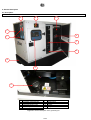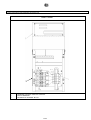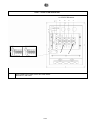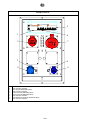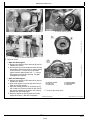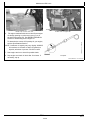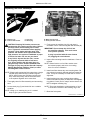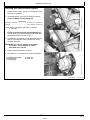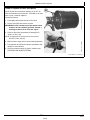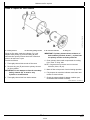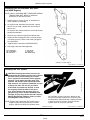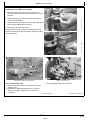
1
User and maintenance manual for generating sets R44 33501719701NE_2_1 1. Preface .................................................................................................................................................................................................. 3 1.1. General recommendations ....................................................................................................................................................... 3 1.2. Pictograms and their meanings ................................................................................................................................................ 4 1.3. Instructions and safety regulations ........................................................................................................................................... 8 1.3.1 General advice ......................................................................................................................................................................... 8 1.3.2 Risks related to exhaust gases and fuels ................................................................................................................................. 9 1.3.3 Risks related to toxic products ................................................................................................................................................. 9 1.3.4 Risk of fire, burns and explosion ............................................................................................................................................ 10 1.3.5 Risks related to electrical networks ........................................................................................................................................ 10 1.3.6 Dangers presented by electric currents (first aid)................................................................................................................... 11 1.3.7 Risks related to moving the set .............................................................................................................................................. 11 1.4. Identifying sets ....................................................................................................................................................................... 12 2. General description.............................................................................................................................................................................. 14 2.1. Description ............................................................................................................................................................................. 14 2.2. Technical specifications ......................................................................................................................................................... 21 2.3. Fuel and consumables ........................................................................................................................................................... 23 2.3.1 Specifications ......................................................................................................................................................................... 23 2.3.1.1. Oil grades.................................................................................................................................................................. 23 2.3.1.2. Specifications of coolants.......................................................................................................................................... 24 3. Installation............................................................................................................................................................................................ 26 3.1. Unloading ............................................................................................................................................................................... 26 3.1.1 Safety during unloading ......................................................................................................................................................... 26 3.1.2 Instructions for unloading ....................................................................................................................................................... 26 3.1.2.1. Slings ........................................................................................................................................................................ 26 3.1.2.2. Fork lift truck.............................................................................................................................................................. 26 3.2. Fluid retention......................................................................................................................................................................... 27 3.3. Choice of location................................................................................................................................................................... 28 3.4. Electricity ................................................................................................................................................................................ 29 3.5. Special arrangements ............................................................................................................................................................ 30 4. Trailer................................................................................................................................................................................................... 31 4.1. Trailer linkage......................................................................................................................................................................... 31 4.2. Check before towing............................................................................................................................................................... 31 4.3. Operation ............................................................................................................................................................................... 32 4.4. Unhitching the trailer .............................................................................................................................................................. 32 4.5. Implementation for installation................................................................................................................................................ 33 4.6. Break transmission adjustment .............................................................................................................................................. 33 4.7. Faults and repairs................................................................................................................................................................... 35 4.8. Electrical connection diagram................................................................................................................................................. 36 4.9. Complete wheels technical information .................................................................................................................................. 36 5. Preparation before operating the set ................................................................................................................................................... 37 5.1. Installation checks .................................................................................................................................................................. 37 5.2. Checks after starting the generating set ................................................................................................................................. 37 1/260 6. Using the generator set........................................................................................................................................................................37 6.1. Pre-Start Inspection................................................................................................................................................................37 6.2. Generator set with NEXYS control panel................................................................................................................................40 6.2.1 Control panel presentation .....................................................................................................................................................40 6.2.1.1. Introduction to pictograms .........................................................................................................................................41 6.2.2 Manual starting.......................................................................................................................................................................42 6.2.3 Switching off ...........................................................................................................................................................................43 6.2.4 Alarms and faults....................................................................................................................................................................43 6.2.5 Faults and alarms - Details.....................................................................................................................................................43 6.3. Generator set with TELYS control panel ................................................................................................................................46 6.3.1 Control panel presentation .....................................................................................................................................................46 6.3.1.1. View of the front panel...............................................................................................................................................46 6.3.1.2. Description of the screen...........................................................................................................................................48 6.3.1.3. Description of the pictograms in zone 1.....................................................................................................................49 6.3.1.4. Description of the pictograms in zone 2.....................................................................................................................50 6.3.1.5. Description of the pictograms in zone 3.....................................................................................................................51 6.3.1.6. Display of messages in zone 4 ..................................................................................................................................53 6.3.2 Starting ...................................................................................................................................................................................57 6.3.3 Switching off ...........................................................................................................................................................................58 6.3.4 Alarms and faults....................................................................................................................................................................58 6.3.4.1. Viewing alarms and faults..........................................................................................................................................58 6.3.4.2. Activation of an alarm or fault ....................................................................................................................................59 6.3.4.3. Activation of an alarm and a fault ..............................................................................................................................60 6.3.4.4. Engine fault codes display.........................................................................................................................................61 6.3.4.5. Horn reset..................................................................................................................................................................62 7. Maintenance schedule .........................................................................................................................................................................63 7.1. Reminder of use .....................................................................................................................................................................63 7.2. Engine ....................................................................................................................................................................................63 7.3. Alternator ................................................................................................................................................................................63 8. Battery..................................................................................................................................................................................................64 8.1. Storage and transport .............................................................................................................................................................64 8.2. Battery setting into service......................................................................................................................................................65 8.3. Check .....................................................................................................................................................................................65 8.4. Load preconization .................................................................................................................................................................66 8.5. Faults and remedies ...............................................................................................................................................................67 9. Appendix ..............................................................................................................................................................................................68 9.1. Appendix A – Engine user and maintenance manual .............................................................................................................69 9.2. Appendix B - Alternator user and maintenance manual .......................................................................................................193 9.3. Appendix C - Common spare parts ......................................................................................................................................245 9.4. Appendix D - List of John Deere - Volvo and Perkins fault codes.........................................................................................247 2/260 1. Preface 1.1. General recommendations Thank you for choosing an electrical generating set from our company. This manual has been designed to help you operate and maintain your electrical generating set correctly. The information contained in this manual is taken from technical data available at the time of print. In line with our policy of continually improving the quality of our products, this information may be amended without warning. Read the safety instructions attentively in order to prevent any accidents, faults or damage. These instructions must always be followed. You are likely to encounter several warning symbols in this manual. This symbol indicates an immediate danger to human health and life in case of exposure. Failure to follow the corresponding advice entails serious consequences for human health and life in case of exposure. Danger This symbol draws attention to the potential risks to human health and life in case of exposure. Failure to follow the corresponding advice entails serious consequences for human health and life in case of exposure. Warning This symbol indicates a dangerous situation if the warning is not heeded. Failure to follow the corresponding advice risks resulting in minor injury of personnel or damage to any other object in case of exposure. Important In order to obtain optimum efficiency and the longest possible life for the electrical generating sets, maintenance operations must be carried out according to the periods indicated in the attached preventative maintenance tables. If the electrical generating set is used under dusty or unfavourable conditions, some of these periods will be shorter. Ensure that all repairs and adjustments are carried out by personnel who have received appropriate training. Dealers have this qualification, and can answer all of your questions. They can also supply you with spare parts and other services. The left and right sides can be seen from the back of the electrical generating set (the radiator is at the front). Our electrical generating sets have been designed so that damaged or worn parts can be replaced by new or reconditioned parts thereby reducing the out of action period to a minimum. For any replacement of parts, contact your nearest dealer for our company who will have the necessary equipment and can offer properly trained and informed staff to carry out maintenance, parts replacement and even total reconditioning of generating sets. Contact your local dealer for the available repair manuals and to make the necessary arrangements for training personnel in implementation and maintenance. Important Some user and maintenance manuals for the engines fitted to generating sets cover control units and include the start-up and shutdown procedures for the engines. As the generating sets are fitted with control units that are specific to the generating sets, only the information that appears in the documentation for the generating sets' control units should be taken into consideration. In addition, according to the manufacturing criteria of the generating sets, some engines may be fitted with specific electrical wiring different to that described in the engine documentation. 3/260 1.2. Pictograms and their meanings Safety notices are clearly mounted on the equipment to draw the operator's or maintenance technician's attention to the potential dangers and explain the action to be taken in the interest of safety. These notices are reproduced in this publication for ease of identification by the operator. Replace any notice that is missing or illegible. Caution: danger Publications delivered with the generating set must be referred to Caution: risk of explosion Caution: risk of electric shock Protective clothing must be worn Naked flames unprotected prohibited. No smoking Caution: materials toxic Eyes and ears must be protected Entry prohibited to nonauthorised persons Caution: pressurised fluids Periodic maintenance must be carried out Jet washing prohibited Caution: high temperature, risk of burns Battery level must be checked Earth Caution: rotating or moving parts (risk of getting caught in the machinery) Lifting point must be used Caution: corrosive product Fork pockets for lifting Retention high tank and lights level c Important: refer to the documentation accompanying the generating set. d Important: emission of toxic exhaust gases. Do not use in a confined or badly ventilated area. c d Figure 1.1: Pictograms and their meanings 4/260 WARNING: DANGER This symbol warns of a safety hazard. The presence of this symbol indicates a risk of injury. Observe the safety instructions and precautions for use. Important: Carefully read the instructions supplied with the generating set before using or servicing the equipment. WARNING: DANGER Risk of electrocution Do not touch the cables or connections when the generating set is in operation. Switch off the generating set for maintenance operations. DANGER Use diesel fuel only. The fuel is highly flammable, handle with care. Do not smoke near the generating set or expose it to a naked flame or sparks. Shut down the generating set engine before filling the fuel tank. Fill with fuel outside. To prevent fire risks, clean the generating set regularly. Wipe away any dirt and traces of grease or fuel. WARNING: DANGER The exhaust gases from the engine are toxic and can affect health or even cause death. Use the generating set outdoors only, in well ventilated areas, or fit an exhaust extension to discharge the exhaust gases outside. Figure 1.2: Pictograms and their meanings 5/260 WARNING: DANGER Hot coolant can cause serious burns. Switch off the engine. Do not remove the filler cap until it is completely cold. Do not open the radiator when it is hot. DANGER Rotating parts can cause serious injury. Do not operate the generating set with the doors open. Do not remove the enclosures. Shut down the generating set before any maintenance or servicing operation. DANGER Avoid any contact with the exhaust pipes, turbochargers and silencers. Keep flammable materials away from hot parts. Wait for the machine to cool down completely before touching it. WARNING: DANGER The gas from the battery electrolyte is explosive. Keep the batteries away from any flames. The battery electrolyte (sulphuric acid) is toxic. Risk of poisoning. Figure 1.2 (continued): Pictograms and their meanings 6/260 WARNING: DANGER A poor earth connection can lead to serious injuries or death. Always connect the earth terminal of the generating set to an external earth terminal. WARNING Voltage selector This function should be used by qualified persons only. WARNING Adjust the output voltage correctly before connecting a load. WARNING The voltage selector must not be used when the generating set is operating. Figure 1.2 (continued): Pictograms and their meanings 7/260 1.3. Instructions and safety regulations THESE SAFETY GUIDELINES ARE IMPORTANT If you do not understand or have any questions about any point in this manual, contact your dealer who will explain it to you or give you a demonstration. A list of risks and precautionary measures to take follows. You should also refer to any local and national regulations that apply in accordance with your own jurisdiction. KEEP THIS MANUAL This manual contains important instructions which must be followed when installing or carrying out maintenance on a generating set or batteries. 1.3.1 General advice Use 9 The operating and safety instructions must be made known to operating personnel. They will be regularly updated. 9 Read and understand the manuals provided with the generating set, pump unit or lighting column properly. The manufacturer's instructions must remain at the disposal of technicians, if possible in situ. 9 The facility must be operated under the direct or indirect supervision of a person appointed by the operator, who is familiar with the operation of the facility, and the dangers and drawbacks of the products used or stored in the facility. 9 Do not wear loose clothing, or get close to machines in operation. Note that the fans are not clearly visible when the engine is running. 9 Warn personnel present to keep their distance during operation. 9 Do not run the generating set, pump unit or lighting column without refitting the protective covers and closing all the access doors. 9 Never let a child touch the generating set, pump unit or lighting column, even when shut down. 9 Avoid operating the generating set, pump unit or lighting tower in the presence of animals (disturbance, scares, etc.). 9 Engage the parking brake when the generating set or lighting tower on its trailer is installed on the operating site. When chocking the trailer on a slope; ensure that there is nobody in the path of the trailer. 9 Never start the engine without an air filter or exhaust. 9 Engine with turbocharger: never start the engine without fitting the air filter. The compressor wheel rotating inside the turbocharger may cause serious bodily injury. Foreign objects in the inlet pipe may cause mechanical damage. 9 Engine with air preheating (starting components): never use a starting spray or any other similar starter assistance product. Upon contact with the starting component, an explosion may occur in the inlet tube, causing bodily injury. 9 Do not touch the lighting column lights when they are switched on. Maintenance 9 Follow the maintenance table and its instructions. 9 Always use tools in good condition which are suited to the work to be done. Ensure you have understood the instructions before beginning any operation. 9 Goggles should be worn when carrying out maintenance operations and watches, bracelets etc. should be removed. 9 Fit only original parts. 9 Disconnect the battery and the pneumatic starter (if fitted) before undertaking any repairs, to prevent the engine from starting accidentally. Fit a panel over the controls to prevent any attempt to start. 9 Only use the correct crankshaft turning techniques for turning the crankshaft manually. Do not try to turn the crankshaft by pulling it or levering the fan. This method may cause serious bodily or material damage, or damage the vanes of the fan, reducing the service life of the fan. 9 Clean off any trace of oil, fuel or coolant using a clean cloth. 9 Do not use a soapy solution containing either chlorine or ammonia, as these two chemicals prevent bubble formation. 9 Never use petrol or other inflammable substances to clean the parts. Use only approved cleaning solvents. 9 Do not use a high pressure cleaner for cleaning the engine and equipment. The radiator, hoses, electrical components, etc. may be damaged. 9 Avoid accidental contact with parts at high temperatures (exhaust manifold, exhaust). 9 Before any maintenance operation on a lighting column light, cut the electrical power supply and wait for the bulbs to cool down. Consumables 9 Observe regulations in force concerning use of fuel before using your generating set, pump unit or lighting tower. 9 Under no circumstances use seawater or any other corrosive or electrolytic product in the cooling circuit. Environment 9 The operator must take the necessary measures to comply with the aesthetics of the site of use. The whole site must be maintained in a good state of cleanliness. 9 The premises must be kept clean, and be regularly cleaned so as to avoid accumulation of dangerous materials or pollutants and dust, which could ignite or cause an explosion. The cleaning equipment must be suited to the risks posed by the products and dust. 9 The presence of dangerous or combustible materials inside premises housing combustion devices shall be limited to the operating requirements. 8/260 9 9 9 9 9 9 9 9 9 Facilities must be operated under the constant supervision of a qualified person, who must regularly check that the safety devices are operating correctly and ensure that the combustion devices have the correct fuel supply. Apart from the combustion devices, it is prohibited to use fire in any form. This restriction must be clearly displayed. Spreading of waste water, sludge and waste is prohibited. The fuels to be used must correspond to those featured in the declaration file and the specifications recommended by the combustion device manufacturer. The fuel is considered to remain in the same physical state as when it is introduced into the combustion chamber. Burning of waste in the open air is prohibited. Always protect your hands when checking for leaks. Pressurised liquids may penetrate body tissue and cause serious damage. Risk of blood contamination. Drain and dispose of engine oil in a specially provided container (fuel distributors can collect your used oil). Except by special agreement, once closed, the gas supply main unit must only be re-opened by the gas distributor. However, the user may access it under certain conditions. Check these for each site. 1.3.2 Risks related to exhaust gases and fuels Danger The carbon monoxide present in exhaust gases may cause death if the concentration levels in the air breathed are too high. Always use generating sets, pump units or lighting towers in a well-ventilated place where gases cannot accumulate. In case of indoor use: 9 Be sure to evacuate exhaust gases outdoors. 9 Provide appropriate ventilation so that personnel present are not affected. 9 Observe the local regulations in force for generating sets, pump units or lighting towers, as well as local regulations for use of fuel (petrol, diesel fuel and gas) before using your generating set, pump unit or lighting tower. 9 Fuel filling should be carried out when the engine is off (except for generating sets with an automatic filling system). 9 Engine exhaust gases are toxic: do not run the generating set, pump unit or lighting column in unventilated premises. If installed in a ventilated room, additional requirements for fire and explosion protection must be observed. 9 A leaking burnt gas exhaust may increase the sound level of the generating set, pump unit or lighting column. To check on its efficiency, regularly examine the burnt gas exhaust. 9 Pipes must be replaced as soon as their condition demands it. 1.3.3 Risks related to toxic products Glycol is a toxic product and dangerous if absorbed. The corrosion inhibitor contains alkali. Avoid all contact with the skin and eyes. Read the Do not swallow it. instructions on the packaging. This substance should not come into contact with the eyes. In the event of contact with the eyes, rinse immediately with plenty of water for at least 15 minutes. Avoid prolonged or repeated contact with the skin. In the event of contact with the skin, wash thoroughly with water and soap. CONSULT A DOCTOR IMMEDIATELY. KEEP THE PRODUCT OUT OF THE REACH OF CHILDREN. Warning The anti-rust product is toxic and dangerous if absorbed. Avoid all contact with the skin and eyes. Read the instructions on the packaging. 9 Caution: fuels and oils are dangerous to inhale. Ensure proper ventilation, and use a protective mask. 9 Never expose the equipment to liquid splashes or rainfall, and do not place it on wet ground. 9 The battery electrolyte is harmful to skin and especially eyes. If splashes get into eyes, rinse immediately with running water and/or a 10% diluted boric acid solution. 9 Wear protective eyewear and strong base resistant gloves for handling the electrolyte. 9/260 1.3.4 Risk of fire, burns and explosion The engine should not be operated in environments containing explosive products. As not all of the electrical and mechanical components are shielded, there is a risk of sparks forming. Danger 9 9 9 9 9 9 9 9 9 9 9 9 Make sure not to create sparks or flames, and not to smoke near the batteries, as the electrolyte gases are highly flammable (especially if the battery is charging). Their acid also poses a risk to the skin, and in particular to the eyes. Never cover the generating set, pump unit or lighting tower with any material during operation or just after shutdown (wait for the engine to cool). Do not touch hot parts such as the exhaust pipe, or put combustible materials on it. Keep all flammable or explosive materials (e.g. petrol, oil, cloth, etc.) out of the way when the set is running. Proper ventilation is required for your generating set, pump unit or lighting column to work properly. Without this ventilation, the engine would very quickly rise to an excessively high temperature, causing accidents or damage to the equipment and to surrounding property. Do not remove the radiator cap if the engine is hot and the coolant is pressurised, due to risks of burns. Depressurise the air, oil and cooling circuits before removing or disconnecting all the fittings, pipes or connected components. Watch out for the possible presence of pressure when disconnecting a device from a pressurised system. Do not try to find pressure leaks by hand. Oil at high pressure can cause bodily damage. Some preservative oils are flammable. Also, some are dangerous to inhale. Ensure proper ventilation. Use a protective mask. Hot oil causes burns. Avoid contact with hot oil. Check that the system is no longer pressurised before carrying out any procedures. Never start or run the engine with the oil filler cap off (oil may splash out). Never coat the generating set, pump unit or lighting column with a thin layer of oil to protect it from rust. Never top up the oil or coolant if the generating set, pump unit or lighting column is running, or if the engine is hot. A generating set can only operate when stationary, and cannot be installed on a vehicle or other mobile equipment, without a prior study taking into account the various specific features of using the generating set. 1.3.5 Risks related to electrical networks 9 The electrical equipment supplied with the generating set complies with standard NF C15.100 (France), or with the standards of the countries in question. 9 The earth connection must be installed in accordance with the standards in force in each country in question, and with the neutral system sold. 9 Read the manufacturer's identification plate carefully. The values for voltage, power, current and frequency are shown. Check that these values match the supply use. 9 Never accidentally touch stripped cables or loose connections. 9 Never handle a generating set with wet hands or feet. 9 Maintain electrical wires and connections in good condition. Using equipment in poor condition can lead to electrocution and damage to equipment. 9 Always disconnect the power to the equipment or facility (generating set voltage, battery voltage and network voltage) before any operation. 9 The electrical connections must be made in accordance with current standards and regulations in the country of use. 9 Do not use faulty, poorly insulated or provisionally connected wires. 9 Never reverse the positive and negative terminals on batteries when connecting them. This could cause severe damage to the electrical equipment. Follow the wiring diagram supplied by the manufacturer. 9 The generating set should not be connected to any other power sources, such as the mains supply network. In specific cases where there is to be a connection to existing electrical networks, this must only be installed by a qualified electrician, who should take the operating differences of the equipment into account, according to whether the mains supply network or generating set is being used. 9 Protection against electric shocks is ensured by an assembly of specific equipment. If this needs to be replaced, it should be by components with identical nominal values and specifications. 10/260 9 If the protective plates (blanking covers) need to be removed to route cables, the protector (blanking cover) must be refitted when the operations are finished. 9 Due to high mechanical stresses, use only strong flexible wiring with rubber sheathing, compliant with IEC 245-4, or equivalent wiring. 1.3.6 Dangers presented by electric currents (first aid) First aid In the event of an electric shock, shut off the power immediately and activate the emergency stop on the generating set or lighting column. If the voltage has not yet been cut off, move the victim out of contact with the live conductor as quickly as possible. Avoid direct contact both with the live conductor and the victim's body. Use a dry plank of wood, dry clothes or other nonconductive materials to move the victim away. The live wire may be cut with an axe. Take great care to avoid the electric arc that will be generated by this. Begin emergency procedures Resuscitation If breathing has stopped, begin artificial respiration at once in the same place the accident took place unless the victim or operator's life could be endangered by this. In the event of cardiac arrest, carry out cardiac massage. 1.3.7 Risks related to moving the set To unload the generating sets, pump units or lighting columns from their transport support brackets under optimum safety and efficiency conditions, you must ensure that the following points are observed: 9 The lifting machinery or equipment is suited to the work required, in good condition and with sufficient lifting capacity. 9 The slings are positioned in the rings provided for this operation, the forklift arms are resting fully underneath all of the base frame cross-beams, or the lifting bars are inserted in the apertures provided for this purpose in the base to lift the entire generating set (according to models). 9 For completely safe working conditions and to prevent damage to the components fitted on the upper edge of the set, pump unit or lighting column, the generating set, pump unit or lighting column must be lifted up with an adjustable boom. All the chains and cables must be parallel with each other, and as perpendicular as possible with the upper edge of the generating set, pump unit or lighting column. 9 If other equipment fitted on the generating set, pump unit or lighting column alters its centre of gravity, special lifting devices may be necessary to maintain correct balance and completely safe working conditions. 9 The ground must be able to withstand the load of the generating set, pump unit or lighting column and its lifting machinery without stress (otherwise, put down beams of sufficient strength in a stable configuration). 9 Position the generating set, pump unit or lighting column as close as possible to its place of use or transport, in a clear space with free access. 9 Never perform work on a generating set, pump unit or lighting tower just hanging from a lifting device. 11/260 1.4. Identifying sets Generating sets and their components are identified by means of identification plates. The precise rules for identifying each major component (engine, alternator etc.) are set out in each manufacturer's documentation contained in the appendices of this manual. 1 - Generating set 2 - Manufacturer name 3 - Model 4 - Serial number 5 - Year of manufacture 6 - Rated output (kVA and kW) according to the ISO 8528-1 standard PRP: main power ESP: emergency power 7 - Rated power factor 8 - Maximum altitude of the site above sea level (m) for the rated power 9 - Maximum ambient temperature for the rated power (°C) 10 - Rated frequency (Hz) 11 - Generating set rotation speed (RPM) 12- Rated voltage (V) 13 - Rated current (A) 14 - Weight (kg) 15 - CE marking 16 Non CE standard marking (e.g.: GOSSTANDART) 17 - Sound pressure 18 - Sound power Figure 1.3: Example of generating set identification plate Figure 1.4: Examples of engine identification plates 12/260 Figure 1.5: Examples of alternator identification plates Control box Figure 1.6: Example of control box identification plate 13/260 2. General description 2.1. Description Overview 3 5 4 2 6 1 7 8 10 9 11 1 2 3 4 5 6 Electric sockets Connection termination box Circuit breakers External emergency stop Protective grilles Battery charge alternator 7 8 9 10 11 Circuit breaker Starter battery Control unit Chassis Filling with fuel Figure 2.1: General description of the generating set 14/260 Fittings Socket control panels and terminals by enclosure type: TYPE 0 - 16/125A 3 1 2 3 COMMAND CONTROL CENTRAL CONSOLE CIRCUIT BREAKER CONNECTION TERMINAL BLOCK 15/260 TYPE 1 - 16/125A OPTION HI05 TO CIRCUIT BREAKERS N1 R1 S1 T1 1 2 1 2 MAX CONNECTION CABLE CROSS-SECTION 185MM² Ø M10 BOLT; Ø M10 NUT 16/260 TYPE 1 - 16/125A TT EDF OPTION HI05 TO CIRCUIT BREAKERS N1 NF C15-100 EARTHING SYSTEM 1 2 S1 EDF EARTHING SYSTEM 1 Connect to the earthing rod R1 EDF earth MAX CONNECTION CABLE CROSS-SECTION 185MM² Ø M10 BOLT; Ø M10 NUT 17/260 2 T1 M126/M127 50Hz FR MERLIN GERIN multi 9 ID 63A 23201 multi 9 C 60N C 16 multi 9 C 60N C 32 24485 24231 5 1 6 2 BALS 400V 32A 3P+N+ 12801 IP44 1 2 3 4 5 6 7 8 9 7 3 8 4 9 DIFFERENTIAL SWITCH (Q10) 4x63A 30 mA X03 16A 400V SOCKET 16A CIRCUIT BREAKER (Q08) X08 16A 230V SOCKET 4x32A CIRCUIT BREAKER (Q02) 4x16A CIRCUIT BREAKER (Q03) X02 32A 400V SOCKET 16A DIRUPTOR CIRCUIT BREAKER (Q05) X05 16A 230V SOCKET 18/260 M126/M127 50Hz EU MERLIN GERIN multi 9 ID 40A 23196 multi 9 C 60N C 16 24485 5 1 2 BALS 6 400V 63A 3P+N+ 12567 IP44 1 2 3 4 5 6 7 8 3 7 4 8 DIFFERENTIAL SWITCH (Q10) 4x40A 30 mA X03 16A 400V SOCKET 16A CIRCUIT BREAKER (Q09) X09 16A 230V SOCKET 4x16A CIRCUIT BREAKER (Q03) X01 63A 400V SOCKET 16A DIRUPTOR CIRCUIT BREAKER (Q05) X05 16A 230V SOCKET 19/260 M127 50Hz UK 4 1 5 2 3 1 2 3 4 5 DIFFERENTIAL SWITCH (Q03) 4x40A 30 mA 1X32A DIRUPTOR CIRCUIT BREAKER (Q04 ; Q05 ; Q06) X04 ; X05 ; X06 32A 230V SOCKET 4x63A CIRCUIT BREAKER (Q02) X02 63A 400V 3P+N+T SOCKET 20/260 2.2. Technical specifications Range / Generating set type RENTAL POWER / R44 Weights and Dimensions Dimensions with standard tank Dimensions l x w x h: 2080mm x 960mm x 1415 mm Weight: 1095kg dry weight 1215kg in operating configuration Hood: M127 Noise level: 63 dB @ 7 m 90 Lwa Dimensions with high autonomy tank Dimensions l x w x h: 2160mm x 966mm x 1582mm Weight: 1227kg dry weight 1457kg in operating configuration Hood: M127-DW Noise level: 63 dB @ 7 m 90 Lwa Output Voltage Hz Phase Load factor 400/230 50 3 0.8 Max current (A) Emergency/Prime 64 / 58 Emergency power 1 kW / kVA 35 / 44 Prime power 2 kW / kVA 32 / 40 (1) ESP: Stand-by output available for emergency use under variable charge up to 200hrs per year as per lSO 8528-1, no overload available under these service conditions. (2) PRP: Main output available continuously under variable load for an unlimited time period per year as per ISO 8528-1, an overload of 10% one hour every 12 hours is available, as per ISO 3046-1. Engine data Manufacturer / model Type Cylinder configuration Cubic capacity Rotation speed Max emergency/prime power at nominal speed Adjustment type JOHN DEERE 3029TF120 4-cycles, Turbo 3 XL 2.9 L 1500 Rpm 40 / 36.4 kW Mechanical Fuel consumption 110 % (emergency power) 100 % main power 75 % main power 50 % main power 10.8 L/h 9.8 L/h 7.5 L/h 5.3 L/h Fuel Fuel type Standard fuel tank High autonomy fuel tank Diesel 100 L 230 L 21/260 Lubrication Oil capacity with filter Min. Oil pressure Nominal oil pressure Oil consumption (100 % load) Oil sump capacity Type of lubricant 6.0 L 1 bar 5 bar 0.009 L/h 5.3 L Genlub Cooling Engine capacity with radiator Max coolant temperature Fan power Ventilator air flow Refrigerant type Thermostat 16.1 L 105 °C 1.5 kW 1.86m3/s Gencool 82-94 °C Emissions HC CO NoX PM 150 mg/Nm3 190 mg/Nm3 3800 mg/Nm3 60 mg/Nm3 Alternator data ● Compliant with NEMA MG21 standards, UTE NF C51.111, VDE 0530, BS 4999, IEC 34.1, CSA Type Number of phases Power factor (cos Phi) Number of poles Excitation type Voltage regulator Short-circuit current Number of bearings Coupling ● The alternator is protected against short circuits ● Vacuum impregnation, epoxy winding, IP23 protection rating LEROY SOMER LSA432S15 3 0.8 4 AREP R438 3 IN 1 Direct Control unit(s) NEXYS Standard specifications: Frequency meter, Voltmeter, Ammeter Alarms and faults: Oil pressure, Coolant temperature, Fail to start, Overspeed, Alternator min/max, Fuel level low, Emergency shutdown Engine parameters: Working hours counter, Engine speed, Battery voltage, Fuel Level, Air Preheating TELYS Standard specifications: Voltmeter, Ammeter, Frequency meter Alarms and faults: Oil pressure, Water temperature, Start failure, Overspeed, Alternator min/max, Battery voltage min/max, Emergency stop Engine parameters: Timer, Oil pressure, Water temperature, Fuel level, Engine speed, Battery voltage 22/260 2.3. Fuel and consumables All specifications (product features) are given in the motor and alternator maintenance manuals attached to this manual. In addition, we recommend the consumables to be used in the "specifications" section. 2.3.1 Specifications 2.3.1.1. Oil grades Engine Oil Make Type John Deere All MITSUBISHI Volvo All All Make John Deere GenPARTS GenPARTS GenPARTS Type John Deere PLUS-50 GENLUB TDX 15W40 GENLUB TDX 15W40 GENLUB TDX 15W40 GENLUB TDX 15W-40 Top-of-the-range lubricant recommended for diesel engines: for generating sets used under severe conditions. USES: 9 Particularly suited to more modern engines with or without turbochargers, intercoolers, or sophisticated injection systems (e.g. HEUI, injector-pumps) 9 All types of use: can cope with the most demanding applications 9 Depolluted engines: complies with EURO 2 and EURO 3 technology and can be used with all types of diesel fuel, especially ecological diesel with low sulphur content. PERFORMANCE: ACEA E3 API CH-4 9 Meets level E3 of the specifications defined by European manufacturers in the ACEA standards 98 edition. ADVANTAGES: 9 Less frequent oil services: this product has been put to the test during thousands of hours of use on worksites under varying conditions, demonstrating its high quality. 9 Conformity with new environmental legislation: adherence to new anti-pollution standards required for new EURO 2 and EURO 3 engines. SPECIFICATIONS: SAE Grade 15W-40 Density at 15°C Cinematic viscosity at 40 °C Cinematic viscosity at 100 °C Viscosity index Dynamic viscosity at -15 °C Pour point Flash point Sulphated ash content (Values given as examples only) 0.883 105 14.1 mm2/s (cSt) mm2/s (cSt) 140 3000 - 30 220 1.4 mPa.s(cP) °C °C % weight 23/260 2.3.1.2. Specifications of coolants Engine Coolants Make John Deere Type All MITSUBISHI All Volvo All Make GenPARTS Mitsubishi GenPARTS GenPARTS Type GENCOOL PC -26°C LLC GENCOOL PC -26°C GENCOOL PC -26°C GenCOOL PC -26 High-protection coolant, approved by manufacturers. GenCOOL PC -26 is a ready-to-use, highly protective coolant which is produced from an antifreeze recommended by the majority of European manufacturers. y It is made from antifreeze and G 48 inhibitors. y It protects up to -26°C. y It is free from nitrates, amines and phosphates. y It is a clear, fluorescent orange liquid. REFERENCES/APPROVALS (for the antifreeze): HEAVY GOODS VEHICLE LIGHTER VEHICLES Approved by MTU, MERCEDES BENZ, MAN, KHD, GENERAL Approved by BMW, VOLKSWAGEN, MERCEDES, PORSCHE MOTORS Conforms with VOLVO, OPEL, SEAT and SKODA specifications Conforms with VOLVO, IVECO, VAN HOOL and STAYR TRUCK specifications Conforms with the NF R 15.601 standard REINFORCED ANTI-CORROSION FEATURES: y y y y y Protects against high-temperature corrosion by oxidisation of ethylene (cylinder head protection). Protects against high-temperature cavitation (top of cylinder and coolant pump protection) Non-corrosive for seals and hoses. Improves the efficiency and longevity of the cooling system. GenCOOL PC -26 is especially recommended for engines fitted with aluminium or light alloy radiators. HIGH TEMPERATURE SUITABILITY: y y y Provides good conditions for thermal exchange. Perfect stability at high temperatures. GenCOOL PC -26 is specially adapted for engines with high power densities. LONG LASTING PROTECTION: y y y y High alkaline reserve/stability and longevity of corrosion inhibitors Maintains its technical properties during prolonged use at high temperatures (neutralisation of acids). Ensures maximum heat transfer without the build up of deposits in the cooling system GenCOOL PC -26 ensures optimum protection against overheating and corrosion in extreme conditions of vehicle use. 24/260 PACKAGING/STORAGE: y y y GenCOOL PC -26 is supplied in 210 l metallic barrels with smooth interior linings. It can be stored for 2 years in its original container and packaging. Avoid zinc coated containers. RECOMMENDATIONS FOR USE: y y Compatible with the original fluid. It is recommended that the cooling system is completely drained when replacing the fluid. UNITS SPECIFIED VALUES TRIAL METHODS kg/m3 1,059 +/- 3 R 15-602-1 pH pH 7.5 to 8.5 NF T 78-103 Alkalinity reserve ml >=10 NF T 78-101 Boiling point °C 105 +/- 2 R 15-602-4 °C -26 +/- 2 NF T 78-102 SPECIFICATIONS Density at 20°C Freezing point: Glassware corrosion (test with antifreeze) : mg/test piece R 15-602-7 - Copper +/- 2.6 - Weld +/- 0.5 - Brass +/- 2.3 - Steel +/- 1.6 - Cast iron +/- 0.8 - Cast aluminium Corrosion on warm (test with antifreeze) +/- 1.0 plate mg/(cm²week) 25/260 +/- 0.17 R 15-602-8 3. Installation 3.1. Unloading 3.1.1 Safety during unloading To unload electrical generating sets from their transport supports under optimum safety and efficiency conditions, you need to ensure that the following points are observed: - Lifting machinery or equipment appropriate to the work required. - Slings positioned in the eyes provided for this operation or lifting arms resting fully underneath the chassis cross members. - Ground able to take the load of the set and the lifting machinery without stress (otherwise lay down beams of sufficient strength and stability). - Set put down as close as possible to its point of use or transportation, in a clear area with free access. Example of equipment to be used: 9 crane, slings, cross bar, safety catch, shackles. 9 Fork lift truck. 3.1.2 Instructions for unloading 3.1.2.1. Slings n o p q r s Attach the lifting vehicle slings to the rings on the generating set designed for this procedure. Hang the slings carefully. Check that the slings are correctly attached and the equipment is solid. Lift the generating set carefully. Direct and stabilise the set towards the chosen position. Carefully set down the equipment while continuing to position it. Release the slings, then detach and remove the lifting rings. 3.1.2.2. Fork lift truck n o p Position the forklift arms under the base frame (except with generating sets fitted with "forklift pockets", in which case position the forklift arms in these pockets), making sure that only its cross-members are resting on the arms. Lift the equipment, handling it gently. Set down the generating set in its unloading position. Figure 3.1: Transporting a generating set using a forklift truck 26/260 3.2. Fluid retention Any outflow of the fluids contained in the generating sets (fuel, oil and coolant, or rainwater or condensation) will be collected in a retention container if the generating set is fitted with this option. The containers have a capacity which allows 110% of the fluids contained in the generating set fitted with this option to be collected. Three different fittings are available. Diagram 3.2: Fluid retention container integrated into the tank chassis. Diagram 3.3: Offset fluid retention container underneath the generating set chassis. 27/260 Diagram 3.4: Offset fluid retention container integrated into the chassis and tank. Generating sets fitted with the offset tank option (DW) above also have a high level indicator in the retention container. In all cases, the retention containers must be regularly checked to ensure they contain no fluid (fuel, oil and coolant, or rainwater or condensation). If necessary, drain the containers either via the drain port or by using the drain pump (for containers fitted with this pump). 9 Note: Never allow these fluids to drain onto the ground; ensure they are collected in a designated container. 3.3. Choice of location It should be determined on the basis of use. There are no specific rules governing the choice of location, other than proximity to the electric distribution panel and disturbances caused by the noise. However, fuel supply, burnt gas evacuation, and the direction of these gases and the noises emitted should be taken into account. The choice of its position will be based on carefully considered compromise! Examples of problems that may be encountered: Incorrect exhaust and ventilation Ground too uneven or soft. Set incorrectly positioned Fuel filling impossible Reduced access Opening cover doors impossible Diagram 3.5: Examples of problems that may be encountered 28/260 3.4. Electricity a) Connections - general information As with low voltage electrical installations, use and maintenance is governed by standard NFC 15.100 (France) or by the standards in the relevant country, based on international standard IEC 60364-6-61. They must also adhere to the regulations in the NFC 15.401 application guide (France) or to the regulations and standards in the relevant country. b) Power cables These can be unipolar or multipolar according to the power of the generating set. Power cables should preferably be installed in ducts or on a cable tray for this purpose. The cable cross-section and number of cables should be determined according to the cable type and the current standards to be observed in the country of installation. The choice of conductors must comply with international standard IEC 30364-5-52. Three phase - Calculation hypothesis Fitting method = wiring in cable runs or non perforated trays. Permissible voltage drop = 5% Multiconductors or single conductor joined when precision 4X…(1) Cable type PVC 70°C (e.g. H07RNF). Ambient temperature = 30°C. Cable sizes Circuit breaker calibre (A) 10 16 20 25 32 40 50 63 80 100 125 160 250 400 630 (1) (1) (1) (1) (1) 0 - 50m mm²/AWG 1.5 / 14 2.5 / 12 2.5 / 12 4 / 10 6/9 10 / 7 10 / 7 16 / 5 25 / 3 35 / 2 4X(1X50) / 0 4X(1X70) / 2/0 4X(1X95) / 4/0 4X(1X185) / 0400MCM 4X(2X1X150) / 2x 2350MCM 51 - 100m mm²/AWG 2.5 / 12 4 / 10 4 / 10 6/9 6/9 10 / 7 10 / 7 16 / 5 25 / 3 35 / 2 4X(1X50) / 0 4X(1X70) / 2/0 4X(1X150) / 2350MCM 4X(1X185) / 0400MCM 4X(2X1X150) / 2x 2350MCM 101 - 150m mm²/AWG 4 / 10 6/9 6/9 10 / 7 10 / 7 16 / 5 16 / 5 25 / 3 35 / 2 4X(1X50) / 0 4X(1X70) / 2/0 4X(1X95) / 4/0 4X(1X150) / 2350MCM 4X(1X185) / 0400MCM 4X(2X1X150) / 2x 2350MCM Single phase - Calculation hypothesis Fitting method = wiring in cable runs or non perforated trays. Permissible voltage drop = 5% Multiconductors. Cable type PVC 70°C (e.g. H07RNF). Ambient temperature = 30°C. Circuit breaker rating (A) 10 16 20 25 32 40 50 63 80 100 125 Cable sizes 0 - 50m 51 - 100m 101 - 150m mm²/AWG 4 / 10 6/9 10 / 7 10 / 7 10 / 7 16 / 5 16 / 5 25 / 3 35 / 2 35 / 2 50 / 0 mm²/AWG 10 / 7 10 / 7 16 / 5 16 / 5 25 / 3 35 / 2 35 / 2 50 / 0 50 / 0 70 / 2/0 95 / 4/0 mm²/AWG 10 / 7 16 / 5 25 / 3 25 / 3 35 / 2 50 / 0 50 / 0 70 / 2/0 95 / 4/0 95 / 4/0 120 / 2250MCM c) Battery cables Install the battery or batteries in the immediate vicinity of the electric starter motor. The cables will be connected directly from the battery terminals to the starter motor terminals. The primary instruction to follow is to ensure that the polarities between the battery and starter motor match. Never reverse the positive and negative battery terminals when connecting them. This could cause severe damage to the electrical equipment. 2 The minimum cross-section of the cables will be 70 mm . It varies according to the power of the starter motor but also the distance between the batteries and the set (voltage drops on the line). 29/260 d) Safety guidelines References: NFC 15-100:2002 (France) - IEC: 60364-5-54 In order to protect personnel against electric shocks, this generating set is equipped with a differential residual current protector "factory" set to trigger instantly, with a sensitivity of 30 mA. Important Any modification to this setting could endanger personnel. Any modification would render the user liable, and must only be performed by qualified and authorised personnel. When the generating set is disconnected from a facility after use, the master differential protector must be returned to its "factory" settings, and this must be checked by trained personnel. For effective protection against electric shocks, the generating set needs to be earthed. To do this, use a copper wire, with a minimum 2 2 cross-section of 25 mm for a stripped cable and 16 mm for an insulated cable, connected to the generating set earth socket and a galvanised steel earthing rod embedded vertically into the ground. The earthing rod resistance value should comply with the values shown in the table below. Note: use the highest differential setting from the installation as a guideline. The resistance value is calculated in the following way: R = Ul I Δn Maximum resistance value of the earth socket R (Ω) according to the differential unit operational current (operation time should not be longer than 1 second). I Δn differential Earth R (Ω) Ul: 50 V 500 500 167 100 50 17 10 5 ≤ 30 mA 100 mA 300 mA 500 mA 1A 3A 5A 10A Earth R (Ω) Ul: 25 V > 500 250 83 50 25 8 5 2.5 The Ul value: 25 V is required for work site installations, and livestock buildings, etc. For a default voltage of 25 V and a default current of 30 mA, this rod must be of a minimum length of: see table below Nature of ground Thick arable land, moist compact ballast Lean arable land, Gravel, coarse ballast Bare stony soils, dry sand, impermeable rock Length of rod in metres 1 1 3.6 To obtain an equivalent length, you can use several earthing rods connected in parallel and set apart by at least their length. Example: 4 interconnected 1 metre rods separated by 1 metre. Note: For the United States (National Electrical Code reference NFPA-70). The generating set must be earthed. To do this, use a copper wire with a minimum cross-section of 13.3 mm² (or AWG 6, at most) connected to the generating set earth socket and a galvanised steel earthing rod fully embedded into the ground vertically. This earthing rod embedded fully in the ground must have a minimum length of 2.5 m. 3.5. Special arrangements Generating sets are not fitted with protection against power surges caused by drops in atmospheric pressure or manoeuvring. The company does not accept any responsibility regarding damage caused by these occurrences. However, lightning conductors can be installed, on the understanding that this does not give total protection. 30/260 4. Trailer 4.1. Trailer linkage Before attaching the trailer, check the trailer hook on the tow vehicle; it should fit the trailer ring perfectly. Danger Trying to tow a trailer with a non-matching device (bar, wires, cords, etc.) could lead to serious accidents. Also check: - no incipient fractures or excessive wear on the hitching system. - locking system is operating properly. To hitch the trailer, proceed as follows: n o p q r s t Lock the wheels to stop the trailer from moving. Lift up the rear trailer supports and lock them. Release the parking brake. Release the locking levers for the draw bar arms and adjust the ring to the same height as the vehicle hook. Hitch the trailer, remove the locks on each side of the wheels then lift up the front wheel fully using its handle. Connect the electrical circuit of the trailer to that of the tow vehicle. Hook the handbrake safety wire onto the hook on the tow vehicle. CORRECT CORRECT Tow vehicle Tow vehicle Trailer Trailer INCORRECT INCORRECT Tow vehicle Tow vehicle Trailer Trailer Diagram 4.1 : Coupling a trailer 4.2. Check before towing Before towing, check the following: 9 Tightness of the generating set enclosure bolts. 9 Wheel tightness. 9 Hitching hook locked. 9 Tyre pressure. 9 Signalling lights working, for "on-road" trailers. 9 Enclosure doors closed. 9 Parking brake released, for "on-road" trailers. 9 Guide wheels (jockey wheels) and stands lifted (if fitted). 9 Towbar arm locking levers tightened and pinned (if fitted with an adjustable towbar). 9 Brake test, for "on-road" trailers. 9 Safety cable fitted, for "on-road" trailers. 31/260 4.3. Operation "On-site" trailer These trailers are not fitted with a main brake, and so cannot be braked in motion; the tyres allow for a maximum speed of 27 km/h. So it is absolutely prohibited to exceed this speed. Nor are these trailers fitted with signalling lights. On-road use is prohibited. "On-road" trailer The driving speed must be suited to the condition of the road and the handling of the trailer. Driving at high speed causes heating of the tyres; so it is important to stop from time to time, and check them. Excessive heating may cause a puncture, and therefore a serious accident. For reversing manoeuvres, remember to lock the inertia brake. Warning Particular attention must be paid to the tightness of the wheels on new vehicles. In the first few miles' driving, heating of the brake hubs and drums will actually reduce the wheel tightness. It is therefore essential to check the tightness every 6 miles (10 kilometres) until no further loosening is noted. Nonetheless the tightness must be checked whenever you are about to tow the trailer. Lights/signalling (only for "on-road" trailers) Warning lights are obligatory for on-road driving. Signalling must comply with regulations in force in the country of use. Red rear lights + direction indicators + stop lights Front reflective devices (white) Rear reflective devices (red triangle) Side reflective devices (orange) Figure 4.2: Example of French signalling 4.4. Unhitching the trailer This operation should be carried out on horizontal, flat, stable ground. n o p q r s Lock the wheels. Lower the front wheel. Disconnect the road signals wire. Refit the hitch using the wheel to release the hook ring from the tow vehicle. Engage the handbrake. Release the tow vehicle. 32/260 4.5. Implementation for installation Operations to be carried out: 9 Ensure that the ground is strong enough for the assembly not to sink into it. 9 Unhitch the trailer. 9 Immobilise the trailer by placing chocks under the wheels. 9 Fully engage the parking brake (if fitted). 9 Using the front wheel, position the generating set as close to horizontal as possible. 9 Lower the stands (if fitted), and lock them. 4.6. Break transmission adjustment - The handbrake is used only as a parking brake. - Setting is carried out starting with the brakes moving to the brake control. Important n o p After fitting the wheels on the axle, turn the wheels in the FORWARD direction (on all RA 2 type brakes, check that the adjustment screw 8 reaches the “FORWARD” stop on the brake backing plate). Adjust the brake setting using screw 8, with the cables not connected to the cross bar(s). The shoes should rub the drum slightly. Connect the brake cables to the cross bars(s) and tighten the nuts and lock nuts, leaving the end of the threaded end protruding by around 10 mm (Fig. 4.4). IMPORTANT: Wherever possible, cables must cross over to achieve the highest possible gain curve (Fig. 4.5). q r s t u Check that the parking lever 1 is in the ‘REST” position and that the compensating spring 4 is completely free on its rod (unscrew the nuts 5 fully). Check that the hook slide 2 is not compressed and the yoke 3 is in the pulled out position. Fit the transmission and adjust the assembly using the tensioner 6 until a gap (J1) of 1 mm max is obtained between the linkage 9 and slide 2. Adjust the compensating spring 4 at one end pressing it against the anchorage plate, and at the other end leaving a 2 mm gap (J2) max between the spring and nuts 5. Tighten all the lock nuts. Checking the setting (trailer on axle stands): n o Pull the parking lever 2 notches - the wheels cannot turn in a FORWARD direction. The wheels can turn in REVERSE (adjustment screw 8 switches to the REAR position). Pull the parking lever fully. The wheels will not turn either in FORWARD or REVERSE and the cross bar(s) must remain parallel with the axle body. ¾ Check the transmission setting after 180 miles (300 km) (running in period) and if necessary adjust the gap (J1) using the tensioner. Parking ¾ ¾ The lever must be fully pulled up, so that the compensating spring is fully compressed. Every 900 miles (1500 km), check the braking settings and distribution on all the wheels. Important ¾ ¾ ¾ The brake controls are designed to draw trailers behind flexible suspension touring vehicles. If used behind an HGV, be sure to provide the fitted ball joint with a shock absorber to prevent premature wear. During any manoeuvres with the trailer coupled, do not turn more than 90° or force reverse. The specifications of our brake controls are indicated on a manufacturer's plate, and the items on this should be supplied to us when requesting replacement parts, in particular for the shock absorber, of a special type, approved by the Service des Mines to correspond to European standards (it is advisable to have a spare shock absorber to enable instant repairs). 33/260 Figure 4.3: Braking transmission Figure 4.4: Cross bar fitting Figure 4.5: Tandem bearing fitting 34/260 4.7. Faults and repairs Fault observed Erratic braking of trailer Braking too weak Drum temperature abnormally high Jerky braking Origin - Faulty shock absorber - Jaws worn - Jaws not run in - Incorrect linkage setting - Significant friction on the slide - Slide corrosion - Coupling height does not match that of the towing vehicle - Incorrect linkage setting - Incorrect brake setting - High levels of dust in the drums - Jaws, springs, drums damaged - Brake cables or link rod damaged - Incorrect linkage setting - Interfering parts on the slide - Corroded slide - Damage to slide guide rings - Faulty shock absorber - Cross-bar(s) not balanced - Different brake setting on the two sides Trailer tending to swerve upon braking When starting the trailer holds back the towing vehicle Play in the coupling head Parking braking too weak - Cables damaged or incorrectly fitted - Poor load distribution - Damage to slide or to guide rings - Slide corrosion - Tie rod damaged - Linkage damaged or incorrectly set - Brake on - Head worn (see wear indicator) - Ball joint worn - Compensating spring incorrectly set - Braking system incorrectly set - Notched sector damaged - Lever ratchet worn - Cable ruptured 35/260 Solutions Replace the shock absorber Replace the jaws Fault will disappear only after running in Adjust the setting Grease the sliding parts Remove the corrosion and grease Adjust the height so that the two parts are in the same horizontal plane Adjust the settings Adjust the settings Remove the dust Replace the damaged parts Replace the damaged parts Adjust the settings Remove, clean and grease Remove the corrosion and grease Replace the rings (and possibly the slide) and grease Replace the shock absorber Adjust the cross-bar(s) Adjust the brake settings Replace the damaged parts Refit the cables Check the load distribution Replace the faulty parts and grease Remove the corrosion and grease Replace the tie rod and adjust the settings Replace the damaged parts and adjust the settings Loosen the brake Replace the head Replace the ball joint Adjust the setting Adjust the setting Replace the sector and adjust the setting Replace the lever and adjust the setting Replace the cable and adjust the setting 4.8. Electrical connection diagram Figure 4.6: Electrical connection diagram 4.9. Complete wheels technical information TYRES 550 566 578 534 548 594 622 Cross section (mm) 134 145 150 150 147 185 172 Radius under load (mm) 265 272 277 259 263 285 284 100 N 525 155 244 185 R 14 C 102 P 650 188 316 195 R 14 C 195/50 x 10 106 P 98 N 666 450 198 190 32 - Dimensions Indices Diameter (mm) 135 R 13 145 R 13 155 R 13 145/70 R 13 155/70 R 13 185/70 R 13 165 R 14 C 70 T 75 T 79 T 71 T 75 T 86 T 98 N 155/70 R12 36/260 Load (Kg) 335 387 437 345 387 530 650 650 800 675 850 950 750 COMPLETE WHEELS Pressure (bar) 2.4 2.4 2.4 2.5 2.5 2.5 3.8 6.25 4.5 4.5 6.0 5. Preparation before operating the set The inspections referred to in this section enable the electrical generator set to operate. Specific skills are required to carry out these operations. They must only be entrusted to personnel with the necessary skills. Failure to follow these instructions in any way could result in malfunction or very serious accidents. Danger 5.1. Installation checks • • • • check that the general recommendations given in the installation section (ventilation, exhaust, fluids, etc.) are observed. carry out the level checks (oil, water, diesel fuel, battery). check the generating set earth connection is earthed. check that the electrical connections are in order. 5.2. Checks after starting the generating set • • • carry out the mechanical checks (oil pressure, water temperature, absence of noise etc.) carry out the electrical checks (voltage and frequency) carry out the safety checks (emergency stop, oil pressure, water temperature etc.) 6. Using the generator set 6.1. Pre-Start Inspection Inspecting the engine compartment Inspect the engine carefully. Wipe all the grease fittings and caps before carrying out any maintenance in order to reduce the risk of contaminating the circuits. Checking the engine oil level Important n o p - Do not top up the oil if the oil level is not below the low level marker. - Do not exceed the hatched area The oil level is correct if it is within the hatched area. Check the oil level using the dipstick (A). Top up the oil as required. Use an oil whose viscosity is suited to the seasonal conditions. Pour the oil through the rocker cover filling port (B). 37/260 Checking the coolant level Warning n o p Fluid may abruptly exit the cooling circuit and cause serious burns. Only remove the filler cap once the engine and cap have cooled sufficiently to enable them to be handled with bare hands. Firstly, loosen the cap slightly by one notch to eliminate any pressure, then remove it. Remove the cap from the radiator (E) and check the coolant level. The level should reach the lower section of the filler neck. Fill the radiator with the appropriate coolant if the level is too low. Check for leaks in the cooling circuit. Checking the air filter The maximum authorised vacuum in the air filter is 6.25 kPa (0.06 bar; 1.0 psi) (25 in water). A clogged filter element limits the engine's air intake. Important If the air filter is fitted with a dust control valve (C), press the tip of the valve to evacuate any accumulated dust particles. Check the air filter clogging indicator (D). If the indicator is red, clean the air filter. 38/260 Checking the fuel filters The fuel is highly flammable and its vapours are combustible. The fuel filter(s) must only be bled when the engine is stopped and cold. Danger Note: Engines with a mechanical supply circuit have a single fuel filter whilst electronically controlled engines (DE10 and high pressure common rail fuel circuits) have two fuel filters (primary and final). In addition, fuel filters in electronically controlled engines may be fitted with a water presence sensor. An indicator on the instrument panel warns the operator that the water must be drained from the filter cup. Inspect fuel filters (C) and (D) as follows, in order to detect any traces of water or debris: n o p q Undo the drain plug(s) (A) at the bottom of the fuel filter(s) or cup(s) by two or three turns. Loosen the air drain plugs(s) (B) by two full turns and drain the water into a suitable container. When the fuel begins to flow out, tighten the drain plugs. Bleed the supply circuit. A – Drain plug B – Air bleed plug C – Main fuel filter D – Final fuel filter 39/260 6.2. Generator set with NEXYS control panel 6.2.1 Control panel presentation 9 1 7 9 10 2 3 9 9 4 5 6 8 Diagram 6.1: View of the front side c d e f g h i j k l Emergency stop button for switching off the generating set in the event of a fault which could endanger personnel or damage equipment Key switch for starting up/shutting down the module and RESET function Electronic card protection fuse Screen-scroll button, press successively to access the various screens which are available STOP button, press to switch off the generating set START button, press to switch on the generating set Normal operation LEDs and alarm and fault warning LEDs Slot reserved for panel fascia options Mounting bolt. LCD for displaying alarms and faults, operating states, electrical and mechanical quantities 40/260 1 2 3 4 5 Diagram 6.2 – Description of the LEDs A lit LED indicates: c d e Module being supplied (green, lights up and remains lit) Emergency stop activated (control panel or external emergency stop) (red, lights up and remains lit) Visualisation of starting phase and speed/voltage stabilisation (flashing) and generating set operating OK or set ready to generate (green, lights up and remains lit) f g General alarm (orange, flashing) General fault (red, flashing) 6.2.1.1. Introduction to pictograms The pictograms are as follows: Operating temperature Fuel Symbols for electric and mechanical sizes Overspeed Battery Non-starting fault Starting on external command Preheating Air intake Delay Oil pressure Diagram 6.3: View of pictograms ¾ ¾ ¾ ¾ The "fuel level" pictogram is used to display the fault, the alarm and the fuel level. The "operating temperature" and "oil pressure" pictograms are used to display the fault and analog value. The "overspeed" and "non-starting fault" pictograms are used to display the fault. The "battery" pictogram is used to display the "alternator charge" fault and to indicate the battery voltage. 41/260 6.2.2 Manual starting Check that the generating set circuit breaker has triggered. Danger n o Connect the generating set battery. Turn the key switch to the ON position (without forcing it) 9 All of the LEDs light up for 2 seconds, to confirm that they are operating correctly. 9 If the LEDs do not light up, check the protection fuse and replace it if necessary. 9 All the items on the screen are displayed for 2 seconds. 9 Only the "ON" LED remains lit to indicate that the module is powered up. 9 The following screen appears. The first line displays the motor speed in RPM. The second line displays the battery voltage in volts (V). 9 p Check the battery voltage (min. 12 V) Press (once briefly) the green "START" button. 9 If the motor is equipped with an air preheating system, there is a 10-second delay before the motor starts (preheating activation period). 9 The following screen appears. The third line displays the air preheating time remaining (with pictograms representing a resistor and an hourglass). 9 9 If the motor is not fitted with an air preheating system or once the preheating delay has elapsed, the engine starts up (start of a cycle comprising 3 attempts to start up the engine). The following screen appears. The number of successive and automatic starting attempts is limited to 3. Warning Note: the LED flashes as soon as the START button is pressed and continues to flash until the frequency stabilises if a "measurements" card has not been inserted and until the frequency and voltage stabilise if a "measurements" card has been inserted. Following stabilisation, the LED light comes on continuously. 42/260 6.2.3 Switching off n Trigger the circuit breaker located at the base of the centre console. o Let the motor run under no load for 1 to 2 minutes to allow it to cool. p Press the "STOP" button to stop the generating set. q Switch off the MICS Nexys module by switching the key to "OFF" (without forcing it). 6.2.4 Alarms and faults The appearance of a fault or an alarm causes the following screen to be displayed (one or more pictograms or a fault code along with the SOS message are displayed). The user can access the following screens by pressing the key The fault or alarm screen will disappear once the fault or alarm has been removed. Only one fault is displayed on this screen (the fault which caused the generating set to stop). If one or more faults have appeared after the first fault, they can only be displayed after the first fault has been reset (press "Reset" as many times as the number of faults present). Note: an alarm can appear at the same time as a fault. 6.2.5 Faults and alarms - Details List of faults which will cause the generating set to stop and generate a pictogram Associated message Low coolant level fault: indicates that the level of coolant is low in the radiator (linked to a two second time delay). Or Overload or short-circuit fault (optional): with the circuit breaker SD contact closing (overload or short-circuit), the generating set switches off immediately also causing the main circuit breaker to be triggered. Additional fault linked to message opposite: is displayed in the following two cases: ¾ Differential fault (1) ¾ insulation fault (2) (1) Differential fault (optional): with a differential fault causing the activation of the differential relay, the generating set stops immediately also causing the main circuit breaker to be tripped. (2) Insulation fault (optional): with an insulation fault causing the activation of the control unit performing insulation, the generating set stops immediately. 43/260 Associated message Associated message Underspeed fault: indicates an incorrect rotation speed (below 1000 rpm). Associated message Emergency stop or external emergency stop fault. Associated message "STOP" fault activated if the "STOP" button is pressed whilst the "AUT" LED is flashing to indicate that the generating set is operating in automatic mode. List of faults which will cause the generating set to stop and generate a fault code Associated pictogram Oil pressure fault: Indicates that the oil pressure is incorrect. Associated pictogram Engine temperature fault: temperature is too high. Indicates that the engine Associated pictogram Non-starting fault: Indicates that there have been three consecutive unsuccessful starting attempts. 44/260 Associated pictogram Overspeed fault: Indicates an excessive generating set running speed. Associated pictogram Low fuel level fault: Indicates the need to top up the fuel. List of alarms associated with a pictogram Associated pictogram Low fuel level alarm: Indicates the need to fill up with fuel. Associated pictogram "Alternator charging fault" alarm indicates a problem affecting the alternator charging rate. 45/260 6.3. Generator set with TELYS control panel 6.3.1 Control panel presentation 6.3.1.1. View of the front panel 9 13 6 7 9 1 5 2 12 3 9 9 8 10 11 4 Diagram 6.4 - View of the front panel 1 2 3 4 5 6 7 8 9 10 11 12 13 Emergency stop button (AU) for switching off the generating set in the event of a fault which could endanger personnel or damage equipment. Key switch for switching the module on/off. Electronic board protection fuse. Scrolling and selection wheel for scrolling through the menus and screens and selecting items simply by pressing the wheel. STOP button, press to switch off the generating set. START button, press to switch on the generating set. Power ON LEDs and alarm/fault warning LEDs. Location of USB ports. Mounting bolt. LCD for displaying alarms and faults, operating statuses, electrical and mechanical quantities. ESC button: for returning to the previous selection and for default RESET function.4 MENU button for accessing the menus. Lighting for the emergency stop button. 46/260 1 2 3 Diagram 6.5 – Description of the LEDs A lit LED indicates: 1 Alarm activated (flashing yellow). 2 Fault found (flashing red). 3 Module on (green, on continuously). 1 2 3 Diagram 6.6 – Close-up of USB ports 1 2 3 USB key connection (HOST): file transfer between USB key and TELYS and vice versa. Connection for microcomputer (DEVICE): ¾ file transfer between PC and TELYS and vice versa, ¾ main module power supply. Protective cover. 47/260 6.3.1.2. Description of the screen The screen is backlit and requires no contrast adjustments. This screen is divided into 4 zones. n p o SERIAL No.: 08030010000 SOFTWARE: 5.3.5 NOMINAL VOLTAGE: 400V FREQUENCY: 50Hz NOMINAL KW: 320kW EARTH SYSTEM: TNS q Diagram 6.7: Description of the screen (example) n Zone 1: in this zone, the status of the generating set is displayed o Zone 2: in this zone, pictograms relating to dimensions measured are displayed, as well as Alarm and Fault pictograms p Zone 3: in this zone, the measured values corresponding to the measured dimensions are displayed with the corresponding units of measurement q Zone 4: in this zone, messages relating to the control of the generating set and the menus are displayed. Note: the information displayed on measurements, alarms and faults as well as messages and menus relating to control of the generating set will depend on the equipment level of each generating set. Certain screens may therefore not be present. 48/260 6.3.1.3. Description of the pictograms in zone 1 Pictograms in zone 1 Pictograms Display Fixed Activation conditions TELYS in manual mode (MANU) Flashing For 5 seconds when switching from AUTO mode to MANU mode Fixed TELYS in automatic mode (AUTO) Flashing For 5 seconds when switching from MANU mode to AUTO mode Flashing Generating set in start-up phase Fixed Generating set started Fixed Generating frequency) Flashing (appearance of constant movement from left to right) The generating set is powering the installation Fixed The installation is supplied "MANU" Mode "AUTO" Mode Not used Not used 49/260 set stabilised (voltage and 6.3.1.4. Description of the pictograms in zone 2 Alarm and fault pictograms in zone 2 All the pictograms in this zone are activated when TELYS is initialised. Data displayed Fuel level indicator Alarm / Fault low fuel level Alarm Low level fault Min battery voltage (flashing) Alarm / Fault high fuel level High level fault alarm Coolant level / temperature indicator Alarm High temperature fault Battery Max battery voltage (flashing) No preheating fault alarm Battery charge indicator (flashing bars) Oil pressure / temperature indicator Oil pressure Alarm / Fault High or low oil level Alarm / Fault High or low oil temperature Alarm / Fault Emergency stop Emergency stop fault Overload or short circuit Tripping of circuit breaker following an overload or short circuit Engine speed Underspeed fault Overspeed fault Non-starting fault 50/260 6.3.1.5. Description of the pictograms in zone 3 Pictograms in zone 3 All the pictograms in these zones are activated when TELYS is initialised. The pictograms below are given as examples. Generating set stopped Screen no. Pictograms Data displayed Fuel Level Indicator Indication of Temperature of High Temperature coolant (HT) (units according to settings menu) P1 Indication of Battery Voltage Indication of Oil Temperature (units according to settings menu) Generating set start-up or generating set started or generating set switching off in progress Screen no. Pictograms Data displayed Engine Speed Indication Indication of Temperature of High Temperature coolant (units according to settings menu) P2 Indication of Oil Pressure (units according to settings) Indication of Oil Temperature (units according to settings menu) Generating set started Screen no. Pictograms Data displayed Fuel Level Indicator P3 Default screen in operation Alternator composite Voltage Indicator Total Active Power Indicator Alternator Frequency Indicator U12 Alternator composite Voltage Indicator U23 Alternator composite Voltage Indicator P4 U31 Alternator composite Voltage Indicator Alternator Frequency Indicator 51/260 Screen no. Pictograms Data displayed V1 Alternator single Voltage Indicator V2 Alternator single Voltage Indicator P5 V3 Alternator single Voltage Indicator Alternator Frequency Indicator U12 Alternator composite Voltage Indicator V2 Alternator single Voltage Indicator P6 V1 Alternator single Voltage Indicator Alternator Frequency Indicator V1 Alternator single Voltage Indicator P7 Single phase Alternator current indicator Alternator Frequency Indicator Single phase Alternator current indicator Two phase Alternator current indicator P8 Three phase Alternator current indicator Neutral Alternator current indicator Total Active Power Indicator Total Reactive Power Indicator P9 Total Effective Power Indicator Total Power Factor Indicator (lagging or leading) Fuel Level Indicator P10 Indication of Battery Voltage Indication of Battery Amps 52/260 Screen order of appearance according to network type with the generating set on. Type of network Order of appearance 1 2 3 4 5 6 7 3P+N P3 P4 P5 P8 P9 P2 P10 3P P3 P4 P8 P9 P2 P10 2P+N P3 P6 P8 P9 P2 P10 1P+N P3 P7 P9 P2 P10 Change screens by using the scrolling and selection wheel. When the wheel is rotated clockwise, the screens scroll upwards and vice-versa. The screens scroll in a loop. E.g.: On three-phase + neutral network, then screen 7, then screen 1 and vice-versa. 6.3.1.6. Display of messages in zone 4 The display (zone 4), among other things, displays messages relating to the operation of the generating set. The messages are as follows: Initialisation of TELYS Screen no. Screen Data displayed Initialisation of TELYS when the power is switched on and/or when loading a configuration G1 G2 SERIAL No.: 08030010000 SOFTWARE: 6.1.0 NOMINAL VOLTAGE: 400V FREQUENCY: 50Hz NOMINAL KW: 320kW EARTH SYSTEM: TNS Generating set serial no. Software version of TELYS Alternator Nominal Voltage Alternator Nominal Frequency Nominal Active Output Neutral Point Bar graph indicating the display delay of the screen Generating set stopped Screen no. Screen Data displayed OPERATION MANUAL G3 Operating mode - generating set in Manual Mode ready to start Date and time (depending on settings) Press START to start 24/08/2005 13:12 53/260 Screen no. Screen Data displayed OPERATION AUTO G4 WARNING START-UP POSSIBLE IMMEDIATELY 24/08/2005 Operating mode - generating set in Auto Mode ready to start Date and time (depending on settings) 13:12 WARNING G5 Operating mode - generating set in Auto Mode with programmed start Countdown to micro disconnection delay or EJP notice delay (for France only) Date and time (depending on settings) AUTOMATIC Start 19 min 30 sec 24/08/2005 13:12 Generating set start-up Screen no. G6 Screen Data displayed START-UP IN PROGRESS 24/08/2005 Operating phase - generating set in starting phase Date and time (depending on settings) 13:12 AIR PREHEATING Operating phase - air preheating prior to starting generating set Countdown for air preheating delay Date and time (depending on settings) G7 10 seconds 24/08/2005 13:12 54/260 Generating set started Screen no. Screen Data displayed AVAILABLE POWER G8 Default screen Operating phase – generating set in operation – stable voltage and frequency Available power Date and time (depending on settings) 75% 24/08/2005 13:12 AUTOMATIC STOP IN PROGRESS G9 Operating mode - operation in Auto Mode Opening of power supply device (motorised circuit breaker or source changeover switch controlled by TELYS) Countdown for the mains return delay OR the load test delay Date and time (depending on settings) LOAD SUPPRESSION 1 min 30 sec 24/08/2005 13:12 AUTOMATIC STOP IN PROGRESS G 10 Operating mode - operation in Auto Mode Generation set cooling in progress Countdown for Engine Stop delay (cooling) OR Gradual Stop delay (Coolant temperature) OR Overload Gradual Stop delay OR OFF load test delay Date and time (depending on settings) COOLING DOWN 1 min 30 sec 24/08/2005 13:14 Generating setstop Screen no. G 11 Screen Data displayed OFF IN PROGRESS 24/08/2005 Generating set stop in progress Date and time (depending on settings) 13:16 55/260 Operating mode changeover (switching from Manual Mode to Auto Mode following auto start demand) Screen no. G 12 Screen Data displayed Start Demand AUTO Do you wish to change to Auto Mode? WARNING Immediate start OK Operating mode - operation in Manual Mode AUTOMATIC start demand Esc Generating set stop request due to fault or by pressing STOP in Auto Mode Screen no. Screen Data displayed Manual Mode activated G 13 Do you wish to change to AUTO mode? OK Operating mode - operation in Auto Mode (generating set in operation) Warning message for switching to Manual Mode after the STOP button has been pressed or a fault has appeared Esc 56/260 6.3.2 Starting Check that the generating set circuit breaker has triggered. Danger n Connect the generating set battery o Turn the key switch to the ON position (without forcing it to the ON position), the ON lamp will light up (if the lamp does not light up, check and replace the fuse if necessary) p Test the Alarm and Fault LEDs (menu 15 – TEST LAMPS) 1 ACTIONS 1/5 11 MANUAL <> AUTO 12 CONTROL LOAD 13 TEST GENERATING SET 14 PROGRAMS 15 TEST LAMPS 12 OK Esc q Press "Esc" several times to return to the following home menu OPERATION MANUAL Press START to start 24/08/2005 13:12 rCheck the battery voltage s Press START: AVAILABLE POWER AIR PREHEATING START-UP IN PROGRESS 100.0% 10 seconds 13:12 If the engine is equipped with an air preheating system, there is a delay (adjustable) before the engine starts (preheating activation period). If the motor is not fitted with an air preheating system or once the preheating delay has elapsed, the engine starts up (start of a cycle comprising 3 attempts to start up the engine). 24/08/2005 13:12 24/08/2005 13:12 The following pictogram is displayed Warning: the number of successive and automatic starting attempts is limited to 3. The following pictogram will flash The following information is displayed Speed of rotation Coolant temperature Oil pressure Oil Temperature 57/260 Options 24/08/2005 6.3.3 Switching off n Open the circuit breaker ¾ manually OR ¾ by selecting menu 12 "CONTROL LOAD" The following display will disappear (supply stopped) o Press the STOP button p The following screen is displayed and the generating set will stop OFF IN PROGRESS 24/08/2005 13:12 q Switch TELYS off by turning the key to "OFF" (without forcing it to the "OFF" position). 6.3.4 Alarms and faults 6.3.4.1. Viewing alarms and faults Alarms and faults are displayed as follows: c Alarms All alarms will cause: ¾ the yellow LED to flash "General alarm". In conjunction with this LED: ¾ a flashing pictogram appears on the LCD screen representing the circuit affected by the alarm and the associated indicator, if present (example) ¾ message on graphic FAULT ALARM Low Fuel Level 25/12/05 15:30 OK=HELP 58/260 display (example) d Faults All faults will cause: ¾ the generating set to stop: immediate or gradual stop (coolant temperature and overload or short circuit) ¾ the red LED to flash "General fault". In conjunction with this LED: ¾ a flashing pictogram appears on the LCD screen representing the circuit affected by the fault and the associated indicator, if present (example) ¾ message on graphic display (example) FAULT FAULT Oil Pressure 25/12/05 15:30 OK=HELP Faults have priority over alarms. Faults are displayed in the descending order of their appearance (from the most recent to the oldest). 6.3.4.2. Activation of an alarm or fault The appearance of an alarm or a fault causes the corresponding screen to be displayed (examples below) FAULT FAULT ALARM Low coolant Level 06/10/06 10:30 FAULT Emergency Stop 06/10/06 15:30 Esc=RESET OK=HELP OK=HELP Press OK (on the scrolling and selection wheel) to access the help message if it is available (example below) HELP Check the level fuel Esc=EXIT If the alarm is no longer active, it is reset automatically (cause disappears). Press Esc to reset a fault: reset acknowledged if the cause of the fault has been removed reset not performed if the cause of the fault is still present. 59/260 6.3.4.3. Activation of an alarm and a fault The appearance of an alarm and a fault causes: ¾ The yellow and red LEDs to flash ¾ the related screen to be displayed (example below) FAULTS 1/2 FAULT Emergency Stop 25/12/05 15:30 Esc=RESET If several faults are present, the number of faults is displayed at the top of the screen. OK=LIST The faults list can be accessed by pressing OK (of the scrolling and selection wheel) (examples below) FAULTS 1/2 FAULT 25/12/05 15:30 Emergency Stop ALARM 25/12/05 15:30 Low Fuel Level 12 OK=HELP Press Esc to return to the previous screen. Press OK to go to the HELP screen (help on the highlighted fault) Use the scrolling and selection wheel to scroll through the list of faults. Esc HELP Check: - Emerg. Stop Pos. - Connector(s) Esc If the alarm is no longer active, it is reset automatically (cause disappears). Press Esc to reset a fault: reset acknowledged if the cause of the fault has been removed reset not performed if the cause of the fault is still present. 60/260 6.3.4.4. Engine fault codes display Certain alarms and engine faults generate specific fault codes. These codes are standardised according to the J1939 and/or J1587 standards, except for MTU engines that have a specific transmission protocol (see appendix, if applicable). Terminology used by the SAE CAN J1939 standard SPN: Suspect Parameter Number This represents the system or component at fault, for example: SPN 100, indicates an oil pressure problem or a problem with the oil pressure sensor. FMI: Failure Mode identifier This represents the type of fault that has occurred. This may be an electrical, mechanical or equipment fault. Terminology used by VOLVO SID: System Identifier PID: Parameter Identifier This term, used in the J1587 standard, has an equivalent in the J1939 standard (SPN). However, this term corresponds, more particularly, to an assembly of components, for example, the injection system. This term, used in the J1587 standard, has an equivalent in the J1939 standard (SPN). However, this term corresponds, more particularly, to a specific component, for example, a sensor. PPID: Parameter Identifier This term, used in the J1587 standard, has an equivalent in the J1939 standard (SPN). PPID corresponds to PID, but is only used by VOLVO. FMI: Failure Mode identifier This represents the type of fault that has occurred. This may be an electrical, mechanical or equipment fault. VOLVO uses a SID-FMI or PID-FMI or PPID-FMI combination. Terminology used by PERKINS CID: Component parameter This term used by PERKINS has an equivalent in the J1939 standard (SPN). FMI: Failure Mode identifier This represents the type of fault that has occurred. This may be an electrical, mechanical or equipment fault. Terminology used by JOHN DEERE SPN: Suspect Parameter Number This represents the system or component at fault, for example: SPN 100, indicates an oil pressure problem or a problem with the oil pressure sensor. FMI: Failure Mode identifier This represents the type of fault that has occurred. This may be an electrical, mechanical or equipment fault. 61/260 Terminology used by MTU The MDEC general system faults are indicated on the equipment in the following way: fault code numbers (generated by the ECU - Engine control unit). Displaying faults In the event of a fault, the screen will display the following message: FAULT ALARM ENGINE GENERAL 110 18 25/12/2005 15:30 Engine fault code. Pressing OK will display fault finding information. In addition, appendix D indicate the meaning of the code. The checking and maintenance operations to carry out in order to solve the fault are included in the user and maintenance manuals of the engines supplied with the generating set documentation. OK=HELP For JOHN DEERE (JD), PERKINS (PE) and VOLVO (VO) engines, the codes displayed are SPN and FMI codes. 6.3.4.5. Horn reset Depending on the settings made (menu 363 - HORN), the activation of an alarm and/or a fault leads to the horn sounding and the following screen appearing: HORN STOP PRESS OK 25/12/2005 This screen will display first any messages relating to the alarms and faults that appear as soon as OK is pressed. 15:30 62/260 7. Maintenance schedule 7.1. Reminder of use The maintenance interval frequency and the operations to be carried out are outlined in the maintenance schedule, given as a guideline. N.B. the environment in which the generating set is operating determines this schedule. If the generating set is used in extreme conditions, shorter intervals between maintenance procedures should be observed These maintenance intervals only apply to generating sets running on fuel, oil and coolant which conform to the specifications given in this manual. 7.2. Engine OPERATION Inspect the engine compartment Check the engine oil/fuel/refrigerant levels Check the air filter clogging indicator (a) Drain the water and sediment from the fuel filter(s) Drain the engine oil and replace the filter (b) Replace the fuel filter element(s) Check the tension of the belts and the automatic tensioner (c) Check the valve clearances and adjust if necessary (d) Clean the breather Check the air inlet circuit (with hoses and unions) Check the cooling circuit pressure Check the damper (6 cyl.) (e) Check the engine speed and the regulator droop Drain and flush the cooling circuit (f) Clean the air filter element (a) Check the thermostat and the injectors (g) 10 h / 1 day 500 hours 1000 hrs / every year 2000 hrs / every 2 years 2500 hrs / every 3 years As required ● ● ● ● ● ● ● ● ● ● ● ● ● ● ● ● ● ● ● (a) Clean the air filter when the clogging indicator is red. Replace the filter element after it has been cleaned 6 times, or once a year. (b) Drain the oil and change the filter after the first 100 hours of operation. (c) Check the tension of the belt every 500 hours on 3029 and 4039 engines, and on 4045 and 6068 engines fitted with a manual tensioner. Check the automatic tensioner every 1000 hours/once a year on 4045 and 6068 engines. (d) This operation should be carried out by one of our agents. After the first 500 hours of operation then every 1000 hours for 3029 and 4039 engines. Every 2000 hours for 3029 and 4039 engines. (e) Operation to be carried out by one of our agents. The Damper must be changed every 4500 hours /every 5 years. (f) Using John Deere COOL GARD coolant, drain and flush the cooling circuit every 2500 hours/every 3 years. In all other cases, carry out this operation every 2000 hours/every 2 years (g) Operation to be carried out by one of our agents. Replace the injectors every 5000 hours and the thermostat every 10000 hours. If in doubt about the operation of one of these components, contact one of our agents. 7.3. Alternator ¾ After 20 hours in operation, check the tightness of all the mounting bolts, the general condition of the machine and the various electrical connections of the installation. ¾ The bearings fitted on the machine are greased for life to around the service life of the grease (depending on use) = 20 000 hours or 3 years. 63/260 8. Battery Fit the battery so that it is properly ventilated. Maintenance should only be carried out by qualified personnel. If replacing the batteries, use the same type of batteries. Do not throw the old battery in the fire. Only use insulated tools (the operator should not be wearing a watch, chain or any metal object). Never use sulphuric acid or acid water to top up the electrolyte level. Use an approved battery fluid. Batteries release oxygen and hydrogen gas, which are flammable. Never bring flames or sparks near the battery (risk of explosion). Discharge any static electricity before handling the batteries by first touching an earthed metal surface. Do not use the battery when the fluid level is below the minimum required level Using a battery with a low electrolyte level could result in an explosion. Do not short the battery terminals with a tool or other metal object. When disconnecting battery cables, remove the cable from the negative (-) terminal first. When reconnecting the battery, connect the positive lead (+) first. Charge the battery in a well-ventilated place, with all the filler caps opened. Ensure that the battery terminals are correctly tightened. A loose cable clamp can cause sparks that could result in an explosion. Before servicing electrical components or performing electric welding, set the battery switch to the [OFF] position or disconnect the battery negative cable (-) to cut off the electrical current. Electrolyte contains dilute sulphuric acid. Careless handling of the battery causing contact with sulphuric acid could damage your eyesight or cause burns. Wear safety goggles and rubber gloves when working with the battery (topping-up fluid, charging, etc.) If electrolyte comes into contact with your skin or clothes, wash it off immediately with plenty of water, then carefully wash the area with soap. Danger If electrolyte comes into contact with your eyes, rinse immediately with plenty of water and seek medical attention as soon as possible. If electrolyte is accidentally swallowed, gargle with plenty of water and drink large quantities of water. Consult a doctor immediately. Large quantities of electrolyte should be rinsed off using a neutralising agent. A common method is to use a solution of 500g of bicarbonate of soda diluted in 4 litres of water. The bicarbonate of soda solution should be added until the reaction has finished (lather). The remaining liquid should be rinsed off with water and left to dry. 9 Dry batteries do not require any servicing 9 Batteries ready for use must be recharged at the latest when the acid density drops below 1.20. 8.1. Storage and transport 9 Batteries ready for use must be stored in a cool and dry place (frost-free) protected from the sun (self-discharge). 9 Batteries must be transported and stored vertically (risk of acid spillage) 9 Leave the terminal cover on the positive terminal 64/260 8.2. Battery setting into service ¾ Batteries filled with acid have a density of 1.28 g/ml and are charged. ¾ In the case of dry batteries, fill each battery cell with acid up to the maximum level mark or to 15 mm above the plates. Let the battery rest for 20 minutes. ¾ Before fitting the battery, stop the engine and any power consumer, clean the terminals and give them a light coating of grease. When connecting, connect the positive terminal (+) first, and then the negative terminal (-). 8.3. Check Acid density 1.27 1.25 1.20 1.19 1.13 Charge status 100% 80% 60% 40% 20% Voltage when idle Above 12.60 V 12.54 V 12.36 V 12.18 V Under 11.88 V 65/260 From 50 % recharge Risk of sulphation Unusable 8.4. Load preconization 9 Very discharged or sulphated batteries can no longer regenerate or charge in a generating set. Note: Sulphation is the formation of whitish lead sulphate deposit on the plates which becomes hard and insoluble in acid. This deposit reduces the active surface of the plates and increases their internal resistance. A discharged battery may become irreparably damaged. Recharge it immediately Important Battery charge When several batteries are connected together, the following points should be checked: 9 Are the batteries connected in series? 9 Is the voltage chosen exact? 1 x 12 V battery, 3 x 36V batteries 9 Adjust the charge current to the lowest battery. 9 The power difference between the batteries must be as low as possible. Example of charge: 9 12V 60 Ah battery = charging current 6 A 9 Charge status: 50% (acid density 1.21/voltage when idle 12.30V) 9 The battery should be recharged to 30Ah 9 Charge factor: 1.2 9 Ah x 1.2 = 36 Ah to be charged 9 Charging current: 6A approximately 6 hours charging required. Recharging is complete when the battery voltage and the acid density stop increasing. th → The charging current must always be 1/10 of the nominal capacity of the battery. The power of the charger must be suitable for the battery to be charged and the charging time available. You need to use an automatic charger able to provide a sufficient voltage and charging current, as well as a compensation voltage to handle spontaneous battery discharge. 66/260 8.5. Faults and remedies Fault observed The acid heats up when a new battery is filled The acid escapes through the filler holes Acid level too low Acid level too low Incorrect operation from start-up Acid density too high Starting problems Starting test incorrect Battery terminals melted Probable origin Incorrect composition Incorrect storage Prolonged storage in a damp place Overfilled battery Battery tray not leaktight Excessive charge voltage leading to a significant accumulation of gas - Insufficient charge - Short circuit in the power circuit - Consumption fault - - The battery has been filled with acid instead of battery fluid - Battery empty Battery exhausted or faulty Capacity too low Battery sulphated Incorrect electrical connection Battery cabling incorrect - Measures or observations Cool Load Check the acid density Reduce the battery fluid level Replace the battery Check the charger and repair necessary if - Recharge - Check the electrical installation - Reduce the acid level by filling with distilled water. Repeat the operation if necessary - Recharge the battery - Fit a new battery - Tighten the ends of the battery cables, or replace them if necessary One or two cells release a lot of gas at high charge - Cell(s) faulty - Fit a new battery The battery discharges very quickly - Charge status too low - Short circuit in the current circuit - High self-discharge (through electrolyte contamination etc.) - Sulphation (storage of discharged battery) - Check the load - Replace the battery Short service life - Incorrect battery part no. - Repeated deep discharging - Battery stored too long without charge - Define the correct battery part no. for the recommended use - It is recommended to charge the battery using a regulator High water consumption The battery explodes Overload Charging voltage too high Spark after battery charging Short circuit Connection or disconnection during charging - Internal fault and low electrolyte level - 67/260 - Check the charger (voltage regulator) - Replace the battery - Ventilate well 68/260 9. Appendix 9.1. Appendix A – Engine user and maintenance manual 69/260 70/260 User guide and maintenance manual JOHN DEERE Engine 3029DF & TF120 3029TFS & HFS70 (TF & HF270) 4045TFS70 (TF270) 4045DF270 4045HFS72 (HF275) 4045HFS73 (HF279) 4045HFS80 (HF280) 4045HFS82 & 83 (HF285) 6068HFS72 (HF275) 6068HFS73 (HF279) 6068HFS82 & 83 (HF285) 6068HFS89 (HF485) OMCD16564 06/07/2009 33522039401_4_1 71/260 72/260 Engines & Power Units for Generator Sets (SaranBuilt) OPERATOR’S MANUAL Engines & Power Units for Generator Sets (SaranBuilt) OMCD16564 ISSUE G9 (ANGLAIS) CALIFORNIA Proposition 65 Warning Diesel engine exhaust and some of its constituents are known to the State of California to cause cancer, birth defects, and other reproductive harm. If this product contains a gasoline engine: WARNING The engine exhaust from this product contains chemicals known to the State of California to cause cancer, birth defects or other reproductive harm. The State of California requires the above two warnings. John Deere Usine De Saran (This manual replaces OMCD16564 F8) European Version PRINTED IN GERMANY 73/260 Introduction Foreword THIS MANUAL COVERS the following engines for generator sets: Emission Certified Engines (EPA Tier 3) CD4045HFS80 (Mechanical Fuel System) Non Emission Certified Engines (Mechanical Fuel System) CD4045HFS82 (HPCR System, 2Valve Head) CD3029DF120 CD4045HFS83 (HPCR System, 2Valve Head) CD3029DF128 CD6068HFS82 (HPCR System, 2Valve Head) CD3029TF120 CD6068HFS83 (HPCR System, 2Valve Head) CD3029TF158 CD6068HFS89 (HPCR System, 4Valve Head) CD4039DF008 CD4039TF008 CD4045DF158 CD4045HF120 CD4045HF158 CD4045TF120 CD4045TF158 CD4045TF220 CD4045TF258 CD6068HF120 CD6068HF158 CD6068HF258 CD6068TF158 CD6068TF220 CD6068TF258 Emission Certified Engines (Stage II according to Directive 97/68/EC) CD3029HFS70 (Mechanical Fuel System) CD3029HFU70 (Mechanical Fuel System) CD3029TFS70 (Mechanical Fuel System) CD3029TFU70 (Mechanical Fuel System) CD4045HFS72 (DE10 Fuel System) CD4045HFS73 (HPCR System, 2Valve Head) CD4045HFU72 (DE10 Fuel System) CD4045HFU79 (HPCR System, 2Valve Head) CD4045TFS70 (Mechanical Fuel System) CD4045TFU70 (Mechanical Fuel System) CD6068HFS72 (DE10 Fuel System) CD6068HFS73 (HPCR System, 2Valve Head) CD6068HFS76 (HPCR System, 4Valve Head) CD6068HFS77 (HPCR System, 4Valve Head) CD6068HFU72 (DE10 Fuel System) CD6068HFU74 (HPCR System, 4Valve Head) CD6068HFU79 (HPCR System, 2Valve Head) Emission Certified Engines (EPA Tier 2) CD3029TF270 (Mechanical Fuel System) CD4045TF270 (Mechanical Fuel System) CD6068HF275 (VP44 Fuel System) CD6068HF475 (HPCR System, 4Valve Head) READ THIS MANUAL carefully to learn how to operate and service your engine correctly. Failure to do so could result in personal injury or equipment damage. THIS MANUAL SHOULD BE CONSIDERED a permanent part of your engine and should remain with the engine when you sell it. MEASUREMENTS IN THIS MANUAL are given in metric. Use only correct replacement parts and fasteners. Metric and inch fasteners may require a specific metric or inch wrench. WRITE ENGINE SERIAL NUMBERS and option codes in the spaces indicated in the Serial Number Section. Accurately record all the numbers. Your dealer also needs these numbers when you order parts. File the identification numbers in a secure place off the engine or machine. RIGHTHAND AND LEFTHAND sides are determined by standing at the drive or flywheel end (rear) of the engine and facing toward the front of the engine. SETTING FUEL DELIVERY beyond published factory specifications or otherwise overpowering will result in loss of warranty protection for this engine. Information relative to emissions regulations Depending on final destination, this engine can meet the emissions regulations according to the US Environmental Protection Agency (EPA), California Air Resources Board (CARB) and for Europe, the Directive 97/68/EC relating the measures against the emissions of gaseous and particulates pollutants from internal combustion engines. In this case an emission label is stuck on the engine. Emission regulations prohibit tampering with the emissionrelated components listed below which would render that component inoperative or to make any adjustment on the engine beyond published specifications. It is also illegal to install a part or component where the principal effect of that component is to bypass, defeat, or render inoperative any engine component or device which would affect the engine conformance to the emissions regulations. To summarize, it is illegal to do anything except return the engine to its original published specifications. Continued on next page DPSG,CD03523,1 1906JUL091/2 072209 PN=2 74/260 Introduction List of emissionrelated components: Fuel injection pump Intake manifold Turbocharger Charge air cooling system Piston CALIFORNIA PROPOSITION 65 WARNING Diesel engine exhaust and some of its constituents are known to the State of California to cause cancer, birth defects and other reproductive harm. DPSG,CD03523,1 1906JUL092/2 072209 PN=3 75/260 Introduction 072209 PN=4 76/260 Contents Page Page Identification views ...........................................01 1 Mixing of Lubricants..........................................10 3 Diesel Engine Coolant ......................................10 3 Operating in Warm Temperature Climates .......10 4 Identification Views Maintenance Records Using maintenance records..............................02 1 100 Hours of operation .....................................02 1 500 Hours of operation .....................................02 2 1000 Hours of operation ...................................02 2 1500 Hours of operation ...................................02 3 2000 Hours of operation ...................................02 3 2500 Hours of operation ...................................02 4 3000 Hours of operation ...................................02 4 3500 Hours of operation ...................................02 5 4000 Hours of operation ...................................02 5 4500 Hours of operation ...................................02 6 5000 Hours of operation ...................................02 6 5500 Hours of operation ...................................02 7 6000 Hours of operation ...................................02 7 6500 Hours of operation ...................................02 8 7000 Hours of operation ...................................02 8 7500 Hours of operation ...................................02 9 8000 Hours of operation ...................................02 9 8500 Hours of operation ...................................0210 9000 Hours of operation ...................................0210 9500 Hours of operation ...................................0211 10000 Hours of operation .................................0211 Operating the Engine Serial Numbers Observe service intervals .................................20 1 Use correct fuels, lubricants and coolant..........20 1 Maintenance interval chart ...............................20 1 PowerTech label ...............................................03 Engine serial number plate...............................03 Record engine serial number ...........................03 Engine option codes .........................................03 Record fuel injection pump model number .......03 Record Engine Control Unit (ECU) Serial Number ..............................................03 Record HighPressure Fuel Pump Model Number..............................................03 Using Diagnostic Gauge to Access Engine Information (Optional equipment) ....15 1 Main Menu Navigation......................................15 1 Engine Configuration Data ...............................15 3 Accessing Stored Trouble Codes .....................15 5 Accessing Active Trouble Codes......................15 7 Engine Shutdown Codes ..................................15 9 Adjusting Backlighting ......................................1510 Adjusting Contrast ............................................1512 Selecting Units Of Measurement......................1513 Setup 1Up Display...........................................1515 Setup 4Up Display...........................................1521 Breakin period .................................................1525 Starting the engine ...........................................1525 Cold weather operation ....................................1526 Using a booster battery or charger ...................1528 Engine operation ..............................................1529 Standby power units .........................................1529 Stopping the engine..........................................1529 Changing Generator Frequency .......................1529 Maintenance 1 1 2 3 4 Maintenance/Daily or every 10 hours Daily prestarting checks ...................................25 1 5 Maintenance/500 hours Changing engine oil and filter ...........................30 Replacing fuel filter element(s) .........................30 Checking belt (3029 and 4039 Engines) ..........30 Checking belt (4045 and 6068 Engines with manual tensioner) .................................30 5 Safety ........................................................ 05 1 Fuels, Lubricants and Coolant Diesel Fuel........................................................10 Handling and Storing Diesel Fuel .....................10 Diesel Engine BreakIn Oil ...............................10 Diesel Engine Oil ..............................................10 Lubricant Storage .............................................10 1 4 5 6 Maintenance/1000 hours/1 year 1 1 2 2 3 Cleaning crankcase vent tube ..........................35 1 Checking air intake system...............................35 1 Checking automatic belt tensioner (4045 and 6068 Engines).............................35 2 Continued on next page Original Instructions. All information, illustrations and specifications in this manual are based on the latest information available at the time of publication. The right is reserved to make changes at any time without notice. COPYRIGHT © 2009 DEERE & COMPANY European Office Mannheim All rights reserved. A John Deere ILLUSTRUCTION ® Manual Previous Editions Copyright © 2007, 2008 i 072209 PN=1 77/260 Contents Page Page Check and adjust engine valve clearance (3029 and 4039 Engines) ............35 3 Pressure testing cooling system.......................35 5 General engine pack specifications (EPA Tier 2 Emission Certified Engines)......65 General engine pack specifications (EPA Tier 3 Emission Certified Engines)......65 Unified Inch Bolt and Screw Torque Values......65 Metric Bolt and Screw Torque Values...............65 Maintenance/2000 hours/2 years Check and adjust engine valve clearance (4045 and 6068 Engines) ............40 Checking engine speed (Mechanical fuel system)..................................................40 Adjust speed droop governor (Mechanical fuel system) .............................40 Checking crankshaft vibration damper (6CYLINDER ENGINE ONLY) ....................40 6 7 8 9 1 3 3 4 Maintenance/2500 hours/3 years Drain and flush cooling system.........................45 1 Maintenance/As required Additional service information...........................50 Do not modify fuel system ................................50 Welding Near Electronic Control Units .............50 Keep Electronic Control Unit Connectors Clean ........................................50 Clean or replace air filter (onepiece) ...............50 Clean or replace air filter element.....................50 Replacing fan and alternator belt (4045 and 6068 Engines) .......................................50 Bleeding the fuel system ..................................50 1 1 2 2 3 4 5 5 Troubleshooting General troubleshooting information ................55 1 Engine Wiring Layout (Electronic Fuel System With Stanadyne DE10 Injection Pump) ............................................55 2 Engine Wiring Layout (Electronic Fuel System With Denso High Pressure Common Rail) ..............................................55 3 Engine troubleshooting.....................................55 4 Electrical troubleshooting .................................55 8 Displaying Of Diagnostic Trouble Codes (DTCs) ..............................................55 9 Using blink code method for retrieving Diagnostic Trouble Codes (DTC’s)...............55 9 Using diagnostic gauge for retrieving Diagnostic Trouble Codes (DTC’s)...............5510 Listing of Diagnostic Trouble Codes (DTCs) ....5511 Intermittent Fault Diagnostics (With Electronic Controls)......................................5513 Storage Engine storage guidelines ................................60 1 Preparing engine for long term storage ............60 1 Removing engine from long term storage ........60 1 Specifications General engine pack specifications (NonEmission Certified Engines) ................65 1 General engine pack specifications (Stage II Emission Certified Engines) ..........65 4 ii 072209 PN=2 78/260 Identification Views CD30840 —UN—10JAN03 Identification views 3029DF128 Continued on next page 011 79/260 DPSG,CD03523,3 1922JAN071/3 072209 PN=7 CD30841 —UN—10JAN03 Identification Views 4045HF158 Continued on next page 012 80/260 DPSG,CD03523,3 1922JAN072/3 072209 PN=8 CD30842 —UN—10JAN03 Identification Views 6068HF258 DPSG,CD03523,3 1922JAN073/3 013 81/260 072209 PN=9 Maintenance Records Using maintenance records To obtain the best performance, economy and service life from your engine, ensure service is carried out according to this present manual and recorded in the following pages. It is recommended that your engine Distributor or your Dealer carry out this service work and stamp the appropriate case. John Deere oils and coolants have been formulated to give maximum protection and performance to your engine. We recommend only genuine John Deere service products and replacement parts. To protect your rights under the warranty ensure all scheduled services are carried out and recorded. If your engine is covered by extended warranty, it is important to maintain this record for the duration of the warranty. Keeping an accurate account of all service performed on your engine will give more value to the machine when resell it. DPSG,CD03523,6 1922JAN071/1 100 Hours of operation □ Engine oil, drain □ Engine oil filter, replace □ Hose connections, check Number of hours: Dealer or distributor stamp Observation: Date: Job done by: DPSG,CD03523,7 1922JAN071/1 021 82/260 072209 PN=10 Maintenance Records 500 Hours of operation □ Engine oil, drain □ Engine oil filter, replace □ Fuel filter, replace □ Belt, check tension and wear (300Series and POWERTech with manual tensioner) □ Valve clearance, adjust (300Series) Number of hours: Dealer or distributor stamp Observation: Date: Job done by: DPSG,CD03523,8 1922JAN071/1 1000 Hours of operation □ Engine oil, drain □ Air intake system, check □ Engine oil filter, replace □ Fuel filter, replace □ Check belt and tensioning system □ Crankcase vent tube, clean Number of hours: Dealer or distributor stamp Observation: Date: Job done by: DPSG,CD03523,9 1922JAN071/1 022 83/260 072209 PN=11 Maintenance Records 1500 Hours of operation □ Engine oil, drain □ Engine oil filter, replace □ Fuel filter, replace □ Belt, check tension and wear (300Series and POWERTech with manual tensioner) □ Valve clearance, adjust (300Series) Number of hours: Dealer or distributor stamp Observation: Date: Job done by: DPSG,CD03523,10 1922JAN071/1 2000 Hours of operation □ Engine oil, drain □ Cooling system, drain and flush (if COOLGARD is not used) □ Engine oil filter, replace □ Valve clearance, adjust (POWERTech) □ Fuel filter, replace □ Air intake system, check □ Check belt and tensioning system □ Vibration damper, check □ Crankcase vent tube, clean Number of hours: Dealer or distributor stamp Observation: Date: Job done by: DPSG,CD03523,59 1922JAN071/1 023 84/260 072209 PN=12 Maintenance Records 2500 Hours of operation □ Engine oil, drain □ Cooling system, drain and flush (if COOLGARD is used) □ Engine oil filter, replace □ Fuel filter, replace □ Belt, check tension and wear (300Series and POWERTech with manual tensioner) □ Valve clearance, adjust (300Series) Number of hours: Dealer or distributor stamp Observation: Date: Job done by: DPSG,CD03523,60 1922JAN071/1 3000 Hours of operation □ Engine oil, drain □ Air intake system, check □ Engine oil filter, replace □ Fuel filter, replace □ Check belt and tensioning system □ Crankcase vent tube, clean Number of hours: Dealer or distributor stamp Observation: Date: Job done by: DPSG,CD03523,61 1922JAN071/1 024 85/260 072209 PN=13 Maintenance Records 3500 Hours of operation □ Engine oil, drain □ Engine oil filter, replace □ Fuel filter, replace □ Belt, check tension and wear (300Series and POWERTech with manual tensioner) □ Valve clearance, adjust (300Series) Number of hours: Dealer or distributor stamp Observation: Date: Job done by: DPSG,CD03523,62 1922JAN071/1 4000 Hours of operation □ Engine oil, drain □ Cooling system, drain and flush (if COOLGARD is not used) □ Engine oil filter, replace □ Valve clearance, adjust (POWERTech) □ Fuel filter, replace □ Air intake system, check □ Check belt and tensioning system □ Vibration damper, check □ Crankcase vent tube, clean Number of hours: Dealer or distributor stamp Observation: Date: Job done by: DPSG,CD03523,63 1922JAN071/1 025 86/260 072209 PN=14 Maintenance Records 4500 Hours of operation □ Engine oil, drain □ Vibration damper, replace (6 cyl.) □ Fuel filter, replace □ Belt, check tension and wear (300Series and POWERTech with manual tensioner) □ Valve clearance, adjust (300Series) Number of hours: Dealer or distributor stamp Observation: Date: Job done by: DPSG,CD03523,64 1922JAN071/1 5000 Hours of operation □ Engine oil, drain □ Injection nozzles, replace □ Engine oil filter, replace □ Air intake system, check □ Fuel filter, replace □ Cooling system, drain and flush (if COOLGARD is used) □ Check belt and tensioning system □ Crankcase vent tube, clean Number of hours: Dealer or distributor stamp Observation: Date: Job done by: DPSG,CD03523,65 1922JAN071/1 026 87/260 072209 PN=15 Maintenance Records 5500 Hours of operation □ Engine oil, drain □ Engine oil filter, replace □ Fuel filter, replace □ Belt, check tension and wear (300Series and POWERTech with manual tensioner) □ Valve clearance, adjust (300Series) Number of hours: Dealer or distributor stamp Observation: Date: Job done by: DPSG,CD03523,66 1922JAN071/1 6000 Hours of operation □ Engine oil, drain □ Cooling system, drain and flush (if COOLGARD is not used) □ Engine oil filter, replace □ Valve clearance, adjust (POWERTech) □ Fuel filter, replace □ Air intake system, check □ Check belt and tensioning system □ Vibration damper, check □ Crankcase vent tube, clean Number of hours: Dealer or distributor stamp Observation: Date: Job done by: DPSG,CD03523,67 1922JAN071/1 027 88/260 072209 PN=16 Maintenance Records 6500 Hours of operation □ Engine oil, drain □ Engine oil filter, replace □ Fuel filter, replace □ Belt, check tension and wear (300Series and POWERTech with manual tensioner) □ Valve clearance, adjust (300Series) Number of hours: Dealer or distributor stamp Observation: Date: Job done by: DPSG,CD03523,68 1922JAN071/1 7000 Hours of operation □ Engine oil, drain □ Air intake system, check □ Engine oil filter, replace □ Fuel filter, replace □ Check belt and tensioning system □ Crankcase vent tube, clean Number of hours: Dealer or distributor stamp Observation: Date: Job done by: DPSG,CD03523,69 1922JAN071/1 028 89/260 072209 PN=17 Maintenance Records 7500 Hours of operation □ Engine oil, drain □ Cooling system, drain and flush (if COOLGARD is used) □ Engine oil filter, replace □ Fuel filter, replace □ Belt, check tension and wear (300Series and POWERTech with manual tensioner) □ Valve clearance, adjust (300Series) Number of hours: Dealer or distributor stamp Observation: Date: Job done by: DPSG,CD03523,70 1922JAN071/1 8000 Hours of operation □ Engine oil, drain □ Cooling system, drain and flush (if COOLGARD is not used) □ Engine oil filter, replace □ Valve clearance, adjust (POWERTech) □ Fuel filter, replace □ Air intake system, check □ Check belt and tensioning system □ Vibration damper, check □ Crankcase vent tube, clean Number of hours: Dealer or distributor stamp Observation: Date: Job done by: DPSG,CD03523,71 1922JAN071/1 029 90/260 072209 PN=18 Maintenance Records 8500 Hours of operation □ Engine oil, drain □ Engine oil filter, replace □ Fuel filter, replace □ Belt, check tension and wear (300Series and POWERTech with manual tensioner) □ Valve clearance, adjust (300Series) Number of hours: Dealer or distributor stamp Observation: Date: Job done by: DPSG,CD03523,72 1922JAN071/1 9000 Hours of operation □ Engine oil, drain □ Air intake system, check □ Engine oil filter, replace □ Fuel filter, replace □ Check belt and tensioning system □ Crankcase vent tube, clean Number of hours: Dealer or distributor stamp Observation: Date: Job done by: DPSG,CD03523,73 1922JAN071/1 0210 91/260 072209 PN=19 Maintenance Records 9500 Hours of operation □ Engine oil, drain □ Engine oil filter, replace □ Fuel filter, replace □ Belt, check tension and wear (300Series and POWERTech with manual tensioner) □ Valve clearance, adjust (300Series) Number of hours: Dealer or distributor stamp Observation: Date: Job done by: DPSG,CD03523,74 1922JAN071/1 10000 Hours of operation □ Engine oil, drain □ Cooling system, drain and flush □ Engine oil filter, replace □ Valve clearance, adjust (POWERTech) □ Fuel filter, replace □ Thermostat, replace □ Check belt and tensioning system □ Vibration damper, check □ Crankcase vent tube, clean □ Injection nozzles, replace □ Air intake system, check Number of hours: Dealer or distributor stamp Observation: Date: Job done by: DPSG,CD03523,75 1922JAN071/1 0211 92/260 072209 PN=20 Serial Numbers PowerTech label RG8041 —UN—15JAN99 A label is located on the rocker arm cover which identifies each engine as a John Deere PowerTech engine. DPSG,CD03523,11 1910JUL091/1 RG8007 —UN—15JAN99 CD30746 —UN—24SEP99 Engine serial number plate 4045 and 6068 Engines 3029 and 4039 Engines Each engine has a 13–digit John Deere serial number. The first two digits identify the factory that produced the engine: Your engine’s serial number plate (A) is located on the righthand side of cylinder block behind the fuel filter for 4045 and 6068 engines and near the fuel supply pump on 3029 and 4039 engines. ”CD” indicates the engine was built in Saran, France DPSG,CD03523,12 1922JAN071/1 031 93/260 072209 PN=21 Serial Numbers Record engine serial number Record all of the numbers and letters found on your engine serial number plate in the spaces provided below. This information is very important for repair parts or warranty information. CD30705B —UN—24AUG99 Engine Serial Number (B) ___________________ Engine Model Number (C) ___________________ Coefficient of Absorption Value (D) 3029 and 4039 engine plate CD30747A —UN—22JAN07 ___________________ 4045 and 6068 engine plate DPSG,CD03523,13 1922JAN071/1 032 94/260 072209 PN=22 Serial Numbers CD30748A —UN—26AUG99 Engine option codes Engine option code label In addition to the serial number plate, OEM engines have an engine option code label affixed to the rocker arm cover. These codes indicate which of the engine options were installed on your engine at the factory. When in need of parts or service, furnish your authorized servicing dealer or engine distributor with these numbers. The first two digits of each code identify a specific group, such as alternators. The last two digits of each code identify one specific option provided on your engine, such as a 12volt, 55amp alternator. NOTE: These option codes are based on the latest information available at the time of publication. The right is reserved to make changes at any time without notice. An additional sticker may be also delivered (in a plastic bag attached to the engine or inserted in the machine documentation). It is recommended to stick this option code list sticker either: If an engine is ordered without a particular component, the last two digits of that functional group option code will be 99, 00, or XX. The list on the next page shows only the first two digits of the code numbers. For future reference such as ordering repair parts, it is important to have these code numbers available. To ensure this availability, enter the third and fourth digits shown on your engine option code label in the spaces provided on the following page. • On this page of your Operator’s manual below this • section. or On the ”Engine Owner’s Warranty” booklet under the title OPTION CODES (Engine manufacturing configuration). NOTE: The Machine Manufacturer may have already stuck it at a specific accessible place (inside the enclosure or close to a maintenance area). NOTE: NOTE: Your engine option code label may not contain all option codes if an option has been added after the engine left the producing factory. The engine option code label includes an engine base code (A). This base code must also be recorded along with the option codes. At times it will be necessary to furnish this base code to differentiate two identical option codes for the same engine model. Option Codes Description If option code label is lost or destroyed, consult your servicing dealer or engine distributor selling the engine for a replacement. Option Codes Description Engine Base Code:________ 11____ Rocker Arm Cover 50____ Oil Pump 12____ Oil Filler Neck 51____ Cylinder Head With Valves 13____ Crankshaft Pulley 52____ Auxiliary Gear Drive 14____ Flywheel Housing 53____ Fuel Heater 15____ Flywheel 54____ Oil heater 16____ Fuel Injection Pump 55____ Shipping stand 17____ Air inlet 56____ Paint Option 18____ Air cleaner 57____ Coolant Inlet 19____ Oil pan 59____ Oil Cooler 20____ Coolant pump 60____ Addon Auxiliary Drive Pulley 21____ Thermostat Cover 62____ Alternator Mounting 22____ Thermostat 63____ Low Pressure Fuel Line Continued on next page 033 95/260 DPSG,CD03523,14 1922JAN071/2 072209 PN=23 Serial Numbers Option Codes Description Option Codes Description 23____ Fan Drive 64____ Exhaust Elbow 24____ Fan Belt 65____ Turbocharger 25____ Fan 66____ Temperature Switch 26____ Engine Coolant Heater 67____ Electronic Tachometer Sensor 27____ Radiator 68____ Damper 28____ Exhaust Manifold 69____ Engine Serial Number Plate 29____ Ventilator System 72____ ECU Electronic Software Option 30____ Starting Motor 74____ Air conditioner Compressor Mounting 31____ Alternator 75____ Air Restriction Indicator 32____ Instrument Panel 76____ Oil Pressure Switch 35____ Fuel Filter 81____ Primary Fuel Filter 36____ Front Plate 83____ Electronic Software 37____ Fuel Transfer Pump 84____ Electrical Wiring Harness 39____ Thermostat Housing 86____ Fan Pulley 40____ Oil Dipstick 87____ Automatic Belt Tensioner 41____ Belt Driven Front Auxiliary Drive 88____ Oil Filter 43____ Starting Aid 91____ Special Equipment (Factory Installed) 44____ Timing Gear Cover with Gears 94____ Vehicle Timing 45____ Balancer Shaft 95____ Identification label 46____ Cylinder Block With Liners and Camshaft 97____ Special Equipment (Field Installed) 47____ Crankshaft and Bearings 98____ Shipping 48____ Connecting Rods and Pistons 49____ Valve Actuating Mechanisms DPSG,CD03523,14 1922JAN072/2 Record fuel injection pump model number Record the fuel injection pump model and serial information found on the serial number plate (A). CD30749 —UN—24SEP99 Model No. _____________________ RPM _______ Manufacturer’s No. __________________________ Serial No. _________________________________ DPSG,CD03523,15 1922JAN071/1 034 96/260 072209 PN=24 Serial Numbers Record Engine Control Unit (ECU) Serial Number RG14635 —UN—13APR06 Record the part number and serial number information found on the serial number label (A) on the Engine Control Unit (ECU) mounted on or near the engine. Part No. Serial No. Record Engine Control Unit (ECU) Serial Number A—Serial Number Label CD03523,0000189 1906FEB071/1 Record HighPressure Fuel Pump Model Number Record the highpressure fuel pump model and serial number information found on the serial number plate (A). RPM RG13718 —UN—11NOV04 Model No. Manufacturer’s No. Serial No. A—Serial Number Plate Record HighPressure Fuel Pump Serial Number CD03523,000018A 1906FEB071/1 035 97/260 072209 PN=25 Safety Recognize Safety Information This is a safetyalert symbol. When you see this symbol on your machine or in this manual, be alert to the potential for personal injury. T81389 —UN—07DEC88 Follow recommended precautions and safe operating practices. DX,ALERT 1929SEP981/1 Understand Signal Words A signal word—DANGER, WARNING, or CAUTION—is used with the safetyalert symbol. DANGER identifies the most serious hazards. TS187 —19—30SEP88 DANGER or WARNING safety signs are located near specific hazards. General precautions are listed on CAUTION safety signs. CAUTION also calls attention to safety messages in this manual. DX,SIGNAL 1903MAR931/1 Do Not Open HighPressure Fuel System TS1343 —UN—18MAR92 Highpressure fluid remaining in fuel lines can cause serious injury. Do not disconnect or attempt repair of fuel lines, sensors, or any other components between the highpressure fuel pump and nozzles on engines with High Pressure Common Rail (HPCR) fuel system. Only technicians familiar with this type of system can perform repairs. (See your John Deere dealer.) DX,WW,HPCR1 1907JAN031/1 051 98/260 072209 PN=26 Safety Engine lifting procedure RG7784 —UN—11NOV97 CAUTION: The only recommended method for lifting the engine is with JDG23 Engine Lifting Sling (A) and safety approved lifting straps (B) that come with engine. Use extreme caution when lifting and NEVER permit any part of the body to be positioned under an engine being lifted or suspended. Lift engine with longitudinal loading on lifting sling and lifting straps only. Angular loading greatly reduces lifting capacity of sling and straps. NOTE: If engine does not have lifting straps, universal straps can be procured through service parts under part numbers JD2441 and JD2442. larger components, such as power takeoff, transmission, generator air compressor... etc, are attached to engine, the lifting straps provided with engine or through parts channel are not intended for this purpose. Technician is responsible for providing adequate lifting devices under these situations. See machine manuals for additional information on removing engine from machine. 1. If not equipped, install lifting straps and torque to 200 N∙m (145 lbft). 2. Attach JDG23 Engine Lifting Sling (A) to engine lifting straps (B) and overhead hoist. IMPORTANT: Lifting straps are designed to lift the engine and accessories such as radiator, air filter and other small components. If 3. Carefully move engine to desired location. DPSG,CD03523,95 1922JAN071/1 Follow Safety Instructions TS201 —UN—23AUG88 Carefully read all safety messages in this manual and on your machine safety signs. Keep safety signs in good condition. Replace missing or damaged safety signs. Be sure new equipment components and repair parts include the current safety signs. Replacement safety signs are available from your John Deere dealer. There can be additional safety information contained on parts and components sourced from suppliers that is not reproduced in this operator’s manual. Learn how to operate the machine and how to use controls properly. Do not let anyone operate without instruction. Keep your machine in proper working condition. Unauthorized modifications to the machine may impair the function and/or safety and affect machine life. If you do not understand any part of this manual and need assistance, contact your John Deere dealer. DX,READ 1916JUN091/1 052 99/260 072209 PN=27 Safety Prevent Machine Runaway Avoid possible injury or death from machinery runaway. Do not start engine by shorting across starter terminals. Machine will start in gear if normal circuitry is bypassed. TS177 —UN—11JAN89 NEVER start engine while standing on ground. Start engine only from operator’s seat, with transmission in neutral or park. DX,BYPAS1 1929SEP981/1 Handle Fuel Safely—Avoid Fires Handle fuel with care: it is highly flammable. Do not refuel the machine while smoking or when near open flame or sparks. TS202 —UN—23AUG88 Always stop engine before refueling machine. Fill fuel tank outdoors. Prevent fires by keeping machine clean of accumulated trash, grease, and debris. Always clean up spilled fuel. DX,FIRE1 1903MAR931/1 Prepare for Emergencies Be prepared if a fire starts. Keep a first aid kit and fire extinguisher handy. TS291 —UN—23AUG88 Keep emergency numbers for doctors, ambulance service, hospital, and fire department near your telephone. DX,FIRE2 1903MAR931/1 053 100/260 072209 PN=28 Safety Handle Starting Fluid Safely Starting fluid is highly flammable. Keep all sparks and flame away when using it. Keep starting fluid away from batteries and cables. TS1356 —UN—18MAR92 To prevent accidental discharge when storing the pressurized can, keep the cap on the container, and store in a cool, protected location. Do not incinerate or puncture a starting fluid container. DX,FIRE3 1916APR921/1 Wear Protective Clothing Wear close fitting clothing and safety equipment appropriate to the job. TS206 —UN—23AUG88 Prolonged exposure to loud noise can cause impairment or loss of hearing. Wear a suitable hearing protective device such as earmuffs or earplugs to protect against objectionable or uncomfortable loud noises. Operating equipment safely requires the full attention of the operator. Do not wear radio or music headphones while operating machine. DX,WEAR 1910SEP901/1 Protect Against Noise Prolonged exposure to loud noise can cause impairment or loss of hearing. TS207 —UN—23AUG88 Wear a suitable hearing protective device such as earmuffs or earplugs to protect against objectionable or uncomfortable loud noises. DX,NOISE 1903MAR931/1 054 101/260 072209 PN=29 Safety Handle Chemical Products Safely TS1132 —UN—26NOV90 Direct exposure to hazardous chemicals can cause serious injury. Potentially hazardous chemicals used with John Deere equipment include such items as lubricants, coolants, paints, and adhesives. A Material Safety Data Sheet (MSDS) provides specific details on chemical products: physical and health hazards, safety procedures, and emergency response techniques. Check the MSDS before you start any job using a hazardous chemical. That way you will know exactly what the risks are and how to do the job safely. Then follow procedures and recommended equipment. (See your John Deere dealer for MSDS’s on chemical products used with John Deere equipment.) DX,MSDS,NA 1903MAR931/1 Stay Clear of Rotating Drivelines Entanglement in rotating driveline can cause serious injury or death. TS1644 —UN—22AUG95 Keep master shield and driveline shields in place at all times. Make sure rotating shields turn freely. Wear close fitting clothing. Stop the engine and be sure the PTO driveline is stopped before making adjustments or performing any type service on the engine or PTOdriven equipment. CD,PTO 1922JAN071/1 055 102/260 072209 PN=30 Safety Practice Safe Maintenance Understand service procedure before doing work. Keep area clean and dry. Never lubricate, service, or adjust machine while it is moving. Keep hands, feet , and clothing from powerdriven parts. Disengage all power and operate controls to relieve pressure. Lower equipment to the ground. Stop the engine. Remove the key. Allow machine to cool. Securely support any machine elements that must be raised for service work. Keep all parts in good condition and properly installed. Fix damage immediately. Replace worn or broken parts. Remove any buildup of grease, oil, or debris. On selfpropelled equipment, disconnect battery ground cable () before making adjustments on electrical systems or welding on machine. TS218 —UN—23AUG88 On towed implements, disconnect wiring harnesses from tractor before servicing electrical system components or welding on machine. DX,SERV 1917FEB991/1 Work In Ventilated Area TS220 —UN—23AUG88 Engine exhaust fumes can cause sickness or death. If it is necessary to run an engine in an enclosed area, remove the exhaust fumes from the area with an exhaust pipe extension. If you do not have an exhaust pipe extension, open the doors and get outside air into the area. DX,AIR 1917FEB991/1 056 103/260 072209 PN=31 Safety Avoid HighPressure Fluids Escaping fluid under pressure can penetrate the skin causing serious injury. X9811 —UN—23AUG88 Avoid the hazard by relieving pressure before disconnecting hydraulic or other lines. Tighten all connections before applying pressure. Search for leaks with a piece of cardboard. Protect hands and body from high pressure fluids. If an accident occurs, see a doctor immediately. Any fluid injected into the skin must be surgically removed within a few hours or gangrene may result. Doctors unfamiliar with this type of injury should reference a knowledgeable medical source. Such information is available from Deere & Company Medical Department in Moline, Illinois, U.S.A. DX,FLUID 1903MAR931/1 Avoid Heating Near Pressurized Fluid Lines TS953 —UN—15MAY90 Flammable spray can be generated by heating near pressurized fluid lines, resulting in severe burns to yourself and bystanders. Do not heat by welding, soldering, or using a torch near pressurized fluid lines or other flammable materials. Pressurized lines can accidentally burst when heat goes beyond the immediate flame area. DX,TORCH 1910DEC041/1 Remove Paint Before Welding or Heating Avoid potentially toxic fumes and dust. Hazardous fumes can be generated when paint is heated by welding, soldering, or using a torch. TS220 —UN—23AUG88 Remove paint before heating: • Remove paint a minimum of 100 mm (4 in.) from area • • to be affected by heating. If paint cannot be removed, wear an approved respirator before heating or welding. If you sand or grind paint, avoid breathing the dust. Wear an approved respirator. If you use solvent or paint stripper, remove stripper with soap and water before welding. Remove solvent or paint stripper containers and other flammable material from area. Allow fumes to disperse at least 15 minutes before welding or heating. Do all work in an area that is well ventilated to carry toxic fumes and dust away. Dispose of paint and solvent properly. Do not use a chlorinated solvent in areas where welding will take place. DX,PAINT 1924JUL021/1 057 104/260 072209 PN=32 Safety Service Cooling System Safely Explosive release of fluids from pressurized cooling system can cause serious burns. TS281 —UN—23AUG88 Shut off engine. Only remove filler cap when cool enough to touch with bare hands. Slowly loosen cap to first stop to relieve pressure before removing completely. DX,RCAP 1904JUN901/1 Avoid Harmful Asbestos Dust Avoid breathing dust that may be generated when handling components containing asbestos fibers. Inhaled asbestos fibers may cause lung cancer. TS220 —UN—23AUG88 Components in products that may contain asbestos fibers are brake pads, brake band and lining assemblies, clutch plates, and some gaskets. The asbestos used in these components is usually found in a resin or sealed in some way. Normal handling is not hazardous as long as airborne dust containing asbestos is not generated. Avoid creating dust. Never use compressed air for cleaning. Avoid brushing or grinding material containing asbestos. When servicing, wear an approved respirator. A special vacuum cleaner is recommended to clean asbestos. If not available, apply a mist of oil or water on the material containing asbestos. Keep bystanders away from the area. DX,DUST 1915MAR911/1 Dispose of Waste Properly TS1133 —UN—26NOV90 Improperly disposing of waste can threaten the environment and ecology. Potentially harmful waste used with John Deere equipment include such items as oil, fuel, coolant, brake fluid, filters, and batteries. Use leakproof containers when draining fluids. Do not use food or beverage containers that may mislead someone into drinking from them. Do not pour waste onto the ground, down a drain, or into any water source. Air conditioning refrigerants escaping into the air can damage the Earth’s atmosphere. Government regulations may require a certified air conditioning service center to recover and recycle used air conditioning refrigerants. Inquire on the proper way to recycle or dispose of waste from your local environmental or recycling center, or from your John Deere dealer. DX,DRAIN 1903MAR931/1 058 105/260 072209 PN=33 Fuels, Lubricants and Coolant Diesel Fuel Consult your local fuel distributor for properties of the diesel fuel available in your area. Sulfur Content for Interim Tier 4 and EU Stage IIIB Engines In general, diesel fuels are blended to satisfy the low temperature requirements of the geographical area in which they are marketed. • Diesel fuel quality and fuel sulfur content must comply Diesel fuels specified to EN 590 or ASTM D975 are recommended. Renewable diesel fuel produced by hydrotreating animal fats and vegetable oils is basically identical to petroleum diesel fuel. Renewable diesel that meets EN 590 or ASTM D975 is acceptable for use at all percentage mixture levels. • with all existing emissions regulations for the area in which the engine operates. Use ONLY ultra low sulfur diesel (ULSD) fuel with a maximum of 0.0015% (15 ppm) sulfur content. Sulfur Content for Other Engines • Diesel fuel quality and fuel sulfur content must comply Required Fuel Properties • In all cases, the fuel shall meet the following properties: • Cetane number of 45 minimum. Cetane number greater than 50 is preferred, especially for temperatures below –20°C (–4°F) or elevations above 1500 m (5000 ft). • Cold Filter Plugging Point (CFPP) should be at least 5°C (9°F) below the expected lowest temperature or Cloud Point below the expected lowest ambient temperature. with all existing emissions regulations for the area in which the engine operates. Use of diesel fuel with sulfur content less than 0.10% (1000 ppm) is STRONGLY recommended. Use of diesel fuel with sulfur content 0.10% (1000 ppm) to 0.50% (5000 ppm) may result in REDUCED oil and filter change intervals. Refer to table in Diesel Engine Oil and Filter Service Intervals. BEFORE using diesel fuel with sulfur content greater than 0.50% (5000 ppm), contact your John Deere dealer. IMPORTANT: Do not mix used diesel engine oil or any other type of lubricating oil with diesel fuel. Fuel lubricity should pass a maximum scar diameter of 0.45 mm as measured by ASTM D6079 or ISO 121561. Improper fuel additive usage may cause damage on fuel injection equipment of diesel engines. DX,FUEL1 1928APR091/1 Handling and Storing Diesel Fuel CAUTION: Handle fuel carefully. Do not fill the fuel tank when engine is running. When using biodiesel fuel, the fuel filter may require more frequent replacement due to premature plugging. DO NOT smoke while you fill the fuel tank or service the fuel system. Check engine oil level daily prior to starting engine. A rising oil level may indicate fuel dilution of the engine oil. IMPORTANT: The fuel tank is vented through the filler cap. If a new filler cap is required, always replace it with an original vented cap. Fill the fuel tank at the end of each day’s operation to prevent water condensation and freezing during cold weather. When fuel is stored for an extended period or if there is a slow turnover of fuel, add a fuel conditioner to stabilize the fuel and prevent water condensation. Contact your fuel supplier for recommendations. Keep all storage tanks as full as practicable to minimize condensation. Ensure that all fuel tank caps and covers are installed properly to prevent moisture from entering. Monitor water content of the fuel regularly. DX,FUEL4 1919DEC031/1 101 106/260 072209 PN=34 Fuels, Lubricants and Coolant Diesel Engine BreakIn Oil New engines are filled at the factory with John Deere ENGINE BREAKIN OIL. During the breakin period, add John Deere ENGINE BREAKIN OIL as needed to maintain the specified oil level. After the breakin period, use John Deere PLUS50 ™ or other diesel engine oil as recommended in this manual. IMPORTANT: Do not use PLUS50 oil or engine oils meeting any of the following during the first 100 hours of operation of a new or rebuilt engine: Change the oil and filter after the first 100 hours of operation of a new or rebuilt engine. After engine overhaul, fill the engine with John Deere ENGINE BREAKIN OIL. If John Deere ENGINE BREAKIN OIL is not available, use a diesel engine oil meeting one of the following during the first 100 hours of operation: API CJ4 ACEA E7 API CI4 PLUS ACEA E6 API CI4 ACEA E5 API CH4 ACEA E4 API CG4 ACEA E3 API CF4 • API Service Classification CE • API Service Classification CD • API Service Classification CC • ACEA Oil Sequence E2 • ACEA Oil Sequence E1 API CF2 API CF These oils will not allow the engine to breakin properly. PLUS50 is a trademark of Deere & Company. DX,ENOIL4 1913SEP061/1 Diesel Engine Oil Use oil viscosity based on the expected air temperature range during the period between oil changes. Depending on Emission Regulation requirements, the oil recommendations are different. Refer to the chart to identify the proper oil to be used. Non Emission Certified Engines and Stage II or EPA Tier 2 Emission Certified Engines EPA Tier 3 Emission Certified Engines John Deere PLUS50™ (Preferred) John Deere PLUS50™ (Preferred) ACEAE7, ACEAE6, ACEAE5, ACEAE4 ACEAE7, ACEAE6 TS1675 —UN—09OCT06 Multiviscosity diesel engine oils are preferred. If diesel fuel with sulfur content greater than 0.5% is used or if oil does not meet the classification above, reduce the service interval by 50%. DO NOT use diesel fuel with sulfur content greater than 1%. Oil Viscosities for Air Temperature Ranges PLUS50 is a trademark of Deere & Company CD,ENOIL 1901JUL091/1 102 107/260 072209 PN=35 Fuels, Lubricants and Coolant Lubricant Storage Your equipment can operate at top efficiency only when clean lubricants are used. Make certain that all containers are properly marked to identify their contents. Use clean containers to handle all lubricants. Properly dispose of all old containers and any residual lubricant they may contain. Whenever possible, store lubricants and containers in an area protected from dust, moisture, and other contamination. Store containers on their side to avoid water and dirt accumulation. DX,LUBST 1918MAR961/1 Mixing of Lubricants In general, avoid mixing different brands or types of oil. Oil manufacturers blend additives in their oils to meet certain specifications and performance requirements. Consult your John Deere dealer to obtain specific information and recommendations. Mixing different oils can interfere with the proper functioning of these additives and degrade lubricant performance. DX,LUBMIX 1918MAR961/1 Diesel Engine Coolant The engine cooling system is filled to provide yearround protection against corrosion and cylinder liner pitting, and winter freeze protection to 37°C (34°F). A 50% mixture of propylene glycol engine coolant in water provides freeze protection to 33°C (27°F). John Deere COOLGARD is preferred for service. If protection at lower temperatures is required, consult your John Deere dealer for recommendations. If John Deere COOLGARD is not available, use a low silicate ethylene glycol or propylene glycol base coolant concentrate in a 50% mixture of concentrate with quality water. Water quality Water quality is important to the performance of the cooling system. Distilled, deionized, or demineralized water is recommended for mixing with ethylene glycol and propylene glycol base engine coolant concentrate. The coolant concentrate shall be of a quality that provides cavitation protection to cast iron and aluminum parts in the cooling system. John Deere COOLGARD meets this requirement. IMPORTANT: Do not use cooling system sealing additives or antifreeze that contains sealing additives. Freeze protection IMPORTANT: Do not mix ethylene glycol and propylene glycol base coolants. A 50% mixture of ethylene glycol engine coolant in water provides freeze protection to 37°C (34°F). DX,COOL8 1916NOV011/1 103 108/260 072209 PN=36 Fuels, Lubricants and Coolant Operating in Warm Temperature Climates John Deere engines are designed to operate using glycol base engine coolants. IMPORTANT: Water may be used as coolant in emergency situations only. Always use a recommended glycol base engine coolant, even when operating in geographical areas where freeze protection is not required. Foaming, hot surface aluminum and iron corrosion, scaling, and cavitation will occur when water is used as the coolant, even when coolant conditioners are added. John Deere COOLGARD™ II Premix is available in a concentration of 50% ethylene glycol. However, there are situations in warm temperature climates where a coolant with lower glycol concentration (approximately 20% ethylene glycol) has been approved. In these cases, the low glycol formulation has been modified to provide the same level of corrosion inhibitor as John Deere COOLGARD II Premix (50/50). Drain cooling system and refill with recommended glycol base engine coolant as soon as possible. COOLGARD is a trademark of Deere & Company DX,COOL6 1903NOV081/1 104 109/260 072209 PN=37 Operating the Engine RG13132 —UN—09SEP03 Using Diagnostic Gauge to Access Engine Information (Optional equipment) Diagnostic Gauge A—Diagnostic Gauge B—Menu Key C—Arrow Keys D—Enter Key E—Red ”STOP ENGINE” Indicator Light F— Amber ”WARNING” Indicator Light • Coolant temperature • Oil pressure • Throttle position • Intake manifold temperature • Current fuel consumption • Active service (diagnostic) codes • Stored service (diagnostic) codes from the engine • Set the units for display • View the engine configuration parameters NOTE: Generator sets powered by an electronically controlled engine (DE10 or HPCR fuel system) can be optionally equipped with the diagnostic gauge shown. Depending on the generator set manufacturer, other instrumentations can be used. Refer to the generator set documentation for more information. The diagnostic gauge (A) allows the operator to view many readouts of engine functions and trouble codes (DTCs). The gauge is linked to the electronic control system and its sensors. This allows the operator to monitor engine functions and to troubleshoot the engine systems when needed. NOTE: Engine parameters which can be accessed will vary with the engine application. Six languages for readouts are available and can be selected during setup of gauge. Press the menu key (B) to access the various engine functions in sequence. The displays can be selected as either customary English or metric units. The following menu of engine parameters can be displayed on the diagnostic gauge window: The diagnostic gauge includes a graphical backlit Liquid Crystal Display (LCD) screen. The display can show either a single parameter or a quadrant display showing four parameters simultaneously. The diagnostic gauge uses two arrow keys (C) for scrolling through the engine parameter list and viewing the menu list and an enter key (D) for selecting highlighted items. The red (E) and amber (F) lights are used to signal active trouble code received by the diagnostic gauge. • Engine hours • Engine rpm • System voltage • Percent engine load at the current rpm CD03523,000018B 1922JAN071/1 RG13159 —UN—26SEP03 Main Menu Navigation NOTE: The engine does not need to be running to navigate the diagnostic gauge screens. If engine start up is desired, See Starting The Engine. All of the engine values illustrated on the diagnostic gauge indicate the engine is running. 1. Turn the key switch to the ON position. Starting at the single or four engine parameter display, press the "Menu" key. Menu Key Continued on next page 151 110/260 OURGP11,00000A9 1903SEP031/5 072209 PN=38 Operating the Engine RG13160 —UN—02OCT03 2. The first seven items of the "Main Menu" will be displayed. Menu Display OURGP11,00000A9 1903SEP032/5 RG13161 —UN—02OCT03 3. Pressing the "Arrow" keys will scroll through the menu selections. Main Menu Items OURGP11,00000A9 1903SEP033/5 RG13162 —UN—26SEP03 4. Pressing the right arrow key will scroll down to reveal the last items of "Main Menu" screen, highlighting the next item down. Last Items On Main Menu Continued on next page 152 111/260 OURGP11,00000A9 1903SEP034/5 072209 PN=39 Operating the Engine RG13163 —UN—02OCT03 5. Use the arrow keys to scroll to the desired menu item or press the "Menu Button" to exit the main menu and return to the engine parameter display. Use Arrow Buttons To Scroll / Quadrant Display OURGP11,00000A9 1903SEP035/5 RG13159 —UN—26SEP03 Engine Configuration Data NOTE: The engine configuration data is a read only function. NOTE: The engine does not need to be running to navigate the diagnostic gauge screens. If engine start up is desired, See Starting The Engine. All of the engine values illustrated on the diagnostic gauge indicate the engine is running. Menu Key 1. Turn the key switch to the ON position. Starting at the single or four engine parameter display, press the "Menu" key. OURGP11,00000AB 1903SEP031/6 RG13164 —UN—07OCT03 2. The main menu will be displayed. Use the "Arrow" keys to scroll through the menu until "Engine Config" is highlighted. Select Engine Configuration Continued on next page 153 112/260 OURGP11,00000AB 1903SEP032/6 072209 PN=40 Operating the Engine RG13165 —UN—02OCT03 3. Once "Engine Config" menu item has been highlighted, press the "Enter" key to view the engine configuration data. Enter Key OURGP11,00000AB 1903SEP033/6 RG13166 —UN—29SEP03 4. Use the "Arrow" keys to scroll through the engine configuration data. Use Arrow Keys To Scroll OURGP11,00000AB 1903SEP034/6 RG13167 —UN—29SEP03 5. Press the "Menu" key to return to the main menu. Return To Main Menu Continued on next page 154 113/260 OURGP11,00000AB 1903SEP035/6 072209 PN=41 Operating the Engine RG13159 —UN—26SEP03 6. Press the "Menu" key to exit the main menu and return to the engine parameter display. Exit Main Menu OURGP11,00000AB 1903SEP036/6 RG13159 —UN—26SEP03 Accessing Stored Trouble Codes NOTE: The engine does not need to be running to navigate the diagnostic gauge screens. If engine start up is desired, See Starting The Engine. All of the engine values illustrated on the diagnostic gauge indicate the engine is running. For description of trouble codes, see chart in Troubleshooting Section. Menu Key 1. Turn the key switch to the ON position. Starting at the single or four engine parameter display, press the "Menu" key. OURGP11,00000AC 1903SEP031/6 RG13168 —UN—02OCT03 2. The main menu will be displayed. Use the "Arrow" keys to scroll through the menu until "Stored Codes" is highlighted. Select Stored Codes Continued on next page 155 114/260 OURGP11,00000AC 1903SEP032/6 072209 PN=42 Operating the Engine RG13169 —UN—02OCT03 3. Once the "Stored Codes" menu item has been highlighted press the "Enter" key to view the stored codes. Enter Key OURGP11,00000AC 1903SEP033/6 RG13245 —UN—02OCT03 4. If the word "Next" appears above the "Arrow" keys, there are more stored codes that may be viewed. Use the "Arrow" key to scroll to the next stored code. Use Arrow Keys To Scroll OURGP11,00000AC 1903SEP034/6 RG13246 —UN—02OCT03 5. Press the "Menu" key to return to the main menu. Return To Main Menu Continued on next page 156 115/260 OURGP11,00000AC 1903SEP035/6 072209 PN=43 Operating the Engine RG13159 —UN—26SEP03 6. Press the "Menu" key to exit the main menu and return to the engine parameter display. Exit Main Menu OURGP11,00000AC 1903SEP036/6 RG13172 —UN—26SEP03 Accessing Active Trouble Codes NOTE: The engine does not need to be running to navigate the diagnostic gauge screens. If engine start up is desired, See Starting The Engine. All of the engine values illustrated on the diagnostic gauge indicate the engine is running. For description of trouble codes, see chart in Troubleshooting Section. Normal Operation 1. During normal operation the single or four parameter screen will be displayed. OURGP11,00000AD 1903SEP031/7 RG13240 —UN—30SEP03 2. When the diagnostic gauge receives a trouble code from an engine control unit, the single or four parameter screen will be replaced with the "Warning" message. The SPN and FMI number will be displayed along with a description of the problem and the corrective action needed. IMPORTANT: Ignoring active trouble codes can result in severe engine damage. Active Trouble Codes Displayed OURGP11,00000AD 1903SEP032/7 RG13241 —UN—30SEP03 3. If the word "Next" appears above the arrow keys, there are more trouble codes that can be viewed by using the arrow keys to scroll to the next trouble code. Use Arrow Keys To Scroll Continued on next page 157 116/260 OURGP11,00000AD 1903SEP033/7 072209 PN=44 Operating the Engine IMPORTANT: Ignoring active trouble codes can result in severe engine damage. RG13242 —UN—30SEP03 4. To acknowledge and hide the code and return to the single or four parameter display, press the "Enter" Key. Hide Trouble Codes OURGP11,00000AD 1903SEP034/7 RG13176 —UN—26SEP03 5. The display will return to the single or four parameter display, but the display will contain the warning icon. Pressing the "Enter" key will redisplay the hidden trouble code. Active Trouble Code Icon OURGP11,00000AD 1903SEP035/7 IMPORTANT: Ignoring active trouble codes can result in severe engine damage. RG13242 —UN—30SEP03 6. Pressing the "Enter" key once again will hide the trouble code and return the screen to the single or four parameter display. Enter Key OURGP11,00000AD 1903SEP036/7 The single or four parameter screen will display the warning icon until the trouble code condition is corrected. RG13243 —UN—01OCT03 7. Active Trouble Code Condition OURGP11,00000AD 1903SEP037/7 158 117/260 072209 PN=45 Operating the Engine RG13172 —UN—26SEP03 Engine Shutdown Codes 1. During normal operation the single or four parameter screen will be displayed. Normal Operation OURGP11,00000AE 1903SEP031/6 RG13238 —UN—29SEP03 2. When the diagnostic gauge receives a severe trouble code from an engine control unit, the single or four parameter screen will be replaced with the "Shutdown" message. The SPN and FMI number will be displayed along with a description of the problem and the corrective action needed. If the word "Next" appears above the arrow keys, there are more trouble codes that can be viewed by using the arrow keys to scroll to the next trouble code. Shutdown Message OURGP11,00000AE 1903SEP032/6 3. To acknowledge and hide the trouble code and return to the single or four parameter display, press the "Enter" key". RG13239 —UN—29SEP03 IMPORTANT: Ignoring the shutdown message can result in severe engine damage. Hide Trouble Code OURGP11,00000AE 1903SEP033/6 RG13179 —UN—26SEP03 4. The display will return to the single or four parameter display, but the display will contain the "Shutdown" icon. Pressing the "Enter" key will redisplay the hidden trouble code. IMPORTANT: Ignoring the shutdown message can result in severe engine damage. Flashing Shutdown Icon Continued on next page 159 118/260 OURGP11,00000AE 1903SEP034/6 072209 PN=46 Operating the Engine RG13239 —UN—29SEP03 5. Pressing the "Enter" key once again will hide the trouble code and return the screen to the single or four parameter display. Redisplay Trouble Code OURGP11,00000AE 1903SEP035/6 RG13180 —UN—26SEP03 6. The single or four parameter screen will display the shutdown icon until the trouble code condition is corrected. IMPORTANT: Ignoring the shutdown message can result in severe engine damage. Shutdown Icon OURGP11,00000AE 1903SEP036/6 RG13159 —UN—26SEP03 Adjusting Backlighting 1. Turn the key switch to the ON position. Starting at the single or four engine parameter display, press the "Menu" key. Menu Key OURGP11,0000237 1921OCT031/6 RG13181 —UN—02OCT03 2. The main menu will be displayed. Use the "Arrow" keys to scroll through the menu until "Adjust Backlight" is highlighted. Select Adjust Backlight Continued on next page 1510 119/260 OURGP11,0000237 1921OCT032/6 072209 PN=47 Operating the Engine RG13182 —UN—02OCT03 3. Once the "Adjust Backlight" menu item has been highlighted, press the "Enter" key to activate the "Adjust Backlight" function. Press Enter Key OURGP11,0000237 1921OCT033/6 RG13183 —UN—29SEP03 4. Use the "Arrow" keys to select the desired backlight intensity. Adjust Backlight Intensity OURGP11,0000237 1921OCT034/6 RG13184 —UN—26SEP03 5. Press the "Menu" key to return to the main menu. Return To Main Menu Continued on next page 1511 120/260 OURGP11,0000237 1921OCT035/6 072209 PN=48 Operating the Engine RG13159 —UN—26SEP03 6. Press the "Menu" key to exit the main menu and return to the engine parameter display. Exit Main Menu OURGP11,0000237 1921OCT036/6 RG13159 —UN—26SEP03 Adjusting Contrast 1. Turn the key switch to the ON position. Starting at the single or four engine parameter display press the "Menu" key. Menu Key OURGP11,00000AF 1903SEP031/6 RG13161 —UN—02OCT03 2. The main menu will be displayed. Use the "Arrow" keys to scroll through the menu until "Adjust Contrast" is highlighted. Select Adjust Contrast OURGP11,00000AF 1903SEP032/6 RG13185 —UN—02OCT03 3. Once the "Adjust Contrast" menu item has been highlighted, press the "Enter" key to activate the "Adjust Contrast" function. Press Enter Key Continued on next page 1512 121/260 OURGP11,00000AF 1903SEP033/6 072209 PN=49 Operating the Engine RG13186 —UN—29SEP03 4. Use the "Arrow" keys to select the desired contrast intensity. Adjust Contrast Intensity OURGP11,00000AF 1903SEP034/6 RG13187 —UN—26SEP03 5. Press the "Menu" key to return to the main menu. Return To Main Menu OURGP11,00000AF 1903SEP035/6 RG13159 —UN—26SEP03 6. Press the "Menu" key to exit the main menu and return to the engine parameter display. Exit Main Menu OURGP11,00000AF 1903SEP036/6 RG13159 —UN—26SEP03 Selecting Units Of Measurement 1. Turn the key switch to the ON position. Starting at the single or four engine parameter display, press the "Menu" key. Menu Key Continued on next page 1513 122/260 OURGP11,00000B0 1903SEP031/7 072209 PN=50 Operating the Engine RG13188 —UN—02OCT03 2. The main menu will be displayed. Use the "Arrow" keys to scroll through the menu until "Select Units" is highlighted. Select Units OURGP11,00000B0 1903SEP032/7 RG13189 —UN—02OCT03 3. Once the "Select Units" menu item has been highlighted press the "Enter" key to access the "Select Units" function. Press Enter Key OURGP11,00000B0 1903SEP033/7 4. There are three choices for units of measurement, English, Metric kPa or Metric Bar. RG13190 —UN—26SEP03 English is for Imperial units, with pressures displayed in PSI and temperatures in °F. Metric kPa and Metric bar are for IS units, with pressures displayed in kPa and bar respectively, and temperatures in °C. Use the "Arrow" keys to highlight the desired units of measurement. Select Desired Units Continued on next page 1514 123/260 OURGP11,00000B0 1903SEP034/7 072209 PN=51 Operating the Engine RG13191 —UN—30SEP03 5. Press the "Enter" key to select the highlighted units. Press Enter Key to Select OURGP11,00000B0 1903SEP035/7 RG13192 —UN—26SEP03 6. Press the "Menu" key to return to the main menu. Return To Main Menu OURGP11,00000B0 1903SEP036/7 RG13159 —UN—26SEP03 7. Press the "Menu" key to return to the engine parameter display. Press Menu Key OURGP11,00000B0 1903SEP037/7 RG13159 —UN—26SEP03 Setup 1Up Display 1. Turn the key switch to the ON position. Starting at the single engine parameter display, press the "Menu" key. Menu Key Continued on next page 1515 124/260 OURGP11,00000B1 1903SEP031/18 072209 PN=52 Operating the Engine Use the "Arrow" keys to scroll through the menu until "Setup 1Up Display" is highlighted. RG13193 —UN—02OCT03 2. Setup 1Up Display OURGP11,00000B1 1903SEP032/18 RG13194 —UN—02OCT03 3. Once "Setup 1Up Display" menu item has been highlighted press the "Enter" key to access the "Setup 1Up Display" function. Press Enter Key OURGP11,00000B1 1903SEP033/18 4. Three options are available for modification of the 1Up Display. RG13196 —UN—26SEP03 a. Use Defaults – This option contains the following engine parameters for display: Engine Hours, Engine Speed, Battery Voltage, % Load, Coolant Temperature and Oil Pressure. b. Custom Setup – This option contains a list of engine parameters. Engine parameters from this list can be selected to replace any or all of the default parameters. This option can be used to add parameters available for scrolling in the 1Up Display. 1Up Display Options c. Automatic Scan – Selecting the scan function will allow the 1Up Display to scroll through the selected set of parameters one at a time, momentarily pausing at each. Continued on next page 1516 125/260 OURGP11,00000B1 1903SEP034/18 072209 PN=53 Operating the Engine RG13195 —UN—26SEP03 5. Use Defaults To select "Use Defaults" use the Arrow keys to scroll to and highlight "Use Defaults" in the menu display. Select Defaults OURGP11,00000B1 1903SEP035/18 RG13197 —UN—29SEP03 6. Press the "Enter" key to activate the "Use Defaults" function. Defaults Selected OURGP11,00000B1 1903SEP036/18 The display parameters are reset to the factory defaults, then the display will return to the "Setup 1Up Display" menu. RG13149 —UN—24SEP03 7. Restored To Defaults Continued on next page 1517 126/260 OURGP11,00000B1 1903SEP037/18 072209 PN=54 Operating the Engine RG13198 —UN—26SEP03 8. Custom Setup To perform a custom setup of the 1Up Display, use the arrow buttons to scroll to and highlight "Custom Setup" on the display. Select Custom Setup OURGP11,00000B1 1903SEP038/18 RG13199 —UN—26SEP03 9. Press the "Enter" key to display a list of engine parameters. Engine Parameters OURGP11,00000B1 1903SEP039/18 RG13150 —UN—24SEP03 10. Use the "Arrow" keys to scroll to and highlight a selected parameter (parameter with a number to right of it). Select Parameters Continued on next page 1518 127/260 OURGP11,00000B1 1903SEP0310/18 072209 PN=55 Operating the Engine RG13219 —UN—26SEP03 11. Press the "Enter" key to deselect the selected parameter, removing it from the list of parameters being displayed on the 1Up Display. Deselect Parameters OURGP11,00000B1 1903SEP0311/18 RG13151 —UN—24SEP03 12. Use the "Arrow" keys to scroll and highlight the desired parameter that has not been selected for display (parameter without a number to right of it). Select Desired Parameters OURGP11,00000B1 1903SEP0312/18 13. Press the "Enter" key to select the parameter for inclusion in the Single Engine Parameter Display. RG13220 —UN—26SEP03 14. Continue to scroll through and select additional parameters for the custom 1Up Display. Press the "Menu" key at any time to return to the "Custom Setup" menu. Select Parameters For Display Continued on next page 1519 128/260 OURGP11,00000B1 1903SEP0313/18 072209 PN=56 Operating the Engine RG13221 —UN—26SEP03 15. Automatic Scan Selecting the scan function will allow the 1 Up Display to scroll through the selected set of parameters one at a time. Use the "Arrow" keys to scroll to the "Automatic Scan" function. Automatic Scan Off OURGP11,00000B1 1903SEP0314/18 RG13222 —UN—26SEP03 16. Press the "Enter" key to toggle the "Automatic Scan" function on. Automatic Scan On OURGP11,00000B1 1903SEP0315/18 RG13223 —UN—26SEP03 17. Press the "Enter" key again to toggle the "Automatic Scan" function off. Automatic Scan Off Continued on next page 1520 129/260 OURGP11,00000B1 1903SEP0316/18 072209 PN=57 Operating the Engine RG13224 —UN—26SEP03 18. Once the "Use Defaults", "Custom Setup" and "Automatic Scan" functions have been set, press the "Menu" key to return to the main menu. Menu Key OURGP11,00000B1 1903SEP0317/18 RG13159 —UN—26SEP03 19. Press the "Menu" key to exit the main menu and return to the engine parameter display. Exit Main Menu OURGP11,00000B1 1903SEP0318/18 RG13159 —UN—26SEP03 Setup 4Up Display 1. Turn the key switch to the ON position. From the single or four engine parameter display, press the "Menu" key. Menu Key OURGP11,00000B2 1903SEP031/14 RG13225 —UN—02OCT03 2. The main menu will be displayed. Use the "Arrow" keys to scroll through the menu until "Setup 4Up Display" is highlighted. Select Setup 4Up Display Continued on next page 1521 130/260 OURGP11,00000B2 1903SEP032/14 072209 PN=58 Operating the Engine RG13226 —UN—02OCT03 3. Once the "Setup 4Up Display" menu item has been highlighted, press the "Enter" key to activate the "Setup 4Up Display" menu. Press Enter Key OURGP11,00000B2 1903SEP033/14 4. Two options are available for the 4Up Display. RG13244 —UN—02OCT03 a. Use Defaults – This option contains the following engine parameters for display: Engine Speed, Battery Voltage, Coolant Temperature and Oil Pressure. b. Custom Setup – This option contains a list of engine parameters. Engine parameters from this list can be selected to replace any or all of the default parameters. Select Factory Defaults OURGP11,00000B2 1903SEP034/14 To reset the display parameters to the factory defaults, scroll to and highlight "Use Defaults". Press the "Enter" key to activate the "Use Defaults" function. A message indicating the display parameters are reset to the factory defaults will be displayed, then the display will return to the "Setup 4Up Display" menu. RG13149 —UN—24SEP03 5. Restored To Defaults Continued on next page 1522 131/260 OURGP11,00000B2 1903SEP035/14 072209 PN=59 Operating the Engine Custom Setup To perform a custom setup of the 4Up Display, use the arrow buttons to scroll to and highlight "Custom Setup" on the display. RG13227 —UN—26SEP03 6. Custom Setup OURGP11,00000B2 1903SEP036/14 The quadrant with the highlighted parameter value is the current selected parameter. Use the "Arrow" keys to highlight the value in the quadrant you wish to change to a new parameter. RG13228 —UN—26SEP03 7. Select Parameters OURGP11,00000B2 1903SEP037/14 RG13229 —UN—26SEP03 8. Press the "Enter" key and a list of engine parameters will be displayed. List Of Engine Parameters Continued on next page 1523 132/260 OURGP11,00000B2 1903SEP038/14 072209 PN=60 Operating the Engine RG13230 —UN—26SEP03 9. The parameter that is highlighted is the selected parameter for the screen. Use the "arrow" keys to highlight the new parameter to be placed in the "4Up Display". Select Desired Engine Parameter OURGP11,00000B2 1903SEP039/14 RG13231 —UN—26SEP03 10. Press the "Enter" key to change the selected parameter in the quadrant to the new parameter. Enter Selected Parameter OURGP11,00000B2 1903SEP0310/14 RG13232 —UN—26SEP03 11. Use the "Menu" keys to return to the "4Up Custom Setup" screen. Return To 4Up Custom Setup OURGP11,00000B2 1903SEP0311/14 RG13153 —UN—24SEP03 12. The selected quadrant has now changed to the new selected parameter. 4Up Display Continued on next page 1524 133/260 OURGP11,00000B2 1903SEP0312/14 072209 PN=61 Operating the Engine 13. Repeat the parameter selection process until all spaces are as desired. RG13154 —UN—24SEP03 14. Press the "Menu" key to return to the main menu. Return To Main Menu OURGP11,00000B2 1903SEP0313/14 RG13155 —UN—07OCT03 15. Press the "Menu" key to exit the main menu and return to the engine parameter display. Select Remaining Parameters OURGP11,00000B2 1903SEP0314/14 Breakin period Within first 100 hours of operation: During the first 100 hours of operation, avoid overloading, excessive idling and noload operation. After the first 100 hours, drain the crankcase and change the oil filter (see CHANGING ENGINE OIL AND FILTER). Fill crankcase with seasonal viscosity grade oil (see DIESEL ENGINE OIL). If oil has to be added during this time, see ENGINE BREAKIN OIL. Check tension of alternator belt. NOTE: During the breakin period a higherthanusual oil consumption should be considered as normal. Check connections of air intake hoses. Check for proper tightening of cap screws all around the engine. After first 100 hours of operation: DPSG,CD03523,17 1922JAN071/1 Starting the engine 1. Perform all prestarting checks outlined in Maintenance/Daily Section. CAUTION: Before starting engine in a confined building, install proper outlet exhaust ventilation equipment. Always use safety approved fuel storage and piping. 2. Open the fuel supply shutoff valve, if equipped. 3. Activate the starter motor switch to crank the engine and release it as soon as engine starts. NOTE: If temperature is below 0 ° C (32 ° F), it may be necessary to use cold weather starting aids (See COLD WEATHER OPERATION). NOTE: Do not operate the starter motor more than 20 seconds at a time. DPSG,CD03523,18 1922JAN071/1 1525 134/260 072209 PN=62 Operating the Engine Cold weather operation Depending on equipment, various cold weather starting aids are available to assist in starting the engine at temperature below 0° C (32 °F). TS1356 —UN—18MAR92 Air intake heater CAUTION: DO NOT use starting fluid on engines equipped with gridtype air intake heater or glow plug (s). Ether starting fluid is highly flammable and may explode, causing serious injury. NOTE: On engines with electronically controlled fuel system (DE10, HPCR), the air intake heater operates automatically, controlled by the ECU. An engine preheater indicator light comes on when the key switch is turned ON. In warm weather, the light comes on briefly for a light check. In cold weather, the light remains ON during the automatic operation of the air intake heater or glow plug (s). Operating time depends on temperature. Do not crank engine until light goes OFF. Handle starting fluid with care • the single glow plug (B) screwed in cylinder head intake manifold. Activate the glow plug (preheater position) for 30 seconds maximum then start the engine. 4045 and 6068 engines (except HPCR, 4valve head) are optionally equipped with the gridtype air heater (A) installed between cylinder head and air intake pipe. For mechanical fuel system, activate the heating element (preheater position) for 30 seconds maximum then start the engine. For electronically controlled engines (DE10, HPCR 2valve head), turn key switch ON, but DO NOT crank engine until engine preheater indicator light turns OFF. HPCR, 4valve head engines are equipped with glow plugs (one per cylinder) (C). Turn key switch ON, but DO NOT crank engine until preheater indicator light turns OFF. A—GridType heater (4045 and 6068 non HPCR 4valve head engines) B—Single Glow Plug (3029 and 4039 engines) Glow Plug or GridType air heater CD30925 —UN—23JAN07 • CD30750 —UN—03SEP99 • 3029 and 4039 engines are optionally equipped with C—Multiple Glow Plugs (HPCR 4valve head engines) Glow Plugs on HPCR, 4valve head engine Continued on next page 1526 135/260 DPSG,CD03523,19 1906FEB071/3 072209 PN=63 Operating the Engine Coolant heater Connect plug of coolant heater (A) to a proper power source (110 or 220 V). LX1017768 —UN—24OCT97 At an ambient temperature of 15°C (5°F), the heating process takes approximatively 2 hours. Extend heating period if ambient temperature is lower. DPSG,CD03523,19 1906FEB072/3 Fuel preheater LX1017708 —UN—09OCT97 Fuel preheater (A) switches ON and OFF automatically in relation with the ambient temperature. DPSG,CD03523,19 1906FEB073/3 1527 136/260 072209 PN=64 Operating the Engine Using a booster battery or charger A 12volt booster battery can be connected in parallel with battery(ies) on the unit to aid in cold weather starting. ALWAYS use heavy duty jumper cables. TS204 —UN—23AUG88 CAUTION: Gas given off by battery is explosive. Keep sparks and flames away from battery. Before connecting or disconnecting a battery charger, turn charger off. Make last connection and first disconnection at a point away from battery. Always connect NEGATIVE (–) cable last and disconnect this cable first. RG4678 —UN—14DEC88 IMPORTANT: Be sure polarity is correct before making connections. Reversed polarity will damage electrical system. Always connect positive to positive and negative to ground. Always use 12volt booster battery for 12volt electrical systems and 24volt booster battery(ies) for 24volt electrical systems. 1. Connect booster battery or batteries to produce the required system voltage for your engine application. 12Volt System NOTE: To avoid sparks, DO NOT allow the free ends of jumper cables to touch the engine. 2. Connect one end of jumper cable to the POSITIVE (+) post of the booster battery. RG4698 —UN—14DEC88 3. Connect the other end of the jumper cable to the POSITIVE (+) post of battery connected to starter. 4. Connect one end of the other jumper cable to the NEGATIVE (–) post of the booster battery. 5. ALWAYS complete the hookup by making the last connection of the NEGATIVE (–) cable to a good ground on the engine frame and away from the battery(ies). 24Volts System 6. Start the engine. Disconnect jumper cables immediately after engine starts. Disconnect NEGATIVE (–) cable first. A—12Volt Machine battery (ies) B—12Volt Booster battery (ies) C—Booster cable D—Cable to starter motor DPSG,CD03523,20 1922JAN071/1 1528 137/260 072209 PN=65 Operating the Engine Engine operation • Unusual noise or vibration • Excessive black exhaust • Excessive fuel consumption • Excessive oil consumption • Fluid leaks Warming engine Operate engine at high idle for 1 to 2 minutes before applying the load. NOTE: This procedure does not apply to standby generator sets where the engine is loaded immediately upon reaching rated speed. Recommendation for turbocharger engines Should the engine stall when operating under load, IMMEDIATELY restart it to prevent overheating of turbocharger components. Normal engine operation Compare engine coolant temperature and engine oil pressure with specifications below: Idling engine Avoid excessive engine idling. Prolonged idling may cause the engine coolant temperature to fall below its normal range. This, in turn, causes crankcase oil dilution, due to incomplete fuel combustion, and permits formation of gummy deposits on valves, pistons, and piston rings. It also promotes rapid accumulation of engine sludge and unburned fuel in the exhaust system. If an engine will be idling for more than 5 minutes, stop and restart later. Specification Minimum oil pressure at full load rated 1 speed —Pressure........................................ 275 kPa (2.75 bar) (40 psi) Coolant temperature range—Temperature....................................... 82°—94°C (180°—202°F) Stop engine immediately if coolant temperature is above or oil pressure below specifications or if there are any signs of part failure. Symptoms that may be early signs of engine problems could be: NOTE: Generator set applications have the governor locked at a specified speed and do not have a slow idle function. These engines idle at no load governed speed (fast idle). • Sudden loss of power 1 Oil at normal operating temperature of 115°C (240°F). DPSG,CD03523,21 1922JAN071/1 Standby power units To assure that your engine will deliver efficient standby operation when needed, start engine and run at rated speed (with 50%—70% load) for 30 minutes every 2 weeks. DO NOT allow engine to run extended period of time with no load. DPSG,CD03523,22 1922JAN071/1 Stopping the engine 2. Stop the engine. 1. Before stopping, run engine for at least 2 minutes at fast idle and no load. DPSG,CD03523,23 1922JAN071/1 Changing Generator Frequency Refer to the generator set documentation for more information. Generator sets powered by 6068HFU74 engine are dualfrequency; 50 Hz (1500 rpm) or 60 Hz (1800 rpm). CD03523,000018C 1926JAN071/1 1529 138/260 072209 PN=66 Maintenance Observe service intervals Using hour meter as a guide, perform all services at the hourly intervals indicated on following pages. At each scheduled maintenance interval, perform all previous maintenance operations in addition to the ones specified. Keep a record of hourly intervals and services performed using charts provided in Maintenance Records Section. IMPORTANT: Recommended service intervals are for normal operating conditions. Service MORE OFTEN if engine is operated under adverse conditions. Neglecting maintenance can result in failures or permanent damage to the engine. DPSG,CD03523,24 1922JAN071/1 Use correct fuels, lubricants and coolant TS100 —UN—23AUG88 IMPORTANT: Use only fuels, lubricants, and coolants meeting specifications outlined in Fuels, Lubricants, and Coolant Section when servicing your John Deere Engine. Consult your John Deere engine distributor, servicing dealer or your nearest John Deere Parts Network for recommended fuels, lubricants, and coolant. Also available are necessary additives for use when operating engines in tropical, arctic, or any other adverse conditions. DPSG,CD03523,25 1922JAN071/1 Maintenance interval chart Item 10 H / daily Check engine oil and coolant level • Check air filter restriction indicatora • 500 H Change engine oil and filterb • Replace fuel filter element(s) • • Check belt tension and automatic tensionerc 1000 H / 1 year • Clean crankcase vent tube • Check air intake hoses, connections and system • Pressure test cooling system • Check vibration damper (6 cyl.) As required • • e Check engine speed and speed drop governor • Drain and flush cooling systemf • • • Drain water and sediment from fuel filter • Clean filter element (see note a) Test thermostat and injection nozzles (see your dealer) 2500 H / 3 years • Check and adjust valve clearance d 2000 H / 2 years • g • Test glow plugs (HPCR, 4valve head) a Clean air filter element when restriction indicator is red. Replace filter element after 6 cleanings or once a year. Change oil and filter after the first 100 hours of operation, then every 500 hours maximum thereafter (see DIESEL ENGINE OIL information). Change oil and filter at least once a year. c Check belt tension every 500 hours on 3029 and 4039 engines and on 4045 and 6068 engines with manual tensioner. Check automatic belt tensioner every 1000 hours/1 year on 4045 and 6068 engines when equipped. d Have your authorized servicing dealer or engine distributor adjust valve clearance as follows. After the first 500 hours of operation then every 1000 hours thereafter on 3029 and 4039 engines. Every 2000 hours on 4045 and 6068 engines. e Have your authorized dealer or engine distributor replace the vibration damper every 4500 hours/5 years. f Drain and flush cooling system every 2500 hours/3 years when John Deere COOLGARD coolant is used. Otherwise every 2000 hours/2 years. g Contact your dealer when thermostat or injection nozzles are suspected to be defective. Replace injection nozzles every 5000 hours and thermostat every 10000 hours. b DPSG,CD03523,26 1925JAN071/1 201 139/260 072209 PN=67 Maintenance/Daily or every 10 hours CD30754 —UN—26AUG99 CD30753 —UN—26AUG99 Daily prestarting checks 3029 and 4039 engines CD30755 —UN—24SEP99 FD000047 —UN—13MAR96 4045 and 6068 engines Do the following BEFORE STARTING THE ENGINE for the first time each day: IMPORTANT: DO NOT fill above the crosshatch area. Oil levels anywhere within crosshatch are considered in the acceptable operating range. IMPORTANT: DO NOT add makeup oil until the oil level is BELOW the add mark. 1. Check engine oil level on dipstick (A). Add as required, using seasonal viscosity grade oil. (See DIESEL ENGINE OIL). Add oil at rocker arm cover filler cap (B). Continued on next page 251 140/260 DPSG,CD03523,27 1907FEB071/4 072209 PN=68 TS281 —UN—23AUG88 CD30756 —UN—26AUG99 Maintenance/Daily or every 10 hours 2. Remove radiator cap (E) and check coolant level which should be at bottom of filler neck. Fill radiator with proper coolant solution if level is low. (See DIESEL ENGINE COOLANT). Check entire cooling system for leaks. CAUTION: Explosive release of fluids from pressurized cooling system can cause serious burns. Only remove filler cap when engine is cold or when cool enough to touch with bare hands. Slowly loosen cap to first stop to relieve pressure before removing completely. DPSG,CD03523,27 1907FEB072/4 3. If air filter has a dust unloader valve (C), squeeze valve tip to release any trapped dirt particles. 4. Check air intake restriction indicator (D). When indicator is red, air filter needs to be cleaned. RG4687 —UN—20DEC88 IMPORTANT: Maximum air intake restriction is 6.25 kPa (0.06 bar) (1.0 psi) (25 in. H2O). A clogged air cleaner element will cause excessive intake restriction and a reduced air supply to the engine. 5. Make a thorough inspection of the engine compartment. CD30757 —UN—26AUG99 NOTE: Wipe all fittings, caps, and plugs before performing any maintenance to reduce the chance of system contamination. Continued on next page 252 141/260 DPSG,CD03523,27 1907FEB073/4 072209 PN=69 Maintenance/Daily or every 10 hours 6. CD30929 —UN—07FEB07 NOTE: Engines with mechanical fuel system have a single fuel filter while electronically controlled engines (DE10 and HPCR fuel systems) have two fuel filters (primary and final). Moreover these electronically controlled engines may be equipped with a water sensor at the fuel filters. An indicator light on the instrument panel will signal the operator that water should be drained from filter bowls. Check fuel filters (C) and (D) for water and debris as follows: a. Loosen drain plug(s) (A) at bottom of fuel filter(s) or bowl(s) two or three turns. Drain fuel filter(s) b. Loosen air bleed plug(s) (B) two full turns and drain water into a suitable container. A—Drain plug B—Air bleed plug C—Primary fuel filter D—Final fuel filter c. When fuel starts to drain out, tighten drain plug(s) securely. d. Bleed fuel system. DPSG,CD03523,27 1907FEB074/4 253 142/260 072209 PN=70 Maintenance/500 hours Changing engine oil and filter IMPORTANT: Filtration of oils is critical to proper lubrication. Always change filter regularly. Use filter meeting John Deere performance specifications. CD30758 —UN—26AUG99 NOTE: Change engine oil and filter for the first time after 100 hours maximum of operation, then every 500 hours thereafter. Change oil and filter at leat once a year. 1. Run engine approximately 5 minutes to warm up oil. Shut engine off. 2. Open oil pan drain valve (A). 3. Drain crankcase oil from engine while warm. Continued on next page 301 143/260 DPSG,CD03523,29 1901JUL091/3 072209 PN=71 CD30760 —UN—26AUG99 CD30926 —UN—30JAN07 Maintenance/500 hours Oil new filter element packing CD30759A —UN—29JAN07 RG11617 —UN—24OCT01 Oil filter on 3029 and 4039 engines Oil filter seals Oil filter on 4045 and 6068 engines 4. Replace oil filter • 3029 and 4039 engines RG11618 —UN—24OCT01 a. Remove and discard oil filter element (B) using a suitable filter wrench. b. Oil new packing (C) and install new filter element. Hand tighten element according to values printed on filter element. If values are not provided, tighten element approximately 3/4 — 11/4 turn after packing contacts filter housing. DO NOT overtighten filter element. Filter and mounting header • 4045 and 6068 engines a. Remove and discard oil filter element (A) using a suitable filter wrench. b. Apply clean engine oil to inner (B) and outer (C) seals and to filter threads. c. Wipe both sealing surfaces of the header (D, E) with a clean rag. Ensure notches in dust seal (F) are properly installed in the slots in the housing. Replace dust seal if damaged. d. Install and tighten oil filter by hand until firmly against dust seal (F). DO NOT overtighten. A—Oil filter element B—Inner seal C—Outer seal D—Sealing surface E—Sealing surface F— Dust seal 5. Close oil pan drain valve. Continued on next page 302 144/260 DPSG,CD03523,29 1901JUL092/3 072209 PN=72 Oil filler cap on rocker arm cover 6. CD30927 —UN—01FEB07 CD30761 —UN—24SEP99 Maintenance/500 hours Oil filler neck on engine side Fill engine crankcase with correct John Deere engine oil through opening on rocker arm cover (C) or on the side of the engine (D). See DIESEL ENGINE OIL Section for determining correct engine oil. FD000047 —UN—13MAR96 To determine the correct oil fill quantity for your engine, see the Specifications Section. NOTE: Crankcase oil capacity may vary slightly. ALWAYS fill crankcase to full mark or within crosshatch on dipstick, whichever is present. DO NOT overfill. 7. Start engine and run to check for possible leaks. 8. Stop engine and check oil level after 10 minutes. If necessary, top up. Oil dipstick DPSG,CD03523,29 1901JUL093/3 303 145/260 072209 PN=73 Maintenance/500 hours CD30930 —UN—07FEB07 X9811 —UN—23AUG88 Replacing fuel filter element(s) Fuel filters A—Retaining ring B—Final fuel filter element E—Water separator bowl F— Primary fuel filter element C—Drain plug D—Bleed plug 3. Firmly grasp the retaining ring (A) and rotate it clockwise 1/4 turn. Remove ring with filter element (B). CAUTION: Escaping fluid under pressure can penetrate the skin causing serious injury. Relieve pressure before disconnecting fuel or other lines. Tighten all connections before applying pressure. Keep hands and body away from pinholes and nozzles which eject fluids under high pressure. Use a piece of cardboard or paper to search for leaks. Do not use your hand. IMPORTANT: Do not dump the old fuel into the new filter element. This could cause fuel injection problem. A plug is provided with the new element for plugging the used element. If any fluid is injected into the skin, it must be surgically removed within a few hours by a doctor familiar with this type injury or gangrene may result. Doctors unfamiliar with this type of injury may call the Deere & Company Medical Department in Moline, Illinois, or other knowledgeable medical source. 4. Inspect filter mounting base for cleanliness. Clean as required. NOTE: Raised locators on fuel filter canister must be indexed properly with slots in mounting base for correct installation. 5. Install new filter element dry onto mounting base. Be sure element is properly indexed and firmly seated on base. It may be necessary to rotate filter for correct alignment. NOTE: Engines with mechanical fuel system have a single fuel filter while electronically controlled engines (DE10, HPCR) have two fuel filters (primary and final). Both the primary and the final filters have to be replaced together at the same time. 1. Thoroughly clean fuel filter assembly and surrounding area. 6. Install retaining ring onto mounting base making certain dust seal is in place on filter base. Hand tighten ring (about 1/3 turn) until it ”snaps” into the detent. DO NOT overtighten retaining ring. 2. Loosen drain plug (C) and drain fuel into a suitable container. NOTE: The proper installation is indicated when a "click" is heard and a release of the retaining ring is felt. NOTE: Lifting up on retaining ring as it is rotated helps to get it past raised locators. 7. Bleed the fuel system. DPSG,CD03523,30 1907FEB071/1 304 146/260 072209 PN=74 Maintenance/500 hours Checking belt (3029 and 4039 Engines) 1. Inspect belt for cracks, fraying, or stretched out areas. Replace as necessary. CD30644 —UN—04MAY98 2. Check belt tension using one of following methods: a) Use of JDG529 Tension Gauge (A) Specification Belt tension—New belt.......................... 578—622 N (130—140 lbforce) Used belt .................................................. 378—423 N (85—94 lbforce) NOTE: Belt is considered used after 10 minutes of operation. b) Use of tension tester (B) and straightedge (C) A 89 N (20 lb) force applied halfway between pulleys should deflect belt by 19 mm (0.75 in.). CD30645 —UN—04MAY98 3. If adjustment is necessary, loosen alternator nuts (D) and (E). Pull alternator frame outward until belt is correctly tensioned. IMPORTANT: Do not pry against the alternator rear frame. Do not tighten or loosen belts while they are hot. 4. Tighten alternator bracket nuts firmly. 5. Run engine for 10 minutes then recheck belt tension. D—Upper nut E—Lower nut CD30646 —UN—04MAY98 A—JDG529 Tension Gauge B—Tension tester C—Straightedge DPSG,CD03523,31 1930JAN071/1 305 147/260 072209 PN=75 Maintenance/500 hours Checking belt (4045 and 6068 Engines with manual tensioner) Inspect belts for cracks, fraying, or stretched out areas. Replace if necessary. RG9132 —UN—04OCT99 NOTE: Belt adjustment is measured using a gauge stamped on the top edge of the alternator bracket. 1. Loosen cap screws (B) and (C). 2. Slide alternator in slot by hand to remove all excess slack in belt. Scribe a reference mark (D) on line with notch (E) on upper alternator bracket. Manual belt tensioner on 4045 and 6068 engines IMPORTANT: Do not pry against alternator rear frame. 3. Using the gauge (A) on the alternator bracket, stretch belt by prying outward on alternator front frame. Stretch the belt 1 gauge unit for a used belt and 1.5 gauge units for a new belt. A—Belt gauge B—Cap screw C—Cap screw CD30843 —UN—10JAN03 4. Tighten cap screws (B) and (C). D—Reference mark E—Alternator upper bracket notch Reference marks DPSG,CD03523,57 1930JAN071/1 306 148/260 072209 PN=76 Maintenance/1000 hours/1 year Cleaning crankcase vent tube If you operate the engine in dusty conditions, clean the tube at shorter intervals. CD30773 —UN—27AUG99 1. Remove and clean crankcase vent tube (A). 2. Install the vent tube. Be sure the Oring fits correctly in the rocker arm cover for elbow adapter. Tighten hose clamp securely. DPSG,CD03523,32 1922JAN071/1 CD30762 —UN—27AUG99 Checking air intake system IMPORTANT: The air intake system must not leak. Any leak, no matter how small, may result in engine failure due to abrasive dirt and dust entering the intake system. 2. Check clamps on piping (A) which connect the air filter, engine and, if present, turbocharger and airtoair radiator. Tighten clamps as necessary. 3. Test air restriction indicator (B) for proper operation. Replace indicator as necessary. 1. Inspect all intake hoses (piping) for cracks. Replace as necessary. Continued on next page 351 149/260 DPSG,CD03523,33 1922JAN071/2 072209 PN=77 Maintenance/1000 hours/1 year 4. If engine has a rubber dust unloader valve (C), inspect the valve on bottom of air filter for cracks or plugging. Replace as necessary. RG4687 —UN—20DEC88 5. Service air filter as necessary. DPSG,CD03523,33 1922JAN072/2 Checking automatic belt tensioner (4045 and 6068 Engines) RG8098 —UN—18NOV97 Belt drive systems equipped with automatic (spring) belt tensioners cannot be adjusted or repaired. The automatic belt tensioner is designed to maintain proper belt tension over the life of the belt. If tensioner spring tension is not within specification, replace tensioner assembly. • Checking belt wear The belt tensioner is designed to operate within the limit of arm movement provided by the cast stops (A and B) when correct belt length and geometry is used. If the tensioner stop on swing arm (A) is hitting the fixed stop (B), check mounting brackets (alternator, belt tensioner, idler pulley, etc.) and the belt length. Replace belt as needed (see REPLACING FAN AND ALTERNATOR BELTS). B—Fixed cast stop RG13744 —UN—11NOV04 A—Swing arm stop Earlier design tensioner Later design tensioner Continued on next page 352 150/260 DPSG,CD03523,34 1930JAN071/2 072209 PN=78 Maintenance/1000 hours/1 year • Checking tensioner spring tension RG7977 —UN—14NOV97 A belt tension gauge will not give an accurate measure of the belt tension when automatic spring tensioner is used. Measure tensioner spring tension using a torque wrench and procedure outlined below: a. Release tension on belt using a breaker bar and socket on tension arm. Remove belt from pulleys. b. Release tension on tension arm and remove breaker bar. c. Put a mark (A) on swing arm of tensioner as shown. d. Measure 21 mm (0.83 in.) from (A) and put a mark (B) on tensioner mounting base. NOTE: Earlier engines have a LEFTHAND thread roller cap screw while later engines have a 12.7 mm (1/2 in.) square hole in tensioner. Marks on tensioner RG12054 —UN—08JAN02 e. Install torque wrench on roller cap screw or in square hole so that it is aligned with center of roller and tensioner as shown. Rotate the swing arm using a torque wrench until marks (A and B) are aligned. f. Record torque wrench measurement and compare with specification below. Replace tensioner assembly as required. Specification Spring—Force................................................. 18—22 N∙m (13—16 lbft) A—Mark on swing arm Align marks B—Mark on tensioner mounting base DPSG,CD03523,34 1930JAN072/2 Check and adjust engine valve clearance (3029 and 4039 Engines) CD30544 —UN—19MAY98 NOTE: Valve clearance must be adjusted after the first 500 hours of operation, then every 1000 hours thereafter. Adjust engine valve clearance as follows or have your authorized servicing dealer or engine distributor adjust the engine valve clearance. 1. Remove rocker arm cover and crankcase vent tube. 2. Using JDE83 or JDG820 Flywheel Turning Tool (A), rotate engine flywheel in running direction (clockwise viewed from water pump) until No.1 piston (front) has reached top dead center (TDC) on compression stroke. Insert timing pin JDE814 or JDG1571 (B) into flywheel bore. Continued on next page 353 151/260 DPSG,CD03523,35 1931JAN071/2 072209 PN=79 Maintenance/1000 hours/1 year 3. Check and adjust valve clearance to specifications according to following procedures. CD30545 —UN—19MAY98 Specification Valve clearance (engine cold)—Intake............................................................. 0.35 mm (0.014 in.) Exhaust..................................................................... 0.45 mm (0.018 in.) NOTE: If rocker arm is equipped with adjusting screw and jam nut (A), tighten jam nut to 27 N∙m (20 lbft) after adjusting valve clearance. 4. Reinstall rocker arm cover and crankcase vent tube. • 3Cylinder Engine: NOTE: Firing order is 123 RG6307 —UN—03AUG92 a. Lock No. 1 piston at TDC compression stroke (D). b. Adjust valve clearance on No. 1 and 2 exhaust valves and No.1 and 3 intake valves. c. Rotate flywheel 360°. Lock No. 1 piston at TDC exhaust stroke (E). d. Adjust valve clearance on No. 3 exhaust valve and No. 2 intake valve. • 4Cylinder Engine: NOTE: Firing order is 1342 D—No.1 Piston at TDC compression stroke E—No.1 Piston at TDC exhaust stroke A—Front of engine B—No.1 Piston at TDC compression stroke C—No.4 Piston at TDC compression stroke E—Exhaust valve I— Intake valve RG4776 —UN—31OCT97 A—Front of engine B—Exhaust valve C—Intake valve CD30549 —UN—16JUN98 a. Lock No. 1 piston at TDC compression stroke (B). b. Adjust valve clearance on No. 1 and 3 exhaust valves and No.1 and 2 intake valves. c. Rotate flywheel 360°. Lock No. 4 piston at TDC compression stroke (C). d. Adjust valve clearance on No. 2 and 4 exhaust valves and No. 3 and 4 intake valves. DPSG,CD03523,35 1931JAN072/2 354 152/260 072209 PN=80 Maintenance/1000 hours/1 year RG6558 —UN—20JAN93 RG6557 —UN—20JAN93 Pressure testing cooling system Test radiador cap Test cooling system 1. Allow engines to cool, then carefully remove radiator cap. CAUTION: Explosive release of fluids from pressurized cooling system can cause serious burns. 2. Fill radiator with coolant to the normal operating level. Shut off engines. Only remove filler cap when cool enough to touch with bare hands. Slowly loosen cap to first stop to relieve pressure before removing completely. IMPORTANT: DO NOT apply excessive pressure to cooling system, doing so may damage radiator and hoses. 3. Connect gauge and adapter to radiator filler neck. Pressurize cooling system to specification listed for radiator cap. Test Radiator Cap 1. Remove radiator cap and attach to D05104ST tester as shown. 4. With pressure applied, check all cooling system hose connections, radiator, and overall engine for leaks. 2. Pressurize cap to specification listed. Gauge should hold pressure for 10 seconds within the normal range if cap is acceptable. If leakage is detected, correct as necessary and pressure test system again. If gauge does not hold pressure, replace radiator cap. If no leakage is detected, but the gauge indicated a drop in pressure, coolant may be leaking internally within the system or at the blocktohead gasket. Have your engine distributor or servicing dealer correct this problem immediately. Specification Radiator Cap Calibration—Pressure.................................................... 70 kPa (0.7 bar) (10 psi) for 10 seconds minimum 3. Remove the cap from gauge, turn it 180°, and retest cap to confirm measurement. Test Cooling System NOTE: Engine should be warmed up to test overall cooling system. CD03523,00000EC 1922JAN071/1 355 153/260 072209 PN=81 Maintenance/2000 hours/2 years Check and adjust engine valve clearance (4045 and 6068 Engines) CD30544 —UN—19MAY98 Adjust engine valve clearance as follows or have your authorized servicing dealer or engine distributor adjust the engine valve clearance. 1. Remove rocker arm cover and crankcase vent tube. 2. Using JDE83 or JDG820 Flywheel Turning Tool (A), rotate engine flywheel in running direction (clockwise viewed from water pump) until No.1 piston (front) has reached top dead center (TDC) on compression stroke. Insert timing pin JDE814 (B) into flywheel bore. Continued on next page 401 154/260 DPSG,CD03523,36 1931JAN071/2 072209 PN=82 Maintenance/2000 hours/2 years 3. Check and adjust valve clearance to specifications according to following procedures. RG7409 —UN—06AUG96 Specification Valve clearance (engine cold)—Intake............................................................. 0.35 mm (0.014 in.) Exhaust..................................................................... 0.45 mm (0.018 in.) 4. If valves need adjusting, loosen the locknut on rocker arm adjusting screw. Turn adjusting screw until feeler gauge slips with a slight drag. Hold the adjusting screw from turning with screwdriver and tighten locknut to 27 N∙m (20 lbft). Recheck clearance after tightening locknut. Readjust clearance as necessary 5. Reinstall rocker arm cover and crankcase vent tube. • 4Cylinder Engine: RG4776 —UN—31OCT97 NOTE: Firing order is 1342 a. Lock No. 1 piston at TDC compression stroke (B). b. Adjust valve clearance on No. 1 and 3 exhaust valves and No.1 and 2 intake valves. c. Rotate flywheel 360°. Lock No. 4 piston at TDC compression stroke (C). d. Adjust valve clearance on No. 2 and 4 exhaust valves and No. 3 and 4 intake valves. • 6Cylinder Engine: A—Front of engine B—No.1 Piston at TDC compression stroke C—No.4 Piston at TDC compression stroke NOTE: Firing order is 153624. a. Lock No. 1 piston at TDC compression stroke (B). b. Adjust valve clearance on No. 1, 3, and 5 exhaust valves and No. 1, 2, and 4 intake valves. c. Rotate flywheel 360°. Lock No. 6 piston at TDC compression stroke (C). d. Adjust valve clearance on No. 2, 4, and 6 exhaust valves and No. 3, 5, and 6 intake valves. E—Exhaust valve I— Intake valve RG4777 —UN—31OCT97 A—Front of engine B—No.1 Piston at TDC compression stroke C—No.6 Piston at TDC compression stroke E—Exhaust valve I— Intake valve DPSG,CD03523,36 1931JAN072/2 402 155/260 072209 PN=83 Maintenance/2000 hours/2 years Checking engine speed (Mechanical fuel system) CD30763 —UN—24SEP99 NOTE: Most engines for generator set application (1500 rpm for 50 Hz or 1800 rpm for 60 Hz) run only at fast idle and therefore they do not have slow idle. Specification Fast idle—50 Hz Generator set................................................................ 1550—1580 rpm 60 Hz Generator set ..................................................... 1865—1890 rpm NOTE: Fast idle is settled by the factory then the idle adjusting screw (A) is sealed to prevent from tampering. Fast idle adjustment can only be done by an authorized fuel system agent. A—Fast idle adjusting screw DPSG,CD03523,38 1931JAN071/1 Adjust speed droop governor (Mechanical fuel system) 1. Warm engine to normal operating temperature. CD30764 —UN—24SEP99 2. Run engine at fast idle. 3. Apply full load. 4. If specified power cannot be obtained, turn screw (B) to adjust droop until the requested power is reached. NOTE: If surging exits upon removing the load, turn screw (B) clockwise to eliminate. B—Speed droop governor adjusting screw DPSG,CD03523,39 1931JAN071/1 403 156/260 072209 PN=84 Maintenance/2000 hours/2 years Checking crankshaft vibration damper (6CYLINDER ENGINE ONLY) 1. Remove belts (shown removed). RG8018 —UN—15JAN99 2. Grasp vibration damper with both hands and attempt to turn it in both directions. If rotation is felt, damper is defective and should be replaced. IMPORTANT: The vibration damper assembly is not repairable and should be replaced every 4500 hours or 5 years, whichever occurs first. 3. Check vibration damper radial runout by positioning a dial indicator so probe contacts damper outer circumference. 4. With engine at operating temperature, rotate crankshaft using JDG820 or JDE83 Flywheel Turning Tool. RG7508 —UN—23NOV97 5. Note dial indicator reading. If runout exceeds specifications given below, replace vibration damper. Specification Damper—Maximum radial runout.............................................................. 1.50 mm (0.060 in.) DPSG,CD03523,40 1922JAN071/1 404 157/260 072209 PN=85 Maintenance/2500 hours/3 years Drain and flush cooling system NOTE: Drain and flush cooling system every 2500 hours/3 years when John Deere COOLGARD coolant is used. Otherwise every 2000 hours/2 years TS281 —UN—23AUG88 CAUTION: Explosive release of fluids from pressurized cooling system can cause serious burns. Shut off engine. Only remove filler cap when cool enough to touch with bare hands. Slowly loosen cap to first stop to relieve pressure before removing completely. DPSG,CD03523,41 1915JUL091/5 1. Slowly open the radiator cap. RG4894 —UN—14DEC88 2. Remove engine block drain plug (A). DPSG,CD03523,41 1915JUL092/5 ZX016192 —UN—11JAN99 3. On POWERTech engines, remove oil cooler housing drain plug (B). Continued on next page 451 158/260 DPSG,CD03523,41 1915JUL093/5 072209 PN=86 Maintenance/2500 hours/3 years 4. Open radiator drain valve (C). Drain all coolant from radiator. 5. Close all drain orifices after coolant has drained. CD30765 —UN—27AUG99 6. Fill the cooling system with clean water. Run engine until water passes through the thermostat to stir up possible rust or sediment. 7. Stop engine and immediately drain the water from system before rust and sediment settle. 8. After draining water, close all drain orifices and fill the cooling system with cleaning product such as PMCC2610 or PMCC2638 Cooling System Cleaners available from your John Deere Dealer. Follow manufacturer’s directions on label. Cooling system capacity 9. After cleaning the cooling system, drain cleaner and fill with water to flush the system. Run engine until water passes through the thermostat, then drain out flushing water. Engine Model Cooling system capacity 3029DF128, 3029TF120, 3029TF158, 3029HFS70, 3029TF270, 3029TFS70, 3029HFU70, 3029TFU70 14.5 L (15.5 qt) 10. Check cooling system hoses for proper condition. Replace as necessary. 4039DF008, 4039TF008, 16.5 L (17.5 qt) 4045DF158 20 L (21 qt) 11. Close all drain orifices and fill the cooling system with specified coolant (see DIESEL ENGINE COOLANT). 4045TF120, 4045TF158, 4045TF220, 4045TF258, 4045HFS80, 4045TF270, 4045TFS70, 4045TFU70 25 L (26.5 qt) 4045HF158, 4045HFU72, 6068TF158, 6068TF258 28 L (29.5 qt) 4045HFS73, 4045HFS82, 4045HFS83, 4045HFU79,6068HF120, 6068HF158, 6068HF220, 6068HF258, 6068HF275, 6068HFS72, 6068HFS73, 6068HFS82, 6068HFS83, 6068HFU72, 6068HFU79 32 L (34 qt) 6068HF475, 6068HFS76, 6068HFS77, 6068HFS89, 6068HFU74 35 L (37 qt) DPSG,CD03523,41 1915JUL094/5 12. When refilling cooling system, loosen temperature sensor (B) or plug at the rear of cylinder head to allow air to escape. CD30643 —UN—04MAY98 13. Run engine until it reaches operating temperature then check coolant level and entire cooling system for leaks. DPSG,CD03523,41 1915JUL095/5 452 159/260 072209 PN=87 Maintenance/As required Additional service information RG4624 —UN—15DEC88 This manual does not allow a complete repair of your engine. If you want want more detailed service information the following publications are available from your regular parts channel. • PC2451 — Parts Catalog for NonEmission Certified engines • PC3235 — Parts Catalog for Stage II Emission Certified engines • CTM3274 — Component Technical Manual for 3029 and 4039 engines (English) • CTM104 — Component Technical Manual for 4045 and 6068 base engines (English) • CTM207 — Component Technical Manual for • • • CTM502 — Component Technical Manual for HPCR Mechanical Fuel Systems on 4045 and 6068 engines (English) CTM320 — Component Technical Manual for HPCR Fuel System on 4045 and 6068 with 4Valve Head Engines (English) CTM331 — Component Technical Manual for DE10 Fuel Systems on 4045 and 6068 engines (English) • • Fuel System on 4045 and 6068 with 2Valve Head Engines (English) CTM67 — Component Technical Manual for OEM Engine accessories (English only) CTM77 — Component Technical Manual for Alternators and Starter Motors (English only) DPSG,CD03523,42 1931JAN071/1 Do not modify fuel system IMPORTANT: Modification or alteration of the injection pump, the injection pump timing, or the fuel injectors in ways not recommended by the manufacturer will terminate the warranty obligation to the purchaser. CD30768 —UN—24SEP99 Do not attempt to service injection pump or fuel injectors yourself. Special training and special tools are required. (See your authorized servicing dealer or engine distributor.) DPSG,CD03523,43 1922JAN071/1 501 160/260 072209 PN=88 Maintenance/As required Welding Near Electronic Control Units IMPORTANT: Do not jumpstart engines with arc welding equipment. Currents and voltages are too high and may cause permanent damage. TS953 —UN—15MAY90 1. Disconnect the negative () battery cable. 2. Disconnect the positive (+) battery cable. 3. Short the positive and negative terminals together. Do not attach to vehicle frame. 4. Clear or move any wiring harness sections away from welding area. 5. Connect welder ground close to welding point and away from control units. 6. After welding, reverse Steps 1—5. DX,WW,ECU02 1911JUN091/1 Keep Electronic Control Unit Connectors Clean RG16946 —UN—31MAR09 IMPORTANT: Do not open control unit and do not clean with a highpressure spray. Moisture, dirt, and other contaminants may cause permanent damage. 1. Keep terminals clean and free of foreign debris. Moisture, dirt, and other contaminants may cause the terminals to erode over time and not make a good electrical connection. 2. If a connector is not in use, put on the proper dust cap or an appropriate seal to protect it from foreign debris and moisture. 5. The wiring harness terminals and connectors for electronic control units are repairable. 3. Control units are not repairable. 4. Since control units are the components LEAST likely to fail, isolate failure before replacing by completing a diagnostic procedure. (See your John Deere dealer.) DX,WW,ECU04 1911JUN091/1 502 161/260 072209 PN=89 Maintenance/As required Clean or replace air filter (onepiece) Clean air filter when restriction indicator (A) is red. Air filter can be cleaned up to six times. Thereafter, or at least once a year, it must be replaced. CD30766 —UN—06SEP99 Proceed as follows: 1. Thoroughly clean all dirt around air filter area. 2. Loosen clamp (B) then remove air filter. IMPORTANT: Never reinstall an air filter which shows evidence of bad condition (punched, dented...) allowing no filtered air to enter the engine. 3. Clean air filter with compressed air working from ”clean” to ”dirty” side. NOTE: Compressed air pressure must not exceed 600 kPa (6 bar; 88 psi). RG9912 —UN—25FEB99 4. Mark air filter to keep track of each cleaning operation. 5. Fully depress air restriction indicator reset button and release to reset indicator. 6. Check air system entirely for proper condition (see CHECKING AIR INTAKE SYSTEM). DPSG,CD03523,44 1922JAN071/1 503 162/260 072209 PN=90 Maintenance/As required CD30772 —UN—27AUG99 Clean or replace air filter element A—Primary element B—Secondary (safety) element C—Air restriction indicator D—Wing nut Clean air filter when restriction indicator (C) is red. Replace both primary (A) and secondary (B) filter elements after primary element has been cleaned six times or at least once a year. IMPORTANT: If primary element shows evidence of bad condition (punched, dented...), replace both the primary and the secondary elements. Proceed as follows: 4. Clean primary element with compressed air working from ”clean” to ”dirty” side. 1. Thoroughly clean all dirt around air filter area. NOTE: Compressed air pressure must not exceed 600 kPa (6 bar; 88 psi). 2. Remove wing nut (D) and remove primary element (A) from canister. 5. Mark air filter to keep track of each cleaning operation. IMPORTANT: Do not attempt to clean the secondary (safety) element (B). It must be only replaced as recommended. 6. Fully depress air restriction indicator reset button and release to reset indicator. 7. Check air system entirely for proper condition (see CHECKING AIR INTAKE SYSTEM). 3. Thoroughly clean all dirt from inside canister. DPSG,CD03523,58 1922JAN071/1 504 163/260 072209 PN=91 Maintenance/As required Replacing fan and alternator belt (4045 and 6068 Engines) NOTE: Refer to CHECKING BELT TENSIONER SPRING TENSION AND BELT WEAR for additional information on the belt tensioner. CD30769 —UN—01SEP99 1. Inspect belts for cracks, fraying, or stretched out areas. Replace if necessary. 2. On engines with automatic belt tensioner, release tension on belt using a breaker bar and socket on tension arm. On engines with manual tensioner, loosen cap screws holding the alternator. Installation on 4045 engines 3. Remove poly Vbelt from pulleys and discard belt. 4. Install new belt, making sure belt is correctly seated in all pulley grooves. Refer to belt routing at right for your application. 5. Apply tension to belt (See CHECKING BELT). ALT— Alternator CP—Crank Pulley FD—Fan Drive CD30770 —UN—01SEP99 6. Start engine and check belt alignment. I— Idler Pulley T— Tensioner WP—Water Pump Installation on 6068 engines DPSG,CD03523,45 1931JAN071/1 Bleeding the fuel system X9811 —UN—23AUG88 CAUTION: Escaping fluid under pressure can penetrate the skin causing serious injury. Relieve pressure before disconnecting fuel or other lines. Tighten all connections before applying pressure. Keep hands and body away from pinholes and nozzles which eject fluids under high pressure. Use a piece of cardboard or paper to search for leaks. Do not use your hand. If ANY fluid is injected into the skin, it must be surgically removed within a few hours by a doctor familiar with this type injury or gangrene may result. Doctors unfamiliar with this type of injury may call the Deere & Company Medical Department in Moline, Illinois, or other knowledgeable medical source. two fuel filters (primary and final). Whenever the fuel system has been opened up for service (lines disconnected or filters removed), it will be necessary to bleed air from the system. On dual fuel filter system, bleed air only from final filter. NOTE: Engines with mechanical fuel system have a single fuel filter while electronically controlled engines (DE10 and HPCR fuel systems) have Continued on next page 505 164/260 DPSG,CD03523,46 1909FEB071/3 072209 PN=92 Maintenance/As required A.) Mechanical and DE10 fuel systems 1. Loosen the air bleed screw (A) two full turns. On DE10 fuel system, loosen only air bleed screw on final fuel filter. RG7947 —UN—13NOV97 2. Operate supply pump primer lever (B) until fuel flow is free from air bubbles. 3. Tighten bleed screw securely, continue operating hand primer until pumping action is not felt. 4. Start engine and check for leaks. If engine does not start, it will be necessary to bleed air from fuel system at fuel injection pump or injection nozzles as explained next. RG8013A —UN—15JAN99 Fuel filter bleed screw CD30928 —UN—02FEB07 CD30771 —UN—24SEP99 Fuel pump primer lever Mechanical injection pump return line DE10 Fuel return line • At Fuel Injection Pump: c. Securely tighten return line connector. a. Slightly loosen fuel return line connector (C) at fuel injection pump. b. Operate fuel supply pump primer lever until fuel, without air bubbles, flows from fuel return line connection. Continued on next page 506 165/260 DPSG,CD03523,46 1909FEB072/3 072209 PN=93 Maintenance/As required • At Fuel Injection Nozzles: RG7725 —UN—08JAN97 a. Using two openend wrenches, loosen fuel line connection at injection nozzle. b. Crank engine over with starting motor, (but do not start engine), until fuel free from bubbles flows out of loosened connection. Retighten connection to 27 N∙m (20 lbft). c. Repeat procedure for remaining injection nozzles (if necessary) until all air has been removed from fuel system. If engine still will not start, see your authorized servicing dealer or engine distributor. TS1343 —UN—18MAR92 RG12220 —UN—24MAY02 Bleed fuel system at fuel injection nozzles Final fuel filter bleed screw B.) HPCR fuel system (2 or 4valve head) CAUTION: Highpressure fluid remaining in fuel lines can cause serious injury. Do not disconnect fuel lines between the high pressure fuel pump and nozzles. Only bleed the fuel system at the fuel filter bleed screw (A). RG12221 —UN—24MAY02 1. Loosen the air bleed screw (A) two full turns on final filter base only. 2. Operate fuel supply pump primer lever (B) until fuel flow is free from air bubbles. 3. Tighten bleed screw securely. Continue operating primer until pumping action is not felt. 4. Start engine and check for leaks. Fuel supply pump primer lever If engine will not start, repeat steps 14. DPSG,CD03523,46 1909FEB073/3 507 166/260 072209 PN=94 Troubleshooting General troubleshooting information Troubleshooting electronically controlled engine problems can be difficult. The first thing to do is to identify the type of problem which can be mechanical or electrical. • Know the engine and all related systems. • Study the problem thoroughly. • Relate the symptoms to your knowledge of engine and An engine wiring layout is provided in this section to identify electrical components (engine controller, sensors, connectors... ). • Diagnose the problem starting with the easiest things systems. first. • Doublecheck before beginning the disassembly. • Determine cause and make a thorough repair. • After making repairs, operate the engine under normal Later in this section is a list of possible engine problems and diagnostic trouble codes that may be encountered accompanied by possible causes and corrections. This troubleshooting information is of a general nature. See also the generator documentation for a complete information of your application. conditions to verify that the problem and cause was corrected. A reliable program for troubleshooting engine problems should include the following basic diagnostic thought process: CD03523,000018D 1908FEB071/1 551 167/260 072209 PN=95 Troubleshooting RG12201 —UN—24MAY02 Engine Wiring Layout (Electronic Fuel System With Stanadyne DE10 Injection Pump) A—Coolant Temperature Sensor Connector B—Fuel Temperature Sensor Connector C—Injection Pump Solenoid Connector D—SAE 1939 CAN Connector E—Crankshaft Position Sensor Connector F— ECU Connector M—Remote ON/ OFF Connector N—CAN Network Diagnostic Connector O—Instrument Panel Connector Harness P—23pin Optional Feature Connector (Extendedfeature ECU only) Q—21pin Instrument Panel Connector R—Engine Wiring Harness G—Starter Relay Connector H—Oil Pressure Sensor Connector I— Main System Fuse (10 amp) J— Power and Ground Battery Connections K—Fuse Holder L— Transient Voltage Protection (TVP) Module Connector S—Fuel Heater Connector T— Manifold Air Temperature (MAT) Sensor Connector U—Alternator Ignition Connector V—Optional Instrument Panel or Generator Instrument Panel CD03523,000018E 1902FEB071/1 552 168/260 072209 PN=96 Troubleshooting RG12224 —UN—19JUN02 Engine Wiring Layout (Electronic Fuel System With Denso High Pressure Common Rail) 6068HFU74 Engine shown A—Engine Coolant Temperature (ECT) Sensor B—Electronic Injector Connector C—Manifold Air Temperature (MAT) Sensor D—ECU Connector E—Optional Instrument Panel or Generator Instrument Panel F— Engine Wiring Harness G—Engine Oil Pressure Sensor Connector H—Power and Ground Battery Connections M—Fuel Temperature Sensor I— Fuel Rail Pressure Sensor J— Crankshaft Position Sensor K—Pump Position Sensor L— Pump Control Valve Solenoid CD03523,000018F 1902FEB071/1 553 169/260 072209 PN=97 Troubleshooting Engine troubleshooting Symptom Problem Solution Engine cranks but will not start Incorrect starting procedure. Verify correct starting procedure. No fuel. Check fuel in tank and manual shutoff valve. Exhaust restricted. Check and correct exhaust restriction. Fuel filter plugged or full of water. Replace fuel filter or drain water from filter. Injection pump not getting fuel or air in fuel system. Check fuel flow at supply pump or bleed fuel system. Faulty injection pump or nozzles. Consult authorized diesel repair station for repair or replacement. Engine hard to start or will not start Engine starting under load. Engine knocks Remove load. Improper starting procedure. Review starting procedure. No fuel. Check fuel tank. Air in fuel line. Bleed fuel line. Cold weather. Use cold weather starting aids. Slow starter speed. See ”Starter Cranks Slowly”. Crankcase oil too heavy. Use oil of proper viscosity. Improper type of fuel. Consult fuel supplier; use proper type fuel for operating conditions. Water, dirt, or air in fuel system. Drain, flush, fill, and bleed system. Clogged fuel filter. Replace filter element. Dirty or faulty injection nozzles. Have authorized servicing dealer or engine distributor check injectors. Injection pump shutoff not reset. Turn key switch to ”OFF” then to ”ON”. Low engine oil level. Add oil to engine crankcase. Injection pump out of time. See your authorized servicing dealer or engine distributor. Low coolant temperature. Remove and check thermostat. Engine overheating. See ”Engine Overheats”. Continued on next page 554 170/260 DPSG,CD03523,49 1922JAN071/4 072209 PN=98 Troubleshooting Symptom Problem Solution Engine runs irregularly or stalls frequently Low coolant temperature. Remove and check thermostat. Clogged fuel filter. Replace fuel filter element. Water, dirt, or air in fuel system. Drain, flush, fill, and bleed system. Dirty or faulty injection nozzles. Have authorized servicing dealer or engine distributor check injectors. Defective thermostat. Remove and check thermostat. Defective temperature gauge or sender. Check gauge, sender, and connections. Engine overloaded. Reduce load. Intake air restriction. Service air cleaner. Clogged fuel filter. Replace filter elements. Improper type of fuel. Use proper fuel. Overheated engine. See ”Engine Overheats”. Below normal engine temperature. Remove and check thermostat. Improper valve clearance. See your authorized servicing dealer or engine distributor. Dirty or faulty injection nozzles. Have authorized servicing dealer or engine distributor check injectors. Injection pump out of time. See your authorized servicing dealer or engine distributor. Turbocharger not functioning. See your authorized servicing dealer or engine distributor. Leaking exhaust manifold gasket. See your authorized servicing dealer or engine distributor. Defective aneroid control line. See your authorized servicing dealer or engine distributor. Restricted fuel hose. Clean or replace fuel hose. Low fast idle speed. See your authorized servicing dealer or engine distributor. Low oil level. Add oil. Below normal engine temperature Lack of power Low oil pressure Continued on next page 555 171/260 DPSG,CD03523,49 1922JAN072/4 072209 PN=99 Troubleshooting Symptom High oil consumption Engine emits white smoke Problem Solution Improper type of oil. Drain, fill crankcase with oil of proper viscosity and quality. Crankcase oil too light. Use proper viscosity oil. Oil leaks. Check for leaks in lines, gaskets, and drain plug. Restricted crankcase vent tube. Clean vent tube. Defective turbocharger. See your authorized servicing dealer or engine distributor. Improper type of fuel. Use proper fuel. Low engine temperature. Warm up engine to normal operating temperature. Defective thermostat. Remove and check thermostat. Defective injection nozzles. See your authorized servicing dealer or engine distributor. Engine out of time. See your authorized servicing dealer or engine distributor. Engine emits black or gray exhaust Improper type of fuel. smoke Clogged or dirty air cleaner. Engine overheats Use proper fuel. Service air cleaner. Engine overloaded. Reduce load. Injection nozzles dirty. See your authorized servicing dealer or engine distributor. Engine out of time. See your authorized servicing dealer or engine distributor. Turbocharger not functioning. See your authorized servicing dealer or engine distributor. Engine overloaded. Reduce load. Low coolant level. Fill radiator to proper level, check radiator and hoses for loose connections or leaks. Faulty radiator cap. Have serviceman check. Stretched poly Vbelt or defective belt Check automatic belt tensioner and tensioner. check belts for stretching. Replace as required. Continued on next page 556 172/260 DPSG,CD03523,49 1922JAN073/4 072209 PN=100 Troubleshooting Symptom High fuel consumption Problem Solution Low engine oil level. Check oil level. Add oil as required. Cooling system needs flushing. Flush cooling system. Defective thermostat. Remove and check thermostat. Defective temperature gauge or sender. Check water temperature with thermometer and replace, if necessary. Incorrect grade of fuel. Use correct grade of fuel. Improper type of fuel. Use proper type of fuel. Clogged or dirty air cleaner. Service air cleaner. Engine overloaded. Reduce load. Improper valve clearance. See your authorized servicing dealer or engine distributor. Injection nozzles dirty. See your authorized servicing dealer or engine distributor. Engine out of time. See your authorized servicing dealer or engine distributor. Defective turbocharger. See your authorized servicing dealer or engine distributor. Low engine temperature. Check thermostat. DPSG,CD03523,49 1922JAN074/4 557 173/260 072209 PN=101 Troubleshooting Electrical troubleshooting Symptom Problem Solution Undercharged system Excessive electrical load from added accessories. Remove accessories or install higher output alternator. Excessive engine idling. Increase engine rpm when heavy electrical load is used. Poor electrical connections on battery, Inspect and clean as necessary. ground strap, starter, or alternator. Test battery. Defective battery. Battery uses too much water Batteries will not charge Starter will not crank Starter cranks slowly Entire electrical system Defective alternator. Test charging system. Cracked battery case. Check for moisture and replace as necessary. Defective battery. Test battery. Battery charging rate too high. Test charging system. Loose or corroded connections. Clean and tighten connections. Sulfated or wornout batteries. See your authorized servicing dealer or engine distributor. Stretched poly Vbelt or defective belt Adjust belt tension or replace belts. tensioner. Engine under load Remove load Loose or corroded connections. Clean and tighten loose connections. Low battery output voltage. See your authorized servicing dealer or engine distributor. Faulty start circuit relay. See your authorized servicing dealer or engine distributor. Blown fuse. Replace fuse. Low battery output. See your authorized servicing dealer or engine distributor. Crankcase oil too heavy. Use proper viscosity oil. Loose or corroded connections. Clean and tighten loose connections. Faulty battery connection. Clean and tighten connections. Continued on next page 558 174/260 DPSG,CD03523,50 1922JAN071/2 072209 PN=102 Troubleshooting Symptom Problem Solution Sulfated or wornout batteries. See your authorized servicing dealer or engine distributor. Blown fuse. Replace fuse. DPSG,CD03523,50 1922JAN072/2 Displaying Of Diagnostic Trouble Codes (DTCs) There are several different methods for displaying both stored and active DTCs from the ECU via a fault lamp or a diagnostic gauge on the electronic instrument panel. The SPN identifies the system or the component that has the failure; for example SPN 000110 indicates a failure in the engine coolant temperature circuit. 2DIGIT CODES The FMI identifies the type of failure that has occurred; for example FMI 03 indicates value above normal. Combining SPN 000110 with FMI 03 yields engine coolant temperature input voltage too high, or the equivalent of 2digit fault code 18. Some engines display Service Codes or DTCs as 2digit codes read from a fault lamp which gives blink codes. SPN/FMI CODES Stored and active diagnostic trouble codes are output on the diagnostic gauge on the Deere electronic instrument panel according to the J1939 standard as a twopart code as shown on the tables on the following pages. If diagnosing an application that shows DTCs as SPNs and FMIs, using the following list, determine the equivalent 2digit code and have your dealer use the diagnostic procedure in the component technical manual for that 2digit code. The first part is a sixdigit Suspect Parameter Number (SPN) followed by a twodigit Failure Mode Identifier (FMI) code. In order to determine the exact failure, both parts (SPN and FMI) of the code are needed. Always contact your servicing dealer for help in correcting diagnostic trouble codes which are displayed for your engine. CD03523,0000190 1902FEB071/1 Using blink code method for retrieving Diagnostic Trouble Codes (DTC’s) NOTE: The method below applies to applications having a fault lamp on instrument panel (refer to the generator documentation for more information). If there are no active DTCs, the Fault Lamp will flash a code 88. 4. Following the active codes, the Fault Lamp will flash a code 33. This indicates the start of blinking stored codes. If there are any stored DTCs, the Fault Lamp will flash its 2–digit number. If there is more than one stored DTC, the ECU will flash each code in numerical order. If there are no stored DTCs, the Fault Lamp will flash a code 88. The Electronic Control Unit (ECU) has the ability to display DTCs using blinking sequence of the fault lamp. NOTE: The ECU blinks the codes in 2digit codes only. See LISTING OF DIAGNOSTIC TROUBLE CODES (DTCS) later in this Group. 5. Once complete, this sequence will repeat. 1. Press down Override Shutdown Switch while turning the ignition switch ”ON”. 6. When complete, turn ignition ”OFF”. 2. The Fault Lamp will begin to flash a code number. For example, flash three times...short pause...flash two times...long pause. This example is code 32. As an example, if an engine had an active DTC 18 and stored DTC 53, the flashing sequence would be: flash three times...short pause...flash two times...long pause...flash one time...short pause...flash eight times...long pause...flash three times...short pause...flash three times...long pause...flash five times...short pause...flash three times. 3. The ECU begins the flashing sequence by flashing a code 32, this indicates the start of blinking active codes. If there are any active DTCs, the ECU will flash its 2–digit number. If there is more than one active DTC, the ECU will flash each code in numerical order. CD03523,0000191 1902FEB071/1 559 175/260 072209 PN=103 Troubleshooting Using diagnostic gauge for retrieving Diagnostic Trouble Codes (DTC’s) NOTE: The method below applies on applications having the optional diagnostic gauge shown (refer to the generator documentation for more information). RG13740 —UN—11NOV04 1. Make sure all engine mechanical and other systems not related to the electronic control system are operating properly. (See ENGINE TROUBLESHOOTING in this section). NOTE: Diagnostic gauge (A) uses the menu key (B) to access various engine functions, two arrow keys (C) to scroll through the engine parameter list and view the menu list, and an enter key (D) for selecting highlighted items. Trouble Code Display On Instrument Panel 2. Read and record DTC(s) displayed on LCD of diagnostic gauge (A). For procedure to access diagnostic trouble codes, refer to ”Using Diagnostic Gauge to Access Engine Information”, earlier in this manual. A—Diagnostic Gauge B—Menu Key C—Arrow Keys D—Enter Key 4. Contact your nearest engine distributor or servicing dealer with a list of DTC(s) so that necessary repairs can be made. 3. Go to the LISTING OF DIAGNOSTIC TROUBLE CODES (DTCs) later in this section, to interpret the DTC(s) present. CD03523,0000192 1902FEB071/1 5510 176/260 072209 PN=104 Troubleshooting Listing of Diagnostic Trouble Codes (DTCs) Trouble Codes NOTE: Not all of these codes are used on all OEM engine applications SPN 000028 FMI Description of Fault Corrective Action Check Sensor and Wiring 03 Throttle #3 Signal Out of Range High 04 Throttle #3 Signal Out of Range Low Check Sensor and Wiring 000029 03 Throttle #2 Signal Out of Range High Check Sensor and Wiring 04 Throttle #2 Signal Out of Range Low Check Sensor and Wiring 000084 31 Vehicle Speed Signal Unreliable Contact Servicing Dealer 000091 000094 000097 000100 000105 000107 000110 03 Throttle #1 Signal Out of Range High Check Switch and Wiring 04 Throttle #1 Signal Out of Range Low Check Switch and Wiring 09 Throttle #1 Communication Signal Erratic Check Sensor and Wiring 03 Low Pressure Fuel Signal Out of Range High Check Sensor and Wiring 04 Low Pressure Fuel Signal Out of Range Low Check Sensor and Wiring 10 Low Pressure Fuel Rate of Change Abnormal Contact Servicing Dealer 13 Low Pressure Fuel Out of Calibration Contact Servicing Dealer Contact Servicing Dealer 17 High Pressure Fuel System Pressure Slightly Low 00 Water in Fuel Continuously Detected Contact Servicing Dealer 03 WaterinFuel Signal Out of Range High Check Sensor and Wiring 04 WaterinFuel Signal Out of Range Low Check Sensor and Wiring 16 Water in Fuel Detected Stop and Drain Water Separator 01 Engine Oil Pressure Signal Extremely Low Check Oil Level 03 Engine Oil Pressure Signal Out of Range High Check Sensor and Wiring 04 Engine Oil Pressure Signal Out of Range Low Check Sensor and Wiring Check Oil Level 18 Engine Oil Pressure Signal Moderately Low 00 Intake Manifold Air Temperature Signal Extremely High 03 Intake Manifold Air Temperature Signal Out of Range High 04 Intake Manifold Air Temperature Signal Out of Range Low 16 Intake Manifold Air Temperature Signal Moderately High 00 Air Filter Pressure Differential Extremely High Check for plugged air filter Check Cooling System, Reduce Power Check Air Cleaner, Aftercooler, or Room Temperature Check Sensor and Wiring Check Sensor and Wiring Check Air Cleaner, Aftercooler, or Room Temperature 00 Engine Coolant Temperature Signal Extremely High 03 Engine Coolant Temperature Signal Out of Range High 04 Engine Coolant Temperature Signal Out of Range Low 15 Engine Coolant Temperature Signal Slightly High Check Cooling System, Reduce Power 16 Engine Coolant Temperature Signal Moderately High Check Cooling System, Reduce Power 000111 01 Engine Coolant Level Low Check Operator’s Manual, “Adding Coolant” 000158 17 ECU Power Down Error (Internal ECU Problem) Contact Servicing Dealer Check Sensor and Wiring Check Sensor and Wiring 000160 02 Axle Speed Signal Unreliable Contact Servicing Dealer 000174 00 Fuel Temperature Signal Extremely High Add Fuel or Switch Fuel Tanks 000174 03 Fuel Temperature Signal Out of Range High Check Sensor and Wiring 04 Fuel Temperature Signal Out of Range Low Check Sensor and Wiring 16 Fuel Temperature Signal Moderately High Add Fuel or Switch Fuel Tanks 000189 00 Engine Speed Derate Condition Exists Check Fault Codes or Contact Servicing Dealer 000190 00 Engine Speed Extremely High Reduce Engine Speed 16 Engine Speed Moderately High Reduce Engine Speed 03 Injector Shorted to Power Check Wiring 04 Injector Shorted to Ground Check Wiring 000611 000620 03 Sensor Supply 2 Voltage High Check Wiring 04 Sensor Supply 2 Voltage Low Check Wiring Continued on next page 5511 177/260 OURGP12,00001E2 1915MAR061/2 072209 PN=105 Troubleshooting SPN FMI Description of Fault Corrective Action 000627 01 All Injector Currents Are Low Check Battery Voltage and Wiring 000629 13 ECU Programming Error Contact Service Dealer 000636 02 Engine Position Sensor Signal Unreliable Check Sensor and Wiring 08 Engine Position Sensor Signal Missing Check Sensor and Wiring 10 Engine Position Sensor Signal Rate of Change Abnormal 02 Engine Timing Sensor Signal Unreliable Check Sensor and Wiring 07 Engine Timing and Position Sensors Out of Sync Check Sensor and Wiring 08 Engine Timing Sensor Signal Missing Check Sensor and Wiring 10 Engine Timing Signal Rate of Change Abnormal Check Sensor and Wiring 13 CAN Bus Error (Communication network problem) Contact Servicing Dealer 000637 000639 000651 000652 000653 000654 000655 000656 Check Sensor and Wiring 05 Injector Number 1 Circuit Has High Resistance Check Injector Wiring or Injector Solenoid 06 Injector Number 1 Circuit Has Low Resistance Check Injector Wiring or Injector Solenoid 07 Injector Number 1 Not Responding Injector Failed or Flow Limiter Closed 05 Injector Number 2 Circuit Has High Resistance Check Injector Wiring or Injector Solenoid 06 Injector Number 2 Circuit Has Low Resistance Check Injector Wiring or Injector Solenoid Injector Failed or Flow Limiter Closed 07 Injector Number 2 Not Responding 05 Injector Number 3 Circuit Has High Resistance Check Injector Wiring or Injector Solenoid 06 Injector Number 3 Circuit Has Low Resistance Check Injector Wiring or Injector Solenoid Injector Failed or Flow Limiter Closed 07 Injector Number 3 Not Responding 05 Injector Number 4 Circuit Has High Resistance Check Injector Wiring or Injector Solenoid 06 Injector Number 4 Circuit Has Low Resistance Check Injector Wiring or Injector Solenoid 07 Injector Number 4 Not Responding Injector Failed or Flow Limiter Closed 05 Injector Number 5 Circuit Has High Resistance Check Injector Wiring or Injector Solenoid 06 Injector Number 5 Circuit Has Low Resistance Check Injector Wiring or Injector Solenoid 07 Injector Number 5 Not Responding Injector Failed or Flow Limiter Closed 05 Injector Number 6 Circuit Has High Resistance Check Injector Wiring or Injector Solenoid 06 Injector Number 6 Circuit Has Low Resistance Check Injector Wiring or Injector Solenoid 07 Injector Number 6 Not Responding Injector Failed or Flow Limiter Closed 000898 09 Vehicle Speed or Torque Message Unreliable Contact Servicing Dealer 000970 31 External Shutdown Commanded Not Engine Fault. Check Other Shutdown Devices 000971 31 External Fuel Derate Switch Active Not Engine Fault. Check Other Shutdown Devices 001069 09 Tire Size Invalid Contact Servicing Dealer 31 Tire Size Error Contact Servicing Dealer 001079 03 Sensor Supply 1 Voltage High Check Wiring 04 Sensor Supply 1 Voltage Low Check Wiring 03 Fuel Rail Pressure Sensor Supply Voltage High Check Wiring 04 Fuel Rail Pressure Sensor Supply Voltage Low Check Wiring 001109 31 Engine Protection Shutdown Warning Shut Down Engine, Check Fault Codes 001110 31 Engine Protection Shutdown Shut Down Engine, Check Fault Codes 001347 03 High Pressure Fuel Pump Control Valve Signal Out of Range High Contact Servicing Dealer 05 High Pressure Fuel Pump Solenoid Number 1 Circuit Has High Check Pump Wiring Resistance 07 High Pressure Fuel Pump Not Able to Meet Required Rail Pressure 001080 Check Fuel Filter and Lines 001568 02 Requested Torque Curve Signal Unreliable Contact Servicing Dealer 001569 31 Engine in Derate Condition Check Fault Codes 002000 13 Security Violation Contact Servicing Dealer OURGP12,00001E2 1915MAR062/2 5512 178/260 072209 PN=106 Troubleshooting Intermittent Fault Diagnostics (With Electronic Controls) Intermittent faults are problems that periodically ”go away”. A problem such as a terminal that intermittently doesn’t make contact can cause an intermittent fault. Other intermittent faults may be set only under certain operating conditions such as heavy load, extended idle, etc. When diagnosing intermittent faults, take special note of the condition of wiring and connectors, since a high percentage of intermittent problems originate here. Check for loose, dirty or disconnected connectors. Inspect the wiring routing, looking for possible shorts caused by contact with external parts (for example, rubbing against sharp sheet metal edges). Inspect the connector vicinity, looking for wires that have pulled out of connectors, poorly positioned terminals, damaged connectors and corroded or damaged splices and terminals. Look for broken wires, damaged splices, and wiretowire shorts. Use good judgement if component replacement is thought to be required. Suggestions for diagnosing intermittent faults: • If the problem is intermittent, try to reproduce the • operating conditions that were present when the diagnostic trouble code (DTC) set. If a faulty connection or wire is suspected to be the cause of the intermittent problem: clear DTCs, then check the connection or wire by wiggling it while watching the diagnostic gauge to see if the fault resets. Possible causes of intermittent faults: • Faulty connection between sensor or actuator harness. • Faulty contact between terminals in connector. • Faulty terminal/wire connection. • Electromagnetic interference (EMI) from an improperly installed 2way radio, etc., can cause faulty signals to be sent to the ECU. NOTE: Refer also to generator documents for more information about connections and wirings. NOTE: The engine control unit (ECU) is the component LEAST likely to fail. CD03523,0000193 1905FEB071/1 5513 179/260 072209 PN=107 Storage Engine storage guidelines 1. John Deere engines can be stored outside for up to three (3) months with no long term preparation IF COVERED BY WATERPROOF COVERING. 4. John Deere engines expected to be stored more than six (6) months, long term storage preparation MUST BE taken. (See PREPARING ENGINE FOR LONG TERM STORAGE). 2. John Deere engines can be stored in a standard overseas shipping container for up to three (3) months with no long term preparation. 3. John Deere engines can be stored inside, warehoused, for up to six (6) months with no long term preparation. DPSG,CD03523,51 1922JAN071/1 Preparing engine for long term storage The following storage preparations are good for long term engine storage up to one year. After that, the engine should be started, warmed up, and retreated for an extended storage period. with appropriate coolant. (See DIESEL ENGINE COOLANT). 4. Fill the fuel tank. 5. Remove fan/alternator belt, if desired. IMPORTANT: Any time your engine will not be used for over six (6) months, the following recommendations for storing it and removing it from storage will help to minimize corrosion and deterioration. 6. Remove and clean batteries. Store them in a cool, dry place and keep them fully charged. 7. Clean the exterior of the engine with saltfree water and touchup any scratched or chipped painted surfaces with a good quality paint. 1. Change engine oil and replace filter. Used oil will not give adequate protection. (See CHANGING ENGINE OIL AND FILTER). 8. Coat all exposed (machined) metal surfaces with grease or corrosion inhibitor if not feasible to paint. 2. Service air cleaner. (See CLEAN OR REPLACE AIR FILTER). 9. Seal all openings on engine with plastic bags and tape. 10. Store the engine in a dry protected place. If engine must be stored outside, cover it with a waterproof canvas or other suitable protective material and use a strong waterproof tape. 3. Draining and flushing of cooling system is not necessary if engine is to be stored only for several months. However, for extended storage periods of a year or longer, it is recommended that the cooling system be drained, flushed, and refilled. Refill DPSG,CD03523,53 1922JAN071/1 Removing engine from long term storage Refer to the appropriate section for detailed services listed below or have your authorized servicing dealer or engine distributor perform services that you may not be familiar with. IMPORTANT: DO NOT operate starter more than 30 seconds at a time. Wait at least 2 minutes for starter to cool before trying again. 1. Remove all protective coverings from engine. Unseal all openings in engine and remove covering from electrical systems. 6. Crank engine for 20 seconds with starter (do not allow the engine to start). Wait 2 minutes and crank engine an additional 20 seconds to assure bearing surfaces are adequately lubricated. 2. Remove the batteries from storage. Install batteries (fully charged) and connect the terminals. 7. Start engine and run at no load for several minutes. Warm up carefully and check all gauges before placing engine under load. 3. Install fan/alternator belt if removed. 4. Check for filled fuel tank. 8. On the first day of operation after storage, check overall engine for leaks and check all gauges for correct operation. 5. Perform all appropriate prestarting checks. (See DAILY PRESTARTING CHECKS). DPSG,CD03523,54 1922JAN071/1 601 180/260 072209 PN=108 Specifications General engine pack specifications (NonEmission Certified Engines) ITEM UNIT OF MEASURE Number of Cylinders Fuel 3029DF120 3029DF128 3029TF120 3029TF158 3 3 3 3 Diesel Diesel Diesel Diesel Bore mm 106.5 106.5 106.5 106.5 Stroke mm 110 110 110 110 Displacement L Compression Ratio 2.9 2.9 2.9 2.9 17.2:1 17.2:1 17.2:1 17.2:1 POWERa @ 1500 rpm (Prime) kW (hp) 27 (36) 26 (35) 38 (51) 36 (49) POWERa @ 1500 rpm (Standby) kW (hp) 30 (41) 30 (41) 42 (56) 40 (54) POWERa @ 1800 rpm (Prime) kW (hp) 30 (41) 30 (41) 43 (58) 40 (54) POWERa @ 1800 rpm (Standby) kW (hp) 35 (47) 34 (46) 48 (64) 45 (61) mm 519 582 519 582 Width (overall) Length (overall) mm 716 888 716 888 Height (overall) mm 819 931 819 979 Weight (dry)b kg 316 345 316 350 Engine oil quantity L 6 6 8 8 Engine coolant quantity L 14.5 14.5 14.5 14.5 UNIT OF MEASURE 4039DF008 4039TF008 4045DF158 4045HF120 4045HF158 4 4 4 4 4 a With Fan Approximate b ITEM Number of Cylinders Fuel Diesel Diesel Diesel Diesel Diesel Bore mm 106.5 106.5 106.5 106.5 106.5 Stroke mm 110 110 127 127 127 Displacement L Compression Ratio 3.9 3.9 4.5 4.5 4.5 17.8:1 17.8:1 17.6:1 17.0:1 17.0:1 POWERa @ 1500 rpm (Prime) kW (hp) 35 (48) 55 (75) 41 (56) 91 (122) 88 (120) POWERa @ 1500 rpm (Standby) kW (hp) 38 (52) 61 (83) 42 (57) 102 (137) 96 (131) POWERa @ 1800 rpm (Prime) kW (hp) 41 (56) 67 (91) 48 (65) 108 (147) POWERa @ 1800 rpm (Standby) kW (hp) 47 (64) 73 (99) 51 (69) 120 (163) Width (overall) mm 588 588 606 Length (overall) mm 1016 1016 Height (overall) mm 960 979 b 598 798 1038 861 1209 959 980 1197 Weight (dry) kg 475 487 493 396 599 Engine oil quantity L 12 12 8 12 12 Engine coolant quantity L 16.5 16.5 20 28 28 a With Fan Continued on next page 651 181/260 DPSG,CD03523,55 1908JUL091/3 072209 PN=109 Specifications b Approximate ITEM 4045TF120 UNIT OF MEASURE Number of Cylinders Fuel 4045TF158 4045TF220 4045TF258 4 4 4 4 Diesel Diesel Diesel Diesel Bore mm 106.5 106.5 106.5 106.5 Stroke mm 127 127 127 127 Displacement L Compression Ratio 4.5 4.5 4.5 4.5 17.0:1 17.0:1 17.0:1 17.0:1 POWERa @ 1500 rpm (Prime) kW (hp) 63 (84) 61 (83) 75 (101) 72 (98) POWERa @ 1500 rpm (Standby) kW (hp) 70 (94) 68 (92) 83 (111) 80 (109) POWERa @ 1800 rpm (Prime) kW (hp) 72 (98) 90 (121) 80 (109) POWERa @ 1800 rpm (Standby) kW (hp) 79 (107) 100 (134) 88 (120) 606 598 652 Width (overall) mm Length (overall) mm 861 1191 861 1225 Height (overall) mm 980 1027 980 1027 Weight (dry)b kg 396 505 396 520 Engine oil quantity L 12 12 12 12 Engine coolant quantity L 25 25 25 25 598 a With Fan Approximate b ITEM UNIT OF MEASURE 6068HF120 115 6068HF120 183 6068HF158 6068HF258 6 6 6 6 Number of Cylinders Diesel Diesel Diesel Diesel Bore Fuel mm 106.5 106.5 106.5 106.5 Stroke mm 127 127 127 127 L 6.8 6.8 6.8 6.8 17.0:1 17.0:1 17.0:1 17.0:1 POWERa @ 1500 rpm (Prime) kW (hp) 140 (188) 166 (223) 134 (182) 160 (218) POWERa @ 1500 rpm (Standby) kW (hp) 155 (208) 183 (245) 148 (201) 177 (241) POWERa @ 1800 rpm (Prime) kW (hp) 164 (223) 179 (243) POWERa @1800 rpm (Standby) kW (hp) 187 (254) 200 (272) Displacement Compression Ratio Width (overall) mm 623 623 798 798 Length (overall) mm 1141 1141 1500 1500 Height (overall) mm 1009 1009 1136 1204 kg 569 569 705 764 b Weight (dry) Engine oil quantity L 20 20 20 32 Engine coolant quantity L 32 32 32 32 a With Fan Approximate b ITEM Number of Cylinders UNIT OF MEASURE 6068TF158 6068TF220 6068TF258 6 6 6 Continued on next page 652 182/260 DPSG,CD03523,55 1908JUL092/3 072209 PN=110 Specifications ITEM 6068TF158 6068TF220 6068TF258 Diesel Diesel Diesel Bore mm 106.5 106.5 106.5 Stroke mm 127 127 127 UNIT OF MEASURE Fuel Displacement L Compression Ratio 6.8 6.8 6.8 17.0:1 17.0:1 17.0:1 POWERa @ 1500 rpm (Prime) kW (hp) 92 (125) 109 (146) 105 (143) POWERa @ 1500 rpm (Standby) kW (hp) 101 (137) 121 (162) 116 (158) POWERa @ 1800 rpm (Prime) kW (hp) 108 (147) 124 (169) POWERa @1800 rpm (Standby) kW (hp) 119 (162) 137 (186) Width (overall) mm 652 598 652 Length (overall) mm 1364 1117 1364 Height (overall) mm 1070 984 1070 Weight (dry) kg 651 533 651 Engine oil quantity L 20 20 20 Engine coolant quantity L 28 28 28 b a With Fan Approximate b DPSG,CD03523,55 1908JUL093/3 653 183/260 072209 PN=111 Specifications General engine pack specifications (Stage II Emission Certified Engines) ITEM UNIT OF MEASURE Number of Cylinders Fuel 3029HFS70 3029HFU70 3029TFS70 3029TFU70 3 3 3 3 Diesel Diesel Diesel Diesel Bore mm 106.5 106.5 106.5 106.5 Stroke mm 110 110 110 110 Displacement L Compression Ratio 2.9 2.9 2.9 2.9 17.2:1 17.2:1 17.2:1 17.2:1 POWERa @ 1500 rpm (Prime) kW (hp) 37 (50) 37 (50) 28 (37) 28 (37) POWERa @ 1500 rpm (Standby) kW (hp) 41 (56) 41 (56) 31 (41) 31 (41) POWERa @ 1800 rpm (Prime) kW (hp) POWERa @1800 rpm (Standby) kW (hp) 582 582 582 582 Width (overall) mm Length (overall) mm 888 888 888 888 Height (overall) mm 974 974 974 974 Weight (dry)b kg 350 350 350 350 Engine oil quantity L 8 8 8 8 Engine coolant quantity L 14.5 14.5 14.5 14.5 UNIT OF MEASURE 4045HFS72 4045HFS73 4045HFU72 4045HFU79 4 4 4 4 a With Fan Approximate b ITEM Number of Cylinders Diesel Diesel Diesel Diesel Bore Fuel mm 106.5 106.5 106.5 106.5 Stroke mm 110 110 127 127 L 4.5 4.5 4.5 4.5 17.0:1 19.0:1 17.0:1 19.0:1 POWERa @ 1500 rpm (Prime) kW (hp) 75 (100) 94 (126) 75 (100) 94 (126) POWERa @ 1500 rpm (Standby) kW (hp) 83 (111) 103 (138) 83 (111) 103 (138) POWERa @ 1800 rpm (Prime) kW (hp) POWERa @1800 rpm (Standby) kW (hp) Displacement Compression Ratio Width (overall) mm 751 765 751 765 Length (overall) mm 1362 1365 1362 1365 Height (overall) mm 1137 1162 1137 1162 kg 505 505 505 505 b Weight (dry) Engine oil quantity L 16 16 16 16 Engine coolant quantity L 28 32 28 32 a With Fan Approximate b Continued on next page 654 184/260 CD03523,0000194 1908JUL091/3 072209 PN=112 Specifications ITEM UNIT OF MEASURE Number of Cylinders Fuel 4045TFU70 4045TFS70 4 4 Diesel Diesel Bore mm 106.5 106.5 Stroke mm 110 127 L 4.5 4.5 17.0:1 17.0:1 POWERa @ 1500 rpm (Prime) kW (hp) 55 (74) 55 (74) POWERa @ 1500 rpm (Standby) kW (hp) 61 (81) 61 (81) POWERa @ 1800 rpm (Prime) kW (hp) POWERa @1800 rpm (Standby) kW (hp) Displacement Compression Ratio Width (overall) mm 637 600 Length (overall) mm 867 1230 Height (overall) mm 979 1010 Weight (dry)b kg 451 505 Engine oil quantity L 12 12 Engine coolant quantity L 25 25 UNIT OF MEASURE 6068HFS72 6068HFS73 a With Fan Approximate b ITEM Number of Cylinders Fuel 6068HFS76 6068HFS77 6 6 6 6 Diesel Diesel Diesel Diesel Bore mm 106.5 106.5 106.5 106.5 Stroke mm 127 127 127 127 Displacement L Compression Ratio 6.8 6.8 6.8 6.8 17.0:1 19.0:1 17.0:1 17.0:1 POWERa @ 1500 rpm (Prime) kW (hp) 112 (150) 139 (186) 167 (224) 189 (253) POWERa @ 1500 rpm (Standby) kW (hp) 123 (165) 153 (205) 184 (247) 207 (277)) POWERa @ 1800 rpm (Prime) kW (hp) POWERa @1800 rpm (Standby) kW (hp) Width (overall) mm 784 784 960 960 Length (overall) mm 1500 1500 1509 1509 Height (overall) mm 1137 1137 1381 1381 Weight (dry)b kg 764 764 764 764 Engine oil quantity L 32 32 32 32 Engine coolant quantity L 32 32 35 35 UNIT OF MEASURE 6068HFU72 6068HFU74 6068HFU79 a With Fan Approximate b ITEM Number of Cylinders Fuel 6 6 6 Diesel Diesel Diesel Bore mm 106.5 106.5 106.5 Stroke mm 127 127 127 Continued on next page 655 185/260 CD03523,0000194 1908JUL092/3 072209 PN=113 Specifications ITEM UNIT OF MEASURE 6068HFU72 6068HFU74 6068HFU79 L 6.8 6.8 6.8 17.0:1 17.0:1 19.0:1 POWERa @ 1500 rpm (Prime) kW (hp) 111 (149) 166(223) / 188 (252) 139 (186) POWERa @ 1500 rpm (Standby) kW (hp) 123 (165) 184 (247) / 207 (277)) 153 (205) POWERa @ 1800 rpm (Prime) kW (hp) 191(256) POWERa @1800 rpm (Standby) kW (hp) 201 (269) Displacement Compression Ratio Width (overall) mm 784 960 812 Length (overall) mm 1500 1509 1532 Height (overall) mm 1137 1381 1200 Weight (dry)b kg 764 764 764 Engine oil quantity L 32 32 32 Engine coolant quantity L 32 35 32 a With Fan Approximate b CD03523,0000194 1908JUL093/3 General engine pack specifications (EPA Tier 2 Emission Certified Engines) ITEM UNIT OF MEASURE Number of Cylinders Fuel 3029TF270 4045TF270 6068HF475 3 4 6 Diesel Diesel Diesel Bore mm 106.5 106.5 106.5 Stroke mm 110 127 127 Displacement L Compression Ratio 2.9 4.5 6.8 17.2:1 17.0:1 17.0:1 POWERa @ 1500 rpm (Prime) kW (hp) POWERa @ 1500 rpm (Standby) kW (hp) POWERa @ 1800 rpm (Prime) kW (hp) 44 (59) 67 (90) 213 (286) POWERa @1800 rpm (Standby) kW (hp) 48 (64) 74 (99) 234 (314) Width (overall) mm 519 612 627 Length (overall) mm 716 860 1161 Height (overall) mm 819 994 1044 Weight (dry)b kg 316 396 587 Engine oil quantity L 8 12 32 Engine coolant quantity L 14.5 25 35 a With Fan Approximate b CD03523,00001D3 1908JUL091/1 656 186/260 072209 PN=114 Specifications General engine pack specifications (EPA Tier 3 Emission Certified Engines) ITEM UNIT OF MEASURE Number of Cylinders Fuel 4045HFS80 4045HFS82 4045HFS83 4 4 4 Diesel Diesel Diesel Bore mm 106.5 106.5 106.5 Stroke mm 127 127 110 L 4.5 4.5 4.5 19.0:1 19.0:1 19.0:1 Displacement Compression Ratio POWERa @ 1500 rpm (Prime) kW (hp) POWERa @ 1500 rpm (Standby) kW (hp) POWERa @ 1800 rpm (Prime) kW (hp) 67 (90) 85 (114) 107 (143) POWERa @1800 rpm (Standby) kW (hp) 74 (99) 94 (126) 118 (158) Width (overall) mm 600 765 765 Length (overall) mm 1230 1365 1365 Height (overall) mm 1010 1162 1162 Weight (dry)b kg 505 505 505 Engine oil quantity L 12 16 16 Engine coolant quantity L 25 32 32 UNIT OF MEASURE 6068HFS82 6068HFS83 6068HFS89 a With Fan Approximate b ITEM Number of Cylinders Fuel 6 6 6 Diesel Diesel Diesel Bore mm 106.5 106.5 106.5 Stroke mm 127 127 127 L 6.8 6.8 6.8 19.0:1 19.0:1 17.0:1 Displacement Compression Ratio POWERa @ 1500 rpm (Prime) kW (hp) POWERa @ 1500 rpm (Standby) kW (hp) POWERa @ 1800 rpm (Prime) kW (hp) 134 (180) 161(216) 214 (287) POWERa @1800 rpm (Standby) kW (hp) 147 (197) 177 (237) 235 (315) Width (overall) mm 784 784 960 Length (overall) mm 1500 1500 1509 Height (overall) mm 1137 1137 1381 Weight (dry)b kg 764 764 764 Engine oil quantity L 32 32 32 Engine coolant quantity L 32 32 35 a With Fan Approximate b CD03523,00001D4 1908JUL091/1 657 187/260 072209 PN=115 Specifications Unified Inch Bolt and Screw Torque Values TS1671 —UN—01MAY03 Bolt or SAE Grade 2a SAE Grade 1 Lubricatedb Screw Size N∙m 1/4 3.7 lbin 33 Dryc N∙m 4.7 Lubricatedb lbin 42 N∙m 6 lbin 53 SAE Grade 5, 5.1 or 5.2 Dryc N∙m 7.5 Lubricatedb lbin 66 N∙m 9.5 lbin 84 SAE Grade 8 or 8.2 Dryc N∙m 12 Lubricatedb lbin 106 N∙m N∙m 5/16 7.7 68 9.8 86 12 106 15.5 137 19.5 N∙m 3/8 13.5 120 17.5 N∙m 7/16 22 N∙m 194 155 lbft 22 N∙m 194 lbft 27 N∙m 240 172 lbft 25 N∙m 221 lbin 13.5 120 lbft Dryc N∙m 17 N∙m lbin 150 lbft 28 20.5 35 26 lbft 35 26 44 32.5 49 36 63 46 56 41 70 52 80 59 100 74 lbft 28 20.5 35 26 44 32.5 lbft 1/2 34 25 42 31 53 39 67 49 85 63 110 80 120 88 155 115 9/16 48 35.5 60 45 76 56 95 70 125 92 155 115 175 130 220 165 5/8 67 49 85 63 105 77 135 100 170 125 215 160 240 175 305 225 3/4 120 88 150 110 190 140 240 175 300 220 380 280 425 315 540 400 7/8 190 140 240 175 190 140 240 175 490 360 615 455 690 510 870 640 1 285 210 360 265 285 210 360 265 730 540 920 680 1030 760 1300 960 11/8 400 300 510 375 400 300 510 375 910 670 1150 850 1450 1075 1850 1350 11/4 570 420 725 535 570 420 725 535 1280 945 1630 1200 2050 1500 2600 1920 13/8 750 550 950 700 750 550 950 700 1700 1250 2140 1580 2700 2000 3400 2500 11/2 990 730 1250 930 990 730 1250 930 2250 1650 2850 2100 3600 2650 4550 3350 Torque values listed are for general use only, based on the strength of the bolt or screw. DO NOT use these values if a different torque value or tightening procedure is given for a specific application. For plastic insert or crimped steel type lock nuts, for stainless steel fasteners, or for nuts on Ubolts, see the tightening instructions for the specific application. Shear bolts are designed to fail under predetermined loads. Always replace shear bolts with identical grade. Replace fasteners with the same or higher grade. If higher grade fasteners are used, tighten these to the strength of the original. Make sure fastener threads are clean and that you properly start thread engagement. When possible, lubricate plain or zinc plated fasteners other than lock nuts, wheel bolts or wheel nuts, unless different instructions are given for the specific application. a Grade 2 applies for hex cap screws (not hex bolts) up to 6. in (152 mm) long. Grade 1 applies for hex cap screws over 6 in. (152 mm) long, and for all other types of bolts and screws of any length. b “Lubricated” means coated with a lubricant such as engine oil, fasteners with phosphate and oil coatings, or 7/8 in. and larger fasteners with JDM F13C zinc flake coating. c “Dry” means plain or zinc plated without any lubrication, or 1/4 to 3/4 in. fasteners with JDM F13B zinc flake coating. DX,TORQ1 1924MAR091/1 658 188/260 072209 PN=116 Specifications Metric Bolt and Screw Torque Values TS1670 —UN—01MAY03 Bolt or Screw Size M6 4.8 8.8 9.8 10.9 12.9 12.9 4.8 8.8 9.8 10.9 12.9 12.9 Class 4.8 Lubricateda N∙m 4.7 lbin 42 Class 8.8 or 9.8 Dryb N∙m 6 Lubricateda lbin 53 N∙m 8.9 lbin 79 Class 10.9 Dryb N∙m 11.3 Lubricateda lbin 100 N∙m 13 N∙m M8 11.5 102 14.5 N∙m M10 23 N∙m 204 29 128 lbft 21 22 N∙m 43 194 lbft 32 27.5 N∙m 55 243 lbin 115 lbft Class 12.9 Dryb N∙m 16.5 N∙m Lubricateda lbin N∙m 146 lbft 15.5 N∙m lbin 137 lbft Dryb N∙m 19.5 N∙m lbin 172 lbft 32 23.5 40 29.5 37 27.5 47 35 63 46 80 59 75 55 95 70 lbft 40 lbft M12 40 29.5 50 37 75 55 95 70 110 80 140 105 130 95 165 120 M14 63 46 80 59 120 88 150 110 175 130 220 165 205 150 260 190 M16 100 74 125 92 190 140 240 175 275 200 350 255 320 235 400 300 M18 135 100 170 125 265 195 330 245 375 275 475 350 440 325 560 410 M20 190 140 245 180 375 275 475 350 530 390 675 500 625 460 790 580 M22 265 195 330 245 510 375 650 480 725 535 920 680 850 625 1080 800 M24 330 245 425 315 650 480 820 600 920 680 1150 850 1080 800 1350 1000 M27 490 360 625 460 950 700 1200 885 1350 1000 1700 1250 1580 1160 2000 1475 M30 660 490 850 625 1290 950 1630 1200 1850 1350 2300 1700 2140 1580 2700 2000 M33 900 665 1150 850 1750 1300 2200 1625 2500 1850 3150 2325 2900 2150 3700 2730 M36 1150 850 1450 1075 2250 1650 2850 2100 3200 2350 4050 3000 3750 2770 4750 3500 Torque values listed are for general use only, based on the strength of the bolt or screw. DO NOT use these values if a different torque value or tightening procedure is given for a specific application. For stainless steel fasteners or for nuts on Ubolts, see the tightening instructions for the specific application. Tighten plastic insert or crimped steel type lock nuts by turning the nut to the dry torque shown in the chart, unless different instructions are given for the specific application. Shear bolts are designed to fail under predetermined loads. Always replace shear bolts with identical property class. Replace fasteners with the same or higher property class. If higher property class fasteners are used, tighten these to the strength of the original. Make sure fastener threads are clean and that you properly start thread engagement. When possible, lubricate plain or zinc plated fasteners other than lock nuts, wheel bolts or wheel nuts, unless different instructions are given for the specific application. a “Lubricated” means coated with a lubricant such as engine oil, fasteners with phosphate and oil coatings, or M20 and larger fasteners with JDM F13C zinc flake coating. b “Dry” means plain or zinc plated without any lubrication, or M6 to M18 fasteners with JDM F13B zinc flake coating. DX,TORQ2 1924MAR091/1 659 189/260 072209 PN=117 Specifications 6510 190/260 072209 PN=118 Index Page Page Engine wiring layout With Denso High Pressure Common Rail............. 55 3 With Stanadyne DE10 pump................................. 55 2 A Air filter Clean or replace (onepiece) ................................ 50 3 Clean or replace element...................................... 50 4 Air intake system Checking ............................................................... 35 1 F Fuel Diesel .................................................................... 10 Handling and storing ............................................. 10 Fuel filter Replacement......................................................... 30 Fuel pump model number......................................... 03 Fuel system Bleeding ................................................................ 50 B Belt Check automatic tensioner ................................... 35 Check tension ....................................................... 30 Replace (4045 and 6068 engines)........................ 50 Bolt and screw torque values Metric .................................................................... 65 Unified inch ........................................................... 65 Breakin engine oil.................................................... 10 2 5 5 4 5 5 H 9 8 2 Hardware torque values Metric .................................................................... 65 9 Unified inch ........................................................... 65 8 C Configuration data, viewing ...................................... 15 Coolant Diesel engine ........................................................ 10 Drain and flush cooling system ............................. 45 Pressure testing cooling system ........................... 35 Warm temperature climates.................................. 10 Crankcase vent tube Cleaning................................................................ 35 1 1 3 I 3 1 5 4 Instrument panel Adjust backlighting ................................................ 1510 Adjust contrast ...................................................... 1512 Changing units of measure ................................... 1513 Main menu navigation........................................... 15 1 Setup 1up display ................................................ 1515 Setup 4up display ................................................ 1521 Shutdown codes ................................................... 15 9 Using diagnostic gauge......................................... 15 1 Viewing active service codes ................................ 15 7 Viewing configuration data.................................... 15 3 Viewing stored service codes ............................... 15 5 Intermittent fault diagnostics..................................... 5513 1 D Damper..................................................................... 40 4 Diagnostic procedure................................................ 5510 Using diagnostic gauge......................................... 15 1 Diagnostic trouble codes (DTCs) Active engine service codes, viewing ................... 15 7 Stored service codes, viewing .............................. 15 5 Diagnostic Trouble Codes (DTCs)............................ 5511 Diagnostic gauge .................................................. 5510 Diesel engine oil ....................................................... 10 2 Diesel fuel................................................................. 10 1 DTCs (Diagnostic Trouble Codes) View active service codes..................................... 15 7 View stored service codes .................................... 15 5 E Engine Operation .............................................................. 1529 Engine Control Unit (ECU) serial number................. 03 5 Engine oil BreakIn ................................................................ 10 2 Diesel .................................................................... 10 2 Draining................................................................. 30 1 Engine speed (Mechanical fuel system)................... 40 3 L Listing of DTCs ......................................................... 5511 Lubricant Mixing.................................................................... 10 3 Storage ................................................................. 10 3 M Maintenance 1000 hours/1 year Check and adjust valve clearance (3029 and 4039 engines)........................................... 35 Checking air intake system ............................... 35 Checking automatic belt tensioner (4045 and 6068 Engines) ................................ 35 Cleaning crankcase vent tube ........................... 35 Pressure testing cooling system........................ 35 3 1 2 1 5 Continued on next page Index1 191/260 072209 PN=1 Index Page 2000 hours/2 years Adjust speed droop governor (Mechanical fuel system)................................. 40 Adjust valve clearance (4045 and 6068 engines)........................................................... 40 Check engine speed (Mechanical fuel system) ............................................................ 40 Damper check ................................................... 40 2500 hours/3 years Drain and flush cooling system ......................... 45 500 hours Changing engine oil and filter............................ 30 Checking belt..................................................... 30 Replace fuel filter............................................... 30 As required Additional service information ........................... 50 Clean or replace air filter (onepiece) ................ 50 Clean or replace air filter element ..................... 50 Do not modify fuel system ................................. 50 Replace fan and alternator belts (4045 and 6068 engines)........................................... 50 Daily or every 10 hours ......................................... 25 Observe service intervals...................................... 20 Use correct fuel, lubricant and coolant.................. 20 Maintenance records ................................................ 02 Metric bolt and screw torque values ......................... 65 Mixing lubricants....................................................... 10 Page Engine option codes ............................................. 03 Engine serial number plate ................................... 03 Fuel pump model number ..................................... 03 POWERTech label ................................................ 03 Record engine serial number................................ 03 Record fuel injection pump model number ........... 03 Specifications Engine Pack EPA Tier 2 Emission Certified Engines ............. 65 EPA Tier 3 Emission Certified Engines ............. 65 NonEmission Certified Engines........................ 65 Stage II Emission Certified Engines .................. 65 Storage Engine................................................................... 60 Storing fuel ............................................................... 10 Storing lubricants...................................................... 10 3 1 3 4 1 1 5 4 1 3 4 1 3 1 5 1 2 4 6 7 1 4 1 1 3 T 5 1 1 1 1 9 3 Torque charts Metric .................................................................... 65 9 Unified inch ........................................................... 65 8 Trouble codes........................................................... 5511 Troubleshooting Electrical ............................................................... 55 8 Engine................................................................... 55 4 General information .............................................. 55 1 O U Operating the engine Breakin period...................................................... 1525 Changing Generator Frequency ........................... 1529 Standby power units ............................................. 1529 Starting the engine................................................ 1525 Stopping the engine .............................................. 1529 Using a booster battery or charger ....................... 1528 Unified inch bolt and screw torque values ................ 65 8 Units of measure, changing...................................... 1513 S Serial number Engine Control Unit (ECU).................................... 03 5 Highpressure fuel pump....................................... 03 5 Serial numbers Engine Control Unit (ECU) serial number ............. 03 5 V Valve clearance Adjust (3029 and 4039 engines) ........................... 35 3 Adjust (4045 and 6068 engines) ........................... 40 1 W Wiring harness With Denso High Pressure Common Rail............. 55 3 With Stanadyne DE10 pump................................. 55 2 Index2 192/260 072209 PN=2 9.2. Appendix B - Alternator user and maintenance manual 193/260 194/260 User guide and maintenance manual LEROY SOMER Alternator 43.2 & 44.2 SHUNT, AREP & PMG 3434 i 01/10/2010 33522059401_6_1 195/260 196/260 3434 en - 2010 .10 / i 325 15 16 49 320 48 41 347 120 207 124 198 en giv e b o l is t ser a u n ma du This o the en t 343 323 324 322 325 320 33 30 15 LSA 43.2/44.2 - 4 pole 325 16 15 320 ALTERNATORS Installation and maintenance 197/260 4 49 48 41 347 120 207 124 198 37 28 1 LEROY-SOMER Installation AND maintenance 3434 en - 2010.10 / i LSA 43.2 / 44.2 - 4-pole ALTERNATORS This manual concerns the alternator which you have just purchased. The latest addition to a whole new generation of alternators, this range benefits from the experience of the world’s leading manufacturer, using advanced technology and incorporating strict quality control. SAFETY MEASURES Before using your alternator for the first time, it is important to read the whole of this installation and maintenance manual. WARNING SYMBOLS We would like to draw your attention to the following two safety measures that must be complied with: a) During operation, do not allow anyone to stand in front of the air outlet guards, in case anything is ejected from them. b) Do not allow children younger than 14 to go near the air outlet guards. A set of self-adhesive stickers depicting the various warning symbols is included with this maintenance manual. They should be positioned as shown in the drawing below once the alternator has been fully installed. All necessary operations and interventions on this alternator must be performed by a qualified technician. Our technical support service will be pleased to provide any additional information you may require. The various operations described in this manual are accompanied by recommendations or symbols to alert the user to potential risk of accident. It is vital that you understand and take notice of the different warning symbols used. CAUTION Warning symbol for an operation capable of damaging or destroying the alternator or surrounding equipment. WARNING Warning symbol for general danger to personnel. The alternators must not be put into service until the machines in which they are to be incorporated have been declared compliant with Directives EC plus any other directives that may be applicable. Warning symbol for electrical danger to personnel. Note: LEROY-SOMER reserves the right to modify the characteristics of its products at any time in order to incorporate the latest technological developments. The information contained in this document may therefore be changed without notice. Copyright 2004: MOTEURS LEROY-SOMER This document is the property of: MOTEURS LEROY-SOMER It may not be reproduced in any form without prior authorization. All brands and models have been registered and patents applied for. 2 198/260 LEROY-SOMER Installation AND maintenance 3434 en - 2010.10 / i LSA 43.2 / 44.2 - 4-pole ALTERNATORS 1 - RECEIPT 4 - SERVICING - MAINTENANCE 1.1 - Standards and safety measures..................... 4 4.1 - Safety measures........................................... 10 1.2 - Inspection....................................................... 4 4.2 - Regular maintenance.................................... 10 1.3 - Identification................................................... 4 4.3 - Fault detection.............................................. 10 1.4 - Storage........................................................... 4 4.4 - Mechanical defects........................................11 1.5 - Applications.................................................... 4 4.5 - Electrical faults...............................................11 1.6 - Contra-indications to use ............................... 4 4.6 - Dismantling, reassembly............................... 12 4.7 - Installation and maintenance of the PMG...... 14 2 - TECHNICAL CHARACTERISTICS 4.8 - Table of characteristics................................. 14 2.1 - Electrical characteristics................................. 5 4.9 - Table of weights............................................ 15 2.2 - Mechanical characteristics.............................. 5 5 - SPARE PARTS 3 - INSTALLATION - COMMISSIONING 5.1 - First maintenance parts................................ 16 3.1 - Assembly........................................................ 6 5.2 - Bearing designations.................................... 16 3.2 - Inspection prior to first use.............................. 6 5.3 - Technical support service.............................. 16 3.3 - Terminal connection diagrams........................ 7 5.4 - Exploded view, parts list................................ 17 3.4 - Commissioning............................................... 9 3.5 - Settings........................................................... 9 EC DECLARATION OF INCORPORATION.......19 3 199/260 LEROY-SOMER Installation AND maintenance 3434 en - 2010.10 / i LSA 43.2 / 44.2 - 4-pole ALTERNATORS 1 - RECEIPT 1.3.1 - Nameplate 1.1 - Standards and safety measures So that you can identify your alternator quickly and accurately, we suggest you fill in its specifications on the non-contractual nameplate below. Our alternators comply with most international standards. See the EC Declaration of Incorporation on the last page. 1.4 - Storage 1.2 - Inspection On receipt of your alternator, check that it has not suffered any damage in transit. If there are obvious signs of knocks, contact the transporter (you may able to claim on their insurance) and after a visual check, turn the machine by hand to detect any malfunction. 1.3 - Identification The alternator is identified by means of a nameplate glued to the frame. Make sure that the nameplate on the alternator conforms to your order. The alternator name is defined according to various criteria (see below). Example of description: LSA 43.2 M45 J6/4 • LSA: Name used in the PARTNER range • M: Marine • C: Cogeneration • T: Telecommunications • 43.2: Machine type • M45: Model • J: Excitation system (C: AREP/J: SHUNT or PMG/ E: COMPOUND) • 6/4: Winding number/number of poles Prior to commissioning, machines should not be stored in humid conditions: at relative humidity levels greater than 90%, the machine insulation can drop very rapidly, to just above zero at around 100%. The state of the anti-rust protection on unpainted parts should be monitored. For storage over an extended period, the alternator can be placed in a sealed enclosure (heatshrunk plastic for example) with dehydrating sachets inside, away from significant and frequent variations in temperature to avoid the risk of condensation during storage. If the area is affected by vibration, try to reduce the effect of these vibrations by placing the generator on a damper support (rubber disc or similar) and turn the rotor a fraction of a turn once a fortnight to avoid marking the bearing rings. 1.5 - Applications These alternators are designed mainly to produce electricity in the context of applications involving the use of generators. 1.6 - Contra-indications to use Use of the alternator is restricted to operating conditions (environment, speed, voltage, power, etc.) compatible with the characteristics indicated on your genset. ALTERNATORS ALTERNATEURS LSA Date N° Hz Min-1/R.P.M. Protection Cos Ø /P.F. Cl. ther. / Th. class Régulateur/A.V.R. Altit. m Masse / Weight Rlt AV/D.E bearing Rlt AR/N.D.E bearing Graisse / Grease Valeurs excit / Excit. values en charge / full load à vide / at no load PUISSANCE / RATING Tension Voltage V Ph. Connex. Continue Continuous 40C Secours Std by 27C 4 200/260 kVA kW A kVA kW A LEROY-SOMER Installation AND maintenance 3434 en - 2010.10 / i LSA 43.2 / 44.2 - 4-pole ALTERNATORS 2.2 - Mechanical characteristics 2 - TECHNICAL CHARACTERISTICS - Steel frame - Cast iron end shields - Protected ball bearings, greased for life - Mounting arrangements: IM 1201 (MD 35) foot and flange mounted, single-bearing with SAE coupling disc. IM 1001 (B 34) double-bearing with SAE flange and standard cylindrical shaft extension. - Drip-proof machine, self-cooled - Degree of protection: IP 23 2.1 - Electrical characteristics PARTNER LSA 43.2/44.2 alternators are generators without sliprings or revolving field brushes, wound as «2/3 pitch», 12wire; the insulation is class H and the field excitation system is available in either «SHUNT», «AREP» or «PMG» versions (see AVR manual). 2.1.1 - Options 2.2.1 - Options 6– - Stator temperature detection probes. - Space heaters. Interference suppression conforms to standard EN 55011, group 1, class B. (Europe). 5+ - Air inlet filter - Regreasable bearings (only for LSA 44.2 and SHUNT or AREP version) - IP 44 protection R 250 2.1.2 - SHUNT system with R 250 AVR Other version R 251 AVR for dedicated single-phase or R 448 for additional function. MAIN FIELD STATOR : 12 wires (marked T1 to T12) Exiter T1 T7 T2 T8 T3 T9 T4 T10 T5 T11 T6 T12 Varistor Armature 5+ Field 6– SERIES connection R 250 Power supply and voltage reference 2.1.3 - AREP system with R 438 AVR MAIN FIELD STATOR : 12 wires (marked T1 to T12) Auxiliary windings Exiter T1 T7 T2 T8 T3 T9 T4 T10 T5 T11 T6 T12 PARALLEL connection Black 6– Green Field Red 5+ Yellow Varistor Armature R 438 Voltage reference 2.1.4 - PMG system with R 438 AVR MAIN FIELD STATOR : 12 wires (marked T1 to T12) Exiter Varistor Armature 5+ Field PARALLEL connection T1 T7 T2 T8 T3 T9 T4 T10 T5 T11 T6 T12 PMG 6– R 438 Voltage reference 5 201/260 LEROY-SOMER Installation AND maintenance 3434 en - 2010.10 / i LSA 43.2 / 44.2 - 4-pole ALTERNATORS 3 - INSTALLATION Personnel undertaking the various operations discussed in this section must wear the appropriate personal protective equipment for mechanical and electrical hazards. 3.1.2.2 - Two-bearing alternator - Semi-flexible coupling Careful alignment of the alternator and the heat engine is recommended, checking that the differences in concentricity and parallelism of the two parts of the coupling do not exceed 0.1 mm. CAUTION 3.1 - Assembly This alternator has been balanced with a half-key. 3.1.3 - Location All mechanical handling operations must be undertaken using approved equipment and the machine must be horizontal. Check how much the alternator weight (see 4.9) before choosing the lifting tool. During this operation, do not allow anyone to stand under the load. Ensure that the ambient temperature in the room where the alternator is placed cannot exceed 40 °C for standard power ratings (for temperatures > 40 °C, apply a derating coefficient). Fresh air, free from damp and dust, must be able to circulate freely around the air intake grilles on the opposite side from the coupling. 3.1.1 - Handling 3.2 - Inspection prior to first use The generously-sized lifting rings are for handling the alternator alone. They must not be used to lift the genset. The choice of lifting hooks or handles should be determined by the shape of these rings. Choose a lifting system that has regard for the integrity and environment of the alternator. 3.1.2 - Coupling 3.1.2.1 - Single-bearing alternator Before coupling the alternator and the heat engine, check they are compatible by: - undertaking a torsional analysis of the transmission on both units - checking the dimensions of the flywheel and its housing, the flange, coupling discs and offset. CAUTION When coupling the alternator to the prime mover, the holes of the coupling discs should be aligned with the flywheel holes by cranking the engine. Do not use the alternator fan to turn the rotor. Make sure the alternator is securely bedded in position during coupling. Tighten the coupling disc screws to the recommended torque and check that there is lateral play on the crankshaft. 6 202/260 3.2.1 - Electrical checks Under no circumstances should an alternator, new or otherwise, be operated if the insulation is less than 1 megohm for the stator and 100,000 ohms for the other windings. There are three possible methods for restoring the above minimum values. a) Dry out the machine for 24 hours in a drying oven at a temperature of approximately 110 °C (without the AVR). b) Blow hot air into the air inlet, having made sure that the machine is rotating with the exciter field disconnected. c) Run in short-circuit mode (disconnect the AVR): - Short-circuit the three output terminals (power) using connections capable of supporting the rated current (try not to exceed 6 A/ mm2) - Insert a clamp ammeter to monitor the current passing through the short-circuit connections - Connect a 48 Volt battery in series with a rheostat of approximately 10 ohms (50 W) to the exciter field terminals, respecting the polarity - Open all the alternator openings fully - Run the alternator at its rated speed, and adjust the exciter field current using the rheostat to obtain the rated output current in the short-circuit connections Note: Prolonged standstill: In order to avoid these problems, we recommend the use of space heaters, as well as turning over the machine from time to time. Space heaters are only really effective if they are working continuously while the machine is stopped. CAUTION Ensure that the alternator has the degree of protection matching the defined environmental conditions. LEROY-SOMER Installation AND maintenance 3434 en - 2010.10 / i LSA 43.2 / 44.2 - 4-pole ALTERNATORS 3.2.2 - Mechanical checks 3.3 - Terminal connection diagrams Before starting the machine for the first time, check that: - the fixing bolts on the feet are tight, - the cooling air is drawn in freely, - the protective grilles and housing are correctly in place, - the standard direction of rotation is clockwise as seen from the shaft end (phase rotation in order 1-2-3). For anti-clockwise rotation, swap 2 and 3. - the winding connection corresponds to the site operating voltage (see section 3.3). To modify the connection, change the position of the terminal cables. The winding code is specified on the nameplate. Connections codes L.L voltage L1(U) A T1 3 phases T7 T4 T12 N T10 T2 T11 T6 L3(W) T3 L2(V) T8 D L1(U) T1 3 phases T4 T7 T10 T12 T9 N T11 T5 T8 T6 T3 T2 L2(V) L3(W) FF T2 T12 T8 T6 T3 T11 T5 T4 T1 L 50 Hz 6 190 - 208 190 - 240 7 220 - 230 - T9 T7 T10 M L LM voltage = 1/2 LL voltage L1(U) F 1 phase or 3 phases T12 T1 T9 T4 T7 T6 T3 L3(W) L T10 T11 T8 T5 M LM voltage = 1/2 LL voltage T2 L2(V) L - 60 Hz 190 - 208 T11 T6 T12 T10 N T4 T9 L3(W) T3 T8 L2(V) T7 L1(U) T1 Winding 50 Hz 60 Hz T11 6 380 - 415 380 - 480 T10 7 440 - 460 - T9 8 - 380 - 416 T8 AR T12 N L3(W) T6 T3 L2(V) T5 R 250 voltage sensing: 0 => (T8) / 110 V => (T11) R 438 voltage sensing: 0 => (T3) / 380 V => (T2) T2 T7 L1(U) T4 50 Hz 60 Hz 6 220 - 240 220 - 240 7 250 - 260 - 8 200 220 - 240 T11 T1 AR T4 T7 M T3 T9 L T10 T8 T6 T12 T5 L T1 AR T2 R 250 voltage sensing: 0 => (T1) / 110 V => (T4) R 438 voltage sensing: 0 => (T10) / 220 V => (T1) Winding 50 Hz 60 Hz 6 220 - 240 220 - 240 7 250 - 260 - 8 200 220 - 240 R 250 voltage sensing: 0 => (T8) / 110 V => (T11) R 438 voltage sensing: 0 => (T3) / 220 V => (T2) T5 T2 R 250 voltage sensing: 0 => (T8) / 110 V => (T11) R 438 voltage sensing: 0 => (T3) / 220 V => (T2) Winding 1 phase Factory connection Winding 8 T5 T9 Any intervention on the alternator terminals during reconnection or checks should be performed with the machine stopped. T11 T6 T3 T9 T5 T8 T10 T4 T2 T7 T12 T1 L L L3(W) L2(V) L1(U) AR 7 203/260 LEROY-SOMER Installation AND maintenance 3434 en - 2010.10 / i LSA 43.2 / 44.2 - 4-pole ALTERNATORS Connection codes L.L. voltage L1(V) B 1 phase or 3 phases T12 T9 6 110 - 120 120 120 - 130 - 7 8 T4 T10 T5 L 50 Hz T7 T3 L3(W) Winding T1 T6 L2(V) T2 T11 L T8 Factory connection 60 Hz L L3(W) T3 T9 110 - 120 - T5 T11 R 250 voltage sensing: 0 => (T8) / 110 V => (T11) R 438 voltage sensing: 0 => (T3) / 110 V => (T2) T10 T8 L T4 L2(V) T12 T2 T7 T6 L1(U) T1 AR FOR LSA 44.2, THE COUPLING B IS NOT POSSIBLE Connection not recommended G 1 phase T6 T12 T7 Winding 50 Hz 6 220 - 240 220 - 240 T10 7 250 - 260 - T9 M T1 T4 T3 T10 T9 L 8 T2 T5 L T8 T11 LM voltage = 1/2 LL voltage 60 Hz M T4 L T3 220 - 240 200 T5 T11 T8 R 250 voltage sensing: 0 => (T8) / 110 V => (T11) R 438 voltage sensing: 0 => (T3) / 220 V => (T2) L T12 T2 T7 T6 AR T1 SINGLE-PHASE 4-WIRE - type M or M1 DEDICATED WINDING SERIAL CONNECTION T3 T2 T1 Voltage 50/60Hz L-M L-L 110 220 115 230 120 240 T3 T4 M L PARALLEL CONNECTION (Not possible with LSA 44.2) T4 T1 L T2 L L Link L Output L M T2 - T3 T1 T4 T2 - T3 Voltage 50/60Hz L-M L-L 110 115 120 - R 251 voltage sensing: 0 => (T1) / 110 V => (T2) Link T1 - T3 T2 - T4 L Output L T1-T3 T2 - T4 M - R 251 voltage sensing: 0 => (T1) / 110 V => (T2) 3.3.1 - Connexion de l’excitatrice Parallel connection (AREP or PMG excitation) Series connection (shunt excitation) White – – Blue Black – – 6- + + 5+ 6– Red White Blue Black 6- R 250 + + 5+ 6– Red R 438 Single-phase dedicated SHUNT version: R 251 AVR, no connection for 2000 (2-wire output without terminal block) 8 204/260 LEROY-SOMER Installation AND maintenance 3434 en - 2010.10 / i LSA 43.2 / 44.2 - 4-pole ALTERNATORS 3.3.2 - Schéma de connexion des options R 791 T interference suppression kit (standard for CE marking) Connections Black Black Black Blue White A D F B F/F G T1 T2 T3 N T1 T2 T3 N T1 T2 T3 T1 T2 T3 T1 T9 T3 T2 T4 T3 Voltage potentiometer ST4 Voltage adjustment by remote potentiometer Anti condensation heater Thermistor (PTC) temperature 103 101 102 LSA 43.2, 44.2 104 3.3.3 - Connection checks 130°C Blue Ph2 150°C Black Ph3 180°C Red/white 3.4 - Commissioning Electrical installations must comply with the current legislation in force in the country of use. Check that: - The residual circuit-breaker complies with legislation on protection of personnel in force in the country of use, and has been correctly installed on the alternator power output as close as possible to the alternator. (In this case, disconnect the blue wire of the R 791 interference suppression module linking the neutral); - Any protective devices in place have not tripped; - If there is an external AVR, the connections between the alternator and the cubicle are made in accordance with the connection diagram; - There is no short-circuit between phase or phase-neutral between the alternator output terminals and the generator set control cabinet (part of the circuit not protected by circuitbreakers or cubicle relays); - The alternator has been connected with the busbar separating the terminals as shown in the terminal connection diagram. - The equipotential earth links have been implemented correctly (cross-section and continuity of the earths). Ph1 The alternator can only be started up and used if the installation is in accordance with the regulations and instructions defined in this manual. The alternator is tested and set in the factory. When first used with no load, make sure that the drive speed is correct and stable (see the genset nameplate). On application of the load, the alternator should achieve its rated speed and voltage; however, in the event of abnormal operation, the alternator setting can be altered (follow the adjustment procedure: see section 3.5). If the operation is still incorrect, the cause of the malfunction must be located (see section 4.4 & 4.5). 3.5 - Setting up The various adjustments during tests must be made by a qualified engineer. The screwdriver for making adjustments must be suitable for use with electrical equipment. It is essential that the drive speed specified on the genset nameplate is reached before commencing adjustment. The AVR is used to make any adjustments to the alternator. Access to the AVR adjustments is via the panel provided for this purpose. After operational testing, replace all access panels or covers. 9 205/260 LEROY-SOMER Installation AND maintenance 3434 en - 2010.10 / i LSA 43.2 / 44.2 - 4-pole ALTERNATORS 4.2.4 - Electrical servicing 4 - SERVICING / MAINTENANCE Cleaning product for the windings. 4.1 - Safety measures CAUTION Do not use: trichlorethylene, perchlorethylene, trichloroethane or any alkaline products. Servicing or troubleshooting must be carried out strictly in accordance with instructions so as to avoid the risk of accidents and to maintain the alternator in its original state. All such operations performed on the alternator should be undertaken by personnel trained in the commissioning, servicing and maintenance of electrical and mechanical components, who must wear the appropriate personal protective equipment for mechanical and electrical hazards. Before carrying out any work on the alternator, ensure that it cannot be started by a manual or automatic system by isolating the power in any cabinet or enclosure and make sure you have understood the operating principles of the system. 4.2 - Regular maintenance Certain strictly defined pure volatile degreasing agents can be used, such as: - Normal petrol (without additives); inflammable - Toluene (slightly toxic); inflammable - Benzene (or benzine, toxic); inflammable - Ciclohexare (non toxic); inflammable The insulating components and the impregnation system are not at risk of damage from solvents (see the list of authorized products). Avoid letting the cleaning product run into the slots. Apply the product with a brush, sponging frequently to avoid accumulation in the housing. Dry the winding with a dry cloth. Let any traces evaporate before reassembling the alternator. These operations must be performed at a cleaning station, equipped with a vacuum system that collects and flushes out the products used. 4.2.5 - Mechanical servicing 4.2.1 - Checks after start-up CAUTION After approximately 20 hours of operation, check that all fixing screws on the alternator are still tight, plus the general state of the alternator and the various electrical connections in the installation. 4.2.2 - Cooling circuit It is advisable to check that circulation of air is not reduced by partial blocking of the air intake and outlet grilles: mud, fibre, grease, etc. and to check whether the ventilation guards are corroded or scratched. 4.2.3 - Bearings The bearings are permanently greased: approximate life of the grease = 20,000 hours or 3 years. As an option, they are regreasable for the LSA 44.2. It is advisable to lubricate the alternator during operation. Time intervals and quantity of grease are given in the table below. NDE/DE bearing Quantity of grease 6315 C3 6309 C3 30 g 15 g Regreasing interval 6000 hrs 10,000 hrs Lubrication intervals are given for grease type LITHIUM - standard - NLGI 3. In the factory, the grease used for lubrication is: ESSO UNIREX N3. Before using another grease, check for compatibility with the original one. Monitor the temperature rise in the bearings, which must not exceed 50°C above the ambient temperature. Should this value be exceeded, the alternator must be stopped and checks carried out. Cleaning the machine using a water spray or a high‑pressure washer is strictly prohibited. Any problems arising from such treatment are not covered by our warranty. The machine should be cleaned with a degreasing agent, applied using a brush. Check that the degreasing agent will not affect the paint. Compressed air should used to remove any dust. If filters have been added to the machine after manufacture and do not have thermal protection, the service personnel should clean the air filters periodically and systematically, as often as necessary (every day in very dusty atmospheres). Cleaning can be performed using water for dry dust or in a bath containing soap or detergent in the case of greasy dust. Petrol or chloroethylene can also be used. After cleaning the alternator, it is essential to check the winding insulation (see sections 3.2 and 4.8). 4.3 - Fault detection If, when commissioned, the alternator does not work normally, the source of the malfunction must be identified. To do this, check that: - the protective devices are fitted correctly - the connections comply with the diagrams in the manuals supplied with the machine - the speed of the unit is correct (see section 1.3) Repeat the operations defined in section 3 10 206/260 LEROY-SOMER Installation AND maintenance 3434 en - 2010.10 / i LSA 43.2 / 44.2 - 4-pole ALTERNATORS 4.4 - Mechanical defects Fault Bearing Temperature abnormal Vibration Action Excessive overheating of one or both bearings (temperature > 80 °C on the bearing retainers with or without abnormal noise) - If the bearing has turned blue or if the grease has turned black, change the bearing. - Bearing not properly seated. - End shields misaligned (flanges not properly fitted). Excessive overheating of alternator frame (more than 40 °C above the ambient temperature) - Air flow (intake-outlet) partially clogged or hot air is being recycled from the alternator or engine - Alternator operating at too high a voltage (> 105% of Un on load) - Alternator overloaded - Misalignment (coupling) - Defective mounting or play in coupling - Rotor balancing fault Excessive vibration Excessive vibration and humming noise coming from the machine Abnormal noise - Alternator operating in single-phase mode (single-phase load or faulty contactor or installation fault) - Stator short-circuit - System short-circuit - Mis-paralleling Alternator damaged by a significant impact, Possible consequences followed by humming and vibration - Broken or damaged coupling - Broken or bent shaft end - Shifting and short-circuit of main field - Fan fractured or coming loose on shaft - Irreparable damage to rotating diodes or AVR 4.5 - Electrical faults Fault Action Effect Check/Cause The alternator builds up and its voltage is - Lack of residual magnetism still correct when the battery is removed. No voltage at no load on start-up Connect between E- and E+ a new battery of 4 to 12 volts, respecting the AVR polarities, for 2 to 3 seconds The alternator builds up but its voltage does not reach the rated value when the battery is removed. - Check the connection of the voltage reference to the AVR - Faulty diodes - Armature short-circuit The alternator builds up but its voltage - Faulty AVR disappears when the battery is removed - Field windings disconnected - Main field winding open circuit. Check the resistance Correct speed Check the AVR connections (AVR may be faulty) - Field windings short-circuited - Rotating diodes burnt out - Main field winding short-circuited - Check the resistance Speed too low Increase the drive speed (Do not touch the AVR voltage pot. (P2) before running at the correct speed.) Voltage too high Adjust AVR voltage potentiometer Adjustment ineffective Faulty AVR Voltage oscillations If no effect: try normal/rapid recovery modes (ST2) - Check the speed: possibility of cyclic irregularity - Loose connections - Faulty AVR - Speed too low when on load (or LAM set too high) Voltage too low Check the drive speed Adjust AVR stability potentiometer Voltage correct Run at no load and check at no load and the voltage between E+ too low when on and E- on the AVR load (*) Voltage between E+ and ESHUNT < 20 V - AREP/PMG < 10 V Voltage between E+ and ESHUNT > 30 V - AREP/PMG > 15 V - Check the speed (or LAM set too high) - Faulty rotating diodes - Short-circuit in the main field. Check the resistance - Faulty exciter armature (*) Caution: For single-phase operation, check that the sensing wires coming from the AVR are correctly connected to the operating terminals Voltage Check the AVR, the surge The voltage does not return to the rated - Exciter winding open circuit disappears suppressor, the rotating value - Faulty exciter armature during operation diodes, and replace any - Faulty AVR (**) defective components - Main field open circuit or short-circuited (**) Caution: Internal protection may be activated (overload, open circuit, short-circuit) 11 207/260 LEROY-SOMER Installation AND maintenance 3434 en - 2010.10 / i LSA 43.2 / 44.2 - 4-pole ALTERNATORS 4.5.1 - Checking the winding You can check the winding insulation by performing a high voltage test. In this case, you must disconnect all AVR wires. Damage caused to the AVR in such conditions is not covered by our warranty. 4.5.2 - Checking the diode bridge C A 3) Run the unit at its rated speed. 4) Gradually increase the exciter field supply current by adjusting the rheostat or the Variac and measure the output voltages on L1 - L2 - L3, checking the excitation voltage at no load (see machine nameplate or ask for the factory test report). When the output voltage is at its rated value and balanced within 1% for the rated excitation level, the machine is in good working order. The fault therefore comes from the AVR or its associated wiring (ie. sensing, auxiliary windings). CAUTION Anode compatible with the field excitation power of the machine (see the genset nameplate). Cathode Variac LSA 43.2 / 44.2 diode bridge - ~ ~ ~ C ~ ~ ~ + + A A A C 40 50 20 10 0 A diode in good working condition allows the current to flow in only one direction, from anode to cathode. 100 C Diode 1A 90 C + 80 C 5+ 70 A A A Exciter field 60 30 C - 6– AC 220 V - DC 12 V Assembly B 4.5.3 - Checking the windings and rotating diodes using separate excitation 4.6 - Dismantling, reassembly (see sections 5.4.1/5.4.2 & 5.4.3) During this procedure, make sure that the alternator is disconnected from any external load and inspect the terminal box to check that the connections are fully tightened. 1) Stop the unit, disconnect and isolate the AVR wires. 2) There are two ways of creating an assembly with separate excitation. Assembly A: Connect a 12 V battery in series with a rheostat of approximately 50 ohms - 300 W and a diode on both exciter field wires (5+) and (6-). During the warranty period, this operation should only be carried out in an LEROY-SOMER approved workshop or in our factory, otherwise the warranty may be invalidated. Whilst being handled, the alternator should remain horizontal (translational movement of rotor not locked). Check how much the alternator weighs (see section 4.9) before choosing the lifting method. The choice of lifting hooks or handles should be determined by the shape of the lifting rings. Assembly A 6- Exciter field Rh. 50 Ω - 300 W Diode 1A - 5+ + 12 V battery Assembly B: Connect a «Variac» variable power supply and a diode bridge on both exciter field wires (5+) and (6-). Both these systems should have characteristics which are Variac 12 40 50 60 6– 5+ + 208/260 LEROY-SOMER Installation AND maintenance 3434 en - 2010.10 / i LSA 43.2 / 44.2 - 4-pole ALTERNATORS 4.6.1 - Tools required To fully dismantle the machine, we recommend using the tools listed below: - 1 ratchet spanner + extension - 1 torque wrench - 1 set of flat spanners: 7 mm, 8 mm, 10 mm, 12 mm - 1 socket set: 8 mm, 10 mm, 13 mm, 16 mm, 18 mm, 21 mm, 22 mm, 24 mm - 1 size 5 Allen key (eg. Facom: ET5) - 1 size 6 Allen key (eg. Facom: ET6) - 1 size 10 Allen key (eg. Facom: ET10) - 1 size 14 Allen key (eg. Facom: ET14) - 1 T20 and T30 TORX bit - 1 puller (eg. Facom: U35) - 1 puller (eg. Facom: U32/350). 4.6.2 - Screw tightening torque IDENTIFICATION Field terminal block screw Field screw Diode bridge/RP Diode nut 43.2 tie rod 44.2 tie rod Earth screw 43.2 disc/shaft screw 44.2 disc/shaft screw 44.2 turbine screw Grille screws Cover screws Terminal block nut screw Ø M4 M6 M6 M5 M12 M14 M8 M12 M16 M6 M6 M6 M10 Torque N.m 4 N.m 10 N.m 5 N.m 4 N.m 57 N.m 90 N.m 26 N.m 110 N.m 250 N.m 5 N.m 5 N.m 5 N.m 20 N.m remove the connector from the exciter and the R 791 module. - Remove the 4 nuts on the tie rods - Remove the NDE shield [36] using a puller: eg. U.32 - 350 (FACOM) - Remove the ball bearing [70] using a screw puller 4.6.5.2 - Reassembly - Heat the inner slipring of a new bearing by induction or in a drying oven at 80 °C (do not use an oil-bath) and fit it to the machine. - Place the preloading wavy washer [79] in the shield and fit a new O ring seal [349]. Refit the NDE shield and pass the bundle of wires between the top bars of the shield. - Refit the fixing clamps on the cables, the R 791 module and the exciter connector. - Refit the air intake grille [51]. - Replace the terminal box lid [48]. Rotor NDE shield Screw rod 4.6.3 - Access to connections and the regulation system The terminals are accessed directly by removing the terminal box lid [48]. To access the AVR adjustment potentiometers, the side plate [367] should be removed. 4.6.4 - Accessing, checking and replacing diodes 4.6.6 - Replacing the bearings on two-bearing machines 4.6.4.1 - Dismantling - Remove the air intake grille [51] - Remove the surge suppressor [347] - Disconnect the 6 diodes using an ohmmeter or a battery lamp (see section 4.5.2) 4.6.4.2 - Reassembly - Replace the bridges, respecting the polarity (see section 4.5.1) - Replace the surge suppressor [347] - Refit the air intake grille [51] - Replace the terminal box lid [48] 4.6.6.1 - Dismantling - Uncouple the alternator from the prime mover. - Remove the 8 assembly screws. - Remove the DE shield [30]. - Remove the NDE shield (see section 4.6.5.1) - Remove both ball bearings [60] and [70] using a puller with a central screw. 4.6.5 - Replacing the NDE bearing on singlebearing machines 4.6.5.1 - Dismantling - Remove the terminal box lid [48] - Remove the air intake grille [51] - Unscrew the fixing clamps on the power output cables, 4.6.6.2 - Reassembly - Heat the new bearings by induction or in a drying oven at 80°C (do not use an oil-bath) and fit them to the machine. - Check that both the preloading wavy washer [79] and the new O ring seal [349] have been fitted on the NDE shield [36]. Refit the NDE shield and pass the bundle of wires between the top bars of the shield. - Refit the DE shield [30] and tighten the 4 fixing screws. - Check that the machine assembly is correctly mounted and that all screws are tightened. 13 209/260 LEROY-SOMER Installation AND maintenance 3434 en - 2010.10 / i LSA 43.2 / 44.2 - 4-pole ALTERNATORS 4.4.6.7 - Accessing the main field and stator 4.6.7.1 - Dismantling Follow the procedure for dismantling the bearings (see sections 4.6.5.1 and 4.6.6.1) - Remove the coupling disc (single-bearing alternator) or the DE shield (two-bearing alternator) and insert a tube of the corresponding diameter on the shaft end. - Rest the rotor on one of its poles, then slide it out. Use the tube as a lever arm to assist dismantling. - After extraction of the rotor, be careful not to damage the fan. If the fan is dismantled, it is essential that it is replaced for the 43.2. NOTE: If intervention is required on the main field (rewinding, replacement of components), the rotor assembly must be rebalanced. 4.6.7.2 - Reassembling the main field - Follow the dismantling procedure in reverse order. Take care not to knock the windings when refitting the rotor in the stator. - If the fan is being replaced on the 43.2, assemble the parts as shown in the following diagram. Fit a tube and a threaded screw. On the 44.2 the fan is fixed by screws on the hub. Follow the procedure for reassembling the bearings (see sections 4.6.5.2 and 4.6.6.2). and operation at rated load with separate field excitation. All values are given at ± 10% (for exact values, consult the test report) and are subject to change without prior warning. For 60 Hz machines, the resistance values are the same and the excitation current «i exc» is approximately 5 to 10% weaker. 4.8.1 - 3-phase LSA 43.2 4 P, SHUNT excitation Resistances at 20 °C (Ω) LSA 43.2 Stator L/N Rotor Field Armature S1 0.155 1.35 18.4 0.23 S15 0.155 1.35 18.4 0.23 S25 0.155 1.35 18.4 0.23 S35 0.128 1.41 18.4 0.23 M45 0.105 1.57 18.4 0.23 L65 0.083 1.76 18.4 0.23 L8 0.063 1.96 18.4 0.23 Field excitation current i exc (A) - 400 V - 50 Hz «i exc»: excitation current of the exciter field LSA 43.2 no load on load S1 0.5 1.3 S15 0.5 1.5 S25 0.5 1.6 S35 0.5 1.8 M45 0.4 1.6 L65 0.4 1.6 L8 0.4 1.6 4.8.2 - 3-phase LSA 43.2 4 P, AREP excitation Resistances at 20 °C (Ω) LSA 43.2 Stator L/N Rotor After operational testing, replace all access panels or covers. 4.7 - Installation and maintenance of the PMG For the LSA 43.2 and LSA 44.2, the PMG reference is PMG 1. See the PMG maintenance manual, ref: 4211. Wind. Widing. X1,X2 Z1,Z2 Field Armat. S1 0.155 1.35 0.32 0.52 4.6 0.23 S15 0.155 1.35 0.32 0.52 4.6 0.23 S25 0.155 1.35 0.32 0.52 4.6 0.23 S35 0.128 1.41 0.29 0.5 4.6 0.23 M45 0.105 1.57 0.26 0.51 4.6 0.23 L65 0.083 1.76 0.26 0.44 4.6 0.23 L8 0.063 1.96 0.21 0.4 4.6 0.23 Field excitation current i exc (A) -400 V -50 Hz «i exc»: excitation current of the exciter field CAUTION Mounting is impossible with the «regreasable bearings» option with the LSA 44.2. 4.8 - Electrical characteristics Table of average values: Alternator - 2 and 4 poles - 50 Hz/60 Hz - Winding n° 6 and M or M1 connected in dedicated single-phase. (400 V for the excitation values). The voltage and current values are given for no-load operation 14 210/260 LSA 43.2 no load on load S1 1 2.6 S15 1 3 S25 1 3.2 S35 1 3.6 M45 0.8 3.2 L65 0.8 3.2 L8 0.8 3.2 LEROY-SOMER Installation AND maintenance 3434 en - 2010.10 / i LSA 43.2 / 44.2 - 4-pole ALTERNATORS Field excitation current i exc (A) -400 V -50 Hz «i exc»: excitation current of the exciter field 4.8.3 - Dedicated single-phase LSA 43.2: 4‑pole, SHUNT excitation (60 Hz only) LSA 44.2 VS3 VS45 S7 S75 M95 L12 Resistances at 20 °C (Ω) LSA 43.2 Stator L/N Rotor Field S1 S25 S35 M45 L65 L8 0.058 0.058 0.046 0.037 0.027 0.019 1.35 1.35 1.41 1.57 1.76 1.96 13.9 13.9 13.9 13.9 13.9 13.9 Armature 0.23 0.23 0.23 0.23 0.23 0.23 «i exc»: excitation current of the exciter field no load 0.59 0.59 0.66 0.61 0.62 0.74 Resistances at 20 °C (Ω) on load 1.44 1.68 1.65 1.48 1.48 1.46 LSA 44.2 VS3 VS45 S7 M95 LSA 44.2 VS3 VS45 S7 M95 Resistances at 20 °C (Ω) Stator L/N 0.046 0.046 0.036 0.036 0.024 0.019 Rotor 2.51 2.51 2.91 2.91 3.32 3.66 Armature 0.5 0.5 0.5 0.5 0.5 0.5 Field 18.4 18.4 18.4 18.4 18.4 18.4 no load 0.5 0.5 0.5 0.5 0.6 0.5 on load 1.8 2.1 1.9 2.1 2 1.9 4.8.5 - 3-phase LSA 44.2: 4-pole, AREP excitation Resistances at 20 °C (Ω) LSA 44.2 Stator L/N Rotor VS3 0.046 2.51 VS45 0.046 2.51 S7 0.036 2.91 S75 0.036 2.91 M95 0.024 3.32 L12 0.019 3.66 Wind. X1,X2 0.3 0.3 0.21 0.21 0.17 0.16 Wind. Z1,Z2 0.5 0.5 0.32 0.32 0.28 0.21 Rotor 2.51 2.51 2.91 3.32 Field 18.4 18.4 18.4 18.4 Armature 0.5 0.5 0.5 0.5 no load 0.44 0.44 0.43 0.55 on load 1.18 1.25 1.2 1.28 4.9 - Table of weights Field excitation current i exc (A) - 400 V - 50 Hz «i exc»: excitation current of the exciter field LSA 44.2 VS3 VS45 S7 S75 M95 L12 Stator L/N 0.0194 0.0194 0.0140 0.0088 Field excitation current i exc (A) -240 V -60 Hz «i exc»: excitation current of the exciter field 4.8.4 - 3-phase LSA 44.2: 4-pole, SHUNT excitation LSA 44.2 VS3 VS45 S7 S75 M95 L12 on load 3.6 4.2 3.8 4.2 4 3.8 4.8.6 - Dedicated single-phase LSA 44.2: 4‑pole, SHUNT excitation (60 Hz only) Field excitation current i exc (A) -240 V -60 Hz LSA 43.2 S1 S25 S35 M45 L65 L8 no load 1 1 1 1 1.2 1 LSA 43.2 S1 S15 S25 S35 M45 L65 L8 Total weight (kg) 220 220 220 240 270 290 330 Rotor (kg) 76 76 76 80 90 102 120 LSA 44.2 VS3 VS45 S7 S75 M95 L12 Total weight (kg) 405 405 460 460 515 570 Rotor (kg) 140 140 165 165 185 210 Field Armat. 4.9 4.9 4.9 4.9 4.9 4.9 0.5 0.5 0.5 0.5 0.5 0.5 15 211/260 LEROY-SOMER Installation AND maintenance 3434 en - 2010.10 / i LSA 43.2 / 44.2 - 4-pole ALTERNATORS 5 - SPARE PARTS 5.1 - First maintenance parts Emergency repair kits are available as an option. They contain the following items: Ref. Designation Qty LSA 43.2/44.2 - SHUNT Code R 250 AEM 110 RE 019 R 251 AEM 110 RE 021 AVR 1 343 Diode bridge assembly 1 LSA 432 9 100 ALT 432 KD 001 347 Surge suppressor 1 LSA 432 1 13 AEM 000 RE 126 AVR fuse 1 250 V - 8 A/slow-blow 198 Ref. Qty LSA 43.2/44.2 - AREP 4 P Code 198 AVR Designation 1 R 438 AEM 110 RE 017 343 Diode bridge assembly 1 LSA 432 9 100 ALT 432 KD 001 347 Surge suppressor 1 LSA 432 1 13 AEM 000 RE 126 AVR fuse 2 250 V - 8 A/fast-blow 5.2 - Bearing designations Ref. Designation Qty LSA 43.2 Code LSA 44.2 Code 60 Bearing on shaft extension end 1 6312 2RS/C3 RLT060ET007 6315 2RS/C3 RLT075ET004 70 Bearing on exciter end 1 6307 2RS/C3 RLT035ET030 6309 2RS/C3 RLT045ET030 5.3 - Technical support service Our technical support service will be pleased to provide any additional information you may require. When ordering spare parts, you should indicate the complete machine type, its serial number and the information given on the genset nameplate. Address your enquiry to your usual contact. CAUTION Part numbers should be identified from the exploded views and their description from the parts list. Our extensive network of service centres can dispatch the necessary parts without delay. To ensure correct operation and the safety of our machines, we recommend the use of original manufacturer spare parts. In the event of failure to comply with this advice, the manufacturer cannot be held responsible for any damage. 16 212/260 LEROY-SOMER Installation AND maintenance 3434 en - 2010.10 / i LSA 43.2 / 44.2 - 4-pole ALTERNATORS 5.4 - Exploded views, parts list 5.4.1 - Single-bearing LSA 43.2/44.2 325 15 16 49 320 217 47 48 59 36 41 347 120 207 124 198 44.2 coupling 343 323 N° 1 4 15 16 28 30 33 36 37 41 47 48 49 51 59 70 79 90 91 100 107 324 Nbr 1 1 1 6 1 1 1 1 4 1 1 1 34 1 3 1 1 1 4 1 1 322 325 320 33 30 15 4 37 28 107 70 349 79 90 51 1 PMG option Description Stator assembly Rotor assembly Fan Fixing screws (44.2 only) Earth terminal DE shield Air outlet grille Shield on exciter end Tie rod Cover front panel Cover rear panel Cover top panel Fixing screws Air intake grille Inspection door NDE bearing Preloading wavy washer Exciter field Exciter field fixing screw Exciter armature Diode crescent support 100 91 N° 120 124 198 207 217 290 291 292 293 294 295 296 297 320 322 323 324 325 343 347 349 290 Nbr 1 1 1 1 1 1 1 1 1 2 1 1 1 1 1 1 1 1 1 291 292 293 294 295 296 297 Description Terminal block support (AREP) Terminal block Voltage regulator (AVR) AVR damper seal Terminal block PMG housing Adaptation shaft Magnetic rotor Stator Fixing screws Tie rod Cable gland washer + nut End plate Hub (43.2 L7 & 44.2 only) Coupling disc Fixing screws Clamping washer (43.2 S1 to L6) Spacer shim (43.2 L7 & 44.2 only) Diode bridge assembly Surge suppressor «O» ring 17 213/260 LEROY-SOMER Installation AND maintenance 3434 en - 2010.10 / i LSA 43.2 / 44.2 - 4-pole ALTERNATORS 5.4.2 - Two-bearing LSA 43.2/44.2 68 62 16 15 49 320 217 47 48 59 36 41 347 124 LSA 44.2 120 207 198 4 410 67 60 68 63 15 30 37 1 28 343 107 100 Nbr 1 4 15 16 28 30 33 36 37 41 47 48 49 51 59 60 62 63 67 68 70 79 1 1 1 6 1 1 1 1 4 1 1 1 34 1 3 1 2/4 1 1 1 1 1 349 90 91 51 33 290 N° 70 79 Description Stator assembly Rotor assembly Fan Fixing screws (44.2 only) Earth terminal DE shield Air outlet grille Shield on exciter end Tie rod Cover front panel Cover rear panel Cover top panel Fixing screws Air intake grille Inspection door DE bearing Bearing retainer fixing screw Cable gland washer (43.2 only) Circlips Inner bearing retainer NDE bearing Preloading wavy washer N° Nbr 90 91 100 107 120 124 198 207 217 290 291 292 293 294 295 296 297 320 343 347 349 410 1 4 1 1 1 1 1 1 1 1 1 1 1 2 1 1 1 1 1 1 1 1 18 214/260 291 292 293 294 295 296 297 PMG option Description Exciter field Exciter field fixing screw Exciter armature Diode crescent support Terminal block support (AREP) Terminal block Voltage regulator (AVR) AVR damper seal Terminal block PMG housing Adaptation shaft Magnetic rotor Stator Fixing screws Tie rod Cable gland washer + nut End plate Hub (44.2 only) Diode bridge assembly Surge suppressor «O» ring End shield LEROY-SOMER Installation AND maintenance 3434 en - 2010.10 / i LSA 43.2 / 44.2 - 4-pole ALTERNATORS Electric Power Generation DECLARATION of COMPLIANCE related to CE marking This Declaration applies to the generators designed to be incorporated into machines complying with the Machine Directive Nr 2006/42/CE dated 17 May 2006. MOTEURS LEROY-SOMER Boulevard Marcellin Leroy 16015 ANGOULEME (France) Declares hereby that the electric generators of the ranges " PARTNER", Industrial and Professional, as well as their derivatives, manufactured by Leroy Somer or on Leroy Somer's behalf, comply with the following International Standards and Directives : - EN et CEI 60034 -1 et 60034 -5 - ISO 8528 – 3 “ Reciprocating internal combustion engine driven alternating current generating sets. Part 3. Alternating current generators for generating sets ” - The Low Voltage Directive Nr 2006/95/CE dated 12 December 2006. Furthermore, these generators, designed in compliance with the Machine Directive Nr 2006/42, are therefore able to be incorporated into Electrical Gen-Sets complying with the following International Standards and Directives : - The Machine Directive Nr 2006/42/CE dated 17 May 2006 - The EMC Directive Nr 2004/108/CE dated 15 December 2004, as intrinsic levels of emissions and immunity are concerned WARNING : The here above mentioned generators should not be commissioned until the corresponding Gen-Sets have been declared in compliance with the Directives Nr 2006/42/CE et 2004/108/CE, as well as with the other relevant Directives. Technical Managers P Betge – O Cadel 4152 en – 12.2009 / c 19 215/260 MOTEURS LEROY-SOMER 16015 ANGOULÊME CEDEX - FRANCE RCS ANGOULÊME N° B 671 820 223 S.A. au capital de 62 779 000 € http://www.leroy-somer.com 216/260 4067 en - 2009.05 / b STATOR : 12 wires (marking T1 to T12) MAIN FIELD T1 T7 T2 T8 T3 T4 T5 T11 T6 Varistor SHUNT SYSTEM 5+ Induced 6- Field T10 75 mm R 250 P1 Voltage ST4 Stability Option R250 A.V.R. Installation and maintenance 217/260 KNEE 65Hz LAM OFF KNEE 57Hz LAM OFF External potentiometrer for voltage adjusting 9 LAM OFF SPECIAL 8 7 50Hz o 901 6 1 23 P2 KNEE 47.5Hz 78 Slow fuse 250V 8 A 5 4 60Hz LAM OFF 2 3 13% 25% OFF 13% 25% LAM FREQ. & L.A.M. CONFIG. F1 456 n to give to be s i l er ua man e end us This th STAB VOLT 140 mm 110 0V E+ E- 4 x holes Ø 5.8 x 50 x 115 mm Frequency selector 50 H / 60 Hz for U/F fonction and LAM adjustement LEROY-SOMER Installation and maintenance 4067 en - 2009.05 / b R250 A.V.R. This manual concerns the alternator A.V.R. which you have just purchased. We wish to draw your attention to the contents of this maintenance manual. By following certain important points during installation, use and servicing of your A.V.R., you can look forward to many years of trouble-free operation. SAFETY MEASURES WARNING Before using your machine for the first time, it is important to read the whole of this installation and maintenance manual. All necessary operations and interventions on this machine must be performed by a qualified technician. Warning symbol for an operation capable of damaging or destroying the machine or surrounding equipment. Our technical support service will be pleased to provide any additional information you may require. The various operations described in this manual are accompanied by recommendations or symbols to alert the user to potential risks of accidents. It is vital that you understand and take notice of the following warning symbols. Warning symbol for general danger to personnel. Warning symbol for electrical danger to personnel. Note : LEROY-SOMER reserves the right to modify the characteristics of its products at any time in order to incorporate the latest technological developments. The information contained in this document may therefore be changed without notice. 2 218/260 LEROY-SOMER Installation and maintenance 4067 en - 2009.05 / b R250 A.V.R. SUMMARY 1 - SUPPLY...............................................................................................................................4 1.1 - SHUNT excitation system.............................................................................................4 2 - R250 A.V.R..........................................................................................................................5 2.1 - Characteristics.............................................................................................................. 5 2.2 - U/F fonction and LAM....................................................................................................5 2.3 - R250 A.V.R. option........................................................................................................ 5 2.4 - LAM Characteristics .....................................................................................................6 2.5 - Typical effects of the LAM..............................................................................................7 3 - INSTALLATION - COMMISIONING....................................................................................8 3.1 - Electrical checks on the AVR.........................................................................................8 3.2 - Settings.........................................................................................................................8 3.3 - Electrical faults.............................................................................................................. 9 4 - SPARE PARTS.................................................................................................................. 10 4.1 - Designation.................................................................................................................10 4.2 - Technical support service............................................................................................10 Any maintenance or breakdown operations on the A.V.R. are to be done by personnel trained on commisioning, servicing and maintenance for the electrical and mechanical elements. The R250 is an IP00 product. It must be installed inside a unit so that this unit’s cover can provide IP20 minimum total protection (it must only be installed on LS alternators in the appropriate location so that when viewed externally, it has a higher degree of protection than IP20). Copyright 2005: MOTEURS LEROY-SOMER This document is the property of: MOTEURS LEROY SOMER. It may not be reproduced in any form without prior authorization All brands and models have been registered and patents applied for. 3 219/260 LEROY-SOMER Installation and maintenance 4067 en - 2009.05 / b R250 A.V.R. The regulator controls the excitation current according to the alternator’s output voltage. With a very simple conception, the SHUNT excitation alternator does not have a short circuit capacity. 1 - SUPPLY 1.1 - SHUNT excitation system The SHUNT excitation alternator is autoexcited with a R 250 voltage regulator. STATOR : 12 wires (marking T1 to T12) MAIN FIELD T1 T7 T2 T8 T3 T9 T4 T10 T5 T11 T6 T12 Varistor SHUNT SYSTEM 5+ Induced 6- Field 75 mm R 250 Voltage ST4 9 LAM OFF SPECIAL KNEE 65Hz LAM OFF KNEE 57Hz LAM OFF 8 7 50Hz o 901 6 1 23 P2 Stability KNEE 47.5Hz 78 P1 456 Slow fuse 250V 8 A 5 4 60Hz Option External potentiometrer for voltage adjusting 4 220/260 LAM OFF 2 3 13% 25% OFF 13% 25% LAM FREQ. & L.A.M. CONFIG. F1 STAB VOLT 140 mm 110 0V E+ E- 4 x holes Ø 5.8 x 50 x 115 mm Frequency selector 50 Hz / 60 Hz for U/F fonction and LAM adjustement LEROY-SOMER Installation and maintenance 4067 en - 2009.05 / b R250 A.V.R. The threshhold position and LAM fonction settings are done with the jumper. 2 - R250 A.V.R. 2.1 - Characteristics -Storage: -55°C; +85°C -Operation: -40°C; +70°C -Voltage regulation: around ± 0,5 %. -Supply range/voltage detection 85 to 139 V (50/60Hz). -Rapid response time (500 ms) for a transient voltage variation amplitude of ± 20 %. -Voltage setting P1. -Stability setting P2. -Power supply protected by 8 A fuse, replacement product: Ferraz-Shawmut T084013T fast-blow fuse, 8 A FA 250 V, breaking capacity 30 kA. The threshold position (50 Hz - 60 Hz) to action the U/F fonction as well as the LAM setting type is selected using the potentionmeter. 50Hz KNEE LAM OFF 78 65Hz 901 8 7 LAM OFF KNEE 57Hz LAM OFF 6 5 13% 2 3 4 60Hz 1: threshold at 48 Hz with LAM 13% for impacts between 40 and 70% of the rated load. 2: threshold at 48 Hz with LAM 25% for impacts > 70% of the rated load. Operating at 60 Hz: (U/F gradient) 3: threshold at 58 Hz without LAM for impacts between 30 and 40% of the rated load. 5: threshold at 58Hz with LAM 25% for impacts > 70% of the rated load. Specific operating 6: threshold at 57Hz without LAM for speed variations at a steady state > 2 Hz OFF 1 23 KNEE 9 456 SPECIAL LAM o 0: threshold at 48 Hz without LAM for impacts between 30 and 40% of the rated load. 4: threshold at 58Hz with LAM 13% for impacts 40 and 70% of the rated load. 2.2 - U/F Fonction and LAM 47.5Hz Operating at 50 Hz: (U/F gradient) 7: threshold at 65Hz without LAM for variable speed and tractelec / gearlec (U/F gradient). 25% OFF 13% 8: special: the factory setting 48Hz 2U/F gradient ; a special programme is possible on request. This programme must be specified before ordering, during the project study. 25% LAM WARNING: The jumper settings must correspond to the rated operating frequency (see the nameplate on the alternator). Risk of destruction for the alternator. 9: threshold at 47.5 Hz without LAM for speed variations at a steady state > 2 Hz. For hydraulic applications, it is advisable to select: - position 0 for 50 Hz - position 3 for 60 Hz 5 221/260 LEROY-SOMER Installation and maintenance 4067 en - 2009.05 / b R250 A.V.R. 2.3 - R250 A.V.R. option Potentiometer for voltage setting, 1000 W / 0,5 W min: setting range ± 5 %. - Remove the ST4 jumper. It is advised to use the “LAM” at 25% for load impacts > at 70% of the genset rated power. Voltage Voltage UN 0,85 UN For wiring up the external potentiometer; the “earth” wires must be isolated as well as the potentiometer terminals (wires at the same voltage as the power). 0 U/f LAM 48 or 58 Hz ST3 fC 50 or 60 Hz fN 2.4 - LAM characteristics (Load Acceptance Module) 2.4.1 - Voltage drop The LAM system is integrated in the A.V.R. It is active as standard. It can be adjusted to 13% or 25%. - Role of the «LAM» (Load Adjustment Module): On application of a load, the rotation speed of the generator set decreases. When it passes below the preset frequency threshold, the LAM causes the voltage to drop by approximately 13% or 25% and consequently the amount of active load applied is reduced by approximately 25% to 50%, until the speed reaches its rated value again. Hence the “LAM” can be used either to reduce the speed variation (frequency) and its duration for a given applied load, or to increase the applied load possible for one speed variation (turbo-charged engines). To avoid voltage oscillations, the trip threshold for the “LAM” function should be set approximately 2 Hz below the lowest frequency in steady state. 2.4.2 - Gradual voltage return function During load impacts, the function helps the genset to return to its rated speed faster thanks to a gradual increase in voltage according to the following principles: - if the speed drops between 46 Hz and 50 Hz, the rated voltage follows a fast gradient as it is restored. - if the speed drops below 46 Hz, since the engine needs more help, the voltage follows a slow gradient as it returns to the reference value. U Drop N < 46 Hz 0 6 222/260 Drop N > 46 Hz Time LEROY-SOMER Installation and maintenance 4067 en - 2009.05 / b R250 A.V.R. 2.5 - Typical effects of the LAM with a diesel engine or without a LAM (U/F only) 2.5.1 - Voltage Transient voltage drop UN 0,9 (U/f) without LAM with LAM 0,8 1s 0 Time 2s 3s 2.5.2 - Frequency Max speed drop fN with LAM 0,9 without LAM 0,8 1s 0 2s Time 3s 2.5.3 - Power Load on shaft (kW) LAM 0 Load variation Shedding due to "LAM" 1s 2s Time 3s 7 223/260 LEROY-SOMER Installation and maintenance 4067 en - 2009.05 / b R250 A.V.R. 3 - INSTALLATION COMMISSIONING 3.1 - Electrical checks on the AVR - Check that all connections have been made properly as shown in the attached wiring diagram. - Check that the position of the jumper corresponds to the operating frequency. - Check whether the ST4 jumper or the remote adjustment potentiometer have been connected. 3.2.2 - Special type of use WARNING Excitation circuit E+, E- must not be left open when the machine is running: A.V.R. damage will occur. 3.2.2.1 - R250 field weakening (SHUNT) The different settings made during the trial are to be done by qualified personnel. Respecting the load speed specified on the nameplate is vital in order to start a settings procedure. After operational testing, replace all access panels or covers. The only possible settings on the machine are to be done with the A.V.R. 110 0V E+ E- 3.2 - Settings The exciter is switched off by disconnecting the A.V.R. power supply (1 wire - 0 or 110V). Contact rating: 16A - 250V AC Do not reclose the power supply until the voltage has reached a value ≤15% of the rated voltage (approximately 5 seconds after opening) 3.2.2.2 - R250 field forcing (400V - 10A) t Initial potentiometer positions - voltage setting potentiometer P1 for the A.V.R.: full left - remote voltage setting potentiometer: in the middle. Operate the alternator at its rated speed: if the voltage does not rise it is necessary to re-magnatise the magnetic circuit. - slowly adjust the voltage potentiometer of the A.V.R. P1 until the output voltage reaches its rated value. - Stability setting with P2. 110 0V E+ E- 3.2.1 - R250 settings (SHUNT system) Diode - Battery (B Volt) + Excitation Inducer The battery must be isolated from the mass. Exciter field may be at line potential. 8 224/260 LEROY-SOMER Installation and maintenance 4067 en - 2009.05 / b R250 A.V.R. 3.3 - Electrical faults Fault Action Connect a new battery No voltage at of 4 to 12 volts to no load on terminals E- and E+ start-up respecting the polarity for 2 to 3 seconds Voltage too low Voltage too high Effect - Lack of residual magnetism The alternator starts up but its voltage does not reach the rated value when the battery is removed. - Check the connection of the voltage reference to the A.V.R. - Faulty diodes - Induced short circuit The alternator starts up but its voltage disappears when the battery is removed - Faulty A.V.R. - Exciter field short-circuited - Short-circuit in the main field. Check the resistance Correct speed Check the A.V.R. connections (A.V.R. may be faulty) - Field windings short-circuited - Rotating diodes burnt out - Main field winding short-circuited - Check the resistance Speed too low Increase the drive speed (Do not touch the A.V.R. pot (P1) before returning to the correct speed.) Adjustment ineffective - Faulty A.V.R. - 1 faulty diode Check the drive speed Adjust A.V.R. potentiometer Voltage oscillations Adjust A.V.R. stability potentiometer Voltage correct at no load and too low when on load (*) Run at no load and check the voltage between E+ and E- on the A.V.R. Check/cause The alternator starts up and its voltage is still correct when the battery is removed. - Check the speed: possibility of cyclic irregularity - Loose terminals - Faulty A.V.R. - Speed too low on load (or U/F gradient set too high) - Check the speed (or U/F gradient set too high) - Faulty rotating diodes - Short-circuit in the main field. Check the resistance - Faulty induced excitaion (*) Warning: For single-phase operation, check that the sensing wires coming from the A.V.R. are correctly connected to the operating terminals (see the alternator manual). Voltage disappears during operation Check the A.V.R., the surge suppressor, the rotating diodes and replace any defective components - Exciter winding open circuit The voltage does not return to the - Faulty induced excitation rated value - Faulty A.V.R. - Main field open circuit or short-circuited Warning: after setting-up or troubleshooting, replace all access panels or covers. 9 225/260 LEROY-SOMER Installation and maintenance R250 A.V.R. 4 - SPARE PARTS 4.1 - Designation Description Type Code A.V.R. R 250 AEM 110 RE 019 4.2 - Technical support service Our technical support service will be pleased to help you with any information needed. For replacement part orders, it is necessary to indicate the type and the code number of the A.V.R. Please contact your usual correspondant. An extensive network of service centres is available to rapidly supply any necessary parts. In order to ensure the correct operation and safety of our machines, we strongly recommend that original manufacturer’s spare parts are used. Failure to do so, will discharge the manufacturer from liabilty in the case of damage. 10 226/260 4067 en - 2009.05 / b LEROY-SOMER Installation and maintenance 4067 en - 2009.05 / b R250 A.V.R. 11 227/260 MOTEURS LEROY-SOMER 16015 ANGOULÊME CEDEX - FRANCE 338 567 258 RCS ANGOULÊME S.A. au capital de 62 779 000 ¤ www.leroy-somer.com 228/260 3971 en - 2010.11 / f 5+ 6- en to T1 T7 T2 T8 T3 T9 T4 T10 T5 T11 T6 T12 iv be g s to er i l a u man e end us This th 140 mm F1 200 mm X2 Z1 X1 Z2 E+ E- 0V 110 220 380 ST5 P1 50Hz ST10 LAM 60Hz ST9 R 438 T.I. R438 13 % 25 % P5 ST4 ST11 A.V.R. ST2 ST1 P2 P3 Installation and maintenance 229/260 S2 S1 R731 AREP PMG P2 P1 Ph.1 LEROY-SOMER Installation and maintenance R438 3971 en - 2010.11 / f A.V.R. This manual concerns the alternator A.V.R. which you have just purchased. We wish to draw your attention to the contents of this maintenance manual. By following certain important points during installation, use and servicing of your A.V.R., you can look forward to many years of trouble-free operation. SAFETY MEASURES Before using your machine for the first time, it is important to read the whole of this installation and maintenance manual. All necessary operations and interventions on this machine must be performed by a qualified technician. Our technical support service will be pleased to provide any additional infor-mation you may require. The various operations described in this manual are accompanied by recommen-dations or symbols to alert the user to potential risks of accidents. It is vital that you understand and take notice of the following warning symbols. WARNING Warning symbol for an operation capable of damaging or destroying the machine or surround-ing equipment. Warning symbol for general danger to personnel. This A.V.R. can be incorporated in a machine marked C.E. Warning symbol for electrical danger to personnel. Note: LEROY-SOMER reserves the right to modify the characteristics of its products at any time in order to incorporate the latest technological developments. The information contained in this document may therefore be changed without notice. 2 230/260 LEROY-SOMER Installation and maintenance R438 3971 en - 2010.11 / f A.V.R. CONTENTS 1 - SUPPLY...............................................................................................................................4 1.1 - AREP excitation system................................................................................................4 1.2 - PMG excitation system..................................................................................................5 1.3 - SHUNT or separate excitation system...........................................................................5 2 - R438 A.V.R.......................................................................................................................... 6 2.1 - Characteristics.............................................................................................................. 6 2.2 - Frequency compared with voltage (without LAM)..........................................................6 2.3 - LAM (Load Acceptance Module) characteristics...........................................................6 2.4 - Typical effects of the LAM with a diesel engine with or without a LAM (U/F only)........... 7 2.5 - R438 A.V.R. options......................................................................................................7 3 - INSTALLATION - COMMISSIONING..................................................................................8 3.1 - Electrical checks on the AVR.........................................................................................8 3.2 - Settings.........................................................................................................................8 3.3 - Electrical faults............................................................................................................ 11 4 - SPARE PARTS.................................................................................................................. 12 4.1 - Designation................................................................................................................. 12 4.2 - Technical support service............................................................................................12 All such operations performed on the A.V.R. should be undertaken by personnel trained in the commissioning, servicing and maintenance of electrical and mechanical components. The R438 is an IP00 product. It must be installed inside a unit so that this unit’s cover can provide IP20 minimum total protection (it must only be installed on LS alternators in the appropriate location so that when viewed externally, it has a higher degree of protection than IP20). Copyright 2005 : MOTEURS LEROY-SOMER This document is the property of : MOTEURS LEROY-SOMER It may not be reproduced in any form without prior authorization. All brands and models have been registered and patents applied for. 3 231/260 LEROY-SOMER Installation and maintenance 3971 en - 2010.11 / f R438 A.V.R. 1 - SUPPLY 1.1 - AREP excitation system to that of the alternator (characteristic Shunt), the second has a voltage in proportion to the stator current (compound characteristic: Booster effect). The power supply voltage is rectified and filtered before being used by the AVR monitoring transistor. This principle ensures that regulation is not affected by distortions generated by the load. For both AREP & PMG excitation systems, the alternator voltage regulator is the R438. With AREP excitation, the R438 electronic AVR is powered by two auxiliary windings which are independent of the voltage match circuit. The first winding has a voltage in proportion MAIN FIELD STATOR : 6 wires (marked T1 to T6) STATOR : 12 wires (marked T1 to T12) T1 T7 T2 T8 T3 T9 T4 T10 T5 T11 T6 T12 Varistor AREP SYSTEM Aux. windings Armature 5+ 6- Field 10 Yellow 11 Red 12 Black 9 Green according voltage F1 X2 Z1 X1 Z2 E+ E- 0V 110 220 380 Slow fuse 250V 8 A ST5 Frequency ST10 LAM P5 ST11 ST2 P3 60Hz 50Hz 13 % R 438 25 % Stability T.I. S2 ST4 open knee-point: 65 Hz normal fast ST9 S1 Excitation ceiling Response time 4 x holes Ø 5.8 x 175 x 115 mm P1 with LAM without LAM ST3 200 mm 140 mm Quad droop AREP PMG P2 P1 Option Ph.1 Option External potentiometer for adjusting the voltage ST1 Singlephase detection P2 Voltage Option R731 3-ph. detection in 3-ph. detection ST1 open 4 232/260 Installation and maintenance LEROY-SOMER 3971 en - 2010.11 / f R438 A.V.R. 1.2 - PMG excitation system alternator winding. As a result the machine has a short-circuit current capacity and good immunity to distortions generated by the load. The AVR monitors and corrects the alternator output voltage by adjusting the excitation current. - 50/60 Hz selection via the ST3 jumper. This excitation system consists of a «PMG» (permanent magnet generator). This is fitted at the rear of the machine and connected to the R438 AVR. The PMG supplies the AVR with constant voltage which is independent of the main STATOR : 6 wires (marked T1 to T6) STATOR : 12 wires (marked T1 to T12) MAIN FIELD PMG Armature 5+ 6- Field 14 15 T1 T7 T2 T8 T3 T9 T4 T10 T5 T11 T6 T12 Varistor PMG SYSTEM according voltage 16 F1 X2 Z1 X1 Z2 E+ E- 0V 110 220 380 Slow fuse 250V 8 A ST5 ST3 ST10 LAM ST11 P3 R 438 ST9 T.I. 13 % 25 % ST4 open knee-point: 65 Hz Response time Stability normal fast S2 S1 Excitation ceiling P5 ST2 60Hz 50Hz 4 x holes Ø 5.8 x 175 x 115 mm P1 with LAM without LAM Frequency 200 mm 140 mm Quad droop AREP PMG P2 P1 Option Ph.1 Option External potentiometer for adjusting the voltage ST1 Singlephase detection P2 Voltage Option R731 3-ph. detection in 3-ph. detection ST1 open 1.3 - SHUNT or separate excitation system A.V.R. can be operated with SHUNT supply (with a transformer / secondary 50V or a 48V battery). 5 233/260 Installation and maintenance LEROY-SOMER 3971 en - 2010.11 / f R438 A.V.R. 2 - R438 A.V.R. 2.1 - Characteristics 2.1.2 - Setting potentiometers function - Storage : -55°C ; +85°C - Operation : -40°C ; +70°C - Standard power supply: AREP or PMG. - Rated overload current: 8 A - 10 s - Electronic protection (overload, short-circuit on opening of voltage sensing circuit): excitation overload current for 10 seconds then return to approximately 1A. The alternator must be stopped (or the power switched off) in order to reset the protection. - Fuse : F1 on X1, X2. 8A ; slow - 250V - Voltage sensing : 5 VA isolated via transformer ; • 0-110 V terminals = 95 to 140 V, • 0-220 V terminals = 170 to 260 V, • 0-380 V terminals = 340 to 520 V. - Voltage regulation ± 1%. - Normal or rapid response time via ST2 jumper (see below). - Voltage adjustment via potentiometer P2. other voltages via adapter transformer - Current sensing (parallel operation): C.T. 2.5 VA cl1, secondary 1 A (optional). - Quadrature droop adjustment via potentiometer P1. - Max. excitation current adjustment via P5 (see below). 2.1.1 - Configuration jumpers function Pot. Delivrery config. Open Closed ST1 3-ph. ST2 ST3 Fast Position Open for module installation tri detection Normal Response time 50 ou 60 Hz Frequency selection Mono External ST4 potentio Without meter ST5 Without With Others ST9 AREP (PMG...) ST10 ST11 Potentiometer LAM Supply 13% or 25% 65 Hz Function 48 or 58 Hz LAM voltage drop amplitude U/f function bend position Delivrery position Pot. Function 0 P1 Quadrature droop ; // operation with C.T. 400V P2 Voltage Centre P3 Stability Maxi P5 Excitation current ceiling 2.2 - Frequency compared with voltage (without LAM) Voltage Bend 100 % U/UN 50 Hz 48 Hz 57.5 Hz 60 Hz 50 Hz 60 Hz Frequency Hz 2.3 - LAM (Load Acceptance Module) characteristics 2.3.1 - Voltage drop The LAM system is integrated in the R 438 AVR as standard. Role of the «LAM» (Load Adjustment Module) : On application of a load, the rotation speed of the generator set decreases. When it passes below the preset frequency threshold, the LAM causes the voltage to drop by approximately 13% or 25% and consequently the amount of active load applied is reduced by approximately 25% to 50%, until the speed reaches its rated value again. Hence the LAM can be used either to reduce the speed variation (frequency) and its duration for a given applied load, or to increase the applied load possible for one speed variation (turbo-charged engine). To avoid voltage oscillations, the trip threshold for the LAM function should be set approximately 2 Hz below the lowest frequency in steady state. 6 234/260 Installation and maintenance LEROY-SOMER 3971 en - 2010.11 / f R438 A.V.R. - LAM : action eliminated by cutting the ST5 jumper. Voltage ST5 disconnected UN 0.85 UN Underspeed and LAM P2 U/f Voltage 2.4 - Typical effects of the LAM with a diesel engine with or without a LAM (U/F only) 2.4.1 - Voltage Transient voltage drop UN LAM 0,9 0 ST3 48 or 57.5 Hz fC 50 or 60 Hz fN 1s 0 2.3.2 - Gradual voltage return function During load impacts, the function helps the genset to return to its rated speed faster thanks to a gradual increase in voltage according to the principle: - If the speed drops between 46 and 50 Hz, the rated voltage follows a fast gradient as it is restored. - If the speed drops below 46 Hz, since the engine needs more help, the voltage follows a slow gradient as it returns to the reference value. (U/f) without LAM with LAM 0,8 Time 2s 3s 2.4.2 - Frequency Max speed drop fN with LAM 0,9 without LAM 0,8 1s 0 2s 2.4.3 - Power LAM Drop N ≤ 46 Hz Drop N > 46 Hz Time Load on the shaft (kW) U 0 Time 3s 0 Variation in the load Load shedding due to "LAM" 1s 2s Time 3s 7 235/260 LEROY-SOMER Installation and maintenance R438 A.V.R. 2.5 - R438 A.V.R. options - Current transformer for parallel operation of ....../1A. 5 VA CL 1. - Remote voltage adjustment potentiometer: 470 Ω, 0.5 W min: adjustment range ± 5% (range limited by internal voltage potentiometer P2). Remove ST4 to connect the poten-tiometer. (A 1 kΩ potentiometer can also be used to extend the adjustment range). For wiring up the external potentiometer; the “earth” wires must be isolated as well as the potentiometer terminals (wires at the same voltage as the power). - R 731 external module: sensing of 3-phase voltage 200 to 500 V, compatible with parallel operation. Disconnect ST1 to connect the module; set the voltage via the module potentiometer. - R 734 module: detection of 3-phase current and voltage for parallel operation on unbalanced installations (imbalance > 15%). - R 726 module: 3 functions (mounted externally). P.F. regulation (2F) and voltage sensing circuit before paralleling (3 F). - Control through DC voltage used monitoring apply to the terminals for connection of a potentiometer DC voltage : • internal impedance 1,5 kΩ • ± 0,5V enable a voltage setting of 10%. 8 236/260 3971 en - 2010.11 / f LEROY-SOMER Installation and maintenance R438 3971 en - 2010.11 / f A.V.R. 3 - INSTALLATION - COMMISSIONING 3.1 - Electrical checks on the AVR - Check that all connections have been made properly as shown in the attached wiring diagram. - Check that the ST3 frequency selection jumper is on the correct frequency setting. - Check whether the ST4 jumper or the remote adjustment potentiometer have been connected. - Optional operating modes. • ST1 jumper : open to connect the R 731or R 734 3-phase sensing module. • ST2 jumper : open if rapid response time used • ST5 jumper : open to suppress the LAM function. 3.2 - Settings a) Initial potentiometer settings (see table below) - Remote voltage adjustment potentiometer : centre (ST4 jumper removed). Action Factory setting Pot. Voltage minimum fully anti-clockwise 400V - 50 Hz (Input 0 - 380 V) P2 Stability Not set (centre position) P3 Not set (fully anticlockwise) P1 Voltage quadrature droop (// operation with C.T.) - 0 quadrature loop fully anti-clockwise. Excitation ceiling Limit of excitation and short-circuit current, minimum fully anti-clockwise. 10 A maximum P5 Stability adjustments in standalone operation The machine is tested and set at the factory. When first used with no load, make sure that the drive speed is correct and stable (see the nameplate). After operational testing, replace all access panels or covers. The only possible adjustments to the machine should be made on the AVR. 3.2.1 - R438 settings (AREP or PMG system) b) Install a D.C. analogue voltmeter (needle dial) cal. 50V on terminals E+, E- and an A.C. voltmeter cal 300 - 500 or 1000V on the alternator output terminals. c) Make sure that the ST3 jumper is positioned on the desired frequency (50 or 60 Hz). d) Voltage potentiometer P2 at minimum, fully anti-clockwise. e) Stability potentiometer P3 to around 1/3 of the anti-clockwise limit. f) Start the engine and set its speed to a frequency of 48 Hz for 50 Hz, or 58 for 60 Hz. WARNING Before any intervention on the A.V.R., make sure that the ST9 jumper is closed with AREP excitation and disconnected with PMG or SHUNT or separate excitation. g) Set the output voltage to the desired value using P2. - Rated voltage UN for solo operation (eg. 400 V) - Or UN + 2 to 4% for parallel operation with C.T. (eg. 410 V) If the voltage oscillates, use P3 to make adjustments (try both directions) observing the voltage between E+ and E- (approx. 10V D.C.). 9 237/260 LEROY-SOMER Installation and maintenance 3971 en - 2010.11 / f R438 A.V.R. The best response times are obtained at the limit of the instability. If no stable position can be obtained, try disconnecting or replacing the ST2 jumper (normal/fast). h) Check LAM operation : ST5 closed. i) Vary the frequency (speed) around 48 or 58 Hz according to the operating frequency, and check the change in voltage from that observed previously (~ 15%). j) Readjust the speed of the unit to its rated no-load value. Adjustments in parallel operation Before any intervention on the alternator, make sure that the speed droop is identical for all engines. k) Preset for parallel operation (with C.T. connected to S1, S2) - Potentiometer P1 (quadrature droop) in centre position. Apply the rated load (cos ϕ = 0.8 inductive). The voltage should drop by 2 to 3%. If it increases, check that V and W and also S1 and S2 have not been reversed. l) The no-load voltages should be identical for all the alternators intended to run in parallel. - Couple the machines in parallel. - By adjusting the speed, try to obtain 0 KW power exchange. - By altering the voltage setting P2 on one of the machines, try to cancel (or minimise) the current circulating between the machines. - From now on, do not touch the voltage settings. m) Apply the available load (the setting is only correct if a reactive load is available) - By altering the speed, match the kW (or divide the rated power of the units proportionally) - By altering the quadrature droop potentiometer P1, match or divide the currents. 3.2.2 - Max. excitation setting (excitation ceiling) Depending on the mains frequency Max. excitation ST3 X2 50Hz 60Hz Z1 X1 Z2 E+ R 438 P3 E0V 110 V P2 220 V ST4 380 V Main (50/60 Hz supply) 48 V P5 A – A + Field ~ 5 ohms 10 A CC/DC 110/220/380 V D Voltage Static adjustment of the current limit, potentiometer P5 (factory setting: 7.5 A, fuse rating: 8 A - 10 seconds). The maximum factory setting corresponds to that of the excitation current required to obtain a 3-phase short-circuit current of approximately 3 IN at 50 Hz for industrial power, unless otherwise specified(*). A static method can be used to reduce this value or adapt the Isc to the actual operating power (derated machine), which is safer for the alternator and the installation. Disconnect power supply wires X1,X2 and Z1,Z2 and the voltage reference (0‑110V-220V-380V) on the alternator. Connect the mains power supply using a transformer (200-240V) as indicated (X1,X2 : 48V). Install a 10A D.C. ammeter in series with the exciter field. Turn P5 fully anti-clockwise and activate the power supply. If there is no output current from the AVR, turn potentiometer P2 (voltage) clockwise until the ammeter indicates a stable current. Switch the power supply off, then on again, turn P5 clockwise until the required max. current is obtained (no more than 8 A). 10 238/260 LEROY-SOMER Installation and maintenance 3971 en - 2010.11 / f R438 A.V.R. Checking the internal protection : Open switch (D) : the excitation current should increase to its preset ceiling, remain at that level for ≥ 10 seconds and then drop to < 1A. To reset, switch off the power supply by opening switch (A). Note: After setting the excitation ceiling as described, adjust the voltage again (see section 2.1.1) (*) In some countries it is a legal requirement to have a short‑circuit current of 3 In, so as to offer selective protection. 3.2.3 - Special type of use The exciter is switched off by disconnecting the AVR power supply (1 wire on each auxiliary winding) - contact rating 16 A - 250V A.C. Connection is identical for resetting the AVR internal protection. In case of using the de-excitation, provide a forced excitation. 3.2.3.3 - R438 field forcing WARNING (400V - 10A) Excitation circuit E+, E- must not be left open when the machine is running : AVR damage will occur. 3.2.3.1 - R438 field weakening (SHUNT) X2 Z1 X1 Z2 E+ E- X2 Z1 X1 Z2 E+ E- t - Diode Battery (B Volt) + Exciter field Forced excitation B Volt t Time The exciter is switched off by disconnecting the AVR power supply (1 wire - X1 or X2). Contact rating 16 A - 250V A.C. 3.2.3.2 - R438 field weakening (AREP/ PMG) X2 Z1 X1 Z2 E+ E- Applications B volts Time t Guaranteed voltage build-up 12 (1A) 1-2 s Parallel operation, de-energized 12 (1A) 1-2 s Parallel operation, at standstill 12 (1A) 5 - 10 s Frequency starting 12 (1A) 5 - 10 s Sustained voltage on overload 12 (1A) 5 - 10 s 11 239/260 LEROY-SOMER Installation and maintenance R438 3971 en - 2010.11 / f A.V.R. 3.3 - Electrical faults Fault Action Connect a new battery No voltage at of 4 to 12 volts to no load on terminals E- and E+, start-up respecting the polarity, for 2 to 3 seconds Voltage too low Voltage too high Effect Check/Cause The alternator builds up and its voltage is still correct when the battery is removed. - Lack of residual magnetism The alternator builds up but its voltage does not reach the rated value when the battery is removed. - Check the connection of the voltage reference to the AVR - Faulty diodes - Armature short-circuit The alternator builds up but its voltage disappears when the battery is removed - Faulty AVR - Field windings disconnected - Main field winding open circuit - check the resistance Correct speed Check the AVR connections (AVR may be faulty) - Field windings short-circuited - Rotating diodes burnt out - Main field winding short-circuited - Check the resistance Speed too low Increase the drive speed (Do not touch the AVR voltage pot. (P2) before running at the correct speed.) Adjustment ineffective Faulty AVR If no effect : try normal / fast recovery modes (ST2) - Check the speed : possibility of cyclic irregularity - Loose connections - Faulty AVR - Speed too low when on load (or U/F bend set too high) Voltage between E+ and ESHUNT < 20 V AREP / PMG < 10V - Check the speed (or U/F bend set too high) Voltage between E+ and ESHUNT > 30V AREP / PMG > 15V - Faulty rotating diodes - Short-circuit in the main field. Check the resistance - Faulty exciter armature. Check the drive speed Adjust AVR voltage potentiometer Voltage oscillations Adjust AVR stability potentiometer Voltage correct at no load and too low when on load (*) Run at no load and check the voltage between E+ and E- on the AVR (*) Caution : For single-phase operation, check that the sensing wires coming from the AVR are correctly connected to the operating terminals Check the AVR, the Voltage surge suppressor, the disappears rotating diodes, and during replace any defective operation (**) components - Exciter winding open circuit The voltage does not return to the - Faulty exciter armature rated value. - Faulty AVR - Main field open circuit or short-circuited (**) Caution : Internal protection may be activated (overload, open circuit, short-circuit) Warning : after operational testing, replace all access panels or covers. 12 240/260 Installation and maintenance LEROY-SOMER 3971 en - 2010.11 / f R438 A.V.R. 4 - SPARE PARTS 4.1 - Designation Description Type Code A.V.R. R 438 AEM 110 RE 017 4.2 - Technical support service Our technical support service will be happy to provide any information you require. When ordering spare parts, you should in dicate the complete machine type, its serial number and the information indicated on the nameplate. Part numbers should be identified from the exploded views and their description in the parts list. Our extensive network of «service stations» can dispatch the necessary parts without delay. To ensure correct operation and the safety of our machines, we recommend the use of original manufacture spare parts. In the event of failure to comply with this ad vice, the manufacturer cannot be held res ponsible for any damage. 13 241/260 LEROY-SOMER Installation and maintenance R438 NOTES 14 242/260 3971 en - 2010.11 / f LEROY-SOMER Installation and maintenance 3971 en - 2010.11 / f R438 NOTES 15 243/260 MOTEURS LEROY-SOMER 16015 ANGOULÊME CEDEX - FRANCE 338 567 258 RCS ANGOULÊME S.A. au capital de 62 779 000 € www.leroy-somer.com 244/260 9.3. Appendix C - Common spare parts R44 Rental Power GENCOOL GENLUB ENGINE JOHN DEERE 3029TF120 Starter motor solenoid 330361644 X1 Radiator cap 330901058 X1 Alternator diode 330360144 X1 Fan belt 330360175 X1 Thermostat 330360012 X1 Thermostat seal 330361286 X1 Alarm oil pressure sensor 330360059 X1 Alarm water temperature sensor 330360061 X1 x 20 L 330910115 x 208 L 330910095 x 20 L 330910098 x 60 L 330910099 x 210 L 330910100 X1 245/260 X1 330510021+330510020 X1 330560552+330510015 x1 330560632 x1 ALTERNATOR LEROY-SOMER LSA432S15 Note Diode bridge 330410713 x1 Varistor 330410335 X1 For all technical assistance or spare part requests, contact your nearest SDMO agent. 246/260 SID PID PPID FMI 28 Throttle #3 Position Short to V+ 4 Throttle Voltage low, short to V- Short to V- 3 Throttle Voltage high, short to V+ Short to V+ 4 Throttle Voltage low, short to V- Short to V- 14 Throttle Voltage out of range Throttle #2 Position Vehicle speed 91 91 2 Vehicle invalid or missing 31 Vehicle speed mismatch 132 Accelerator pedal position 3 Throttle Voltage high, short to V+ 4 Throttle Voltage low, short to V- 7 Throttle calibration invalid 8 PWM throttle abnormal pulse width 9 Throttle invalid (CAN value) 10 Throttle voltage out of range low 13 Throttle calibration aborted 14 97 98 99 Commentary Throttle Voltage high, short to V+ 84 94 Description 3 29 91 Perkins CID Volvo SPN John Deere 9.4. Appendix D - List of John Deere - Volvo and Perkins fault codes 94 FMI non déterminé pour tous les VOLVO Not possible with genset application, codes declared by the CAN J1587 for VOLVO. Throttle voltage out of range Fuel rail pressure sensor 1 Fuel supply pressure extremely low 3 Fuel rail pressure input voltage high Short to V+ 4 Fuel rail pressure input voltage low Short to V- 5 Fuel rail pressure sensor open circuit 10 Fuel rail pressure lost detected 13 Fuel rail pressure higher than expected 16 Fuel supply pressure moderately high 17 Fuel rail pressure not developed 18 Fuel supply pressure moderately low 97 Water in fuel sensor 0 Water in fuel continuously detected 3 Water in fuel input voltage high Short to V+ 4 Water in fuel input voltage low Short to V- 16 Water in fuel detected 31 Water in fuel detected 98 99 Not possible with genset application Oil level sensor 1 Oil level value below normal 3 Oil level sensor input voltage high Short to V+ 4 Oil level sensor input voltage low Short to V- 5 Oil level sensor open circuit Engine Oil filter Differential Pressure 247/260 100 102 273 PID PPID FMI 100 Oil pressure sensor 3 Oil pressure sensor input voltage high Short to V+ 4 Oil pressure sensor input voltage low Short to V- 5 Oil pressure sensor open circuit 17 Engine oil pressure low 18 Engine oil pressure moderately low 102 Manifold air pressure sensor 0 Manifold air pressure above normal 1 15 Manifold air pressure below normal Manifold air pressure sensor input Short to V+ voltage high Manifold air pressure sensor input Short to Vvoltage low Manifold air pressure moderately low 16 Manifold air pressure low 105 Manifold air temperature sensor 0 3 4 5 16 106 3 5 107 3 4 5 31 274 Air inlet pressure above normal Air inlet pressure sensor input voltage high Air inlet pressure sensor open circuit Air filter differential pressure sensor 0 108 Manifold air temperature extremely high Manifold air temperature sensor input voltage high Manifold air temperature sensor input voltage low Manifold air temperature sensor open circuit Manifold air temperature moderately high Air inlet pressure sensor 0 107 Commentary Engine oil pressure extremely low 4 106 Description 1 3 105 Perkins 100 SID Volvo CID John Deere SPN 108 Air filter restriction high Air filter differential pressure sensor input voltage high Air filter differential pressure sensor input voltage low Air filter differential pressure sensor open circuit Air filter restriction high Barometric pressure sensor 3 4 17 Not use with EDC III and EMS2 High barometric pressure sensor short to high High barometric pressure sensor short to low High barometric pressure 248/260 ECM option, connected sensor not 110 PID PPID FMI 110 5 Coolant temperature extremely high Coolant temperature sensor input voltage high Coolant temperature sensor input voltage low Coolant temperature sensor open circuit 15 Coolant temperature high least severe 16 Coolant temperature moderately high 31 Coolant temperature high 3 4 111 Engine coolant level low 3 Coolant level sensor input voltage high 4 Coolant level sensor input voltage low 0 Value above normal Crankcase pressure sensor input voltage high Crankcase pressure sensor open circuit Crankcase pressure sensor 3 5 158 Battery voltage sensor 1 Voltage above normal 17 ECU power down error 160 Wheel speed sensor 2 164 168 164 168 172 Electrical system voltage 172 Electrical system voltage low Inlet air temperature sensor for PERKINS Ambiant air temperature sensor input Inlet air temperature sensor voltage high input voltage high Ambiant air temperature sensor input Inlet air temperature sensor voltage low input voltage low Ambiant air temperature sensor open circuit High Inlet air temperature alarm-warning High Inlet air temperature alarm-action alert Fuel temperature sensor Ambiant air temperature sensor 3 4 5 15 16 174 Wheel speed input noise Injection Control Pressure 2 172 Engine coolant level low 1 153 158 Commentary Coolant level sensor 0 153 Description Coolant temperature sensor 0 111 Perkins 110 SID Volvo CID John Deere SPN 174 0 15 Fuel temperature high most severe Fuel temperature sensor input voltage high Fuel temperature sensor input voltage low Fuel temperature high 16 Fuel temperature high moderately high 31 Fuel temperature sensor faulty 3 4 249/260 175 PID PPID FMI 175 3 Oil temperature sensor input voltage high 4 Oil temperature sensor input voltage low 5 Oil temperature sensor open circuit Transmission oil temperature sensor 189 252 190 0 Engine speed de rated 31 Engine speed de rated 190 Engine speed sensor 0 Overspeed extreme 2 Engine speed sensor data intermittent 9 Engine speed sensor abnormal update 11 Engine speed sensor signal lost 12 Engine speed sensor signal lost 15 Overspeed 16 Overspeed moderate 261 Speed sensor calibration 13 Engine timing abnormal calibration 11 Incorrect engine software 252 253 281 281 Software Check system parameters 2 285 3 Action alert output open/short to B+ 4 Action alert output short to ground 5 Action alert output open circuit 282 Overspeed output status 3 Overspeed output open/short to B+ 4 Overspeed output short to ground 285 4 323 Incorrect parameters Action alert output status 3 286 Transmission oil temperature invalid Rated engine speed 234 282 Commentary Oil temperature sensor Oil temperature extremely high 9 228 Description 0 177 190 Perkins SID Volvo CID John Deere SPN 286 Coolant temperature output status Coolant temperature lamp open/short to B+ Coolant temperature lamp short to ground Oil pressure output status 3 Oil pressure output open/short to B+ 4 Oil pressure output short to ground 5 Oil pressure output open circuit 323 Shutdown output status 3 Shutdown output open/short to B+ 4 Shutdown output short to ground 5 Shutdown output open circuit 250/260 not possible with Genset application 324 443 PID PPID FMI Description Warning output open/short to B+ 4 Warning output short to ground 5 Warning output open circuit 443 ENGINE RUN output status 3 Engine run output open/short to B+ 4 Engine run output short to BGear selection 9 608 250 262 3 Injector wiring shorted to power source 4 Injector wiring shorted to ground 232 626 Gear selection invalid Not possible with Genset application Data link faulty J1587 Start/Stop redundancy / J1939 communication bus Injector wiring status 98 611 5 Volt sensor power supply FMI not VOLVO informed by 3 Sensor power supply open/short to B+ 4 5 Sensor power supply short to ground Start enable device (intake heater and ether) Start enable device output short to B+ Not use, the control panel is Start enable device output short to in charge to manage the ground start enable device Start enable device output open circuit 1 Injector supply voltage problem For 6125HF070 only 4 ECU unswitched power missing For 6068HF275 VP44 only 45 3 4 627 Power supply 628 240 Memory fault in EMS2 629 254 ECU status/controller error CIU module status 2 RAM cell test failure 8 CPU watchdog reset test failure 11 Main and fuelling ASIC test fail 12 RAM address test failure 13 Watchdog trip failure ECU to injection pump communication Possible only error 6068HF475 VP44 Data set memory EEPROM 19 630 Commentary Warning output status 3 523 620 Perkins 324 SID Volvo CID John Deere SPN 253 632 Injection status 2 Fuel shutoff error 5 Fuel shutoff non-functional 251/260 with 636 PID PPID FMI 21 2 3 8 9 10 637 22 2 3 247 Pump position sensor/Cam position Pump position or CAM sensor/Speed sensor CAM position in function of the Pump position sensor/cam position type of injection sensor input noise Permanent loss of signal Pump position sensor/cam position sensor input missing Not informed by VOLVO Pump position sensor/cam position sensor input pattern error Crank position sensor/Speed sensor flywheel Crank position input noice 9 Not informed by VOLVO 10 Crank position sensor input pattern error 231 out of Communication status 2 Bus Off error 9 Passive bus error 11 Data registers read back failure 12 Loss of message error 13 Bus CAN error Engine shutdown vehicle status 1 1 11 Engine shutdown vehicle request invalid 31 Engine shutdown vehicle request 651 Cylinder #1 status injector 2 4 Short circuit high side to B+ Short circuit high side to low side or low side to B+ Short circuit high or low side to ground 5 Cylinder #1 circuit open 6 Cylinder #1 circuit shorted Cylinder #1 balancing error/mechanical failure Cylinder #1 unknown error/mechanical failure Cylinder #2 status injector 3 7 11 652 Commentary 8 640 651 Description Permanent loss of signal Crank position/Cam position synchronisation Crank position input missing 7 639 Perkins SID Volvo CID John Deere SPN 2 2 652 2 4 Short circuit high side to B+ Short circuit high side to low side or low side to B+ Short circuit high or low side to ground 5 Cylinder #2 circuit open 6 Cylinder #2 circuit shorted Cylinder #2 balancing error/mechanical failure Cylinder #2 unknown error/mechanical failure 3 7 11 252/260 PID 653 3 3 653 PPID FMI 4 Short circuit high side to B+ Short circuit high side to low side or low side to B+ Short circuit high or low side to ground 5 Cylinder #3 circuit open 6 Cylinder #3 circuit shorted Cylinder #3 balancing error/mechanical failure Cylinder #3 unknown error/mechanical failure Cylinder #4 status injector 3 7 11 4 4 654 2 4 Short circuit high side to B+ Short circuit high side to low side or low side to B+ Short circuit high or low side to ground 5 Cylinder #4 circuit open 6 Cylinder #4 circuit shorted Cylinder #4 balancing error/mechanical failure Cylinder #4 unknown error/mechanical failure Cylinder #5 status injector 3 7 11 655 5 5 655 2 4 Short circuit high side to B+ Short circuit high side to low side or low side to B+ Short circuit high or low side to ground 5 Cylinder #5 circuit open 6 Cylinder #5 circuit shorted Cylinder #5 balancing error/mechanical failure Cylinder #5 unknown error/mechanical failure Cylinder #6 status injector 3 7 11 656 6 6 656 2 4 Short circuit high side to B+ Short circuit high side to low side or low side to B+ Short circuit high or low side to ground 5 Cylinder #6 circuit open 6 Cylinder #6 circuit shorted 7 Cylinder #6 balancing error/mechanical failure 11 Cylinder #6 unknown error/mechanical failure 3 676 677 Description Cylinder #3 status injector 2 654 Perkins SID Volvo CID John Deere SPN 39 Glow plug relay status 3 Glow plug relay voltage high 5 Glow plug relay voltage low 3 Start relay status 3 Start relay control short circuit to high 4 Start relay control short circuit low 5 Start relay control open circuit 253/260 Commentary 41 679 723 PID PPID FMI 4 11 ACM 8 Volt DC supply open/short to ground Injection control pressure regulator/pressure release valve Secondary speed sensor Secondary engine speed sensor data intermittent Secondary engine speed sensor loss of signal 12 Loss of signal/sensor failure 342 70 Inlet air heater signal/Preheat sense 3 Inlet air heater signal high 5 Inlet air heater signal low 810 Vehicle speed 2 861 Calculated vehicle speed input noise Not possible with Genset application Diagnostic output status 3 Diagnostic output open/short to B+ 4 Diagnostic output short to ground 898 CAN throttle status 9 970 Commentary 8 Volt power supply ACM 8 Volt DC supply open/short to B+ 2 861 Description 3 42 729 Perkins 678 SID Volvo CID John Deere SPN 6 Speed value invalid or missing Auxiliary engine shutdown switch status EMS 2 Auxiliary engine shutdown switch signal invalid 31 Auxiliary engine shutdown switch active 31 External engine de rate switch active 971 Not used External engine de rate switch status 1069 Not used Tire size status 2 Tire size error 9 Tire size invalid 31 Tire size error 0 Pump control valve closure too long Injection DE10 1 Pump control valve closure too short Injection DE10 2 Pump detected defect Injection VP44 3 Pump solenoid current high Injection DE10 5 Pump solenoid circuit open Injection DE10 6 Pump solenoid circuit severely shorted Injection DE10 7 Pump control valve closure not detected Injection DE10 10 Pump solenoid circuit moderately shorted Injection DE10 13 Pump current decay time invalid 1076 Not possible with Genset application Fuel Injection pump status 1077 Fuel injection pump controller status 7 Attempting to fuel without command 11 Pump supply voltage out of range 12 Pump self test error 19 Pump detected communication error 31 Pump initiated engine protection 254/260 Injection DE10 PID PPID FMI 1078 7 11 31 1079 1080 Description Sensor supply voltage high 4 3 Sensor supply voltage low Sensor supply voltage (Oil pressure)/+5V sensor supply 2 Sensor supply voltage high 4 Sensor supply voltage low 31 Engine shutdown warning 211 temp, fuel > 5,5 Volt < 4,40 Volt Engine status 31 268 1136 55 1184 Programmed parameter fault ECU Temperature 173 1188 Engine shutdown Check parameters 2 Exhaust gas temperature sensor 32 Wastegate 1231 CAN bus 2 1239 Rail pressure system 1266 General fault output status 3 General fault output open/short to B+ 4 General fault output short to ground 1347 Pump control valve status 3 Pump control valve current high 5 Pump control valve error/mismatch 7 Fuel rail pressure control error 10 Pump control valve fuel flow not detected 1348 1485 > 5,5 Volt < 4,44 Volt pressure, Coolant Engine/ECU status 1110 1266 Commentary ECU/Pump timing status ECU/Pump timing moderately out of synchronisation ECU/Pump timing speed out of synchronisation ECU/Pump timing extremely out of synchronisation Sensor supply voltage (+5 Volt) Analog throttle reference 3 1109 1111 Perkins SID Volvo CID John Deere SPN Pump control valve #2 status 1485 5 Pump control valve #2 error/mismatch 10 Pump control valve #2 fuel flow not detected 5 Pump power relay status 2 Torque curve selection Torque curve selection invalid 4 Torque curve input voltage high 9 Torque curve selection missing Fuel supply status 31 ECU main relay of VOLVO EMS/EDC ECU main relay short circuit high 2 1569 Only for 6081HF070 Pump power relay fault 3 1568 Pump control valve #1 status for 6081HF070 Fuel de rate 255/260 PID PPID FMI 1639 Description Commentary Fan speed sensor 1 Fan speed signal missing 2 Fan speed signal erratic 16 Fan speed higher than expected 18 Fan speed lower than expected 1675 1690 Perkins SID Volvo CID John Deere SPN Engine starter motor relay 1690 Analogue throttle status Abnormal pulse signal 2000 ECU status 2017 6 Vehicle ID missing 13 Security violation J1939 Communication bus 2791 19 Internal EGR status 520192 8 Piston cooling switch 520193 267 520194 4 520195 6 Sea water pressure Starter input sensor (start request) Key off input sensor (stop request) CIU 256/260 Not possible with Genset application SAE J1939-73 : March 2004 FMI and Description FMI=0—DATA VALID BUT ABOVE NORMAL OPERATIONAL RANGE - MOST SEVERE LEVEL The signal communicating information is within a defined acceptable and valid range, but the real world condition is above what would be considered normal as determined by the predefined most severe level limits for that particular measure of the real world condition (Region e of the signal range definition) Broadcast of data values is continued as normal. FMI=1—DATA VALID BUT BELOW NORMAL OPERATIONAL RANGE - MOST SEVERE LEVEL The signal communicating information is within a defined acceptable and valid range, but the real world condition is below what would be considered normal as determined by the predefined least severe level limits for that particular measure of the real world condition (Region e of the signal range definition). Broadcast of data values is continued as normal. FMI=2—DATA ERRATIC, INTERMITTENT OR INCORRECT Erratic or intermittent data includes all measurements that change at a rate that is not considered possible in the real world condition and must be caused by improper operation of the measuring device or its connection to the module. Broadcast of data values is substituted with the “error indicator” value. Incorrect data includes any data not received and any data that is exclusive of the situations covered by FMIs 3, 4, 5 and 6. Data may also be considered incorrect if it is inconsistent with other information collected or known about the system. FMI=3—VOLTAGE ABOVE NORMAL, OR SHORTED TO HIGH SOURCE a. A voltage signal, data or otherwise, is above the predefined limits that bound the range (Region e of the signal range definition). Broadcast of data values is substituted with the “error indicator” value. b. Any signal external to an electronic control module whose voltage remains at a high level when the ECM commands it to low. Broadcast of data value is substituted with the “error indicator” value. FMI=4—VOLTAGE BELOW NORMAL, OR SHORTED TO LOW SOURCE c. A voltage signal, data or otherwise, is below the predefined limits that bound the range (Region e of the signal range definition). Broadcast of data values is substituted with the “error indicator” value. d. Any signal external to an electronic control module whose voltage remains at a low level when the ECM commands it to high. Broadcast of data value is substituted with the “error indicator” value. FMI=5—CURRENT BELOW NORMAL OR OPEN CIRCUIT e. A current signal, data or otherwise, is below the predefined limits that bound the range (Region e of the signal range definition). Broadcast of data values is substituted with the “error indicator” value. f. Any signal external to an electronic control module whose current remains off when the ECM commands it on. Broadcast of data value is substituted with the “error indicator” value. FMI=6—CURRENT ABOVE NORMAL OR GROUNDED CIRCUIT g. A current signal, data or otherwise, is above the predefined limits that bound the range. (Region e of the signal range definition). Broadcast of data values is substituted with the “error indicator” value. h. Any signal external to an electronic control module whose current remains on when the ECM commands it off. Broadcast of data value is substituted with the “error indicator” value. FMI=7—MECHANICAL SYSTEM NOT RESPONDING OR OUT OF ADJUSTMENT Any fault that is detected as the result of an improper mechanical adjustment or an improper response or action of a mechanical system that, with a reasonable confidence level, is not caused by an electronic or electrical system failure. This type of fault may or may not be directly associated with the value of general broadcast information. FMI=8—ABNORMAL FREQUENCY OR PULSE WIDTH OR PERIOD To be considered in cases of FMI 4 and 5. Any frequency or PWM signal that is outside the predefined limits which bound the signal range for frequency or duty cycle (outside Region b or the signal definition). Also if the signal is an ECM output, any signal whose frequency or duty cycle is not consistent with the signal which is emitted. Broadcast of data value is substituted with the “error indicator” value. FMI=9—ABNORMAL UPDATE RATE Any failure that is detected when receipt of data via the data link or as input from a smart actuator or smart sensor is not at the update rate expected or required by the ECM (outside Region c of the signal range definition). Also any error that causes the ECM not to send information at the rate required by the system. This type of fault may or may not be directly associated with the value of general broadcast information. 257/260 FMI=10—ABNORMAL RATE OF CHANGE Any data, exclusive of the abnormalities covered by FMI 2, that is considered valid but whose data is changing at a rate that is outside the predefined limits that bound the rate of change for a properly functioning system (outside Region c of the signal range definition). Broadcast of data values is continued as normal. FMI=11—ROOT CAUSE NOT KNOWN It has been detected that a failure has occurred in a particular subsystem but the exact nature of the fault is not known. Broadcast of data value is substituted with the “error indicator” value. FMI=12—BAD INTELLIGENT DEVICE OR COMPONENT Internal diagnostic procedures have determined that the failure is one which requires the replacement of the ECU, used here to mean the packaged unit that includes some microprocessor and its associated components and circuits. It can be assumed that the communications subsystem is not the part that has failed, and the manufacturer has determined that there is no serviceable component smaller than the ECU involved in the failure. Broadcast of data value is substituted with the “error indicator” value if appropriate, as there may or may not be any broadcast involved. This error is to include all internal controller trouble codes that can not be caused by connections or systems external to the controller. FMI=13—OUT OF CALIBRATION A failure that can be identified to be the result of not being properly calibrated. This may be the case for a subsystem which can identify that the calibration attempting to be used by the controller is out of date. Or it may be the case that the mechanical subsystem is determined to be out of calibration. This failure mode does not relate to the signal range definition as do many of the FMIs. FMI=14—SPECIAL INSTRUCTIONS “Special Instructions” is the FMI to be used when the on-board system can isolate the failure to a small number of choices but not to a single point of failure. When the FMI is used, there is clear necessity for the service technician to take some action to complete the specific diagnosis, and the manufacturer has provided instructions for the completion of that diagnosis. There are two cases where this will be used: 1. for emission-related diagnostics where the particular failure cannot be separated between a sensor out of range and the case where the actual value is at the edge of a diagnostic region, and 2. for the older SPN 611 to 615 where the problem is in determining which of two or more circuits (which may interact) is the one that needs repair. SPNs 611 through 615 are defined as “System Diagnostic Codes” and are used to identify failures that cannot be tied to a specific field replaceable component. Specific subsystem fault isolation is the goal of any diagnostic system, but for various reasons this cannot always be accomplished. These SPNs allow the manufacturer some flexibility to communicate non-“specific component” diagnostic information. Since SPNs 611-615 use the standard SPN/FMI format it allows the use of standard diagnostic tools, electronic dashboards, satellite systems and other advanced devices that scan Parameter Groups containing the SPN/FMI formats. Because manufacturer defined codes are not desirable in terms of standardization, the use of these codes should only occur when diagnostic information cannot be communicated as a specific component and failure mode. Possible reasons for using a System Diagnostic Code include: 1. Cost of specific component fault isolation is not justified, or 2. New concepts in Total Vehicle Diagnostics are being developed, or 3. New diagnostic strategies that are not component specific are being developed. Due to the fact that SPNs 611-615 are manufacturer defined and are not component specific, FMIs 0-13 and 15-31 have little meaning. Therefore, FMI 14, “Special Instructions”, is usually used. The goal is to refer the service personnel to the manufacturer's troubleshooting manual for more information on the particular diagnostic code. This failure mode does not relate to the signal range definition as do many of the FMIs. This type of fault may or may not be directly associated with the value of general broadcast information. FMI=15—DATA VALID BUT ABOVE NORMAL OPERATING RANGE - LEAST SEVERE LEVEL The signal communicating information is within a defined acceptable and valid range, but the real world condition is above what would be considered normal as determined by the predefined least severe level limits for that particular measure of the real world condition (Region i of the signal range definition). Broadcast of data values is continued as normal. FMI=16—DATA VALID BUT ABOVE NORMAL OPERATING RANGE - MODERATELY SEVERE LEVEL The signal communicating information is within a defined acceptable and valid range, but the real world condition is above what would be considered normal as determined by the predefined moderately severe level limits for that particular measure of the real world condition (Region k of the signal range definition). Broadcast of data values is continued as normal. 258/260 FMI=17—DATA VALID BUT BELOW NORMAL OPERATING RANGE - LEAST SEVERE LEVEL The signal communicating information is within a defined acceptable and valid range, but the real world condition is below what would be considered normal as determined by the predefined least severe level limits for that particular measure of the real world condition (Region h of the signal range definition). Broadcast of data values is continued as normal. FMI=18—DATA VALID BUT BELOW NORMAL OPERATING RANGE - MODERATELY SEVERE LEVEL The signal communicating information is within a defined acceptable and valid range, but the real world condition is below what would be considered normal as determined by the predefined moderately severe level limits for that particular measure of the real world condition (Region j of the signal range definition). Broadcast of data values is continued as normal. FMI=19—RECEIVED NETWORK DATA IN ERROR Any failure that is detected when the data received via the network is found substituted with the “error indicator” value (i.e. FE16, see J1939-71). This type of failure is associated with received network data. The component used to measure the real world signal is wired directly to the module sourcing the data to the network and not to the module receiving the data via the network. The FMI is applicable to Region f and g of the signal range definition. This type of fault may or may not be directly associated with the value of general broadcast information. FMI=20-30—RESERVED FOR SAE ASSIGNMENT FMI=31—CONDITION EXISTS Used to indicate that the condition that is identified by the SPN exists when no more applicable FMI exists or in cases when the reported SPN name spells out the component and a non-standard failure mode. This type of fault may or may be directly associated with the value of general broadcast information. This FMI will mean “not available” when the associated SPN is also “not available” as when the remainder of the packet is filled with binary ones after all data has been transmitted. 259/260 260/260