1
Welcome
If you are new to Lifeline and need to set up your service, please
refer to the Quick Start Guide and User’s Manual that came with
your Communicator.
If you are upgrading to the AutoAlert Help Button and your Lifeline
service is already set up, please refer to the Help Button Programming
Instructions sheet that came with your new button in order to activate it.
The AutoAlert Help Button is only compatible with the following Philips
Lifeline Communicators:
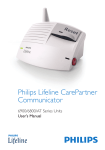
• DT1000 series Philips Lifeline Cordless Phone Communicator
• 6900 series Philips Lifeline CarePartner Communicator
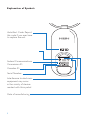
Thank you for choosing Philips Lifeline with our new AutoAlert Help
Button (FD100).
The AutoAlert Help Button has all of the features of our standard Help
Button, allowing you to summon assistance when you need it. Your
AutoAlert Help Button also provides an added layer of protection –
automatically calling for help if you fall and are unable to push the button.
These Instructions for Use will provide you with all the information
you need to know about the AutoAlert Help Button. Please read the
manual carefully, and if you have questions, call Lifeline at any time. Please
remember that you can always push the AutoAlert Help Button or the
Help Button located on the side of your Communicator if you need help.
2