1
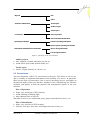
Physical
PUI
NPUI
Aesthetics and Emotions
Visual aspect
Auditory aspect
Tactile aspect
Convenience
Ease of operation
Ease of Element Identification
Operating mechanisms
Common operating mechanisms
Device-specific operating mechanisms
Information and Information Architecture
Device-facing information
User-facing information
Figure 1. Taxonomy of CE User Interfaces
Auditory aspect
• tone, loudness of sound, intonation, accent, etc.
• sound effects (bell sound, animal sound, etc.)
Tactile aspect
• texture, weight, elasticity of a device, etc.
2.3 Convenience
The next dimension of the UI is convenience to the users. This refers to ease of use,
and is certainly an important determinant of the usability of a device. In particular,
there are two types of convenience. One is ease of operating a device, and applies to
the physical aspect of the user interface. Another is ease of identifying user interface
elements, and applies to both the physical and non-physical aspects of the user
interface.
Ease of Operation
• shape, size, and layout of PUI elements,
• sound, flashing or blinking light,
• other characteristics of a device
that make it easier to see, understand, press, grasp, touch and feel a device, etc.
Ease of Identification
• shape, size, and color of PUI elements,
• font size, font style, font color, and background color of text, etc.,
VOL. 6, NO. 3
JOURNAL OF OBJECT TECHNOLOGY
43