1
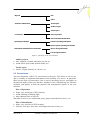
• operation: input for menu navigation, control and data input, input for error
handling, etc.
User-facing information
• installation: cable connection, help information for initial setting (including on-line
manual), etc.
• operation: operating mechanisms for the menus, buttons, switches, etc.
• representation: labels, icons, symbols, buttons, etc., feedback on user input, device
status information, error feedback, etc.
The information may also be classified in terms of the types of data to be input or
output, as follows.
Device-facing information
• visual information
- image: finger print, pupil, picture, etc.
- text: title, name, description, etc.
- numeric: channel, setting values, etc.
- date and time: system time, reservation time
- scalar: volume, play position, etc.
• audio information: voice, sound, etc.
User-facing information
• visual information
- image: icon, image, graphic, animation, video, etc.
- text: menu label, description, message, etc.
- numeric: channel, setting values, etc.
- date and time: system time, reservation information, program
information, etc.
- scalar: volume, play position, etc.
- attributes: color, font size, font style, blinking, etc.
• audio information: voice, melody, sound effect, etc.
• other modalities: vibration (haptic information)
3 DESIGN GUIDELINES
We now present our minimal set of guidelines for designing the user interface of CE
devices with the view to making it as easy as possible for everyday users to
comprehend all primary functions and primary information contents of CE devices.
The guidelines apply to all five dimensions in our taxonomy.
We start with a very simple premise, that is, the UI must be simple. To be simple,
the types and number of UI elements must be minimal; all UI elements and their
combinations must be intuitively comprehensible to everyday users with minimal
exposure to some CE devices; and there must be consistency among all UI elements
and their combinations. Further, the minimum and intuitiveness guidelines must be
applied consistently throughout the UI design. Below we examine each of these three
guidelines for making the UI simple.
VOL. 6, NO. 3
JOURNAL OF OBJECT TECHNOLOGY
45