1
DINPAD
User Manual
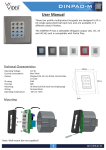
These low profile standalone keypads are designed to fit a UK
single gang electrical back box and are available in 6 different
colour finishes.
They incorporate an easy to follow programming menu allowing
up to 99 unique codes and the setting of relay output times.
The units also include inputs to trigger the relay from a push to
exit button.
Technical Characteristics
Operating Voltage:
Current consumption:
Relays:
Relay time:
Codes:
IP rating:
Housing:
Mounting:
Wiring:
Operating temperature:
80mm
12-24V DC; 15-24V AC
Standby 30mA; Max 100mA
3A @ 24V DC / 230V AC
1 - 99 Seconds or latching (00)
99 User codes (1 - 8 digits)
IP40
ABS
UK electrical flush back (single gang)
Terminal block
-25°C to +50°C
80mm
9mm
Mounting
Note: Wall mount box not supplied!
1
DINPAD
DINPAD
Terminals
12 / 24V
AC / DC
GND
PB
Tamper
Tamper
NO1
COM1
NC1
NO2
COM2
NC2
12/24V
AC/ DC GND PB TAMPER
DINPAD
NO1 COM1 NC1 NO2 COM2 NC2
Backlight ON/OFF jumper
Power supply
Power supply
Push to exit
Tamper output (dry contact)
Relay 1: Normally open
Relay 1: Common
Relay 1: Normally closed
Relay 2: Normally open
Relay 2: Common
Relay 2: Normally closed
Master code reset jumper
Wiring
Fail Safe Lock 12/24V (AC/DC)
POWER SUPPLY
12/24V
AC/DC GND PB TAMPER
PTE
MOV
NO1 COM1 NC1 NO2 COM2 NC2
Fail Secure Lock 12/24V (AC/DC)
POWER SUPPLY
12/24V
AC/DC GND PB TAMPER
PTE
MOV
NO1 COM1 NC1 NO2 COM2 NC2
2
DINPAD
DINPAD
Jumpers
NO1 COM1 NC1 NO2 COM2 NC2
DINPAD
12/24V
AC/ DC GND PB TAMPER
Default: Backlight - closed; Reset - open
Backlight
Reset
Permanent Backlight ON/OFF
Redefine Master Code
Backlight jumper -
Closed; Backlight always on
Open; Backlight active upon keypress
Master reset jumper It is possible to redefine and restore the default setting if the Master code is forgotten.
000
2578
A
B
Disconnect power
Close master reset jumper
Reconnect power
Beep Beep + Yellow LED blinks
Remove master reset jumper
Yellow LED switches on + Long beep
Enter the default master code 000
Enter the new master code e.g 2578
Press A followed by Beep Beep
Press B and the yellow LED switches off
LED status
Green LED
Relay Status(Output1)
Red LED
Relay Status(Output2)
Orange LED
Key press and Menu
3
DINPAD
DINPAD
Adding a User Code
Relay/Output Time
Enter Master Code
(Factory Default = 000)
Followed by B
Enter Master Code
(Factory Default = 000)
Followed by B
Yellow LED on
Yellow LED on
Press 0
Enter <output number> (1 or 2)
Enter <user number> (01-99)
(Up to 99 codes may be added)
Enter <output time> (01-99)
(Enter 00 if latch mode required)
Enter <new user code> (1-8 digits)
Press A
Press A
More Yes
outputs?
Press 3 + <user number>
No
Yellow LED off
Enter <output number> to be triggered
[1 = Relay] [2 = Transistor] [12 = both]
Press B to exit programming
Press A
More
codes?
Yes
Delete a User Code
No
Yellow LED off
Press B to exit programming
Enter Master Code
(Factory Default = 000)
Followed by B
Yellow LED on
Press 9
Delete All Codes
Enter <user number> (01-99)
to delete
Enter Master Code
(Factory Default = 000)
Followed by B
Press A
Yellow LED on
Press 8
More
codes?
Press 99
Yes
No
Yellow LED off
Press B to exit programming
Press A
Yellow LED off
Press B to exit programming
4
DINPAD
DINPAD
Troubleshooting
Keypad does not respond to key presses
1. Check the correct voltage is present on the input terminals (12/24v ac/dc).
Keypad is not accepting default master code 000
1. Perform master code reset.
Keypad no longer accepts user code
1. Check master code has been changed from the default.
2. Check back EMF protection across lock release.
Keypad accepts user code but no longer releases lock
1. Check the correct relay output is assigned to user code.
2. Check push to exit button is normally open.
3. Check for continuity across relay contacts when user code is entered.
4. Check lock wiring for continuity.
5. Check the correct voltage is present on the input terminals (12/24v ac/dc).
Relay triggers and does not return back to its previous state
1. Check relay is not set up to latch
5
DINPAD
DINPAD
6
DINPAD
DINPAD
6
DINPAD
DINPAD
Northern Office
Videx Security Ltd
Unit 4-7 Chillingham ind Est
Newcastle Upon Tyne
NE6 2XX
Tel: 0870 300 1240
Fax: 0191 224 5678
Southern Office
1 Osprey
Trinity Park
Trinity Way
London
E4 8TD
Fax: 0208 523 5825
Technical Support
[email protected]
Tel: 0191 224 3174
Fax: 0191 224 4938
http://www.videx-security.com
6
DINPAD