1
grifo®
ITALIAN TECHNOLOGY
CHARACTERS VISUALIZATION ON DISPLAY
QTP 12 shows on its display all the received characters having a code included in the range 0÷255
(00÷FF Hex) including the one that identifies a command sequence (27 = 1BH), as described later.
The character is visualized on the current cursor position and this latter will go to the next position;
if it is placed on the last character of the display (right down corner), it will be placed on Home
position (left up corner).
The corrispondence between codes and displayed characters is defined by the following rules:
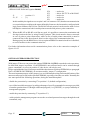
Codes
0 ÷ 15 (00÷0F Hex)
16 ÷ 31 (10÷1F Hex)
32 ÷ 127 (20÷7F Hex)
128 ÷ 255 (80÷FF Hex)
Characters
User defineable
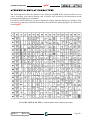
Special and different, according with installed display
Standard ASCII
Special and different, according with installed display
To allow visualization of special characters, that have same codes of the one character commands,
a specific command has been provided that selects the operating mode of QTP 12 among the two
available:
command
representation
the characters are not displayed and the relative commands are executed;
the characters are always displayed.
After a power on it is automatically selected the command mode to make immediately utilizable
every functionalities. The commands composed by a sequence of two or more characters, that always
start with ESC = 27 = 1BH, are anyhow interpreted and executed independently from the selected
operating mode.
Every models of QTP 12 has 8 user characters that can be defined and/or stored according to
application requirements, and then shown on the display, as explained in the further paragraph
COMMANDS FOR USER CHARACTERS.
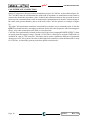
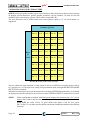
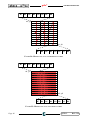
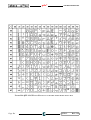
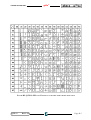
About special characters please refer to APPENDIX B and remind that it is possible to get also
different display models, provided of different special characters, but everything must be directly
prearranged with grifo®.
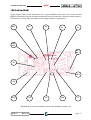
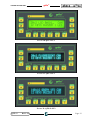
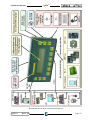
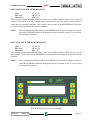
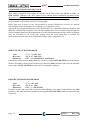
FIGURE 36: CHARACTERS AVAILABLE ON QTP 12-GF2
QTP 12
Rel. 5.50
Page 41