1
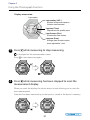
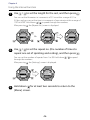
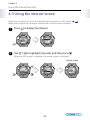
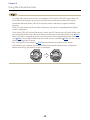
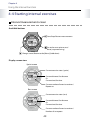
User's Manual
First Issue November 2012
Introduction
Thank you very much for purchasing this WristableGPS.
To use the device correctly, read this User's Manual.
The illustrations and screens shown in the User's Manual are for the SS-700.
By using a built-in GPS sensor and stride sensor, this device can measure running
distance and pace. You can also upload recorded data to a dedicated Web site
allowing you to look back over previous workouts. You can then make more effective
plans and gain more enjoyment from your running.
About descriptions in this User's Manual
Indicates related information and helpful hints.
...for the first time
[Menu Name]
Indicates operations that must be performed when using the device.
Indicates menu items displayed on the screen of the device.
Example: [MENU] - [Settings] - [Scrn.Settings]
Indicates the device buttons.
Indicates that the current explanation continues on the next page
(displayed at the bottom right of the page).
P. XX
Indicates reference pages that contain related information and more
detailed explanations.
Click the page number to jump to the target page.
Trademarks
EPSON and EXCEED YOUR VISION are registered trademarks of the Seiko Epson Corporation.
The official name for Windows® is the Microsoft® Windows® Operating System.
Windows® 7 is a product name of the Microsoft Corporation in the United States of America.
Windows is a registered trademark of the Microsoft Corporation in the United States of America and other
countries.
Other product names are the trademarks or registered trademarks of their respective companies.
Caution:
· Unapproved copying of part or all of this guide is strictly forbidden.
· The content of this guide may be changed without prior notice.
2
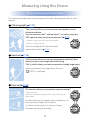
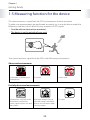
Measuring Using this Device
Three measurement functions
This device has three types of measurement function; chronograph, exercise, and
interval.
Chronograph ( P. 27)
This function allows you to measure running data such as
distance and time.
You can measure split*1 and lap times*2, as well as using the
GPS signal to measure distance and pace ( P. 21).
*1 Split time: Progress time from start to specific point
*2 Lap time : Time for each lap
You can use [Recall] to check recorded
measurement data ( P. 55).
Exercise ( P. 35)
This function allows you to set a target pace and check how
close you are to your target while exercising.
This is useful when you want to maintain a steady target pace.
When you exceed your target pace, the icon
" GOOD" is displayed.
Interval ( P. 43)
This function allows you to perform interval training*³.
*3 Interval training:
Allows you to repeat sets of light and hard exercise to increase your
athletic ability.
An exercise menu is created using combinations of
hard (sprint) and light (rest) exercise.
An alarm sounds when it is time to change
between sprinting and resting.
3
Contents
Introduction........................................................................................................................................... 2
Measuring Using this Device........................................................................................................... 3
Using this Device Safely.................................................................................................................... 7
Chapter 1
Getting Ready........................................................................................................ 12
1-1 Checking the supplied items.................................................................................................13
1-2 Charging........................................................................................................................................14
1-3 Basic operations..........................................................................................................................18
1-4 Measurable items.......................................................................................................................21
1-5 Measuring function for the device.......................................................................................23
1-6 Setting GPS (GPS search).........................................................................................................24
Chapter 2
Using the Chronograph Function.................................................................. 26
2-1 About the chronograph function.........................................................................................27
2-2 Using the chronograph screen..............................................................................................28
2-3 Measuring.....................................................................................................................................30
Chapter 3
Using the Exercise Function............................................................................. 34
3-1 About the exercise function...................................................................................................35
3-2 Setting the target pace............................................................................................................36
3-3 Using the exercise screen........................................................................................................38
3-4 Starting the exercise function...............................................................................................39
Chapter 4
Using the Interval Function.............................................................................. 42
4-1 About the interval function....................................................................................................43
4-2 Setting interval conditions.....................................................................................................44
4-3 Using the interval screen.........................................................................................................47
4-4 Starting interval exercises.......................................................................................................49
Chapter 5
Checking Measurement Data Using the Recall Function...................... 54
5-1 Measurement data that can be checked in recall...........................................................55
5-2 Checking measurement data.................................................................................................56
4
Chapter 6
Measuring Distance and Pace with the Stride Sensor (SS-700/SS-500 Only).... 58
6-1 About the stride sensor............................................................................................................59
6-2 Enabling the stride sensor......................................................................................................60
Chapter 7
Measuring Heart Rate (SS-700/SS-500 Only).............................................. 62
7-1 About heart rate measurements..........................................................................................63
7-2 Wearing the HR sensor set......................................................................................................64
7-3 Pairing............................................................................................................................................65
7-4 Enabling the HR sensor............................................................................................................67
7-5 Replacing the battery for the HR sensor............................................................................70
Chapter 8
About Settings...................................................................................................... 72
8-1 About the settings function...................................................................................................73
8-2 Screen settings............................................................................................................................75
8-3 Auto lap.........................................................................................................................................79
8-4 Auto light......................................................................................................................................81
8-5 Auto pause....................................................................................................................................83
8-6 Alarm..............................................................................................................................................85
8-7 System settings...........................................................................................................................95
8-8 Clear history.................................................................................................................................98
8-9 User settings.............................................................................................................................. 101
Chapter 9
Usage Guide (Screen Settings According to Your Needs)....................106
9-1 Settings on the chronograph screen............................................................................... 107
9-2 Noting distance and pace while running....................................................................... 108
9-3 Noting pitch and stride while running (SS-700/SS-500 only)................................. 110
9-4 Noting targets while running............................................................................................. 111
9-5 Noting heart rate while running (SS-700/SS-500 only)............................................. 113
Chapter 10
Data Management Using the Web Application......................................115
10-1 Installing the NR Uploader................................................................................................ 116
10-2 Connecting the device to a computer and using NeoRun.................................... 119
10-3 Updating the driver software........................................................................................... 121
5
Chapter 11
Maintenance........................................................................................................125
11-1 Performing maintenance................................................................................................... 126
11-2 Replacing the battery.......................................................................................................... 127
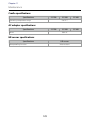
11-3 Product specifications......................................................................................................... 128
Chapter 12
Troubleshooting.................................................................................................130
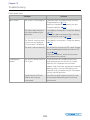
12-1 Dealing with problems....................................................................................................... 131
12-2 Resetting the system........................................................................................................... 135
12-3 Contacting us about this product................................................................................... 136
12-4 After service............................................................................................................................ 137
12-5 Certification information.................................................................................................... 138
Chapter 13
Index.......................................................................................................................139
6
Using this Device Safely
To use this device safely, make sure you read the User's Manual before use.
If you do not follow the content of the User's Manual, a problem or accident could
occur.
· When using this device abroad, check conditions such as laws
and regulations for the country/region.
· This is not a medical device. Use for exercising only.
VCCI Class B Information Technology Device
This device is a class B information technology device. This device
is designed for home use, but interference could occur when
using in close proximity to radios or television antennas.
Symbols in this Manual
This User's Manual uses the following symbols to prevent injury to the user or
to others, or damage to property when using this device, as well as preventing
dangerous usage.
Read the guide after understanding these symbols.
Warning
Ignoring these instructions or mishandling this device could
cause serious injury or death.
Caution
Ignoring these instructions or mishandling this device could
cause injury or damage to property.
This symbol indicates operations (instructions and actions)
you must perform.
This symbol indicates actions (forbidden actions) that must
not be performed.
7
Notes on Usage
About the Device and Accessories
Warning
Exercise according to your own physical condition. It is dangerous
to exercise suddenly or excessively. If you feel nauseous or if your
physical condition alters while exercising, stop exercising and contact
a doctor.
Do not watch the device too closely while exercising. Otherwise
you could fall or cause a traffic accident. Pay close attention to your
surroundings while using the device.
Do not use while scuba diving.
This device is made using precision parts and electronic components.
Do not use or store in the following locations. Otherwise an electric
shock, fire, problem, or malfunction could occur.
• Locations subject to high temperatures or humidity • Volatile locations
• Locations near fire
• Locations subject to smoke and dust
• Locations close to magnetic fields (near speakers and so on)
Do not disassemble or perform repairs yourself. Otherwise an electric
shock or an accident could occur.
Do not leave this device in reach of children.
Caution
If you suffer from any allergies or rashes when wearing the device,
stop using it immediately and contact a medical specialist such as a
dermatologist.
The device has enhanced (practical) waterproofing. Although you can
use the device in water, such as when swimming, do not perform button
operations when it is wet. This may effect the quality of the waterproofing.
Do not hold the device directly under high pressure water from a
faucet. Water pressure from a faucet is high and could effect the
quality of the waterproofing.
Do not use in the bath or in a sauna. Steam and materials in soap and in
hot springs could effect the quality of the waterproofing or cause rust.
8
Notes on Usage
About the Cradle and the AC Adapter
Warning
Make sure the plug is fully inserted. Otherwise an electric shock or
fire could occur.
When you are not using the AC adapter, unplug it from the electrical
outlet. Also, make sure you clean the plug periodically.
If you hear thunder, unplug it from the electrical outlet immediately.
Otherwise an electric shock could occur.
Note the following points when handling the AC adapter. Otherwise
an electric shock or fire could occur.
• Do not use it in locations subject to rain or water
• Do not cover it with bedding and so on
Do not touch the power plug with wet hands. Otherwise an electric
shock could occur.
Do not plug the AC adapter into an outlet that is being used by
many other devices.
Do not use the AC adapter or USB cable if they are damaged. Otherwise a
problem or fire could occur. If they are damaged, contact a repair center.
Do not use them if you notice any abnormalities such as smoke,
strange odors or noises. Otherwise a fire could occur. If any
abnormalities occur, unplug from the electrical outlet immediately,
and contact a repair center.
Do not use if any foreign substances or liquids such as water get inside
any of the devices. Otherwise an electric shock or fire could occur. Unplug
from the electrical outlet immediately, and contact a repair center.
Do not use the USB cable if any foreign substances such as dust are
stuck to the connector. Otherwise a fire could occur.
Do not use the AC adapter and cradle to charge any other devices. Also,
do not charge the device with any thing except for the AC adapter and
cradle. Otherwise problems, an electric shock, or fire could occur.
9
Notes on Usage
About the HR Sensor (SS-700/SS-500 Only)
Read when using the HR (heart rate) sensor function.
This device contains a wireless function. When using the HR sensor, this function wirelessly sends
and receives heart rate measurement data to the device.
This device has been classified as a small electronic data communication system based on Radio
Law. Therefore, this device does not require a radio station license. The following acts may be
punishable by law.
·Disassembling or remodeling the device
·Removing the verification or certification number for the device
* When using this device abroad, check conditions such as laws and regulations for the country/region.
Frequency
This device uses frequency 2.457 GHz in the 2.4 GHz band.
Wireless devices may use the same frequency.
Note the following points to avoid wireless interference with other
wireless devices.
Precautions when performing wireless communication
This device operates on the 2.4 GHz band. This device operates in the same frequency bandwidth
as industrial, scientific, and medical devices such as microwave ovens and mobile object
identification (RF-ID) systems (licensed premises radio stations, amateur, and unlicensed specified
low-power radio stations (hereafter "other radio stations")) used in factory production lines.
1.Before using this device, make sure there are no "other radio stations" being used in the vicinity.
2.If this device causes RF interference between the device and "other radio stations", promptly
move to a different location, stop using the device.
3.If you have any questions, or if other problems occur, contact our information center.
Warning
If you notice any abnormalities on your skin and so on, stop using the
device immediately and contact a specialist.
In areas in which usage is restricted, such as on airplanes and in
hospitals, follow the rules and regulations provided (such as in-flight
announcements).
Do not use the device if you have a surgically implanted pacemaker.
Do not bring the device into an operating room, intensive care unit,
and so on, and do not use the device near medical equipment. Radio
waves from the device may interfere with electronic medical equipment
causing the equipment to malfunction and cause an accident.
10
Notes on Usage
About the HR Sensor Battery
Note the following points regarding the HR sensor battery.
Warning
If the battery is accidentally swallowed, contact your doctor
immediately.
Caution
Be careful not to injure yourself when replacing the battery.
When disposing of the battery, follow your local laws and regulations.
When replacing the battery, only use the type of battery specified.
Also, make sure the polarities (+ and -) are correct.
Do not place the battery or the HR sensor with a battery installed
into a fire.
Notes on Storage
Caution
Do not place in a location subject to magnetic fields or
electromagnetic waves. Otherwise, data may be corrupted or lost.
Do not leave the device unattended in locations where it could
come into contact with chemicals, or in locations where chemical
substances are emitted. If any spray-on liquid such as gasoline, nail
varnish, or cosmetics, as well as cleaning liquid, toilet detergent,
adhesives, and so on, come into contact with the device or the strap,
they could cause discoloring or damage.
11
Getting Ready
Chapter
1
1-1 Checking the supplied items
1-2 Charging
1-3 Basic operations
1-4 Measurable items
1-5 Measuring function for the device
1-6 Setting GPS (GPS search)
1 2 3 4 5 6 7 8 9 10 1112 13
Chapter 1
Getting Ready
1-1 Checking the supplied items
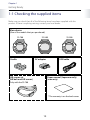
Make sure you check that all of the following items have been supplied with this
product. If there is anything missing, contact your local dealer.
Main device
(One of the models that you purchased.)
SS-700
Cradle
SS-500
AC adapter
HR sensor set
(HR belt and HR sensor)
SS-300
USB cable
Paper manual (Japanese only)
(warranty)
Only with the SS-700
* The warranty is on the back cover.
13
Chapter 1
Getting Ready
1-2 Charging
During use
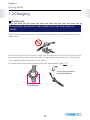
Do not place the device in the cradle if it is wet from water or
sweat.
Otherwise the contact points on the cradle and the device could corrode and cause a
malfunction.
If the device is dirty from water or sweat, use low pressure water from a faucet to wash
the contact points, wipe away most of the water with a towel and so on, and then let
it dry naturally before placing it in the cradle.
For more details about daily maintenance, see “Maintenance” ( P. 125).
Use low pressure water
to wash the device.
Contact points
14
Chapter 1
Getting Ready
Charging
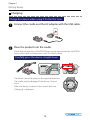
Charge this device when using it for the first time.
1 Connect the cradle and the AC adapter with the USB cable.
2 Place the product into the cradle.
Check that the direction of the EPSON logo on the device matches the EPSON
logo on the cradle, and then press until it is fixed in place.
Carefully press the device straight down.
The device cannot be placed in the opposite direction.
The cradle may be damaged if the device is forced
into it.
When the device is placed in the correct direction,
[Charging] is displayed.
15
Chapter 1
Getting Ready
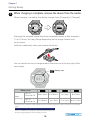
3 When charging is complete, remove the device from the cradle.
When charging is complete, the display changes from [Charging] to [Charged].
Although the standard charge time from completely empty to fully charged is
2.5 to 3.5 hours, this may change depending on the usage situation and
environment.
Hold the cradle firmly when you remove the device.
You can check how much charge remains from the icon at the top right of the
time display.
Battery icon
Battery icon
Hours
remaining*
GPS On,
HR sensor Off
10 to 14 hours 5 to 10 hours
GPS On,
HR sensor On
7 to 10 hours
3 to 7 hours
2 to 5 hours
0 to 2 hours
1.5 to 3 hours
0 to 1.5 hours
* Standard times in which the Chronograph, Exercise, and Interval functions can be used while receiving a GPS
signal.
The usage time differs depending on the status of the HR sensor.
There is no difference in usage time if the stride sensor is on or off.
Using the light frequently makes the battery run low.
16
Chapter 1
Getting Ready
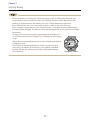
·· When the battery is running low, the time display screen is displayed even when the
measurement screen or [Menu] screen are selected, and the buttons do not function.
Nothing is displayed when the battery runs out. Charge the battery right away.
·· Even if the battery runs out, measurement data is stored in the main memory.
·· Once charging is complete, an over-charge function is activated to prevent the battery
from being over charged. The device will not be damaged even if you continue to charge
the battery.
·· Charge in an environment with a room temperature of 0 to 35˚C.
In any other environment [Charge Err.] is displayed, and charging
stops.
When the internal temperature returns to a suitable temperature,
charging restarts.
·· Even if you are not using the device, make sure you charge it
once every six months. If the device is not used for extended
periods of time, the performance of the rechargeable battery
may decrease.
17
Charge err Screen
Chapter 1
Getting Ready
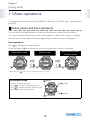
1-3 Basic operations
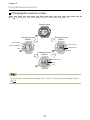
To change the display to English, set [Menu] - [Settings] - [Sys. Settings] - [Language] to
[English].
Button names and basic operations
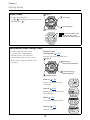
You can select the measurement screen and the settings screen from the [Menu].
This section explains the button names and operations when each screen is selected.
The function for each button changes depending on which screen is displayed.
Basic operations
Press to change the screen display.
If you hold down for at least two seconds, the previous screen is displayed.
Time display screen
Hold down*
* Hold down: Press
Measurement screen/
Settings screen
[Menu] screen
Hold down*
for at least two seconds to change the screen.
Time display screen
Light on
Unused
Displays the date and time.
Press to change to the [Menu] screen.
Press to turn on the light. The light turns
on for approximately 10 seconds.
Unused
Display [Menu]
18
Chapter 1
Getting Ready
[Menu] screen
Light on
Displays the [Menu] list.
Use / to highlight the target function,
and then press .
Select (top)
Select (bottom)
Confirm selection
Displays the [Menu] level
( moves to the right as you
move through the menu screens.)
Measurement screen/Settings screen
Displays each function screen.
As well as the [Chronograph]
example screen, there are also
measurement and settings screens
for [Exercise], [Interval], [Recall], and
[Settings].
Example screen:
Chronograph ( P. 27)
Measure split times and lap times.
Light on
Start/Stop/
Restart measurements
Change screens
Lap (measuring) /
Reset (stopped)
Exercise ( P. 35)
Exercise while checking the
target pace.
Interval ( P. 43)
Repeat exercise for hard and
light workouts.
Recall ( P. 55)
Check measurement results.
Settings ( P. 73)
Change settings.
19
Chapter 1
Getting Ready
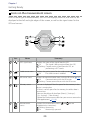
Icons on the measurement screen
Icons for each type of measurement, such as chronograph, exercise, and interval, are
displayed at the left and right edges of the screen, as well as the signal status for the
GPS and sensors.
4
1
5
2
3
Icon
Name
Summary
1
GPS signal status
Displays the status of the signal from the GPS.
On
:The signal is being received from the GPS.
Flashing:Cannot receive signal from the GPS, or
performing a GPS search.
2
Stride sensor status
Displays the setting status for the stride sensor (
On
: The stride sensor is enabled.
3
HR sensor status
Displays the communication status with the HR sensor ( P. 67).
On
:Communicating with the HR sensor.
Flashing:Cannot communicate with the HR sensor.
4
Memory status
The icon is displayed if the free space for the memory in the
device is running low.
·If there is no free space for the memory, the oldest data is
overwritten.
·You can also delete all data from [Menu] - [Settings] [Sys. Settings] - [Clear History].
·Upload the measurement data that you want to store to the
Web application ( P. 119).
5
Measurement
status
Displays the measurement status (
displayed at the same time).
Flashing:Measuring
On
:Measuring is paused
20
and
P. 60).
are not
Chapter 1
Getting Ready
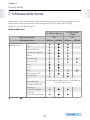
1-4 Measurable items
Items that can be measured by each measurement function for chronograph, exercise,
and interval change according to the settings for the GPS signal (GPS on/off ),
stride sensor, and the HR sensor.
Measurable items
SS-700/SS-500 only
SS-700/SS-500/
SS-300
ON
OFF
Stride sensor status
GPS on/off status
Measurement item
(Display name)
GPS on
GPS off
GPS on
GPS off
Distance (Dist.)
-
Pace
-
Lap pace (PaceLa)
-
Average pace (PaceAv)
-
Speed
-
Split time (Spl)
Lap time (Lap)
Pitch
-
-
Stride
-
-
Time
Calories burnt (Cal.)
-
Altitude (Alti.)
HR
See the following table for items measurable by
the HR sensor settings
Lap HR (HR Lap)
Average HR (HR Avg.)
: Measurable
-
Guide time
(Guide: Time display)
-
Guide dist.
(Guide: Distance display)
-
: Stride sensor measurement possible -: Cannot measure
21
Chapter 1
Getting Ready
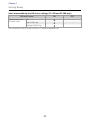
Items measurable by the HR sensor settings (SS-700 and SS-500 only)
HR sensor status
Measurement item
(Display name)
ON
OFF
HR
-
Lap HR (HR Lap)
-
Average HR (HR Avg)
-
You can purchase the HR sensor set for the SS-500 as an optional item.
22
Chapter 1
Getting Ready
1-5 Measuring function for the device
This device receives a signal from the GPS, and measures distance and pace.
To make sure measurements are performed accurately, try to use the device under the
following conditions which allow for easy reception of GPS signals.
•• Outside with no obstructions overhead
•• The device is on the outside of your wrist
You cannot receive a signal from the GPS in the following environments.
Obstructed environments
Inside rooms or buildings, or
underground
In tunnels
Under water
Partially obstructed environments
Environments with high levels
of electronic interference,
such as constructions sites and
heavy traffic
Near high-voltage wires or
television towers, overhead
electric wires for trains, roads
with skyscrapers
23
On water
Chapter 1
Getting Ready
1-6 Setting GPS (GPS search)
When changing to each measurement function for chronograph, exercise, and
interval, the device receives a signal from the GPS and assigns a GPS to be used for
measurements (GPS search).
While performing a GPS search, make sure you are outside with no obstructions
overhead, and try to keep the device as still as possible.
This section explains how to perform a GPS search using the chronograph function as an
example.
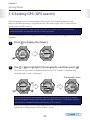
1 Press
2 Use
to display the [Menu].
/
to highlight [Chronograph], and then press
.
The [Searching] screen is displayed. When the GPS search is complete, the
chronograph screen is displayed.
Chronograph screen
For a more accurate measurement the first time you use the device, display
the chronograph screen while you are outside for at least 15 minutes with no
obstructions overhead before performing a GPS search.
You do not need to make these preparations from the second time. You need to
make these settings again if the system is reset.
24
Chapter 1
Getting Ready
·· It usually takes within two minutes to complete a GPS search. If the GPS search does not
finish after three minutes or more, you may be in an environment where GPS signals
cannot be received. Select [Cancel] to stop the search, and then try again in another
location.
·· If the GPS search does not finish after 10 minutes, the search is stopped and the [Menu]
screen is displayed.
·· With the chronograph and interval functions, you can also select [GPS off] and perform
measurements. However, measurement items are limited at this time ( P. 21).
·· When the GPS search is complete, the correct time is displayed.
25
Using the Chronograph
Function
Chapter
2
2-1 About the chronograph function
2-2 Using the chronograph screen
2-3 Measuring
1 2 3 4 5 6 7 8 9 10 1112 13
Chapter 2
Using the Chronograph Function
2-1 About the chronograph function
What is the chronograph function?
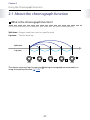
This function allows you to measure split times and lap times simultaneously.
Split time : Progress time from start to a specific point
Lap time : Time for each lap
Split time
Lap time
Start
This device measures laps by pressing
using the auto lap function ( P. 79).
Goal
during chronograph measurements, or
27
Chapter 2
Using the Chronograph Function
2-2 Using the chronograph screen
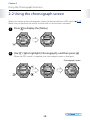
When you change to the chronograph screen, the device performs a GPS search (
Make sure you perform the search outside with no obstructions overhead.
1 Press
2 Use
P. 24).
to display the [Menu].
/
to highlight [Chronograph], and then press
.
When the GPS search is complete, the chronograph screen is displayed.
Chronograph screen
28
Chapter 2
Using the Chronograph Function
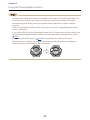
·· It usually takes within two minutes to complete a GPS search. If the GPS search does not
finish after three minutes or more, you may be in an environment where GPS signals
cannot be received. Select [Cancel] to stop the search, and then try again in another
location.
·· If the GPS search does not finish after 10 minutes, the search is stopped and the [Menu]
screen is displayed.
·· If you select [GPS off ] on the [Searching] screen, the GPS sensor turns off which allows you
to use the chronograph function. However, measurement items are limited at this time
( P. 21).
·· See "Setting GPS (GPS search)" ( P. 24) for more details on making a GPS search.
·· If 60 minutes pass without any measurements being made (if the device is stopped or
before measuring), the [Menu] screen is displayed.
29
Chapter 2
Using the Chronograph Function
2-3 Measuring
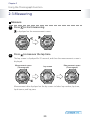
Measure
1 Press
to start measuring.
is displayed on the measurement screen.
2 Press
to measure the lap time.
The lap screen is displayed for 20 seconds, and then the measurement screen is
displayed.
Measurement screen
(Chronograph)
Lap screen
Measurement screen
(Chronograph)
Measurement data displayed on the lap screen includes lap number, lap time,
lap distance, and lap pace.
30
Chapter 2
Using the Chronograph Function
Display screen view
Lap screen
Lap number (LAP -)
Number of lap measurements
(Section measurement)
Lap time (Time)
Elapsed time for specific point
Lap distance (Dist.)
Distance for each section
Lap pace (Pace)
Average pace for each section
(time required for 1 km)
3 Press
while measuring to stop measuring.
is displayed on the measurement screen.
Press to start measuring again.
4 Press
while measuring has been stopped to reset the
measurement display.
When you reset the display, the values return to zero allowing you to start the
next measurement.
Data that has been measured up to that point is stored in the device's memory.
31
Chapter 2
Using the Chronograph Function
·· After resetting, hold down for a few seconds to update GPS data and return to the
[Menu] screen. By updating the GPS data, the GPS measurement data is recorded. The
recorded data is used to increase the measurement accuracy for distance and pace.
·· If 60 minutes pass without any measurements being made (if the device is stopped or
before measuring), the [Menu] screen is displayed.
·· You can use [Recall] to check the stored measurement data ( P. 55).
32
Chapter 2
Using the Chronograph Function
Changing the chronograph screen
During chronograph measurement, three items are displayed on one screen.
There are three measurement screens available. You can change screens by pressing
.
Chronograph screen
Screen 1
Distance (Dist.)
Split time (Spl)
Pace
Chronograph screen
Screen 2
Chronograph screen
Screen 3
Distance (Dist.)
Distance (Dist.)
Calories burnt (Cal.)
Time
Pace
Pace
You can change the measurement item displayed on each screen (screens 1, 2, and 3)
from [Menu] - [Settings] - [Scrn. Settings] ( P. 75). Change to the item you want to check.
The following measurement items are displayed by default.
Default settings
Screen 1
Screen 2
Screen 3
Top row
Distance (Dist.)
Distance (Dist.)
Distance (Dist.)
Middle row
Split time (Spl)
Time
Calories burnt (Cal.)
Bottom row
Pace
Pace
Pace
33
Using the Exercise Function
Chapter
3
3-1 About the exercise function
3-2 Setting the target pace
3-3 Using the exercise screen
3-4 Starting the exercise function
1 2 3 4 5 6 7 8 9 10 1112 13
Chapter 3
Using the Exercise Function
3-1 About the exercise function
What is the exercise function?
This function allows you to exercise and check how close you are to your target pace.
By setting a target pace in advance, the device indicates if you are exceeding your
target while exercising. It also indicates how close you are to your target.
This is useful when you want to be aware of your running pace.
You can measure split and lap times in the same way as the chronograph.
Display screen view
Calories burnt
Displays the total calories burnt from the start of the
exercise
Exercise screen
Estimate (LOW/GOOD)
LOW : You have not reached your target.
GOOD: You have reached your target.
Standard of performance
Displays the current exercise intensity as a bar
indicates the target
Exercise intensity
Displays the current exercise intensity as a number
METS is a unit that shows the strength of physical activity. We can express the strength of
physical activity by assuming that one METS is the equivalent of sitting down and relaxing.
A walk is usually the equivalent of three METS. Therefore, this type of physical activity is
approximately three times as strong as sitting down and relaxing.
35
Chapter 3
Using the Exercise Function
3-2 Setting the target pace
Set the target time for your running exercise per kilometer in [Target Pace] from
[Settings].
1 Press
2 Use
to display the [Menu].
/
to highlight [Settings], and then press
.
The [Settings] function selection screen is displayed.
3 Use
/
to highlight [Target Pace], and then press
The [Target Pace] settings screen is displayed.
36
.
Chapter 3
Using the Exercise Function
4 Use
/
to set the target pace, and then press
.
Set the target pace for your exercise shown on the top row of the screen. You
can set the target pace in increments of 0'01'/km within a range of 1'00" to
15'00"/km. Hold down / to speed through the numbers.
The target for the amount of calories burnt in one hour calculated based on the
target pace is displayed at the bottom of the screen.
After confirming the selection, the [Settings] screen is displayed.
See the user settings data for measurements of calories burnt. Set the user data in
user settings to accurately measure how many calories you have burnt ( P. 101).
5 Hold down
for at least two seconds to return to the
[Menu] screen.
37
Chapter 3
Using the Exercise Function
3-3 Using the exercise screen
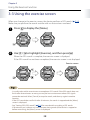
When you change to the exercise screen, the device performs a GPS search (
Make sure you perform the search outside with no obstructions overhead.
1 Press
2 Use
P. 24).
to display the [Menu].
/
to highlight [Exercise], and then press
.
When the GPS search is complete, the exercise screen is displayed.
If the GPS search has not been completed, the exercise screen is not displayed.
Exercise screen
·· It usually takes within two minutes to complete a GPS search. If the GPS search does not
finish after three minutes or more, you may be in an environment where GPS signals
cannot be received. Select [Cancel] to stop the search, and then try again in another
location.
·· If the GPS search does not finish after 10 minutes, the search is stopped and the [Menu]
screen is displayed.
·· See "Setting GPS (GPS search)" ( P. 24) for more details on making a GPS search.
·· If 60 minutes pass without any measurements being made (if the device is stopped or
before measuring), the [Menu] screen is displayed.
38
Chapter 3
Using the Exercise Function
3-4 Starting the exercise function
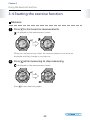
Measure
1 Press
to start exercise measurements.
is displayed on the measurement screen.
When you start exercising, values, the current evaluation, and a bar are
displayed, and they change as you exercise.
2 Press
while measuring to stop measuring.
is displayed on the measurement screen.
Press
to start measuring again.
39
Chapter 3
Using the Exercise Function
3 Press
while measuring has been stopped to reset the
measurement display.
When you reset the display, the values return to zero allowing you to start the
next measurement.
Data that has been measured up to that point is stored in the device's memory.
·· After resetting, hold down for a few seconds to update GPS data and return to the
[Menu] screen. By updating the GPS data, the GPS measurement data is recorded. The
recorded data is used to increase the measurement accuracy for distance and pace.
·· If 60 minutes pass without any measurements being made (if the device is stopped or
before measuring), the [Menu] screen is displayed.
·· You can use [Recall] to check the stored measurement data ( P. 55).
40
Chapter 3
Using the Exercise Function
Changing the exercise screen
Press
to change to the chronograph screen while measuring exercise.
Exercise screen
Chronograph screen
Screen 3
Chronograph screen
Screen 1
Distance (Dist.)
Distance (Dist.)
Calories burnt (Cal.)
Split time (Spl)
Pace
Pace
Chronograph screen
Screen 2
Distance (Dist.)
Time
Pace
For more details about the chronograph screen, see the "Changing the chronograph screen"
( P. 33).
41
Using the Interval Function
Chapter
4
4-1 About the interval function
4-2 Setting interval conditions
4-3 Using the interval screen
4-4 Starting interval exercises
1 2 3 4 5 6 7 8 9 10 1112 13
Chapter 4
Using the Interval Function
4-1 About the interval function
What is the interval function?
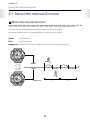
This function allows you to perform sets of hard (sprint) and light (rest) exercise.
You can set the distance and time, and create an exercise menu.
An alarm notifies you of a change between sprint and rest times.
Sprint
: Hard exercise
: Light exercise
Rest
Repeat no.: Number of times to repeat one set of sprinting and resting
Sprint
Rest
Repeat no.
1
43
2
Chapter 4
Using the Interval Function
4-2 Setting interval conditions
You can set the length and a number of times to repeat a set of sprints and rests from
[Interval] in [Settings].
1 Press
2 Use
to display the [Menu].
/
to highlight [Settings], and then press
.
The [Settings] function selection screen is displayed.
3 Use
/
to highlight [Interval], and then press
The [Sprint Setting] screen is displayed.
44
.
Chapter 4
Using the Interval Function
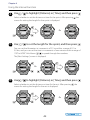
4 Use
/
to highlight [Distance] or [Time], and then press
Select whether to set the distance or time for the sprint. After pressing
screen for setting the length for the sprint is displayed.
.
, the
Or
5 Use
/
to set the length for the sprint, and then press
.
You can set the kilometers in increments of 0.1 km within a range of 0.1 to
5.0 km, and you can set the time in increments of one minute within a range of
1’00” to 60’00”. Hold down / to speed through the numbers.
The [Rest Settings] screen is displayed.
Or
6 Use
/
to highlight [Distance] or [Time], and then press
Select whether to set the distance or time for the rest. After pressing
screen for setting the length for the rest is displayed.
Or
45
, the
.
Chapter 4
Using the Interval Function
7 Use
/
to set the length for the rest, and then press
.
You can set the kilometers in increments of 0.1 km within a range of 0.1 to
5.0 km, and you can set the time in increments of one minute within a range of
1’00” to 60’00”. Hold down / to speed through the numbers.
After pressing , the [Repeat No.] screen is displayed.
Or
8 Use
/ to set the repeat no. (the number of times to
repeat one set of sprinting and resting), and then press .
You can set the number of repeats from 1 to 99. Hold down
through the numbers.
After pressing , the [Settings] screen is displayed.
9 Hold down
/
to speed
for at least two seconds to return to the
[Menu] screen.
46
Chapter 4
Using the Interval Function
4-3 Using the interval screen
When you change to the interval screen, the device performs a GPS search (
Make sure you perform the search outside with no obstructions overhead.
1 Press
2 Use
P. 24).
to display the [Menu].
/
to highlight [Interval], and then press
.
When the GPS search is complete, the interval screen is displayed.
Interval screen
47
Chapter 4
Using the Interval Function
·· It usually takes within two minutes to complete a GPS search. If the GPS search does not
finish after three minutes or more, you may be in an environment where GPS signals
cannot be received. Select [Cancel] to stop the search, and then try again in another
location.
·· If the GPS search does not finish after 10 minutes, the search is stopped and the [Menu]
screen is displayed.
·· If you select [GPS off ] on the [Searching] screen, the GPS sensor turns off which allows you
to use the interval function. However, measurement items are limited at this time ( P. 21).
When [GPS off ] is selected, distance is not measured. Set the length of time for sprint/
rest ( P. 44). For SS-700/SS-500, when the stride sensor is enabled ( P. 59), you can set the
sprint/rest length for Distance.
·· See "Setting GPS (GPS search)" ( P. 24) for more details on making a GPS search.
·· If 60 minutes pass without any measurements being made (if the device is stopped or
before measuring), the [Menu] screen is displayed.
48
Chapter 4
Using the Interval Function
4-4 Starting interval exercises
Interval measurement screen
Available buttons
Start/Stop/Restart measurements
Go to the next sprint or rest/
Reset (stop measuring)
Change screen/Return to the [Menu] (hold down)
Display screen view
Sprint screen
Current exercise status (sprint)
Current distance/Set distance
Or
Current time/Set time
Current number of exercise routines/
Repeat no.
Rest screen
Current exercise status (rest)
Current distance/Set distance
Or
Current time/Set time
Current number of exercise routines/
Number of set repeats
49
Chapter 4
Using the Interval Function
Measure
1 Press
to start interval measurements.
is displayed on the measurement screen.
When the sprint distance (or sprint time) has passed,
an alarm sounds and the rest screen is automatically
displayed.
Also, when the rest distance (or rest time) has passed, an
alarm sounds and the sprint screen is displayed.
The number of exercise routines increases by one.
·· If you press while measuring, you can change from sprint to rest, and then back
to sprint again. This also increases the number of exercise routines.
·· If no GPS signal is being received (when the
is flashing), there may not be a
change between sprinting and resting even if you reach the set time. Make sure
you are in an environment where the GPS signal can be easily received without
any obstructions overhead, and check that the GPS signal is being received (the
changes from flashing to on).
·· When the stride sensor is enabled for the SS-700/SS-500 ( P. 59), although the
stride sensor can perform measurement, if the exercise distance is short, there
is no change between sprinting and resting even if you reach the set time. Keep
exercising, and increase the exercise distance.
50
Chapter 4
Using the Interval Function
2 Press
while measuring to stop measuring.
is displayed on the measurement screen.
Press
to start measuring again.
3 Finishes measuring.
Exercise the set number of repeats. Once you have exercised for the set number
of repeats, [Finish] is displayed on the screen.
If you want to finish while exercising, press to stop measuring.
is displayed on the measurement screen.
51
Chapter 4
Using the Interval Function
4 Press
while measuring has been stopped to reset the
measurement display.
When you reset the display, values, such as the number of exercise routines,
return to zero allowing you to start the next measurement.
Data that has been measured up to that point is stored in the device's memory.
·· After resetting, hold down for a few seconds to update GPS data and return to the
[Menu] screen. By updating the GPS data, the GPS measurement data is recorded. The
recorded data is used to increase the measurement accuracy for distance and pace.
·· If 60 minutes pass without any measurements being made (if the device is stopped or
before measuring), the [Menu] screen is displayed.
·· You can use [Recall] to check the stored measurement data ( P. 55).
52
Chapter 4
Using the Interval Function
Changing the interval screen
If you press
during interval measurements, the chronograph screen is displayed.
Interval screen
Chronograph screen
Screen 3
Chronograph screen
Screen 1
Distance (Dist.)
Distance (Dist.)
Calories burnt (Cal.)
Split time (Spl)
Pace
Pace
Chronograph screen
Screen 2
Distance (Dist.)
Time
Pace
For more details about the chronograph screen, see the "Changing the chronograph screen"
( P. 33).
53
Checking Measurement Data
Using the Recall Function
Chapter
5
5-1 Measurement data that can be checked in recall
5-2 Checking measurement data
1 2 3 4 5 6 7 8 9 10 1112 13
Chapter 5
Checking Measurement Data Using the Recall Function
5-1 Measurement data that can be checked in recall
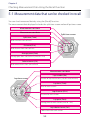
You can check measured data by using the [Recall] function.
The measurement data displayed includes the split time screen and each lap time screen.
Measurement start time
Measurement start date
Split time screen
Split time (Time)
Total time from start to finish
Distance (Dist.)
Total distance from start to finish
Average pace (Pace)
Average pace from start to finish (time for 1 km)
Calories burnt (Cal.)
Total calories burnt from start to finish
Measurement start date
Lap number (No.)
Lap time screen
Number of lap measurement (section measurement)
Lap time (Time)
Time for each section
Lap distance (Dist.)
Distance for each section
Lap pace (Pace)
Average pace for each section (time for 1 km)
Lap calories burnt (Cal.)
Calories burnt for each section
55
Chapter 5
Checking Measurement Data Using the Recall Function
5-2 Checking measurement data
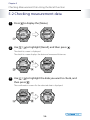
1 Press
2 Use
to display the [Menu].
/
to highlight [Recall], and then press
.
The data list screen is displayed.
The data list screen displays the date and measured distances.
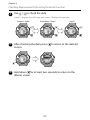
3 Use
/ to highlight the data you want to check, and
then press .
The confirmation screen for the selected date is displayed.
56
Chapter 5
Checking Measurement Data Using the Recall Function
4 Use
/
to check the data.
Screen 1 displays the split time, and screen 2 displays the lap time.
Screen 1 (Split)
From screen 2 (Lap 1)
5 After checking the data, press
(Lap 2)
to return to the data list
screen.
6 Hold down
for at least two seconds to return to the
[Menu] screen.
57
Measuring Distance and Pace with the
Stride Sensor (SS-700/SS-500 Only)
Chapter
6
6-1 About the stride sensor
6-2 Enabling the stride sensor
1 2 3 4 5 6 7 8 9 10 1112 13
Chapter 6
Measuring Distance and Pace with the Stride Sensor (SS-700/SS-500 Only)
6-1 About the stride sensor
Measuring with the stride sensor
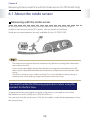
By using the built-in stride sensor, you can measure distance and pace even in
locations that cannot receive GPS signals, such as tunnels or buildings.
Stride sensor measurements are only available for the SS-700/SS-500.
·· The stride sensor measures distance and pace using the latest running pitch information
received from the GPS.
If your running pace differs greatly from the latest running pace received from the GPS,
there may be a large difference between the distance and pace measured with the stride
sensor.
·· The device's stride sensor is used for running. This is not available for cycling, skiing, or
canoeing. Also, when walking, a large measurement error may occur.
You need to make the following preparations when using this
product for the first time.
To measure distance and pace using the stride sensor, you need to run at least
400 meters first with [Stride] set to [ON] and GPS on.
You can then use the stride sensor. You do not need to make these preparations from
the second time.
59
Chapter 6
Measuring Distance and Pace with the Stride Sensor (SS-700/SS-500 Only)
6-2 Enabling the stride sensor
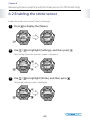
Enable the stride sensor from [Stride] in [Settings].
1 Press
2 Use
to display the [Menu].
/
to highlight [Settings], and then press
.
The [Settings] function selection screen is displayed.
3 Use
/
to highlight [Stride], and then press
The [Stride] settings screen is displayed.
60
.
Chapter 6
Measuring Distance and Pace with the Stride Sensor (SS-700/SS-500 Only)
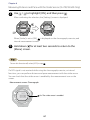
4 Use
/
to highlight [ON], and then press
.
After confirming the selection, the [Settings] screen is displayed.
When [Stride] is set to [ON],
is displayed on the chronograph, exercise, and
interval measurement screen.
5 Hold down
for at least two seconds to return to the
[Menu] screen.
To turn this function off, select [OFF] in step
4
.
If a GPS signal is not received while using the chronograph, exercise, or interval
functions, you can perform distance and pace measurement with the stride sensor.
You can check that the stride sensor is enabled by the measurement icon on the
screen.
Measurement screen: Chronograph
On: The stride sensor is enabled.
61
Measuring Heart Rate
(SS-700/SS-500 Only)
Chapter
7
7-1 About heart rate measurements
7-2 Wearing the HR sensor set
7-3 Pairing
7-4 Enabling the HR sensor
7-5 Replacing the battery for the HR sensor
1 2 3 4 5 6 7 8 9 10 1112 13
Chapter 7
Measuring Heart Rate (SS-700/SS-500 Only)
7-1 About heart rate measurements
You can measure your heart rate by wearing the HR sensor set.
HR sensor measurements are only available for the SS-700/SS-500.
For the SS-700, use the set provided. For the SS-500, purchase the set as an optional
item (SSHRKIT01).
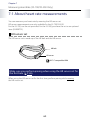
HR sensor set
The HR sensor set is made up of the HR belt and the HR sensor.
HR belt
HR sensor
ANT+™ compatible HRM
Make sure you perform pairing when using the HR sensor set for
the first time ( P. 65).
When using the HR sensor set for the first time, perform pairing while wearing
the HR sensor set.
63
Chapter 7
Measuring Heart Rate (SS-700/SS-500 Only)
7-2 Wearing the HR sensor set
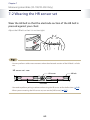
Wear the HR belt so that the electrode section of the HR belt is
pressed against your chest.
Adjust the HR belt so that it is not too tight.
·· You can perform stable measurements when the electrode section of the HR belt is a little
wet.
HR sensor set - rear
HR sensor
HR belt
Electrode
·· Y
ou need to perform pairing in advance when using the HR sensor set for the first time (
·· When you are wearing the HR sensor set, turn on the [HR Sensor] ( P. 67).
64
P. 65).
Chapter 7
Measuring Heart Rate (SS-700/SS-500 Only)
7-3 Pairing
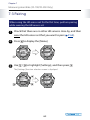
When using the HR sensor set for the first time, perform pairing
while wearing the HR sensor set.
1 Check that there are no other HR sensors close by, and then
wear the HR sensor set that you want to pair (
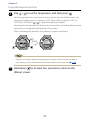
2 Press
3 Use
P. 64).
to display the [Menu].
/
to highlight [Settings], and then press
The [Settings] function selection screen is displayed.
65
.
Chapter 7
Measuring Heart Rate (SS-700/SS-500 Only)
4 Use
/
to highlight [HR Sensor], and then press
.
The [HR Sensor] settings screen is displayed.
5 Use
/
to highlight [Pairing], and then press
When pairing is completed successfully, [Pairing Finish] is displayed.
6 Press
to return to the [Menu] screen.
66
.
Chapter 7
Measuring Heart Rate (SS-700/SS-500 Only)
7-4 Enabling the HR sensor
When using the HR sensor set, set [HR Sensor] to [ON].
1 Press
2 Use
to display the [Menu].
/
to highlight [Settings], and then press
.
The [Settings] function selection screen is displayed.
3 Use
/
to highlight [HR Sensor], and then press
The [HR Sensor] settings screen is displayed.
67
.
Chapter 7
Measuring Heart Rate (SS-700/SS-500 Only)
4 Use
/
to highlight [ON], and then press
.
After confirming the selection, the [Settings] screen is displayed.
When [HR Sensor] is set to [ON],
is displayed on the chronograph, exercise,
and interval measurement screen.
5 Hold down
for at least two seconds to return to the
[Menu] screen.
When the HR sensor is set to [ON], the battery life for the device is reduced ( P. 16).
When you are not using the HR sensor, set [HR Sensor] to [Off ].
To turn this function off, select [OFF] in step
4
.
When the [HR Sensor] is set to [ON], you can measure your heart rate while using the
chronograph, exercise, or interval functions.
You can check the status of the HR sensor from the measurement icon on the screen.
Measurement screen: Chronograph
On
: Communicating with the HR sensor.
Flashing: Cannot communicate with the HR sensor.
68
Chapter 7
Measuring Heart Rate (SS-700/SS-500 Only)
·· If
is flashing, check that you are wearing the HR sensor set correctly ( P. 64).
·· The examples used while checking the HR (heart rate) are shown in “Noting heart rate
while running (SS-700/SS-500 only)” ( P. 113).
69
Chapter 7
Measuring Heart Rate (SS-700/SS-500 Only)
7-5 Replacing the battery for the HR sensor
If you cannot measure your heart rate, the battery may have run out. Replace the battery.
Install a CR2032 battery in the HR sensor.
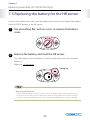
1 Use something flat, such as a coin, to remove the battery
cover.
2 Remove the battery, and reset the HR sensor.
Turn the battery over and replace it, wait for at least three seconds, and then
remove it.
Make sure - is facing up.
Facing up
Why reset the HR sensor?
Any remaining charge in the HR sensor circuitry is dispersed by removing the battery,
reinserting it with the negative side facing up, and waiting for at least three seconds.
If the HR sensor temporarily freezes, you can restore operation by using this method.
70
Chapter 7
Measuring Heart Rate (SS-700/SS-500 Only)
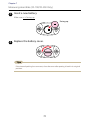
3 Insert a new battery.
Make sure + is facing up.
Facing up
4 Replace the battery cover.
If the internal packing has come out, close the cover after putting it back in its original
position.
71
About Settings
Chapter
8
8-1 About the settings function
8-2 Screen settings
8-3 Auto lap
8-4 Auto light
8-5 Auto pause
8-6 Alarm
8-7 System settings
8-8 Clear history
8-9 User settings
1 2 3 4 5 6 7 8 9 10 1112 13
Chapter 8
About Settings
8-1 About the settings function
In [Settings], you can change various settings for the device including the
measurement values displayed on the chronograph screen, turn the stride sensor/
HR sensor on or off, and set targets and intervals for exercising.
Make settings to suit the way you use the device.
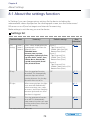
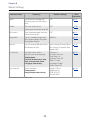
Settings list
Function items
Scrn.
Settings
Screen 1
Screen 2
Screen 3
Summary
Default settings
Select values displayed on the
chronograph screen from the
following items.
Selection items:
Screen 1
Top: Distance (Dist.)
Middle: Split time (Spl)
Bottom: Pace (Pace)
Screen 2
Top: Distance (Dist.)
Middle: Time (Time)
Bottom: Pace (Pace)
Screen 3
Top: Distance (Dist.)
Middle: Calories burnt (Cal.)
Bottom: Pace (Pace)
P. 75
Distance, Pace, Lap Pace,
Average Pace, Speed, Split Time,
Lap Time, Pitch*, Stride*, Time,
Calories Burnt, Altitude, HR*,
Lap HR*, Average HR*, Guide
Time, Guide Distance
More
information
AT Lap
Turns the auto lap function
on and off. This automatically
measures laps over a fixed
running distance. Sets the lap
distance when set to On.
OFF
P. 79
AT Light
When measuring laps, the light
turns on or off automatically
when measuring starts, stops,
or restarts, and when changing
between sprint and rest when
the alarm is triggered.
OFF
P. 81
AT Pause
Turns the auto pause function
OFF
on or off. This automatically
stops measuring when you stop
running, and resumes when you
continue running.
P. 83
* Only displayed for the SS-700/SS-500.
73
Chapter 8
About Settings
Function items
Summary
Default settings
More
information
Alarm
Set the alarm conditions for
distance, pace, and HR* (heart
rate).
OFF
P. 85
Stride*
Turns the stride sensor
OFF
measurement function on or off.
P. 60
HR Sensor*
Turns communication with the
HR sensor on or off.
OFF
P. 67
Target Pace
Sets the standard target pace.
You can also display the guide
time/guide distance.
8'00"/km
P. 36
Interval
Sets the interval (for sprint/rest)
for distance or time.
Sprint Setting: Distance/1.0 km
Rest Settings: Distance/1.0 km
Repeat No.: 1
P. 44
Sys.Settings
Sets basic items such as
distance units and language.
Setting items:
Contrast: 4
Distance Units: km
Time Zone: +9
Summer Time: OFF
Clock: 12 Hour
Language: English
Clear History: NO
P. 95
Height: 170 cm
Weight: 65 kg
DOB: 1975/1/1
Gender: Male
P. 101
Contrast, Distance Units, Time
Zone, Summer Time, Clock,
Language, Clear History
User Settings
Set the user data.
Setting items:
Height, Weight, DOB, Gender
* Only displayed for the SS-700/SS-500.
74
Chapter 8
About Settings
8-2 Screen settings
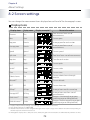
You can change the measurement items displayed on each level of the chronograph screen.
Display items
Display item
Display name
Display example*1
More information
Distance
Dist.
Total distance from start of
measurements
Pace
Pace
Current pace
Lap pace
PaceLa
Average pace for each section
Average pace
PaceAv
Average pace from start of
measurements
Speed
Speed
Current speed
Split time
Spl
Total time from start of measurements
Lap time
Lap
Time for each section
Pitch*²
Pitch
Current pitch
Stride*²
Stride
Current stride
Time
Time
Current time
Calories burnt
Cal.
Current calories burnt through
exercise
Altitude*³
Alti.
Current altitude
HR *²
HR
Current heart rate
HR lap*²
HR Lap
Average heart rate for current lap
Average HR*²
HR Avg.
Guide time*⁴
Guide
Guide distance*⁴
Guide
Average heart rate from start of
measurements
Progress time towards target pace
(reaching target or falling behind)
Progress distance towards target pace
(reaching target or falling behind)
*1: Display example when [Settings] - [Sys.Settings] - [Distance Units] is set to "km".
*2: Only displayed for the SS-700/SS-500.
*3: Altitude measurements are taken using the GPS signal. There may be a large error in altitude measurements depending on
the GPS reception environment and so on.
*4: Although the display name is always the same, "Guide", the guide time and distance are differentiated by numbers or units.
75
Chapter 8
About Settings
Screen settings
Regarding the settings screen, examples of display item combinations are provided in
"Usage Guide (Screen Settings According to Your Needs)" ( P. 106).
1 Press
2 Use
to display the [Menu].
/
to highlight [Settings], and then press
.
The [Settings] function selection screen is displayed.
3 Use
/
to highlight [Scrn.Settings], and then press
The [Select Screen] is displayed.
76
.
Chapter 8
About Settings
4 Use
/ to highlight the settings screen you want, and
then press .
The screen allowing you to select which part of the screen (top, middle, or
bottom) is displayed.
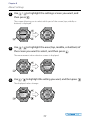
5 Use
/ to highlight the area (top, middle, or bottom) of
the screen you want to select, and then press .
The measurement value selection screen is displayed.
6 Use
/
to highlight the setting you want, and then press
The displayed values change.
77
.
Chapter 8
About Settings
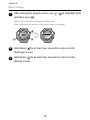
7 After setting the target section, use
and then press
/
to highlight [OK],
.
Select [OK] to confirm the changed display item.
After confirming the selection, the select screen is displayed.
8 Hold down
for at least two seconds to return to the
[Settings] screen.
9 Hold down
for at least two seconds to return to the
[Menu] screen.
78
Chapter 8
About Settings
8-3 Auto lap
Automatically measures laps when running a fixed distance.
You can turn this function on or off, and set the lap distance.
1 Press
2 Use
to display the [Menu].
/
to highlight [Settings], and then press
.
The [Settings] function selection screen is displayed.
3 Use
/
to highlight [AT Lap], and then press
The [AT Lap] settings screen is displayed.
79
.
Chapter 8
About Settings
4 Use
/
to highlight [ON], and then press
The [Lap Distance] settings screen is displayed.
When [OFF] is selected, the [Settings] screen is displayed (
5 Use
/
.
go to step
to set the lap distance, and then press
6
).
.
You can set the distance in increments of 0.1 kilometers from 0.1 to 10.0 km.
Hold down / to speed through the numbers.
After confirming the selection, the [Settings] screen is displayed.
6 Hold down
for at least two seconds to return to the
[Menu] screen.
To turn this function off, select [OFF] in step
4
.
80
Chapter 8
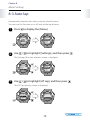
About Settings
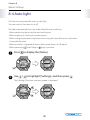
8-4 Auto light
This function automatically turns on the light.
You can turn this function on or off.
The light automatically turns on under the following conditions.
·When measuring laps using the auto lap function.
·When stopping or starting using auto pause.
·When changing between interval and rest using the Interval function, and when
closing the function.
·When an alarm is triggered (distance alarm, pace alarm, or HR alarm).
·When measuring (Start/Stop) or (Lap) is pressed.
1 Press
2 Use
to display the [Menu].
/
to highlight [Settings], and then press
The [Settings] function selection screen is displayed.
81
.
Chapter 8
About Settings
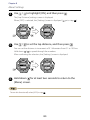
3 Use
/
to highlight [AT Light], and then press
.
The [AT Light] settings screen is displayed.
4 Use
/
to highlight [ON], and then press
.
After confirming the selection, the [Settings] screen is displayed.
5 Hold down
for at least two seconds to return to the
[Menu] screen.
To turn this function off, select [OFF] in step
4
.
82
Chapter 8
About Settings
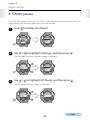
8-5 Auto pause
Turns the auto pause function on or off. This automatically stops measuring when you
stop running, and resumes when you continue running.
1 Press
2 Use
to display the [Menu].
/
to highlight [Settings], and then press
.
The [Settings] function selection screen is displayed.
3 Use
/
to highlight [AT Pause], and then press
The [AT Pause] settings screen is displayed.
83
.
Chapter 8
About Settings
4 Use
/
to highlight [ON], and then press
.
After confirming the selection, the [Settings] screen is displayed.
5 Hold down
for at least two seconds to return to the
[Menu] screen.
To turn this function off, select [OFF] in step
4
.
84
Chapter 8
About Settings
8-6 Alarm
This sounds an alarm when you reach the distance, pace, or heart rate that you set.
The alarm function allows you to select the type of alarm and the conditions under
which the alarm sounds.
Selecting an alarm
1 Press
2 Use
to display the [Menu].
/
to highlight [Settings], and then press
.
The [Settings] function selection screen is displayed.
3 Use
/
to highlight [Alarm], and then press
The [Alarm] function selection screen is displayed.
85
.
Chapter 8
About Settings
4 Use
/
to highlight the target alarm, and then press
.
The setting screen for the selected alarm is displayed. See the following pages for
each alarm.
• Distance alarm P. 87
• Pace alarm P. 89
• HR alarm P. 92
Settings screen for each alarm
86
Chapter 8
About Settings
Setting the distance alarm
The distance alarm function notifies you when you have reached the target distance
from the start of measurements.
You can set the distance at which the alarm sounds.
1 Select [Dist. Alarm] from [Menu] - [Settings] - [Alarm], and
then press
.
The [Dist. Alarm] settings screen is displayed.
2 Use
/
to highlight [ON], and then press
Displays the setting screen for [Distance].
87
.
Chapter 8
About Settings
3 Use
/ to set the distance at which the alarm sounds,
and then press .
You can set the distance in increments of 0.1 kilometers from 0.1 to 100.0 km.
Hold down / to speed through the numbers.
After confirming the selection, the [Alarm] function selection screen is
displayed.
4 Hold down
for at least two seconds to return to the
[Settings] screen.
5 Hold down
for at least two seconds to return to the
[Menu] screen.
To turn this function off, select [OFF] in step
2
.
88
Chapter 8
About Settings
Setting the pace alarm
The pace alarm notifies you when you have reached the target pace that you set.
You can set the maximum and minimum pace at which the alarm sounds.
1 Select [Pace Alarm] from [Menu] - [Settings] - [Alarm], and
then press
.
The [Max. Pace] settings screen is displayed.
2 Use
/
to highlight [ON] or [OFF], and then press
.
Select [ON] to set the maximum pace limit ( go to step 3 ).
Select [OFF] to set the minimum pace without setting the maximum pace
( go to step 4 ).
89
Chapter 8
About Settings
3 Use
/ to set the maximum pace at which the alarm
sounds, and then press .
You can set the pace in increments of 0'01' km within a range of 1'00" to
15'00" km.
Hold down / to speed through the numbers.
After confirming the selection, the [Min. Pace] screen is displayed.
4 Use
/
to highlight [ON] or [OFF], and then press
.
Select [ON] to set the minimum pace limit ( go to step 5 ).
Select [OFF] when settings are complete without setting a minimum pace
( go to step 6 ).
90
Chapter 8
About Settings
5 Use
/ to set the minimum pace at which the alarm
sounds, and then press .
You can set the pace in increments of 0'01" km within a range of 1'00" to
15'00" km.
Hold down / to speed through the numbers.
After confirming the selection, the [Alarm] function selection screen is
displayed.
6 Hold down
for at least two seconds to return to the
[Settings] screen.
7 Hold down
for at least two seconds to return to the
[Menu] screen.
To turn this function off, select [OFF] in step
2
and step
91
4
.
Chapter 8
About Settings
Setting the HR alarm (SS-700/SS-500 only)
The HR alarm notifies you when you have reached the target heart rate that you set.
You can set the maximum and minimum heart rate at which the alarm sounds.
You need the HR sensor set to use the HR alarm ( P. 63).
1 Select [HR Alarm] from [Menu] - [Settings] - [Alarm], and
then press
.
The [Max. HR] settings screen is displayed.
2 Use
/
to highlight [ON] or [OFF], and then press
.
Select [ON] to set the maximum heart rate limit ( go to step 3 ).
Select [OFF] to set the minimum heart rate without setting the maximum heart
rate ( go to step 4 ).
92
Chapter 8
About Settings
3 Use
/ to set the maximum heart rate at which the
alarm sounds, and then press .
You can set the HR (heart rate) in increments of 1 bpm within a range of 30 to
240 bpm.
Hold down / to speed through the numbers.
After confirming the selection, the [Min. HR] screen is displayed.
4 Use
/
to highlight [ON] or [OFF], and then press
.
Select [ON] to set the minimum heart rate limit ( go to step 5 ).
Select [OFF] when settings are complete without setting a minimum heart rate
( go to step 6 ).
93
Chapter 8
About Settings
5 Use
/ to set the minimum heart rate at which the
alarm sounds, and then press .
You can set the HR (heart rate) in increments of 1 bpm within a range of 30 to
240 bpm.
Hold down / to speed through the numbers.
After confirming the selection, the [Alarm] function selection screen is displayed.
6 Hold down
for at least two seconds to return to the
[Settings] screen.
7 Hold down
for at least two seconds to return to the
[Menu] screen.
To turn this function off, select [OFF] in step
2
and step
94
4
.
Chapter 8
About Settings
8-7 System settings
You can set the following functions in system settings.
Function
Setting items
Summary
Contrast
1 to 7
Adjusts the screen contrast
Distance Units
· km
· miles
Sets distance units.
Time Zone
+14 to -12
Sets the time zone for your location.
Summer time
· ON
· OFF
Sets summer time to on or off.
Clock
· 12 Hour
· 24 Hour
Sets the display time for the device using the
12 or 24 hour clock.
Language
· 日本語 (Japanese)
· English
Sets the display language as Japanese or English.
Clear History
· NO
· YES
Clears all measurement data (
1 Press
2 Use
P. 98).
to display the [Menu].
/
to highlight [Settings], and then press
The [Settings] function selection screen is displayed.
95
.
Chapter 8
About Settings
3 Use
/
to highlight [Sys. Settings], and then press
.
Allows you to select settings for [Sys. Settings].
4 Use
/ to highlight the function you want to set, and
then press .
Displays the setting screen for each function.
Setting screen for
each function
5 Use
/
to highlight the value, and then press
After confirming the selection, the [Sys. Settings] screen is displayed.
Setting screen for
each function
96
.
Chapter 8
About Settings
6 Hold down
for at least two seconds to return to the
[Settings] screen.
7 Hold down
for at least two seconds to return to the
[Menu] screen.
97
Chapter 8
About Settings
8-8 Clear history
If the free space for the memory in the device is running low, the icon is displayed.
You can clear the management data by performing [Clear History].
When the data has been cleared, the icon turns off.
Measurement screen: Chronograph
On: Free space in the memory is running low
Upload the measurement data that you want to store in the Web application (
1 Press
to display the [Menu].
98
P. 119).
Chapter 8
About Settings
2 Use
/
to highlight [Settings], and then press
.
The [Settings] function selection screen is displayed.
3 Use
/
to highlight [Sys. Settings], and then press
.
Allows you to select settings for [Sys. Settings].
4 Use
/
to highlight [Clear History], and then press
The [Clear History] settings screen is displayed.
99
.
Chapter 8
About Settings
5 Use
/
to highlight [YES], and then press
.
The "Complete" screen is displayed.
6 Press
to return to the [Sys.Settings] screen.
7 Hold down
for at least two seconds to return to the
[Settings] screen.
8 Hold down
for at least two seconds to return to the
[Menu] screen.
100
Chapter 8
About Settings
8-9 User settings
Sets the user's information (height, weight, date of birth, gender).
This is used to calculate calories burnt.
1 Press
2 Use
to display the [Menu].
/
to highlight [Settings], and then press
.
The [Settings] function selection screen is displayed.
3 Use
/
to highlight [User Settings], and then press
Allows you to select settings for [User Settings].
101
.
Chapter 8
About Settings
4 Use
/
to highlight [Height], and then press
.
Displays the setting screen for [Height].
5 Press
/
to enter the user's height, and then press
You can set the height in increments of one centimeter from 0 to 220 cm.
Hold down / to speed through the numbers.
After confirming the selection, the [User Settings] screen is displayed.
6 Use
/
to highlight [Weight], and then press
Displays the setting screen for [Weight].
102
.
.
Chapter 8
About Settings
7 Press
/
to enter the user's weight, and then press
.
You can set the weight in increments of one kilogram from 0 to 200 kg.
Hold down / to speed through the numbers.
After confirming the selection, the [User Settings] screen is displayed.
8 Use
/
to highlight [DOB], and then press
.
Displays the setting screen for [DOB Year].
9 Press
/
to enter the user's year of birth, and then press
You can set the year from 1910 to 2020.
Hold down / to speed through the numbers.
After confirming the selection, the [DOB Month] settings screen is displayed.
103
.
Chapter 8
About Settings
10 Press
/
.
press
to enter the user's month of birth, and then
You can set the month from 1 to 12.
Hold down / to speed through the numbers.
After confirming the selection, the [DOB Day] settings screen is displayed.
11 Press
/
to enter the user's day of birth, and then press
You can set the day from 1 to 31.
Hold down / to speed through the numbers.
After confirming the selection, the [User Settings] screen is displayed.
12 Use
/
to highlight [Gender], and then press
Displays the setting screen for [Gender].
104
.
.
Chapter 8
About Settings
13 Press
/
to highlight the user's gender, and then press
After confirming the selection, the [User Settings] screen is displayed.
14 Hold down
for at least two seconds to return to the
[Settings] screen.
15 Hold down
for at least two seconds to return to the
[Menu] screen.
105
.
Usage Guide (Screen Settings
According to Your Needs)
Chapter
9
9-1 Settings on the chronograph screen
9-2 Noting distance and pace while running
9-3 Noting pitch and stride while running (SS-700/SS-500 only)
9-4 Noting targets while running
9-5 Noting heart rate while running (SS-700/SS-500 only)
1 2 3 4 5 6 7 8 9 10 1112 13
Chapter 9
Usage Guide (Screen Settings According to Your Needs)
9-1 Settings on the chronograph screen
You can display chronograph items on the screen according to your needs and purposes
( P. 75).
This section explains how to change the display items to suit your needs.
Default screen settings
All three items are displayed on one screen during chronograph measurement.
There are three measurement screens available. You can change screens by pressing
The following items are displayed by default.
Chronograph screen
Screen 1
Distance (Dist.)
Split time (Spl)
Pace
Chronograph screen
Screen 2
Chronograph screen
Screen 3
Distance (Dist.)
Distance (Dist.)
Calories burnt (Cal.)
Time
Pace
Pace
These sections explain how to change the display items for the following purposes.
• Noting distance and pace while running P. 108
• Noting pitch and stride while running P. 110
• Noting targets while running P. 111
• Noting heart rate while running P. 113
107
.
Chapter 9
Usage Guide (Screen Settings According to Your Needs)
9-2 Noting distance and pace while running
The default screen settings when the device is purchased allow you to check distance
and current pace while running. This is suitable for exercising and for competitions.
Screen settings (default settings)
Chronograph screen
Screen 1
Distance (Dist.)
Split time (Spl)
Pace
Chronograph screen
Screen 2
Chronograph screen
Screen 3
Distance (Dist.)
Distance (Dist.)
Calories burnt (Cal.)
Time
Pace
Pace
Screen 1
Screen 2
Screen 3
Top row
Distance (Dist.)
Distance (Dist.)
Distance (Dist.)
Middle row
Split time (Spl)
Time
Calories burnt (Cal.)
Bottom row
Pace
Pace
Pace
·· Split Time (Spl) displays the overall time that has lapsed.
·· Pace displays the current pace (time taken to run one kilometer).
108
Chapter 9
Usage Guide (Screen Settings According to Your Needs)
Checking the measurement screen
Screen 1 is the main screen to check while running.
Gives you a basic glimpse of your pace while running.
Maintain an even pace from start to finish while running. You can check the
distance from when you started running, the elapsed time (split time), and if you are
maintaining your target pace.
Press to change to screen 2 and check the time. The time is displayed in the middle
of screen 2.
Screen settings (changing from the default settings)
Changing the pace display
The following three types of pace can be displayed on the device.
When you need to check your pace for each section, such as when running in a
competition, we recommend displaying the lap pace (PaceLa).
Pace
Displays the current pace.
(The extent of display fluctuation differs depending
on the GPS reception conditions and so on.)
Lap pace (PaceLa)
Displays the average pace for the current lap.
Average pace (PaceAv)
Displays the average pace from measurement start
to finish.
Using the auto lap function
When using in a location in which you do not know the distance, we recommend
using auto lap ( P. 79). When [AT Lap] is set to [ON], laps are automatically measured for
the set distance. The default setting is [OFF].
Although auto lap is a useful function, the gap between the actual distance may increase
during competitions in urban areas where GPS reception may be weak. If you are concerned
about the gap between the actual display distance, set [AT Lap] to [OFF], and perform
manual lap measurements (by pressing ).
109
Chapter 9
Usage Guide (Screen Settings According to Your Needs)
9-3 Noting pitch and stride while running (SS-700/SS-500 only)
When running fast, there are two points to consider; the number of strides you take
(Pitch) and the length of your stride (Stride). If you want to note your pitch and stride
while running, we recommend using the following screen.
Screen settings (changing from the default settings)
Change the middle and bottom sections of screen 3 from their default settings.
Chronograph screen
Screen 1
Distance (Dist.)
Split time (Spl)
Pace
Chronograph screen
Screen 2
Chronograph screen
Screen 3
Distance (Dist.)
Distance (Dist.)
Pitch
Time
Stride
Pace
Screen 1
Screen 2
Screen 3
Top row
Distance (Dist.)
Distance (Dist.)
Distance (Dist.)
Middle row
Split time (Spl)
Time
Pitch
Bottom row
Pace
Pace
Stride
: Change from default setting
To measure pitch and stride, set [Stride] to [ON] (
P. 60).
Checking the measurement screen
Press to change to screen 3 and then run. You can check the pitch and stride while
running.
110
Chapter 9
Usage Guide (Screen Settings According to Your Needs)
9-4 Noting targets while running
If you want to note how close or far you are from your target pace, we recommend
using the following screen.
Screen settings (changing from the default settings)
Change the middle and bottom sections of screen 2 from their default settings.
Chronograph screen
Screen 1
Distance (Dist.)
Split time (Spl)
Pace
Chronograph screen
Screen 2
Chronograph screen
Screen 3
Distance (Dist.)
Distance (Dist.)
Calories burnt (Cal.)
Guide time
Pace
Guide distance
Screen 1
Screen 2
Screen 3
Top row
Distance (Dist.)
Distance (Dist.)
Distance (Dist.)
Middle row
Split time (Spl)
Guide time (Guide)
Calories burnt (Cal.)
Bottom row
Pace
Guide distance (Guide)
Pace
: Change from default setting
111
Chapter 9
Usage Guide (Screen Settings According to Your Needs)
Checking the measurement screen
Press to change to screen 2 and then run.
You can check the time difference between your current time and target time in guide
time, and the difference between your current distance and target distance in guide
distance.
When displaying the guide time and distance, an arrow indicating if you are behind
your target or if you have exceeded your target is shown on the left. This allows you to
note how close you are to exceeding your target while running.
(Pointing down): Slower than target pace
(Pointing up) : Faster than target pace
Guide time display example
Arrow icon
Guide time
(Time behind/exceeding the target pace)
Guide distance display example
Arrow icon
Guide distance
(Distance behind/exceeding the target pace)
·· The displayed guide time and guide distance are calculated using the [Target Pace]
settings. Set the [Target Pace] before starting measurements ( P. 36).
·· Although the display name is always the same, "Guide", the guide time and distance are
differentiated by numbers or units.
112
Chapter 9
Usage Guide (Screen Settings According to Your Needs)
9-5 Noting heart rate while running (SS-700/SS-500 only)
These are the recommended settings when you want to note your heart rate while running.
Your heart rate increases as you increase the strength of your exercise, such as when
speeding up your or running up hill. By noting your heart rate while running, you can
adjust the strength of your exercise, or make sure that you are not running too fast.
·· Heart rate (HR) measurements are only available for the SS-700/SS-500. You need
the HR sensor set to perform measurements ( P. 63).
·· When using the HR sensor, perform pairing with the HR sensor ( P. 65), and then set
[HR Sensor] to [ON] ( P. 67).
Screen settings
Change the middle of screen 2 and the middle and lower sections of screen 3 from
their default settings.
Chronograph screen
Screen 1
Distance (Dist.)
Split time (Spl)
Pace
Chronograph screen
Screen 2
Chronograph screen
Screen 3
Distance (Dist.)
Distance (Dist.)
Pitch
Heart rate (HR)
Stride
Pace
Screen 1
Top row
Middle row
Bottom row
Distance (Dist.)
Split time (Spl)
Pace
Screen 2
Distance (Dist.)
Heart rate (HR)
Pace
: Change from default setting
113
Screen 3
Distance (Dist.)
Pitch
Stride
Chapter 9
Usage Guide (Screen Settings According to Your Needs)
Checking the measurement screen
Press to change to screen 2 and then run. You can check your heart rate while
running.
Press to change to screen 3 and check the pitch and stride.
114
Data Management Using the
Web Application
Chapter
10
10-1 Installing the NR Uploader
10-2 Connecting the device to a computer and using NeoRun
10-3 Updating the driver software
1 2 3 4 5 6 7 8 9 10 1112 13
Chapter 10
Data Management Using the Web Application
10-1 Installing the NR Uploader
You can connect the device to a computer and then manage your measurement data
with a dedicated Web application (NeoRun).
You need NR Uploader to upload measurement data to the Web application (NeoRun).
Follow the steps below to install NR Uploader.
Install NR Uploader before connecting the device to a computer.
1 Access the following Web site and download NR Uploader.
http://www.epson.jp/download/
To upload measurement data, install the application on a computer that can
connect to the Internet.
2 Run the downloaded file.
The Setup screen is displayed.
3 Select [accept the terms in the License Agreement], and
then click [Install].
116
Chapter 10
Data Management Using the Web Application
Installation starts.
Follow the on-screen instructions until the installation complete screen is
displayed.
4 When the completion screen is displayed, click [Finish].
117
Chapter 10
Data Management Using the Web Application
5 When a screen is displayed asking you to reboot your
computer, click [Yes] to reboot.
Installation is complete.
118
Chapter 10
Data Management Using the Web Application
10-2 Connecting the device to a computer and using NeoRun
Connect the device to the computer on which NR Uploader is installed.
1 Connect the USB cable to the computer on which
NR Uploader is installed and to the cradle.
2 Place the product into the cradle.
Do not place the device in the cradle if it is wet from water or sweat.
Match the direction of the EPSON logo on the product with the EPSON logo
on the cradle, and then press until it is fixed in place.
Caution
Make sure the device is placed in the
correct direction. A problem could
occur if it is forced into the cradle in
the wrong direction.
NR Uploader starts.
If NR Uploader does not start, the device has not been recognized by the computer.
Update the driver software ( P. 121).
119
Chapter 10
Data Management Using the Web Application
3 Enter the login ID and password, and then click [Upload].
Data is uploaded to the Web application (NeoRun).
·· You need an account (login ID and password) to use the Web application (NeoRun). When
using the application for the first time, click [Create Account] to create a new account.
·· For details on using the Web application (NeoRun), see the NeoRun Help.
120
Chapter 10
Data Management Using the Web Application
10-3 Updating the driver software
If you connect the device before installing NR Uploader, the computer may not
recognize the device even after you have installed NR Uploader.
If this does happen, follow the steps below to update the driver software.
1 Connect the device to the computer.
Check that NR Uploader is not running.
2 Open the Control Panel.
Click [Start], and then select [Control Panel].
The following explanation uses screen shots from Windows 7.
3 Click [System and Security].
121
Chapter 10
Data Management Using the Web Application
4 Click [Device Manager] from [System].
5 Right-click the name of this device in [Other devices], and
then click [Update Driver Software].
122
Chapter 10
Data Management Using the Web Application
6 Click [Search automatically for updated driver software].
7 If a Windows security screen is displayed, click [Install this
driver software anyway].
123
Chapter 10
Data Management Using the Web Application
8 When installation is complete, click [Close].
Driver software update is complete.
124
Maintenance
Chapter
11
11-1 Performing maintenance
11-2 Replacing the battery
11-3 Product specifications
1 2 3 4 5 6 7 8 9 10 1112 13
Chapter 11
Maintenance
11-1 Performing maintenance
Performing after care
Do not leave any water, sweat, or dirt on the device.
After using the device, use low pressure water from a faucet to wash the contact
points, wipe away most of the water with a towel and so on, and then let it dry
naturally.
Water, sweat, or dirt could cause the device to malfunction.
Use low pressure water
to wash the device.
Contact points
If the device is placed in the cradle when it is covered in water, sweat, or dirt, the
contact points could corrode and cause a malfunction.
If charging or communicating becomes unstable, clean the contact points on
the device and the cradle with a damp cotton swab.
Do not clean using organic solvents such as benzene, thinner, alcohol, or detergent.
This could cause the product to degrade.
About the strap
If the strap gets soiled, wash it with water and wipe thoroughly with a dry cloth.
This strap is made from polyurethane and after years of use the color may fade
or it may lose its elasticity.
HR sensor maintenance
•• After exercise, take off the HR sensor and HR belt, dip them in water and wash.
•• Also make sure that you wash the button sections and wipe off all moisture.
•• Although you can wash the HR belt in a washing machine, make sure you place
the belt in a net, and do not use a drier.
•• Do not iron, dry clean, or use a chlorine-based detergent on the HR belt.
•• Wash the HR sensor carefully with water. Do not use a washing machine or a drier.
•• Dry the HR sensor and HR belt completely and store them separately.
126
Chapter 11
Maintenance
11-2 Replacing the battery
About the device's rechargeable battery
You cannot replace the built-in rechargeable battery yourself.
After prolonged use, the battery may not retain its charge for as long as it used
to. In this situation, contact your local dealer or our repair center to replace the
battery. You will need to pay for the battery to be replaced.
The average service life for the battery is five years, although this may change
depending on the operating conditions.
About the HR sensor battery
Be careful not to injure yourself when replacing the battery (CR2032) ( P. 70).
The average service life for the battery when using the HR sensor for one hour
every day is three years.
127
Chapter 11
Maintenance
11-3 Product specifications
Check each item.
Device specifications
Specifications
Size (thickness)
Weight
Waterproofing function
Operating
time
SS-700
SS-500
SS-300
15.7 mm
13.0mm
14.7mm
61 g
49g
59g
10 atm
GPS-on, Stride ON/OFF, HR-OFF
5 atm
14 hours
GPS-on, Stride ON/OFF, HR-ON
10 hours
Time display
-
Five weeks
Operating temperature
-5 to 50˚C
Possible memory time
100 hours
Maximum number of laps
1000
*¹
Heart rate measurement (using the HR sensor)
-
Pitch/stride measurement
-
Measuring distance/pace with the stride sensor
-
Display
range
0.00 to 999.99 km / 0.00 to 999.99 mi
Distance
Pace/Lap pace/Average pace
0'00'' to 30'00''/km / 0'00'' to 45'00''/mi
Speed
0.0 to 999.9 km/h / 0.0 to 999.9 mi/h
Split/Lap time
00'00'' to 99:59'59''
Pitch
0 to 255 spm
-
Stride
0 to 200 cm / 0 to 99 inch
-
Calories burnt
0 to 9999 kcal
Altitude*²
-500 to 9999 m / -1500 to 29999 ft
HR/Lap HR/Average HR
30 to 240 bpm
Guide time
-
-9:59'59'' to 9:59'59''
Guide distance
-99.99 to 99.99 km / -99.99 to 99.99 mi
Exercise intensity
1.0 to 18.0 METS
*1: You can purchase the HR sensor set for the SS-500 as an optional item.
*2: The altitude is measured using the GPS signal. There may be large errors in altitude measurement values depending
on the GPS environment.
128
Chapter 11
Maintenance
Cradle specifications
Specifications
SS-700
Operating temperature range
SS-500
SS-300
5 to 35˚C
AC adapter specifications
Specifications
SS-700
Power
SS-500
100 V AC
HR sensor specifications
Specifications
HR sensor
Waterproofing function
Water resistant
129
SS-300
Troubleshooting
Chapter
12
12-1 Dealing with problems
12-2 Resetting the system
12-3 Contacting us about this product
12-4 After service
12-5 Certification information
1 2 3 4 5 6 7 8 9 10 1112 13
Chapter 12
Troubleshooting
12-1 Dealing with problems
Caution
* After using the device, use low pressure water from a faucet to wash the contact points
on the device, wipe away most of the water with a towel and so on, and then let it dry
naturally.
If the device is placed in the cradle when it is dirty, the contact points on the device
could corrode and cause a malfunction.
If charging or communicating becomes unstable, clean the contact points on the device
and the cradle with a damp cotton swab.
* If device operations become unstable or if some functions do not work normally, try
resetting the system (hold down all four buttons at the same time).
* If the HR sensor operations become unstable or if it does not work normally, remove the
HR sensor battery, turn it over so that the negative side is facing up, hold it in place for
three seconds (to reset), and then turn it back over.
131
Chapter 12
Troubleshooting
Check each item.
Problem
Basic actions
Solution
The screen is not displayed.
Operation stops immediately after purchase.
Charge before use ( P. 14).
Nothing is displayed if the battery runs out.
Charge the battery ( P. 14).
The device does not react
even after performing an
operation.
Is the battery running low? Charge the battery
( P. 14).
If the device does not operate after charging,
try resetting the system ( P. 135).
The [Menu] screen or other
screens are not displayed.
Only the clock is displayed.
Is the battery running low? Charge the battery
( P. 14).
The time is not set correctly. Set the time by receiving a GPS signal. Change
to the chronograph function to receive a GPS
signal ( P. 24).
If the hour is different, check the time zone
and summer time settings.
Chronograph
actions
The device cannot receive a Check that there are no obstructions over
GPS signal.
head, and that you can see the sky. Signals
from the GPS cannot be received while
indoors. Also, if there are any obstacles partially
blocking the sky, such as tall buildings and
mountain sides, reception may be interrupted
causing a lack of precision.
Signals from the GPS are
hard to receive or are
interrupted.
Even when a signal is being received, it may
be interrupted depending on the running
environment.
132
Chapter 12
Troubleshooting
Problem
Charging
Solution
The device does not charge
even when it is placed in
the cradle.
Check the connection for the AC adapter and
the USB cable.
Clean the contact points on the device and
the cradle ( P. 125).
A malfunction may have occurred if you
cannot charge the device even after checking
the points above.
Stop charging the device, and contact our
information center.
The device and the cradle
There may be a malfunction. Stop using the
become hot while charging. device, and contact our information center.
Waterproofing
function
Accessories
[Charge Err.] is displayed
when you place the device
in the cradle.
Charge in an environment with a room
temperature of 0 to 35˚C.
Can I use the device when
swimming?
This device has been waterproofed and can be
used when swimming.
However, a GPS signal cannot be received
when in water.
Inside the glass becomes
cloudy.
Condensation may occur in the device due
to differences in temperature between
the device and the open air. Temporary
condensation does not have any effect on the
device. You can continue to use the device in
this condition. If the condensation remains
for a long time, water may have got inside the
device.
Contact our information center.
I need another cradle set.
You can purchase cradle sets, HR sensor sets,
HR belts, and straps for the device as optional
extras. Contact your local dealer or our
information center.
133
Chapter 12
Troubleshooting
Problem
Solution
HR sensor
The HR sensor is not
working correctly.
Check that you are wearing the HR belt
correctly ( P. 64).
Check that the [HR Sensor] is set to On ( P. 67).
Perform pairing with the device ( P. 65).
If you cannot pair the device, replace the
battery after resetting the HR sensor. To reset
the HR sensor, turn the battery over so that the
negative side is facing up and hold it in place
for three seconds ( P. 70).
Perform a system reset for the device ( P. 135).
Check if the battery has run out. Replace the
battery if it has run out ( P. 127).
Communication
The device is not
recognized correctly
when it is connected to a
computer.
Check the connection for the computer and
the USB cable.
Clean the contact points on the device and
the cradle ( P. 126).
Perform a system reset ( P. 135).
Web application
When communicating
with a computer, an error
screen is displayed and
communication stops.
Do not move the device or the cradle during
communication.
Also, avoid communicating data under
environments where static electricity has been
generated.
If an error occurs, reconnect the cradle to start
communication again.
If you connect the device before installing NR
NR Uploader does not
Uploader, the computer may not recognize
start even if the device is
connected to the computer. the device even after you have installed
NR Uploader. If NR Uploader does not start,
update the driver software ( P. 121).
* If you cannot solve the problem even after trying the points above, contact our information center.
134
Chapter 12
Troubleshooting
12-2 Resetting the system
If operations are unstable, try resetting the system.
Hold down all of the buttons ( , , , and
two seconds until the display turns off.
) for at least
The screen is reset and the time/setting content is cleared.
Measurement data is not cleared.
•• After resetting to synchronize the time, perform a GPS search ( P. 24).
•• After resetting, the display language is English.
•• Stride sensor information is reset after performing a reset. Make the same
preparations as when using the device for the first time ( P. 59).
•• Pairing information for the HR sensor is reset after performing a reset. Perform
pairing for the device in the same way as when using the device for the first
time ( P. 65).
135
Chapter 12
Troubleshooting
12-3 Contacting us about this product
Information center:
Call if you have questions or need to consult about the device.
Support from the Information Center is only available in Japanese. Also, the manual that is provided with the product is only
available in Japanese.
Tel: 050-3155-8280
Working hours: Monday to Friday 9:00 to 20:00 (except for public holidays and company holidays)
If the above telephone number is unavailable, try 042-585-8590.
Sending or bringing for repair:
Bring the product to your local dealer, or send it to the following repair center.
Matsumoto repair center
Address: Epson Service Center, Kanbayashi 1563, Matsumoto City, 390-1243
Tel: 050-3155-7110
Working hours: Monday to Friday 9:00 to 17:30 (except for public holidays and company holidays)
* Please note that the address or contact information may change without prior notice.
* Check the Epson Web site for more detailed information on repairs. http://www.epson.jp/support/
If the above telephone number is unavailable, try the following numbers.
Matsumoto repair center: 0263-86-7660
Inquiries about door-to-door repair service
Door-to-door service is a specialized repair service whereby a designated contractor will come to the address you specify and
pick up your product for repair. Once repairs are complete, we will send the product back to you. Please note that this is not a
free service. The product will be packed by the contractor.
Tel: 050-3155-7150
Working hours: Monday to Friday 9:00 to 5:30 PM (except for public holidays and company holidays)
If the above telephone number is unavailable, try 0263-86-9995.
* Check the Epson Web site for more detailed information on the door-to-door service. http://www.epson.jp/support/
* From 17:30 to 20:00 on weekdays (including company holidays), as well as 09:00 to 18:00 on weekends and national holidays,
you can call 0263-86-9995 (year-round service)
The contractor is Nippon Express.
* New year holidays (12/30 to 1/3) are treated like weekends and public holidays.
Showroom * See the following Web site for more details. http://www.epson.jp/showroom/
Epson Square Shinjuku:Shinjuku-ku, Nishi-Shinjuku 6-24-1, Tokyo, 160-8324 Nishi Shinjuku Mitsui Bldg. 1F
[Working hours] Monday to Friday 9:30 AM to 17:30 (except for public holidays and company holidays)
Optional items and consumables
You can buy these items from your local Epson retailer or from Epson Direct:
Web site http://www.epson.jp/shop/ or free-phone 0120-545-101 (As of May, 2012)
Epson Web site http://www.epson.jp
The Epson Web site provides a variety of information such as special offers, product and driver information, support, and so on.
Epson offers you full after service support. You can check the most common queries in the FAQ provided on the Web site. Please check
this before contacting us.
http://www.epson.jp/faq/
Epson offers a membership service to Epson customers and non-customers alike. We can send you the latest information
tailored to suit your needs, and help you get more from your printer. You can easily register your user information after
purchasing a product.
Sign-up right away!
Connect to the internet
http://myepson.jp/
Fill in the easy questions to set up your registration information.
WGPS 2012. 08
136
Chapter 12
Troubleshooting
12-4 After service
•• For repair and maintenance for this product, contact your local dealer or
our repair center.
•• After prolonged use, the battery may not retain its charge for as long as it used
to. In this situation, contact your local dealer or our repair center to replace the
battery. You will need to pay for the battery to be replaced.
•• The strap for the device, the battery for the HR sensor, the HR belt, and the
USB cable are not covered by the guarantee. If you need to purchase any of
these items, contact your local dealer or our information center.
•• Spare parts for repairing this product will be available for six years after the
device has stopped being manufactured.
•• In the event of product failure, we do not guarantee that data recorded on the
device can be recovered.
•• A sticker displaying the serial number for this product is stuck to the guarantee.
If there is no sticker, the guarantee is void.
137
Chapter 12
Troubleshooting
12-5 Certification information
Japan
Model: SS-300/SS-500/SS-700
* Except for model SS-300
USA
FCC ID: BKMAP001
*Except for model SS-300
WristableGPS
Model: SS-300/SS-500/SS-700
FCC NOTICE
This device complies with Part 15 of the FCC Rules. Operation is subject to the following two conditions: (1) This
device may not cause harmful interference, and (2) this device must accept any interference received, including
interference that may cause undesired operation.
Caution: Changes or modifications not expressly approved by the party responsible for compliance could void the
user's authority to operate this equipment.
Properly shielded and grounded cables and connectors must be used for connection to host computers and / or
peripherals in order to meet FCC emission limits.
Use a genuine USB cable with a ferrite core.
This equipment has been tested and found to comply with the limits for a Class B digital device, pursuant to Part
15 of the FCC Rules. These limits are designed to provide reasonable protection against harmful interference in a
residential installation. This equipment generates, uses and can radiate radio frequency energy and, if not installed
and used in accordance with the instructions, may cause harmful interference to radio communications. However,
there is no guarantee that interference will not occur in a particular installation. If this equipment does cause
harmful interference to radio or television reception, which can be determined by turning the equipment off and
on, the user is encouraged to try to correct the interference by one of the following measures:
· Reorient or relocate the receiving antenna.
· Increase the separation between the equipment and receiver.
· Connect the equipment into an outlet on a circuit different from that to which the receiver is connected.
· Consult the dealer or an experienced radio/TV technician for help.
This transmitter must not be co-located or operating in conjunction with any other antenna or transmitter.
This equipment complies with FCC radiation exposure limits set forth for an uncontrolled equipment and meets the
FCC radio frequency (RF) Exposure Guidelines in Supplement C to OET65. This equipment has very low levels of RF
energy that are deemed to comply without testing of specific absorption ratio (SAR).
All EPSON products with the ANT+ logo have been certified as interoperable by ANT+. For more information, visit
www.thisisant.com/directory
In case you purchases further HR sensors, we recommend using optional EPSON products.
138
Index
Chapter
13
1 2 3 4 5 6 7 8 9 10 1112 13
A
I
AC adapter . ..........................................13, 14
After service ............................................. 137
Alarm .............................................................85
Altitude ..................................................21, 75
Auto lap ........................................................79
Auto light .....................................................81
Auto pause ..................................................83
Average HR . .........................................21, 72
Average pace .......................................21, 72
Icon ................................................................20
Interval . ........................................................43
Interval settings . .......................................44
Items supplied ...........................................13
L
Language .....................................................95
Lap HR ....................................................21, 75
Lap pace ................................................21, 75
Lap time .........................................21, 27, 75
C
M
Calories burnt . ....................................21, 72
Caring for the product ......................... 126
Certification information . ................... 138
Changing the screen...................33, 41, 53
Charging . .....................................................14
Chronograph ..............................................27
Clear history .........................................95, 98
Clock settings .............................................95
Contact us . ............................................... 136
Contrast ........................................................95
Cradle .....................................................13, 14
Maintenance . .......................................... 125
Measure ................................................... 3, 30
Measurement items .................................21
Measurement methods ..........................23
N
NeoRun ...................................................... 119
NR Uploader . ........................................... 116
P
Pace . ............................................. 21, 75, 108
Pace alarm ...................................................89
Pairing ...........................................................65
Pitch .............................................. 21, 75, 110
Product specifications . ........................ 128
D
Dealing with problems ........................ 131
Distance . ..................................... 21, 75, 108
Distance alarm ...........................................87
Distance units . ...........................................95
R
Recall..............................................................55
Repeat no...............................................43, 49
Replacing the battery . .................. 73, 130
Rest ................................................................44
E
Exercise..........................................................35
G
S
GPS search ...................................................24
Guide distance .......................... 21, 75, 111
Guide time . ................................ 21, 75, 111
Screen settings ................................ 78, 110
Settings . .......................................................73
Specifications .................................128, 129
Speed .....................................................21, 75
Split time ........................................21, 27, 75
Sprint .............................................................43
Stride ............................................ 21, 75, 110
Stride sensor................................................59
Summer time . ............................................95
System reset . ........................................... 134
System settings . ........................................95
H
Heart rate ........................................... 63, 113
HR ............................................................21, 75
HR alarm .......................................................92
HR belt ..........................................................63
HR sensor ..............................................63, 67
HR sensor set .......................................13, 63
140
T
Target pace . ...................................... 36, 111
Time ........................................................21, 75
Time zone ....................................................95
Troubleshooting . ................................... 130
U
Updating the driver software ............ 121
Usage guide.............................................. 106
USB cable ..............................................13, 14
User settings ............................................ 101
W
Web application ..................................... 115
141
412400201 ©2012 Seiko Epson Corporation