1
Installation
The digital signage board/ box can connect to PC monitor (VGA) or TV (AV). After connection to PC
monitor or TV, source must be set. Otherwise, the monitor or TV will be no picture.
Source Setting
1. Remove all media storages from digital signage board/ box.
2. Toggle main power switch and then the LED indicate in green.
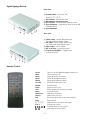
3. Press “ Source” on the remote controller once and press once until find the correct source. Please
wait for 1.5 second per pressing because the device needs few time to detect the correct display.
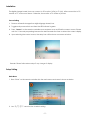
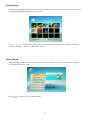
4. Upon selecting the correct source, the setup icon will be shown on screen as below.
Remark: Please follow above steps if any change of display.
Setup Setting
Main Menu
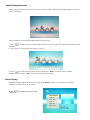
1. Press “Enter” on the remote controller into the main menu and screen is shown as below
2. Use “
” arrow button to select setting.
-5-