1
Question:
While scanning, the Scanner often makes noises, or it scans back and forth.
Answer:
Please choose lower speed from the TWAIN user interface for low speed PC.
Question:
The scanned image always comes out to be too dark.
Answer:
a) Use your application to modify the Gamma setting to 2.2 and 1.8 for your
printer and monitor respectively.
b) Use Brightness setting from the TWAIN user interface to get a brighter
image.
Question:
The Scanner works well otherwise, but for the line art, the lines of which seem
much thicker than those of the original.
Answer:
Use the Brightness or Threshold setting to adjust the line art image.
4.2 PAPER JAM IN THE ADF
In the event of paper jam, please follow the procedures below.
i).
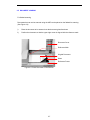
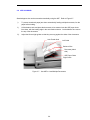
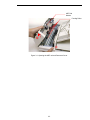
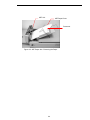
Press the ADF Release Button at the front left of the Scanner as shown in Figure 4-1. The
ADF cover will be released.
ii).
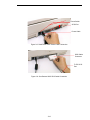
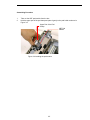
Open the ADF cover to the full open position as shown in Figure 4-2..
iii).
Pull the paper out of the ADF unit carefully.
ADF Cover
ADF Release Button
Figure 4-1 ADF Paper Jam - Opening the ADF.
4-3