1
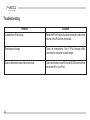
Troubleshooting
Problem
Solution
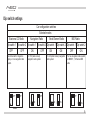
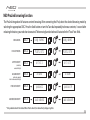
Radio/NAV display only shows DISC and Track number, Make sure DIP switch settings are correctly set for text
but there is no iPod control.
display (refer to p.9 for dip switch settings).
Radio/ steering wheel controls do not operate iPod.
Reset iPod and make sure most recent iPod firmware
is installed.
No text display.
Make sure DIP switch settings are correctly set for text
display (refer to p.9 for dip switch settings).
Correct DIP switch settings, but still no text display.
Select DISC 6 to set text output to the correct location
(refer to p.15 for Text display settings)
25